lights TOYOTA COROLLA 2017 11.G Service Manual
[x] Cancel search | Manufacturer: TOYOTA, Model Year: 2017, Model line: COROLLA, Model: TOYOTA COROLLA 2017 11.GPages: 612, PDF Size: 14.18 MB
Page 238 of 612

2384-5. Using the driving support systems
COROLLA_TMMMS_TMMC_U (OM02494U)■Conditions in which functions may not operate properly
In the following situations, the camera sensor may not detect white (yellow)
lines and various functions may not operate normally.
●There are shadows on the road that run parallel with, or cover, the white
(yellow) lines.
●The vehicle is driven in an area without white (yellow) lines, such as in front
of a tollgate or checkpoint, or at an intersection etc.
●The white (yellow) lines are cracked, “Botts’ dots”, “Raised pavement
marker” or stones are present.
●The white (yellow) lines cannot be seen or are difficult to see due to sand,
etc.
●The vehicle is driven on a road surface that is wet due to rain, puddles, etc.
●The traffic lines are yellow (which may be more difficult to recognize than
lines that are white).
●The white (yellow) lines cross over a curb, etc.
●The vehicle is driven on a bright surface, such as concrete.
●The vehicle is driven on a surface that is bright due to reflected light, etc.
●The vehicle is driven in an area where the brightness changes suddenly,
such as at the entrances and exits of tunnels, etc.
●Light from the headlights of an oncoming vehicle, the sun, etc., enters the
camera.
●The vehicle is driven where the road diverges, merges, etc.
●The vehicle is driven on a slope.
●The vehicle is driven on a road which tilts left or right, or a winding road.
●The vehicle is driven on an unpaved or rough road.
●The vehicle is driven around a sharp curve.
●The traffic lane is excessively narrow or wide.
●The vehicle is extremely tilted due to carrying heavy luggage or having
improper tire pressure.
●The distance to the preceding vehicle is extremely short.
●The vehicle is moving up and down a large amount due to road conditions
during driving (poor roads or road seams).
●The headlight lenses are dirty and emit a faint amount of light at night, or the
beam axis has deviated.
●The vehicle is struck by a crosswind.
●The vehicle has just changed lanes or crossed an intersection.
●Snow tires, etc., are equipped.
Page 243 of 612
2434-5. Using the driving support systems
4
Driving
COROLLA_TMMMS_TMMC_U (OM02494U)
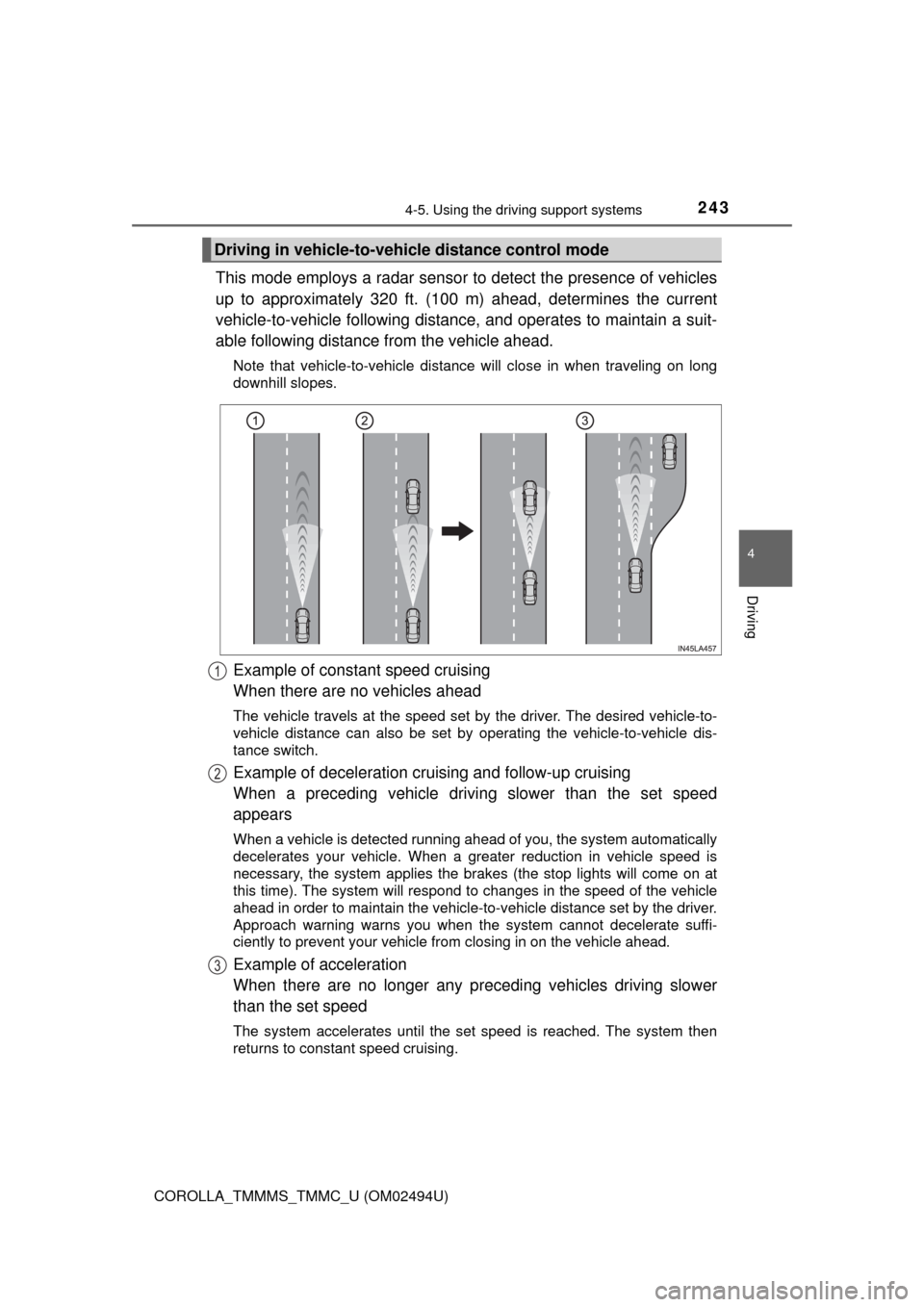
This mode employs a radar sensor to detect the presence of vehicles
up to approximately 320 ft. (100 m) ahead, determines the current
vehicle-to-vehicle following distance, and operates to maintain a suit-
able following distance from the vehicle ahead.
Note that vehicle-to-vehicle distance will close in when traveling on long
downhill slopes.
Example of constant speed cruising
When there are no vehicles ahead
The vehicle travels at the speed set by the driver. The desired vehicle-to-
vehicle distance can also be set by operating the vehicle-to-vehicle dis-
tance switch.
Example of deceleration cruising and follow-up cruising
When a preceding vehicle driving slower than the set speed
appears
When a vehicle is detected running ahead of you, the system automatically
decelerates your vehicle. When a greater reduction in vehicle speed is
necessary, the system applies the brakes (the stop lights will come on at
this time). The system will respond to changes in the speed of the vehicle
ahead in order to maintain the vehicle-to-vehicle distance set by the driver.
Approach warning warns you when the system cannot decelerate suffi-
ciently to prevent your vehicle from closing in on the vehicle ahead.
Example of acceleration
When there are no longer any preceding vehicles driving slower
than the set speed
The system accelerates until the set speed is reached. The system then
returns to constant speed cruising.
Driving in vehicle-to-vehicle distance control mode
1
2
3
Page 259 of 612
2594-5. Using the driving support systems
4
Driving
COROLLA_TMMMS_TMMC_U (OM02494U)■
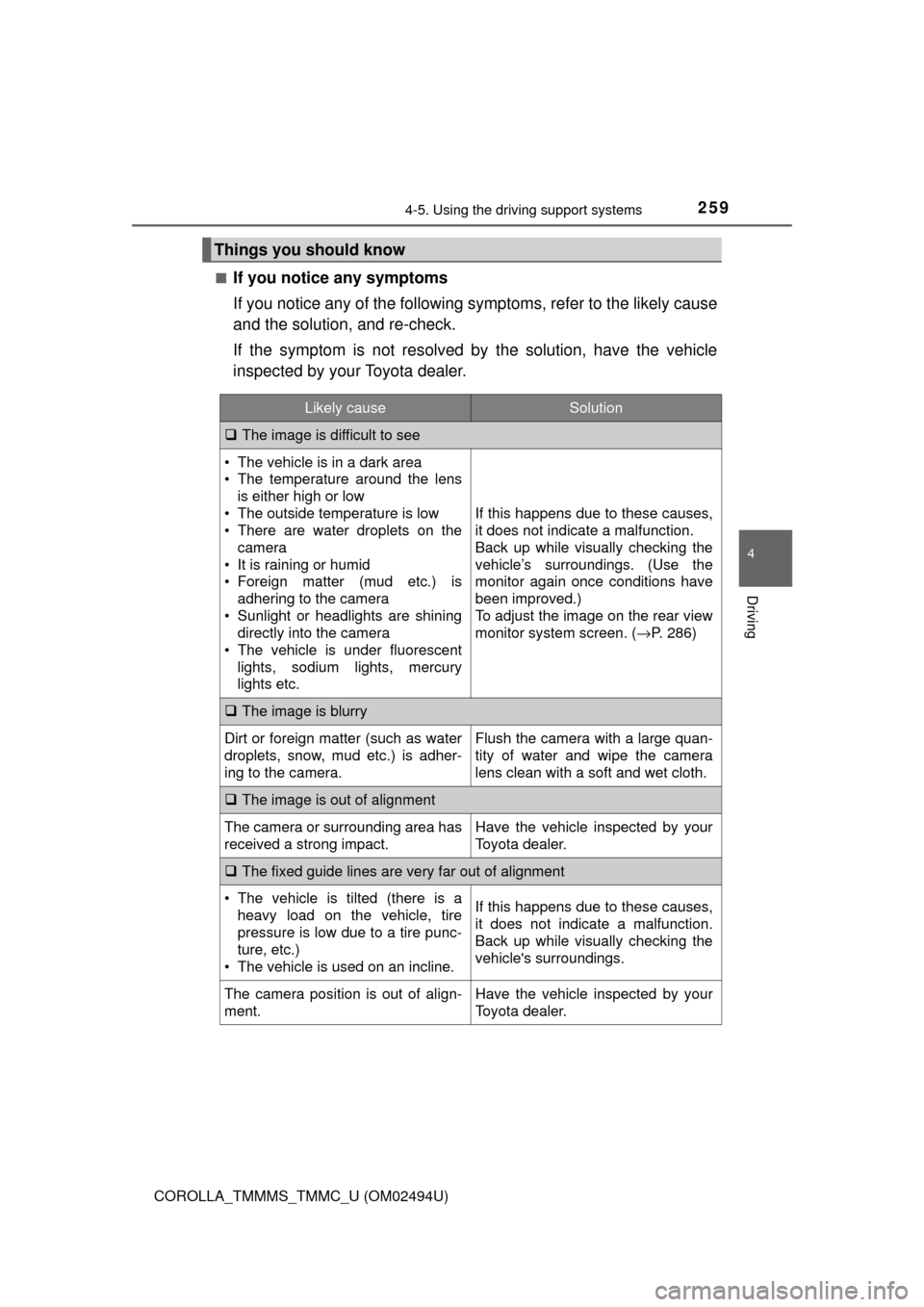
If you notice any symptoms
If you notice any of the following symptoms, refer to the likely cause
and the solution, and re-check.
If the symptom is not resolved by the solution, have the vehicle
inspected by your Toyota dealer.
Things you should know
Likely causeSolution
The image is difficult to see
• The vehicle is in a dark area
• The temperature around the lens
is either high or low
• The outside temperature is low
• There are water droplets on the
camera
• It is raining or humid
• Foreign matter (mud etc.) is
adhering to the camera
• Sunlight or headlights are shining
directly into the camera
• The vehicle is under fluorescent
lights, sodium lights, mercury
lights etc.
If this happens due to these causes,
it does not indicate a malfunction.
Back up while visually checking the
vehicle’s surroundings. (Use the
monitor again once conditions have
been improved.)
To adjust the image on the rear view
monitor system screen. (→P. 286)
The image is blurry
Dirt or foreign matter (such as water
droplets, snow, mud etc.) is adher-
ing to the camera.Flush the camera with a large quan-
tity of water and wipe the camera
lens clean with a soft and wet cloth.
The image is out of alignment
The camera or surrounding area has
received a strong impact.Have the vehicle inspected by your
Toyota dealer.
The fixed guide lines are very far out of alignment
• The vehicle is tilted (there is a
heavy load on the vehicle, tire
pressure is low due to a tire punc-
ture, etc.)
• The vehicle is used on an incline.If this happens due to these causes,
it does not indicate a malfunction.
Back up while visually checking the
vehicle's surroundings.
The camera position is out of align-
ment.Have the vehicle inspected by your
Toyota dealer.
Page 268 of 612
268
COROLLA_TMMMS_TMMC_U (OM02494U)
4-6. Driving tips
●Use fluids that are appropriate to the prevailing outside tempera-
tures.
• Engine oil
• Engine coolant
• Washer fluid
●Have a service technician inspect the condition of the battery.
●Have the vehicle fitted with four snow tires or purchase a set of tire
chains for the front tires.
Ensure that all tires are the same size and brand, and that chains match
the size of the tires.
Perform the following according to the driving conditions:
●Do not try to forcibly open a window or move a wiper that is frozen.
Pour warm water over the frozen area to melt the ice. Wipe away
the water immediately to prevent it from freezing.
●To ensure proper operation of the climate control system fan,
remove any snow that has accumulated on the air inlet vents in
front of the windshield.
●Check for and remove any excess ice or snow that may have accu-
mulated on the exterior lights, vehicle’s roof, chassis, around the
tires or on the brakes.
●Remove any snow or mud from the bottom of your shoes before
getting in the vehicle.
Winter driving tips
Carry out the necessary preparations and inspections before
driving the vehicle in winter. Always drive the vehicle in a man-
ner appropriate to the prevailing weather conditions.
Preparation for winter
Before driving the vehicle
Page 286 of 612
2865-2. Setup
COROLLA_TMMMS_TMMC_U (OM02494U)
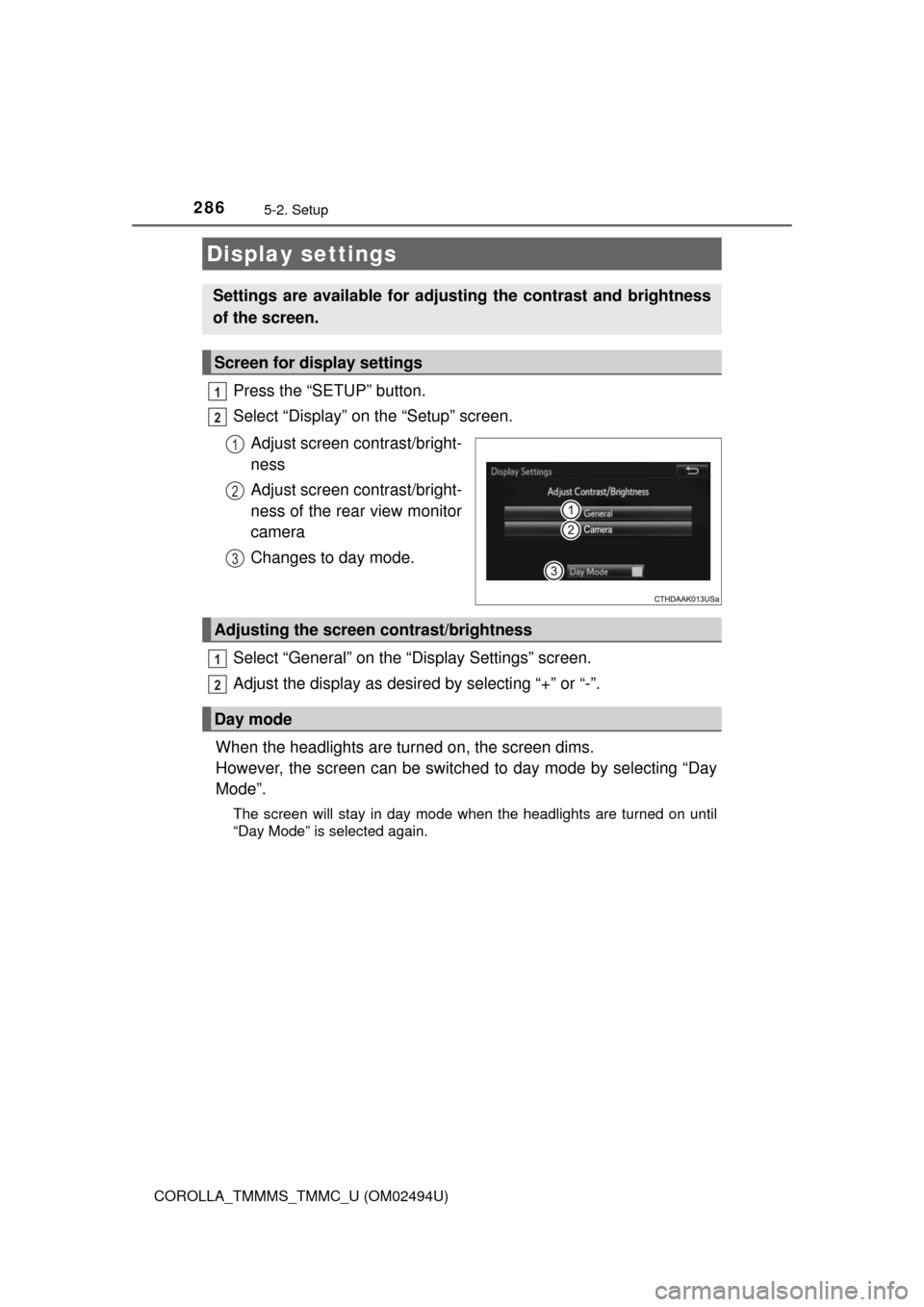
Press the “SETUP” button.
Select “Display” on the “Setup” screen.
Adjust screen contrast/bright-
ness
Adjust screen contrast/bright-
ness of the rear view monitor
camera
Changes to day mode.
Select “General” on the “Display Settings” screen.
Adjust the display as desired by selecting “+” or “-”.
When the headlights are turned on, the screen dims.
However, the screen can be switched to day mode by selecting “Day
Mode”.
The screen will stay in day mode when the headlights are turned on until
“Day Mode” is selected again.
Display settings
Settings are available for adjusting the contrast and brightness
of the screen.
Screen for display settings
1
2
1
2
3
Adjusting the screen contrast/brightness
Day mode
1
2
Page 369 of 612

369
6Interior features
COROLLA_TMMMS_TMMC_U (OM02494U)6-1. Using the air
conditioning system
and defogger
Manual air conditioning
system ............................ 370
Automatic air
conditioning system ........ 377
Heated steering wheel/
seat heaters .................... 386
6-2. Using the interior lights
Interior lights list ................ 388
• Front interior light/
personal lights............... 389
• Rear interior light .......... 390
6-3. Using the storage
features
List of storage features ..... 391
• Glove box...................... 392
• Console box .................. 392
• Bottle holders ................ 393
• Cup holders .................. 394
6-4. Other interior features
Other interior features ....... 396
• Sun visors ..................... 396
• Vanity mirrors................ 396
• Clock ............................. 396
• Outside temperature
display........................... 397
• Power outlet .................. 398
• Assist grips ................... 399
Garage door opener.......... 400
Compass ........................... 407
Page 388 of 612
388
COROLLA_TMMMS_TMMC_U (OM02494U)
6-2. Using the interior lights
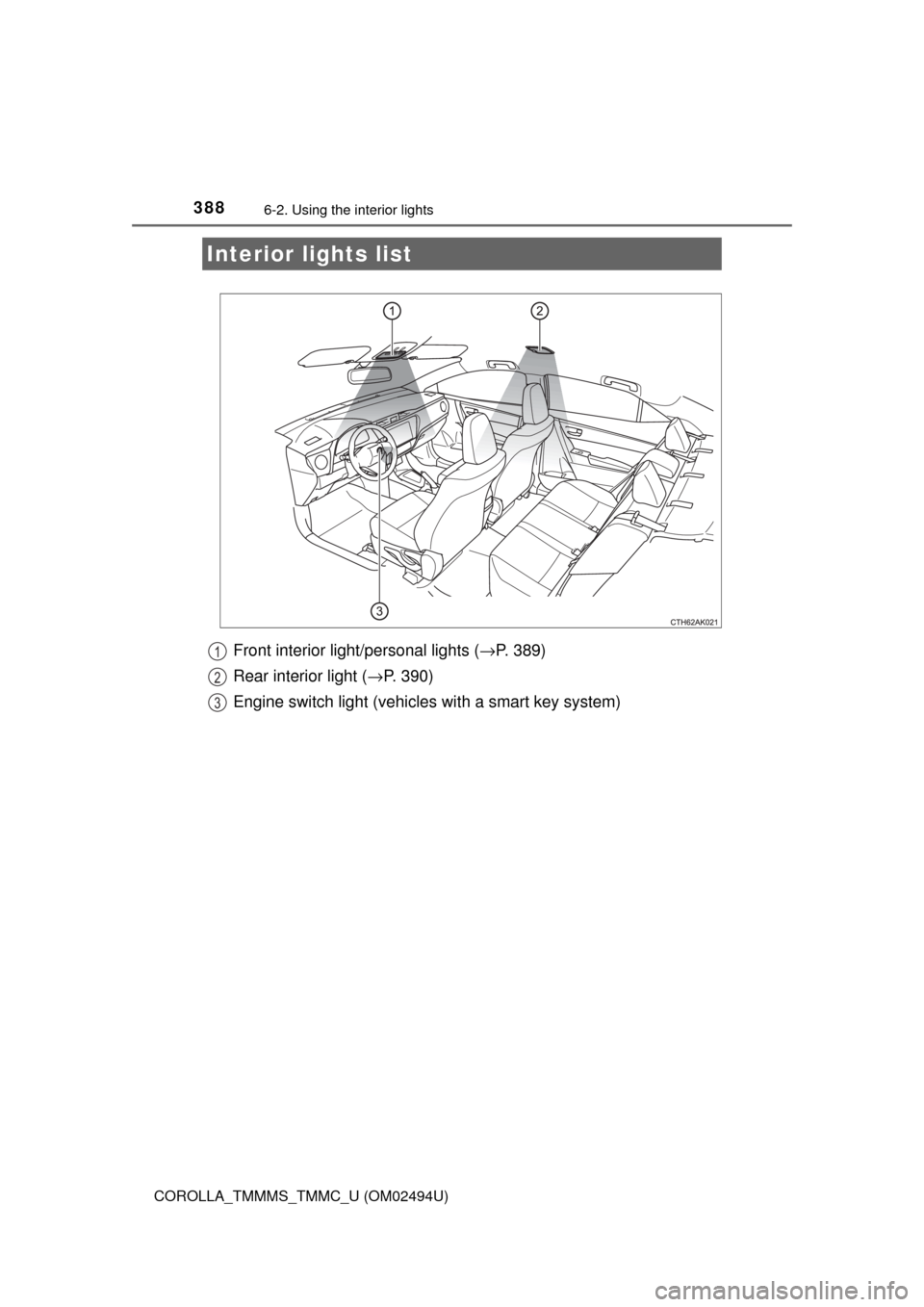
Front interior light/personal lights (→P. 389)
Rear interior light (→P. 390)
Engine switch light (vehicles with a smart key system)
Interior lights list
1
2
3
Page 389 of 612
3896-2. Using the interior lights
6
Interior features
COROLLA_TMMMS_TMMC_U (OM02494U)■
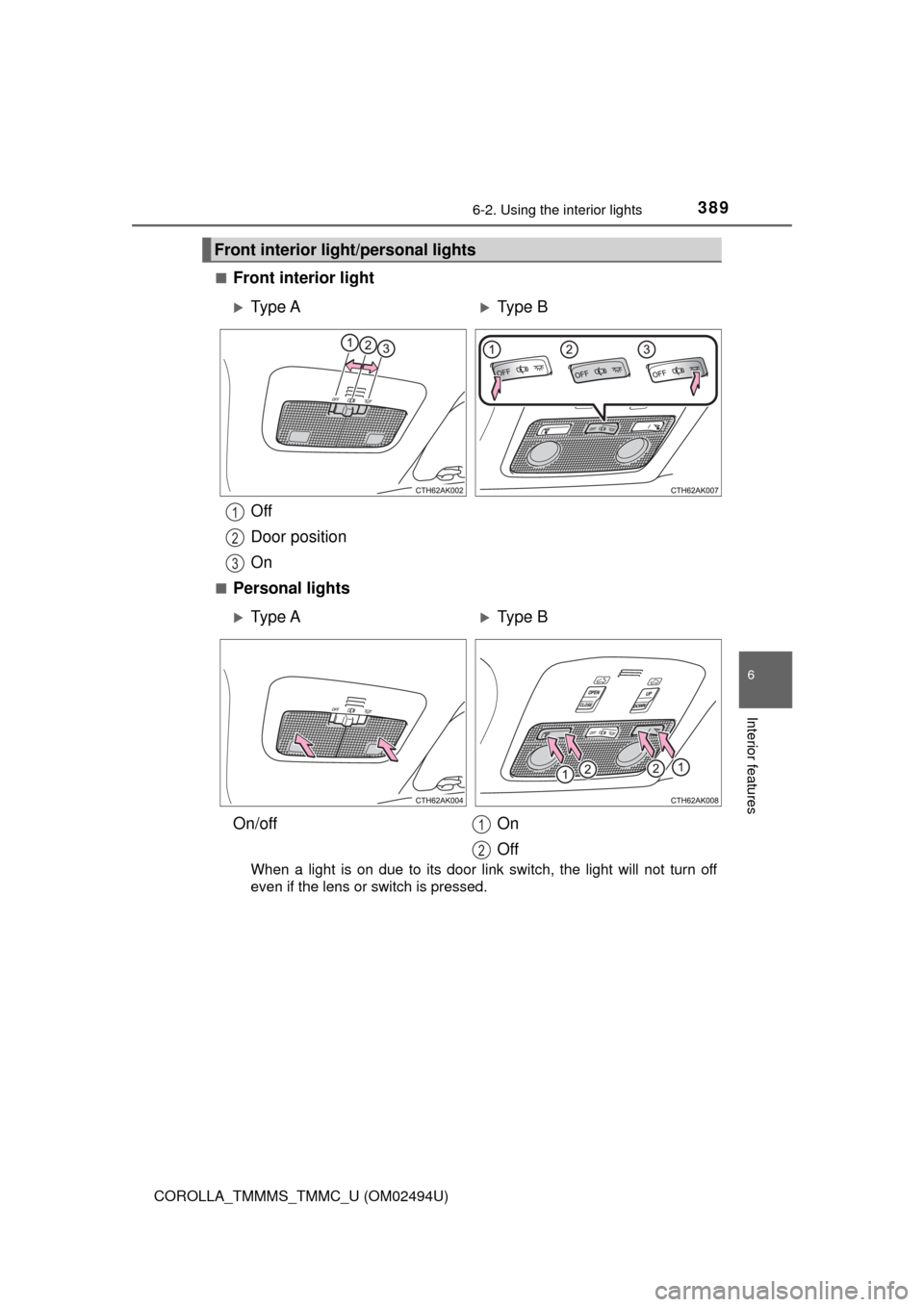
Front interior light
Off
Door position
On
■Personal lights
When a light is on due to its door link switch, the light will not turn off
even if the lens or switch is pressed.
Front interior light/personal lights
Ty p e AType B
1
2
3
Ty p e AType B
On/off On
Off
1
2
Page 390 of 612
3906-2. Using the interior lights
COROLLA_TMMMS_TMMC_U (OM02494U)
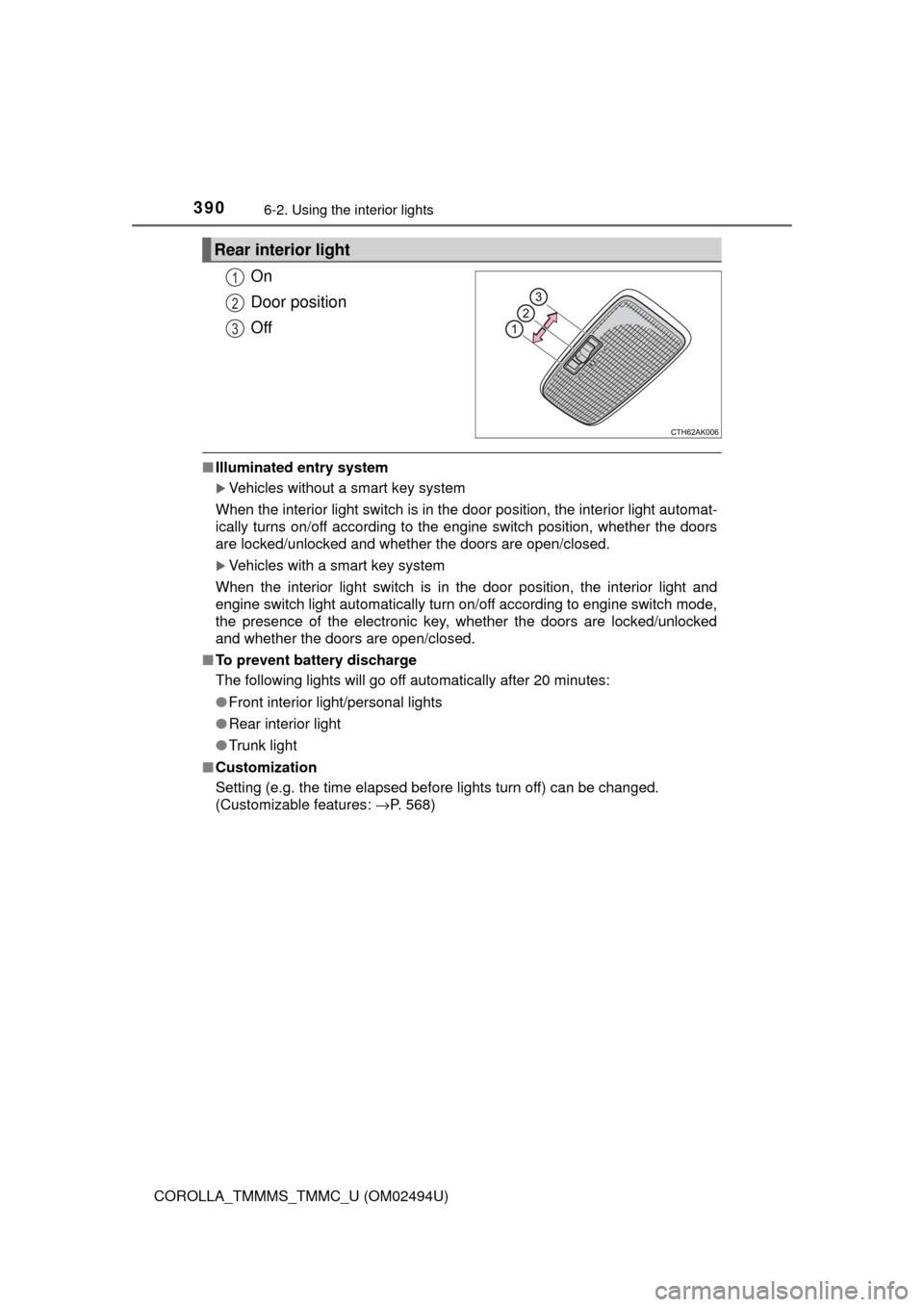
On
Door position
Off
■Illuminated entry system
Vehicles without a smart key system
When the interior light switch is in the door position, the interior light automat-
ically turns on/off according to the engine switch position, whether the doors
are locked/unlocked and whether the doors are open/closed.
Vehicles with a smart key system
When the interior light switch is in the door position, the interior light and
engine switch light automatically turn on/off according to engine switch mode,
the presence of the electronic key, whether the doors are locked/unlocked
and whether the doors are open/closed.
■To prevent battery discharge
The following lights will go off automatically after 20 minutes:
●Front interior light/personal lights
●Rear interior light
●Trunk light
■Customization
Setting (e.g. the time elapsed before lights turn off) can be changed.
(Customizable features: →P. 568)
Rear interior light
1
2
3
Page 414 of 612
4147-1. Maintenance and care
COROLLA_TMMMS_TMMC_U (OM02494U)
NOTICE
■To prevent paint deterioration and corrosion on the body and compo-
nents (aluminum wheels etc.)
●Wash the vehicle immediately in the following cases:
• After driving near the sea coast
• After driving on salted roads
• If coal tar or tree sap is present on the paint surface
• If dead insects, insect droppings or bird droppings are present on the
paint surface
• After driving in an area contaminated with soot, oily smoke, mine dust,
iron powder or chemical substances
• If the vehicle becomes heavily soiled with dust or mud
• If liquids such as benzene and gasoline are spilled on the paint surface
●If the paint is chipped or scratched, have it repaired immediately.
●To prevent the wheels from corroding, remove any dirt and store in a place
with low humidity when storing the wheels.
■Cleaning the exterior lights
●Wash carefully. Do not use organic substances or scrub with a hard brush.
This may damage the surfaces of the lights.
●Do not apply wax to the surfaces of the lights.
Wax may cause damage to the lenses.
■To prevent damage to the windshield wiper arms
When lifting the wiper arms away from the windshield, pull the driver side
wiper arm upward first, and then the passenger side. When returning the
wipers to their original position, do so from the passenger side first.
■When using a high pressure car wash
Do not bring the nozzle tip close to boots (rubber or resin manufactured
cover), connectors or the following parts. The parts may be damaged if they
come into contact with high-pressure water.
•Traction related parts
•Steering parts
•Suspension parts
• Brake parts