audio TOYOTA COROLLA 2017 11.G Workshop Manual
[x] Cancel search | Manufacturer: TOYOTA, Model Year: 2017, Model line: COROLLA, Model: TOYOTA COROLLA 2017 11.GPages: 612, PDF Size: 14.18 MB
Page 308 of 612
3085-6. Using an external device
COROLLA_TMMMS_TMMC_U (OM02494U)●MP3, WMA and AAC playback
• When a device containing MP3, WMA and AAC files is connected, all
files in the USB memory device are checked. Once the file check is fin-
ished, the first MP3, WMA and AAC file is played. To make the file check
finish more quickly, we recommend that you do not include any files other
than MP3, WMA and AAC files or create any unnecessary folders.
• When a USB memory device is connected and the audio source is
changed to USB memory mode, the USB memory device will start play-
ing the first file in the first folder. If the same device is removed and
reconnected (and the con- tents have not been changed), the USB mem-
ory device will resume play from the same point in which it was last used.
●Extensions
If the file extensions .mp3, .wma and .m4a are used for files other than
MP3, WMA and AAC files, they will be skipped (not played).
●Playback
• To play MP3 files with steady sound quality, we recommend a fixed bit
rate of at least 128 kbps and a sampling frequency of 44.1 kHz.
• There is a wide variety of freeware and other encoding software for MP3,
WMA and AAC files on the market, and depending on the status of the
encoding and the file format, poor sound quality or noise at the start of
playback may result. In some cases, playback may not be possible at all.
• Microsoft, Windows, and Windows Media are the registered trademarks
of Microsoft Corporation in the U.S.A. and other countries.
WARNING
■While driving
Do not connect a USB memory device or operate the device controls.
NOTICE
■To prevent damage to the USB memory device or its terminals
●Do not leave the USB memory device in the vehicle. The temperature
inside the vehicle may become high, resulting in damage to the USB
memory device.
●Do not push down on or apply unnecessary pressure to the USB memory
device while it is connected.
●Do not insert foreign objects into the port.
Page 309 of 612
3095-6. Using an external device
5
Audio system
COROLLA_TMMMS_TMMC_U (OM02494U)
→P. 2 7 6
■Operating portable audio players connected to Entune Audio
The volume can be adjusted using the vehicle's audio controls. All other
adjustments must be made on the portable audio player itself.
■When using a portable audio player connected to the power outlet
Noise may occur during playback. Use the power source of the portable
audio player.
Using the AUX port
To use the AUX port, connect a portable player, press the
“AUDIO” button, then select “AUX” to display the audio control
screen.
Connecting a portable audio player
WARNING
■While driving
Do not connect a portable audio player or operate the device controls.
Page 310 of 612
310
COROLLA_TMMMS_TMMC_U (OM02494U)
5-7. Connecting Bluetooth®
■About Bluetooth®
Preparations to use wireless communica-
tion
The following can be performed using Bluetooth® wireless com-
munication:
■A portable audio player can be operated and listened to via
Entune Audio
■Hands-free phone calls can be made via a cellular phone
In order to use wireless communication, register and connect a
Bluetooth
® device by performing the following procedures.
The Bluetooth® word mark and logos are
registered trademarks owned Bluetooth
SIG, Inc. and any use of such marks by
Fujitsu Ten Limited is under license.
Other trademarks and trade names are
those of their respective owners.
WARNING
■Certifications for the Bluetooth
FCC ID: BABFT0077A
●CAUTION: Radio Frequency Radiation Exposure
This equipment complies with FCC radiation exposure limits set forth for
uncontrolled equipment and meets the FCC radio frequency (RF) Expo-
sure Guidelines.
This equipment has very low levels of RF energy that it deemed to comply
without maximum permissive exposure evaluation (MPE). But it is desir-
able that it should be installed and operated with at least 20cm and more
between the radiator and person's body in normal use position.
• Co-location: This transmitter must not be co-located or operated in con-
junction with any other antenna or transmitter.
• This device complies with part 15 of the FCC Rules. Operation is sub-
ject to the following two conditions: (1) This device may not cause
harmful interference, and (2) this device must accept any interference
received, including interference that may cause undesired operation.
Page 311 of 612
3115-7. Connecting Bluetooth®
5
Audio system
COROLLA_TMMMS_TMMC_U (OM02494U)
WARNING
●FCC WARNING:
Changes or modifications not expressly approved by the party responsi-
ble for compliance could void the user's authority to operate the equip-
ment.
●IC: 2024B-FT0077A
• This device complies with Industry Canada’s licence-exempt RSSs.
Operation is subject to the following two conditions: (1) This device may
not cause interference; and (2) This device must accept any interfer-
ence, including interference that may cause undesired operation of the
device.
●CAUTION: Radio Frequency Radiation Exposure
This equipment complies with IC radiation exposure limits set forth for
uncontrolled equipment and meets RSS-102 of the IC radio frequency
(RF) Exposure rules.
This equipment has very low levels of RF energy that it deemed to comply
without maximum permissive exposure evaluation (MPE).
But it is desirable that it should be installed and operated with at least
20cm and more between the radiator and person's body (excluding
extremities: hands, wrists, feet and ankles).
●IC: 2024B-FT0077A
• Le présent appareil est conforme aux CNR d'Industrie Canada appli-
cables aux appareils radio exempts de licence. L'exploitation est autori-
sée aux deux conditions suivantes : (1) l'appareil ne doit pas produire
de brouillage; (2) l'utilisateur de l'appareil doit accepter tout brouillage
radioélectrique subi, même si le brouillage est susceptible d'en compro-
mettre le fonctionnement.
●ATTENTION: l'exposition aux rayonnements radiofréquence
- Cet équipement se conforme aux limites d’exposition aux radiations éta-
blies par Industrie Canada pour un environnement non contrôlé ainsi
qu’aux directives d’exposition aux fréquences radioélectriques (RF)
émises par Industrie Canada dans la norme CNR-102. Cet équipement
émet un niveau d’énergie RF faible à un point tel qu’il se conforme sans
devoir effectuer d’évaluation d’exposition maximum admissible (EMA).
Lorsque l’équipement est utilisé, il est toutefois souhaitable de laisser au
moins 20cm entre l’antenne et le corps (à l’exception des extrémités :
mains, poignets, pieds et chevilles).
Page 312 of 612

3125-7. Connecting Bluetooth®
COROLLA_TMMMS_TMMC_U (OM02494U)
Device registration/connection flow
1. Register the Bluetooth® device to be used with Entune
Audio (→P. 314, 315, 316)
2. Connect the Bluetooth® device to be used
(→P. 319)
To be used for audio To be used for hands-free
phone
3. Start Bluetooth® connec-
tion (→P. 319)3. Start Bluetooth® connec-
tion (→P. 319)
4. Check connection status
(→P. 324)4. Check connection status
(→P. 327)
5. Use Bluetooth® audio
(→P. 324)5. Use Bluetooth® phone
(→P. 326)
Page 313 of 612
3135-7. Connecting Bluetooth®
5
Audio system
COROLLA_TMMMS_TMMC_U (OM02494U)
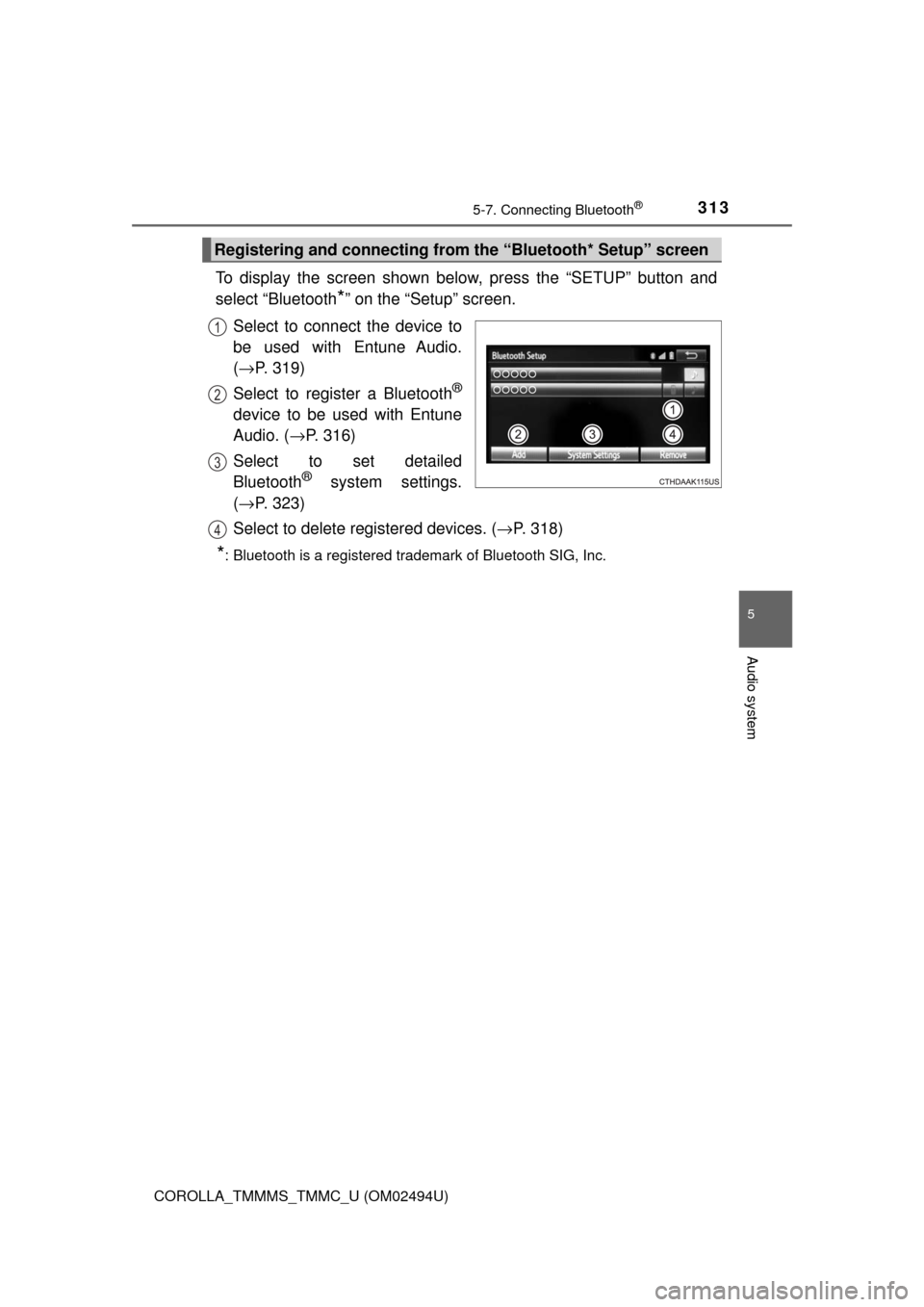
To display the screen shown below, press the “SETUP” button and
select “Bluetooth
*” on the “Setup” screen.
Select to connect the device to
be used with Entune Audio.
(→P. 319)
Select to register a Bluetooth
®
device to be used with Entune
Audio. (→P. 316)
Select to set detailed
Bluetooth
® system settings.
(→P. 323)
Select to delete registered devices. (→P. 318)
*: Bluetooth is a registered trademark of Bluetooth SIG, Inc.
Registering and connecting from the “Bluetooth* Setup” screen
1
2
3
4
Page 314 of 612
3145-7. Connecting Bluetooth®
COROLLA_TMMMS_TMMC_U (OM02494U)
Turn the Bluetooth® connection setting of your audio player on.
Press the “AUDIO” button.
Select “ Audio”.
Select “Select Device”.
Follow the steps in “How to registering a Bluetooth
® device” from
step . (→P. 316)
Registering a Bluetooth® audio player for
the first time
To use the Bluetooth® Audio, it is necessary to register an audio
player with the system.
Once the player has been registered, it is possible to use the
Bluetooth
® Audio.
For details about registering a Bluetooth
® device (→P. 316)
1
2
3
4
5
2
Page 315 of 612
3155-7. Connecting Bluetooth®
5
Audio system
COROLLA_TMMMS_TMMC_U (OM02494U)
Turn the Bluetooth® connection setting of your cellular phone on.
Press the “ ” button.
Select “OK” to register a phone.
Follow the steps in “How to registering a Bluetooth
® device” from
step . (→P. 316)
Registering a Bluetooth® phone for the first
time
To use the hands-free system, it is necessary to register a
Bluetooth® phone with the system.
Once the phone has been registered, it is possible to use the
hands-free system.
For details about registering a Bluetooth
® device (→P. 316)
1
2
3
4
3
Page 316 of 612
3165-7. Connecting Bluetooth®
COROLLA_TMMMS_TMMC_U (OM02494U)
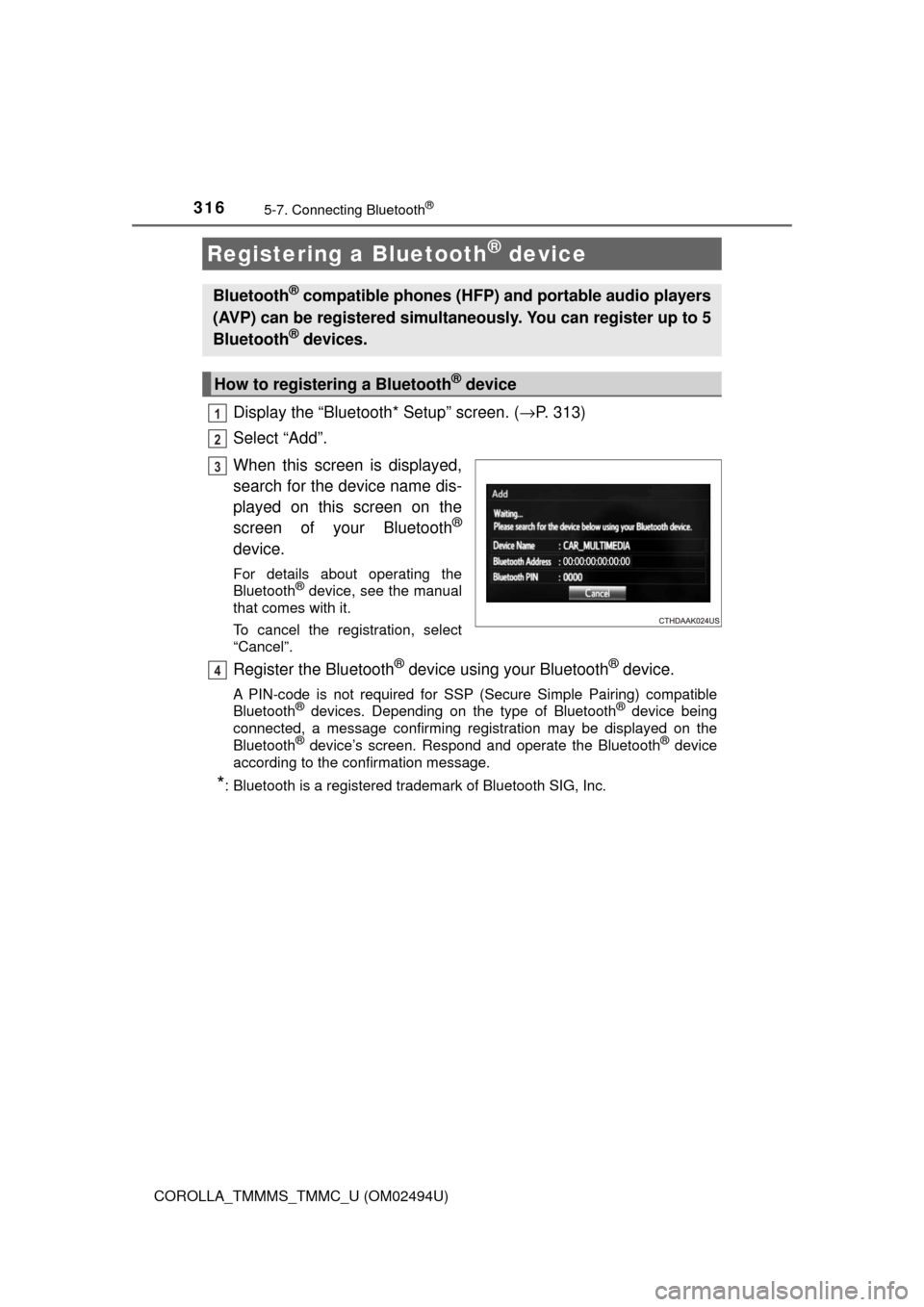
Display the “Bluetooth* Setup” screen. (→P. 313)
Select “Add”.
When this screen is displayed,
search for the device name dis-
played on this screen on the
screen of your Bluetooth
®
device.
For details about operating the
Bluetooth® device, see the manual
that comes with it.
To cancel the registration, select
“Cancel”.
Register the Bluetooth® device using your Bluetooth® device.
A PIN-code is not required for SSP (Secure Simple Pairing) compatible
Bluetooth® devices. Depending on the type of Bluetooth® device being
connected, a message confirming registration may be displayed on the
Bluetooth
® device’s screen. Respond and operate the Bluetooth® device
according to the confirmation message.
*: Bluetooth is a registered trademark of Bluetooth SIG, Inc.
Registering a Bluetooth® device
Bluetooth® compatible phones (HFP) and portable audio players
(AVP) can be registered simultaneously. You can register up to 5
Bluetooth
® devices.
How to registering a Bluetooth® device
1
2
3
4
Page 317 of 612
3175-7. Connecting Bluetooth®
5
Audio system
COROLLA_TMMMS_TMMC_U (OM02494U)
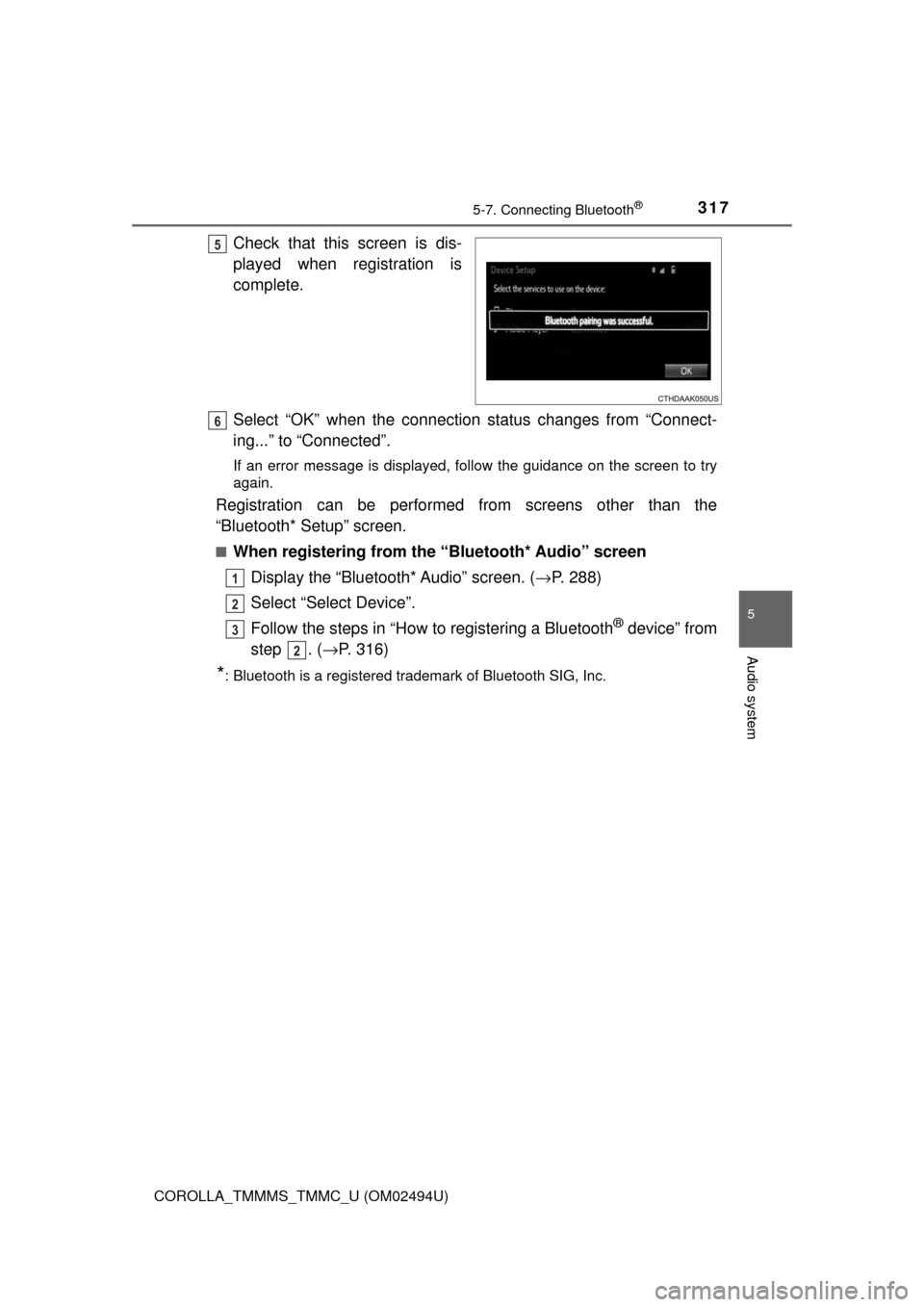
Check that this screen is dis-
played when registration is
complete.
Select “OK” when the connection status changes from “Connect-
ing...” to “Connected”.
If an error message is displayed, follow the guidance on the screen to try
again.
Registration can be performed from screens other than the
“Bluetooth* Setup” screen.
■When registering from the “Bluetooth* Audio” screen
Display the “Bluetooth* Audio” screen. (→P. 288)
Select “Select Device”.
Follow the steps in “How to registering a Bluetooth
® device” from
step . (→P. 316)
*: Bluetooth is a registered trademark of Bluetooth SIG, Inc.
5
6
1
2
3
2