engine TOYOTA COROLLA 2018 (in English) User Guide
[x] Cancel search | Manufacturer: TOYOTA, Model Year: 2018, Model line: COROLLA, Model: TOYOTA COROLLA 2018Pages: 52, PDF Size: 3.25 MB
Page 16 of 52
 User Guide 14
FEATURES & OPERATIONS
USB port
By connecting a USB-compatible portable audio device or USB memory to th\
e
USB port, you can listen to music from the portable audio device or USB \
memory
through")
14
FEATURES & OPERATIONS
USB port
By connecting a USB-compatible portable audio device or USB memory to th\
e
USB port, you can listen to music from the portable audio device or USB \
memory
through the vehicle’s speaker system.
AUX port
By inserting a mini plug into the AUX port, you can listen to music from\
a portable
audio device through the vehicle’s speaker system while in AUX mode.
The engine switch must be in the “ACC”, “ON” (without a Sma\
rt Key system),
ACCESSORY or IGNITION ON mode (with a Smart Key system) position for u\
se.
Adjusts the hourRounds to
nearest hourAdjusts the minutes
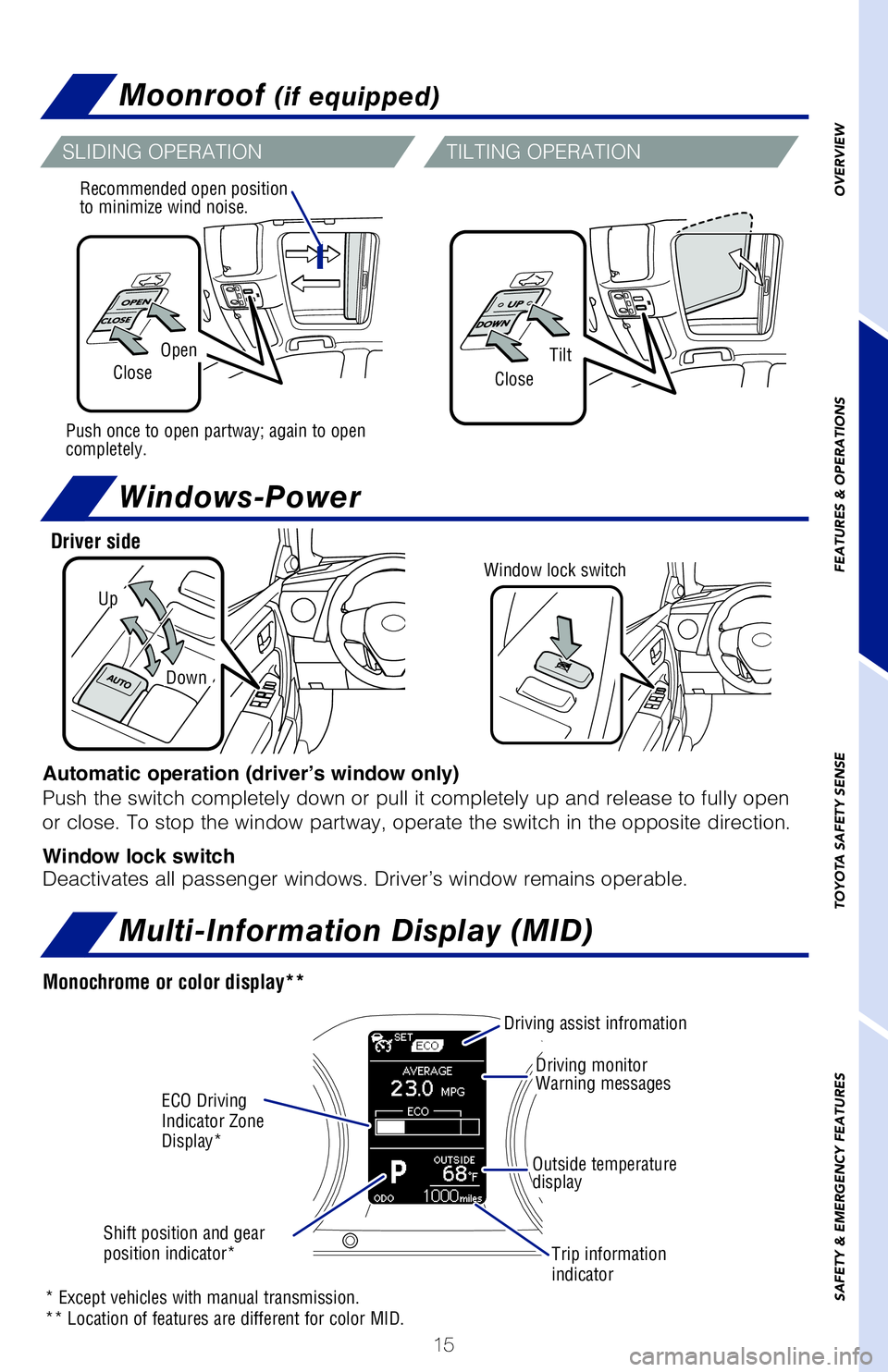
Recommended open position
to minimize wind noise.
Push once to open partway; again to open
completely.
Monochrome or color display**
* Except vehicles with manual transmission.
** Location of features are different for color MID.
Driver side
Automatic operation (driver’s window only)
Push the switch completely down or pull it completely up and release to \
fully open
or close. To stop the window partway, operate the switch in the opposite\
direction.
Window lock switch
Deactivates all passenger windows. Driver’s window remains operable. \
Power outlet
USB/AUX port
Clock
SLIDING OPERATION
2018_Corolla_QRG_V4_ML_0801.indd 148/2/17 1:49 AM
Page 17 of 52
15
OVERVIEW
FEATURES & OPERATIONS
TOYOTA SAFETY SENSE
SAFETY & EMERGENCY FEATURES
Moonroof (if equipped)
Multi-Information Display (MID)
USB port
By connecting a USB-compatible portable audio device or USB memory to the
USB port, you can listen to music from the portable audio device or USB mem\
ory
through the vehicle’s speaker system.
AUX port
By inserting a mini plug into the AUX port, you can listen to music from a\
portable
audio device through the vehicle’s speaker system while in AUX mode. The engine switch must be in the “ACC”, “ON” (without a Smart \
Key system),
ACCESSORY or IGNITION ON mode (with a Smart Key system) position for use.
OpenTiltCloseClose
Recommended open position
to minimize wind noise.
Push once to open partway; again to open
completely.
Monochrome or color display**
* Except vehicles with manual transmission.
** Location of features are different for color MID.
Windows-Power
Up
Down
Driver side
Window lock switch
Automatic operation (driver’s window only)
Push the switch completely down or pull it completely up and release to full\
y open
or close. To stop the window partway, operate the switch in the opposite d\
irection.
Window lock switch
Deactivates all passenger windows. Driver’s window remains operable.
Clock
SLIDING OPERATION
TILTING OPERATION
ECO Driving
Indicator Zone
Display*
Driving monitor
Warning messages
Outside temperature
display
Driving assist infromation
Shift position and gear
position indicator* Trip information
indicator
2018_Corolla_QRG_V4_ML_0801.indd 158/2/17 1:49 AM
Page 26 of 52
24
p 243
p 243
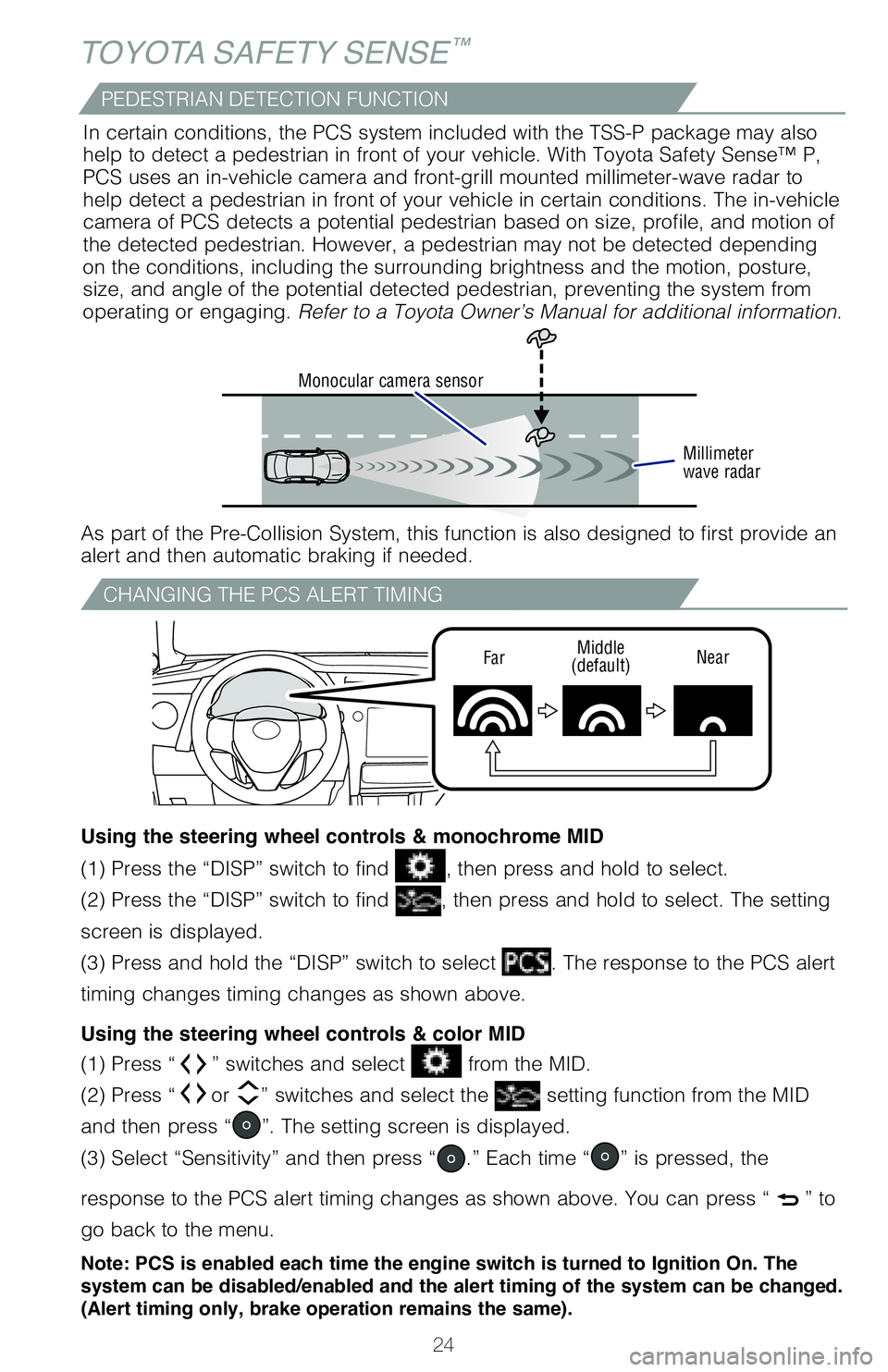
CHANGING THE PCS ALERT TIMING
FarMiddle
(default) Near
TOYOTA SAFETY SENSE™
(1) Press “” switches and select from the MID.
(2) Press “
or ” switches and select the setting function from the MID
and then press “
”. The setting screen is displayed.
(3) Select “Sensitivity” and then press “
.” Each time “” is pressed, the
response to the PCS alert timing changes as shown above. You can press “
” to
go back to the menu.
Note: PCS is enabled each time the engine switch is turned to Ignition On. The
system can be disabled/enabled and the alert timing of the system can be changed.
(Alert timing only, brake operation remains the same).
(1) Press the “DISP” switch to find , then press and hold to select.
(2) Press the “DISP” switch to find
, then press and hold to select. The setting
screen is displayed.
(3) Press and hold the “DISP” switch to select
. The response to the PCS alert
timing changes timing changes as shown above.
Using the steering wheel controls & color MID
(1) Press “ ” switches and select from the MID.
(2) Press “ or ” switches and select the
setting function from the MID
and then press “
”. The setting screen is displayed.
(3) Select
and then press “.” The Pre-Collision System will be disabled.
You can press “
” to go back to the menu.
Note: PCS is enabled each time the engine switch is turned to Ignition On. The
system can be disabled/enabled and the alert timing of the system can be changed.
(Alert timing only, brake operation remains the same).
(1) Press the “DISP” switch to find , then press and hold to select.
(2) Press the “DISP” switch to find
, then press and hold to select. The setting
screen is displayed.
(3) Press and hold the “DISP” switch to select
. The Pre-Collision System will
be disabled.
Using the steering wheel controls & color MID Using the steering wheel controls & monochrome MID
Using the steering wheel controls & monochrome MID
Monocular camera sensor
Millimeter
wave radar
As part of the Pre-Collision System, this function is also designed to f\
irst provide an
alert and then automatic braking if needed.In certain conditions, the PCS system included with the TSS-P package ma\
y also
help to detect a pedestrian in front of your vehicle. With Toyota Safety\
Sense™ P,
PCS uses an in-vehicle camera and front-grill mounted millimeter-wave ra\
dar to
help detect a pedestrian in front of your vehicle in certain conditions.\
The in-vehicle
camera of PCS detects a potential pedestrian based on size, profile, and\
motion of
the detected pedestrian. However, a pedestrian may not be detected depen\
ding
on the conditions, including the surrounding brightness and the motion, \
posture,
size, and angle of the potential detected pedestrian, preventing the sys\
tem from
operating or engaging. Refer to a Toyota Owner’s Manual for additional information.
PEDESTRIAN DETECTION FUNCTIONDISABLING THE PRE-COLLISION SYSTEM (PCS)
2018_Corolla_QRG_V4_ML_0801.indd 248/2/17 1:49 AM
Page 27 of 52
25
OVERVIEW
FEATURES & OPERATIONS
TOYOTA SAFETY SENSE
SAFETY & EMERGENCY FEATURES
(1) Press “ ” switches and select from the MID.
(2) Press “ or ” switches and select the
setting function from the MID
and then press “
”. The setting screen is displayed.
(3) Select “Sensitivity” and then press “
.” Each time “” is pressed, the
response to the PCS alert timing changes as shown above. You can press “
” to
go back to the menu.
Note: PCS is enabled each time the engine switch is turned to Ignition On. The
system can be disabled/enabled and the alert timing of the system can be changed.
(Alert timing only, brake operation remains the same).
(1) Press the “DISP” switch to find , then press and hold to select.
(2) Press the “DISP” switch to find
, then press and hold to select. The setting
screen is displayed.
(3) Press and hold the “DISP” switch to select
. The response to the PCS alert
timing changes timing changes as shown above.
Using the steering wheel controls & color MID
(1) Press “” switches and select from the MID.
(2) Press “
or ” switches and select the setting function from the MID
and then press “
”. The setting screen is displayed.
(3) Select
and then press “.” The Pre-Collision System will be disabled.
You can press “
” to go back to the menu.
Note: PCS is enabled each time the engine switch is turned to Ignition On. The
system can be disabled/enabled and the alert timing of the system can be changed.
(Alert timing only, brake operation remains the same).
(1) Press the “DISP” switch to find , then press and hold to select.
(2) Press the “DISP” switch to find
, then press and hold to select. The setting
screen is displayed.
(3) Press and hold the “DISP” switch to select
. The Pre-Collision System will
be disabled.
Using the steering wheel controls & color MID Using the steering wheel controls & monochrome MID
Using the steering wheel controls & monochrome MID As part of the Pre-Collision System, this function is also designed to f\
irst provide an
alert and then automatic braking if needed. In certain conditions, the PCS system included with the TSS-P package ma\
y also
help to detect a pedestrian in front of your vehicle. With Toyota Safety\
Sense™ P,
PCS uses an in-vehicle camera and front-grill mounted millimeter-wave ra\
dar to
help detect a pedestrian in front of your vehicle in certain conditions.\
The in-vehicle
camera of PCS detects a potential pedestrian based on size, profile, and\
motion of
the detected pedestrian. However, a pedestrian may not be detected depen\
ding
on the conditions, including the surrounding brightness and the motion, \
posture,
size, and angle of the potential detected pedestrian, preventing the sys\
tem from
operating or engaging. Refer to a Toyota Owner’s Manual for additional information.
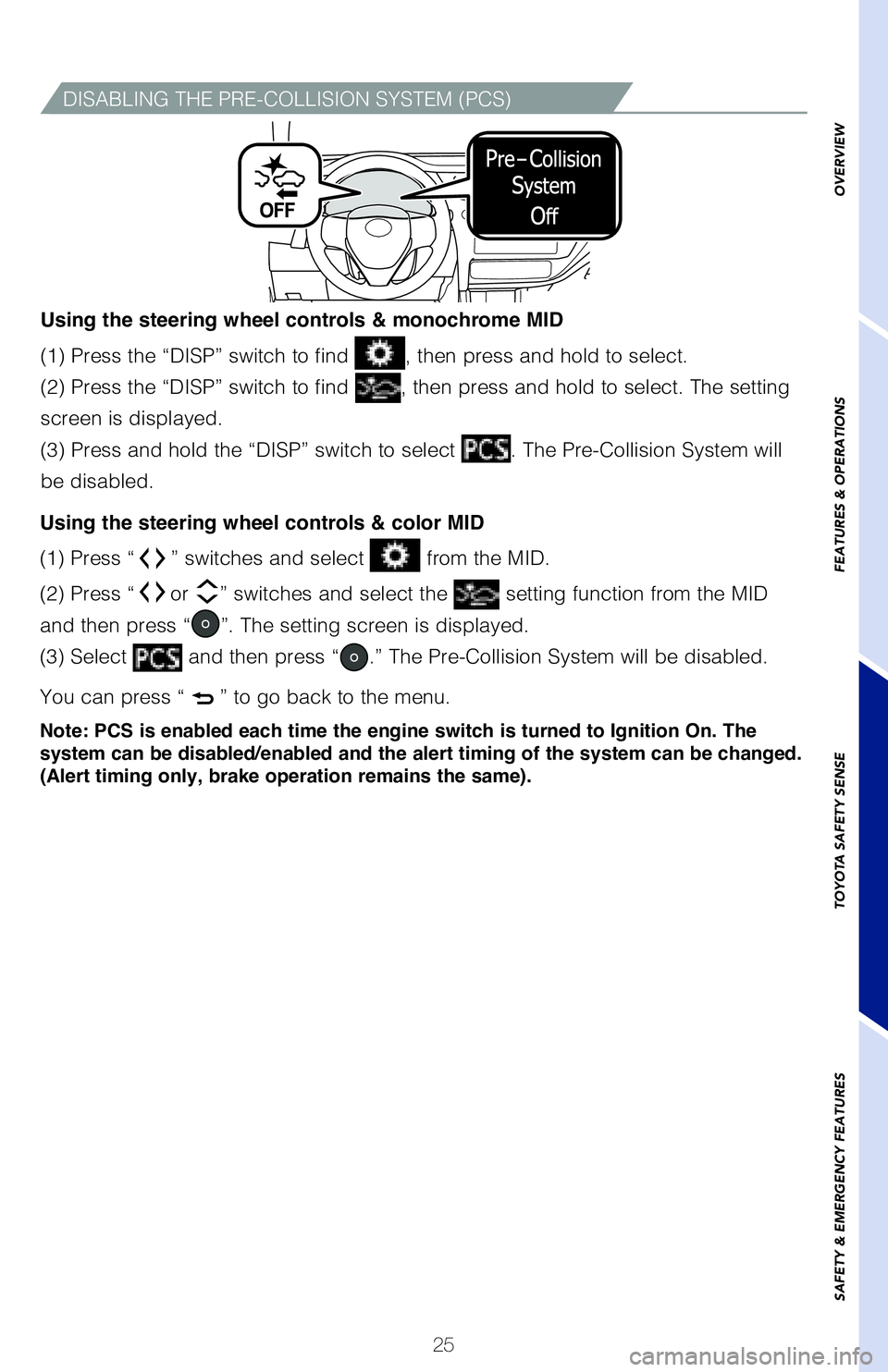
DISABLING THE PRE-COLLISION SYSTEM (PCS)
2018_Corolla_QRG_V4_ML_0801.indd 258/2/17 1:49 AM
Page 28 of 52
26
(1)
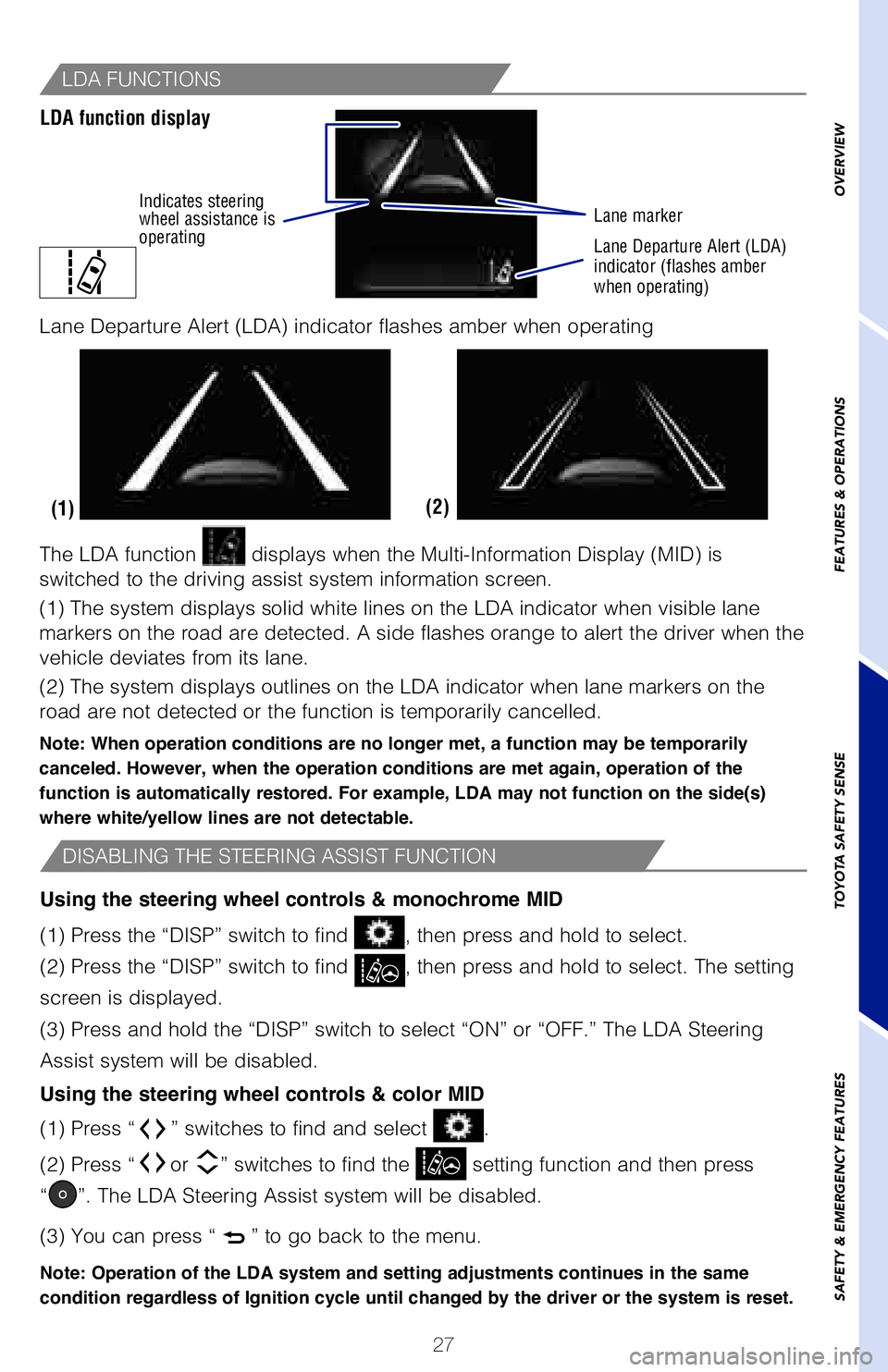
The LDA function displays when the Multi-Information Display (MID) is
switched to the driving assist system information screen.
(1) The system displays solid white lines on the LDA indicator when vi\
sible lane
markers on the road are detected. A side flashes orange to alert the dri\
ver when the
vehicle deviates from its lane.
(2) The system displays outlines on the LDA indicator when lane marker\
s on the
road are not detected or the function is temporarily cancelled.
Note: When operation conditions are no longer met, a function may be temporarily
canceled. However, when the operation conditions are met again, operation of the
function is automatically restored. For example, LDA may not function on the side(s)
where white/yellow lines are not detectable.TURNING THE LDA SYSTEM ON/OFF
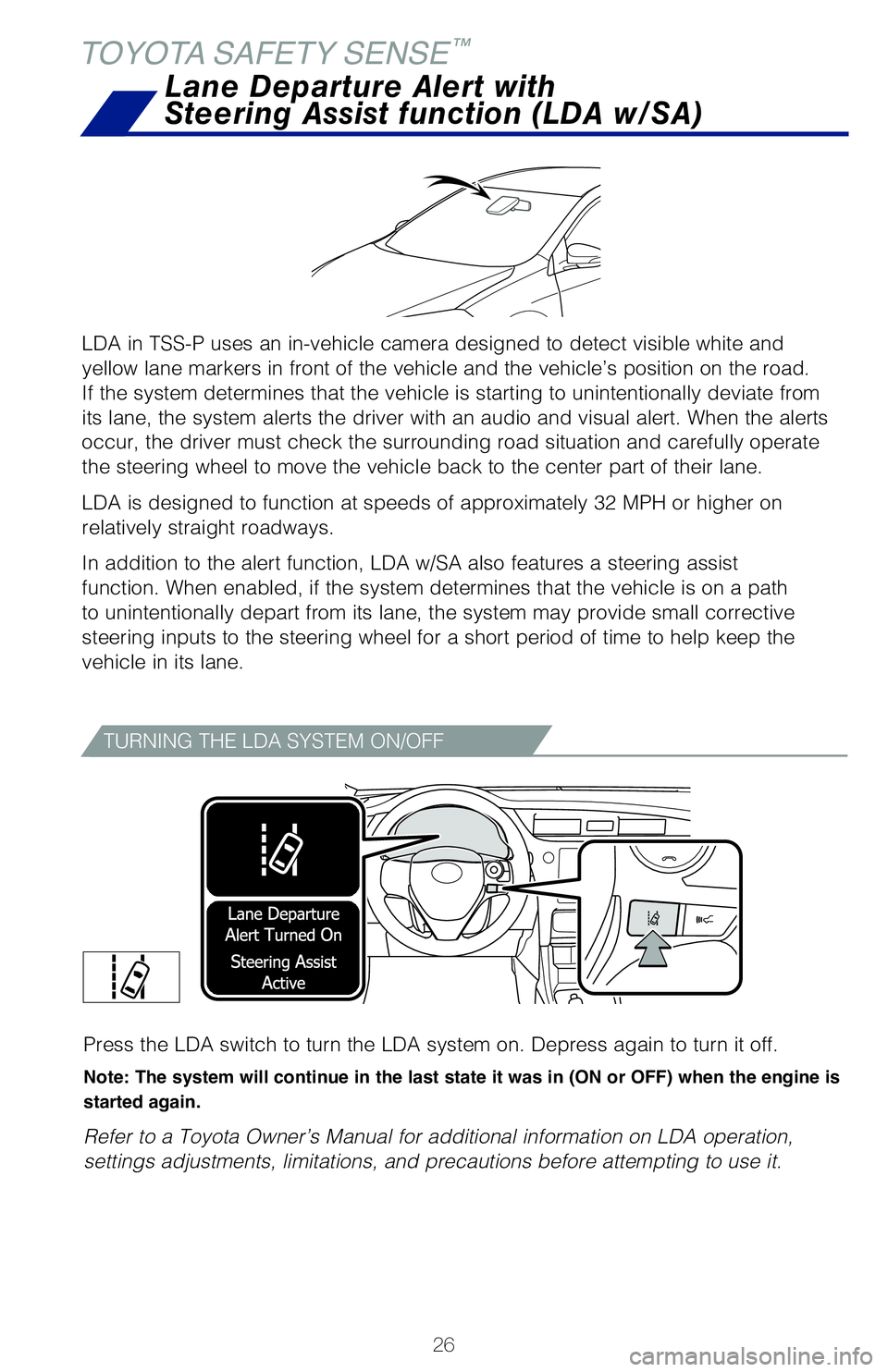
Press the LDA switch to turn the LDA system on. Depress again to turn it\
off.
Note: The system will continue in the last state it was in (ON or OFF) when the engine is
started again.
Refer to a Toyota Owner’s Manual for additional information on LDA op\
eration,
settings adjustments, limitations, and precautions before attempting to \
use it.
DISABLING THE STEERING ASSIST FUNCTION
LDA FUNCTIONS
LDA function display
Lane Departure Alert (LDA) indicator flashes amber when operating
(1) Press “ ” switches to find and select .
(2) Press “ or ” switches to find the
setting function and then press
“”. The LDA Steering Assist system will be disabled.
(3) You can press “
” to go back to the menu.
Note: Operation of the LDA system and setting adjustments continues in the same
condition regardless of Ignition cycle until changed by the driver or the system is reset.
(1) Press the “DISP” switch to find , then press and hold to select.
(2) Press the “DISP” switch to find
, then press and hold to select. The setting
screen is displayed.
(3) Press and hold the “DISP” switch to select “ON” or “\
OFF.” The LDA Steering
Assist system will be disabled.
Using the steering wheel controls & color MID Using the steering wheel controls & monochrome MID
LDA in TSS-P uses an in-vehicle camera designed to detect visible white \
and
yellow lane markers in front of the vehicle and the vehicle’s positio\
n on the road.
If the system determines that the vehicle is starting to unintentionally\
deviate from
its lane, the system alerts the driver with an audio and visual alert. W\
hen the alerts
occur, the driver must check the surrounding road situation and carefull\
y operate
the steering wheel to move the vehicle back to the center part of their \
lane.
LDA is designed to function at speeds of approximately 32 MPH or higher \
on
relatively straight roadways.
In addition to the alert function, LDA w/SA also features a steering ass\
ist
function. When enabled, if the system determines that the vehicle is on \
a path
to unintentionally depart from its lane, the system may provide small co\
rrective
steering inputs to the steering wheel for a short period of time to help\
keep the
vehicle in its lane.
Lane Departure Alert with
Steering Assist function (LDA w/SA)
TOYOTA SAFETY SENSE
™
2018_Corolla_QRG_V4_ML_0801.indd 268/2/17 1:49 AM
Page 29 of 52
27
OVERVIEW
FEATURES & OPERATIONS
TOYOTA SAFETY SENSE
SAFETY & EMERGENCY FEATURES
(2)
(1)
The LDA function
displays when the Multi-Information Display (MID) is
switched to the driving assist system information screen.
(1) The system displays solid white lines on the LDA indicator when vi\
sible lane
markers on the road are detected. A side flashes orange to alert the dri\
ver when the
vehicle deviates from its lane.
(2) The system displays outlines on the LDA indicator when lane marker\
s on the
road are not detected or the function is temporarily cancelled.
Note: When operation conditions are no longer met, a function may be temporarily
canceled. However, when the operation conditions are met again, operation of the
function is automatically restored. For example, LDA may not function on the side(s)
where white/yellow lines are not detectable.
Press the LDA switch to turn the LDA system on. Depress again to turn it\
off.
Note: The system will continue in the last state it was in (ON or OFF) when the engine is
started again.
Refer to a Toyota Owner’s Manual for additional information on LDA op\
eration,
settings adjustments, limitations, and precautions before attempting to \
use it.
DISABLING THE STEERING ASSIST FUNCTION
LDA FUNCTIONS
LDA function display
Lane marker
Lane Departure Alert (LDA)
indicator (flashes amber
when operating)
Lane Departure Alert (LDA) indicator flashes amber when operating
(1) Press “” switches to find and select .
(2) Press “
or ” switches to find the setting function and then press
“
”. The LDA Steering Assist system will be disabled.
(3) You can press “
” to go back to the menu.
Note: Operation of the LDA system and setting adjustments continues in the same
condition regardless of Ignition cycle until changed by the driver or the system is reset.
(1) Press the “DISP” switch to find , then press and hold to select.
(2) Press the “DISP” switch to find
, then press and hold to select. The setting
screen is displayed.
(3) Press and hold the “DISP” switch to select “ON” or “\
OFF.” The LDA Steering
Assist system will be disabled.
Using the steering wheel controls & color MID Using the steering wheel controls & monochrome MID
LDA in TSS-P uses an in-vehicle camera designed to detect visible white \
and
yellow lane markers in front of the vehicle and the vehicle’s positio\
n on the road.
If the system determines that the vehicle is starting to unintentionally\
deviate from
its lane, the system alerts the driver with an audio and visual alert. W\
hen the alerts
occur, the driver must check the surrounding road situation and carefull\
y operate
the steering wheel to move the vehicle back to the center part of their \
lane.
LDA is designed to function at speeds of approximately 32 MPH or higher \
on
relatively straight roadways.
In addition to the alert function, LDA w/SA also features a steering ass\
ist
function. When enabled, if the system determines that the vehicle is on \
a path
to unintentionally depart from its lane, the system may provide small co\
rrective
steering inputs to the steering wheel for a short period of time to help\
keep the
vehicle in its lane.
Lane Departure Alert with
Steering Assist function (LDA w/SA)
Indicates steering
wheel assistance is
operating
2018_Corolla_QRG_V4_ML_0801.indd 278/2/17 1:49 AM
Page 32 of 52
30
SWITCHING TO CONSTANT SPEED (CRUISE) CONTROL MODE
If you are already using DRCC “ ”, push ON-OFF button to turn the system off
first, then push and hold ON-OFF button for at least 1.5 seconds to swit\
ch.
Note: When the engine is turned off, it will automatically default to DRCC.
(1) Constant speed cruising when there are no vehicles aheadThe vehicle travels at the speed set by the driver. The desired vehicle-\
to-
vehicle distance can also be set by operating the vehicle-to-vehicle dis\
tance
control.
(2) Deceleration cruising and follow-up cruising when a preceding vehicle
driving slower than the set speed appears When a vehicle is detected running ahead of you, the system automaticall\
y
decelerates your vehicle. When a greater reduction in vehicle speed is
necessary, the system applies the brakes (the stop lights will come on \
at this
time). The system will respond to changes in the speed of the vehicle a\
head
in order to maintain the vehicle-to-vehicle distance set by the driver. \
A warning
tone warns you when the system cannot decelerate sufficiently to prevent\
your
vehicle from closing in on the vehicle ahead.
(3) Acceleration when there are no longer any preceding vehicles driving
slower than the set speed The system accelerates until the set speed is reached. The system then
returns to constant speed cruising.
Note: When your vehicle is too close to a vehicle ahead, and sufficient automatic
deceleration via the cruise control is not possible, the display will flash and the buzzer
will sound to alert the driver. An example of this would be if another driver cuts in
front of you while you are following a vehicle. Depress the brake pedal to ensure an
appropriate vehicle-to-vehicle distance.
ADJUSTING DRCC DISTANCE (CONTINUED)ADJUSTING DRCC SET SPEED
1
The set speed may also be cancelled by depressing the brake pedal.
2 The set speed may be resumed once vehicle speed exceeds 25 mph.
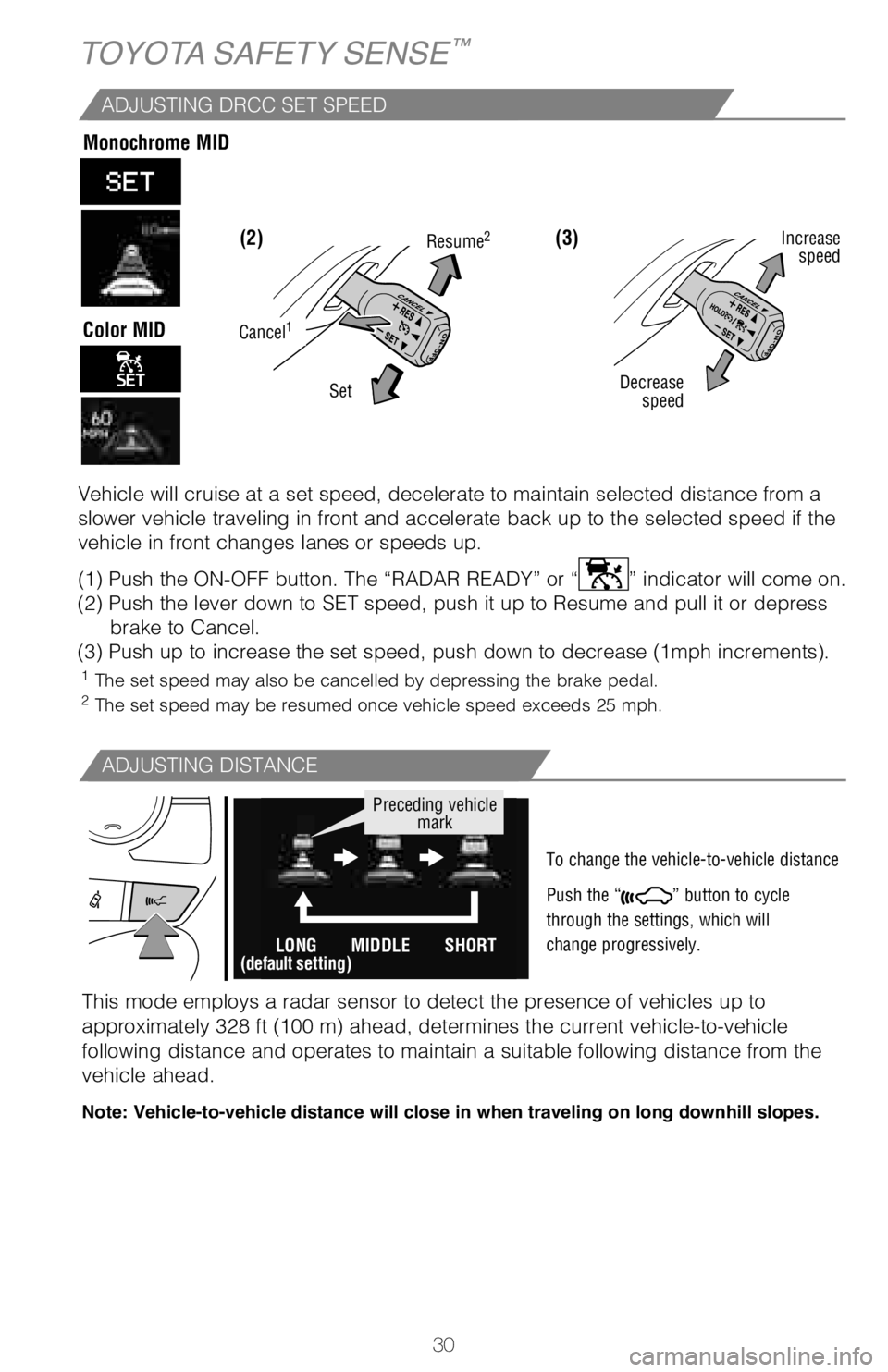
Vehicle will cruise at a set speed, decelerate to maintain selected dist\
ance from a
slower vehicle traveling in front and accelerate back up to the selected\
speed if the
vehicle in front changes lanes or speeds up.
(1) Push the ON-OFF button. The “RADAR READY” or “
” indicator will come on.
(2) Push the lever down to SET speed, push it up to Resume and pull it\
or depress brake to Cancel.
(3) Push up to increase the set speed, push down to decrease (1mph in\
crements).
(3) (2)
ADJUSTING DISTANCE
To change the vehicle-to-vehicle distance
Push the “
” button to cycle
through the settings, which will
change progressively.
Decrease speed Increase
speed
Cancel1
Resume2
Set
This mode employs a radar sensor to detect the presence of vehicles up t\
o
approximately 328 ft (100 m) ahead, determines the current vehicle-to-\
vehicle
following distance and operates to maintain a suitable following distanc\
e from the
vehicle ahead.
Note: Vehicle-to-vehicle distance will close in when traveling on long downhill slopes.
LONG
(default setting)MIDDLE SHORT
Preceding vehicle
mark
TOYOTA SAFETY SENSE™
Monochrome MID
Color MID
2018_Corolla_QRG_V4_ML_0801.indd 308/2/17 1:49 AM
Page 33 of 52
31
OVERVIEW
FEATURES & OPERATIONS
TOYOTA SAFETY SENSE
SAFETY & EMERGENCY FEATURES
SWITCHING TO CONSTANT SPEED (CRUISE) CONTROL MODE
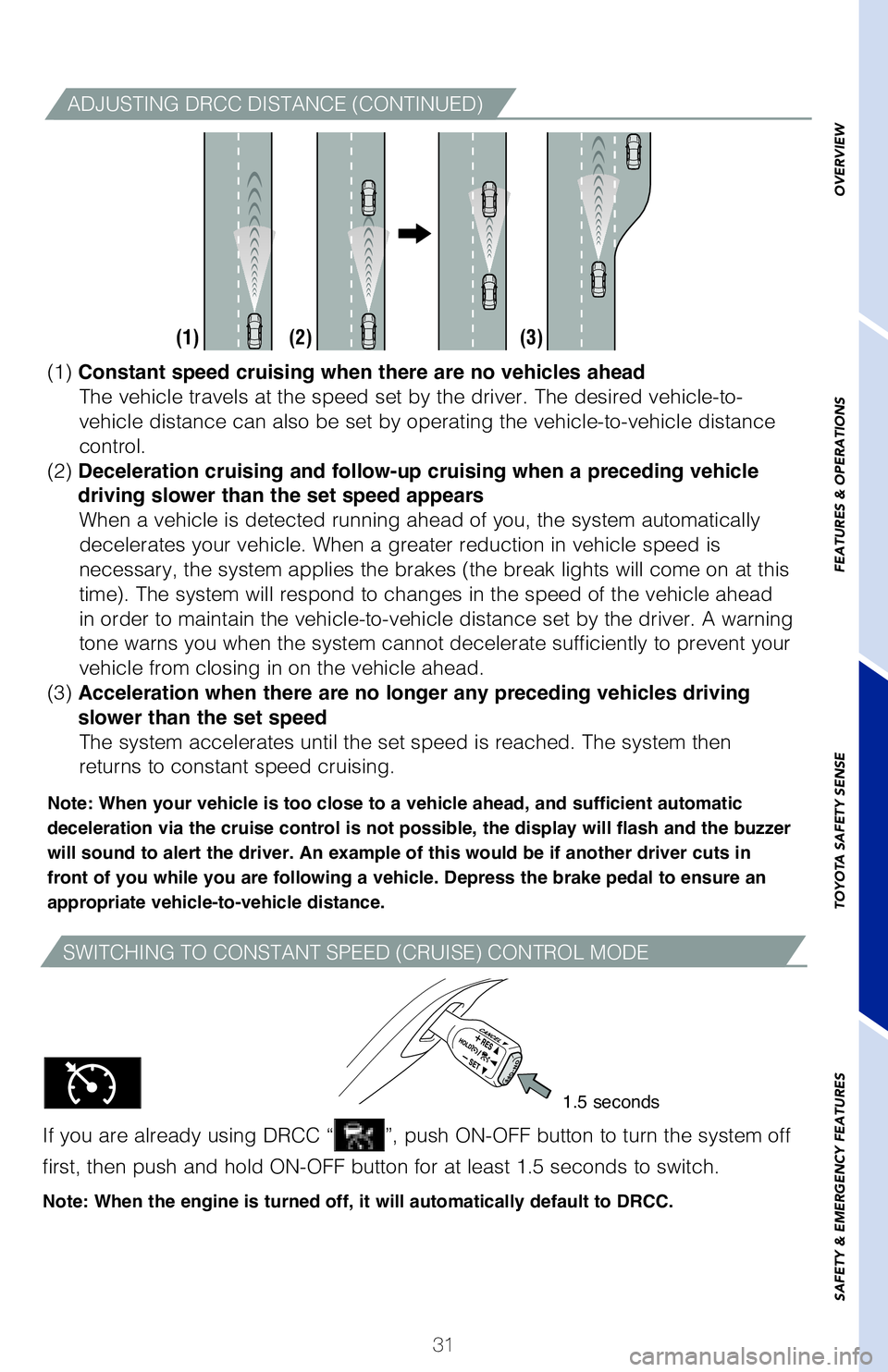
If you are already using DRCC “”, push ON-OFF button to turn the system off
first, then push and hold ON-OFF button for at least 1.5 seconds to swit\
ch.
Note: When the engine is turned off, it will automatically default to DRCC.
1.5 seconds
(1) Constant speed cruising when there are no vehicles ahead
The vehicle travels at the speed set by the driver. The desired vehicle-\
to-
vehicle distance can also be set by operating the vehicle-to-vehicle dis\
tance
control.
(2) Deceleration cruising and follow-up cruising when a preceding vehicle
driving slower than the set speed appears When a vehicle is detected running ahead of you, the system automaticall\
y
decelerates your vehicle. When a greater reduction in vehicle speed is
necessary, the system applies the brakes (the break lights will come on\
at this
time). The system will respond to changes in the speed of the vehicle a\
head
in order to maintain the vehicle-to-vehicle distance set by the driver. \
A warning
tone warns you when the system cannot decelerate sufficiently to prevent\
your
vehicle from closing in on the vehicle ahead.
(3) Acceleration when there are no longer any preceding vehicles driving
slower than the set speed The system accelerates until the set speed is reached. The system then
returns to constant speed cruising.
Note: When your vehicle is too close to a vehicle ahead, and sufficient automatic
deceleration via the cruise control is not possible, the display will flash and the buzzer
will sound to alert the driver. An example of this would be if another driver cuts in
front of you while you are following a vehicle. Depress the brake pedal to ensure an
appropriate vehicle-to-vehicle distance.
(1) (2) (3)
ADJUSTING DRCC DISTANCE (CONTINUED)
1
The set speed may also be cancelled by depressing the brake pedal.
2 The set speed may be resumed once vehicle speed exceeds 25 mph.
Vehicle will cruise at a set speed, decelerate to maintain selected dist\
ance from a
slower vehicle traveling in front and accelerate back up to the selected\
speed if the
vehicle in front changes lanes or speeds up.
(1) Push the ON-OFF button. The “RADAR READY” or “
” indicator will come on.
(2) Push the lever down to SET speed, push it up to Resume and pull it\
or depress brake to Cancel.
(3) Push up to increase the set speed, push down to decrease (1mph in\
crements).
To change the vehicle-to-vehicle distance
Push the “
” button to cycle
through the settings, which will
change progressively.
Increase speed
This mode employs a radar sensor to detect the presence of vehicles up t\
o
approximately 328 ft (100 m) ahead, determines the current vehicle-to-\
vehicle
following distance and operates to maintain a suitable following distanc\
e from the
vehicle ahead.
Note: Vehicle-to-vehicle distance will close in when traveling on long downhill slopes.
2018_Corolla_QRG_V5_ML_0802.indd 318/3/17 11:11 AM
Page 34 of 52
32
SAFETY & EMERGENCY FEATURES
NOTE: If a passenger’s seat belt is fully extended, then retracted even slightly,
the Automatic locking retractor (ALR) will prevent it from being re-extended
beyond that point, unless fully retracted again. This feature is used to help
hold child restraint systems securely.
To find more information about seat belts, and how to install a child re\
straint
system, refer to the Owner’s Manual.
Moving the lever downward will allow the door to be opened only from the\
outside.
Automatic High Beams (AHB)
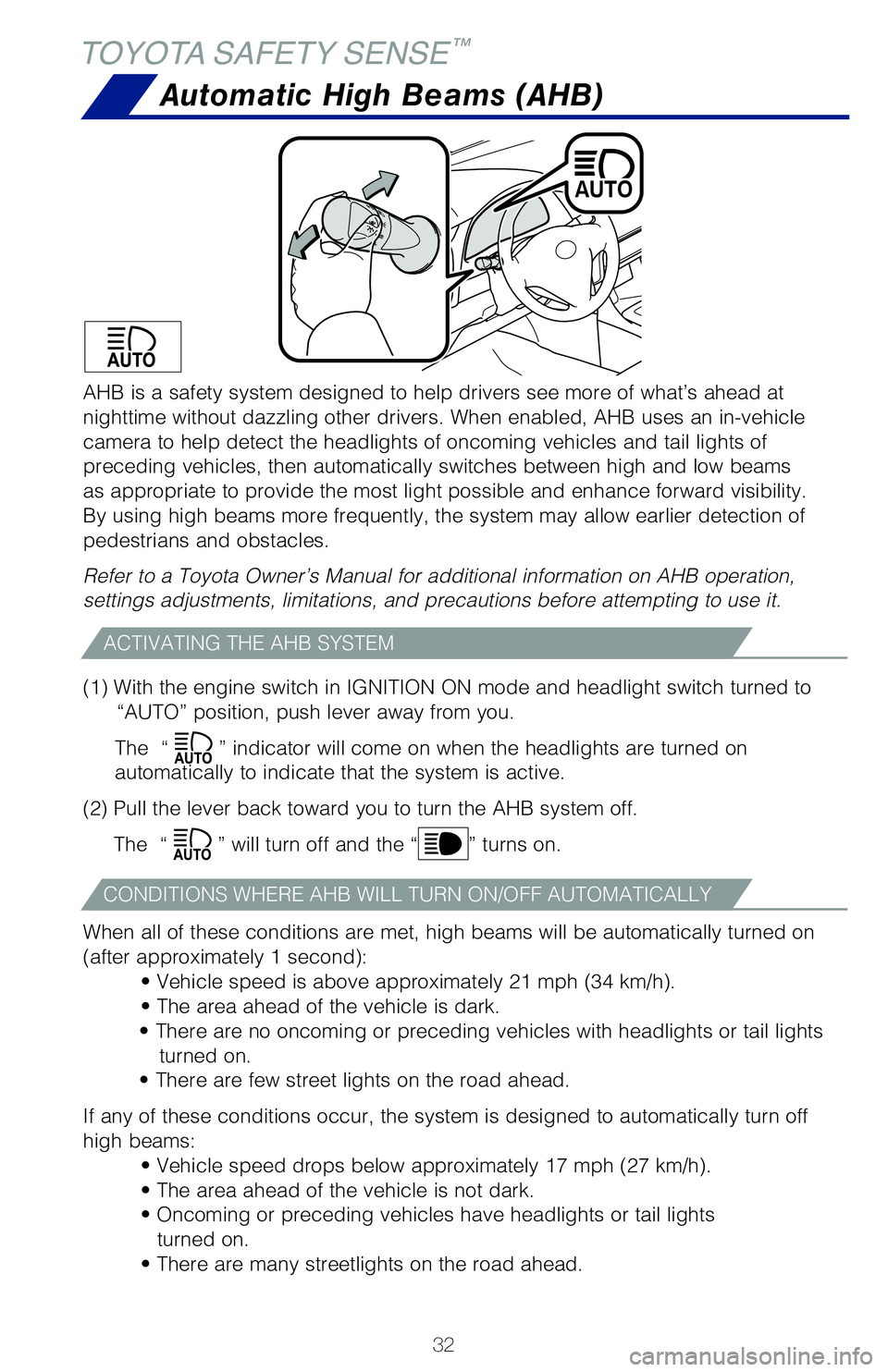
(1) With the engine switch in IGNITION ON mode and headlight switch tu\
rned to “AUTO” position, push lever away from you.
The “
” indicator will come on when the headlights are turned on
automatically to indicate that the system is active.
(2) Pull the lever back toward you to turn the AHB system off.
The “
” will turn off and the “” turns on.
When all of these conditions are met, high beams will be automatically t\
urned on
(after approximately 1 second): • Vehicle speed is above approximately 21 mph (34 km/h).
• The area ahead of the vehicle is dark.
• There are no oncoming or preceding vehicles with headlights or tail\
lights turned on.
• There are few street lights on the road ahead.
If any of these conditions occur, the system is designed to automaticall\
y turn off
high beams: • Vehicle speed drops below approximately 17 mph (27 km/h).
• The area ahead of the vehicle is not dark.
• Oncoming or preceding vehicles have headlights or tail lightsturned on.
• There are many streetlights on the road ahead.
ACTIVATING THE AHB SYSTEM
CONDITIONS WHERE AHB WILL TURN ON/OFF AUTOMATICALLY
AHB is a safety system designed to help drivers see more of what’s ah\
ead at
nighttime without dazzling other drivers. When enabled, AHB uses an in-v\
ehicle
camera to help detect the headlights of oncoming vehicles and tail light\
s of
preceding vehicles, then automatically switches between high and low bea\
ms
as appropriate to provide the most light possible and enhance forward vi\
sibility.
By using high beams more frequently, the system may allow earlier detect\
ion of
pedestrians and obstacles.
Refer to a Toyota Owner’s Manual for additional information on AHB op\
eration,
settings adjustments, limitations, and precautions before attempting to \
use it.
TOYOTA SAFETY SENSE™
Rear door
2018_Corolla_QRG_V4_ML_0801.indd 328/2/17 1:49 AM
Page 35 of 52
33
OVERVIEW
FEATURES & OPERATIONS
TOYOTA SAFETY SENSE
SAFETY & EMERGENCY FEATURES
Rear door child safety locks
SAFETY & EMERGENCY FEATURES
Keep as low on
hips as possible
Take up slack
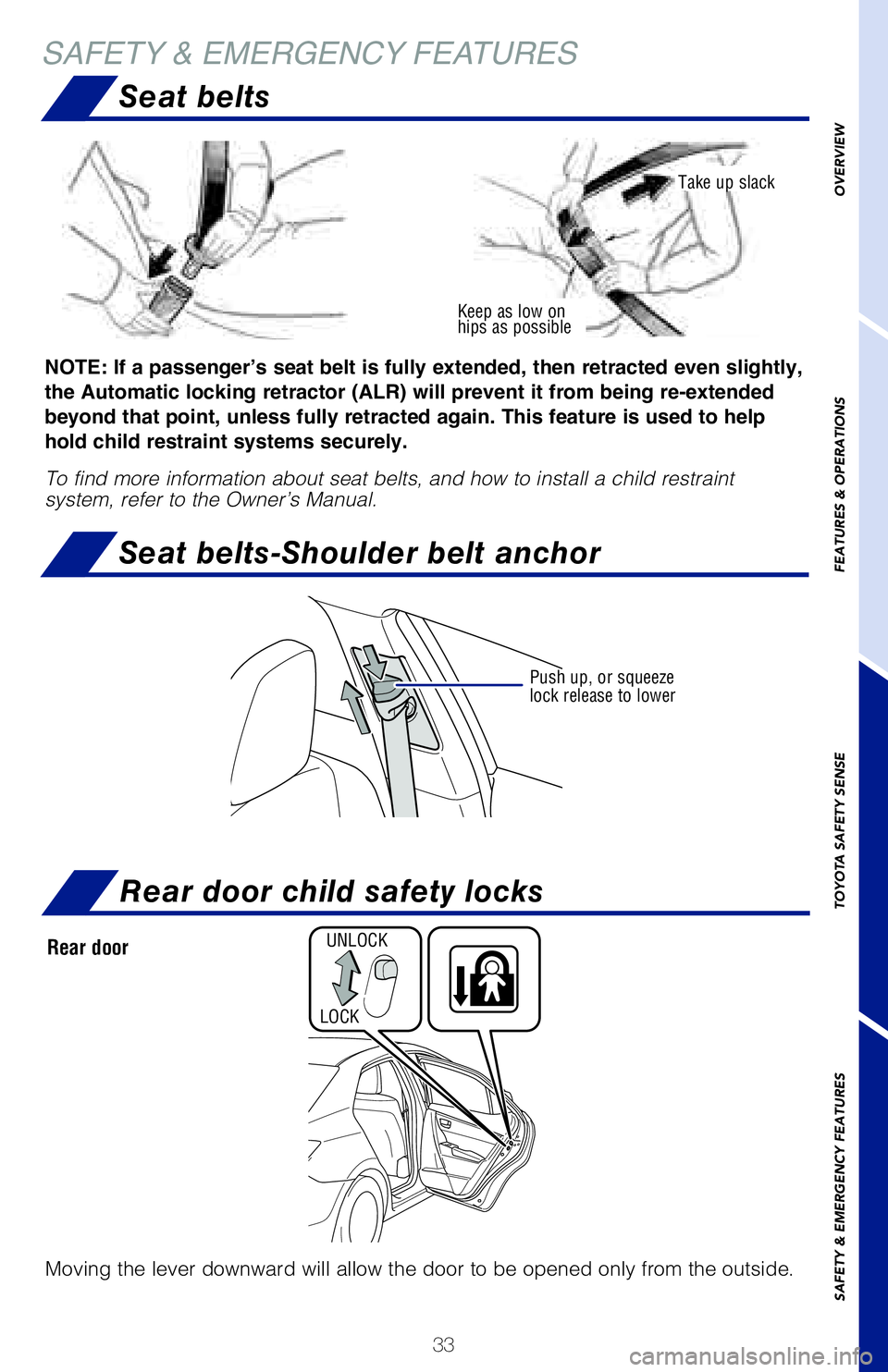
NOTE: If a passenger’s seat belt is fully extended, then retracted even slightly,
the Automatic locking retractor (ALR) will prevent it from being re-extended
beyond that point, unless fully retracted again. This feature is used to help
hold child restraint systems securely.
To find more information about seat belts, and how to install a child re\
straint
system, refer to the Owner’s Manual.
Moving the lever downward will allow the door to be opened only from the\
outside.
Push up, or squeeze
lock release to lower
UNLOCK
LOCK
Automatic High Beams (AHB)
(1) With the engine switch in IGNITION ON mode and headlight switch tu\
rned to “AUTO” position, push lever away from you.
The “
” indicator will come on when the headlights are turned on
automatically to indicate that the system is active.
(2) Pull the lever back toward you to turn the AHB system off.
The “
” will turn off and the “” turns on.
When all of these conditions are met, high beams will be automatically t\
urned on
(after approximately 1 second): • Vehicle speed is above approximately 21 mph (34 km/h).
• The area ahead of the vehicle is dark.
• There are no oncoming or preceding vehicles with headlights or tail\
lights turned on.
• There are few street lights on the road ahead.
If any of these conditions occur, the system is designed to automaticall\
y turn off
high beams: • Vehicle speed drops below approximately 17 mph (27 km/h).
• The area ahead of the vehicle is not dark.
• Oncoming or preceding vehicles have headlights or tail lightsturned on.
• There are many streetlights on the road ahead.
AHB is a safety system designed to help drivers see more of what’s ah\
ead at
nighttime without dazzling other drivers. When enabled, AHB uses an in-v\
ehicle
camera to help detect the headlights of oncoming vehicles and tail light\
s of
preceding vehicles, then automatically switches between high and low bea\
ms
as appropriate to provide the most light possible and enhance forward vi\
sibility.
By using high beams more frequently, the system may allow earlier detect\
ion of
pedestrians and obstacles.
Refer to a Toyota Owner’s Manual for additional information on AHB op\
eration,
settings adjustments, limitations, and precautions before attempting to \
use it.
Seat belts-Shoulder belt anchor
Seat belts
Rear door
2018_Corolla_QRG_V4_ML_0801.indd 338/2/17 1:49 AM