audio TOYOTA COROLLA 2020 (in English) Owner's Guide
[x] Cancel search | Manufacturer: TOYOTA, Model Year: 2020, Model line: COROLLA, Model: TOYOTA COROLLA 2020Pages: 588, PDF Size: 13.49 MB
Page 270 of 588
2705-2. Basic information before operation
COROLLA_U
ACC or ON, or restart the sys-
tem by press and hold the
“POWER VOLUME” knob for
3 seconds or more.
Capacitive touch screen button sen-
sor sensitivity can be adjusted.
( P.296)
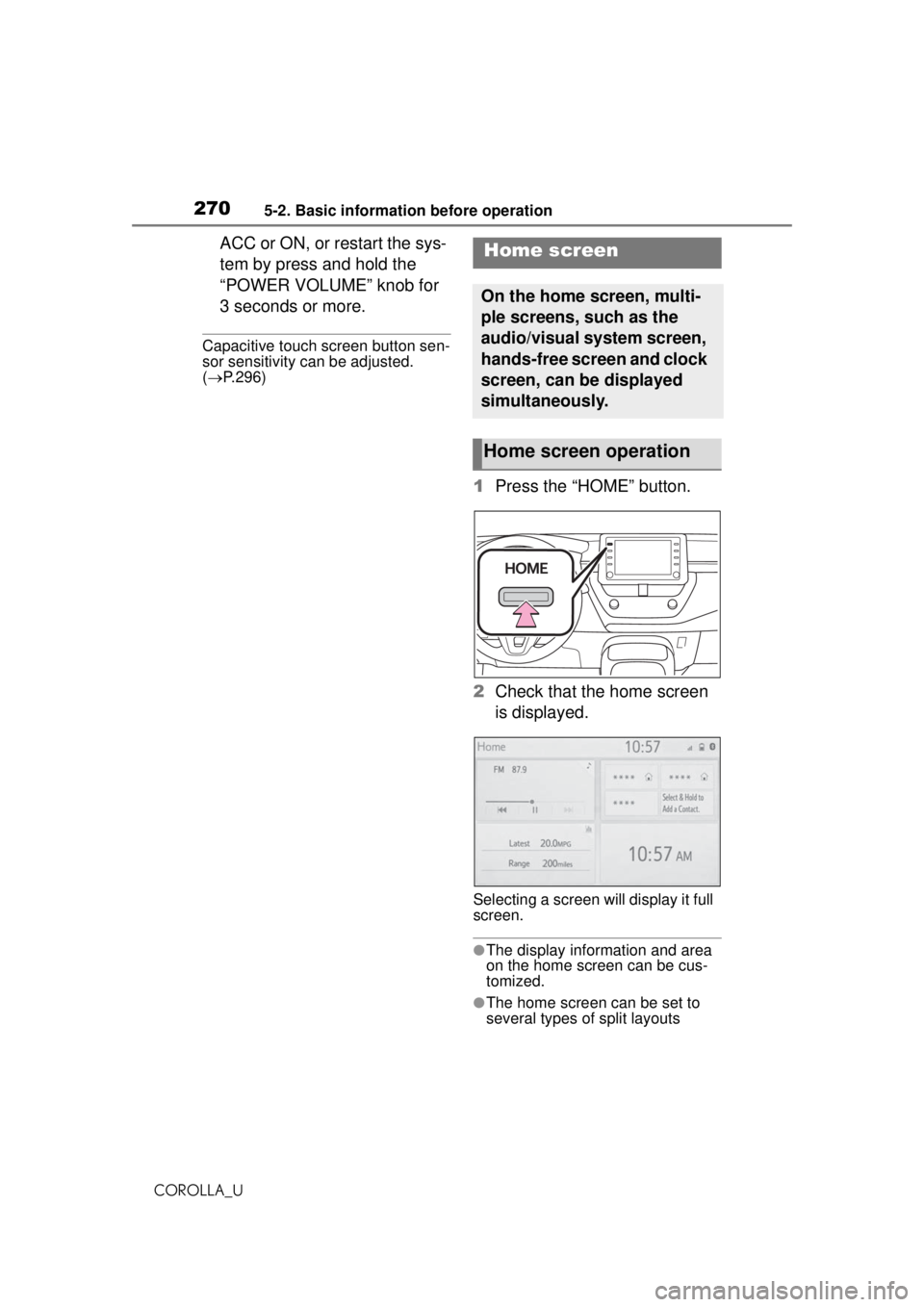
1 Press the “HOME” button.
2 Check that the home screen
is displayed.
Selecting a screen will display it full
screen.
●The display information and area
on the home screen can be cus-
tomized.
●The home screen can be set to
several types of split layouts
Home screen
On the home screen, multi-
ple screens, such as the
audio/visual system screen,
hands-free screen and clock
screen, can be displayed
simultaneously.
Home screen operation
Page 271 of 588
2715-2. Basic information before operation
COROLLA_U
5
Entune audio
The display information/area on
the home screen and the home
screen layout can be changed.
1 Press the “MENU” button.
2 Select “Setup”.
If the general settings screen is not
displayed, select “General”.
3Select “Customize Home
Screen”.
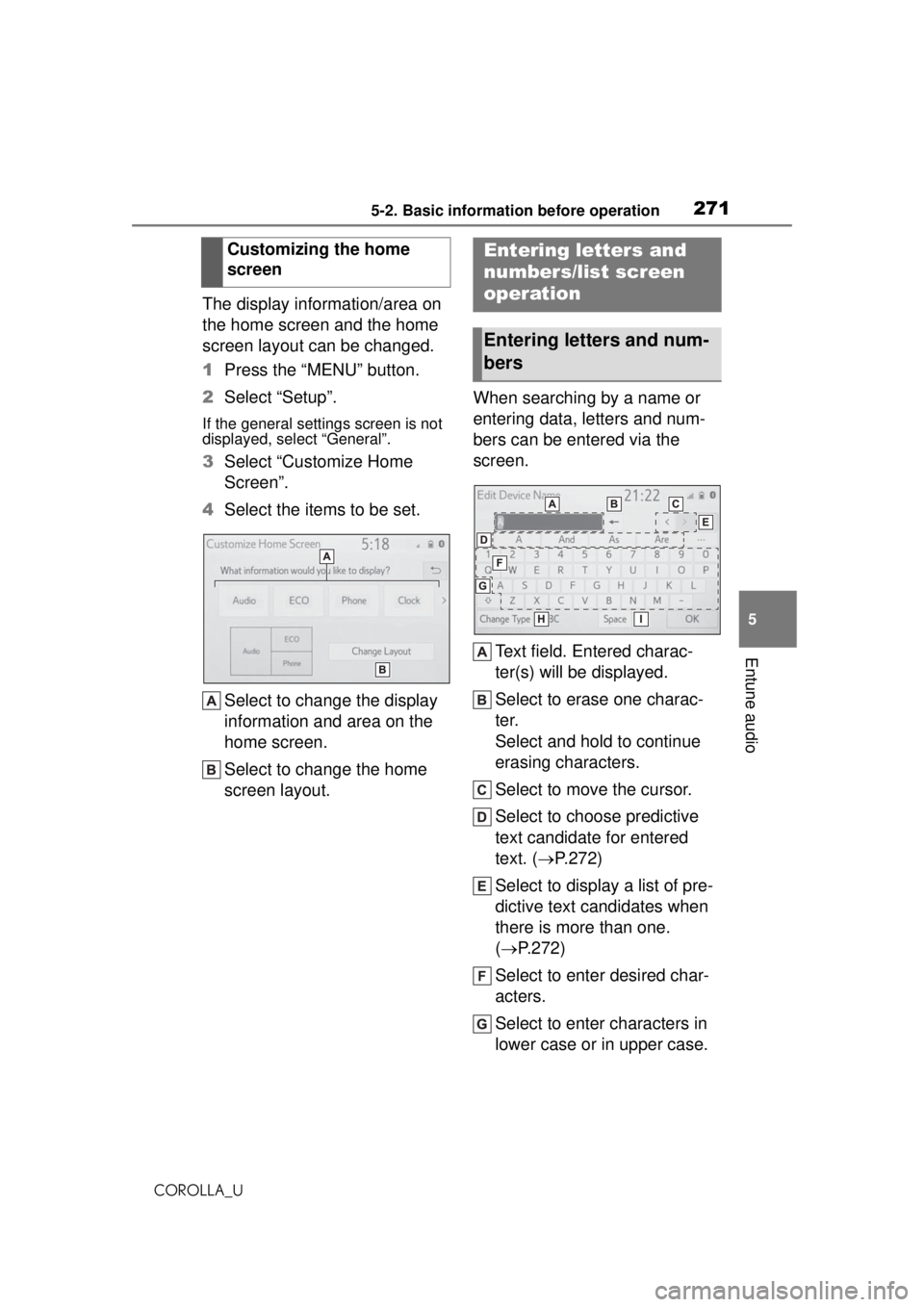
4 Select the items to be set.
Select to change the display
information and area on the
home screen.
Select to change the home
screen layout. When searching by a name or
entering data, letters and num-
bers can be entered via the
screen.
Text field. Entered charac-
ter(s) will be displayed.
Select to erase one charac-
ter.
Select and hold to continue
erasing characters.
Select to move the cursor.
Select to choose predictive
text candidate for entered
text. ( P.272)
Select to display a list of pre-
dictive text candidates when
there is more than one.
( P.272)
Select to enter desired char-
acters.
Select to enter characters in
lower case or in upper case.
Customizing the home
screen
Entering letters and
numbers/list screen
operation
Entering letters and num-
bers
Page 273 of 588
2735-2. Basic information before operation
COROLLA_U
5
Entune audio
To scroll up/down the list,
flick the list up/down.
Select to skip to the next or
previous page. Select and
hold or to scroll
through the displayed list.
Indicates the position of the
displayed entries in the entire
list.
To scroll up/down pages,
drag the bar.
If appears to the right of an item
name, the complete name is too
long to display.
●Select to scroll to the end of
the name.
●Select to move to the begin-
ning of the name.
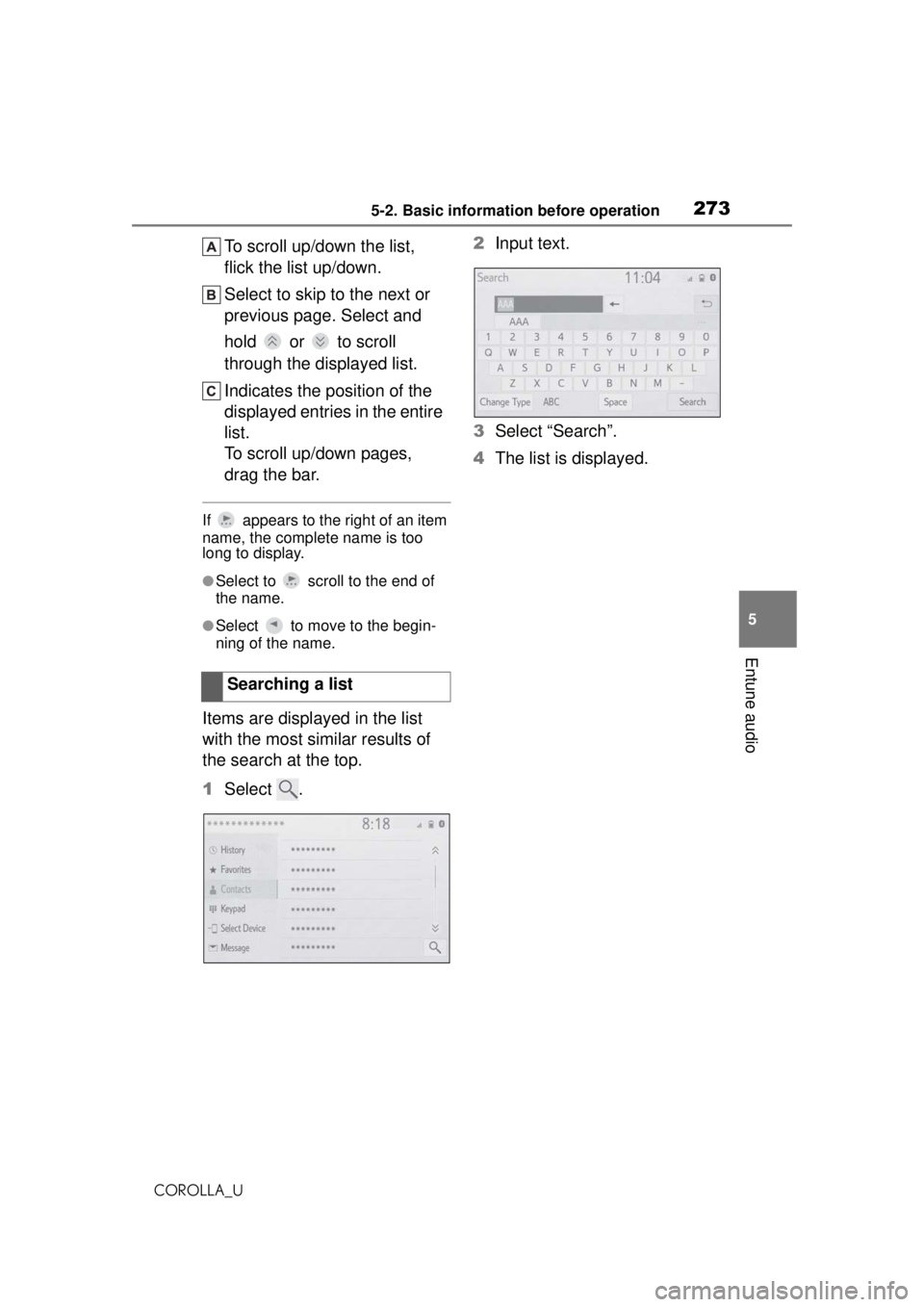
Items are displayed in the list
with the most similar results of
the search at the top.
1 Select . 2
Input text.
3 Select “Search”.
4 The list is displayed.
Searching a list
Page 274 of 588
2745-2. Basic information before operation
COROLLA_U
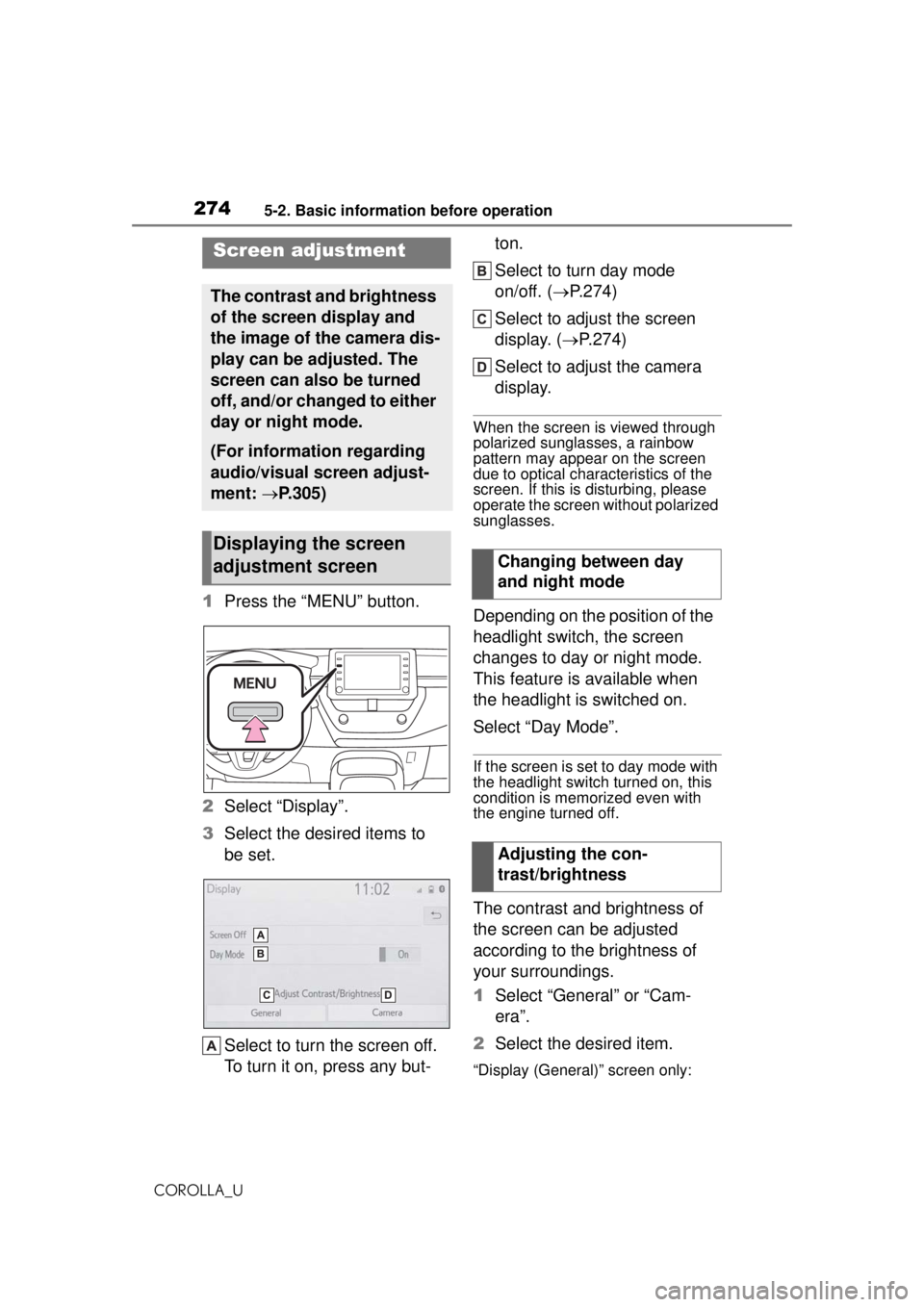
1Press the “MENU” button.
2 Select “Display”.
3 Select the desired items to
be set.
Select to turn the screen off.
To turn it on, press any but- ton.
Select to turn day mode
on/off. (
P.274)
Select to adjust the screen
display. ( P.274)
Select to adjust the camera
display.
When the screen is viewed through
polarized sunglasses, a rainbow
pattern may appear on the screen
due to optical char acteristics of the
screen. If this is disturbing, please
operate the screen without polarized
sunglasses.
Depending on the position of the
headlight switch, the screen
changes to day or night mode.
This feature is available when
the headlight is switched on.
Select “Day Mode”.
If the screen is set to day mode with
the headlight switch turned on, this
condition is memorized even with
the engine turned off.
The contrast and brightness of
the screen can be adjusted
according to the brightness of
your surroundings.
1 Select “General” or “Cam-
era”.
2 Select the desired item.
“Display (General)” screen only:
Screen adjustment
The contrast and brightness
of the screen display and
the image of the camera dis-
play can be adjusted. The
screen can also be turned
off, and/or changed to either
day or night mode.
(For information regarding
audio/visual screen adjust-
ment: P.305)
Displaying the screen
adjustment screen
Changing between day
and night mode
Adjusting the con-
trast/brightness
Page 275 of 588
2755-2. Basic information before operation
COROLLA_U
5
Entune audio
Select “<” or “>” to select the
desired display.
“Contrast”
“+”: Select to strengthen the con-
trast of the screen.
“-”: Select to weaken the contrast of
the screen.
“Brightness”
“+”: Select to brighten the screen.
“-”: Select to darken the screen.
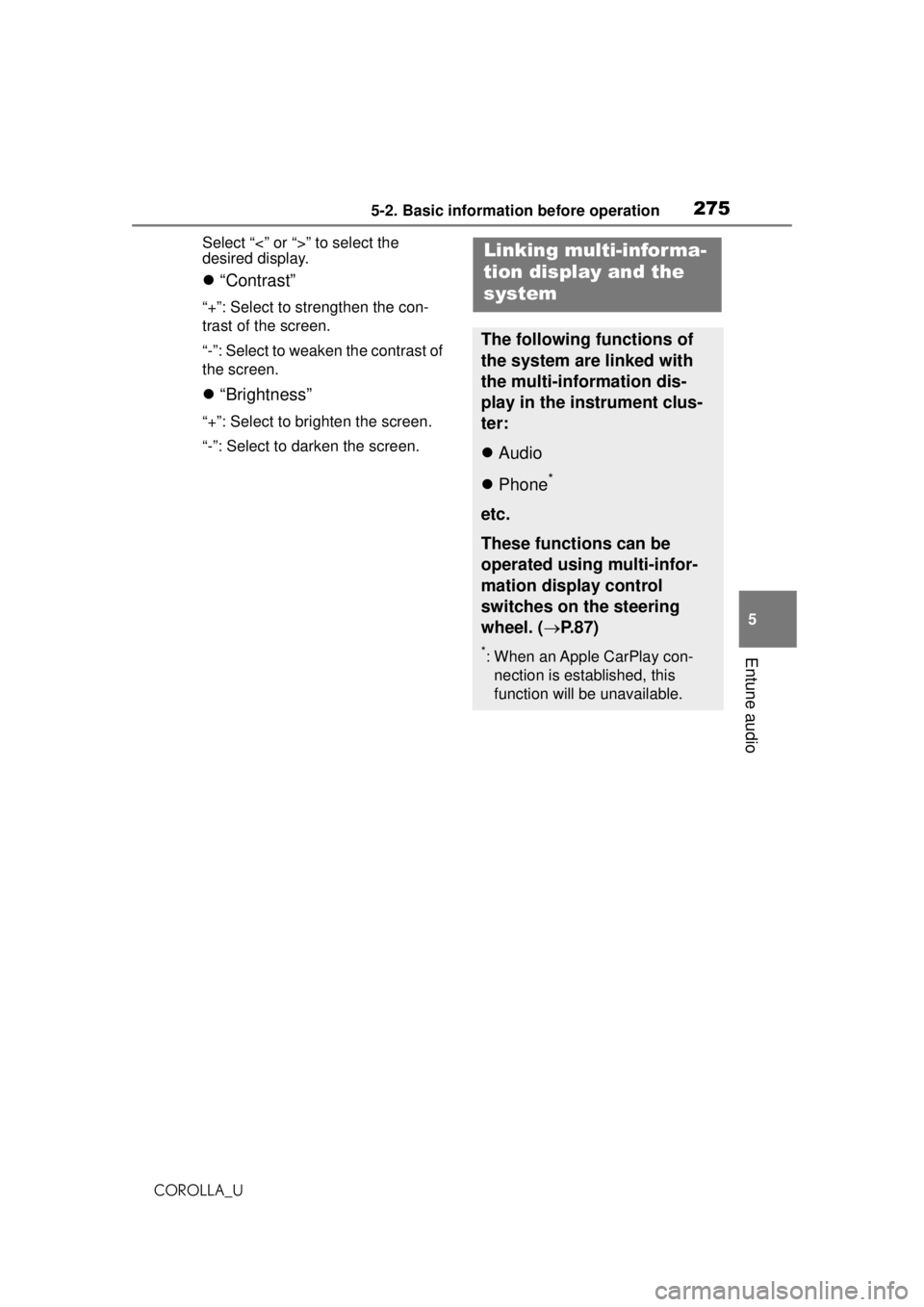
Linking multi-informa-
tion display and the
system
The following functions of
the system are linked with
the multi-information dis-
play in the instrument clus-
ter:
Audio
Phone
*
etc.
These functions can be
operated using multi-infor-
mation display control
switches on the steering
wheel. ( P.87)
*: When an Apple CarPlay con-
nection is established, this
function will be unavailable.
Page 277 of 588
2775-3. Connectivity settings
COROLLA_U
5
Entune audio
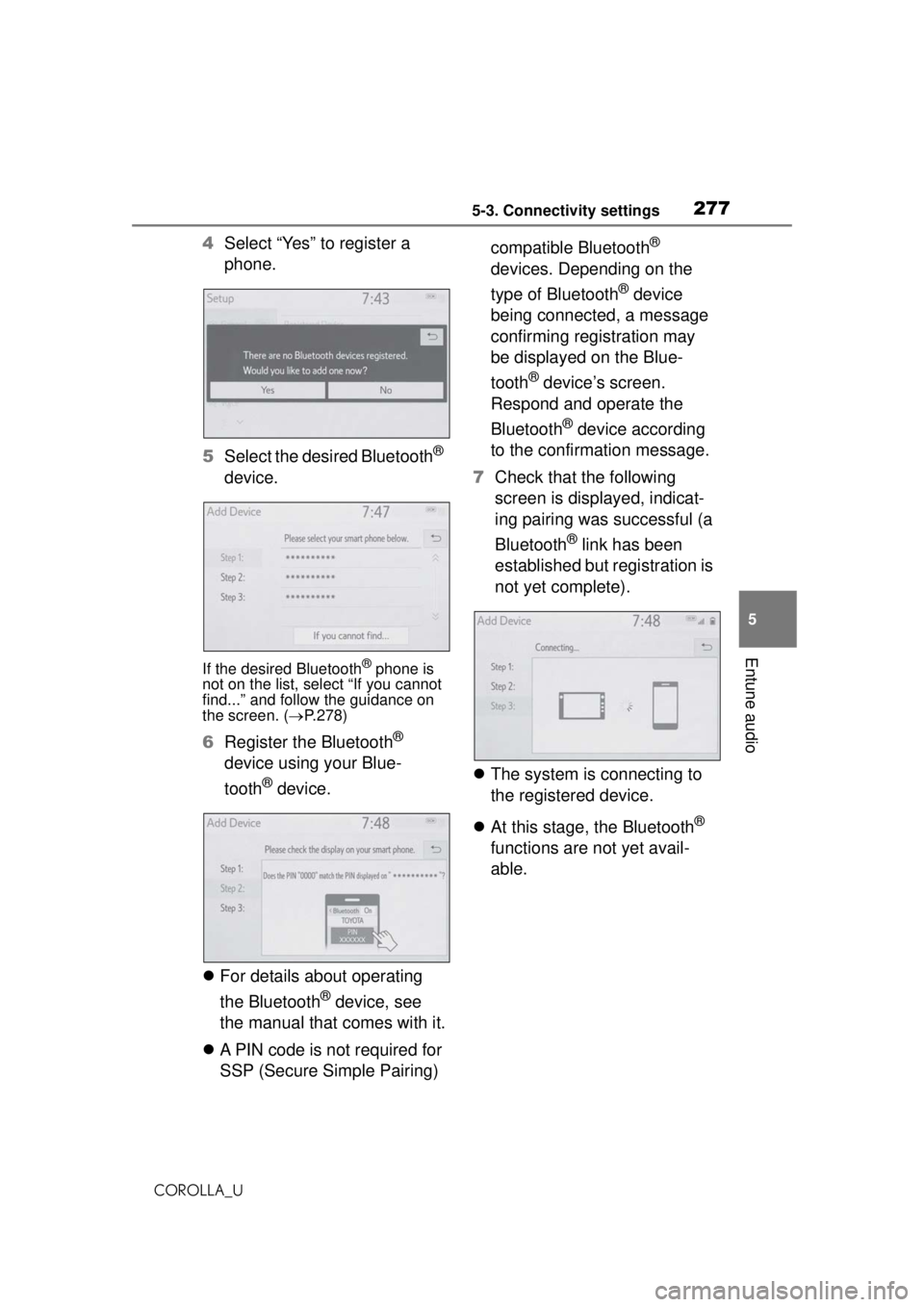
4 Select “Yes” to register a
phone.
5 Select the desired Bluetooth
®
device.
If the desired Bluetooth® phone is
not on the list, select “If you cannot
find...” and follow the guidance on
the screen. ( P.278)
6 Register the Bluetooth®
device using your Blue-
tooth
® device.
For details about operating
the Bluetooth
® device, see
the manual that comes with it.
A PIN code is not required for
SSP (Secure Simple Pairing) compatible Bluetooth
®
devices. Depending on the
type of Bluetooth
® device
being connected, a message
confirming registration may
be displayed on the Blue-
tooth
® device’s screen.
Respond and operate the
Bluetooth
® device according
to the confirmation message.
7 Check that the following
screen is displayed, indicat-
ing pairing was successful (a
Bluetooth
® link has been
established but registration is
not yet complete).
The system is connecting to
the registered device.
At this stage, the Bluetooth
®
functions are not yet avail-
able.
Page 278 of 588
2785-3. Connectivity settings
COROLLA_U
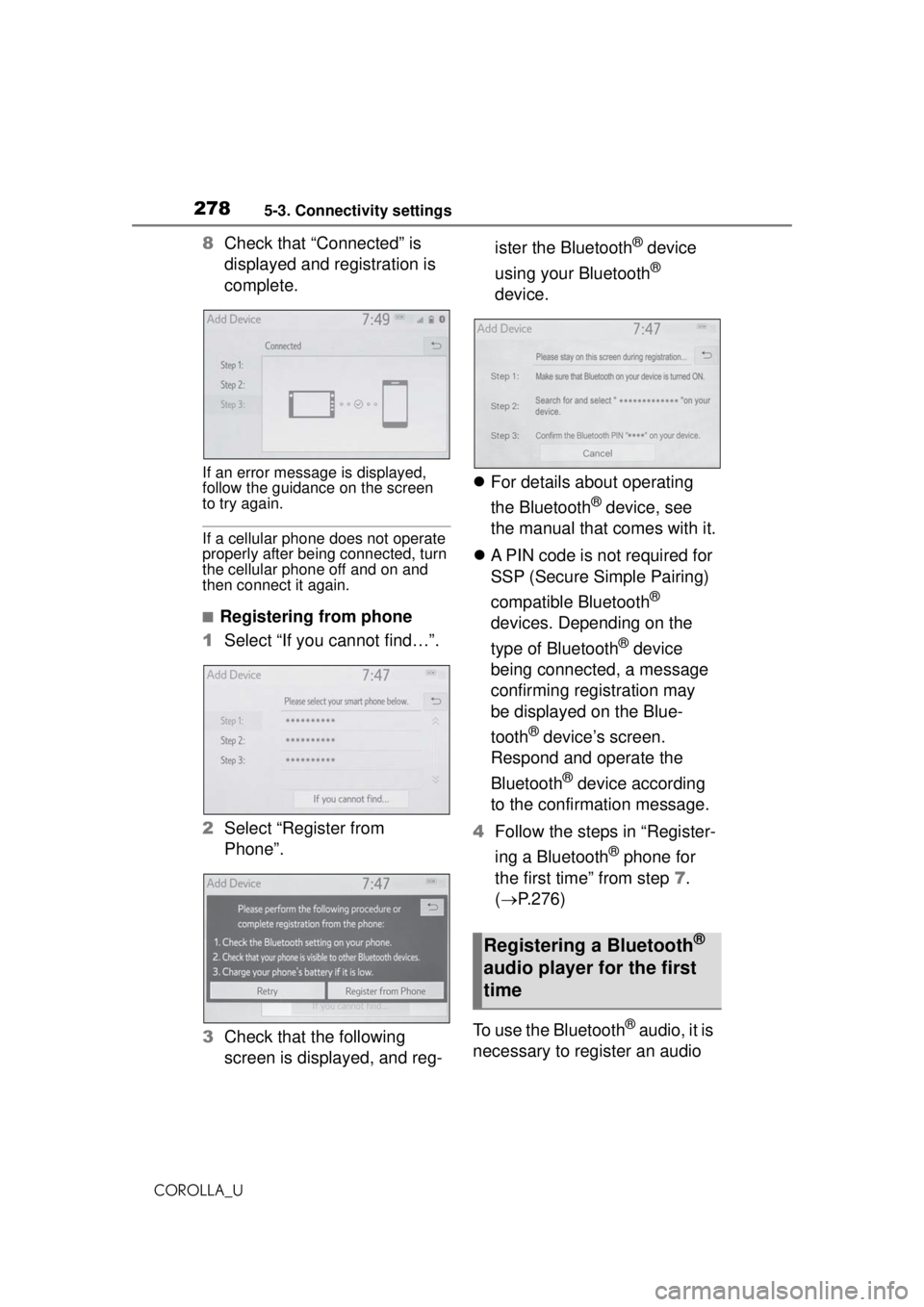
8Check that “Connected” is
displayed and registration is
complete.
If an error message is displayed,
follow the guidance on the screen
to try again.
If a cellular phone does not operate
properly after being connected, turn
the cellular phone off and on and
then connect it again.
■Registering from phone
1 Select “If you cannot find…”.
2 Select “Register from
Phone”.
3 Check that the following
screen is displayed, and reg- ister the Bluetooth
® device
using your Bluetooth
®
device.
For details about operating
the Bluetooth
® device, see
the manual that comes with it.
A PIN code is not required for
SSP (Secure Simple Pairing)
compatible Bluetooth
®
devices. Depending on the
type of Bluetooth
® device
being connected, a message
confirming registration may
be displayed on the Blue-
tooth
® device’s screen.
Respond and operate the
Bluetooth
® device according
to the confirmation message.
4 Follow the steps in “Register-
ing a Bluetooth
® phone for
the first time” from step 7.
( P.276)
To use the Bluetooth
® audio, it is
necessary to register an audio
Registering a Bluetooth®
audio player for the first
time
Page 279 of 588
2795-3. Connectivity settings
COROLLA_U
5
Entune audio
player with the system.
Once the player has been regis-
tered, it is possible to use the
Bluetooth
® audio.
This operation cannot be per-
formed while driving.
For details about registering a
Bluetooth
® device: P.276
When an Apple CarPlay con-
nection is established, Blue-
tooth
® functions of the system
will become unavailable and any
connected Bluetooth
® devices
will be disconnected.
1 Turn the Bluetooth
® connec-
tion setting of your audio
player on.
This function is not available when
the Bluetooth® connection setting
of your audio player is set to off.
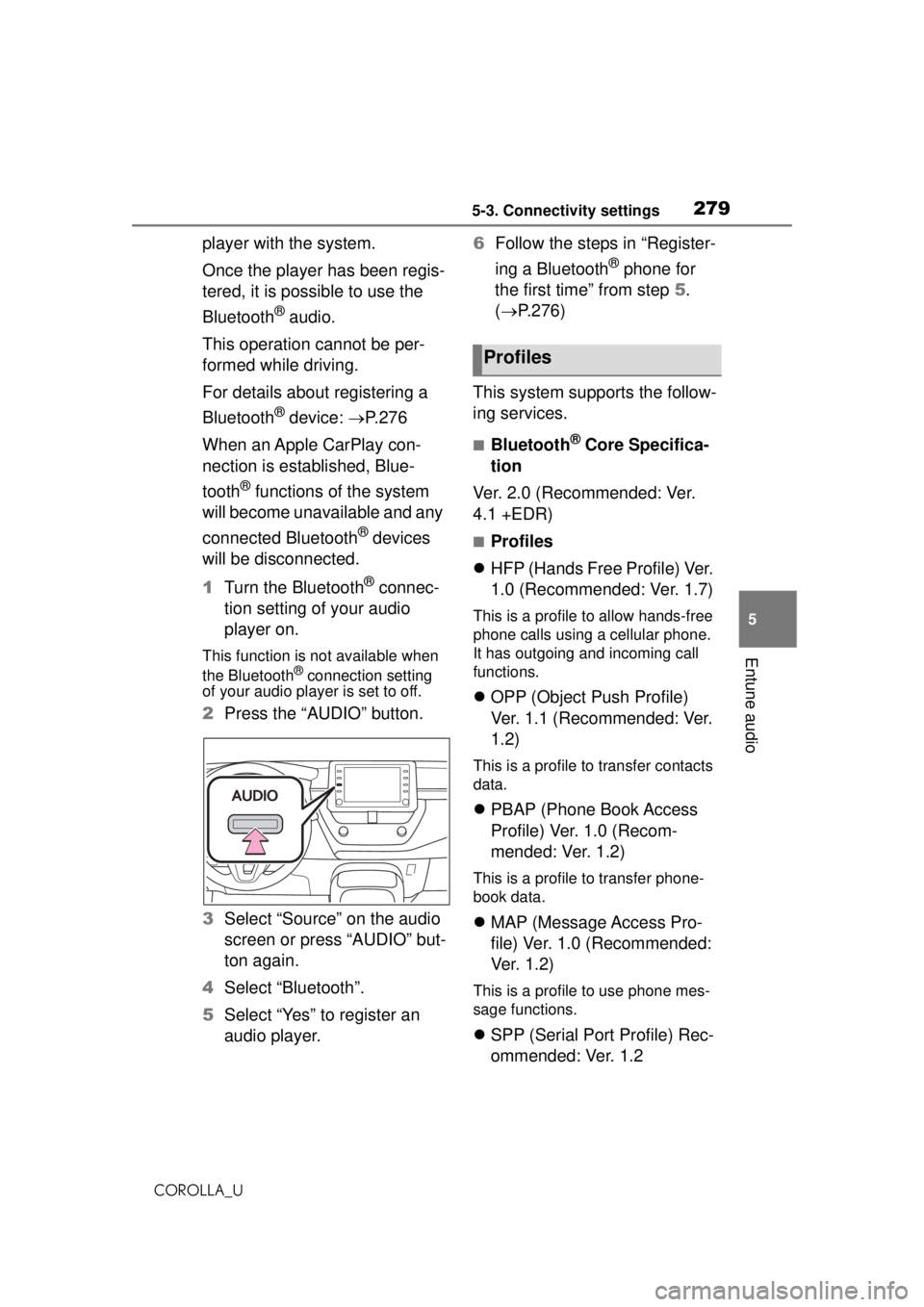
2 Press the “AUDIO” button.
3 Select “Source” on the audio
screen or press “AUDIO” but-
ton again.
4 Select “Bluetooth”.
5 Select “Yes” to register an
audio player. 6
Follow the steps in “Register-
ing a Bluetooth
® phone for
the first time” from step 5.
( P.276)
This system supports the follow-
ing services.
■Bluetooth® Core Specifica-
tion
Ver. 2.0 (Recommended: Ver.
4.1 +EDR)
■Profiles
HFP (Hands Free Profile) Ver.
1.0 (Recommended: Ver. 1.7)
This is a profile to allow hands-free
phone calls using a cellular phone.
It has outgoing and incoming call
functions.
OPP (Object Push Profile)
Ver. 1.1 (Recommended: Ver.
1.2)
This is a profile to transfer contacts
data.
PBAP (Phone Book Access
Profile) Ver. 1.0 (Recom-
mended: Ver. 1.2)
This is a profile to transfer phone-
book data.
MAP (Message Access Pro-
file) Ver. 1.0 (Recommended:
Ve r. 1 . 2 )
This is a profile to use phone mes-
sage functions.
SPP (Serial Port Profile) Rec-
ommended: Ver. 1.2
Profiles
Page 280 of 588
2805-3. Connectivity settings
COROLLA_UThis is a profile to use the “Toyota
Entune” function.
A2DP (Advanced Audio Dis-
tribution Profile) Ver. 1.0 (Rec-
ommended: Ver. 1.3)
This is a profile to transmit stereo
audio or high quality sound to the
audio/visual system.
AVRCP (Audio/Video Remote
Control Profile) Ver. 1.0 (Rec-
ommended: Ver. 1.6)
This is a profile to allow remote
control the A/V equipment.
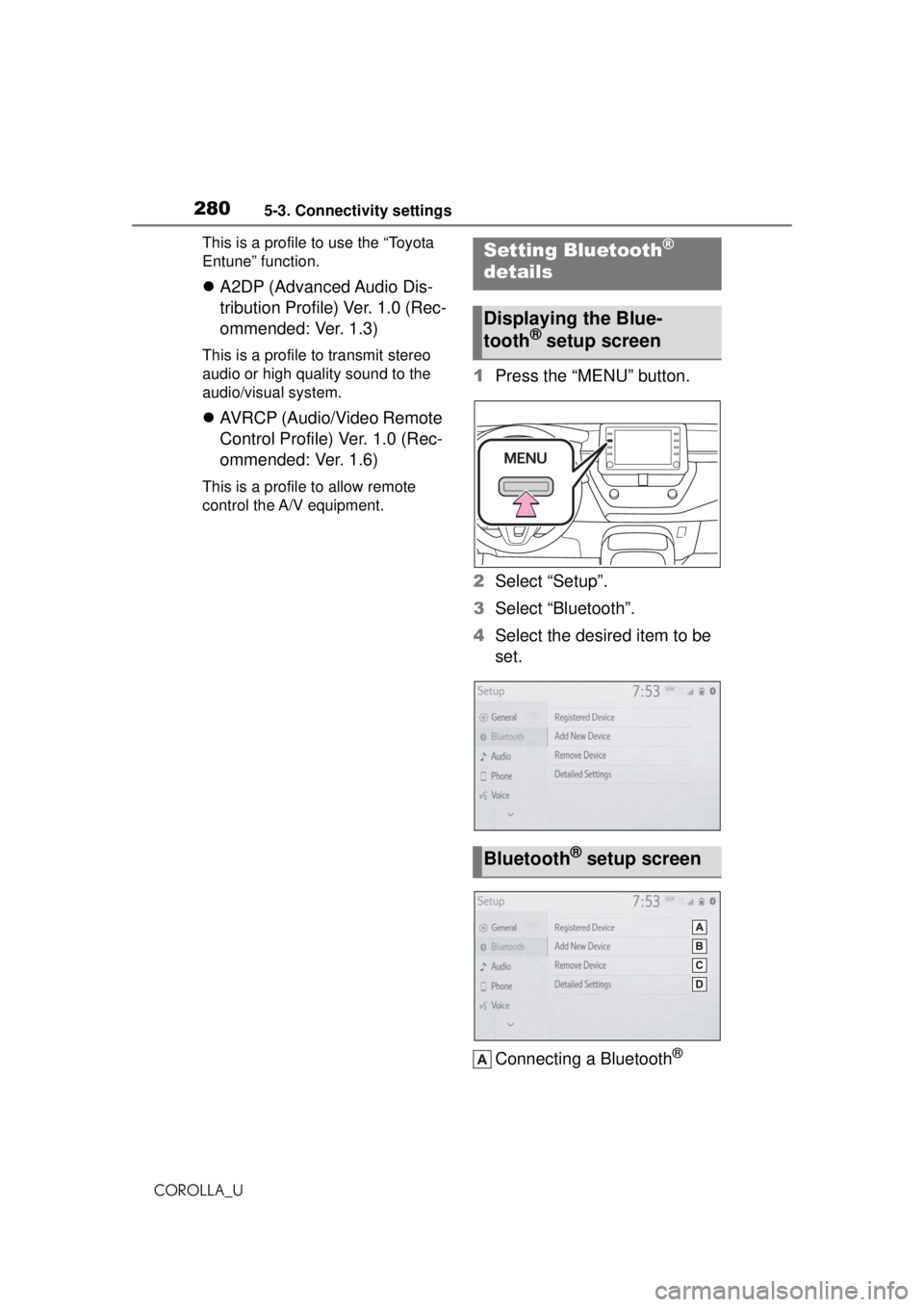
1 Press the “MENU” button.
2 Select “Setup”.
3 Select “Bluetooth”.
4 Select the desired item to be
set.
Connecting a Bluetooth
®
Setting Bluetooth®
details
Displaying the Blue-
tooth® setup screen
Bluetooth® setup screen
Page 281 of 588
2815-3. Connectivity settings
COROLLA_U
5
Entune audio
device and editing the Blue-
tooth
® device information
( P.280, 283)
Registering a Bluetooth
®
device ( P.282)
Deleting a Bluetooth
® device
( P.283)
Setting the Bluetooth
® sys-
tem ( P.285)
Up to 5 Bluetooth
® devices
(Phones (HFP) and audio play-
ers (AVP)) can be registered.
If more than 1 Bluetooth
® device
has been registered, select
which device to connect to.
1 Display the Bluetooth
® set-
tings screen. ( P.280)
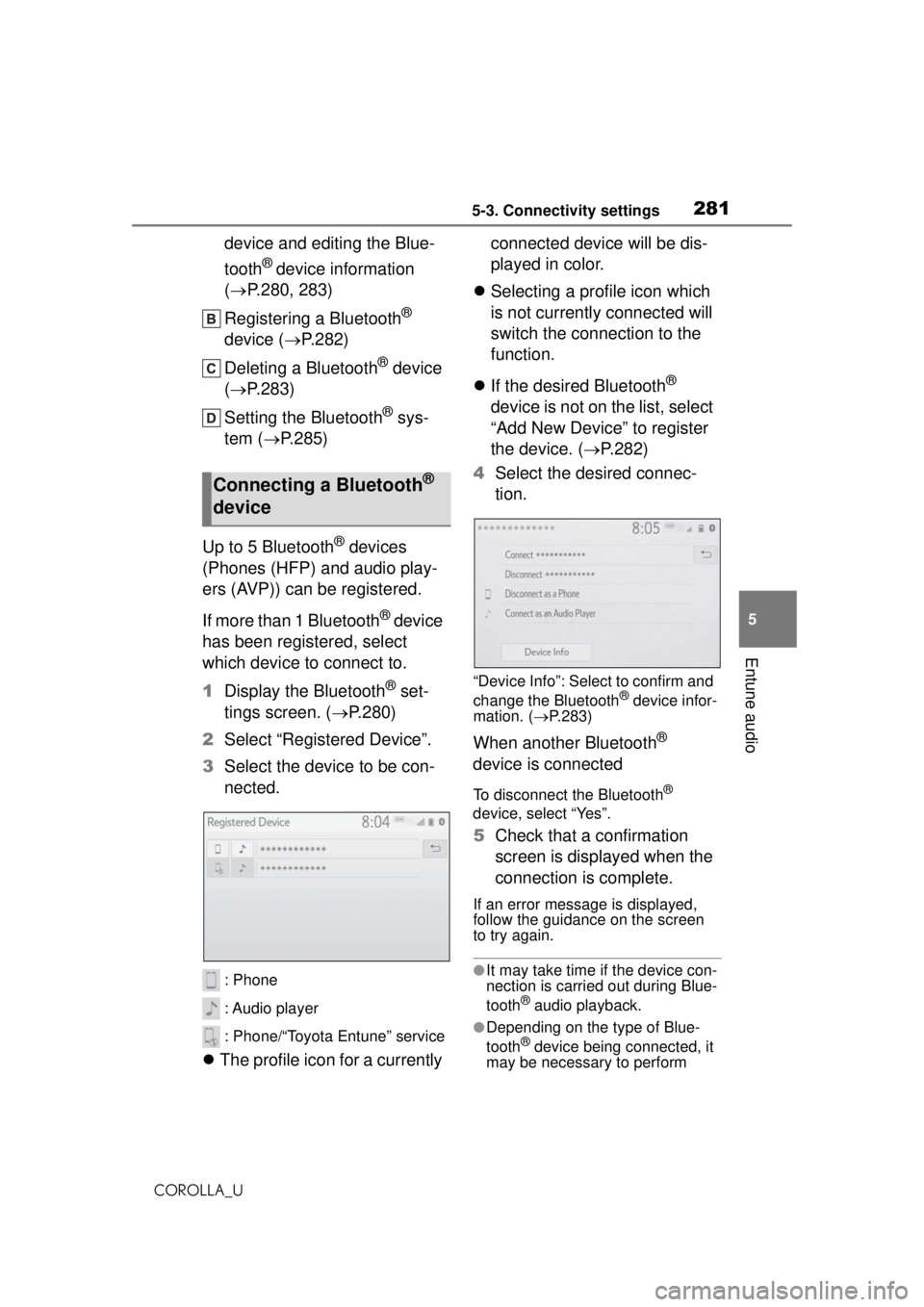
2 Select “Registered Device”.
3 Select the device to be con-
nected.
: Phone
: Audio player
: Phone/“Toyota Entune” service
The profile icon for a currently connected device will be dis-
played in color.
Selecting a profile icon which
is not currently connected will
switch the connection to the
function.
If the desired Bluetooth
®
device is not on the list, select
“Add New Device” to register
the device. ( P.282)
4 Select the desired connec-
tion.
“Device Info”: Select to confirm and
change the Bluetooth® device infor-
mation. ( P.283)
When another Bluetooth®
device is connected
To disconnect the Bluetooth®
device, select “Yes”.
5 Check that a confirmation
screen is displayed when the
connection is complete.
If an error message is displayed,
follow the guidance on the screen
to try again.
●It may take time if the device con-
nection is carried out during Blue-
tooth
® audio playback.
●Depending on the type of Blue-
tooth® device being connected, it
may be necessary to perform
Connecting a Bluetooth®
device