steering TOYOTA COROLLA 2020 Owners Manual (in English)
[x] Cancel search | Manufacturer: TOYOTA, Model Year: 2020, Model line: COROLLA, Model: TOYOTA COROLLA 2020Pages: 588, PDF Size: 13.49 MB
Page 2 of 588
2
COROLLA_UTABLE OF CONTENTS
For your information ........................
6
Reading this manual ...................... 10
How to search ................................ 11
Pictorial index ................................ 12
1-1. For safe use Before driving ........................ 22
For safe driving ..................... 23
Seat belts .............................. 25
SRS airbags .......................... 29
Front passenger occupant clas- sification system.................. 39
Exhaust gas precautions....... 44
1-2. Child safety Riding with children ............... 45
Child restraint systems .......... 46
1-3. Emergency assistance Safety Connect ..................... 61
1-4. Theft deterrent system Engine immobilizer system ... 67
Alarm ..................................... 69
2-1. Instrument cluster Warning lights and indicators............................................ 72
Gauges and meters (4.2-inch display)................................ 77
Gauges and meters (7-inch dis- play) .................................... 81
Multi-information display ....... 86
Fuel consumption information ............................................ 923-1. Key information
Keys ...................................... 96
3-2.
Opening, closing and locking
th
e doors
Doors ................................. 103
Trunk .................................. 108
Smart key system .............. 111
3-3. Adjusting the seats Front seats ......................... 118
Rear seats.......................... 119
Head restraints................... 121
3-4. Adjust
ing the steering wheel
and mirrors
Ste
ering wheel ...................123
Inside rear view mirror ....... 124
Outside rear view mirrors ... 125
3-5. Opening and closing the win- dows
Power windows .................. 127
Moon roof ........................... 130
4-1. Before driving Driving the vehicle.............. 134
Cargo and luggage ............ 142
Vehicle load limits .............. 145
Trailer towing...................... 145
Dinghy towing .................... 146
4-2. Driving procedures Engine (ignition) switch (vehicles without a smart key system)......................................... 147
Engine (ignition) switch (vehicles with a smart key system) . 148
Continuously variable transmis- sion (vehic les without paddle
shift switches)
..................153
1For safety and security
2Vehicle status information
and indicators
3Before driving
4Driving
Page 3 of 588
3TABLE OF CONTENTS
COROLLA_U
1
2
3
4
5
6
7
8
9
10
Continuously variable transmis- sion (vehicles with paddle shift
switches) .......................... 155
Manual transmission .......... 160
Turn signal lever................. 162
Parking brake ..................... 163
Electric parking brake......... 164
Brake Hold ......................... 167
4-3. Operating the lights and wip- ers
Headlight switch ................. 170
Automatic High Beam ........ 173
Windshield wipers and washer ......................................... 176
4-4. Refueling Opening the fuel tank cap .. 178
4-5. Using the driving support sys- tems
Toyota Safety Sense 2.0 .... 180
PCS (Pre-Collision System) ......................................... 187
LTA (Lane Tracing Assist)... 195
LDA (Lane Departure Alert with steering control) ............... 205
Dynamic radar cruise control with full-speed range ........ 213
Dynamic radar cruise control ......................................... 223
RSA (Road Sign Assist) ..... 233
BSM (Blind Spot Monitor)... 236
Rear view monitor system .. 241
Driving mode select switch ......................................... 249
Driving assist systems........ 250
4-6. Driving tips Winter driving tips............... 255
5-1. Basic function Buttons overview ................ 261Menu screen ......................
263
Status icon ......................... 264
“Setup” screen ................... 266
5-2. Basic information before oper- ation
Initial screen ....................... 267
Touch screen...................... 268
Home screen...................... 270
Entering letters and num- bers/list screen operation
......................................... 271
Screen adjustment ............. 274
Linking multi-information display and the system ................ 275
5-3. Connectivity settings Registering/Connecting a Blue-
tooth
® device ................... 276
Setting Bluetooth
® details .. 280
Wi-Fi
® Hotspot ................... 287
Apple CarPlay .................... 292
5-4. Other settings General settings ................. 296
Voice settings ..................... 299
Vehicle settings .................. 300
5-5. Using the audio/visual system Quick reference.................. 302
Some basics ...................... 303
5-6. Radio operation AM/FM radio ...................... 307
Internet radio ...................... 309
5-7. Media operation USB memory...................... 311
iPod/iPhone........................ 313
Bluetooth
® audio ................ 316
AUX.................................... 319
5-8. Audio/visual remote controls Steering switches ............... 321
5-9. Audio settings Setup.................................. 323
5Entune audio
Page 4 of 588
4TABLE OF CONTENTS
COROLLA_U
5-10. Tips for operating the audio/visual system
Operating information......... 324
5-11. Voice command system oper- ation
Voice command system ..... 336
Command list ..................... 339
5-12. Mobile Assistant operation Mobile Assistant ................. 343
5-13. Phone operation (Hands-free system for cellular phones)
Quick reference .................. 345
Some basics ...................... 346
Placing a call using the Blue-
tooth
® hands-free system
......................................... 350
Receiving a call using the Blue-
tooth
® hands-free system
......................................... 353
Talking on the Bluetooth
®
hands-free system ........... 354
Bluetooth
® phone message
function ............................ 356
5-14. Phone settings Setup .................................. 360
5-15. What to do if... (Bluetooth
®)
Troubleshooting ................. 369
5-16. Toyota Entune overview Toyota Entune .................... 373
Type A: Function achieved by using a smart phone or DCM
......................................... 374
Type B: Function achieved by using DCM and the system......................................... 377
Type C: Function achieved by using DCM ....................... 378
5-17. Toyota Entune operation Toyota Entune App Suite Con-nect .................................. 3795-18. Toyota Entune App Suite Con-
nect settings
Setup.................................. 383
6-1. Using the air conditioning system and defogger
Manual air conditioning system......................................... 386
Automatic air conditioning sys- tem ................................... 391
Heated steering wheel/seat heaters ............................. 396
6-2. Using the interior lights Interior lights list ................. 398
6-3. Using the storage features List of storage features ...... 400
Trunk features .................... 403
6-4. Other interior features Other interior features ........ 404
Garage door opener........... 414
7-1. Maintenance and care Cleaning and protecting the vehicle exterior................. 422
Cleaning and protecting the vehicle interior.................. 424
7-2. Maintenance Maintenance requirements......................................... 427
General maintenance......... 428
Emission inspection and mainte- nance (I/M) programs ...... 431
7-3. Do-it-yourself maintenance Do-it-yourself service precau-tions ................................. 432
Hood .................................. 434
Positioning a floor jack ....... 435
6Interior features
7Maintenance and care
Page 15 of 588

15Pictorial index
COROLLA_U
When a warning message is displayed ................................ P.490
Parking brake
*4................................................................... P.163
Applying/releasing................................................................ P.163
Precautions for winter season.... .......................................... P.256
Warning light/message.................. ............................... P.163, 481
Turn signal lever................................................................. P.162
Headlight switch ................................................................ P.170
Headlights/parking lights/tail lights/ side marker lights/daytime run-
ning lights/LED accent lights
*4............................................. P.170
Windshield wiper and washer switch............................... P.176
Usage................................................................................... P.176
Adding washer fluid .............................................................. P.443
Emergency flasher switch ................................................. P.472
Hood lock releas e lever .............................................. ....... P.434
Tilt and telescopic steering lo ck release lever ................ P.123
Air conditioning system ................................. ........... P.386, 391
Usage........................................................................... P.386, 391
Rear window defogger ................................................. P.388, 392
Entune Audio
*4................................................................... P.261
Entune Audio Plus
*4, 5
Entune Premium Audio*4, 5
*1
: Vehicles without a smart key system
*2: Vehicles with a smart key system
*3: Vehicles with a continuously variable transmission
*4: If equipped
*5: Refer to “NAVIGATION AND MU LTIMEDIA SYSTEM OWNER’S MAN-
UAL”.
Page 16 of 588
16Pictorial index
COROLLA_U
■ Switches
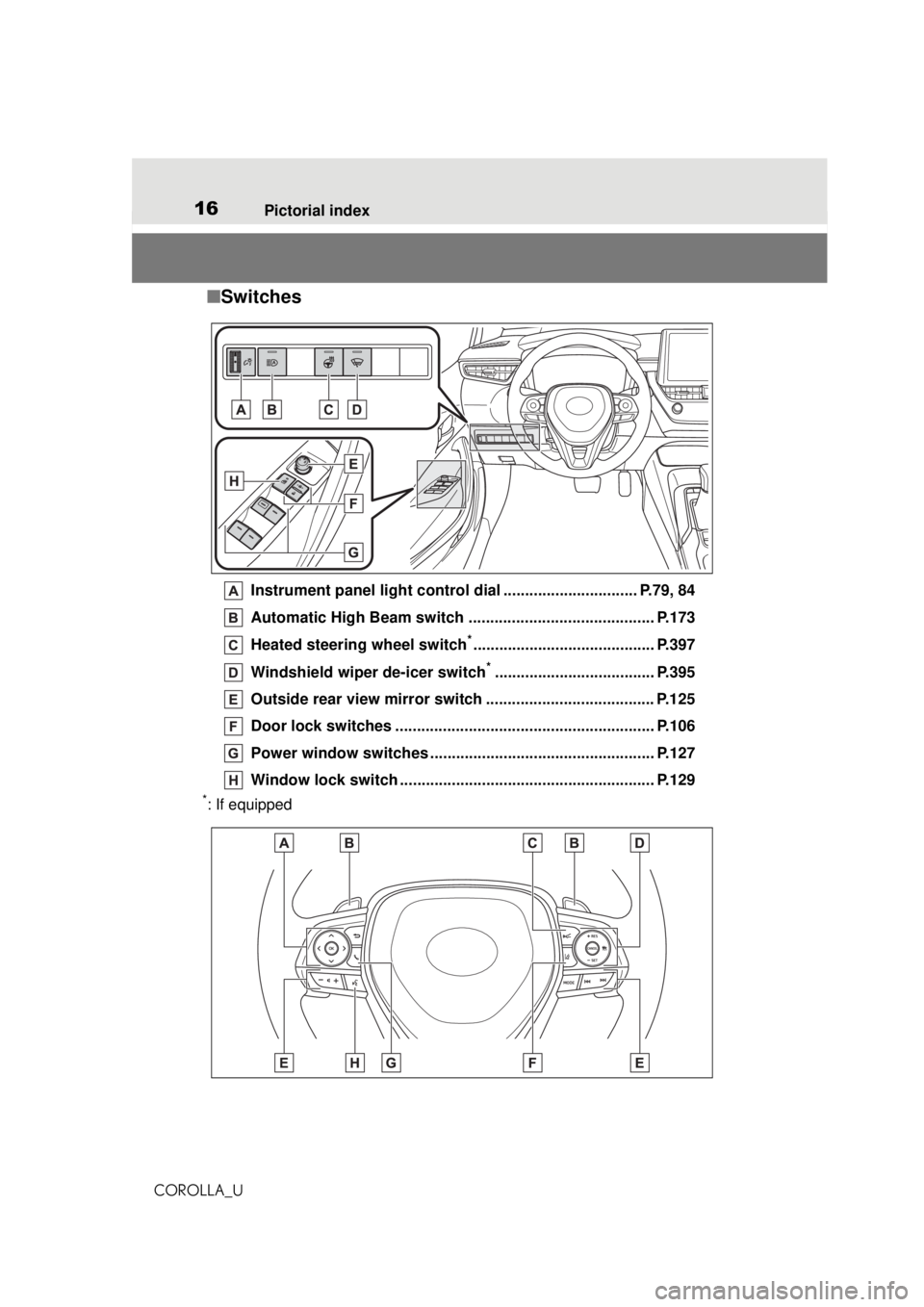
Instrument panel light control dial ............................... P.79, 84
Automatic High Beam switch ........................................... P.173
Heated steering wheel switch
*.......................................... P.397
Windshield wiper de-icer switch
*..................................... P.395
Outside rear view mirror switch ....................................... P.125
Door lock switches ............................................................ P.106
Power window switches ................................. ................... P.127
Window lock switch .... ................................................ ....... P.129
*: If equipped
Page 17 of 588
17Pictorial index
COROLLA_U
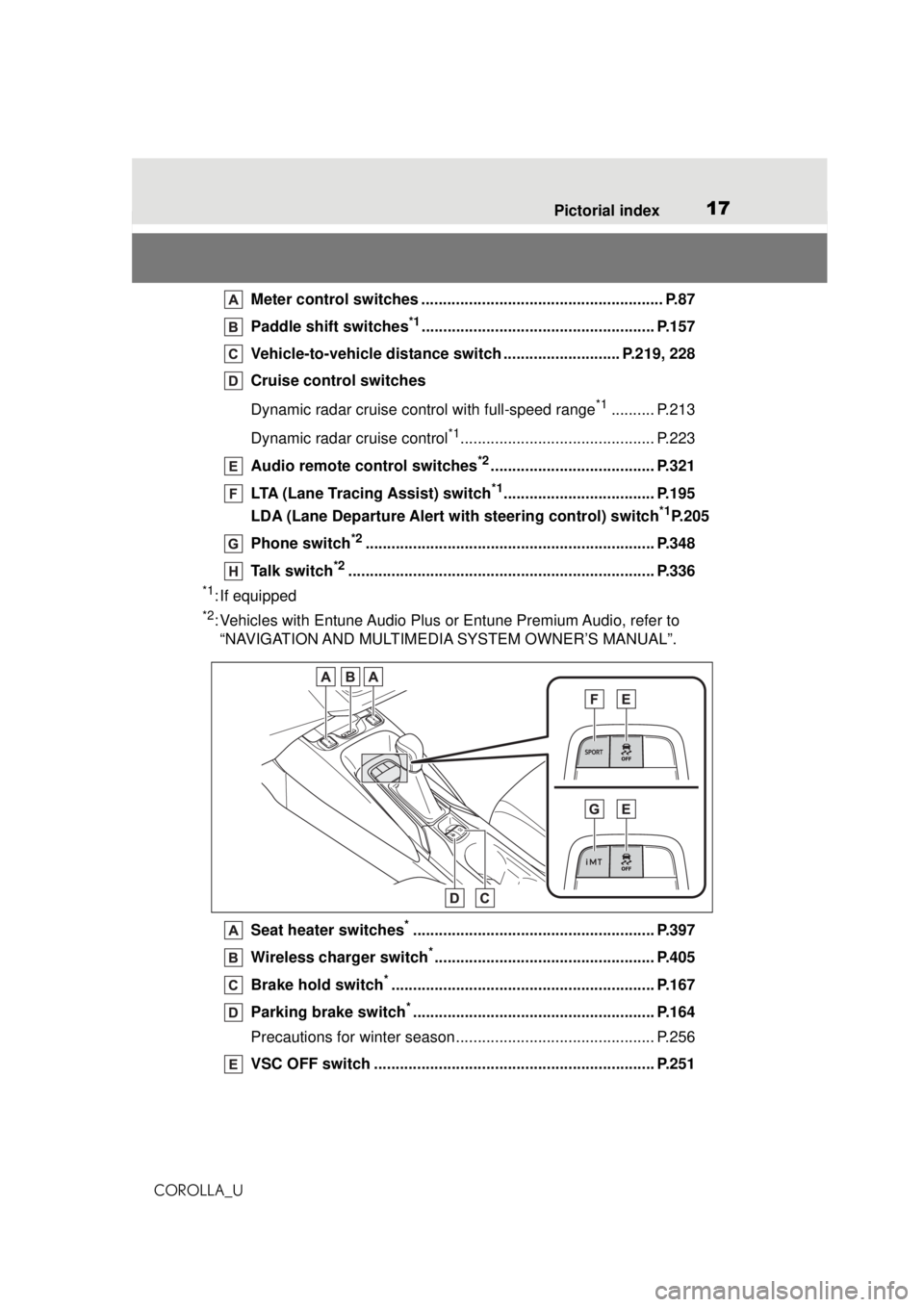
Meter control switches ............... ......................................... P.87
Paddle shift switches
*1...................................................... P.157
Vehicle-to-vehicle distance swit ch ........................... P.219, 228
Cruise control switches
Dynamic radar cruise control with full-speed range
*1.......... P.213
Dynamic radar cruise control
*1............................................. P.223
Audio remote control switches
*2...................................... P.321
LTA (Lane Tracing Assist) switch
*1................................... P.195
LDA (Lane Departure Alert with steering control) switch
*1P.205
Phone switch
*2................................................................... P.348
Talk switch
*2....................................................................... P.336
*1: If equipped
*2: Vehicles with Entune Audio Plus or Entune Premium Audio, refer to “NAVIGATION AND MULTIMEDIA SYSTEM OWNER’S MANUAL”.
Seat heater switches
*........................................................ P.397
Wireless charger switch
*................................................... P.405
Brake hold switch
*............................................................. P.167
Parking brake switch
*........................................................ P.164
Precautions for winter season.... .......................................... P.256
VSC OFF switch ................................................................. P.251
Page 23 of 588
231-1. For safe use
COROLLA_U
1
For safety and security
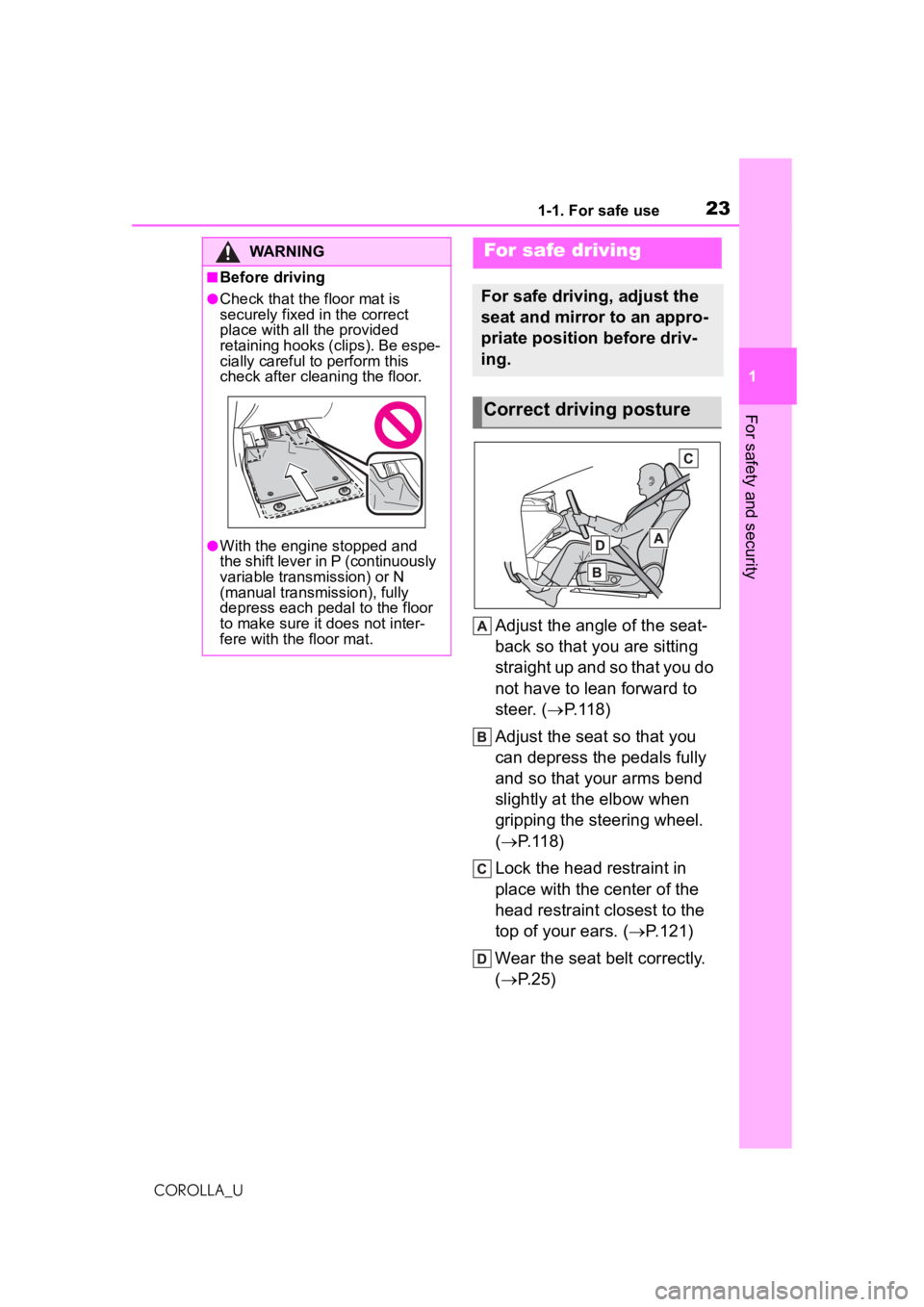
Adjust the angle of the seat-
back so that you are sitting
straight up and so that you do
not have to lean forward to
steer. ( P.118)
Adjust the seat so that you
can depress the pedals fully
and so that your arms bend
slightly at the elbow when
gripping the steering wheel.
( P.118)
Lock the head restraint in
place with the center of the
head restraint closest to the
top of your ears. ( P.121)
Wear the seat belt correctly.
( P.25)
WARNING
■Before driving
●Check that the floor mat is
securely fixed in the correct
place with all the provided
retaining hooks (c lips). Be espe-
cially careful to perform this
check after cleaning the floor.
●With the engine stopped and
the shift lever in P (continuously
variable transmission) or N
(manual transmission), fully
depress each pedal to the floor
to make sure it does not inter-
fere with the floor mat.
For safe driving
For safe driving, adjust the
seat and mirror to an appro-
priate position before driv-
ing.
Correct driving posture
Page 33 of 588
331-1. For safe use
COROLLA_U
1
For safety and security
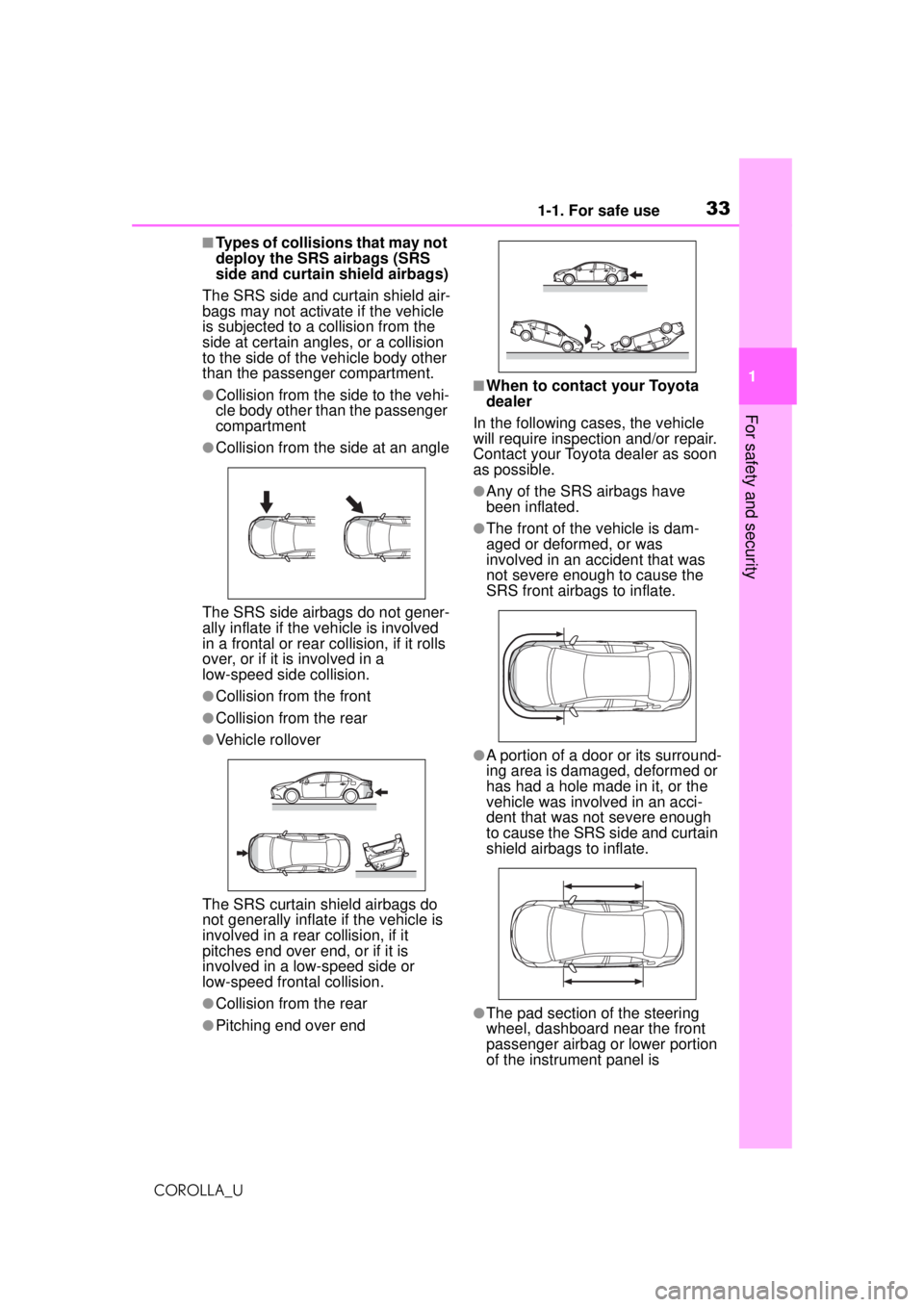
■Types of collisions that may not
deploy the SRS airbags (SRS
side and curtain shield airbags)
The SRS side and curtain shield air-
bags may not activate if the vehicle
is subjected to a collision from the
side at certain angles, or a collision
to the side of the vehicle body other
than the passenger compartment.
●Collision from the side to the vehi-
cle body other than the passenger
compartment
●Collision from the side at an angle
The SRS side airbags do not gener-
ally inflate if the vehicle is involved
in a frontal or rear collision, if it rolls
over, or if it is involved in a
low-speed side collision.
●Collision from the front
●Collision from the rear
●Vehicle rollover
The SRS curtain shield airbags do
not generally inflate if the vehicle is
involved in a rear collision, if it
pitches end over end, or if it is
involved in a low-speed side or
low-speed fron tal collision.
●Collision from the rear
●Pitching end over end
■When to contact your Toyota
dealer
In the following cases, the vehicle
will require inspection and/or repair.
Contact your Toyota dealer as soon
as possible.
●Any of the SRS airbags have
been inflated.
●The front of the vehicle is dam-
aged or deformed, or was
involved in an accident that was
not severe enough to cause the
SRS front airbags to inflate.
●A portion of a door or its surround-
ing area is damaged, deformed or
has had a hole made in it, or the
vehicle was involved in an acci-
dent that was not severe enough
to cause the SRS side and curtain
shield airbags to inflate.
●The pad section of the steering
wheel, dashboard near the front
passenger airbag or lower portion
of the instrument panel is
Page 35 of 588
351-1. For safe use
COROLLA_U
1
For safety and security
WARNING
• If your steering wheel is adjust- able, tilt it downward. This
points the airbag toward your
chest instead of your head and
neck.
The seat should be adjusted as
recommended by NHTSA above,
while still maintaining control of
the foot pedals, steering wheel,
and your view of the instrument
panel controls.
●If the seat belt extender has
been connected to the front
seat belt buckles but the seat
belt extender has not also been
fastened to the latch plate of the
seat belt, the SRS front airbags
will judge that the driver and
front passenger are wearing the
seat belt even though the seat
belt has not been connected. In
this case, the SRS front airbags
may not activate correctly in a
collision, resultin g in death or
serious injury in the event of a
collision. Be sure to wear the
seat belt with the seat belt
extender.
●The SRS front passenger air-
bag also deploys with consider-
able force, and can cause death
or serious injury especially if the
front passenger is very close to
the airbag. The front passenger
seat should be as far from the
airbag as possible with the seat-
back adjusted, so the front pas-
senger sits upright.
●Improperly seated and/or
restrained infants and children
can be killed or seriously injured
by a deploying airbag. An infant
or child who is too small to use
a seat belt should be properly
secured using a child restraint
system. Toyota strongly recom-
mends that all infants and chil-
dren be placed in the rear seats
of the vehicle and properly
restrained. The rear seats are
safer for infants and children
than the front passenger seat.
(
P. 4 6 )
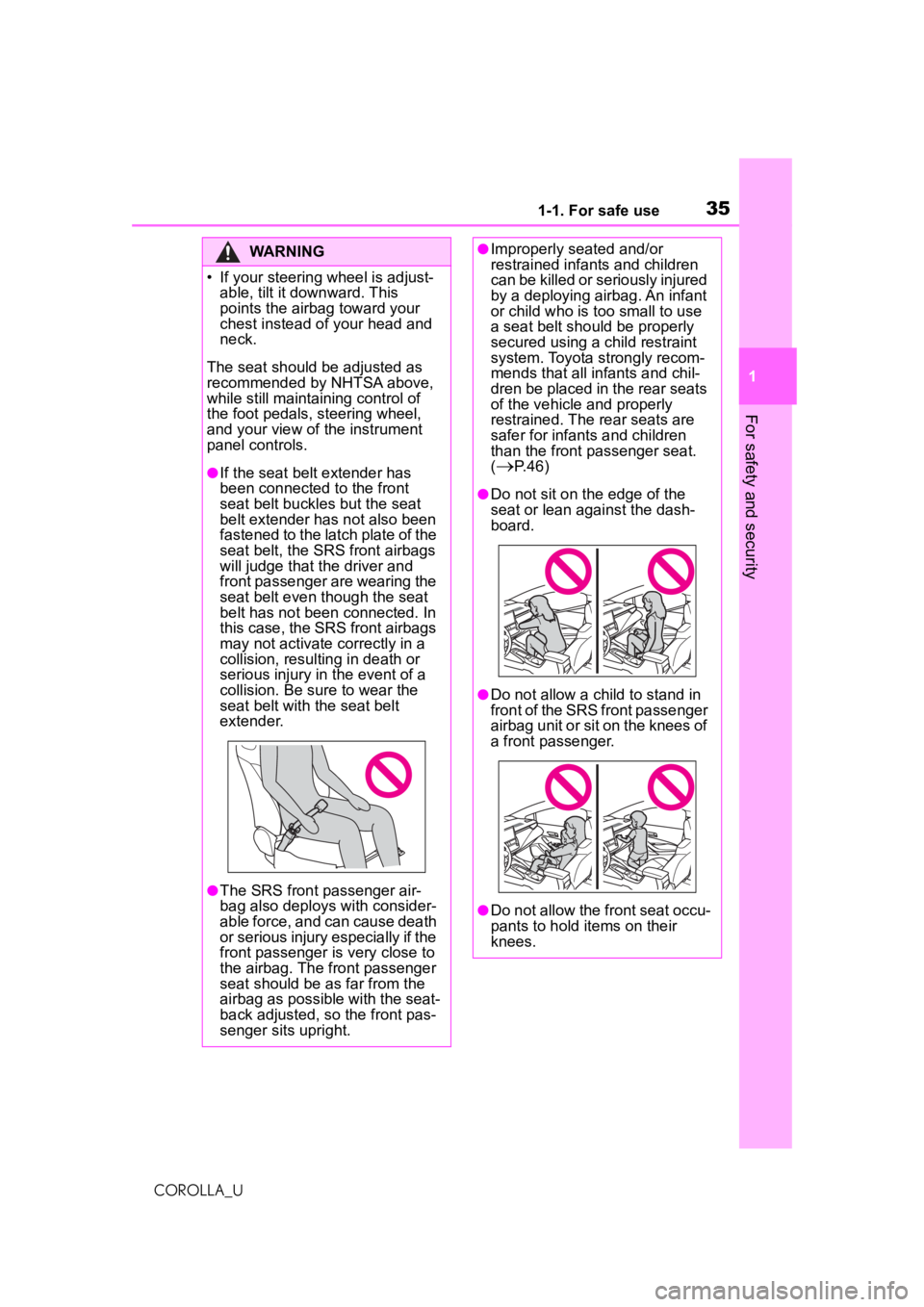
●Do not sit on the edge of the
seat or lean against the dash-
board.
●Do not allow a child to stand in
front of the SRS front passenger
airbag unit or sit on the knees of
a front passenger.
●Do not allow the front seat occu-
pants to hold items on their
knees.
Page 36 of 588
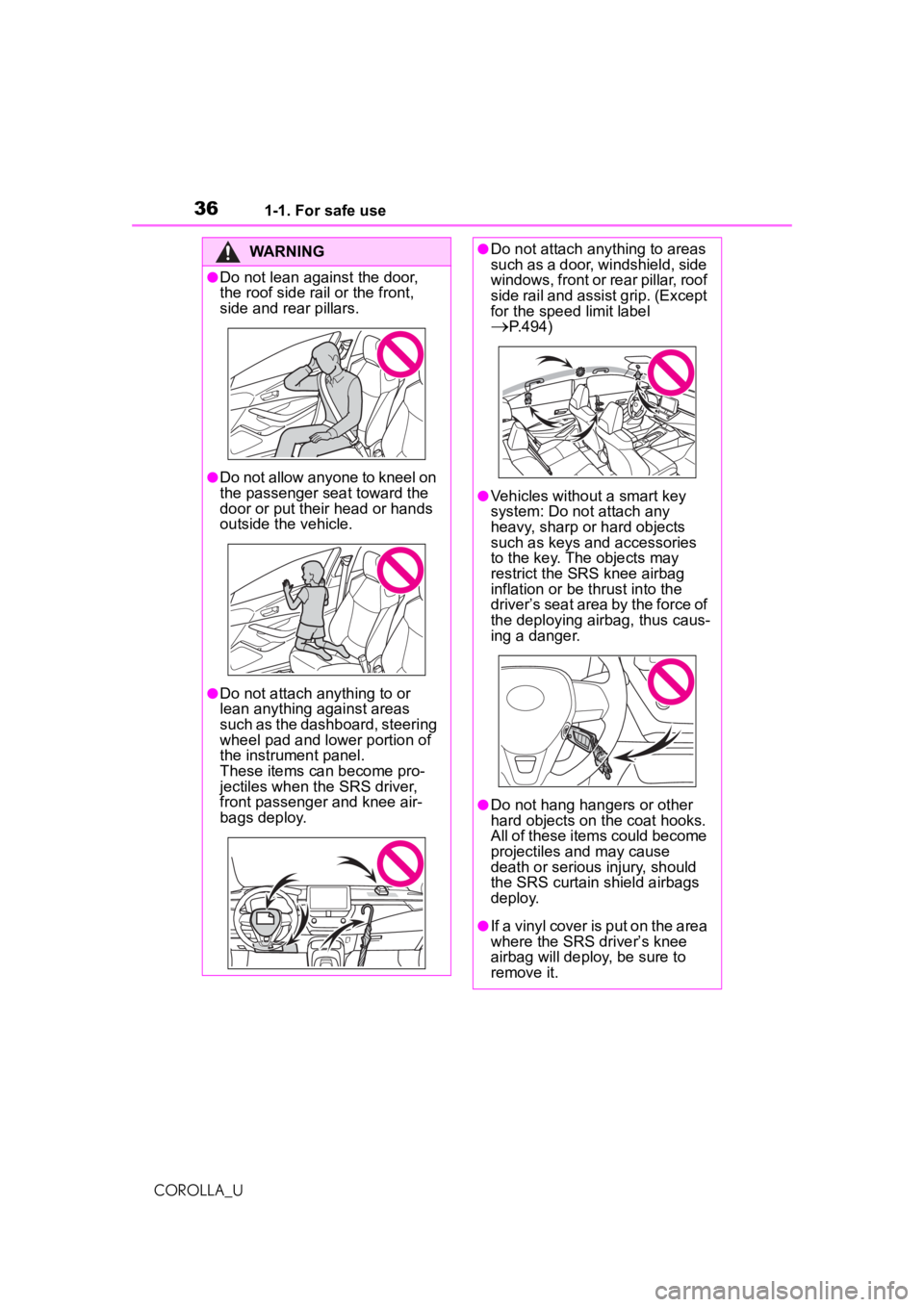
361-1. For safe use
COROLLA_U
WARNING
●Do not lean against the door,
the roof side rail or the front,
side and rear pillars.
●Do not allow anyone to kneel on
the passenger seat toward the
door or put their head or hands
outside the vehicle.
●Do not attach anything to or
lean anything against areas
such as the dashboard, steering
wheel pad and lower portion of
the instrument panel.
These items can become pro-
jectiles when the SRS driver,
front passenger and knee air-
bags deploy.
●Do not attach anything to areas
such as a door, windshield, side
windows, front or rear pillar, roof
side rail and assist grip. (Except
for the speed limit label
P.494)
●Vehicles without a smart key
system: Do not attach any
heavy, sharp or hard objects
such as keys and accessories
to the key. The objects may
restrict the SRS knee airbag
inflation or be thrust into the
driver’s seat area by the force of
the deploying airbag, thus caus-
ing a danger.
●Do not hang hangers or other
hard objects on the coat hooks.
All of these items could become
projectiles and may cause
death or serious injury, should
the SRS curtain shield airbags
deploy.
●If a vinyl cover is put on the area
where the SRS driver’s knee
airbag will deploy, be sure to
remove it.