lights TOYOTA COROLLA 2021 (in English) Service Manual
[x] Cancel search | Manufacturer: TOYOTA, Model Year: 2021, Model line: COROLLA, Model: TOYOTA COROLLA 2021Pages: 624, PDF Size: 20.3 MB
Page 243 of 624
2434-5. Using the driving support systems
4
Driving
COROLLA_U
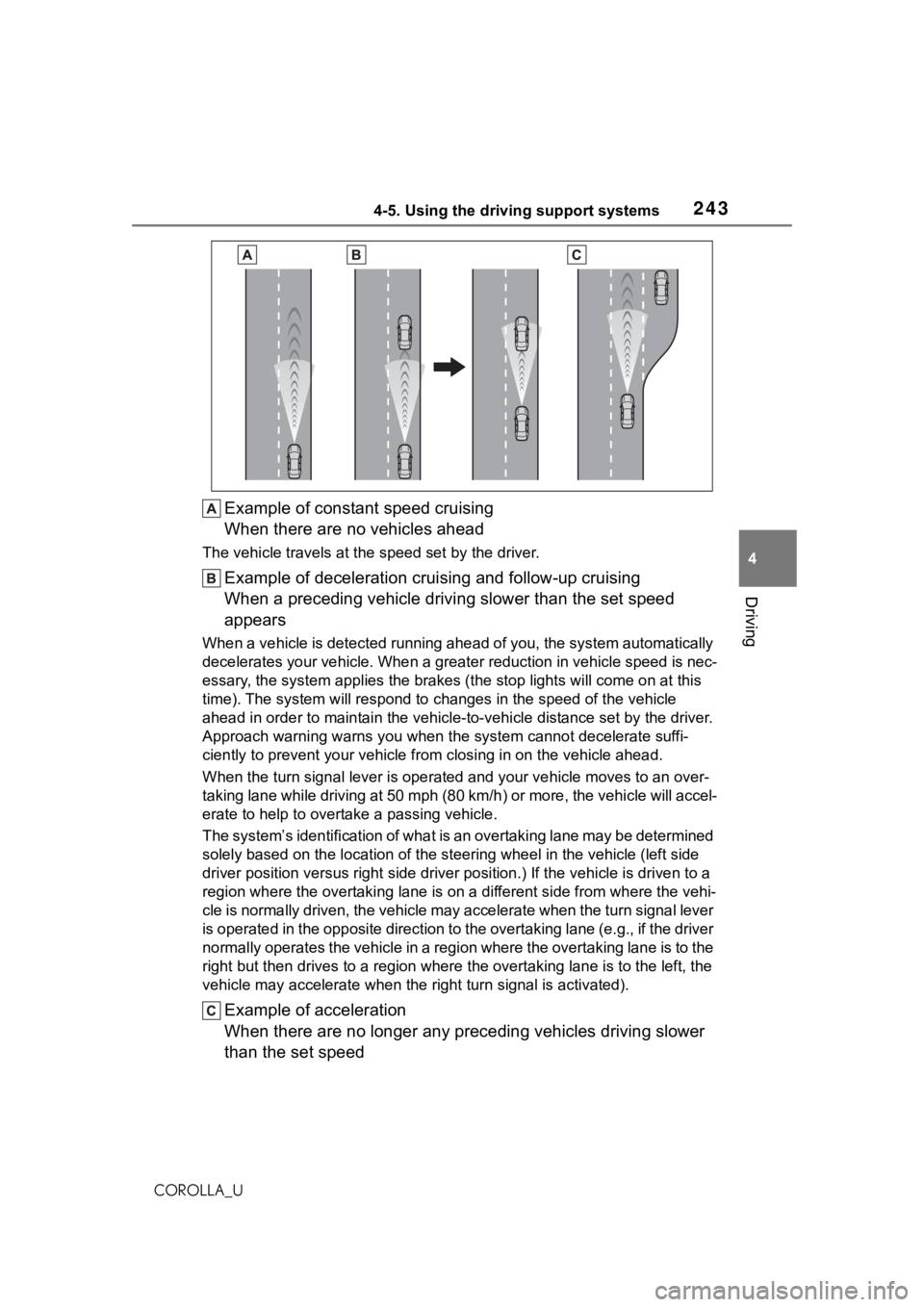
Example of constant speed cruising
When there are no vehicles ahead
The vehicle travels at the speed set by the driver.
Example of deceleration crui sing and follow-up cruising
When a preceding vehicle driving slower than the set speed
appears
When a vehicle is detected runni ng ahead of you, the system automatically
decelerates your vehicle. When a greater reduction in vehicle s peed is nec-
essary, the system applies the brakes (the stop lights will come on at this
time). The system will respond to changes in the speed of the vehicle
ahead in order to maintain the vehicle-to-vehicle distance set by the driver.
Approach warning warns you when the system cannot decelerate suffi-
ciently to prevent your vehicle from closing in on the vehicle ahead.
When the turn signal lever is ope rated and your vehicle moves to an over-
taking lane while driving at 50 mph (80 km/h) or more, the vehi cle will accel-
erate to help to overt ake a passing vehicle.
The system’s identification of what is an overtaking lane may be determined
solely based on the location of the steering wheel in the vehicle (left side
driver position versus right side driver position.) If the vehi cle is driven to a
region where the overtaking lane is on a different side from wh ere the vehi-
cle is normally driven, the vehicle may accelerate when the tur n signal lever
is operated in the opposite direction to the overtaking lane (e .g., if the driver
normally operates the vehicle in a region where the overtaking lane is to the
right but then drives to a region where the overtaking lane is to the left, the
vehicle may accelerate when the right turn signal is activated).
Example of acceleration
When there are no longer any preceding vehicles driving slower
than the set speed
Page 268 of 624
2684-5. Using the driving support systems
COROLLA_U
■If you notice any symptoms
If you notice any of the following symptoms, refer to the likely cause
and the solution, and re-check.
If the symptom is not resolved by the solution, have the vehicl e
inspected by your Toyota dealer.
Things you should know
SymptomLikely causeSolution
The image is difficult to
see
The vehicle is in a dark
area
The temperature
around the lens is
either high or low
The outside tempera-
ture is low
There are water drop-
lets on the camera
It is raining or humid
Foreign matter (mud
etc.) is adhering to the
camera
Sunlight or headlights
are shining directly
into the camera
The vehicle is under
fluorescent lights,
sodium lights, mer-
cury lights etc.
If this happens due to
these causes, it does
not indicate a malfunc-
tion. Back up while visu-
ally checking the
vehicle’s surroundings.
(Use the monitor again
once conditions have
been improved.) The
procedure for adjusting
the picture quality of the
rear view monitor sys-
tem is the same as the
procedure for adjusting
the screen. ( P.296)
The image is blurry
Dirt or foreign matter
(such as water droplets,
snow, mud etc.) is
adhering to the camera.Flush the camera with a
large quantity of water
and wipe the camera
lens clean with a soft
and wet cloth.
The image is out of
alignment
The camera or sur-
rounding area has
received a strong
impact.Have the vehicle
inspected by your Toy-
ota dealer.
Page 272 of 624
2724-5. Using the driving support systems
COROLLA_U
■ABS (Anti-lock Brake Sys-
tem)
Helps to prevent wheel lock
when the brakes are applied
suddenly, or if the brakes are
applied while driving on a slip-
pery road surface
■Brake assist
Generates an increased level of
braking force after the brake
pedal is depressed when the
system detects a panic stop sit-
uation
■VSC (Vehicle Stability Con-
trol)
Helps the driver to control skid-
ding when swerving suddenly or
turning on slippery road sur-
faces.
■Enhanced VSC (Enhanced
Vehicle Stability Control)
Provides cooperative control of
the ABS, TRAC, VSC and EPS.
Helps to maintain directional
stability when swerving on slip-
pery road surfaces by con-
trolling steering performance.
■TRAC (Traction Control)
Helps to maintain drive power
and prevent the drive wheels
from spinning when starting the
vehicle or accelerating on slip-
pery roads
■Active Cornering Assist
(ACA)
Helps to prevent the vehicle
from drifting to the outer side by
performing inner wheel brake
control when attempting to
accelerate while turning
■Hill-start assist control
Helps to reduce the backward
movement of the vehicle when
starting on an uphill
■EPS (Electric Power Steer-
ing)
Employs an electric motor to
reduce the amount of effort
needed to turn the steering
wheel.
■The Secondary Collision
Brake
When the SRS airbag sensor
detects a collision and the sys-
tem operates, the brakes and
brake lights are automatically
Driving assist systems
To keep driving safety and
performance, the following
systems operate automati-
cally in response to various
driving situations. Be
aware, however, that these
systems are supplementary
and should not be relied
upon too heavily when oper-
ating the vehicle.
Summary of the driving
assist systems
Page 278 of 624
2784-6. Driving tips
COROLLA_U
Perform the following according
to the driving conditions:
Do not try to forcibly open a
window or move a wiper that
is frozen. Pour warm water
over the frozen area to melt
the ice. Wipe away the water
immediately to prevent it from
freezing.
To ensure proper operation of
the climate control system
fan, remove any snow that
has accumulated on the air
inlet vents in front of the wind-
shield.
Check for and remove any
excess ice or snow that may
have accumulated on the
exterior lights, vehicle’s roof,
chassis, around the tires or on
the brakes.
Remove any snow or mud
from the bottom of your shoes
before getting in the vehicle.
Accelerate the vehicle slowly,
keep a safe distance between
you and the vehicle ahead, and
drive at a reduced speed suit-
able to road conditions.
Park the vehicle and shift the
shift lever to P (continuously variable transmission), or 1 or
R (manual transmission)
without setting the parking
brake. The parking brake may
freeze up, preventing it from
being released. If the vehicle
is parked without setting the
parking brake, make sure to
block the wheels.
Failure to do so may be dan-
gerous because it may cause
the vehicle to move unexpect-
edly, possibly leading to an
accident.
Vehicles with a continuously
variable transmission: If the
vehicle is parked without set-
ting the parking brake, con-
firm that the shift lever cannot
be moved out of P
*.
*: The shift lever will be locked if it is
attempted to be sh ifted from P to
any other position without
depressing the brake pedal. If the
shift lever can be shifted from P,
there may be a problem with the
shift lock system. Have the vehi-
cle inspected by your Toyota
dealer immediately.
Use the correct tire chain size
when mounting the tire chains.
Chain size is regulated for each
tire size.
Before driving the vehicle
When driving the vehicle
When parking the vehicle
Selecting tire chains
Page 415 of 624
415
6
6
Interior features
COROLLA_U
Interior features
.6-1. Using the air conditioning system and defogger
Manual air conditioning sys- tem ............................ 416
Automatic air conditioning system ....................... 421
Heated steering wheel/seat heaters ...................... 426
6-2. Using the interior lights Interior lights list .......... 428
6-3. Using the storage features List of storage features.................................. 430
Trunk features ............. 433
6-4. Other interior features
Other interior features . 434
Garage door opener.... 444
Page 428 of 624
4286-2. Using the interior lights
COROLLA_U
6-2.Using the interior lights
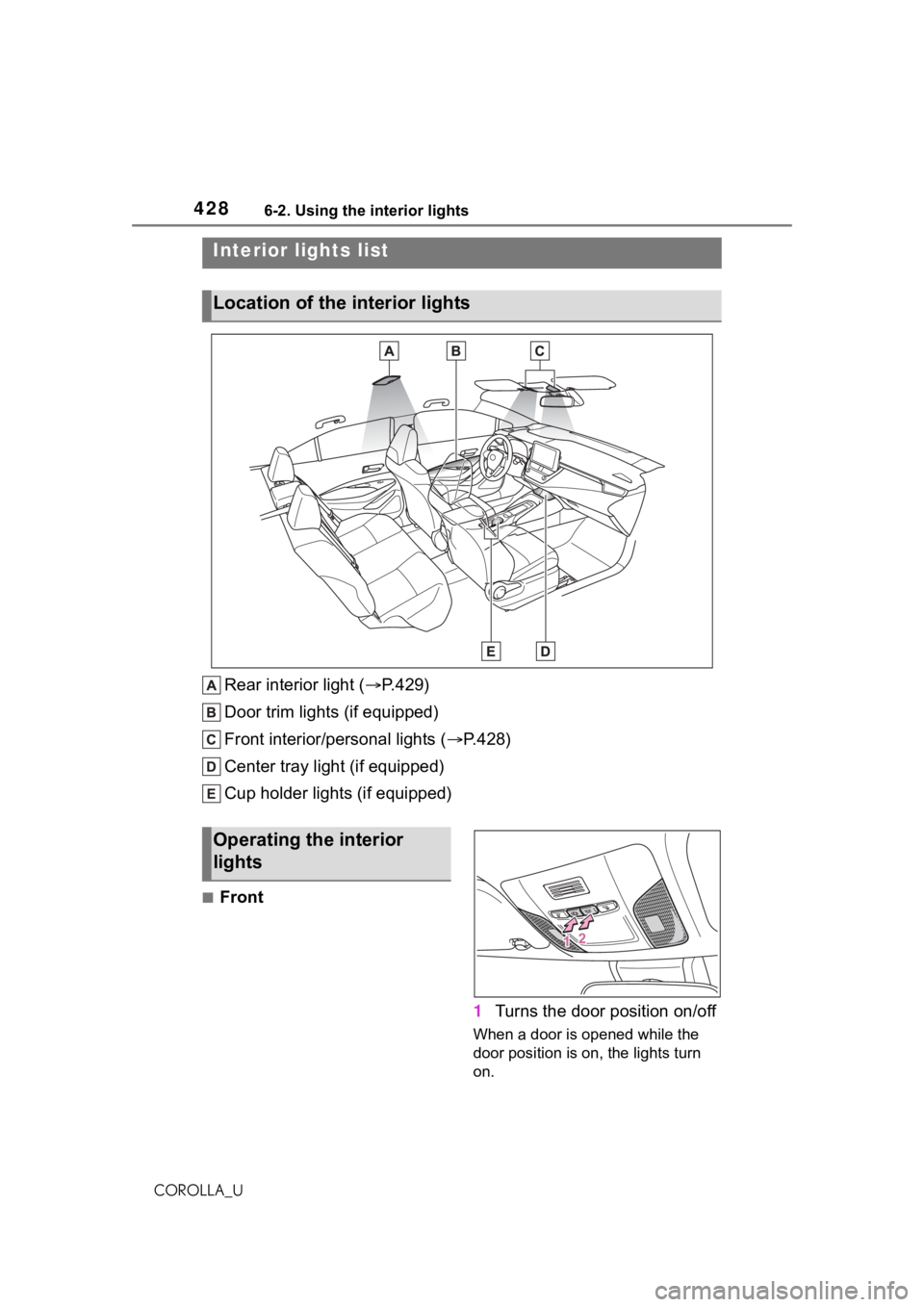
Rear interior light (P.429)
Door trim lights (if equipped)
Front interior/personal lights ( P.428)
Center tray light (if equipped)
Cup holder lights (if equipped)
■Front
1Turns the door position on/off
When a door is opened while the
door position is on, the lights turn
on.
Interior lights list
Location of the i nterior lights
Operating the interior
lights
Page 429 of 624
4296-2. Using the interior lights
6
Interior features
COROLLA_U
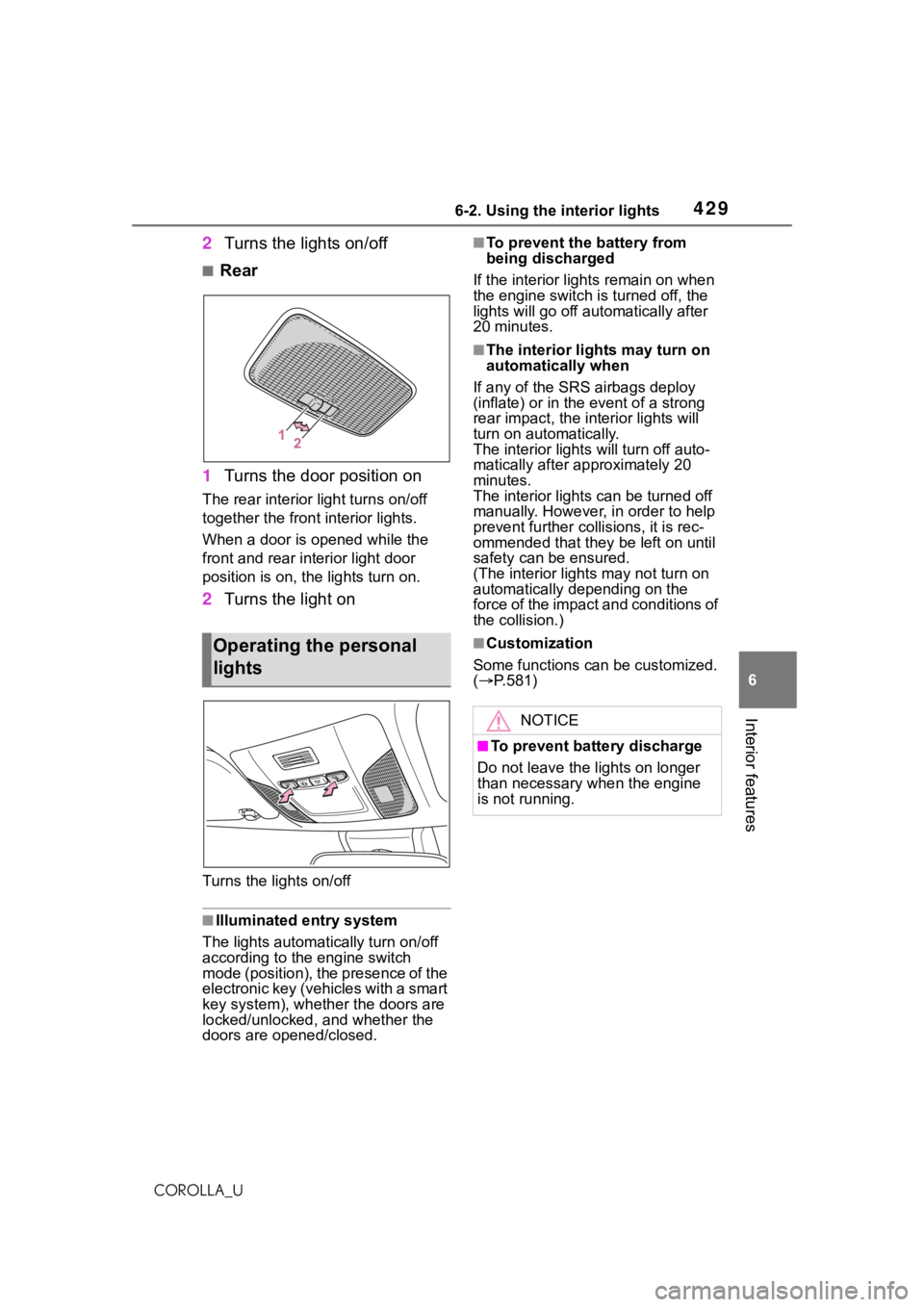
2Turns the lights on/off
■Rear
1 Turns the door position on
The rear interior light turns on/off
together the front interior lights.
When a door is opened while the
front and rear interior light door
position is on, the lights turn on.
2Turns the light on
Turns the lights on/off
■Illuminated entry system
The lights automatically turn on/off
according to the engine switch
mode (position), the presence of the
electronic key (vehicles with a smart
key system), whether the doors are
locked/unlocked, and whether the
doors are opened/closed.
■To prevent the battery from
being discharged
If the interior light s remain on when
the engine switch is turned off, the
lights will go off aut omatically after
20 minutes.
■The interior li ghts may turn on
automatically when
If any of the SRS airbags deploy
(inflate) or in the event of a strong
rear impact, the in terior lights will
turn on automatically.
The interior light s will turn off auto-
matically after approximately 20
minutes.
The interior lights can be turned off
manually. However, in order to help
prevent further co llisions, it is rec-
ommended that they be left on until
safety can be ensured.
(The interior lights may not turn on
automatically depending on the
force of the impact and conditions of
the collision.)
■Customization
Some functions can be customized.
( P.581)Operating the personal
lights
NOTICE
■To prevent battery discharge
Do not leave the lights on longer
than necessary w hen the engine
is not running.
Page 431 of 624
4316-3. Using the storage features
6
Interior features
COROLLA_U
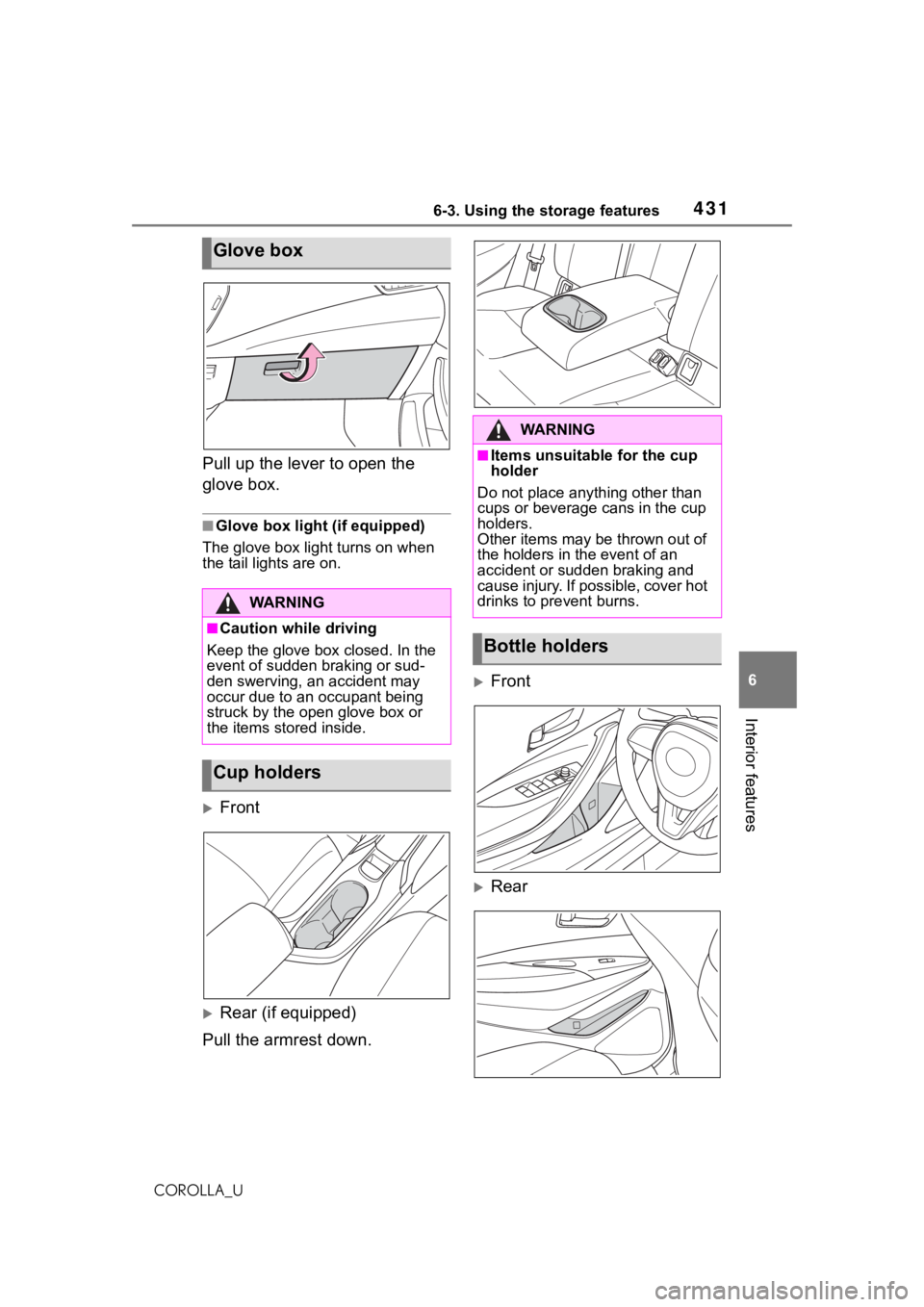
Pull up the lever to open the
glove box.
■Glove box light (if equipped)
The glove box light turns on when
the tail lights are on.
Front
Rear (if equipped)
Pull the armrest down.
Front
Rear
Glove box
WA R N I N G
■Caution while driving
Keep the glove box closed. In the
event of sudden braking or sud-
den swerving, an accident may
occur due to an occupant being
struck by the open glove box or
the items stored inside.
Cup holders
WA R N I N G
■Items unsuitable for the cup
holder
Do not place anyth ing other than
cups or beverage cans in the cup
holders.
Other items may be thrown out of
the holders in the event of an
accident or sudden braking and
cause injury. If possible, cover hot
drinks to pre vent burns.
Bottle holders
Page 437 of 624
4376-4. Other interior features
6
Interior features
COROLLA_U
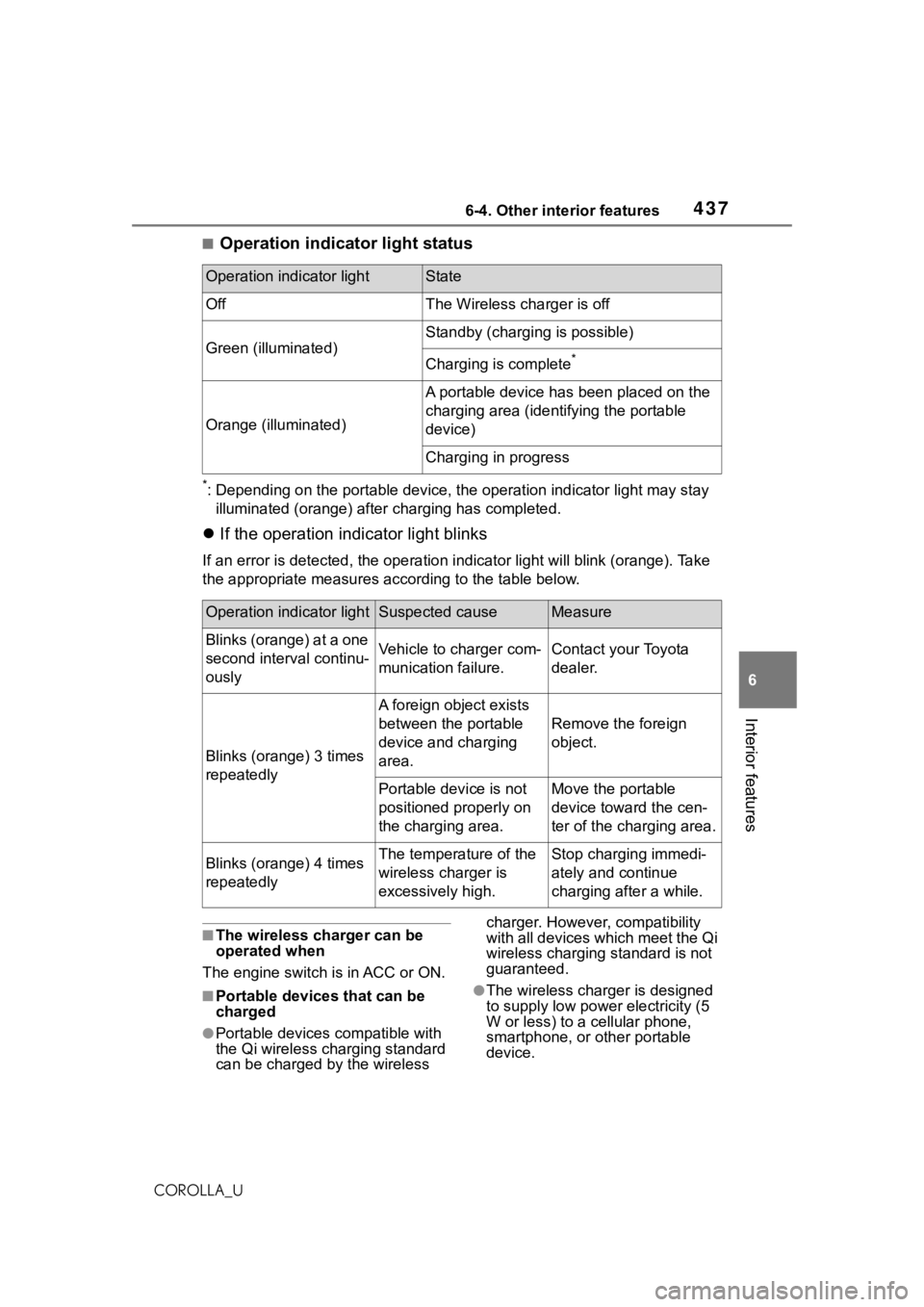
■Operation indicator light status
*: Depending on the portable devic e, the operation indicator light may stay
illuminated (orange) after charging has completed.
If the operation indicator light blinks
If an error is detec ted, the operation in dicator light will blink (orange). Take
the appropriate measures according to the table below.
■The wireless charger can be
operated when
The engine switch is in ACC or ON.
■Portable devices that can be
charged
●Portable devices compatible with
the Qi wireless charging standard
can be charged by the wireless charger. However, compatibility
with all devices which meet the Qi
wireless charging standard is not
guaranteed.
●The wireless char
ger is designed
to supply low power electricity (5
W or less) to a cellular phone,
smartphone, or other portable
device.
Operation indicator lightState
OffThe Wireless charger is off
Green (illuminated)
Standby (charging is possible)
Charging is complete*
Orange (illuminated)
A portable device has been placed on the
charging area (identifying the portable
device)
Charging in progress
Operation indicator lightSuspected causeMeasure
Blinks (orange) at a one
second interval continu-
ouslyVehicle to charger com-
munication failure.Contact your Toyota
dealer.
Blinks (orange) 3 times
repeatedly
A foreign object exists
between the portable
device and charging
area.
Remove the foreign
object.
Portable device is not
positioned properly on
the charging area.Move the portable
device toward the cen-
ter of the charging area.
Blinks (orange) 4 times
repeatedlyThe temperature of the
wireless charger is
excessively high.Stop charging immedi-
ately and continue
charging after a while.
Page 442 of 624
4426-4. Other interior features
COROLLA_U
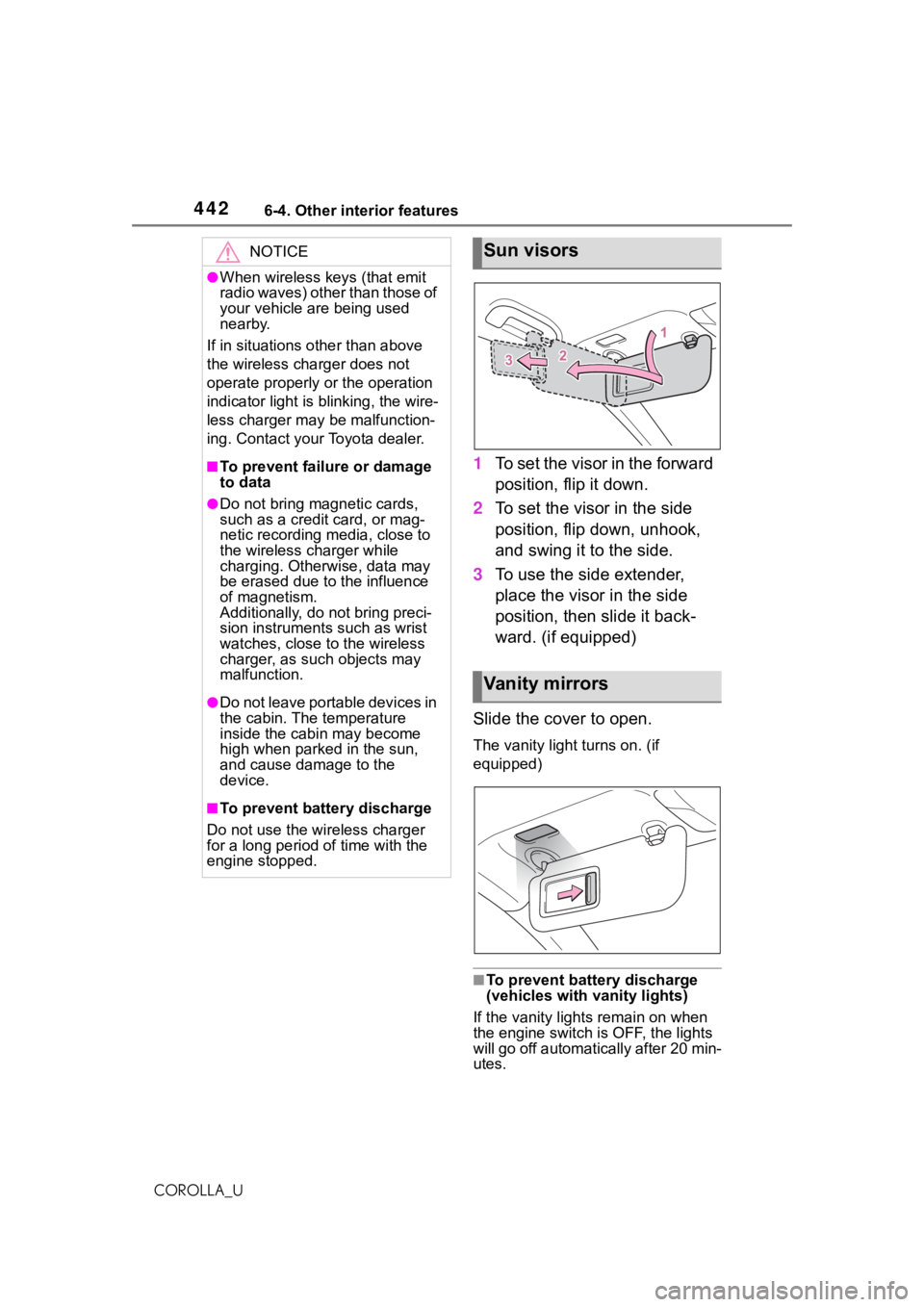
1To set the visor in the forward
position, flip it down.
2 To set the visor in the side
position, flip down, unhook,
and swing it to the side.
3 To use the side extender,
place the visor in the side
position, then slide it back-
ward. (if equipped)
Slide the cover to open.
The vanity light turns on. (if
equipped)
■To prevent batte ry discharge
(vehicles with vanity lights)
If the vanity lights remain on when
the engine switch is OFF, the lights
will go off automatically after 20 min-
utes.
NOTICE
●When wireless keys (that emit
radio waves) other than those of
your vehicle are being used
nearby.
If in situations other than above
the wireless charger does not
operate properly or the operation
indicator light is blinking, the wire-
less charger may be malfunction-
ing. Contact your Toyota dealer.
■To prevent failu re or damage
to data
●Do not bring magnetic cards,
such as a credit card, or mag-
netic recording media, close to
the wireless charger while
charging. Otherwise, data may
be erased due to the influence
of magnetism.
Additionally, do not bring preci-
sion instruments such as wrist
watches, close to the wireless
charger, as such objects may
malfunction.
●Do not leave portable devices in
the cabin. The temperature
inside the cabin may become
high when parked in the sun,
and cause damage to the
device.
■To prevent battery discharge
Do not use the wireless charger
for a long period of time with the
engine stopped.
Sun visors
Va n i t y m i r r o r s