brake TOYOTA COROLLA 2021 Owners Manual (in English)
[x] Cancel search | Manufacturer: TOYOTA, Model Year: 2021, Model line: COROLLA, Model: TOYOTA COROLLA 2021Pages: 624, PDF Size: 20.3 MB
Page 3 of 624
3TABLE OF CONTENTS
1
2
3
4
5
6
7
8
9
10
COROLLA_U
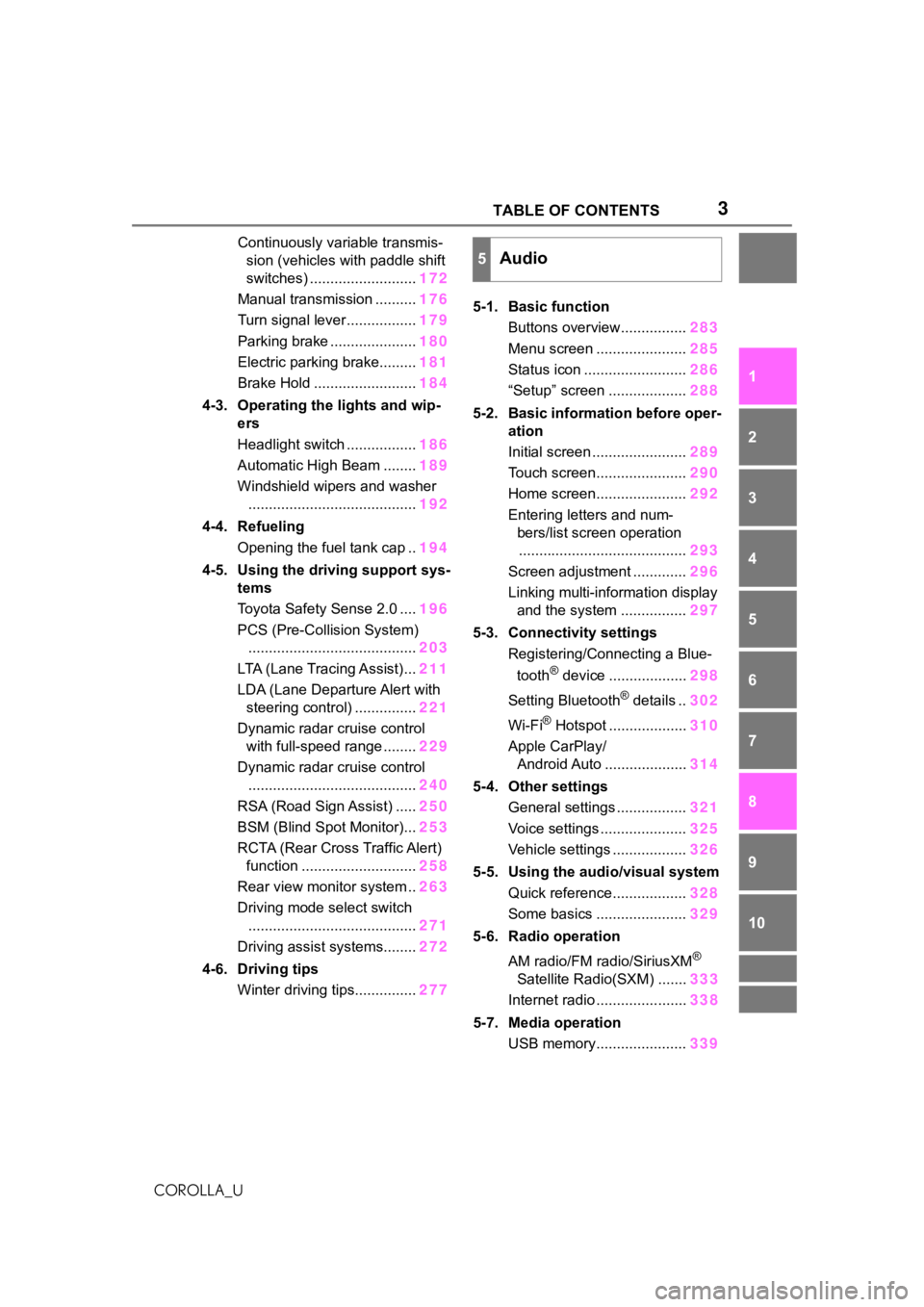
Continuously variable transmis- sion (vehicles with paddle shift
switches) .......................... 172
Manual transmission .......... 176
Turn signal lever................. 179
Parking brake ..................... 180
Electric parking brake......... 181
Brake Hold ......................... 184
4-3. Operating the lights and wip- ers
Headlight switch ................. 186
Automatic High Beam ........ 189
Windshield wipers and washer ......................................... 192
4-4. Refueling Opening the fuel tank cap .. 194
4-5. Using the driving support sys- tems
Toyota Safety Sense 2.0 .... 196
PCS (Pre-Collision System) ......................................... 203
LTA (Lane Tracing Assist)... 211
LDA (Lane Departure Alert with steering control) ............... 221
Dynamic radar cruise control with full-speed range ........ 229
Dynamic radar cruise control ......................................... 240
RSA (Road Sign Assist) ..... 250
BSM (Blind Spot Monitor)... 253
RCTA (Rear Cross Traffic Alert) function ............................ 258
Rear view monitor system .. 263
Driving mode select switch ......................................... 271
Driving assist systems........ 272
4-6. Driving tips Winter driving tips............... 2775-1. Basic function
Buttons overview................ 283
Menu screen ...................... 285
Status icon ......................... 286
“Setup” screen ................... 288
5-2. Basic information before oper- ation
Initial screen ....................... 289
Touch screen...................... 290
Home screen...................... 292
Entering letters and num- bers/list screen operation......................................... 293
Screen adjustment ............. 296
Linking multi-information display and the system ................ 297
5-3. Connectivity settings Registering/Connecting a Blue-
tooth
® device ................... 298
Setting Bluetooth
® details .. 302
Wi-Fi
® Hotspot ................... 310
Apple CarPlay/ Android Auto .................... 314
5-4. Other settings General settings ................. 321
Voice settings ..................... 325
Vehicle settings .................. 326
5-5. Using the audio/visual system Quick reference.................. 328
Some basics ...................... 329
5-6. Radio operation
AM radio/FM radio/SiriusXM
®
Satellite Radio(SXM) ....... 333
Internet radio ...................... 338
5-7. Media operation USB memory...................... 339
5Audio
Page 8 of 624
8
COROLLA_U
Anti-lock brake system
SRS airbag system
Seat belt pretensioner system
Be sure to check with your Toy-
ota dealer for precautionary
measures or special instructions
regarding installation of a mobile
two-way radio system.
The vehicle is equipped with
sophisticated computers that will
record certain data, such as:
• Engine speed/Electric motor speed (traction motor speed)
• Accelerator status
• Brake status
• Vehicle speed
• Operation status of the driving assist systems
• Images from the cameras Your vehicle is equipped with
cameras. Contact your Toyota
dealer for the location of
recording cameras.
The recorded data varies
according to the vehicle grade
level and options with which it is
equipped.
These computers do not record
conversations or sounds, and
only record images outside of
the vehicle in certain situations.
Data Transmission
Your vehicle may transmit the data
recorded in these computers to
Toyota without notification to you.
Data usage
Toyota may use the data recorded
in this computer to diagnose mal-
functions, conduct research and
development, and improve quality.
Toyota will not disclose the
recorded data to a third party
except:
• With the consen t of the vehicle
owner or with the consent of the
lessee if the vehicle is leased
• In response to an official request by the police, a court of law or a
government agency
• For use by Toyota in a lawsuit
• For research purposes where the data is not tied to a specific vehi-
cle or vehicle owner
Recorded image information
can be erased by your Toyota
dealer.
The image recording function can
be disabled. However, if the func-
tion is disabled, data from when the
system operates will not be avail-
able.
To learn more about the vehi-
cle data collected, used and
shared by Toyota, please visit
www.toyota.com/privacyvts/
.
If your Toyota has Safety Con-
nect and if you have subscribed
to those services, please refer to
the Safety Connect Telematics
Subscription Service Agreement
Vehicle data recording
Usage of data collected
through Safety Connect
(U.S. mainland only)
Page 9 of 624

9
COROLLA_U
for information on data collected
and its usage.
To learn more about the vehicle
data collected, used and shared
by Toyota, please visit
www.toyota.com/privacyvts/
.
This vehicle is equipped with an
event data recorder (EDR). The
main purpose of an EDR is to
record, in certain crash or near
crash-like situations, such as an
air bag deployment or hitting a
road obstacle, data that will
assist in understanding how a
vehicle’s systems performed.
The EDR is designed to record
data related to vehicle dynamics
and safety systems for a short
period of time, typically 30 sec-
onds or less.
The EDR in this vehicle is
designed to record such data
as:
• How various systems in your vehicle were operating;
• Whether or not the driver and passenger safety belts were
buckled/fastened;
• How far (if at all) the driver was depressing the accelera-
tor and/or brake pedal; and,
• How fast the vehicle was trav- eling.
These data can help provide a
better understanding of the cir-
cumstances in which crashes and injuries occur.
NOTE: EDR data are recorded
by your vehicle only if a non-triv-
ial crash situation occurs; no
data are recorded by the EDR
under normal driving conditions
and no personal data (e.g.,
name, gender, age, and crash
location) are recorded. How-
ever, other parties, such as law
enforcement, could combine the
EDR data with the type of per-
sonally identifying data rou-
tinely acquired during a crash
investigation.
To read data recorded by an
EDR, special equipment is
required, and access to the
vehicle or the EDR is needed. In
addition to the vehicle manufac-
turer, other parties, such as law
enforcement, that have the spe-
cial equipment, can read the
information if they have access
to the vehicle or the EDR.
Disclosure of the EDR data
Toyota will not disclose the data
recorded in an EDR to a third party
except when:
• An agreement from the vehicle’s
owner (or the lessee for a leased
vehicle) is obtained
• In response to an official request by the police, a court of law or a
government agency
• For use by Toyota in a lawsuit
However, if necessary, Toyota may:
• Use the data for research on vehicle safety performance
Event data recorder
Page 16 of 624
16Pictorial index
COROLLA_UWhen a warning message is displayed ............................
.... P.521
Parking brake
*4............................................................... .... P.180
Applying/releasing............................................. ................... P.180
Precautions for winter seas on.............................................. P.278
Warning light/message..... ............................................ P.180, 511
Turn signal lever.............................................. ................... P.179
Headlight switch ............................................... ................. P.186
Headlights/parking lights/tail lig hts/side marker lights/daytime run-
ning lights/LED accent lights
*4............................................. P.186
Windshield wiper and washer switch............................... P.192
Usage................................................................................... P.192
Adding washer fluid .............................................................. P.474
Emergency flasher switch ....................................... .......... P.502
Hood lock release lever ........................................ ............. P.464
Tilt and telescopic steering lock release lever ................P. 1 3 8
Air conditioning system ............................. ............... P.416, 421
Usage.......................................................... ................. P.416, 421
Rear window defogger ........................................... ...... P.418, 422
Audio
*4............................................................... ................. P.283
Audio Plus
*4, 5
Premium Audio*4, 5
*1
: Vehicles without a smart key system
*2: Vehicles with a smart key system
*3: Vehicles with a continuous ly variable transmission
*4: If equipped
*5: Refer to “NAVIGATION AND MULTIMEDIA SYSTEM OWNER’S MAN-
UAL”.
Page 18 of 624
18Pictorial index
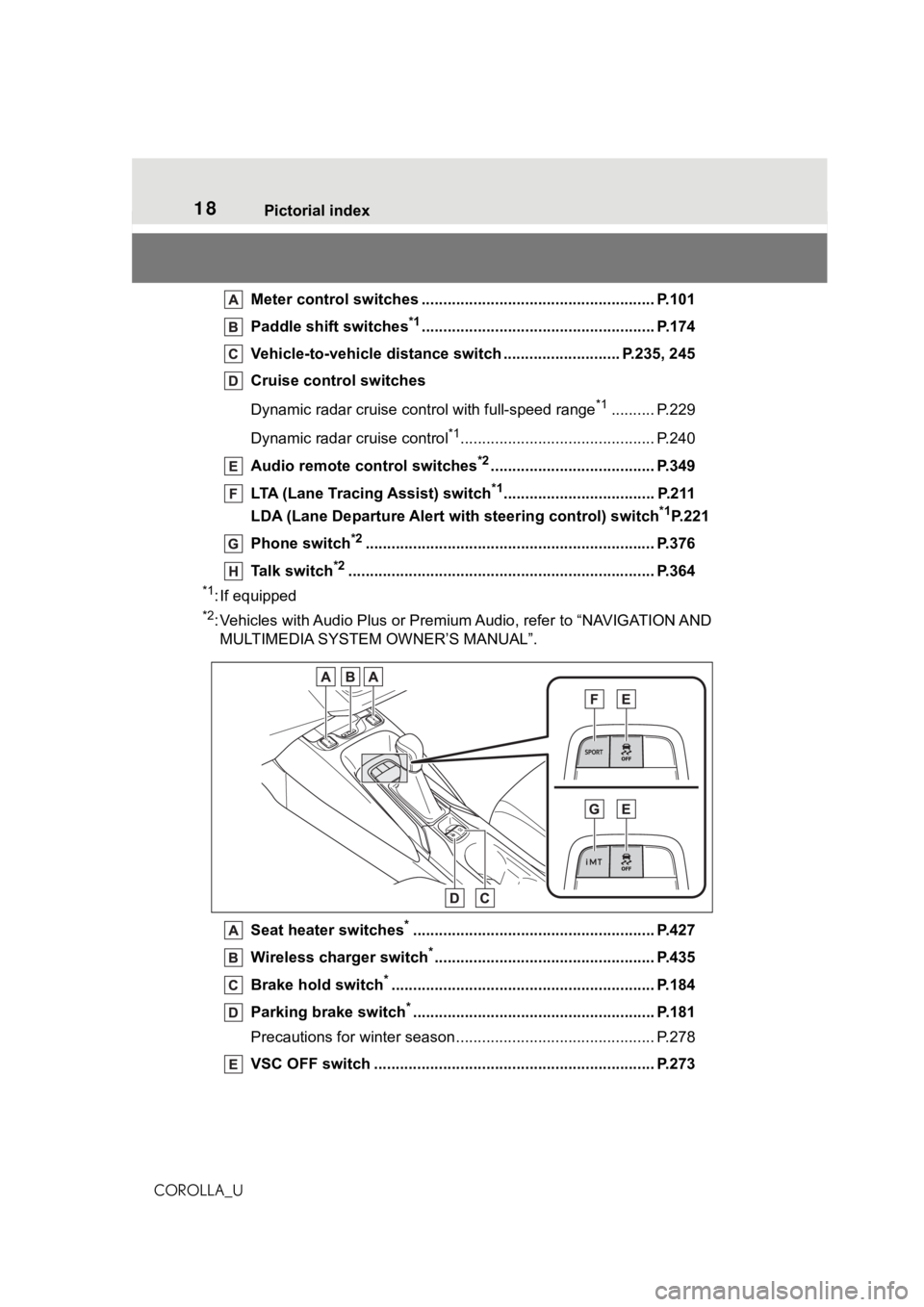
COROLLA_UMeter control switches ..
.................................................... P.101
Paddle shift switches
*1...................................................... P.174
Vehicle-to-vehicle distance switch ........................... P.235, 245
Cruise control switches
Dynamic radar cruise cont rol with full-speed range
*1.......... P.229
Dynamic radar cruise control
*1............................................. P.240
Audio remote control switches
*2...................................... P.349
LTA (Lane Tracing Assist) switch
*1................................... P.211
LDA (Lane Departure Alert wi th steering control) switch
*1P.221
Phone switch
*2............................................................... .... P.376
Talk switch
*2............................................................... ........ P.364
*1: If equipped
*2: Vehicles with Audio Plus or Premium Audio, refer to “NAVIGATIO N AND
MULTIMEDIA SYSTEM OWNER’S MANUAL”.
Seat heater switches
*........................................................ P.427
Wireless cha rger switch
*................................................... P.435
Brake hold switch
*............................................................. P. 184
Parking brake switch
*........................................................ P.181
Precautions for winter seas on.............................................. P.278
VSC OFF switch ................................................. ................ P.273
Page 33 of 624
331-1. For safe use
1
For safety and security
COROLLA_U
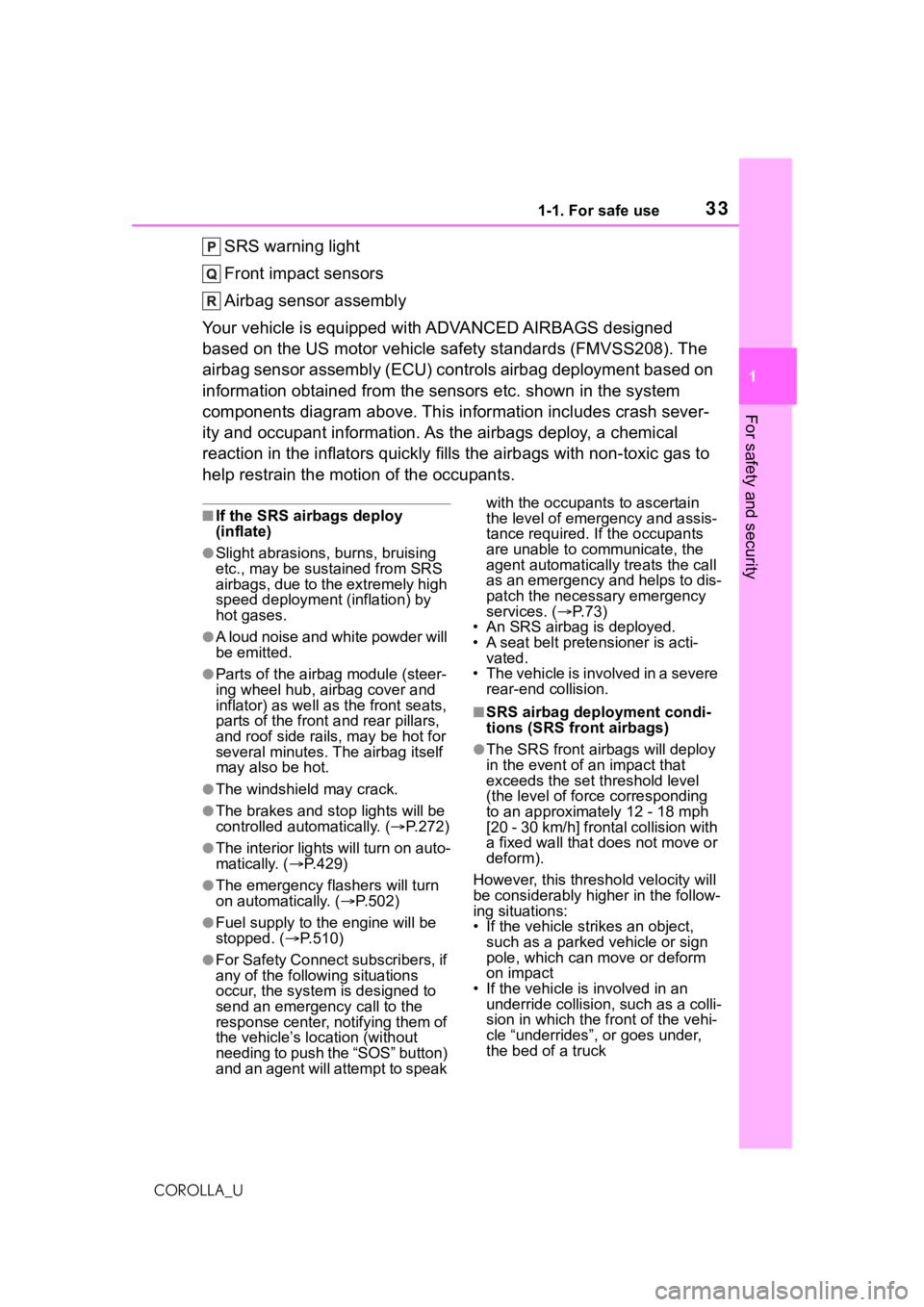
SRS warning light
Front impact sensors
Airbag sensor assembly
Your vehicle is equipped with ADVANCED AIRBAGS designed
based on the US motor vehicle safety standards (FMVSS208). The
airbag sensor assembly (ECU) cont rols airbag deployment based on
information obtained from the sensors etc. shown in the system
components diagram above. This in formation includes crash sever-
ity and occupant information. As the airbags deploy, a chemical
reaction in the inflators quickly fills the airbags with non-toxic gas to
help restrain the motion of the occupants.
■If the SRS airbags deploy
(inflate)
●Slight abrasions, burns, bruising
etc., may be sustained from SRS
airbags, due to the extremely high
speed deployment (inflation) by
hot gases.
●A loud noise and white powder will
be emitted.
●Parts of the airbag module (steer-
ing wheel hub, airbag cover and
inflator) as well as the front seats,
parts of the front and rear pillars,
and roof side rails, may be hot for
several minutes. T he airbag itself
may also be hot.
●The windshield may crack.
●The brakes and st op lights will be
controlled automatically. ( P.272)
●The interior lights will turn on auto-
matically. ( P.429)
●The emergency flashers will turn
on automatically. ( P.502)
●Fuel supply to the engine will be
stopped. (P.510)
●For Safety Connect subscribers, if
any of the followin g situations
occur, the system is designed to
send an emergency call to the
response center, notifying them of
the vehicle’s location (without
needing to push the “SOS” button)
and an agent will attempt to speak with the occupants to ascertain
the level of emergency and assis-
tance required. If the occupants
are unable to communicate, the
agent automatically treats the call
as an emergency and helps to dis-
patch the necessary emergency
services. (
P. 7 3 )
• An SRS airbag is deployed.
• A seat belt pretensioner is acti-
vated.
• The vehicle is involved in a severe
rear-end collision.
■SRS airbag deployment condi-
tions (SRS front airbags)
●The SRS front airbags will deploy
in the event of an impact that
exceeds the set threshold level
(the level of forc e corresponding
to an approximately 12 - 18 mph
[20 - 30 km/h] frontal collision with
a fixed wall that does not move or
deform).
However, this threshold velocity will
be considerably higher in the follow-
ing situations:
• If the vehicle strikes an object, such as a parked vehicle or sign
pole, which can move or deform
on impact
• If the vehicle is involved in an underride collision, such as a colli-
sion in which the front of the vehi-
cle “underrides”, or goes under,
the bed of a truck
Page 87 of 624
872-1. Instrument cluster
2
Vehicle status information and indicators
COROLLA_U
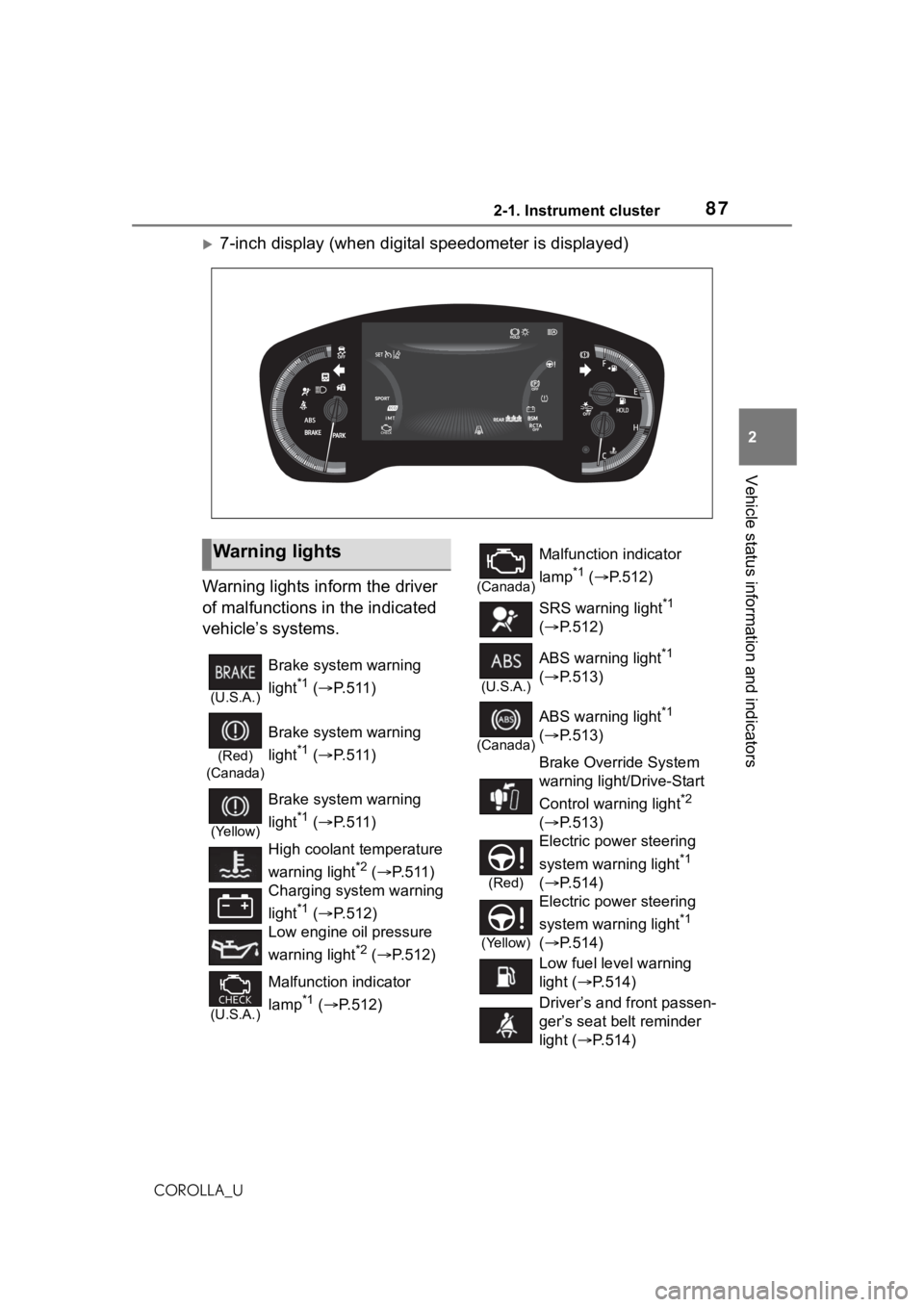
7-inch display (when digital speedometer is displayed)
Warning lights inform the driver
of malfunctions in the indicated
vehicle’s systems.
Warning lights
(U.S.A.)
Brake system warning
light
*1 ( P.511)
(Red)
(Canada)
Brake system warning
light
*1 ( P.511)
(Yellow)
Brake system warning
light
*1 ( P.511)
High coolant temperature
warning light
*2 ( P.511)
Charging system warning
light
*1 ( P.512)
Low engine oil pressure
warning light
*2 ( P.512)
(U.S.A.)
Malfunction indicator
lamp
*1 ( P.512)
(Canada)
Malfunction indicator
lamp
*1 ( P.512)
SRS warning light
*1
( P.512)
(U.S.A.)
ABS warning light*1
( P.513)
(Canada)
ABS warning light*1
( P.513)
Brake Override System
warning light/Drive-Start
Control warning light
*2
( P.513)
(Red)
Electric power steering
system warning light
*1
( P.514)
(Yellow)
Electric power steering
system warning light
*1
( P.514)
Low fuel level warning
light ( P.514)
Driver’s and front passen-
ger’s seat belt reminder
light ( P.514)
Page 88 of 624
882-1. Instrument cluster
COROLLA_U
*1: These lights come on when the engine switch is turned to ON to
indicate that a system check is
being performed. They will turn
off after the engine is started, or
after a few seconds. There may
be a malfunction in a system if
the lights do not come on, or turn
off. Have the vehicle inspected
by your Toyota dealer.
*2: This light illuminates on the multi-information display.
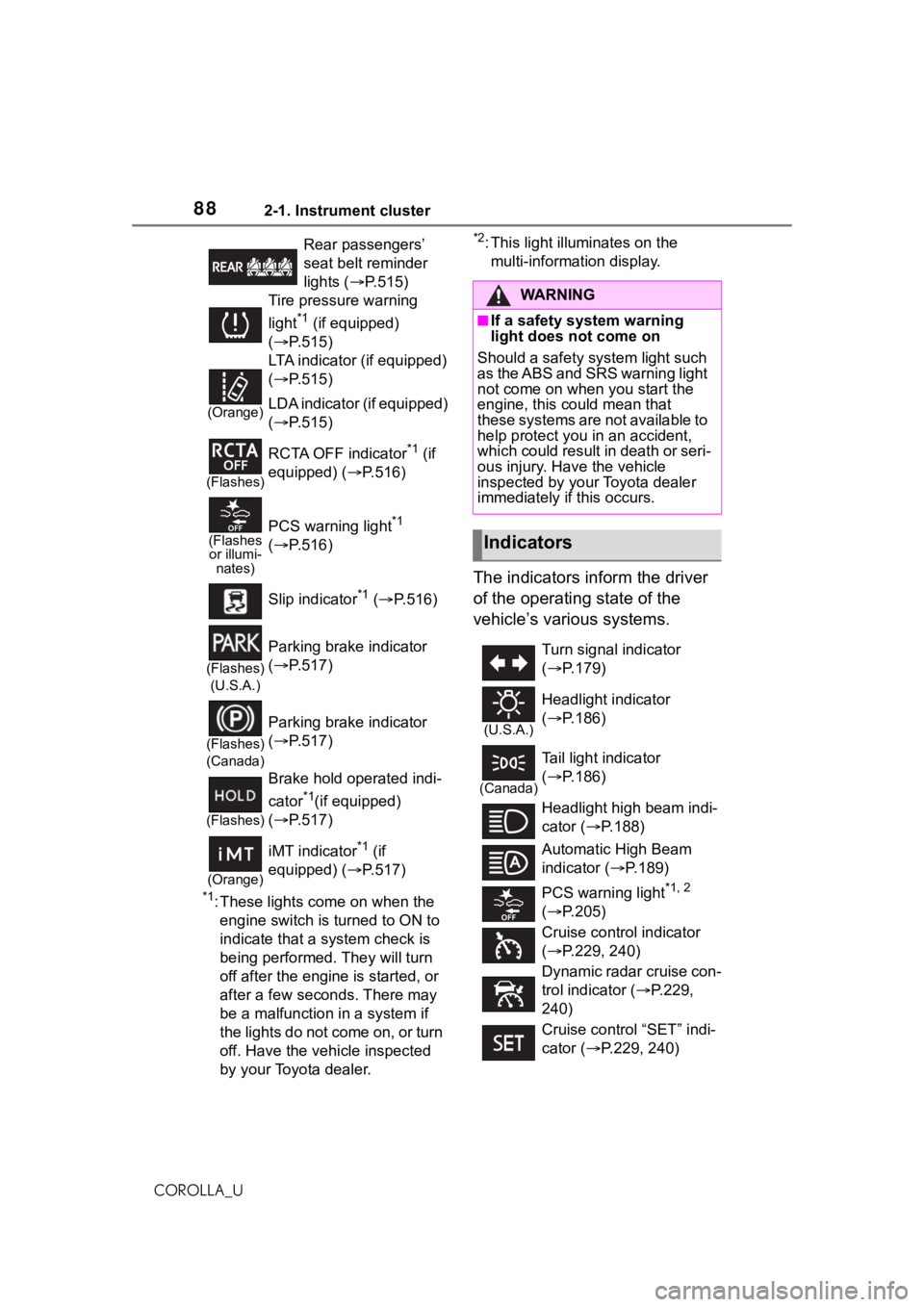
The indicators inform the driver
of the operating state of the
vehicle’s various systems.
Rear passengers’
seat belt reminder
lights ( P.515)
Tire pressure warning
light
*1 (if equipped)
( P.515)
(Orange)
LTA indicator (if equipped)
( P.515)
LDA indicator (if equipped)
( P.515)
(Flashes)
RCTA OFF indicator*1 (if
equipped) (P.516)
(Flashes or illumi- nates)PCS warning light*1
( P.516)
Slip indicator
*1 ( P.516)
(Flashes)
(U.S.A.)
Parking brake indicator
( P.517)
(Flashes)
(Canada)
Parking brake indicator
( P.517)
(Flashes)
Brake hold operated indi-
cator
*1(if equipped)
( P.517)
(Orange)
iMT indicator*1 (if
equipped) (P.517)
WA R N I N G
■If a safety system warning
light does not come on
Should a safety system light such
as the ABS and SRS warning light
not come on when you start the
engine, this cou ld mean that
these systems are not available to
help protect you in an accident,
which could result in death or seri-
ous injury. Have the vehicle
inspected by your Toyota dealer
immediately if this occurs.
Indicators
Turn signal indicator
( P.179)
(U.S.A.)
Headlight indicator
( P.186)
(Canada)
Tail light indicator
( P.186)
Headlight high beam indi-
cator ( P.188)
Automatic High Beam
indicator ( P.189)
PCS warning light
*1, 2
( P.205)
Cruise control indicator
( P.229, 240)
Dynamic radar cruise con-
trol indicator ( P.229,
240)
Cruise control “SET” indi-
cator ( P.229, 240)
Page 89 of 624
892-1. Instrument cluster
2
Vehicle status information and indicators
COROLLA_U
*1: These lights come on when the engine switch is turned to ON to
indicate that a system check is
being performed. They will turn
off after the engine is started, or
after a few seconds. There may
be a malfunction in a system if
the lights do not come on, or turn
off. Have the vehicle inspected
by your Toyota dealer.
*2: This light comes on when the system is turned off.
*3: Depending on the operating con-dition, the color and illuminat-
ing/flashing stat e of the light
change.
*4: In order to confirm operation, the BSM outside rear view mirror
indicators illumina te in the follow-
ing situations:
• When the engine switch is
turned to ON, the BSM func-
tion is enabled on of the
multi-information display.
• When the BSM function is
enabled on of the
multi-information display, the
engine switch is turned to ON.
If the system is functioning cor-
rectly, the BSM outside rear view
mirror indicators will turn off after a
few seconds.
*3
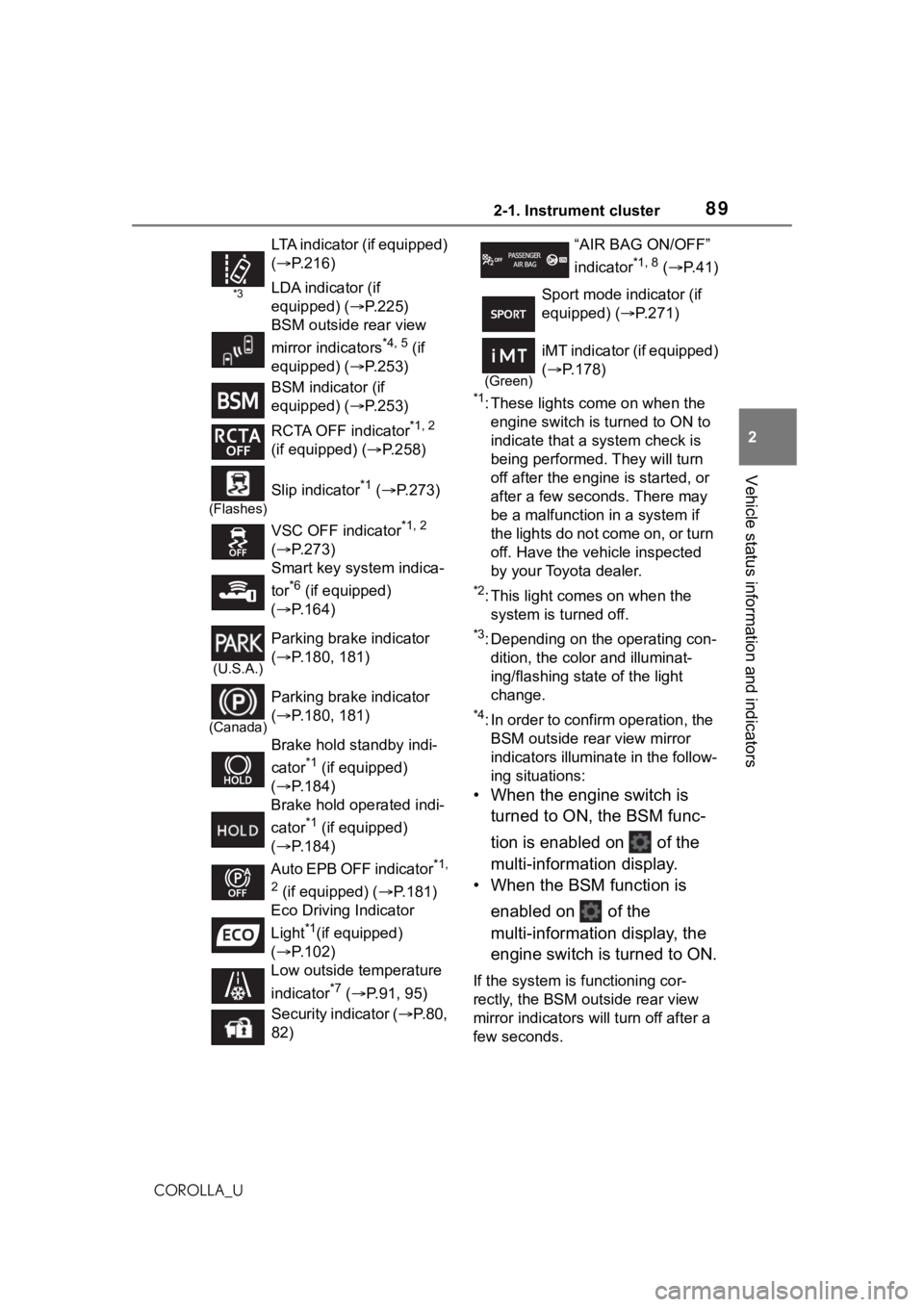
LTA indicator (if equipped)
( P.216)
LDA indicator (if
equipped) ( P.225)
BSM outside rear view
mirror indicators
*4, 5 (if
equipped) ( P.253)
BSM indicator (if
equipped) ( P.253)
RCTA OFF indicator
*1, 2
(if equipped) ( P.258)
(Flashes)
Slip indicator*1 ( P.273)
VSC OFF indicator
*1, 2
( P.273)
Smart key system indica-
tor
*6 (if equipped)
( P.164)
(U.S.A.)
Parking brake indicator
( P.180, 181)
(Canada)
Parking brake indicator
( P.180, 181)
Brake hold standby indi-
cator
*1 (if equipped)
( P.184)
Brake hold operated indi-
cator
*1 (if equipped)
( P.184)
Auto EPB OFF indicator
*1,
2
(if equipped) ( P.181)
Eco Driving Indicator
Light
*1(if equipped)
( P.102)
Low outside temperature
indicator
*7 ( P.91, 95)
Security indicator ( P.80,
82)
“AIR BAG ON/OFF”
indicator
*1, 8 ( P. 4 1 )
Sport mode indicator (if
equipped) (P.271)
(Green)
iMT indicator (if equipped)
( P.178)
Page 135 of 624
1353-3. Adjusting the seats
3
Before driving
COROLLA_U
WA R N I N G
●Stop the vehicle on level
ground, set the parking brake
and shift the shift lever to P
(continuously variable transmis-
sion) or N (manual transmis-
sion).
●Do not allow anyone to sit on a
folded seatback or in the trunk
while driving.
●Do not allow child ren to enter
the trunk.
●Be careful not to get your hand
caught when folding the rear
seatbacks.
●Adjust the position of the front
seats before folding down the
rear seatbacks so that the front
seats do not int erfere with the
rear seatbacks when folding
down the rear seatbacks.
■After returning the rear seat-
back to the upright position
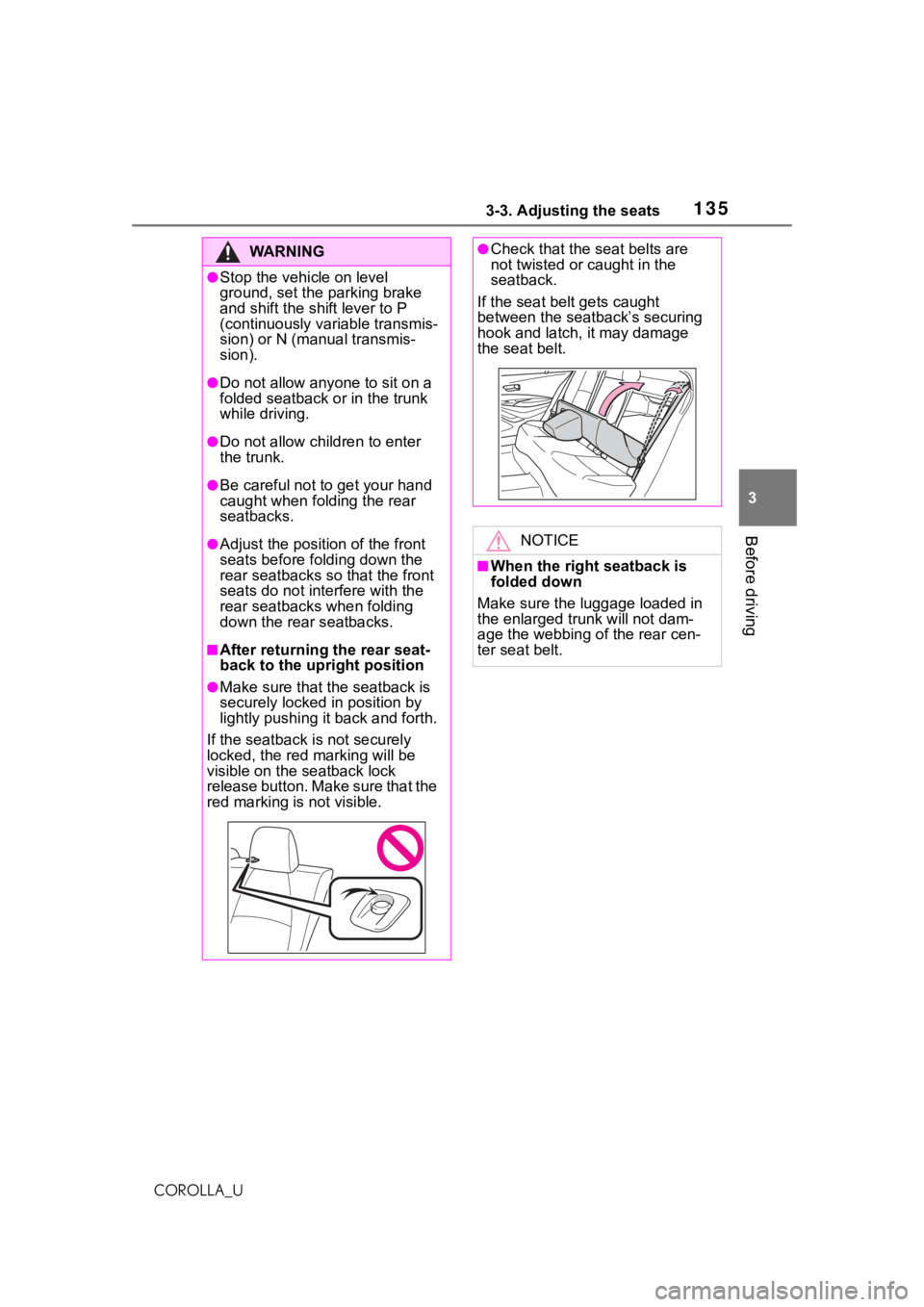
●Make sure that the seatback is
securely locked in position by
lightly pushing it back and forth.
If the seatback is not securely
locked, the red marking will be
visible on the seatback lock
release button. Make sure that the
red marking is not visible.
●Check that the seat belts are
not twisted or caught in the
seatback.
If the seat belt gets caught
between the seatback’s securing
hook and latch, it may damage
the seat belt.
NOTICE
■When the right seatback is
folded down
Make sure the luggage loaded in
the enlarged tr unk will not dam-
age the webbing of the rear cen-
ter seat belt.