key battery TOYOTA COROLLA 2021 Owners Manual (in English)
[x] Cancel search | Manufacturer: TOYOTA, Model Year: 2021, Model line: COROLLA, Model: TOYOTA COROLLA 2021Pages: 624, PDF Size: 20.3 MB
Page 1 of 624
1
2
3
4
5
6
7
8
9
9
10
COROLLA_U
Pictorial indexSearch by illustration
For safety
and securityMake sure to read through them
(Main topics: Child seat, theft deterrent system)
Vehicle status
information and
indicatorsReading driving-related information
(Main topics: Meters, multi-information display)
Before driving
Opening and closing the doors and windows,
adjustment before driving
(Main topics: Keys, doors, seats)
Driving
Operations and advice which are necessary for
driving
(Main topics: Starting engine, refueling)
AudioOperating the Audio
(Main topics: Audio/visual, phone)
Interior featuresUsage of the interior features
(Main topics: Air conditioner, storage features)
Maintenance
and careCaring for your vehicle and maintenance
procedures
(Main topics: Interior and exterior, light bulbs)
When trouble
arisesWhat to do in case of malfunction and emergency
(Main topics: Battery discharge, flat tire)
Vehicle
specificationsVehicle specifications, customizable features
(Main topics: Fuel, oil, tire inflation pressure)
For ownersReporting safety defects for U.S. owners, and seat
belt and SRS airbag instructions for Canadian
owners
IndexSearch by symptom
Search alphabetically
Page 5 of 624
5TABLE OF CONTENTS
1
2
3
4
5
6
7
8
9
10
COROLLA_U
7-2. Maintenance Maintenance requirements......................................... 457
General maintenance ......... 458
Emission inspection and mainte- nance (I/M) programs....... 461
7-3. Do-it-yourself maintenance Do-it-yourself service precau-tions ................................. 462
Hood .................................. 464
Positioning a floor jack ....... 465
Engine compartment .......... 466
Tires ................................... 475
Tire inflation pressure......... 484
Wheels ............................... 486
Air conditioning filter ........... 487
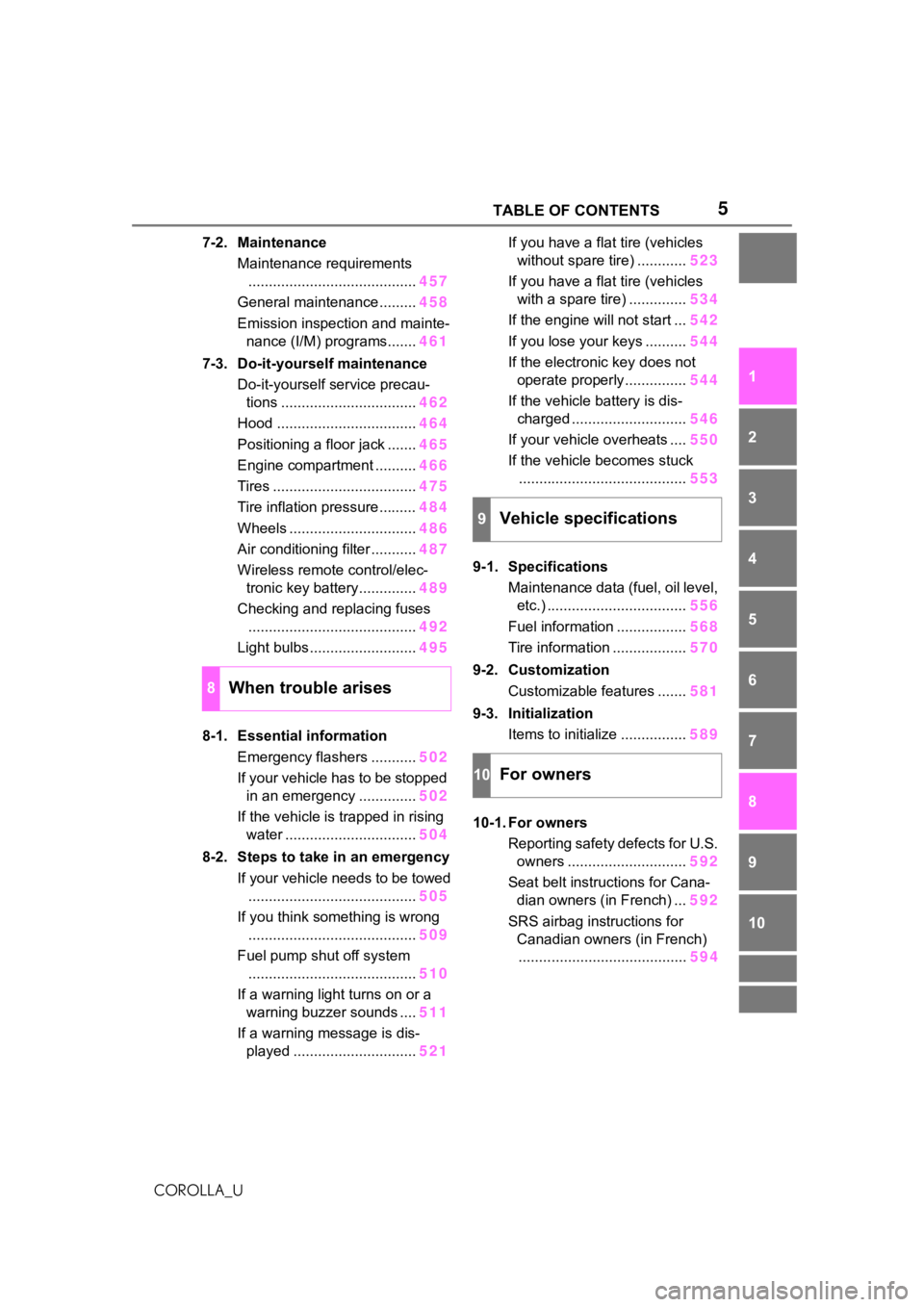
Wireless remote control/elec- tronic key battery.............. 489
Checking and replacing fuses ......................................... 492
Light bulbs .......................... 495
8-1. Essential information Emergency flashers ........... 502
If your vehicle has to be stopped in an emergency .............. 502
If the vehicle is trapped in rising water ................................ 504
8-2. Steps to take in an emergency If your vehicle needs to be towed......................................... 505
If you think something is wrong ......................................... 509
Fuel pump shut off system ......................................... 510
If a warning light turns on or a warning buzzer sounds .... 511
If a warning message is dis- played .............................. 521If you have a flat tire (vehicles
without spare tire) ............ 523
If you have a flat tire (vehicles with a spare tire) .............. 534
If the engine will not start ... 542
If you lose your keys .......... 544
If the electronic key does not operate properly............... 544
If the vehicle battery is dis- charged ............................ 546
If your vehicle overheats .... 550
If the vehicle becomes stuck ......................................... 553
9-1. Specifications Maintenance data (fuel, oil level, etc.) .................................. 556
Fuel information ................. 568
Tire information .................. 570
9-2. Customization Customizable features ....... 581
9-3. Initialization Items to initialize ................ 589
10-1. For owners Reporting safety defects for U.S. owners ............................. 592
Seat belt instructions for Cana- dian owners (in French) ... 592
SRS airbag instructions for Canadian owners (in French)........ ................................. 59
4
8When trouble arises
9Vehicle specifications
10For owners
Page 110 of 624
1103-1. Key information
COROLLA_U
3-1.Key information
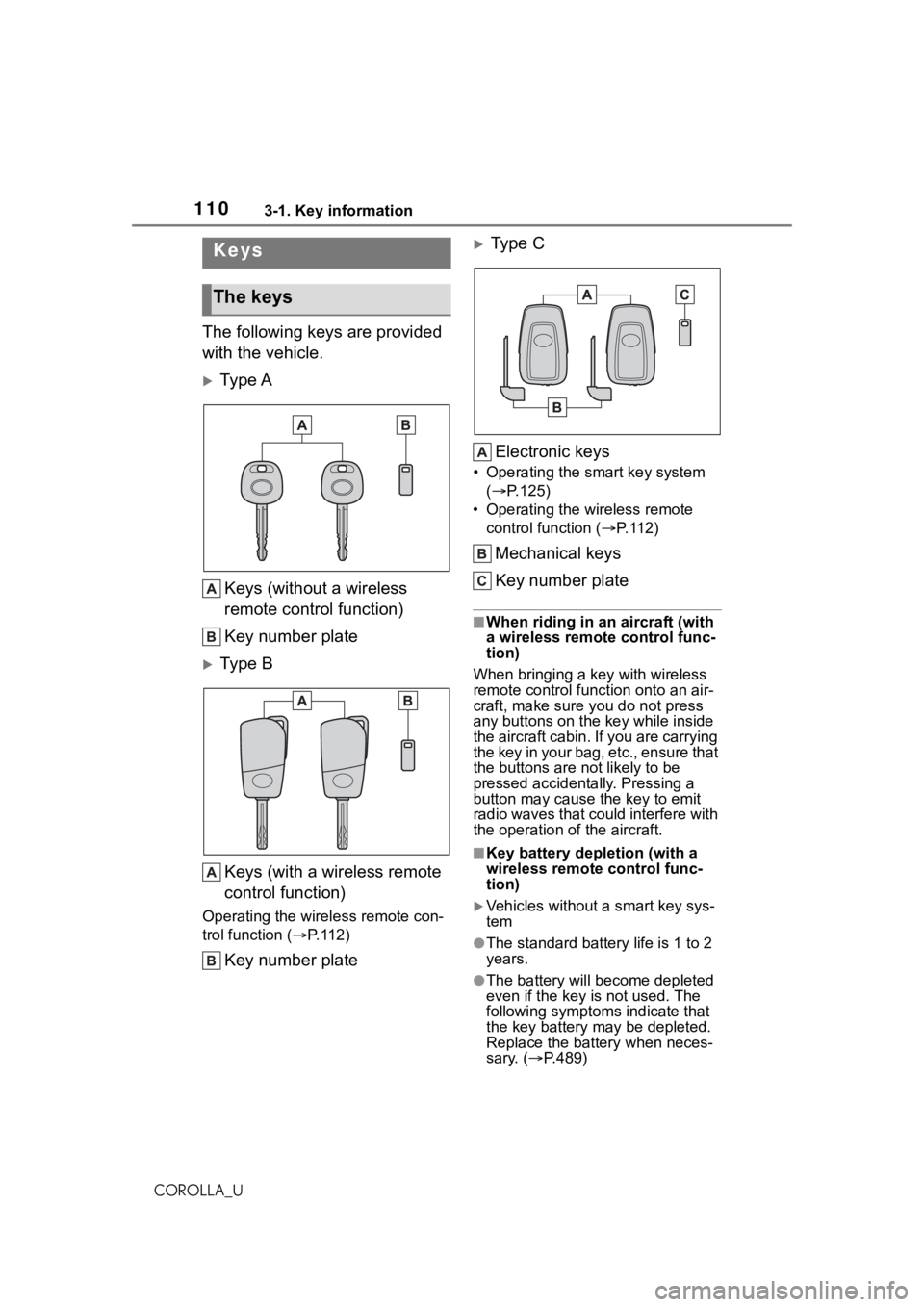
The following keys are provided
with the vehicle.
Ty p e AKeys (without a wireless
remote control function)
Key number plate
Ty p e BKeys (with a wireless remote
control function)
Operating the wireless remote con-
trol function ( P. 1 1 2 )
Key number plate
Type C
Electronic keys
• Operating the smart key system ( P.125)
• Operating the wireless remote control function ( P. 1 1 2 )
Mechanical keys
Key number plate
■When riding in an aircraft (with
a wireless remote control func-
tion)
When bringing a ke y with wireless
remote control func tion onto an air-
craft, make sure you do not press
any buttons on the key while inside
the aircraft cabin. If you are carrying
the key in your bag, etc., ensure that
the buttons are not likely to be
pressed accidentally. Pressing a
button may cause the key to emit
radio waves that could interfere with
the operation of the aircraft.
■Key battery depletion (with a
wireless remote control func-
tion)
Vehicles without a smart key sys-
tem
●The standard battery life is 1 to 2
years.
●The battery will be come depleted
even if the key is not used. The
following symptoms indicate that
the key battery may be depleted.
Replace the battery when neces-
sary. ( P.489)
Keys
The keys
Page 111 of 624
1113-1. Key information
3
Before driving
COROLLA_U• The wireless remote control does
not operate.
• The detection area becomes
smaller.
Vehicles with a smart key system
●The standard battery life is 1 to 2
years.
●If the battery becomes low, an
alarm will sound in the cabin and a
message will be s hown on the
multi-information display when the
engine is stopped.
●To reduce key battery depletion
when the electronic key is to not
be used for long periods of time,
set the electronic key to the bat-
tery-saving mode. ( P.127)
●As the electronic key always
receives radio waves, the battery
will become deplet ed even if the
electronic key is not used. The fol-
lowing symptoms indicate that the
electronic key battery may be
depleted. Replace the battery
when necessary. ( P.489)
• The smart key system or the wire- less remote control does not oper-
ate.
• The detection area becomes
smaller.
• The LED indicator on the key sur-
face does not turn on.
●To avoid serious deterioration, do
not leave the electronic key within
3 ft. (1 m) of the following electri-
cal appliances t hat produce a
magnetic field:
•TVs
• Personal computers
• Cellular phones, cordless phones and battery chargers
• Recharging cellular phones or
cordless phones
• Table lamps
• Induction cookers
●If the electronic key is near the
vehicle for longer than necessary,
even if the smart key system is not
operated, the key battery may
become depleted faster than nor-
mal.
■Replacing the battery (with a
wireless remote control func-
tion)
P.489
■If “A New Key has been Regis-
tered Contact Your Dealer for
Details” is shown on the
multi-information display (vehi-
cles with a smart key system)
This message will be displayed
each time the driver’s door is
opened when the doors are
unlocked from the outside for
approximately 10 days after a new
electronic key has been registered.
If this message is displayed but you
have not had a new electronic key
registered, ask your Toyota dealer to
check if an unknown electronic key
(other than those in your posses-
sion) has been registered.
■If a wrong key is used (with a
wireless remote control func-
tion)
The key cylinder rotates freely, iso-
lated from the internal mechanism.
NOTICE
■To prevent key damage
●Do not drop the keys, subject
them to strong shocks or bend
them.
●Do not expose the keys to high
temperatures for long periods of
time.
●Do not get the keys wet or wash
them in an ultrasonic washer
etc.
●Vehicles with a smart key sys-
tem: Do not att ach metallic or
magnetic materials to the keys
or place the keys close to such
materials.
●Do not disassemble the keys.
Page 113 of 624
1133-1. Key information
3
Before driving
COROLLA_Uat your Toyota dealer.
*2: If equipped
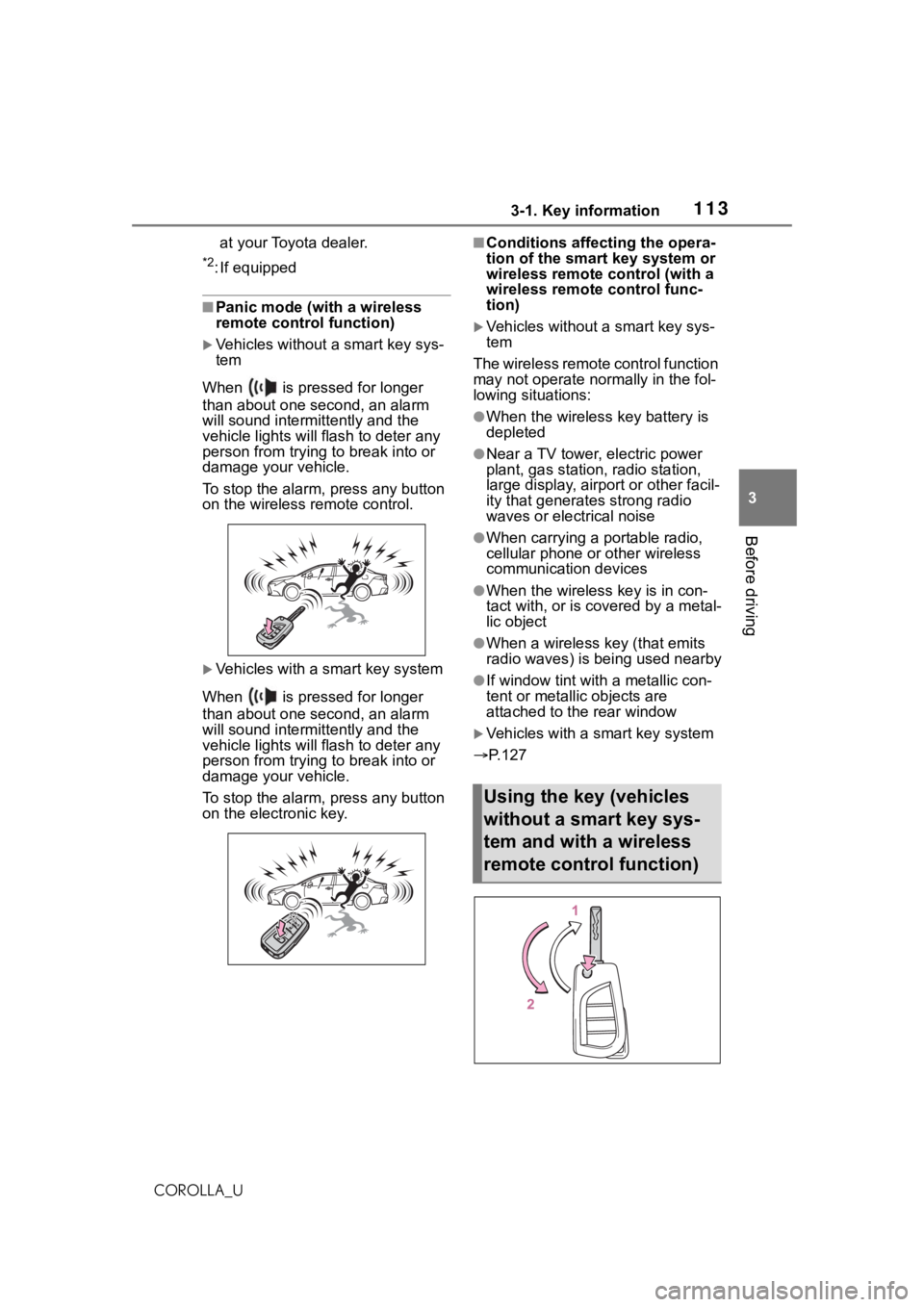
■Panic mode (with a wireless
remote control function)
Vehicles without a smart key sys-
tem
When is pressed for longer
than about one second, an alarm
will sound intermittently and the
vehicle lights will f lash to deter any
person from trying to break into or
damage your vehicle.
To stop the alarm, press any button
on the wireless re mote control.
Vehicles with a smart key system
When is pressed for longer
than about one second, an alarm
will sound intermittently and the
vehicle lights will f lash to deter any
person from trying to break into or
damage your vehicle.
To stop the alarm, press any button
on the electronic key.
■Conditions affecting the opera-
tion of the smart key system or
wireless remote control (with a
wireless remote control func-
tion)
Vehicles without a smart key sys-
tem
The wireless remote control function
may not operate normally in the fol-
lowing situations:
●When the wireles s key battery is
depleted
●Near a TV tower, electric power
plant, gas station, radio station,
large display, airpo rt or other facil-
ity that generates strong radio
waves or electrical noise
●When carrying a portable radio,
cellular phone or other wireless
communication devices
●When the wireless key is in con-
tact with, or is c overed by a metal-
lic object
●When a wireless key (that emits
radio waves) is being used nearby
●If window tint wit h a metallic con-
tent or metallic objects are
attached to the rear window
Vehicles with a smart key system
P.127
Using the key (vehicles
without a smart key sys-
tem and with a wireless
remote control function)
Page 114 of 624
1143-1. Key information
COROLLA_U
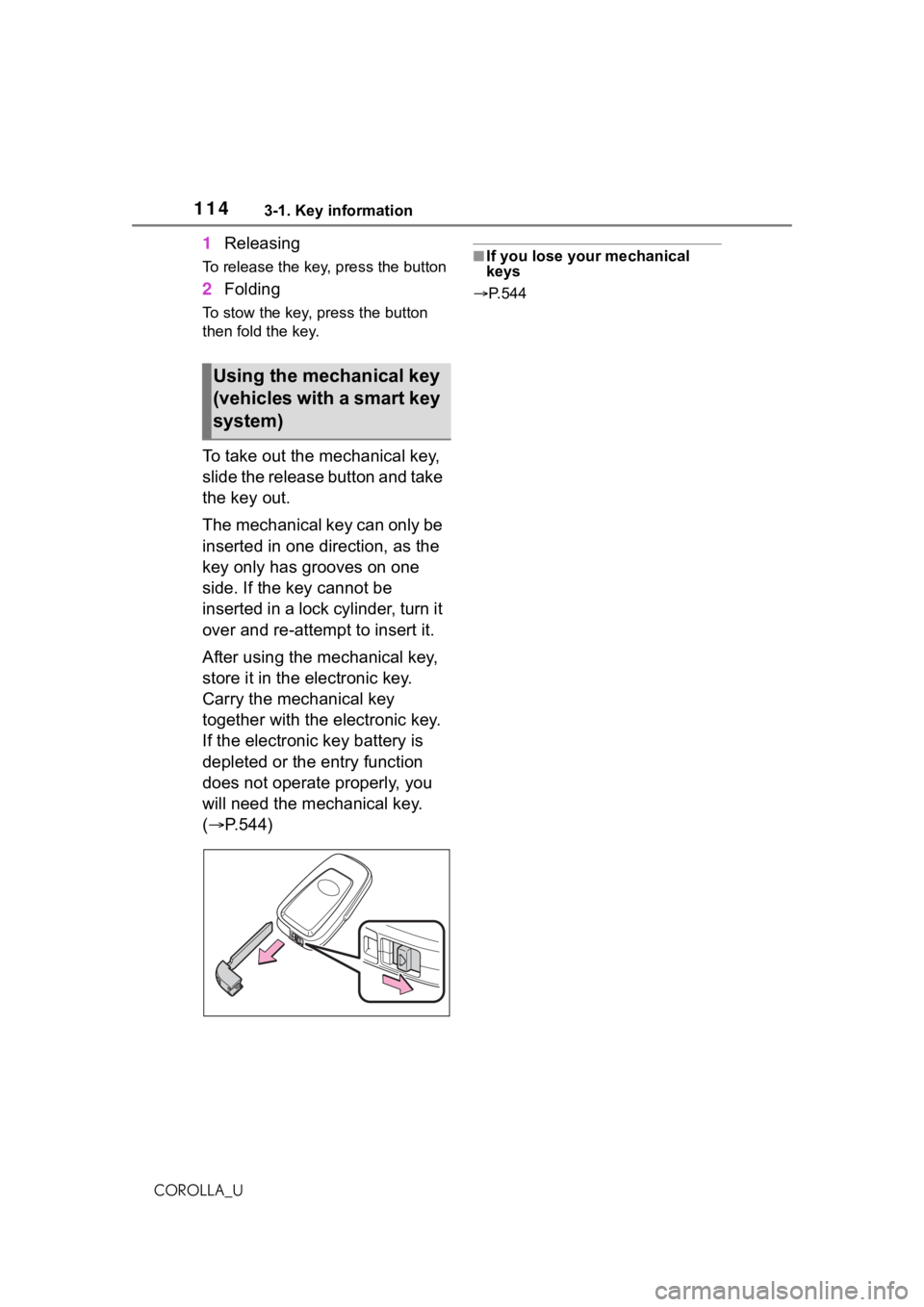
1Releasing
To release the key, press the button
2Folding
To stow the key, press the button
then fold the key.
To take out the mechanical key,
slide the release button and take
the key out.
The mechanical key can only be
inserted in one direction, as the
key only has grooves on one
side. If the key cannot be
inserted in a lock cylinder, turn it
over and re-attempt to insert it.
After using the mechanical key,
store it in the electronic key.
Carry the mechanical key
together with the electronic key.
If the electronic key battery is
depleted or the entry function
does not operate properly, you
will need the mechanical key.
( P.544)
■If you lose your mechanical
keys
P.544
Using the mechanical key
(vehicles with a smart key
system)
Page 120 of 624
1203-2. Opening, closing and locking the doors
COROLLA_U
■If the smart key system or the
wireless remote control does
not operate properly (if
equipped)
Vehicles without a smart key sys-
tem
Replace the key battery with a new
one if it is depleted. ( P.489)
Vehicles with a smart key system
Use the mechanical key to lock and
unlock the doors. ( P.544)
Replace the key battery with a new
one if it is depleted. ( P.489)
■If the battery is discharged
(vehicles with a smart key sys-
tem)
The doors cannot be locked and
unlocked using the smart key sys-
tem or wireless remote control. Lock
or unlock the doors using the
mechanical key. ( P.544)
■Customization
Some functions can be customized.
( P.581)
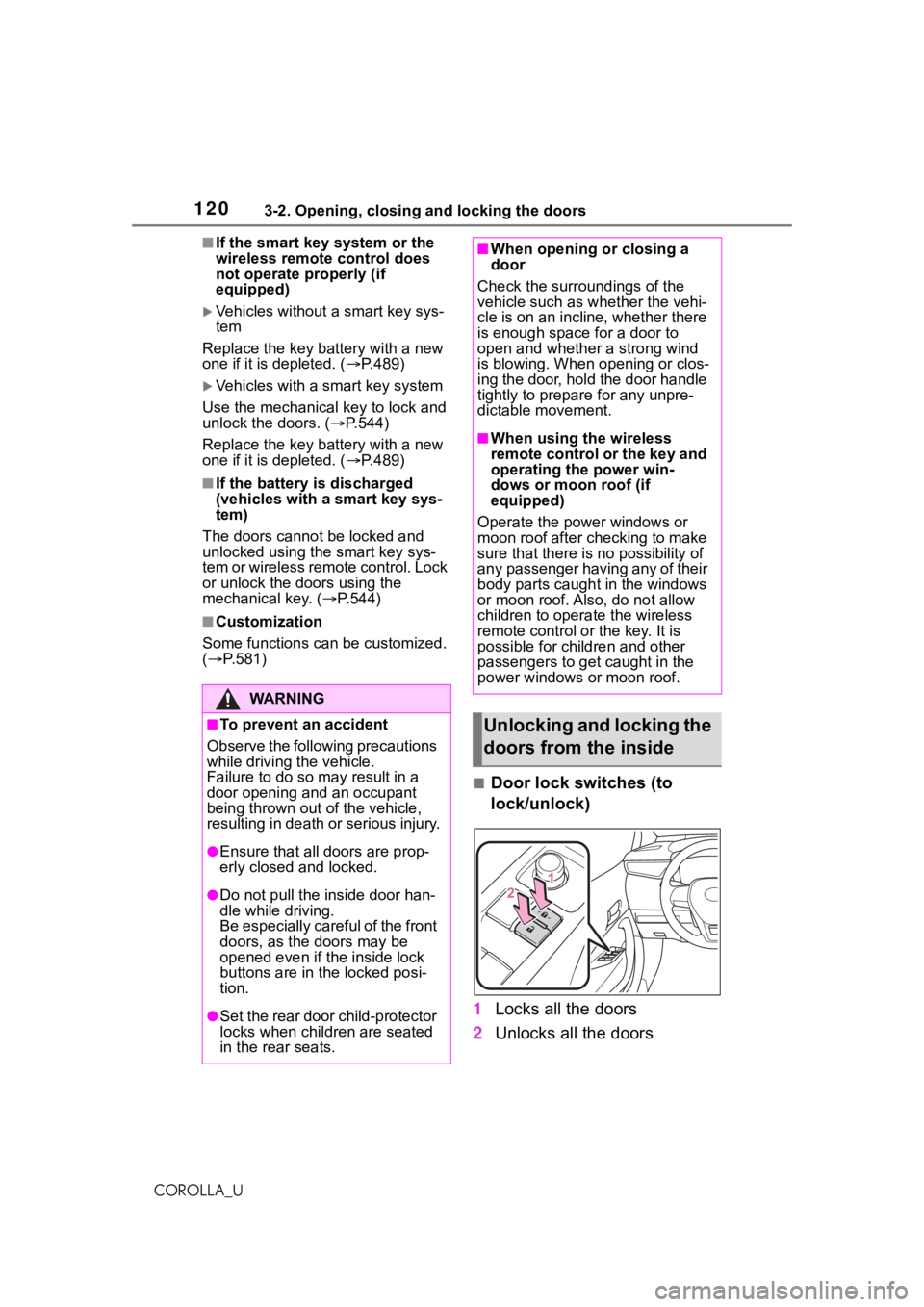
■Door lock switches (to
lock/unlock)
1 Locks all the doors
2 Unlocks all the doors
WA R N I N G
■To prevent an accident
Observe the following precautions
while driving t he vehicle.
Failure to do so m ay result in a
door opening and an occupant
being thrown out of the vehicle,
resulting in death or serious injury.
●Ensure that all doors are prop-
erly closed and locked.
●Do not pull the inside door han-
dle while driving.
Be especially careful of the front
doors, as the doors may be
opened even if the inside lock
buttons are in the locked posi-
tion.
●Set the rear door child-protector
locks when children are seated
in the rear seats.
■When opening or closing a
door
Check the surroundings of the
vehicle such as wh ether the vehi-
cle is on an incline, whether there
is enough space for a door to
open and whether a strong wind
is blowing. When opening or clos-
ing the door, hold the door handle
tightly to prepare for any unpre-
dictable movement.
■When using the wireless
remote control or the key and
operating the power win-
dows or moon roof (if
equipped)
Operate the power windows or
moon roof after checking to make
sure that there is no possibility of
any passenger having any of their
body parts caught in the windows
or moon roof. Also, do not allow
children to opera te the wireless
remote control or the key. It is
possible for children and other
passengers to get caught in the
power windows or moon roof.
Unlocking and locking the
doors from the inside
Page 125 of 624
1253-2. Opening, closing and locking the doors
3
Before driving
COROLLA_Ucan be opened. In order to pre-
vent theft, take all electronic keys
with you when leaving the vehicle.
●If the electronic key is put in the
trunk with all the doors locked, the
key may not be detected depend-
ing on the location of the key and
the surrounding radio wave condi-
tions. In this case, the key con-
finement prevention function
cannot be activate
d, causing the
doors to lock when the trunk is
closed. Make sure to check where
the key is before closing the trunk.
●The key confinement prevention
function cannot be activated if any
one of the doors is unlocked. In
this case, open the trunk using the
trunk opener.
■Internal trunk release lever
The trunk lid can be opened by pull-
ing up the glow-in -the-dark lever
located on the inside of the trunk lid.
The lever will conti nue to glow for
some time after the trunk lid is
closed.
■If the smart key system or the
wireless remote control does
not operate properly (if
equipped)
Replace the key battery with a new
one if it is depleted. ( P.489)
■Open door warning buzzer
P. 1 2 1
■Customization
Some functions can be customized.
( P.581)
*: If equipped
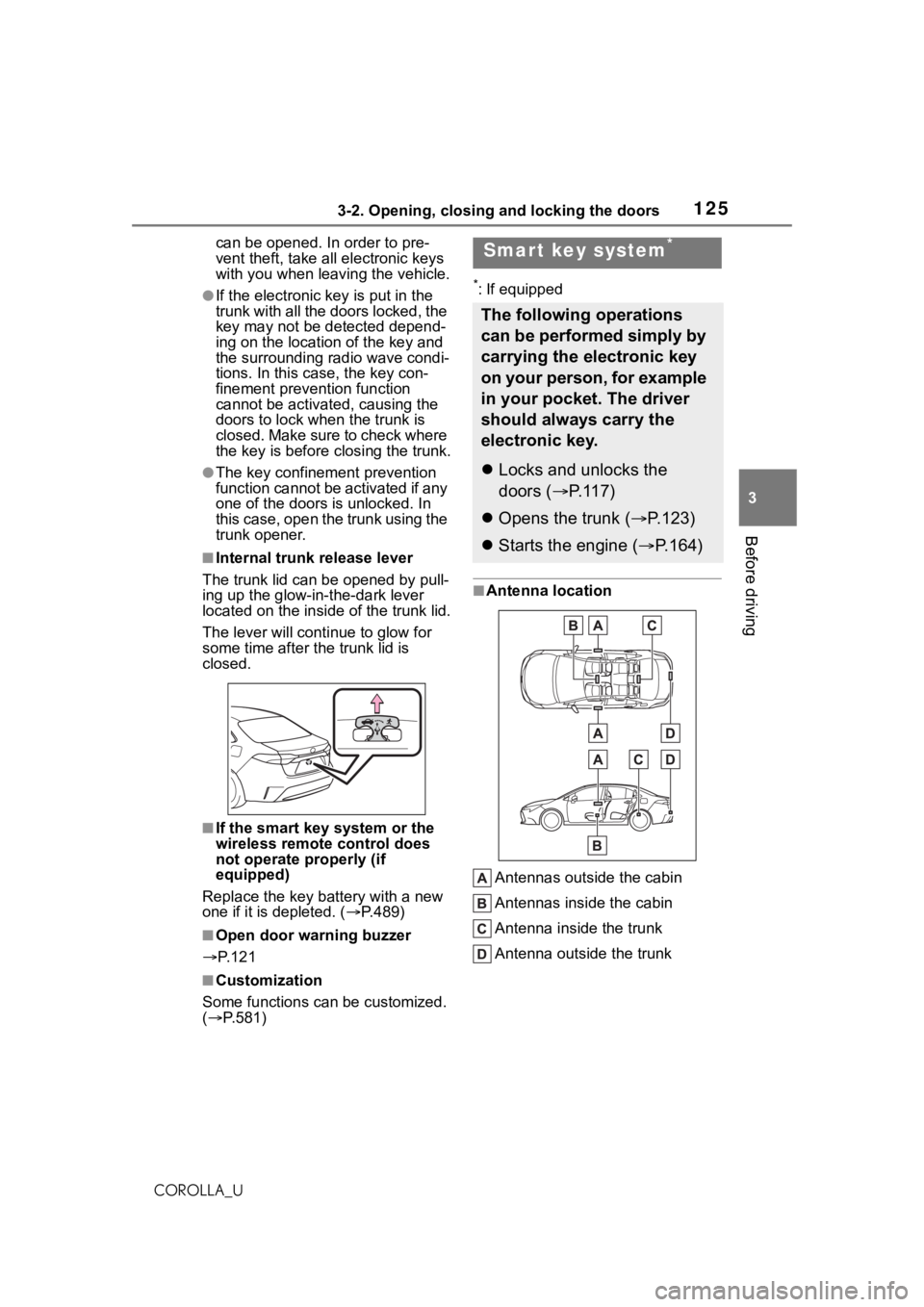
■Antenna location
Antennas outside the cabin
Antennas inside the cabin
Antenna inside the trunk
Antenna outside the trunk
Smart key system*
The following operations
can be performed simply by
carrying the electronic key
on your person, for example
in your pocket. The driver
should always carry the
electronic key.
Locks and unlocks the
doors ( P.117)
Opens the trunk ( P.123)
Starts the engine ( P.164)
Page 126 of 624
1263-2. Opening, closing and locking the doors
COROLLA_U
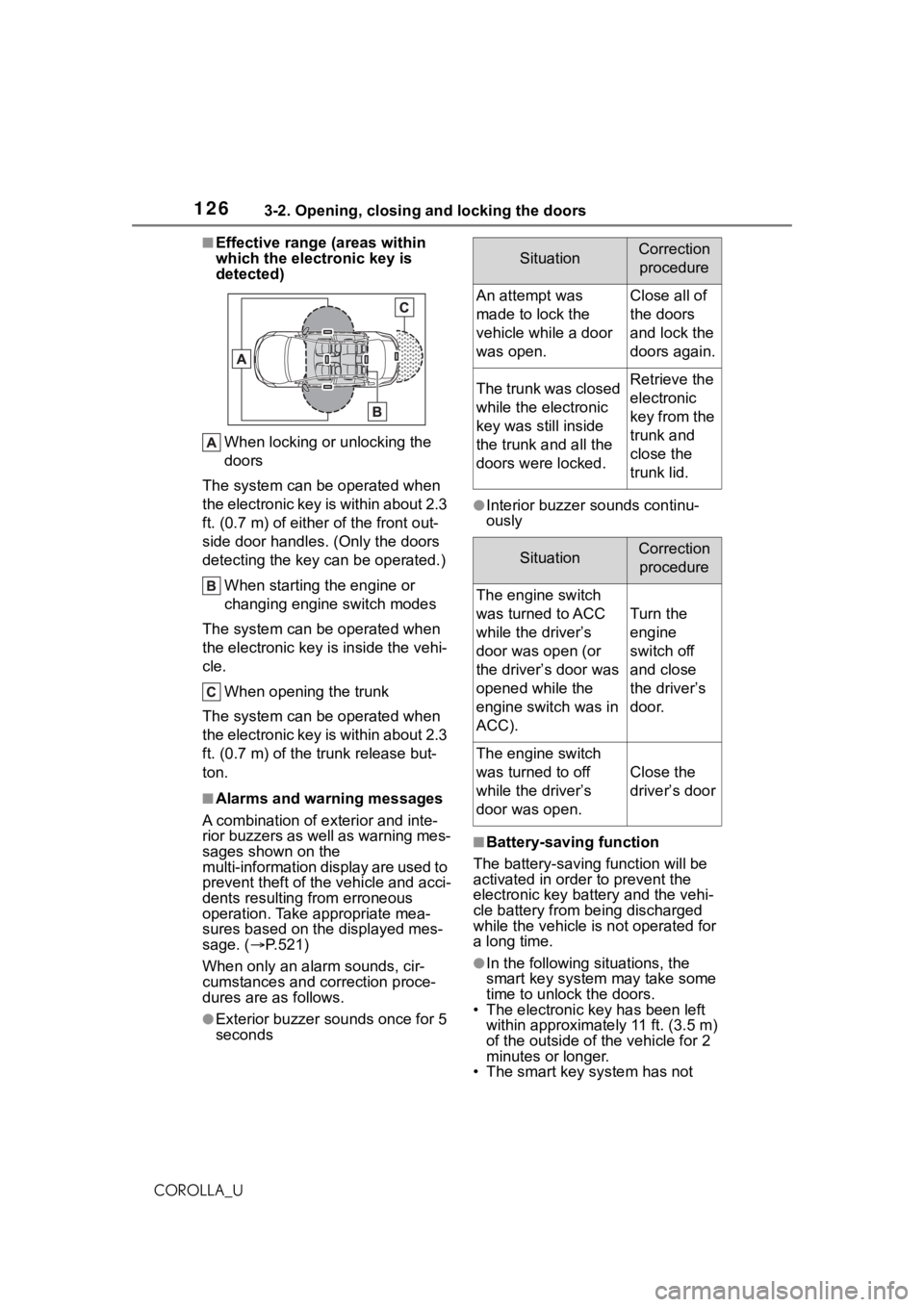
■Effective range (areas within
which the electronic key is
detected)When locking or unlocking the
doors
The system can be operated when
the electronic key is within about 2.3
ft. (0.7 m) of eithe r of the front out-
side door handles. (Only the doors
detecting the key c an be operated.)
When starting the engine or
changing engine switch modes
The system can be operated when
the electronic key is inside the vehi-
cle.
When opening the trunk
The system can be operated when
the electronic key is within about 2.3
ft. (0.7 m) of the trunk release but-
ton.
■Alarms and warning messages
A combination of e xterior and inte-
rior buzzers as well as warning mes-
sages shown on the
multi-information display are used to
prevent theft of the vehicle and acci-
dents resulting from erroneous
operation. Take appropriate mea-
sures based on the displayed mes-
sage. ( P.521)
When only an ala rm sounds, cir-
cumstances and c orrection proce-
dures are as follows.
●Exterior buzzer sounds once for 5
seconds
●Interior buzzer sounds continu-
ously
■Battery-saving function
The battery-saving function will be
activated in ord er to prevent the
electronic key battery and the vehi-
cle battery from being discharged
while the vehicle is not operated for
a long time.
●In the following situations, the
smart key system may take some
time to unlock the doors.
• The electronic key has been left within approximatel y 11 ft. (3.5 m)
of the outside of the vehicle for 2
minutes or longer.
• The smart key system has not
SituationCorrection
procedure
An attempt was
made to lock the
vehicle while a door
was open.Close all of
the doors
and lock the
doors again.
The trunk was closed
while the electronic
key was still inside
the trunk and all the
doors were locked.Retrieve the
electronic
key from the
trunk and
close the
trunk lid.
SituationCorrection procedure
The engine switch
was turned to ACC
while the driver’s
door was open (or
the driver’s door was
opened while the
engine switch was in
ACC).
Turn the
engine
switch off
and close
the driver’s
door.
The engine switch
was turned to off
while the driver’s
door was open.
Close the
driver’s door
Page 127 of 624
1273-2. Opening, closing and locking the doors
3
Before driving
COROLLA_Ubeen used for 5 days or longer.
●If the smart key system has not
been used for 14 days or longer,
the doors cann
ot be unlocked
from any door except the driver’s
door. In this case, hold the driver’s
door handle, or use the wireless
remote control or mechanical key
to unlock the doors.
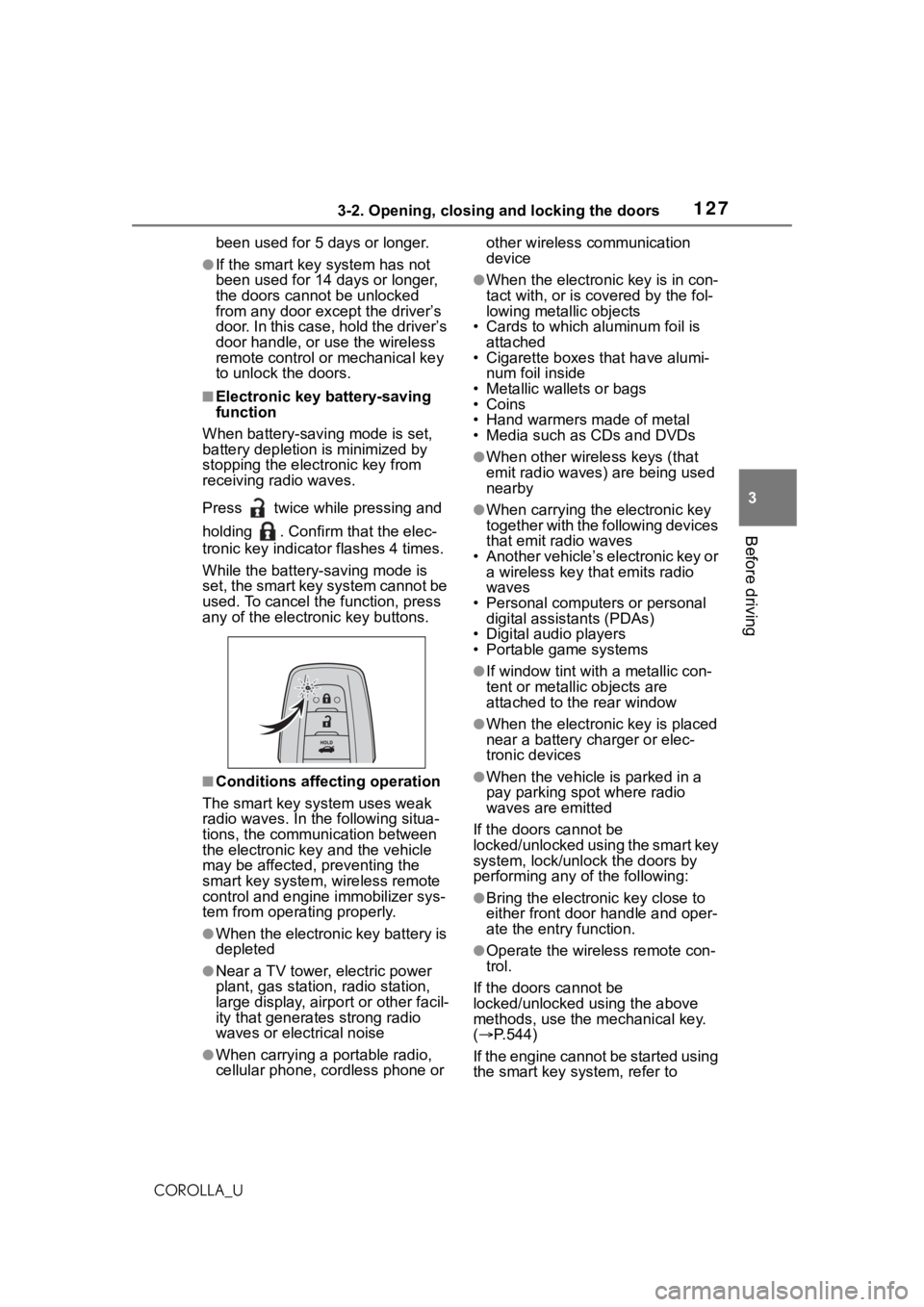
■Electronic key battery-saving
function
When battery-savi ng mode is set,
battery depletion is minimized by
stopping the electronic key from
receiving radio waves.
Press twice while pressing and
holding . Confirm that the elec-
tronic key indicator flashes 4 times.
While the battery-saving mode is
set, the smart key system cannot be
used. To cancel the function, press
any of the electronic key buttons.
■Conditions affecting operation
The smart key system uses weak
radio waves. In the following situa-
tions, the communication between
the electronic key and the vehicle
may be affected, preventing the
smart key system, wireless remote
control and engine immobilizer sys-
tem from operating properly.
●When the electronic key battery is
depleted
●Near a TV tower, electric power
plant, gas station , radio station,
large display, airpo rt or other facil-
ity that generates strong radio
waves or electrical noise
●When carrying a portable radio,
cellular phone, cordless phone or other wireless communication
device
●When the electronic key is in con-
tact with, or is c
overed by the fol-
lowing metallic objects
• Cards to which aluminum foil is
attached
• Cigarette boxes that have alumi-
num foil inside
• Metallic wallets or bags
•Coins
• Hand warmers made of metal
• Media such as CDs and DVDs
●When other wirel ess keys (that
emit radio waves) are being used
nearby
●When carrying the electronic key
together with the following devices
that emit radio waves
• Another vehicle’s electronic key or a wireless key that emits radio
waves
• Personal computers or personal digital assistants (PDAs)
• Digital audio players
• Portable game systems
●If window tint wit h a metallic con-
tent or metallic objects are
attached to the rear window
●When the electronic key is placed
near a battery charger or elec-
tronic devices
●When the vehicle is parked in a
pay parking spot where radio
waves are emitted
If the doors cannot be
locked/unlocked using the smart key
system, lock/unlock the doors by
performing any of the following:
●Bring the electronic key close to
either front door handle and oper-
ate the entry function.
●Operate the wireless remote con-
trol.
If the doors cannot be
locked/unlocked using the above
methods, use the mechanical key.
( P.544)
If the engine cannot be started using
the smart key system, refer to