remote control TOYOTA COROLLA 2022 (in English) Owner's Manual
[x] Cancel search | Manufacturer: TOYOTA, Model Year: 2022, Model line: COROLLA, Model: TOYOTA COROLLA 2022Pages: 678, PDF Size: 147.24 MB
Page 139 of 678
137
3
3-5. Opening and closing the windows
Before driving
direction again. After the door win-
dow is completely closed, continue holding the switch for a further 1 sec-
ond or more.
If you release the switch while the win- dow is moving, start again from the
beginning.
If the window reverses and cannot be fully closed or opened, have the vehicle
inspected by any authorized Toyota
retailer or Toyota authorized repairer, or any reliable repairer.
■Door lock linked window operation
●Vehicles without a smart entry & start
system: The power windows can be
opened and closed using the key.*
( P. 1 1 4 )
Vehicles with a smart entry & start system: The power windows can be
opened and closed using the mechan-
ical key.* ( P.512)
●The power windows can be opened
and closed using the wireless remote
control.* ( P.113)*: These settings must be customized at
any authorized Toyota retailer or
Toyota authorized repairer, or any reli-
able repairer.
■Customization
Some functions can be customized.
( P.538)
WA R N I N G
Observe the following precautions.
Failure to do so may result in death or serious injury.
■Closing the windows
●The driver is responsible for all the
power window operations, including
the operation for the passengers. In order to prevent accidental opera-
tion, especially by a child, do not let
a child operate the power windows. It is possible for children and other
passengers to have body parts
caught in the power window. Also, when riding with a child, it is recom-
mended to use the window lock
switch. (P.138)
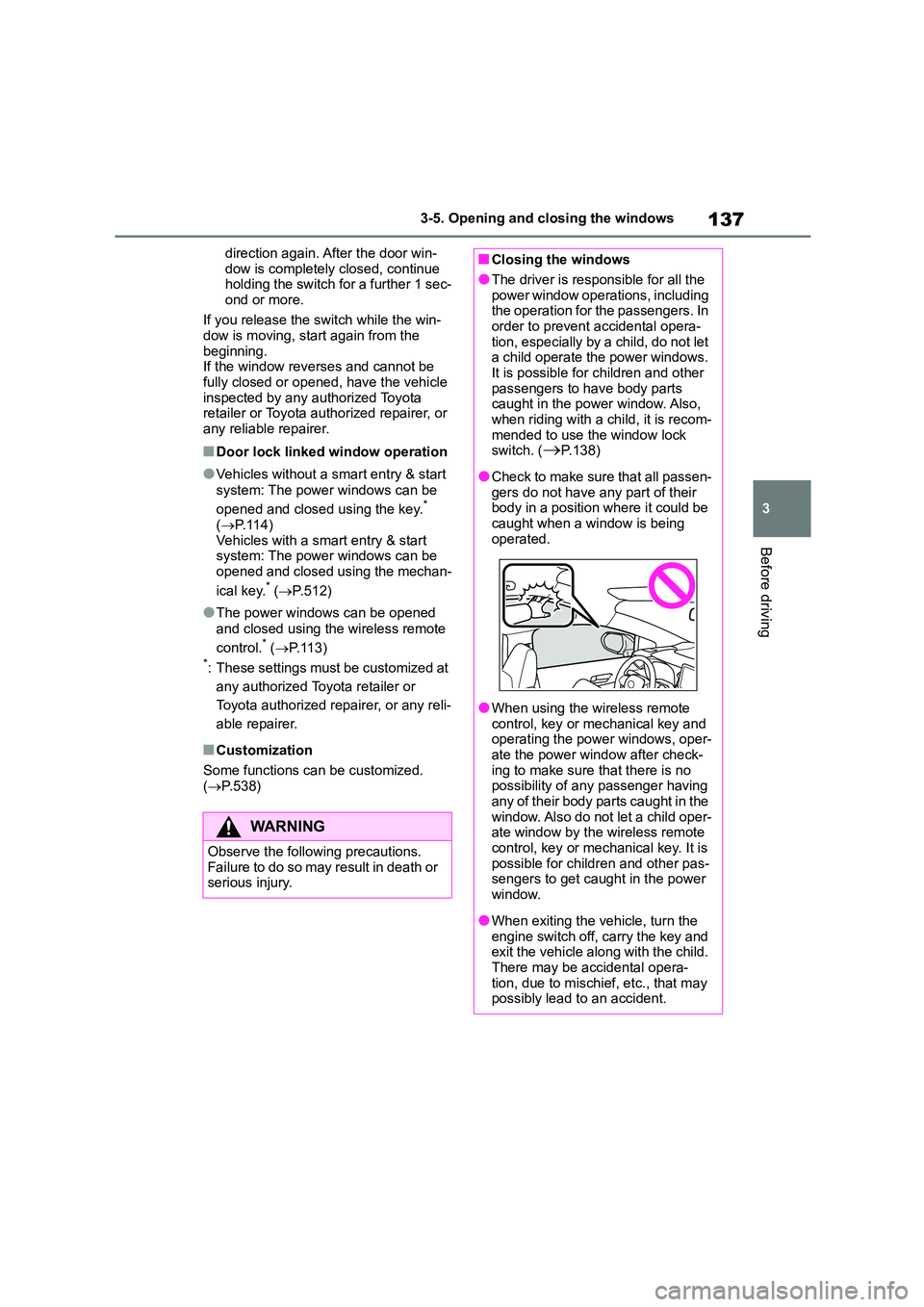
●Check to make sure that all passen-
gers do not have any part of their body in a position where it could be
caught when a window is being
operated.
●When using the wireless remote
control, key or mechanical key and operating the power windows, oper-
ate the power window after check-
ing to make sure that there is no possibility of any passenger having
any of their body parts caught in the
window. Also do not let a child oper- ate window by the wireless remote
control, key or mech anical key. It is
possible for children and other pas- sengers to get caught in the power
window.
●When exiting the vehicle, turn the
engine switch off, carry the key and
exit the vehicle along with the child.
There may be accidental opera- tion, due to mischief, etc., that may
possibly lead to an accident.
Page 143 of 678
141
3
3-5. Opening and closing the windows
Before driving
WA R N I N G
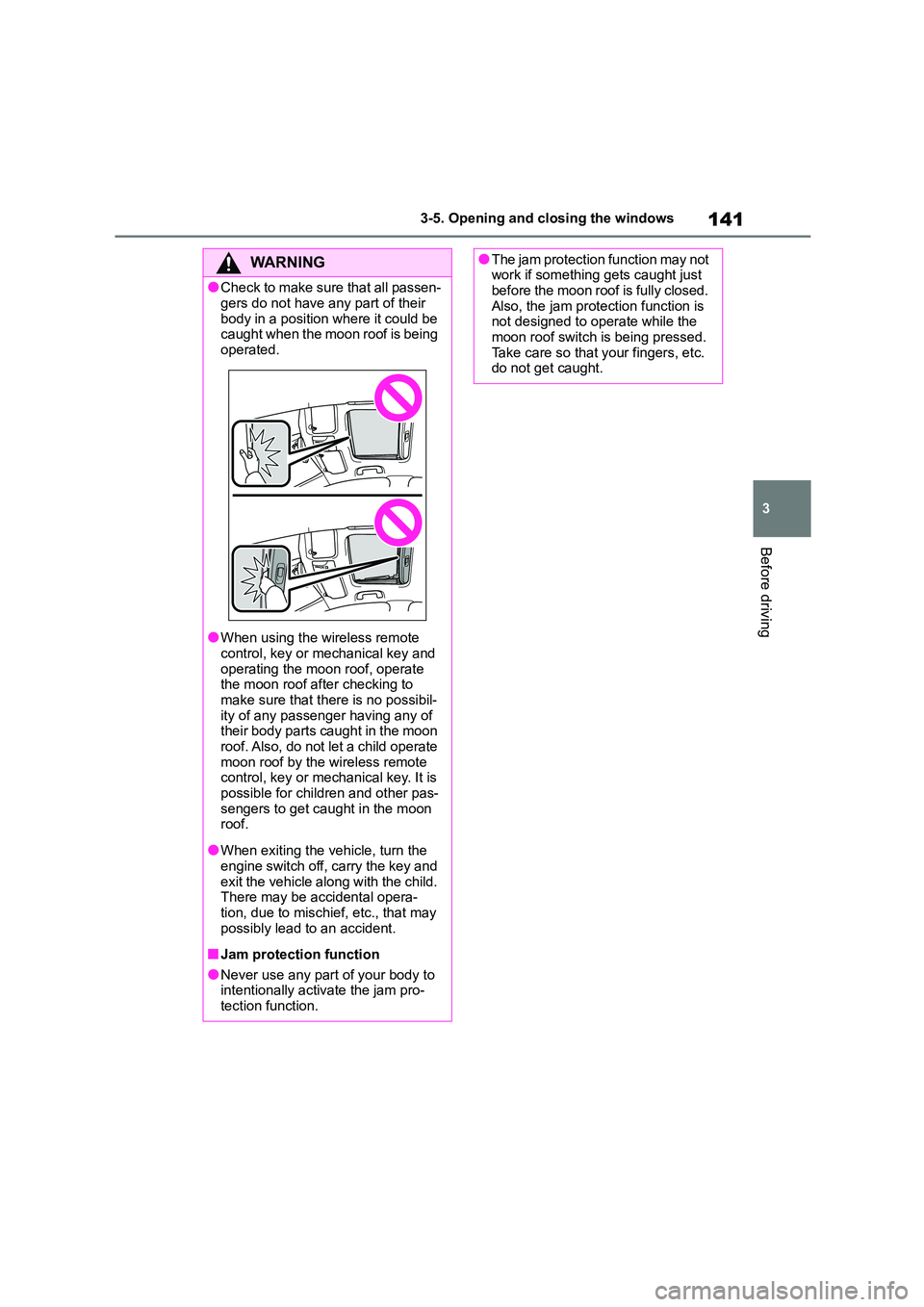
●Check to make sure that all passen-
gers do not have any part of their
body in a position where it could be caught when the moon roof is being
operated.
●When using the wireless remote
control, key or mechanical key and
operating the moon roof, operate the moon roof after checking to
make sure that there is no possibil-
ity of any passenger having any of their body parts caught in the moon
roof. Also, do not let a child operate
moon roof by the wireless remote control, key or mechanical key. It is
possible for children and other pas-
sengers to get caught in the moon roof.
●When exiting the vehicle, turn the engine switch off, carry the key and
exit the vehicle along with the child.
There may be accidental opera- tion, due to mischief, etc., that may
possibly lead to an accident.
■Jam protection function
●Never use any part of your body to
intentionally activate the jam pro- tection function.
●The jam protection function may not work if something gets caught just
before the moon roof is fully closed.
Also, the jam protection function is not designed to operate while the
moon roof switch is being pressed.
Take care so that your fingers, etc. do not get caught.
Page 369 of 678
367
5
5-10. Bluetooth®
Audio system
5-10.Bluetooth®
■When using the Bluetooth®
audio/phone
In the following situations, the
system may not function.
• The portable player does not support
Bluetooth®
• The cellular phone is located outside
the service area
• The Bluetooth® device is switched off
• The Bluetooth® device has a low bat-
tery
• The Bluetooth® device is not con-
nected to the system
• The Bluetooth® device is behind the
seat or in the glove box or console
box, or metal material covers or
touches the device
There may be a delay if a cellular
phone connection is made dur-
ing Bluetooth® audio play.
Depending on the type of porta-
ble audio player that is con-
nected to the system, operation
may differ slightly and certain
functions may not be available.
This system is not guaranteed to
operate with all Bluetooth®
devices.
■When transferring ownership
of the vehicle
Be sure to initialize the system to
prevent personal data from being
improperly accessed. ( P.357)
■About Bluetooth®
Bluetooth is a registered trademark
of Bluetooth SIG, Inc.
■Compatible models
The Bluetooth® audio system sup-
ports portable audio players with
the following specifications
Bluetooth® specifications: Ver.
1.1 or higher (Recommended:
Ve r. 4 . 1 )
Profiles:
• A2DP (Advanced Audio Distribution
Profile) Ver. 1.0, or higher (Recom-
mended: Ver. 1.3)
This is a profile to transmit stereo audio
or high quality sound to the audio sys-
tem.
• AVRCP (Audio/Video Remote Control
Profile) Ver. 1.0 or higher (Recom-
mended: Ver. 1.6)
This is a profile to allow remote control
the A/V equipment.
However, please note that some
functions may be limited depending
on the type of portable audio player
connected.
The hands-free system supports
cellular phones with the following
specifications.
Bluetooth® specifications: Ver.
Bluetooth®
Overview
Page 411 of 678
7
409
7
Maintenance and care
Maintenance and care
.7-1. Maintenance and care
Cleaning and protecting the
vehicle exterior ............... 410
Cleaning and protecting the
vehicle interior ................ 413
7-2. Maintenance
Maintenance requirements
....................................... 416
7-3. Do-it-yourself maintenance
Do-it-yourself service precau-
tions ................................ 418
Hood ................................. 419
Positioning a floor jack ...... 420
Engine compartment ........ 422
Tires .................................. 429
Tire inflation pressure ....... 444
Wheels.............................. 445
Air conditioning filter ......... 447
Wireless remote control/elec-
tronic key battery ............ 449
Checking and replacing fuses
....................................... 452
Light bulbs ........................ 455
Page 429 of 678
427
7
7-3. Do-it-yourself maintenance
Maintenance and care
Check the battery as follows.
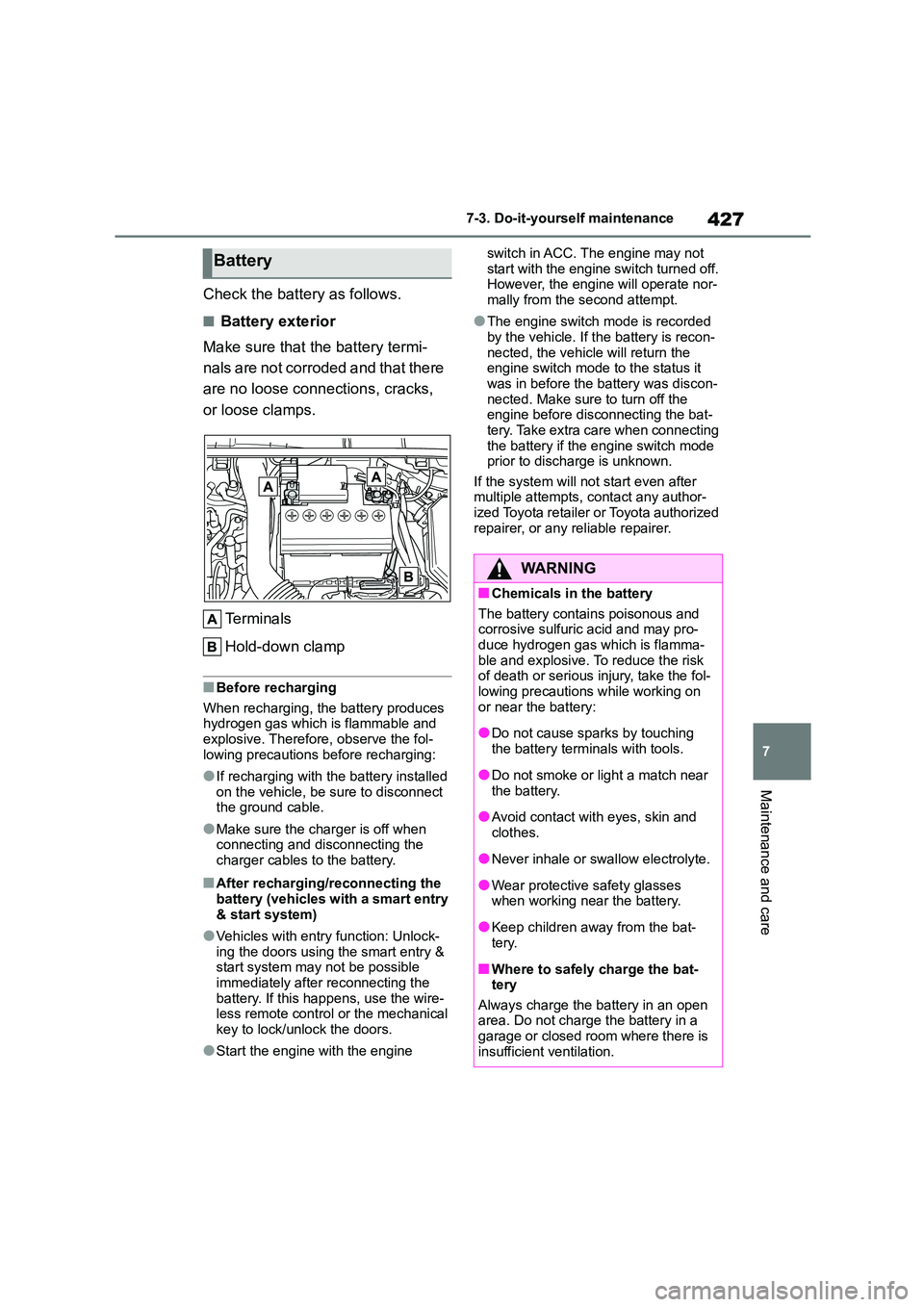
■Battery exterior
Make sure that the battery termi-
nals are not corroded and that there
are no loose connections, cracks,
or loose clamps.
Te r m i n a l s
Hold-down clamp
■Before recharging
When recharging, the battery produces hydrogen gas which is flammable and
explosive. Therefore, observe the fol-
lowing precautions before recharging:
●If recharging with the battery installed
on the vehicle, be sure to disconnect the ground cable.
●Make sure the charger is off when connecting and disconnecting the
charger cables to the battery.
■After recharging/reconnecting the
battery (vehicles with a smart entry & start system)
●Vehicles with entry function: Unlock-ing the doors using the smart entry &
start system may not be possible
immediately after reconnecting the battery. If this happens, use the wire-
less remote control or the mechanical
key to lock/unlock the doors.
●Start the engine with the engine
switch in ACC. The engine may not
start with the engine switch turned off. However, the engine will operate nor-
mally from the second attempt.
●The engine switch mode is recorded
by the vehicle. If the battery is recon-
nected, the vehicle will return the engine switch mode to the status it
was in before the battery was discon-
nected. Make sure to turn off the engine before disconnecting the bat-
tery. Take extra care when connecting
the battery if the engine switch mode prior to discharge is unknown.
If the system will not start even after
multiple attempts, contact any author- ized Toyota retailer or Toyota authorized
repairer, or any reliable repairer.
Battery
WA R N I N G
■Chemicals in the battery
The battery contains poisonous and corrosive sulfuric acid and may pro-
duce hydrogen gas which is flamma-
ble and explosive. To reduce the risk of death or serious injury, take the fol-
lowing precautions while working on
or near the battery:
●Do not cause sparks by touching
the battery terminals with tools.
●Do not smoke or light a match near
the battery.
●Avoid contact with eyes, skin and
clothes.
●Never inhale or swallow electrolyte.
●Wear protective safety glasses
when working near the battery.
●Keep children away from the bat-
tery.
■Where to safely charge the bat-
tery
Always charge the battery in an open area. Do not charge the battery in a
garage or closed room where there is
insufficient ventilation.
Page 451 of 678
449
7
7-3. Do-it-yourself maintenance
Maintenance and care
■If the key battery is depleted
The following symptoms may occur:
●The smart entry & start system (if equipped) and wireless remote control
will not function properly.
●The operational range will be reduced.
Flathead screwdriver
Small flathead screwdriver
Lithium battery CR2032
■Use a CR2032 lithium battery
●Batteries can be purchased at any
authorized Toyota retailer or Toyota authorized repairer, or any reliable
repairer, local electrical appliance
shops or camera stores.
●Replace only with the same or equiva-
lent type recommended by the manu- facturer.
●Dispose of used batteries according to local laws.
Vehicles without a smart entry &
start system
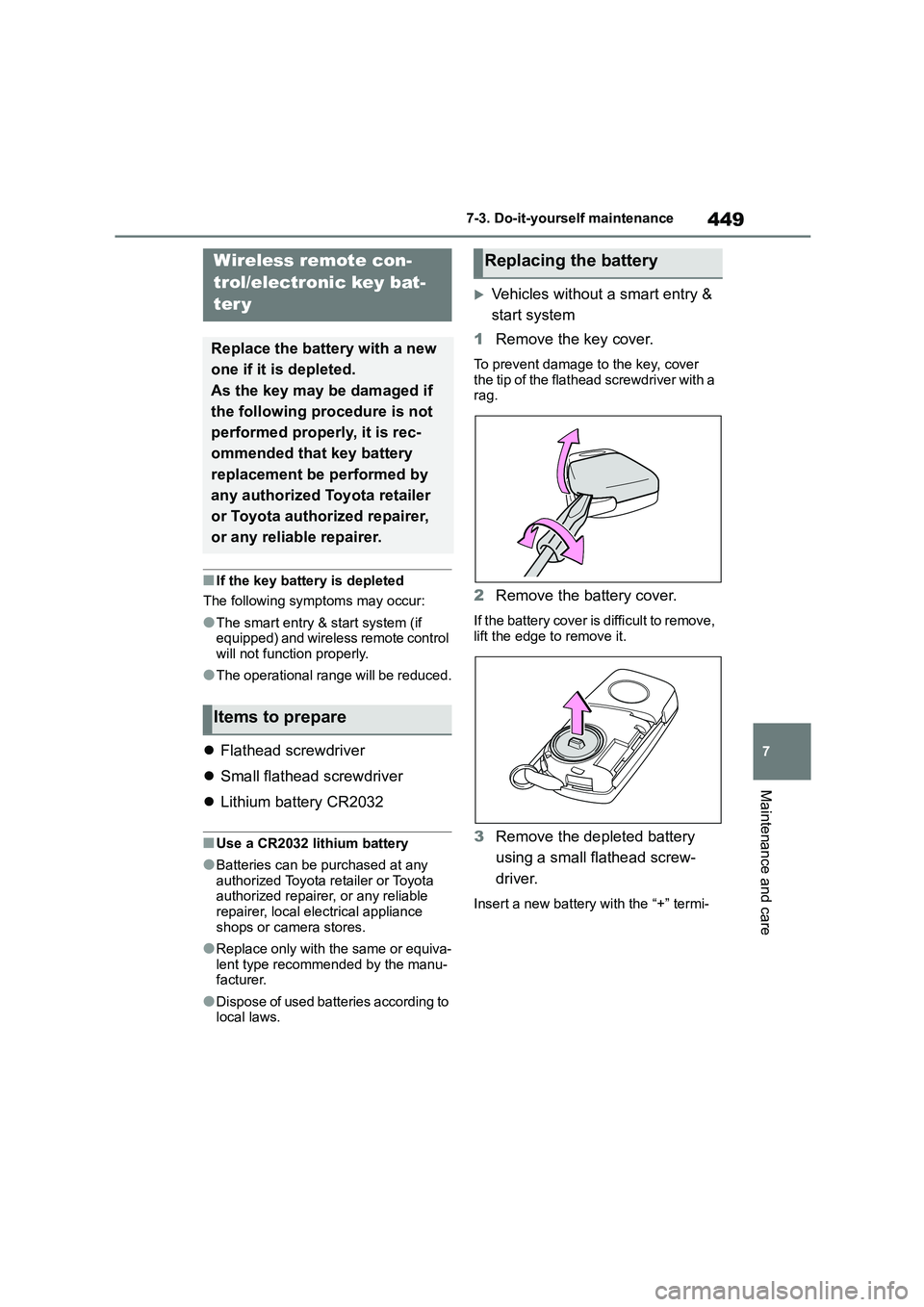
1 Remove the key cover.
To prevent damage to the key, cover the tip of the flathead screwdriver with a
rag.
2 Remove the battery cover.
If the battery cover is difficult to remove,
lift the edge to remove it.
3 Remove the depleted battery
using a small flathead screw-
driver.
Insert a new battery with the “+” termi-
Wireless remote con-
trol/electronic key bat-
ter y
Replace the battery with a new
one if it is depleted.
As the key may be damaged if
the following procedure is not
performed properly, it is rec-
ommended that key battery
replacement be performed by
any authorized Toyota retailer
or Toyota authorized repairer,
or any reliable repairer.
Items to prepare
Replacing the battery
Page 513 of 678
511
8
8-2. Steps to take in an emergency
When trouble arises
■When the electronic key does not
work properly
●Make sure that the smart entry & start
system has not been deactivated in
the customization setting. If it is off, turn the function on. (Customizable
features: P.538)
●Check if battery-saving mode is set. If it is set, cancel the function. ( P.122)
If you lose your keys
New genuine keys can be
made by any authorized Toyota
retailer or Toyota authorized
repairer, or any reliable
repairer using the other key
(vehicles without a smart entry
& start system) or mechanical
key (vehicles with a smart
entry & start system) and the
key number stamped on your
key number plate.
Keep the plate in a safe place
such as your wallet, not in the
vehicle.
NOTICE
■When an electronic key is lost
(vehicles with a smart entry &
start system)
If the electronic ke y remains lost, the
risk of vehicle thef t increases signifi-
cantly. Visit any authorized Toyota retailer or Toyota authorized repairer,
or any reliable repairer immediately
with all remaining electronic keys that were provided with your vehicle.
If the electronic key
does not operate prop-
erly (vehicles with a
smar t entr y & star t sys-
tem)
If communication between the
electronic key and vehicle is
interrupted ( P.122) or the
electronic key cannot be used
because the battery is
depleted, the smart entry &
start system and wireless
remote control cannot be used.
In such cases, the doors can
be opened and the engine can
be started by following the pro-
cedure below.
NOTICE
■In case of a smart entry & start
system malfunction or other key-related problems
Take your vehicle with all the elec-
tronic keys provided with your vehicle to any authorized Toyota retailer or
Toyota authorized repairer, or any reli-
able repairer.
Page 518 of 678
5168-2. Steps to take in an emergency
moving parts as shown in the illustration
5 Start the engine of the second
vehicle. Increase the engine
speed slightly and maintain at
that level for approximately 5
minutes to recharge the battery
of your vehicle.
6 Vehicles with a smart entry &
start system: Open and close
any of the doors of your vehicle
with the engine switch OFF.
7 Maintain the engine speed of
the second vehicle and start the
engine of your vehicle by turning
the engine switch to ON.
8 Once the vehicle’s engine has
started, remove the jumper
cables in the exact reverse
order from which they were con-
nected.
9 1ZR-FAE engine: Reinstall the
engine cover.
9 M15A-FKS engine: Reinstall the
positive (+) battery terminal
cover.
Once the engine starts, have the
vehicle inspected at any author-
ized Toyota reta iler or Toyota
authorized repairer, or any reliable
repairer as soon as possible.
■Starting the engine when the bat- tery is discharged
The engine cannot be started by
push-starting.
■To prevent battery discharge
●Turn off the headlights and the audio
system while the engine is off.
●Turn off any unnecessary electrical
components when the vehicle is run-
ning at a low speed for an extended period, such as in heavy traffic.
■When the battery is removed or dis-
charged
●Information stored in the ECU is
cleared. When the battery is depleted,
have the vehicle inspected at any authorized Toyota retailer or Toyota
authorized repairer, or any reliable
repairer.
●Some systems may require initializa-
tion. ( P.547)
■When removing the battery termi- nals
When the battery terminals are
removed, the information stored in the ECU is cleared. Before removing the
battery terminals, contact any author-
ized Toyota retailer or Toyota authorized repairer, or any reliable repairer.
■Charging the battery
The electricity stored in the battery will
discharge gradually even when the vehi- cle is not in use, due to natural dis-
charge and the draining effects of
certain electrical appliances. If the vehi- cle is left for a long time, the battery may
discharge, and the engine may be una-
ble to start. (The battery recharges auto- matically during driving.)
■When recharging or replacing the
battery (vehicles with a smart entry
& start system)
●Vehicles with entry function: In some
cases, it may not be possible to unlock the doors using the smart entry
& start system when the battery is dis-
charged. Use the wireless remote
control or the mechanical key to lock or unlock the doors.
●The engine may not start on the first attempt after the battery has
recharged but will start normally after
the second attempt. This is not a mal- function.
Page 543 of 678
541
9
9-2. Customization
Vehicle specifications
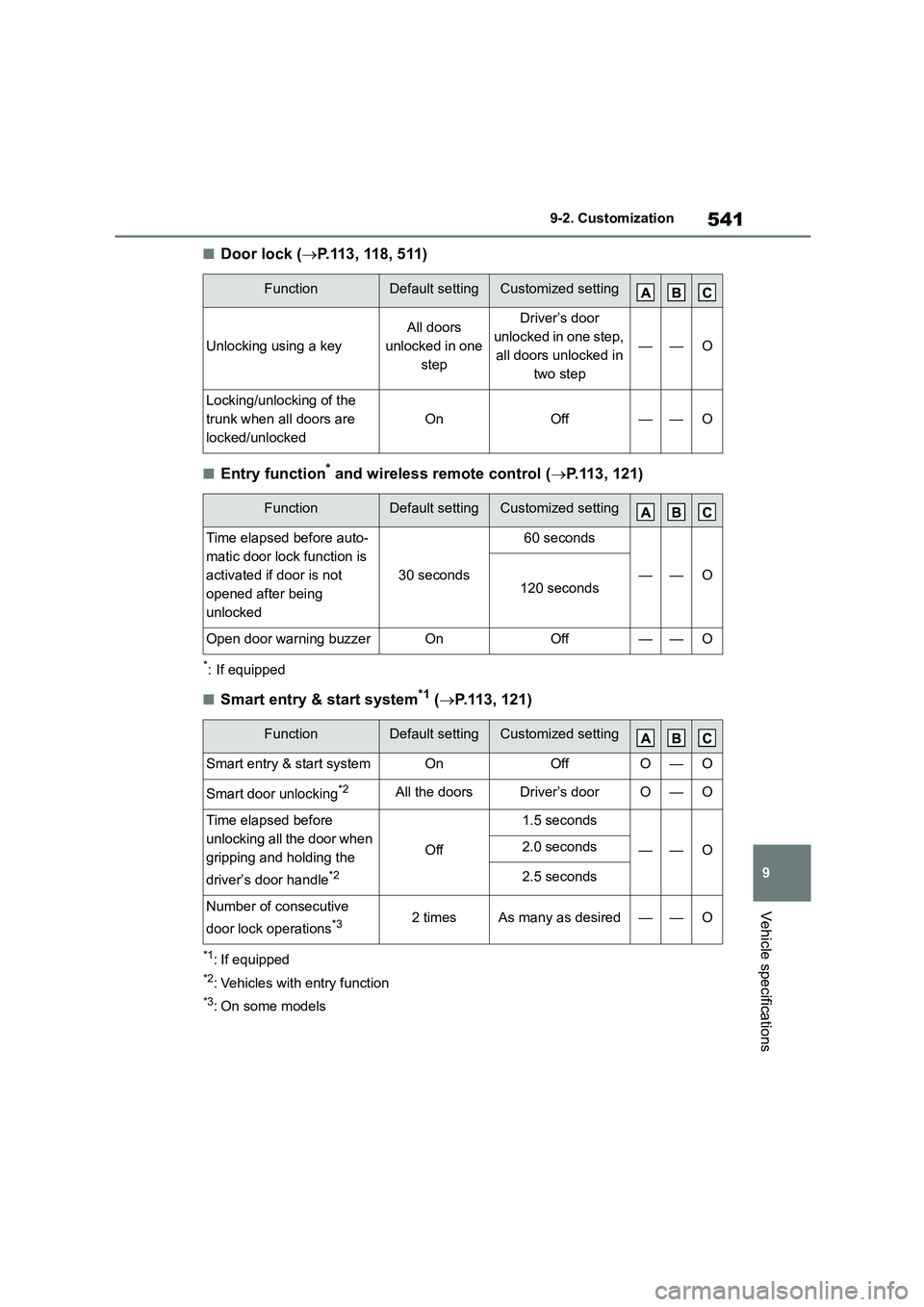
■Door lock ( P.113, 118, 511)
■Entry function* and wireless remote control (P.113, 121)
*: If equipped
■Smart entry & start system*1 (P.113, 121)
*1: If equipped
*2: Vehicles with entry function
*3: On some models
FunctionDefault settingCustomized setting
Unlocking using a key
All doors
unlocked in one
step
Driver’s door
unlocked in one step,
all doors unlocked in
two step
——O
Locking/unlocking of the
trunk when all doors are
locked/unlocked
OnOff——O
FunctionDefault settingCustomized setting
Time elapsed before auto-
matic door lock function is
activated if door is not
opened after being
unlocked
30 seconds
60 seconds
——O120 seconds
Open door warning buzzerOnOff——O
FunctionDefault settingCustomized setting
Smart entry & start systemOnOffO—O
Smart door unlocking*2All the doorsDriver’s doorO—O
Time elapsed before
unlocking all the door when
gripping and holding the
driver’s door handle*2
Off
1.5 seconds
——O2.0 seconds
2.5 seconds
Number of consecutive
door lock operations*32 timesAs many as desired——O
Page 544 of 678
5429-2. Customization
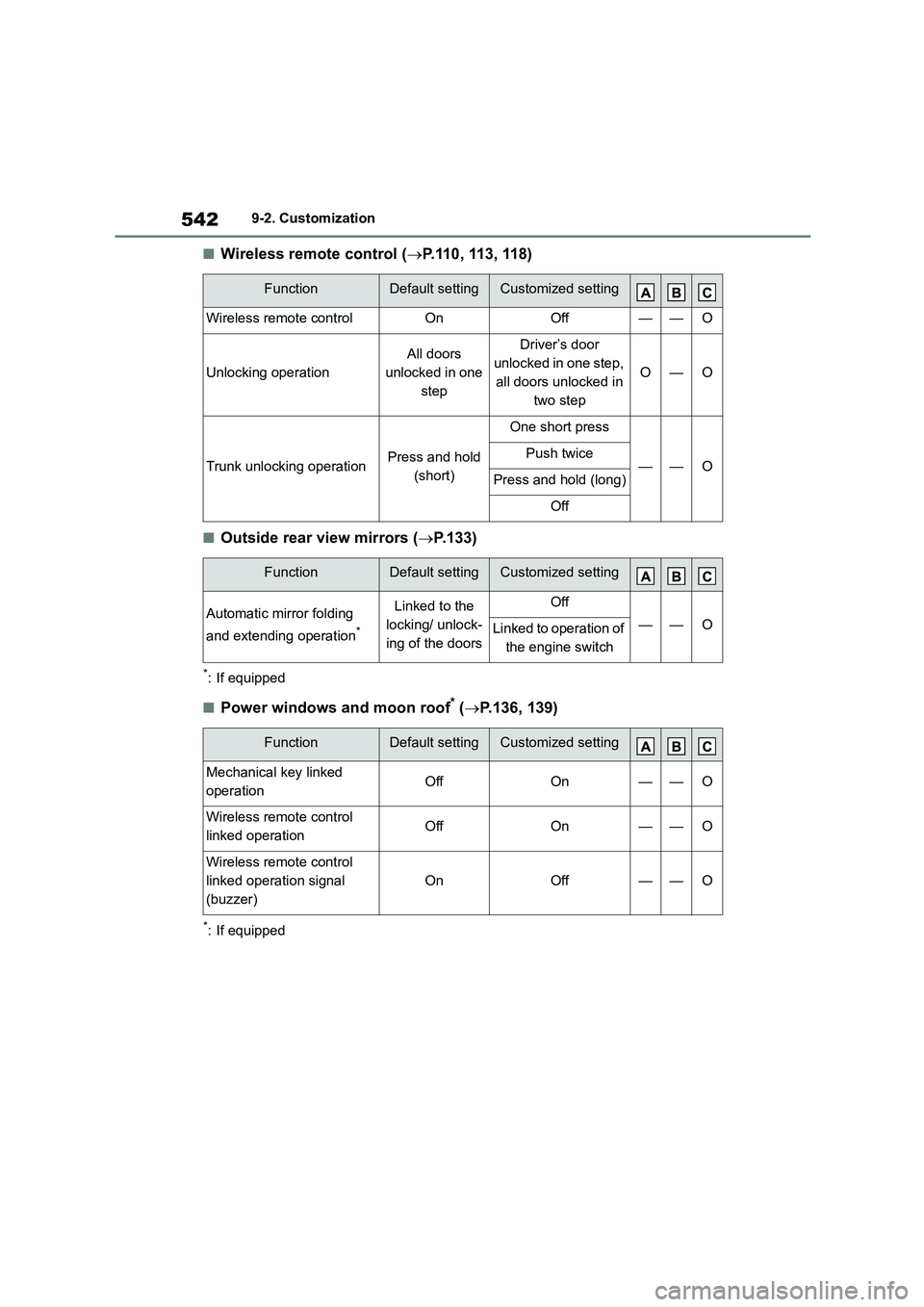
■Wireless remote control (P.110, 113, 118)
■Outside rear view mirrors (P.133)
*: If equipped
■Power windows and moon roof* (P.136, 139)
*: If equipped
FunctionDefault settingCustomized setting
Wireless remote controlOnOff——O
Unlocking operation
All doors
unlocked in one
step
Driver’s door
unlocked in one step,
all doors unlocked in
two step
O—O
Trunk unlocking operationPress and hold
(short)
One short press
——OPush twice
Press and hold (long)
Off
FunctionDefault settingCustomized setting
Automatic mirror folding
and extending operation*
Linked to the
locking/ unlock-
ing of the doors
Off
——OLinked to operation of
the engine switch
FunctionDefault settingCustomized setting
Mechanical key linked
operationOffOn——O
Wireless remote control
linked operationOffOn——O
Wireless remote control
linked operation signal
(buzzer)
OnOff——O