display TOYOTA COROLLA 2022 (in English) Owner's Guide
[x] Cancel search | Manufacturer: TOYOTA, Model Year: 2022, Model line: COROLLA, Model: TOYOTA COROLLA 2022Pages: 678, PDF Size: 147.24 MB
Page 104 of 678
1022-1. Instrument cluster
head-up display.
■Enabling/disabling of the head-up
display
If the head-up display is disabled, it will
remain disabled when the engine switch
is turned off then back to ON.
■Display brightness
The brightness of the head-up display
can be adjusted on of the
multi-information display. Also, it is auto- matically adjusted according to the
ambient brightness.
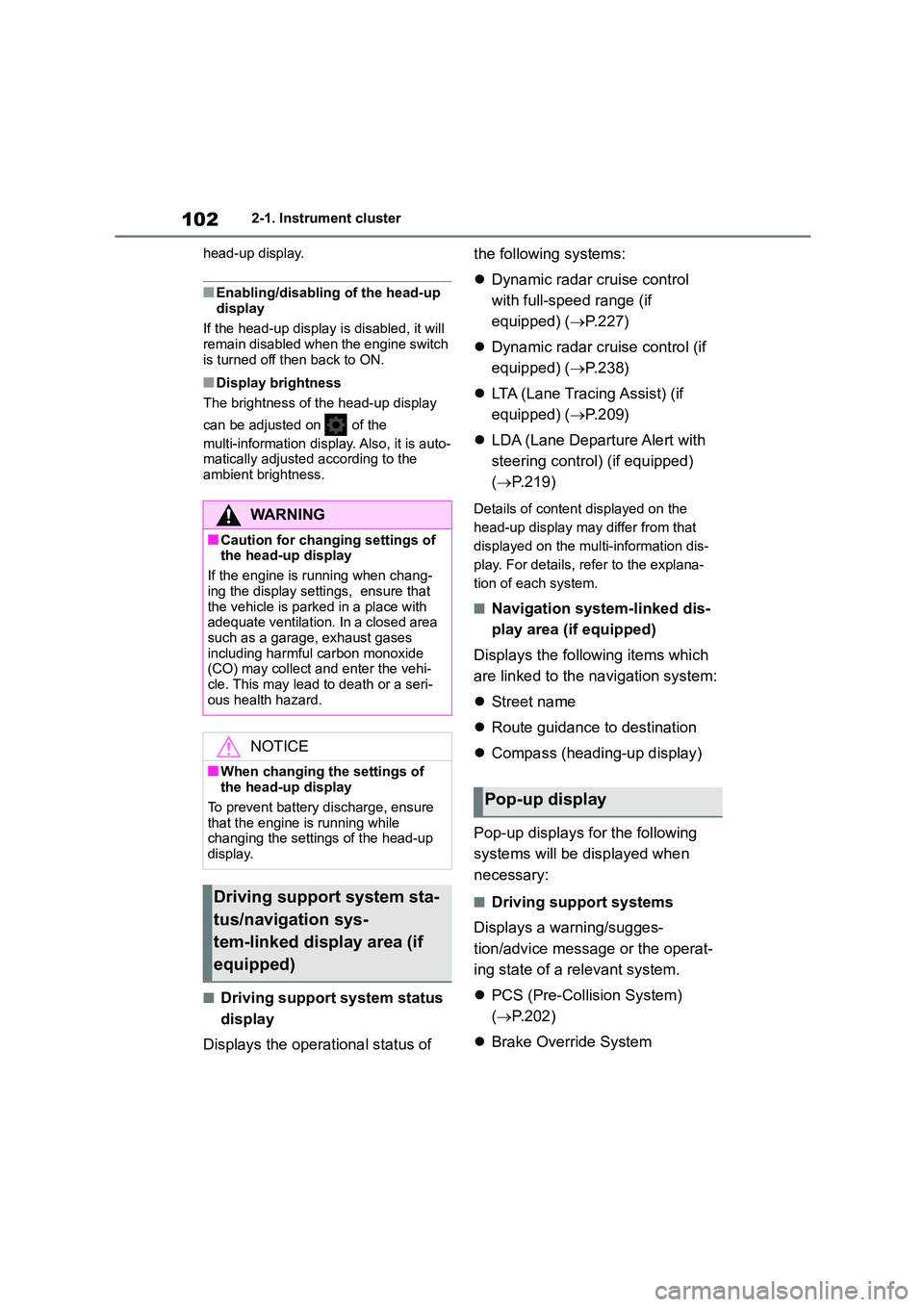
■Driving support system status
display
Displays the operational status of
the following systems:
Dynamic radar cruise control
with full-speed range (if
equipped) ( P.227)
Dynamic radar cruise control (if
equipped) ( P.238)
LTA (Lane Tracing Assist) (if
equipped) ( P.209)
LDA (Lane Departure Alert with
steering control) (if equipped)
( P.219)
Details of content displayed on the
head-up display may differ from that
displayed on the multi-information dis-
play. For details, refer to the explana-
tion of each system.
■Navigation system-linked dis-
play area (if equipped)
Displays the following items which
are linked to the navigation system:
Street name
Route guidance to destination
Compass (heading-up display)
Pop-up displays for the following
systems will be displayed when
necessary:
■Driving support systems
Displays a warning/sugges-
tion/advice message or the operat-
ing state of a relevant system.
PCS (Pre-Collision System)
( P.202)
Brake Override System
WA R N I N G
■Caution for changing settings of
the head-up display
If the engine is running when chang-
ing the display settings, ensure that
the vehicle is parked in a place with adequate ventilation. In a closed area
such as a garage, exhaust gases
including harmful carbon monoxide (CO) may collect and enter the vehi-
cle. This may lead to death or a seri-
ous health hazard.
NOTICE
■When changing the settings of
the head-up display
To prevent battery discharge, ensure that the engine is running while
changing the settings of the head-up
display.
Driving support system sta-
tus/navigation sys-
tem-linked display area (if
equipped)
Pop-up display
Page 105 of 678
103
2
2-1. Instrument cluster
Vehicle status information and indicators
( P.146)
Drive-Start Control (if equipped)
( P.146)
Details of content displayed on the
head-up display may differ from that
displayed on the multi-information dis-
play. For details, refer to the explana-
tion of each system.
■ icon
Displayed when a warning mes-
sage is displayed on the multi-infor-
mation display. ( P.480)
■Warning message
Some warning messages are dis-
played when necessary, according
to certain conditions.
Details of content displayed on the
head-up display may differ from that
displayed on the multi-information dis-
play.
■Audio system operation status
(if equipped)
Displayed when an audio remote
control switch on the steering wheel
is operated.
■Hands-free system status (if
equipped)
Displayed when the hands-free
system is operated.
■When a pop-up display is displayed
When a pop-up display is displayed, a
current display may no longer be dis-
played. In this case, the display will return after the pop-up display disap-
pears.
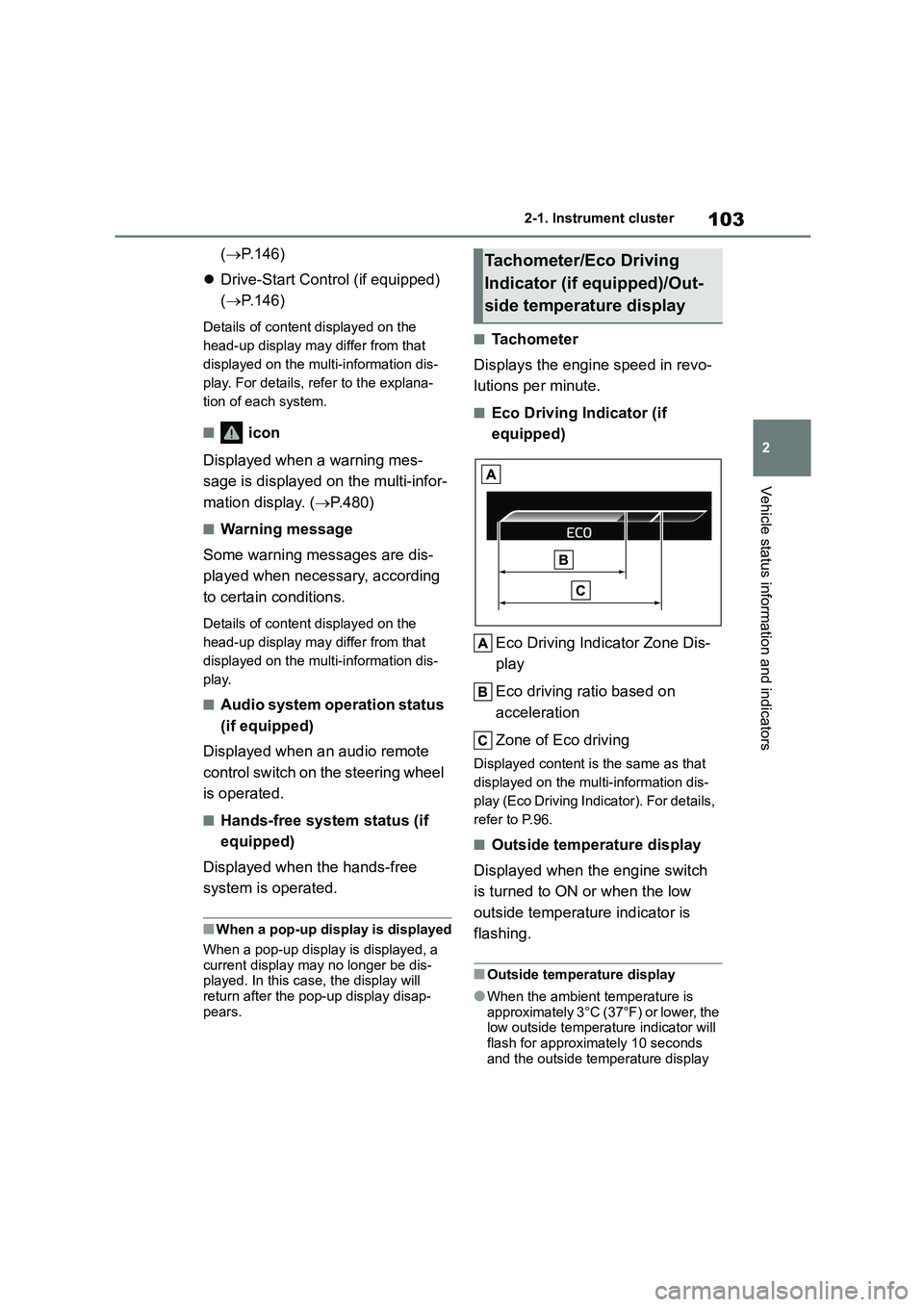
■Tachometer
Displays the engine speed in revo-
lutions per minute.
■Eco Driving Indicator (if
equipped)
Eco Driving Indicator Zone Dis-
play
Eco driving ratio based on
acceleration
Zone of Eco driving
Displayed cont ent is the same as that
displayed on the multi-information dis-
play (Eco Driving Indicator). For details,
refer to P.96.
■Outside temperature display
Displayed when the engine switch
is turned to ON or when the low
outside temperature indicator is
flashing.
■Outside temperature display
●When the ambient temperature is
approximately 3°C (37°F) or lower, the low outside temperature indicator will
flash for approximately 10 seconds
and the outside temperature display
Tachometer/Eco Driving
Indicator (if equipped)/Out-
side temperature display
Page 106 of 678
1042-1. Instrument cluster
will turn off. In this case, the display
will be displayed again when the out- side temperature becomes approxi-
mately 5°C (41°F) or higher.
●In the following situations, the correct
outside temperature may not be dis-
played, or the display may take longer than normal to change:
• When stopped, or driving at low
speeds (less than 25 km/h [16 mph]) • When the outside temperature has
changed suddenly (at the
entrance/exit of a garage, tunnel, etc.)
●When “--” or “E” is displayed, the sys-
tem may be malfunctioning. Take your vehicle to any authorized Toyota
retailer or Toyota authorized repairer,
or any reliable repairer.
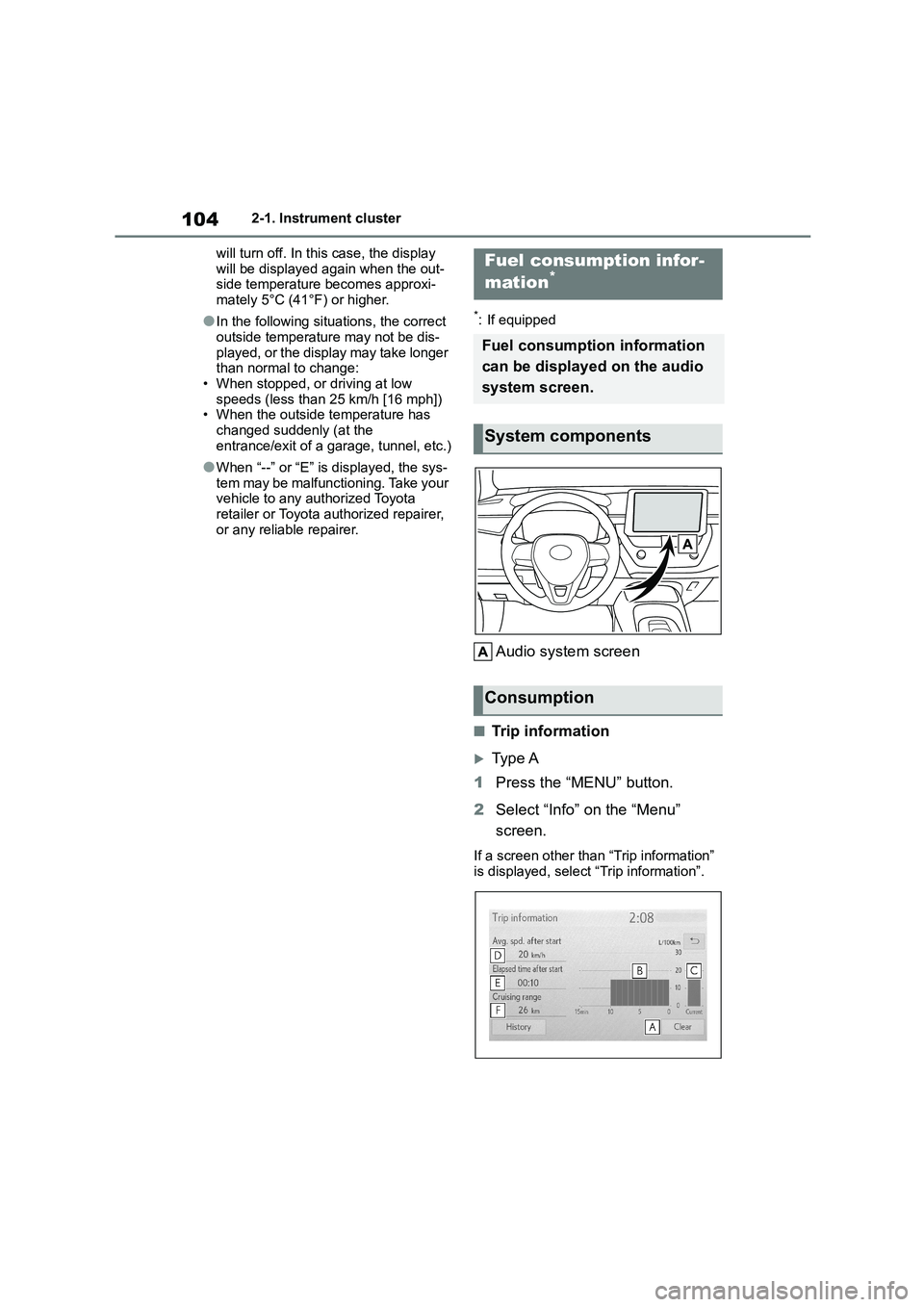
*: If equipped
Audio system screen
■Trip information
Ty p e A
1 Press the “MENU” button.
2 Select “Info” on the “Menu”
screen.
If a screen other than “Trip information” is displayed, select “Trip information”.
Fuel consumption infor-
mation*
Fuel consumption information
can be displayed on the audio
system screen.
System components
Consumption
Page 108 of 678
1062-1. Instrument cluster
Use the displayed average fuel
consumption as a reference.
The image is an example only, and may
vary slightly from actual conditions.
■Updating the history data
Update the latest fuel consumption by
selecting “Clip” or “Update” to measure
the current fuel consumption again.
■Resetting the data
The fuel consumption data can be
deleted by selecting “Clear” or “Clear
data”.
■Cruising range
Displays the estimated maximum dis-
tance that can be driven with the quan-
tity of fuel remaining.
This distance is computed based on
your average fuel consumption.
As a result, the actual distance that can be driven may differ from that displayed.
Page 111 of 678
109
3
3-1. Key information
Before driving
Vehicles with a smart entry & start
system
●The standard battery life is 1 to 2
years.
●If the battery becomes low, an alarm
will sound in the cabin and a message will be shown on the multi-information
display when the engine is stopped.
●To reduce key battery depletion when
the electronic key is to not be used for
long periods of time, set the electronic key to the batter y-saving mode.
( P.122)
●As the electronic key always receives
radio waves, the battery will become
depleted even if the electronic key is not used. The following symptoms
indicate that the electronic key battery
may be depleted. Replace the battery when necessary. ( P.449)
• The smart entry & start system or the
wireless remote control does not oper- ate.
• The detection area becomes smaller.
• The LED indicator on the key surface does not turn on.
●To avoid serious deterioration, do not leave the electronic key within 1 m (3
ft.) of the following electrical appli-
ances that produce a magnetic field: •TVs
• Personal computers
• Cellular phones, cordless phones and battery chargers
• Recharging cellular phones or cord-
less phones • Table lamps
• Induction cookers
●If the electronic key is near the vehicle
for longer than necessary, even if the
smart entry & start system is not oper-
ated, the key battery may become depleted faster than normal.
■Replacing the battery
P.449
■If “New Key Registered Contact
Your Dealer if You Did Not Register a New Key” is shown on the
multi-information display (vehicles
with a smart entry & start system)
This message will be displayed each
time the driver’s door is opened when
the doors are unlocked from the outside for approximately 10 days after a new
electronic key has been registered.
If this message is displayed but you have not had a new electronic key regis-
tered, ask any authorized Toyota retailer
or Toyota authorized repairer, or any reli- able repairer to check if an unknown
electronic key (other than those in your
possession) has been registered.
■If a wrong key is used
The key cylinder rotates freely, isolated
from the internal mechanism.
NOTICE
■To prevent key damage
●Do not drop the keys, subject them to strong shocks or bend them.
●Do not expose the keys to high temperatures for long periods of
time.
●Do not get the keys wet or wash
them in an ultrasonic washer etc.
●Vehicles with a smart entry & start
system: Do not attach metallic or
magnetic materials to the keys or place the keys close to such materi-
als.
●Do not disassemble the keys.
●Do not attach a sticker or anything else to the surface of the key.
●Vehicles with a smart entry & start system: Do not place the keys near
objects that produce magnetic
fields, such as TVs, audio systems and induction cookers.
Page 116 of 678
1143-2. Opening, closing and locking the doors
any authorized Toyota retailer or
Toyota authorized repairer, or any
reliable repairer.
*2: If equipped
■Key
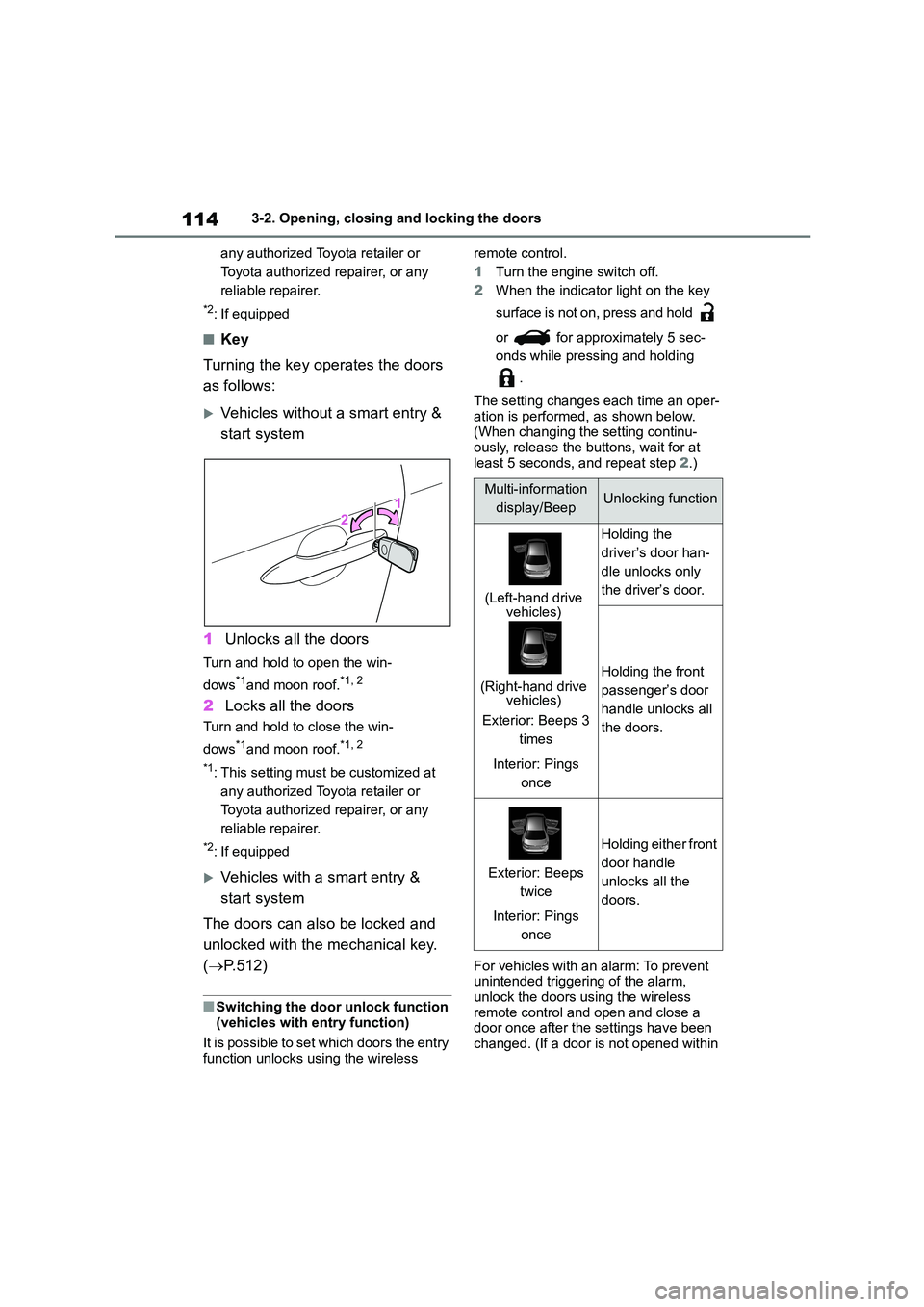
Turning the key operates the doors
as follows:
Vehicles without a smart entry &
start system
1 Unlocks all the doors
Turn and hold to open the win-
dows*1and moon roof.*1, 2
2 Locks all the doors
Turn and hold to close the win-
dows*1and moon roof.*1, 2
*1: This setting must be customized at
any authorized Toyota retailer or
Toyota authorized repairer, or any
reliable repairer.
*2: If equipped
Vehicles with a smart entry &
start system
The doors can also be locked and
unlocked with the mechanical key.
( P.512)
■Switching the door unlock function
(vehicles with entry function)
It is possible to set which doors the entry function unlocks using the wireless
remote control.
1 Turn the engine switch off.
2 When the indicator light on the key
surface is not on, press and hold
or for approximately 5 sec-
onds while pressing and holding
.
The setting changes each time an oper-
ation is performed, as shown below.
(When changing the setting continu- ously, release the buttons, wait for at
least 5 seconds, and repeat step 2.)
For vehicles with an alarm: To prevent
unintended triggering of the alarm,
unlock the doors using the wireless remote control and open and close a
door once after the settings have been
changed. (If a door is not opened within
Multi-information
display/BeepUnlocking function
(Left-hand drive vehicles)
(Right-hand drive vehicles)
Exterior: Beeps 3
times
Interior: Pings
once
Holding the
driver’s door han-
dle unlocks only
the driver’s door.
Holding the front
passenger’s door
handle unlocks all
the doors.
Exterior: Beeps
twice
Interior: Pings
once
Holding either front
door handle
unlocks all the
doors.
Page 119 of 678
117
3
3-2. Opening, closing and locking the doors
Before driving
2 Unlocks the door
The front doors can be opened by pull-
ing the inside handle even if the lock
buttons are in the lock position.
■Locking the front doors from the
outside without a key
1 Move the inside lock button to the
lock position.
2 Close the door while pulling the door handle.
Vehicles without a smart entry & start system
The door cannot be locked if the key is in the engine switch.
Vehicles with a smart entry & start system
The door cannot be locked if the engine switch is in ACC or ON, or the electronic
key is left inside the vehicle.
The key may not be detected correctly
and the door may be locked.
■Open door warning buzzer
If a door or the trunk is not fully closed, a buzzer will sound when the vehicle
speed reaches 5 km/h (3 mph).
The open door(s) or trunk is indicated on the multi-information display.
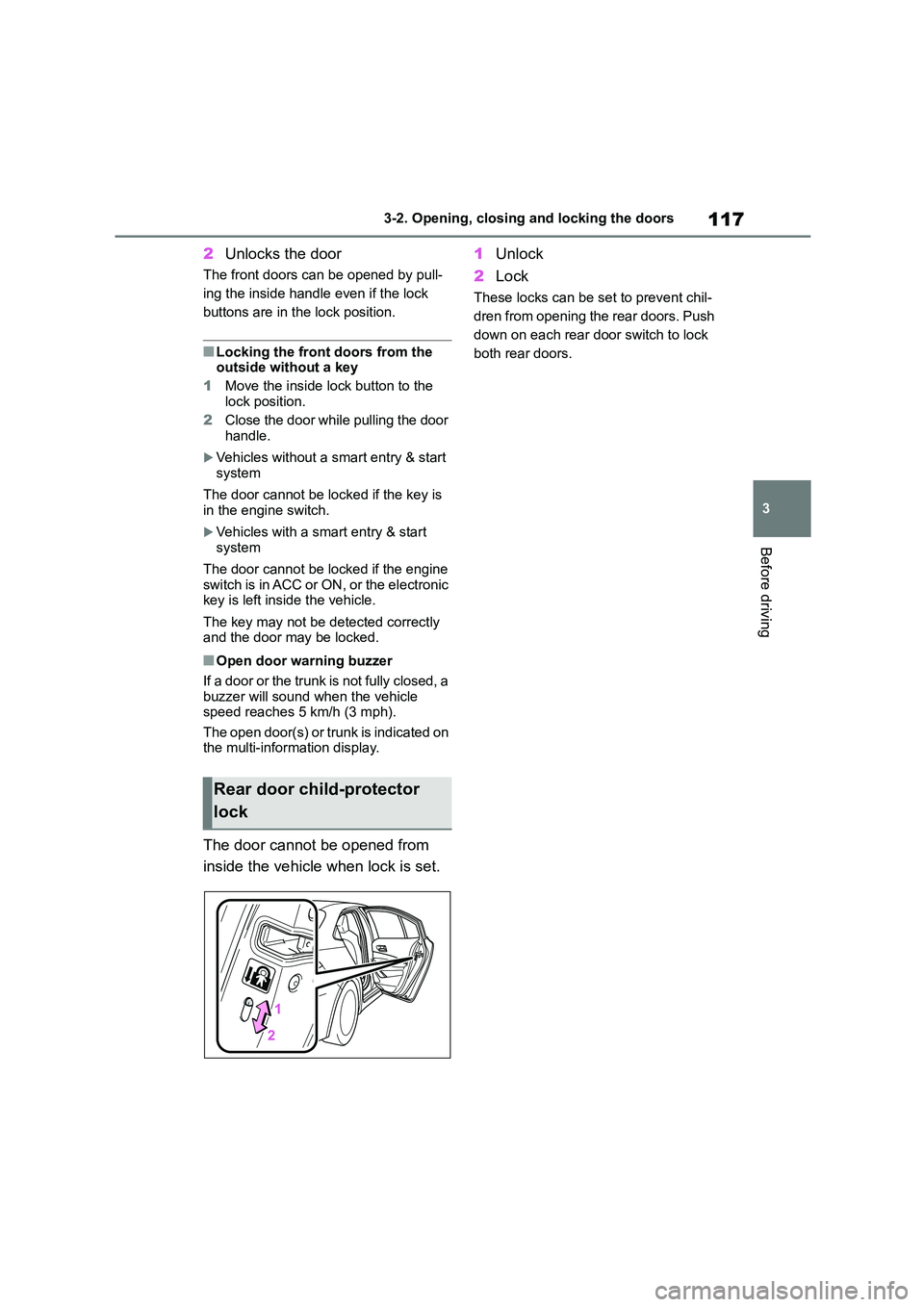
The door cannot be opened from
inside the vehicle when lock is set.
1 Unlock
2 Lock
These locks can be set to prevent chil-
dren from opening the rear doors. Push
down on each rear door switch to lock
both rear doors.
Rear door child-protector
lock
Page 123 of 678
121
3
3-2. Opening, closing and locking the doors
Before driving
*: If equipped
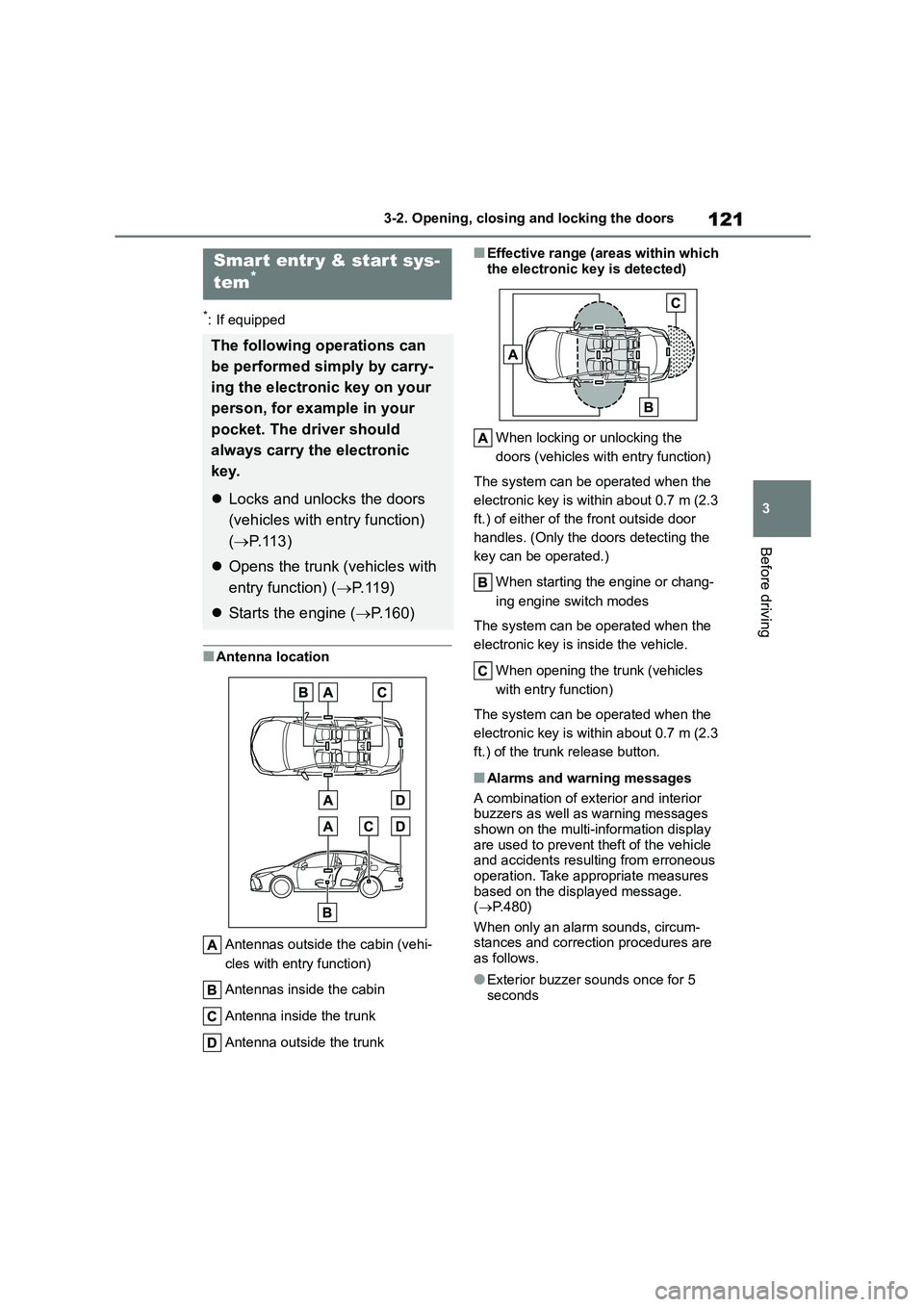
■Antenna location
Antennas outside the cabin (vehi-
cles with entry function)
Antennas inside the cabin
Antenna inside the trunk
Antenna outside the trunk
■Effective range (areas within which
the electronic key is detected)
When locking or unlocking the
doors (vehicles with entry function)
The system can be operated when the
electronic key is within about 0.7 m (2.3
ft.) of either of the front outside door
handles. (Only the doors detecting the
key can be operated.)
When starting the engine or chang-
ing engine switch modes
The system can be operated when the
electronic key is inside the vehicle.
When opening the trunk (vehicles
with entry function)
The system can be operated when the
electronic key is within about 0.7 m (2.3
ft.) of the trunk release button.
■Alarms and warning messages
A combination of exterior and interior buzzers as well as warning messages
shown on the multi-information display
are used to prevent theft of the vehicle and accidents resulting from erroneous
operation. Take appropriate measures
based on the displayed message. ( P.480)
When only an alarm sounds, circum-
stances and correction procedures are as follows.
●Exterior buzzer sounds once for 5 seconds
Smart entr y & start sys-
tem*
The following operations can
be performed simply by carry-
ing the electronic key on your
person, for example in your
pocket. The driver should
always carry the electronic
key.
Locks and unlocks the doors
(vehicles with entry function)
( P.113)
Opens the trunk (vehicles with
entry function) ( P. 1 1 9 )
Starts the engine (P.160)
Page 148 of 678
1464-1. Before driving
Manual transmission
1 While depressing the clutch
pedal, depress the brake pedal.
2 Set the parking brake. (P.172,
173)
Check that the parking brake indicator
is illuminated.
3 Shift the shift lever to N.
( P.169)
If parking on a hill, shift the shift lever to
1 or R and block the wheels as needed.
4 Vehicles without a smart entry &
start system: Turn the engine
switch to OFF to stop the
engine.
Vehicles with a smart entry &
start system: Press the engine
switch to stop the engine.
5 Slowly release the brake pedal.
6 Lock the door, making sure that
you have the key on your per-
son.
■Starting off on a steep uphill
Multidrive
1 Make sure that the parking
brake is set and shift the shift
lever to D.
2 Gently depress the accelerator
pedal.
3 Release the parking brake.
Manual transmission
1 Make sure that the parking
brake is set and shift the shift
lever to 1.
2 Lightly depress the accelerator
pedal at the same time as grad-
ually releasing the clutch pedal.
3 Release the parking brake.
■Driving in the rain
●Drive carefully when it is raining,
because visibility will be reduced, the windows may become fogged-up, and
the road will be slippery.
●Drive carefully when it starts to rain,
because the road surface will be
especially slippery.
●Refrain from high speeds when driv-
ing on an expressway in the rain, because there may be a layer of water
between the tires and the road sur-
face, preventing the steering and brakes from operating properly.
■Engine speed while driving (vehi-
cles with a Multidrive)
In the following conditions, the engine speed may become high while driving.
This is due to automatic up-shifting con-
trol or down-shifting implementation to meet driving conditions. It does not indi-
cate sudden acceleration.
●The vehicle is judged to be driving
uphill or downhill
●When the accelerator pedal is released
●When the brake pedal is depressed while sport mode is selected
■Restraining the engine output
(Brake Override System)
●When the accelerator and brake ped-
als are depressed at the same time,
the engine output may be restrained.
●A warning message is displayed on
the multi-information display while the system is operating.
■Restraining sudden start
(Drive-Start Control [vehicles with a
Multidrive])
●When the following unusual operation
Page 149 of 678
147
4
4-1. Before driving
Driving
is performed, the engine output may
be restrained. • When the shift lever is shifted from R
to D, D to R, N to R, P to D, or P to R
(D includes M) with the accelerator pedal depressed, a warning message
appears on the multi-information dis-
play. If a warning message is shown on the multi-information display, read
the message and follow the instruc-
tion. • When the accelerator pedal is
depressed too much while the vehicle
is in reverse.
●While Drive-Start Control is being acti-
vated, your vehicle may have trouble escaping from the mud or fresh snow.
In such case, deactivate TRC
( P.317) to cancel Drive-Start Control so that the vehicle may become able
to escape from the mud or fresh snow.
■Breaking in your new Toyota
To extend the life of the vehicle, observ- ing the following precautions is recom-
mended:
●For the first 300 km (186 miles):
Avoid sudden stops.
●For the first 800 km (500 miles):
Do not tow a trailer.
●For the first 1000 km (621 miles):
• Do not drive at extremely high speeds.
• Avoid sudden acceleration.
• Do not drive continuously in low gears.
• Do not drive at a constant speed for
extended periods.
■Operating your vehicle in a foreign country
Comply with the relevant vehicle regis-
tration laws and confirm the availability
of the correct fuel. ( P.526)
WA R N I N G
Observe the following precautions.
Failure to do so may result in death or
serious injury.
■When starting the vehicle (vehi- cles with a Multidrive)
Always keep your foot on the brake
pedal while stopped with the engine running. This prevents the vehicle
from creeping.
■When driving the vehicle
●Do not drive if you are unfamiliar
with the location of the brake and accelerator pedals to avoid
depressing the wrong pedal.
• Accidentally depressing the accel- erator pedal instead of the brake
pedal will result in sudden accelera-
tion that may lead to an accident.
• When backing up, you may twist
your body around, leading to a diffi- culty in operating the pedals. Make
sure to operate the pedals properly.
• Make sure to keep a correct driving
posture even when moving the
vehicle only slightly. This allows you to depress the brake and accelera-
tor pedals properly.
• Depress the brake pedal using your
right foot. Depressing the brake
pedal using your left foot may delay response in an emergency, result-
ing in an accident.
●Do not drive the vehicle over or
stop the vehicle near flammable
materials. The exhaust system and exhaust
gases can be extremely hot. These
hot parts may cause a fire if there is any flammable material nearby.