change wheel TOYOTA COROLLA 2022 Owners Manual (in English)
[x] Cancel search | Manufacturer: TOYOTA, Model Year: 2022, Model line: COROLLA, Model: TOYOTA COROLLA 2022Pages: 678, PDF Size: 147.24 MB
Page 42 of 678
401-1. For safe use
WA R N I N G
●The driver and all passengers in the
vehicle must wear their seat belts
properly. The SRS airbags are supplemental
devices to be used with the seat
belts.
●The SRS driver airbag deploys with
considerable force, and can cause
death or serious injury especially if the driver is very close to the
airbag.
Since the risk zone for the driver’s airbag is the first 50 - 75 mm (2 - 3 in.)
of inflation, placing yourself 250 mm
(10 in.) from your driver airbag pro- vides you with a clear margin of
safety. This distance is measured
from the center of the steering wheel to your breastbone. If you sit less than
250 mm (10 in.) away now, you can
change your driving position in sev- eral ways:
• Move your seat to the rear as far as
you can while still reaching the ped- als comfortably.
• Slightly recline the back of the seat. Although vehicle designs vary,
many drivers can achieve the 250
mm (10 in.) distance, even with the driver seat all the way forward, sim-
ply by reclining the back of the seat
somewhat. If reclining the back of your seat makes it hard to see the
road, raise yourself by using a firm,
non-slippery cushion, or raise the seat if your vehicle has that feature.
• If your steering wheel is adjustable, tilt it downward. This points the
airbag toward your chest instead of
your head and neck.
The seat should be adjusted as rec-
ommended above, while still main- taining control of the foot pedals,
steering wheel, and your view of the
instrument panel controls.
●The SRS front passenger airbag also deploys with considerable
force, and can cause death or seri-
ous injury especially if the front pas- senger is very close to the airbag.
The front passenger seat should be
as far from the airbag as possible with the seatback adjusted, so the
front passenger sits upright.
●Improperly seated and/or restrained
infants and children can be killed or
seriously injured by a deploying airbag. An infant or child who is too
small to use a seat belt should be
properly secured using a child restraint system. Toyota strongly
recommends that all infants and
children be placed in the rear seats of the vehicle and properly
restrained. The rear seats are safer
for infants and children than the front passenger seat. (P. 4 7 )
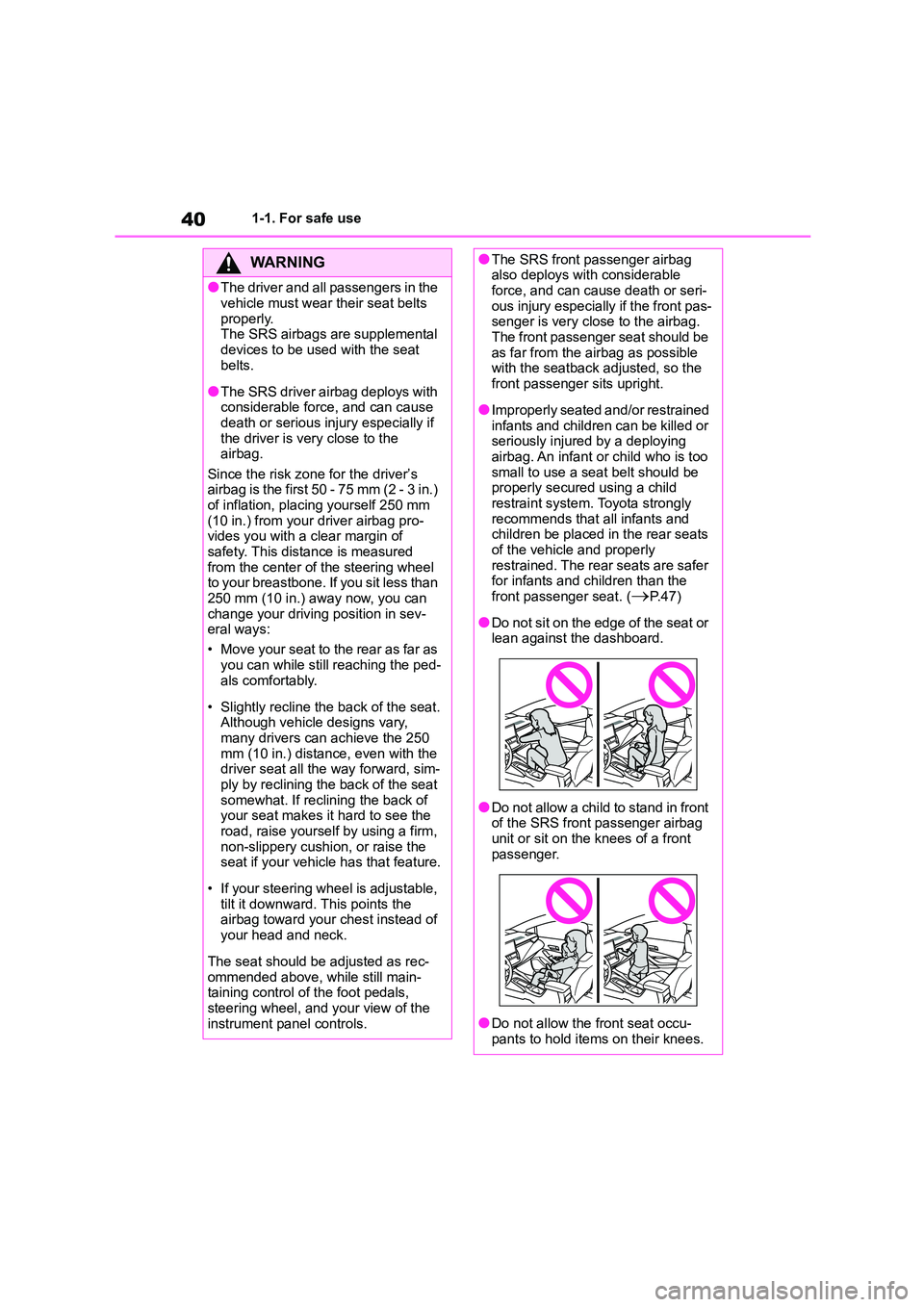
●Do not sit on the edge of the seat or lean against the dashboard.
●Do not allow a child to stand in front of the SRS front passenger airbag
unit or sit on the knees of a front
passenger.
●Do not allow the front seat occu-
pants to hold items on their knees.
Page 150 of 678
1484-1. Before driving
WA R N I N G
●During normal driving, do not turn
off the engine. Turning the engine
off while driving will not cause loss of steering or braking control, but
the power assist to these systems
will be lost. This will make it more difficult to steer and brake, so you
should pull over and stop the vehi-
cle as soon as it is safe to do so.
However, in the event of an emer- gency, such as if it becomes impos-
sible to stop the vehicle in the
normal way: P. 4 6 2
●Use engine braking (downshift) to
maintain a safe speed when driving down a steep hill.
Using the brakes continuously may
cause the brakes to overheat and lose effectiveness. (P.165, 169)
●Do not adjust the positions of the steering wheel, the seat, or the
inside or outside rear view mirrors
while driving. Doing so may result in a loss of
vehicle control.
●Always check that all passengers’
arms, heads or other parts of their
body are not outside the vehicle.
■When driving on slippery road
surfaces
●Sudden braking, acceleration and
steering may cause tire slippage
and reduce your ability to control the vehicle.
●Sudden acceleration, engine brak-ing due to shifting, or changes in
engine speed could cause the vehi-
cle to skid.
●After driving through a puddle, lightly depress the brake pedal to
make sure that the brakes are func-
tioning properly. Wet brake pads may prevent the brakes from func-
tioning properly. If the brakes on
only one side are wet and not func- tioning properly, steering control
may be affected.
■When shifting the shift lever
●Vehicles with a Multidrive: Do not
let the vehicle roll backward while a forward driving position is selected,
or roll forward while the shift lever is
in R. Doing so may cause the engine to
stall or lead to poor brake and
steering performance, resulting in an accident or damage to the vehi-
cle.
●Vehicles with a Multidrive: Do not
shift the shift lever to P while the
vehicle is moving. Doing so can damage the transmis-
sion and may result in a loss of
vehicle control.
●Do not shift the shift lever to R while
the vehicle is moving forward. Doing so can damage the transmis-
sion and may result in a loss of
vehicle control.
●Do not shift the shift lever to a driv-
ing position while the vehicle is moving backward.
Doing so can damage the transmis-
sion and may result in a loss of vehicle control.
●Moving the shift lever to N while the vehicle is moving will disengage the
engine from the transmission.
Engine braking is not available
when N is selected.
Page 153 of 678
151
4
4-1. Before driving
Driving
NOTICE
●Observe the following precautions.
Failure to do so may cause exces-
sive premature wear or damage to the clutch, eventually making it diffi-
cult to accelerate and start off from
a stop. Have the vehicle inspected by any authorized Toyota retailer or
Toyota authorized repairer, or any
reliable repairer.
• Do not rest your foot on the clutch pedal or depress it any time other
than when shifting.
Doing so may cause clutch trouble.
• Do not use any gear other than the
1st gear when starting off and mov- ing forward.
Doing so may damage the clutch.
• Do not use the clutch pedal to
adjust vehicle speed.
Doing so may damage the clutch.
• When stopping the vehicle with the
shift lever in a position other than N, make sure to fully depress the
clutch pedal and stop the vehicle
using the brakes.
●Do not shift the shift lever to R with-
out the vehicle completely stopped. Doing so may damage the clutch,
transmission and gears.
■When parking the vehicle (vehi-
cles with a Multidrive)
Always set the parking brake and shift the shift lever to P. Failure to do so
may cause the vehicle to move or the
vehicle may accelerate suddenly if the accelerator pedal is accidentally
depressed.
■Avoiding damage to vehicle parts
●Do not turn the steering wheel fully
in either direction and hold it there for an extended period of time.
Doing so may damage the power
steering motor.
●When driving over bumps in the road, drive as slowly as possible to
avoid damaging the wheels, under-
side of the vehicle, etc.
■If you get a flat tire while driving
A flat or damaged tire may cause the following situations. Hold the steering
wheel firmly and gradually depress
the brake pedal to slow down the vehicle.
●It may be difficult to control your vehicle.
●The vehicle will make abnormal sounds or vibrations.
●The vehicle will lean abnormally.
Information on what to do in case of a
flat tire (P.482, 498)
■When encountering flooded
roads
Do not drive on a road that has
flooded after heavy rain etc. Doing so
may cause the following serious dam- age to the vehicle:
●Engine stalling
●Short in electrical components
●Engine damage caused by water
immersion
In the event that you drive on a
flooded road and the vehicle
becomes flooded or stuck in mud or sand, be sure to have any authorized
Toyota retailer or Toyota authorized
repairer, or any reliable repairer check the following:
●Brake function
●Changes in the quantity and quality
of the engine oil, transaxle fluid,
clutch fluid, differential oil, etc.
●Lubricant condition for the bearings
and suspension joints (where possi- ble), and the function of all joints,
bearings, etc.
Page 159 of 678
157
4
4-1. Before driving
Driving
of your vehicle and trailer and
ensure that the vehicle-to-vehicle
distance is sufficient before execut-
ing lane changes.
■Transmission information
Multidrive
To maintain engine braking effi-
ciency and charging system perfor-
mance when using engine braking,
do not use the transmission in D,
must be in M and select gear step 4
or lower. ( P. 1 6 5 )
Manual transmission
Refrain from driving in 6th gear to
maintain the effectiveness of
engine braking and to maintain
charging system performance.
■If the engine overheats
Towing a loaded trailer up a long,
steep incline in temperatures
exceeding 30°C (85°F) may result
in the engine overheating. If the
engine coolant temperature gauge
indicates that the engine is over-
heating, turn the air conditioning off
immediately, leave the road and
stop the vehicle in a safe place.
( P.518)
■When parking the vehicle
Always place wheel chocks under
the wheels of both the vehicle and
trailer. Firmly set the parking brake
and shift the shift lever to P
(Multidrive) and 1 or R (manual
transmission).
WA R N I N G
Follow all the instructions described in
this section. Failure to do so could
cause an accident resulting in death or serious injury.
■Trailer towing precautions
When towing, make sure that none of
the weight limits are exceeded.
( P.153)
■Vehicle speed in towing
Observe the legal maximum speeds
for trailer towing.
■Before descending hills or long
declines
Reduce speed and downshift. How-
ever, never downshift suddenly while
descending steep or long downhill grades.
■Operation of the brake pedal
Do not hold the brake pedal
depressed often or for long periods of
time. Doing so may result in the brake overheating or reduce braking effects.
■To avoid accident or injury
●Vehicles with a compact spare tire:
Do not tow a trailer when the com-
pact spare tire is installed on your vehicle.
●Vehicles with the emergency tire puncture repair kit: Do not tow a
trailer when the tire installed is
repaired with the emergency tire puncture repair kit.
●Do not use the following systems when trailer towing.
• Cruise control (if equipped)
• Dynamic radar cruise control (if
equipped)
• Dynamic radar cruise control with
full-speed range (if equipped)
Page 163 of 678
161
4
4-2. Driving procedures
Driving
engine switch mode.
■If the engine does not start
●The engine immobilizer system may
not have been deactivated. ( P.74)
Contact any authorized Toyota retailer or Toyota authorized repairer, or any
reliable repairer.
●If a message related to start-up is
shown on the multi-information dis-
play, read the message and follow the instructions.
■If the battery is discharged
The engine cannot be started using the
smart entry & start system. Refer to P.513to restart the engine.
■Electronic key battery depletion
P.449
■Conditions affecting operation
P.122
■Notes for the entry function
P.123
■Steering lock function
●After turning the engine switch off and opening and closing the doors, the
steering wheel will be locked due to
the steering lock function. Operating
the engine switch again automatically cancels the steering lock.
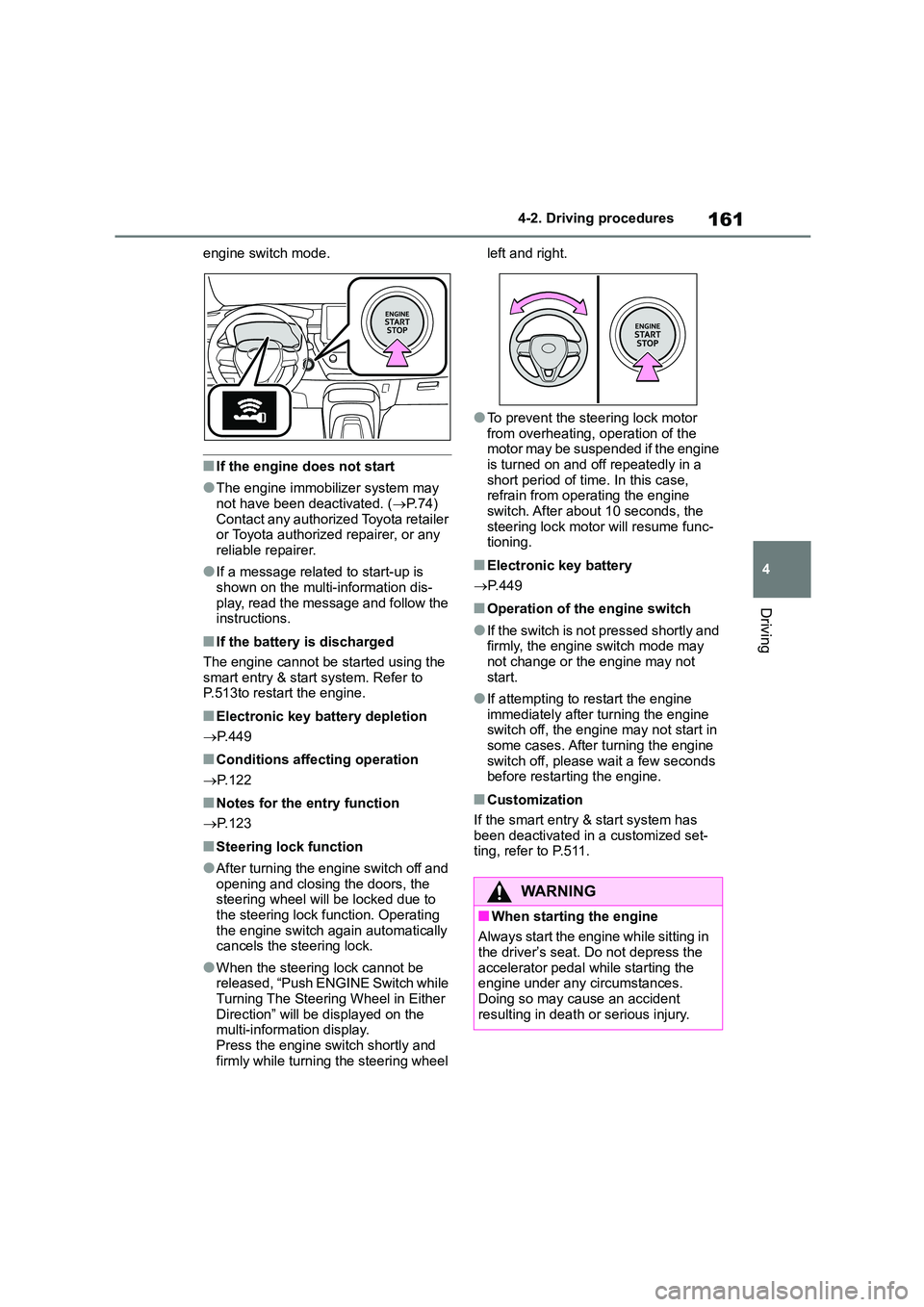
●When the steering lock cannot be released, “Push ENGINE Switch while
Turning The Steering Wheel in Either
Direction” will be displayed on the multi-information display.
Press the engine switch shortly and
firmly while turning the steering wheel
left and right.
●To prevent the steering lock motor
from overheating, operation of the
motor may be suspended if the engine is turned on and off repeatedly in a
short period of time. In this case,
refrain from operating the engine switch. After about 10 seconds, the
steering lock motor will resume func-
tioning.
■Electronic key battery
P. 4 4 9
■Operation of the engine switch
●If the switch is not pressed shortly and firmly, the engine switch mode may
not change or the engine may not
start.
●If attempting to restart the engine
immediately after turning the engine switch off, the engine may not start in
some cases. After turning the engine
switch off, please wait a few seconds before restarting the engine.
■Customization
If the smart entry & start system has
been deactivated in a customized set- ting, refer to P.511.
WA R N I N G
■When starting the engine
Always start the engine while sitting in
the driver’s seat. Do not depress the accelerator pedal while starting the
engine under any circumstances.
Doing so may cause an accident resulting in death or serious injury.
Page 184 of 678
1824-3. Operating the lights and wipers
• When the vehicle is cut in front of by
another vehicle • When vehicles ahead cannot be
detected due to repeated curves, road
dividers or roadside trees • When vehicles ahead appear in a far-
away lane on a wide road
• When the lights of vehicles ahead are not on
●The high beams may be turned off if a vehicle ahead that is using fog lights
without its headlights turned on is
detected.
●House lights, streetlights, traffic sig-
nals, and illuminated billboards or signs and other reflective objects may
cause the high beams to change to
the low beams, or the low beams to remain on.
●The following factors may affect the amount of time taken for the high
beams to turn on or off:
• The brightness of the headlights, fog lights, and tail lights of vehicles ahead
• The movement and direction of vehi-
cles ahead • When a vehicle ahead only has oper-
ational lights on one side
• When a vehicle ahead is a two-wheeled vehicle
• The condition of the road (gradient,
curve, condition of the road surface, etc.)
• The number of passengers and
amount of luggage in the vehicle
●The high beams may turn on or off
unexpectedly.
●Bicycles or similar vehicles may not
be detected.
●In the following sit uations the system
may not be able to correctly detect the
surrounding brightness level. This may cause the low beams to remain
on or the high beams to flash or daz-
zle pedestrians or vehicles ahead. In such a case, it is necessary to manu-
ally switch between the high and low
beams. • When driving in inclement weather
(heavy rain, snow, fog, sandstorms,
etc.)
• When the windshield is obscured by fog, mist, ice, dirt, etc.
• When the windshield is cracked or
damaged • When the camera sensor is deformed
or dirty
• When the temperature of the camera sensor is extremely high
• When the surrounding brightness
level is equal to that of headlights, tail lights or fog lights
• When headlights or tail lights of vehi-
cles ahead are turned off, dirty, chang- ing color, or not aimed properly
• When the vehicle is hit by water,
snow, dust, etc. from a preceding vehicle
• When driving through an area of inter-
mittently changing brightness and darkness
• When frequently and repeatedly driv-
ing ascending/descending roads, or roads with rough, bumpy or uneven
surfaces (such as stone-paved roads,
gravel roads, etc.) • When frequently and repeatedly tak-
ing curves or driving on a winding
road • When there is a highly reflective
object ahead of the vehicle, such as a
sign or mirror • When the back of a preceding vehicle
is highly reflective, such as a con-
tainer on a truck • When the vehicle’s headlights are
damaged or dirty, or are not aimed
properly • When the vehicle is listing or titling
due to a flat tire, a trailer being towed,
etc. • When the headlights are changed
between the high beams and low
beams repeatedly in an abnormal
manner • When the driver believes that the high
beams may be flashing or dazzling
pedestrians or other drivers
Page 205 of 678
203
4
4-5. Using the driving support systems
Driving
WA R N I N G
■Limitations of the pre-collision
system
●The driver is solely responsible for safe driving. Always drive safely,
taking care to observe your
surroundings. Do not use the pre-collision system
instead of normal braking opera-
tions under any circumstances.
This system will not prevent colli- sions or lessen collision damage or
injury in every situation. Do not
overly rely on this system. Failure to do so may lead to an accident,
resulting in death or serious injury.
●Although this system is designed to
help avoid a collision or help reduce
the impact of the collision, its effec- tiveness may change according to
various conditions, therefore the
system may not always be able to achieve the same level of perfor-
mance.
Read the following conditions care- fully. Do not overly rely on this sys-
tem and always drive carefully.
• Conditions under which the system may operate even if there is no pos-
sibility of a collision: P.206
• Conditions under which the system
may not operate properly:P.207
●Do not attempt to test the operation
of the pre-collision system yourself.
Depending on the objects used for testing (dummies, cardboard
objects imitating detectable objects,
etc.), the system may not operate properly, possibly leading to an
accident.
■Pre-collision braking
●When the pre-collision braking
function is operating, a large amount of braking force will be
applied.
●If the vehicle is stopped by the operation of the pre-collision brak-
ing function, the pre-collision brak-
ing function operation will be canceled after approximately 2 sec-
onds. Depress the brake pedal as
necessary.
●The pre-collision braking function
may not operate if certain opera- tions are performed by the driver. If
the accelerator pedal is being
depressed strongly or the steering wheel is being turned, the system
may determine that the driver is tak-
ing evasive action and possibly pre- vent the pre-collision braking
function from operating.
●In some situations, while the
pre-collision braking function is
operating, operation of the function may be canceled if the accelerator
pedal is depressed strongly or the
steering wheel is turned and the system determines that the driver is
taking evasive action.
●If the brake pedal is being
depressed, the system may deter-
mine that the driver is taking eva- sive action and possibly delay the
operation timing of the pre-collision
braking function.
■When to disable the pre-colli-
sion system
In the following situations, disable the
system, as it may not operate prop-
erly, possibly leading to an accident resulting in death or serious injury:
●When the vehicle is being towed
●When your vehicle is towing
another vehicle
●When transporting the vehicle via
truck, boat, train or similar means of
transportation
●When the vehicle is raised on a lift
with the engine running and the tires are allowed to rotate freely
Page 206 of 678
2044-5. Using the driving support systems
■Enabling/disabling the pre-col-
lision system
The pre-collisio n system can be
enabled/disabled on ( P.538)
of the multi-information display.
The system is auto matically enabled
each time the engine switch is turned to
ON.
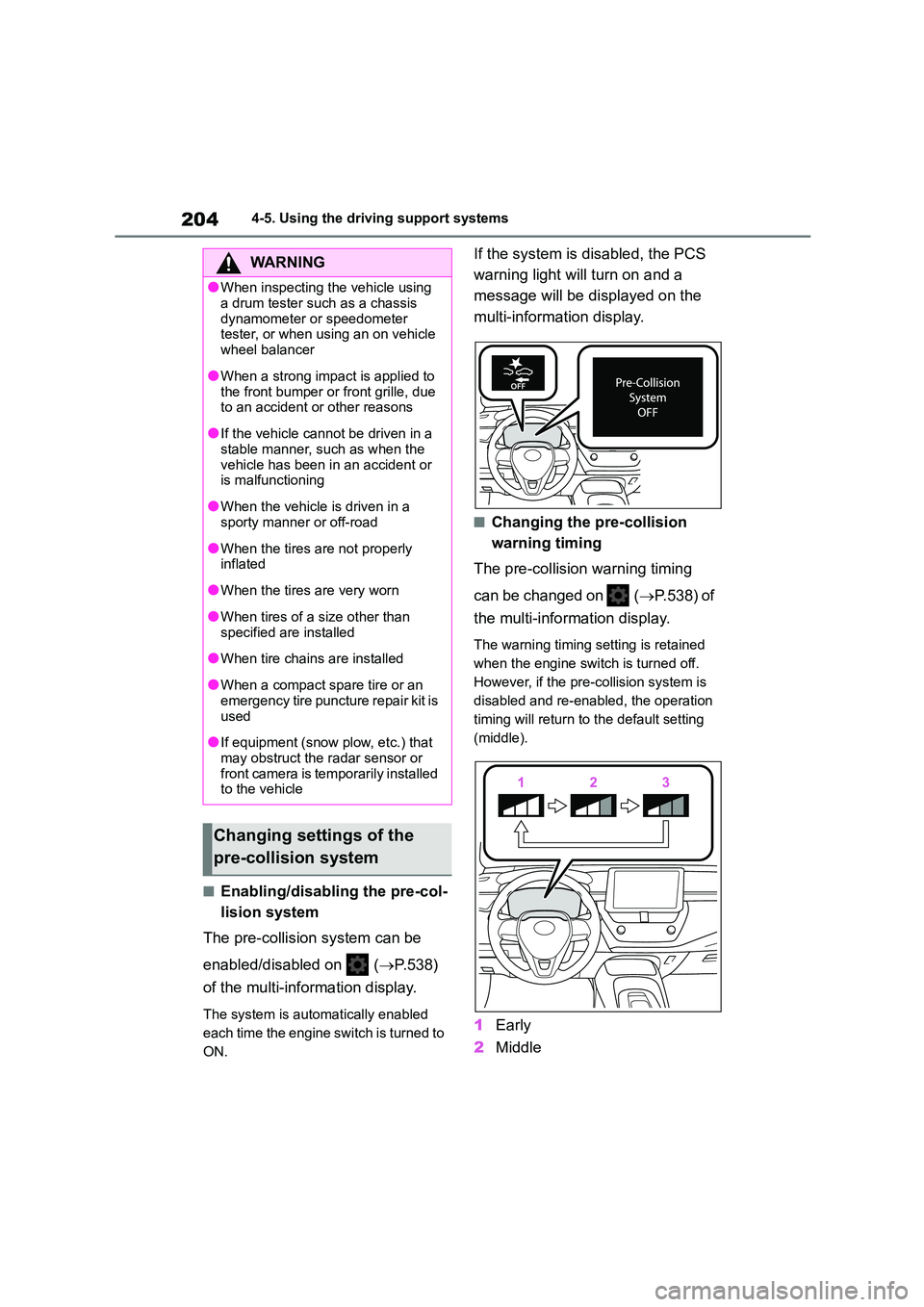
If the system is disabled, the PCS
warning light will turn on and a
message will be di splayed on the
multi-information display.
■Changing the pre-collision
warning timing
The pre-collision warning timing
can be changed on ( P.538) of
the multi-information display.
The warning timing setting is retained
when the engine switch is turned off.
However, if the pr e-collision system is
disabled and re-enabled, the operation
timing will return to the default setting
(middle).
1 Early
2 Middle
WA R N I N G
●When inspecting the vehicle using
a drum tester such as a chassis
dynamometer or speedometer tester, or when using an on vehicle
wheel balancer
●When a strong impact is applied to
the front bumper or front grille, due
to an accident or other reasons
●If the vehicle cannot be driven in a
stable manner, such as when the
vehicle has been in an accident or is malfunctioning
●When the vehicle is driven in a sporty manner or off-road
●When the tires are not properly inflated
●When the tires are very worn
●When tires of a size other than
specified are installed
●When tire chains are installed
●When a compact spare tire or an
emergency tire puncture repair kit is
used
●If equipment (snow plow, etc.) that
may obstruct the radar sensor or front camera is temporarily installed
to the vehicle
Changing settings of the
pre-collision system
Page 210 of 678
2084-5. Using the driving support systems
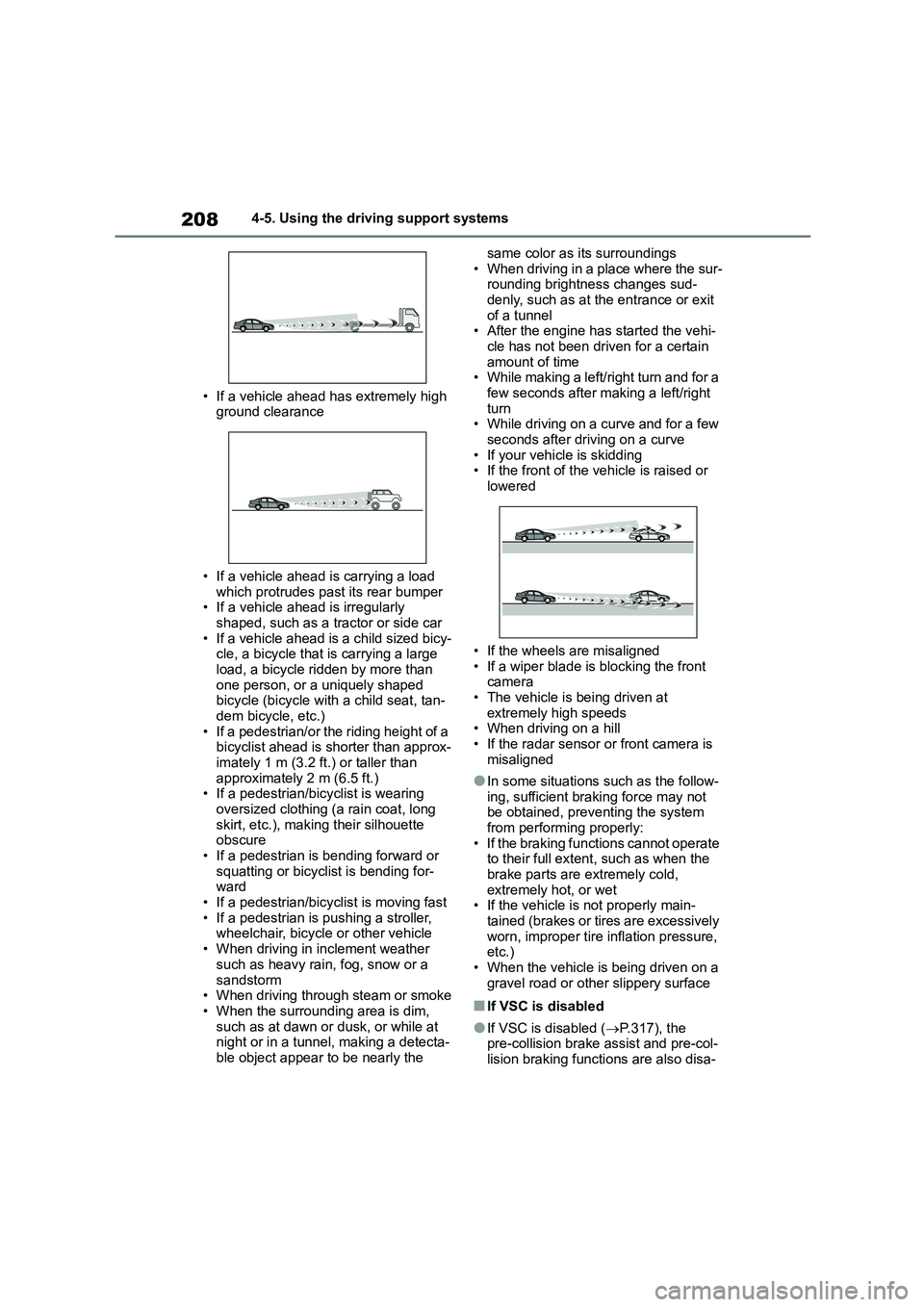
• If a vehicle ahead has extremely high
ground clearance
• If a vehicle ahead is carrying a load
which protrudes past its rear bumper • If a vehicle ahead is irregularly
shaped, such as a tractor or side car
• If a vehicle ahead is a child sized bicy- cle, a bicycle that is carrying a large
load, a bicycle ridden by more than
one person, or a uniquely shaped bicycle (bicycle with a child seat, tan-
dem bicycle, etc.)
• If a pedestrian/or the riding height of a bicyclist ahead is shorter than approx-
imately 1 m (3.2 ft.) or taller than
approximately 2 m (6.5 ft.) • If a pedestrian/bicyclist is wearing
oversized clothing (a rain coat, long
skirt, etc.), making their silhouette obscure
• If a pedestrian is bending forward or
squatting or bicyclist is bending for- ward
• If a pedestrian/bicyclist is moving fast
• If a pedestrian is pushing a stroller, wheelchair, bicycle or other vehicle
• When driving in inclement weather
such as heavy rain, fog, snow or a
sandstorm • When driving through steam or smoke
• When the surrounding area is dim,
such as at dawn or dusk, or while at night or in a tunnel, making a detecta-
ble object appear to be nearly the
same color as its surroundings
• When driving in a place where the sur- rounding brightness changes sud-
denly, such as at the entrance or exit
of a tunnel • After the engine has started the vehi-
cle has not been driven for a certain
amount of time • While making a left/right turn and for a
few seconds after making a left/right
turn • While driving on a curve and for a few
seconds after driving on a curve
• If your vehicle is skidding • If the front of the vehicle is raised or
lowered
• If the wheels are misaligned
• If a wiper blade is blocking the front
camera • The vehicle is being driven at
extremely high speeds
• When driving on a hill • If the radar sensor or front camera is
misaligned
●In some situations such as the follow-
ing, sufficient braking force may not
be obtained, prev enting the system from performing properly:
• If the braking functions cannot operate
to their full extent, such as when the brake parts are extremely cold,
extremely hot, or wet
• If the vehicle is not properly main- tained (brakes or ti res are excessively
worn, improper tire inflation pressure,
etc.)
• When the vehicle is being driven on a gravel road or other slippery surface
■If VSC is disabled
●If VSC is disabled ( P.317), the pre-collision brake assist and pre-col-
lision braking functions are also disa-
Page 214 of 678
2124-5. Using the driving support systems
■Lane departure alert function
When the system determines that
the vehicle might depart from its
lane or course*, a warning is dis-
played on the multi-information dis-
play, and a warning buzzer will
sound to alert the driver.
When the warning buzzer sounds,
check the area around your vehicle and
carefully operate the steering wheel to
move the vehicle back to the center of
WA R N I N G
●The vehicle is driven in an area
without white (yellow) lines, such as
in front of a tollgate or checkpoint, or at an intersection, etc.
●The white (yellow) lines are cracked, “Raised pavement
marker” or stones are present.
●The white (yellow) lines cannot be seen or are difficult to see due to
sand, etc.
●The vehicle is driven on a road sur-
face that is wet due to rain, pud-
dles, etc.
●The traffic lines are yellow (which
may be more difficult to recognize than lines that are white).
●The white (yellow) lines cross over a curb, etc.
●The vehicle is driven on a bright surface, such as concrete.
●If the edge of the road is not clear or straight.
●The vehicle is driven on a surface that is bright due to reflected light,
etc.
●The vehicle is driven in an area
where the brightness changes sud-
denly, such as at the entrances and exits of tunnels, etc.
●Light from the headlights of an oncoming vehicle, the sun, etc.
enters the camera.
●The vehicle is driven on a slope.
●The vehicle is driven on a road which tilts left or right, or a winding
road.
●The vehicle is driven on an
unpaved or rough road.
●The traffic lane is excessively nar-
row or wide.
●The vehicle is extremely tilted due to carrying heavy luggage or having
improper tire pressure.
●The distance to the preceding vehi-
cle is extremely short.
●The vehicle is moving up and down
a large amount due to road condi-
tions during driving (poor roads or road seams).
●When driving in a tunnel or at night with the headlights off or when a
headlight is dim due to its lens
being dirty or it being misaligned.
●The vehicle is struck by a cross-
wind.
●The vehicle is affected by wind from
a vehicle driven in a nearby lane.
●The vehicle has just changed lanes
or crossed an intersection.
●Tires which differ by structure, man-
ufacturer, brand or tread pattern are used.
●Snow tires, etc. are equipped.
●The vehicle is being driven at
extremely high speeds.
Functions included in LTA
system