engine TOYOTA COROLLA CROSS 2023 Owners Manual
[x] Cancel search | Manufacturer: TOYOTA, Model Year: 2023, Model line: COROLLA CROSS, Model: TOYOTA COROLLA CROSS 2023Pages: 500, PDF Size: 15.11 MB
Page 238 of 500
2384-5. Using the driving support systems
■When the brake hold sys-
tem is operating
When the engine is stopped
by the Stop & Start system, if
the brake pedal is released
the engine will remain
stopped.
If the accelerator pedal is
depressed while the engine is
stopped by the Stop & Start
system, the engine will
restart.
While the engine is stopped
by the Stop & Start system, if
the engine is restarted, the
brake hold system will con-
tinue to apply the brakes,
unless the operation condi-
tions of the brake hold system
are no longer met. ( P.175)
■When the dynamic radar
cruise control with
full-speed range is operat-
ing
When the vehicle is stopped
by the dynamic radar cruise
control with full-speed range,
the engine will stop automati-
cally even though the brake
pedal is not depressed.
When the preceding vehicle
starts off, the engine will
restart automatically.
If the engine is restarted by
the Stop & Start system while
the vehicle is stopped by the
dynamic radar cruise control
with full-speed range, the vehicle will remain stopped.
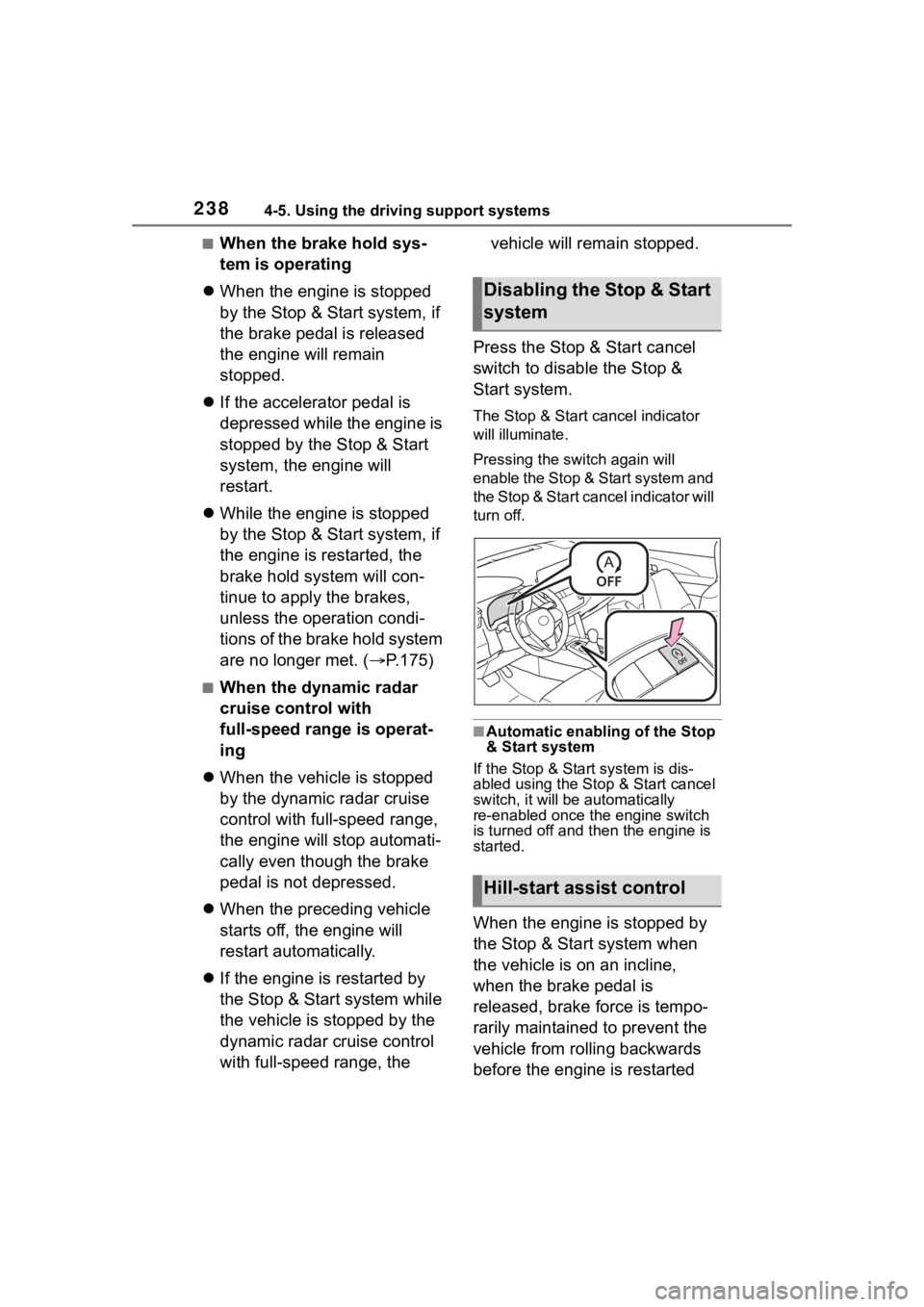
Press the Stop & Start cancel
switch to disable the Stop &
Start system.
The Stop & Start cancel indicator
will illuminate.
Pressing the s witch again will
enable the Stop & Start system and
the Stop & Start cancel indicator will
turn off.
■Automatic enabling of the Stop
& Start system
If the Stop & Start system is dis-
abled using the Stop & Start cancel
switch, it will be a utomatically
re-enabled once the engine switch
is turned off and then the engine is
started.
When the engine is stopped by
the Stop & Start system when
the vehicle is on an incline,
when the brake pedal is
released, brake force is tempo-
rarily maintained to prevent the
vehicle from rolling backwards
before the engine is restarted
Disabling the Stop & Start
system
Hill-start assist control
Page 239 of 500
2394-5. Using the driving support systems
4
Driving
and drive force is generated.
When drive force is generated,
the maintained brake force is
automatically canceled.
This function operates on flat
surfaces as well as steep
inclines.
Sound may be generated
from the brake system, but
this does not indicate a mal-
function.
Brake pedal response may
change and vibration may
occur, but this does not indi-
cate a malfunction.
■Points for use
●If the engine switch is pressed
when the engine is stopped by the
Stop & Start system, the engine
will not be able to b e restarted by
the automatic engine start func-
tion. In this case, restart the
engine using the normal engine
starting procedure. ( P.162, 163)
●When the engine is being
restarted by the Stop & Start sys-
tem, the power outlets may be
temporarily unusable, but this
does not indicate a malfunction.
●Installation and re moval of electri-
cal components and wireless
devices may affect the Stop &
Start system. Contact your Toyota
dealer for details.
●When stopping the vehicle for a
longer period of time, turn the
engine switch off to stop the
engine completely.
■Operating conditions
●The Stop & Start system is opera-
tional when all of the following
conditions are met:
• The vehicle has been driven a cer- tain amount of time. • The brake pedal is being
depressed firmly. (Except when
the vehicle is stopped by the
dynamic radar cruis e control with
full-speed range when in vehi-
cle-to-vehicle d istance control
mode)
• The D or P shift position is selected.
• The driver’s seat belt is fastened.
• The driver’s door is closed.
• The windshield de fogger is off.
(vehicles without a manual air
conditioning system)
• The accelerator pedal is not being
depressed.
• The engine is adequately warmed up.
• The hood is closed. ( P.240)
●In the following situations the
engine may not be stopped by the
Stop & Start system. This is not a
malfunction of the Stop & Start
system.
• When the air conditioning system is being used.
• When the battery is undergoing a
periodic recharge.
• When the battery is not sufficiently
charged, such as if the vehicle
has been parked for a long time
and the battery charge has
decreased, the electric load is
large, the battery fluid tempera-
ture is excessively low or the bat-
tery has deteriorated.
*
• When the brake booster vacuum is low.
• When the elapsed time since the engine was restarted is short.
• When the vehicle is stopped fre- quently, such as when in a traffic
jam.
• When the engine coolant tem- perature or transm ission fluid tem-
perature is extremely low or high.
• When the vehicle is stopped on a
steep incline.
• When the vehicle is being driven
in a high altitude area.
• When the battery fluid tempera- ture is extremely low or high.
• For a while after the battery termi-
Page 240 of 500

2404-5. Using the driving support systems
nals have been disconnected and
reconnected.
*: The state that the engine is not stopped may continue.
●When the engine is stopped by
the Stop & Start system, the
engine will be res tarted automati-
cally if any of the following condi-
tions are met: (To enable the
engine to be stopped by the Stop
& Start system again, drive the
vehicle.)
• The air conditioning system is being used. (vehicles without a
manual air conditioning system)
• The windshield defogger is turned on. (vehicles without a manual air
conditioning system)
• The shift lever is shifted from D or P.
• The shift lever is shifted from P.
(When the engine is stopped by
the Stop & Start system when the
shift lever is in P.)
• The driver’s seat belt is unfas- tened.
• The driver’s door is opened.
• The Stop & Start cancel switch is
pressed.
• The accelerator pedal is
depressed.
• The vehicle starts to roll on an incline.
●When the engine is stopped by
the Stop & Start system, the
engine may restart automatically
in the following situations: (To
enable the engine to be stopped
by the Stop & Start system again,
drive the vehicle.)
• When the brake pedal is pumped
or strongly depressed.
• When the air conditioning system is being used.
• When a switch of the air condition- ing system is operated (windshield
defogger switch, etc.).
• If the battery charge becomes low.
■When the hood is opened
●If the hood is opened while the
engine is stopped by the Stop & Start system, the engine will stall
and will not be able to be restarted
by the automatic engine start
function. In this c
ase, restart the
engine using the normal engine
starting procedure. ( P.162, 163)
●If the hood is closed after the
engine is started with the hood
open, the Stop & Start system will
not operate. Close the hood, turn
the engine switch off, wait 30 sec-
onds or more, and then start the
engine.
■Air conditioning system opera-
tion while the engine is stopped
by the Stop & Start system
Vehicles with an automatic air con-
ditioning system: When the air con-
ditioning is in automatic mode and
the engine is stopped by the Stop &
Start system, the fan may operate at
a low speed in order to prevent the
temperature in the cabin from
increasing or decreasing or may be
stopped.
To prioritize air conditioning system
performance when the vehicle is
stopped, disable the Stop & Start
system by pressing the Stop & Start
cancel switch.
●If the windshield is fogged up
Turn the windshi eld defogger on.
( P.286, 292)
If the windshield fogs up frequently,
press the Stop & Start cancel switch
to disable the Stop & Start system.
●If an odor is emitted from the air
conditioning system
• Vehicles with a manual air condi- tioning system
If the idling stop time setting is set to
“Extended” change it to “Standard”.
If an odor is emitted when the idling
stop time setting is set to “Stan-
dard”, press the Stop & Start cancel
switch to deactivate the Stop & Start
system.
• Vehicles with a n automatic air
Page 241 of 500
2414-5. Using the driving support systems
4
Driving
conditioning system
Press the Stop & Start cancel switch
to deactivate the Stop & Start sys-
tem.
■Changing the idling stop time
with the air conditioning system
on
The length of time the Stop & Start
system will operate when the air
conditioning system is on can be
changed in or of the
multi-informat ion display (P.82,
89). (The length of time the Stop &
Start system will op erate when the
air conditioning system is off cannot
be changed.)
■Displaying the Stop & Start sys-
tem status
P.77, 81
■Multi-information display mes-
sages
If the follo wing situations, and a
message may be displayed on the
multi-information display.
●When the engine cannot be
stopped by the Stop & Start sys-
tem
“Press Brake More to Activate”
• The brake pedal is not sufficiently depressed.
If the brake pedal is depressed
further, the system will operate.
“Non-Dedicated Battery”
• A battery not designed for use with a Stop & Start system may
have been installed.
Have the vehicl e inspected by
your Toyota dealer.
“Battery Charging”
• The battery charge may be low.
Stopping of the engine is tempo-
rarily prohibited to prioritize charging
of the battery. After the engine runs for a certain amount of time, the sys-
tem will be enabled.
• A refresh charge may be occur-
ring
After a refresh charge for up to
an hour completes, the system can
be operated.
• If displayed continuously for a long time (more than an hour)
The battery may be deteriorated.
Contact your Toyota dealer for
details.
“Stop & Start System Unavail-
able”
• The Stop & Start system is tempo- rarily disabled.
Allow the engine to run for some
time.
• The engine may have been started with the hood open.
Close the hood, turn the engine
switch off, wait f or 30 seconds or
more, and then start the engine.
“In Preparation”
• The vehicle is being driven in a high altitude area.
• The brake booster vacuum is low.
When the brake booster vacuum
reaches a predeter mined level, the
system will be enabled.
“For Climate Control”
• The air conditioning system is being used when the ambient
temperature is high or low.
If the difference between the set
temperature and cabin temperature
becomes small, the system will be
enabled.
• The windshield defogger is on.
●When the engine automatically
restarts while stopped by the Stop
Page 242 of 500
2424-5. Using the driving support systems
& Start system “In Preparation”
• The brake pedal has been depressed further or pumped.
The system will be enabled after
the engine runs and the brake
booster vacuum reaches a predeter-
mined level.
“For Climate Control”
• The air conditioning system has been turned on or is being used.
• The windshield defogger has been turned on.
“Battery Charging”
• The battery charge may be low.
The system will be enabled after
the engine runs to sufficiently
charge the battery.
■When the buzzer sounds
If the driver’s door is opened when
the engine is stopped by the Stop &
Start system and the shift lever is in
D, a buzzer will s ound and the Stop
& Start system indicator will flash. To
stop the buzzer, close the driver’s
door.
■The Stop & Start system protec-
tion function
●When the volume of the audio
system is excessively high, sound
output from the audio system may
suddenly be cut off in order to
reduce battery consumption. To
prevent the audio system from
being cut off, keep the volume of
audio system at a moderate level.
If the audio system has been cut
off, turn the engine switch off, wait
for 3 seconds or more and then
turn it to ACC or ON to re-enable
the audio system.
●The audio system may not be acti-
vated if the battery terminals are
disconnected an d then recon-
nected. If this o ccurs, turn the engine switch off and then repeat
the following oper
ation twice to
activate the audio system nor-
mally.
• Turn the engine switch to ON and then to OFF.
■Replacing the battery
P.421
■If the malfunction indicator
lamp comes on
The system may be malfunctioning.
Have the vehicle inspected by your
Toyota dealer.
■If “Stop & Start System Mal-
function Visit Your Dealer” is
displayed on the multi-informa-
tion display
The system may be malfunctioning.
Have the vehicle inspected by your
Toyota dealer.
WARNING
■When the Stop & Start system
is operating
Make sure to disable the Stop &
Start system while the vehicle is in
a poorly ventilated area. If not dis-
abled, the engine may be auto-
matically restarted unexpectedly,
causing exhaust gases to collect
and enter the vehicle, possibly
resulting in dea th or a serious
health hazard.
●Do not leave the vehicle while
the engine is stopped by the
Stop & Start system (while the
Stop & Start indicator is on). An
accident may occur due to the
automatic engine start function.
●Depress the brake pedal and
apply the parking brake when
necessary while the engine is
stopped by the Stop & Start sys-
tem (while the Stop & Start indi-
cator is on).
Page 245 of 500
2454-5. Using the driving support systems
4
Driving
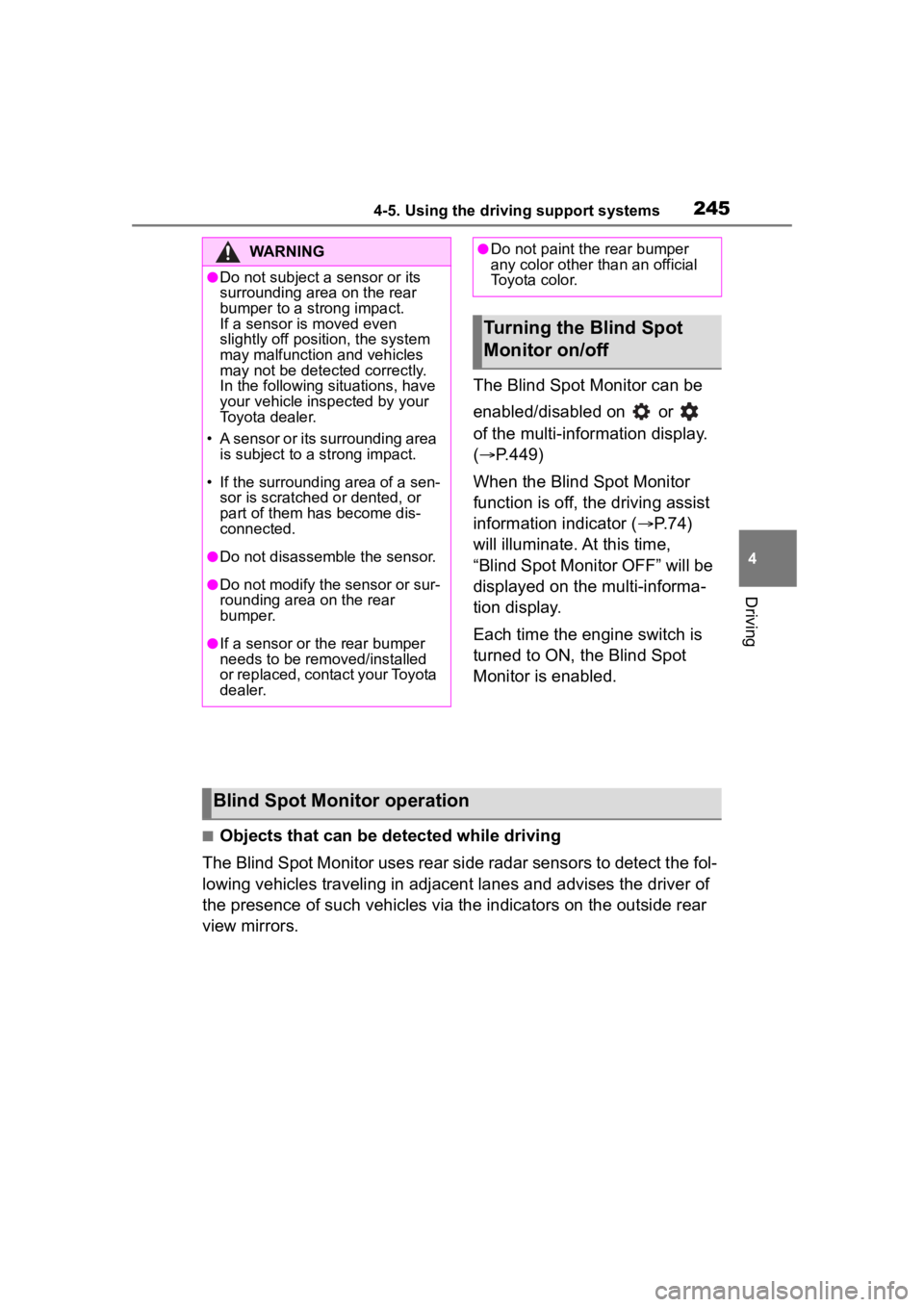
The Blind Spot Monitor can be
enabled/disabled on or
of the multi-information display.
(P.449)
When the Blind Spot Monitor
function is off, the driving assist
information indicator ( P.74)
will illuminate. At this time,
“Blind Spot Monitor OFF” will be
displayed on the multi-informa-
tion display.
Each time the engine switch is
turned to ON, the Blind Spot
Monitor is enabled.
■Objects that can be detected while driving
The Blind Spot Monitor uses rear side radar sensors to detect the fol-
lowing vehicles traveling in adjacent lanes and advises the driver of
the presence of such vehicles via the indicators on the outside rear
view mirrors.
WARNING
●Do not subject a sensor or its
surrounding area on the rear
bumper to a strong impact.
If a sensor is moved even
slightly off position, the system
may malfunction and vehicles
may not be detected correctly.
In the following si tuations, have
your vehicle inspected by your
Toyota dealer.
• A sensor or its surrounding area is subject to a strong impact.
• If the surrounding area of a sen- sor is scratched or dented, or
part of them has become dis-
connected.
●Do not disassemble the sensor.
●Do not modify the sensor or sur-
rounding area on the rear
bumper.
●If a sensor or th e rear bumper
needs to be removed/installed
or replaced, contact your Toyota
dealer.
●Do not paint the rear bumper
any color other t han an official
Toyota color.
Turning the Blind Spot
Monitor on/off
Blind Spot Monitor operation
Page 247 of 500
2474-5. Using the driving support systems
4
Driving
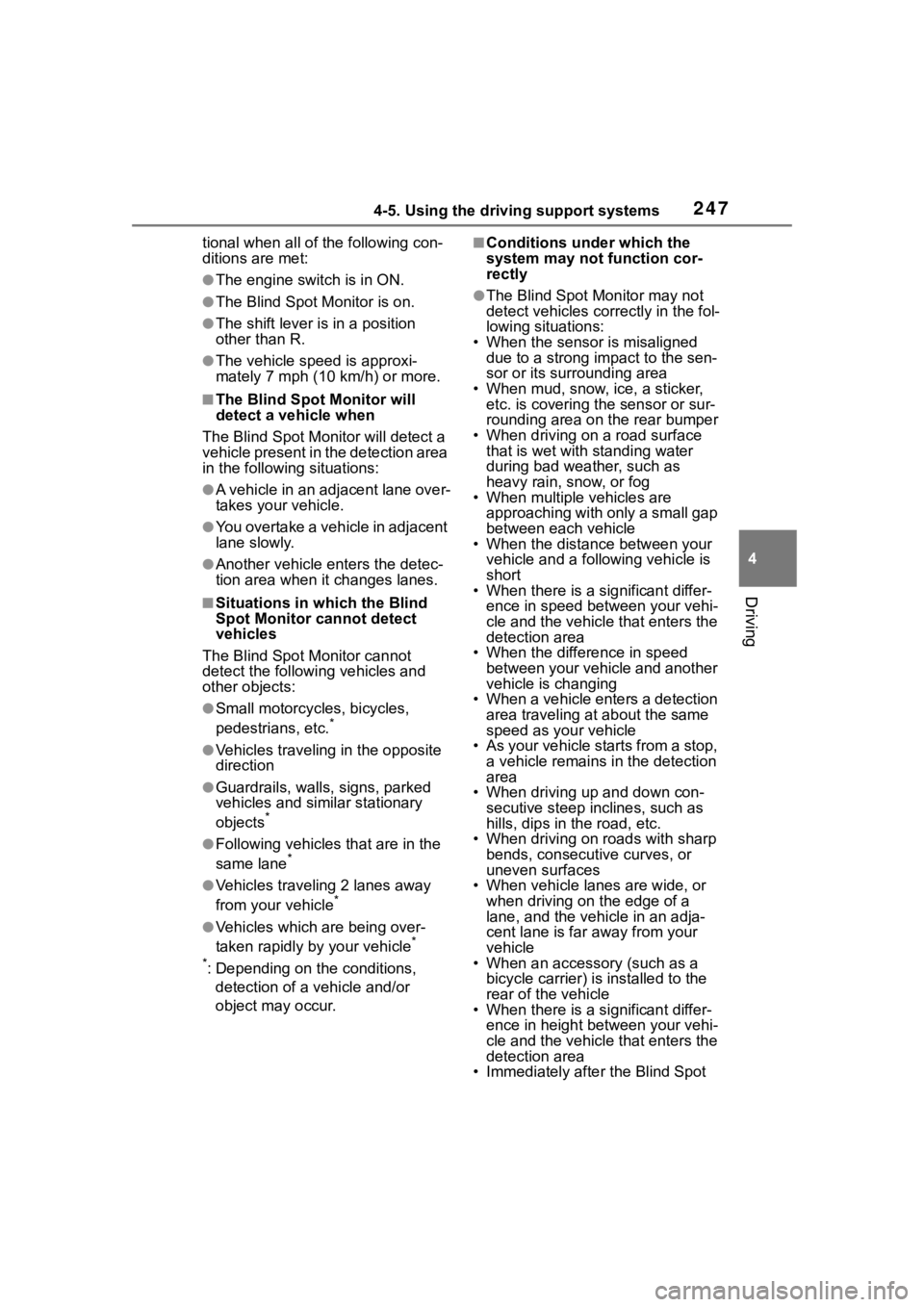
tional when all of the following con-
ditions are met:
●The engine switch is in ON.
●The Blind Spot Monitor is on.
●The shift lever is in a position
other than R.
●The vehicle speed is approxi-
mately 7 mph (10 km/h) or more.
■The Blind Spot Monitor will
detect a vehicle when
The Blind Spot Mon itor will detect a
vehicle present in the detection area
in the followin g situations:
●A vehicle in an adjacent lane over-
takes your vehicle.
●You overtake a vehicle in adjacent
lane slowly.
●Another vehicle enters the detec-
tion area when it changes lanes.
■Situations in which the Blind
Spot Monitor cannot detect
vehicles
The Blind Spot Monitor cannot
detect the following vehicles and
other objects:
●Small motorcycles, bicycles,
pedestrians, etc.*
●Vehicles traveling in the opposite
direction
●Guardrails, walls, signs, parked
vehicles and similar stationary
objects
*
●Following vehicles that are in the
same lane*
●Vehicles traveling 2 lanes away
from your vehicle*
●Vehicles which are being over-
taken rapidly by your vehicle*
*
: Depending on the conditions, detection of a vehicle and/or
object may occur.
■Conditions under which the
system may not function cor-
rectly
●The Blind Spot Monitor may not
detect vehicles corr ectly in the fol-
lowing situations:
• When the sensor is misaligned due to a strong impact to the sen-
sor or its surrounding area
• When mud, snow, ice, a sticker, etc. is covering the sensor or sur-
rounding area on the rear bumper
• When driving on a road surface that is wet with standing water
during bad weather, such as
heavy rain, snow, or fog
• When multiple vehicles are
approaching with only a small gap
between each vehicle
• When the distance between your
vehicle and a following vehicle is
short
• When there is a significant differ-
ence in speed between your vehi-
cle and the vehicle that enters the
detection area
• When the difference in speed between your vehicle and another
vehicle is changing
• When a vehicle enters a detection area traveling at about the same
speed as your vehicle
• As your vehicle starts from a stop, a vehicle remains in the detection
area
• When driving up and down con- secutive steep inclines, such as
hills, dips in the road, etc.
• When driving on r oads with sharp
bends, consecutive curves, or
uneven surfaces
• When vehicle lanes are wide, or when driving on the edge of a
lane, and the vehicle in an adja-
cent lane is far away from your
vehicle
• When an accessory (such as a bicycle carrier) is installed to the
rear of the vehicle
• When there is a significant differ- ence in height between your vehi-
cle and the vehicle that enters the
detection area
• Immediately after the Blind Spot
Page 249 of 500
2494-5. Using the driving support systems
4
Driving
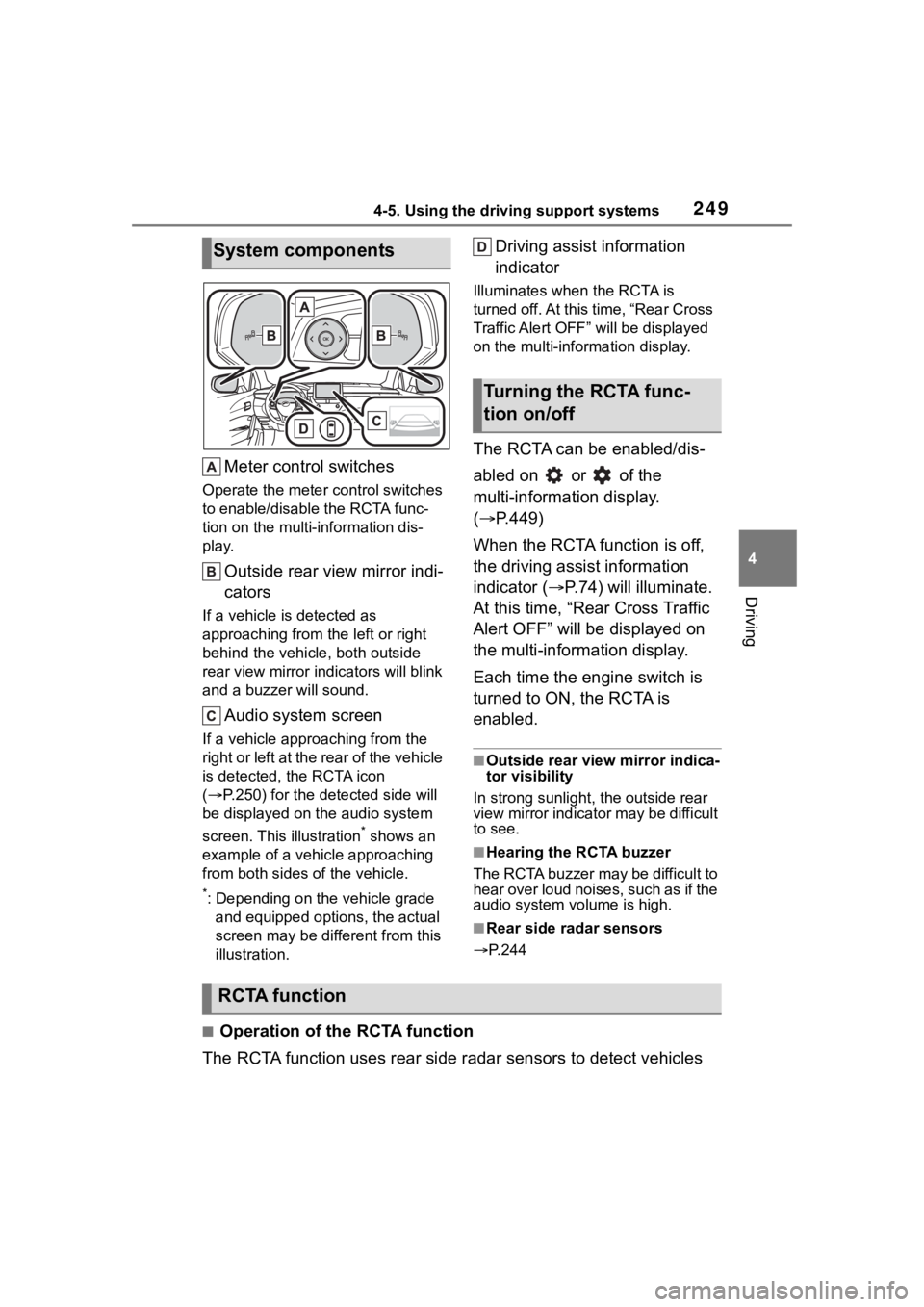
Meter control switches
Operate the meter control switches
to enable/disable the RCTA func-
tion on the multi-information dis-
play.
Outside rear view mirror indi-
cators
If a vehicle is detected as
approaching from the left or right
behind the vehicle, both outside
rear view mirror indicators will blink
and a buzzer will sound.
Audio system screen
If a vehicle appr oaching from the
right or left at the rear of the vehicle
is detected, the RCTA icon
( P.250) for the det ected side will
be displayed on t he audio system
screen. This illustration
* shows an
example of a vehicle approaching
from both sides of the vehicle.
*: Depending on the vehicle grade and equipped options, the actual
screen may be different from this
illustration.
Driving assist information
indicator
Illuminates when the RCTA is
turned off. At this time, “Rear Cross
Traffic Alert OFF” will be displayed
on the multi-information display.
The RCTA can be enabled/dis-
abled on or of the
multi-information display.
( P.449)
When the RCTA function is off,
the driving assist information
indicator ( P.74) will illuminate.
At this time, “Rear Cross Traffic
Alert OFF” will be displayed on
the multi-information display.
Each time the engine switch is
turned to ON, the RCTA is
enabled.
■Outside rear vie w mirror indica-
tor visibility
In strong sunlight, the outside rear
view mirror indicator may be difficult
to see.
■Hearing the RCTA buzzer
The RCTA buzzer may be difficult to
hear over loud noises, such as if the
audio system volume is high.
■Rear side radar sensors
P.244
■Operation of the RCTA function
The RCTA function uses rear side radar sensors to detect vehicles
System components
Turning the RCTA func-
tion on/off
RCTA function
Page 251 of 500
2514-5. Using the driving support systems
4
Driving
■The RCTA function is opera-
tional when
The RCTA function operates when
all of the followin g conditions are
met:
●The engine swit ch is in ON.
●The RCTA function is on.
●The shift position is in R.
●The vehicle speed is less than
approximately 9 mph (15 km/h).
●The approaching vehicle speed is
between approximately 5 mph (8
km/h) and 34 mph (56 km/h).
■Setting the buzzer volume
The buzzer volume can be adjusted
on the multi-information display.
The buzzer volume of the RCTA and
intuitive parking assi st (if equipped)
can be adjusted all together on
or of the multi-information dis-
play. ( P.449)
■Muting a buzzer temporarily (if
equipped)
When an object is detected, the
temporary mute switch is displayed
on the audio system screen.
S elect the switch to mute the buzzer
of the intuitive parking assist (if
equipped) and RCTA all together.
Mute will be canceled automatically
in the followin g situations:
●When the shift lever is changed.
●When the vehicle speed exceeds
a certain speed.
●When there is a malfunction in a sensor or the system is temporar-
ily unavailable.
●When the operati
ng function is
disabled manually.
●When the engine switch is turned
off.
■Conditions under which the
system will not detect a vehicle
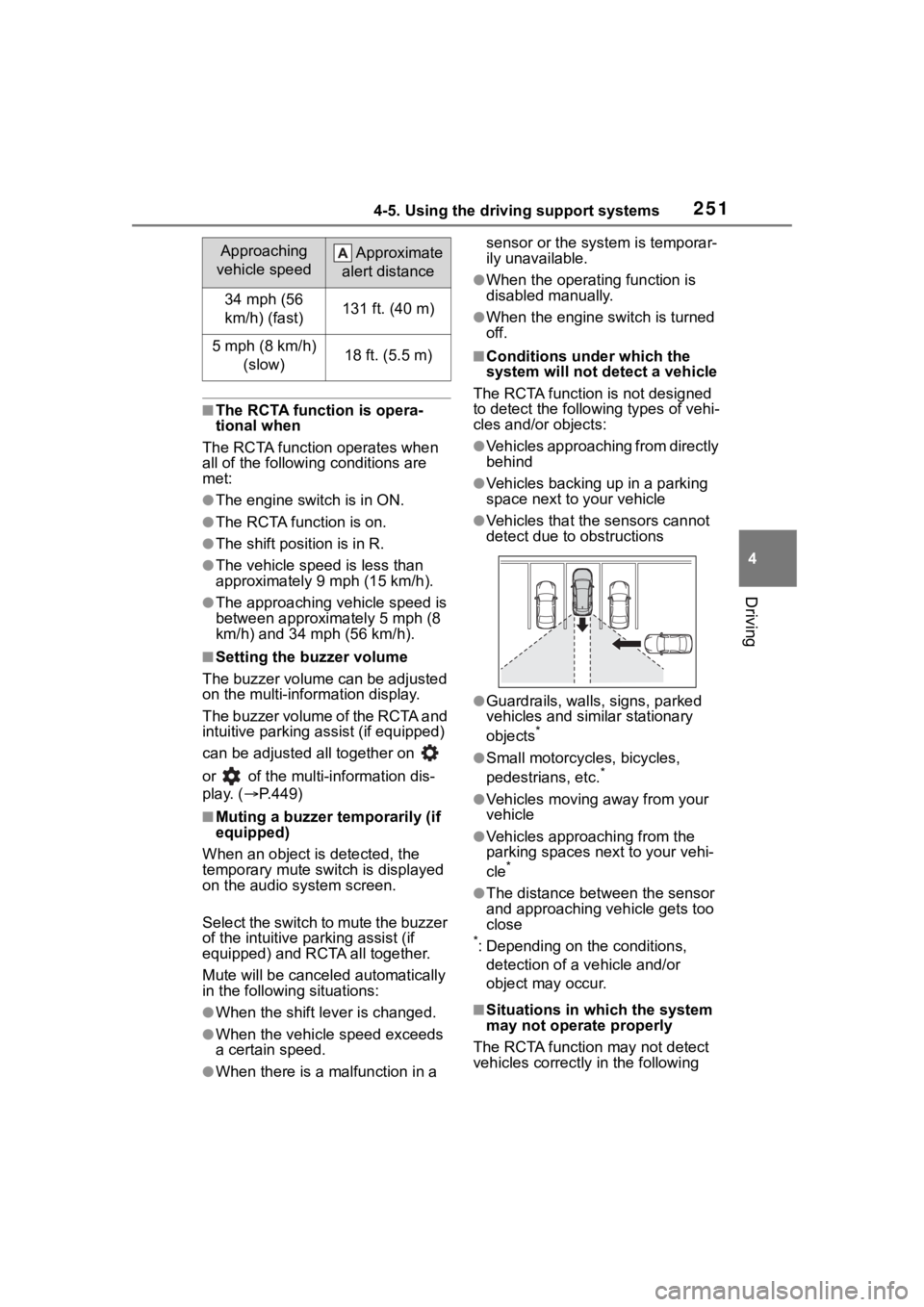
The RCTA function is not designed
to detect the follo wing types of vehi-
cles and/or objects:
●Vehicles approaching from directly
behind
●Vehicles backing up in a parking
space next to your vehicle
●Vehicles that the sensors cannot
detect due to obstructions
●Guardrails, walls, signs, parked
vehicles and similar stationary
objects
*
●Small motorcycles, bicycles,
pedestrians, etc.*
●Vehicles moving away from your
vehicle
●Vehicles approaching from the
parking spaces nex t to your vehi-
cle
*
●The distance between the sensor
and approaching vehicle gets too
close
*: Depending on the conditions, detection of a v ehicle and/or
object may occur.
■Situations in which the system
may not operate properly
The RCTA function may not detect
vehicles correctly in the following
Approaching
vehicle speed Approximate
alert distance
34 mph (56
km/h) (fast)131 ft. (40 m)
5 mph (8 km/h) (slow)18 ft. (5.5 m)
Page 252 of 500
2524-5. Using the driving support systems
situations:
●When the sensor is misaligned
due to a strong impact to the sen-
sor or its surrounding area
●When mud, snow, ice, a sticker,
etc., is covering the sensor or sur-
rounding area on the position
above the rear bumper
●When driving on a road surface
that is wet with standing water
during bad weather, such as
heavy rain, snow, or fog
●When multiple vehicles are
approaching with only a small gap
between each vehicle
●When a vehicle is approaching at
high speed
●When equipment that may
obstruct a sensor is installed, such
as a towing eyelet, bumper pro-
tector (an additional trim strip,
etc.), bicycle carrier, or snow plow
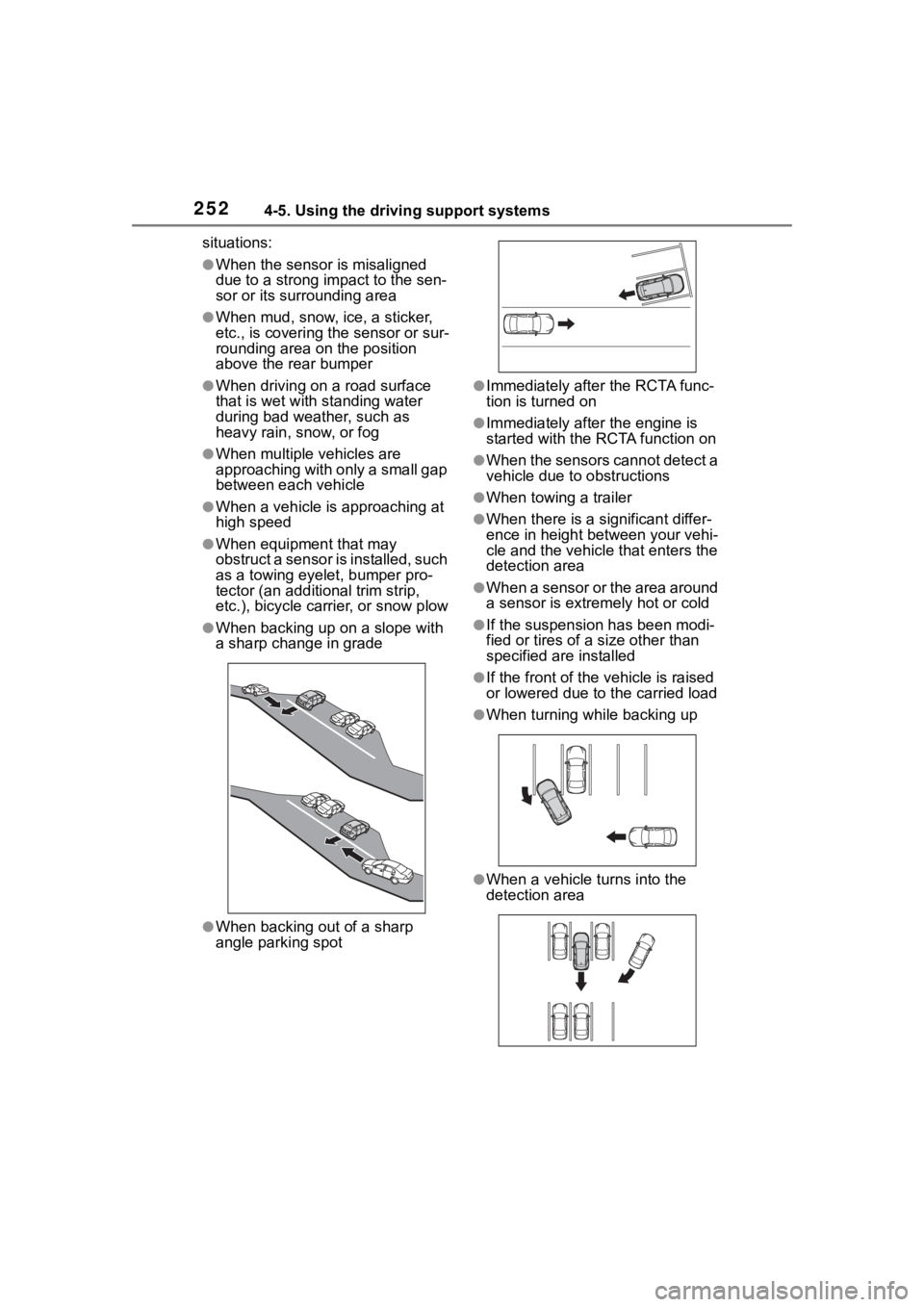
●When backing up on a slope with
a sharp change in grade
●When backing out of a sharp
angle parking spot
●Immediately after the RCTA func-
tion is turned on
●Immediately after the engine is
started with the RCTA function on
●When the sensors cannot detect a
vehicle due to obstructions
●When towing a trailer
●When there is a significant differ-
ence in height between your vehi-
cle and the vehicle that enters the
detection area
●When a sensor or the area around
a sensor is extremely hot or cold
●If the suspension has been modi-
fied or tires of a size other than
specified are installed
●If the front of the v ehicle is raised
or lowered due to the carried load
●When turning while backing up
●When a vehicle tu rns into the
detection area