charging TOYOTA COROLLA CROSS 2023 User Guide
[x] Cancel search | Manufacturer: TOYOTA, Model Year: 2023, Model line: COROLLA CROSS, Model: TOYOTA COROLLA CROSS 2023Pages: 500, PDF Size: 15.11 MB
Page 311 of 500
3115-4. Other interior features
5
Interior features
Qi wireless charging standard
created by the Wireless Power
Consortium.
The wireless charger cannot be
used with a portable device that
is larger than the charging area.
Additionally, depending on the
portable device, the wireless
charger may not operate prop-
erly. Refer to the operation man-
ual of the portable device.
■The “Qi” logo
The “Qi” logo is a trademark of
the Wireless Power Consortium.
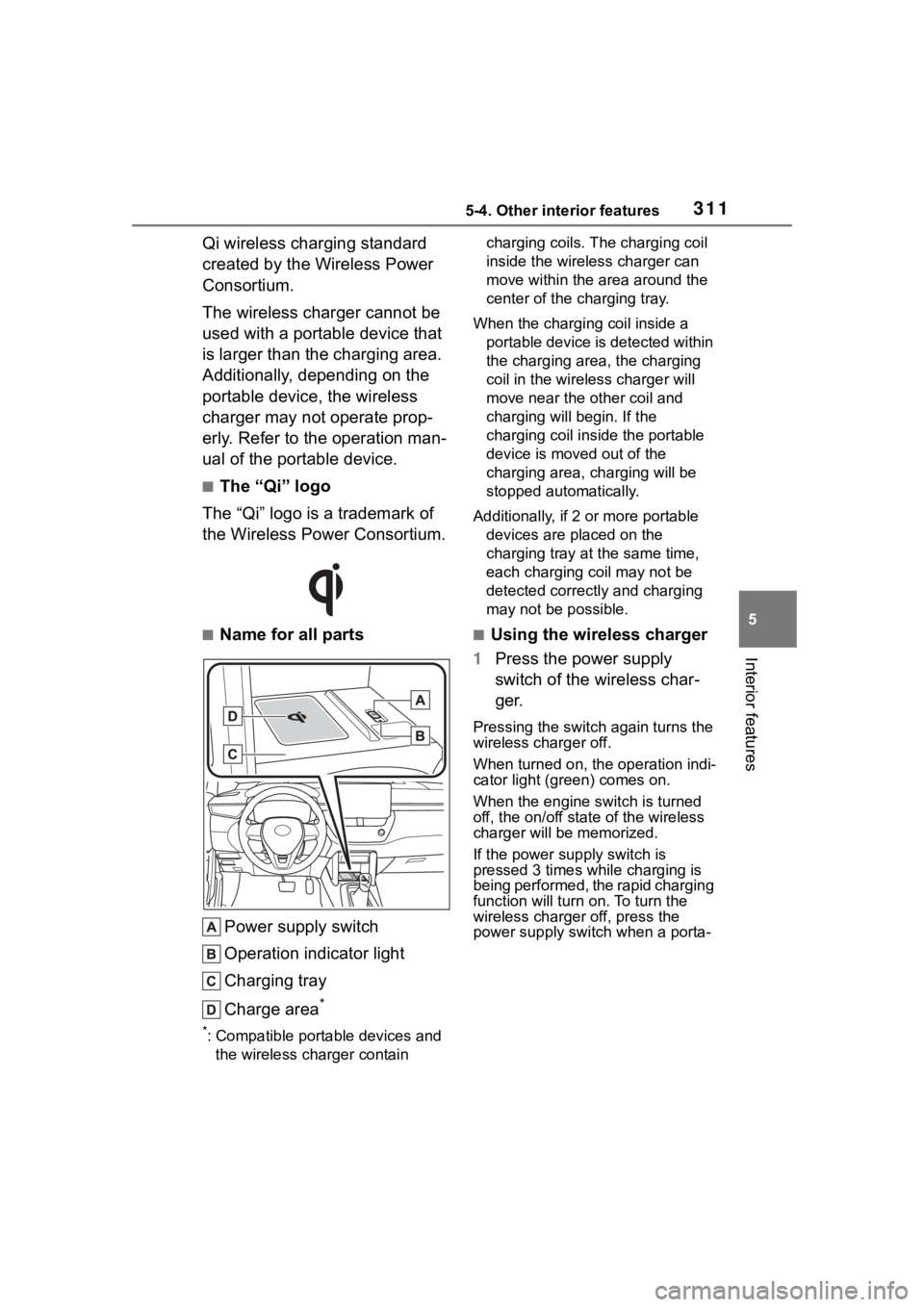
■Name for all parts
Power supply switch
Operation indicator light
Charging tray
Charge area
*
*: Compatible portable devices and the wireless charger contain charging coils. The charging coil
inside the wireless charger can
move within the area around the
center of the charging tray.
When the charging coil inside a portable device is detected within
the charging area, the charging
coil in the wirel ess charger will
move near the other coil and
charging will begin. If the
charging coil inside the portable
device is moved out of the
charging area, charging will be
stopped automatically.
Additionally, if 2 or more portable devices are placed on the
charging tray at t he same time,
each charging coil may not be
detected correctly and charging
may not be possible.
■Using the wireless charger
1 Press the power supply
switch of the wireless char-
ger.
Pressing the switch again turns the
wireless charger off.
When turned on, the operation indi-
cator light (green) comes on.
When the engine switch is turned
off, the on/off state of the wireless
charger will be memorized.
If the power supply switch is
pressed 3 times while charging is
being performed, the rapid charging
function will turn on. To turn the
wireless charger off, press the
power supply swit ch when a porta-
Page 312 of 500
3125-4. Other interior features
ble device is not being charged.
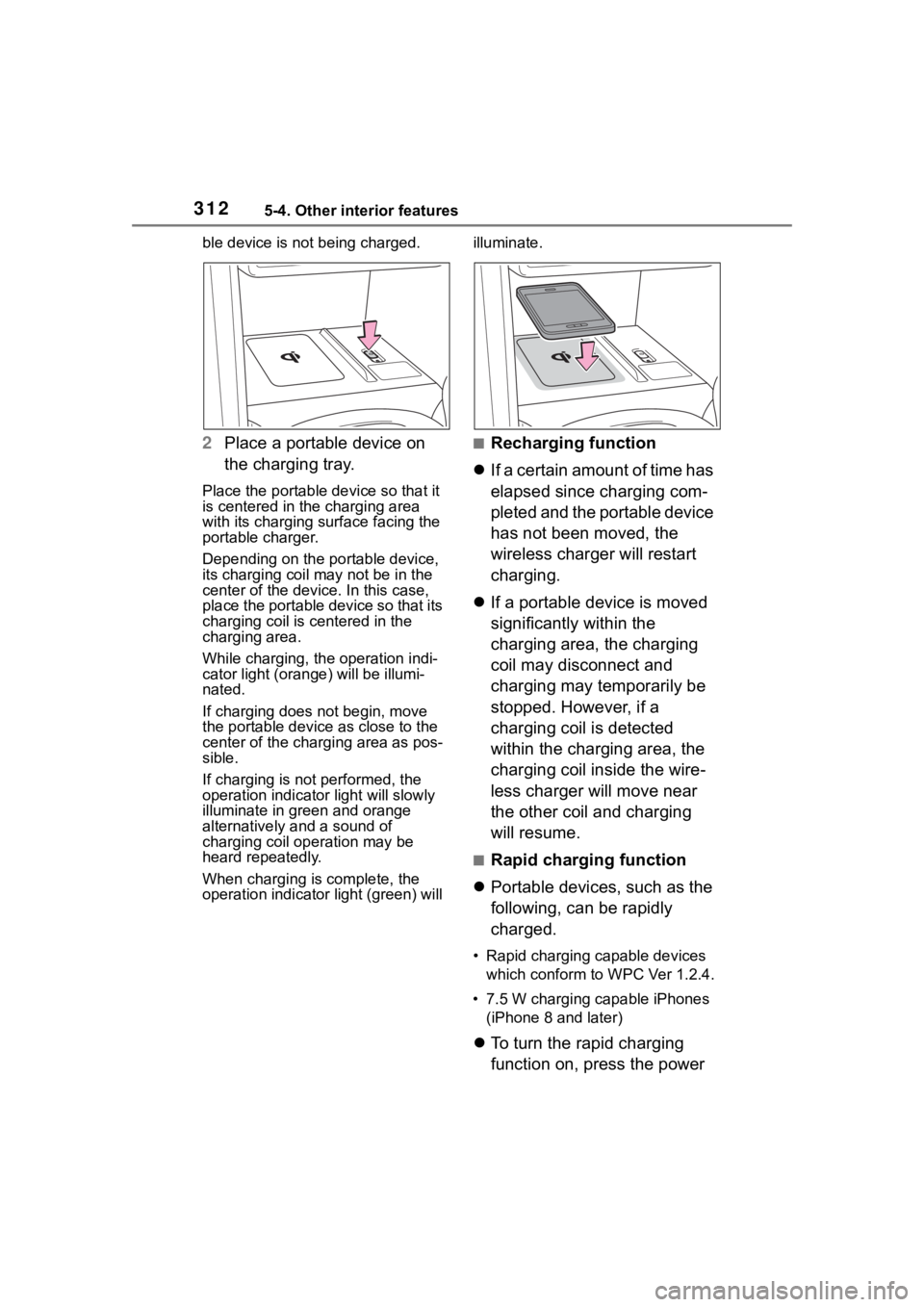
2Place a portable device on
the charging tray.
Place the portable device so that it
is centered in the charging area
with its charging surface facing the
portable charger.
Depending on the portable device,
its charging coil may not be in the
center of the device. In this case,
place the portable device so that its
charging coil is centered in the
charging area.
While charging, the operation indi-
cator light (orang e) will be illumi-
nated.
If charging does not begin, move
the portable device as close to the
center of the charging area as pos-
sible.
If charging is not performed, the
operation indicator light will slowly
illuminate in gr een and orange
alternatively and a sound of
charging coil operation may be
heard repeatedly.
When charging is complete, the
operation indicator light (green) will illuminate.
■Recharging function
If a certain amount of time has
elapsed since charging com-
pleted and the portable device
has not been moved, the
wireless charger will restart
charging.
If a portable device is moved
significantly within the
charging area, the charging
coil may disconnect and
charging may temporarily be
stopped. However, if a
charging coil is detected
within the charging area, the
charging coil inside the wire-
less charger will move near
the other coil and charging
will resume.
■Rapid charging function
Portable devices, such as the
following, can be rapidly
charged.
• Rapid charging capable devices
which conform to WPC Ver 1.2.4.
• 7.5 W charging capable iPhones (iPhone 8 and later)
To turn the rapid charging
function on, press the power
Page 313 of 500
3135-4. Other interior features
5
Interior features
supply switch 3 times while
charging is being performed.
If rapid charging is possible,
the operation indicator will
change from illuminated
(orange) to alternating
between (green) and (orange).
When charging is finished, the
rapid charging function will
turn off. To perform rapid
charging again, turn the rapid
charging function back on.
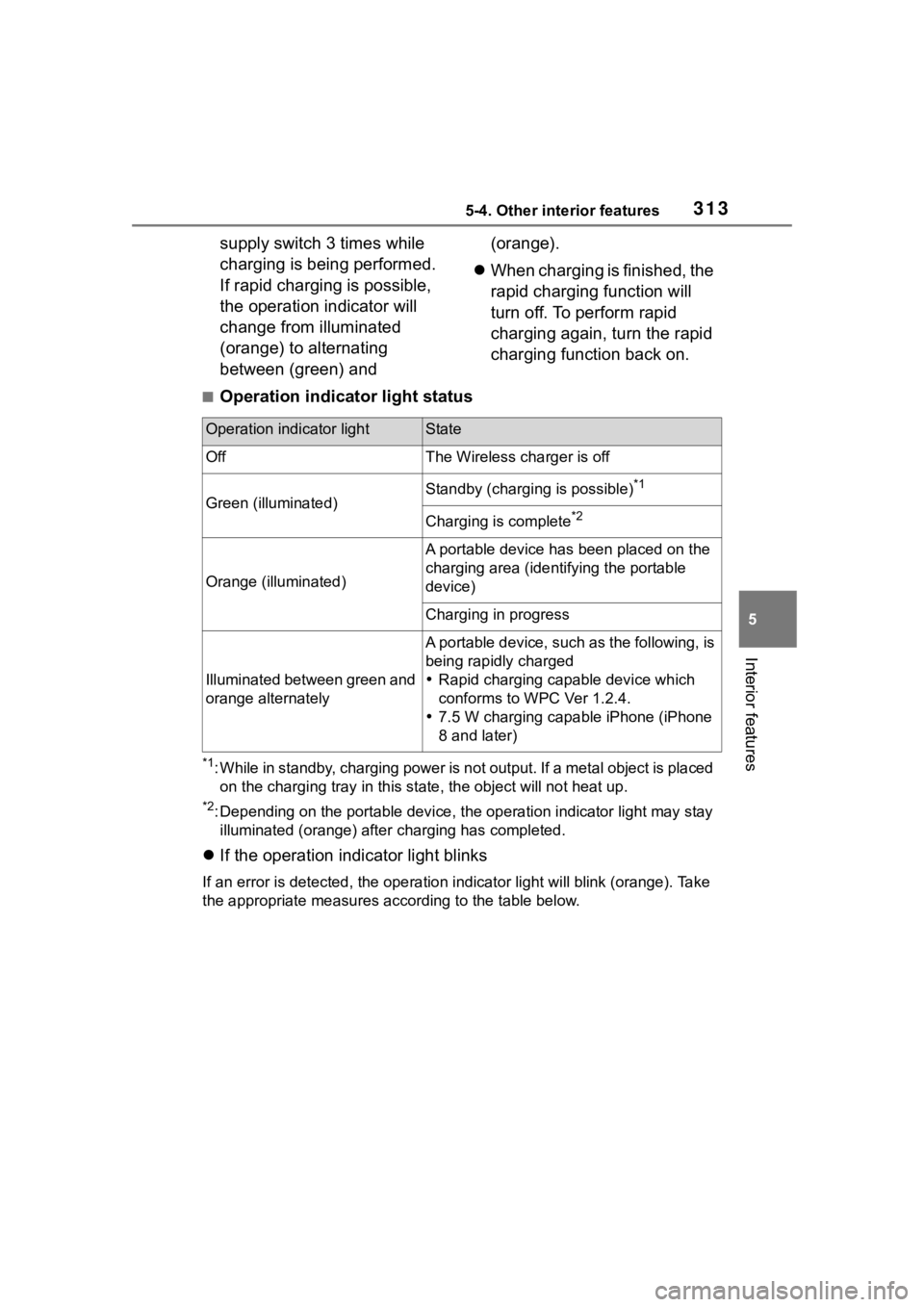
■Operation indicator light status
*1: While in standby, charging power is not output. If a metal obj ect is placed
on the charging tray i n this state, the object will not heat up .
*2: Depending on the portable device, the operation indicator light may stay
illuminated (orang e) after charging has completed.
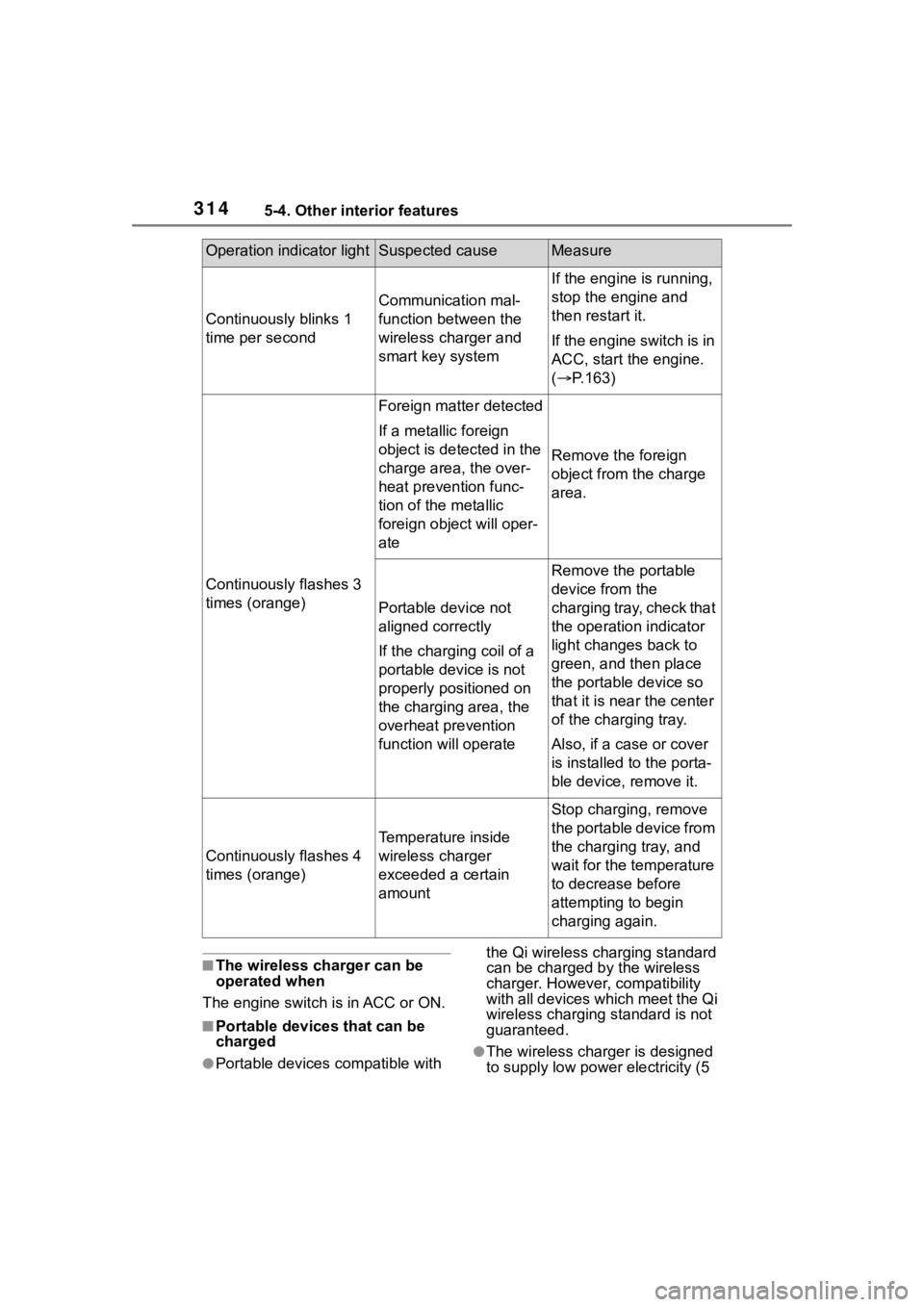
If the operation indicator light blinks
If an error is detec ted, the operation in dicator light will blink (orange). Take
the appropriate measures according to the table below.
Operation indicator lightState
OffThe Wireless charger is off
Green (illuminated)Standby (charging is possible)*1
Charging is complete*2
Orange (illuminated)
A portable device has been placed on the
charging area (identifying the portable
device)
Charging in progress
Illuminated between green and
orange alternately
A portable device, such as the following, is
being rapidly charged
Rapid charging capable device which
conforms to WPC Ver 1.2.4.
7.5 W charging capable iPhone (iPhone
8 and later)
Page 314 of 500
3145-4. Other interior features
■The wireless charger can be
operated when
The engine switch is in ACC or ON.
■Portable devices that can be
charged
●Portable devices compatible with the Qi wireless charging standard
can be charged by the wireless
charger. However, compatibility
with all devices which meet the Qi
wireless charging standard is not
guaranteed.●The wireless char
ger is designed
to supply low power electricity (5
Operation indicator lightSuspected causeMeasure
Continuously blinks 1
time per second
Communication mal-
function between the
wireless charger and
smart key system
If the engine is running,
stop the engine and
then restart it.
If the engine switch is in
ACC, start the engine.
( P.163)
Continuously flashes 3
times (orange)
Foreign matter detected
If a metallic foreign
object is detected in the
charge area, the over-
heat prevention func-
tion of the metallic
foreign obje ct will oper-
ate
Remove the foreign
object from the charge
area.
Portable device not
aligned correctly
If the charging coil of a
portable device is not
properly positioned on
the charging area, the
overheat prevention
function will operate
Remove the portable
device from the
charging tray, check that
the operation indicator
light changes back to
green, and then place
the portable device so
that it is near the center
of the charging tray.
Also, if a case or cover
is installed to the porta-
ble device, remove it.
Continuously flashes 4
times (orange)
Temperature inside
wireless charger
exceeded a certain
amount
Stop charging, remove
the portable device from
the charging tray, and
wait for the temperature
to decrease before
attempting to begin
charging again.
Page 315 of 500
3155-4. Other interior features
5
Interior features
W or less) to a cellular phone,
smartphone, or other portable
device.
●However, portable devices, such
as the following, can be charged
with more than 5 W.
• 7.5 W charging compatible iPhones can be ch arged at 7.5 W
or less.
• Portable devices compliant with EPP output as defined by WPC
standard Ver1.2.4. can be
charged at 10 W or less.
■Using the smart key system
During charging, when the smart
key system searches for an elec-
tronic key, charging may be tempo-
rarily suspended.
■If a cover or accessory is
attached to the portable device
Do not charge a portable device if a
cover or accessory which is not Qi
compatible is attached. Depending
on the type of cover (including the
certain genuine manufacture parts)
and/or accessory attached, it may
not be possible to charge the porta-
ble device. If the portable device is
placed on the charging area and
does not charge, remove the cover
and/or accessories.
■If interference is heard in AM
radio broadcasts while
charging
●Turn off the wireless charger and
check if the noise is reduced. If
noise is reduced, press and hold
the power supply switch of the
wireless charger for 2 seconds.
The frequency of the wireless
charger is changed and noise may
be reduced. When the frequency
is changed, the operation indica-
tor light will blink (orange) 2 times.
●Rapid charging for iPhones is per-
formed using a specific radio
wave frequency.
Depending on the version of iOS
installed, while th e frequency is
being changed, rapid charging may not be performed.
■Charging precautions
While charging, the wireless charger
and the portable device will become
warm. This is not a malfunction.
If a portable device becomes warm
while charging and charging stops
due to the protection function of the
portable device, wai t until the porta-
ble device cools down and charge it
again.
Also, to decrease the temperature
inside the wireless charger, a fan
may operate. This does not indicate
a malfunction.
■Sound generated during opera-
tion
Operation sounds may be heard
when the power supply switch is
pressed to turn the wireless charger
on, when the engine switch is
pressed to change to ACC or ON
while the wireless charger is on, or
when a portable device is being
detected. This does not indicate a
malfunction.
■Situations in which the wireless
charger may not operate cor-
rectly
In the following situ ations, the wire-
less charger may not operate cor-
rectly:
●When a portable device is fully
charged
●When a portable device is being
charged by a wired connection
●When there is a foreign object
between the charging area and
portable device
●When the temperature of a porta-
ble device becomes high while
charging
●When the temperature near the
charging tray is 95°F (35°C) or
more due to being in direct sun-
light, etc.
●When a portable device is placed
with its charging surface facing up
Page 316 of 500
3165-4. Other interior features
●When a portable device is not
centered on the charging area
●When a portable device is larger
than the charging tray
●When a foldable portable device is
placed outside of the charging
area
●When the vehicle is near a TV
tower, electric power plant, fuel
station, radio station, large dis-
play, airport, or other facility that
generates strong radio waves or
electrical noise
●When the any of the following
objects, with a thickness of 0.08
in. (2 mm) or more, are between
the charging surface of a portable
device and the charging are:
• Cases or covers a ttached with an
uneven or tilted surface, so that
the charging side is not flat
• Thick cases or covers
• Thick decorations
• Accessories, such as finger rings, straps, etc.
●When the portable device is in
contact with, or is covered by any
of the following metallic objects:
• Cases which have magnet in it on the charging side of the portable
device
• Cards covered with metal, such as aluminum foil
• Cigarette boxes that have alumi-
num foil inside
• Metallic wallets or bags
• Coins
• Heat packs
• Recorded media such as CDs and DVDs
• Metallic decorations
• Metallic cases or covers
●When wireless keys (that emit
radio waves) other than those of
your vehicle are being used
nearby
●When 2 or more portable devices
are placed on the charging tray at
the same time
In situations other than above, if the
wireless charger does not operate properly or the operation indicator
light blinks continuously, the wire-
less charger may be malfunctioning.
Contact your Toyota dealer.
■Cleaning the wireless charger
P.331
WARNING
■Caution while driving
When charging a portable device
while driving, for safety reasons,
the driver should not operate the
portable device.
■Precautions for when driving
Do not charge sma ll, lightweight
portable devices, such as wireless
earbuds, while driving. Light-
weight devices may fly off of the
charging tray, possibly leading to
an accident.
■Caution regarding interfer-
ence with electronic devices
People with implantable cardiac
pacemakers, cardiac resynchroni-
zation therapy pacemakers or
implantable cardioverter def ibrilla-
tors, as well as any other electri-
cal medical device, should consult
their physician about the usage of
the wireless charger.
Operations of th e wireless char-
ger may have an affect on medi-
cal devices.
■To prevent damage or burns
Observe the following precau-
tions.
Failure to do so may result in the
possibility of fire, equipment fail-
ure or damage, or burns due to
heat.
●Do not put any metallic objects
between the charging area and
the portable device while
charging.
Page 317 of 500
3175-4. Other interior features
5
Interior features
WARNING
●Do not attach metallic objects,
such as aluminum stickers, to
the charging area.
●Do not charge portable devices
with aluminum stickers or other
metallic objects attached to the
side which touches the charging
area.
●Do not store items on the wire-
less charger instead of in an
auxiliary box.
●Do not apply force or impact to
the wireless charger.
●Do not disassemble, modify or
remove the wireless charger.
●Do not attempt t o charge porta-
ble devices whic h are not com-
patible with the Qi wireless
charging standard.
●Do not allow magnetic objects
to come near the wireless char-
ger.
●Do not perform charging if the
charging area is dirty.
●When not using the wireless
charger, to prevent foreign mat-
ter or liquids from contacting it,
make sure to close the lid.
●Do not cover the wireless char-
ger with a cloth or other object
while charging.
NOTICE
■To prevent failure or damage
to data
●Do not place magnetic cards,
such as a credit card, or mag-
netic recording media, close to
the wireless charger while
charging. Otherwise, data may
be erased due to the influence
of magnetism.
Additionally, do not bring preci-
sion instruments such as wrist
watches, close to the wireless
charger, as such objects may
malfunction.
●Do not perform c harging with a
contactless smart card, such as
a credit card, between the
charging surface of a portable
device and the charging area.
The IC chip in the card may
become extremely hot, possibly
damaging the portable device or
smart card.
Be extra careful to not charge a
portable device with a case or
cover which a contactless smart
card can be inserted.
●Do not leave portable devices in
the cabin. The temperature
inside the cabin may become
high when parke d in the sun,
and cause damage to the
device.
■When the OS of a smartphone
has been updated
When the OS version of a smart-
phone has been changed, the
charging specifications may have
changed. If the WPC compatibility
version is changed, the rapid
charging function may no longer
be able to be used . For details,
check for inform ation on the web-
site for the smartphone manufac-
turer.
Page 349 of 500
3496-3. Do-it-yourself maintenance
6
Maintenance and care
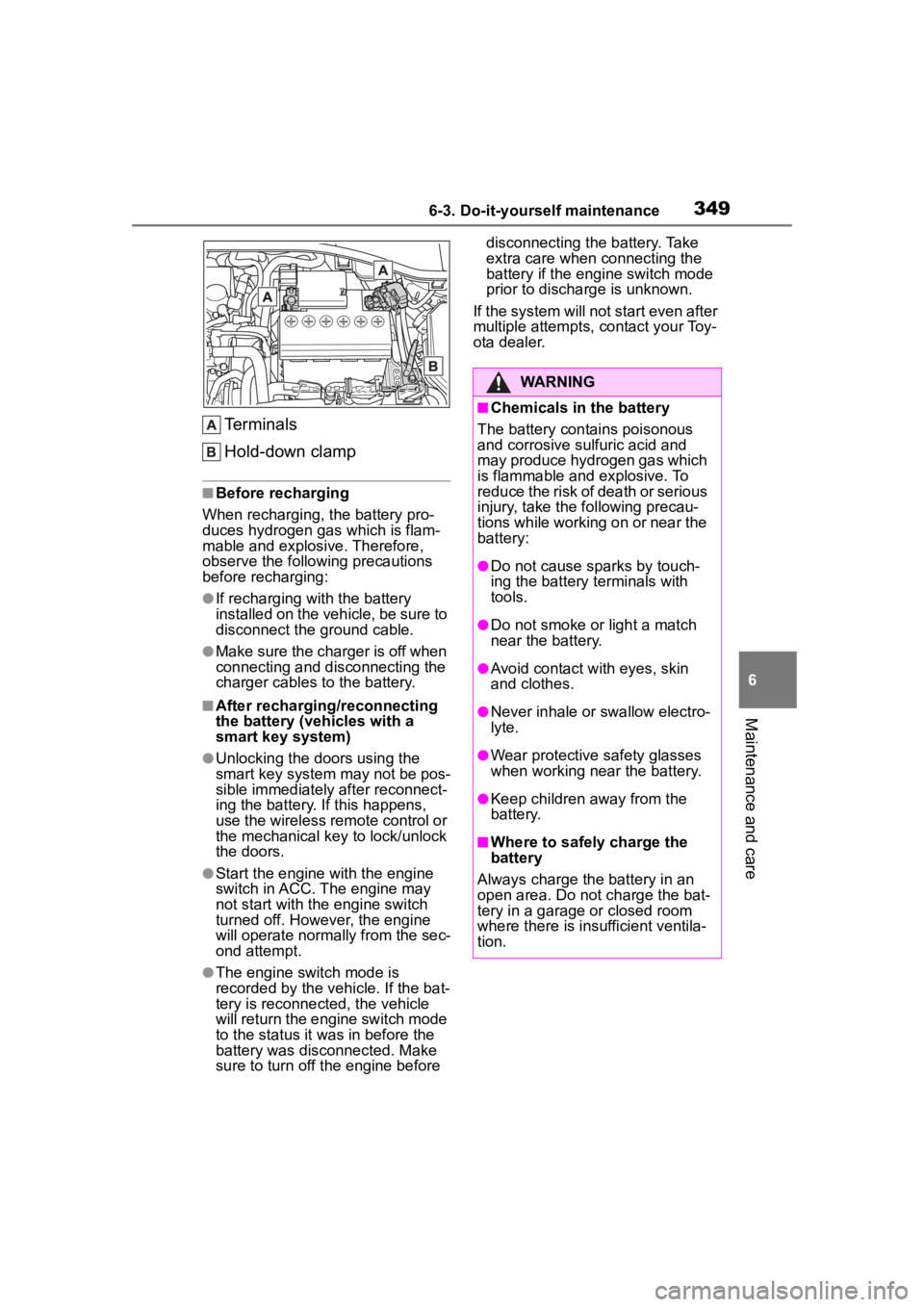
Terminals
Hold-down clamp
■Before recharging
When recharging, t he battery pro-
duces hydrogen ga s which is flam-
mable and explosive. Therefore,
observe the following precautions
before recharging:
●If recharging wi th the battery
installed on the vehicle, be sure to
disconnect the ground cable.
●Make sure the charger is off when
connecting and disconnecting the
charger cables to the battery.
■After recharging/reconnecting
the battery (vehicles with a
smart key system)
●Unlocking the doors using the
smart key system may not be pos-
sible immediately after reconnect-
ing the battery. If this happens,
use the wireless remote control or
the mechanical key to lock/unlock
the doors.
●Start the engine with the engine
switch in ACC. The engine may
not start with the engine switch
turned off. However, the engine
will operate normally from the sec-
ond attempt.
●The engine switch mode is
recorded by the vehicle. If the bat-
tery is reconnected, the vehicle
will return the engi ne switch mode
to the status it was in before the
battery was disconnected. Make
sure to turn off the engine before disconnecting the battery. Take
extra care when connecting the
battery if the engine switch mode
prior to discharge is unknown.
If the system will not start even after
multiple attempts, contact your Toy-
ota dealer.
WARNING
■Chemicals in the battery
The battery contains poisonous
and corrosive sulfuric acid and
may produce hydrogen gas which
is flammable and explosive. To
reduce the risk of death or serious
injury, take the following precau-
tions while working on or near the
battery:
●Do not cause sparks by touch-
ing the battery terminals with
tools.
●Do not smoke or light a match
near the battery.
●Avoid contact with eyes, skin
and clothes.
●Never inhale or swallow electro-
lyte.
●Wear protective safety glasses
when working near the battery.
●Keep children away from the
battery.
■Where to safely charge the
battery
Always charge the battery in an
open area. Do not charge the bat-
tery in a garage or closed room
where there is ins ufficient ventila-
tion.
Page 350 of 500
3506-3. Do-it-yourself maintenance
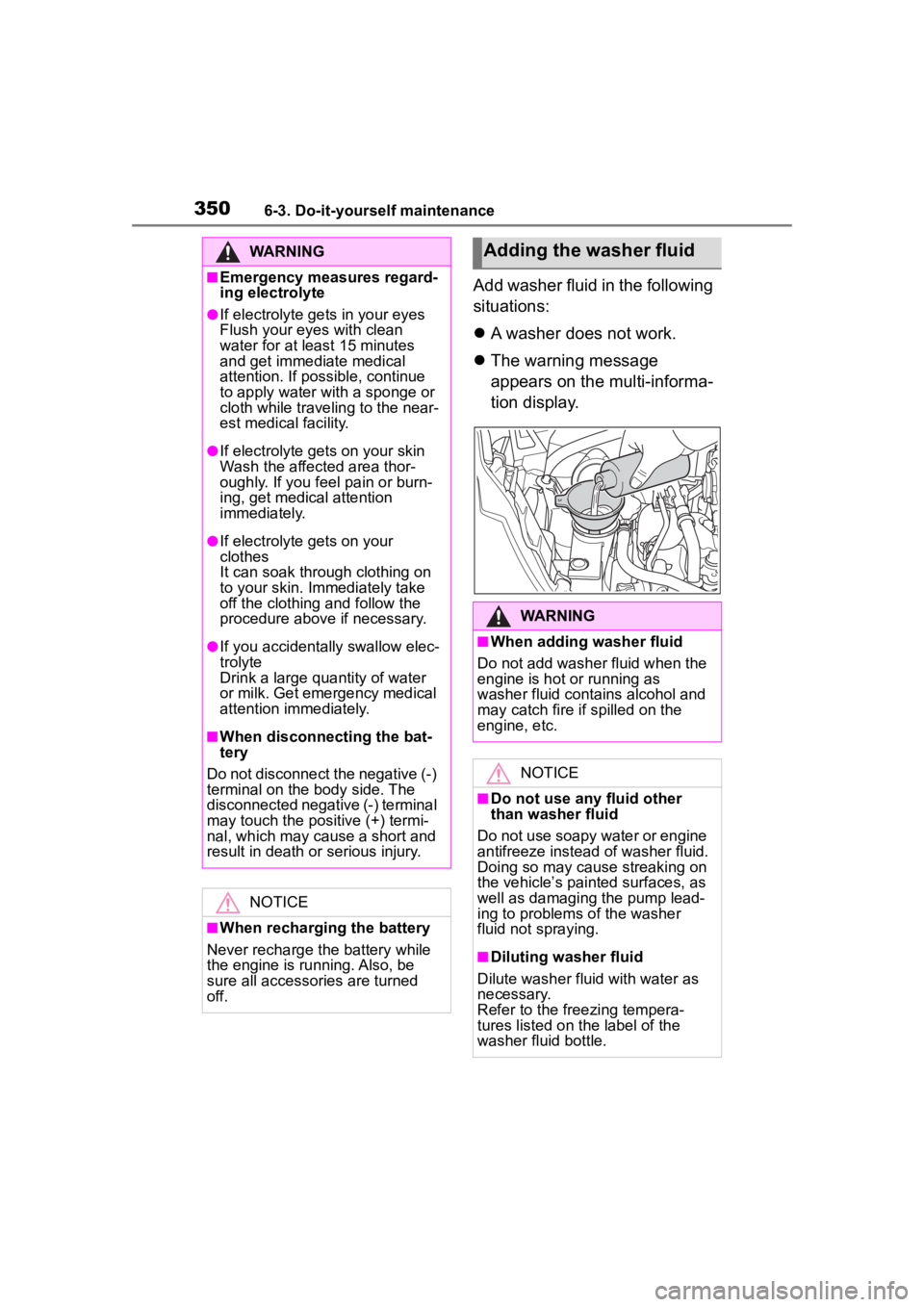
Add washer fluid in the following
situations:
A washer does not work.
The warning message
appears on the multi-informa-
tion display.
WARNING
■Emergency measures regard-
ing electrolyte
●If electrolyte gets in your eyes
Flush your eyes with clean
water for at least 15 minutes
and get immediate medical
attention. If possible, continue
to apply water with a sponge or
cloth while traveling to the near-
est medical facility.
●If electrolyte gets on your skin
Wash the affected area thor-
oughly. If you fee l pain or burn-
ing, get medical attention
immediately.
●If electrolyte gets on your
clothes
It can soak through clothing on
to your skin. Immediately take
off the clothing and follow the
procedure above if necessary.
●If you accidentally swallow elec-
trolyte
Drink a large quantity of water
or milk. Get emergency medical
attention immediately.
■When disconnecting the bat-
tery
Do not disconnect the negative (-)
terminal on the body side. The
disconnected negative (-) terminal
may touch the positive (+) termi-
nal, which may cause a short and
result in death or serious injury.
NOTICE
■When recharging the battery
Never recharge the battery while
the engine is running. Also, be
sure all accessories are turned
off.
Adding the washer fluid
WARNING
■When adding washer fluid
Do not add washer fluid when the
engine is hot or running as
washer fluid contains alcohol and
may catch fire if spilled on the
engine, etc.
NOTICE
■Do not use any fluid other
than washer fluid
Do not use soapy water or engine
antifreeze instead of washer fluid.
Doing so may cause streaking on
the vehicle’s painted surfaces, as
well as damaging the pump lead-
ing to problems of the washer
fluid not spraying.
■Diluting washer fluid
Dilute washer fluid with water as
necessary.
Refer to the freezing tempera-
tures listed on the label of the
washer fluid bottle.
Page 392 of 500
3927-2. Steps to take in an emergency
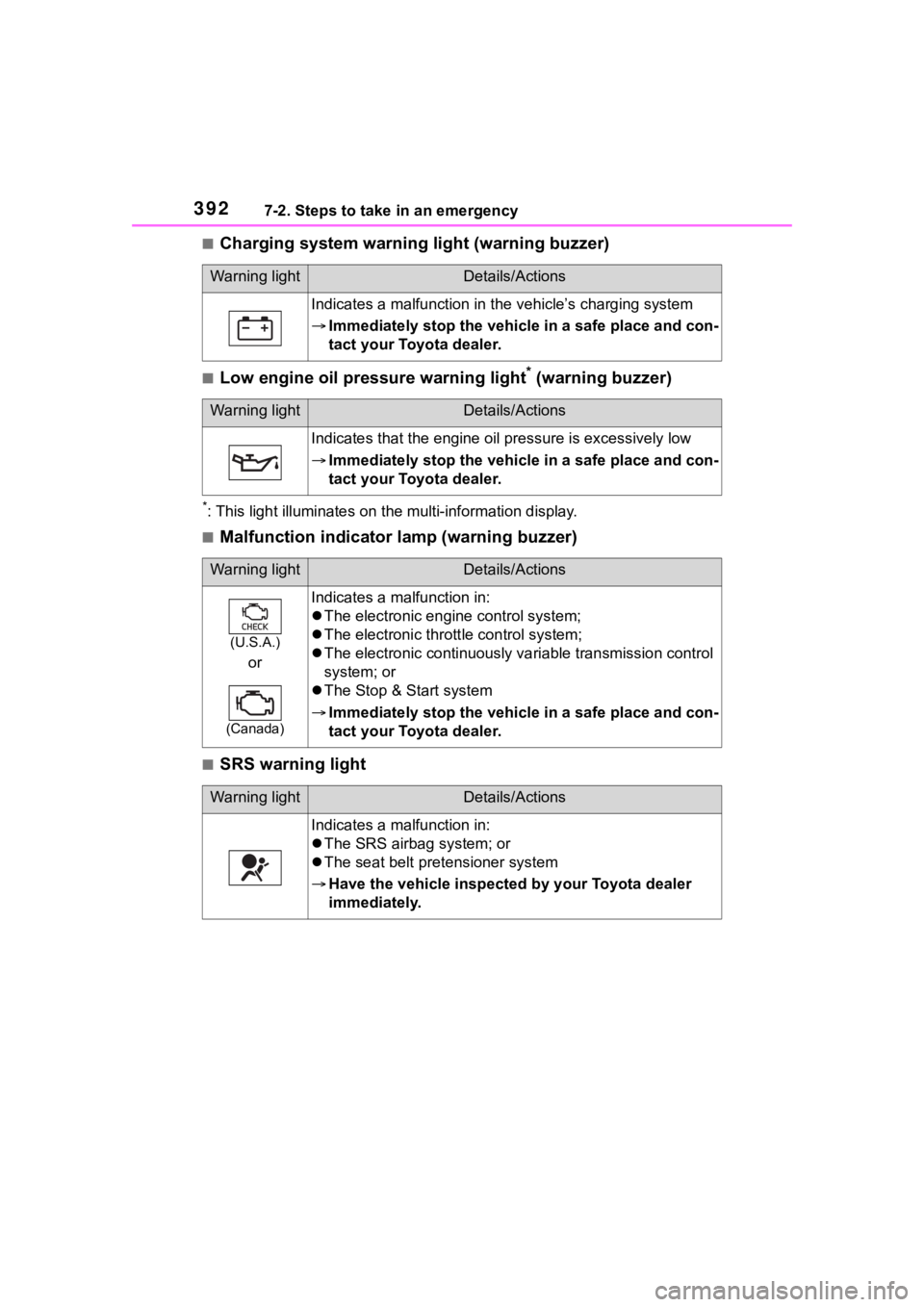
■Charging system warning light (warning buzzer)
■Low engine oil pressure warning light* (warning buzzer)
*: This light illuminat es on the multi-information display.
■Malfunction indicator lamp (warning buzzer)
■SRS warning light
Warning lightDetails/Actions
Indicates a malfunction in the vehicle’s charging system
Immediately stop the vehicle in a safe place and con-
tact your Toyota dealer.
Warning lightDetails/Actions
Indicates that the engine oil pressure is excessively low
Immediately stop the vehicle in a safe place and con-
tact your Toyota dealer.
Warning lightDetails/Actions
(U.S.A.)
or
(Canada)
Indicates a malfunction in:
The electronic engine control system;
The electronic thrott le control system;
The electronic continuously variable transmission control
system; or
The Stop & Start system
Immediately stop the vehicle in a safe place and con-
tact your Toyota dealer.
Warning lightDetails/Actions
Indicates a malfunction in:
The SRS airbag system; or
The seat belt pretensioner system
Have the vehicle inspected by your Toyota dealer
immediately.