check engine light TOYOTA COROLLA CROSS 2023 User Guide
[x] Cancel search | Manufacturer: TOYOTA, Model Year: 2023, Model line: COROLLA CROSS, Model: TOYOTA COROLLA CROSS 2023Pages: 500, PDF Size: 15.11 MB
Page 144 of 500
1444-1. Before driving
WARNING
●Do not shift the shift lever to P
while the vehicle is moving.
Doing so can damage the trans-
mission and may result in a loss
of vehicle control.
●Do not shift the shift lever to R
while the vehicle is moving for-
ward.
Doing so can damage the trans-
mission and may result in a loss
of vehicle control.
●Do not shift the shift lever to a
driving position while the vehicle
is moving backward.
Doing so can damage the trans-
mission and may result in a loss
of vehicle control.
●Moving the shift lever to N while
the vehicle is moving will disen-
gage the engine from the trans-
mission. Engine braking is not
available when N is selected.
●Be careful not to shift the shift
lever with the accelerator pedal
depressed. Shifting the shift
lever to any positions other than
P or N may lead to unexpected
rapid acceleration of the vehicle
that may cause an accident and
result in death or serious injury.
■If you hear a squealing or
scraping noise (brake pad
wear indicators)
Have the brake pads checked and
replaced by your Toyota dealer as
soon as possible.
Rotor damage may result if the
pads are not replaced when
needed.
It is dangerous to drive the vehicle
when the wear limits of the brake
pads and/or those of the brake
discs are exceeded.
■When the vehicle is stopped
●Do not race the engine.
If the vehicle is in any gear other
than P or N, the vehicle may
accelerate suddenly and unex-
pectedly, causing an accident.
●In order to prevent accidents
due to the vehic le rolling away,
always keep depressing the
brake pedal while the engine is
running, and apply the parking
brake as necessary.
●If the vehicle is stopped on an
incline, in order to prevent acci-
dents caused by the vehicle roll-
ing forward or backward, always
depress the brake pedal and
securely apply the parking
brake as needed.
●Avoid revving or racing the
engine.
Running the engine at high
speed while the vehicle is
stopped may cause the exhaust
system to overheat, which could
result in a fire if combustible
material is nearby.
■When the vehicle is parked
●Do not leave glasses, cigarette
lighters, spray cans, or soft
drink cans in the vehicle when it
is in the sun.
Doing so may result in the fol-
lowing:
• Gas may leak from a cigarette lighter or spray can, and may
lead to a fire.
• The temperature inside the vehicle may cause the plastic
lenses and plastic material of
glasses to deform or crack.
• Soft drink cans may fracture, causing the contents to spray
over the interior of the vehicle,
and may also cause a short cir-
cuit in the vehicle’s electrical
components.
Page 152 of 500
1524-1. Before driving
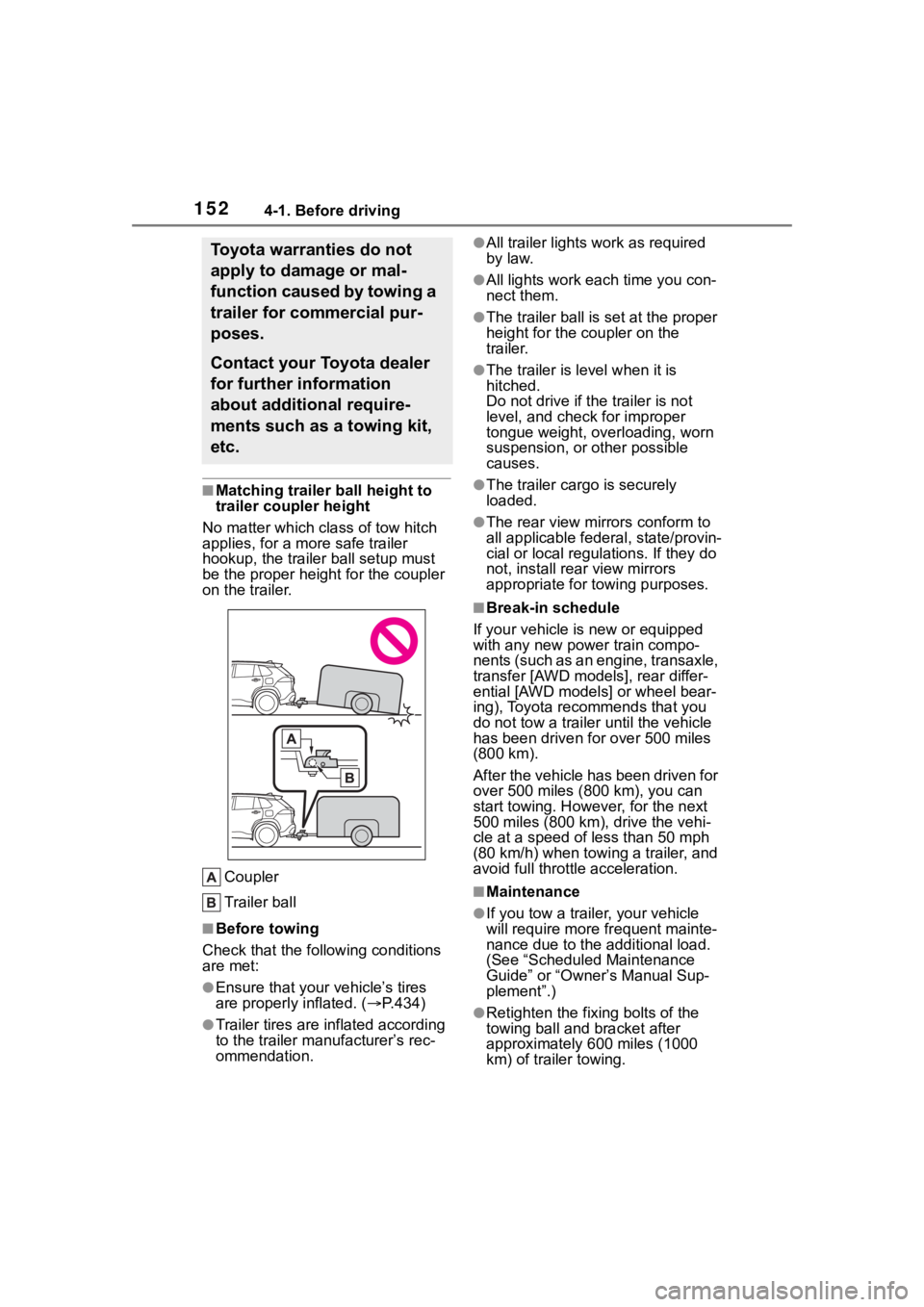
■Matching trailer ball height to
trailer coupler height
No matter which class of tow hitch
applies, for a more safe trailer
hookup, the trailer ball setup must
be the proper height for the coupler
on the trailer.
Coupler
Trailer ball
■Before towing
Check that the following conditions
are met:
●Ensure that your vehicle’s tires
are properly inflated. ( P.434)
●Trailer tires are inflated according
to the trailer manufacturer’s rec-
ommendation.
●All trailer lights work as required
by law.
●All lights work each time you con-
nect them.
●The trailer ball is set at the proper
height for the coupler on the
trailer.
●The trailer is level when it is
hitched.
Do not drive if th e trailer is not
level, and check for improper
tongue weight, overloading, worn
suspension, or other possible
causes.
●The trailer cargo is securely
loaded.
●The rear view mirr ors conform to
all applicable fede ral, state/provin-
cial or local regulations. If they do
not, install rear view mirrors
appropriate for towing purposes.
■Break-in schedule
If your vehicle is new or equipped
with any new power train compo-
nents (such as an engine, transaxle,
transfer [AWD models], rear differ-
ential [AWD models] or wheel bear-
ing), Toyota recommends that you
do not tow a trailer until the vehicle
has been driven for over 500 miles
(800 km).
After the vehicle has been driven for
over 500 miles (800 km), you can
start towing. However, for the next
500 miles (800 km), drive the vehi-
cle at a speed of less than 50 mph
(80 km/h) when towing a trailer, and
avoid full throttle acceleration.
■Maintenance
●If you tow a trailer, your vehicle
will require more fr equent mainte-
nance due to the additional load.
(See “Scheduled Maintenance
Guide” or “Owner ’s Manual Sup-
plement”.)
●Retighten the fixing bolts of the
towing ball and bracket after
approximately 600 miles (1000
km) of tra iler towing.
Toyota warranties do not
apply to damage or mal-
function caused by towing a
trailer for commercial pur-
poses.
Contact your Toyota dealer
for further information
about additional require-
ments such as a towing kit,
etc.
Page 162 of 500
1624-2. Driving procedures
4-2.Driving procedures
1Check that the parking brake
is set. ( P.172)
2 Check that the shift lever is in
P.
Do not press the shift lever button
after shifting the shit position to P.
3Firmly depress the brake
pedal.
4 Turn the engine switch to
START to start the engine.
■If the engine does not start
The engine immobilizer system may
not have been deactivated. ( P.68)
Contact your Toyota dealer.
■When the steering lock cannot
be released
When starting the engine, the
engine switch may seem stuck in
OFF. To free it, turn the key while
turning the steerin g wheel slightly
left and right.
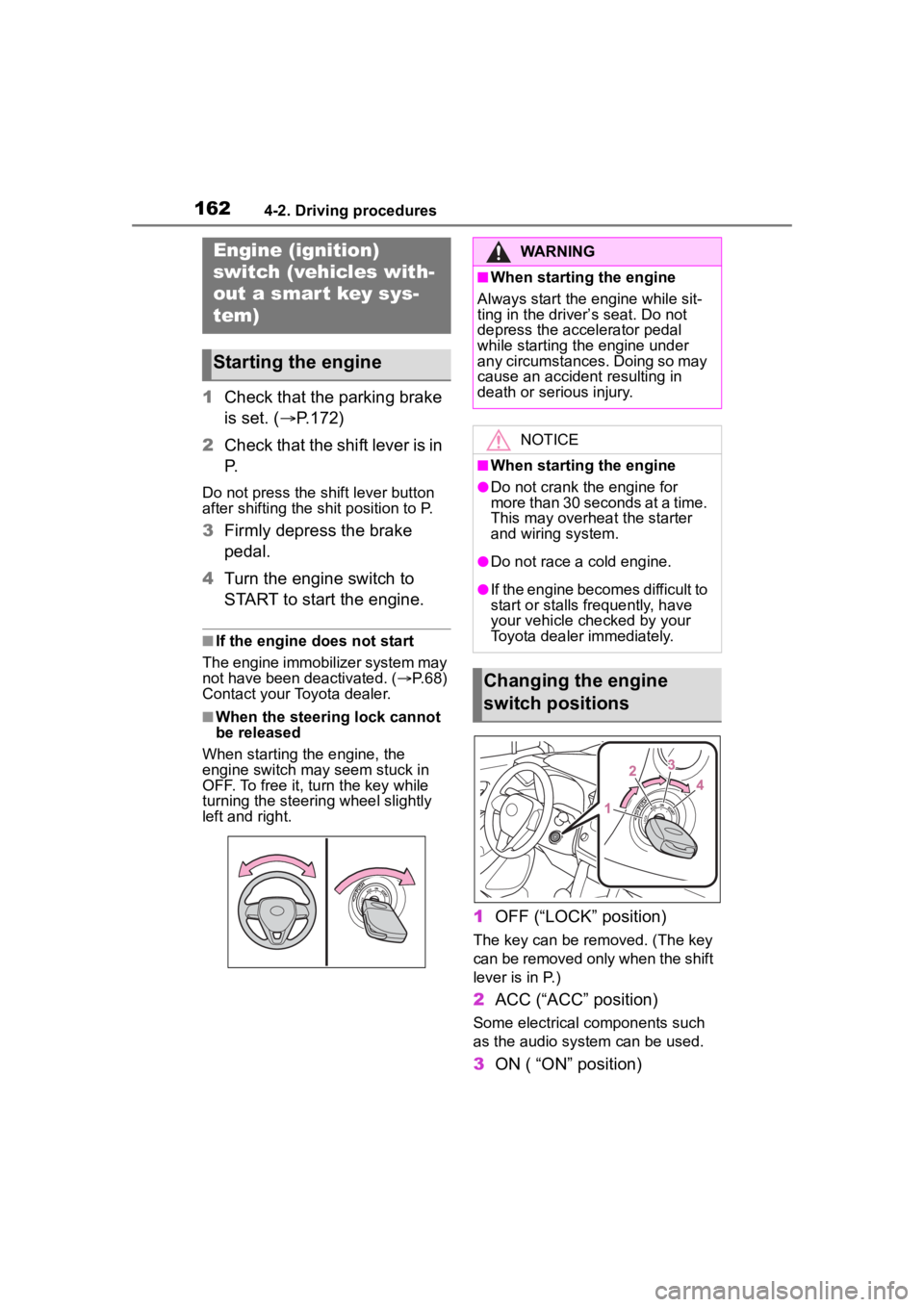
1 OFF (“LOCK” position)
The key can be removed. (The key
can be removed only when the shift
lever is in P.)
2ACC (“ACC” position)
Some electrical components such
as the audio sys tem can be used.
3ON ( “ON” position)
Engine (ignition)
switch (vehicles with-
out a smart key sys-
tem)
Starting the engine
WARNING
■When starting the engine
Always start the engine while sit-
ting in the driver’s seat. Do not
depress the accelerator pedal
while starting the engine under
any circumstances. Doing so may
cause an accident resulting in
death or serious injury.
NOTICE
■When starting the engine
●Do not crank the engine for
more than 30 seconds at a time.
This may overheat the starter
and wiring system.
●Do not race a cold engine.
●If the engine becomes difficult to
start or stalls frequently, have
your vehicle checked by your
Toyota dealer immediately.
Changing the engine
switch positions
Page 165 of 500
1654-2. Driving procedures
4
Driving
1Stop the vehicle completely.
2 Set the parking brake
( P.172), and shift the shift
lever to P.
Check the parking brake indicator
is illuminated.
Do not press the shift lever button
after shifting the shit position to P.
3 Press the engine switch.
The engine will stop, and the meter
display will be extinguished.
4Release the brake pedal and
check that “ACCESSORY” or
“IGNITION ON” is not shown
on the multi-information dis-
p l a y.
■Automatic engine shut off fea-
ture
●The vehicle is equipped with a
feature that automatically shuts off
the engine when the shift lever is
in P with the engine running for an
extended period.
●The engine will automatically shut
off after approximately 1 hour if it
has been left running while the
shift lever is in P.
●The timer for the automatic engine
shut off feature will reset if the
brake pedal is depre ssed or if the shift lever is in a position other
than P.
●After the vehicle
is parked, if the
door is locked with the door lock
switch ( P.107) from the inside or
the mechanical key (P.417) from
the outside, the automatic engine
shut off feature will be disabled.
The timer for the automatic engine
shut off feature will be re-enabled
if the driver’s door is opened.
NOTICE
■Symptoms indicating a mal-
function with the engine
switch
If the engine switch seems to be
operating somewh at differently
than usual, such as the switch
sticking slightly, there may be a
malfunction. Contact your Toyota
dealer immediately.
Stopping the engineWARNING
■Stopping the engine in an
emergency
●If you want to stop the engine in
an emergency while driving the
vehicle, press and hold the
engine switch for more than 2
seconds, or press it briefly 3
times or more in succession.
(
P.382)
However, do not touch the
engine switch while driving
except in an emergency. Turn-
ing the engine off while driving
will not cause loss of steering or
braking control, but the power
assist to these systems will be
lost. This will make it more diffi-
cult to steer and brake, so you
should pull over and stop the
vehicle as soon as it is safe to
do so.
●If the engine switch is operated
while the vehicle is running, a
warning message will be shown
on the multi-information display
and a buzzer sounds.
●To restart the engine after per-
forming an emergency shut-
down, shift the shift lever to N
and then press the engine
switch.
Page 171 of 500
1714-2. Driving procedures
4
Driving
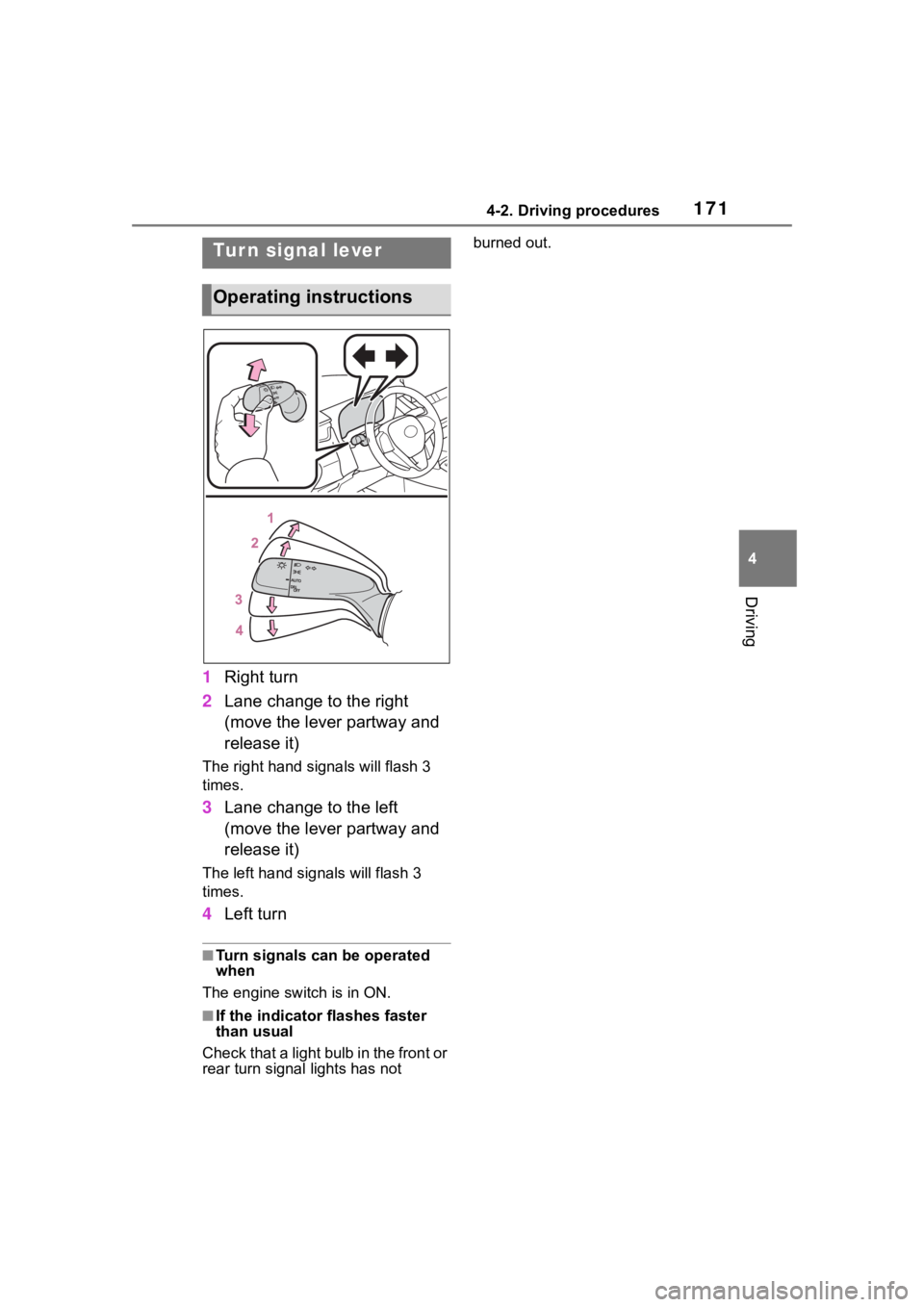
1Right turn
2 Lane change to the right
(move the lever partway and
release it)
The right hand signals will flash 3
times.
3Lane change to the left
(move the lever partway and
release it)
The left hand signals will flash 3
times.
4Left turn
■Turn signals can be operated
when
The engine switch is in ON.
■If the indicator flashes faster
than usual
Check that a light bulb in the front or
rear turn signal lights has not burned out.
Tur n signal lever
Operating instructions
Page 185 of 500
1854-3. Operating the lights and wipers
4
Driving
3 (U.S.A.) or (Canada)
Low speed windshield wiper
operation
4 (U.S.A.) or (Canada)
High speed windshield wiper
operation
5 (U.S.A.) or (Canada)
Temporary operation
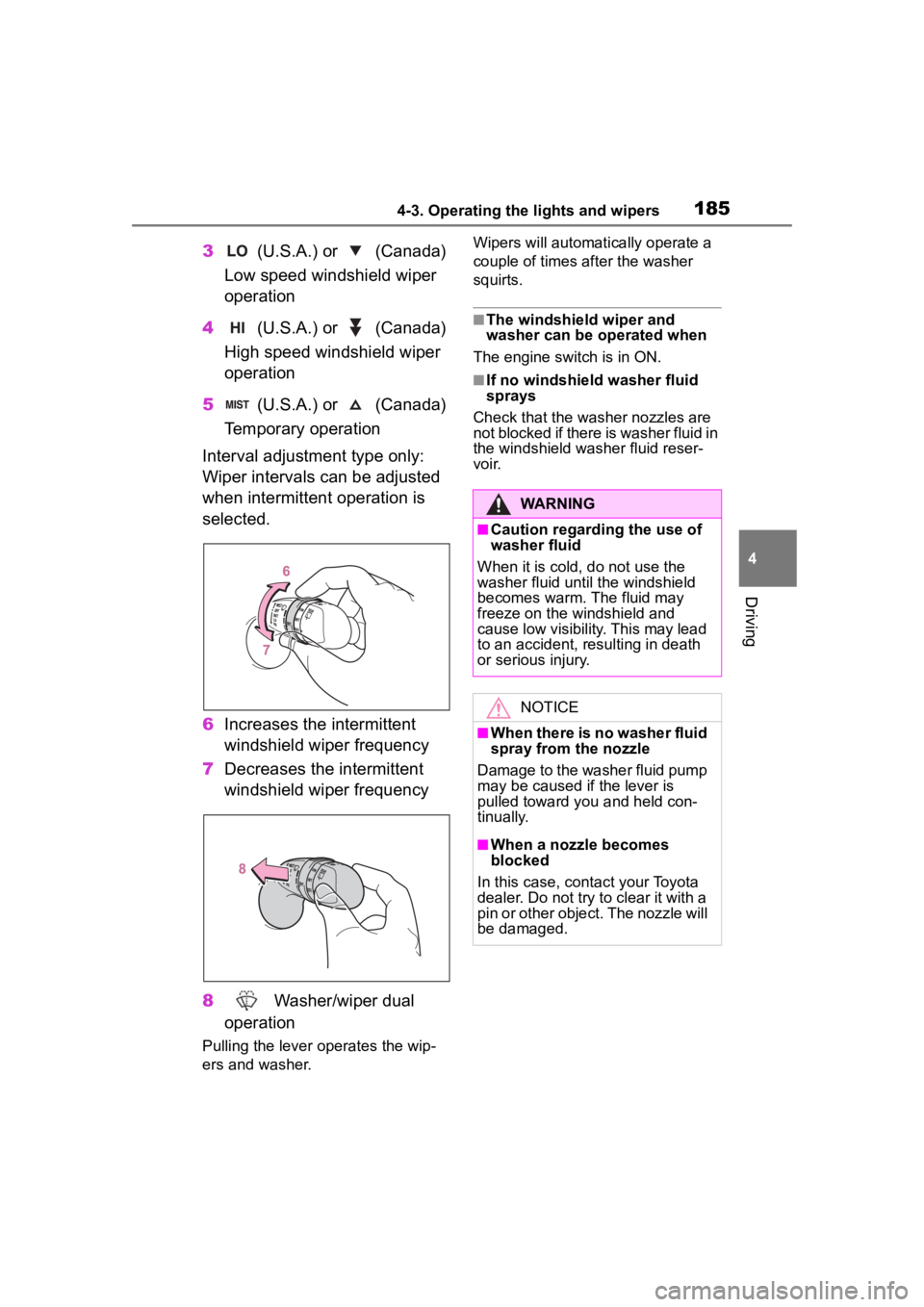
Interval adjustment type only:
Wiper intervals can be adjusted
when intermittent operation is
selected.
6 Increases the intermittent
windshield wiper frequency
7 Decreases the intermittent
windshield wiper frequency
8 Washer/wiper dual
operation
Pulling the lever o perates the wip-
ers and washer. Wipers will automatically operate a
couple of times after the washer
squirts.
■The windshield wiper and
washer can be operated when
The engine switch is in ON.
■If no windshield washer fluid
sprays
Check that the washer nozzles are
not blocked if there is washer fluid in
the windshield washer fluid reser-
voir.
WARNING
■Caution regarding the use of
washer fluid
When it is cold, do not use the
washer fluid unt il the windshield
becomes warm. The fluid may
freeze on the windshield and
cause low visibility. This may lead
to an accident, resulting in death
or serious injury.
NOTICE
■When there is no washer fluid
spray from the nozzle
Damage to the washer fluid pump
may be caused if the lever is
pulled toward you and held con-
tinually.
■When a nozzle becomes
blocked
In this case, contact your Toyota
dealer. Do not try to clear it with a
pin or other object. The nozzle will
be damaged.
Page 186 of 500
1864-3. Operating the lights and wipers
*: If equipped
Operating the switch
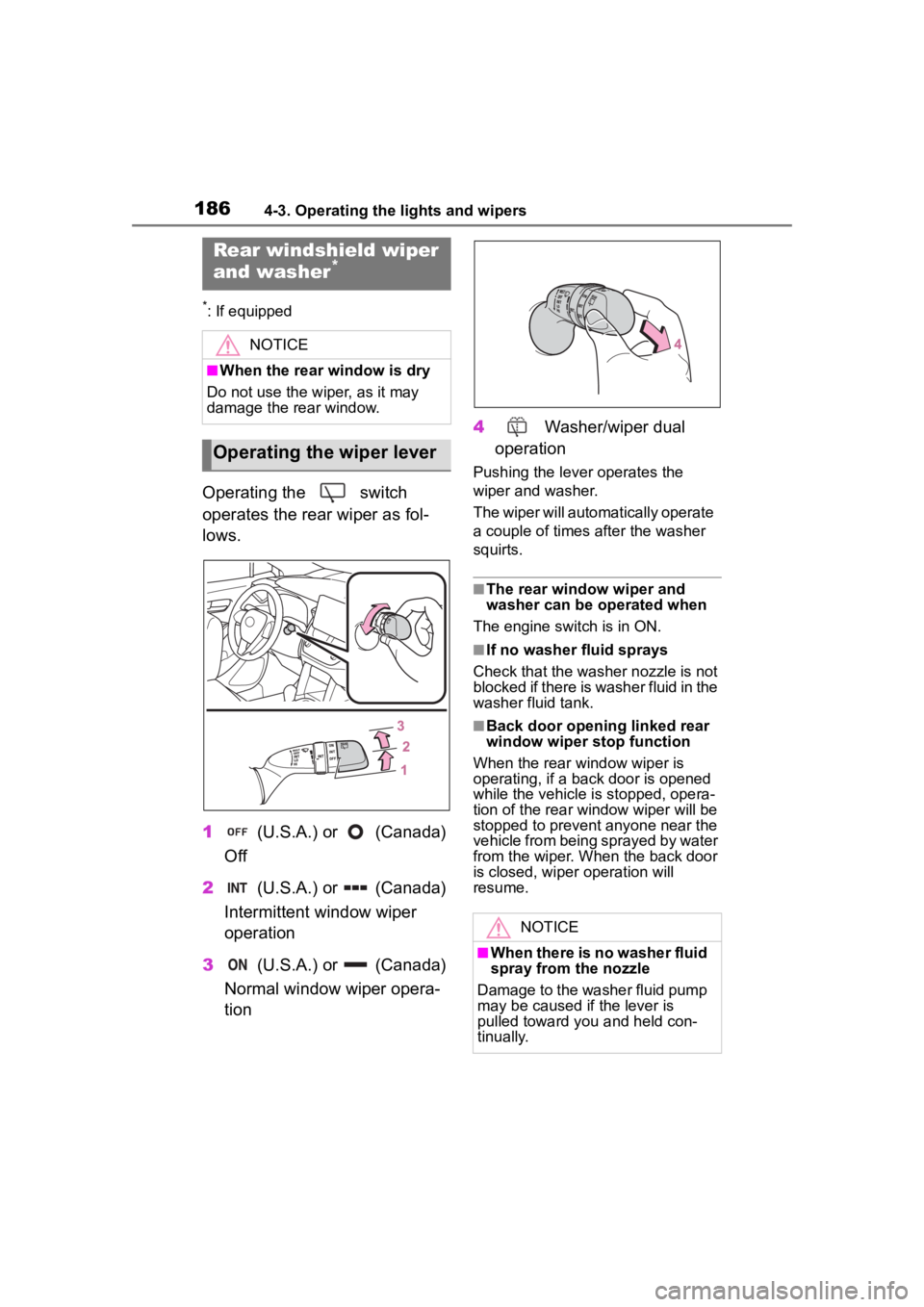
operates the rear wiper as fol-
lows.
1 (U.S.A.) or (Canada)
Off
2 (U.S.A.) or (Canada)
Intermittent window wiper
operation
3 (U.S.A.) or (Canada)
Normal window wiper opera-
tion 4
Washer/wiper dual
operation
Pushing the lever operates the
wiper and washer.
The wiper will automatically operate
a couple of times after the washer
squirts.
■The rear window wiper and
washer can be operated when
The engine switch is in ON.
■If no washer fluid sprays
Check that the wash er nozzle is not
blocked if there is washer fluid in the
washer fluid tank.
■Back door opening linked rear
window wiper stop function
When the rear window wiper is
operating, if a back door is opened
while the vehicle is stopped, opera-
tion of the rear window wiper will be
stopped to prevent anyone near the
vehicle from being sprayed by water
from the wiper. When the back door
is closed, wiper operation will
resume.
Rear windshield wiper
and washer*
NOTICE
■When the rear window is dry
Do not use the wiper, as it may
damage the rear window.
Operating the wiper lever
NOTICE
■When there is no washer fluid
spray from the nozzle
Damage to the washer fluid pump
may be caused if the lever is
pulled toward you and held con-
tinually.
Page 314 of 500
3145-4. Other interior features
■The wireless charger can be
operated when
The engine switch is in ACC or ON.
■Portable devices that can be
charged
●Portable devices compatible with the Qi wireless charging standard
can be charged by the wireless
charger. However, compatibility
with all devices which meet the Qi
wireless charging standard is not
guaranteed.●The wireless char
ger is designed
to supply low power electricity (5
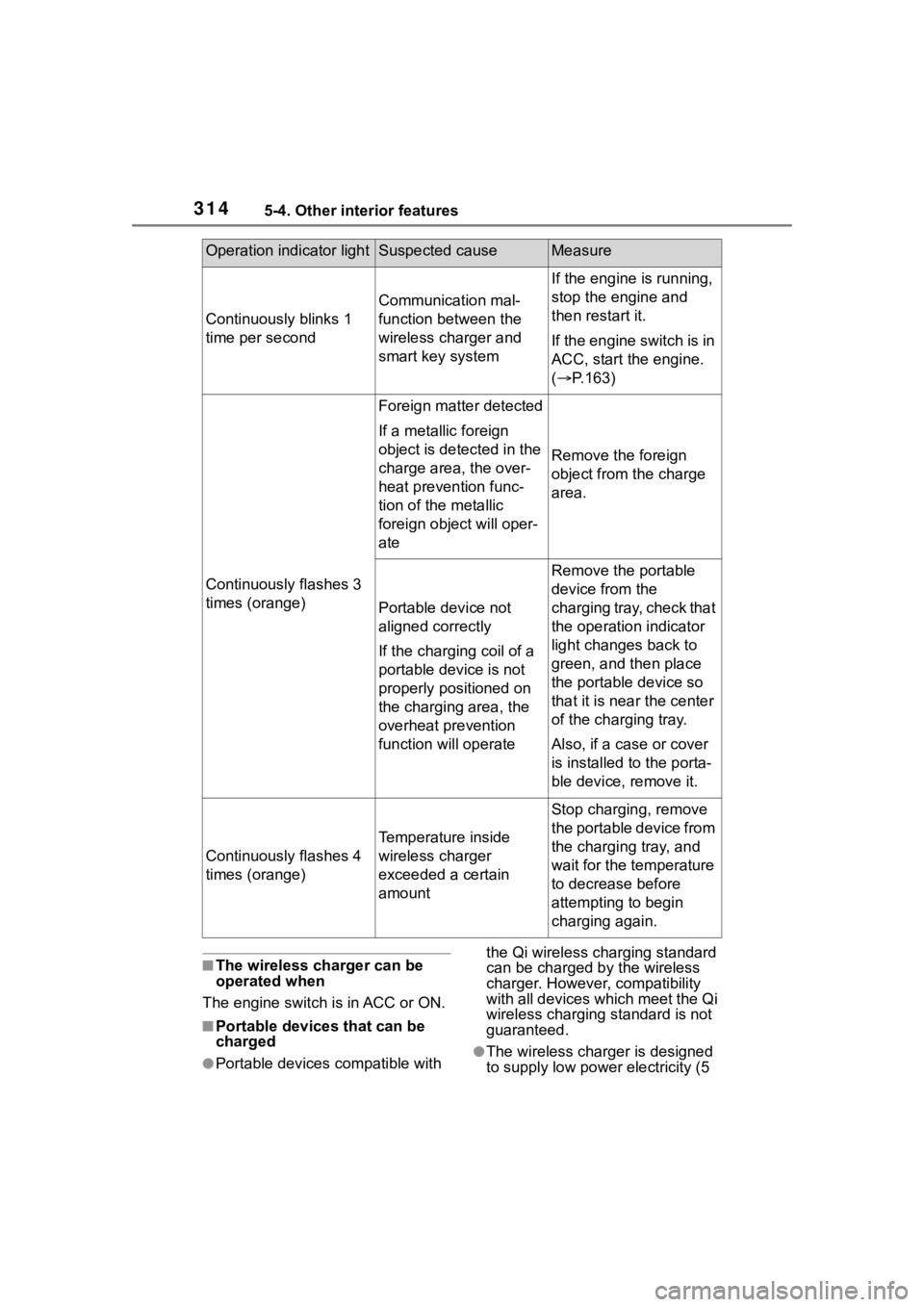
Operation indicator lightSuspected causeMeasure
Continuously blinks 1
time per second
Communication mal-
function between the
wireless charger and
smart key system
If the engine is running,
stop the engine and
then restart it.
If the engine switch is in
ACC, start the engine.
( P.163)
Continuously flashes 3
times (orange)
Foreign matter detected
If a metallic foreign
object is detected in the
charge area, the over-
heat prevention func-
tion of the metallic
foreign obje ct will oper-
ate
Remove the foreign
object from the charge
area.
Portable device not
aligned correctly
If the charging coil of a
portable device is not
properly positioned on
the charging area, the
overheat prevention
function will operate
Remove the portable
device from the
charging tray, check that
the operation indicator
light changes back to
green, and then place
the portable device so
that it is near the center
of the charging tray.
Also, if a case or cover
is installed to the porta-
ble device, remove it.
Continuously flashes 4
times (orange)
Temperature inside
wireless charger
exceeded a certain
amount
Stop charging, remove
the portable device from
the charging tray, and
wait for the temperature
to decrease before
attempting to begin
charging again.
Page 315 of 500

3155-4. Other interior features
5
Interior features
W or less) to a cellular phone,
smartphone, or other portable
device.
●However, portable devices, such
as the following, can be charged
with more than 5 W.
• 7.5 W charging compatible iPhones can be ch arged at 7.5 W
or less.
• Portable devices compliant with EPP output as defined by WPC
standard Ver1.2.4. can be
charged at 10 W or less.
■Using the smart key system
During charging, when the smart
key system searches for an elec-
tronic key, charging may be tempo-
rarily suspended.
■If a cover or accessory is
attached to the portable device
Do not charge a portable device if a
cover or accessory which is not Qi
compatible is attached. Depending
on the type of cover (including the
certain genuine manufacture parts)
and/or accessory attached, it may
not be possible to charge the porta-
ble device. If the portable device is
placed on the charging area and
does not charge, remove the cover
and/or accessories.
■If interference is heard in AM
radio broadcasts while
charging
●Turn off the wireless charger and
check if the noise is reduced. If
noise is reduced, press and hold
the power supply switch of the
wireless charger for 2 seconds.
The frequency of the wireless
charger is changed and noise may
be reduced. When the frequency
is changed, the operation indica-
tor light will blink (orange) 2 times.
●Rapid charging for iPhones is per-
formed using a specific radio
wave frequency.
Depending on the version of iOS
installed, while th e frequency is
being changed, rapid charging may not be performed.
■Charging precautions
While charging, the wireless charger
and the portable device will become
warm. This is not a malfunction.
If a portable device becomes warm
while charging and charging stops
due to the protection function of the
portable device, wai t until the porta-
ble device cools down and charge it
again.
Also, to decrease the temperature
inside the wireless charger, a fan
may operate. This does not indicate
a malfunction.
■Sound generated during opera-
tion
Operation sounds may be heard
when the power supply switch is
pressed to turn the wireless charger
on, when the engine switch is
pressed to change to ACC or ON
while the wireless charger is on, or
when a portable device is being
detected. This does not indicate a
malfunction.
■Situations in which the wireless
charger may not operate cor-
rectly
In the following situ ations, the wire-
less charger may not operate cor-
rectly:
●When a portable device is fully
charged
●When a portable device is being
charged by a wired connection
●When there is a foreign object
between the charging area and
portable device
●When the temperature of a porta-
ble device becomes high while
charging
●When the temperature near the
charging tray is 95°F (35°C) or
more due to being in direct sun-
light, etc.
●When a portable device is placed
with its charging surface facing up
Page 327 of 500
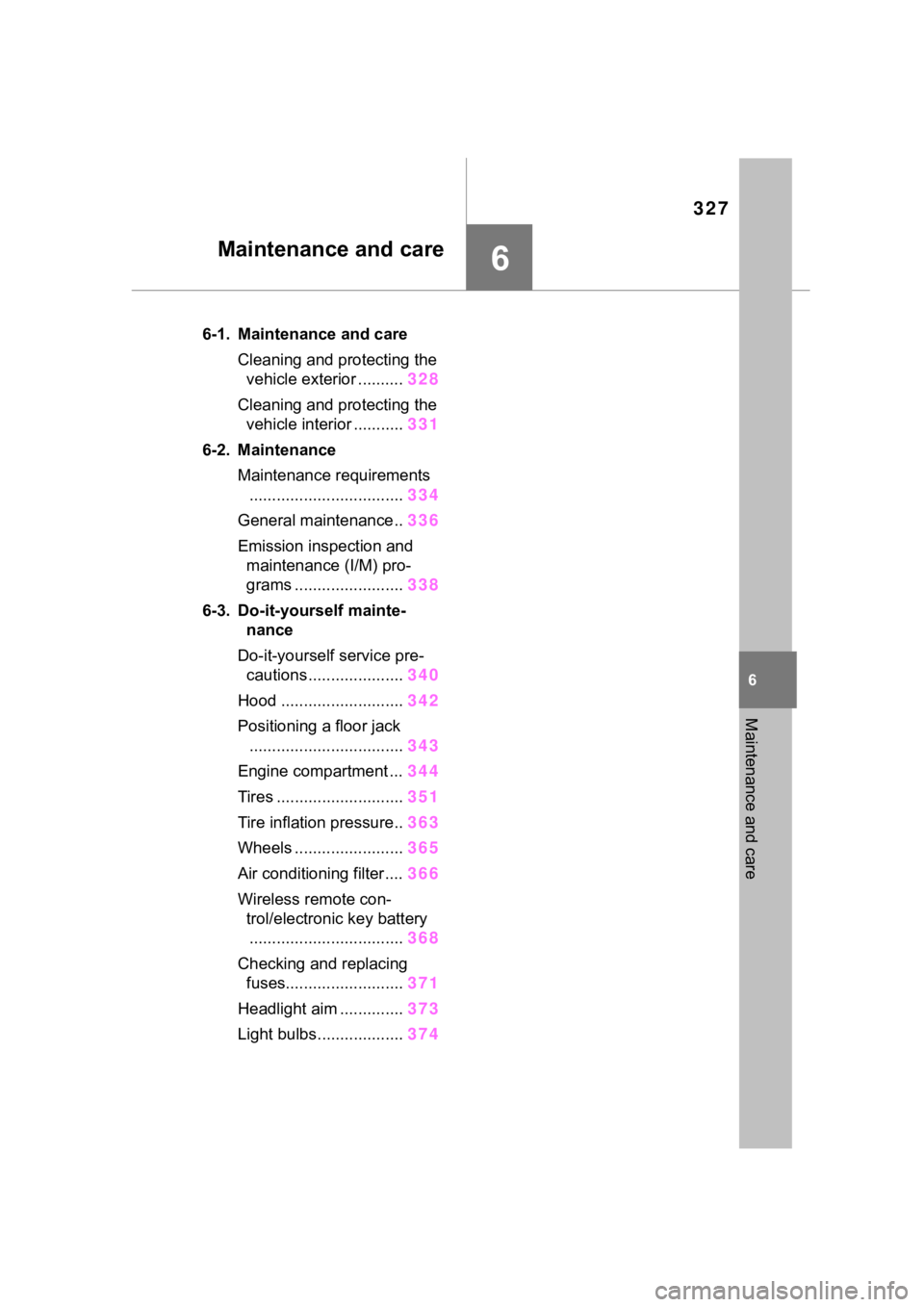
327
6
6
Maintenance and care
Maintenance and care
.6-1. Maintenance and careCleaning and protecting the vehicle exterior .......... 328
Cleaning and protecting the vehicle interior ........... 331
6-2. Maintenance Maintenance requirements.................................. 334
General maintenance.. 336
Emission inspection and maintenance (I/M) pro-
grams ........................ 338
6-3. Do-it-yourself mainte- nance
Do-it-yourself service pre- cautions ..................... 340
Hood ........................... 342
Positioning a floor jack .................................. 343
Engine compartment ... 344
Tires ............................ 351
Tire inflation pressure.. 363
Wheels ......... ...............365
Air conditioning filter .... 366
Wireless remote con- trol/electronic key battery.................................. 368
Checking and replacing fuses.......................... 371
Headlight aim .............. 373
Light bulbs................... 374