brake light TOYOTA COROLLA CROSS 2023 Owner's Manual
[x] Cancel search | Manufacturer: TOYOTA, Model Year: 2023, Model line: COROLLA CROSS, Model: TOYOTA COROLLA CROSS 2023Pages: 500, PDF Size: 15.11 MB
Page 204 of 500
2044-5. Using the driving support systems
performed, emergency steering assist operation may be cancelled:
• The accelerator pedal is strongly depressed
• The steering wheel is ope rated heavily or suddenly
• The brake pedal is depressed
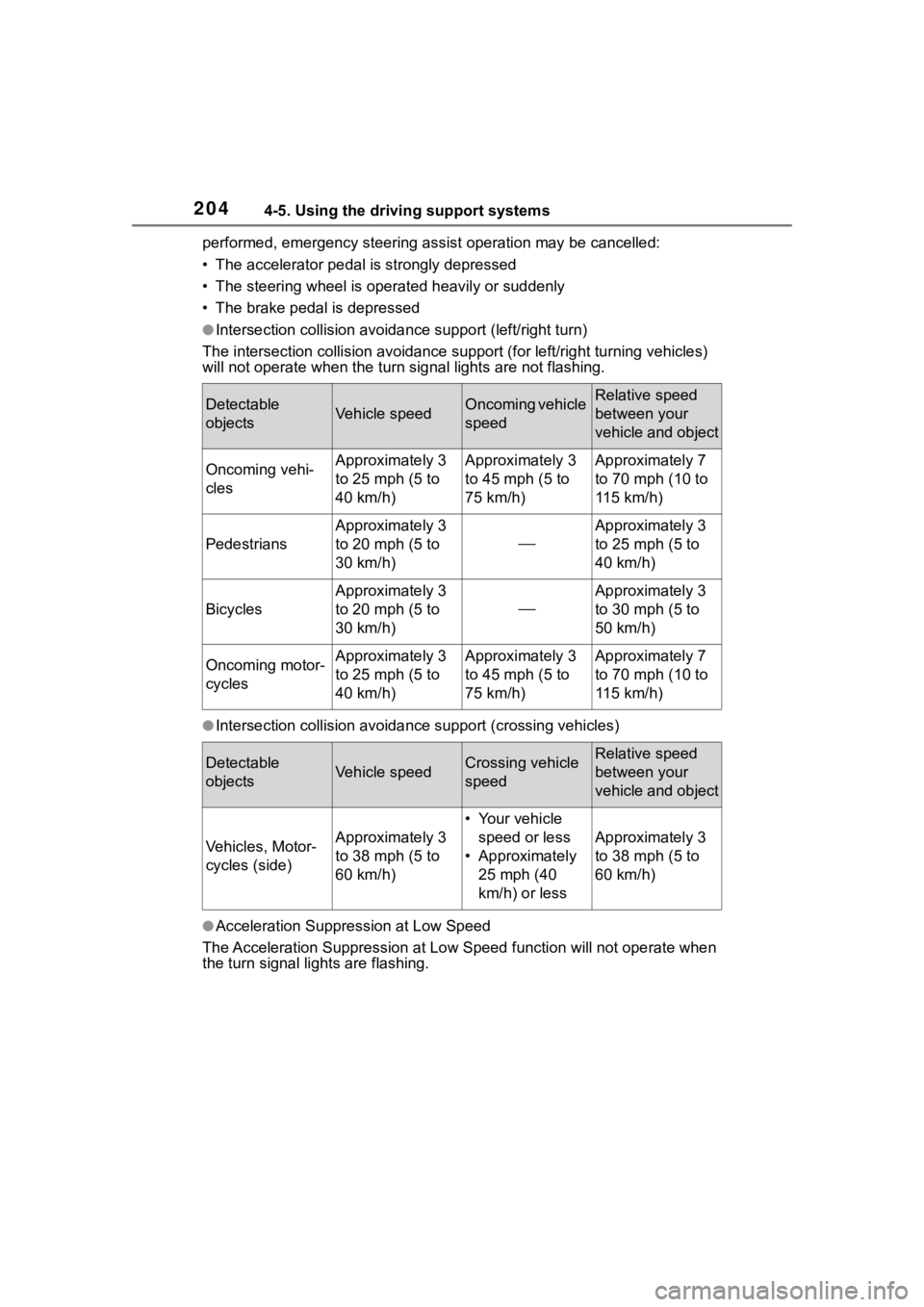
●Intersection collisio n avoidance support (left/right turn)
The intersection collision avoida nce support (for left/right turning vehicles)
will not operate when the turn signal light s are not flashing.
●Intersection collision avoidance support (crossing vehicles)
●Acceleration Suppression at Low Speed
The Acceleration Suppression at Low Speed function will not ope rate when
the turn signal lig hts are flashing.
Detectable
objectsVehicle speedOncoming vehicle
speedRelative speed
between your
vehicle and object
Oncoming vehi-
clesApproximately 3
to 25 mph (5 to
40 km/h)Approximately 3
to 45 mph (5 to
75 km/h)Approximately 7
to 70 mph (10 to
115 km/h)
Pedestrians
Approximately 3
to 20 mph (5 to
30 km/h)
Approximately 3
to 25 mph (5 to
40 km/h)
Bicycles
Approximately 3
to 20 mph (5 to
30 km/h)
Approximately 3
to 30 mph (5 to
50 km/h)
Oncoming motor-
cyclesApproximately 3
to 25 mph (5 to
40 km/h)Approximately 3
to 45 mph (5 to
75 km/h)Approximately 7
to 70 mph (10 to
115 km/h)
Detectable
objectsVehicle speedCrossing vehicle
speedRelative speed
between your
vehicle and object
Vehicles, Motor-
cycles (side)Approximately 3
to 38 mph (5 to
60 km/h)
• Your vehicle
speed or less
• Approximately 25 mph (40
km/h) or less
Approximately 3
to 38 mph (5 to
60 km/h)
Page 222 of 500
2224-5. Using the driving support systems
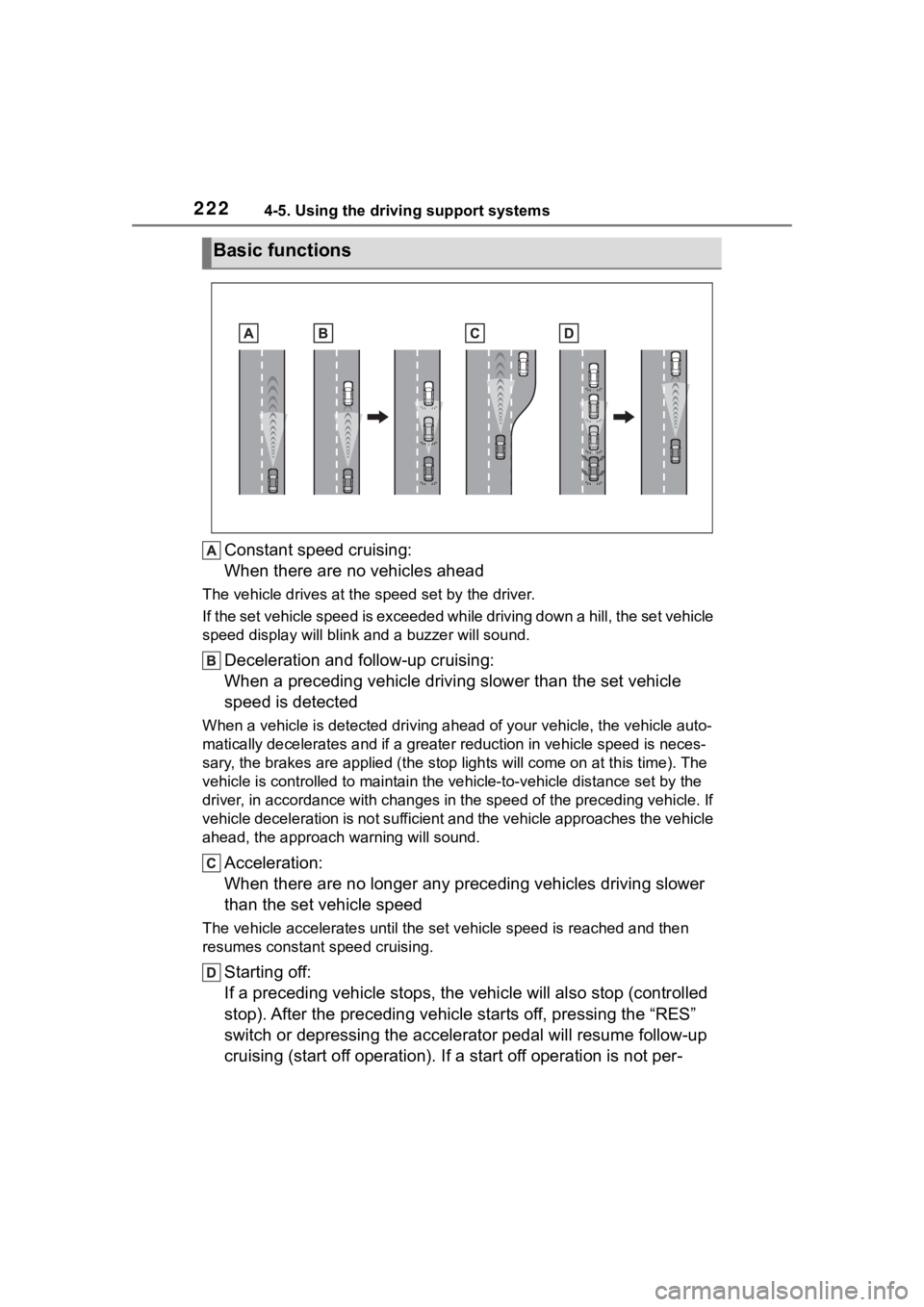
Constant speed cruising:
When there are no vehicles ahead
The vehicle drives at the speed set by the driver.
If the set vehicle speed is exceeded while driving down a hill, the set vehicle
speed display will blin k and a buzzer will sound.
Deceleration and follow-up cruising:
When a preceding vehicle driving slower than the set vehicle
speed is detected
When a vehicle is detected driving ahead of your vehicle, the v ehicle auto-
matically decelerates and if a greater reduction in vehicle spe ed is neces-
sary, the brakes are applied (the stop lights will come on at t his time). The
vehicle is controlled to maintai n the vehicle-to-vehicle distance set by the
driver, in accordance with changes in the speed of the precedin g vehicle. If
vehicle deceleration is not sufficient and the vehicle approaches the vehicle
ahead, the approach wa rning will sound.
Acceleration:
When there are no longer any preceding vehicles driving slower
than the set vehicle speed
The vehicle accelerates until th e set vehicle speed is reached and then
resumes constant speed cruising.
Starting off:
If a preceding vehicle stops, the vehicle will also stop (contr olled
stop). After the preceding vehicle starts off, pressing the “RES”
switch or depressing the accelerator pedal will resume follow-u p
cruising (start off operation). If a start off operation is not per-
Basic functions
Page 236 of 500
2364-5. Using the driving support systems
Through control state “Warning
phase 1” and “Warning phase
2”, the system determines if the
driver is aware and responsive
while outputting a warning and
controlling the vehicle speed. If
the system determines the
driver is not responsive, it will
operate in control state “Decel-
eration stop phase” and “Stop
hold phase” and decelerate and
stop the vehicle. It will then
operate continuously in “Stop
hold phase”.
■Operating conditions
This system opera tes when all of
the following cond itions are met:
●When the LTA is on
●When the vehicle speed is
approximately 30 mph (50 km/h)
or more
■Operation cancelation condi-
tions
In the following si tuations, system
operation will be canceled:
●When LTA control has been can-
celed (the LTA switch has been
pressed, etc.)
●When the dynamic radar cruise
control has been canceled
●When driver operations are
detected (the steering wheel is
held, the brake pedal, accelerator
pedal, parking brake, hazard light
switch, or turn sig nal lever is oper-
ated)
●When the driving assist switch is
pressed while in the stop and hold
phase
●When the engine switch has been
turned from ON to off
●Situations in whic h some or all of
the functions of the system cannot operate:
P. 1 9 7
■LTA control when operation is
canceled
When emergency driving stop sys-
tem operation is canceled, LTA con-
trol may also be canceled.
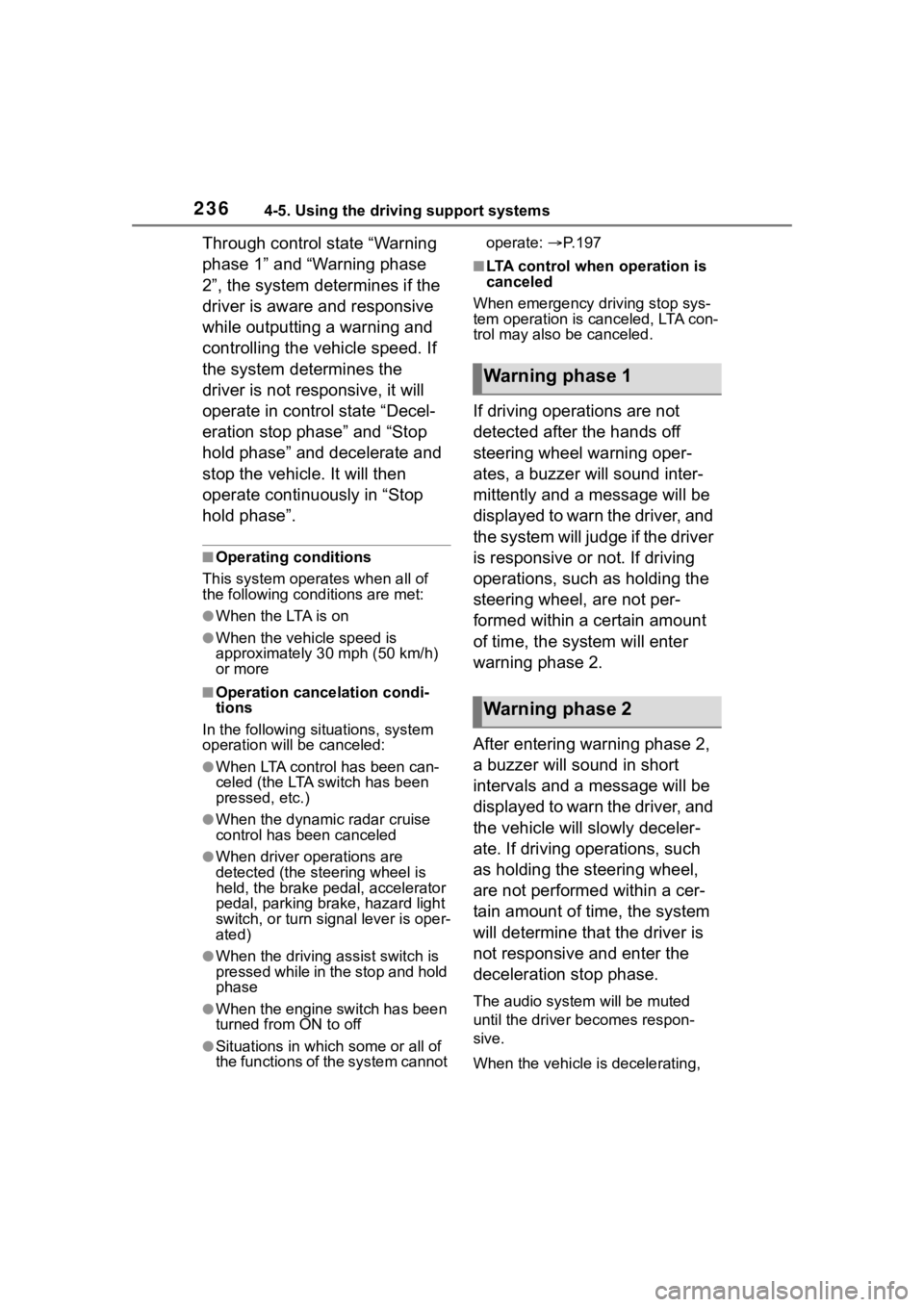
If driving operations are not
detected after the hands off
steering wheel warning oper-
ates, a buzzer will sound inter-
mittently and a message will be
displayed to warn the driver, and
the system will judge if the driver
is responsive or not. If driving
operations, such as holding the
steering wheel, are not per-
formed within a certain amount
of time, the system will enter
warning phase 2.
After entering warning phase 2,
a buzzer will sound in short
intervals and a message will be
displayed to warn the driver, and
the vehicle will slowly deceler-
ate. If driving operations, such
as holding the steering wheel,
are not performed within a cer-
tain amount of time, the system
will determine that the driver is
not responsive and enter the
deceleration stop phase.
The audio system will be muted
until the driver becomes respon-
sive.
When the vehicle is decelerating,
Warning phase 1
Warning phase 2
Page 237 of 500
2374-5. Using the driving support systems
4
Driving
the brake lights may illuminate,
depending on the road conditions,
etc.
After entering the deceleration
stop phase, a buzzer will sound
continuously and a message will
be displayed to warn the driver,
and the vehicle will slowly decel-
erate and stop. After the vehicle
stops, the system will enter the
stop and hold phase.
After the vehicle is stopped, the
parking brake will be applied
automatically. After entering the
stop and hold phase, the buzzer
will continue sounding continu-
ously and the emergency flash-
ers (hazard lights) will flash to
warn other drivers of the emer-
gency.
■Restricted functions after the
operation is canceled
After shifting to the deceleration
stop phase, the following functions
will not be available until the engine
is re-started even though the emer-
gency driving stop system is can-
celed:
●LTA
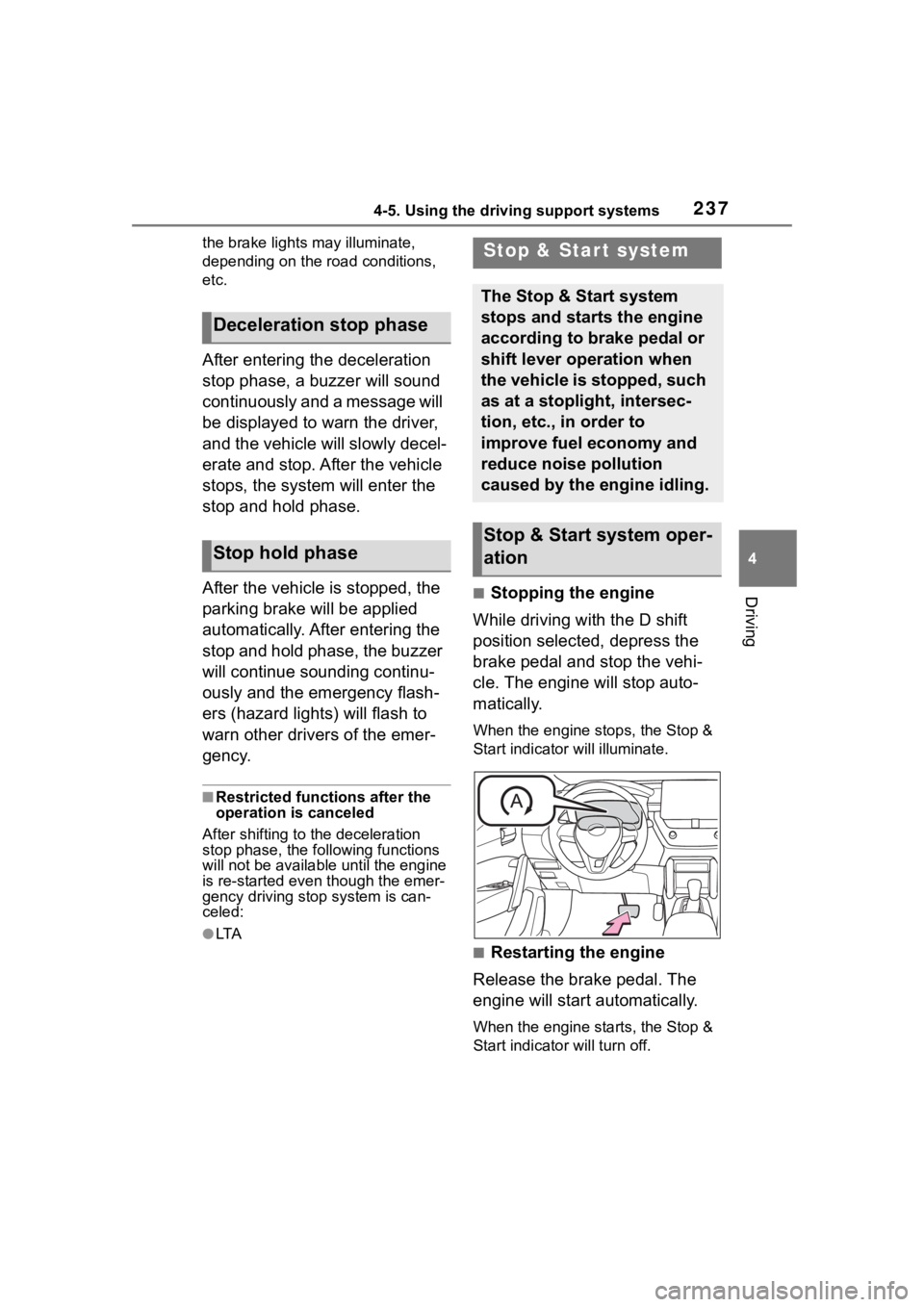
■Stopping the engine
While driving with the D shift
position selected, depress the
brake pedal and stop the vehi-
cle. The engine will stop auto-
matically.
When the engine stops, the Stop &
Start indicator will illuminate.
■Restarting the engine
Release the brake pedal. The
engine will start automatically.
When the engine starts, the Stop &
Start indicator will turn off.
Deceleration stop phase
Stop hold phase
Stop & Star t system
The Stop & Start system
stops and starts the engine
according to brake pedal or
shift lever operation when
the vehicle is stopped, such
as at a stoplight, intersec-
tion, etc., in order to
improve fuel economy and
reduce noise pollution
caused by the engine idling.
Stop & Start system oper-
ation
Page 275 of 500
2754-5. Using the driving support systems
4
Driving
conditions including normal driv-
ing, during cornering, on a
uphill, when starting off, during
acceleration, on a slippery roads
due to snow or rain, thus con-
tributing to stable operability and
driving stability.
■The Secondary Collision
Brake
When the SRS airbag sensor
detects a collision and the sys-
tem operates, the brakes and
brake lights are automatically
controlled to reduce the vehicle
speed and help reduce the pos-
sibility of further damage due to
a secondary collision.
■When the TRAC/VSC systems
are operating
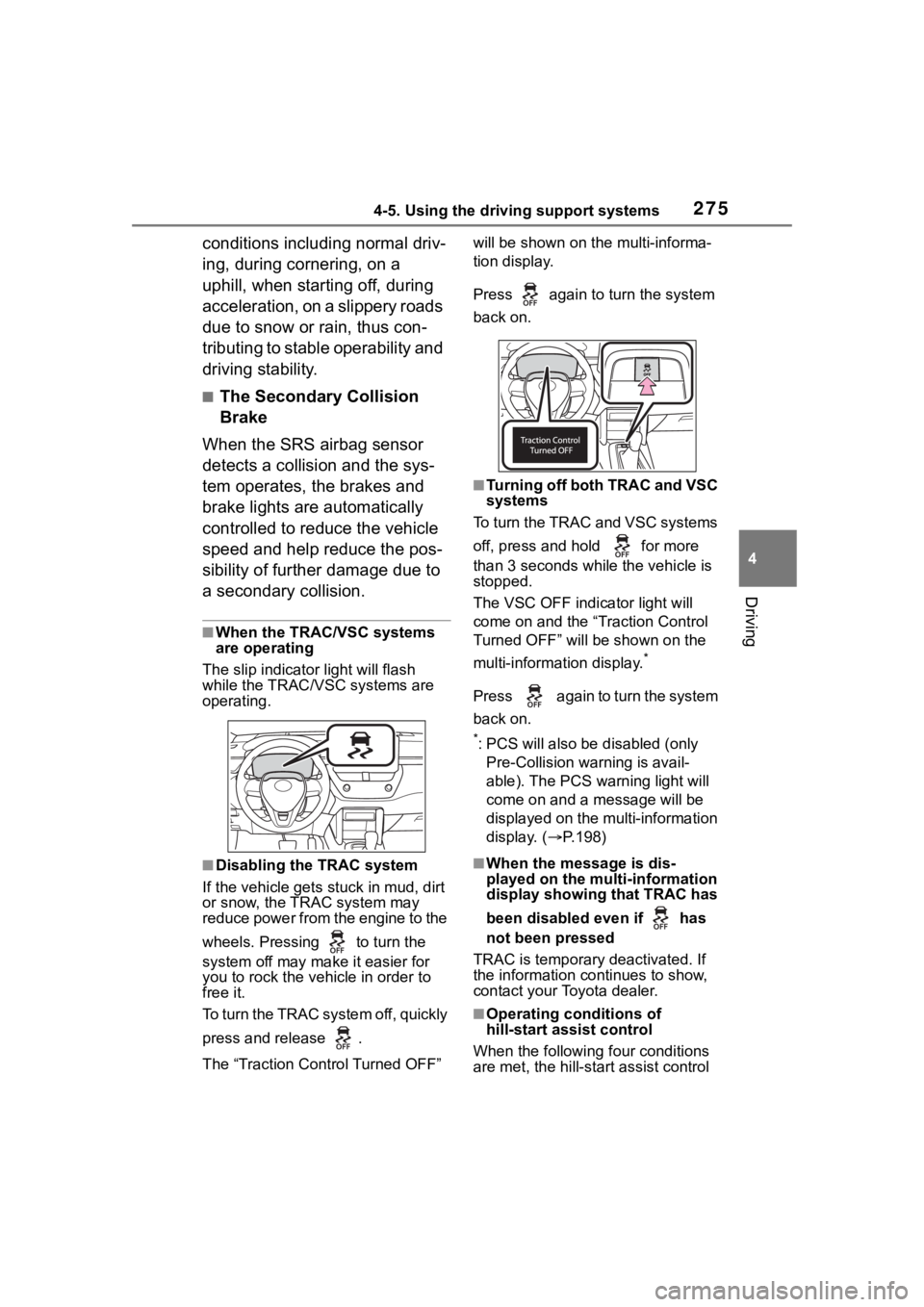
The slip indicator light will flash
while the TRAC/VSC systems are
operating.
■Disabling the TRAC system
If the vehicle gets stuck in mud, dirt
or snow, the TRAC system may
reduce power from the engine to the
wheels. Pressing to turn the
system off may mak e it easier for
you to rock the vehicle in order to
free it.
To turn the TRAC system off, quickly
press and release .
The “Traction Control Turned OFF” will be shown on the multi-informa-
tion display.
Press again to turn the system
back on.
■Turning off both TRAC and VSC
systems
To turn the TRAC and VSC systems
off, press and hold for more
than 3 seconds while the vehicle is
stopped.
The VSC OFF indicator light will
come on and the “Traction Control
Turned OFF” will be shown on the
multi-information display.
*
Press again to turn the system
back on.
*: PCS will also be disabled (only
Pre-Collision warning is avail-
able). The PCS warning light will
come on and a message will be
displayed on the multi-information
display. ( P.198)
■When the message is dis-
played on the multi-information
display showing that TRAC has
been disabled even if has
not been pressed
TRAC is temporary deactivated. If
the information continues to show,
contact your Toyota dealer.
■Operating conditions of
hill-start assist control
When the following four conditions
are met, the hill-star t assist control
Page 276 of 500

2764-5. Using the driving support systems
will operate:
●The shift lever is in a position
other than P or N (when starting
off forward/backward on an
upward incline)
●The vehicle is stopped
●The accelerator pedal is not
depressed
●The parking brake is not engaged
●The engine switch is in ON
■Automatic system cancelation
of hill-start assist control
The hill-start assis t control will turn
off in any of the following situations:
●The shift lever is shifted to P or N
●The accelerator pedal is
depressed
●The parking brake is engaged
●2 seconds at maximum elapsed
after the brake pedal is released
●The engine switch is in ON
■Sounds and vibrations caused
by the ABS, brake assist, VSC,
TRAC and hill-start assist con-
trol systems
●A sound may be heard from the
engine compartment when the
brake pedal is dep ressed repeat-
edly, when the engine is started or
just after the vehicle begins to
move. This sound does not indi-
cate that a malfunction has
occurred in any of these systems.
●Any of the following conditions
may occur when t he above sys-
tems are operating.
None of these indicates that a
malfunction has occurred.
• Vibrations may be felt through the vehicle body and steering.
• A motor sound may be heard also
after the vehicle comes to a stop.
• The brake pedal may pulsate slightly after the ABS is activated.
• The brake pedal may move down slightly after the ABS is activated.
■Active Cornering Assist opera-
tion sounds and vibrations
When the Active Cornering Assist is
operated, operation sounds and
vibrations may be generated from
the brake system, but this is not a
malfunction.
■EPS operation sound
When the steering wheel is oper-
ated, a motor sound (whirring
sound) may be heard. This does not
indicate a malfunction.
■Automatic reactivation of TRAC
and VSC systems
After turning th e TRAC and VSC
systems off, the systems will be
automatically re-enabled in the fol-
lowing situations:
●When the engine switch is turned
off
●If only the TRAC sy stem is turned
off, the TRAC will turn on when
vehicle speed increases
If both the TRAC and VSC sys-
tems are turned o ff, automatic
re-enabling will not occur when
vehicle speed increases.
■Operating conditions of Active
Cornering Assist
The system operates when the fol-
lowing occurs.
●TRAC/VSC can operate
●The driver is attempting to accel-
erate while turning
●The system detects that the vehi-
cle is drifting to the outer side
●The brake pedal is released
■Reduced effectiveness of the
EPS system
The effectiveness of the EPS sys-
tem is reduced to prevent the sys-
tem from overheating when there is
frequent steering input over an
extended period o f time. The steer-
ing wheel may f eel heavy as a
result. Should this occur, refrain
from excessive steering input or
stop the vehicle and turn the engine
Page 278 of 500
2784-5. Using the driving support systems
WARNING
■When the TRAC/VSC is acti-
vated
The slip indicator light flashes.
Always drive carefully. Reckless
driving may cause an accident.
Exercise particular care when the
indicator light flashes.
■When the TRAC/VSC systems
are turned off
Be especially careful and drive at
a speed appropriate to the road
conditions. As these are the sys-
tems to help ensure vehicle stabil-
ity and driving force, do not turn
the TRAC/VSC systems off
unless necessary.
■Replacing tires
Make sure that all tires are of the
specified size, brand, tread pat-
tern and total load capacity. In
addition, make sure that the tires
are inflated to the recommended
tire inflation pressure level.
The ABS, TRAC and VSC sys-
tems will not f unction correctly if
different tires are installed on the
vehicle.
Contact your Toyota dealer for fur-
ther information when replacing
tires or wheels.
■Handling of tires and the sus-
pension
Using tires with any kind of prob-
lem or modifying the suspension
will affect the driving assist sys-
tems, and may cause a system to
malfunction.
■Secondary Collision Brake
Do not rely solely upon the Sec-
ondary Collision Brake. This sys-
tem is designed to help reduce
the possibility of further damage
due to a secondary collision, how-
ever, that effect changes accord-
ing to various conditions. Overly
relying on the system may result
in death or serious injury.
Page 280 of 500
2804-6. Driving tips
excess ice or snow that may
have accumulated on the
exterior lights, outside rear
view mirrors, windows, vehi-
cle’s roof, chassis, around the
tires or on the brakes.
Remove any snow or mud
from the bottom of your shoes
before getting in the vehicle.
Accelerate the vehicle slowly,
keep a safe distance between
you and the vehicle ahead, and
drive at a reduced speed suit-
able to road conditions.
Turn automatic mode of the
parking brake off. Otherwise,
the parking brake may freeze
and not be able to be
released automatically.
Also, avoid using the following as
the parking brake may operate
automatically, even if automatic
mode is off.
• Brake hold system
Park the vehicle and shift the
shift lever to P without setting
the parking brake. The park-
ing brake may freeze up, pre-
venting it from being released.
If the vehicle is parked without
setting the parking brake,
make sure to block the
wheels.
Failure to do so may be dan- gerous because it may cause
the vehicle to move unexpect-
edly, possibly leading to an
accident.
When the parking brake is in
automatic mode, release the
parking brake after shifting
the shift lever to P. ( P.172)
Turn off the engin e switch while
pressing the parking brake switch.
If the vehicle is parked without
setting the parking brake,
confirm that the shift lever
cannot be moved out of P.
If the vehicle is left parked
with the brakes damp in cold
temperatures, there is a pos-
sibility of the brakes freezing.
Tire chains cannot be mounted.
Snow tires should be used
instead.When driving the vehicle
When parking the vehicle
Selecting tire chains
Page 337 of 500
3376-2. Maintenance
6
Maintenance and care
Brakes
• The vehicle should not pull to
one side when
the brakes are
applied.
• The brakes should work
effectively.
• The brake pedal should not feel
spongy.
• The brake pedal should not get
too close to the
floor when the
brakes are
applied.
Head
restraints
Do the head
restraints move
smoothly and lock
securely?
Indica-
tors/buzzersDo the indicators
and buzzers func-
tion properly?
LightsDo all the lights
come on?
Parking brake
• Does the park-ing brake oper-
ate normally?
• When parked on a slope and the
parking brake is
on, is the vehicle
securely
stopped?
ItemsCheck points
Seat belts
• Do the seat belts operate
smoothly?
• The seat belts should not be
damaged.
Seats
Do the seat con-
trols operate prop-
erly?
Steering wheel
• Does the steer-ing wheel rotate
smoothly?
• Does the steer- ing wheel have
the correct
amount of free
play?
• There should not be any strange
sounds coming
from the steer-
ing wheel.
Vehicle exterior
ItemsCheck points
DoorsDo the doors oper-
ate smoothly?
Engine hood
Does the engine
hood lock system
work properly?
Fluid leaks
There should not
be any signs of
fluid leakage after
the vehicle has
been parked.
ItemsCheck points
Page 340 of 500
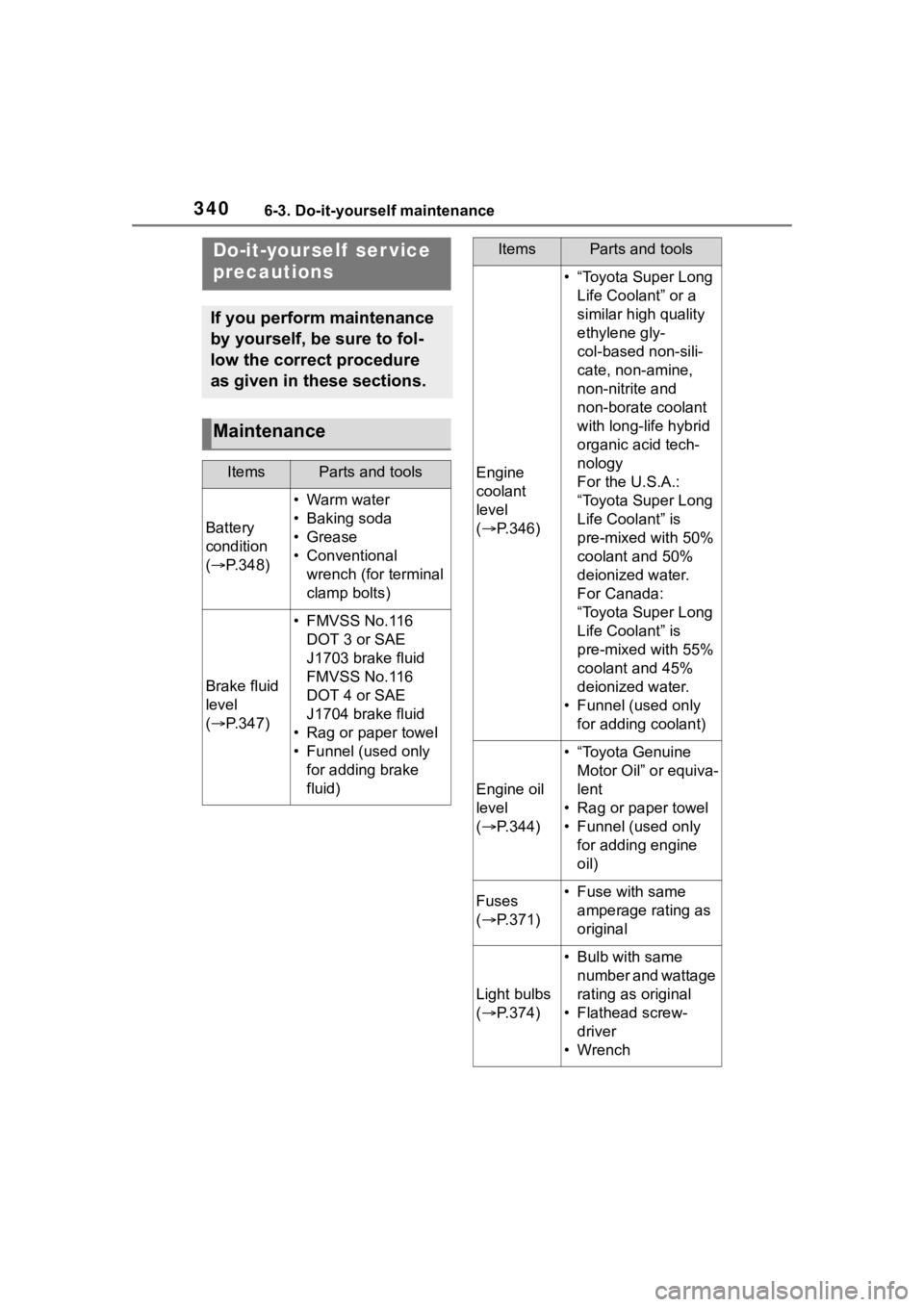
3406-3. Do-it-yourself maintenance
6-3.Do-it-yourself maintenance
Do-it-yourself ser vice
precautions
If you perform maintenance
by yourself, be sure to fol-
low the correct procedure
as given in these sections.
Maintenance
ItemsParts and tools
Battery
condition
( P.348)
•Warm water
• Baking soda
•Grease
• Conventional
wrench (for terminal
clamp bolts)
Brake fluid
level
( P.347)
• FMVSS No.116
DOT 3 or SAE
J1703 brake fluid
FMVSS No.116
DOT 4 or SAE
J1704 brake fluid
• Rag or paper towel
• Funnel (used only for adding brake
fluid)
Engine
coolant
level
( P.346)
• “Toyota Super Long
Life Coolant” or a
similar high quality
ethylene gly-
col-based non-sili-
cate, non-amine,
non-nitrite and
non-borate coolant
with long-life hybrid
organic acid tech-
nology
For the U.S.A.:
“Toyota Super Long
Life Coolant” is
pre-mixed with 50%
coolant and 50%
deionized water.
For Canada:
“Toyota Super Long
Life Coolant” is
pre-mixed with 55%
coolant and 45%
deionized water.
• Funnel (used only for adding coolant)
Engine oil
level
( P.344)
• “Toyota Genuine
Motor Oil” or equiva-
lent
• Rag or paper towel
• Funnel (used only for adding engine
oil)
Fuses
( P.371)• Fuse with same
amperage rating as
original
Light bulbs
( P.374)
• Bulb with same
number and wattage
rating as original
• Flathead screw- driver
•Wrench
ItemsParts and tools