open TOYOTA COROLLA CROSS 2023 Manual PDF
[x] Cancel search | Manufacturer: TOYOTA, Model Year: 2023, Model line: COROLLA CROSS, Model: TOYOTA COROLLA CROSS 2023Pages: 500, PDF Size: 15.11 MB
Page 299 of 500
2995-1. Using the air conditioning system and defogger
5
Interior features
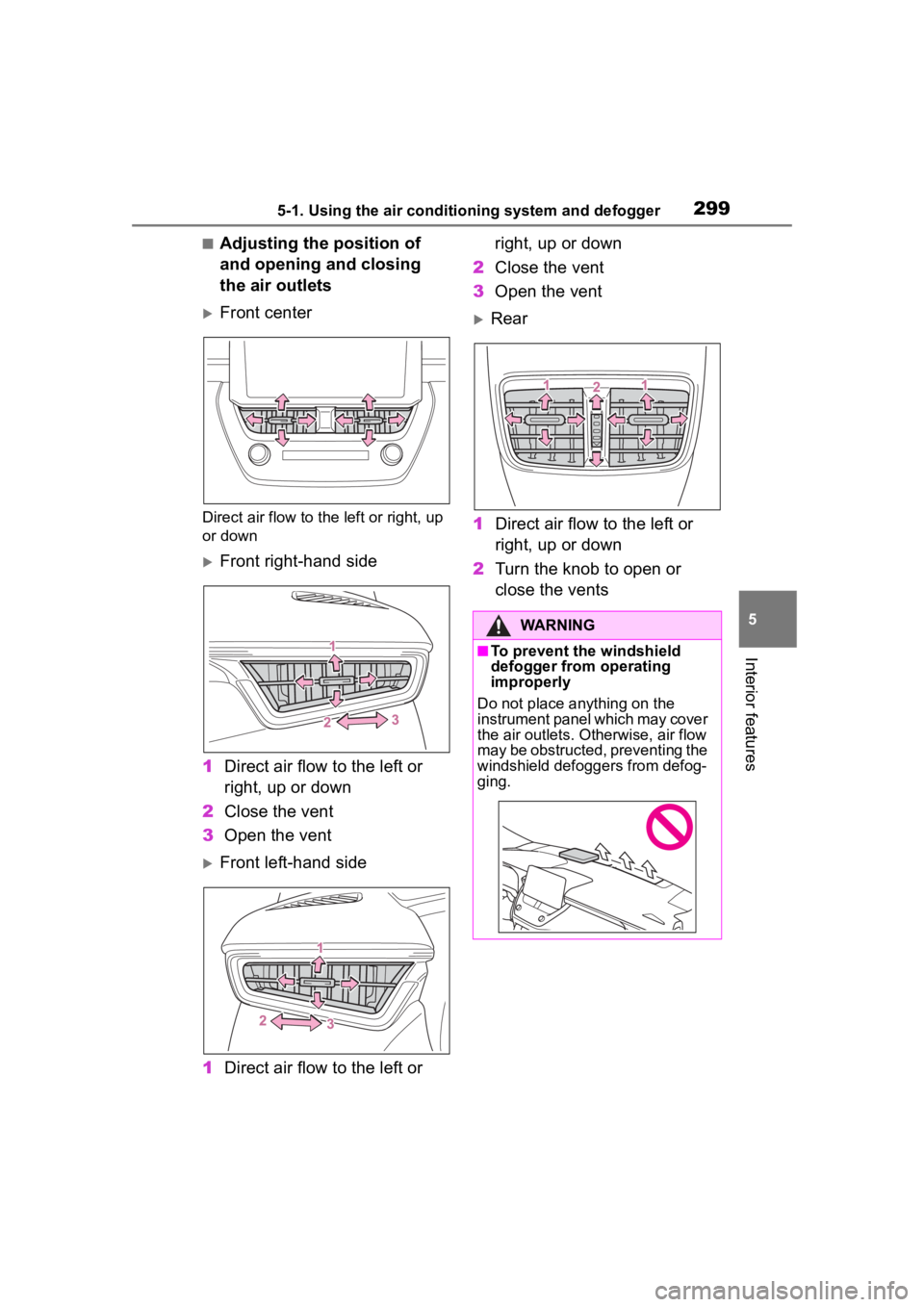
■Adjusting the position of
and opening and closing
the air outlets
Front center
Direct air flow to the left or right, up
or down
Front right-hand side
1 Direct air flow to the left or
right, up or down
2 Close the vent
3 Open the vent
Front left-hand side
1 Direct air flow to the left or right, up or down
2 Close the vent
3 Open the vent
Rear
1 Direct air flow to the left or
right, up or down
2 Turn the knob to open or
close the vents
WARNING
■To prevent the windshield
defogger from operating
improperly
Do not place anything on the
instrument panel which may cover
the air outlets. Otherwise, air flow
may be obstructed, preventing the
windshield defoggers from defog-
ging.
Page 302 of 500
3025-2. Using the interior lights
5-2.Using the interior lights
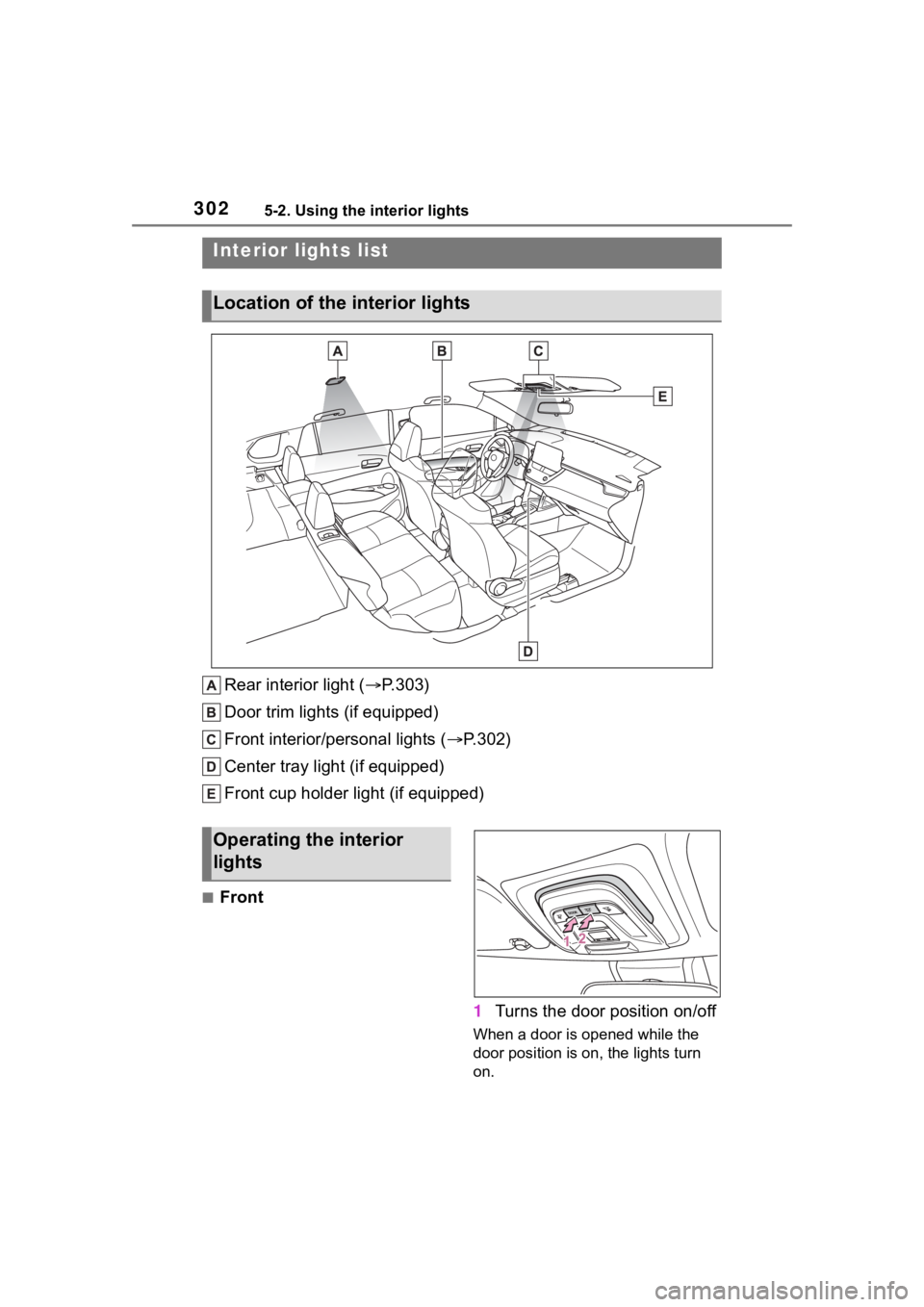
Rear interior light (P.303)
Door trim lights (if equipped)
Front interior/personal lights ( P.302)
Center tray light (if equipped)
Front cup holder light (if equipped)
■Front
1Turns the door position on/off
When a door is opened while the
door position is on, the lights turn
on.
Interior lights list
Location of the i nterior lights
Operating the interior
lights
Page 303 of 500
3035-2. Using the interior lights
5
Interior features
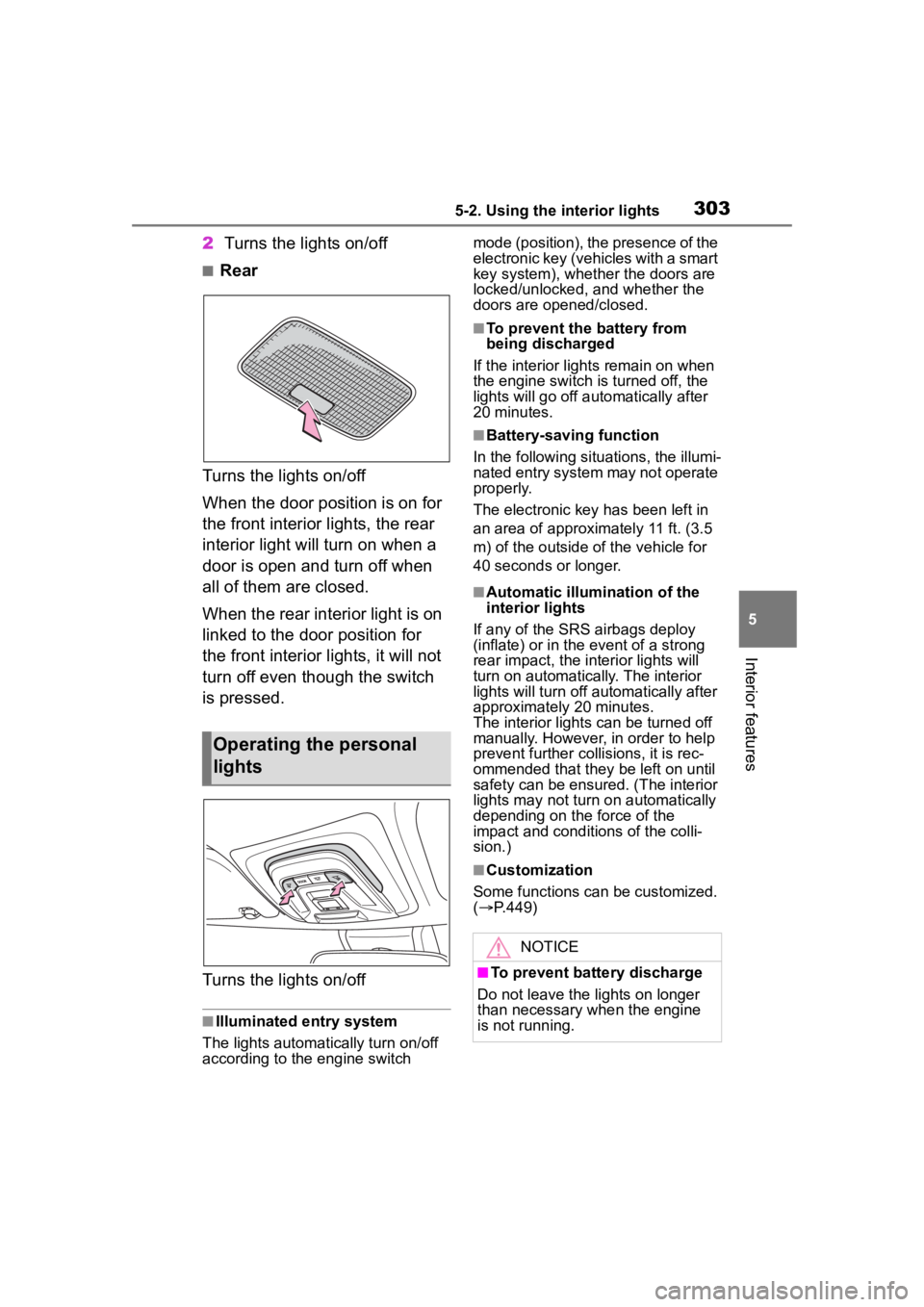
2Turns the lights on/off
■Rear
Turns the lights on/off
When the door position is on for
the front interior lights, the rear
interior light will turn on when a
door is open and turn off when
all of them are closed.
When the rear interior light is on
linked to the door position for
the front interior lights, it will not
turn off even though the switch
is pressed.
Turns the lights on/off
■Illuminated entry system
The lights automatically turn on/off
according to the engine switch mode (position), the presence of the
electronic key (vehicles with a smart
key system), whether the doors are
locked/unlocked, and whether the
doors are opened/closed.
■To prevent the battery from
being discharged
If the interior light s remain on when
the engine switch is turned off, the
lights will go off automatically after
20 minutes.
■Battery-saving function
In the following situations, the illumi-
nated entry system may not operate
properly.
The electronic key has been left in
an area of approximately 11 ft. (3.5
m) of the outside of the vehicle for
40 seconds or longer.
■Automatic illumination of the
interior lights
If any of the SRS airbags deploy
(inflate) or in the event of a strong
rear impact, the in terior lights will
turn on automatically. The interior
lights will turn off automatically after
approximately 20 minutes.
The interior lights can be turned off
manually. However, in order to help
prevent further co llisions, it is rec-
ommended that they be left on until
safety can be ensured. (The interior
lights may not turn on automatically
depending on the force of the
impact and conditions of the colli-
sion.)
■Customization
Some functions can be customized.
( P.449)
Operating the personal
lights
NOTICE
■To prevent battery discharge
Do not leave the lights on longer
than necessary w hen the engine
is not running.
Page 304 of 500
3045-3. Using the storage features
5-3.Using the storage features
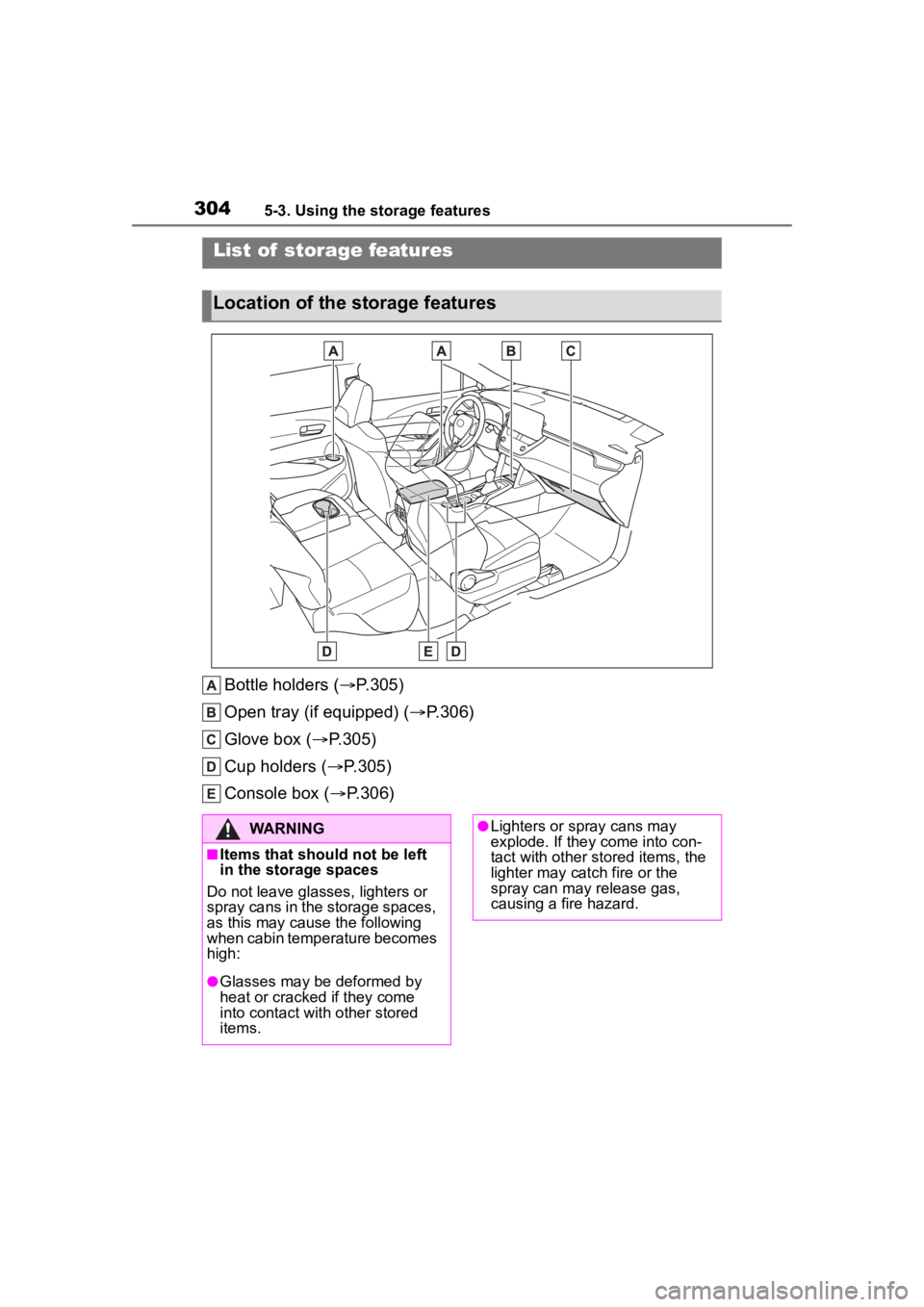
Bottle holders (P.305)
Open tray (if equipped) ( P.306)
Glove box ( P.305)
Cup holders ( P.305)
Console box ( P.306)
List of storage features
Location of the storage features
WARNING
■Items that should not be left
in the storage spaces
Do not leave glasses, lighters or
spray cans in the storage spaces,
as this may cau se the following
when cabin temperature becomes
high:
●Glasses may be deformed by
heat or cracked if they come
into contact with other stored
items.
●Lighters or spray cans may
explode. If they come into con-
tact with other stored items, the
lighter may catch fire or the
spray can may release gas,
causing a fire hazard.
Page 305 of 500
3055-3. Using the storage features
5
Interior features
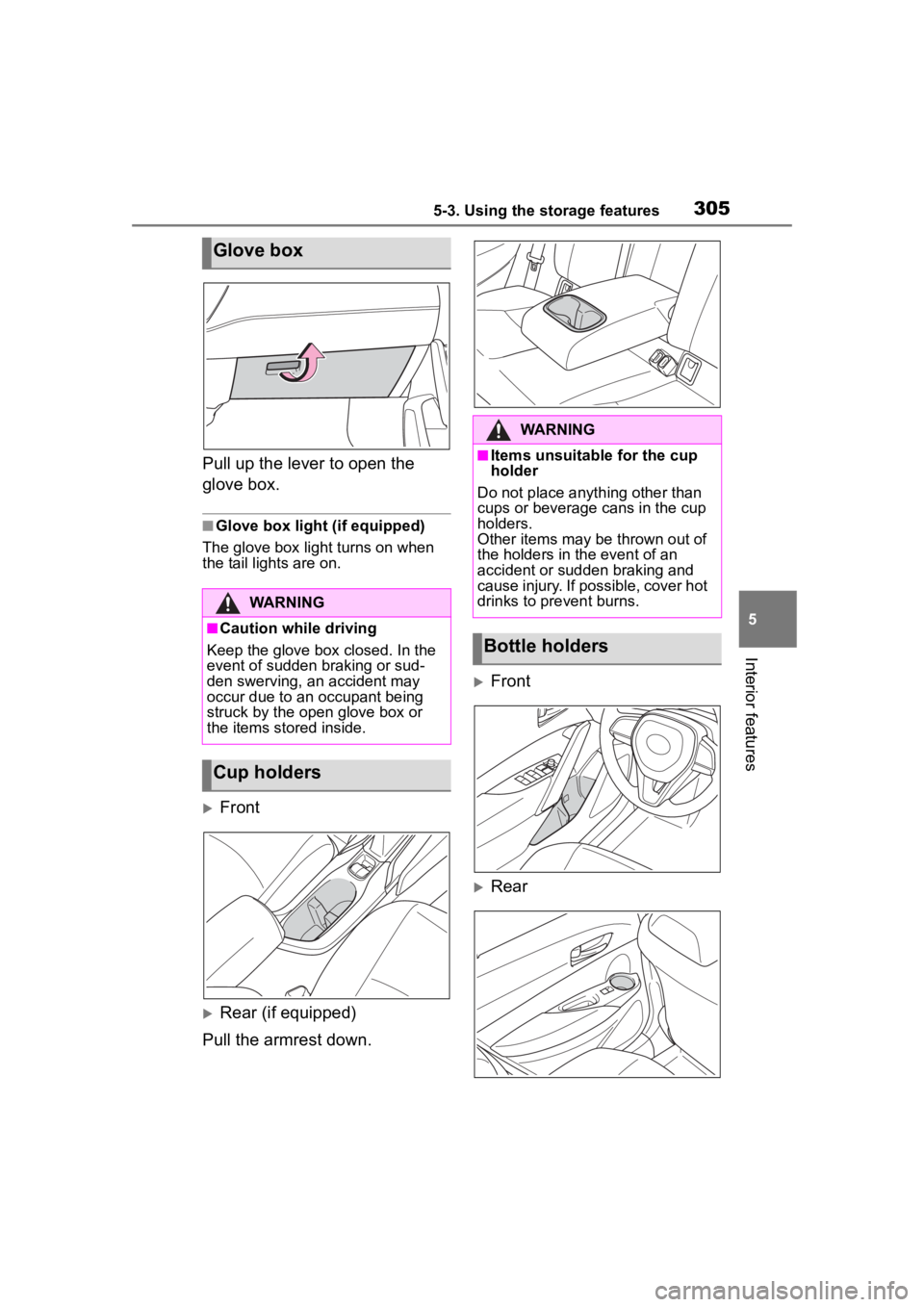
Pull up the lever to open the
glove box.
■Glove box light (if equipped)
The glove box light turns on when
the tail lights are on.
Front
Rear (if equipped)
Pull the armrest down.
Front
Rear
Glove box
WARNING
■Caution while driving
Keep the glove box closed. In the
event of sudden braking or sud-
den swerving, an accident may
occur due to an occupant being
struck by the open glove box or
the items stored inside.
Cup holders
WARNING
■Items unsuitable for the cup
holder
Do not place anyth ing other than
cups or beverage cans in the cup
holders.
Other items may be thrown out of
the holders in the event of an
accident or sudden braking and
cause injury. If possible, cover hot
drinks to pre vent burns.
Bottle holders
Page 306 of 500
3065-3. Using the storage features
■Bottle holders
●When storing a bottle, close the
cap.
●The bottle may not be stored
depending on its size or shape.
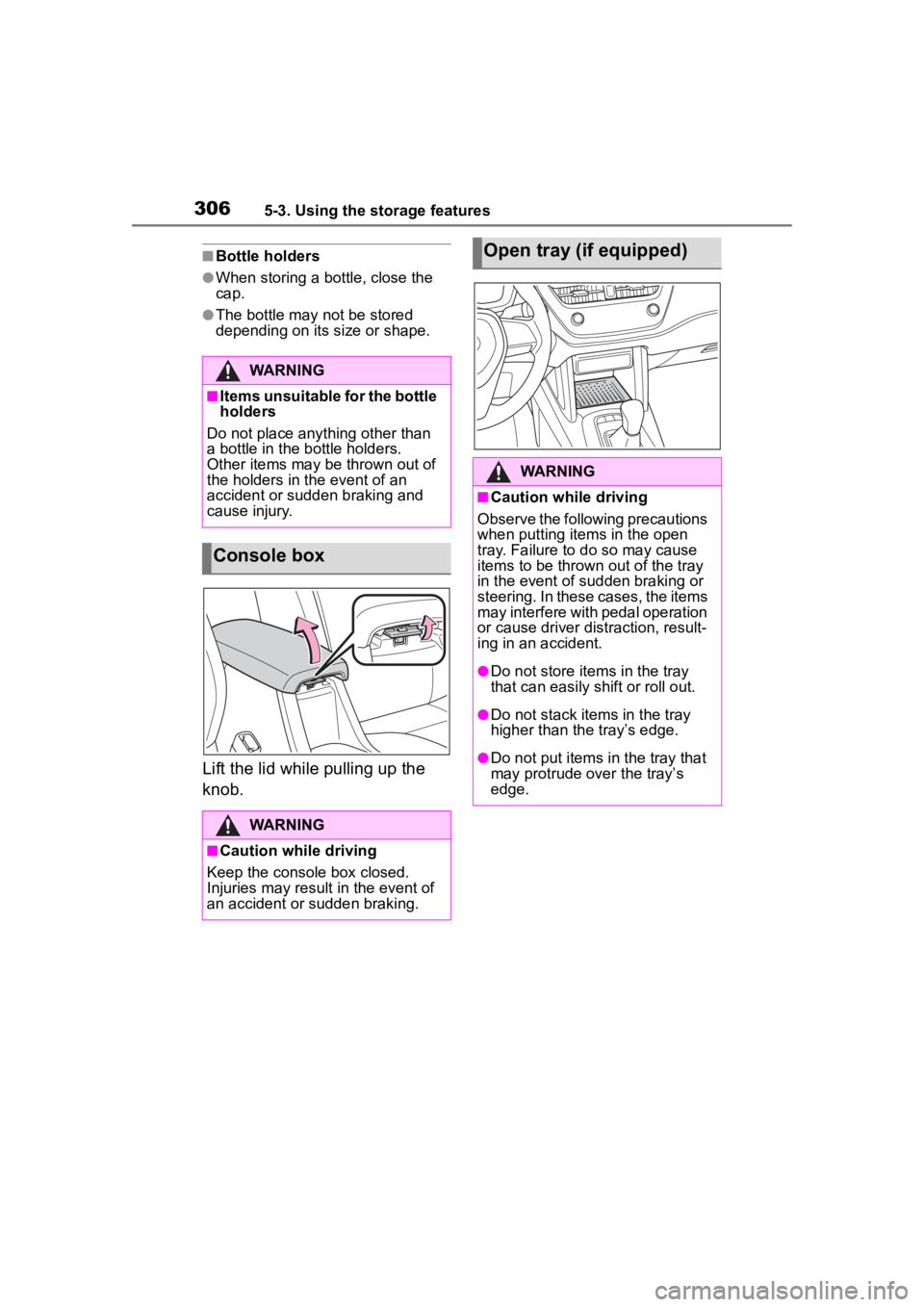
Lift the lid while pulling up the
knob.
WARNING
■Items unsuitable for the bottle
holders
Do not place anything other than
a bottle in the bottle holders.
Other items may be thrown out of
the holders in the event of an
accident or sudden braking and
cause injury.
Console box
WARNING
■Caution while driving
Keep the console box closed.
Injuries may result in the event of
an accident or sudden braking.
Open tray (if equipped)
WARNING
■Caution while driving
Observe the following precautions
when putting items in the open
tray. Failure to do so may cause
items to be thrown out of the tray
in the event of s udden braking or
steering. In these cases, the items
may interfere with pedal operation
or cause driver distraction, result-
ing in an accident.
●Do not store ite ms in the tray
that can easily shift or roll out.
●Do not stack items in the tray
higher than the tray’s edge.
●Do not put items in the tray that
may protrude over the tray’s
edge.
Page 309 of 500
3095-4. Other interior features
5
Interior features
5-4.Other interior features
The USB charging port are used
to supply 3.0 A of electricity at 5
V to external devices.
The USB charging port are for
charging only. They are not
designed for data transfer or
other purposes.
Depending on the external
device, it may not charge prop-
erly. Refer to the manual
included with the device before
using a USB charging port.
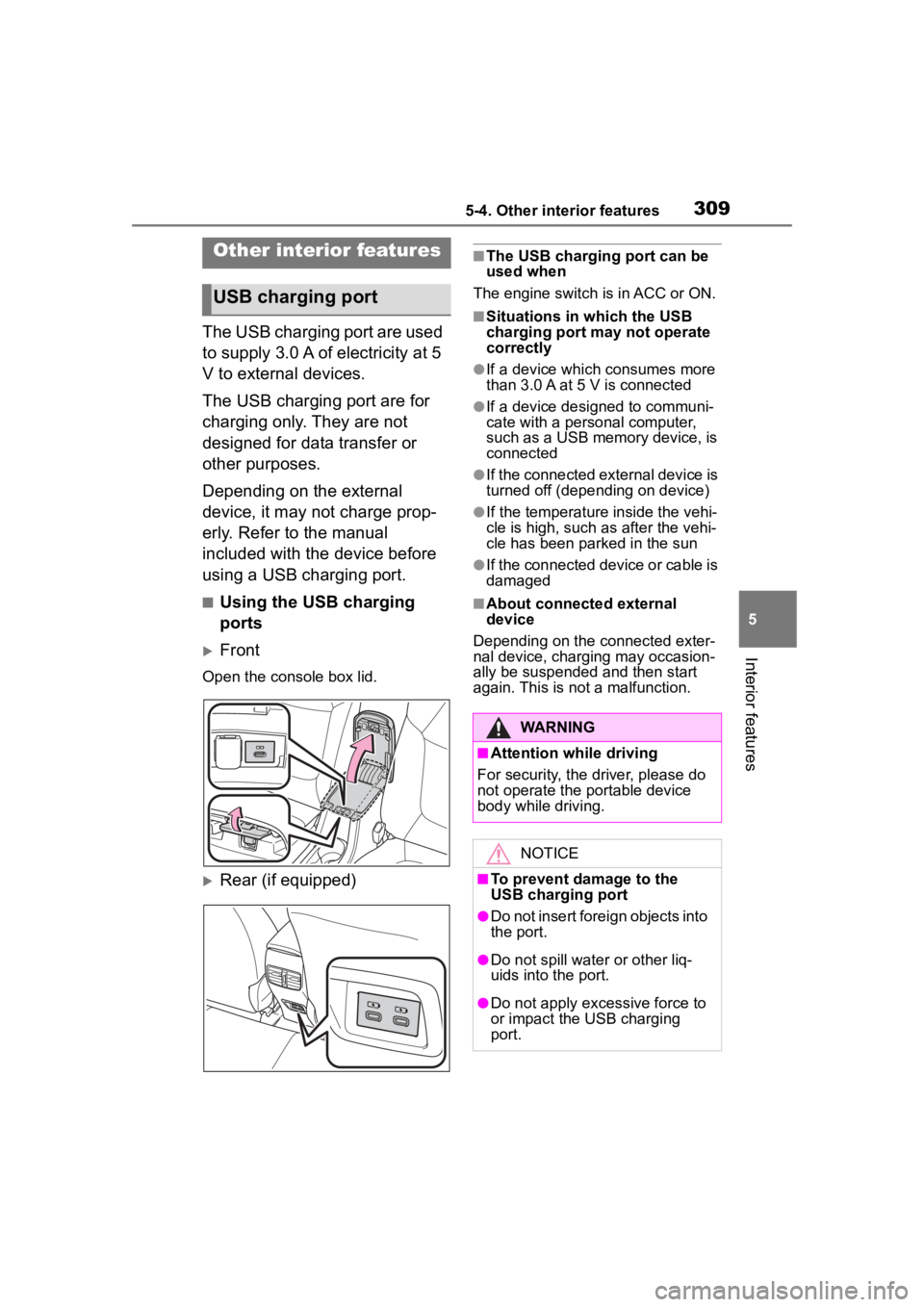
■Using the USB charging
ports
Front
Open the console box lid.
Rear (if equipped)
■The USB charging port can be
used when
The engine switch i s in ACC or ON.
■Situations in which the USB
charging port may not operate
correctly
●If a device which consumes more
than 3.0 A at 5 V is connected
●If a device designed to communi-
cate with a personal computer,
such as a USB memory device, is
connected
●If the connected external device is
turned off (depend ing on device)
●If the temperature inside the vehi-
cle is high, such as after the vehi-
cle has been parked in the sun
●If the connected device or cable is
damaged
■About connected external
device
Depending on the connected exter-
nal device, charging may occasion-
ally be suspended and then start
again. This is not a malfunction.
Other interior features
USB charging port
WARNING
■Attention while driving
For security, the driver, please do
not operate the p ortable device
body while driving.
NOTICE
■To prevent damage to the
USB charging port
●Do not insert foreign objects into
the port.
●Do not spill water or other liq-
uids into the port.
●Do not apply excessive force to
or impact the USB charging
port.
Page 310 of 500
3105-4. Other interior features
The power outlet can be used
for 12 V accessories that run on
less than 10 A.
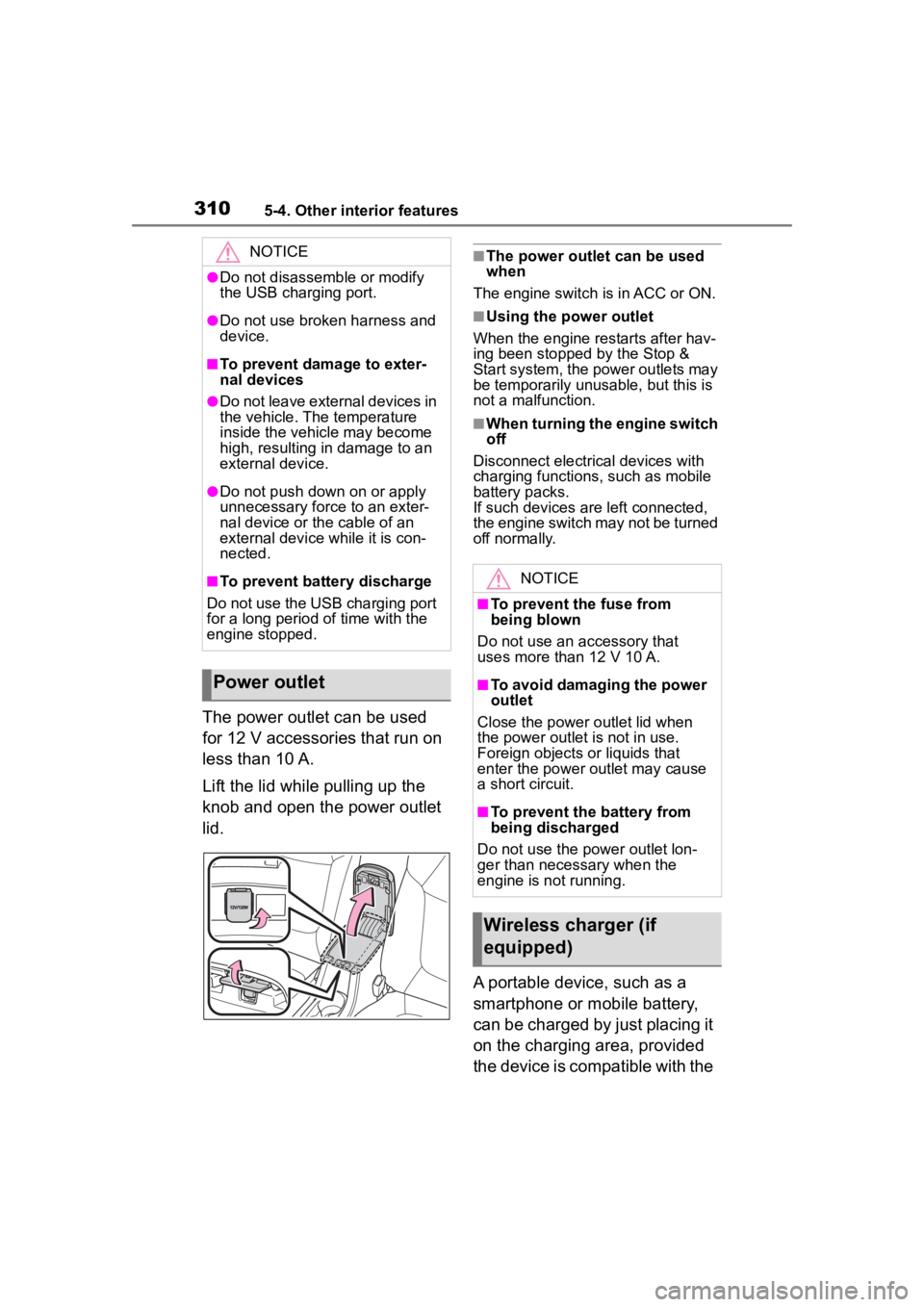
Lift the lid while pulling up the
knob and open the power outlet
lid.
■The power outlet can be used
when
The engine switch i s in ACC or ON.
■Using the power outlet
When the engine restarts after hav-
ing been stopped by the Stop &
Start system, the power outlets may
be temporarily unusable, but this is
not a malfunction.
■When turning the engine switch
off
Disconnect electrical devices with
charging functions, such as mobile
battery packs.
If such devices are left connected,
the engine switch may not be turned
off normally.
A portable device, such as a
smartphone or mobile battery,
can be charged by just placing it
on the charging area, provided
the device is compatible with the
NOTICE
●Do not disassemble or modify
the USB charging port.
●Do not use broken harness and
device.
■To prevent damage to exter-
nal devices
●Do not leave external devices in
the vehicle. The temperature
inside the vehicle may become
high, resulting in damage to an
external device.
●Do not push down on or apply
unnecessary force to an exter-
nal device or the cable of an
external device while it is con-
nected.
■To prevent battery discharge
Do not use the USB charging port
for a long period of time with the
engine stopped.
Power outlet
NOTICE
■To prevent the fuse from
being blown
Do not use an accessory that
uses more than 12 V 10 A.
■To avoid damaging the power
outlet
Close the power outlet lid when
the power outlet is not in use.
Foreign objects or liquids that
enter the power outlet may cause
a short circuit.
■To prevent the battery from
being discharged
Do not use the p ower outlet lon-
ger than necessary when the
engine is not running.
Wireless charger (if
equipped)
Page 318 of 500
3185-4. Other interior features
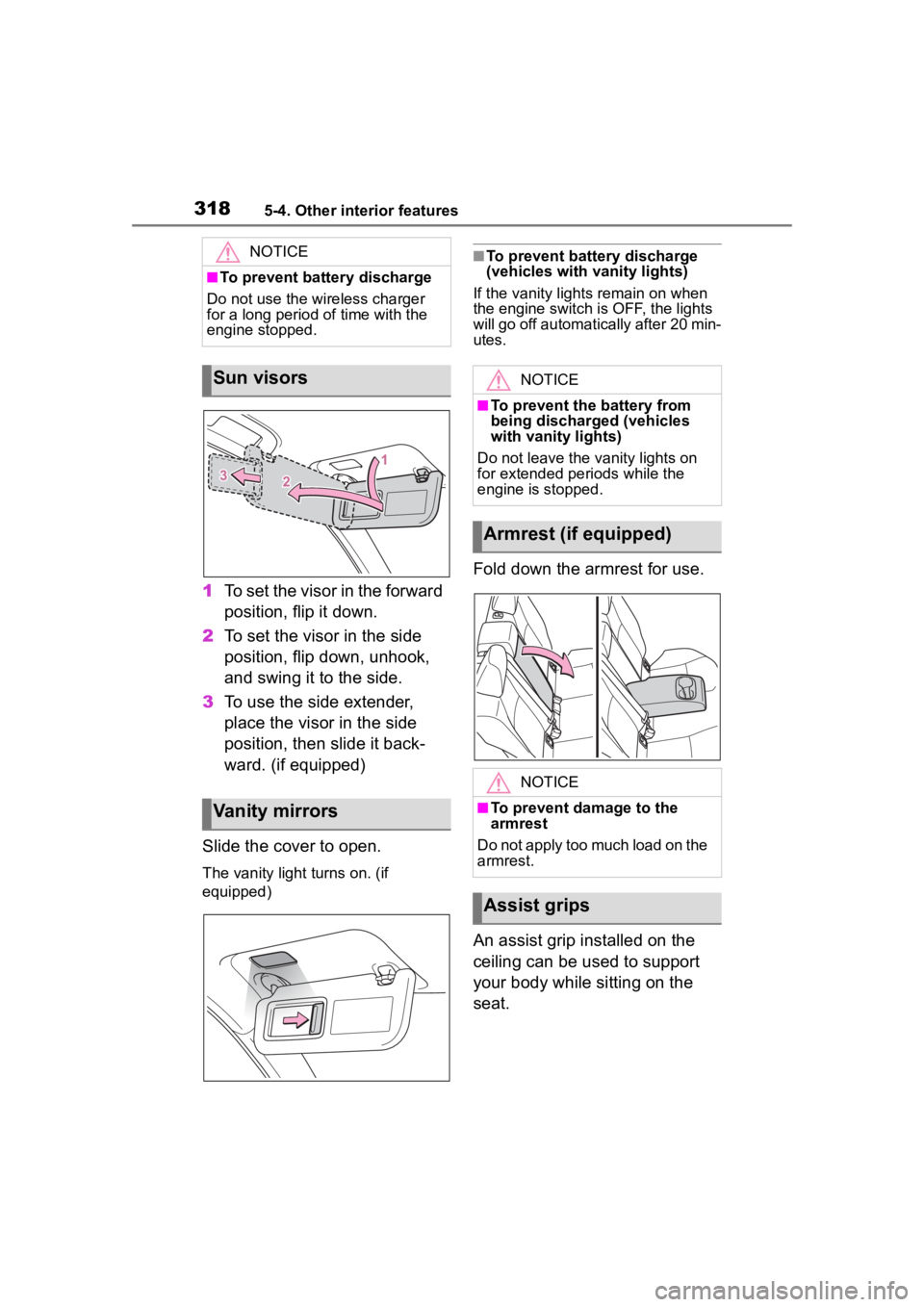
1To set the visor in the forward
position, flip it down.
2 To set the visor in the side
position, flip down, unhook,
and swing it to the side.
3 To use the side extender,
place the visor in the side
position, then slide it back-
ward. (if equipped)
Slide the cover to open.
The vanity light turns on. (if
equipped)
■To prevent battery discharge
(vehicles with vanity lights)
If the vanity lights remain on when
the engine switch is OFF, the lights
will go off automatically after 20 min-
utes.
Fold down the armrest for use.
An assist grip installed on the
ceiling can be used to support
your body while sitting on the
seat.
NOTICE
■To prevent battery discharge
Do not use the wireless charger
for a long period of time with the
engine stopped.
Sun visors
Vanity mirrors
NOTICE
■To prevent the battery from
being discharged (vehicles
with vanity lights)
Do not leave the vanity lights on
for extended periods while the
engine is stopped.
Armrest (if equipped)
NOTICE
■To prevent damage to the
armrest
Do not apply too much load on the
armrest.
Assist grips
Page 320 of 500
3205-4. Other interior features
*: If equipped
■HomeLink® programming pro-
cedure
The programming procedures can
also be found at the following URL.
Website: www.homelink.com/toyota
For support, contact customer sup-
port at the following.
Help Line: 1-800-355-3515
The HomeLink® wireless control
system in your vehicle has 3
buttons which can be pro-
grammed to operate 3 different
devices. Refer to the program-
ming methods on the following
pages to determine the method
which is appropriate for the
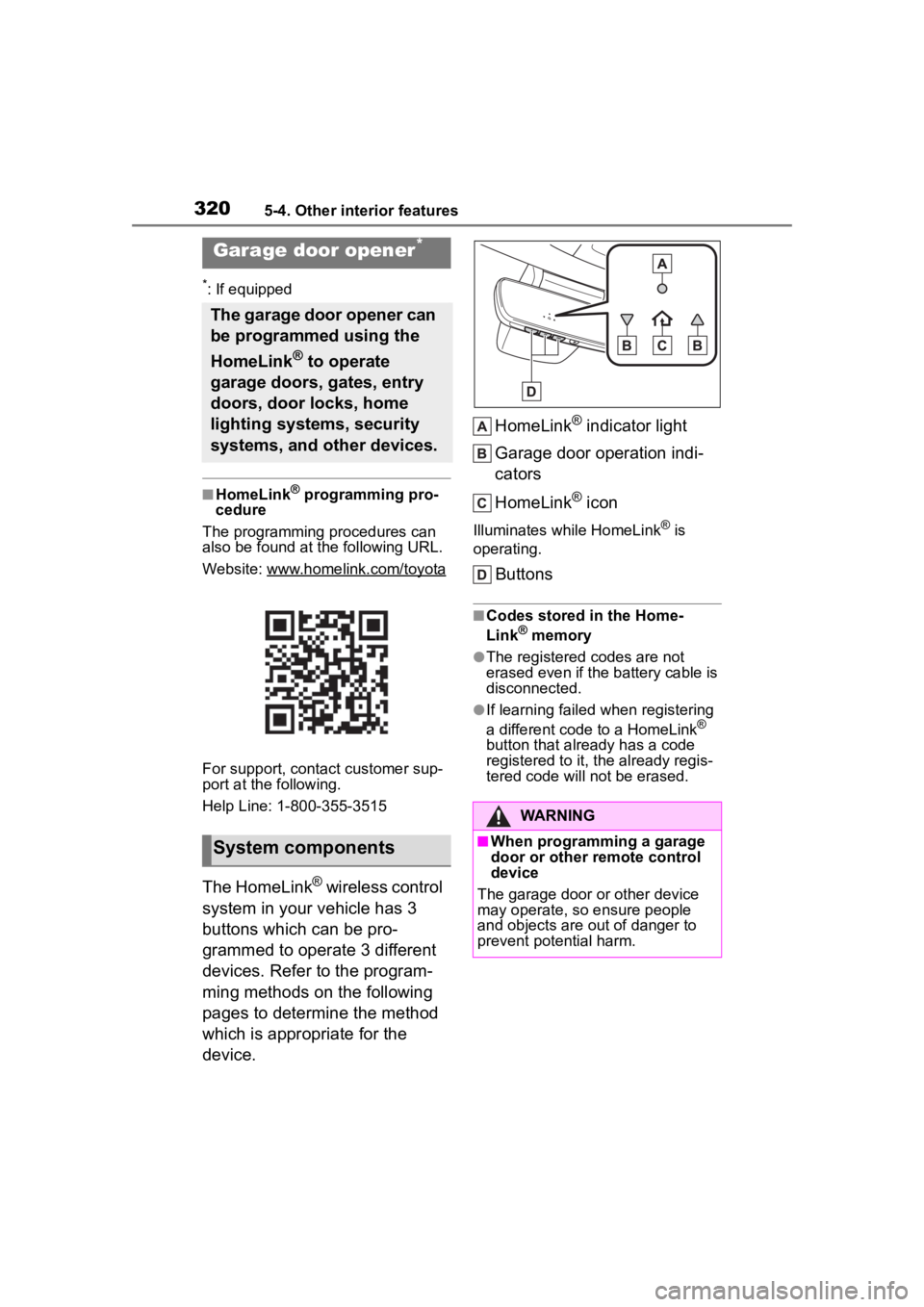
device. HomeLink
® indicator light
Garage door operation indi-
cators
HomeLink
® icon
Illuminates while HomeLink® is
operating.
Buttons
■Codes stored in the Home-
Link® memory
●The registered codes are not
erased even if the battery cable is
disconnected.
●If learning failed when registering
a different code to a HomeLink®
button that already has a code
registered to it, the already regis-
tered code will not be erased.
Garage door opener*
The garage door opener can
be programmed using the
HomeLink
® to operate
garage doors, gates, entry
doors, door locks, home
lighting systems, security
systems, and other devices.
System components
WARNING
■When programming a garage
door or other remote control
device
The garage door or other device
may operate, so ensure people
and objects are out of danger to
prevent potential harm.