mirror TOYOTA COROLLA CROSS HYBRID 2023 Owner's Guide
[x] Cancel search | Manufacturer: TOYOTA, Model Year: 2023, Model line: COROLLA CROSS HYBRID, Model: TOYOTA COROLLA CROSS HYBRID 2023Pages: 516, PDF Size: 15.96 MB
Page 301 of 516

3015-1. Using the air conditioning system and defogger
5
Interior features
To defog the windshield and the
side windows quickly, turn the air
flow and temperature up.
To return to the previous mode,
press the windshield defogger
switch again when the windshield is
defogged.
When the windshield defogger
switch is on, the indicator illumi-
nates on the windshield defogger
switch.
■Defogging the rear window
and outside rear view mir-
rors
Defoggers are used to defog the
rear window, and to remove
raindrops, dew and frost from
the outside rear view mirrors.
Press the rear window and out-
side rear view mirror defoggers
switch.
The defoggers will automatically
turn off after a while.
When the rear window and outside
rear view mirror defoggers switch is
on, the indicator illuminates on the
rear window and ou tside rear view
mirror defoggers switch.
■Eco air conditioning mode
The air conditioning is controlled
with low fuel consumption priori-
tized such as reducing fan
speed, etc.
Press the eco air conditioning
mode switch.
When the eco air conditioning
mode is on, the indicator illumi-
nates on the eco air conditioning
mode switch.
■When the outside temperature
exceeds 75°F (24°C) and the air
conditioning system is on
●In order to reduce the air condi-
tioning power consumption, the air
conditioning system may switch to
recirculated air mode automati-
cally. This may also reduce fuel
consumption.
●Recirculated air mode is selected
as a default mode when the power
switch is turned to ON.
●It is possible to switch to outside
air mode at any time by pressing
the outside air mode switch.
■Fogging up of the windows
●The windows will easily fog up
when the humidity in the vehicle is
high. Turning “A/C” on will dehu-
midify the air from the outlets and
defog the windshield effectively.
●If you turn “A/C” off, the windows
may fog up more easily.
●The windows may fog up if the
recirculated air mode is used.
■When driving on dusty roads
Close all windows. If dust thrown up
by the vehicle is still drawn into the
vehicle after closing the windows, it
is recommended that the air intake
mode be set to outside air mode and
the fan speed to a ny setting except
off.
■Outside/recirculated air mode
●Setting to the recirculated air
mode temporarily is recom-
mended in preventing dirty air
from entering the vehicle interior
and helping to c ool the vehicle
when the outside air temperature
is high.
●Outside/recirculated air mode may
automatically switch depending on
the temperature setting or the
inside temperature.
Page 303 of 516
3035-1. Using the air conditioning system and defogger
5
Interior features
1Press the automatic mode
switch.
2 Adjust the temperature set-
ting.
3 To stop the operation, press
the off switch.
If the fan speed setting or air
flow modes are operated, the
automatic mode indicator goes
off. However, automatic mode
for functions other than that
operated is maintained.
■Using automatic mode
Fan speed is adjusted automati-
cally according to the temperature setting and the ambient conditions.
Therefore, the fan may stop for a
while until warm or
cool air is ready
to flow immediately after the auto-
matic mode switch pressed.
This function automatically con-
trols the air conditioning airflow
so that priority is given to the
front seats. Unnecessary air
conditioning is suppressed, con-
tributing to increased fuel effi-
ciency.
Front seat concentrated airflow
mode operates in the following
situations.
No passengers are detected
in the rear seats
The windshield defogger is
not operating
While operating, illumi-
nates.
■Manually turning front seat
concentrated airflow mode
on/off
In front seat concentrated air-
flow mode, directing airflow to
the front seats only and to all
seats can be switched via switch
operation. When the mode has
been switched manually, auto-
matic airflow control stops oper-
ating.
Press on the air condi-
tioning operation panel and
WARNING
■When the outside rear view
mirror defoggers are operat-
ing
Do not touch the outside rear view
mirror surfaces, as they can
become very hot and burn you.
NOTICE
■To prevent 12-volt battery dis-
charge
Do not leave the air conditioning
system on longer than necessary
when the hybrid system is off.
■When repairing/replacing
parts of the air conditioning
system
Have repair/replacement per-
formed by your Toyota dealer.
When a part of the air conditioning
system, such as the evaporator, is
to be replaced, it must be
replaced with a new one.
Using automatic mode
Front seat concentrated
airflow mode (S-FLOW)
Page 324 of 516
3245-4. Other interior features
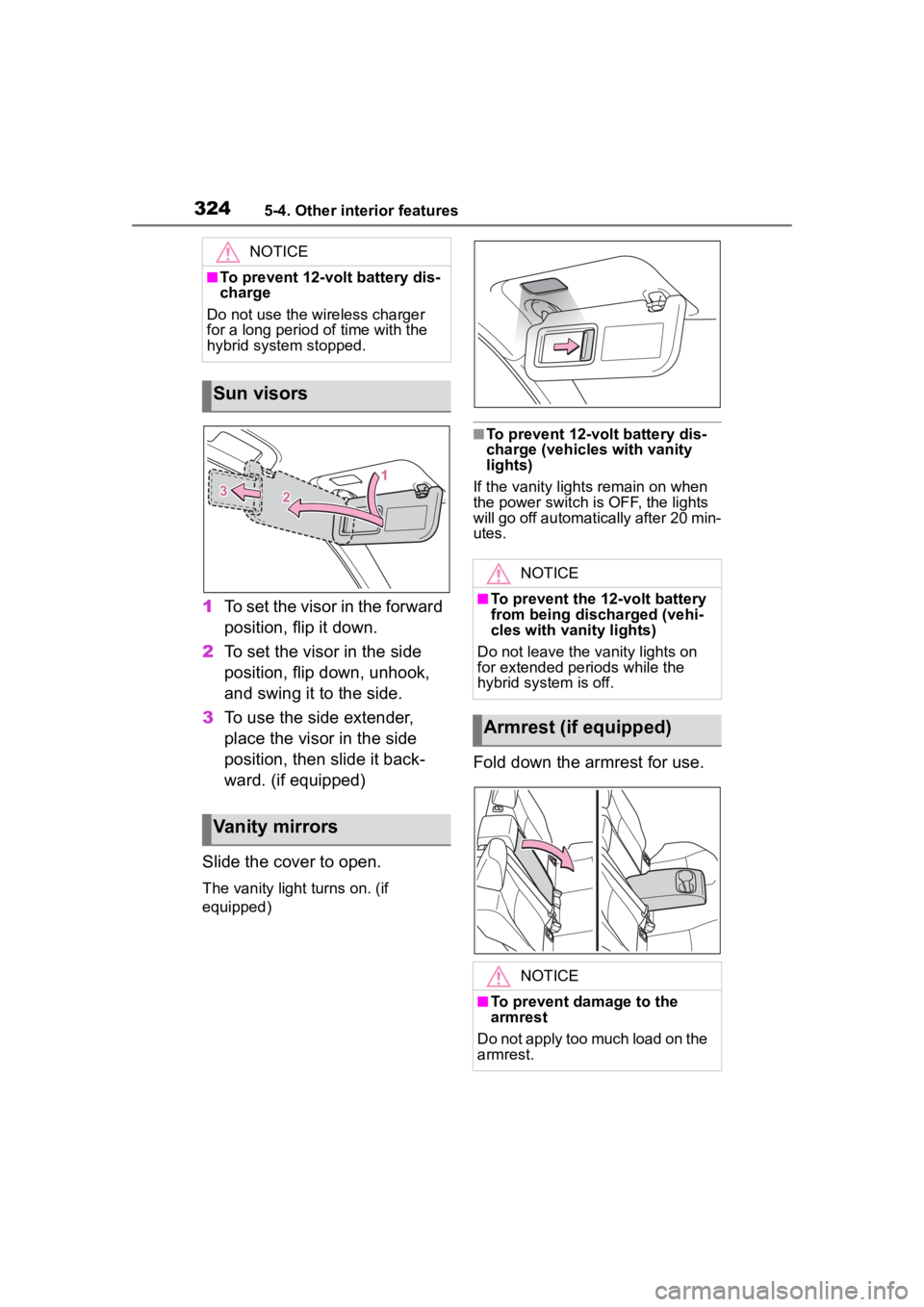
1To set the visor in the forward
position, flip it down.
2 To set the visor in the side
position, flip down, unhook,
and swing it to the side.
3 To use the side extender,
place the visor in the side
position, then slide it back-
ward. (if equipped)
Slide the cover to open.
The vanity light turns on. (if
equipped)
■To prevent 12-volt battery dis-
charge (vehicles with vanity
lights)
If the vanity lights remain on when
the power switch is OFF, the lights
will go off automatically after 20 min-
utes.
Fold down the armrest for use.
NOTICE
■To prevent 12-volt battery dis-
charge
Do not use the wireless charger
for a long period of time with the
hybrid system stopped.
Sun visors
Vanity mirrors
NOTICE
■To prevent the 12-volt battery
from being discharged (vehi-
cles with vanity lights)
Do not leave the vanity lights on
for extended periods while the
hybrid system is off.
Armrest (if equipped)
NOTICE
■To prevent damage to the
armrest
Do not apply too much load on the
armrest.
Page 327 of 516
3275-4. Other interior features
5
Interior features
■Before programming Home-
Link
®
During programming, it is pos-
sible that garage doors,
gates, or other devices may
operate. For this reason,
make sure that people and
objects are clear of the
garage door or other devices
to prevent injury or other
potential harm.
It is recommended that a new
battery be placed in the
remote control transmitter for
more accurate programming.
Garage door opener motors
manufactured after 1995 may
be equipped with rolling code protection. If this is the case,
you may need a stepladder or
other sturdy, safe device to
reach the “Learn” or “Smart”
button on the garage door
opener motor.
■Programming HomeLink®
Steps
1 through 3 must be per-
formed within 60 seconds, oth-
erwise the indicator light will
stop flashing and programming
will not be able to be completed.
1 Press and release the Home-
Link
® button you want to pro-
gram and check that the
HomeLink
® indicator light
flashes (orange).
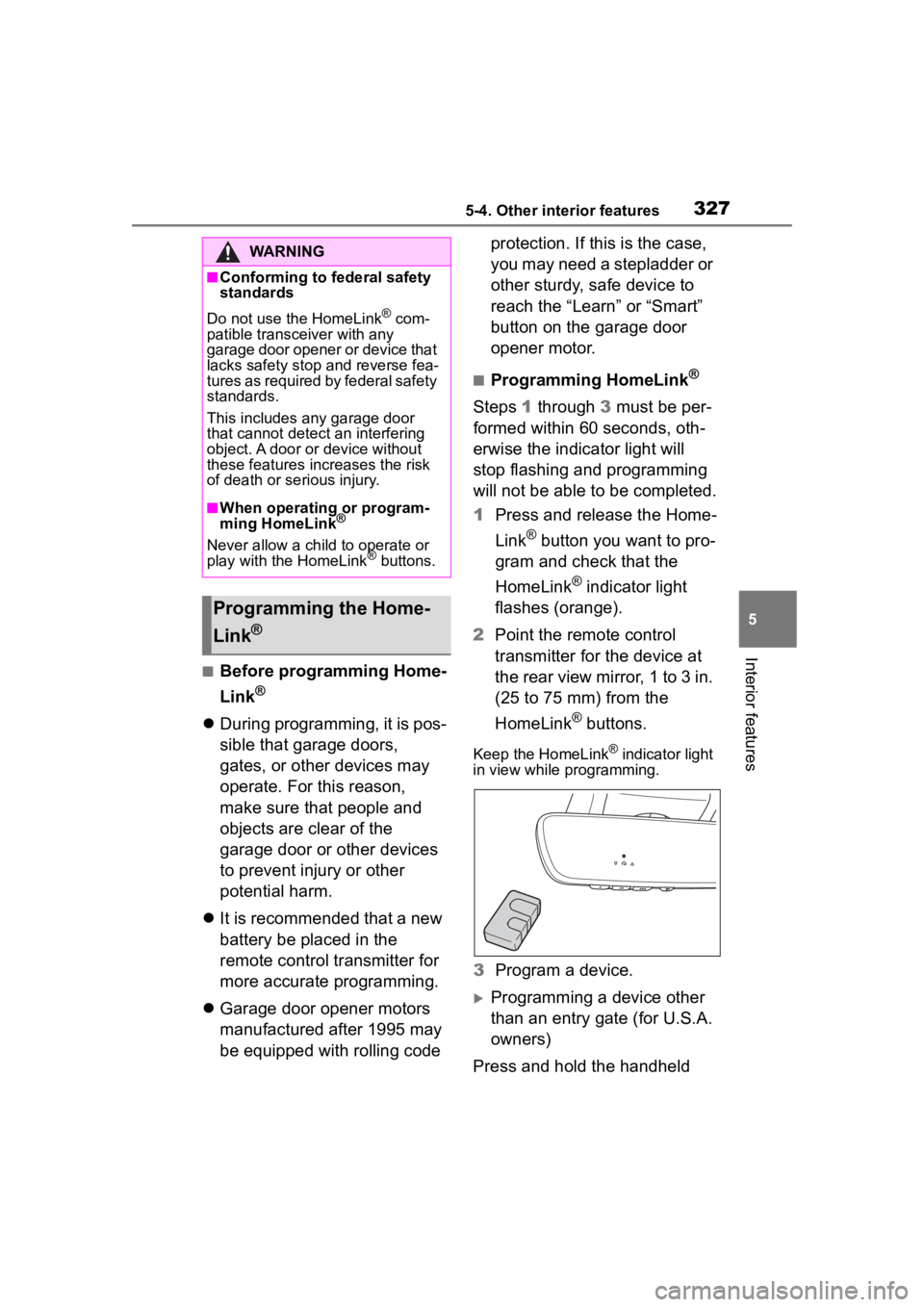
2 Point the remote control
transmitter for the device at
the rear view mirror, 1 to 3 in.
(25 to 75 mm) from the
HomeLink
® buttons.
Keep the HomeLink® indicator light
in view while programming.
3 Program a device.
Programming a device other
than an entry gate (for U.S.A.
owners)
Press and hold the handheld
WARNING
■Conforming to federal safety
standards
Do not use the HomeLink
® com-
patible transceiver with any
garage door opener or device that
lacks safety stop and reverse fea-
tures as required by federal safety
standards.
This includes any garage door
that cannot detect an interfering
object. A door or device without
these features increases the risk
of death or se rious injury.
■When operating or program-
ming HomeLink®
Never allow a child to operate or
play with the HomeLink® buttons.
Programming the Home-
Link
®
Page 334 of 516
3346-1. Maintenance and care
6-1.Maintenance and care
Working from top to bottom,
liberally apply water to the
vehicle body, wheel wells and
underside of the vehicle to
remove any dirt and dust.
Wash the vehicle body using
a sponge or soft cloth, such
as a chamois.
For hard-to-remove marks,
use car wash soap and rinse
thoroughly with water.
Wipe away any water.
Wax the vehicle when the
waterproof coating deterio-
rates.
If water does not bead on a clean
surface, apply wax when the vehi-
cle body is cool.
■Automatic car washes
●Before washing the vehicle:
• Fold the mirrors
• Turn off the power back door (if equipped)
Start washing from the front of the
vehicle. Extend the mirrors before
driving.
■High pressure car washes
As water may ent er the cabin, do
not bring the nozzle tip near the gaps around the doors or perimeter
of the windows, or spray these
areas continuously.
■When using a car wash
If the door handle becomes wet
while the electronic key is within the
effective range, the door may lock
and unlock repeatedly. In that case,
follow the following correction pro-
cedures to wash the vehicle:
●Place the key in a position 6 ft. (2
m) or more separate from the
vehicle while the vehicle is being
washed. (Take care to ensure that
the key is not stolen.)
●Set the electronic key to bat-
tery-saving mode to disable the
smart key system. ( P.130)
●If you need to release the parking
brake, turn off the brake hold sys-
tem, shift the shift lever to N, then
release the parking brake and set
the power switch to ACC.
( P.186)
■Wheels and wheel ornaments
●Remove any dirt immediately by
using a neutral detergent.
●Wash detergent off with water
immediately after use.
●To protect the paint from damage,
make sure to obs erve the follow-
ing precautions.
• Do not use acidic, alkaline or abrasive detergent
• Do not use hard brushes
• Do not use detergent on the wheels when they are hot, such
as after driving or parking in hot
weather
■Brake pads and calipers
Rust may form if the vehicle is
parked with wet brake pads or disc
rotors, causing them to stick. Before
parking the vehicle after it is
washed, drive slo wly and apply the
brakes several times to dry the
parts.
Cleaning and protect-
ing the vehicle exte-
rior
Perform cleaning in a man-
ner appropriate to each
component and its material.
Cleaning instructions
Page 470 of 516
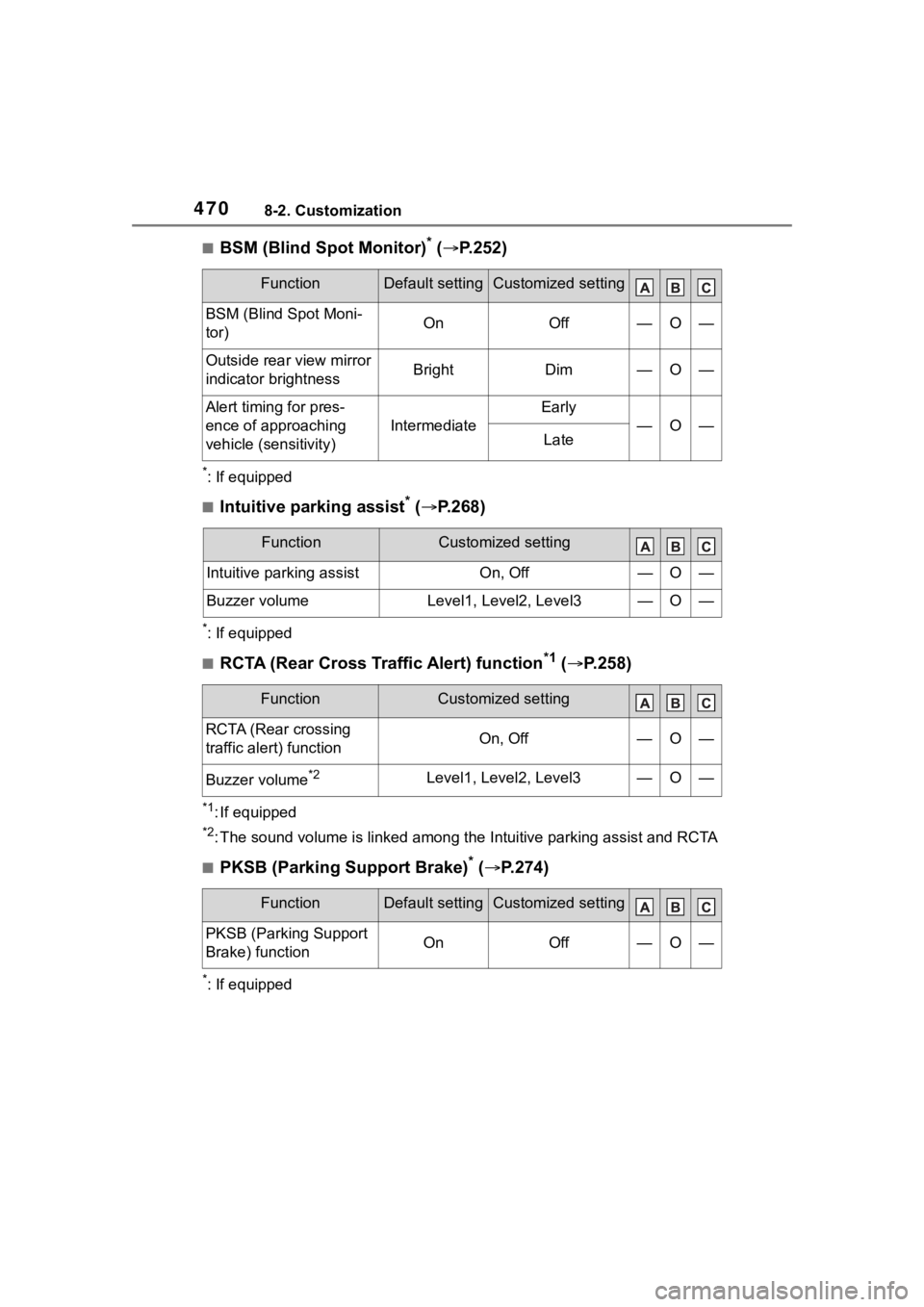
4708-2. Customization
■BSM (Blind Spot Monitor)* ( P.252)
*: If equipped
■Intuitive parking assist* ( P.268)
*: If equipped
■RCTA (Rear Cross Traffic Alert) function*1 ( P.258)
*1: If equipped
*2: The sound volume is linked among the Intuitive parking assist and RCTA
■PKSB (Parking Support Brake)* ( P.274)
*: If equipped
FunctionDefault settingCustomized setting
BSM (Blind Spot Moni-
tor)OnOff—O—
Outside rear view mirror
indicator brightnessBrightDim—O—
Alert timing for pres-
ence of approaching
vehicle (sensitivity)
Intermediate
Early
—O—Late
FunctionCustomized setting
Intuitive parking assistOn, Off—O—
Buzzer volumeLevel1, Level2, Level3—O—
FunctionCustomized setting
RCTA (Rear crossing
traffic alert) functionOn, Off—O—
Buzzer volume*2Level1, Level2, Level3—O—
FunctionDefault settingCustomized setting
PKSB (Parking Support
Brake) functionOnOff—O—
Page 490 of 516

490Alphabetical Index
Preparing and checking before
winter.................................. 291
Battery (traction battery) ......... 71
Blind Spot Monitor (BSM) ...... 252
Bottle holders ......................... 311
Brake Brake hold ............................ 189
Fluid ............................. 354, 449
Parking brake ....................... 186
Regenerative braking ............. 69
Warning light ........................ 402
Brake assist ............................ 284
Break-in tips ........ ................... 154
Brightness control Instrument panel light control86, 89
BSM (Blind Spot Monitor) ...... 252
C
Care Exterior ................................. 334
Interior .................................. 337
Seat belts ............................. 337
Wheels and wheel ornaments........................................... 334
Cargo capacity ....................... 163
Cargo hooks ........................... 313
Child restraint system Fixed with a LATCH system ... 56
Fixed with a seat belt ............. 52
Front passenger occupant clas-sification system ................... 37
Points to remember ................ 43
Riding with children ................ 42
Types of child restraint system installation met hod ............... 45
Using an anchor bracket ........ 61
Child safety 12-volt battery precautions . 357, 437
Airbag precautions ................. 32
Back door precautions ......... 119 Child restraint system .............45
Heated steering wheel and seat
heater precautio ns..............306
How your child should wear the seat belt ................................26
Moon roof precautions..........147
Power window lock switch ....145
Power window precautions...144
Rear door child-protectors .... 118
Removed electronic key battery precautions .........................383
Seat belt extender precautions .............................................26
Seat belt precautions..............42
Child-protectors...................... 118
Cleaning Exterior .................................334
Interior ..................................337
Seat belts .............................337
Wheels and wheel ornaments...........................................334
Clock ................... .....84, 86, 87, 90
Coat hooks ..............................325
Condenser ............. ..................353
Console box ............................312
Cooling system .......................352 Engine overheating ..............438
Hybrid system overheating ...439
Cruise control .........................246
Cup holders............................. 311
Current fuel consumption..92, 99
Curtain shield airbags ..............29
Customizable featu res ...........463
D
Daytime running light system192
Daytime running lights/parking
lightsReplacing light bulbs ............388
Defogger Outside rear view mirrors .....301
Rear window.........................301
Page 491 of 516

491Alphabetical Index
Windshield............................ 300
Differential Rear differential oil ............... 448
Dimensions ............................. 444
Dinghy towing ........................ 173
Display Cruise control ....................... 246
Dynamic radar cruise control 238
Energy monitor ..................... 105
Intuitive parking assist .......... 268
Multi-information display .. 90, 98
RCTA .................................... 258
Warning message ................ 412
Display change button ....... 85, 89
Do-it-yourself maintenance ... 341
Door lock Back door ............................. 119
Side doors ............................ 115
Smart key system................. 129
Wireless remote control ....... 113
Doors Automatic door locking and unlocking system................ 118
Back door ............................. 119
Door glasses ........................ 143
Door lock .............................. 119
Open door warning buzzer . 116, 11 8
Outside rear view mirrors ..... 141
Rear door child-protectors.... 118
Drive distance ................... 95, 102
Drive information ............. 95, 102
Drive-Start Control (DSC) Sudden start restraint control159
Driving Break-in tips ......................... 154
Correct driving posture ........... 23
Driving mode select switch... 283
Hybrid vehicle driving tips .... 289
Procedures ........................... 153
Winter drive tips ................... 291
Driving information display91, 99 Driving range ......................92, 99
Driving support system informa-
tion display......................95, 102
DSC (Drive-Start Control) Sudden start restraint control159
Dynamic radar cruise control 235
E
ECO Accelerator Guidance....93, 100
Eco score ..........................93, 100
EDR (Event data recorder) .........8
E-Four ......................................285
Elapsed time .....................95, 102
Electric motor (t raction motor)68
Electric Power Steering (EPS) ...............................................285Warning light.........................405
Electronic key ......................... 112 Battery-saving function .........130
If the electronic key does not operate properly .................431
Replacing the battery ...........382
Emergency Driving Stop System ...............................................250
Emergency flashers ...............394
Emergency tire puncture .......417
Emergency, in case of If a warning buzzer sounds ..402
If a warning light turns on .....402
If a warning message is dis-played .................................412
If the 12-volt battery is dis- charged ..............................433
If the electronic key does not operate properly .................431
If the fuel filler door cannot be opened ...............................430
If the hybrid sys tem will not start
...........................................428
If the vehicle is submerged or water on the road is rising ..396
Page 493 of 516

493Alphabetical Index
Information ........................... 451
Refueling .............................. 202
Type ..................................... 445
Warning light ........................ 405
Fuel consumption Average fuel economy ..... 92, 99
Current fuel consumption . 92, 99
Fuel economy ......... ............ 92, 99
Fuel filler door If the fuel filler door cannot be opened ............................... 430
Refueling .............................. 202
Fuel gauge .......................... 84, 87
Fuses ....................................... 384
G
Garage door opener ............... 326
Gauges ................................ 84, 87
Glove box ................................ 311
Glove box light ....................... 311
H
Head restraints ....................... 137
Headlight aim .......................... 386
Headlights Adaptive Front-lighting System (AFS) .................................. 194
Automatic High Beam system ........................................... 195
Light switch .......................... 192
Replacing light bulbs ............ 388
Headlights/daytime running lightsReplacing light bulbs ............ 388
Heated steering wheel ........... 306
Heaters Automatic air conditioning sys-tem ..................................... 298
Heated steering wheel ......... 306
Outside rear view mirrors ..... 301
Seat heaters ......................... 306 High mounted stoplight
Replacing light bulbs ............388
High-voltage components .......71
Hill-start assist control...........285
Hood Open.....................................348
Hooks Coat hooks ...........................325
Retaining hooks (floor mat) ....22
Horn .........................................139
Hybrid battery (traction battery) Location ..................................71
Specification .........................446
Warning message...................75
Hybrid battery (traction battery) air intake vent .......................379
Hybrid battery (traction battery) air vents ...................................74
Hybrid system .... .......................68
Acoustic Vehicle Alerting System .............................................70
Emergency shut off system ....74
Energy monitor/consumption screen.................................105
EV drive mode ......................179
High voltage components .......71
Hybrid system precautions .....71
If the hybrid sys tem will not start
...........................................428
Overheating ..........................439
Power (ignition) switch .........174
Regenerative braking .............69
Starting the hybrid system ....174
Hybrid System Indicator ..........93
Hybrid transmissio n ...............181
Paddle shift switches ............183
Hybrid vehicle dri ving tips.....289
I
I/M test .....................................344
Identification
Engine ..................................445
Page 494 of 516

494Alphabetical Index
Vehicle.................................. 444
Ignition switch (power switch) ............................................... 174Changing the power switch modes ................................ 177
Illuminated entry system ....... 309
Immobilizer system .................. 76
Indicators .................................. 82
Initialization Items to initialize................... 473
Maintenance......................... 341
Power windows .................... 143
Tire pressure warning system........................................... 363
Inside rear view mirror........... 140
Instrument panel li ght control86,
89
Interior lights .......................... 308 Front interior light ................. 308
Rear interior light .................. 308
Wattage ................................ 450
Intuitive parking assist Function ............................... 268
Warning message ................ 269
J
JackPositioning a floor jack ......... 349
Vehicle-equipped jack .......... 418
Jack handle ............................. 418
Jam protection function Moon roof ............................. 146
Power back door .................. 125
Power windows .................... 143
K
Keyless entrySmart key system................. 129
Wireless remote control ....... 113
Keys Battery-saving function......... 130 Electronic key ....................... 112
If the electronic key does not
operate properly .................431
If you lose your keys.............429
Key number plate ................. 112
Keyless entry ........ 115, 121, 129
Mechanical key..................... 112
Power switch ........................174
Replacing the battery ...........382
Warning buzzer ....................129
Wireless remote control........ 113
Knee airbags .............................29
L
Lane Departure Alert (LDA) ...228
Lane Tracing Assist (LTA) ......223 Operation..............................223
Language (multi-information dis- play) .................................96, 103
LATCH anchors.........................56
LDA (Lane Departure Alert) ...228 Operation..............................228
LED accent lights Light switch...........................192
Replacing light bulbs ............388
Lever Auxiliary catch lever .............348
Hood lock release lever ........348
Shift lever .............................181
Turn signal lever ...................185
Wiper lever ...........................198
License plate lights Light switch...........................192
Replacing light bulbs ............387
Wattage ................................450
Light bulbs Replacing .............................387
Lights Automatic High Beam system...........................................195
Front interior lights................308
Front personal lights .............309