reset TOYOTA COROLLA HATCHBACK 2021 (in English) Owner's Manual
[x] Cancel search | Manufacturer: TOYOTA, Model Year: 2021, Model line: COROLLA HATCHBACK, Model: TOYOTA COROLLA HATCHBACK 2021Pages: 576, PDF Size: 12.73 MB
Page 365 of 576
3655-14. Phone settings
COROLLA H/B_U
5
Audio
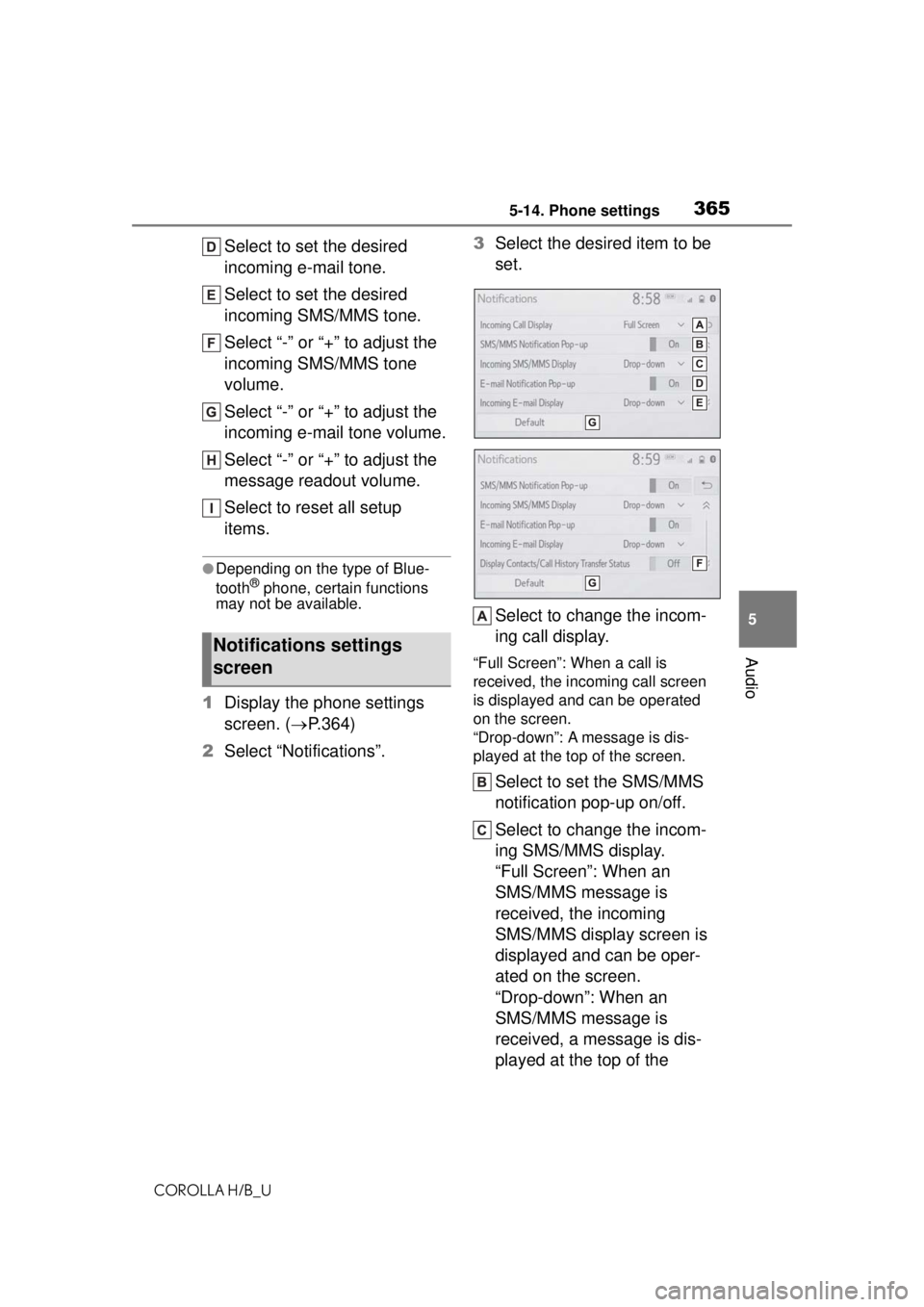
Select to set the desired
incoming e-mail tone.
Select to set the desired
incoming SMS/MMS tone.
Select “-” or “+” to adjust the
incoming SMS/MMS tone
volume.
Select “-” or “+” to adjust the
incoming e-mail tone volume.
Select “-” or “+” to adjust the
message readout volume.
Select to reset all setup
items.
●Depending on the type of Blue-
tooth® phone, certain functions
may not be available.
1 Display the phone settings
screen. ( P.364)
2 Select “Notifications”. 3
Select the desired item to be
set.
Select to change the incom-
ing call display.
“Full Screen”: When a call is
received, the incoming call screen
is displayed and can be operated
on the screen.
“Drop-down”: A message is dis-
played at the top of the screen.
Select to set the SMS/MMS
notification pop-up on/off.
Select to change the incom-
ing SMS/MMS display.
“Full Screen”: When an
SMS/MMS message is
received, the incoming
SMS/MMS display screen is
displayed and can be oper-
ated on the screen.
“Drop-down”: When an
SMS/MMS message is
received, a message is dis-
played at the top of the
Notifications settings
screen
Page 366 of 576
3665-14. Phone settings
COROLLA H/B_U
screen.
Select to set the e-mail notifi-
cation pop-up on/off.
Select to change the incom-
ing e-mail display.
“Full Screen”: When an
e-mail is received, the incom-
ing e-mail display screen is
displayed and can be oper-
ated on the screen.
“Drop-down”: When an
e-mail is received, a mes-
sage is displayed at the top
of the screen.
Select to set display of the
contact/history transfer com-
pletion message on/off.
Select to reset all setup
items.
●Depending on the type of Blue-
tooth® phone, these functions
may not be available.
Contacts can be transferred
from a Bluetooth
® phone to this
system. Contacts and favorites
can be added, edited and
deleted. Also, the call history
can be deleted.
1 Display the phone settings
screen. ( P.364)
2 Select “Contacts/Call His-
tory”. 3
Select the desired item to be
set.
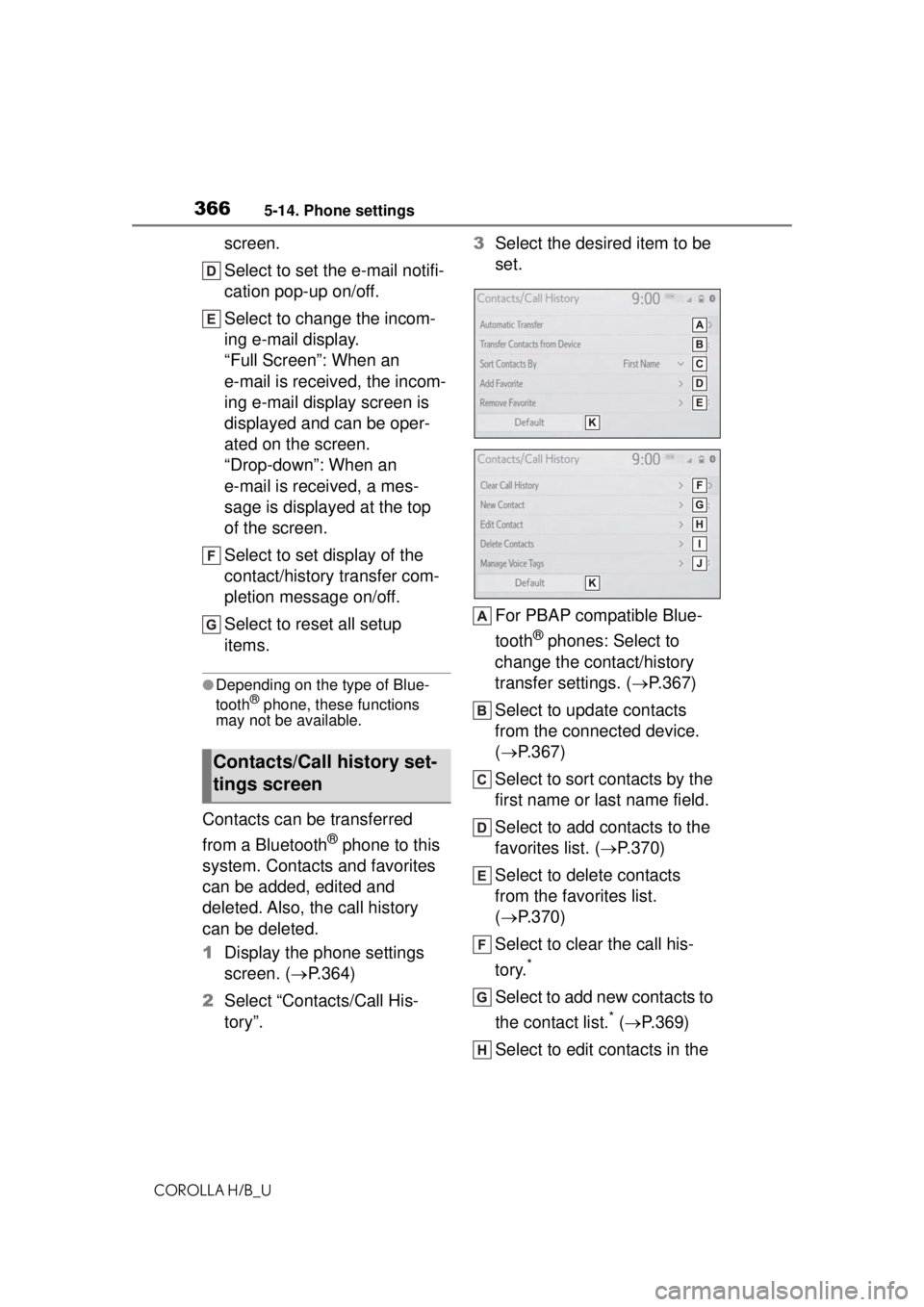
For PBAP compatible Blue-
tooth
® phones: Select to
change the contact/history
transfer settings. ( P.367)
Select to update contacts
from the connected device.
( P.367)
Select to sort contacts by the
first name or last name field.
Select to add contacts to the
favorites list. ( P.370)
Select to delete contacts
from the favorites list.
( P.370)
Select to clear the call his-
tory.
*
Select to add new contacts to
the contact list.
* ( P.369)
Select to edit contacts in the
Contacts/Call history set-
tings screen
Page 367 of 576
3675-14. Phone settings
COROLLA H/B_U
5
Audio
contact list.* ( P.370)
Select to delete contacts
from the contact list.
*
( P.370)
Select to set the voice tags.
( P.371)
Select to reset all setup
items.
*: For PBAP compatible Bluetooth®
phones, this function is available
when “Automatic Transfer” is set
to off. ( P.367)
●Depending on the type of Blue-
tooth® phone, certain functions
may not be available.
●Contact data is managed inde-
pendently for every registered
phone. When one phone is con-
nected, another phone’s regis-
tered data cannot be read.
The automatic contact/history
function is available for PBAP
compatible Bluetooth
® phones
only.
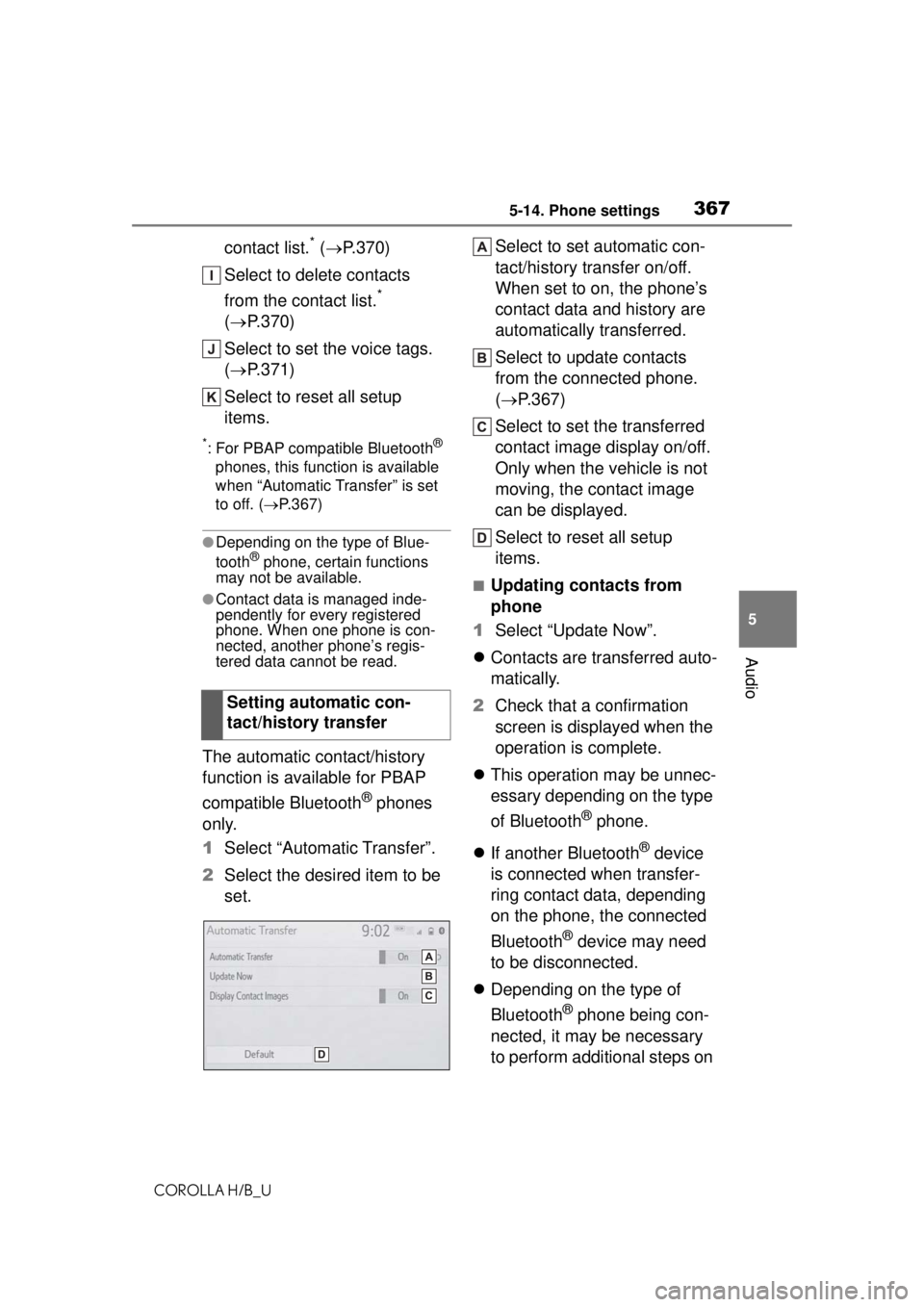
1 Select “Automatic Transfer”.
2 Select the desired item to be
set. Select to set automatic con-
tact/history transfer on/off.
When set to on, the phone’s
contact data and history are
automatically transferred.
Select to update contacts
from the connected phone.
(
P.367)
Select to set the transferred
contact image display on/off.
Only when the vehicle is not
moving, the contact image
can be displayed.
Select to reset all setup
items.
■Updating contacts from
phone
1 Select “Update Now”.
Contacts are transferred auto-
matically.
2 Check that a confirmation
screen is displayed when the
operation is complete.
This operation may be unnec-
essary depending on the type
of Bluetooth
® phone.
If another Bluetooth
® device
is connected when transfer-
ring contact data, depending
on the phone, the connected
Bluetooth
® device may need
to be disconnected.
Depending on the type of
Bluetooth
® phone being con-
nected, it may be necessary
to perform additional steps on
Setting automatic con-
tact/history transfer
Page 372 of 576
3725-14. Phone settings
COROLLA H/B_U
■Deleting the voice tag
1 Select “Delete”.
2 Select the desired contact
and select “Delete”.
3 Select “Yes” when the confir-
mation screen appears.
●Multiple data can be selected and
deleted at the same time.
●Voice tags are deleted when the
set language of the system is
changed. ( P.296)
1 Display the phone settings
screen. ( P.364)
2 Select “Messaging”.
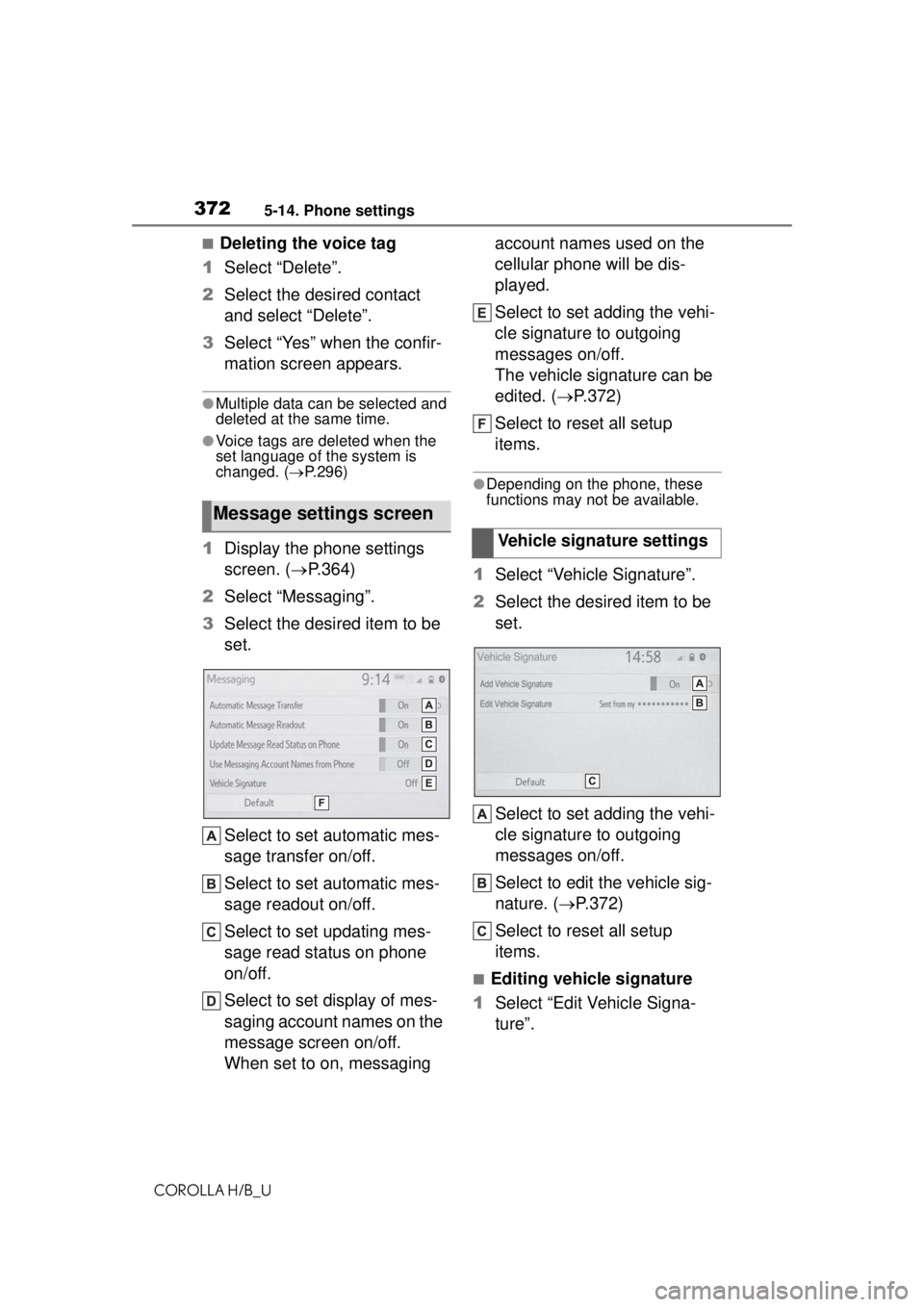
3 Select the desired item to be
set.
Select to set automatic mes-
sage transfer on/off.
Select to set automatic mes-
sage readout on/off.
Select to set updating mes-
sage read status on phone
on/off.
Select to set display of mes-
saging account names on the
message screen on/off.
When set to on, messaging account names used on the
cellular phone will be dis-
played.
Select to set adding the vehi-
cle signature to outgoing
messages on/off.
The vehicle signature can be
edited. (
P.372)
Select to reset all setup
items.
●Depending on the phone, these
functions may not be available.
1 Select “Vehicle Signature”.
2 Select the desired item to be
set.
Select to set adding the vehi-
cle signature to outgoing
messages on/off.
Select to edit the vehicle sig-
nature. ( P.372)
Select to reset all setup
items.
■Editing vehicle signature
1 Select “Edit Vehicle Signa-
ture”.
Message settings screen
Vehicle signature settings
Page 381 of 576
3815-16. Connected Services Overview
COROLLA H/B_U
5
Audio
the United States Virgin
Islands.
●Data usage fees may apply while
using Toyota apps function. Con-
firm data usage fees before using
this function.
●For details regarding operation of
the Toyota apps, refer to
https://www.toyota.com/
connected-servicesin the United States,
https://www.toyota.ca/connected
in Canada, and
http://www.toyotapr.com/
connected-services
in Puerto Rico.
●These functions are not made
available in some countries or
areas. Availability of functions of
the Toyota apps is dependent on
network reception level.
■Initializing personal data
The personal data used in appli-
cations can be reset. ( P.299)
The following personal data
can be deleted and returned
to their default settings:
• Downloaded contents
• Radio stations that were listened
to
●Once initialized, the data and set-
tings will be erased. Pay much
attention when in itializing the data.
■Settings required to use
Toyota mobile application
Perform the settings in the fol-
lowing order. 1
Download the Toyota mobile
application to your smart
phone or the system.
2 Register the smart phone
with the system.
In order to use Toyota mobile appli-
cation, the following must first be
performed:
Download the Toyota mobile
application onto your smart
phone or the system, and
login to the application.
( P.381)
Register the smart phone, on
which the Toyota mobile appli-
cation was installed, with the
system. ( P.381)
Register a Bluetooth
® phone
with the hands-free system.
( P.381)
■Registering the Toyota
mobile application applica-
tion
Registration is optional.
1 Download the Toyota mobile
application to your smart
phone or the system.
2 Run the Toyota mobile appli-
cation on your smart phone
or the system.
3 Enter the information
required into the Toyota
mobile application. Login to
the application.
●Applications can only be used
when the Toyota mobile applica-
tion has been downloaded to your
smart phone or the system, and
Preparation before using
Toyota mobile application
Page 389 of 576
3895-18. Toyota apps settings
COROLLA H/B_U
5
Audio
5-18.Toyota apps settings
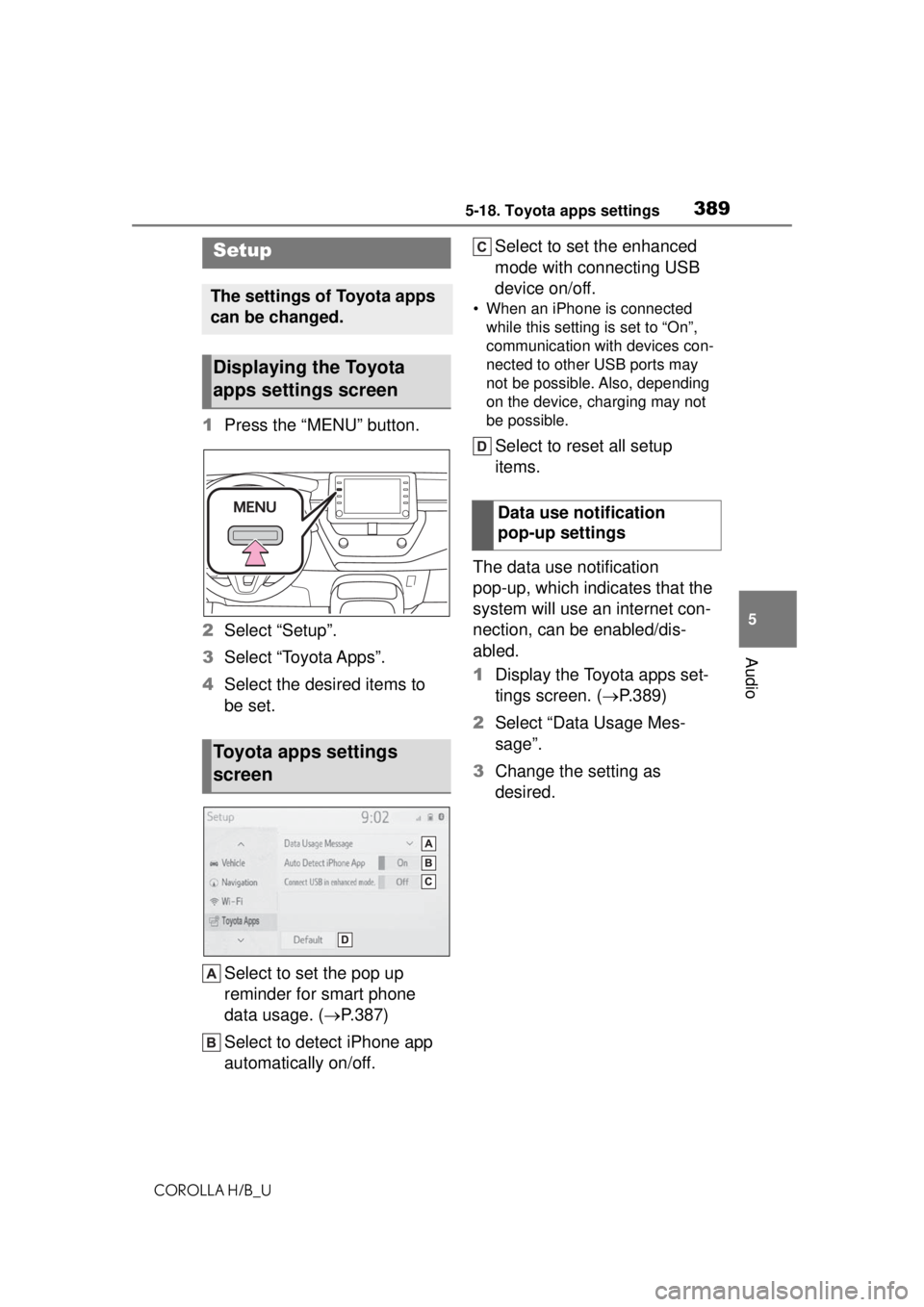
1 Press the “MENU” button.
2 Select “Setup”.
3 Select “Toyota Apps”.
4 Select the desired items to
be set.
Select to set the pop up
reminder for smart phone
data usage. ( P.387)
Select to detect iPhone app
automatically on/off. Select to set the enhanced
mode with connecting USB
device on/off.
• When an iPhone is connected
while this setting is set to “On”,
communication with devices con-
nected to other USB ports may
not be possible. Also, depending
on the device, charging may not
be possible.
Select to reset all setup
items.
The data use notification
pop-up, which indicates that the
system will use an internet con-
nection, can be enabled/dis-
abled.
1 Display the Toyota apps set-
tings screen. ( P.389)
2 Select “Data Usage Mes-
sage”.
3 Change the setting as
desired.
Setup
The settings of Toyota apps
can be changed.
Displaying the Toyota
apps settings screen
Toyota apps settings
screen
Data use notification
pop-up settings
Page 426 of 576
4267-2. Maintenance
COROLLA H/B_U
■Resetting the message indicat-
ing maintenance is required
After the required maintenance is
performed according to the mainte-
nance schedule, please reset the
message.
To reset the message, follow the
procedure described below:
1 Press or of the meter
control switch to select .
2 Press or to select “Vehi-
cle Settings” and then press and
hold .
3 Press or to select
“Scheduled Maintenance” and
then press .
4 Press or to select “Yes”
and then press .
A message will be displayed on the
multi-information display when the
reset procedure has been com-
pleted.
You can perform some mainte-
nance procedures by yourself.
Please be aware that do-it-your-
self maintenance may affect
warranty coverage.
The use of Toyota repair manuals is
recommended.
For details about warranty cover-
age, refer to the separate “Owner’s
Warranty Information Booklet” or
“Owner’s Manual Supplement”.
Do-it-yourself mainte-
nance
General maintenance
Listed below are the general
maintenance items that
should be performed at the
intervals specified in the
“Owner’s Warranty Informa-
tion Booklet” or “Owner’s
Manual Supplement/Sched-
uled Maintenance Guide”. It
is recommended that any
problem you notice should
be brought to the attention
of your Toyota dealer or
qualified service shop for
advice.
WARNING
■If the engine is running
Turn the engine off and ensure
that there is adequate ventilation
before performing maintenance
checks.
Engine compartment
ItemsCheck points
BatteryCheck the connec-
tions. ( P.439)
Brake fluid
Is the brake fluid at
the correct level?
( P.438)
Engine coolant
Is the engine cool-
ant at the correct
level? ( P.437)
Engine oil
Is the engine oil at
the correct level?
( P.435)
Page 449 of 576
4497-3. Do-it-yourself maintenance
COROLLA H/B_U
7
Maintenance and care
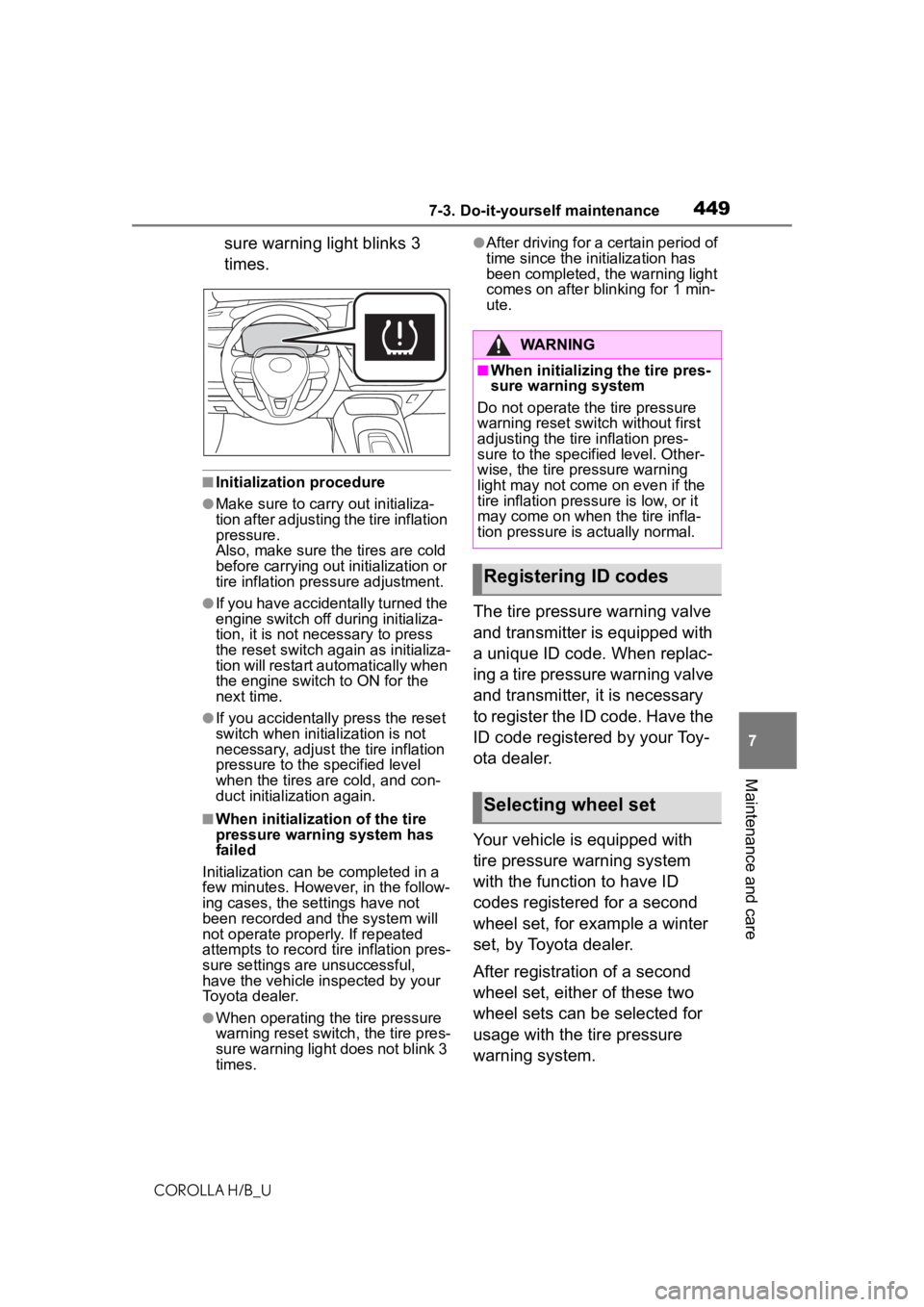
sure warning light blinks 3
times.
■Initialization procedure
●Make sure to carry out initializa-
tion after adjusting the tire inflation
pressure.
Also, make sure the tires are cold
before carrying ou t initialization or
tire inflation pressure adjustment.
●If you have accidentally turned the
engine switch off during initializa-
tion, it is not necessary to press
the reset switch again as initializa-
tion will restart aut omatically when
the engine switch to ON for the
next time.
●If you accidentally press the reset
switch when initialization is not
necessary, adjust the tire inflation
pressure to the specified level
when the tires are cold, and con-
duct initialization again.
■When initialization of the tire
pressure warning system has
failed
Initialization can be completed in a
few minutes. However, in the follow-
ing cases, the settings have not
been recorded and the system will
not operate properly. If repeated
attempts to record tire inflation pres-
sure settings are unsuccessful,
have the vehicle inspected by your
Toyota dealer.
●When operating the tire pressure
warning reset switch , the tire pres-
sure warning light does not blink 3
times.
●After driving for a certain period of
time since the initialization has
been completed, the warning light
comes on after blinking for 1 min-
ute.
The tire pressure warning valve
and transmitter is equipped with
a unique ID code. When replac-
ing a tire pressure warning valve
and transmitter, it is necessary
to register the ID code. Have the
ID code registered by your Toy-
ota dealer.
Your vehicle is equipped with
tire pressure warning system
with the function to have ID
codes registered for a second
wheel set, for example a winter
set, by Toyota dealer.
After registration of a second
wheel set, either of these two
wheel sets can be selected for
usage with the tire pressure
warning system.
WARNING
■When initializing the tire pres-
sure warning system
Do not operate the tire pressure
warning reset switch without first
adjusting the tire inflation pres-
sure to the specified level. Other-
wise, the tire pressure warning
light may not come on even if the
tire inflation pressure is low, or it
may come on when the tire infla-
tion pressure is actually normal.
Registering ID codes
Selecting wheel set
Page 483 of 576
4838-2. Steps to take in an emergency
COROLLA H/B_U
8
When trouble arises
●Automatic High Beam
●RSA (Road Sign Assist) (if
equipped)
●Dynamic radar cruise control with
full-speed range (if equipped)
●Dynamic radar cruise control (if
equipped)
■If “Radar Cruise Control
Unavailable” is displayed
The dynamic radar cruise control
with full-speed range system or
dynamic radar cruise control system
cannot be used temporarily. Use the
system when it becomes available
again.
■If “Maintenance Required
Soon” is displayed
Indicates that all maintenance
according to the driven distance on
the maintenance schedule
* should
be performed soon.
Comes on approximately 4500
miles (7200 km) after the message
has been reset. If necessary, per-
form maintenance. Please reset the
message after the maintenance is
performed. ( P.426)
*: Refer to the separate “Scheduled
Maintenance” or “Owner’s Man-
ual Supplement” for the mainte-
nance interval applicable to your
vehicle.
■If “Maintenance Required Visit
Your Dealer” is displayed
Indicates that all maintenance is
required to correspond to the driven
distance on the maintenance sched-
ule
*.
Comes on approximately 5000
miles (8000 km) after the message
has been reset. (The indicator will
not work properly unless the mes-
sage has been reset.) Perform the
necessary maintenance. Please
reset the message after the mainte-
nance is performed. ( P.426)
*: Refer to the separate “Scheduled Maintenance” or “Owner’s Man-
ual Supplement” for the mainte-
nance interval applicable to your
vehicle.
■If a message that indicates the
need for visiting your Toyota
dealer is displayed
The system or part shown on the
multi-information di splay is malfunc-
tioning. Have the vehicle inspected
by your Toyota dealer immediately.
■If a message that indicates the
need for referring to Owner’s
Manual is displayed
●If “Engine Coolant Temp High” is
displayed, follow the instructions
accordingly. ( P.510)
●If any of the following messages
are displayed on the multi-infor-
mation display, it may indicate a
malfunction. Have the vehicle
inspected by your Toyota dealer
immediately.
• “Smart Key System Malfunction”
●If any of the following messages
are displayed on the multi-infor-
mation display, it may indicate a
malfunction. Immediately stop the
vehicle and contact your Toyota
dealer.
• “Braking Power Low”
• “Charging System Malfunction”
• “Oil Pressure Low”
NOTICE
■If “High Power Consumption
Partial Limit on AC/Heater
Operation” is displayed fre-
quently
There is a possible malfunction
relating to the charging system or
the battery may be deteriorating.
Have the vehicle inspected by
your Toyota dealer.
Page 500 of 576
5008-2. Steps to take in an emergency
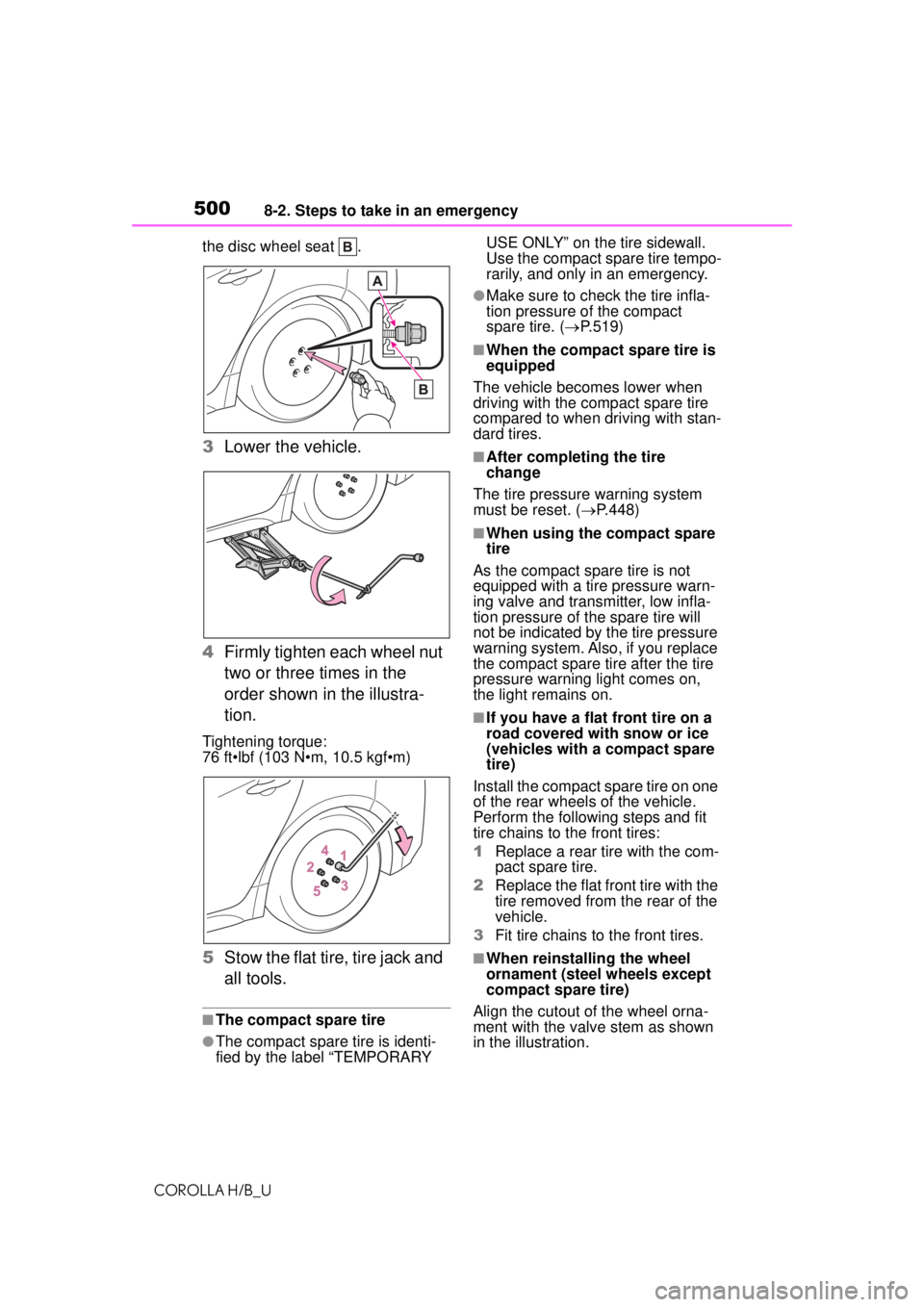
COROLLA H/B_Uthe disc wheel seat .
3
Lower the vehicle.
4 Firmly tighten each wheel nut
two or three times in the
order shown in the illustra-
tion.
Tightening torque:
76 ft•lbf (103 N•m, 10.5 kgf•m)
5Stow the flat tire, tire jack and
all tools.
■The compact spare tire
●The compact spare tire is identi-
fied by the label “TEMPORARY USE ONLY” on the tire sidewall.
Use the compact spare tire tempo-
rarily, and only in an emergency.
●Make sure to check the tire infla-
tion pressure of the compact
spare tire. (
P.519)
■When the compact spare tire is
equipped
The vehicle becomes lower when
driving with the compact spare tire
compared to when driving with stan-
dard tires.
■After completing the tire
change
The tire pressure warning system
must be reset. ( P.448)
■When using the compact spare
tire
As the compact spare tire is not
equipped with a tire pressure warn-
ing valve and transmitter, low infla-
tion pressure of the spare tire will
not be indicated by the tire pressure
warning system. Also, if you replace
the compact spare tire after the tire
pressure warning light comes on,
the light remains on.
■If you have a flat front tire on a
road covered with snow or ice
(vehicles with a compact spare
tire)
Install the compact spare tire on one
of the rear wheels of the vehicle.
Perform the following steps and fit
tire chains to the front tires:
1 Replace a rear tire with the com-
pact spare tire.
2 Replace the flat front tire with the
tire removed from the rear of the
vehicle.
3 Fit tire chains to the front tires.
■When reinstalli ng the wheel
ornament (steel wheels except
compact spare tire)
Align the cutout of the wheel orna-
ment with the valve stem as shown
in the illustration.