headlights TOYOTA COROLLA HATCHBACK 2022 (in English) User Guide
[x] Cancel search | Manufacturer: TOYOTA, Model Year: 2022, Model line: COROLLA HATCHBACK, Model: TOYOTA COROLLA HATCHBACK 2022Pages: 758, PDF Size: 155.26 MB
Page 205 of 758
203
4
4-3. Operating the lights and wipers
Driving
beams in the following situations:
• When vehicles ahead suddenly appear from a curve
• When the vehicle is cut in front of by
another vehicle • When vehicles ahead are hidden from
sight due to repeated curves, road
dividers or roadside trees • When vehicles ahead appear from the
faraway lane on wide road
• When vehicles ahead have no lights
●The high beams may be changed to
the shaded high beams if a vehicle ahead that is using fog lights without
its headlights turned on is detected.
●House lights, streetlights, traffic sig-
nals, and illuminated billboards or
signs and other reflective objects may cause the high beams to change to
the shaded high beams, cause the
high beams not to change to the shaded high beams, or change the
area that is not illuminated.
●The following factors may affect the
amount of time taken to turn the high
beam on or off, or the speed by which the areas not illuminated change:
• The brightness of headlights, fog
lights, and tail lights of vehicles ahead • The movement and direction of vehi-
cles ahead
• When a vehicle ahead only has oper- ational lights on one side
• When a vehicle ahead is a
two-wheeled vehicle • The condition of the road (gradient,
curve, condition of the road surface
etc.) • The number of passengers and
amount of luggage
●The light distribution control of the
headlights may change unexpectedly.
●Bicycles or similar objects may not be detected.
●In the following sit uations the system may not be able to correctly detect the
surrounding brightness level. This
may cause the low beams to remain on or the high beams to flash or daz-
zle pedestrians or vehicles ahead. In
such a case, it is necessary to manu-
ally switch between the high and low beams.
• When driving in inclement weather
(heavy rain, snow, fog, sandstorms, etc.)
• When the windshield is obscured by
fog, mist, ice, dirt, etc. • When the windshield is cracked or
damaged
• When the camera sensor is deformed or dirty
• When the temperature of the camera
sensor is extremely high • When the surrounding brightness
level is equal to that of headlights, tail
lights or fog lights • When headlights or tail lights of vehi-
cles ahead are turned off, dirty, chang-
ing color, or not aimed properly • When the vehicle is hit by water,
snow, dust, etc. from a preceding
vehicle • When driving through an area of inter-
mittently changing brightness and
darkness • When frequently and repeatedly driv-
ing ascending/descending roads, or
roads with rough, bumpy or uneven surfaces (such as stone-paved roads,
gravel roads, etc.)
• When frequently and repeatedly tak- ing curves or driving on a winding
road
• When there is a highly reflective object ahead of the vehicle, such as a
sign or mirror
• When the back of a preceding vehicle is highly reflective, such as a con-
tainer on a truck
• When the vehicle’s headlights are damaged or dirty, or are not aimed
properly
• When the vehicle is listing or tilting
due to a flat tire, a trailer being towed, etc.
• When the headlights are changed
between the high beams and low beams repeatedly in an abnormal
manner
• When the driver believes that the high beams may be flashing or dazzling
pedestrians or other drivers
Page 207 of 758
205
4
4-3. Operating the lights and wipers
Driving
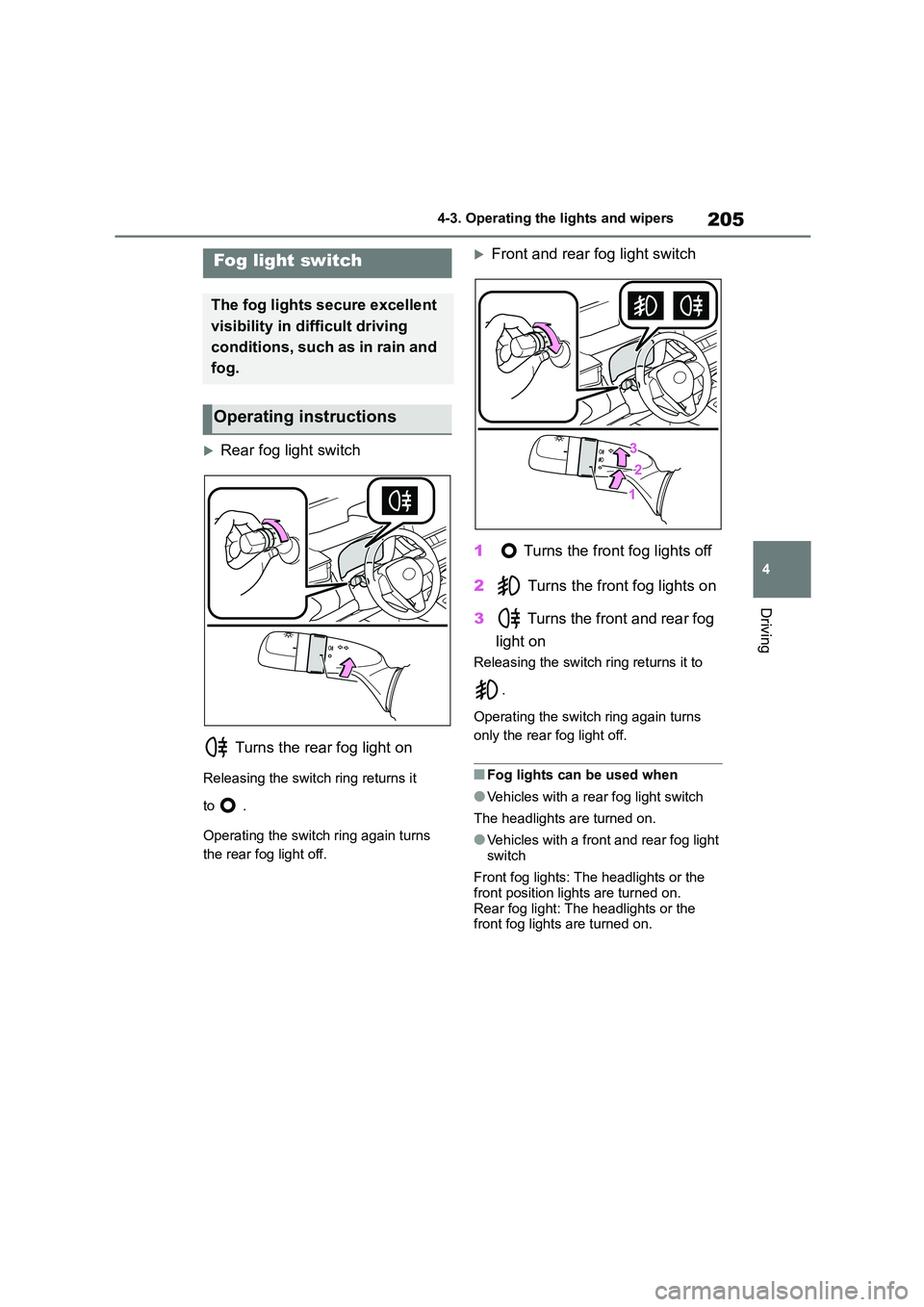
Rear fog light switch
Turns the rear fog light on
Releasing the switch ring returns it
to .
Operating the switch ring again turns
the rear fog light off.
Front and rear fog light switch
1 Turns the front fog lights off
2 Turns the front fog lights on
3 Turns the front and rear fog
light on
Releasing the switch ring returns it to
.
Operating the switch ring again turns
only the rear fog light off.
■Fog lights can be used when
●Vehicles with a rear fog light switch
The headlights are turned on.
●Vehicles with a front and rear fog light
switch
Front fog lights: The headlights or the
front position lights are turned on.
Rear fog light: The headlights or the front fog lights are turned on.
Fog light switch
The fog lights secure excellent
visibility in difficult driving
conditions, such as in rain and
fog.
Operating instructions
Page 208 of 758
2064-3. Operating the lights and wipers
Operating the lever oper-
ates the wipers or washer as fol-
lows.
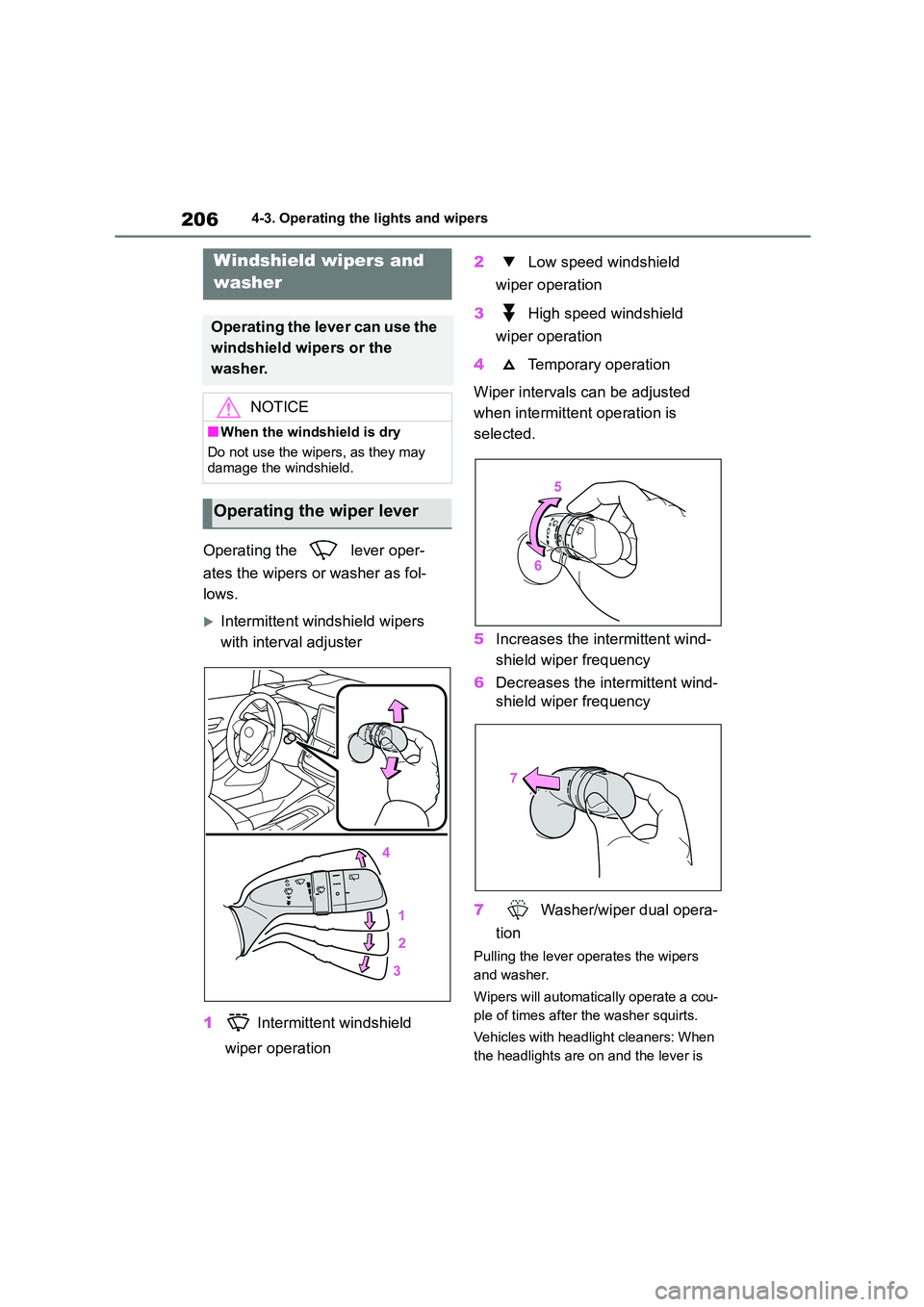
Intermittent windshield wipers
with interval adjuster
1 Intermittent windshield
wiper operation
2 Low speed windshield
wiper operation
3 High speed windshield
wiper operation
4 Temporary operation
Wiper intervals can be adjusted
when intermittent operation is
selected.
5 Increases the intermittent wind-
shield wiper frequency
6 Decreases the intermittent wind-
shield wiper frequency
7 Washer/wiper dual opera-
tion
Pulling the lever operates the wipers
and washer.
Wipers will automatical ly operate a cou-
ple of times after the washer squirts.
Vehicles with headlight cleaners: When
the headlights are on and the lever is
Windshield wipers and
washer
Operating the lever can use the
windshield wipers or the
washer.
NOTICE
■When the windshield is dry
Do not use the wipers, as they may
damage the windshield.
Operating the wiper lever
Page 209 of 758
207
4
4-3. Operating the lights and wipers
Driving
pulled and held, the headlight cleaners
will operate once. After this, the head-
light cleaners will operate every 5th
time the lever is pulled.
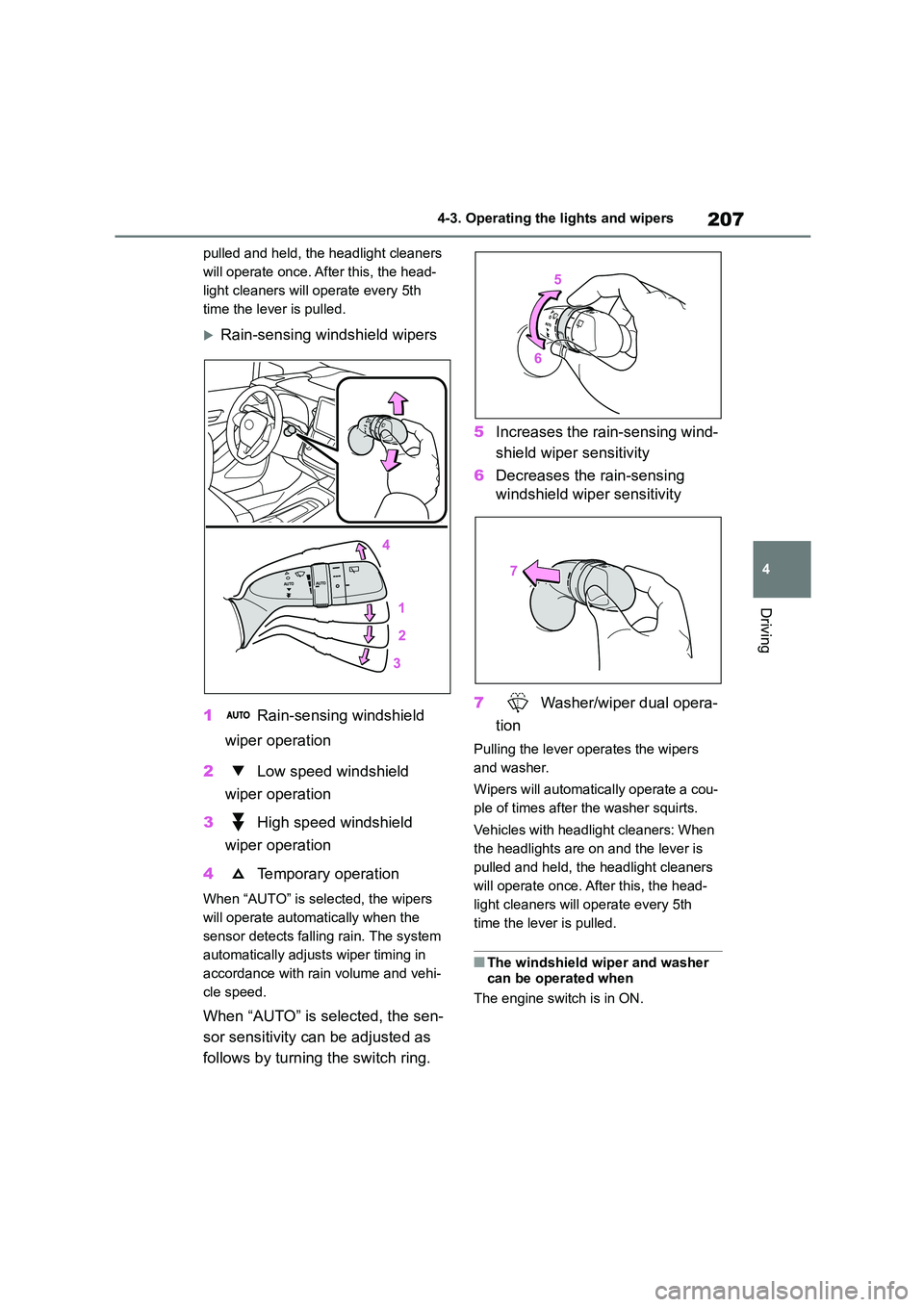
Rain-sensing wi ndshield wipers
1 Rain-sensing windshield
wiper operation
2 Low speed windshield
wiper operation
3 High speed windshield
wiper operation
4 Temporary operation
When “AUTO” is selected, the wipers
will operate automat ically when the
sensor detects falling rain. The system
automatically adjust s wiper timing in
accordance with rain volume and vehi-
cle speed.
When “AUTO” is selected, the sen-
sor sensitivity can be adjusted as
follows by turning the switch ring.
5 Increases the rain-sensing wind-
shield wiper sensitivity
6 Decreases the rain-sensing
windshield wiper sensitivity
7 Washer/wiper dual opera-
tion
Pulling the lever operates the wipers
and washer.
Wipers will automatical ly operate a cou-
ple of times after the washer squirts.
Vehicles with headlight cleaners: When
the headlights are on and the lever is
pulled and held, the headlight cleaners
will operate once. After this, the head-
light cleaners will operate every 5th
time the lever is pulled.
■The windshield wiper and washer can be operated when
The engine switch is in ON.
Page 217 of 758
215
4
4-5. Using the driving support systems
Driving
WA R N I N G
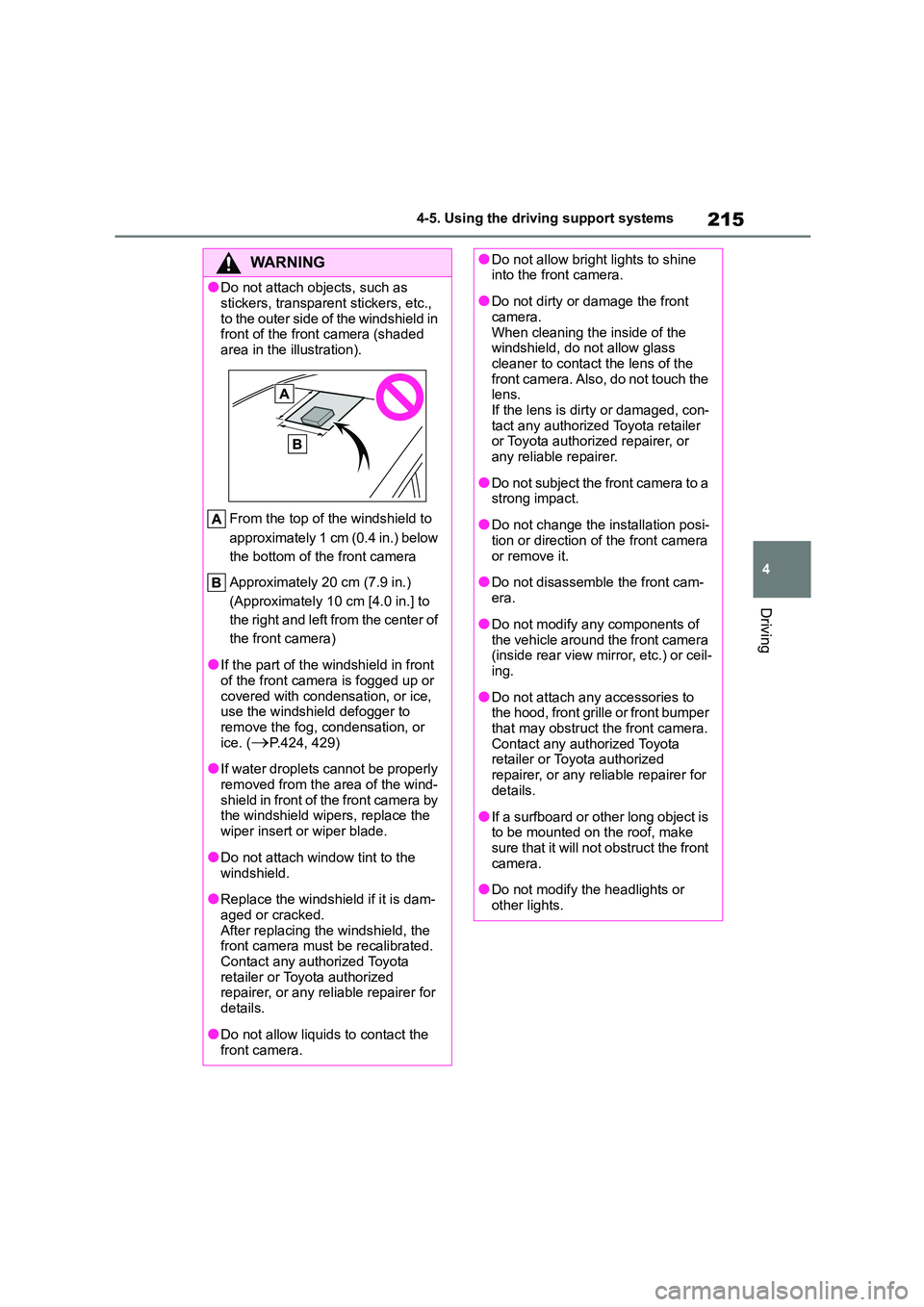
●Do not attach ob jects, such as
stickers, transparent stickers, etc.,
to the outer side of the windshield in front of the front camera (shaded
area in the illustration).
From the top of the windshield to
approximately 1 cm (0.4 in.) below
the bottom of the front camera
Approximately 20 cm (7.9 in.)
(Approximately 10 cm [4.0 in.] to
the right and left from the center of
the front camera)
●If the part of the windshield in front
of the front camera is fogged up or
covered with condensation, or ice, use the windshield defogger to
remove the fog, condensation, or
ice. (P.424, 429)
●If water droplets cannot be properly
removed from the area of the wind- shield in front of the front camera by
the windshield wipers, replace the
wiper insert or wiper blade.
●Do not attach window tint to the
windshield.
●Replace the windshield if it is dam-
aged or cracked. After replacing the windshield, the
front camera must be recalibrated.
Contact any authorized Toyota retailer or Toyota authorized
repairer, or any reliable repairer for
details.
●Do not allow liquids to contact the
front camera.
●Do not allow bright lights to shine into the front camera.
●Do not dirty or damage the front camera.
When cleaning the inside of the
windshield, do not allow glass cleaner to contact the lens of the
front camera. Also, do not touch the
lens. If the lens is dirty or damaged, con-
tact any authorized Toyota retailer
or Toyota authorized repairer, or any reliable repairer.
●Do not subject the front camera to a strong impact.
●Do not change the installation posi-tion or direction of the front camera
or remove it.
●Do not disassemble the front cam-
era.
●Do not modify any components of
the vehicle around the front camera
(inside rear view mirror, etc.) or ceil- ing.
●Do not attach any accessories to the hood, front grille or front bumper
that may obstruct the front camera.
Contact any authorized Toyota retailer or Toyota authorized
repairer, or any reliable repairer for
details.
●If a surfboard or other long object is
to be mounted on the roof, make sure that it will not obstruct the front
camera.
●Do not modify the headlights or
other lights.
Page 231 of 758
229
4
4-5. Using the driving support systems
Driving
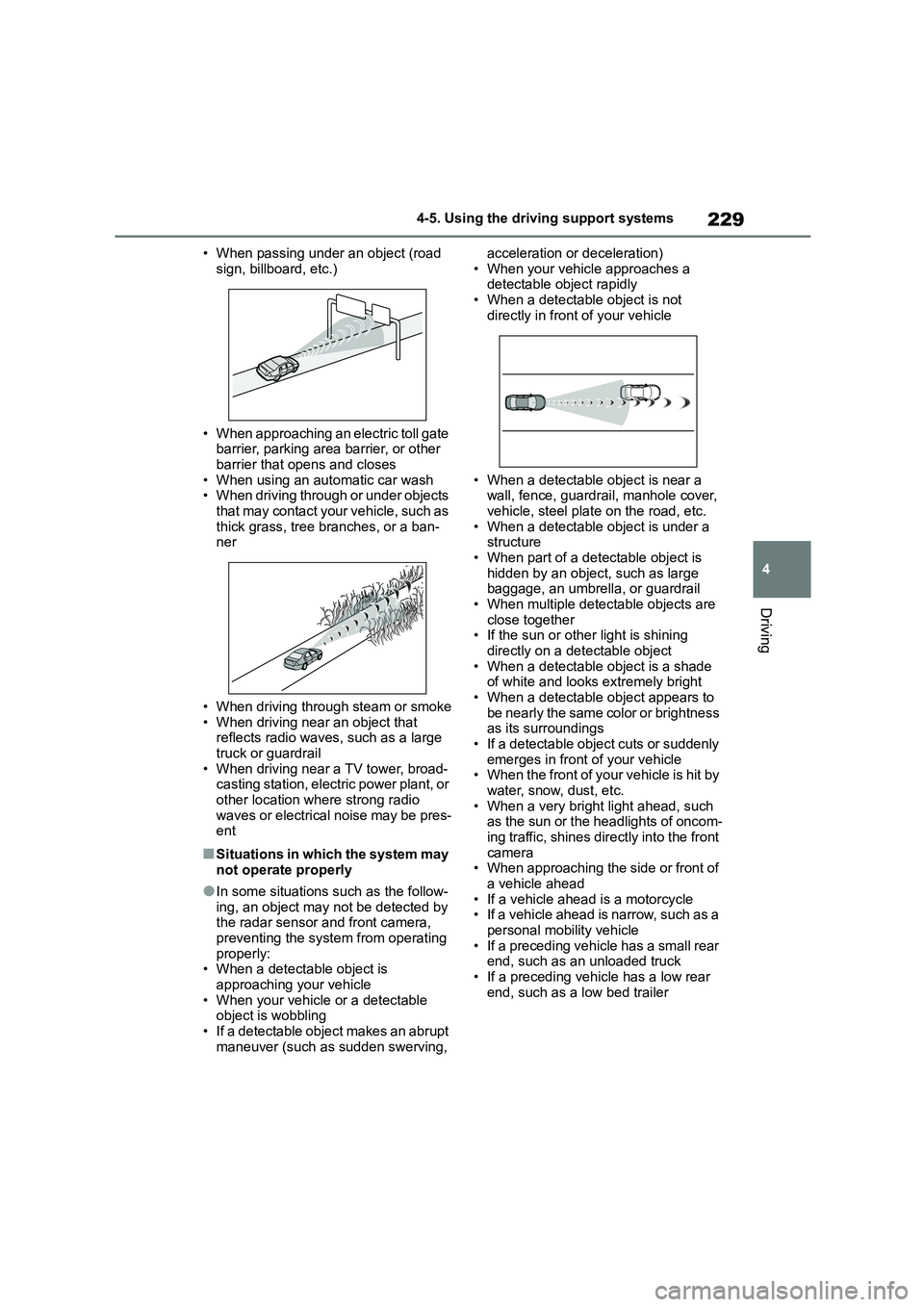
• When passing under an object (road
sign, billboard, etc.)
• When approaching an electric toll gate
barrier, parking area barrier, or other barrier that opens and closes
• When using an automatic car wash
• When driving through or under objects that may contact your vehicle, such as
thick grass, tree branches, or a ban-
ner
• When driving through steam or smoke
• When driving near an object that reflects radio waves, such as a large
truck or guardrail
• When driving near a TV tower, broad- casting station, electric power plant, or
other location where strong radio
waves or electrical noise may be pres- ent
■Situations in which the system may
not operate properly
●In some situations such as the follow-
ing, an object may not be detected by
the radar sensor and front camera, preventing the system from operating
properly:
• When a detectable object is
approaching your vehicle • When your vehicle or a detectable
object is wobbling
• If a detectable object makes an abrupt maneuver (such as sudden swerving,
acceleration or deceleration)
• When your vehicle approaches a detectable object rapidly
• When a detectable object is not
directly in front of your vehicle
• When a detectable object is near a
wall, fence, guardrail, manhole cover, vehicle, steel plate on the road, etc.
• When a detectable object is under a
structure • When part of a detectable object is
hidden by an object, such as large
baggage, an umbrella, or guardrail • When multiple detectable objects are
close together
• If the sun or other light is shining directly on a detectable object
• When a detectable object is a shade
of white and looks extremely bright • When a detectable object appears to
be nearly the same color or brightness
as its surroundings • If a detectable object cuts or suddenly
emerges in front of your vehicle
• When the front of your vehicle is hit by water, snow, dust, etc.
• When a very bright light ahead, such
as the sun or the headlights of oncom- ing traffic, shines directly into the front
camera
• When approaching the side or front of a vehicle ahead
• If a vehicle ahead is a motorcycle
• If a vehicle ahead is narrow, such as a personal mobility vehicle
• If a preceding vehicle has a small rear
end, such as an unloaded truck
• If a preceding vehicle has a low rear end, such as a low bed trailer
Page 234 of 758
2324-5. Using the driving support systems
WA R N I N G
■Before using LTA system
●Do not rely solely upon the LTA sys-
tem. The LTA system does not automatically drive the vehicle or
reduce the amount of attention that
must be paid to the area in front of the vehicle. The driver must always
assume full responsibility for driving
safely by paying careful attention to
the surrounding conditions and operating the steering wheel to cor-
rect the path of the vehicle. Also,
the driver must take adequate breaks when fatigued, such as from
driving for a long period of time.
●Failure to perform appropriate driv-
ing operations and pay careful
attention may lead to an accident, resulting in death or serious injury.
●When not using the LTA system, use the LTA switch to turn the sys-
tem off.
■Situations unsuitable for LTA
system
In the following situations, use the LTA switch to turn the system off. Fail-
ure to do so may lead to an accident,
resulting in death or serious injury.
●Vehicle is driven on a road surface
which is slippery due to rainy weather, fallen snow, freezing, etc.
●Vehicle is driven on a snow-cov-ered road.
●White (yellow) lines are difficult to see due to rain, snow, fog, dust,
etc.
●Vehicle is driven in a temporary
lane or restricted lane due to con-
struction work.
●Vehicle is driven in a construction
zone.
●A spare tire, tire chains, etc. are
equipped.
●When the tires have been exces- sively worn, or when the tire infla-
tion pressure is low.
●When tires of a size other than
specified are installed.
●Vehicle is driven in traffic lanes
other than that highways and free-
ways.
●When your vehicle is towing a
trailer or during emergency towing
■Preventing LTA system malfunc-
tions and operations performed by mistake
●Do not modify the headlights or
place stickers, etc. on the surface of the lights.
●Do not modify the suspension etc. If the suspension etc. needs to be
replaced, contact any authorized
Toyota retailer or Toyota authorized repairer, or any reliable repairer.
●Do not install or place anything on the hood or grille. Also, do not
install a grille guar d (bull bars, kan-
garoo bar, etc.).
●If your windshield needs repairs,
contact any authorized Toyota retailer or Toyota authorized
repairer, or any reliable repairer.
■Conditions in which functions
may not operate properly
In the following situations, the func- tions may not operate properly and
the vehicle may depart from its lane.
Drive safely by always paying careful attention to your surroundings and
operate the steering wheel to correct
the path of the vehicle without relying
solely on the functions.
Page 236 of 758
2344-5. Using the driving support systems
■Lane departure alert function
When the system determines that
the vehicle might depart from its
lane or course*, a warning is dis-
played on the multi-information dis-
play, and a warning buzzer will
sound to alert the driver.
When the warning buzzer sounds,
check the area around your vehicle and
carefully operate the steering wheel to
move the vehicle back to the center of
WA R N I N G
●The vehicle is driven in an area
without white (yellow) lines, such as
in front of a tollgate or checkpoint, or at an intersection, etc.
●The white (yellow) lines are cracked, “Raised pavement
marker” or stones are present.
●The white (yellow) lines cannot be seen or are difficult to see due to
sand, etc.
●The vehicle is driven on a road sur-
face that is wet due to rain, pud-
dles, etc.
●The traffic lines are yellow (which
may be more difficult to recognize than lines that are white).
●The white (yellow) lines cross over a curb, etc.
●The vehicle is driven on a bright surface, such as concrete.
●If the edge of the road is not clear or straight.
●The vehicle is driven on a surface that is bright due to reflected light,
etc.
●The vehicle is driven in an area
where the brightness changes sud-
denly, such as at the entrances and exits of tunnels, etc.
●Light from the headlights of an oncoming vehicle, the sun, etc.
enters the camera.
●The vehicle is driven on a slope.
●The vehicle is driven on a road which tilts left or right, or a winding
road.
●The vehicle is driven on an
unpaved or rough road.
●The traffic lane is excessively nar-
row or wide.
●The vehicle is extremely tilted due to carrying heavy luggage or having
improper tire pressure.
●The distance to the preceding vehi-
cle is extremely short.
●The vehicle is moving up and down
a large amount due to road condi-
tions during driving (poor roads or road seams).
●When driving in a tunnel or at night with the headlights off or when a
headlight is dim due to its lens
being dirty or it being misaligned.
●The vehicle is struck by a cross-
wind.
●The vehicle is affected by wind from
a vehicle driven in a nearby lane.
●The vehicle has just changed lanes
or crossed an intersection.
●Tires which differ by structure, man-
ufacturer, brand or tread pattern are used.
●Snow tires, etc. are equipped.
●The vehicle is being driven at
extremely high speeds.
Functions included in LTA
system
Page 244 of 758
2424-5. Using the driving support systems
WA R N I N G
●When tires of a size other than
specified are installed.
●Vehicle is driven in traffic lanes
other than that highways and free-
ways.
●When your vehicle is towing a
trailer or during emergency towing
■Preventing LDA system malfunc-
tions and operations performed
by mistake
●Do not modify the headlights or
place stickers, etc. on the surface of
the lights.
●Do not modify the suspension etc. If
the suspension etc. needs to be replaced, contact any authorized
Toyota retailer or Toyota authorized
repairer, or any reliable repairer.
●Do not install or place anything on
the hood or grille. Also, do not install a grille guard (bull bars, kan-
garoo bar, etc.).
●If your windshield needs repairs,
contact any authorized Toyota
retailer or Toyota authorized repairer, or any reliable repairer.
■Conditions in which functions may not operate properly
In the following situations, the func-
tions may not operate properly and the vehicle may depart from its lane.
Drive safely by always paying careful
attention to your surroundings and operate the steering wheel to correct
the path of the vehicle without relying
solely on the functions.
●Vehicle is being driven around a
sharp curve.
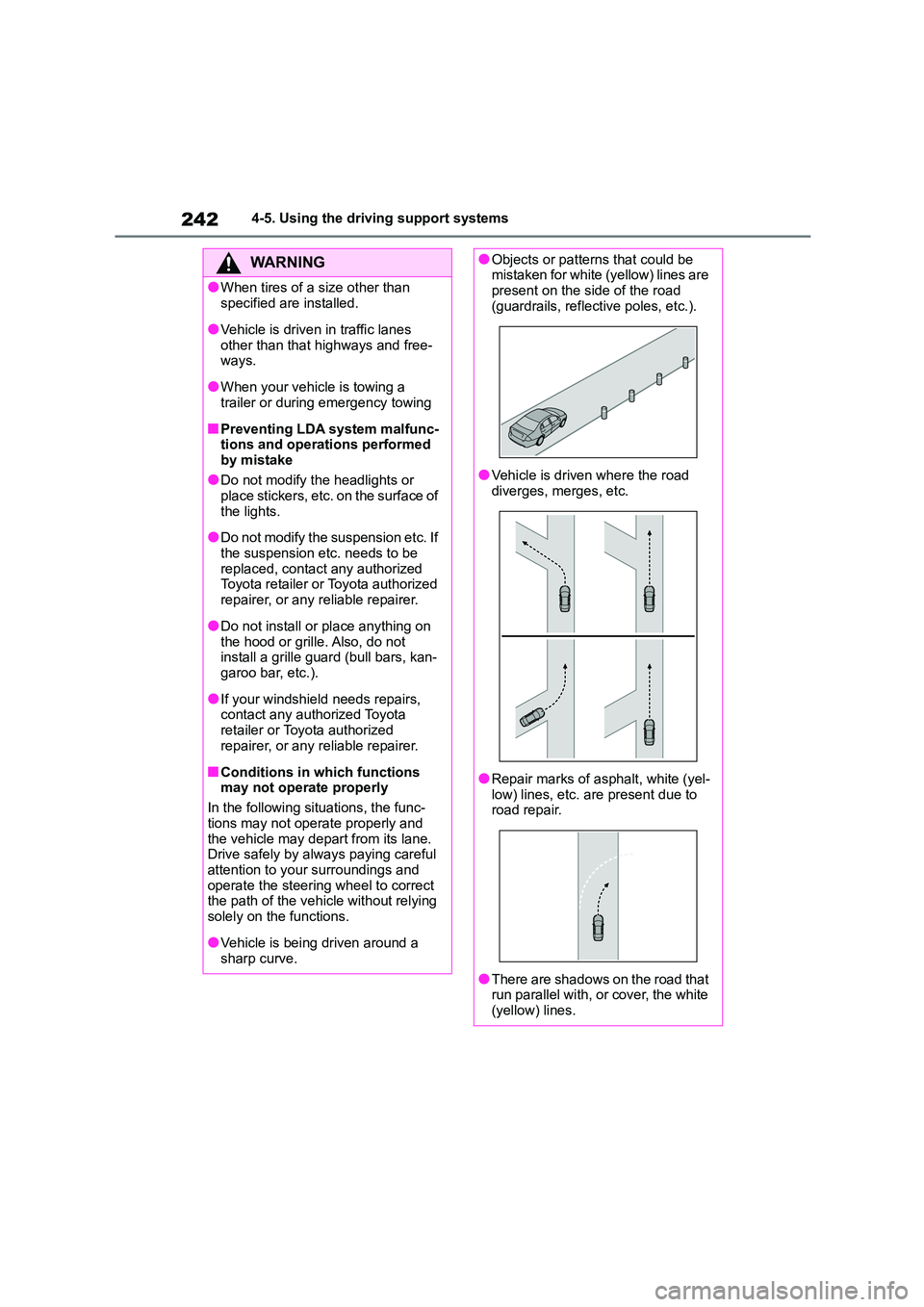
●Objects or patterns that could be mistaken for white (yellow) lines are
present on the side of the road
(guardrails, reflective poles, etc.).
●Vehicle is driven where the road
diverges, merges, etc.
●Repair marks of asphalt, white (yel- low) lines, etc. are present due to
road repair.
●There are shadows on the road that
run parallel with, or cover, the white
(yellow) lines.
Page 245 of 758
243
4
4-5. Using the driving support systems
Driving
■Lane departure alert function
When the system determines that
the vehicle might depart from its
lane or course*, a warning is dis-
played on the multi-information dis-
play, and a warning buzzer will
sound to alert the driver.
When the warning buzzer sounds,
check the area around your vehicle and
carefully operate the steering wheel to
move the vehicle back to the center of
the lane.
Vehicle with BSM: When the system
determines that the vehicle might
depart from its lane and that the possi-
bility of a collision with an overtaking
WA R N I N G
●The vehicle is driven in an area
without white (yellow) lines, such as
in front of a tollgate or checkpoint, or at an intersection, etc.
●The white (yellow) lines are cracked, “Raised pavement
marker” or stones are present.
●The white (yellow) lines cannot be seen or are difficult to see due to
sand, etc.
●The vehicle is driven on a road sur-
face that is wet due to rain, pud-
dles, etc.
●The traffic lines are yellow (which
may be more difficult to recognize than lines that are white).
●The white (yellow) lines cross over a curb, etc.
●The vehicle is driven on a bright surface, such as concrete.
●If the edge of the road is not clear or straight.
●The vehicle is driven on a surface that is bright due to reflected light,
etc.
●The vehicle is driven in an area
where the brightness changes sud-
denly, such as at the entrances and exits of tunnels, etc.
●Light from the headlights of an oncoming vehicle, the sun, etc.
enters the camera.
●The vehicle is driven on a slope.
●The vehicle is driven on a road which tilts left or right, or a winding
road.
●The vehicle is driven on an
unpaved or rough road.
●The traffic lane is excessively nar-
row or wide.
●The vehicle is extremely tilted due to carrying heavy luggage or having
improper tire pressure.
●The distance to the preceding vehi-
cle is extremely short.
●The vehicle is moving up and down
a large amount due to road condi-
tions during driving (poor roads or road seams).
●When driving in a tunnel or at night with the headlights off or when a
headlight is dim due to its lens
being dirty or it being misaligned.
●The vehicle is struck by a cross-
wind.
●The vehicle has just changed lanes
or crossed an intersection.
●Tires which differ by structure, man-
ufacturer, brand or tread pattern are used.
●Snow tires, etc. are equipped.
Functions included in LDA
system