charging TOYOTA COROLLA HATCHBACK 2023 User Guide
[x] Cancel search | Manufacturer: TOYOTA, Model Year: 2023, Model line: COROLLA HATCHBACK, Model: TOYOTA COROLLA HATCHBACK 2023Pages: 436, PDF Size: 8.72 MB
Page 255 of 436
2555-4. Other interior features
5
Interior features
■Sound generated during opera-
tion
When the power su pply switch is
turned on or while a portable device
is being identified, operation sounds
may be heard. This is not a malfunc-
tion.
■Cleaning the wireless charger
P. 2 6 3
WARNING
■Caution while driving
When charging a portable device,
for safety reasons, the driver
should not operate the main part
of the portable device while driv-
ing.
■Caution while in motion
Do not charge lightweight devices
such as wireless headphones
while in motion. These devices
are very light and may be ejected
from the charging tray, which may
lead to unforeseen accidents.
■Caution regarding interfer-
ence with electronic devices
People with implantable cardiac
pacemakers, cardiac resynchroni-
zation therapy-pacemakers or
implantable cardio verters, as well
as any other electrical medical
device, should consult their physi-
cian about the usage of the wire-
less charger.
■To prevent malfunctions or
burns
Observe the following precau-
tions.
Failure to do so m ay result in a
equipment failure and damage,
catch fire, burns due to overheat
or electric shock.
●Do not insert any metallic
objects between the charge
area and the portable device
while charging
●Do not attach a n aluminum
sticker or other metallic object to
the charge area
●Do not attach a n aluminum
sticker or other metallic object to
the side of the portable device
(or to its case or cover) that
touches the charge area
●Do not use the ch arging tray as
a small storage space
●Do not subject to a strong force
or impact
●Do not disassemb le, modify or
remove
●Do not charge devices other
than specified portable devices
●Keep away from magnetic items
●Do not charge devices if the
charge area is covered in dust
●Do not cover with a cloth or sim-
ilar material
NOTICE
■Situations in which the func-
tion may not operate normally
Devices may not be charged nor-
mally in the following situations.
●The camera lens protrudes 0.12
in (3 mm) or more from the sur-
face of the portable device
●The electronic key is not inside
the vehicle
●The portable device is fully
charged
●The portable device is being
charged with a cable connected
●There is foreign matter between
the charge area and portable
device
Page 256 of 436
2565-4. Other interior features
NOTICE
●Charging has caused the porta-
ble device to heat up
●The temperature around the
charging tray is 95°F (35°C) or
higher, such as in extreme heat
●The portable device is placed
with its charging side facing up
●The portable device is placed in
an area misaligned from the
charge area
●The portable device is larger
than the charging tray
●A foldable and portable device
is placed outside the charge
area
●The vehicle is in an area where
strong electrical waves or noise
are emitted, such as near a tele-
vision tower, power plant, gaso-
line station, broadcasting
station, large display, airport,
etc.
●Any of the following objects that
is 0.08 in (2 mm) or thicker is
between the charging side of
the portable device and the
charge area
• Thick cases or covers
• A case or cover attached with an uneven or tilted surface, so
that the charging side is not flat
• Thick decorations
• Accessories, such as finger rings, straps, etc.
●When the portable device is in
contact with, or is covered by
any if the follo wing metallic
objects
• A card that has metal on it, such as aluminum foil, etc.
• A pack of cigarettes that includes aluminum foil
• A wallet or bag that is made of metal
• Coins
• A heating pad
• CDs, DVDs or other media
• A metal accessory
• A case or cover made of metal
• A case which has magnet in it on the charging side of the por-
table device.
●Electric wave type wireless
remote controls are being used
nearby
●2 or more portable devices are
placed on the charging tray at
the same time
If charging is abnormal or the
operation indicator light contin-
ues to flash for any other reason,
the wireless char ger may be mal-
functioning. Contact your Toyota
dealer.
■To prevent malfunctions and
data corruptions
●When charging, bringing a
credit, or other magnetic card,
or magnetic storage media
close to the charge area may
clear any stored data due to
magnetic influence. Also, do not
bring a wristwatch or other pre-
cision instrument close to the
charge area since doing so may
cause it to malfunction.
Page 257 of 436
2575-4. Other interior features
5
Interior features
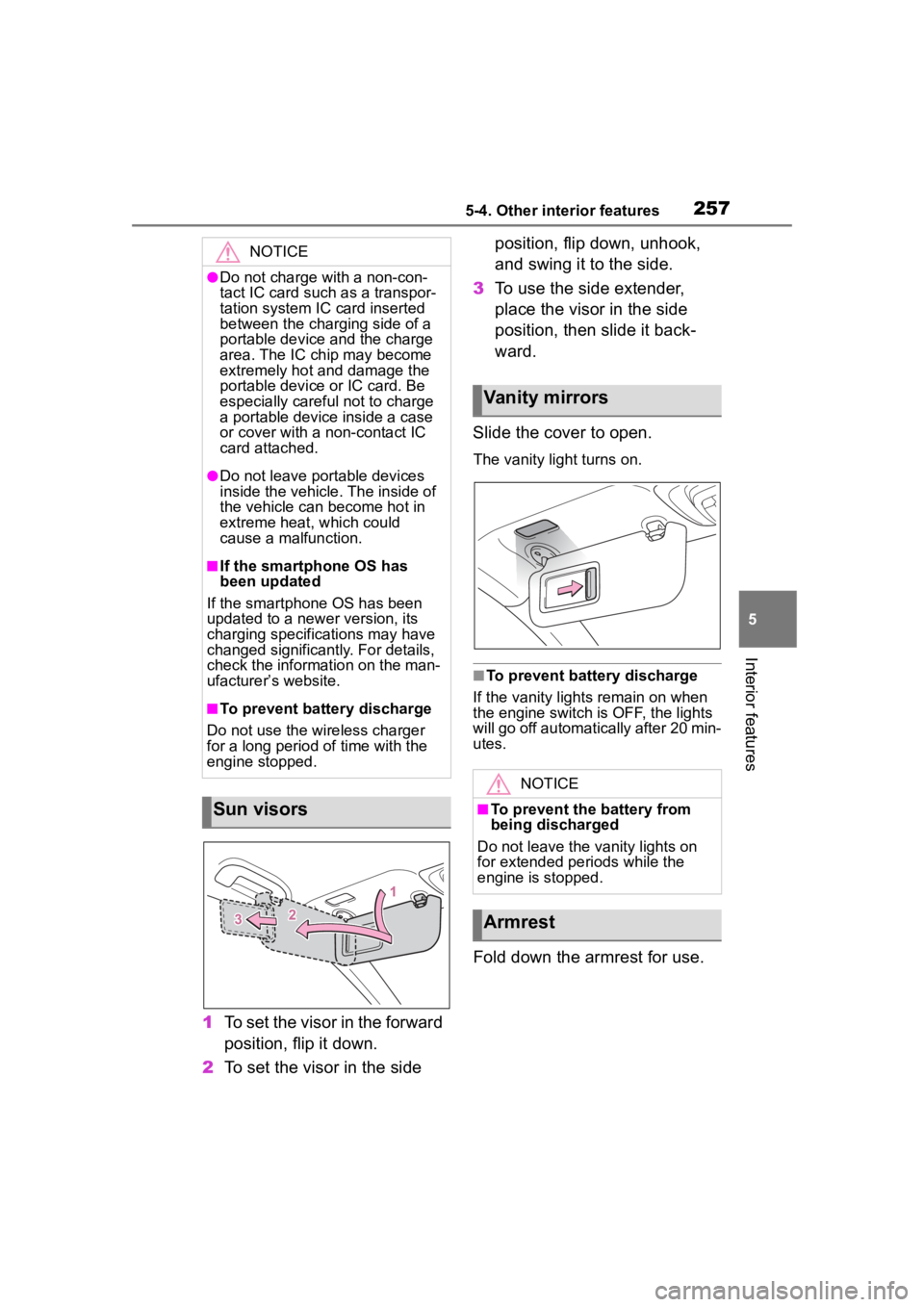
1To set the visor in the forward
position, flip it down.
2 To set the visor in the side position, flip down, unhook,
and swing it to the side.
3 To use the side extender,
place the visor in the side
position, then slide it back-
ward.
Slide the cover to open.
The vanity lig ht turns on.
■To prevent bat tery discharge
If the vanity lights remain on when
the engine switch is OFF, the lights
will go off automatically after 20 min-
utes.
Fold down the armrest for use.
NOTICE
●Do not charge with a non-con-
tact IC card such as a transpor-
tation system IC card inserted
between the charging side of a
portable device and the charge
area. The IC chip may become
extremely hot and damage the
portable device or IC card. Be
especially careful not to charge
a portable device inside a case
or cover with a non-contact IC
card attached.
●Do not leave portable devices
inside the vehicle. The inside of
the vehicle can become hot in
extreme heat, which could
cause a malfunction.
■If the smartphone OS has
been updated
If the smartphone OS has been
updated to a new er version, its
charging specifications may have
changed significantly. For details,
check the information on the man-
ufacturer’s website.
■To prevent battery discharge
Do not use the wireless charger
for a long period of time with the
engine stopped.
Sun visors
Vanity mirrors
NOTICE
■To prevent the battery from
being discharged
Do not leave the vanity lights on
for extended periods while the
engine is stopped.
Armrest
Page 280 of 436
2806-3. Do-it-yourself maintenance
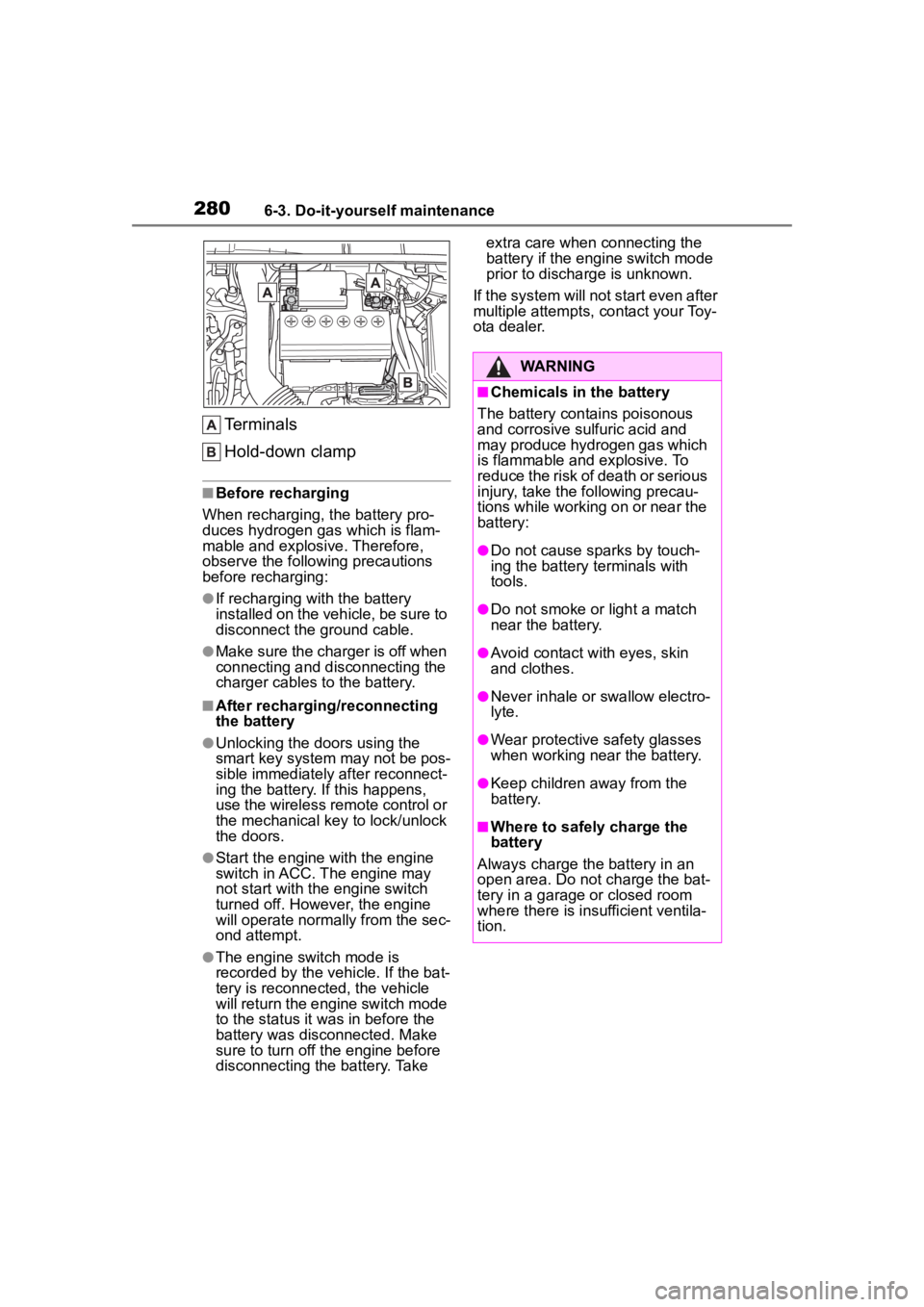
Terminals
Hold-down clamp
■Before recharging
When recharging, t he battery pro-
duces hydrogen ga s which is flam-
mable and explosive. Therefore,
observe the following precautions
before recharging:
●If recharging wi th the battery
installed on the vehicle, be sure to
disconnect the ground cable.
●Make sure the charger is off when
connecting and disconnecting the
charger cables to the battery.
■After recharging/reconnecting
the battery
●Unlocking the doors using the
smart key system may not be pos-
sible immediately after reconnect-
ing the battery. If this happens,
use the wireless remote control or
the mechanical key to lock/unlock
the doors.
●Start the engine with the engine
switch in ACC. The engine may
not start with the engine switch
turned off. However, the engine
will operate normally from the sec-
ond attempt.
●The engine switch mode is
recorded by the vehicle. If the bat-
tery is reconnected, the vehicle
will return the engi ne switch mode
to the status it was in before the
battery was disconnected. Make
sure to turn off the engine before
disconnecting the battery. Take extra care when connecting the
battery if the engine switch mode
prior to discharge is unknown.
If the system will not start even after
multiple attempts, contact your Toy-
ota dealer.
WARNING
■Chemicals in the battery
The battery contains poisonous
and corrosive sulfuric acid and
may produce hydrogen gas which
is flammable and explosive. To
reduce the risk of death or serious
injury, take the following precau-
tions while working on or near the
battery:
●Do not cause sparks by touch-
ing the battery terminals with
tools.
●Do not smoke or light a match
near the battery.
●Avoid contact with eyes, skin
and clothes.
●Never inhale or swallow electro-
lyte.
●Wear protective safety glasses
when working near the battery.
●Keep children away from the
battery.
■Where to safely charge the
battery
Always charge the battery in an
open area. Do not charge the bat-
tery in a garage or closed room
where there is ins ufficient ventila-
tion.
Page 281 of 436
2816-3. Do-it-yourself maintenance
6
Maintenance and care
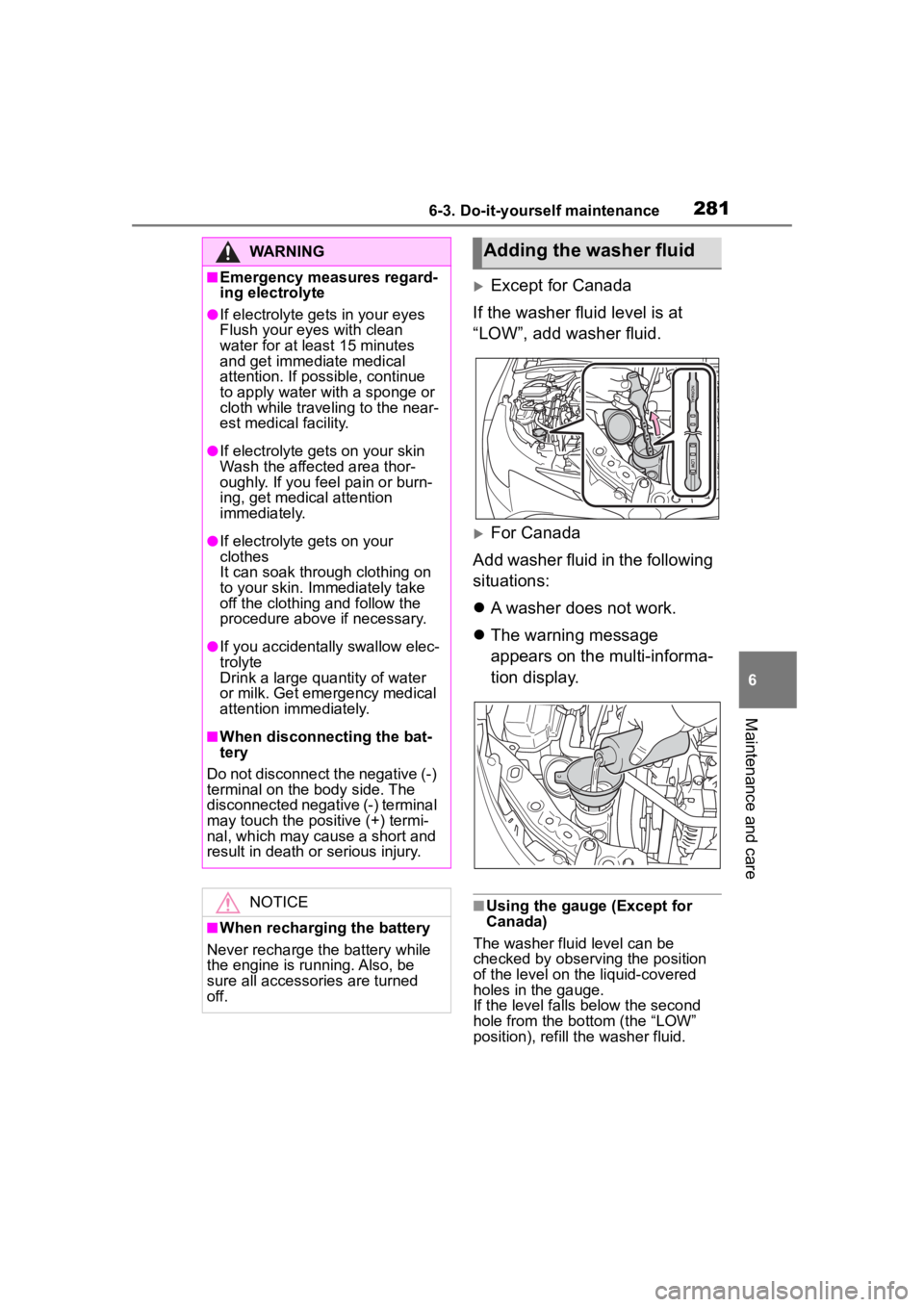
Except for Canada
If the washer fluid level is at
“LOW”, add washer fluid.
For Canada
Add washer fluid in the following
situations:
A washer does not work.
The warning message
appears on the multi-informa-
tion display.
■Using the gauge (Except for
Canada)
The washer fluid level can be
checked by observing the position
of the level on the liquid-covered
holes in the gauge.
If the level falls below the second
hole from the bo ttom (the “LOW”
position), refill the washer fluid.
WARNING
■Emergency measures regard-
ing electrolyte
●If electrolyte gets in your eyes
Flush your eyes with clean
water for at least 15 minutes
and get immediate medical
attention. If possible, continue
to apply water with a sponge or
cloth while traveling to the near-
est medical facility.
●If electrolyte gets on your skin
Wash the affected area thor-
oughly. If you fee l pain or burn-
ing, get medical attention
immediately.
●If electrolyte gets on your
clothes
It can soak through clothing on
to your skin. Immediately take
off the clothing and follow the
procedure above if necessary.
●If you accidentally swallow elec-
trolyte
Drink a large quantity of water
or milk. Get emergency medical
attention immediately.
■When disconnecting the bat-
tery
Do not disconnect the negative (-)
terminal on the body side. The
disconnected negative (-) terminal
may touch the positive (+) termi-
nal, which may cause a short and
result in death or serious injury.
NOTICE
■When recharging the battery
Never recharge the battery while
the engine is running. Also, be
sure all accessories are turned
off.
Adding the washer fluid
Page 321 of 436
3217-2. Steps to take in an emergency
7
When trouble arises
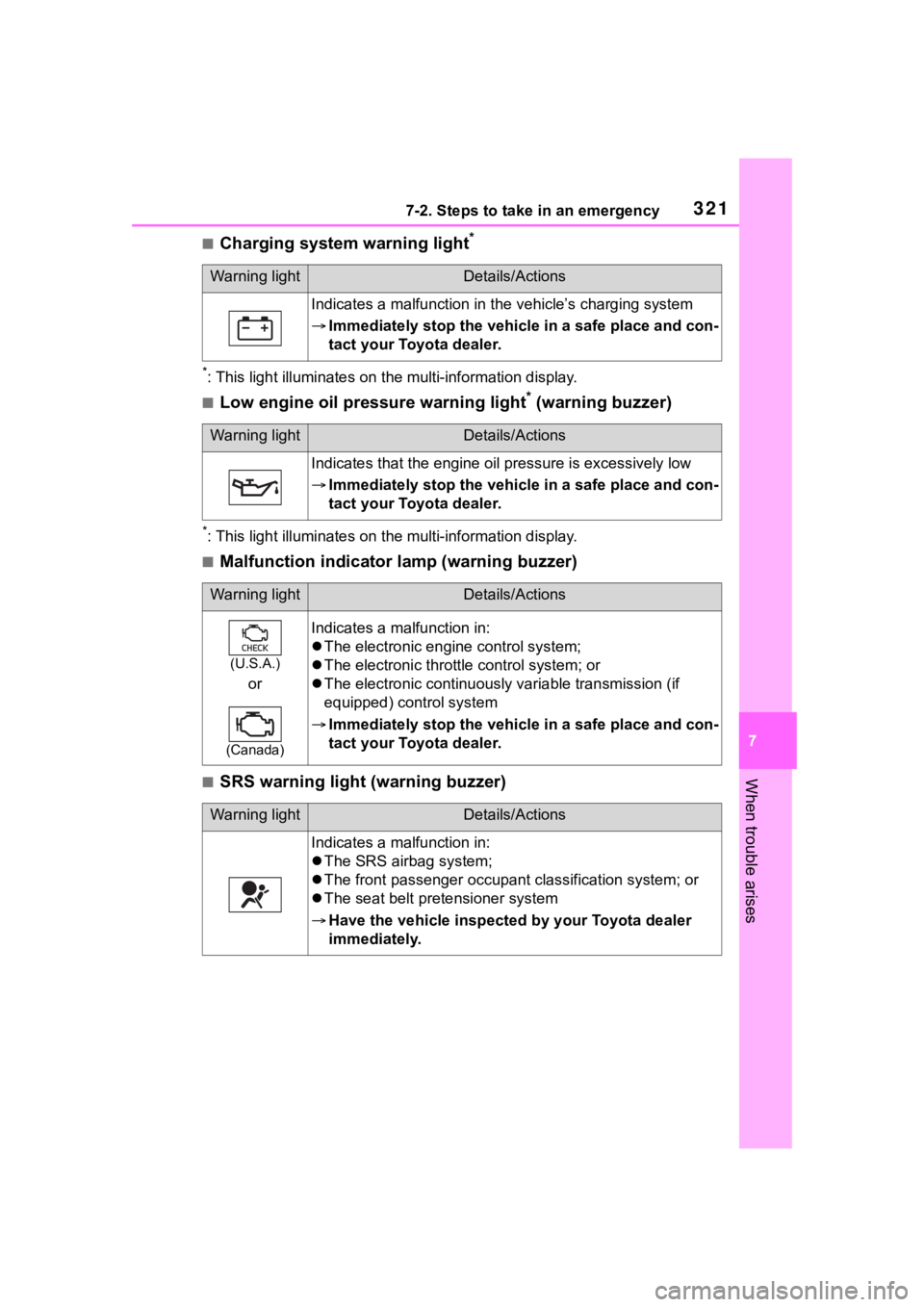
■Charging system warning light*
*: This light illuminat es on the multi-information display.
■Low engine oil pressure warning light* (warning buzzer)
*: This light illuminates on the multi-information display.
■Malfunction indicator lamp (warning buzzer)
■SRS warning light (warning buzzer)
Warning lightDetails/Actions
Indicates a malfunction in the vehicle’s charging system
Immediately stop the vehicle in a safe place and con-
tact your Toyota dealer.
Warning lightDetails/Actions
Indicates that the engine oil pressure is excessively low
Immediately stop the vehicle in a safe place and con-
tact your Toyota dealer.
Warning lightDetails/Actions
(U.S.A.)
or
(Canada)
Indicates a malfunction in:
The electronic engine control system;
The electronic throttle control system; or
The electronic continuousl y variable transmission (if
equipped) control system
Immediately stop the vehicle in a safe place and con-
tact your Toyota dealer.
Warning lightDetails/Actions
Indicates a malfunction in:
The SRS airb ag system;
The front passenger occupan t classification system; or
The seat belt pretensioner system
Have the vehicle inspected by your Toyota dealer
immediately.
Page 334 of 436
3347-2. Steps to take in an emergency
multi-information display is malfunc-
tioning. Have the vehicle inspected
by your Toyota dealer immediately.
■If a message that indicates the
need for referring to Owner’s
Manual is displayed
●If “Engine Coolant Temp High” is
displayed, follow the instructions
accordingly. ( P.362)
●If any of the following messages
are displayed on the multi-infor-
mation display, it may indicate a
malfunction. Have the vehicle
inspected by you r Toyota dealer
immediately.
• “Smart Key System Malfunction”
●If any of the following messages
are displayed on the multi-infor-
mation display, it may indicate a
malfunction. Immediately stop the
vehicle and contact your Toyota
dealer.
• “Braking Power Low”
• “Charging System Malfunction”
• “Oil Pressure Low”
Stop the vehicle in a safe
place on a hard, flat surface.
Set the parking brake.
Shift the shift lever to P.
NOTICE
■If “High Power Consumption
Partial Limit on AC/Heater
Operation” is displayed fre-
quently
There is a possible malfunction
relating to the charging system or
the battery may be deteriorating.
Have the vehicle inspected by
your Toyota dealer.
If you have a flat tire
(vehicles without
spare tire)
Your vehicle is not equipped
with a spare tire, but instead
is equipped with an emer-
gency tire puncture repair
kit.
A puncture caused by a nail
or screw passing through
the tire tread can be
repaired temporarily using
the emergency tire puncture
repair kit. (The kit contains a
bottle of sealant. The seal-
ant can be used only once
to temporarily repair one
tire without removing the
nail or screw from the tire.)
After temporarily repairing
the tire with the kit, have the
tire repaired or replaced by
your Toyota dealer.
WARNING
■If you have a flat tire
Do not continue driving with a flat
tire.
Driving even a short distance with
a flat tire can damage the tire and
the wheel beyond repair, which
could result in an accident.
Before repairing the tire
Page 360 of 436
3607-2. Steps to take in an emergency
recharge the battery of your
vehicle.
5 Open and close any of the
doors of your vehicle with the
engine switch OFF.
6 Maintain the engine speed of
the second vehicle and start
the engine of your vehicle by
turning the engine switch to
ON.
7 Once the vehicle’s engine
has started, remove the
jumper cables in the exact
reverse order from which
they were connected.
Once the engine starts, have the
vehicle inspected at your Toyota
dealer as soon as possible.
■Starting the engine when the
battery is discharged
The engine cannot be started by
push-starting.
■To prevent battery discharge
●Turn off the headlights and the
audio system while the engine is
off.
●Turn off any unnecessary electri-
cal components when the vehicle
is running at a low speed for an
extended period, such as in heavy
traffic.
■When the battery is removed or
discharged
●Information stor ed in the ECU is
cleared. When the battery is
depleted, have the vehicle
inspected at you r Toyota dealer.
●Some systems may require initial-
ization. ( P.395)
■When removing the battery ter-
minals
When the battery terminals are
removed, the information stored in
the ECU is cleared. Before remov-
ing the battery term inals, contact
your Toyota dealer.
■Charging the battery
The electricity stored in the battery
will discharge grad ually even when
the vehicle is not in use, due to nat-
ural discharge and the draining
effects of certain electrical appli-
ances. If the vehicle is left for a long
time, the battery may discharge,
and the engine may be unable to
start. (The battery recharges auto-
matically during driving.)
■When recharging or replacing
the battery
●In some cases, it may not be pos-
sible to unlock the doors using the
smart key system when the bat-
tery is discharged. Use the wire-
less remote control or the
mechanical key to lock or unlock
the doors.
●The engine may not start on the
first attempt after the battery has
recharged but will start normally
after the second attempt. This is
not a malfunction.
●The engine switch mode is memo-
rized by the vehicle. When the
battery is reconnected, the system
will return to the mode it was in
before the bat tery was dis-
charged. Before disconnecting the
battery, turn the engine switch off.
If you are unsure what mode the
engine switch wa s in before the
battery discharged, be especially
careful when reconnecting the
battery.
■When replacing the battery
●Use a battery that conforms to
European regulations.
●Use a battery that the case size is
same as the previous one (LN1),
20 hour rate capacity (20HR) is
Page 369 of 436
3698-1. Specifications
8
Vehicle specifications
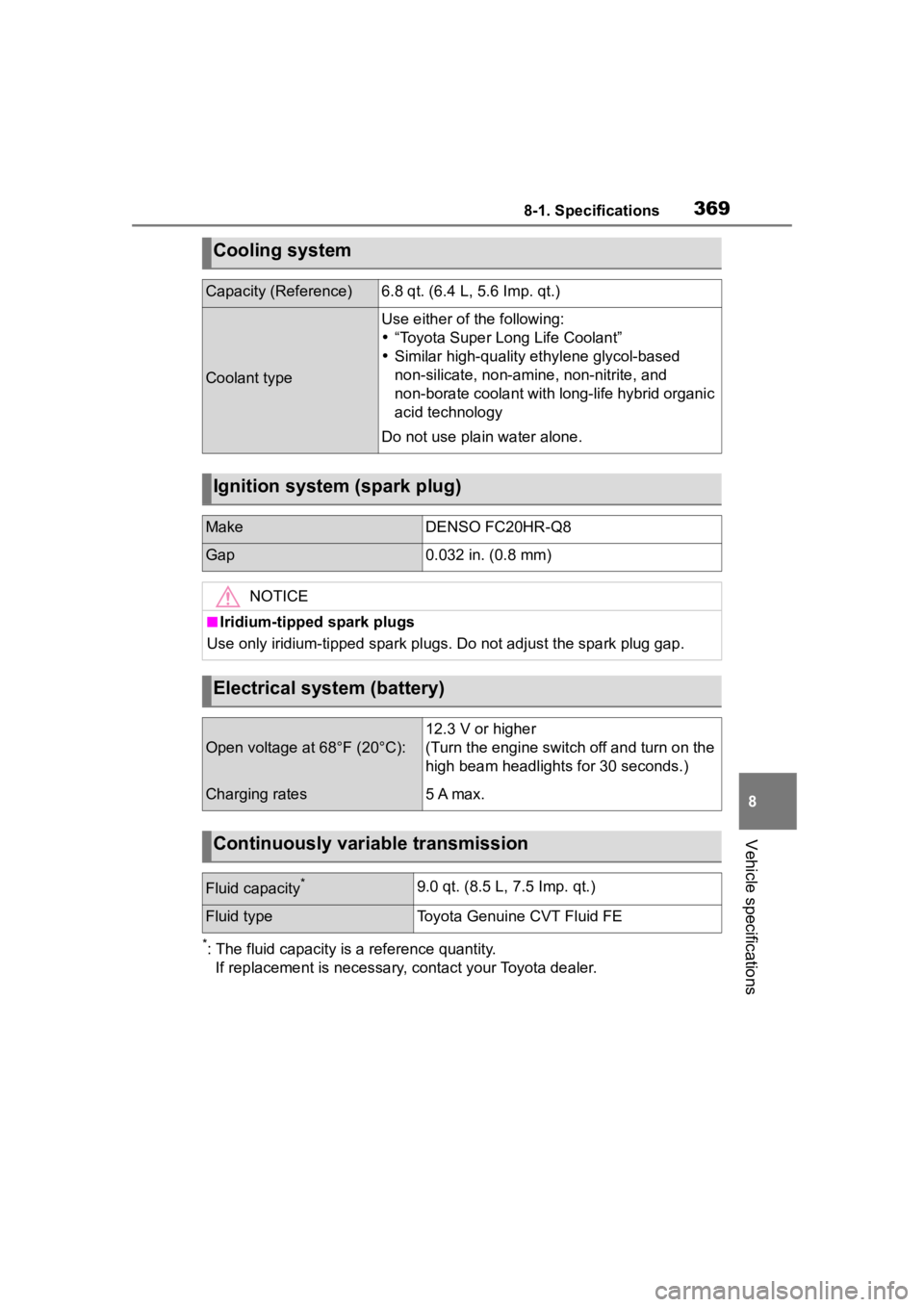
*: The fluid capacity is a reference quantity.If replacement is necessary, contact your Toyota dealer.
Cooling system
Capacity (Reference)6.8 qt. (6.4 L, 5.6 Imp. qt.)
Coolant type
Use either o f the following:
“Toyota Super Long Life Coolant”
Similar high-quality et hylene glycol-based
non-silicate, non -amine, non-nitrite, and
non-borate coolant with long-life hybrid organic
acid technology
Do not use pla in water alone.
Ignition system (spark plug)
MakeDENSO FC20HR-Q8
Gap0.032 in. (0.8 mm)
NOTICE
■Iridium-tipped spark plugs
Use only iridium-tipped spark plugs. Do not adjust the spark pl ug gap.
Electrical system (battery)
Open voltage at 68°F (20°C):
12.3 V or higher
(Turn the engine switch off and turn on the
high beam headlights for 30 seconds.)
Charging rates5 A max.
Continuously variable transmission
Fluid capacity*9.0 qt. (8.5 L, 7.5 Imp. qt.)
Fluid typeToyota Genuine CVT Fluid FE
Page 420 of 436
420Alphabetical Index
If you have a flat tire ............. 334
Inflation pressure.................. 299
Information ........................... 375
Rotating tires ........................ 284
Size ...................................... 370
Snow tires ............................ 230
Tire pressure warning system........................................... 285
Warning light ........................ 324
Tools ................................ 336, 347
Top tether strap ........................ 57
Total load capacity ................. 366
To w i n g Dinghy towing....................... 132
Emergency towing................ 315
Towing eyelet ....................... 317
Trailer towing ........................ 131
Toyota Safety Sense AHB (Automatic High Beam) 150
Cruise control ....................... 201
Dynamic radar cruise control 193
Emergency Driving Stop System........................................... 204
LDA (Lane Departure Alert) .. 182
LTA (Lane Tracing Assist) ..... 177
PCS (Pre-Collision System) . 167
RSA (Road Sign Assist) ....... 206
Toyota Safety Sense 3.0 ........ 161
Toyota Safety Sense 3.0[Toyota Safety Sense 3.0]PDA(Proactive driving assist)[PDA(Proactive driving
assist)] ................................ 187
TRAC (Traction Control) ........ 226
Traction Control (TRAC) ........ 226
Trailer towing .......................... 131
Transmission Continuously variable transmis-sion..................................... 137
Driving mode select switch... 224
M mode ................................ 140
Paddle shift switches.... 139, 140 Trip meters ..........................73, 76
Turn signal lights
Replacing light bulbs ............309
Turn signal lever ...................141
U
USB charging port ..................250
V
Vanity lights ............................257Wattage ................................372
Vanity mirrors .........................257
Vehicle data recording ...............6
Vehicle identification number366
Vehicle information display81, 86
Vehicle Stability Control (VSC) ...............................................225
VSC (Vehicle Stability Control) ...............................................225
W
Warning buzzers ABS ......................................322
Airbags .................................321
Approach warning ................199
Brake hold ............................327
Brake Override System ........322
Brake system ........................320
Charging system ..................321
Downshifting .........................141
Drive-Start Control ................322
Electric power steering .........322
Engine ..................................321
High coolant temperature .....320
LDA (Lane Departure Alert) 182, 325
Low engine oil pressure .......321
LTA (Lane Tracing Assist) ...177, 324
Open door ........................96, 98