towing TOYOTA COROLLA HATCHBACK 2023 User Guide
[x] Cancel search | Manufacturer: TOYOTA, Model Year: 2023, Model line: COROLLA HATCHBACK, Model: TOYOTA COROLLA HATCHBACK 2023Pages: 436, PDF Size: 8.72 MB
Page 217 of 436
2174-5. Using the driving support systems
4
Driving
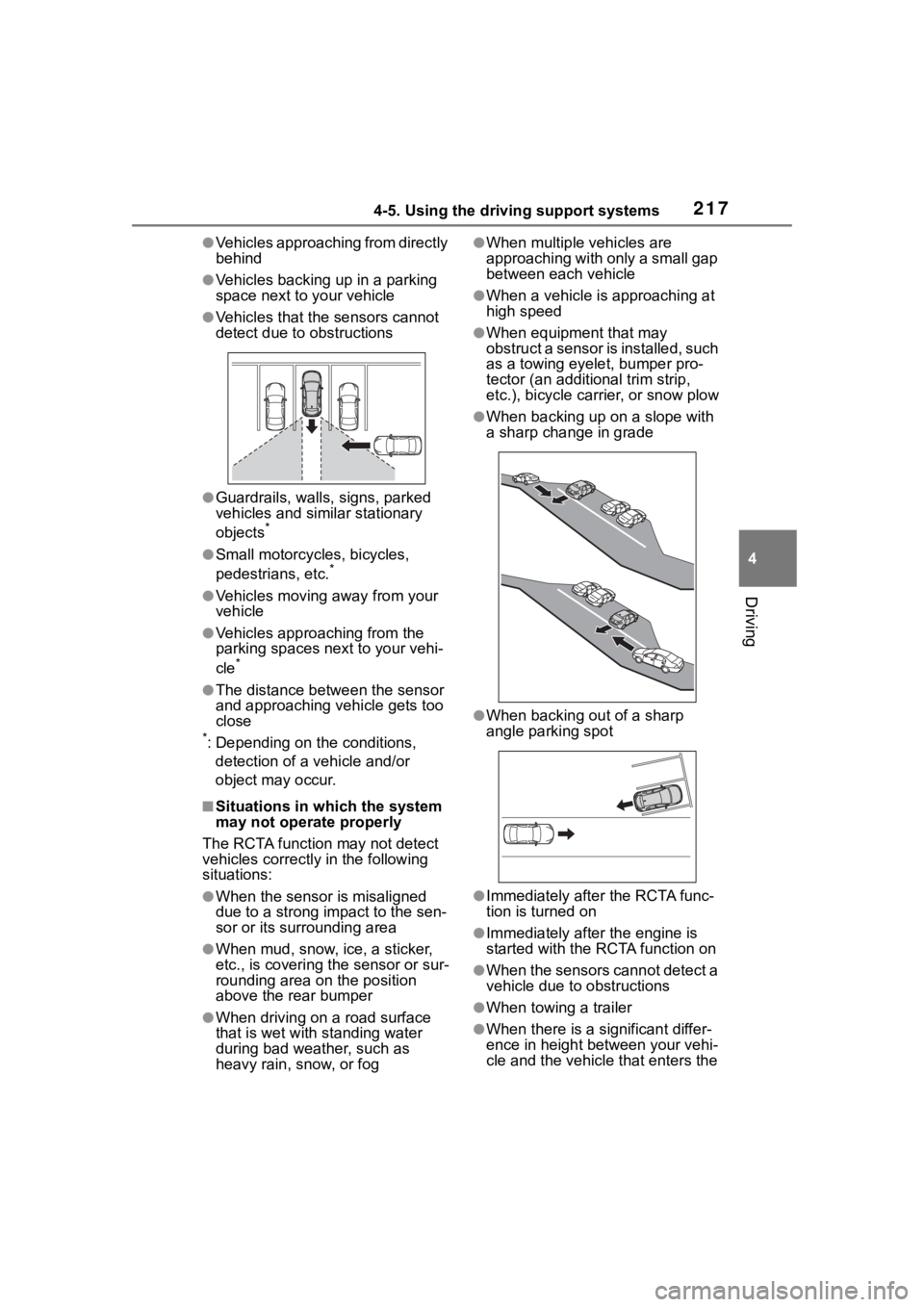
●Vehicles approaching from directly
behind
●Vehicles backing up in a parking
space next to your vehicle
●Vehicles that the sensors cannot
detect due to obstructions
●Guardrails, walls, signs, parked
vehicles and similar stationary
objects
*
●Small motorcycles, bicycles,
pedestrians, etc.*
●Vehicles moving away from your
vehicle
●Vehicles approaching from the
parking spaces next to your vehi-
cle
*
●The distance between the sensor
and approaching vehicle gets too
close
*: Depending on the conditions, detection of a vehicle and/or
object may occur.
■Situations in which the system
may not operate properly
The RCTA function may not detect
vehicles correctly in the following
situations:
●When the sensor is misaligned
due to a strong impact to the sen-
sor or its surrounding area
●When mud, snow, ice, a sticker,
etc., is covering the sensor or sur-
rounding area on the position
above the rear bumper
●When driving on a road surface
that is wet with standing water
during bad weather, such as
heavy rain, snow, or fog
●When multiple vehicles are
approaching with only a small gap
between each vehicle
●When a vehicle is approaching at
high speed
●When equipment that may
obstruct a sensor is installed, such
as a towing eyelet, bumper pro-
tector (an additional trim strip,
etc.), bicycle car rier, or snow plow
●When backing up on a slope with
a sharp change in grade
●When backing out of a sharp
angle parking spot
●Immediately after the RCTA func-
tion is turned on
●Immediately after the engine is
started with the RCTA function on
●When the sensors cannot detect a
vehicle due to obstructions
●When towing a trailer
●When there is a significant differ-
ence in height between your vehi-
cle and the vehicle that enters the
Page 218 of 436
2184-5. Using the driving support systems
detection area
●When a sensor or the area around
a sensor is extremely hot or cold
●If the suspension has been modi-
fied or tires of a size other than
specified are installed
●If the front of the vehicle is raised
or lowered due to the carried load
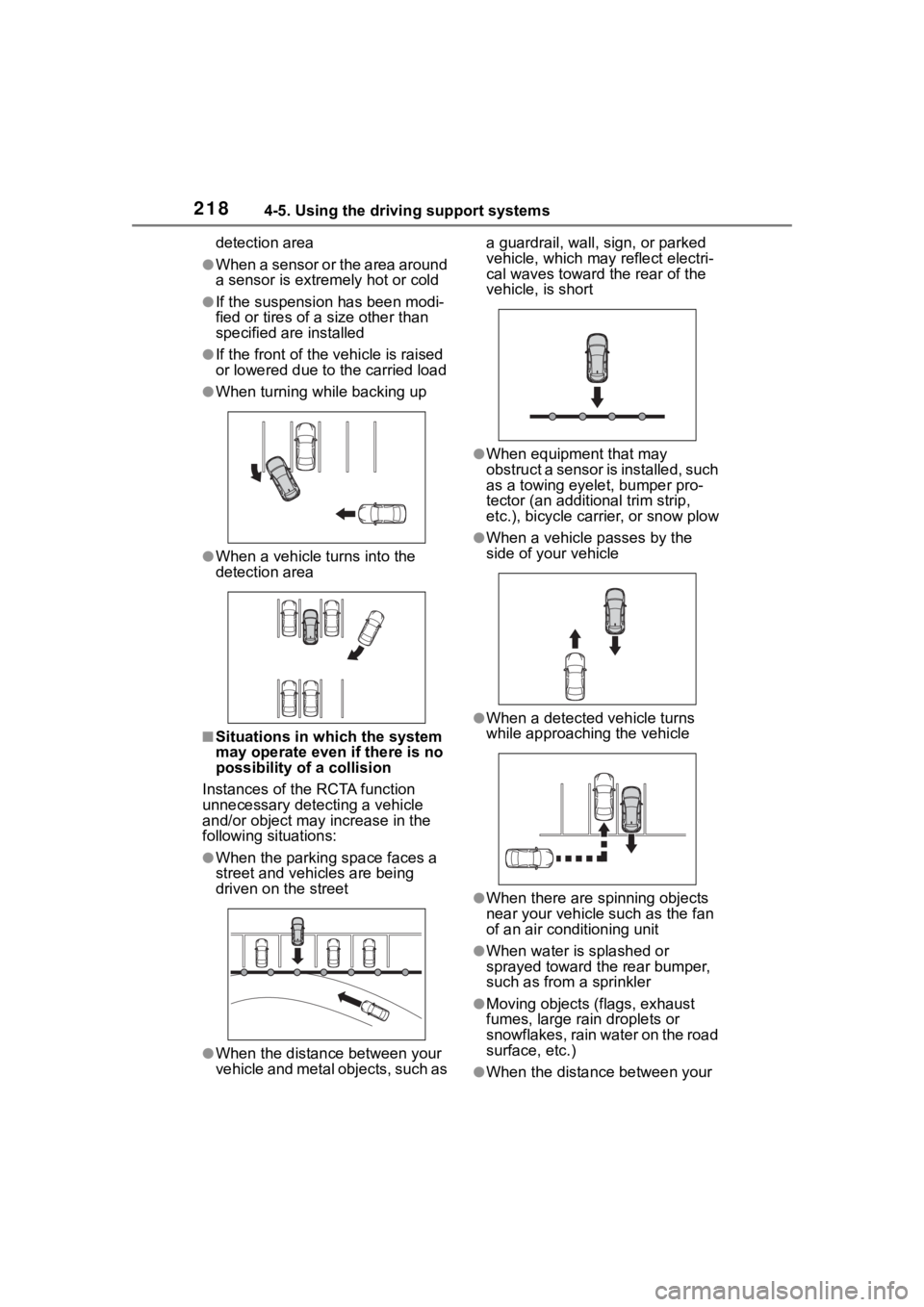
●When turning while backing up
●When a vehicle turns into the
detection area
■Situations in which the system
may operate even if there is no
possibility of a collision
Instances of the RCTA function
unnecessary detec ting a vehicle
and/or object may increase in the
following situations:
●When the parking space faces a
street and vehicles are being
driven on the street
●When the distanc e between your
vehicle and metal objects, such as a guardrail, wall, sign, or parked
vehicle, which may reflect electri-
cal waves toward the rear of the
vehicle, is short
●When equipment that may
obstruct a sensor is installed, such
as a towing eyelet, bumper pro-
tector (an additional trim strip,
etc.), bicycle car
rier, or snow plow
●When a vehicle passes by the
side of your vehicle
●When a detected vehicle turns
while approaching the vehicle
●When there are spinning objects
near your vehicle such as the fan
of an air conditioning unit
●When water is splashed or
sprayed toward the rear bumper,
such as from a sprinkler
●Moving objects (f lags, exhaust
fumes, large rain droplets or
snowflakes, rain water on the road
surface, etc.)
●When the distance between your
Page 223 of 436
2234-5. Using the driving support systems
4
Driving
●Safe exit assist is on
●The vehicle is stopped.
●The shift lever is in a position
other than R.
■The Safe exit assist will detect a
vehicle when
The Safe exit assist will detect a
vehicle present in the detection area
in the followin g situations:
●When the vehicle is stopped and a
vehicle or bicycle, which is travel-
ing parallel to the vehicle, is
approaching within the area that a
door opens (other than the back
door)
■Conditions under which the
system will not detect a vehicle
●Safe exit assist does not detect
the following objects, vehicles,
and bicycles:
• Vehicles or bicycles which are
approaching slowly
*
• Vehicles or bicycles which are determined to have a low possibil-
ity of colliding with a door (other
than the back door) when opened
*
• Vehicles or bicycles which are
approaching from directly behind*
• Vehicles or bicycles which are approaching from the front*
• Guardrails, walls , signs, parked
vehicles, and other stationary
objects
*
• Pedestrians, animals, etc.*
*
: Depending on the conditions, detection of a vehicle and/or
object may occur.
●In situations such as the following,
safe exit assist will not operate:
• When 3 minutes or more have elapsed since the engine off (the
time which operation is possible
may be extended if a door is
opened and closed)
• When your vehicle is not com- pletely stopped
■Conditions under which the
system may not function cor-
rectly
●The Safe exit assist may not
detect vehicles corr ectly in the fol-
lowing situations:
• When the sensor is misaligned due to a strong impact to the sen-
sor or its surrounding area
• When mud, snow, ice, a sticker, etc. is covering the sensor or sur-
rounding area on the rear bumper
• When the vehicle is stopped on a
wet road surface, such as in a
puddle, while in inclement
weather, such as heavy rain,
snow, fog, etc.
• When a vehicle or bicycle approaches from behind a nearby
parked vehicle
• When an approaching vehicle or bicycle suddenly changes direc-
tion
• Immediately after a vehicle or bicycle starts moving
• When the back door is open
• When a bicycle carrier, ramp, or
other accessory is installed to the
back of the vehicle
• When a parked vehicle, wall, sign, person or other stationary object
is behind the vehicle
• When the vehicle is stopped at an angle to the road
• When a vehicle is traveling near
an approaching vehicle or bicycle
• When an approaching vehicle or bicycle is traveling along a station-
ary object, such a wall or sign
• When a vehicle or bicycle is approaching at high speed
• When towing with the vehicle
• When stopped on a steep slope
• When stopped on a curve or at the exit of a curve
●Instances of the Safe exit assist
unnecessarily detecting a vehicle
and/or object may increase in the
following situations:
• When the sensor is misaligned
due to a strong impact to the sen-
sor or its surrounding area
• When a vehicle or bicycle
Page 224 of 436
2244-5. Using the driving support systems
approaches from behind your
vehicle at an angle
• When the vehicle is stopped at an
angle to the road
• When a vehicle or bicycle approaches from behind a parked
vehicle at an angle
• When a parked vehicle, wall, sign, person or other stationary object
is behind the vehicle
• When an approaching vehicle or bicycle suddenly changes direc-
tion
• When an approaching vehicle or bicycle is traveling along a station-
ary object, such a wall or sign
• When the back door is open
• When a bicycle carrier, ramp, or other accessory is installed to the
back of the vehicle
• When a vehicle or bicycle is
approaching at high speed
• When towing with the vehicle
• When stopped on a steep slope
• When stopped on a curve or at the exit of a curve Operate the driv
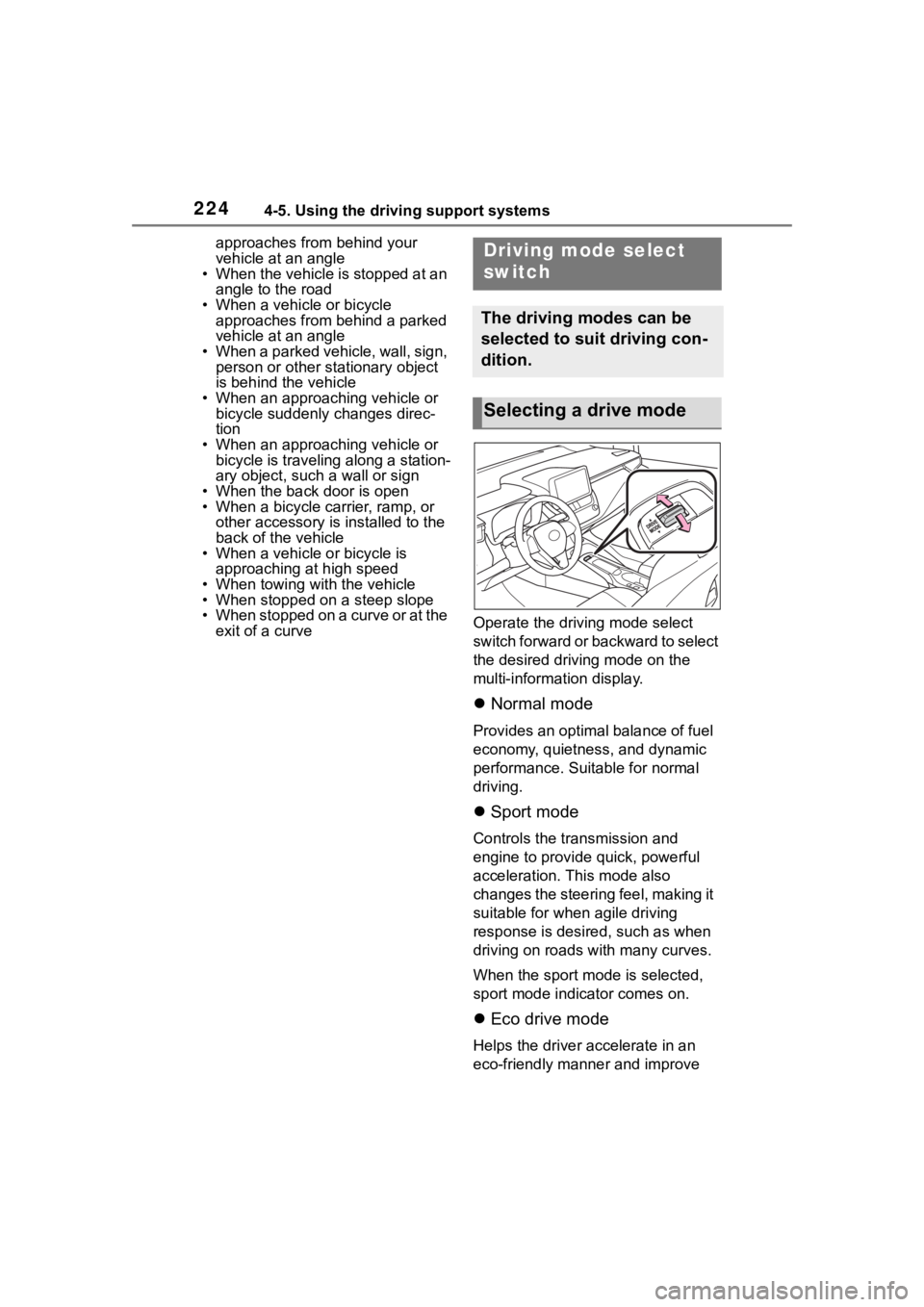
ing mode select
switch forward or backward to select
the desired driving mode on the
multi-information display.
Normal mode
Provides an optimal balance of fuel
economy, quietness, and dynamic
performance. Suitable for normal
driving.
Sport mode
Controls the transmission and
engine to provide quick, powerful
acceleration. This mode also
changes the steering feel, making it
suitable for when agile driving
response is desire d, such as when
driving on roads w ith many curves.
When the sport mode is selected,
sport mode indicator comes on.
Eco drive mode
Helps the driver accelerate in an
eco-friendly manner and improve
Driving mode select
switch
The driving modes can be
selected to suit driving con-
dition.
Selecting a drive mode
Page 315 of 436
3157-2. Steps to take in an emergency
7
When trouble arises
7-2.Steps to take in an emergency
If your vehicle needs
to be towed
If towing is necessary, we
recommend having your
vehicle towed by your Toy-
ota dealer or commercial
towing service, using a
wheel-lift type truck or flat-
bed truck.
Use a safety chain system
for all towing, and abide by
all state/provincial and local
laws.
WARNING
Observe the following precau-
tions.
Failure to do so may result in
death or serious injury.
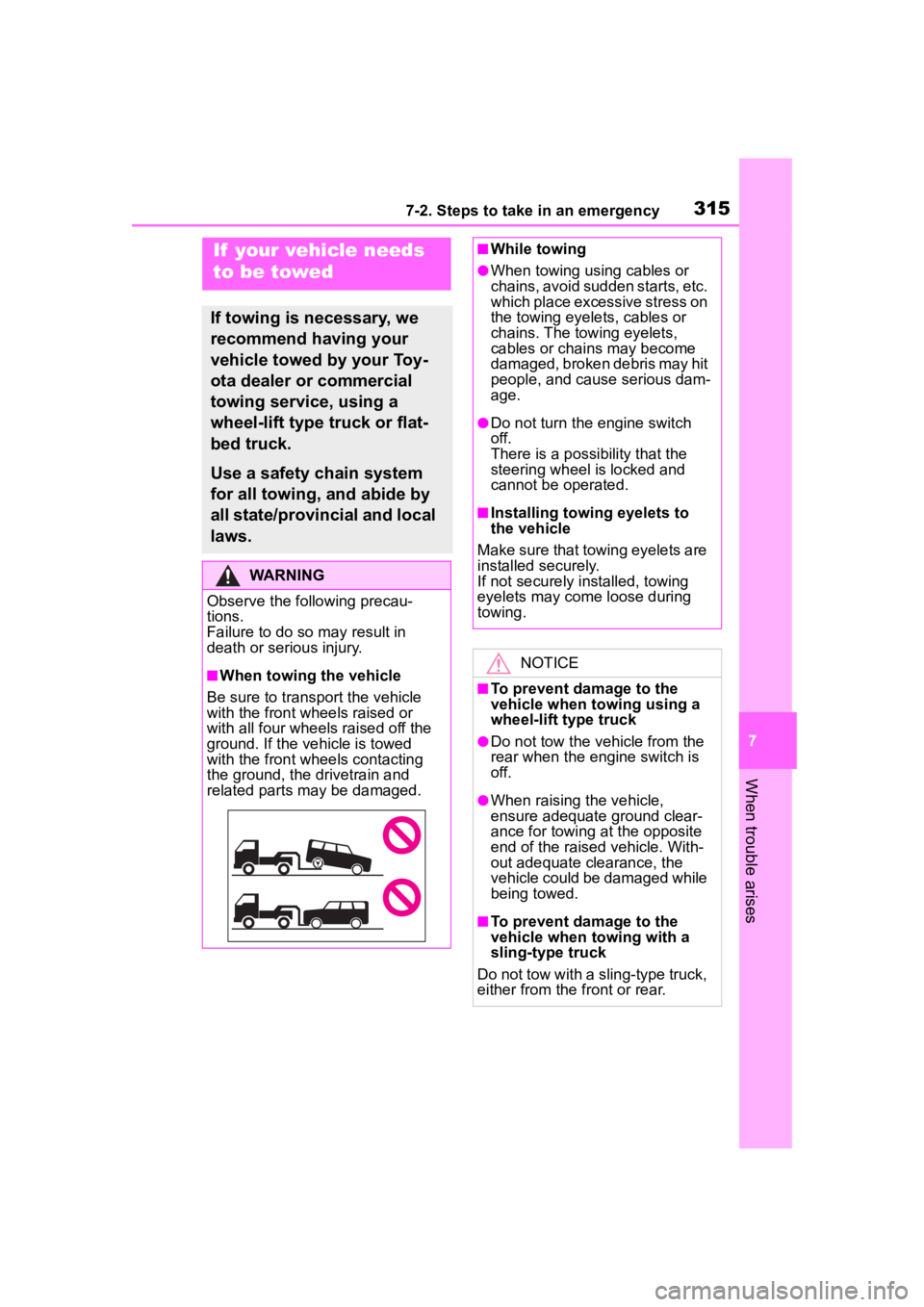
■When towing the vehicle
Be sure to transport the vehicle
with the front wh eels raised or
with all four wheels raised off the
ground. If the vehicle is towed
with the front wh eels contacting
the ground, the drivetrain and
related parts may be damaged.
■While towing
●When towing using cables or
chains, avoid sudden starts, etc.
which place excessive stress on
the towing eyelets, cables or
chains. The towing eyelets,
cables or chains may become
damaged, broken debris may hit
people, and cause serious dam-
age.
●Do not turn the engine switch
off.
There is a possibility that the
steering wheel is locked and
cannot be operated.
■Installing towing eyelets to
the vehicle
Make sure that towing eyelets are
installed securely.
If not securely installed, towing
eyelets may come loose during
towing.
NOTICE
■To prevent damage to the
vehicle when t owing using a
wheel-lift type truck
●Do not tow the vehicle from the
rear when the engine switch is
off.
●When raising the vehicle,
ensure adequate ground clear-
ance for towing at the opposite
end of the raised vehicle. With-
out adequate clearance, the
vehicle could be damaged while
being towed.
■To prevent damage to the
vehicle when towing with a
sling-type truck
Do not tow with a sling-type truck,
either from the front or rear.
Page 316 of 436
3167-2. Steps to take in an emergency
The following may indicate a
problem with your transmission.
Contact your Toyota dealer or
commercial towing service
before towing.
The engine is running but the
vehicle does not move.
The vehicle makes an abnor-
mal sound.
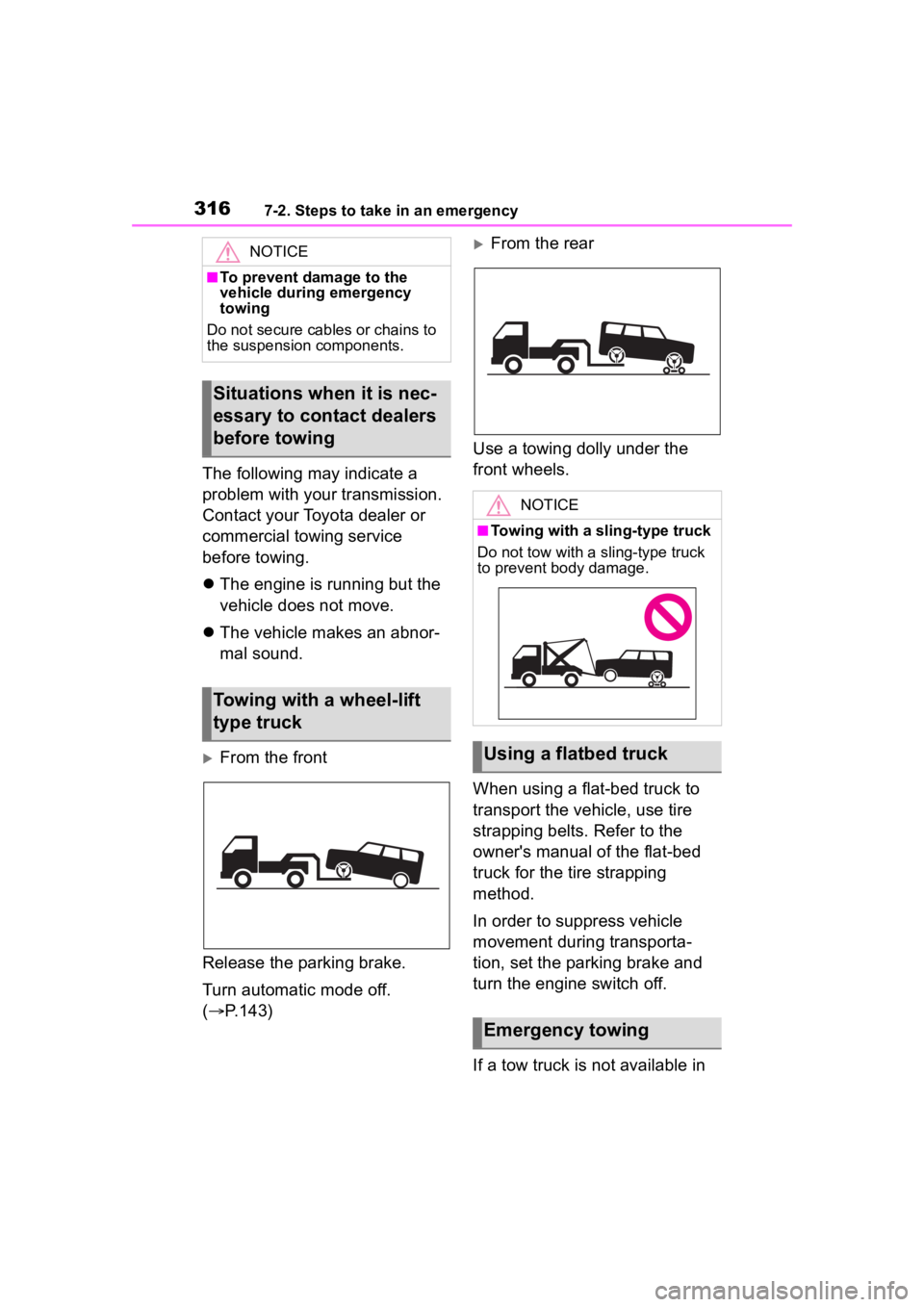
From the front
Release the parking brake.
Turn automatic mode off.
( P.143)
From the rear
Use a towing dolly under the
front wheels.
When using a flat-bed truck to
transport the vehicle, use tire
strapping belts. Refer to the
owner's manual of the flat-bed
truck for the tire strapping
method.
In order to suppress vehicle
movement during transporta-
tion, set the parking brake and
turn the engine switch off.
If a tow truck is not available in NOTICE
■To prevent damage to the
vehicle during emergency
towing
Do not secure cables or chains to
the suspension components.
Situations when it is nec-
essary to contact dealers
before towing
Towing with a wheel-lift
type truck
NOTICE
■Towing with a sling-type truck
Do not tow with a sling-type truck
to prevent body damage.
Using a flatbed truck
Emergency towing
Page 317 of 436
3177-2. Steps to take in an emergency
7
When trouble arises
an emergency, your vehicle may
be temporarily towed using
cables or chains secured to the
emergency towing eyelets. This
should only be attempted on
hard surfaced roads for at most
50 miles (80 km) at under 18
mph (30 km/h).
A driver must be in the vehicle to
steer and operate the brakes.
The vehicle’s wheels, drive train,
axles, steering and brakes must
be in good condition.
Only the front towing eyelets
may be used.
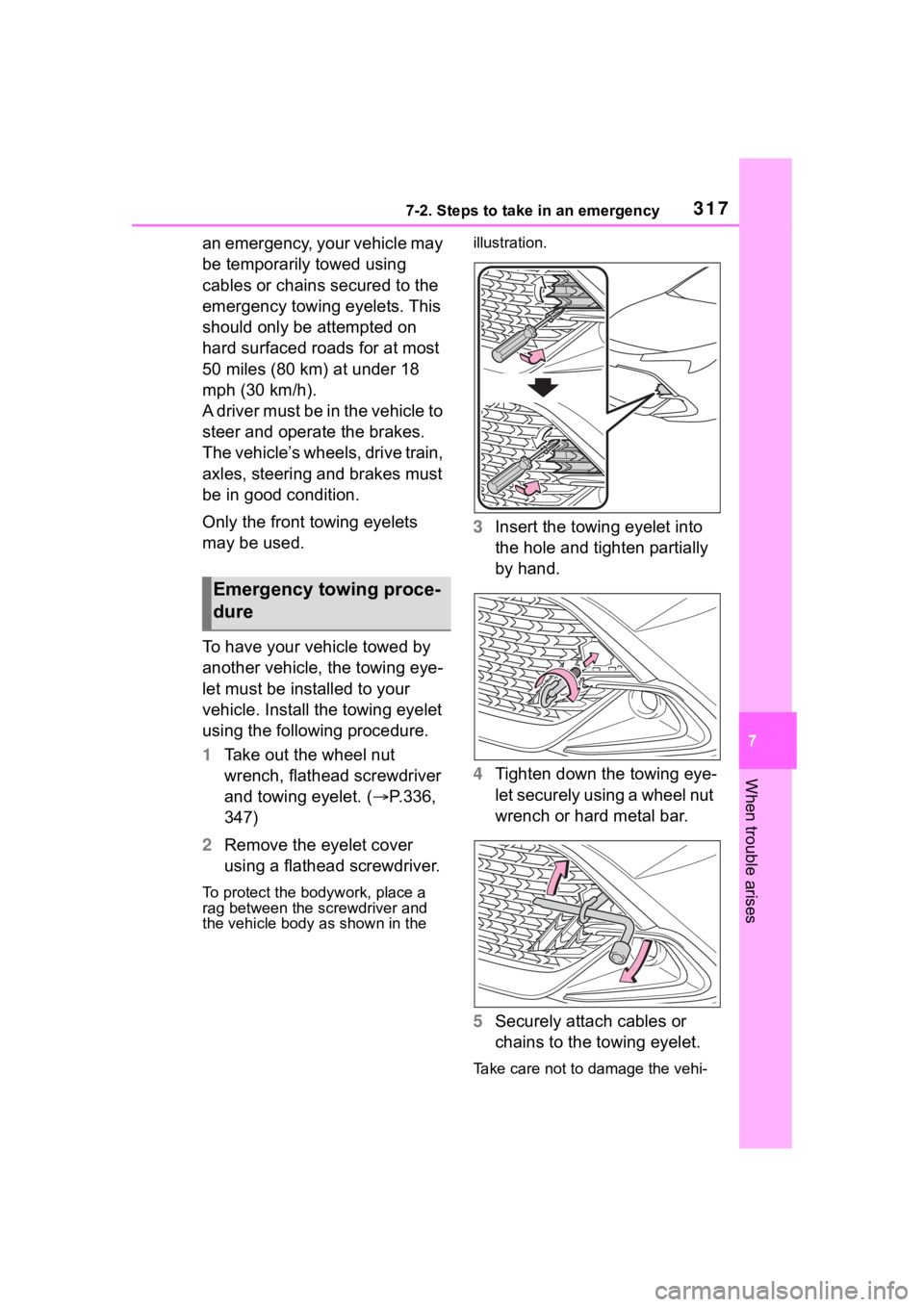
To have your vehicle towed by
another vehicle, the towing eye-
let must be installed to your
vehicle. Install the towing eyelet
using the following procedure.
1Take out the wheel nut
wrench, flathead screwdriver
and towing eyelet. ( P.336,
347)
2 Remove the eyelet cover
using a flathead screwdriver.
To protect the bod ywork, place a
rag between the screwdriver and
the vehicle body as shown in the illustration.
3
Insert the towing eyelet into
the hole and tighten partially
by hand.
4 Tighten down the towing eye-
let securely using a wheel nut
wrench or hard metal bar.
5 Securely attach cables or
chains to the towing eyelet.
Take care not to damage the vehi-
Emergency towing proce-
dure
Page 318 of 436
3187-2. Steps to take in an emergency
cle body.
6Enter the vehicle being towed
and start the engine.
If the engine does not start, turn the
engine switch to ON.
7Shift the shift lever to N and
release the parking brake.
Turn automatic mode off.
( P.143)
When the shift lever cannot
be shifted: P. 1 3 9
■While towing
If the engine is not running, the
power assist for the brakes and
steering will not function, making
steering and braking more difficult.
■Wheel nut wrench
Wheel nut wrench is installed in lug-
gage compartment. ( P.336, 347)
Fluid leaks under the vehicle.
(Water dripping from the air
conditioning after use is nor-
mal.)
Flat-looking tires or uneven
tire wear
Engine coolant temperature
gauge needle continually
points higher than normal.
Changes in exhaust sound
Excessive tire squeal when
cornering
Strange noises related to the
suspension system
Pinging or other noises
related to the engine
Engine missing, stumbling or
running roughly
Appreciable loss of power
Vehicle pulls heavily to one
If you think something
is wrong
If you notice any of the fol-
lowing symptoms, your
vehicle probably needs
adjustment or repair. Con-
tact your Toyota dealer as
soon as possible.
Visible symptoms
Audible symptoms
Operational symptoms
Page 336 of 436
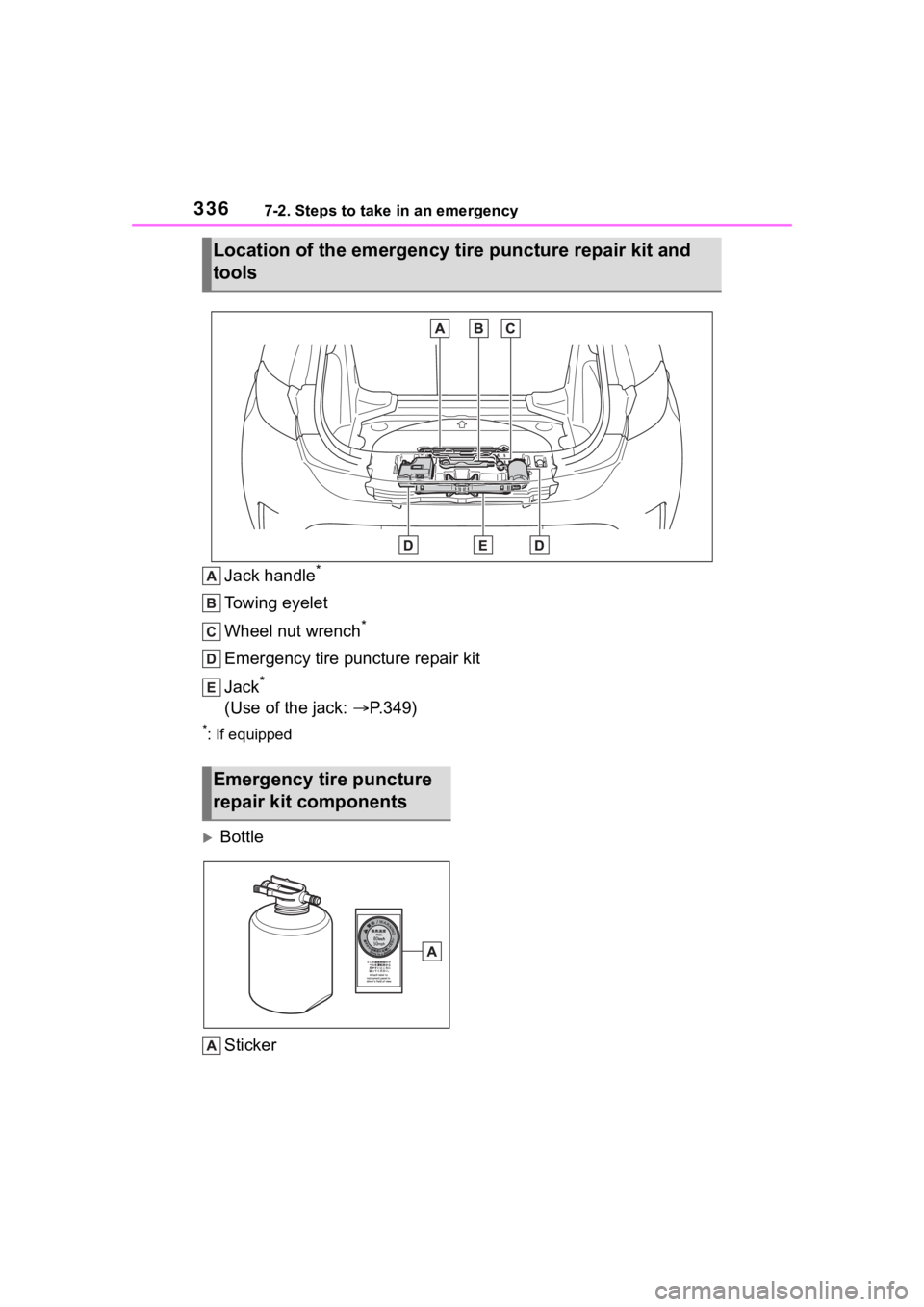
3367-2. Steps to take in an emergency
Jack handle*
Towing eyelet
Wheel nut wrench
*
Emergency tire puncture repair kit
Jack
*
(Use of the jack: P.349)
*: If equipped
Bottle
Sticker
Location of the emergency ti re puncture repair kit and
tools
Emergency tire puncture
repair kit components
Page 347 of 436
3477-2. Steps to take in an emergency
7
When trouble arises
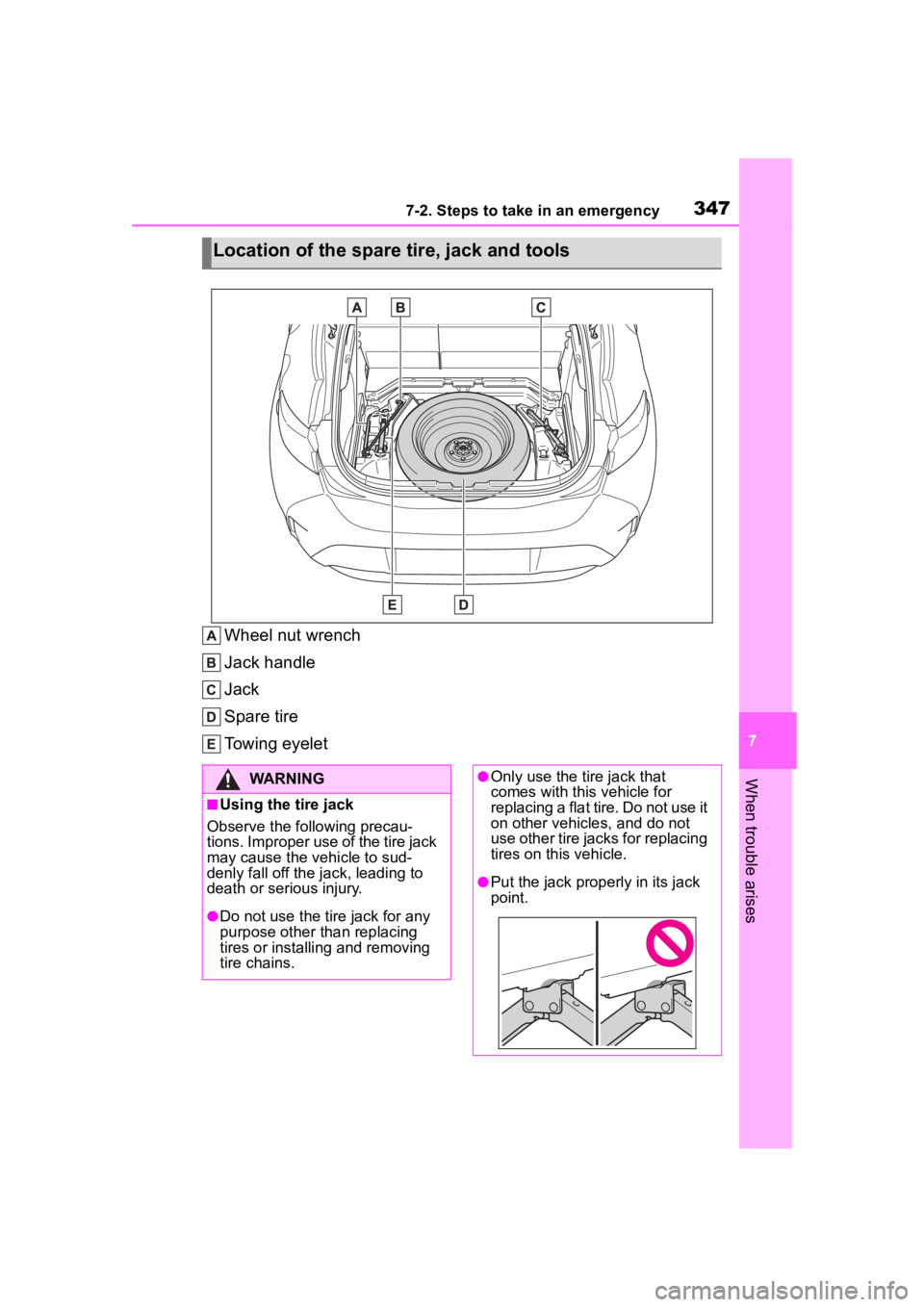
Wheel nut wrench
Jack handle
Jack
Spare tire
Towing eyelet
Location of the spare tire, jack and tools
WARNING
■Using the tire jack
Observe the following precau-
tions. Improper use of the tire jack
may cause the vehicle to sud-
denly fall off the jack, leading to
death or serious injury.
●Do not use the tire jack for any
purpose other than replacing
tires or installing and removing
tire chains.
●Only use the tire jack that
comes with this vehicle for
replacing a flat tire. Do not use it
on other vehicles, and do not
use other tire jacks for replacing
tires on this vehicle.
●Put the jack properly in its jack
point.