wheel TOYOTA COROLLA HATCHBACK 2023 Owner's Manual
[x] Cancel search | Manufacturer: TOYOTA, Model Year: 2023, Model line: COROLLA HATCHBACK, Model: TOYOTA COROLLA HATCHBACK 2023Pages: 436, PDF Size: 8.72 MB
Page 151 of 436
1514-3. Operating the lights and wipers
4
Driving
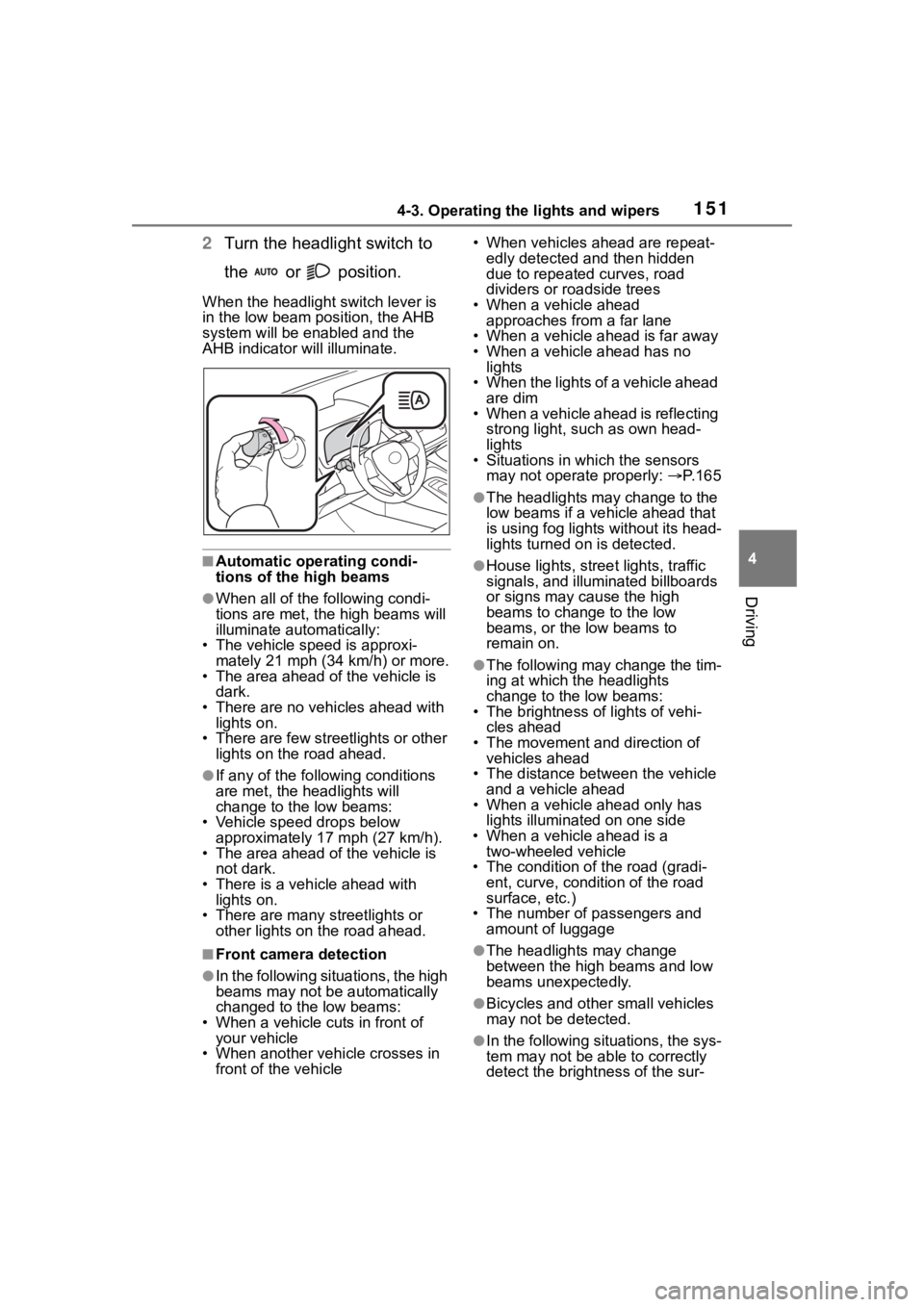
2Turn the headlight switch to
the or position.
When the headlight switch lever is
in the low beam position, the AHB
system will be enabled and the
AHB indicator will illuminate.
■Automatic operating condi-
tions of the high beams
●When all of the following condi-
tions are met, the high beams will
illuminate automatically:
• The vehicle speed is approxi-
mately 21 mph (34 km/h) or more.
• The area ahead of the vehicle is dark.
• There are no vehicles ahead with lights on.
• There are few streetlights or other
lights on the road ahead.
●If any of the following conditions
are met, the headlights will
change to the low beams:
• Vehicle speed drops below
approximately 17 mph (27 km/h).
• The area ahead of the vehicle is not dark.
• There is a vehi cle ahead with
lights on.
• There are many streetlights or
other lights on the road ahead.
■Front camera detection
●In the following situations, the high
beams may not be automatically
changed to the low beams:
• When a vehicle cuts in front of your vehicle
• When another vehicle crosses in front of the vehicle • When vehicles ahead are repeat-
edly detected and then hidden
due to repeated curves, road
dividers or roadside trees
• When a vehicle ahead approaches from a far lane
• When a vehicle ahead is far away
• When a vehicle ahead has no lights
• When the lights of a vehicle ahead are dim
• When a vehicle ahead is reflecting
strong light, such as own head-
lights
• Situations in which the sensors
may not operate properly: P. 1 6 5
●The headlights may change to the
low beams if a vehicle ahead that
is using fog lights without its head-
lights turned on is detected.
●House lights, street lights, traffic
signals, and illuminated billboards
or signs may cause the high
beams to change to the low
beams, or the low beams to
remain on.
●The following may change the tim-
ing at which the headlights
change to the low beams:
• The brightness o f lights of vehi-
cles ahead
• The movement and direction of vehicles ahead
• The distance between the vehicle and a vehicle ahead
• When a vehicle ahead only has
lights illuminate d on one side
• When a vehicle ahead is a two-wheeled vehicle
• The condition of the road (gradi- ent, curve, condition of the road
surface, etc.)
• The number of passengers and amount of luggage
●The headlights may change
between the high beams and low
beams unexpectedly.
●Bicycles and other small vehicles
may not be detected.
●In the following situations, the sys-
tem may not be able to correctly
detect the brightness of the sur-
Page 161 of 436
1614-5. Using the driving support systems
4
Driving
Toyota Safety Sense
3.0
The Toyota Safety Sense 3.0
consists of the driving
assist systems and contrib-
utes to a safe and comfort-
able driving experience:
WARNING
■Toyota Safety Sense 3.0
The Toyota Safety Sense 3.0
operates under the assumption
that the driver will drive safely,
and is designed to help reduce
the impact to the occupants in a
collision and assist the driver
under normal driving conditions.
As there is a limit to the degree of
recognition accuracy and control
performance that this system can
provide, do not ov erly rely on this
system. The driver is solely
responsible for paying attention to
the vehicle’s surroundings and
driving safely.
■For safe use
●Do not overly rely on this sys-
tem. The driver is solely respon-
sible for paying attention to the
vehicle’s surroundings and driv-
ing safely. This system may not
operate in all situations and pro-
vided assistance is limited.
Over-reliance on this system to
drive the vehicle safely may
lead to an accident resulting in
death or serious injury.
●Do not attempt to test the oper-
ation of the system, as it may
not operate properly, possibly
leading to an accident.
●If attention is necessary while
performing driving operations or
a system malfunction occurs, a
warning message or warning
buzzer will be operated. If a
warning message is displayed
on the display, follow the
instructions displayed.
●Depending on external noise,
the volume of the audio system,
etc. it may be difficult to hear the
warning buzzer. Also, depend-
ing on the road conditions, it
may be difficult to recognize the
operation of the system.
■When it is necessary to dis-
able the system
In the following si tuations, make
sure to disable the system.
Failure to do so may lead to the
system not operating properly,
possibly leading to an accident
resulting in death o r serious injury.
●When the vehicle is tilted due to
being overloaded or having a
flat tire
●When driving at extremely high
speeds
●When towing another vehicle
●When the vehicle is being trans-
ported by a truck, ship, train,
etc.
●When the vehicle is raised on a
lift and the tires are allowed to
rotate freely
●When inspecting the vehicle
using a drum tester such as a
chassis dynamometer or speed-
ometer tester, or when using an
on vehicle wheel balancer
●When the vehicle is driven in a
sporty manner or off-road
●When using an automatic car
wash
Page 166 of 436
1664-5. Using the driving support systems
has become extremely short
●When a detectable vehicle is at an
angle
●When snow, mud, etc. is attached
to a detectable vehicle
●When driving on the following
kinds of roads:
• Roads with sharp curves or wind- ing roads
• Roads with chang es in grade,
such as sudden inclines or
declines
• Roads which is slo ped to the left
or right
• Roads with deep ruts
• Roads which are rough and
unmaintained
• Roads which frequently undulate
or are bumpy
●When the steering wheel is being
operated frequently or suddenly
●When the vehicle is not in a con-
stant position within a lane
●When parts related to this system,
the brakes, etc. are cold or
extremely hot, wet, etc.
●When the wheels are misaligned
●When driving on slick road sur-
faces, such as when it is covered
with ice, snow, gravel, etc.
●When the course of the vehicle
differs from the shape of a curve
●When the vehicle speed is exces-
sively high when entering a curve
●When entering/exiting a parking
lot, garage, car elevator, etc.
●When driving in a parking lot
●When driving through an area
where there are obstructions
which may contact your vehicle,
such as tall grass, tree branches,
a curtain, etc.
●When driving in strong wind
■Situations in which the lane
may not be detected
●When the lane is extremely wide
or narrow
●Immediately after changing lanes
or passing through an intersection
●When driving in a temporary lane
or lane regulated by construction
●When there are s tructures, pat-
terns, shadows which are similar
to lane lines in the surrounding
●When the lane lines are not clear
or driving on a wet road surface
●When a lane line is on a curb
●When driving on a bright, reflec-
tive road surface, such as con-
crete
■Situations in which some or all
of the functions of the system
cannot operate
●When a malfunction is detected in
this system or a related system,
such as the brakes, steering, etc.
●When the VSC, TRAC, or other
safety related system is operating
●When the VSC, TRAC, or other
safety related system is off
■Changes in brake operation
sound and pedal response
●When the brakes have been oper-
ated, brake operation sounds may
be heard and the brake pedal
response may cha nge, but this
does not indicate a malfunction.
●When the system is operating, the
brake pedal may feel stiffer than
expected or sink. In either situa-
tion the brake pedal can be
depressed further. Further
depress the brake pedal as nec-
essary.
Page 168 of 436
1684-5. Using the driving support systems
*: Detected as a detectable object only when being ridden.
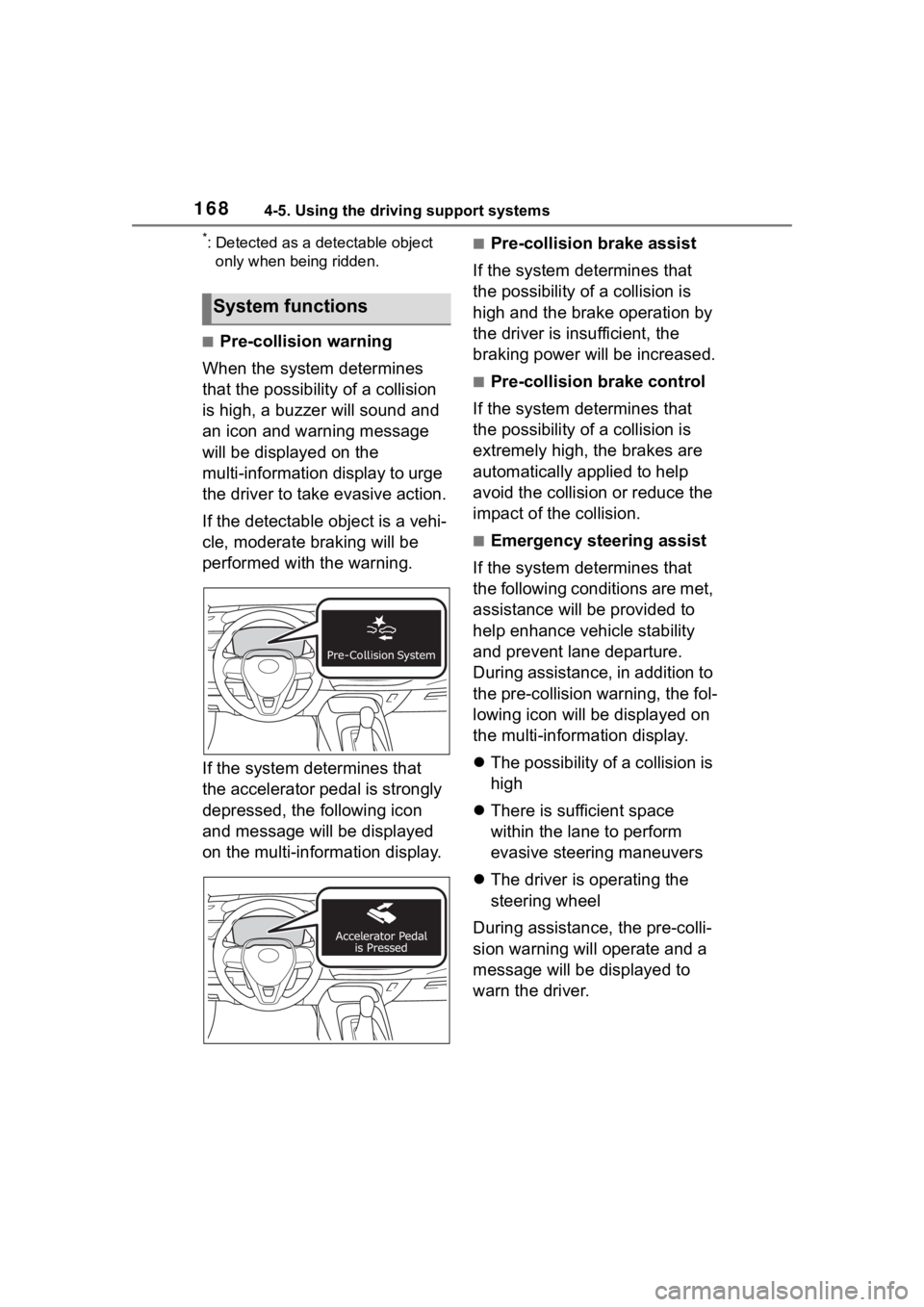
■Pre-collision warning
When the system determines
that the possibility of a collision
is high, a buzzer will sound and
an icon and warning message
will be displayed on the
multi-information display to urge
the driver to take evasive action.
If the detectable object is a vehi-
cle, moderate braking will be
performed with the warning.
If the system determines that
the accelerator pedal is strongly
depressed, the following icon
and message will be displayed
on the multi-information display.
■Pre-collision brake assist
If the system determines that
the possibility of a collision is
high and the brake operation by
the driver is insufficient, the
braking power will be increased.
■Pre-collision brake control
If the system determines that
the possibility of a collision is
extremely high, the brakes are
automatically applied to help
avoid the collision or reduce the
impact of the collision.
■Emergency steering assist
If the system determines that
the following conditions are met,
assistance will be provided to
help enhance vehicle stability
and prevent lane departure.
During assistance, in addition to
the pre-collision warning, the fol-
lowing icon will be displayed on
the multi-information display.
The possibility of a collision is
high
There is sufficient space
within the lane to perform
evasive steering maneuvers
The driver is operating the
steering wheel
During assistance, the pre-colli-
sion warning will operate and a
message will be displayed to
warn the driver.
System functions
Page 170 of 436
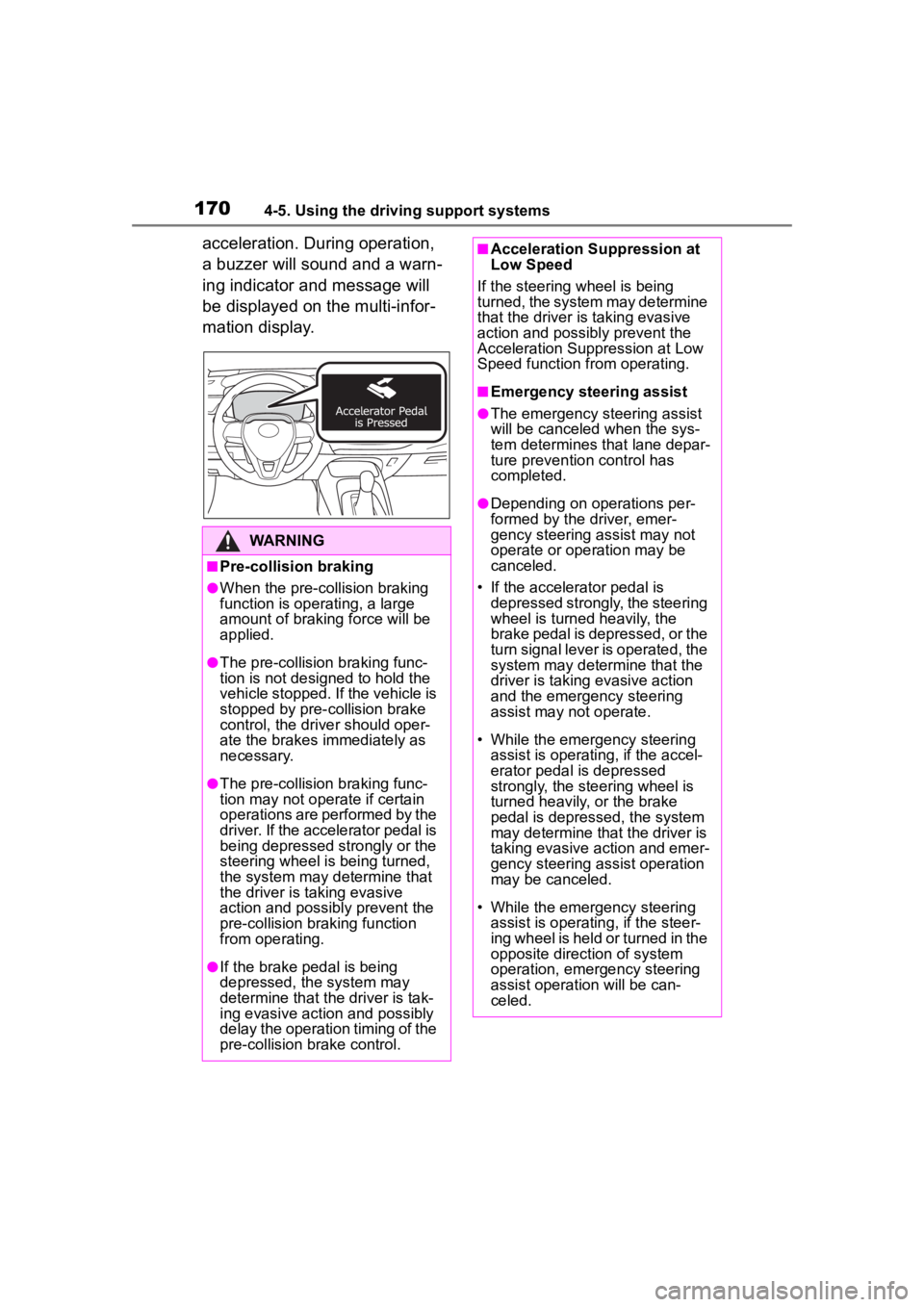
1704-5. Using the driving support systems
acceleration. During operation,
a buzzer will sound and a warn-
ing indicator and message will
be displayed on the multi-infor-
mation display.
WARNING
■Pre-collision braking
●When the pre-collision braking
function is operating, a large
amount of braking force will be
applied.
●The pre-collision braking func-
tion is not designed to hold the
vehicle stopped. If the vehicle is
stopped by pre-collision brake
control, the driver should oper-
ate the brakes immediately as
necessary.
●The pre-collision braking func-
tion may not operate if certain
operations are performed by the
driver. If the accelerator pedal is
being depressed strongly or the
steering wheel is being turned,
the system may determine that
the driver is taking evasive
action and possibly prevent the
pre-collision braking function
from operating.
●If the brake pedal is being
depressed, the system may
determine that the driver is tak-
ing evasive action and possibly
delay the operation timing of the
pre-collision brake control.
■Acceleration Suppression at
Low Speed
If the steering wheel is being
turned, the system may determine
that the driver is taking evasive
action and possibly prevent the
Acceleration Suppression at Low
Speed function from operating.
■Emergency steering assist
●The emergency steering assist
will be canceled when the sys-
tem determines that lane depar-
ture prevention control has
completed.
●Depending on operations per-
formed by the driver, emer-
gency steering assist may not
operate or operation may be
canceled.
• If the accelerator pedal is depressed strongly, the steering
wheel is turned heavily, the
brake pedal is depressed, or the
turn signal lever is operated, the
system may determine that the
driver is taking evasive action
and the emergency steering
assist may n ot operate.
• While the emergency steering assist is operating, if the accel-
erator pedal is depressed
strongly, the steering wheel is
turned heavily, or the brake
pedal is depressed, the system
may determine that the driver is
taking evasive action and emer-
gency steering assist operation
may be canceled.
• While the emergency steering assist is operating, if the steer-
ing wheel is held or turned in the
opposite direction of system
operation, emergency steering
assist operation will be can-
celed.
Page 172 of 436
1724-5. Using the driving support systems
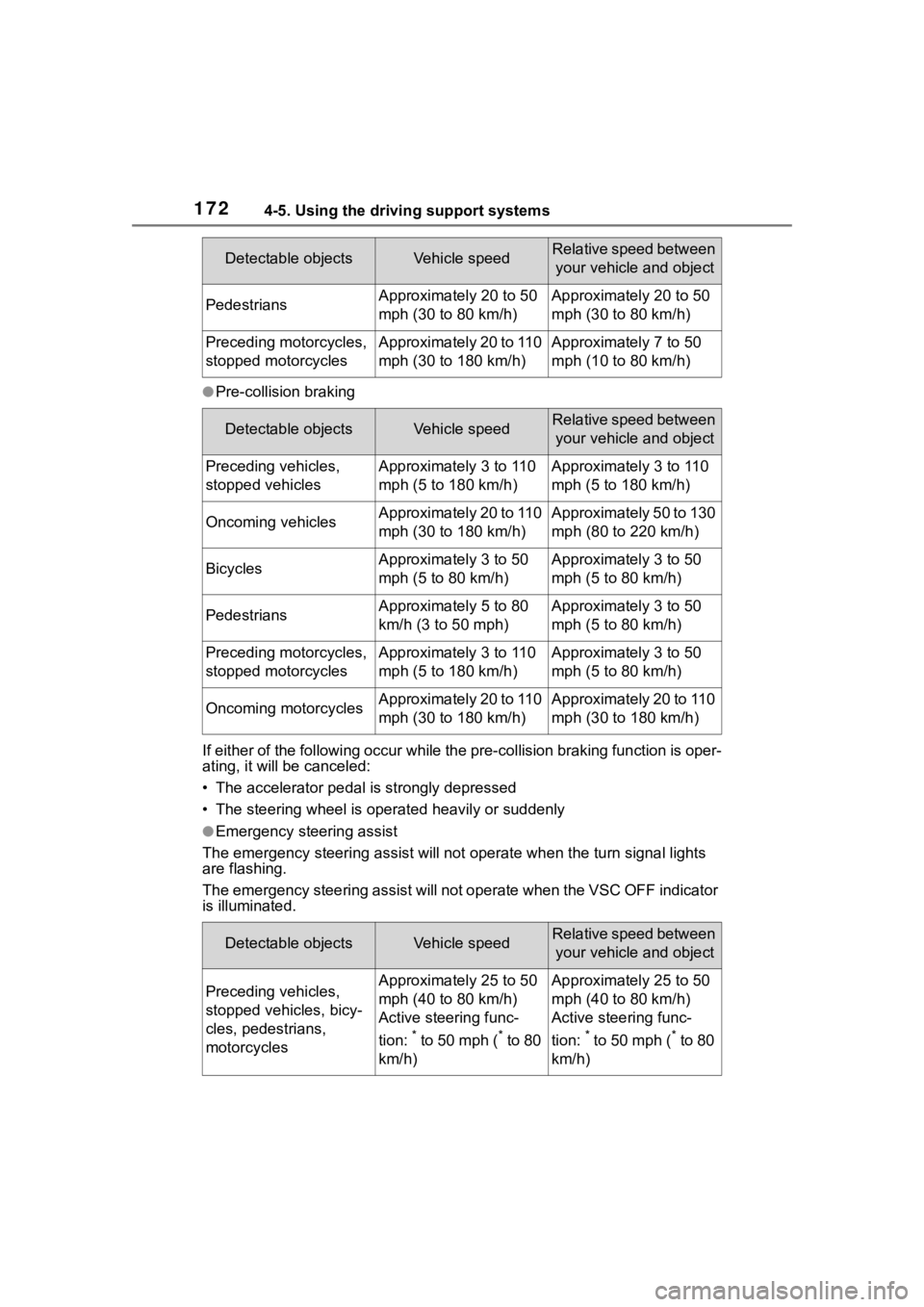
●Pre-collision braking
If either of the following occur while the pre-collision braking function is oper-
ating, it will be canceled:
• The accelerator pedal is strongly depressed
• The steering wheel is ope rated heavily or suddenly
●Emergency steering assist
The emergency steeri ng assist will not opera te when the turn signal lights
are flashing.
The emergency steering assist will not operate when the VSC OFF indicator
is illuminated.
PedestriansApproximately 20 to 50
mph (30 to 80 km/h)Approximately 20 to 50
mph (30 to 80 km/h)
Preceding motorcycles,
stopped motorcyclesApproximately 20 to 110
mph (30 to 180 km/h)Approximately 7 to 50
mph (10 to 80 km/h)
Detectable objectsVehicle speedRelative speed between
your vehicle and object
Preceding vehicles,
stopped vehiclesApproximately 3 to 110
mph (5 to 180 km/h)Approximately 3 to 110
mph (5 to 180 km/h)
Oncoming vehiclesApproximately 20 to 110
mph (30 to 180 km/h)Approximately 50 to 130
mph (80 to 220 km/h)
BicyclesApproximately 3 to 50
mph (5 to 80 km/h)Approximately 3 to 50
mph (5 to 80 km/h)
PedestriansApproximately 5 to 80
km/h (3 to 50 mph)Approximately 3 to 50
mph (5 to 80 km/h)
Preceding motorcycles,
stopped motorcyclesApproximately 3 to 110
mph (5 to 180 km/h)Approximately 3 to 50
mph (5 to 80 km/h)
Oncoming motorcyclesApproximately 20 to 110
mph (30 to 180 km/h)Approximately 20 to 110
mph (30 to 180 km/h)
Detectable objectsVehicle speedRelative speed between your vehicle and object
Preceding vehicles,
stopped vehicles, bicy-
cles, pedestrians,
motorcyclesApproximately 25 to 50
mph (40 to 80 km/h)
Active steering func-
tion:
* to 50 mph (* to 80
km/h)
Approximately 25 to 50
mph (40 to 80 km/h)
Active steering func-
tion:
* to 50 mph (* to 80
km/h)
Detectable objectsVehicle speedRelative speed between your vehicle and object
Page 173 of 436
1734-5. Using the driving support systems
4
Driving
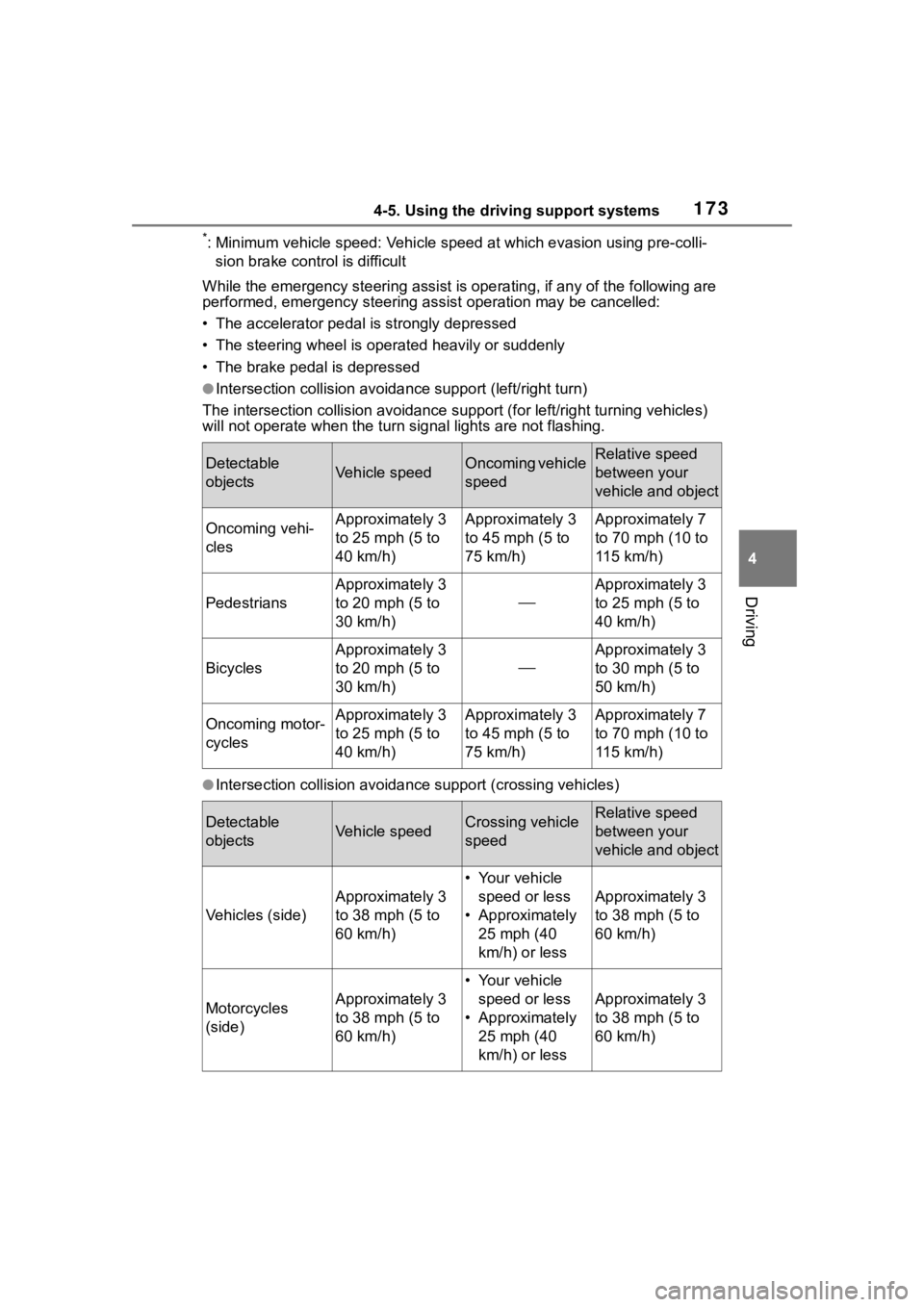
*: Minimum vehicle speed: Vehicle speed at which evasion using pr e-colli-
sion brake control is difficult
While the emergency ste ering assist is operating, if any of the following are
performed, emergency steering assist operation may be cancelled :
• The accelerator pedal is strongly depressed
• The steering wheel is ope rated heavily or suddenly
• The brake pedal is depressed
●Intersection collisio n avoidance support (left/right turn)
The intersection collision avoida nce support (for left/right turning vehicles)
will not operate when the turn signal light s are not flashing.
●Intersection collision avoidance support (crossing vehicles)
Detectable
objectsVehicle speedOncoming vehicle
speedRelative speed
between your
vehicle and object
Oncoming vehi-
clesApproximately 3
to 25 mph (5 to
40 km/h)Approximately 3
to 45 mph (5 to
75 km/h)Approximately 7
to 70 mph (10 to
115 km/h)
Pedestrians
Approximately 3
to 20 mph (5 to
30 km/h)
Approximately 3
to 25 mph (5 to
40 km/h)
Bicycles
Approximately 3
to 20 mph (5 to
30 km/h)
Approximately 3
to 30 mph (5 to
50 km/h)
Oncoming motor-
cyclesApproximately 3
to 25 mph (5 to
40 km/h)Approximately 3
to 45 mph (5 to
75 km/h)Approximately 7
to 70 mph (10 to
115 km/h)
Detectable
objectsVehicle speedCrossing vehicle
speedRelative speed
between your
vehicle and object
Vehicles (side)
Approximately 3
to 38 mph (5 to
60 km/h)
• Your vehicle
speed or less
• Approximately 25 mph (40
km/h) or less
Approximately 3
to 38 mph (5 to
60 km/h)
Motorcycles
(side)Approximately 3
to 38 mph (5 to
60 km/h)
• Your vehicle speed or less
• Approximately 25 mph (40
km/h) or less
Approximately 3
to 38 mph (5 to
60 km/h)
Page 174 of 436
1744-5. Using the driving support systems
●Acceleration Suppression at Low Speed
The Acceleration Suppression at Low Speed function will not ope rate when
the turn signal lig hts are flashing.
While the Acceleration Suppression at Low Speed function is ope rating, if
any of the following are performed, the low speed sudden acceleration sup-
pression function oper ation will be cancelled:
• The accelerator pedal is released.
• The steering wheel is ope rated heavily or suddenly
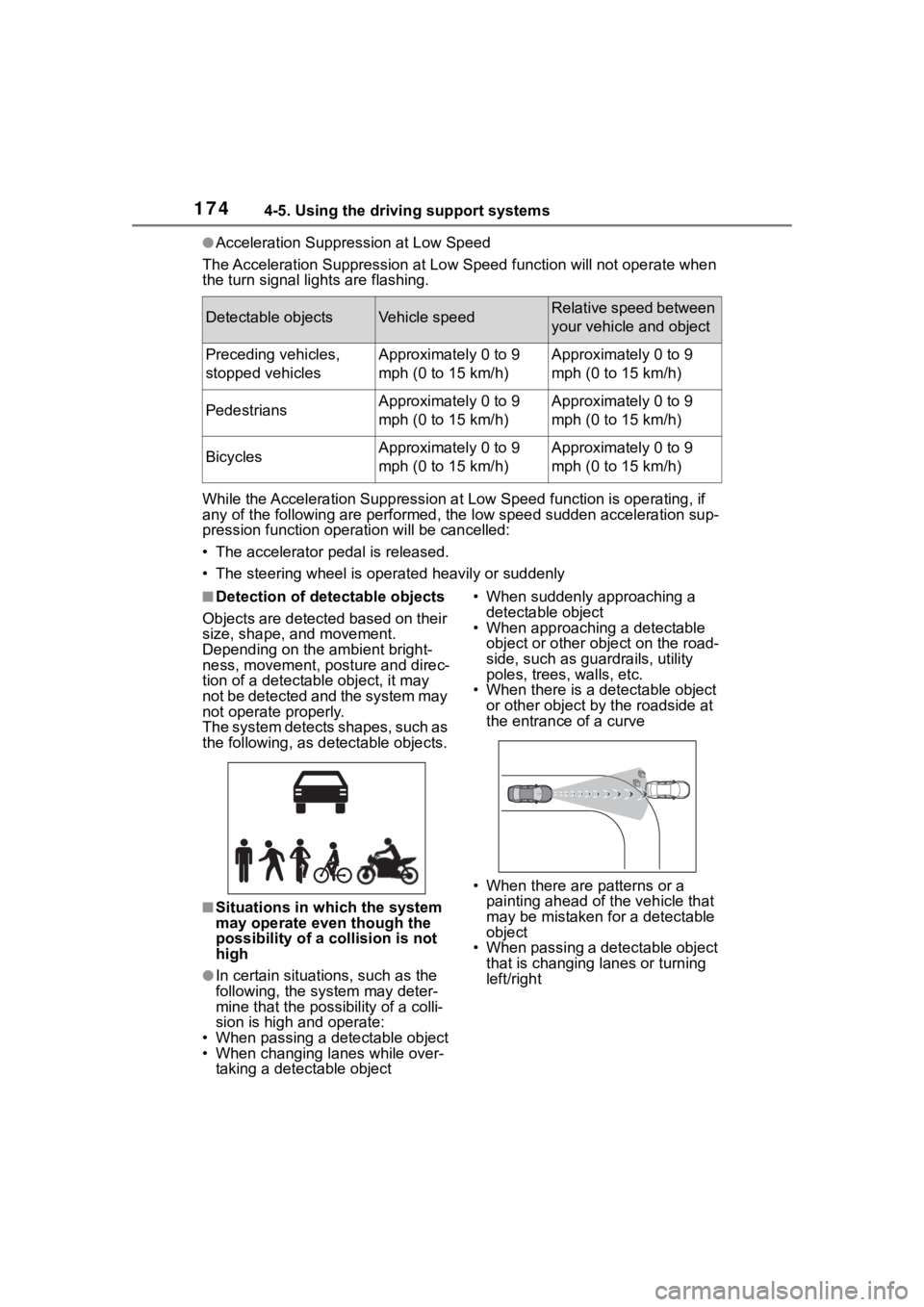
■Detection of detectable objects
Objects are detected based on their
size, shape, and movement.
Depending on the ambient bright-
ness, movement, pos ture and direc-
tion of a detectable object, it may
not be detected and the system may
not operate properly.
The system detects shapes, such as
the following, as de tectable objects.
■Situations in which the system
may operate even though the
possibility of a collision is not
high
●In certain situations, such as the
following, the sys tem may deter-
mine that the possibility of a colli-
sion is high and operate:
• When passing a detectable object
• When changing lanes while over-
taking a detectable object • When suddenly approaching a
detectable object
• When approaching a detectable
object or other ob ject on the road-
side, such as guardrails, utility
poles, trees, walls, etc.
• When there is a d etectable object
or other object by the roadside at
the entrance of a curve
• When there are patterns or a painting ahead of the vehicle that
may be mistaken for a detectable
object
• When passing a detectable object
that is changing lanes or turning
left/right
Detectable objectsVehicle speedRelative speed between
your vehicle and object
Preceding vehicles,
stopped vehiclesApproximately 0 to 9
mph (0 to 15 km/h)Approximately 0 to 9
mph (0 to 15 km/h)
PedestriansApproximately 0 to 9
mph (0 to 15 km/h)Approximately 0 to 9
mph (0 to 15 km/h)
BicyclesApproximately 0 to 9
mph (0 to 15 km/h)Approximately 0 to 9
mph (0 to 15 km/h)
Page 175 of 436
1754-5. Using the driving support systems
4
Driving
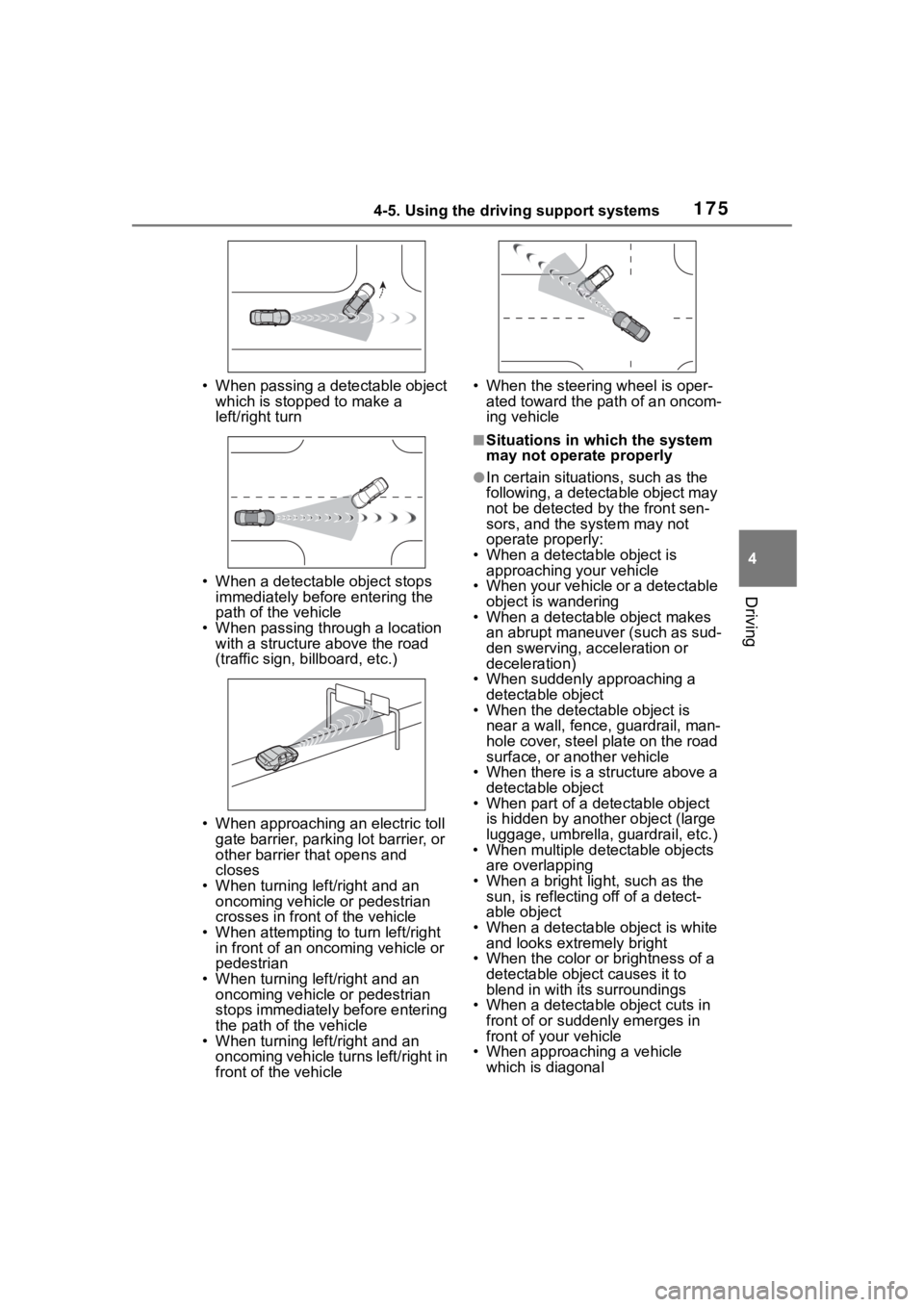
• When passing a detectable object which is stopped to make a
left/right turn
• When a detectable object stops immediately before entering the
path of the vehicle
• When passing through a location with a structure above the road
(traffic sign, b illboard, etc.)
• When approaching an electric toll gate barrier, parking lot barrier, or
other barrier that opens and
closes
• When turning left/right and an oncoming vehicle or pedestrian
crosses in front of the vehicle
• When attempting to turn left/right in front of an oncoming vehicle or
pedestrian
• When turning left/right and an oncoming vehicle or pedestrian
stops immediately before entering
the path of the vehicle
• When turning left/right and an oncoming vehicle turns left/right in
front of the vehicle • When the steering wheel is oper-
ated toward the path of an oncom-
ing vehicle
■Situations in which the system
may not operate properly
●In certain situations, such as the
following, a detectable object may
not be detected by the front sen-
sors, and the system may not
operate properly:
• When a detectable object is approaching your vehicle
• When your vehicle or a detectable object is wandering
• When a detectable object makes
an abrupt maneuver (such as sud-
den swerving, acceleration or
deceleration)
• When suddenly approaching a detectable object
• When the detectable object is
near a wall, fence, guardrail, man-
hole cover, steel plate on the road
surface, or another vehicle
• When there is a structure above a detectable object
• When part of a detectable object
is hidden by another object (large
luggage, umbrella, guardrail, etc.)
• When multiple det ectable objects
are overlapping
• When a bright light, such as the sun, is reflecting off of a detect-
able object
• When a detectable object is white and looks extremely bright
• When the color or brightness of a detectable object causes it to
blend in with its surroundings
• When a detectable object cuts in
front of or suddenly emerges in
front of your vehicle
• When approaching a vehicle
which is diagonal
Page 176 of 436
1764-5. Using the driving support systems
• If a vehicle ahead is a child sized bicycle, is carrying a large load, is
carrying an extra passenger, or
has an unusual shape (bicycles
equipped with a child seat, tan-
dem bicycles, etc.)
• If a pedestrian or bicycle is shorter than approximately 3.2 ft. (1 m) or
taller than approximately 6.5 ft. (2
m).
• When the silhouette of a pedes- trian or bicycle is unclear (such as
when they are wearing a raincoat,
long skirt, etc.)
• When a pedestrian or bicycle is
bending forward or squatting
• When a pedestrian or bicycle is moving at high speed
• When a pedestrian is pushing a stroller, wheelchair, bicycle or
other vehicle
• When a detectable object blends in with the surrounding area, such
a s w h e n i t i s d i m ( a t d a w n o r d u s k )
or dark (at night or in a tunnel)
• When the vehicle has not been driven for a certain amount of time
after the engine was started
• While turning left /right or a few
seconds after turning left/right
• While driving around a curve and a few seconds after driving around
a curve
• When turning left/right and an oncoming vehicle i s driving in a
lane 3 or more l anes from the
vehicle
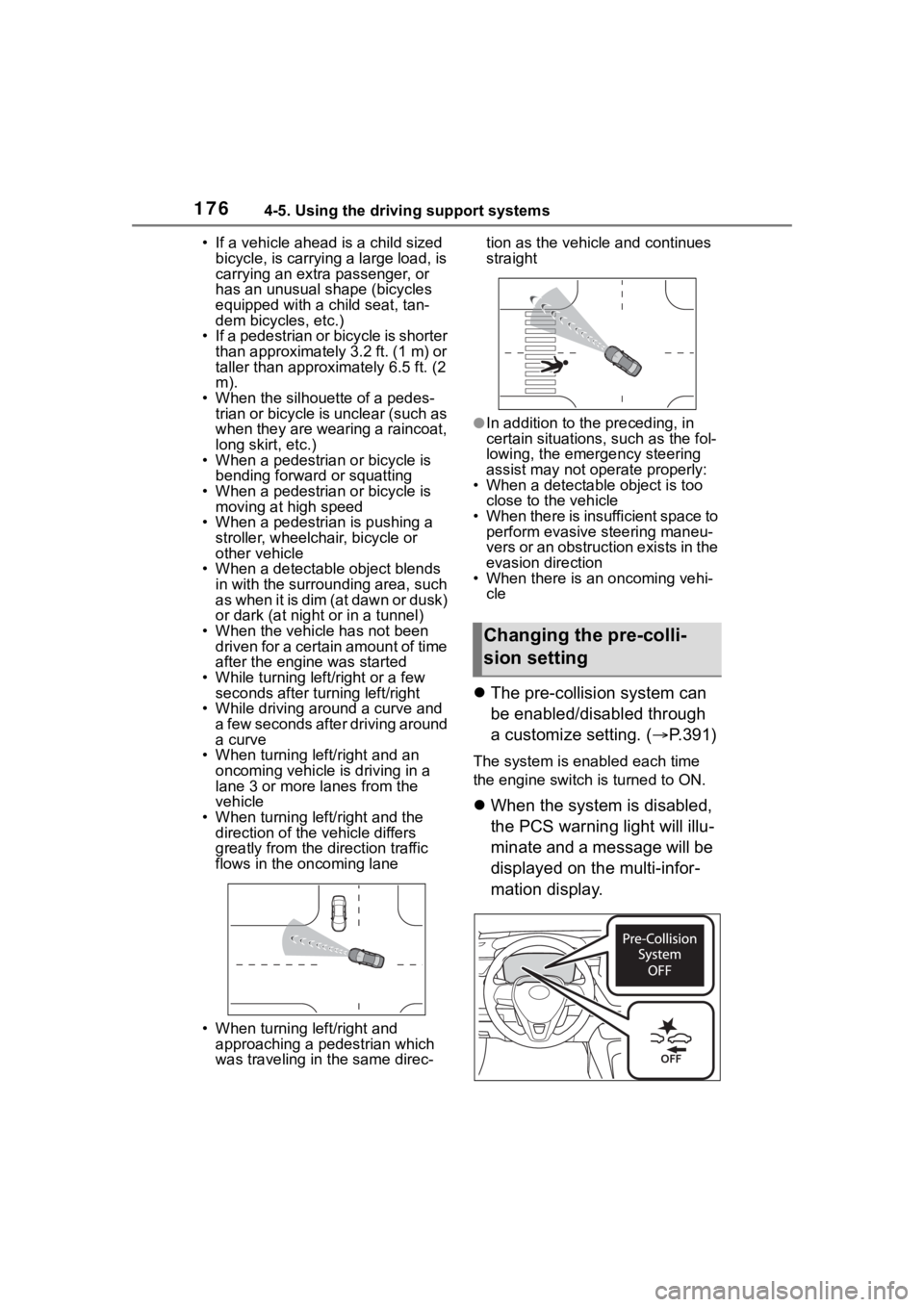
• When turning left/right and the direction of the vehicle differs
greatly from the direction traffic
flows in the oncoming lane
• When turning left/right and approaching a pedestrian which
was traveling in the same direc- tion as the vehicle and continues
straight
●In addition to the preceding, in
certain situations, such as the fol-
lowing, the emergency steering
assist may not operate properly:
• When a detectable object is too close to the vehicle
• When there is insufficient space to perform evasive steering maneu-
vers or an obstruction exists in the
evasion direction
• When there is an oncoming vehi- cle
The pre-collision system can
be enabled/disabled through
a customize setting. ( P.391)
The system is enabled each time
the engine switch is turned to ON.
When the system is disabled,
the PCS warning light will illu-
minate and a message will be
displayed on the multi-infor-
mation display.
Changing the pre-colli-
sion setting