warning TOYOTA COROLLA HATCHBACK 2023 Owner's Guide
[x] Cancel search | Manufacturer: TOYOTA, Model Year: 2023, Model line: COROLLA HATCHBACK, Model: TOYOTA COROLLA HATCHBACK 2023Pages: 436, PDF Size: 8.72 MB
Page 55 of 436
551-2. Child safety
1
For safety and security
WARNING
■When installing a child
restraint system
Observe the following precau-
tions.
Failure to do so m ay result in
death or serious injury.
●Do not allow children to play
with the seat belt. If the seat belt
becomes twisted around a
child’s neck, it may lead to
choking or other serious injuries
that could result in death.
If this occurs and the buckle
cannot be unfastened, scissors
should be used to cut the belt.
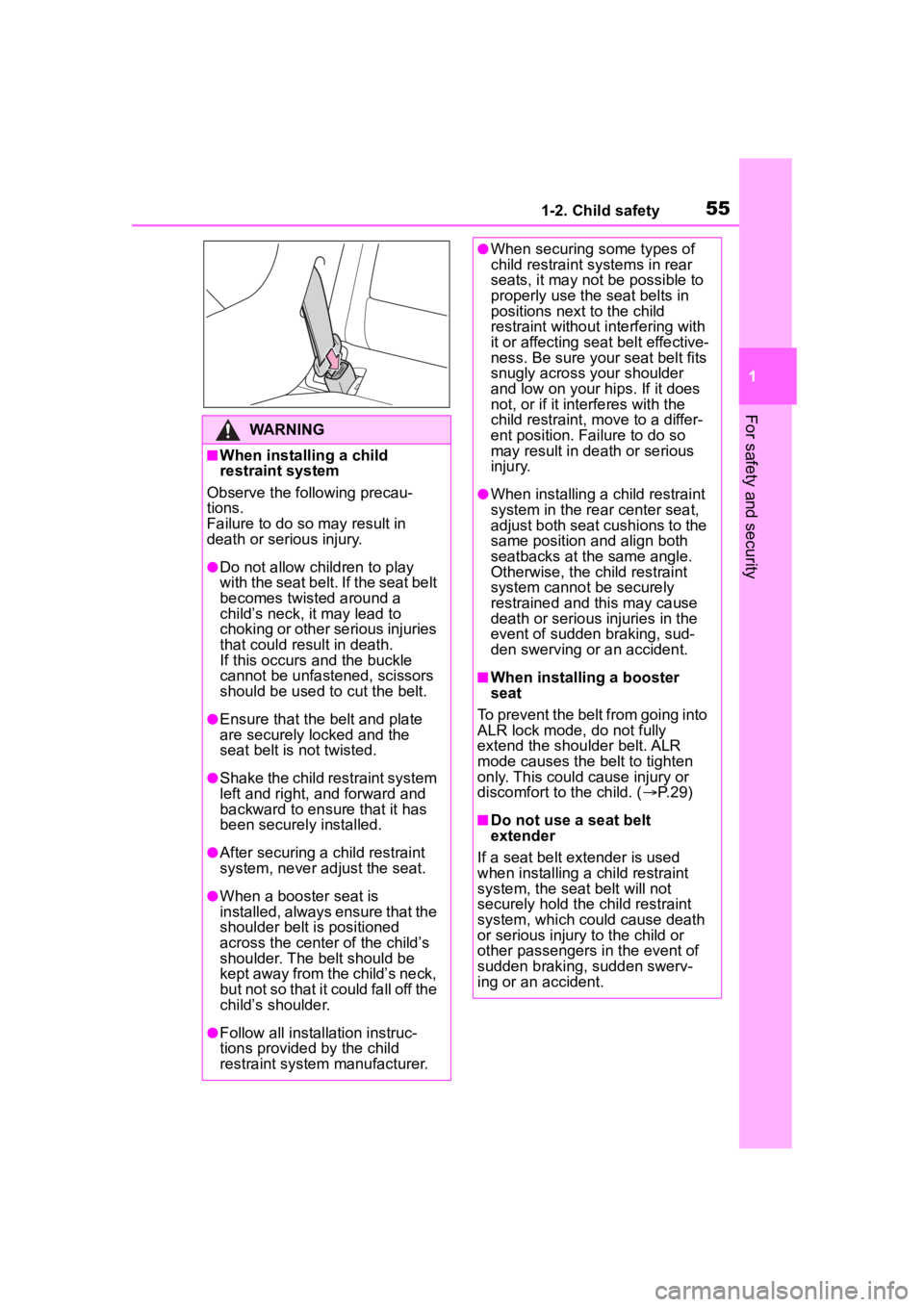
●Ensure that the belt and plate
are securely locked and the
seat belt is not twisted.
●Shake the child restraint system
left and right, and forward and
backward to ensure that it has
been securely installed.
●After securing a child restraint
system, never adjust the seat.
●When a booster seat is
installed, always ensure that the
shoulder belt is positioned
across the center of the child’s
shoulder. The belt should be
kept away from the child’s neck,
but not so that it could fall off the
child’s shoulder.
●Follow all installation instruc-
tions provided by the child
restraint system manufacturer.
●When securing some types of
child restraint systems in rear
seats, it may not be possible to
properly use the seat belts in
positions next to the child
restraint without interfering with
it or affecting seat belt effective-
ness. Be sure your seat belt fits
snugly across your shoulder
and low on your hips. If it does
not, or if it interferes with the
child restraint, move to a differ-
ent position. Fa ilure to do so
may result in death or serious
injury.
●When installing a child restraint
system in the rear center seat,
adjust both seat cushions to the
same position and align both
seatbacks at the same angle.
Otherwise, the child restraint
system cannot be securely
restrained and this may cause
death or serious injuries in the
event of sudden braking, sud-
den swerving or an accident.
■When installing a booster
seat
To prevent the belt from going into
ALR lock mode, do not fully
extend the shoulder belt. ALR
mode causes the belt to tighten
only. This could cause injury or
discomfort to the child. ( P. 2 9 )
■Do not use a seat belt
extender
If a seat belt extender is used
when installing a child restraint
system, the seat belt will not
securely hold the child restraint
system, which could cause death
or serious injury to the child or
other passengers in the event of
sudden braking, sudden swerv-
ing or an accident.
Page 57 of 436
571-2. Child safety
1
For safety and security
3If the child restraint has a top
tether strap, follow the child
restraint manufacturer’s
operation manual regarding
the installation, using the top
tether strap to latch onto the
top tether strap anchor.
( P.57)
4 After installing the child
restraint system, rock it back
and forth to ensure that it is
installed securely. ( P.55)
■When installing in the rear
center seat
There are no LATCH anchors
behind the rear center seat.
However, the inboard LATCH
anchors of the outboard seats,
which are 15.6 in. (396 mm)
apart, can be used if the child
restraint system manufacturer’s
instructions permit use of those
anchors with the anchor spacing
stated.
Child restraint systems with rigid
lower attachments cannot be
installed in the center seat. This
type of child restraint system
can only be installed in the out-
board seat.
■Laws and regulations pertain-
ing to anchors
The LATCH system conforms to
FMVSS225 or CMVSS210.2.
Child restraint systems conforming
to FMVSS213 or CMVSS213 speci-
fications can be used.
This vehicle is designed to conform
to SAE J1819.■Anchor brackets (for top
tether strap)
Anchor brackets are provided
for each rear seat.
Use anchor brackets when fix-
ing the top tether strap.
WARNING
■When installing a child
restraint system
Observe the following precau-
tions.
Failure to do so may result in
death or serious injury.
●When using the LATCH
anchors, be sure that there are
no foreign objects around the
anchors and that the seat belt is
not caught behind the child
restraint system.
●Follow all installation instruc-
tions provided by the child
restraint system manufacturer.
●When securing some types of
child restraint systems in rear
seats, it may not be possible to
properly use the seat belts in
positions next to the child
restraint without interfering with
it or affecting seat belt effective-
ness. Be sure your seat belt fits
snugly across your shoulder
and low on your hips. If it does
not, or if it interferes with the
child restraint, move to a differ-
ent position. Fa ilure to do so
may result in death or serious
injury.
●If the seat is adjusted, reconfirm
the security of the child restraint
system.
Using an anchor bracket
(for top tether strap)
Page 59 of 436
591-2. Child safety
1
For safety and security
WARNING
■When installing a child
restraint system
Observe the following precau-
tions.
Failure to do so m ay result in
death or serious injury.
●Firmly attach t he top tether
strap and make sure that the
belt is not twisted.
●Do not attach the top tether
strap to anything other than the
anchor bracket.
●After securing a child restraint
system, never adjust the seat.
●Follow all installation instruc-
tions provided by the child
restraint system manufacturer.
●When installing the child
restraint system with the head
restraint being raised, after the
head restraint has been raised
and then the anchor bracket has
been fixed, do not lower the
head restraint.
Page 67 of 436
67
2
2
Vehicle status information and indicators
Vehicle status informationand indicators
.2-1. Instrument cluster
Warning lights and indica-tors ............................... 68
Gauges and meters (4.2-inch display) .......... 72
Gauges and meters (7-inch display) ......................... 75
Multi-information display (4.2-inch display) .......... 77
Multi-information display (7-inch display) ............. 83
Fuel consumption informa- tion ............................... 88
Page 68 of 436
682-1. Instrument cluster
2-1.Instrument cluster
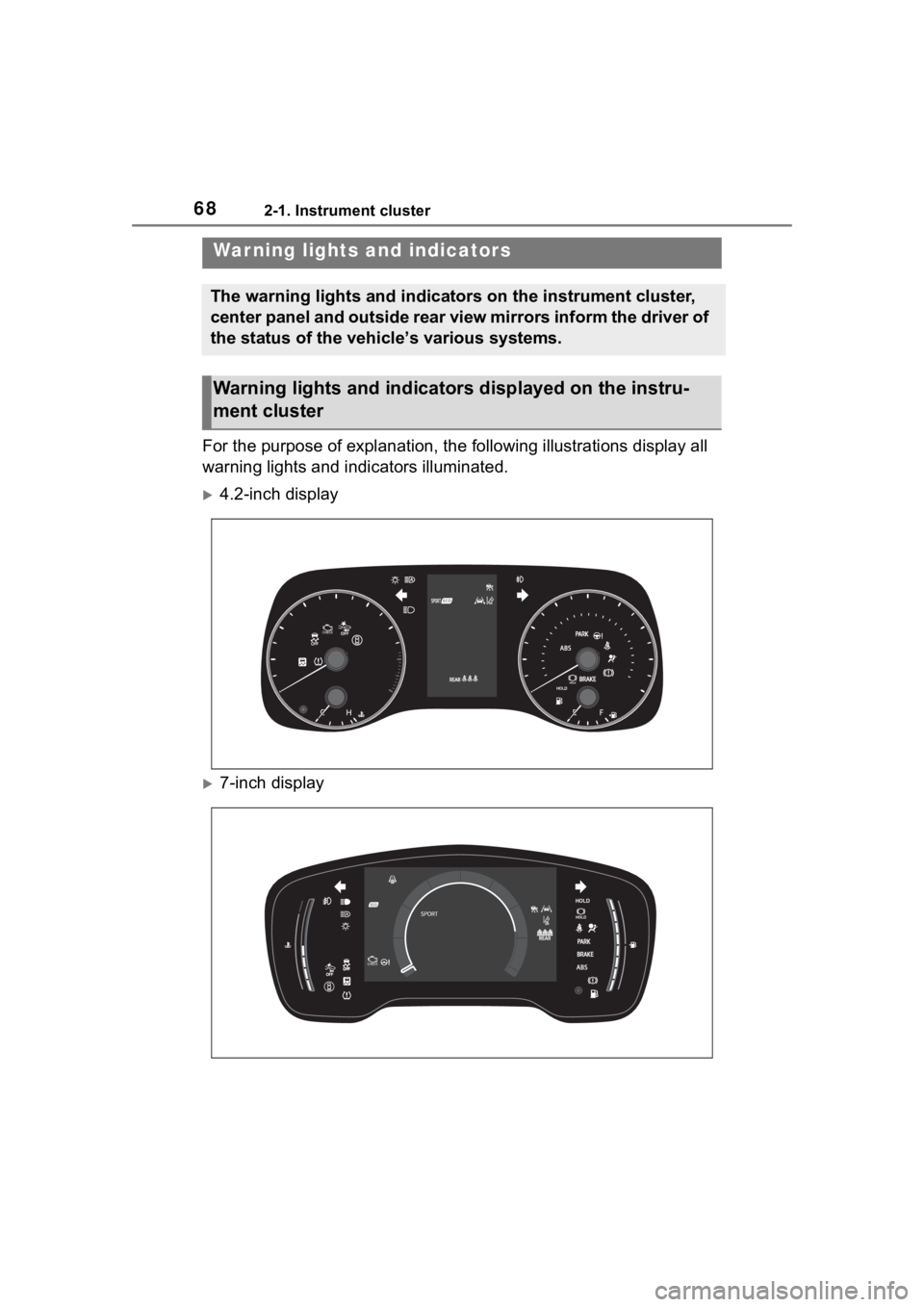
For the purpose of explanation, the following illustrations display all
warning lights and indicators illuminated.
4.2-inch display
7-inch display
War ning lights and indicators
The warning lights and indicators on the instrument cluster,
center panel and outside rear view mirrors inform the driver of
the status of the vehicle’s various systems.
Warning lights and indicators displayed on the instru-
ment cluster
Page 69 of 436
692-1. Instrument cluster
2
Vehicle status information and indicators
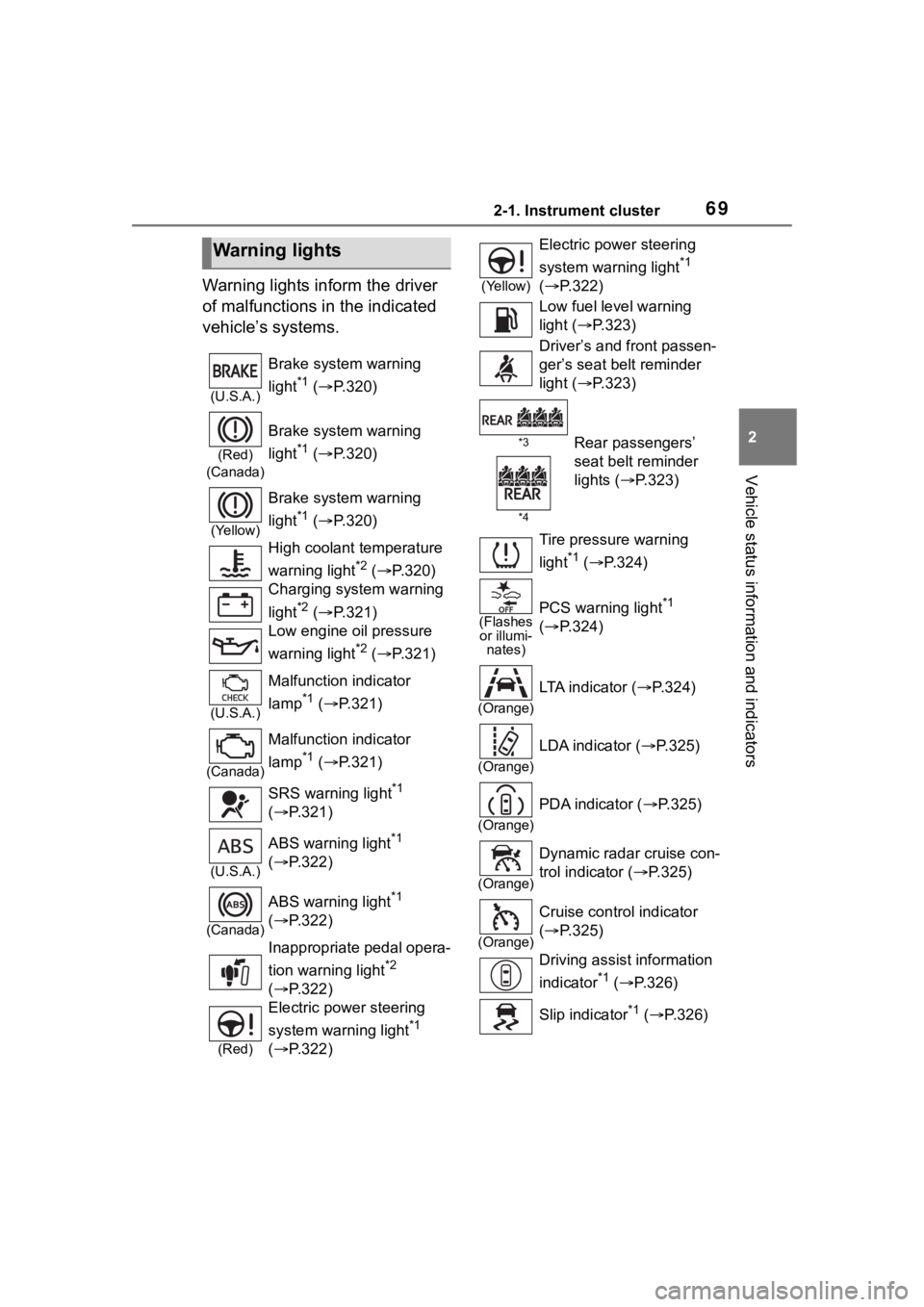
Warning lights inform the driver
of malfunctions in the indicated
vehicle’s systems.
Warning lights
(U.S.A.)
Brake system warning
light
*1 ( P.320)
(Red)
(Canada)
Brake system warning
light
*1 ( P.320)
(Yellow)
Brake system warning
light
*1 ( P.320)
High coolant temperature
warning light
*2 ( P.320)
Charging system warning
light
*2 ( P.321)
Low engine oil pressure
warning light
*2 ( P.321)
(U.S.A.)
Malfunction indicator
lamp
*1 ( P.321)
(Canada)
Malfunction indicator
lamp
*1 ( P.321)
SRS warning light
*1
( P.321)
(U.S.A.)
ABS warning light*1
( P.322)
(Canada)
ABS warning light*1
( P.322)
Inappropriate pedal opera-
tion warning light
*2
( P.322)
(Red)
Electric power steering
system warning light
*1
( P.322)
(Yellow)
Electric power steering
system warning light
*1
( P.322)
Low fuel level warning
light ( P.323)
Driver’s and front passen-
ger’s seat belt reminder
light ( P.323)
*3
*4Rear passengers’
seat belt reminder
lights ( P.323)
Tire pressure warning
light
*1 ( P.324)
(Flashes
or illumi- nates)PCS warning light*1
( P.324)
(Orange)
LTA indicator ( P.324)
(Orange)
LDA indicator ( P.325)
(Orange)
PDA indicator (P.325)
(Orange)
Dynamic radar cruise con-
trol indicator ( P.325)
(Orange)
Cruise control indicator
( P.325)
Driving assist information
indicator
*1 ( P.326)
Slip indicator
*1 ( P.326)
Page 70 of 436
702-1. Instrument cluster
*1: These lights come on when the engine switch is turned to ON to
indicate that a system check is
being performed. They will turn
off after the engine is started, or
after a few seconds. There may
be a malfunction in a system if
the lights do not come on, or turn
off. Have the vehicle inspected
by your Toyota dealer.
*2: This light illuminates on the multi-information display.
*3: 4.2-inch display.
*4: 7-inch display.
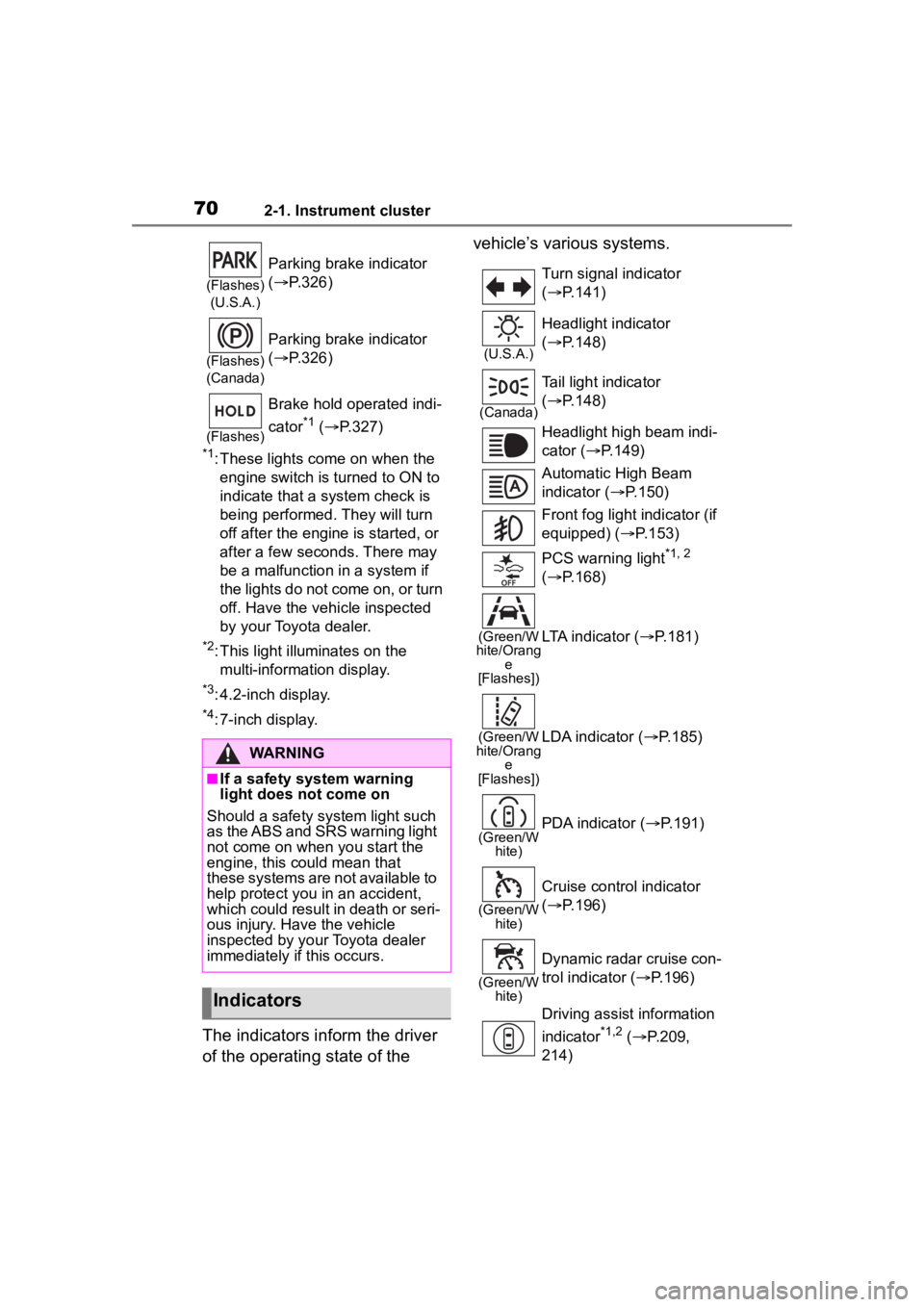
The indicators inform the driver
of the operating state of the vehicle’s various systems.
(Flashes)
(U.S.A.)
Parking brake indicator
( P.326)
(Flashes)
(Canada)
Parking brake indicator
( P.326)
(Flashes)
Brake hold operated indi-
cator
*1 ( P.327)
WARNING
■If a safety system warning
light does not come on
Should a safety system light such
as the ABS and SRS warning light
not come on when you start the
engine, this could mean that
these systems are not available to
help protect you in an accident,
which could result in death or seri-
ous injury. Have the vehicle
inspected by your Toyota dealer
immediately if this occurs.
Indicators
Turn signal indicator
( P.141)
(U.S.A.)
Headlight indicator
( P.148)
(Canada)
Tail light indicator
( P.148)
Headlight high beam indi-
cator ( P.149)
Automatic High Beam
indicator ( P.150)
Front fog light indicator (if
equipped) ( P.153)
PCS warning light
*1, 2
( P.168)
(Green/W
hite/Orang e
[Flashes])LTA indicator ( P.181)
(Green/W
hite/Orang e
[Flashes])LDA indicator ( P.185)
(Green/W
hite)PDA indicator ( P.191)
(Green/W
hite)
Cruise control indicator
( P.196)
(Green/W
hite)
Dynamic radar cruise con-
trol indicator ( P.196)
Driving assist information
indicator
*1,2 ( P.209,
214)
Page 72 of 436
722-1. Instrument cluster
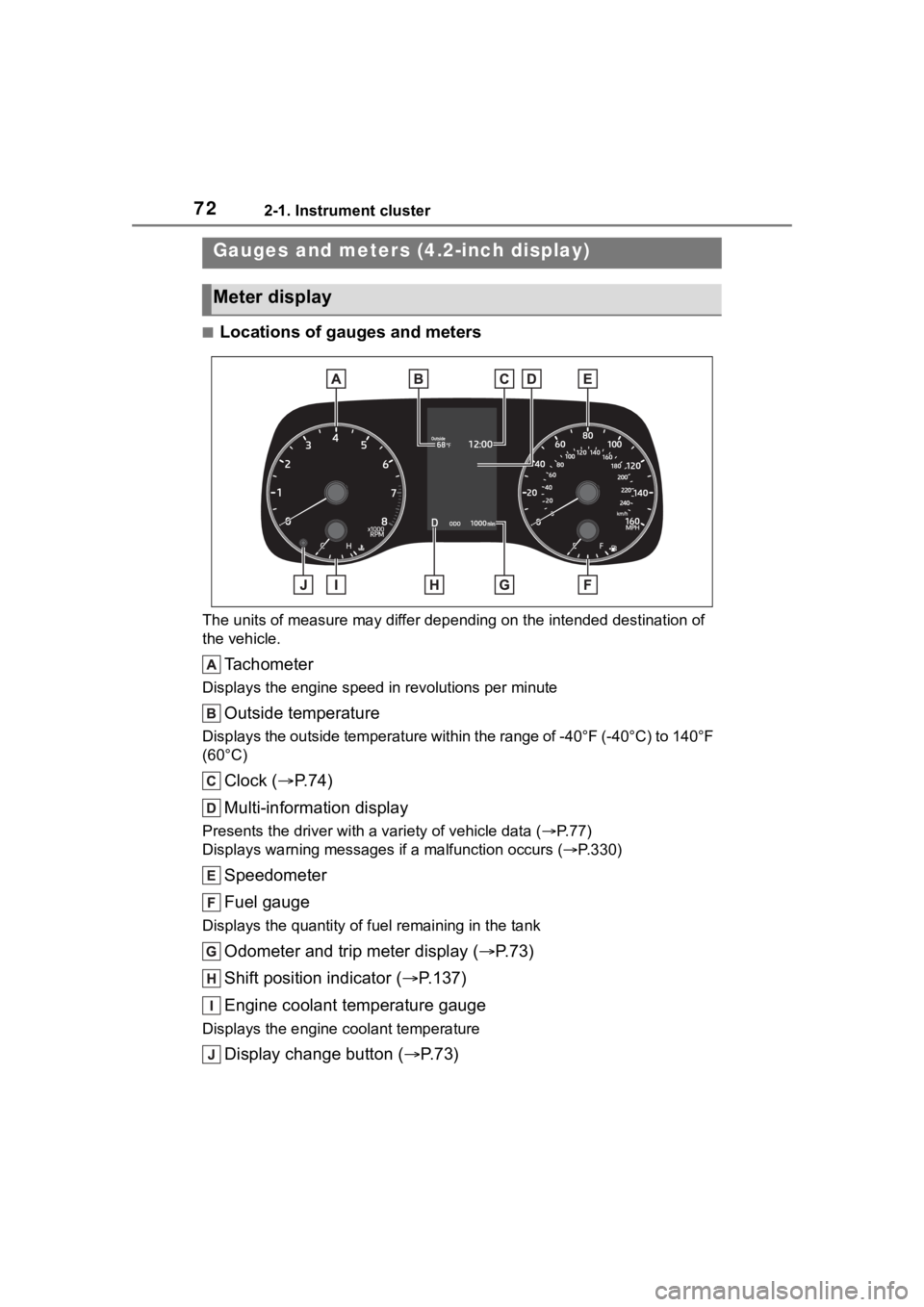
■Locations of gauges and meters
The units of measure may differ depending on the intended destination of
the vehicle.
Tachometer
Displays the engine speed in revolutions per minute
Outside temperature
Displays the outside temperature within the range of -40°F (-40 °C) to 140°F
(60°C)
Clock ( P. 7 4 )
Multi-information display
Presents the driver with a variety of vehicle data (P.77)
Displays warning messages if a malfunction occurs (P.330)
Speedometer
Fuel gauge
Displays the quantity of fu el remaining in the tank
Odometer and trip meter display ( P.73)
Shift position indicator ( P.137)
Engine coolant temperature gauge
Displays the engine c oolant temperature
Display change button ( P.73)
Gauges and meters (4.2-inch display)
Meter display
Page 73 of 436
732-1. Instrument cluster
2
Vehicle status information and indicators
■Outside temperature display
●In the following situations, the cor-
rect outside tempe rature may not
be displayed, or the display may
take longer than normal to
change:
• When stopped, or driving at low
speeds (less than 12 mph [20
km/h])
• When the outside temperature
has changed suddenly (at the
entrance/exit of a garage, tunnel,
etc.)
●When “--” or “E” is displayed, the
system may be malfunctioning.
Take your vehicle to your Toyota
dealer.
■Liquid crystal display
P. 7 8
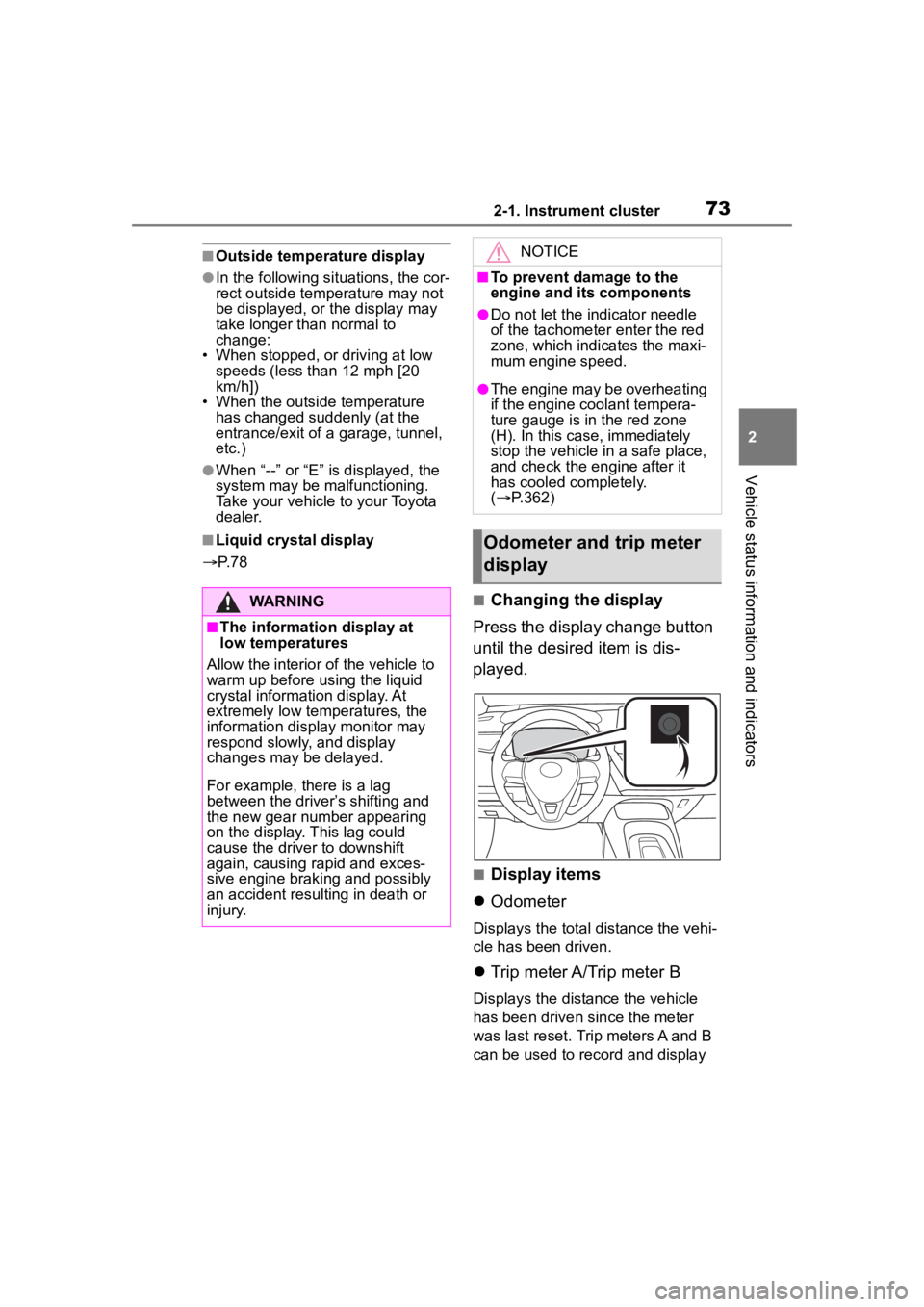
■Changing the display
Press the display change button
until the desired item is dis-
played.
■Display items
Odometer
Displays the total distance the vehi-
cle has been driven.
Trip meter A/Trip meter B
Displays the distance the vehicle
has been driven since the meter
was last reset. Trip meters A and B
can be used to record and display
WARNING
■The information display at
low temperatures
Allow the interior of the vehicle to
warm up before u sing the liquid
crystal informat ion display. At
extremely low temperatures, the
information display monitor may
respond slowly, and display
changes may be delayed.
For example, there is a lag
between the driver’s shifting and
the new gear number appearing
on the display. This lag could
cause the driver to downshift
again, causing rapid and exces-
sive engine braking and possibly
an accident resulting in death or
injury.
NOTICE
■To prevent damage to the
engine and its components
●Do not let the indicator needle
of the tachometer enter the red
zone, which indicates the maxi-
mum engine speed.
●The engine may be overheating
if the engine coolant tempera-
ture gauge is in the red zone
(H). In this case, immediately
stop the vehicle in a safe place,
and check the engine after it
has cooled completely.
( P.362)
Odometer and trip meter
display
Page 75 of 436
752-1. Instrument cluster
2
Vehicle status information and indicators
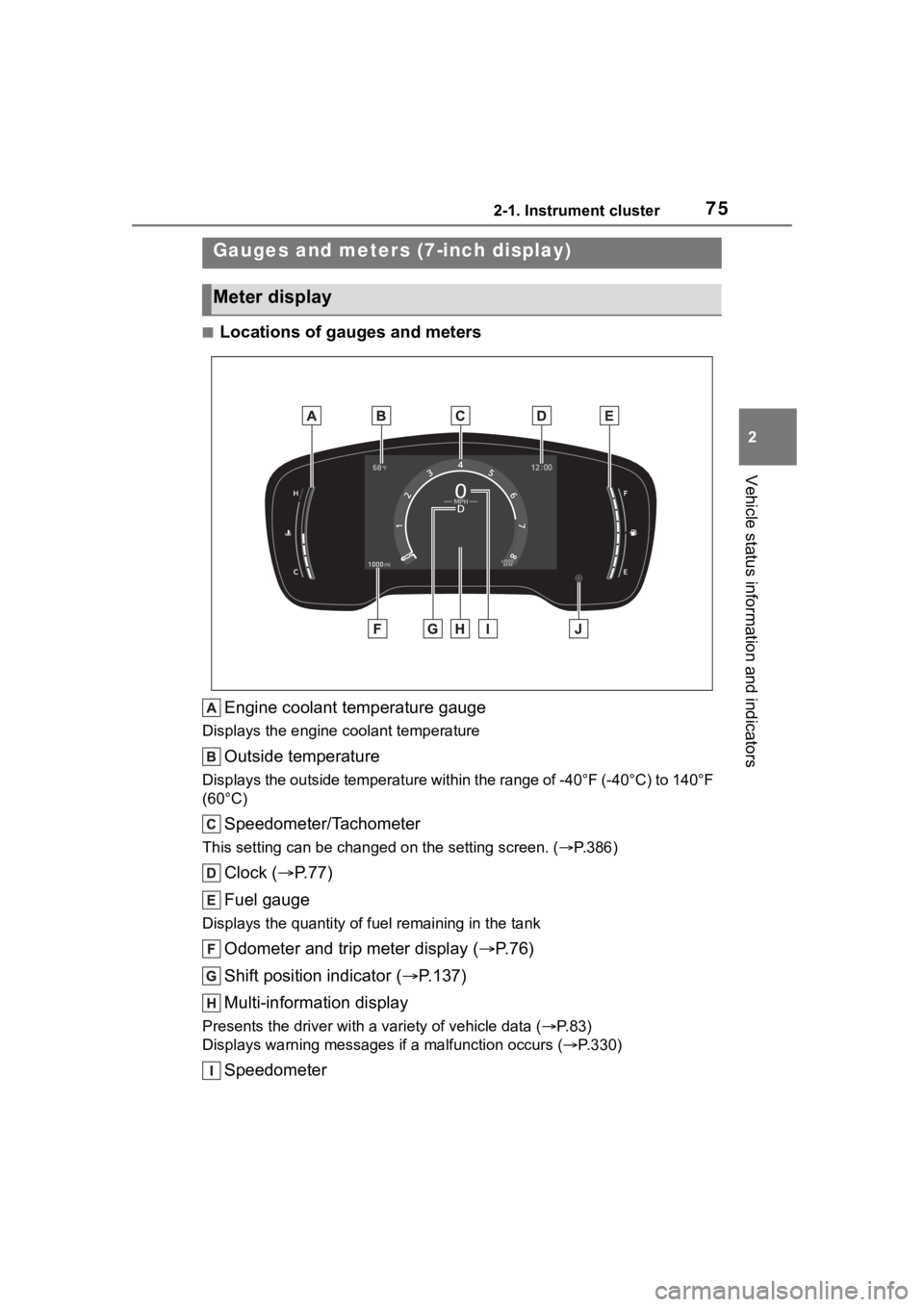
■Locations of gauges and metersEngine coolant temperature gauge
Displays the engine c oolant temperature
Outside temperature
Displays the outside temperature within the range of -40°F (-40 °C) to 140°F
(60°C)
Speedometer/Tachometer
This setting can be changed on the setting screen. ( P.386)
Clock ( P. 7 7 )
Fuel gauge
Displays the quantity of fu el remaining in the tank
Odometer and trip meter display ( P.76)
Shift position indicator ( P.137)
Multi-information display
Presents the driver with a variety of vehicle data (P.83)
Displays warning messages if a malfunction occurs (P.330)
Speedometer
Gauges and meters (7-inch display)
Meter display