steering TOYOTA COROLLA HATCHBACK 2023 Service Manual
[x] Cancel search | Manufacturer: TOYOTA, Model Year: 2023, Model line: COROLLA HATCHBACK, Model: TOYOTA COROLLA HATCHBACK 2023Pages: 436, PDF Size: 8.72 MB
Page 188 of 436
1884-5. Using the driving support systems
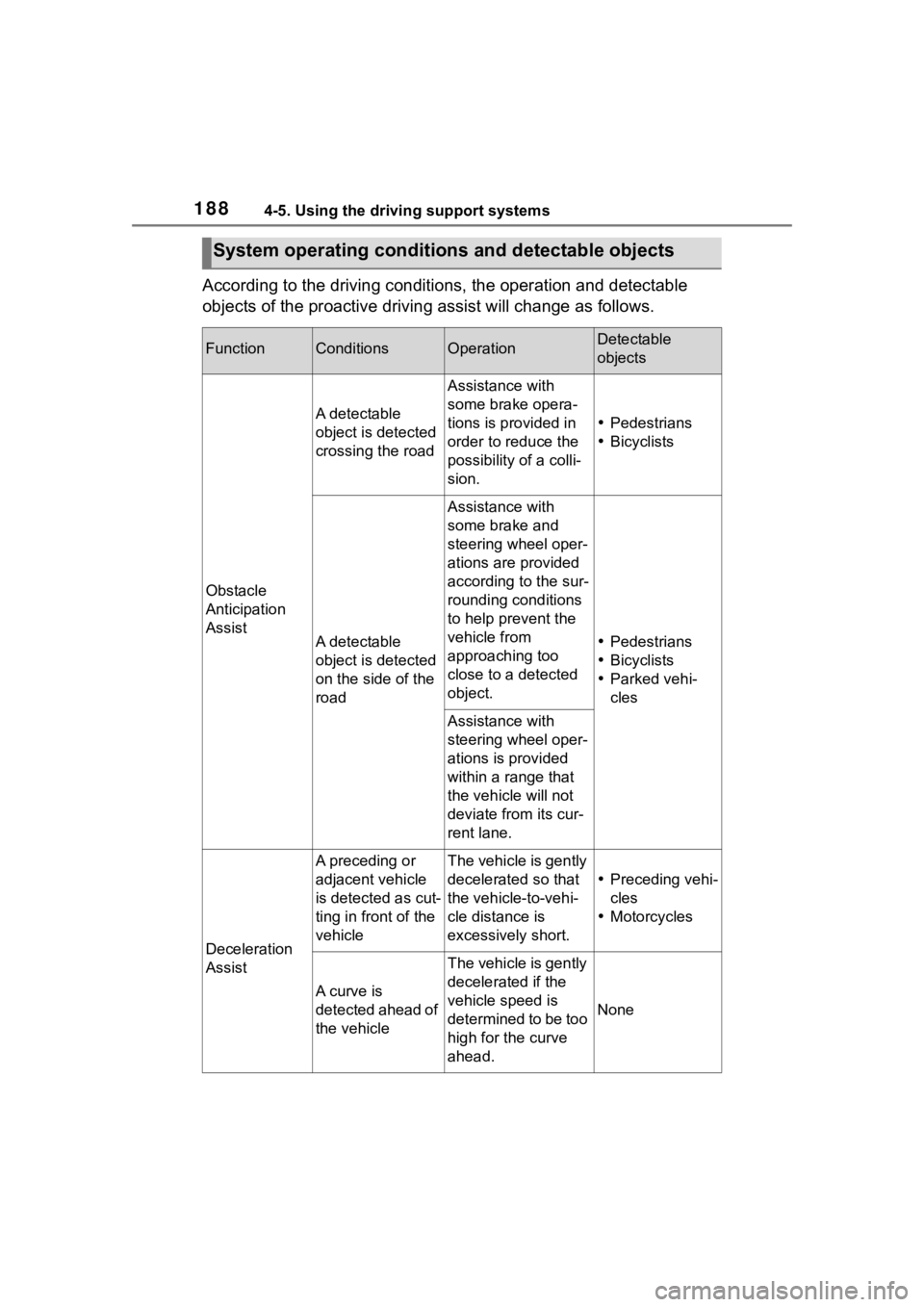
According to the driving conditions, the operation and detectable
objects of the proactive driving assist will change as follows.
System operating conditi ons and detectable objects
FunctionConditionsOperationDetectable
objects
Obstacle
Anticipation
Assist
A detectable
object is detected
crossing the road
Assistance with
some brake opera-
tions is provided in
order to reduce the
possibility of a colli-
sion.
Pedestrians
Bicyclists
A detectable
object is detected
on the side of the
road
Assistance with
some brake and
steering wheel oper-
ations are provided
according to the sur-
rounding conditions
to help prevent the
vehicle from
approaching too
close to a detected
object.
Pedestrians
Bicyclists
Parked vehi-
cles
Assistance with
steering wheel oper-
ations is provided
within a range that
the vehicle will not
deviate from its cur-
rent lane.
Deceleration
Assist
A preceding or
adjacent vehicle
is detected as cut-
ting in front of the
vehicleThe vehicle is gently
decelerated so that
the vehicle-to-vehi-
cle distance is
excessively short.
Preceding vehi-
cles
Motorcycles
A curve is
detected ahead of
the vehicle
The vehicle is gently
decelerated if the
vehicle speed is
determined to be too
high for the curve
ahead.
None
Page 189 of 436
1894-5. Using the driving support systems
4
Driving
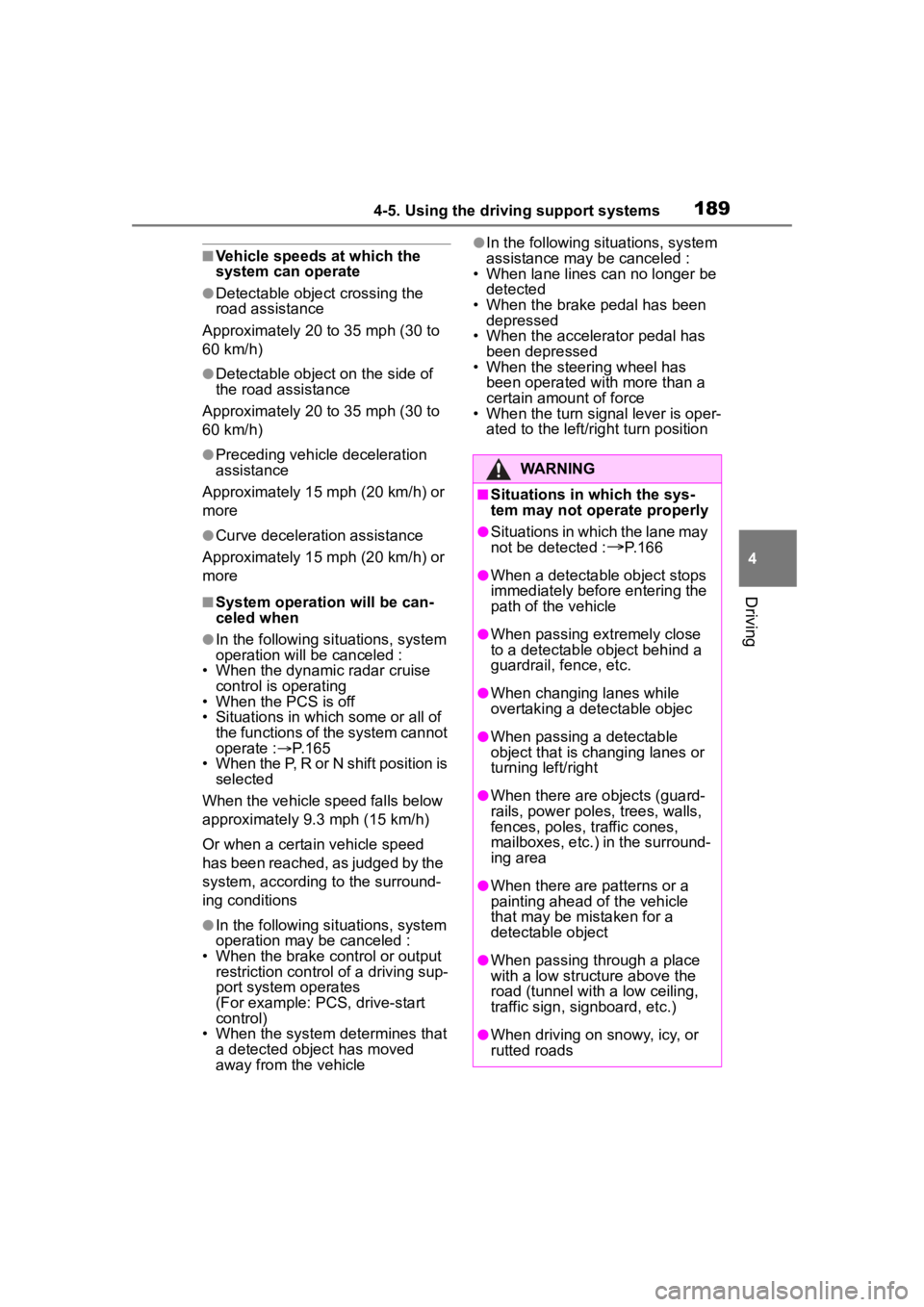
■Vehicle speeds at which the
system can operate
●Detectable object crossing the
road assistance
Approximately 20 to 35 mph (30 to
60 km/h)
●Detectable object on the side of
the road assistance
Approximately 20 to 35 mph (30 to
60 km/h)
●Preceding vehicle deceleration
assistance
Approximately 15 mph (20 km/h) or
more
●Curve decelerati on assistance
Approximately 15 mph (20 km/h) or
more
■System operation will be can-
celed when
●In the following si tuations, system
operation will be canceled :
• When the dynamic radar cruise control is operating
• When the PCS is off
• Situations in whi ch some or all of
the functions of the system cannot
operate : P. 1 6 5
• When the P, R or N shift position is selected
When the vehicle speed falls below
approximately 9.3 mph (15 km/h)
Or when a certain vehicle speed
has been reached, as judged by the
system, according to the surround-
ing conditions
●In the following si tuations, system
operation may be canceled :
• When the brake control or output restriction control of a driving sup-
port system operates
(For example: PCS, drive-start
control)
• When the system determines that a detected object has moved
away from the vehicle
●In the following situations, system
assistance may be canceled :
• When lane lines can no longer be
detected
• When the brake pedal has been
depressed
• When the accelerator pedal has been depressed
• When the steering wheel has
been operated wi th more than a
certain amount of force
• When the turn signal lever is oper-
ated to the left/right turn position
WARNING
■Situations in which the sys-
tem may not ope rate properly
●Situations in which the lane may
not be detected :
P.166
●When a detectable object stops
immediately before entering the
path of the vehicle
●When passing extremely close
to a detectable object behind a
guardrail, fence, etc.
●When changing lanes while
overtaking a detectable objec
●When passing a detectable
object that is changing lanes or
turning left/right
●When there are objects (guard-
rails, power poles, trees, walls,
fences, poles, traffic cones,
mailboxes, etc.) in the surround-
ing area
●When there are patterns or a
painting ahead of the vehicle
that may be mistaken for a
detectable object
●When passing through a place
with a low structure above the
road (tunnel with a low ceiling,
traffic sign, signboard, etc.)
●When driving on snowy, icy, or
rutted roads
Page 191 of 436
1914-5. Using the driving support systems
4
Driving
The proactive driving assist
can be enabled/disabled
through a customize setting. (
P.386)
The following settings of the
proactive driving assist can be
changed through customize
settings.( P.386)
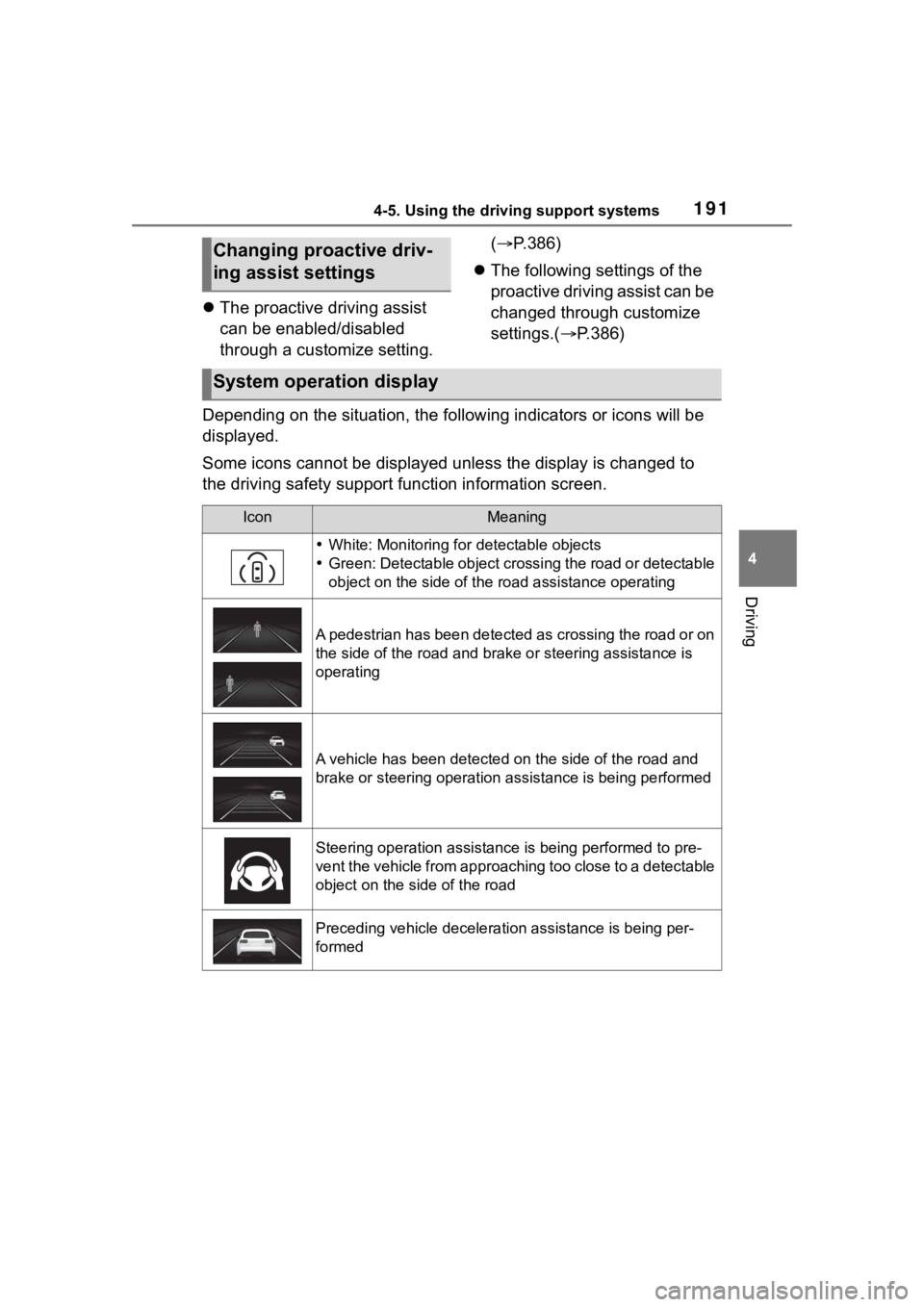
Depending on the situation, the following indicators or icons w ill be
displayed.
Some icons cannot be displayed unless the display is changed to
the driving safety support function information screen.
Changing proactive driv-
ing assist settings
System operation display
IconMeaning
White: Monitoring for detectable objects
Green: Detectable object crossing the road or detectable
object on the side of the road assistance operating
A pedestrian has been detected as crossing the road or on
the side of the road and bra ke or steering assistance is
operating
A vehicle has been detected on the side of the road and
brake or steering operation assistance is being performed
Steering operation assistance is being performed to pre-
vent the vehicle from approaching too close to a detectable
object on the side of the road
Preceding vehicle deceleration assistance is being per-
formed
Page 192 of 436
1924-5. Using the driving support systems
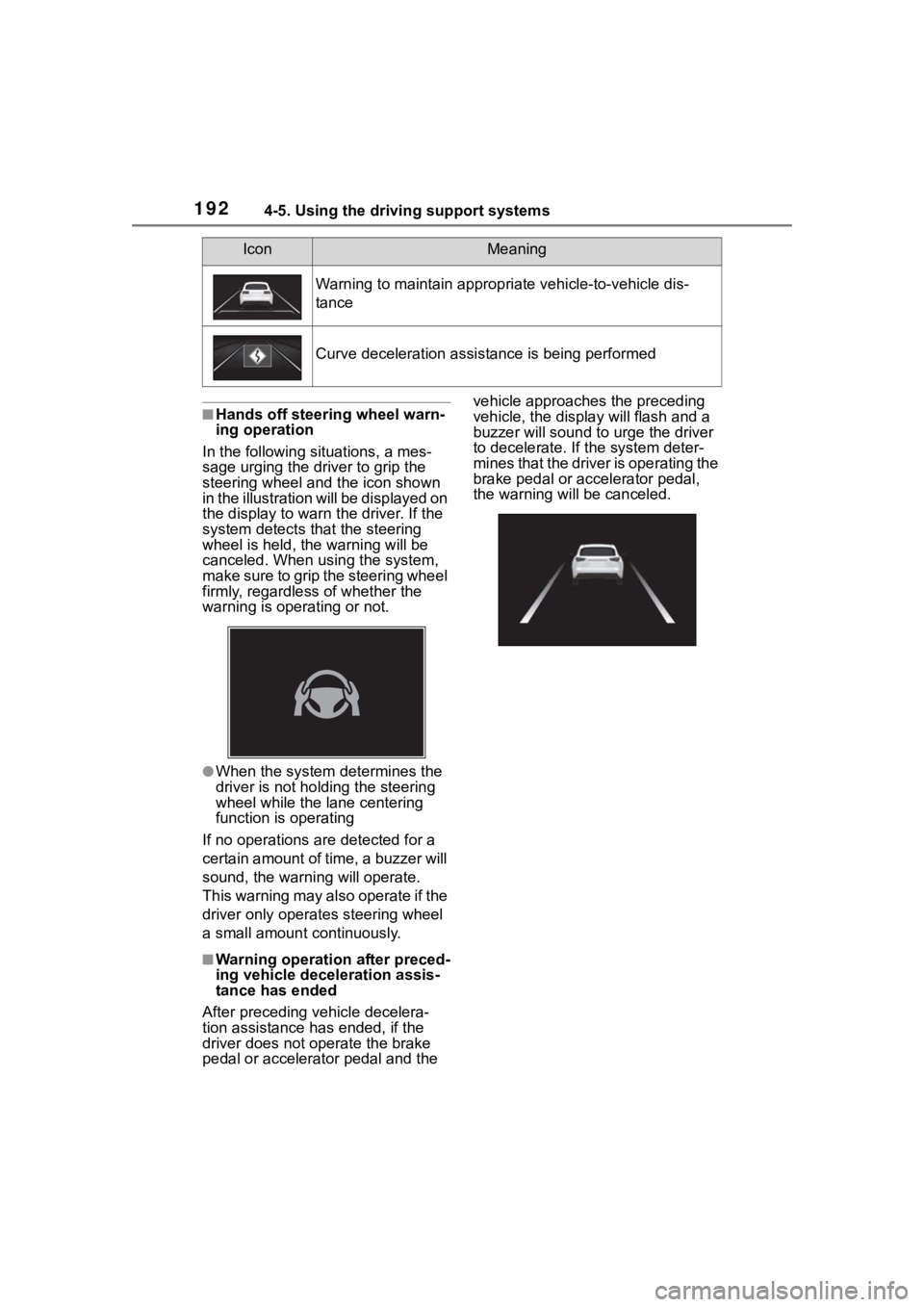
■Hands off steering wheel warn-
ing operation
In the following situations, a mes-
sage urging the dr iver to grip the
steering wheel and the icon shown
in the illustration will be displayed on
the display to warn the driver. If the
system detects that the steering
wheel is held, the warning will be
canceled. When using the system,
make sure to grip the steering wheel
firmly, regardless of whether the
warning is operating or not.
●When the system determines the
driver is not holding the steering
wheel while the lane centering
function is operating
If no operations are detected for a
certain amount of time, a buzzer will
sound, the warnin g will operate.
This warning may also operate if the
driver only operates steering wheel
a small amount continuously.
■Warning operation after preced-
ing vehicle deceleration assis-
tance has ended
After preceding vehicle decelera-
tion assistance has ended, if the
driver does not operate the brake
pedal or accelerator pedal and the vehicle approaches the preceding
vehicle, the displa
y will flash and a
buzzer will sound to urge the driver
to decelerate. If the system deter-
mines that the driver is operating the
brake pedal or accelerator pedal,
the warning will be canceled.
Warning to maintain appropriate vehicle-to-vehicle dis-
tance
Curve deceleration assistance is being performed
IconMeaning
Page 200 of 436
2004-5. Using the driving support systems
and the system cannot provide
sufficient deceleration, such as
if a vehicle cuts in front of the
vehicle, a warning display will
flash and a buzzer will sound to
alert the driver. Depress the
brake pedal to ensure appropri-
ate vehicle-to-vehicle distance.
■Warnings may not occur
when
In the following situations, the
warning may not operate even
though the vehicle-to-vehicle
distance is short.
When the preceding vehicle is
traveling at the same speed
or faster than your vehicle
When the preceding vehicle is
traveling at an extremely low
speed
Immediately after the vehicle
speed has been set
When the accelerator pedal is
depressed
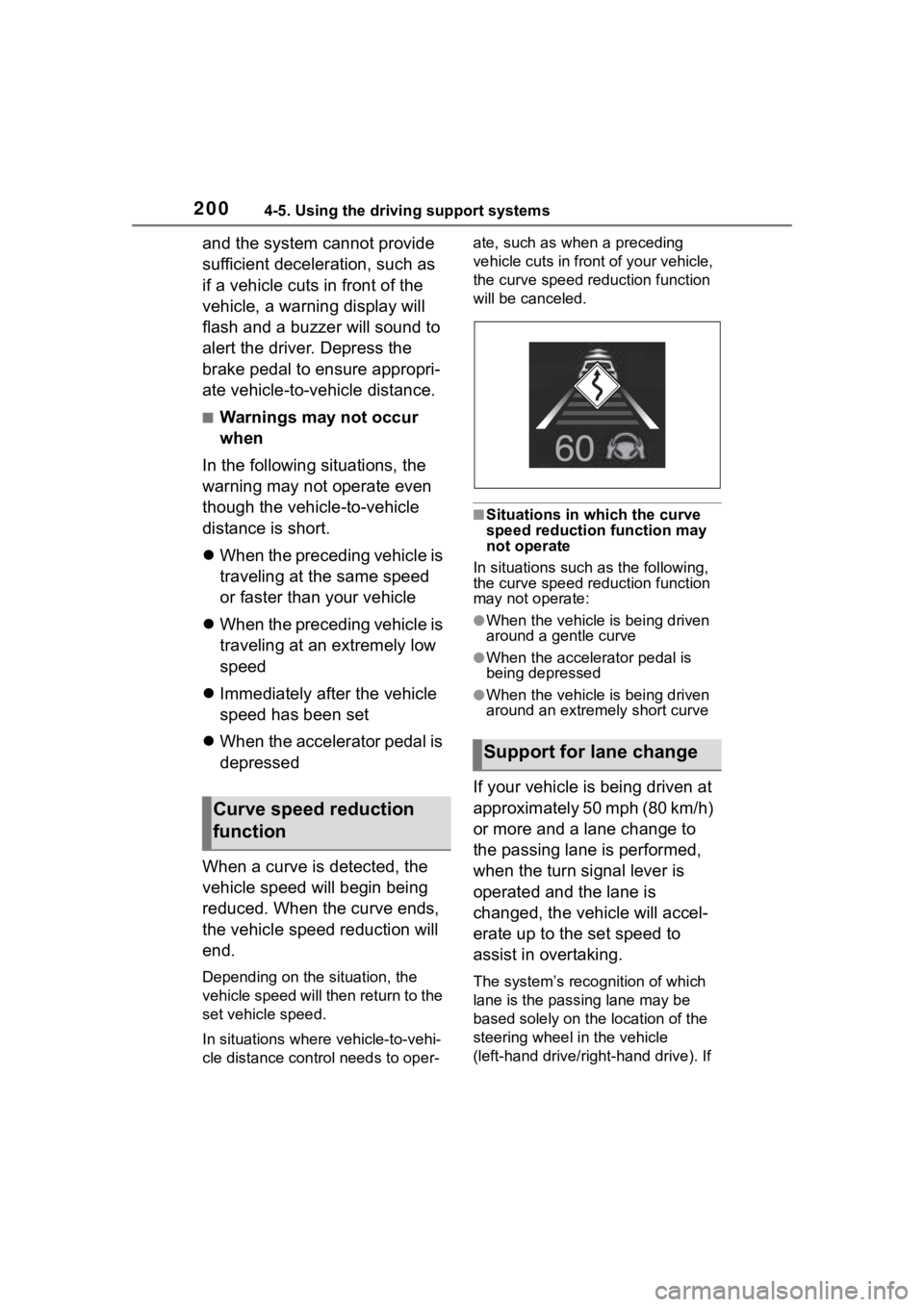
When a curve is detected, the
vehicle speed will begin being
reduced. When the curve ends,
the vehicle speed reduction will
end.
Depending on the situation, the
vehicle speed will then return to the
set vehicle speed.
In situations where vehicle-to-vehi-
cle distance control needs to oper- ate, such as when a preceding
vehicle cuts in front of your vehicle,
the curve speed reduction function
will be canceled.
■Situations in which the curve
speed reduction function may
not operate
In situations such as the following,
the curve speed reduction function
may not operate:
●When the vehicle is being driven
around a gentle curve
●When the accele rator pedal is
being depressed
●When the vehicle is being driven
around an extremely short curve
If your vehicle is being driven at
approximately 50 mph (80 km/h)
or more and a lane change to
the passing lane is performed,
when the turn signal lever is
operated and the lane is
changed, the vehicle will accel-
erate up to the set speed to
assist in overtaking.
The system’s recognition of which
lane is the passing lane may be
based solely on the location of the
steering wheel in the vehicle
(left-hand drive/right-hand drive). If
Curve speed reduction
function
Support for lane change
Page 204 of 436
2044-5. Using the driving support systems
Operation of this system is sep-
arated into 4 control states.
Emergency Driving
Stop System
The emergency driving stop
system is a system which
automatically decelerates
and stops the vehicle within
its lane if the driver
becomes unable to continue
driving the vehicle, such as
if they have suffered a medi-
cal emergency, etc.
During LTA (Lane Tracing
Assist) control, if the sys-
tem does not detect driving
operations, such as if the
driver is not holding the
steering wheel, and deter-
mines the driver is not
responsive, the vehicle will
be decelerated and stopped
within its current lane to
help avoid a collision or
reduce the impact of a colli-
sion.
WARNING
■For safe use
●Driving safely is solely the
responsibility of the driver. Pay
careful attention to the sur-
rounding conditions in order to
ensure safe driving. The emer-
gency driving stop system is
designed to provide support in
an emergency where it is diffi-
cult for the driver to continue
driving, such as if they have had
a medical emergency. It is not
designed to support driving
while drowsy or in poor physical
health, or inattentive driving.
●Although the emergency driv-
ing stop system is designed to
decelerate the vehicle within its
lane to help avoid or help
reduce the impact of a collision
if the system determines that it
is difficult for the driver to con-
tinue driving, its effectiveness
may change according to vari-
ous conditions. Therefore, it
may not always be able to
achieve the same level of per-
formance. Also, if the operating
conditions are not met, this
function will not operate.
●After the emergency driving
stop system operates, if driving
becomes possible again, imme-
diately begin driving again or, if
necessary, park the vehicle on
the shoulder of the road and set
a warning reflecto r and flare to
warn other drivers of your
stopped vehicle.
●After this system operates, pas-
sengers should attend to the
driver as necessary and take
appropriate hazard prevention
measures, such as moving to a
place where safety can be
ensured, such as the shoulder
of the road or behind a guard-
rail.
●This system detects the condi-
tion of the driver through the
operation of the steering wheel.
This system may operate if the
driver is aware but intentionally
and continuously does not oper-
ate the vehicle. Also, the system
may not operate if it cannot
determine that the driver is not
responsive, such as if they are
leaning on the steering wheel.
Summary of the system
Page 205 of 436
2054-5. Using the driving support systems
4
Driving
Through control state “warning
phase 1” and “warning phase 2”,
the system determines if the
driver is aware and responsive
while outputting a warning and
controlling the vehicle speed. If
the system determines the
driver is not responsive, it will
operate in control state “deceler-
ation stop phase” and “stop hold
phase” and decelerate and stop
the vehicle. It will then operate
continuously in “stop hold
phase”.
■Operating conditions
This system opera tes when all of
the following cond itions are met:
●When the LTA is on
●When the vehicle speed is
approximately 30 mph (50 km/h)
or more
■Operation cancelation condi-
tions
In the following si tuations, system
operation will be canceled:
●When LTA control has been can-
celed (the LTA switch has been
pressed, etc.)
●When the dynamic radar cruise
control has been canceled
●When driver operations are
detected (the steering wheel is
held, the brake pedal, accelerator
pedal, parking brake, hazard light
switch, or turn sig nal lever is oper-
ated)
●When the driving assist switch is
pressed while in the stop and hold
phase
●When the engine switch has been
turned from ON to off
●Situations in whic h some or all of
the functions of the system cannot operate:
P. 1 6 6
■LTA control when operation is
canceled
When emergency driving stop sys-
tem operation is canceled, LTA con-
trol may also be canceled.
If driving operations are not
detected after the hands off
steering wheel warning oper-
ates, a buzzer will sound inter-
mittently and a message will be
displayed to warn the driver, and
the system will judge if the driver
is responsive or not. If driving
operations, such as holding the
steering wheel, are not per-
formed within a certain amount
of time, the system will enter
warning phase 2.
After entering warning phase 2,
a buzzer will sound in short
intervals and a message will be
displayed to warn the driver, and
the vehicle will slowly deceler-
ate. If driving operations, such
as holding the steering wheel,
are not performed within a cer-
tain amount of time, the system
will determine that the driver is
not responsive and enter the
deceleration stop phase.
The audio system will be muted
until the driver becomes respon-
sive.
When the vehicle is decelerating,
Warning phase 1
Warning phase 2
Page 224 of 436
2244-5. Using the driving support systems
approaches from behind your
vehicle at an angle
• When the vehicle is stopped at an
angle to the road
• When a vehicle or bicycle approaches from behind a parked
vehicle at an angle
• When a parked vehicle, wall, sign, person or other stationary object
is behind the vehicle
• When an approaching vehicle or bicycle suddenly changes direc-
tion
• When an approaching vehicle or bicycle is traveling along a station-
ary object, such a wall or sign
• When the back door is open
• When a bicycle carrier, ramp, or other accessory is installed to the
back of the vehicle
• When a vehicle or bicycle is
approaching at high speed
• When towing with the vehicle
• When stopped on a steep slope
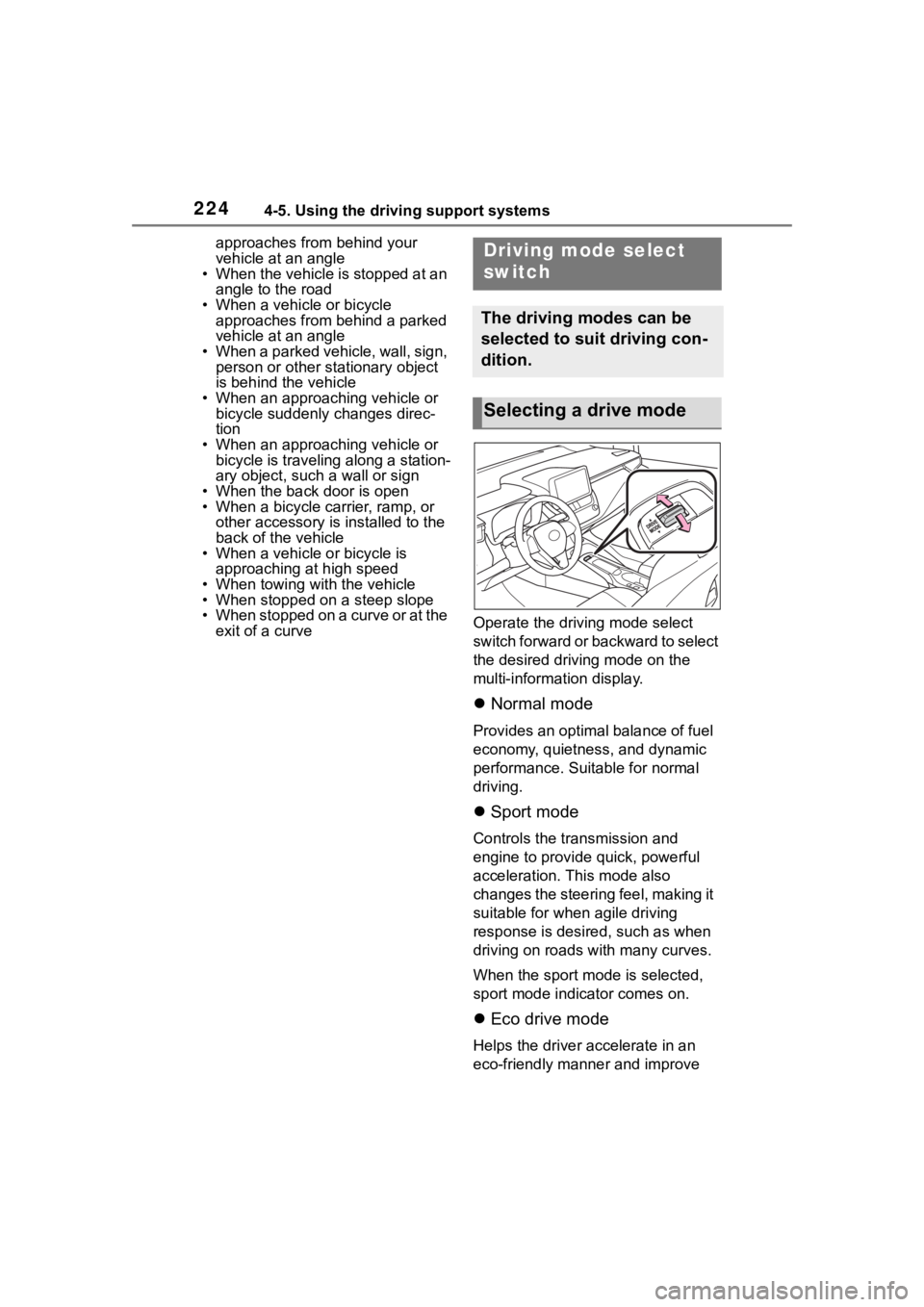
• When stopped on a curve or at the exit of a curve Operate the driv
ing mode select
switch forward or backward to select
the desired driving mode on the
multi-information display.
Normal mode
Provides an optimal balance of fuel
economy, quietness, and dynamic
performance. Suitable for normal
driving.
Sport mode
Controls the transmission and
engine to provide quick, powerful
acceleration. This mode also
changes the steering feel, making it
suitable for when agile driving
response is desire d, such as when
driving on roads w ith many curves.
When the sport mode is selected,
sport mode indicator comes on.
Eco drive mode
Helps the driver accelerate in an
eco-friendly manner and improve
Driving mode select
switch
The driving modes can be
selected to suit driving con-
dition.
Selecting a drive mode
Page 226 of 436
2264-5. Using the driving support systems
■Enhanced VSC (Enhanced
Vehicle Stability Control)
Provides cooperative control of
the ABS, TRAC, VSC and EPS.
Helps to maintai n directional
stability when swerving on slip-
pery road surfaces by con-
trolling steering performance.
■The Secondary Collision
Brake
When the SRS airbag sensor
detects a collision and the sys-
tem operates, the brakes and
brake lights are automatically
controlled to reduce the vehicle
speed and help reduce the pos-
sibility of further damage due to
a secondary collision.
■TRAC (Traction Control)
Helps to maintain drive power
and prevent the drive wheels
from spinning when starting the
vehicle or accelerating on slip-
pery roads
■Active Cornering Assist
(ACA)
Helps to prevent the vehicle
from drifting to the outer side by
performing inner wheel brake
control when attempting to
accelerate while turning
■Hill-start assist control
Helps to reduce the backward
movement of the vehicle when
starting on an uphill
■EPS (Electric Power Steer-
ing)
Employs an electric motor to
reduce the amount of effort
needed to turn the steering
wheel.
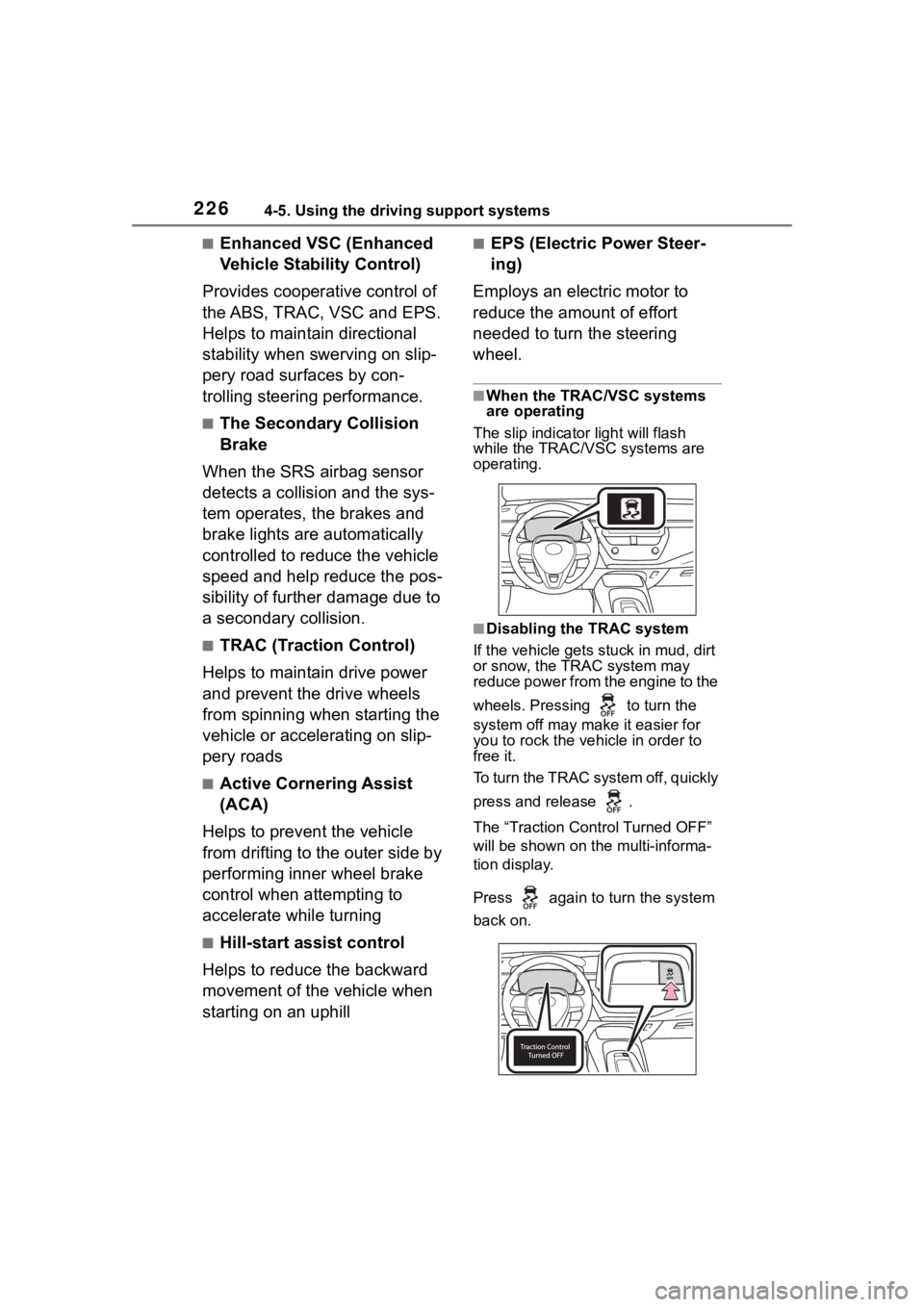
■When the TRAC/VSC systems
are operating
The slip indicator light will flash
while the TRAC/VSC systems are
operating.
■Disabling the TRAC system
If the vehicle gets stuck in mud, dirt
or snow, the TRAC system may
reduce power from the engine to the
wheels. Pressing to turn the
system off may make it easier for
you to rock the vehicle in order to
free it.
To turn the TRAC system off, quickly
press and release .
The “Traction Cont rol Turned OFF”
will be shown on the multi-informa-
tion display.
Press again to turn the system
back on.
Page 227 of 436
2274-5. Using the driving support systems
4
Driving
■Turning off both TRAC and VSC
systems
To turn the TRAC and VSC systems
off, press and h old for more
than 3 seconds while the vehicle is
stopped.
The VSC OFF indicator light will
come on and the “Traction Control
Turned OFF” will be shown on the
multi-information display.
*
Press again to turn the system
back on.
*: PCS will also be disabled (only Pre-Collision warning is avail-
able). The PCS warning light will
come on and a message will be
displayed on the multi-information
display. ( P.176)
■When the message is dis-
played on the multi-information
display showing that TRAC has
been disabled even if has
not been pressed
TRAC is temporary deactivated. If
the information continues to show,
contact your Toyota dealer.
■Operating conditions of
hill-start assist control
When all of the following four condi-
tions are me t, the hill-start assist
control will operate:
●The shift lever is in a position
other than P or N (when starting
off forward/backward on an
upward incline).
●The vehicle is stopped
●The accelerator pedal is not
depressed
●The parking brake is not engaged
●The engine switch is turned to ON
■Automatic system cancelation
of hill-start as sist control
The hill-start assis t control will turn off in any of the fo
llowing situations:
●The shift lever is shifted to P or N.
●The accelerator pedal is
depressed
●The parking brake is engaged
●2 seconds at maximum elapsed
after the brake pedal is released
●The engine switch is turned to
OFF
■Sounds and vibrations caused
by the ABS, brake assist, VSC,
TRAC and hill-start assist con-
trol systems
●A sound may be heard from the
engine compartment when the
brake pedal is depressed repeat-
edly, when the engine is started or
just after the vehicle begins to
move. This sound does not indi-
cate that a mal function has
occurred in any of these systems.
●Any of the following conditions
may occur when the above sys-
tems are operating. None of these
indicates that a malfunction has
occurred.
• Vibrations may be felt through the
vehicle body and steering.
• A motor sound may be heard also after the vehicle comes to a stop.
■Active Cornering Assist opera-
tion sounds and vibrations
When the Active Cornering Assist is
operated, operation sounds and
vibrations may be generated from
the brake system, but this is not a
malfunction.
■EPS operation sound
When the steering wheel is oper-
ated, a motor sound (whirring
sound) may be heard. This does not
indicate a malfunction.
■Automatic reactivation of TRAC
and VSC systems
After turning th e TRAC and VSC
systems off, the systems will be
automatically re-enabled in the fol-
lowing situations: