brakes TOYOTA COROLLA HYBRID 2023 User Guide
[x] Cancel search | Manufacturer: TOYOTA, Model Year: 2023, Model line: COROLLA HYBRID, Model: TOYOTA COROLLA HYBRID 2023Pages: 496, PDF Size: 10.13 MB
Page 210 of 496
2104-5. Using the driving support systems
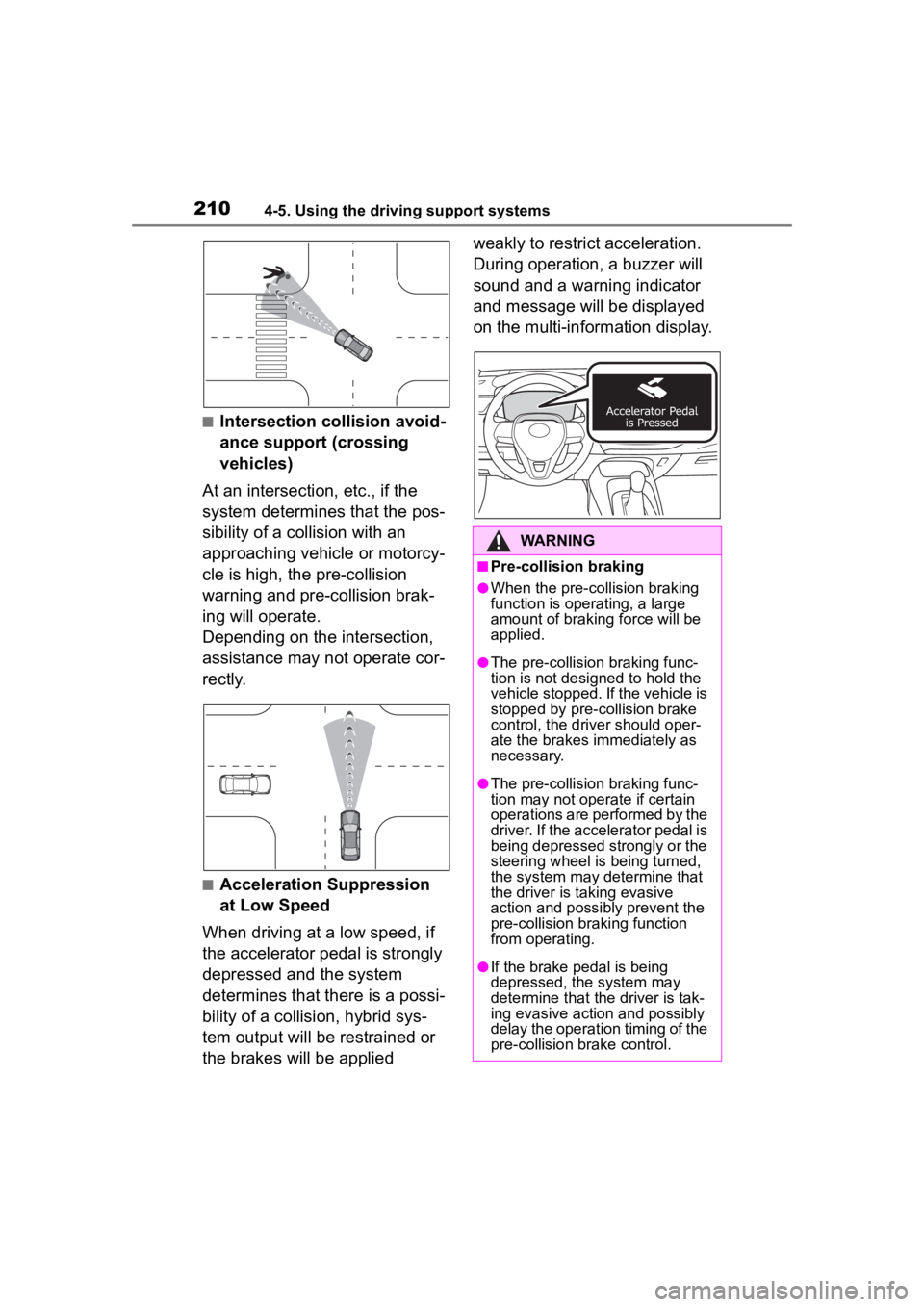
■Intersection collision avoid-
ance support (crossing
vehicles)
At an intersection, etc., if the
system determines that the pos-
sibility of a collision with an
approaching vehicle or motorcy-
cle is high, the pre-collision
warning and pre-collision brak-
ing will operate.
Depending on the intersection,
assistance may not operate cor-
rectly.
■Acceleration Suppression
at Low Speed
When driving at a low speed, if
the accelerator pedal is strongly
depressed and the system
determines that there is a possi-
bility of a collision, hybrid sys-
tem output will be restrained or
the brakes will be applied weakly to restrict acceleration.
During operation, a buzzer will
sound and a warning indicator
and message will be displayed
on the multi-information display.
WARNING
■Pre-collision braking
●When the pre-collision braking
function is operating, a large
amount of braking force will be
applied.
●The pre-collision braking func-
tion is not desig
ned to hold the
vehicle stopped. If the vehicle is
stopped by pre-collision brake
control, the dri ver should oper-
ate the brakes immediately as
necessary.
●The pre-collision braking func-
tion may not operate if certain
operations are performed by the
driver. If the accelerator pedal is
being depressed strongly or the
steering wheel is being turned,
the system may determine that
the driver is taking evasive
action and possibly prevent the
pre-collision braking function
from operating.
●If the brake pedal is being
depressed, the system may
determine that t he driver is tak-
ing evasive action and possibly
delay the operation timing of the
pre-collision brake control.
Page 228 of 496
2284-5. Using the driving support systems
PDA (Proactive driv-
ing assist)
When a detectable object
(P.229) is detected, the
proactive driving assist
operates the brakes and
steering wheel to help pre-
vent the vehicle from
approaching too close to
the object.
WARNING
■For safe use
Driving safely is solely the respon-
sibility of the driver.
●The proactive driving assist is
designed to provide some
assistance for regular braking
and steering operations, as well
as helping to prevent the vehicle
from approaching too close to a
detectable object. However, the
scope of this assistance is lim-
ited.
The driver should perform brake
and steering operations as neces-
sary. Read the following items
carefully. Do not overly rely on the
proactive driving assist and
always drive carefully.( P.230)
●The proactive driving assist is
not a system which reduces the
amount of attention necessary
for safe driving. Even if the sys-
tem is operating correctly, the
surrounding conditions as rec-
ognized by the driver and
detected by the system may dif-
fer. It is necessary for the driver
to pay attention, assess risks,
and ensure safety. Over-reli-
ance on this system to drive the
vehicle safely may lead to an
accident resulting in death or
serious injury.
●Proactive driving assist is not a
system which allows for inatten-
tive driving and is not a system
which assists in poor visibility
conditions. The driver is solely
responsible for paying attention
to their surroundings and driving
safely.
■When turning proactive driv-
ing assist off
●Situations in which the sensors
may not operate properly
: P. 2 0 5
●When it is necessary to disable
the system : P.201
Page 238 of 496
2384-5. Using the driving support systems
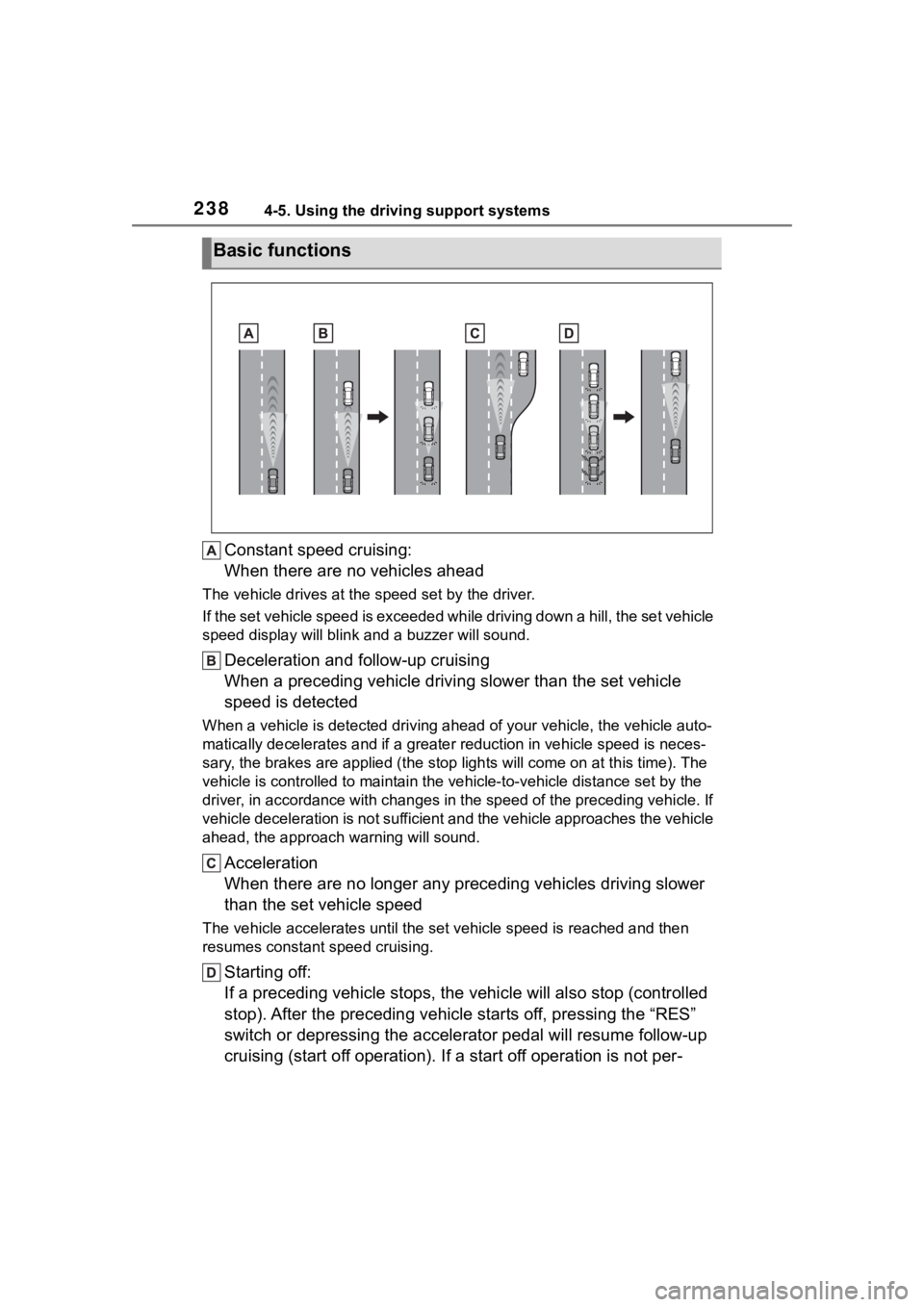
Constant speed cruising:
When there are no vehicles ahead
The vehicle drives at the speed set by the driver.
If the set vehicle speed is exceeded while driving down a hill, the set vehicle
speed display will blin k and a buzzer will sound.
Deceleration and follow-up cruising
When a preceding vehicle driving slower than the set vehicle
speed is detected
When a vehicle is detected driving ahead of your vehicle, the v ehicle auto-
matically decelerates and if a greater reduction in vehicle spe ed is neces-
sary, the brakes are applied (the stop lights will come on at t his time). The
vehicle is controlled to maintai n the vehicle-to-vehicle distance set by the
driver, in accordance with changes in the speed of the precedin g vehicle. If
vehicle deceleration is not sufficient and the vehicle approaches the vehicle
ahead, the approach wa rning will sound.
Acceleration
When there are no longer any preceding vehicles driving slower
than the set vehicle speed
The vehicle accelerates until th e set vehicle speed is reached and then
resumes constant speed cruising.
Starting off:
If a preceding vehicle stops, the vehicle will also stop (contr olled
stop). After the preceding vehicle starts off, pressing the “RES”
switch or depressing the accelerator pedal will resume follow-u p
cruising (start off operation). If a start off operation is not per-
Basic functions
Page 242 of 496

2424-5. Using the driving support systems
■Accelerating after setting the
vehicle speed
As with normal dri ving, acceleration
can be performed by depressing the
accelerator pedal. After accelerat-
ing, the vehicle will return to the set
vehicle speed. However, while in
vehicle-to-vehicle distance control
mode, the vehicle speed may
decrease to below the set vehicle
speed in order to maintain the dis-
tance from the preceding vehicle.
■When the vehicle is stopped by
system control during follow-up
cruising
●When the “+RES” switch is
pressed while the vehicle is
stopped by system control, if the
preceding vehicle starts off within
approximately 3 seconds, fol-
low-up cruising will resume.
●If the preceding vehicle starts off
within approximately 3 seconds of
the vehicle being stopped by sys-
tem control, follo w-up cruising will
resume.
■Automatic cancellation of vehi-
cle-to-vehicle d istance control
mode
In the following situations, vehi-
cle-to-vehicle dista nce control mode
will be canceled automatically:
●When the brake control or output
restriction control of a driving sup-
port system operates
(For example: Pre-Collision Sys-
tem, drive-start control)
●When the parking brake has been
operated
●When the vehicle is stopped by
system control on a steep incline
●When any of the following are
detected while the vehicle is
stopped by system control:
• The driver’s seat belt is unfas- tened
• The driver’s door is opened
• Approximately 3 minutes have elapsed since the vehicle was
stopped The parking brake
may be actived
automatically.
●Situations in which some or all of
the functions of the system cannot
operate: P. 2 0 6
■Dynamic radar cruise control
system warning messages and
buzzers
For safe use: P. 2 0 1
■Preceding vehicles that the sen-
sor may not detect correctly
In the following situations, depend-
ing on the conditions, if the system
cannot provide sufficient decelera-
tion or acceleration is necessary,
operate the brake pedal or accelera-
tor pedal.
As the sensor may not be able to
correctly detect th ese types of vehi-
cles, the approach warning
( P.243) may not operate.
●When a vehicle cuts in front of
your vehicle or changes lanes
away from your vehicle extremely
slowly or quickly
●When changing lanes
●When a preceding vehicle is driv-
ing at a low speed
●When a vehicle is stopped in the
same lane as the vehicle
●When a motorcycle is traveling in
the same lane as the vehicle
■Conditions under which the
system may not operate cor-
rectly
In the following situations, operate
the brake pedal (or accelerator
pedal, depending on the situation)
as necessary.
As the sensor may not be able to
correctly detect a vehicle, the sys-
tem may not operate properly.
●When a preceding vehicle brakes
suddenly
●When changing lanes at low
speeds, such as in a traffic jam
Page 266 of 496
2664-5. Using the driving support systems
■ABS (Anti-lock Brake Sys-
tem)
Helps to prevent wheel lock
when the brakes are applied
suddenly, or if the brakes are
applied while driving on a slip-
pery road surface
■Brake assist
Generates an increased level of
braking force after the brake
pedal is depressed when the
system detects a panic stop sit-
uation
■VSC (Vehicle Stability Con-
trol)
Helps the driver to control skid-
ding when swerving suddenly or
turning on slippery road sur-
faces.
■Enhanced VSC (Enhanced
Vehicle Stability Control)
Provides cooperative control of
the ABS, TRAC, VSC and EPS.
Helps to maintain directional
stability when swerving on slip-
pery road surfaces by con-
trolling steering performance.
■TRAC (Traction Control)
Helps to maintain drive power
and prevent the drive wheels
from spinning when starting the
vehicle or accelerating on slip-
pery roads
■Active Cornering Assist
(ACA)
Helps to prevent the vehicle
from drifting to the outer side by
performing inner wheel brake
control when attempting to
accelerate while turning
■Hill-start assist control
Helps to reduce the backward
movement of the vehicle when
starting on an uphill
■EPS (Electric Power Steer-
ing)
Employs an electric motor to
reduce the amount of effort
needed to turn the steering
wheel.
■E-Four (Electronic
On-Demand AWD system)
(AWD models)
Automatically controls the drive
system such as to front-wheel
drive or AWD (all wheel drive)
Driving assist systems
To keep driving safety and
performance, the following
systems operate automati-
cally in response to various
driving situations. Be
aware, however, that these
systems are supplementary
and should not be relied
upon too heavily when oper-
ating the vehicle.
Summary of the driving
assist systems
Page 267 of 496
2674-5. Using the driving support systems
4
Driving
according to various running
conditions including normal driv-
ing, during cornering, on a
uphill, when starting off, during
acceleration, on a slippery roads
due to snow or rain, thus con-
tributing to stable operability and
driving stability.
■The Secondary Collision
Brake
When the SRS airbag sensor
detects a collision and the sys-
tem operates, the brakes and
brake lights are automatically
controlled to reduce the vehicle
speed and help reduce the pos-
sibility of further damage due to
a secondary collision.
■When the TRAC/VSC/ABS sys-
tems are operating
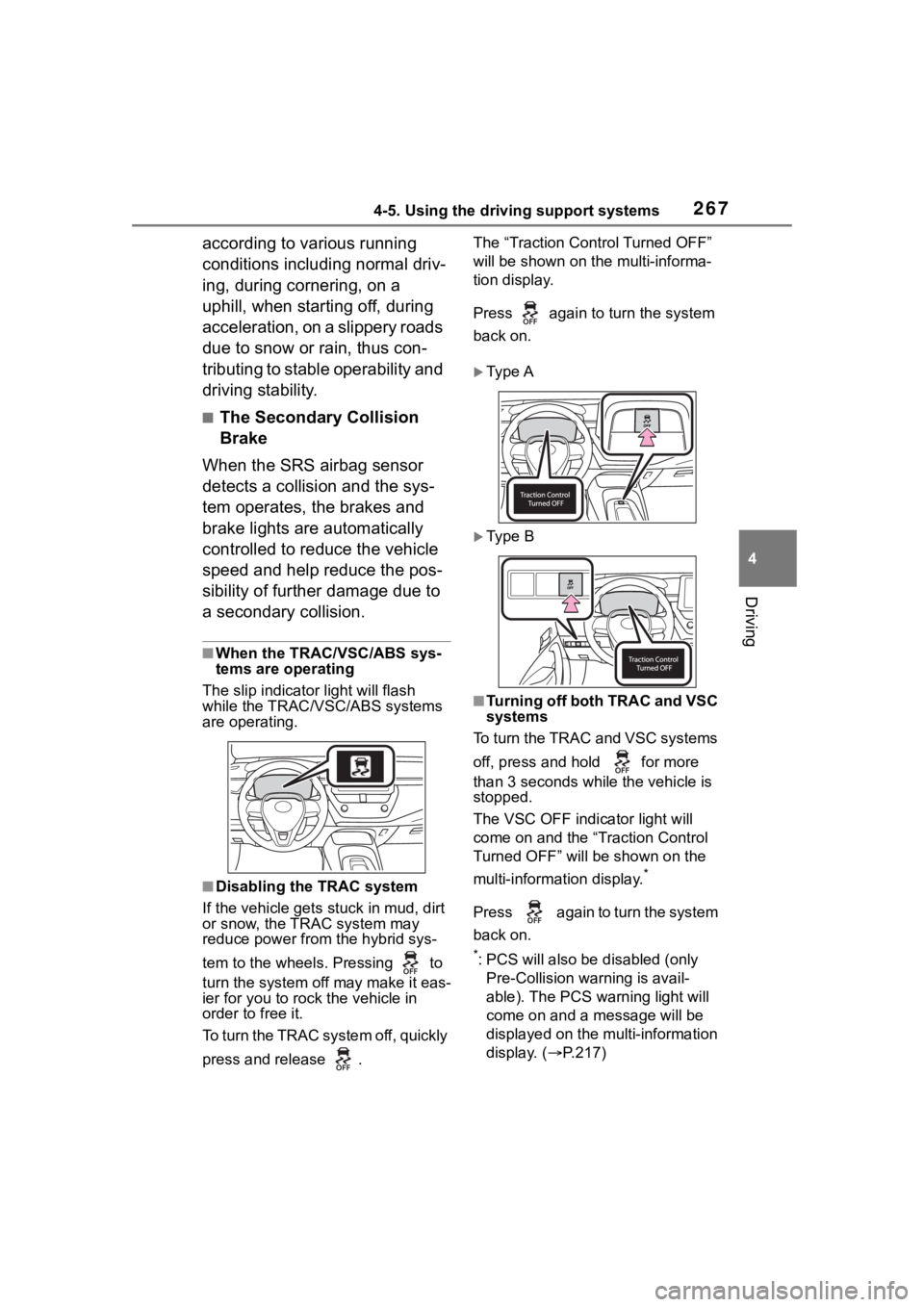
The slip indicator light will flash
while the TRAC/VSC/ABS systems
are operating.
■Disabling the TRAC system
If the vehicle gets stuck in mud, dirt
or snow, the TRAC system may
reduce power from the hybrid sys-
tem to the wheels. Pressing to
turn the system off may make it eas-
ier for you to rock the vehicle in
order to free it.
To turn the TRAC system off, quickly
press and release . The “Traction Cont
rol Turned OFF”
will be shown on the multi-informa-
tion display.
Press again to turn the system
back on.
Ty p e A
Ty p e B
■Turning off both TRAC and VSC
systems
To turn the TRAC and VSC systems
off, press and hold for more
than 3 seconds while the vehicle is
stopped.
The VSC OFF indicator light will
come on and the “Traction Control
Turned OFF” will be shown on the
multi-information display.
*
Press again to turn the system
back on.
*: PCS will also be disabled (only
Pre-Collision warning is avail-
able). The PCS warning light will
come on and a message will be
displayed on the multi-information
display. ( P.217)
Page 270 of 496
2704-5. Using the driving support systems
WARNING
●When driving over roads with
potholes or uneven surfaces
■TRAC/VSC may not operate
effectively when
Directional control and power may
not be achievable while driving on
slippery road surfaces, even if the
TRAC/VSC system is operating.
Drive the vehicle carefully in con-
ditions where stability and power
may be lost.
■Active Cornering Assist does
not operate effectively when
●Do not overly rely on Active
Cornering Assist. Active Corner-
ing Assist may not operate
effectively when accelerating
down slopes or driving on slip-
pery road surfaces.
●When Active Cornering Assist
frequently operates, Active Cor-
nering Assist may temporarily
stop operating to ensure proper
operation of the brakes, TRAC
and VSC.
■Hill-start assist control does
not operate effectively when
●Do not overly rely on hill-start
assist control. Hill-start assist
control may not operate effec-
tively on steep inclines and
roads covered with ice.
●Unlike the parking brake,
hill-start assist control is not
intended to hold the vehicle sta-
tionary for an extended period
of time. Do not attempt to use
hill-start assist control to hold
the vehicle on an incline, as
doing so may lead to an acci-
dent.
■When the TRAC/ABS/VSC is
activated
The slip indicator light flashes.
Always drive carefully. Reckless
driving may cause an accident.
Exercise particula r care when the
indicator light flashes.
■When the TRAC/VSC systems
are turned off
Be especially careful and drive at
a speed appropriate to the road
conditions. As these are the sys-
tems to help ensure vehicle stabil-
ity and driving force, do not turn
the TRAC/VSC systems off
unless necessary.
■Replacing tires
Make sure that all tires are of the
specified size, brand, tread pat-
tern and total load capacity. In
addition, make sure that the tires
are inflated to the recommended
tire inflation p ressure level.
The ABS, TRAC and VSC sys-
tems will not functi on correctly if
different tires are installed on the
vehicle.
Contact your Toyota dealer for fur-
ther information when replacing
tires or wheels.
■Handling of tires and the sus-
pension
Using tires with any kind of prob-
lem or modifying the suspension
will affect the driving assist sys-
tems, and may cause a system to
malfunction.
■Secondary Collision Brake
Do not rely solely upon the Sec-
ondary Collision Brake. This sys-
tem is designed to help reduce
the possibility of further damage
due to a secondary collision, how-
ever, that effect changes accord-
ing to various conditions. Overly
relying on the system may result
in death or serious injury.
Page 271 of 496
2714-6. Driving tips
4
Driving
4-6.Driving tips
When using Eco drive mode, the
torque corresponding to the
accelerator pedal depression
amount can be generated more
smoothly than it is in normal
conditions. In addition, the oper-
ation of the air conditioning sys-
tem (heating/cooling) will be
minimized, improving the fuel
economy. (P.264)
The Eco-friendly driving is pos-
sible by keeping the indicate of
Hybrid System Indicator within
Eco area. ( P.104)
Shift the shift lever to D when
stopped at a traffic light, or driv-
ing in heavy traffic etc. Shift the
shift lever to P when parking.
When using the N, there is no
positive effect on fuel consump-
tion. In the N, the gasoline
engine operates but electricity
cannot be generated. Also,
when using the air conditioning system, etc., the hybrid battery
(traction battery) power is con-
sumed.
Drive your vehicle smoothly.
Avoid abrupt acceleration and
deceleration. Gradual accel-
eration and deceleration will
make more effective use of
the electric motor (traction
motor) without having to use
gasoline engine power.
Avoid repeated acceleration.
Repeated acceleration con-
sumes hybrid battery (trac-
tion battery) power, resulting
in poor fuel consumption. Bat-
tery power can be restored by
driving with the accelerator
pedal slightly released.
Make sure to operate the brakes
gently and in a timely manner. A
greater amount of electrical
energy can be regenerated
when slowing down.
Repeated acceleration and
deceleration, as well as long
waits at traffic lights, will lead to
bad fuel economy. Check traffic
reports before leaving and avoid
delays as much as possible.
Hybrid vehicle driving
tips
For economical and ecolog-
ical driving, pay attention to
the following points:
Using Eco drive mode
Use of Hybrid System
Indicator
Shift lever operation
Accelerator pedal/brake
pedal operation
When braking
Delays
Page 272 of 496
2724-6. Driving tips
When driving in a traffic jam,
gently release the brake pedal
to allow the vehicle to move for-
ward slightly while avoiding
overuse of the accelerator
pedal. Doing so can help control
excessive gasoline consump-
tion.
Control and maintain the vehicle
at a constant speed. Before
stopping at a toll booth or simi-
lar, allow plenty of time to
release the accelerator and gen-
tly apply the brakes. A greater
amount of electrical energy can
be regenerated when slowing
down.
Use the air conditioning only
when necessary. Doing so can
help reduce excessive gasoline
consumption.
In summer: When the ambient
temperature is high, use the
recirculated air mode. Doing so
will help to reduce the burden on
the air conditioning system and
reduce fuel consumption as
well.
In winter: Because the gasoline
engine will not automatically cut
out until it and the interior of the
vehicle are warm, it will con-
sume fuel. Also, fuel consump-
tion can be improved by avoiding overuse of the heater.
Make sure to check the tire infla-
tion pressure frequently.
Improper tire inflation pressure
can cause poor fuel economy.
Also, as snow tires can cause
large amounts of friction, their
use on dry roads can lead to
poor fuel economy. Use tires
that are appropriate for the sea-
son.
Carrying heavy luggage will lead
to poor fuel economy. Avoid car-
rying unnecessary luggage.
Installing a large roof rack will
also cause poor fuel economy.
Since the gasoline engine starts
up and cuts out automatically
when cold, warming up the
engine is unnecessary. More-
over, frequently driving short
distances will cause the engine
to repeatedly warm up, which
can lead to excess fuel con-
sumption.
Highway driving
Air conditioning
Checking tire inflation
pressure
Luggage
Warming up before driv-
ing
Page 274 of 496
2744-6. Driving tips
Perform the following according
to the driving conditions:
Do not try to forcibly open a
window or move a wiper that
is frozen. Pour warm water
over the frozen area to melt
the ice. Wipe away the water
immediately to prevent it from
freezing.
To ensure proper operation of
the climate control system
fan, remove any snow that
has accumulated on the air
inlet vents in front of the wind-
shield.
Check for and remove any
excess ice or snow that may
have accumulated on the
exterior lights, outside rear
view mirrors, windows, vehi-
cle’s roof, chassis, around the
tires or on the brakes.
Remove any snow or mud
from the bottom of your shoes
before getting in the vehicle.
Accelerate the vehicle slowly,
keep a safe distance between
you and the vehicle ahead, and
drive at a reduced speed suit-
able to road conditions.
Turn automatic mode of the parking brake off. Otherwise,
the parking brake may freeze
and not be able to be
released automatically.
Also, avoid using the following as
the parking brake may operate
automatically, even if automatic
mode is off.
• Brake hold system
Park the vehicle and shift the
shift lever to P without setting
the parking brake. The park-
ing brake may freeze up, pre-
venting it from being released.
If the vehicle is parked without
setting the parking brake,
make sure to block the
wheels.
Failure to do so may be dan-
gerous because it may cause
the vehicle to move unexpect-
edly, possibly leading to an
accident.
When the parking brake is in
automatic mode, release the
parking brake after shifting
the shift lever to P. ( P.184)
If the vehicle is parked without
setting the parking brake,
confirm that the shift lever
cannot be moved out of P.
If the vehicle is left parked
with the brakes damp in cold
temperatures, there is a pos-
sibility of the brakes freezing.
Use the correct tire chain size
Before driving the vehicle
When driving the vehicle
When parking the vehicleSelecting tire chains