mirror TOYOTA COROLLA HYBRID 2023 Owner's Manual
[x] Cancel search | Manufacturer: TOYOTA, Model Year: 2023, Model line: COROLLA HYBRID, Model: TOYOTA COROLLA HYBRID 2023Pages: 496, PDF Size: 10.13 MB
Page 260 of 496
2604-5. Using the driving support systems
*: If equipped
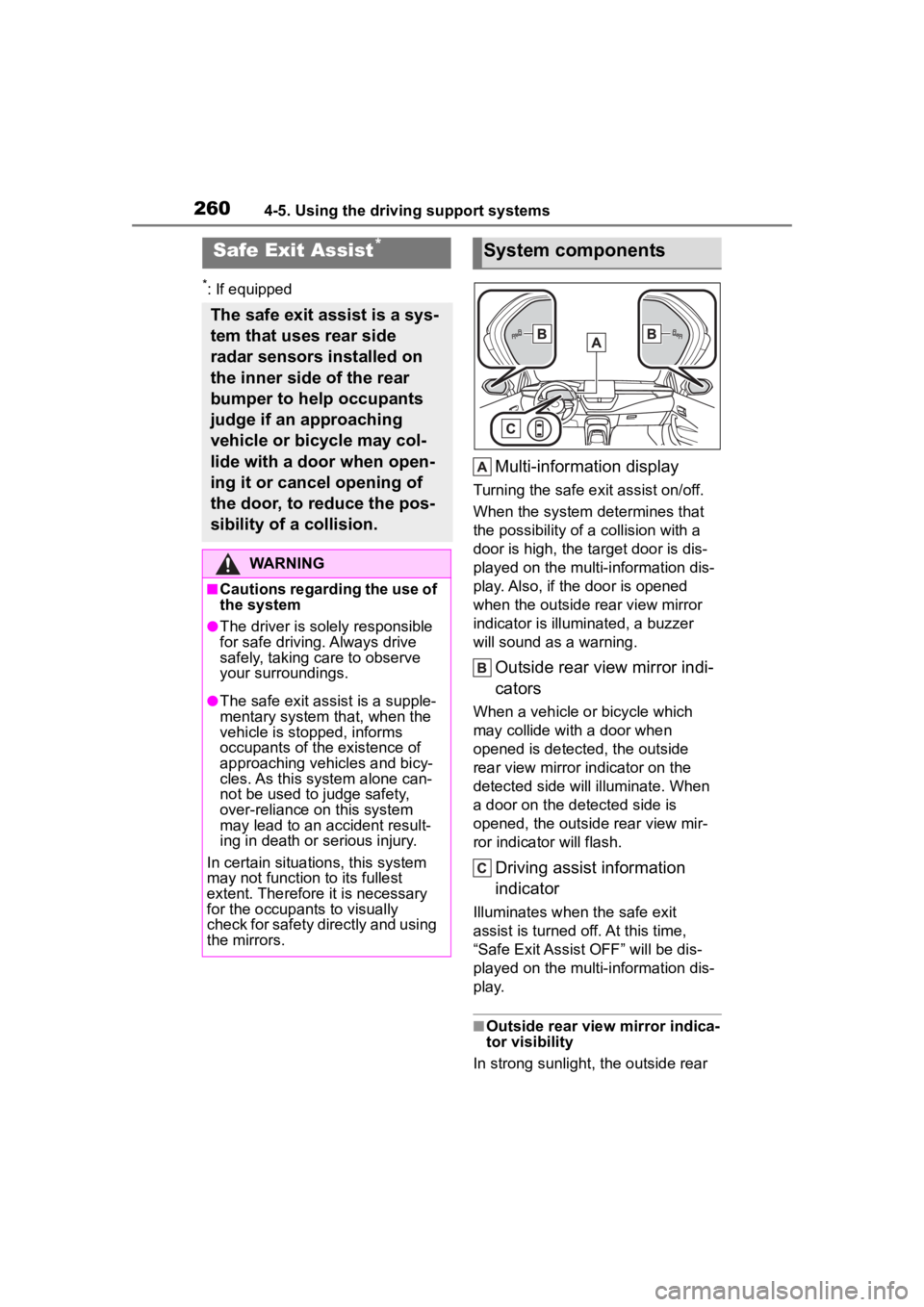
Multi-information display
Turning the safe exit assist on/off.
When the system determines that
the possibility of a collision with a
door is high, the target door is dis-
played on the multi-information dis-
play. Also, if the door is opened
when the outside r ear view mirror
indicator is illuminated, a buzzer
will sound as a warning.
Outside rear view mirror indi-
cators
When a vehicle or bicycle which
may collide with a door when
opened is detected, the outside
rear view mirror indicator on the
detected side will illuminate. When
a door on the de tected side is
opened, the outside rear view mir-
ror indicator will flash.
Driving assist information
indicator
Illuminates when the safe exit
assist is turned off. At this time,
“Safe Exit Assist OFF” will be dis-
played on the multi-information dis-
play.
■Outside rear vie w mirror indica-
tor visibility
In strong sunlight, the outside rear
Safe Exit Assist*
The safe exit assist is a sys-
tem that uses rear side
radar sensors installed on
the inner side of the rear
bumper to help occupants
judge if an approaching
vehicle or bicycle may col-
lide with a door when open-
ing it or cancel opening of
the door, to reduce the pos-
sibility of a collision.
WARNING
■Cautions regarding the use of
the system
●The driver is solely responsible
for safe driving. Always drive
safely, taking care to observe
your surroundings.
●The safe exit assist is a supple-
mentary system that, when the
vehicle is stopped, informs
occupants of the existence of
approaching vehicles and bicy-
cles. As this system alone can-
not be used to judge safety,
over-reliance on this system
may lead to an accident result-
ing in death or serious injury.
In certain situations, this system
may not function to its fullest
extent. Therefore it is necessary
for the occupants to visually
check for safety directly and using
the mirrors.
System components
Page 261 of 496
2614-5. Using the driving support systems
4
Driving
view mirror indicator may be difficult
to see.
■Buzzer
If the volume setting of the audio
system is high or the surrounding
area is loud, it may be difficult to
hear the buzzer.
■Customization
Some functions can be customized.
( P.442)
The safe exit assist can be
enabled/disabled on
(4.2-inch display) or (7-inch
display) of the multi-information
display. ( P.442)
When the safe exit assist is off,
the driving assist information
WARNING
■To ensure the system can
operate properly
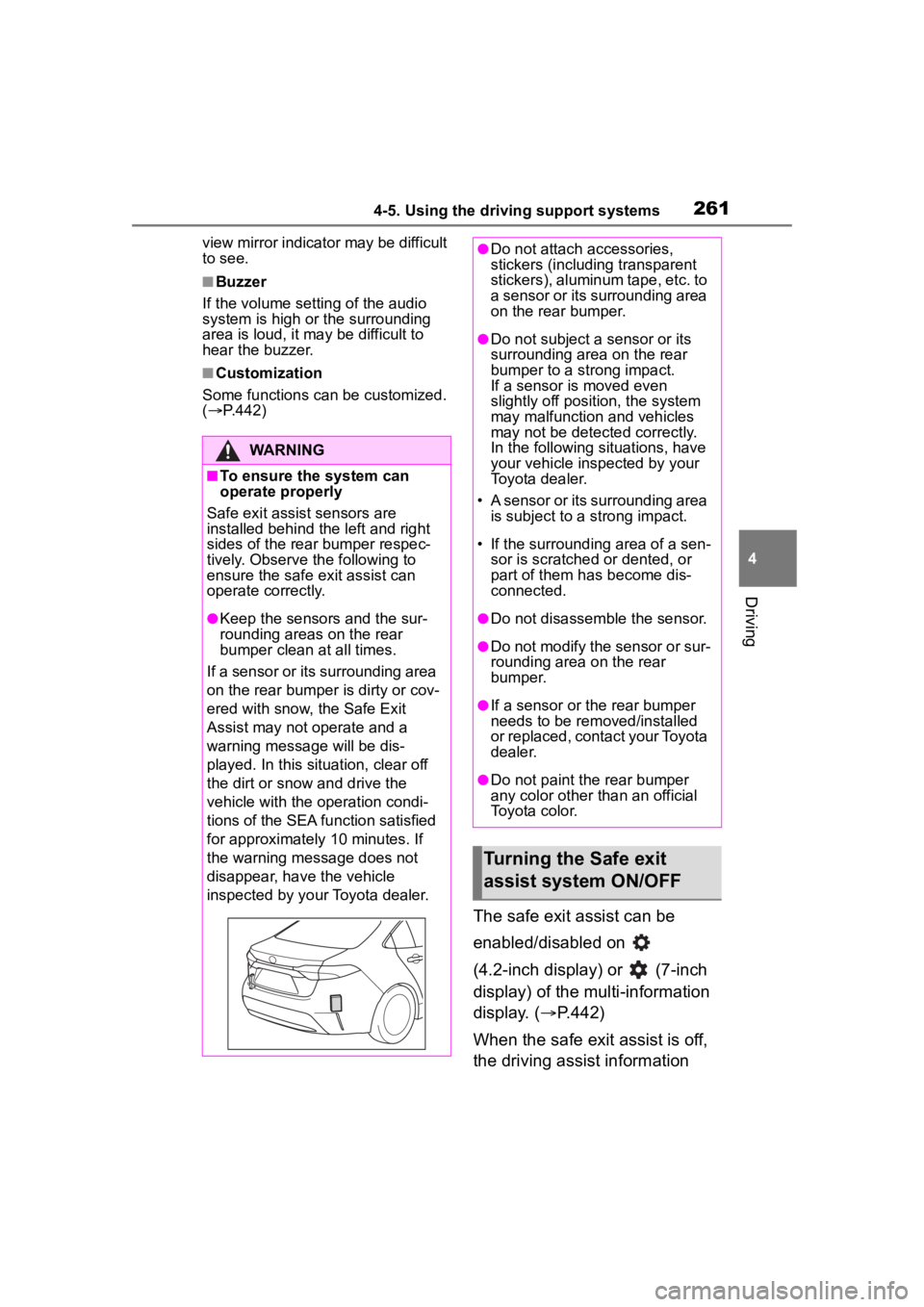
Safe exit assist sensors are
installed behind the left and right
sides of the rear bumper respec-
tively. Observe the following to
ensure the safe exit assist can
operate correctly.
●Keep the sensors and the sur-
rounding areas on the rear
bumper clean at all times.
If a sensor or its surrounding area
on the rear bumper is dirty or cov-
ered with snow, the Safe Exit
Assist may not operate and a
warning message will be dis-
played. In this situation, clear off
the dirt or snow and drive the
vehicle with the operation condi-
tions of the SEA function satisfied
for approximately 10 minutes. If
the warning message does not
disappear, have the vehicle
inspected by your Toyota dealer.
●Do not attach a ccessories,
stickers (including transparent
stickers), aluminum tape, etc. to
a sensor or its surrounding area
on the rear bumper.
●Do not subject a sensor or its
surrounding area on the rear
bumper to a strong impact.
If a sensor is moved even
slightly off position, the system
may malfunction and vehicles
may not be detected correctly.
In the following si tuations, have
your vehicle inspected by your
Toyota dealer.
• A sensor or its surrounding area is subject to a strong impact.
• If the surrounding area of a sen- sor is scratched or dented, or
part of them h as become dis-
connected.
●Do not disassemble the sensor.
●Do not modify the sensor or sur-
rounding area on the rear
bumper.
●If a sensor or the rear bumper
needs to be removed/installed
or replaced, contact your Toyota
dealer.
●Do not paint the rear bumper
any color other t han an official
Toyota color.
Turning the Safe exit
assist system ON/OFF
Page 262 of 496
2624-5. Using the driving support systems
indicator will illuminate. At this
time, “Safe Exit Assist OFF” will
be displayed on the multi-infor- mation display. Each time the
power switch is turned to ON,
the safe exit assist is enabled.
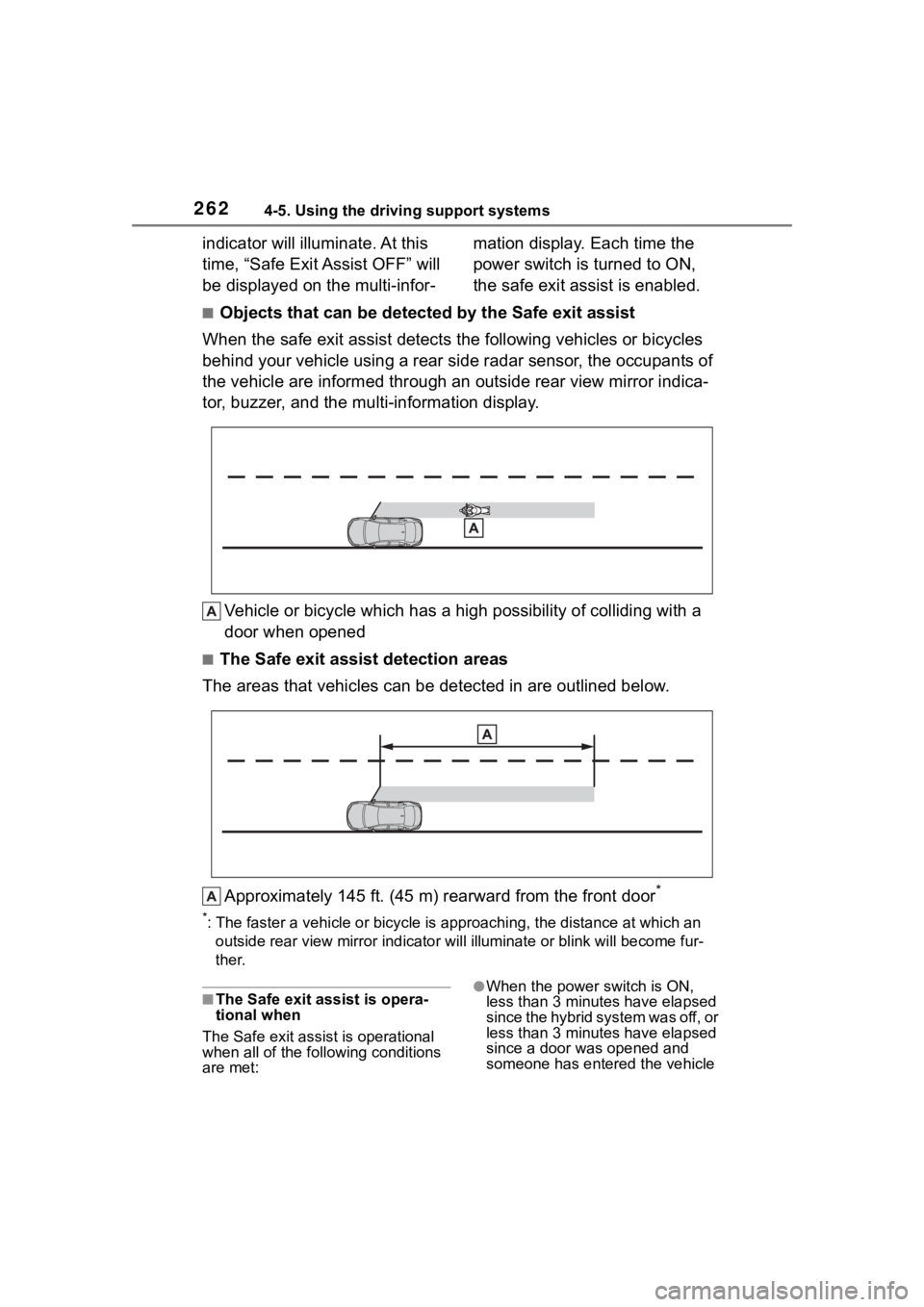
■Objects that can be detected by the Safe exit assist
When the safe exit assist detects the following vehicles or bicycles
behind your vehicle using a rear side radar sensor, the occupan ts of
the vehicle are informed through an outside rear view mirror in dica-
tor, buzzer, and the multi-information display.
Vehicle or bicycle which has a high possibility of colliding wi th a
door when opened
■The Safe exit assist detection areas
The areas that vehicles can be detected in are outlined below.
Approximately 145 ft. (45 m) rearward from the front door
*
*: The faster a vehicle or bicycle is approaching, the distance at which an
outside rear view mirror ind icator will illuminate or blink wil l become fur-
ther.
■The Safe exit ass ist is opera-
tional when
The Safe exit assist is operational
when all of the following conditions
are met:●When the power switch is ON,
less than 3 minutes have elapsed
since the hybrid system was off, or
less than 3 minutes have elapsed
since a door was opened and
someone has entered the vehicle
Page 274 of 496
2744-6. Driving tips
Perform the following according
to the driving conditions:
Do not try to forcibly open a
window or move a wiper that
is frozen. Pour warm water
over the frozen area to melt
the ice. Wipe away the water
immediately to prevent it from
freezing.
To ensure proper operation of
the climate control system
fan, remove any snow that
has accumulated on the air
inlet vents in front of the wind-
shield.
Check for and remove any
excess ice or snow that may
have accumulated on the
exterior lights, outside rear
view mirrors, windows, vehi-
cle’s roof, chassis, around the
tires or on the brakes.
Remove any snow or mud
from the bottom of your shoes
before getting in the vehicle.
Accelerate the vehicle slowly,
keep a safe distance between
you and the vehicle ahead, and
drive at a reduced speed suit-
able to road conditions.
Turn automatic mode of the parking brake off. Otherwise,
the parking brake may freeze
and not be able to be
released automatically.
Also, avoid using the following as
the parking brake may operate
automatically, even if automatic
mode is off.
• Brake hold system
Park the vehicle and shift the
shift lever to P without setting
the parking brake. The park-
ing brake may freeze up, pre-
venting it from being released.
If the vehicle is parked without
setting the parking brake,
make sure to block the
wheels.
Failure to do so may be dan-
gerous because it may cause
the vehicle to move unexpect-
edly, possibly leading to an
accident.
When the parking brake is in
automatic mode, release the
parking brake after shifting
the shift lever to P. ( P.184)
If the vehicle is parked without
setting the parking brake,
confirm that the shift lever
cannot be moved out of P.
If the vehicle is left parked
with the brakes damp in cold
temperatures, there is a pos-
sibility of the brakes freezing.
Use the correct tire chain size
Before driving the vehicle
When driving the vehicle
When parking the vehicleSelecting tire chains
Page 278 of 496
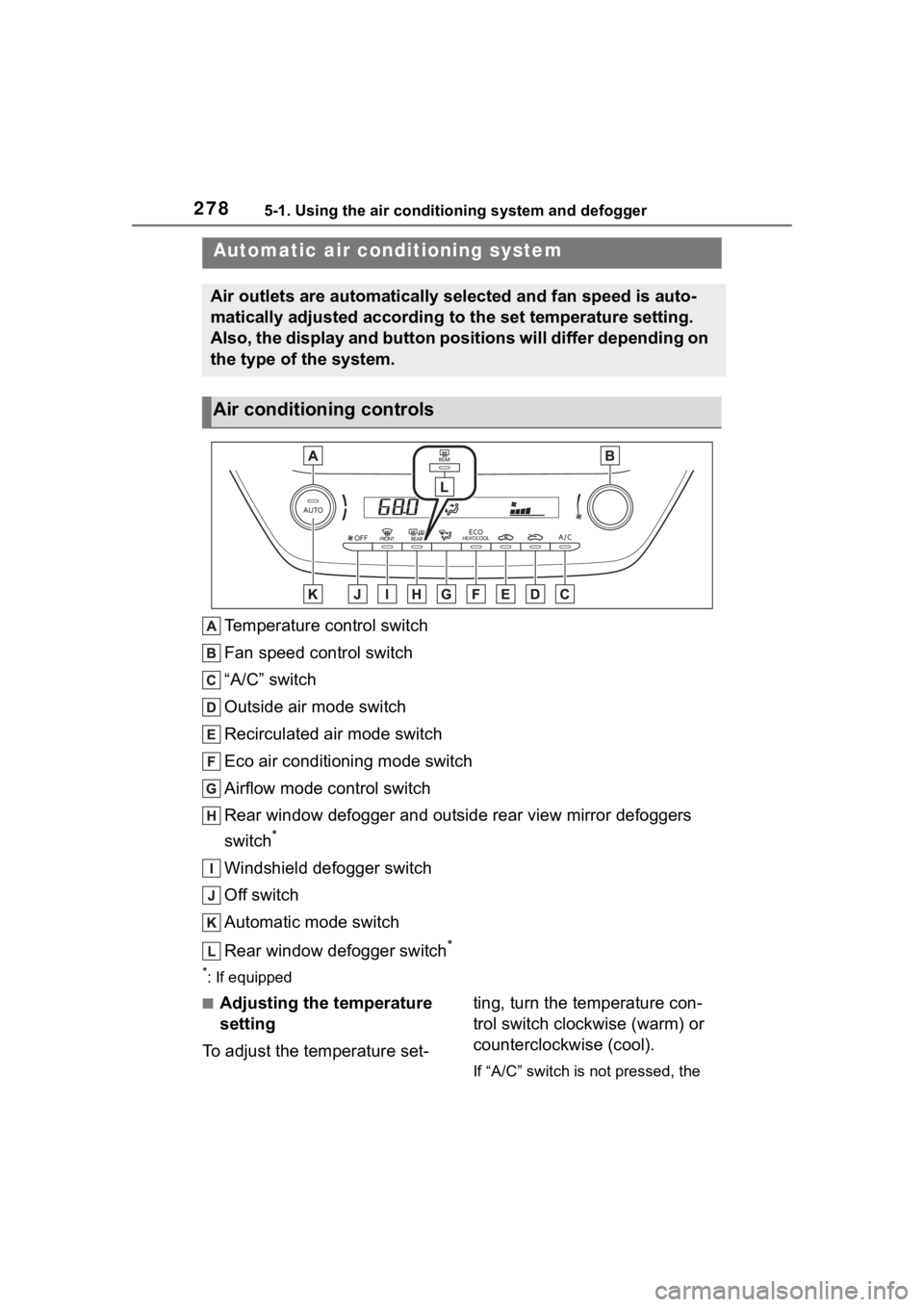
2785-1. Using the air conditioning system and defogger
5-1.Using the air conditioning system and defogger
Temperature control switch
Fan speed control switch
“A/C” switch
Outside air mode switch
Recirculated air mode switch
Eco air conditioning mode switch
Airflow mode control switch
Rear window defogger and outside rear view mirror defoggers
switch
*
Windshield defogger switch
Off switch
Automatic mode switch
Rear window defogger switch
*
*: If equipped
■Adjusting the temperature
setting
To adjust the temperature set- ting, turn the temperature con-
trol switch clockwise (warm) or
counterclockwise (cool).
If “A/C” switch is not pressed, the
Automatic air conditioning system
Air outlets are automatically selected and fan speed is auto-
matically adjusted according to the set temperature setting.
Also, the display and button positions will differ depending on
the type of the system.
Air conditioning controls
Page 280 of 496

2805-1. Using the air conditioning system and defogger
■Defogging the rear window
and outside rear view mir-
rors
Vehicles without outside rear
view mirror defoggers
A defogger is used to defog the
rear window.
Press the rear window defogger
switch.
The defogger will automatically turn
off after a while.
When the rear window defogger
switch is on, the indicator illumi-
nates on the rear window defogger
switch.
Vehicles with outside rear
view mirror defoggers
Defoggers are used to defog the
rear window, and to remove
raindrops, dew and frost from
the outside rear view mirrors.
Press the rear window and out-
side rear view mirror defoggers
switch.
The defoggers will automatically
turn off after a while.
When the rear window and outside
rear view mirror defoggers switch is
on, the indicator illuminates on the
rear window and ou tside rear view
mirror defoggers switch.
■Eco air conditioning mode
The air conditioning is controlled
with low fuel consumption priori-
tized such as reducing fan
speed, etc.
Press the eco air conditioning
mode switch.
When the eco air conditioning
mode is on, the indicator illumi-
nates on the eco air conditioning
mode switch.
■When the outside temperature
exceeds 75°F (24°C) and the air
conditioning system is on
●In order to reduce the air condi-
tioning power consumption, the air
conditioning system may switch to
recirculated air mode automati-
cally. This may also reduce fuel
consumption.
●Recirculated air mode is selected
as a default mode when the power
switch is turned to ON.
●It is possible to switch to outside
air mode at any time by pressing
the outside air mode switch.
■Fogging up of the windows
●The windows will easily fog up
when the humidity in the vehicle is
high. Turning “A/C” on will dehu-
midify the air from the outlets and
defog the windshield effectively.
●If you turn “A/C” off, the windows
may fog up more easily.
●The windows may fog up if the
recirculated air mode is used.
■When driving on dusty roads
Close all windows. If dust thrown up
by the vehicle is still drawn into the
vehicle after closing the windows, it
is recommended that the air intake
mode be set to outside air mode and
the fan speed to a ny setting except
off.
■Outside/recirculated air mode
●Setting to the recirculated air
mode temporarily is recom-
mended in preventing dirty air
from entering the vehicle interior
and helping to c ool the vehicle
when the outside air temperature
is high.
●Outside/recirculated air mode may
automatically switch depending on
Page 282 of 496
2825-1. Using the air conditioning system and defogger
■Customization
Some functions can be customized.
( P.442)
1 Press the automatic mode
switch.
2 Adjust the temperature set-
ting. 3
To stop the operation, press
the off switch.
If the fan speed setting or air
flow modes are operated, the
automatic mode indicator goes
off. However, automatic mode
for functions other than that
operated is maintained.
■Using automatic mode
Fan speed is adjusted automati-
cally according to the temperature
setting and the ambient conditions.
Therefore, the fan may stop for a
while until warm or cool air is ready
to flow immediately after the auto-
matic mode switch pressed.
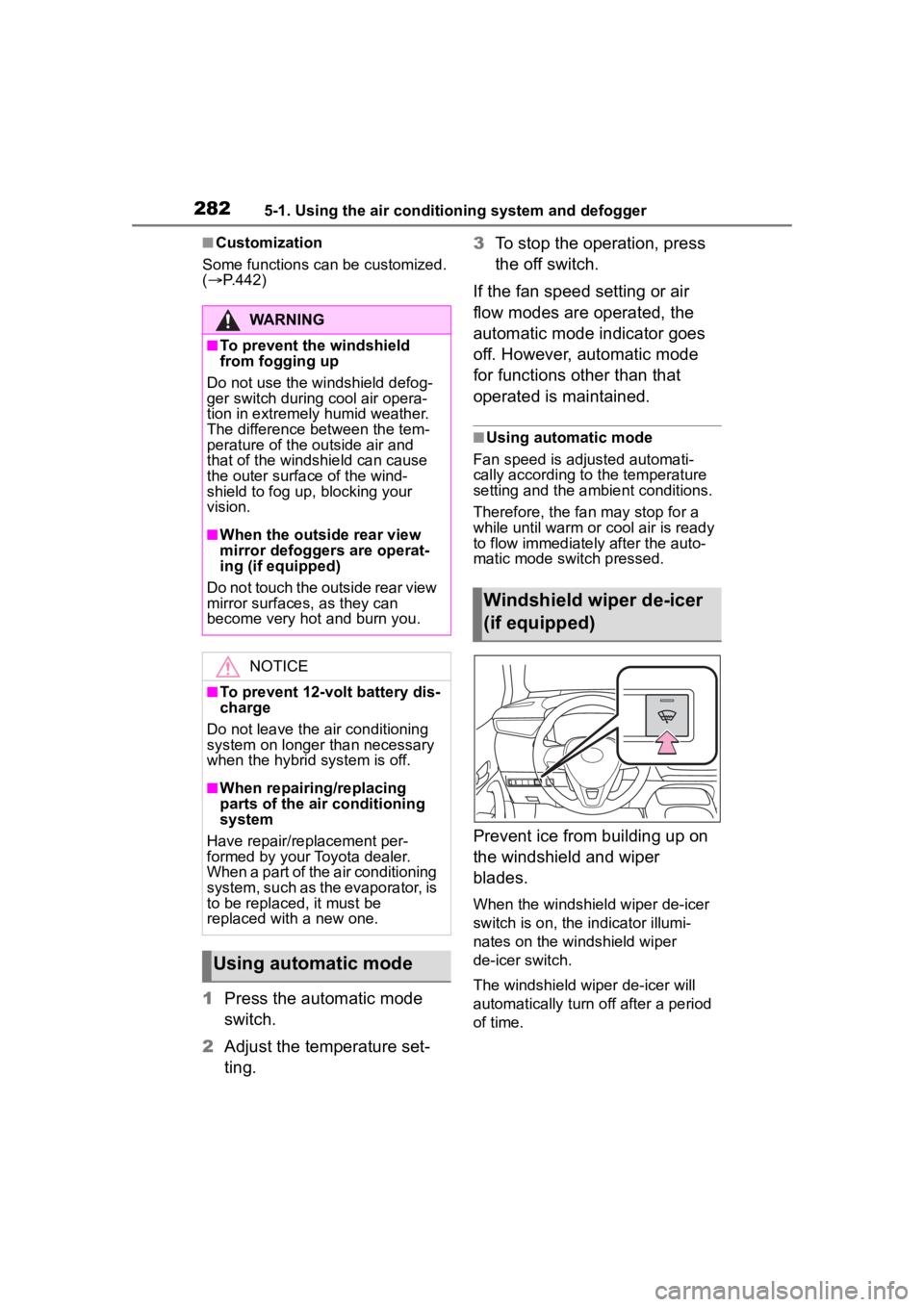
Prevent ice from building up on
the windshield and wiper
blades.
When the windshield wiper de-icer
switch is on, the indicator illumi-
nates on the windshield wiper
de-icer switch.
The windshield wiper de-icer will
automatically turn off after a period
of time.
WARNING
■To prevent the windshield
from fogging up
Do not use the windshield defog-
ger switch during cool air opera-
tion in extremely humid weather.
The difference between the tem-
perature of the outside air and
that of the windshield can cause
the outer surface of the wind-
shield to fog up, blocking your
vision.
■When the outside rear view
mirror defoggers are operat-
ing (if equipped)
Do not touch the outside rear view
mirror surfaces, as they can
become very hot and burn you.
NOTICE
■To prevent 12-volt battery dis-
charge
Do not leave the air conditioning
system on longer than necessary
when the hybrid system is off.
■When repairing/replacing
parts of the air conditioning
system
Have repair/replacement per-
formed by your Toyota dealer.
When a part of the air conditioning
system, such as the evaporator, is
to be replaced, it must be
replaced with a new one.
Using automatic mode
Windshield wiper de-icer
(if equipped)
Page 298 of 496
2985-4. Other interior features
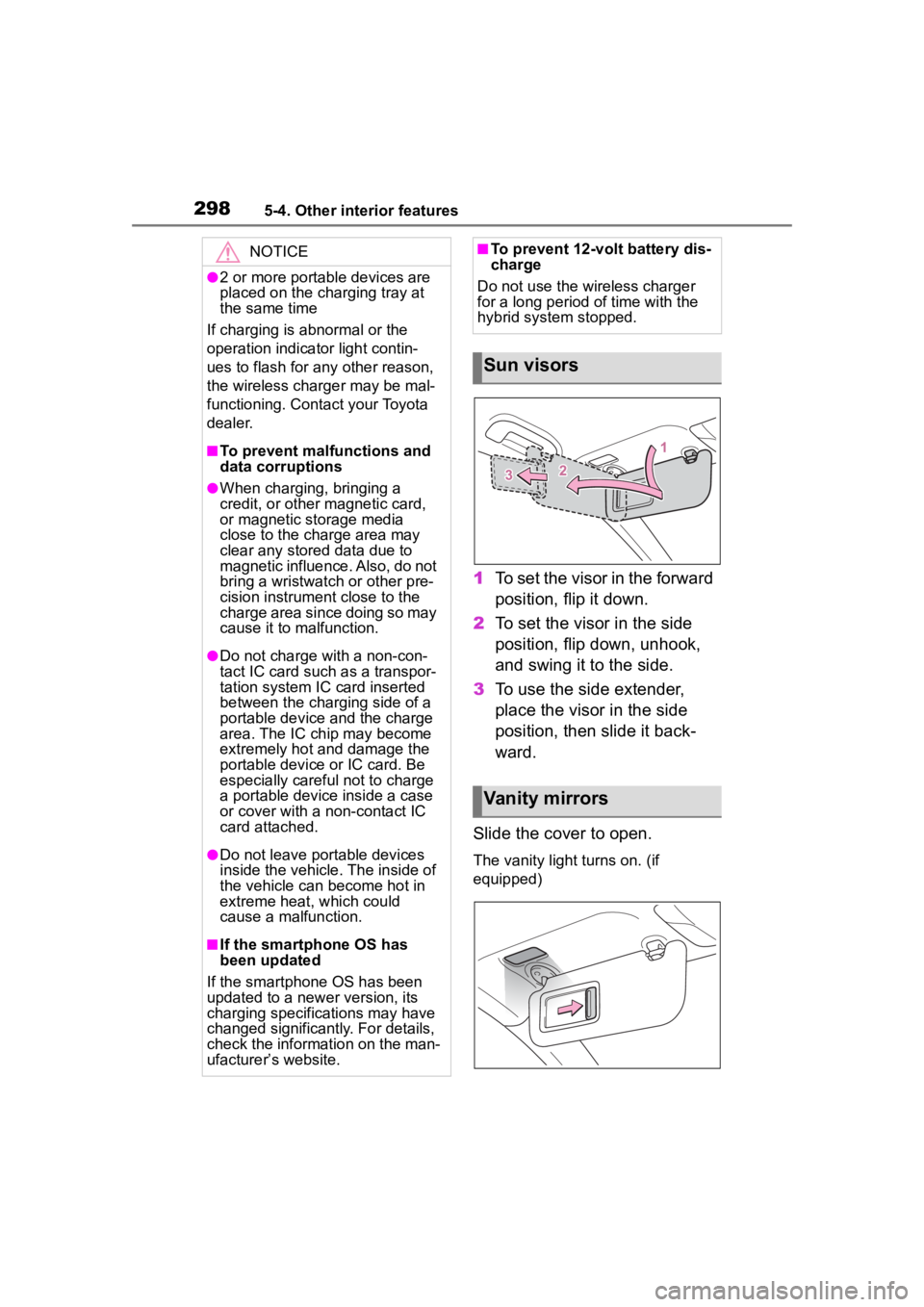
1To set the visor in the forward
position, flip it down.
2 To set the visor in the side
position, flip down, unhook,
and swing it to the side.
3 To use the side extender,
place the visor in the side
position, then slide it back-
ward.
Slide the cover to open.
The vanity light turns on. (if
equipped)
NOTICE
●2 or more portable devices are
placed on the charging tray at
the same time
If charging is abnormal or the
operation indicator light contin-
ues to flash for any other reason,
the wireless charger may be mal-
functioning. Contact your Toyota
dealer.
■To prevent malfunctions and
data corruptions
●When charging, bringing a
credit, or other magnetic card,
or magnetic storage media
close to the charge area may
clear any stored data due to
magnetic influence. Also, do not
bring a wristwatch or other pre-
cision instrument close to the
charge area since doing so may
cause it to malfunction.
●Do not charge with a non-con-
tact IC card such as a transpor-
tation system IC card inserted
between the charging side of a
portable device and the charge
area. The IC chip may become
extremely hot and damage the
portable device or IC card. Be
especially careful not to charge
a portable device inside a case
or cover with a non-contact IC
card attached.
●Do not leave portable devices
inside the vehicle. The inside of
the vehicle can become hot in
extreme heat, which could
cause a malfunction.
■If the smartphone OS has
been updated
If the smartphone OS has been
updated to a new er version, its
charging specifications may have
changed significantly. For details,
check the information on the man-
ufacturer’s website.
■To prevent 12-volt battery dis-
charge
Do not use the wireless charger
for a long period of time with the
hybrid system stopped.
Sun visors
Vanity mirrors
Page 302 of 496
3026-1. Maintenance and care
6-1.Maintenance and care
Working from top to bottom,
liberally apply water to the
vehicle body, wheel wells and
underside of the vehicle to
remove any dirt and dust.
Wash the vehicle body using
a sponge or soft cloth, such
as a chamois.
For hard-to-remove marks,
use car wash soap and rinse
thoroughly with water.
Wipe away any water.
Wax the vehicle when the
waterproof coating deterio-
rates.
If water does not bead on a clean
surface, apply wax when the vehi-
cle body is cool.
■Automatic car washes
●Fold the mirrors before washing
the vehicle. Start washing from the
front of the vehicle. Make sure to
extend the mirrors before driving.
●Brushes used in automatic car
washes may scratch the vehicle
surface, parts (wheel, etc.) and
harm your vehicle’s paint.
●Vehicles with a rear spoiler: In cer-
tain automatic car washes, the rear spoiler may interfere with
machine operation. This may pre-
vent the vehicle from being
cleaned properly or result in dam-
age to the r
ear spoiler.
■High pressure car washes
As water may enter the cabin, do
not bring the nozzle tip near the
gaps around the doors or perimeter
of the windows, or spray these
areas continuously.
■When using a car wash (vehi-
cles with a smart key system)
If the door handle becomes wet
while the electronic key is within the
effective range, the door may lock
and unlock repeatedly. In that case,
follow the following correction pro-
cedures to wash the vehicle:
●Place the key in a position 6 ft. (2
m) or more separate from the
vehicle while the vehicle is being
washed. (Take care to ensure that
the key is not stolen.)
●Set the electronic key to bat-
tery-saving mode to disable the
smart key system. ( P.137)
■Wheels and wheel ornaments
●Remove any dirt immediately by
using a neutral detergent.
●Wash detergent off with water
immediately after use.
●To protect the paint from damage,
make sure to obs erve the follow-
ing precautions.
• Do not use acidic, alkaline or abrasive detergent
• Do not use hard brushes
• Do not use detergent on the
wheels when they are hot, such
as after driving or parking in hot
weather
■Brake pads and calipers
Rust may form if the vehicle is
parked with wet brake pads or disc
rotors, causing them to stick. Before
parking the vehicle after it is
washed, drive slo wly and apply the
brakes several times to dry the
Cleaning and protect-
ing the vehicle exte-
rior
Perform cleaning in a man-
ner appropriate to each
component and its material.
Cleaning instructions
Page 449 of 496
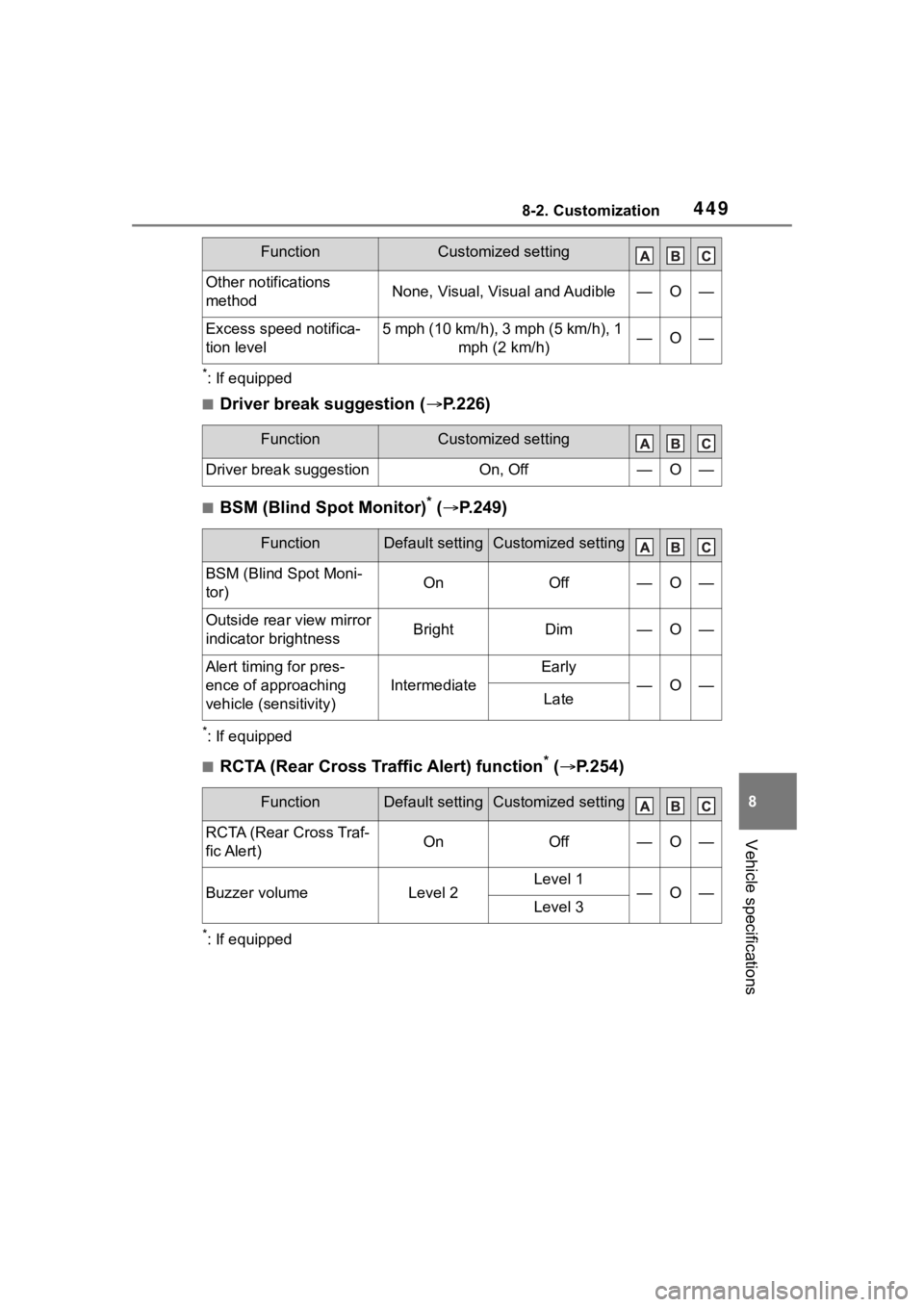
4498-2. Customization
8
Vehicle specifications
*: If equipped
■Driver break suggestion (P.226)
■BSM (Blind Spot Monitor)* ( P.249)
*: If equipped
■RCTA (Rear Cross Traffic Alert) function* ( P.254)
*: If equipped
Other notifications
methodNone, Visual, Visual and Audible—O—
Excess speed notifica-
tion level5 mph (10 km/h), 3 mph (5 km/h), 1
mph (2 km/h)—O—
FunctionCustomized setting
Driver break suggestionOn, Off—O—
FunctionDefault settingCustomized setting
BSM (Blind Spot Moni-
tor)OnOff—O—
Outside rear view mirror
indicator brightnessBrightDim—O—
Alert timing for pres-
ence of approaching
vehicle (sensitivity)
Intermediate
Early
—O—Late
FunctionDefault settingCustomized setting
RCTA (Rear Cross Traf-
fic Alert)OnOff—O—
Buzzer volumeLevel 2Level 1—O—Level 3
FunctionCustomized setting