roof TOYOTA COROLLA HYBRID 2023 Owner's Manual
[x] Cancel search | Manufacturer: TOYOTA, Model Year: 2023, Model line: COROLLA HYBRID, Model: TOYOTA COROLLA HYBRID 2023Pages: 496, PDF Size: 10.13 MB
Page 272 of 496
2724-6. Driving tips
When driving in a traffic jam,
gently release the brake pedal
to allow the vehicle to move for-
ward slightly while avoiding
overuse of the accelerator
pedal. Doing so can help control
excessive gasoline consump-
tion.
Control and maintain the vehicle
at a constant speed. Before
stopping at a toll booth or simi-
lar, allow plenty of time to
release the accelerator and gen-
tly apply the brakes. A greater
amount of electrical energy can
be regenerated when slowing
down.
Use the air conditioning only
when necessary. Doing so can
help reduce excessive gasoline
consumption.
In summer: When the ambient
temperature is high, use the
recirculated air mode. Doing so
will help to reduce the burden on
the air conditioning system and
reduce fuel consumption as
well.
In winter: Because the gasoline
engine will not automatically cut
out until it and the interior of the
vehicle are warm, it will con-
sume fuel. Also, fuel consump-
tion can be improved by avoiding overuse of the heater.
Make sure to check the tire infla-
tion pressure frequently.
Improper tire inflation pressure
can cause poor fuel economy.
Also, as snow tires can cause
large amounts of friction, their
use on dry roads can lead to
poor fuel economy. Use tires
that are appropriate for the sea-
son.
Carrying heavy luggage will lead
to poor fuel economy. Avoid car-
rying unnecessary luggage.
Installing a large roof rack will
also cause poor fuel economy.
Since the gasoline engine starts
up and cuts out automatically
when cold, warming up the
engine is unnecessary. More-
over, frequently driving short
distances will cause the engine
to repeatedly warm up, which
can lead to excess fuel con-
sumption.
Highway driving
Air conditioning
Checking tire inflation
pressure
Luggage
Warming up before driv-
ing
Page 274 of 496
2744-6. Driving tips
Perform the following according
to the driving conditions:
Do not try to forcibly open a
window or move a wiper that
is frozen. Pour warm water
over the frozen area to melt
the ice. Wipe away the water
immediately to prevent it from
freezing.
To ensure proper operation of
the climate control system
fan, remove any snow that
has accumulated on the air
inlet vents in front of the wind-
shield.
Check for and remove any
excess ice or snow that may
have accumulated on the
exterior lights, outside rear
view mirrors, windows, vehi-
cle’s roof, chassis, around the
tires or on the brakes.
Remove any snow or mud
from the bottom of your shoes
before getting in the vehicle.
Accelerate the vehicle slowly,
keep a safe distance between
you and the vehicle ahead, and
drive at a reduced speed suit-
able to road conditions.
Turn automatic mode of the parking brake off. Otherwise,
the parking brake may freeze
and not be able to be
released automatically.
Also, avoid using the following as
the parking brake may operate
automatically, even if automatic
mode is off.
• Brake hold system
Park the vehicle and shift the
shift lever to P without setting
the parking brake. The park-
ing brake may freeze up, pre-
venting it from being released.
If the vehicle is parked without
setting the parking brake,
make sure to block the
wheels.
Failure to do so may be dan-
gerous because it may cause
the vehicle to move unexpect-
edly, possibly leading to an
accident.
When the parking brake is in
automatic mode, release the
parking brake after shifting
the shift lever to P. ( P.184)
If the vehicle is parked without
setting the parking brake,
confirm that the shift lever
cannot be moved out of P.
If the vehicle is left parked
with the brakes damp in cold
temperatures, there is a pos-
sibility of the brakes freezing.
Use the correct tire chain size
Before driving the vehicle
When driving the vehicle
When parking the vehicleSelecting tire chains
Page 302 of 496
3026-1. Maintenance and care
6-1.Maintenance and care
Working from top to bottom,
liberally apply water to the
vehicle body, wheel wells and
underside of the vehicle to
remove any dirt and dust.
Wash the vehicle body using
a sponge or soft cloth, such
as a chamois.
For hard-to-remove marks,
use car wash soap and rinse
thoroughly with water.
Wipe away any water.
Wax the vehicle when the
waterproof coating deterio-
rates.
If water does not bead on a clean
surface, apply wax when the vehi-
cle body is cool.
■Automatic car washes
●Fold the mirrors before washing
the vehicle. Start washing from the
front of the vehicle. Make sure to
extend the mirrors before driving.
●Brushes used in automatic car
washes may scratch the vehicle
surface, parts (wheel, etc.) and
harm your vehicle’s paint.
●Vehicles with a rear spoiler: In cer-
tain automatic car washes, the rear spoiler may interfere with
machine operation. This may pre-
vent the vehicle from being
cleaned properly or result in dam-
age to the r
ear spoiler.
■High pressure car washes
As water may enter the cabin, do
not bring the nozzle tip near the
gaps around the doors or perimeter
of the windows, or spray these
areas continuously.
■When using a car wash (vehi-
cles with a smart key system)
If the door handle becomes wet
while the electronic key is within the
effective range, the door may lock
and unlock repeatedly. In that case,
follow the following correction pro-
cedures to wash the vehicle:
●Place the key in a position 6 ft. (2
m) or more separate from the
vehicle while the vehicle is being
washed. (Take care to ensure that
the key is not stolen.)
●Set the electronic key to bat-
tery-saving mode to disable the
smart key system. ( P.137)
■Wheels and wheel ornaments
●Remove any dirt immediately by
using a neutral detergent.
●Wash detergent off with water
immediately after use.
●To protect the paint from damage,
make sure to obs erve the follow-
ing precautions.
• Do not use acidic, alkaline or abrasive detergent
• Do not use hard brushes
• Do not use detergent on the
wheels when they are hot, such
as after driving or parking in hot
weather
■Brake pads and calipers
Rust may form if the vehicle is
parked with wet brake pads or disc
rotors, causing them to stick. Before
parking the vehicle after it is
washed, drive slo wly and apply the
brakes several times to dry the
Cleaning and protect-
ing the vehicle exte-
rior
Perform cleaning in a man-
ner appropriate to each
component and its material.
Cleaning instructions
Page 397 of 496
3977-2. Steps to take in an emergency
7
When trouble arises
WARNING
●Parts of the repair kit become
hot during operation. Be careful
when handling the repair kit
during and after operation. Do
not touch the metal part around
the connecting area between
the bottle and compressor. It will
be extremely hot.
●Do not attach the vehicle speed
warning sticker to an area other
than the one indicated. If the
sticker is attached to an area
where an SRS airbag is located,
such as the pad of the steering
wheel, it may prevent the SRS
airbag from operating properly.
■Driving to spread the liquid
sealant evenly
Observe the following precautions
to reduce the risk of accidents.
Failing to do so may result in a
loss of vehicle control and cause
death or serious injury.
●Drive the vehicle carefully at a
low speed. Be especially careful
when turning and cornering.
●If the vehicle d oes not drive
straight or you feel a pull
through the steering wheel, stop
the vehicle and check the fol-
lowing.
• Tire condition. The tire may have separated from the wheel.
• Tire inflation pressure. If the tire inflation pressure is 19 psi (130
kPa, 1.3 kgf/cm
2 or bar) or less,
the tire may be severely dam-
aged.
NOTICE
■When performing an emer-
gency repair
●A tire should only be repaired
with the emergency tire punc-
ture repair kit if the damage is
caused by a sharp object such
as nail or screw passing through
the tire tread.
Do not remove th e sharp object
from the tire. Removing the
object may widen the opening
and disenable emergency repair
with the repair kit.
●The repair kit is not waterproof.
Make sure that the repair kit is
not exposed to water, such as
when it is being used in the rain.
●Do not put the repair kit directly
onto dusty ground such as sand
at the side of the road. If the
repair kit vacuums up dust etc.,
a malfunction may occur.
●Make sure to stand the kit with
the bottle vertical. The kit can-
not work properly if it is laid on
its side.
■Precautions for the emer-
gency tire puncture repair kit
●The repair kit power source
should be 12 V DC suitable for
vehicle use. Do not connect the
repair kit to any other source.
●If fuel splatters on the repair kit,
the repair kit may deteriorate.
Take care not to allow fuel to
contact it.
●Place the repair kit in a storage
to prevent it from being exposed
to dirt or water.
●Store the repair kit in the tool
tray under the d eck mat out of
reach of children.
Page 408 of 496
4087-2. Steps to take in an emergency
■When the electronic key does
not work properly
●Make sure that the smart key sys-
tem has not been deactivated in
the customization setting. If it is
off, turn the function on. (Custom-
izable features: P.442)
●Check if battery-saving mode is
set. If it is set, cancel the function.
( P.137)
●The electronic key function may
be suspended. ( P.123)
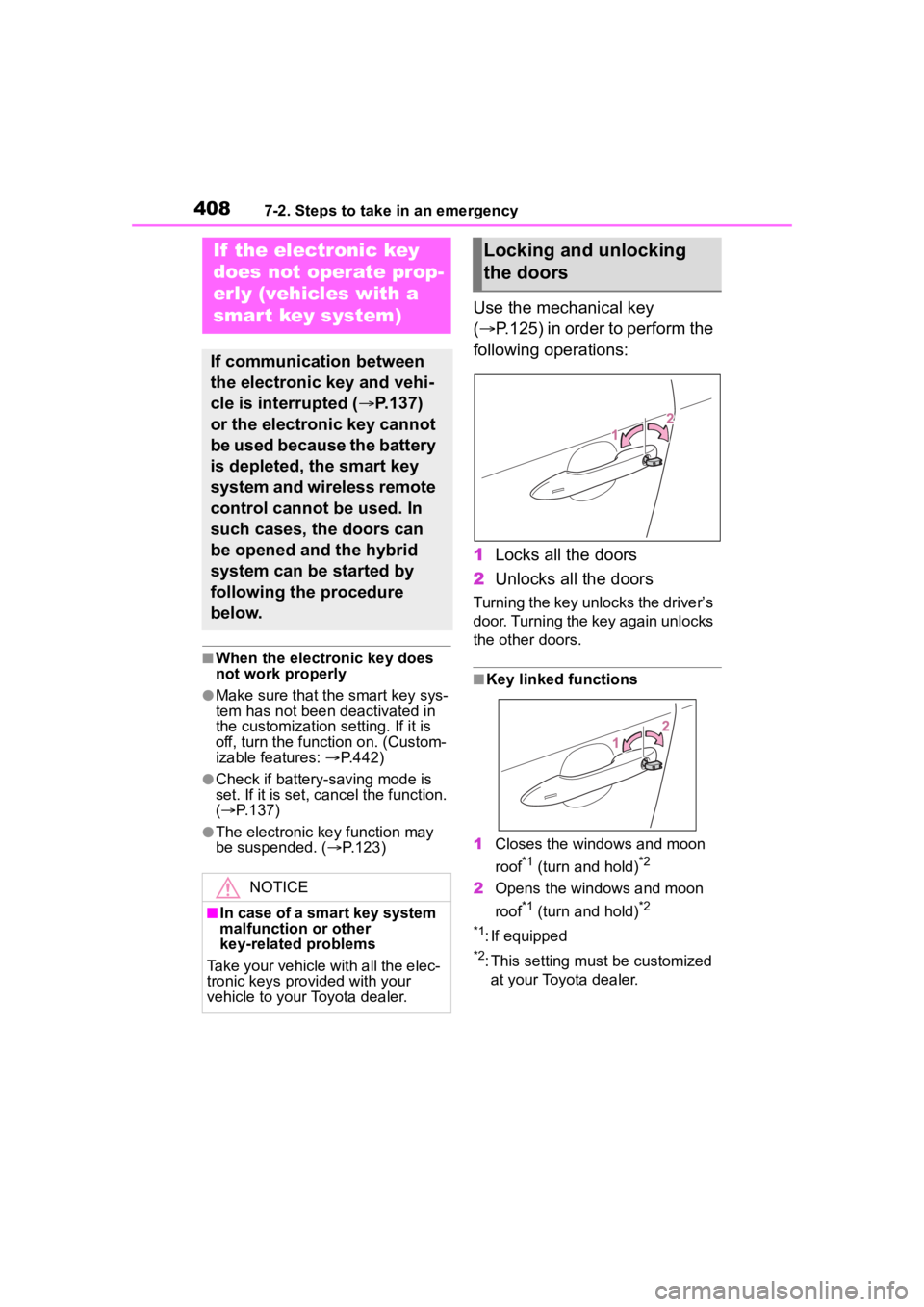
Use the mechanical key
( P.125) in order to perform the
following operations:
1 Locks all the doors
2 Unlocks all the doors
Turning the key unlocks the driver’s
door. Turning the key again unlocks
the other doors.
■Key linked functions
1 Closes the windows and moon
roof
*1 (turn and hold)*2
2Opens the windows and moon
roof
*1 (turn and hold)*2
*1
: If equipped
*2: This setting must be customized at your Toyota dealer.
If the electronic key
does not operate prop-
erly (vehicles with a
smart key system)
If communication between
the electronic key and vehi-
cle is interrupted ( P.137)
or the electronic key cannot
be used because the battery
is depleted, the smart key
system and wireless remote
control cannot be used. In
such cases, the doors can
be opened and the hybrid
system can be started by
following the procedure
below.
NOTICE
■In case of a smart key system
malfunction or other
key-related problems
Take your vehicle with all the elec-
tronic keys provided with your
vehicle to your Toyota dealer.
Locking and unlocking
the doors
Page 409 of 496
4097-2. Steps to take in an emergency
7
When trouble arises
1Ensure that the shift lever is
in P and depress the brake
pedal.
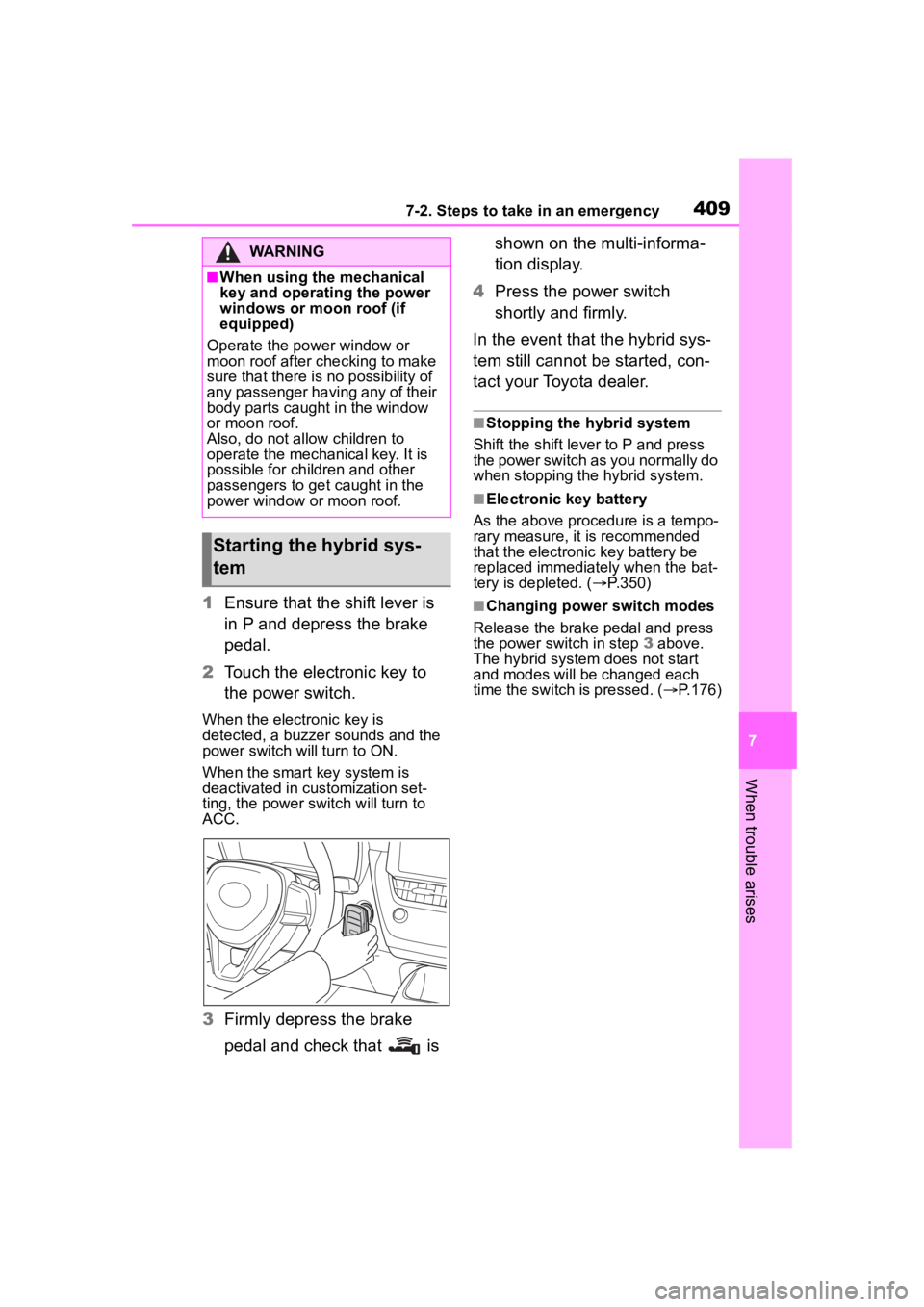
2 Touch the electronic key to
the power switch.
When the electronic key is
detected, a buzzer sounds and the
power switch will turn to ON.
When the smart key system is
deactivated in customization set-
ting, the power switch will turn to
ACC.
3Firmly depress the brake
pedal and check that is shown on the multi-informa-
tion display.
4 Press the power switch
shortly and firmly.
In the event that the hybrid sys-
tem still cannot be started, con-
tact your Toyota dealer.
■Stopping the hybrid system
Shift the shift lever to P and press
the power switch as you normally do
when stopping the hybrid system.
■Electronic key battery
As the above proce dure is a tempo-
rary measure, it is recommended
that the electronic key battery be
replaced immediately when the bat-
tery is depleted. ( P.350)
■Changing power switch modes
Release the brake pedal and press
the power switch in step 3 above.
The hybrid system does not start
and modes will be changed each
time the switch is pressed. ( P.176)
WARNING
■When using the mechanical
key and operating the power
windows or moon roof (if
equipped)
Operate the power window or
moon roof after checking to make
sure that there is n o possibility of
any passenger having any of their
body parts caught in the window
or moon roof.
Also, do not allow children to
operate the mechanical key. It is
possible for children and other
passengers to get caught in the
power window or moon roof.
Starting the hybrid sys-
tem
Page 436 of 496
4368-1. Specifications
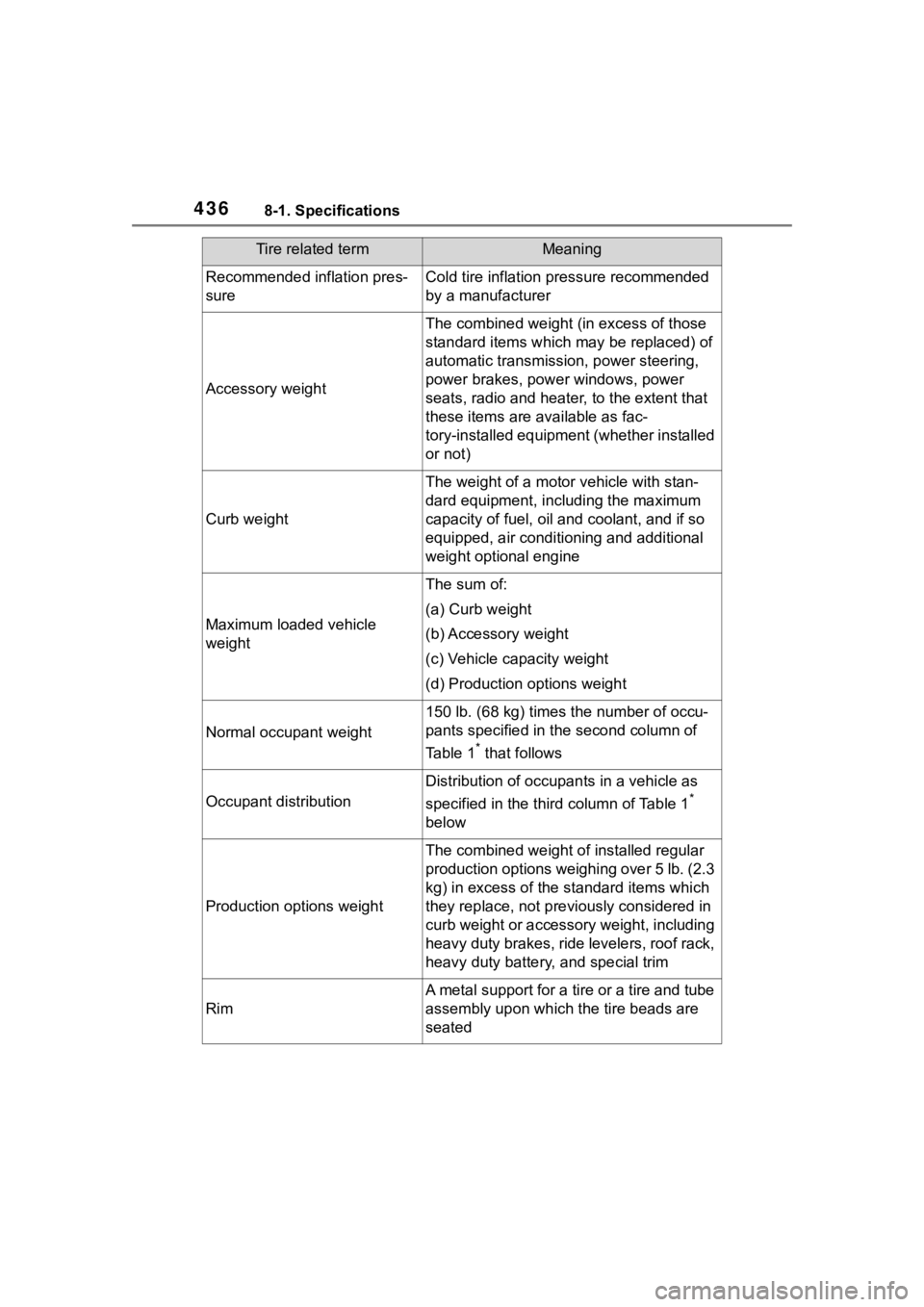
Recommended inflation pres-
sureCold tire inflation pressure recommended
by a manufacturer
Accessory weight
The combined weight (in excess of those
standard items which may be replaced) of
automatic transmission, power steering,
power brakes, power windows, power
seats, radio and heater, to the extent that
these items are available as fac-
tory-installed equipment (whether installed
or not)
Curb weight
The weight of a motor vehicle with stan-
dard equipment, including the maximum
capacity of fuel, oil and coolant, and if so
equipped, air conditioning and additional
weight optional engine
Maximum loaded vehicle
weight
The sum of:
(a) Curb weight
(b) Accessory weight
(c) Vehicle capacity weight
(d) Production options weight
Normal occupant weight
150 lb. (68 kg) times the number of occu-
pants specified in the second column of
Table 1
* that follows
Occupant distribution
Distribution of occupan ts in a vehicle as
specified in the thi rd column of Table 1
*
below
Production options weight
The combined weight o f installed regular
production options weighing over 5 lb. (2.3
kg) in excess of the s tandard items which
they replace, not previously considered in
curb weight or accessory weight, including
heavy duty brakes, ride levelers, roof rack,
heavy duty battery, and special trim
Rim
A metal support for a tire or a tire and tube
assembly upon which the tire beads are
seated
Tire related termMeaning
Page 446 of 496
4468-2. Customization
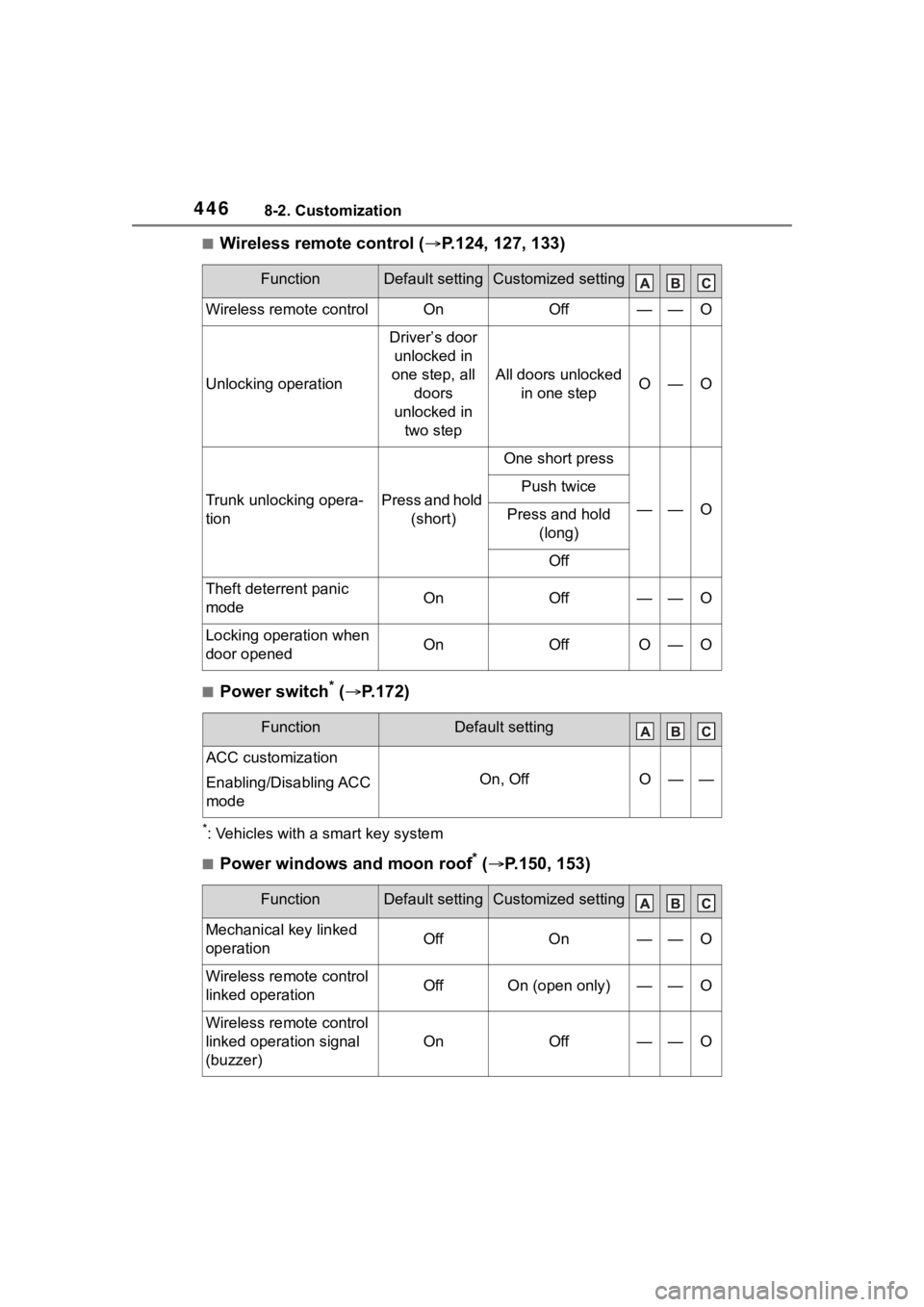
■Wireless remote control (P.124, 127, 133)
■Power switch* ( P.172)
*: Vehicles with a smart key system
■Power windows and moon roof* ( P.150, 153)
FunctionDefault settingCustomized setting
Wireless remote controlOnOff——O
Unlocking operation
Driver’s door
unlocked in
one step, all doors
unlocked in two step
All doors unlocked in one stepO—O
Trunk unlocking opera-
tionPress and hold (short)
One short press
——O
Push twice
Press and hold (long)
Off
Theft deterrent panic
modeOnOff——O
Locking operation when
door openedOnOffO—O
FunctionDefault setting
ACC customization
Enabling/Disabling ACC
mode
On, OffO——
FunctionDefault settingCustomized setting
Mechanical key linked
operationOffOn——O
Wireless remote control
linked operationOffOn (open only)——O
Wireless remote control
linked operation signal
(buzzer)
OnOff——O
Page 447 of 496
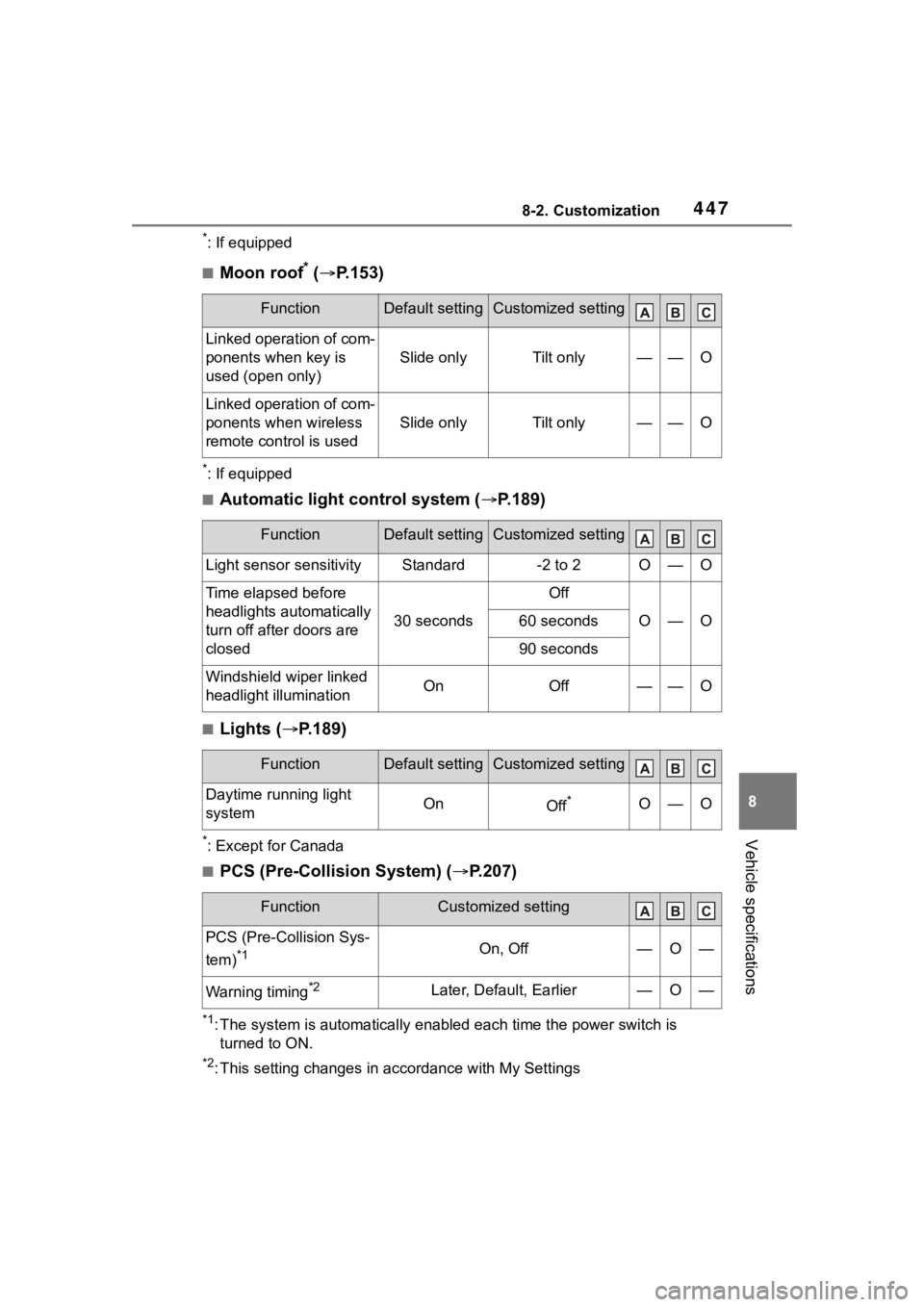
4478-2. Customization
8
Vehicle specifications
*: If equipped
■Moon roof* ( P.153)
*: If equipped
■Automatic light control system ( P.189)
■Lights ( P.189)
*: Except for Canada
■PCS (Pre-Collision System) ( P.207)
*1: The system is automatically enabled each time the power switch is
turned to ON.
*2: This setting changes in ac cordance with My Settings
FunctionDefault settingCustomized setting
Linked operation of com-
ponents when key is
used (open only)
Slide onlyTilt only——O
Linked operation of com-
ponents when wireless
remote control is used
Slide onlyTilt only——O
FunctionDefault settingCustomized setting
Light sensor sensitivityStandard-2 to 2O—O
Time elapsed before
headlights automatically
turn off after doors are
closed
30 seconds
Off
O—O60 seconds
90 seconds
Windshield wiper linked
headlight illuminationOnOff——O
FunctionDefault settingCustomized setting
Daytime running light
systemOnOff*O—O
FunctionCustomized setting
PCS (Pre-Collision Sys-
tem)
*1On, Off—O—
Warning timing*2Later, Default, Earlier—O—
Page 468 of 496

468Alphabetical Index
Brake assist ............................ 266
Break-in tips ........................... 160
Brightness control Instrument panel light control98, 101
Meter light control ................. 101
BSM (Blind Spot Monitor) ...... 249
C
Care Exterior ................................. 302
Interior .................................. 305
Seat belts ............................. 305
Wheels and wheel ornaments........................................... 302
Cargo capacity ....................... 168
Chains ..................................... 274
Child restraint system Fixed with a LATCH system ... 64
Fixed with a seat belt ............. 60
Front passenger occupant clas-sification system ................... 41
Points to remember ................ 48
Riding with children ................ 47
Types of child restraint system installation met hod ............... 50
Using an anchor bracket ........ 68
Child safety 12-volt battery precautions . 323, 413
Airbag precautions ................. 36
Child restraint system............. 50
Heated steering wheel and seat
heater precautions ............. 284
How your child should wear the seat belt................................ 28
Moon roof precau tions ......... 154
Power window lock switch.... 152
Power window precautions .. 151
Rear door child-protectors.... 132
Seat belt extender precautions ............................................. 28 Seat belt precautions..............47
Trunk precautions .................133
Child-protectors......................132
Cleaning Exterior .................................302
Interior ..................................305
Seat belts .............................305
Wheels and wheel ornaments...........................................302
Clock ......................96, 98, 99, 102
Coat hooks ..............................299
Condenser ............. ..................321
Console box ............................290
Cooling system .......................320 Engine overheating ..............414
Hybrid system overheating ...415
Cruise control .........................244
Cup holders.............................289
Current fuel consumption....104, 11 0
Curtain shield airbags ..............31
Customizable featu res ...........442
D
Daytime running light system189
Defogger
Outside rear view mirrors .....280
Rear window.........................280
Windshield ............................279
Differential Rear differential oil................424
Dimensions .............................420
Dinghy towing .........................169
Display Cruise control .......................245
Dynamic radar cruise control 239
Energy monitor ..................... 116
Multi-information display.....102,
109
RCTA ....................................254
Warning message.................382
Display change button .....97, 101