lock TOYOTA COROLLA HYBRID 2023 Manual Online
[x] Cancel search | Manufacturer: TOYOTA, Model Year: 2023, Model line: COROLLA HYBRID, Model: TOYOTA COROLLA HYBRID 2023Pages: 496, PDF Size: 10.13 MB
Page 360 of 496
3606-3. Do-it-yourself maintenance
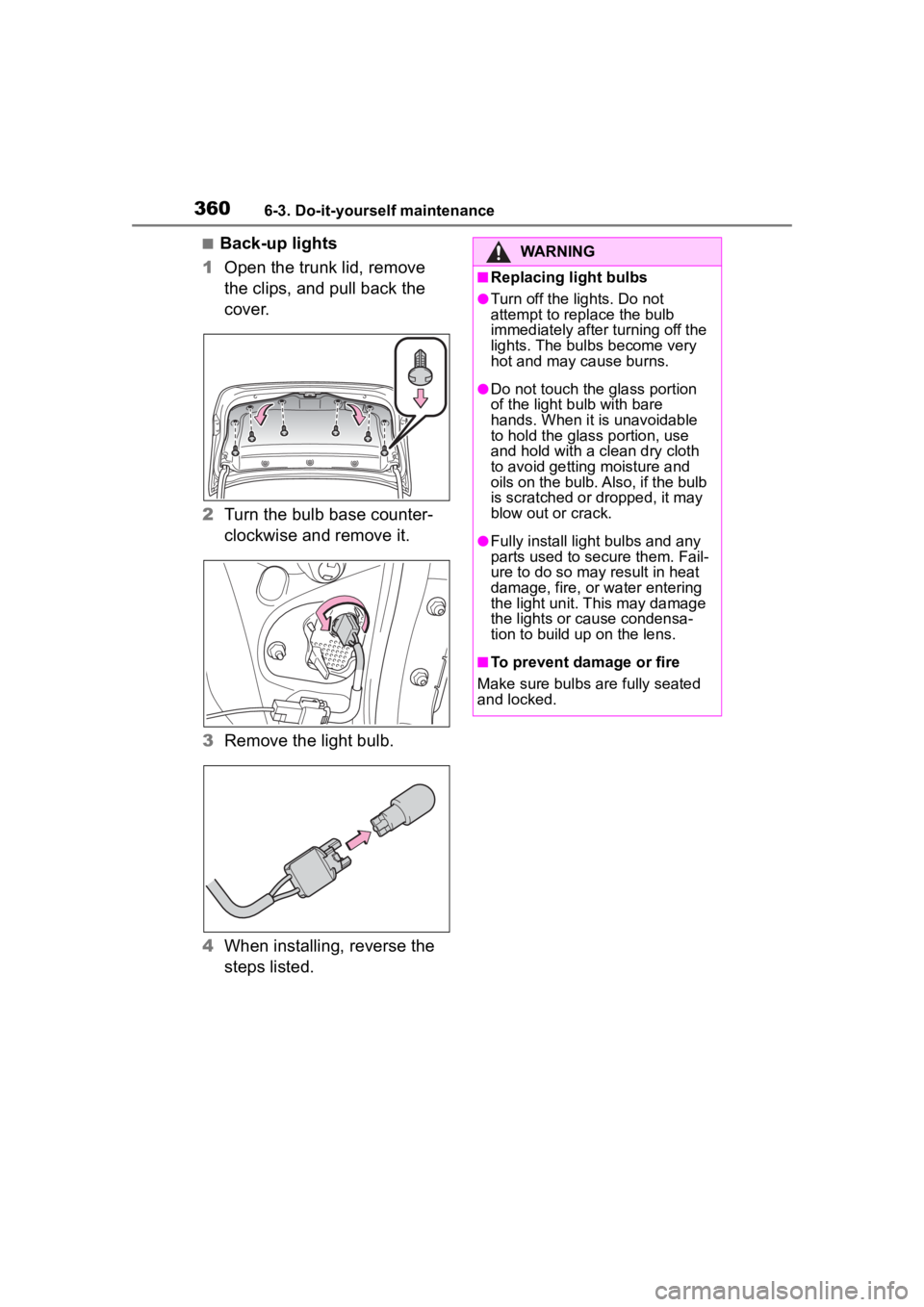
■Back-up lights
1 Open the trunk lid, remove
the clips, and pull back the
cover.
2 Turn the bulb base counter-
clockwise and remove it.
3 Remove the light bulb.
4 When installing, reverse the
steps listed.WARNING
■Replacing light bulbs
●Turn off the lights. Do not
attempt to replace the bulb
immediately after turning off the
lights. The bulbs become very
hot and may cause burns.
●Do not touch the glass portion
of the light bulb with bare
hands. When it is unavoidable
to hold the glass portion, use
and hold with a clean dry cloth
to avoid getting moisture and
oils on the bulb. Also, if the bulb
is scratched or dropped, it may
blow out or crack.
●Fully install light bulbs and any
parts used to secure them. Fail-
ure to do so may result in heat
damage, fire, or water entering
the light unit. This may damage
the lights or cause condensa-
tion to build up on the lens.
■To prevent damage or fire
Make sure bulbs are fully seated
and locked.
Page 364 of 496
3647-1. Essential information
If the door can be opened,
open the door and exit the
vehicle.
If the door can not be opened,
open the window using the
power window switch and
ensure an escape route.
If the window can be opened,
exit the vehicle through the
window.
If the door and window cannot
be opened due to the rising
water, remain calm, wait until
the water level inside the
vehicle rises to the point that
the water pressure inside of
the vehicle equals the water
pressure outside of the vehi-
cle and then open the door
after waiting for the rising
water to enter the vehicle, and
exit the vehicle. When the
WARNING
●Vehicles without a smart key
system: Never attempt to
remove the key, as doing so will
lock the steering wheel.
If the vehicle is sub-
merged or water on
the road is rising
This vehicle is not designed
to be able to drive on roads
that are deeply flooded with
water. Do not drive on roads
where the roads may be
submerged or the water
may be rising. It is danger-
ous to remain in the vehicle,
if it anticipated that the vehi-
cle will be flooded or set a
drift. Remain calm and fol-
low the following.
Page 367 of 496
3677-2. Steps to take in an emergency
7
When trouble arises
The following may indicate a
problem with your transmission.
Contact your Toyota dealer or
commercial towing service
before towing.
The hybrid system warning
message is shown on the
multi-information display and
the vehicle does not move.
The vehicle makes an abnor-
mal sound.
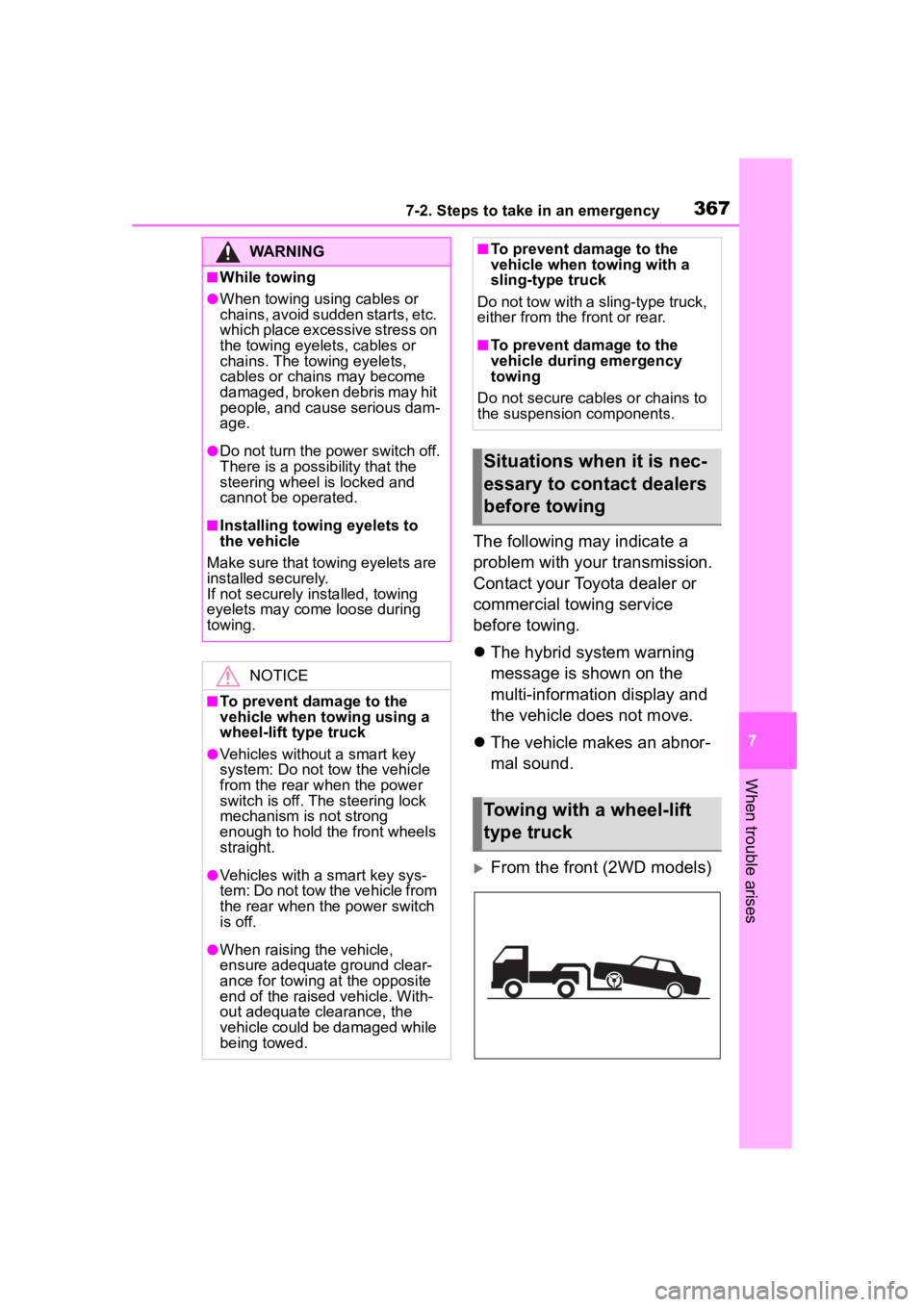
From the front (2WD models)
WARNING
■While towing
●When towing using cables or
chains, avoid sudden starts, etc.
which place excessive stress on
the towing eyelets, cables or
chains. The towing eyelets,
cables or chains may become
damaged, broken debris may hit
people, and cause serious dam-
age.
●Do not turn the power switch off.
There is a possibility that the
steering wheel is locked and
cannot be operated.
■Installing towi ng eyelets to
the vehicle
Make sure that towing eyelets are
installed securely.
If not securely installed, towing
eyelets may come loose during
towing.
NOTICE
■To prevent damage to the
vehicle when towing using a
wheel-lift type truck
●Vehicles without a smart key
system: Do not tow the vehicle
from the rear when the power
switch is off. The steering lock
mechanism is not strong
enough to hold the front wheels
straight.
●Vehicles with a smart key sys-
tem: Do not tow the vehicle from
the rear when th e power switch
is off.
●When raising the vehicle,
ensure adequate ground clear-
ance for towing at the opposite
end of the raised vehicle. With-
out adequate clearance, the
vehicle could be damaged while
being towed.
■To prevent damage to the
vehicle when towing with a
sling-type truck
Do not tow with a sling-type truck,
either from the front or rear.
■To prevent damage to the
vehicle during emergency
towing
Do not secure cables or chains to
the suspension components.
Situations when it is nec-
essary to contact dealers
before towing
Towing with a wheel-lift
type truck
Page 385 of 496
3857-2. Steps to take in an emergency
7
When trouble arises
the air conditioning system to
increase the temperature around
the front camera
■If “System Stopped Front Radar
Sensor Blocked Clean Radar
Sensor” is displayed
Indicates one of the following sys-
tems is disabled.
●PCS (Pre-Collision system)
●LDA (Lane Departure Alert)
●LTA (Lane Tracing Assist)
●AHB (Automatic High Beam)
●Dynamic radar cruise control
Follow the followi ng correction
methods.
• Check if there is any foreign mat- ter attached to the radar sensor or
radar sensor cover and clean
them if necessary ( P.203)
• This message may be displayed when driving in an open area with
few nearby vehicles or structures,
such as a desert, grasslands, sub-
urbs, etc.
The message may be cleared by
driving the vehicle in an area with
structures, vehicles, etc., nearby.
■If “System Stopped Front Radar
Sensor Out of Temperature
Range Wait until Normal Tem-
perature” is displayed
Indicates one of the following sys-
tems is disabled.
●PCS (Pre-Collision system)
●LDA (Lane Departure Alert)
●LTA (Lane Tracing Assist)
●AHB (Automatic High Beam)
●Dynamic radar cruise control
Follow the followi ng correction
methods.
The temperature of the radar sensor
is outside of the operating range.
Wait for the temperature to become
appropriate.
■If “System Stopped Front Radar
In Self Calibration See Owner’s
Manual” is displayed
Indicates one of the following sys-
tems is disabled.
●PCS (Pre-Collision system)
●LDA (Lane Departure Alert)
●LTA (Lane Tracing Assist)
●AHB (Automatic High Beam)
●Dynamic radar cruise control
Follow the following correction
methods.
• Check if there is any foreign mat- ter attached to the radar sensor or
radar sensor cover and clean
them if necessary ( P.203)
• The radar sensor may be mis- aligned and will be adjusted auto-
matically while d riving. Continue
driving for a while.
■If “Cruise Control Unavailable
See Owner’s Manual” is dis-
played
Indicates one of the following sys-
tems is disabled.
●Dynamic radar cruise control
●Cruise control
A message is displayed when the
driving assist s witch is pushed
repeatedly.
Press the driving assist switch
quickly and firmly.
■If “Maintenance Required
Soon” is displayed
Indicates that all maintenance
according to the driven distance on
the maintenance schedule
* should
be performed soon.
Comes on approximately 4500
miles (7200 km) after the message
has been reset. If necessary, per-
form maintenance. Please reset the
message after the maintenance is
performed. ( P.309)
*: Refer to the separate “Scheduled
Maintenance” or “Owner’s Man-
Page 386 of 496
3867-2. Steps to take in an emergency
ual Supplement” for the mainte-
nance interval applicable to your
vehicle.
■If “Maintenance Required Visit
Your Dealer” is displayed
Indicates that all maintenance is
required to correspond to the driven
distance on the maintenance sched-
ule
*.
Comes on approximately 5000
miles (8000 km) after the message
has been reset. (The indicator will
not work properly unless the mes-
sage has been reset.) Perform the
necessary maintenance. Please
reset the message after the mainte-
nance is performed. ( P.309)
*: Refer to the separate “Scheduled
Maintenance” or “Owner’s Man-
ual Supplement” for the mainte-
nance interval applicable to your
vehicle.
■If “Engine Maintenance
Required Visit Your Dealer” is
shown
The engine or an engine component
is malfunctioning. Have the vehicle
inspected by your Toyota dealer
immediately.
■If a message that indicates the
need for visiting your Toyota
dealer is displayed
The system or part shown on the
multi-information display is malfunc-
tioning. Have the vehicle inspected
by your Toyota dealer immediately.
■If a message that indicates the
need for referring to Owner’s
Manual is displayed
●If “Engine Coolant Temp High” is
displayed, follow the instructions
accordingly. ( P.414)
●If any of the following messages
are displayed on the multi-infor-
mation display, it may indicate a
malfunction. Have the vehicle
inspected by you r Toyota dealer immediately.
• “Smart Key System Malfunction”
• “Hybrid System Malfunction”
• “Check Engine”
• “Hybrid Battery System Malfunc- tion”
• “Accelerator System Malfunction”
●If any of the following messages
are displayed on the multi-infor-
mation display, it may indicate a
malfunction. Immediately stop the
vehicle and contact your Toyota
dealer.
• “Braking Power Low”
• “Charging System Malfunction”
• “Oil Pressure Low”
●If any of the following messages
are shown on the multi-informa-
tion display, the vehicle may have
run out of fuel. Stop the vehicle in
a safe place and, if the fuel level is
low, refuel the vehicle. ( P. 8 2 )
• “Hybrid System Stopped”
• “Engine Stopped”
●If “Maintenance Required for Trac-
tion Battery Cooling Parts See
Owner's Manual” is shown, the fil-
ters may be clogged, the air intake
vent may be blocked, or there may
be a gap in the duct. Therefore,
perform the follo wing correction
procedure.
• Cleaning the hybrid battery (trac-
tion battery) air intake vents.
( P.347)
If the warning message is shown
even if the vents are cleaned,
have the vehicle inspected by
your Toyota dealer.
NOTICE
■If “High Power Consumption
Power to Climate Temporar-
ily Limited” is displayed fre-
quently
There is a possible malfunction
relating to the charging system or
the 12-volt battery may be deteri-
orating. Have the vehicle
inspected by you r Toyota dealer.
Page 392 of 496
3927-2. Steps to take in an emergency
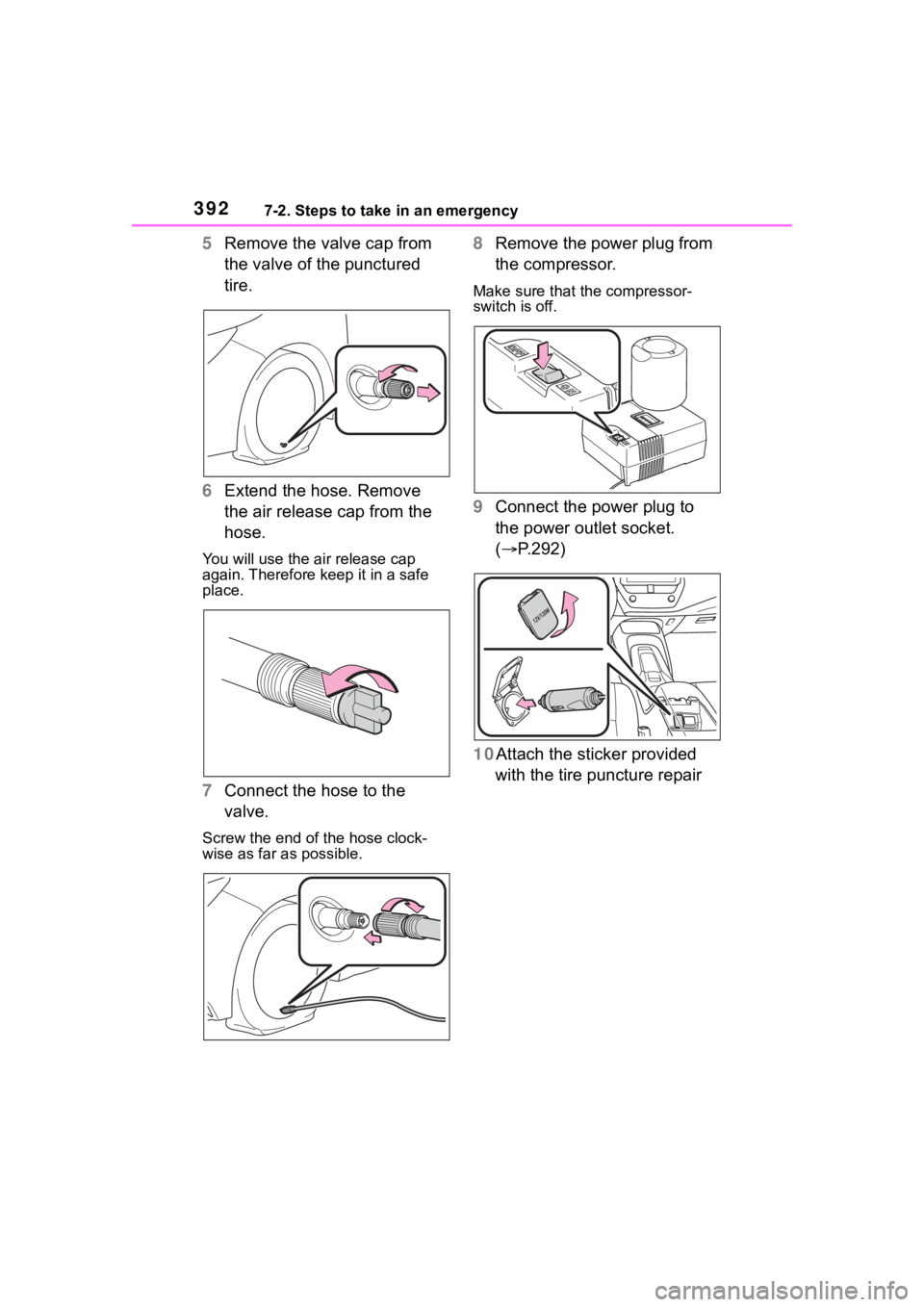
5Remove the valve cap from
the valve of the punctured
tire.
6 Extend the hose. Remove
the air release cap from the
hose.
You will use the air release cap
again. Therefore keep it in a safe
place.
7Connect the hose to the
valve.
Screw the end of the hose clock-
wise as far as possible.
8Remove the power plug from
the compressor.
Make sure that the compressor-
switch is off.
9Connect the power plug to
the power outlet socket.
( P.292)
10Attach the sticker provided with the tire puncture repair
Page 406 of 496
4067-2. Steps to take in an emergency
One of the following may be the
cause of the problem:
Vehicles with a smart key sys-
tem: The electronic key may
not be functioning properly.
( P.408)
There may not be sufficient
fuel in the vehicle’s tank.
Refuel the vehicle.
There may be a malfunction
in the immobilizer system.
( P. 8 7 )
Vehicles without a smart key
system: There may be a mal-
function in the steering lock
system.
Vehicles with a smart key sys-
tem: The hybrid system may
be malfunctioning due to an
electrical problem such as
electronic key battery deple-
tion or a blown fuse. However,
depending on the type of mal- function, an interim measure
is available to start the hybrid
system. (
P.406)
One of the following may be the
cause of the problem:
The 12-volt battery may be
discharged. ( P.410)
The 12-volt battery terminal
connections may be loose or
corroded. ( P.323)
One of the following may be the
cause of the problem:
The 12-volt battery may be
discharged. ( P.410)
One or both of the 12-volt bat-
tery terminals may be discon-
nected. ( P.323)
Contact your Toyota dealer if the
problem cannot be repaired, or if
repair procedures are unknown.
When the hybrid system does
not start, the following steps can
If the hybrid system
will not start
Reasons for the hybrid sys-
tem not starting vary
depending on the situation.
Check the following and
perform the appropriate
procedure:
The hybrid system will not
start even though the cor-
rect starting procedure is
being followed. ( P.172)
The interior lights and
headlights are dim, or the
horn does not sound or
sounds at a low volume.
The interior lights and
headlights do not turn on,
or the horn does not
sound.
Emergency start function
(vehicles with a smart key
system)
Page 408 of 496
4087-2. Steps to take in an emergency
■When the electronic key does
not work properly
●Make sure that the smart key sys-
tem has not been deactivated in
the customization setting. If it is
off, turn the function on. (Custom-
izable features: P.442)
●Check if battery-saving mode is
set. If it is set, cancel the function.
( P.137)
●The electronic key function may
be suspended. ( P.123)
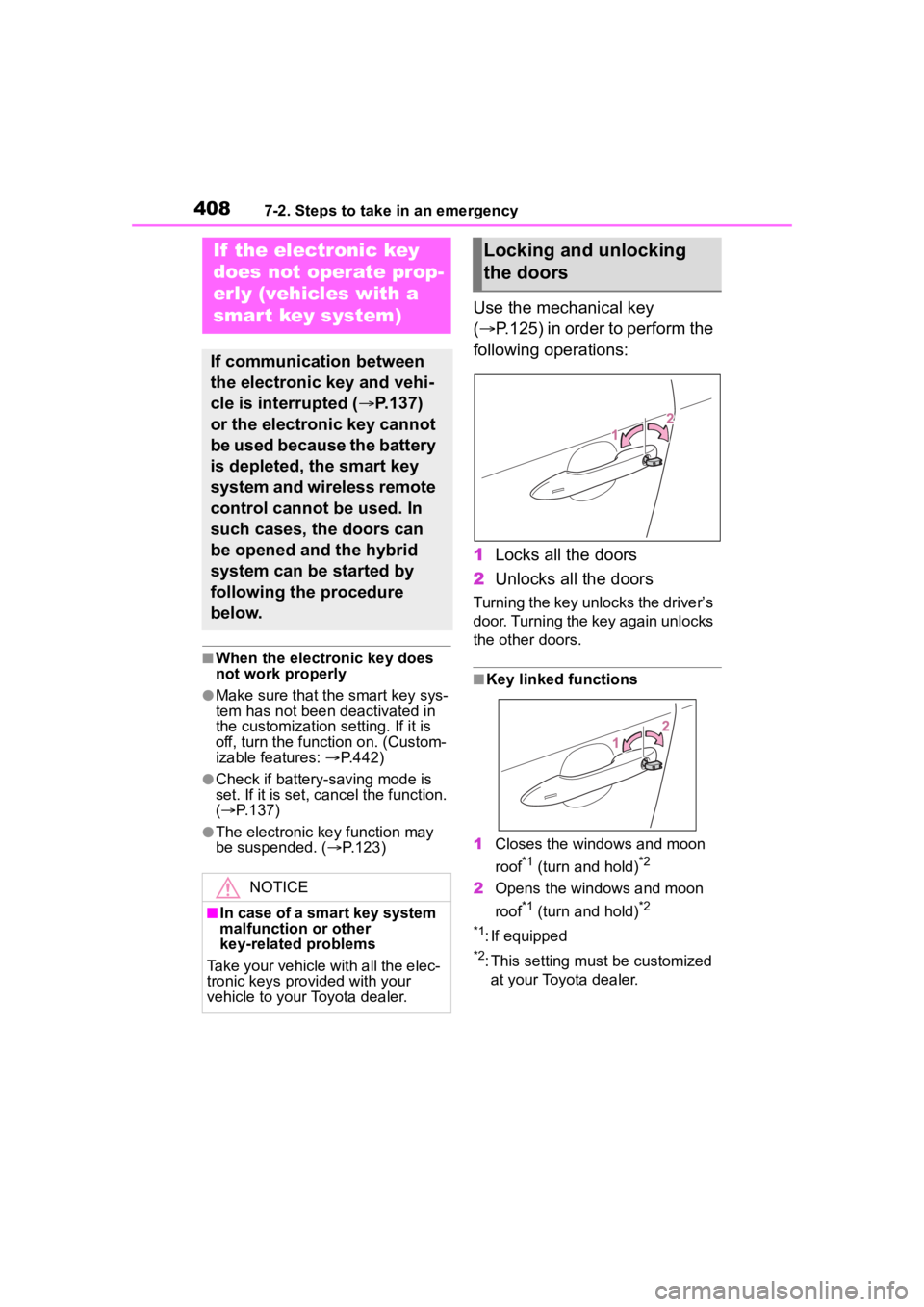
Use the mechanical key
( P.125) in order to perform the
following operations:
1 Locks all the doors
2 Unlocks all the doors
Turning the key unlocks the driver’s
door. Turning the key again unlocks
the other doors.
■Key linked functions
1 Closes the windows and moon
roof
*1 (turn and hold)*2
2Opens the windows and moon
roof
*1 (turn and hold)*2
*1
: If equipped
*2: This setting must be customized at your Toyota dealer.
If the electronic key
does not operate prop-
erly (vehicles with a
smart key system)
If communication between
the electronic key and vehi-
cle is interrupted ( P.137)
or the electronic key cannot
be used because the battery
is depleted, the smart key
system and wireless remote
control cannot be used. In
such cases, the doors can
be opened and the hybrid
system can be started by
following the procedure
below.
NOTICE
■In case of a smart key system
malfunction or other
key-related problems
Take your vehicle with all the elec-
tronic keys provided with your
vehicle to your Toyota dealer.
Locking and unlocking
the doors
Page 410 of 496
4107-2. Steps to take in an emergency
If you have a set of jumper (or
booster) cables and a second
vehicle with a 12-volt battery,
you can jump start your vehicle
by following the steps below.
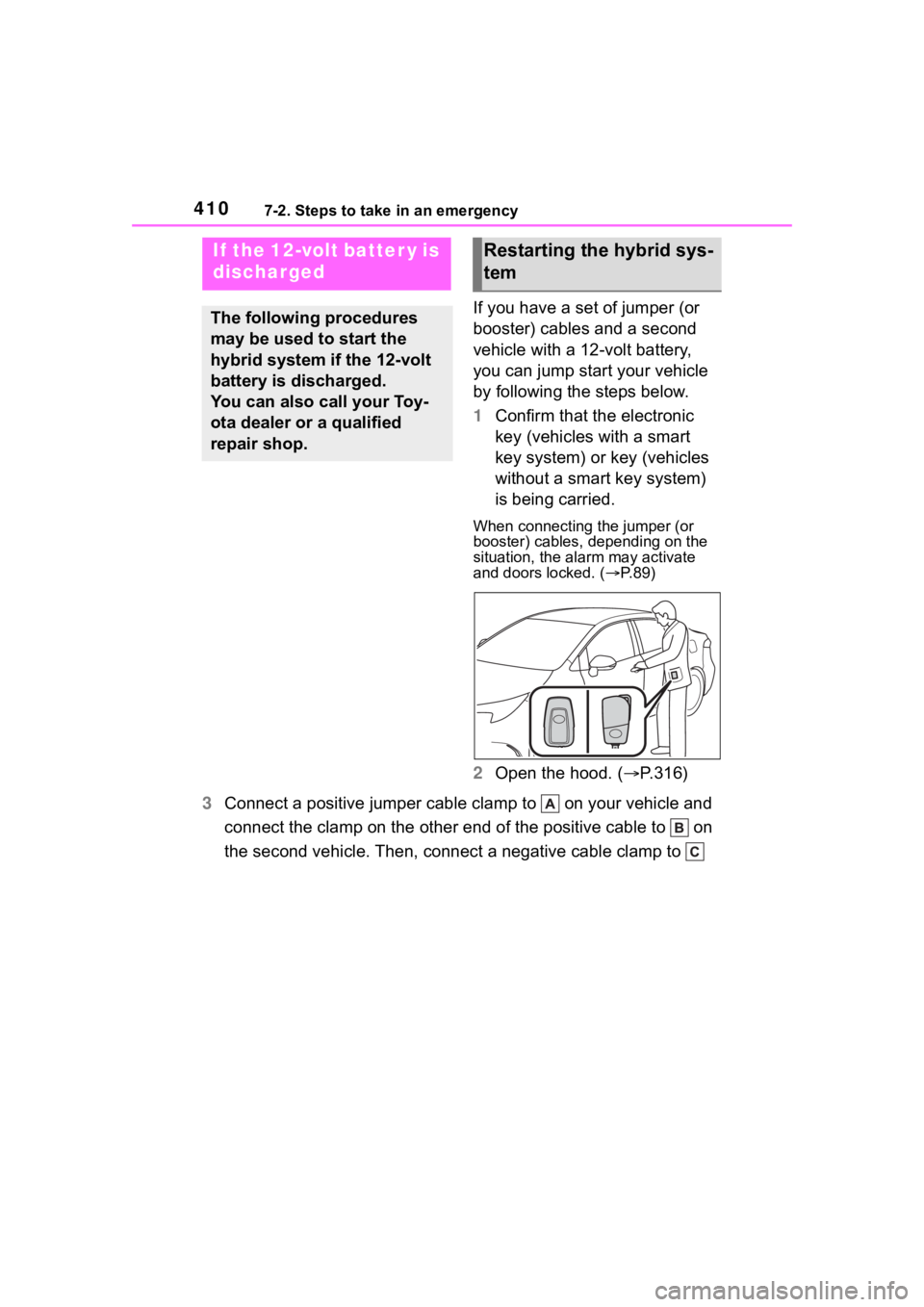
1Confirm that the electronic
key (vehicles with a smart
key system) or key (vehicles
without a smart key system)
is being carried.
When connecting the jumper (or
booster) cables, depending on the
situation, the alarm may activate
and doors locked. ( P. 8 9 )
2 Open the hood. ( P.316)
3 Connect a positive jumper cable clamp to on your vehicle and
connect the clamp on the other end of the positive cable to on
the second vehicle. Then, connect a negative cable clamp to
If the 12-volt batter y is
discharged
The following procedures
may be used to start the
hybrid system if the 12-volt
battery is discharged.
You can also call your Toy-
ota dealer or a qualified
repair shop.
Restarting the hybrid sys-
tem
Page 412 of 496
4127-2. Steps to take in an emergency
■To prevent 12-volt battery dis-
charge
●Turn off the headlights and the
audio system while the hybrid sys-
tem is off.
●Turn off any unnecessary electri-
cal components when the vehicle
is running at a low speed for an
extended period, such as in heavy
traffic.
■When the 12-volt battery is
removed or discharged
●Information stored in the ECU is
cleared. When the 12-volt battery
is depleted, have the vehicle
inspected at you r Toyota dealer.
●Some systems may require initial-
ization. (P.452)
■When removing the 12-volt bat-
tery terminals
When the 12-volt battery terminals
are removed, the information stored
in the ECU is cleared. Before
removing the 12-volt battery termi-
nals, contact your Toyota dealer.
■Charging the 1 2-volt battery
The electricity stor ed in the 12-volt
battery will discharge gradually even
when the vehicle is not in use, due
to natural discharge and the drain-
ing effects of certain electrical appli-
ances. If the vehicle is left for a long
time, the 12-volt battery may dis-
charge, and the hybrid system may
be unable to start. (The 12-volt bat-
tery recharges aut omatically while
the hybrid system is operating.)
■When recharging or replacing
the 12-volt battery (vehicles
with a smart key system)
●In some cases, it may not be pos-
sible to unlock the doors using the
smart key system when the
12-volt battery is discharged. Use
the wireless remote control or the
mechanical key to lock or unlock
the doors.
●The hybrid system may not start
on the first att empt after the 12-volt battery has recharged but
will start normally after the second
attempt. This is not a malfunction.
●The power switch mode is memo-
rized by the vehicle. When the
12-volt battery is reconnected, the
system will return to the mode it
was in before the 12-volt battery
was discharged. Before discon-
necting the 12-volt battery, turn
the power switch off.
If you are unsure what mode the
power switch was in before the
12-volt battery discharged, be
especially careful when recon-
necting the 12-volt battery.
■When replacing t
he 12-volt bat-
tery
●Use a 12-volt battery that con-
forms to European regulations.
●Use a 12-volt battery that the case
size is same as the previous one
(LN1), 20 hour rate capacity
(20HR) is equivalent (45Ah) or
greater, and per formance rating
(CCA) is equivalent (295A) or
greater.
• If the sizes differ, the 12-volt bat-
tery cannot be properly secured.
• If the 20 hour rate capacity is low,
even if the time p eriod where the
vehicle is not used is a short time,
the 12-volt battery may discharge
and the hybrid system may not be
able to start.
●For details, cons ult your Toyota
dealer.
WARNING
■When removing the 12-volt
battery terminals
Always remove the negative (-)
terminal first. If the positive (+) ter-
minal contacts any metal in the
surrounding area when the posi-
tive (+) terminal is removed, a
spark may occur, leading to a fire
in addition to ele ctrical shocks
and death or serious injury.