tow TOYOTA COROLLA HYBRID 2023 Owners Manual
[x] Cancel search | Manufacturer: TOYOTA, Model Year: 2023, Model line: COROLLA HYBRID, Model: TOYOTA COROLLA HYBRID 2023Pages: 496, PDF Size: 10.13 MB
Page 2 of 496
2TABLE OF CONTENTS
For your information ........................5
Reading this manual ...................... 11
How to search ................................ 12
Pictorial index ................................ 13
1-1. For safe use Before driving ........................ 24
For safe driving ..................... 25
Seat belts .............................. 27
SRS airbags .......................... 31
Front passenger occupant clas- sification system.................. 41
Exhaust gas precautions....... 46
1-2. Child safety Riding with children ............... 47
Child restraint systems .......... 48
1-3. Emergency assistance Safety Connect ..................... 72
1-4. Hybrid system Hybrid system features ......... 77
Hybrid system precautions .... 82
1-5. Theft deterrent system Immobilizer system ............... 87
Alarm ..................................... 88
2-1. Instrument cluster Warning lights and indicators............................................ 92
Gauges and meters (4.2-inch display)................................ 96
Gauges and meters (7-inch dis- play) .................................... 99
Multi-information display (4.2-inch display).............. 102
Multi-information display (7-inch display)............................. 109Energy monitor/consumption
screen .............................. 116
3-1. Key information Keys ................................... 122
3-2. Opening, closing and locking the doors
Doors ................................. 127
Trunk .................................. 133
Smart key system .............. 136
3-3. Adjusting the seats Front seats ......................... 141
Rear seats.......................... 142
Head restraints................... 144
3-4. Adjusting the steering wheel and mirrors
Steering wheel ................... 146
Inside rear view mirror ....... 147
Outside rear view mirrors ... 148
3-5. Opening and closing the win- dows
Power windows .................. 150
Moon roof ........................... 153
3-6. Favorite settings My Settings ........................ 156
4-1. Before driving Driving the vehicle.............. 159
Cargo and luggage ............ 166
Vehicle load limits .............. 168
Trailer towing...................... 16
9
Dinghy towing ....................16
9
4-2. Driving procedures Power (ignition) switch (vehicles without a smart key system)......................................... 170
1For safety and security
2Vehicle status information
and indicators
3Before driving
4Driving
Page 4 of 496
4TABLE OF CONTENTS
Air conditioning filter ...........346
Cleaning the hybrid battery (trac- tion battery) air intake vents......................................... 347
Wireless remote control/elec- tronic key battery.............. 350
Checking and replacing fuses ......................................... 354
Light bulbs .......................... 356
7-1. Essential information Emergency flashers ........... 362
If your vehicle has to be stopped in an emergency .............. 363
If the vehicle is submerged or water on the road is rising......................................... 364
7-2. Steps to take in an emergency If your vehicle needs to be towed......................................... 366
If you think something is wrong ......................................... 370
If a warning light turns on or a warning buzzer sounds .... 372
If a warning message is dis- played .............................. 382
If you have a flat tire (vehicles without spare tire) ............ 387
If you have a flat tire (vehicles with a spare tire) .............. 398
If the hybrid system will not start ......................................... 406
If you lose your keys .......... 407
If the electronic key does not operate properly ............... 408
If the 12-volt battery is dis- charged ............................ 410
If your vehicle overheats .... 414
If the vehicle becomes stuck ......................................... 4178-1. Specifications
Maintenance data (fuel, oil level, etc.) .................................. 420
Fuel information ................. 429
Tire information .................. 431
8-2. Customization Customizable features ....... 442
8-3. Initialization Items to initialize ................ 452
9-1. For owners Reporting safety defects for U.S. owners ............................. 454
Reporting safety defects for Canadian owners ............. 454
Seat belt instructions for Cana- dian owners (in French) ... 455
SRS airbag instructions for Canadian owners (in French)......................................... 456
What to do if... (Troubleshooting) ......................................... 464
Alphabetical Index.............. 467
7When trouble arises
8Vehicle specifications
9For owners
Index
Page 15 of 496
15Pictorial index
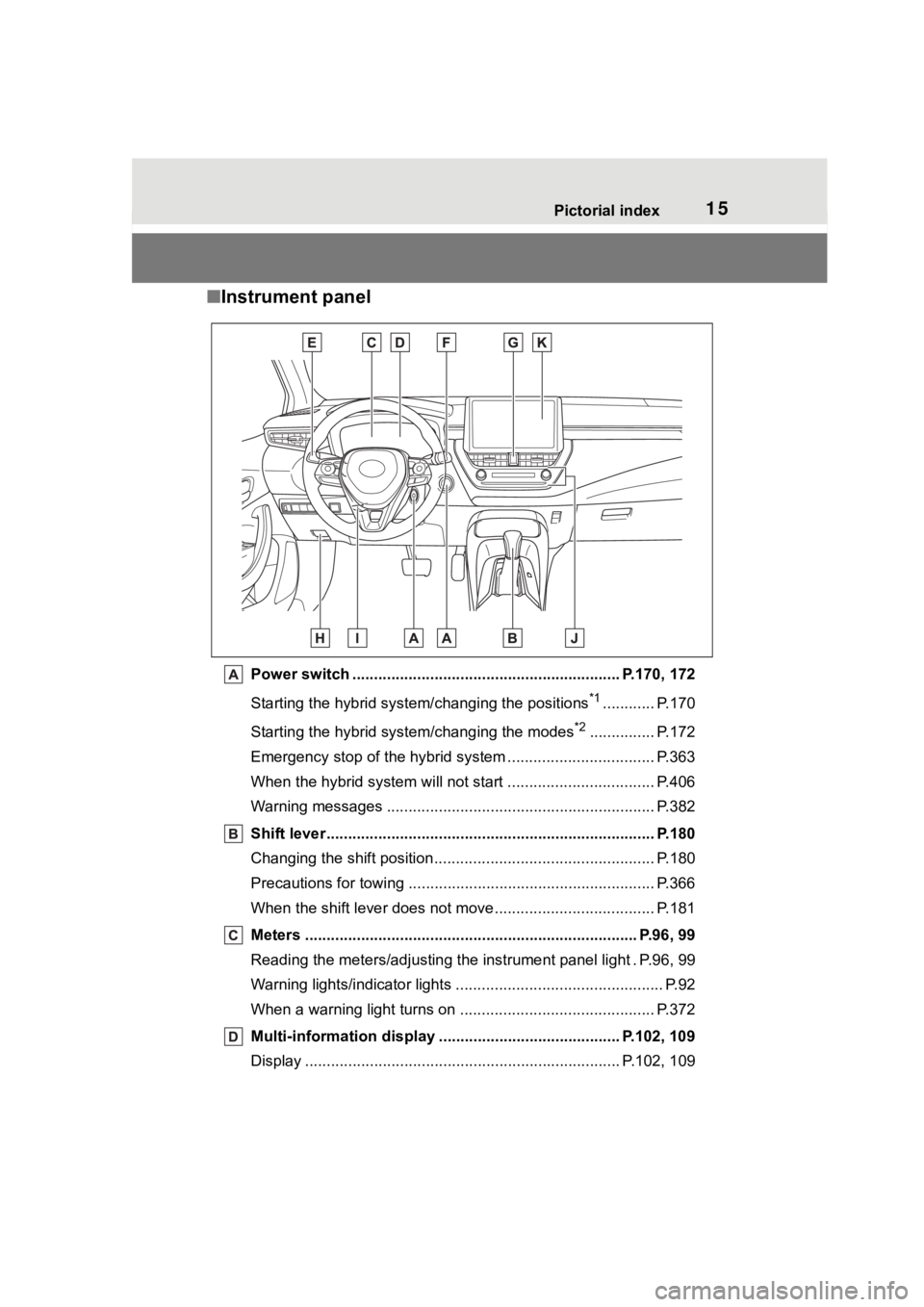
■Instrument panel
Power switch ................................................... ........... P.170, 172
Starting the hybrid syst em/changing the positions
*1............ P.170
Starting the hybrid system/changing the modes
*2............... P.172
Emergency stop of the hybrid system ............................ ...... P.363
When the hybrid system will not start .......................... ........ P.406
Warning messages ............................................... ............... P.382
Shift lever.................................................... ........................ P.180
Changing the shift position.................................... ............... P.180
Precautions for towing .. ....................................... ................ P.366
When the shift lever does not move............................. ........ P.181
Meters ............................................................................. P.96, 99
Reading the meters/adjusting the instrument panel light . P.96, 9 9
Warning lights/indicator lights ................................ ................ P.92
When a warning light turns on .................................. ........... P.372
Multi-information display . ......................................... P.102, 109
Display ........................................................ ................. P.102, 109
Page 38 of 496
381-1. For safe use
WARNING
●Improperly seated and/or
restrained infants and children
can be killed or seriously injured
by a deploying airbag. An infant
or child who is too small to use
a seat belt should be properly
secured using a child restraint
system. Toyota strongly recom-
mends that all infants and chil-
dren be placed in the rear seats
of the vehicle and properly
restrained. The rear seats are
safer for infants and children
than the front passenger seat.
(
P. 4 8 )
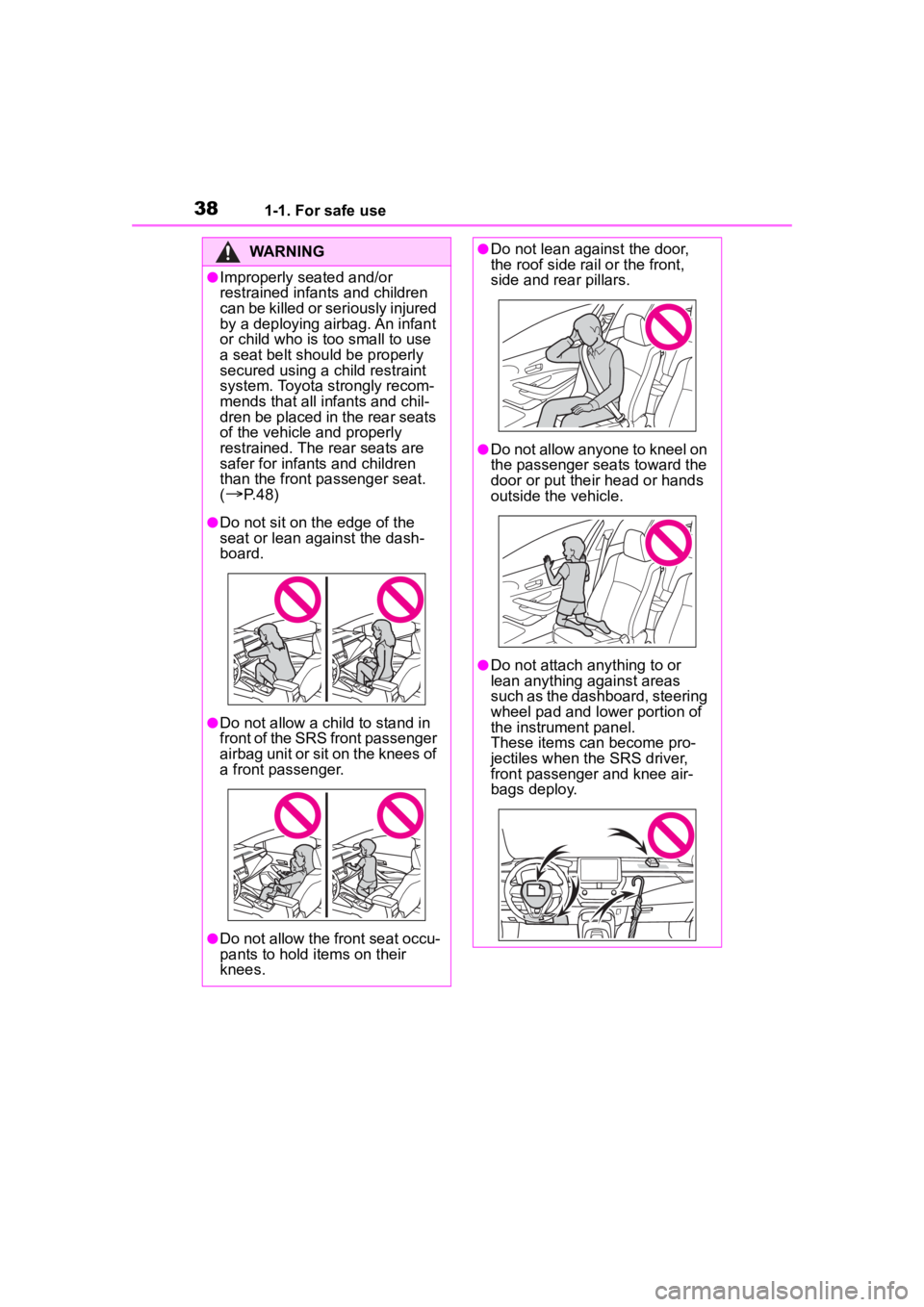
●Do not sit on the edge of the
seat or lean against the dash-
board.
●Do not allow a child to stand in
front of the SRS front passenger
airbag unit or sit on the knees of
a front passenger.
●Do not allow the front seat occu-
pants to hold items on their
knees.
●Do not lean against the door,
the roof side rail or the front,
side and rear pillars.
●Do not allow anyone to kneel on
the passenger seats toward the
door or put their head or hands
outside the vehicle.
●Do not attach anything to or
lean anything against areas
such as the dashboard, steering
wheel pad and lower portion of
the instrument panel.
These items can become pro-
jectiles when th e SRS driver,
front passenger and knee air-
bags deploy.
Page 63 of 496
631-2. Child safety
1
For safety and security
restraint.
Otherwise, put the head
restraint in the upper most
position. (P.144)
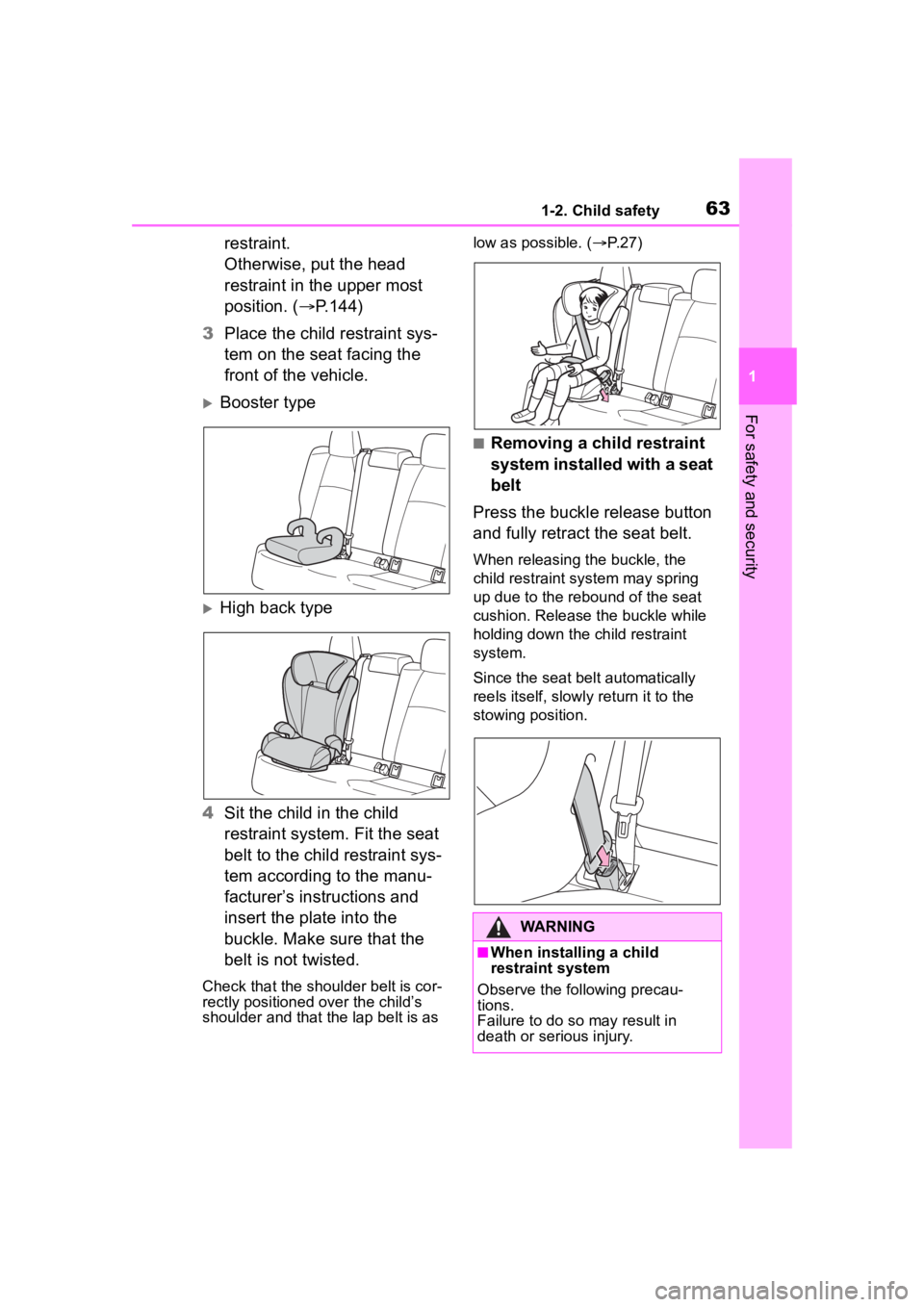
3 Place the child restraint sys-
tem on the seat facing the
front of the vehicle.
Booster type
High back type
4 Sit the child in the child
restraint system. Fit the seat
belt to the child restraint sys-
tem according to the manu-
facturer’s instructions and
insert the plate into the
buckle. Make sure that the
belt is not twisted.
Check that the shoulder belt is cor-
rectly positioned over the child’s
shoulder and that the lap belt is as low as possible. (
P. 2 7 )
■Removing a child restraint
system installed with a seat
belt
Press the buckle release button
and fully retract the seat belt.
When releasing the buckle, the
child restraint system may spring
up due to the rebound of the seat
cushion. Release the buckle while
holding down the child restraint
system.
Since the seat belt automatically
reels itself, slowly return it to the
stowing position.
WARNING
■When installing a child
restraint system
Observe the following precau-
tions.
Failure to do so may result in
death or serious injury.
Page 75 of 496
751-3. Emergency assistance
1
For safety and security
response center. The answer-
ing agent will determine your
vehicle’s location, assess the
emergency, and dispatch the
necessary assistance required.
If you accidentally press the “SOS”
button, tell the response-center
agent that you are not experiencing
an emergency.
■Enhanced Roadside Assis-
tance
Enhanced Roadside Assistance
adds GPS data to the already
included warranty-based Toyota
roadside service.
Subscribers can press the
“SOS” button to reach a Safety
Connect response-center agent,
who can help with a wide range
of needs, such as: towing, flat
tire, fuel delivery, etc. For a
description of the Enhanced
Roadside Assistance services
and their limitations, please see
the Safety Connect Terms and
Conditions, which are available
at Toyota.com in the United
States, Toyotapr.com in Puerto
Rico and Toyota.ca in Canada.
Important! Read this informa-
tion before using Safety Con-
nect.
■Exposure to radio fre-
quency signals
The Safety Connect system installed in your vehicle is a
low-power radio transmitter and
receiver. It receives and also
sends out radio frequency (RF)
signals.
In August 1996, the Federal
Communications Commission
(FCC) adopted RF exposure
guidelines with safety levels for
mobile wireless phones. Those
guidelines are consistent with
the safety standards previously
set by the following U.S. and
international standards bodies.
ANSI (American National
Standards Institute) C95.1
[1992]
NCRP (National Council on
Radiation Protection and
Measurement) Report 86
[1986]
ICNIRP (International Com-
mission on Non-Ionizing Radi-
ation Protection) [1996]
Those standards were based on
comprehensive and periodic
evaluations of the relevant sci-
entific literature. Over 120 scien-
tists, engineers, and physicians
from universities, and govern-
ment health agencies and
industries reviewed the avail-
able body of research to
develop the ANSI Standard
(C95.1).
The design of Safety Connect
complies with the FCC guide-
lines in addition to those stan-
Safety information for
Safety Connect
Page 84 of 496
841-4. Hybrid system
WARNING
●If a fire occurs in the hybrid
vehicle, leave the vehicle as
soon as possible. Never use a
fire extinguisher that is not
meant for electric fires. Using
even a small amount of water
may be dangerous.
●If your vehicle needs to be
towed, do so with front wheels
(2WD models) or four wheels
(AWD models) raised. If the
wheels connected to the electric
motor (traction motor) are on
the ground when towing, the
motor may continue to generate
electricity.This may cause a fire.
(
P.366)
●Carefully inspect the ground
under the vehicle. If you find
that liquid has leaked onto the
ground, the fuel system may
have been damaged. Leave the
vehicle as soon as possible.
●Do not touch the battery if liquid
is leaking from or adhering to it.
If electrolyte (carbonic-based
organic electrolyte) from the
hybrid battery (traction battery)
comes into contact with the
eyes or skin, it could cause
blindness or skin wounds. In the
unlikely event that it comes into
contact with the eyes or skin,
wash it off immediately with a
large amount of water, and seek
immediate medical attention.
●If electrolyte is leaking from the
hybrid battery (traction battery),
do not approac h the vehicle.
Even in the unlikely event that
the hybrid battery (traction bat-
tery) is damaged, the internal
construction of the battery will
prevent a large amount of elec-
trolyte from leaking out. How-
ever, any electrolyte that does
leak out will give off a vapor.
This vapor is an irritant to skin
and eyes and could cause acute
poisoning if inhaled.
●Do not bring burning or
high-temperature items close to
the electrolyte.
The electrolyte may ignite and
cause a fire.
■Hybrid battery (traction bat-
tery)
●Your vehicle contains a sealed
lithium-ion battery.
●Never resell, hand over or mod-
ify the hybrid battery. To prevent
accidents, hybrid batteries that
have been removed from a dis-
posed vehicle are collected
through Toyota dealer. Do not
dispose of the battery yourself.
Unless the battery is properly col-
lected, the following may occur,
resulting in dea th or serious
injury:
• The hybrid batte ry may be ille-
gally disposed of or dumped,
and it is hazardous to the envi-
ronment or someone may touch
a high voltage part, resulting in
an electric shock.
Page 125 of 496
1253-1. Key information
3
Before driving
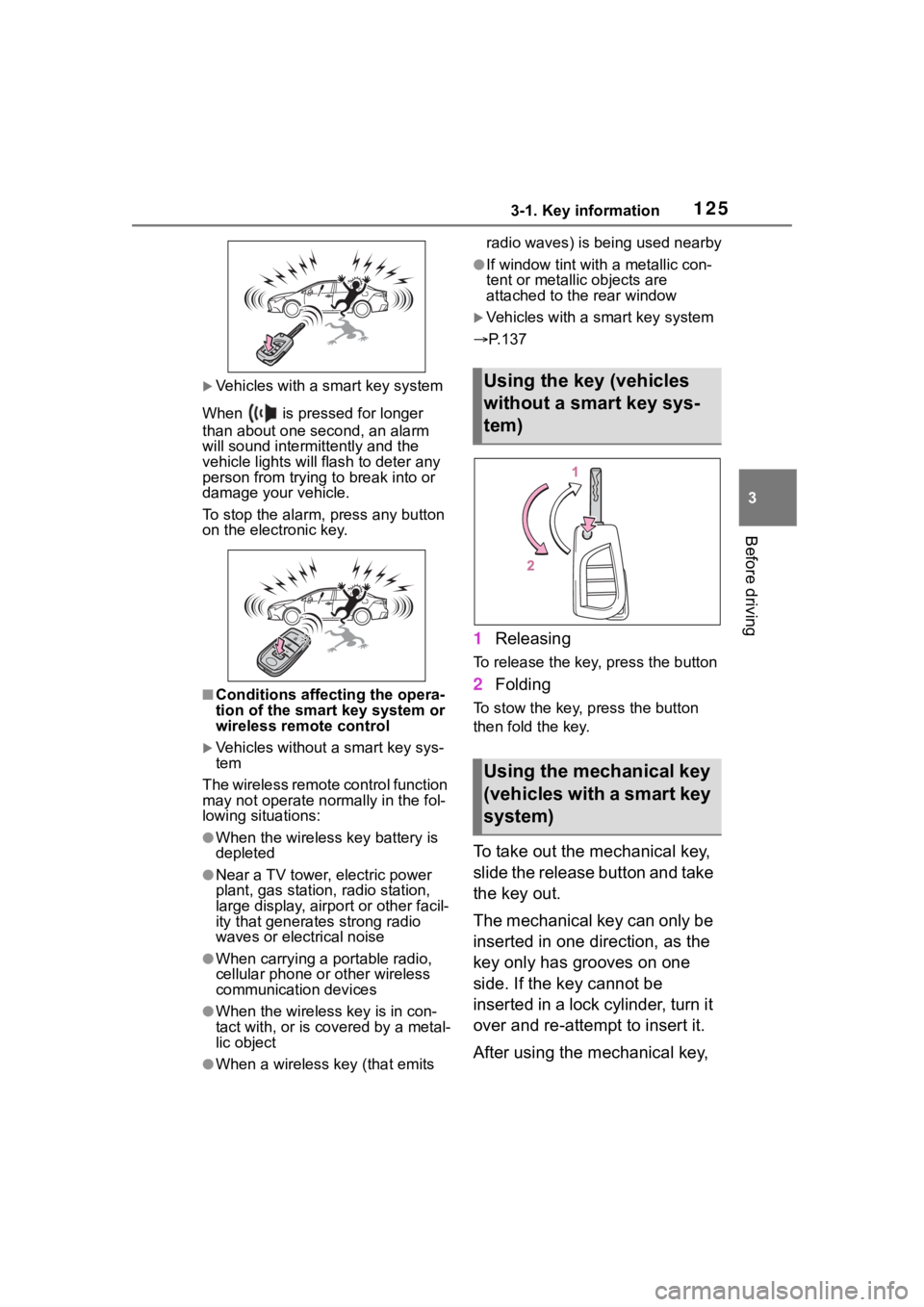
Vehicles with a smart key system
When is pressed for longer
than about one second, an alarm
will sound intermittently and the
vehicle lights will f lash to deter any
person from trying to break into or
damage your vehicle.
To stop the alarm, press any button
on the electronic key.
■Conditions affect ing the opera-
tion of the smart key system or
wireless remo te control
Vehicles without a smart key sys-
tem
The wireless remote control function
may not operate normally in the fol-
lowing situations:
●When the wireless key battery is
depleted
●Near a TV tower, electric power
plant, gas station , radio station,
large display, airpo rt or other facil-
ity that generates strong radio
waves or electrical noise
●When carrying a portable radio,
cellular phone or other wireless
communication devices
●When the wireles s key is in con-
tact with, or is covered by a metal-
lic object
●When a wireless key (that emits radio waves) is being used nearby
●If window tint wit
h a metallic con-
tent or metallic objects are
attached to the rear window
Vehicles with a smart key system
P.137
1 Releasing
To release the key, press the button
2Folding
To stow the key, press the button
then fold the key.
To take out the mechanical key,
slide the release button and take
the key out.
The mechanical key can only be
inserted in one direction, as the
key only has grooves on one
side. If the key cannot be
inserted in a lock cylinder, turn it
over and re-attempt to insert it.
After using the mechanical key,
Using the key (vehicles
without a smart key sys-
tem)
Using the mechanical key
(vehicles with a smart key
system)
Page 138 of 496

1383-2. Opening, closing and locking the doors
●Near a TV tower, electric power
plant, gas station, radio station,
large display, airpo rt or other facil-
ity that generates strong radio
waves or electrical noise
●When carrying a portable radio,
cellular phone, cordless phone or
other wireless communication
device
●When the electronic key is in con-
tact with, or is covered by the fol-
lowing metallic objects
• Cards to which al uminum foil is
attached
• Cigarette boxes that have alumi- num foil inside
• Metallic wallets or bags
• Coins
• Hand warmers made of metal
• Media such as CDs and DVDs
●When other wireless keys (that
emit radio waves) are being used
nearby
●When carrying the electronic key
together with the following devices
that emit radio waves
• Another vehicle’s electronic key or a wireless key that emits radio
waves
• Personal computers or personal digital assistants (PDAs)
• Digital audio players
• Portable game systems
●If window tint with a metallic con-
tent or metallic objects are
attached to the rear window
●When the electronic key is placed
near a battery charger or elec-
tronic devices
●When the vehicle is parked in a
pay parking spot where radio
waves are emitted
If the doors cannot be
locked/unlocked using the smart key
system, lock/unlock the doors by
performing any of the following:
●Bring the electronic key close to
either front door handle and oper-
ate the entry function.
●Operate the wireless remote con- trol.
If the doors cannot be
locked/unlocked using the above
methods, use the mechanical key.
( P.408)
If the hybrid system cannot be
started using the smart key system,
refer to P.409.
■Note for the entry function
●Even when the electronic key is
within the effective range (detec-
tion areas), the system may not
operate properly in the following
cases:
• The electronic key is too close to the window or outside door han-
dle, near the ground, or in a high
place when the doors are locked
or unlocked.
• The electronic key is near the ground or in a high place, or too
close to the center of the rear
bumper when the trunk is opened.
• The electronic key is on the instru- ment panel, rear package tray or
floor, or in the door pockets or
glove box when the hybrid system
is started or power switch modes
are changed.
●Do not leave the electronic key on
top of the instrument panel or near
the door pockets when exiting the
vehicle. Depending on the radio
wave reception conditions, it may
be detected by the antenna out-
side the cabin and the door will
become lockable from the outside,
possibly trapping the electronic
key inside the vehicle.
●As long as the electronic key is
within the effective range, the
doors may be locked or unlocked
by anyone. However, only the
doors detecting the electronic key
can be used to unlock the vehicle.
●Even if the electro nic key is not
inside the vehicle, it may be possi-
ble to start the hybrid system if the
electronic key is near the window.
●The doors may unlock or lock if a
large amount of water splashes on
Page 142 of 496
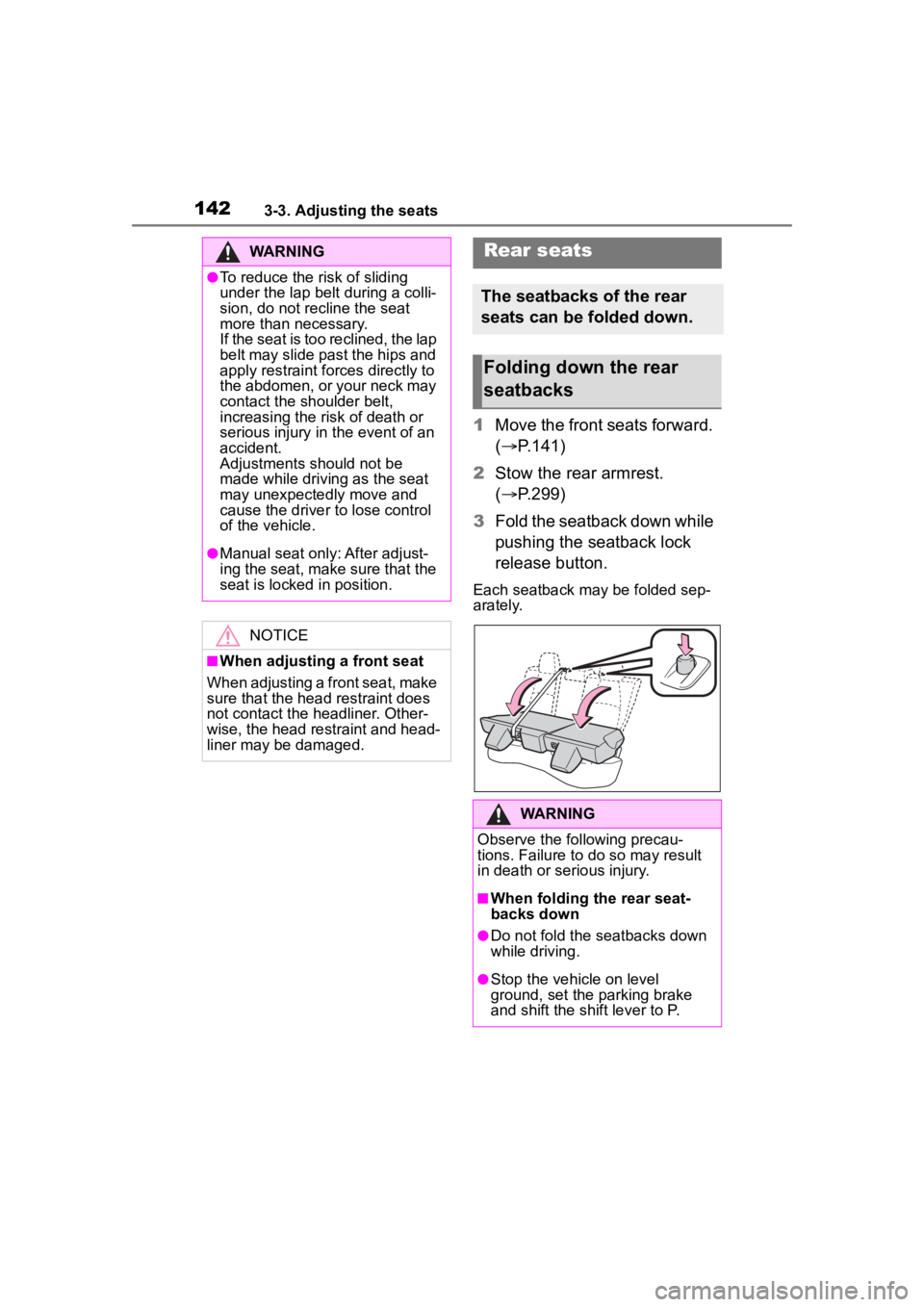
1423-3. Adjusting the seats
1Move the front seats forward.
( P.141)
2 Stow the rear armrest.
( P.299)
3 Fold the seatback down while
pushing the seatback lock
release button.
Each seatback may be folded sep-
arately.
WARNING
●To reduce the risk of sliding
under the lap belt during a colli-
sion, do not recline the seat
more than necessary.
If the seat is too reclined, the lap
belt may slide past the hips and
apply restraint forces directly to
the abdomen, or your neck may
contact the shoulder belt,
increasing the risk of death or
serious injury in the event of an
accident.
Adjustments should not be
made while driving as the seat
may unexpectedly move and
cause the driver to lose control
of the vehicle.
●Manual seat only: After adjust-
ing the seat, make sure that the
seat is locked in position.
NOTICE
■When adjusting a front seat
When adjusting a front seat, make
sure that the head restraint does
not contact the headliner. Other-
wise, the head restraint and head-
liner may be damaged.
Rear seats
The seatbacks of the rear
seats can be folded down.
Folding down the rear
seatbacks
WARNING
Observe the following precau-
tions. Failure to do so may result
in death or serious injury.
■When folding the rear seat-
backs down
●Do not fold the seatbacks down
while driving.
●Stop the vehicle on level
ground, set the parking brake
and shift the shift lever to P.