wheel torque TOYOTA COROLLA HYBRID 2023 Owners Manual
[x] Cancel search | Manufacturer: TOYOTA, Model Year: 2023, Model line: COROLLA HYBRID, Model: TOYOTA COROLLA HYBRID 2023Pages: 496, PDF Size: 10.13 MB
Page 108 of 496
1082-1. Instrument cluster
• Average vehicle speed: Displays the average vehi cle speed since
the display was reset
*
*
: To reset, display the desired item
and press and hold the
meter control switch.
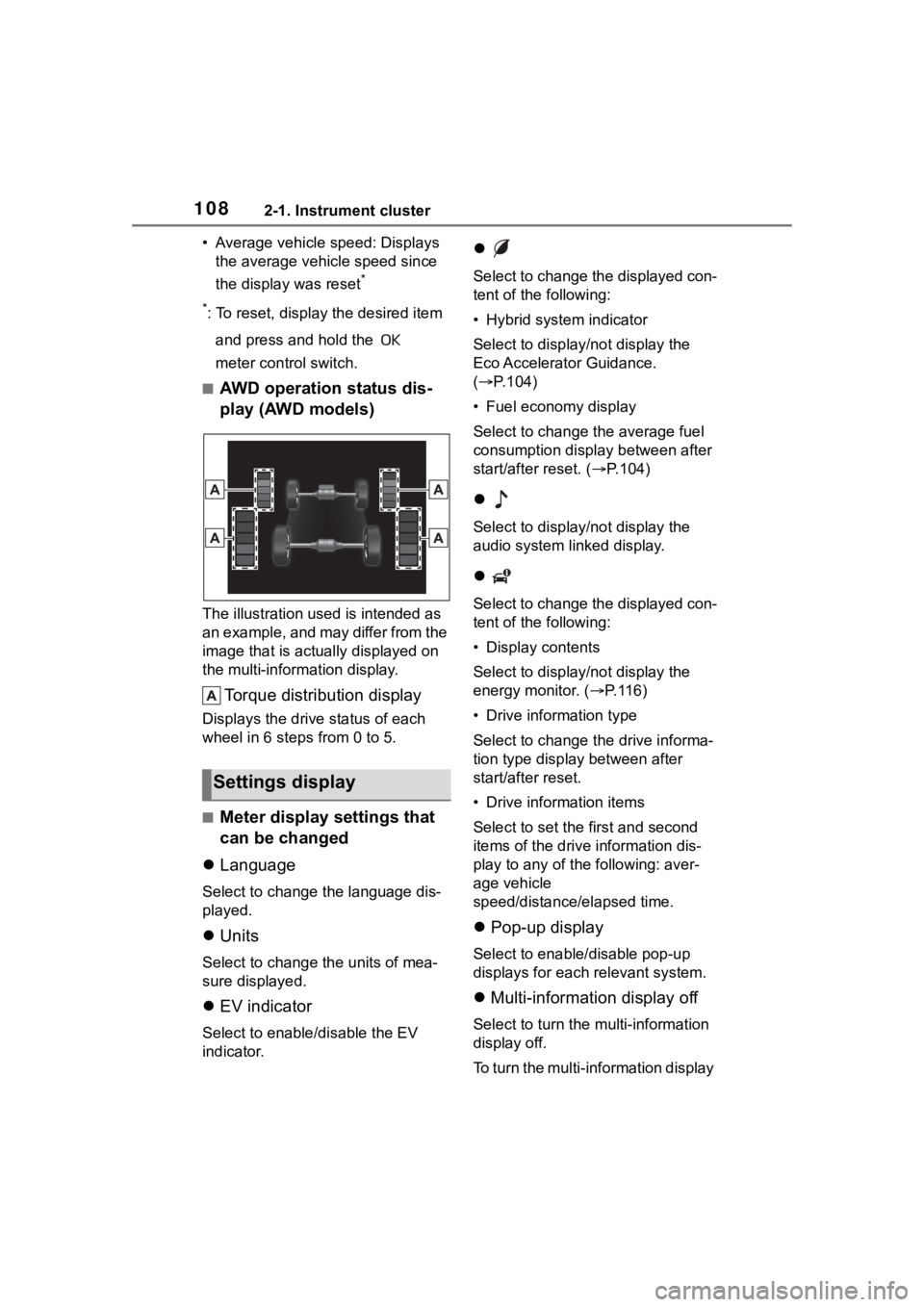
■AWD operation status dis-
play (AWD models)
The illustration used is intended as
an example, and may differ from the
image that is actually displayed on
the multi-information display.
Torque distribution display
Displays the drive status of each
wheel in 6 steps from 0 to 5.
■Meter display settings that
can be changed
Language
Select to change the language dis-
played.
Units
Select to change t he units of mea-
sure displayed.
EV indicator
Select to enable/disable the EV
indicator.
Select to change the displayed con-
tent of the following:
• Hybrid system indicator
Select to displa y/not display the
Eco Accelerator Guidance.
( P.104)
• Fuel economy display
Select to change the average fuel
consumption display between after
start/after reset. ( P.104)
Select to displa y/not display the
audio system linked display.
Select to change the displayed con-
tent of the following:
• Display contents
Select to displa y/not display the
energy monitor. (P. 1 1 6 )
• Drive information type
Select to change the drive informa-
tion type display between after
start/after reset.
• Drive information items
Select to set the first and second
items of the drive information dis-
play to any of the following: aver-
age vehicle
speed/distance/elapsed time.
Pop-up display
Select to enable/disable pop-up
displays for each relevant system.
Multi-information display off
Select to turn the multi-information
display off.
To turn the multi-information display
Settings display
Page 114 of 496
1142-1. Instrument cluster
reset*
• Elapsed time: Displays the elapsed time since the display
was reset
*
• Average vehicle speed: Displays the average vehi cle speed since
the display was reset
*
*
: To reset, display the desired item
and press and hold the
meter control switch.
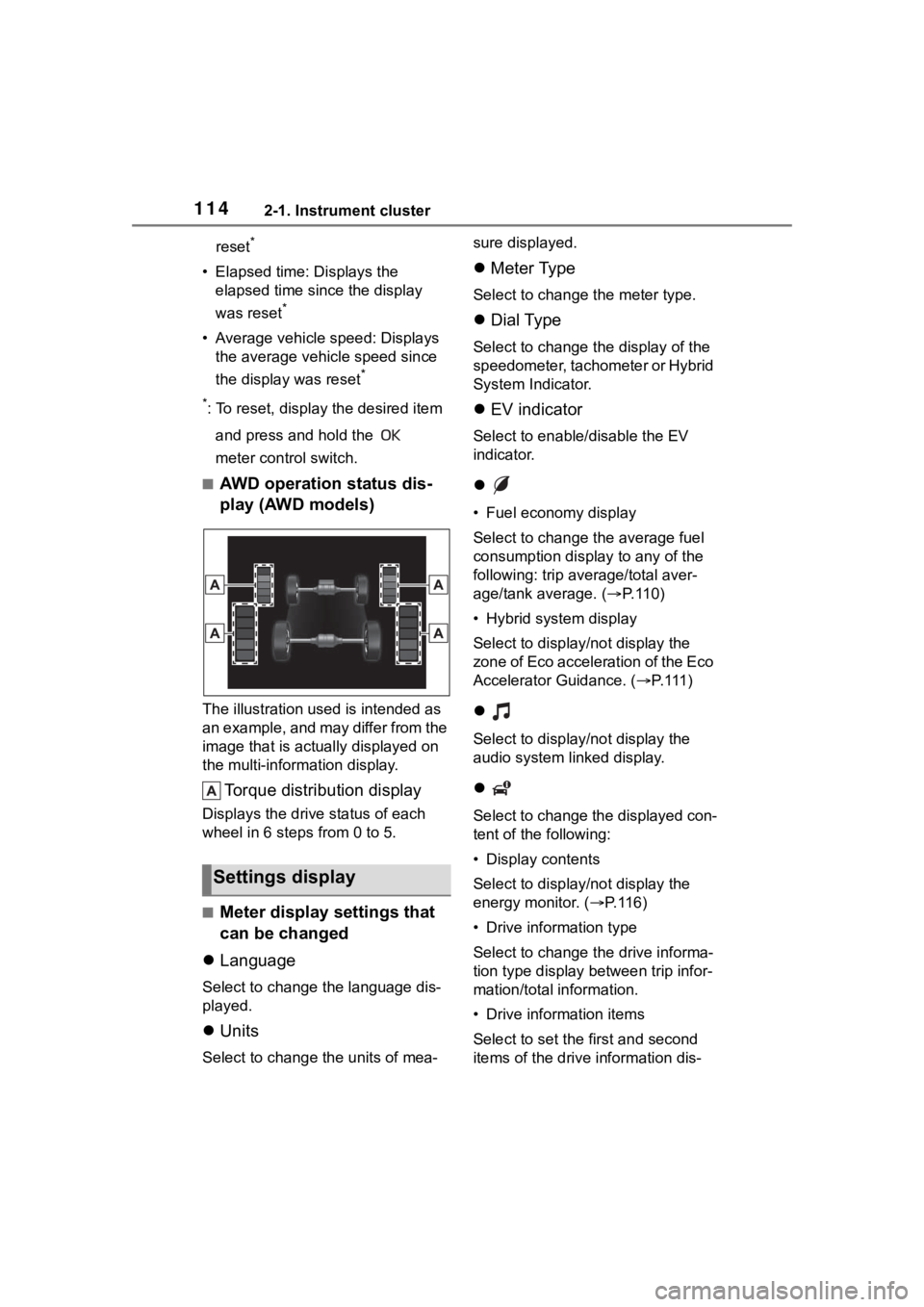
■AWD operation status dis-
play (AWD models)
The illustration used is intended as
an example, and may differ from the
image that is actually displayed on
the multi-information display.
Torque distribution display
Displays the drive status of each
wheel in 6 steps from 0 to 5.
■Meter display settings that
can be changed
Language
Select to change the language dis-
played.
Units
Select to change t he units of mea- sure displayed.
Meter Type
Select to change the meter type.
Dial Type
Select to change the display of the
speedometer, tachometer or Hybrid
System Indicator.
EV indicator
Select to enable/disable the EV
indicator.
• Fuel economy display
Select to change the average fuel
consumption display to any of the
following: trip average/total aver-
age/tank average. ( P. 1 1 0 )
• Hybrid system display
Select to displa y/not display the
zone of Eco acceleration of the Eco
Accelerator Guidance. (P. 1 1 1 )
Select to displa y/not display the
audio system linked display.
Select to change the displayed con-
tent of the following:
• Display contents
Select to displa y/not display the
energy monitor. (P. 1 1 6 )
• Drive information type
Select to change the drive informa-
tion type display between trip infor-
mation/total information.
• Drive information items
Select to set the first and second
items of the drive information dis-
Settings display
Page 402 of 496
4027-2. Steps to take in an emergency
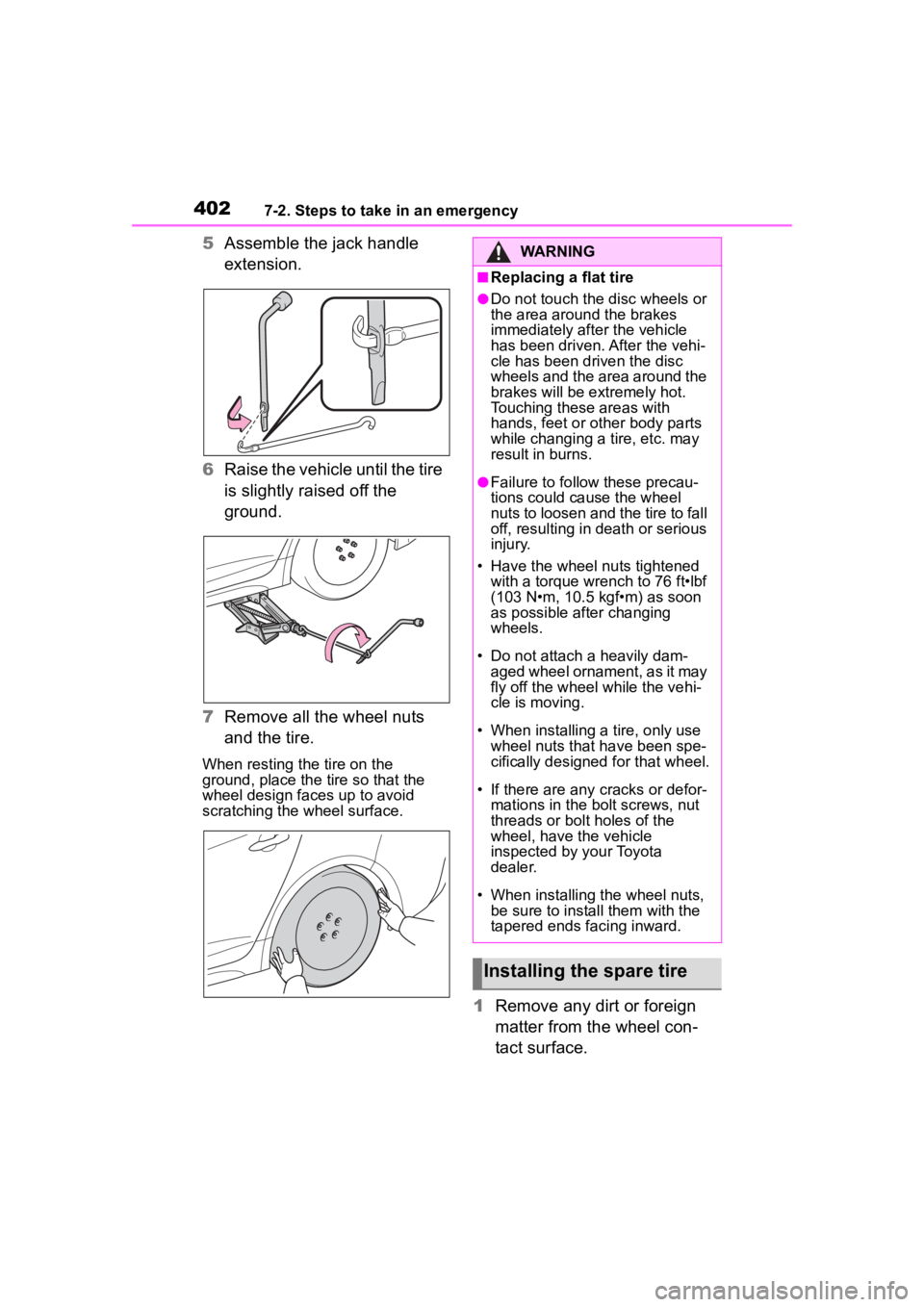
5Assemble the jack handle
extension.
6 Raise the vehicle until the tire
is slightly raised off the
ground.
7 Remove all the wheel nuts
and the tire.
When resting the tire on the
ground, place the tire so that the
wheel design faces up to avoid
scratching the wheel surface.
1 Remove any dirt or foreign
matter from the wheel con-
tact surface.
WARNING
■Replacing a flat tire
●Do not touch the disc wheels or
the area around the brakes
immediately after the vehicle
has been driven. After the vehi-
cle has been driven the disc
wheels and the area around the
brakes will be extremely hot.
Touching these areas with
hands, feet or oth er body parts
while changing a tire, etc. may
result in burns.
●Failure to follow these precau-
tions could cause the wheel
nuts to loosen and the tire to fall
off, resulting in death or serious
injury.
• Have the wheel nuts tightened
with a torque wrench to 76 ft•lbf
(103 N•m, 10.5 kgf•m) as soon
as possible after changing
wheels.
• Do not attach a heavily dam- aged wheel ornament, as it may
fly off the wheel while the vehi-
cle is moving.
• When installing a tire, only use wheel nuts that have been spe-
cifically designed for that wheel.
• If there are any cracks or defor- mations in the bolt screws, nut
threads or bolt holes of the
wheel, have the vehicle
inspected by your Toyota
dealer.
• When installing the wheel nuts, be sure to install them with the
tapered ends facing inward.
Installing the spare tire
Page 403 of 496
4037-2. Steps to take in an emergency
7
When trouble arises
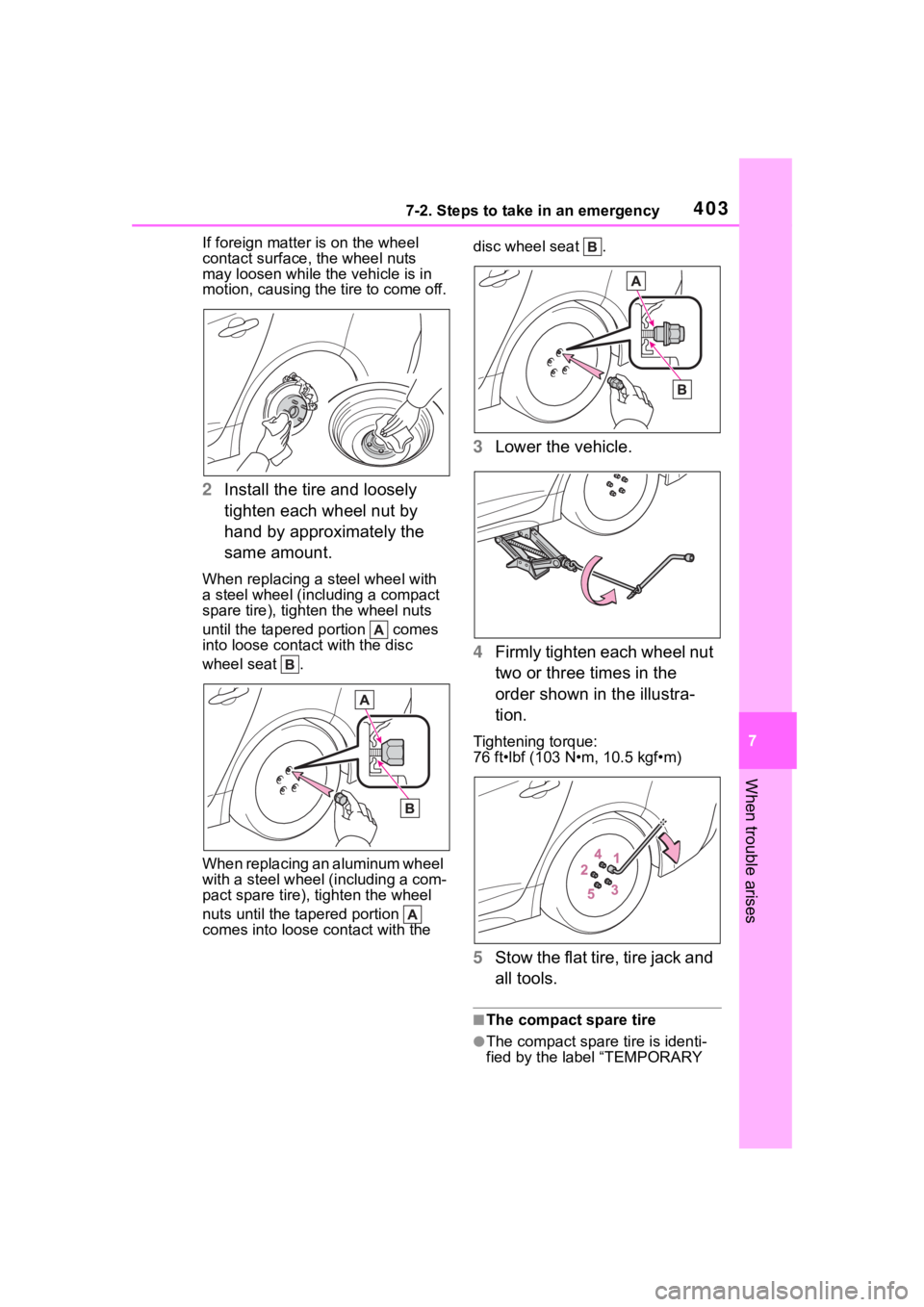
If foreign matter is on the wheel
contact surface, the wheel nuts
may loosen while the vehicle is in
motion, causing the tire to come off.
2 Install the tire and loosely
tighten each wheel nut by
hand by approximately the
same amount.
When replacing a steel wheel with
a steel wheel (including a compact
spare tire), tighte n the wheel nuts
until the tapered portion comes
into loose contact with the disc
wheel seat .
When replacing an aluminum wheel
with a steel wheel (including a com-
pact spare tire), tighten the wheel
nuts until the tapered portion
comes into loose contact with the disc wheel seat .
3
Lower the vehicle.
4 Firmly tighten each wheel nut
two or three times in the
order shown in the illustra-
tion.
Tightening torque:
76 ft•lbf (103 N•m, 10.5 kgf•m)
5Stow the flat tire, tire jack and
all tools.
■The compact spare tire
●The compact spare tire is identi-
fied by the label “TEMPORARY
Page 426 of 496
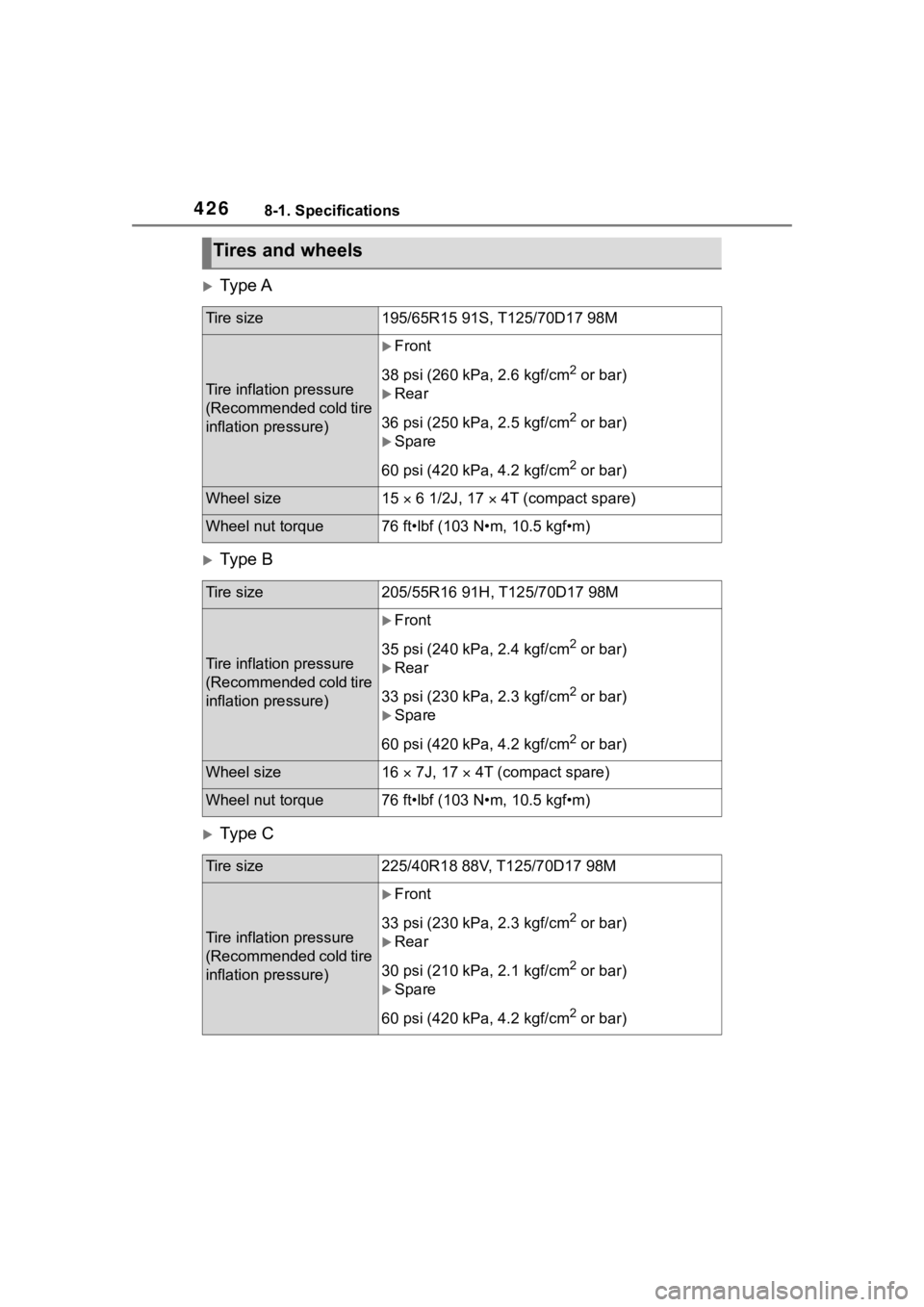
4268-1. Specifications
Ty p e A
Ty p e B
Ty p e C
Tires and wheels
Tire size195/65R15 91S, T125/70D17 98M
Tire inflation pressure
(Recommended cold tire
inflation pressure)
Front
38 psi (260 kPa, 2.6 kgf/cm
2 or bar)
Rear
36 psi (250 kPa, 2.5 kgf/cm
2 or bar)
Spare
60 psi (420 kPa, 4.2 kgf/cm
2 or bar)
Wheel size15 6 1/2J, 17 4T (compact spare)
Wheel nut torque76 ft•lbf (103 N•m, 10.5 kgf•m)
Tire size205/55R16 91H, T125/70D17 98M
Tire inflation pressure
(Recommended cold tire
inflation pressure)
Front
35 psi (240 kPa, 2.4 kgf/cm
2 or bar)
Rear
33 psi (230 kPa, 2.3 kgf/cm
2 or bar)
Spare
60 psi (420 kPa, 4.2 kgf/cm
2 or bar)
Wheel size16 7J, 17 4T (compact spare)
Wheel nut torque76 ft•lbf (103 N•m, 10.5 kgf•m)
Tire size225/40R18 88V, T125/70D17 98M
Tire inflation pressure
(Recommended cold tire
inflation pressure)
Front
33 psi (230 kPa, 2.3 kgf/cm
2 or bar)
Rear
30 psi (210 kPa, 2.1 kgf/cm
2 or bar)
Spare
60 psi (420 kPa, 4.2 kgf/cm
2 or bar)
Page 427 of 496
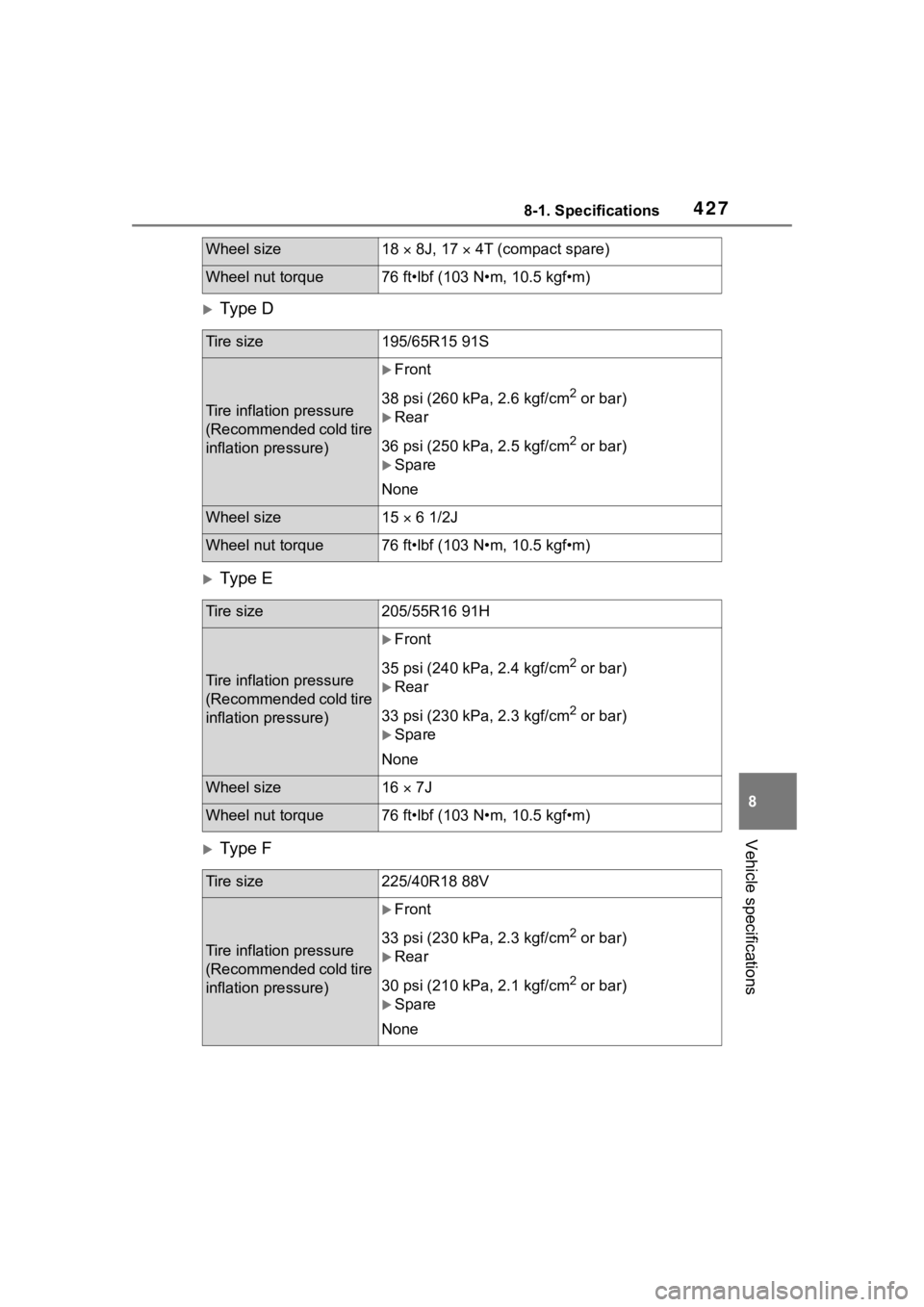
4278-1. Specifications
8
Vehicle specifications
Ty p e D
Ty p e E
Ty p e F
Wheel size18 8J, 17 4T (compact spare)
Wheel nut torque76 ft•lbf (103 N•m, 10.5 kgf•m)
Tire size195/65R15 91S
Tire inflation pressure
(Recommended cold tire
inflation pressure)
Front
38 psi (260 kPa, 2.6 kgf/cm
2 or bar)
Rear
36 psi (250 kPa, 2.5 kgf/cm
2 or bar)
Spare
None
Wheel size15 6 1/2J
Wheel nut torque76 ft•lbf (103 N•m, 10.5 kgf•m)
Tire size205/55R16 91H
Tire inflation pressure
(Recommended cold tire
inflation pressure)
Front
35 psi (240 kPa, 2.4 kgf/cm
2 or bar)
Rear
33 psi (230 kPa, 2.3 kgf/cm
2 or bar)
Spare
None
Wheel size16 7J
Wheel nut torque76 ft•lbf (103 N•m, 10.5 kgf•m)
Tire size225/40R18 88V
Tire inflation pressure
(Recommended cold tire
inflation pressure)
Front
33 psi (230 kPa, 2.3 kgf/cm
2 or bar)
Rear
30 psi (210 kPa, 2.1 kgf/cm
2 or bar)
Spare
None
Page 428 of 496
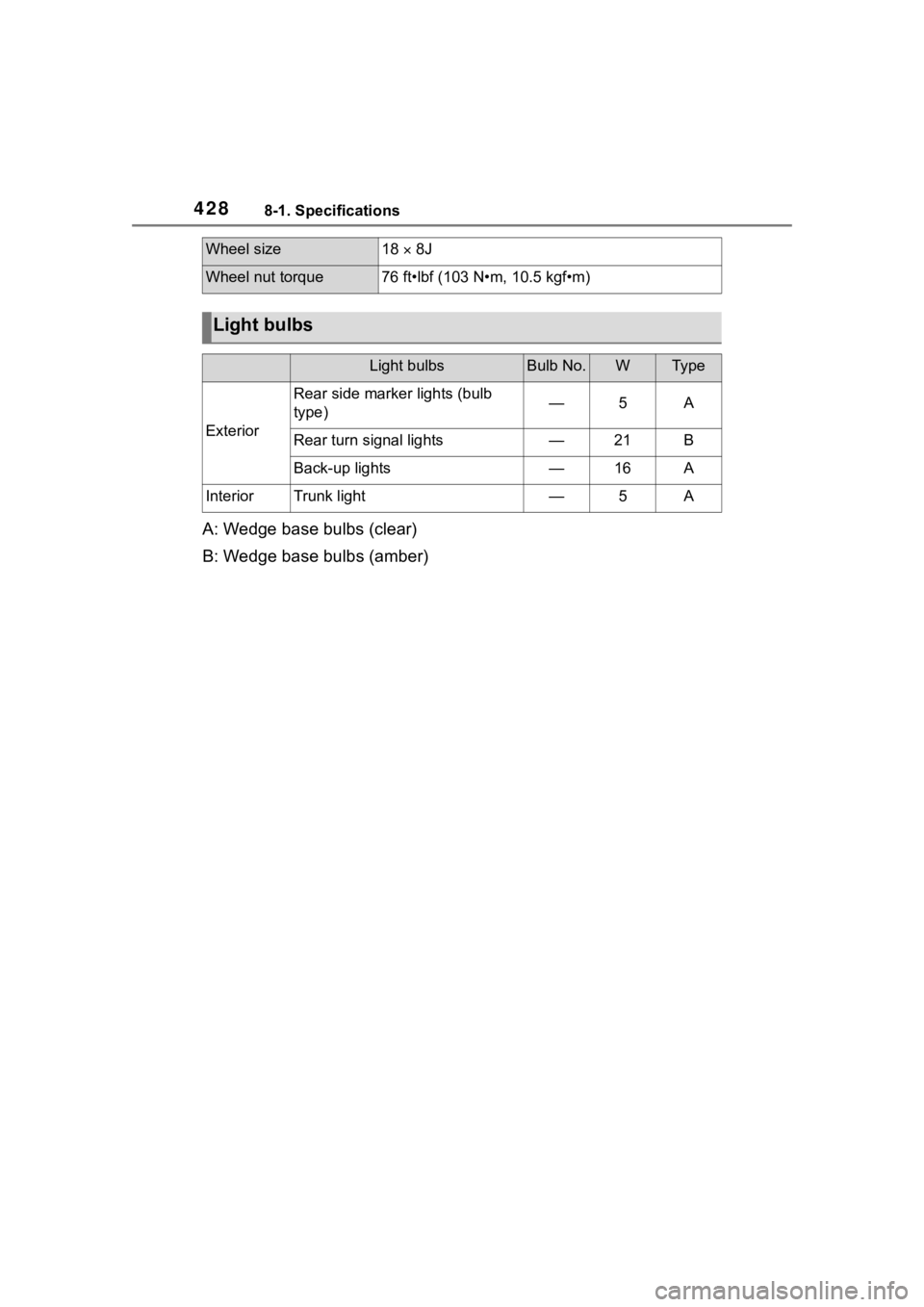
4288-1. Specifications
A: Wedge base bulbs (clear)
B: Wedge base bulbs (amber)
Wheel size18 8J
Wheel nut torque76 ft•lbf (103 N•m, 10.5 kgf•m)
Light bulbs
Light bulbsBulb No.WTy p e
Exterior
Rear side marker lights (bulb
type)—5A
Rear turn signal lights—21B
Back-up lights—16A
InteriorTrunk light—5A