key TOYOTA COROLLA iM 2017 11.G User Guide
[x] Cancel search | Manufacturer: TOYOTA, Model Year: 2017, Model line: COROLLA iM, Model: TOYOTA COROLLA iM 2017 11.GPages: 384, PDF Size: 8.88 MB
Page 87 of 384
873-1. Key information
3
Operation of each component
COROLLA iM_U (OM12K64U)
NOTICE
■To prevent key damage
●Do not drop the keys, subject them to strong shocks or bend them.
●Do not expose the keys to high temperatures for long periods of time.
●Do not get the keys wet or wash them in an ultrasonic washer etc.
●Do not attach metallic or magnetic materials to the keys or place the keys
close to such materials.
●Do not disassemble the keys.
●Do not attach a sticker or anything else to the surface of the key.
Page 88 of 384
88
COROLLA iM_U (OM12K64U)
3-2. Opening, closing and locking the doors
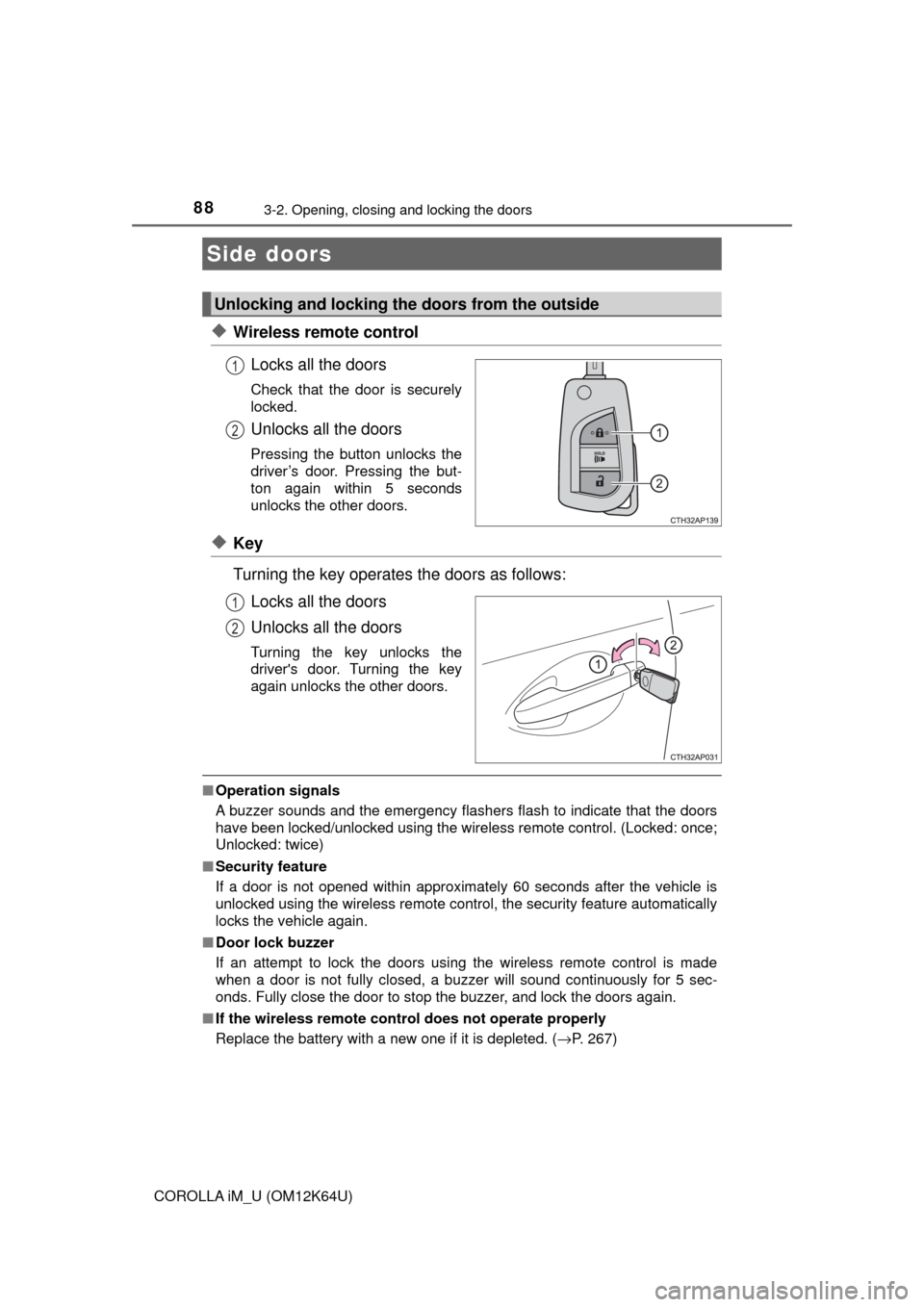
◆Wireless remote control
Locks all the doors
Check that the door is securely
locked.
Unlocks all the doors
Pressing the button unlocks the
driver’s door. Pressing the but-
ton again within 5 seconds
unlocks the other doors.
◆Key
Turning the key operates the doors as follows:
Locks all the doors
Unlocks all the doors
Turning the key unlocks the
driver's door. Turning the key
again unlocks the other doors.
■Operation signals
A buzzer sounds and the emergency flashers flash to indicate that the doors
have been locked/unlocked using the wireless remote control. (Locked: once;
Unlocked: twice)
■Security feature
If a door is not opened within approximately 60 seconds after the vehicle is
unlocked using the wireless remote control, the security feature automatically
locks the vehicle again.
■Door lock buzzer
If an attempt to lock the doors using the wireless remote control is made
when a door is not fully closed, a buzzer will sound continuously for 5 sec-
onds. Fully close the door to stop the buzzer, and lock the doors again.
■If the wireless remote control does not operate properly
Replace the battery with a new one if it is depleted. (→P. 267)
Side doors
Unlocking and locking the doors from the outside
1
2
1
2
Page 89 of 384
893-2. Opening, closing and locking the doors
3
Operation of each component
COROLLA iM_U (OM12K64U)
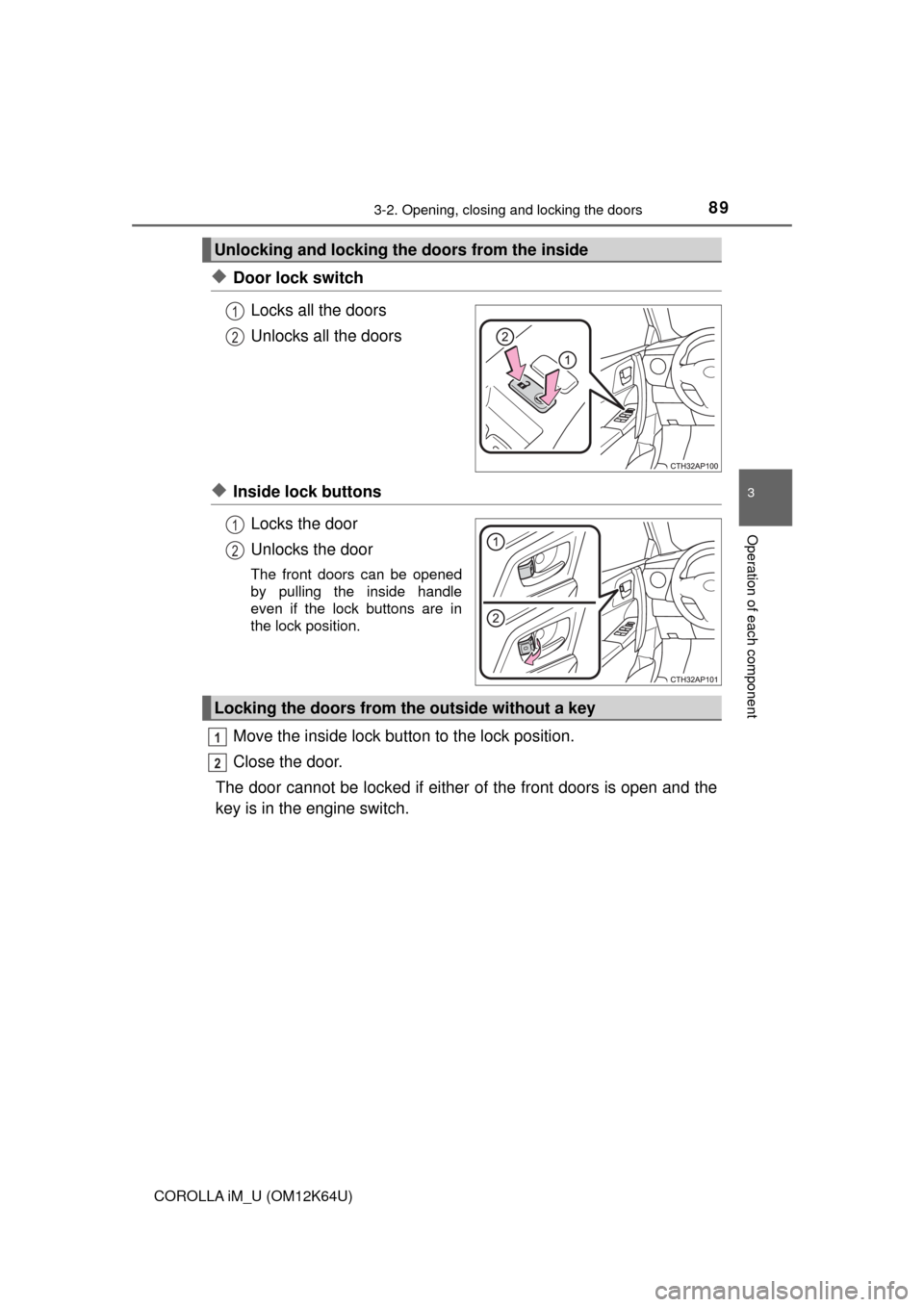
◆Door lock switch
Locks all the doors
Unlocks all the doors
◆Inside lock buttons
Locks the door
Unlocks the door
The front doors can be opened
by pulling the inside handle
even if the lock buttons are in
the lock position.
Move the inside lock button to the lock position.
Close the door.
The door cannot be locked if either of the front doors is open and the
key is in the engine switch.
Unlocking and locking the doors from the inside
1
2
1
2
Locking the doors from the outside without a key
1
2
Page 90 of 384
903-2. Opening, closing and locking the doors
COROLLA iM_U (OM12K64U)
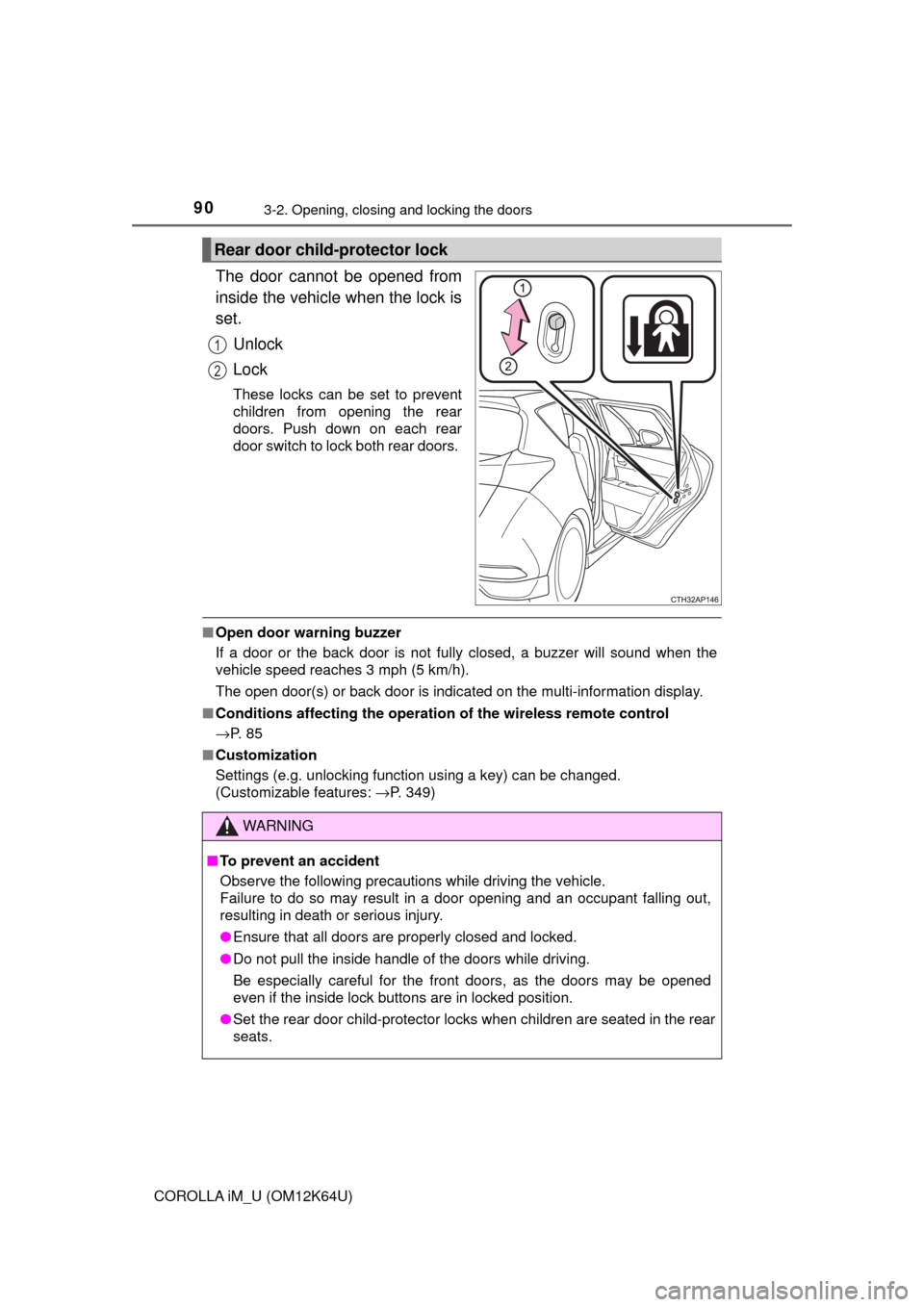
The door cannot be opened from
inside the vehicle when the lock is
set.
Unlock
Lock
These locks can be set to prevent
children from opening the rear
doors. Push down on each rear
door switch to lock both rear doors.
■Open door warning buzzer
If a door or the back door is not fully closed, a buzzer will sound when the
vehicle speed reaches 3 mph (5 km/h).
The open door(s) or back door is indicated on the multi-information display.
■Conditions affecting the operation of the wireless remote control
→P. 8 5
■Customization
Settings (e.g. unlocking function using a key) can be changed.
(Customizable features: →P. 349)
Rear door child-protector lock
1
2
WARNING
■To prevent an accident
Observe the following precautions while driving the vehicle.
Failure to do so may result in a door opening and an occupant falling out,
resulting in death or serious injury.
●Ensure that all doors are properly closed and locked.
●Do not pull the inside handle of the doors while driving.
Be especially careful for the front doors, as the doors may be opened
even if the inside lock buttons are in locked position.
●Set the rear door child-protector locks when children are seated in the rear
seats.
Page 91 of 384
913-2. Opening, closing and locking the doors
3
Operation of each component
COROLLA iM_U (OM12K64U)■
Door lock switch
→P. 8 9
■Wireless remote control
→P. 8 8
■Key
→P. 8 8
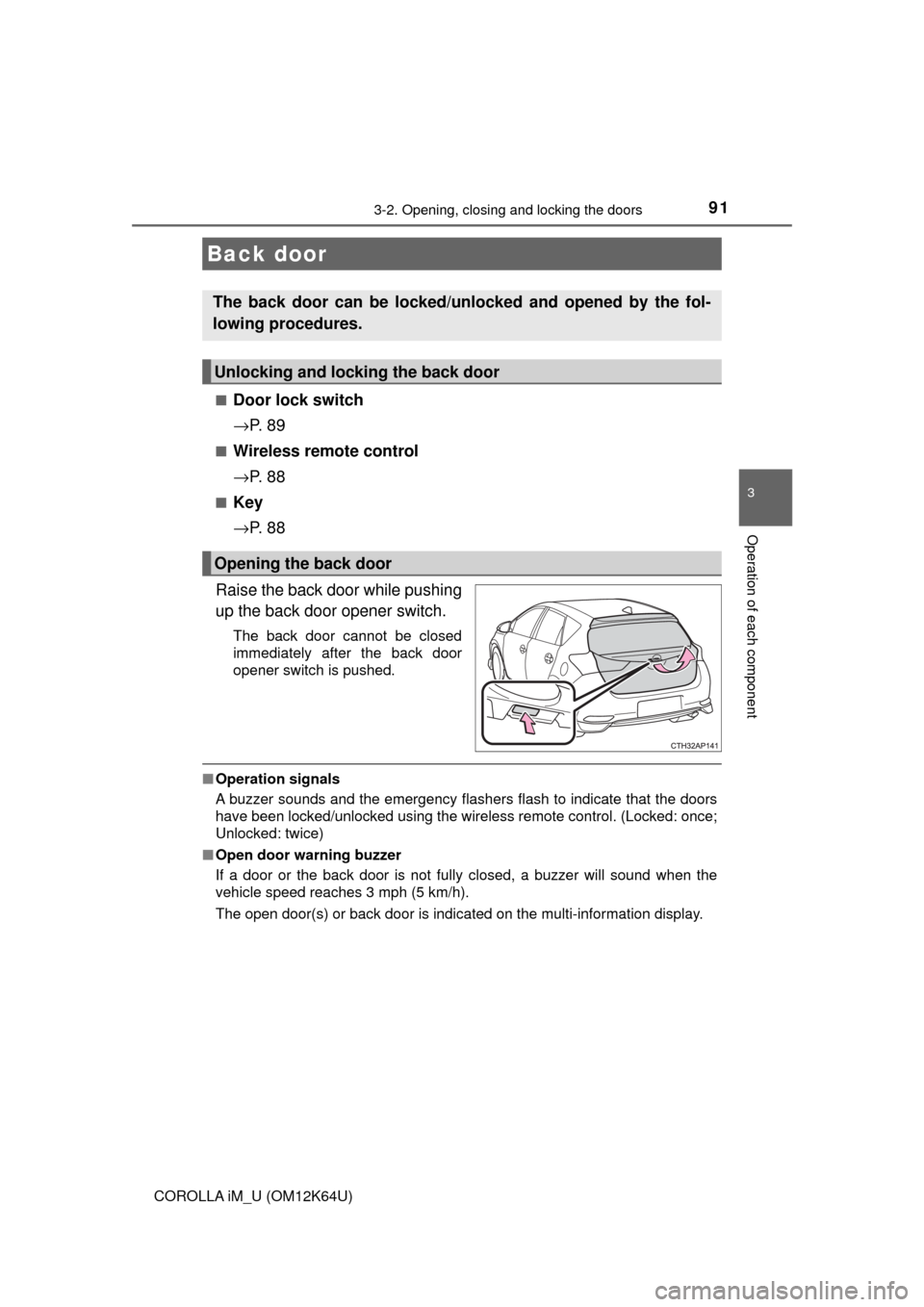
Raise the back door while pushing
up the back door opener switch.
The back door cannot be closed
immediately after the back door
opener switch is pushed.
■Operation signals
A buzzer sounds and the emergency flashers flash to indicate that the doors
have been locked/unlocked using the wireless remote control. (Locked: once;
Unlocked: twice)
■Open door warning buzzer
If a door or the back door is not fully closed, a buzzer will sound when the
vehicle speed reaches 3 mph (5 km/h).
The open door(s) or back door is indicated on the multi-information display.
Back door
The back door can be locked/unlocked and opened by the fol-
lowing procedures.
Unlocking and locking the back door
Opening the back door
Page 108 of 384
1083-5. Opening and closing the windows
COROLLA iM_U (OM12K64U)
WARNING
Observe the following precautions.
Failure to do so may result in death or serious injury.
■Closing the windows
●The driver is responsible for all the power window operations, including the
operation for the passengers. In order to prevent accidental operation,
especially by a child, do not let a child operate the power windows. It is
possible for children and other passengers to have body parts caught in
the power window. Also, when riding with a child, it is recommended to use
the window lock switch.(→P. 106)
●Check to make sure that all passengers do not have any part of their body
in a position where it could be caught when a window is being operated.
●When exiting the vehicle, turn the engine switch off, carry the key and exit
the vehicle along with the child. There may be accidental operation, due to
mischief, etc., that may possibly lead to an accident.
■Jam protection function (driver’s window only)
●Never use any part of your body to intentionally activate the jam protection
function.
●The jam protection function may not work if something gets jammed just
before the window is fully closed. Be careful not to get any part of your
body jammed in the window.
■Catch protection function (driver’s window only)
●Never use any part of your body or clothing to intentionally activate the
catch protection function.
●The catch protection function may not work if something gets caught just
before the window is fully opened. Be careful not to get any part of your
body or clothing caught in the window.
Page 111 of 384
1114-1. Before driving
4
Driving
COROLLA iM_U (OM12K64U)
Continuously variable transmission
With the shift lever in D, depress the brake pedal.
Set the parking brake (→P. 140), and shift the shift lever to P
(→P. 131).
If parking on a hill, block the wheels as needed.
Turn the engine switch to the “LOCK” position to stop the engine.
Lock the door, making sure that you have the key on your per-
son.
Manual transmission
While depressing the clutch pedal, depress the brake pedal.
Set the parking brake (→P. 140), and shift the shift lever to N
(→P. 137).
If parking on a hill, shift the shift lever to 1 or R and block the wheels as
needed.
Turn the engine switch to the “LOCK” position to stop the engine.
Lock the door, making sure that you have the key on your per-
son.
Continuously variable transmission
Make sure that the parking brake is set and shift the shift lever to
D.
Gently depress the accelerator pedal.
Release the parking brake.
Manual transmission
With the parking brake firmly set and the clutch pedal fully
depressed, shift the shift lever to 1.
Lightly depress the accelerator pedal at the same time as gradu-
ally releasing the clutch pedal.
Release the parking brake.
Parking the vehicle
Starting off on a steep uphill
1
2
3
4
1
2
3
4
1
2
3
1
2
3
Page 128 of 384
128
COROLLA iM_U (OM12K64U)
4-2. Driving procedures
Continuously variable transmission
Check that the parking brake is set.
Check that the shift lever is set in P.
Firmly depress the brake pedal.
Turn the engine switch to the “START” position and start the
engine.
Manual transmission
Check that the parking brake is set.
Check that the shift lever is set in N.
Firmly depress the clutch pedal.
Turn the engine switch to the “START” position and start the
engine.
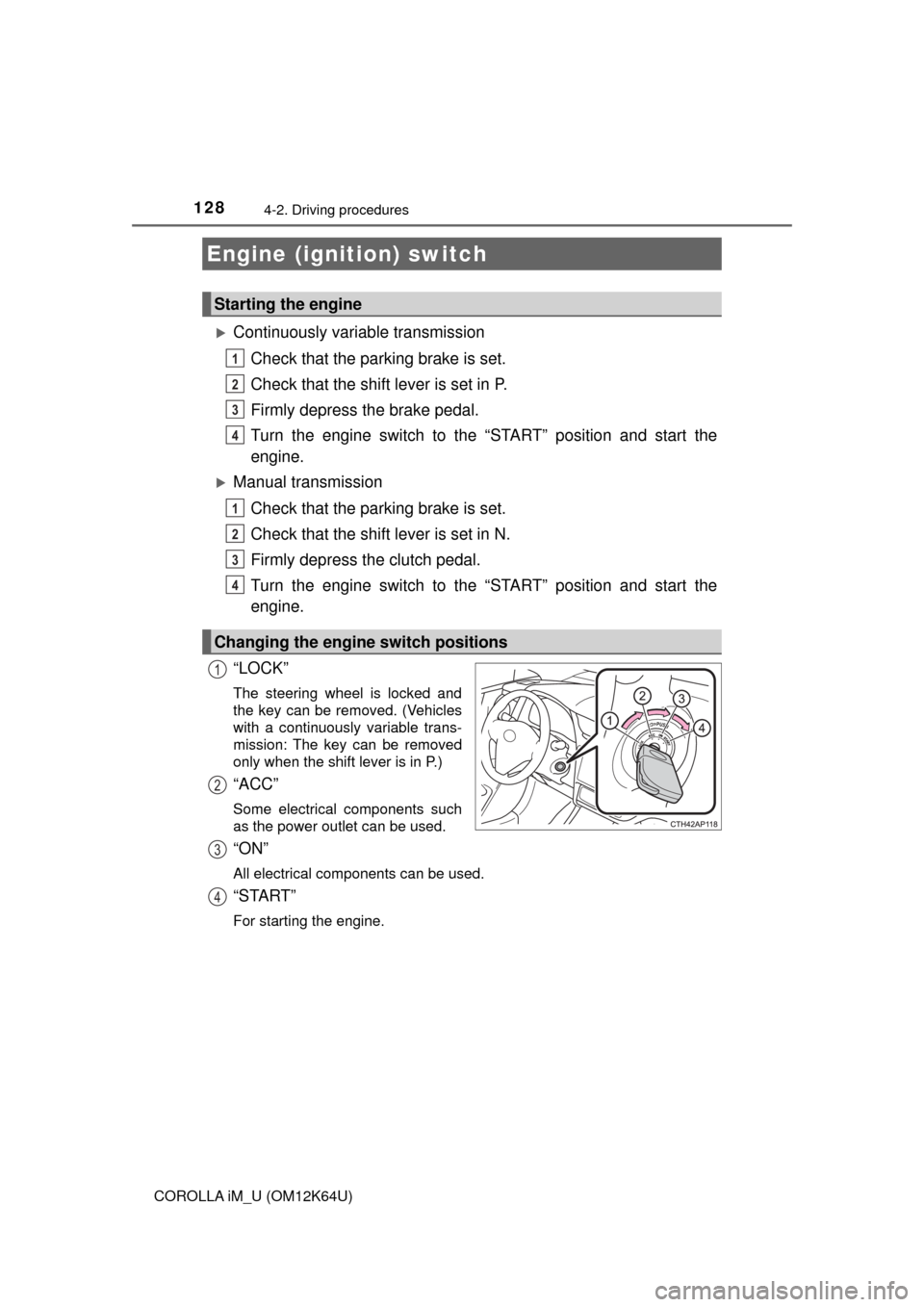
“LOCK”
The steering wheel is locked and
the key can be removed. (Vehicles
with a continuously variable trans-
mission: The key can be removed
only when the shift lever is in P.)
“ACC”
Some electrical components such
as the power outlet can be used.
“ON”
All electrical components can be used.
“START”
For starting the engine.
Engine (ignition) switch
Starting the engine
Changing the engine switch positions
1
2
3
4
1
2
3
4
1
2
3
4
Page 129 of 384
1294-2. Driving procedures
4
Driving
COROLLA iM_U (OM12K64U)
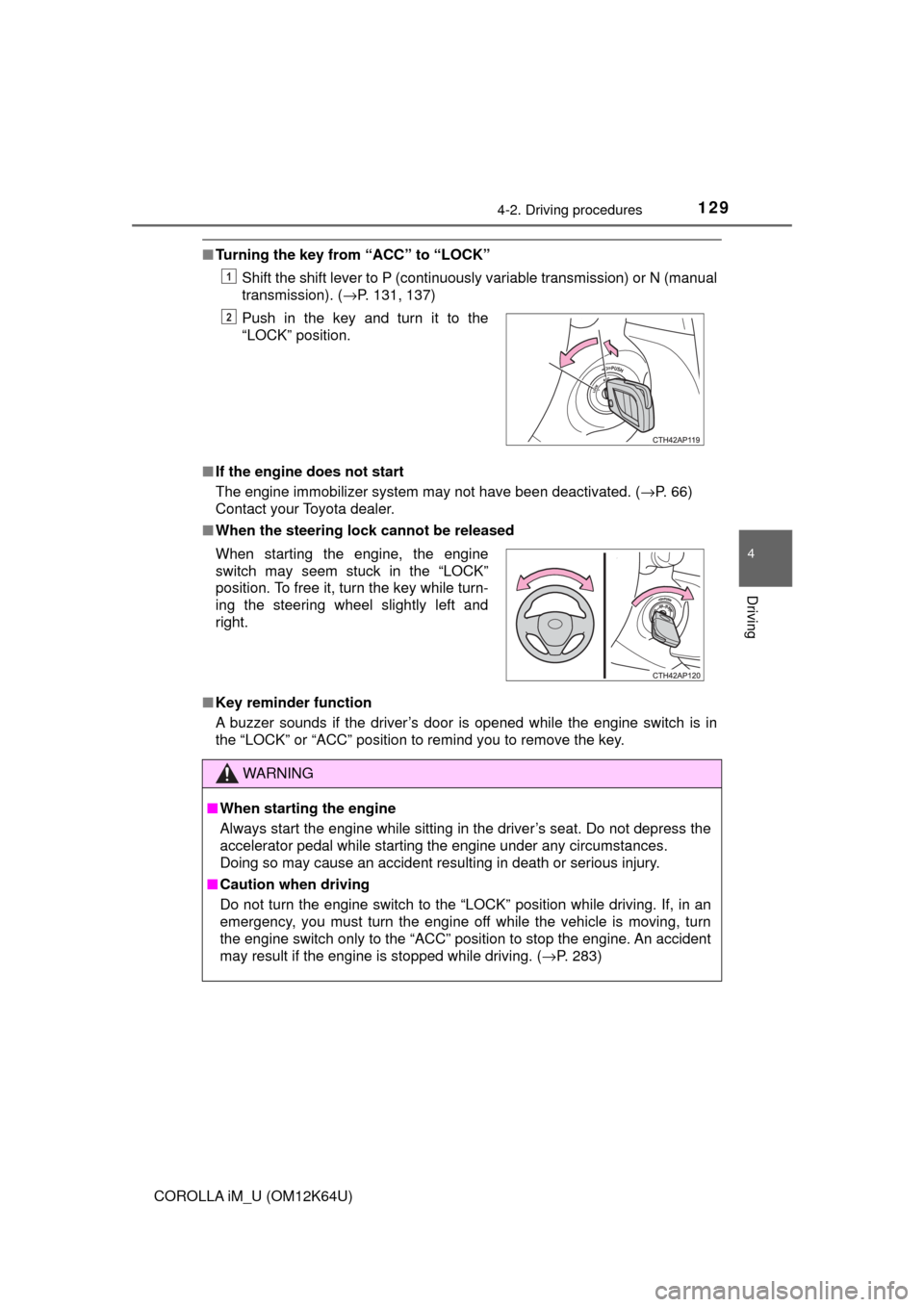
■Turning the key from “ACC” to “LOCK”
Shift the shift lever to P (continuously variable transmission) or N (manual
transmission). (→P. 131, 137)
■If the engine does not start
The engine immobilizer system may not have been deactivated. (→P. 66)
Contact your Toyota dealer.
■When the steering lock cannot be released
■Key reminder function
A buzzer sounds if the driver’s door is opened while the engine switch is in
the “LOCK” or “ACC” position to remind you to remove the key.Push in the key and turn it to the
“LOCK” position.
1
2
When starting the engine, the engine
switch may seem stuck in the “LOCK”
position. To free it, turn the key while turn-
ing the steering wheel slightly left and
right.
WARNING
■When starting the engine
Always start the engine while sitting in the driver’s seat. Do not depress the
accelerator pedal while starting the engine under any circumstances.
Doing so may cause an accident resulting in death or serious injury.
■Caution when driving
Do not turn the engine switch to the “LOCK” position while driving. If, in an
emergency, you must turn the engine off while the vehicle is moving, turn
the engine switch only to the “ACC” position to stop the engine. An accident
may result if the engine is stopped while driving. (→P. 283)
Page 143 of 384
1434-3. Operating the lights and wipers
4
Driving
COROLLA iM_U (OM12K64U)
■Daytime running light system
●To make your vehicle more visible to other drivers during daytime driving,
the daytime running lights turn on automatically whenever the engine is
started and the parking brake is released with the headlight switch off or in
the position. (Illuminate brighter than the parking lights.)
Daytime running lights are not designed for use at night.
For the U.S.A.: Daytime running lights can be turned off by operating the
switch.
●Compared to turning on the headlights, the daytime running light system
offers greater durability and consumes less electricity, so it can help improve
fuel economy.
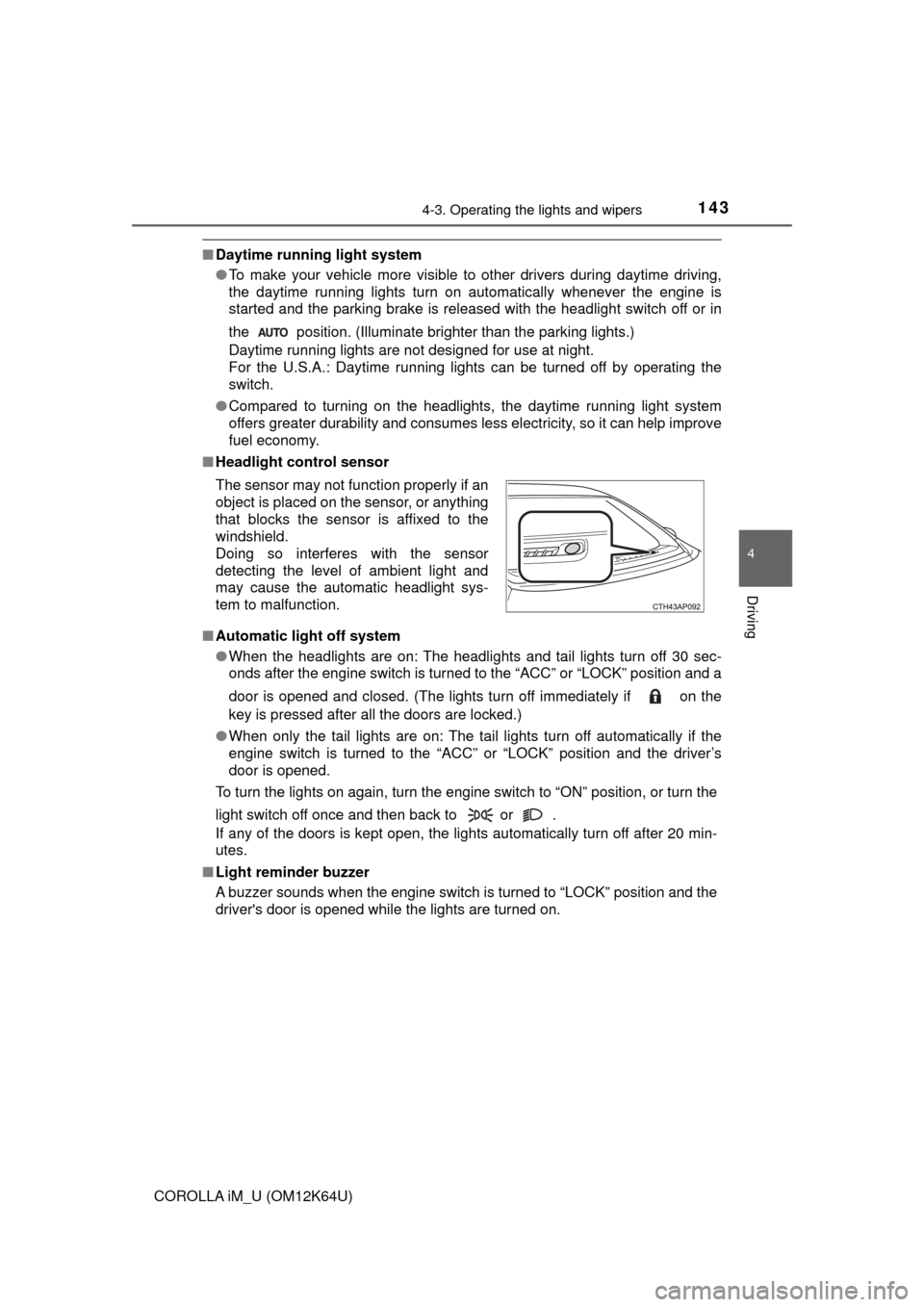
■Headlight control sensor
■Automatic light off system
●When the headlights are on: The headlights and tail lights turn off 30 sec-
onds after the engine switch is turned to the “ACC” or “LOCK” position and a
door is opened and closed. (The lights turn off immediately if on the
key is pressed after all the doors are locked.)
●When only the tail lights are on: The tail lights turn off automatically if the
engine switch is turned to the “ACC” or “LOCK” position and the driver’s
door is opened.
To turn the lights on again, turn the engine switch to “ON” position, or turn the
light switch off once and then back to or .
If any of the doors is kept open, the lights automatically turn off after 20 min-
utes.
■Light reminder buzzer
A buzzer sounds when the engine switch is turned to “LOCK” position and the
driver's door is opened while the lights are turned on. The sensor may not function properly if an
object is placed on the sensor, or anything
that blocks the sensor is affixed to the
windshield.
Doing so interferes with the sensor
detecting the level of ambient light and
may cause the automatic headlight sys-
tem to malfunction.