engine TOYOTA COROLLA iM 2017 11.G Workshop Manual
[x] Cancel search | Manufacturer: TOYOTA, Model Year: 2017, Model line: COROLLA iM, Model: TOYOTA COROLLA iM 2017 11.GPages: 384, PDF Size: 8.88 MB
Page 144 of 384

1444-3. Operating the lights and wipers
COROLLA iM_U (OM12K64U)■Battery-saving function
In the following conditions, the headlights and the other remaining lights will
go off automatically after 20 minutes in order to prevent the vehicle battery
from being discharged:
●The headlights and/or tail lights are on.
●The engine switch is in the “ACC” or “LOCK” position.
This function will be canceled in any of the following situations:
●When the engine switch is turned to the “ON” position.
●When the light switch is operated
●When the door is opened or closed
■Customization
Settings (e.g. light sensor sensitivity) can be changed.
(Customizable features: →P. 349)
NOTICE
■To prevent battery discharge
Do not leave the lights on longer than necessary when the engine is not
running.
Page 150 of 384
1504-3. Operating the lights and wipers
COROLLA iM_U (OM12K64U)
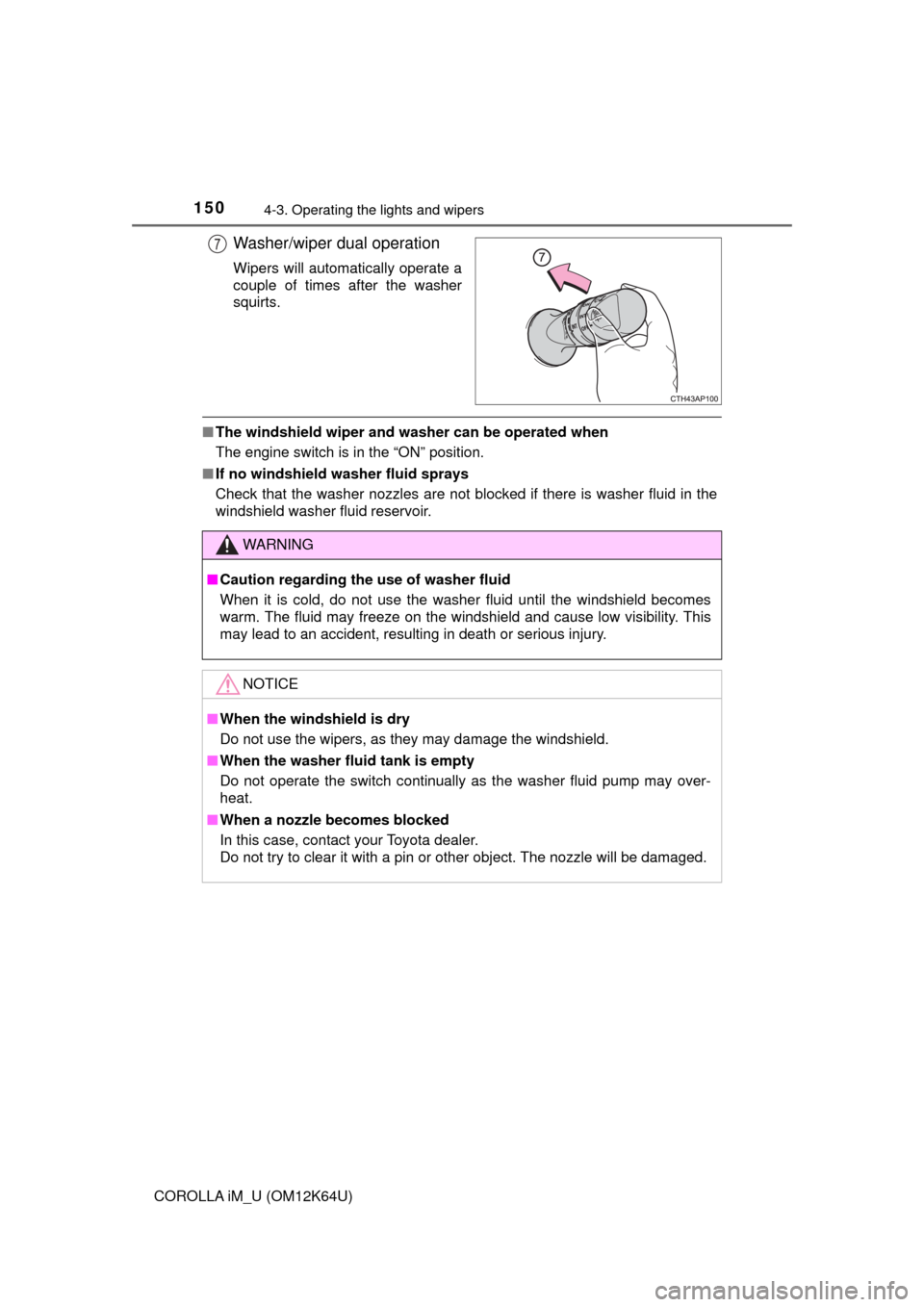
Washer/wiper dual operation
Wipers will automatically operate a
couple of times after the washer
squirts.
■The windshield wiper and washer can be operated when
The engine switch is in the “ON” position.
■If no windshield washer fluid sprays
Check that the washer nozzles are not blocked if there is washer fluid in the
windshield washer fluid reservoir.
7
WARNING
■Caution regarding the use of washer fluid
When it is cold, do not use the washer fluid until the windshield becomes
warm. The fluid may freeze on the windshield and cause low visibility. This
may lead to an accident, resulting in death or serious injury.
NOTICE
■When the windshield is dry
Do not use the wipers, as they may damage the windshield.
■When the washer fluid tank is empty
Do not operate the switch continually as the washer fluid pump may over-
heat.
■When a nozzle becomes blocked
In this case, contact your Toyota dealer.
Do not try to clear it with a pin or other object. The nozzle will be damaged.
Page 151 of 384
1514-3. Operating the lights and wipers
4
Driving
COROLLA iM_U (OM12K64U)
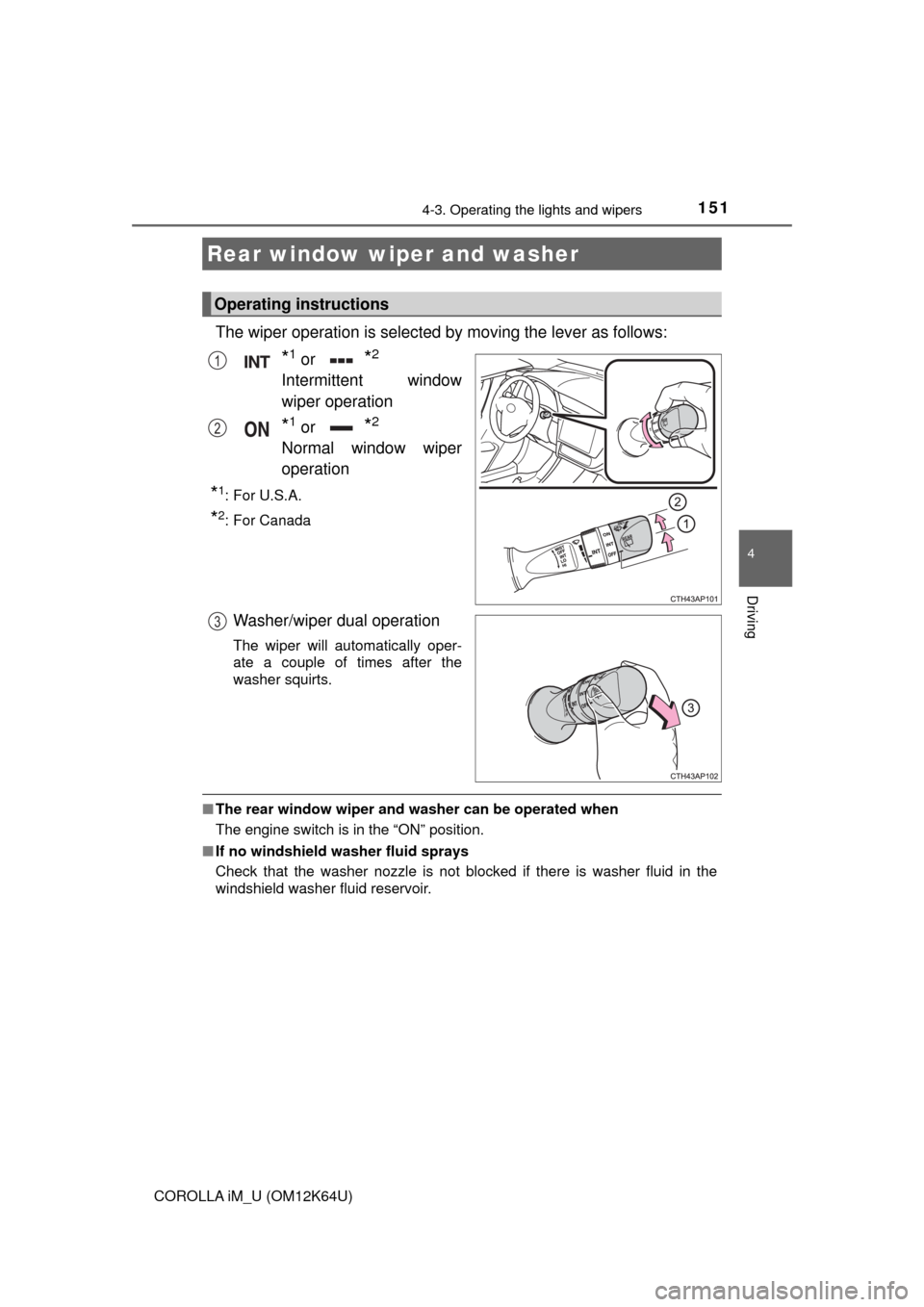
The wiper operation is selected by moving the lever as follows:
*1 or *2
Intermittent window
wiper operation
*1 or *2
Normal window wiper
operation
*1:For U.S.A.
*2: For Canada
Washer/wiper dual operation
The wiper will automatically oper-
ate a couple of times after the
washer squirts.
■The rear window wiper and washer can be operated when
The engine switch is in the “ON” position.
■If no windshield washer fluid sprays
Check that the washer nozzle is not blocked if there is washer fluid in the
windshield washer fluid reservoir.
Rear window wiper and washer
Operating instructions
1
2
3
Page 153 of 384
153
4
Driving
COROLLA iM_U (OM12K64U)
4-4. Refueling
●Turn the engine switch to the “LOCK” position and ensure that all
the doors and windows are closed.
●Confirm the type of fuel.
■Fuel types
→P. 333
■Fuel tank opening for unleaded gasoline
To help prevent incorrect fueling, your vehicle has a fuel tank opening that
only accommodates the special nozzle on unleaded fuel pumps.
Opening the fuel tank cap
Perform the following steps to open the fuel tank cap:
Before refueling the vehicle
Page 165 of 384

1654-5. Using the driving support systems
4
Driving
COROLLA iM_U (OM12K64U)
WARNING
●While driving, such as when driving through a railway crossing, the system
may determine that the possibility of a collision with an object, such as rail-
way crossing barrier, is high and operate the pre-collision braking function.
To move the vehicle in an emergency, such as if the system operates in a
railway crossing, perform the following operations and then take the nec-
essary measures to ensure your safety.
• If the vehicle has been stopped, depress the accelerator pedal.
• If the vehicle is decelerating, fully depress the accelerator pedal.
(→P. 167)
• Disable the pre-collision system. (→P. 166)
■When to disable the pre-collision system
In the following situations, disable the system, as it may not operate prop-
erly, possibly leading to an accident resulting in death or serious injury:
●When the vehicle is being towed
●When your vehicle is towing another vehicle
●When transporting the vehicle via truck, boat, train or similar means of
transportation
●When the vehicle is raised on a lift with the engine running on and the tires
are allowed to rotate freely
●When inspecting the vehicle using a drum tester such as a chassis dyna-
mometer or speedometer tester, or when using an on vehicle wheel bal-
ancer
●If the vehicle cannot be driven in a stable manner, such as when the vehi-
cle has been in an accident or is malfunctioning
●When the vehicle is driven in a sporty manner or off-road
●When the condition of the tires is poor and they do not perform well
(→P. 250, 262)
●When tires of a size other than specified are installed
●When tire chains are installed
●When a compact spare tire or an emergency tire puncture repair kit is used
Page 166 of 384
1664-5. Using the driving support systems
COROLLA iM_U (OM12K64U)■
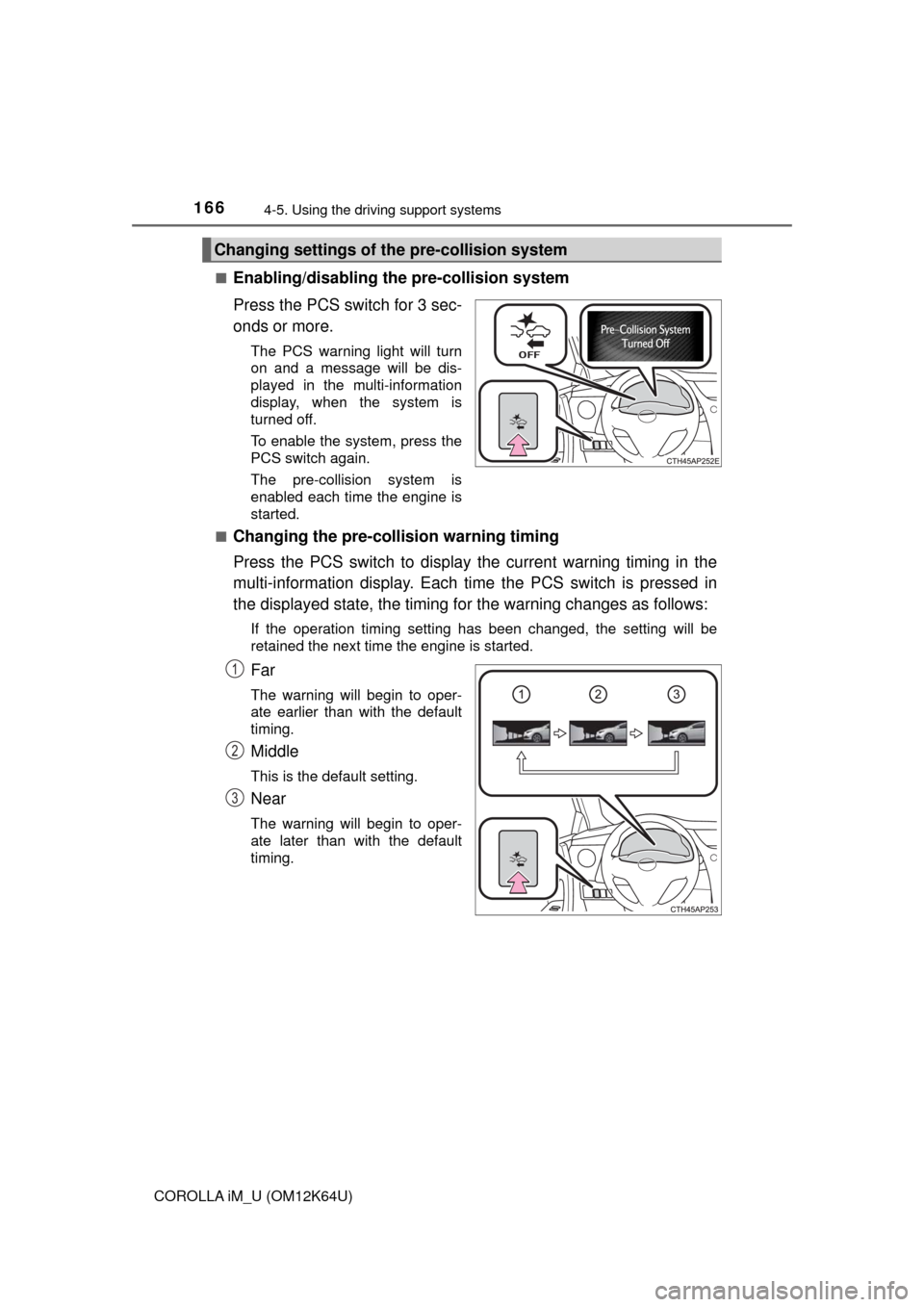
Enabling/disabling the pre-collision system
Press the PCS switch for 3 sec-
onds or more.
The PCS warning light will turn
on and a message will be dis-
played in the multi-information
display, when the system is
turned off.
To enable the system, press the
PCS switch again.
The pre-collision system is
enabled each time the engine is
started.
■
Changing the pre-collision warning timing
Press the PCS switch to display the current warning timing in the
multi-information display. Each time the PCS switch is pressed in
the displayed state, the timing for the warning changes as follows:
If the operation timing setting has been changed, the setting will be
retained the next time the engine is started.
Far
The warning will begin to oper-
ate earlier than with the default
timing.
Middle
This is the default setting.
Near
The warning will begin to oper-
ate later than with the default
timing.
Changing settings of the pre-collision system
1
2
3
Page 178 of 384
1784-5. Using the driving support systems
COROLLA iM_U (OM12K64U)
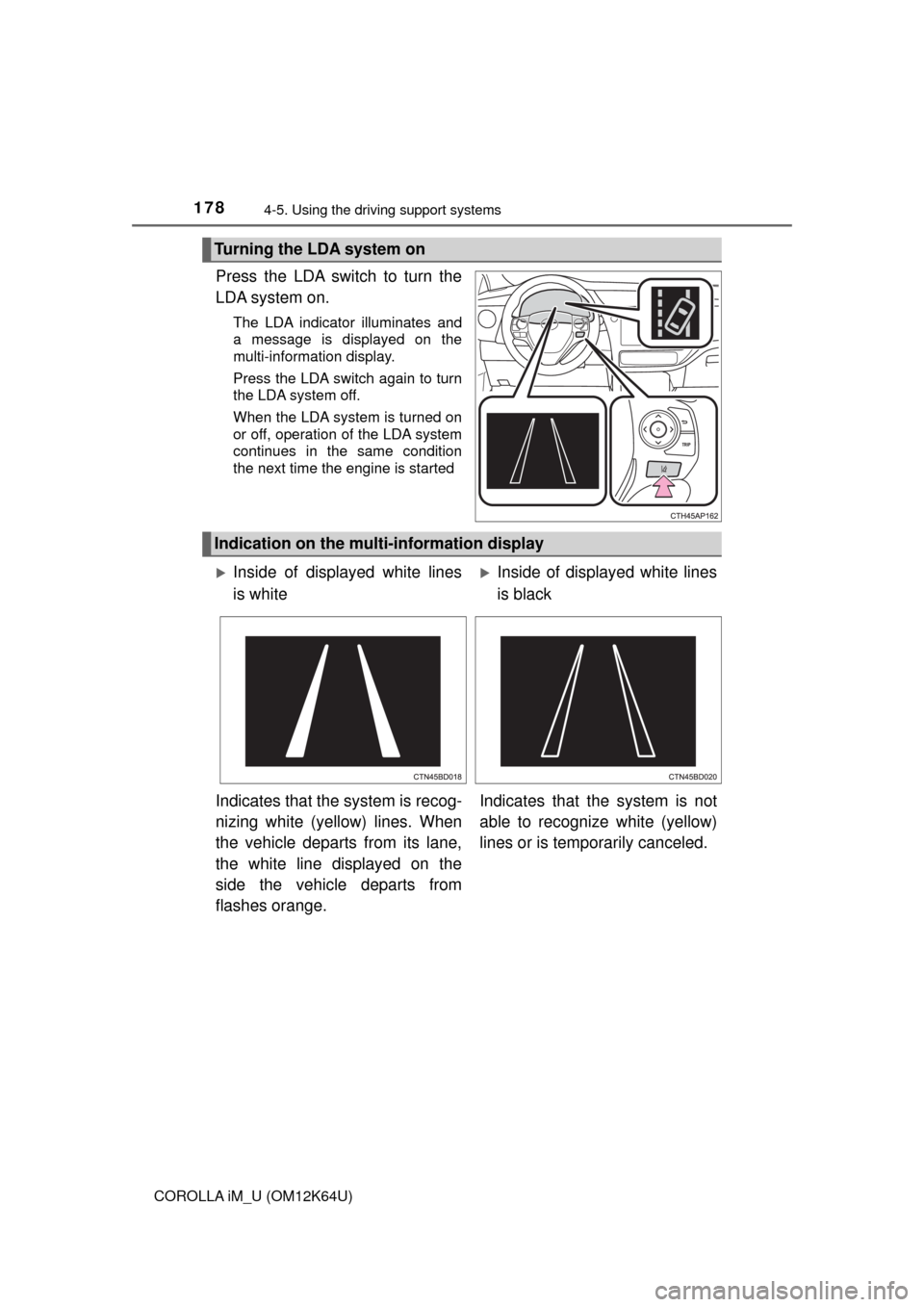
Press the LDA switch to turn the
LDA system on.
The LDA indicator illuminates and
a message is displayed on the
multi-information display.
Press the LDA switch again to turn
the LDA system off.
When the LDA system is turned on
or off, operation of the LDA system
continues in the same condition
the next time the engine is started
Turning the LDA system on
Indication on the multi-information display
Inside of displayed white lines
is whiteInside of displayed white lines
is black
Indicates that the system is recog-
nizing white (yellow) lines. When
the vehicle departs from its lane,
the white line displayed on the
side the vehicle departs from
flashes orange.Indicates that the system is not
able to recognize white (yellow)
lines or is temporarily canceled.
Page 187 of 384
1874-6. Using the driving support systems
4
Driving
COROLLA iM_U (OM12K64U)
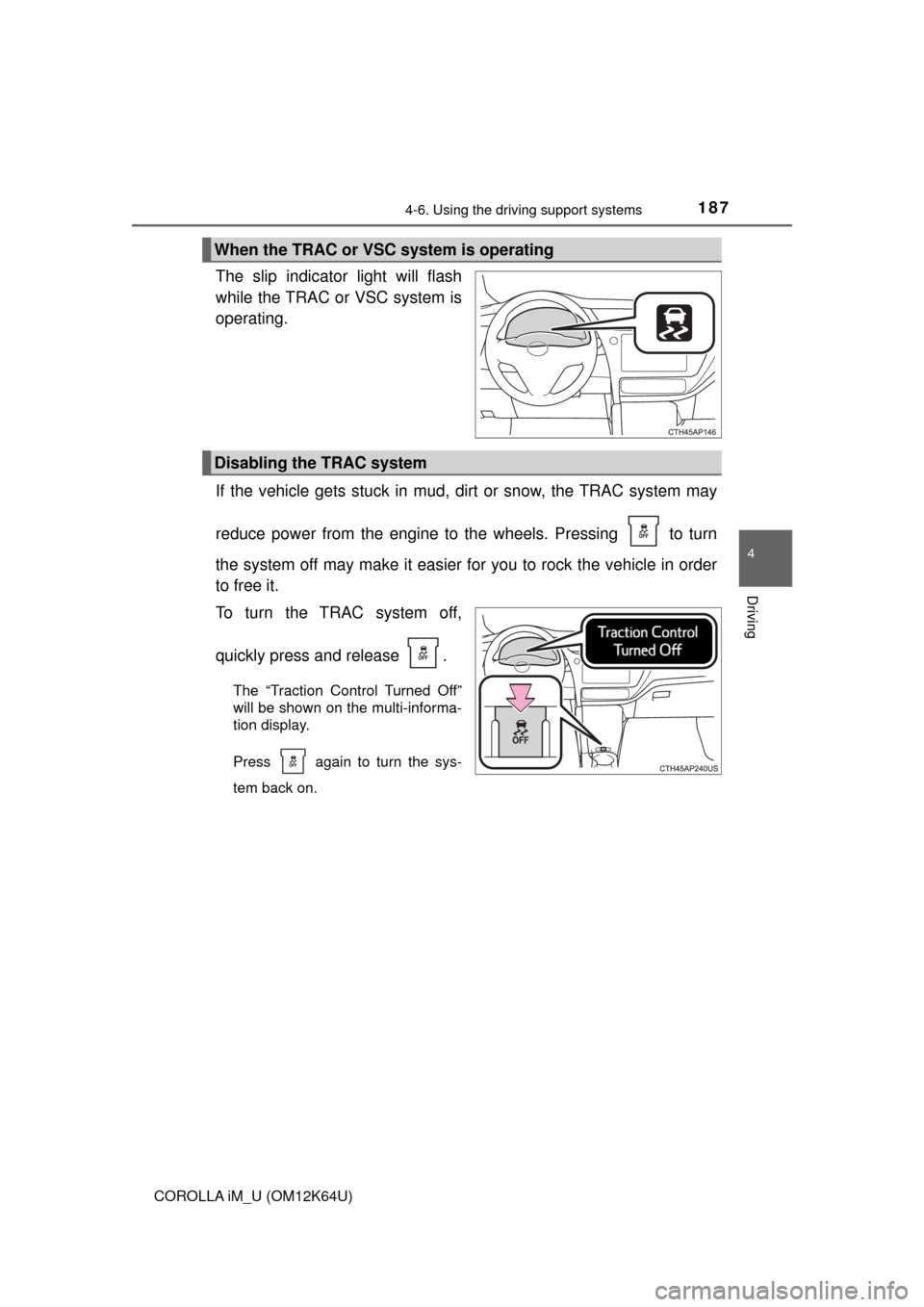
The slip indicator light will flash
while the TRAC or VSC system is
operating.
If the vehicle gets stuck in mud, dirt or snow, the TRAC system may
reduce power from the engine to the wheels. Pressing to turn
the system off may make it easier for you to rock the vehicle in order
to free it.
To turn the TRAC system off,
quickly press and release .
The “Traction Control Turned Off”
will be shown on the multi-informa-
tion display.
Press again to turn the sys-
tem back on.
When the TRAC or VSC system is operating
Disabling the TRAC system
Page 188 of 384
1884-6. Using the driving support systems
COROLLA iM_U (OM12K64U)
■Turning off both TRAC and VSC systems
To turn the TRAC and VSC systems off, press and hold for more than 3
seconds while the vehicle is stopped.
The VSC OFF indicator light will come on and the “Traction Control Turned
Off” will be shown on the multi-information display.
Press again to turn the systems back on.
■When the message is displayed on the multi-information display show-
ing that TRAC has been disabled even if has not been pressed
TRAC and hill-start assist control cannot be operated. Contact your Toyota
dealer.
■Sounds and vibrations caused by the ABS, brake assist, TRAC and VSC
systems
●A sound may be heard from the engine compartment when the engine is
started or just after the vehicle begins to move. This sound does not indicate
that a malfunction has occurred in any of these systems.
●Any of the following conditions may occur when the above systems are
operating. None of these indicates that a malfunction has occurred.
• Vibrations may be felt through the vehicle body and steering.
• A motor sound may be heard after the vehicle comes to a stop.
• The brake pedal may pulsate slightly after the ABS is activated.
• The brake pedal may move down slightly after the ABS is activated.
■EPS operation sound
When the steering wheel is operated, a motor sound (whirring sound) may be
heard. This does not indicate a malfunction.
■Automatic reactivation of TRAC and VSC systems
After turning the TRAC and VSC systems off, the systems will be automati-
cally re-enabled in the following situations:
●When the engine switch is turned to the “LOCK” position
●If only the TRAC system is turned off, the TRAC will turn on when vehicle
speed increases
If both the TRAC and VSC systems are turned off, automatic re-enabling will
not occur when vehicle speed increases.
■Reduced effectiveness of the EPS system
The effectiveness of the EPS system is reduced to prevent the system from
overheating when there is frequent steering input over an extended period of
time. The steering wheel may feel heavy as a result. Should this occur, refrain
from excessive steering input or stop the vehicle and turn the engine off. The
EPS system should return to normal within 10 minutes.
Page 192 of 384
192
COROLLA iM_U (OM12K64U)
4-7. Driving tips
●Use fluids that are appropriate to the prevailing outside tempera-
tures.
• Engine oil
• Engine coolant
• Washer fluid
●Have a service technician inspect the condition of the battery.
●Have the vehicle fitted with four snow tires.
Ensure that all tires are the same size and brand.
Perform the following according to the driving conditions:
●Do not try to forcibly open a window or move a wiper that is frozen.
Pour warm water over the frozen area to melt the ice. Wipe away
the water immediately to prevent it from freezing.
●To ensure proper operation of the climate control system fan,
remove any snow that has accumulated on the air inlet vents in
front of the windshield.
●Check for and remove any excess ice or snow that may have accu-
mulated on the exterior lights, vehicle’s roof, chassis, around the
tires or on the brakes.
●Remove any snow or mud from the bottom of your shoes before
getting in the vehicle.
Winter driving tips
Carry out the necessary preparations and inspections before
driving the vehicle in winter. Always drive the vehicle in a man-
ner appropriate to the prevailing weather conditions.
Preparation for winter
Before driving the vehicle