ECO mode TOYOTA COROLLA iM 2017 11.G Owners Manual
[x] Cancel search | Manufacturer: TOYOTA, Model Year: 2017, Model line: COROLLA iM, Model: TOYOTA COROLLA iM 2017 11.GPages: 384, PDF Size: 8.88 MB
Page 23 of 384
231-1. For safe use
1
For safety and security
COROLLA iM_U (OM12K64U)
WARNING
Observe the following precautions.
Failure to do so may cause the driver’s floor mat to slip, possibly interfering
with the pedals while driving. An unexpectedly high speed may result or it may
become difficult to stop the vehicle. This could lead to an accident, resulting in
death or serious injury.
■When installing the driver’s floor mat
●Do not use floor mats designed for other models or different model year
vehicles, even if they are Toyota Genuine floor mats.
●Only use floor mats designed for the driver’s seat.
●Always install the floor mat securely using the retaining hooks (clips) pro-
vided.
●Do not use two or more floor mats on top of each other.
●Do not place the floor mat bottom-side up or upside-down.
■Before driving
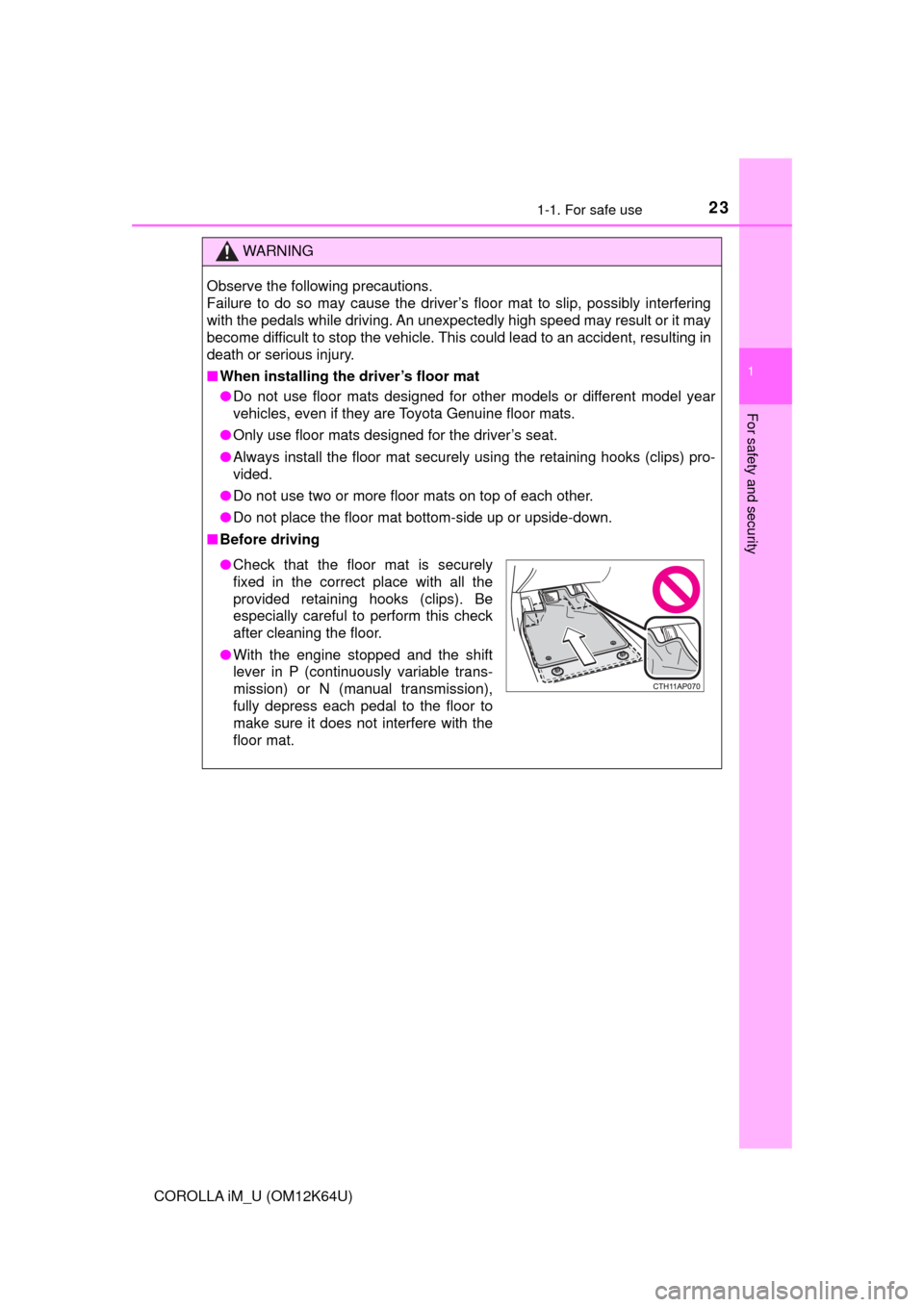
●Check that the floor mat is securely
fixed in the correct place with all the
provided retaining hooks (clips). Be
especially careful to perform this check
after cleaning the floor.
●With the engine stopped and the shift
lever in P (continuously variable trans-
mission) or N (manual transmission),
fully depress each pedal to the floor to
make sure it does not interfere with the
floor mat.
Page 72 of 384
722. Instrument cluster
COROLLA iM_U (OM12K64U)
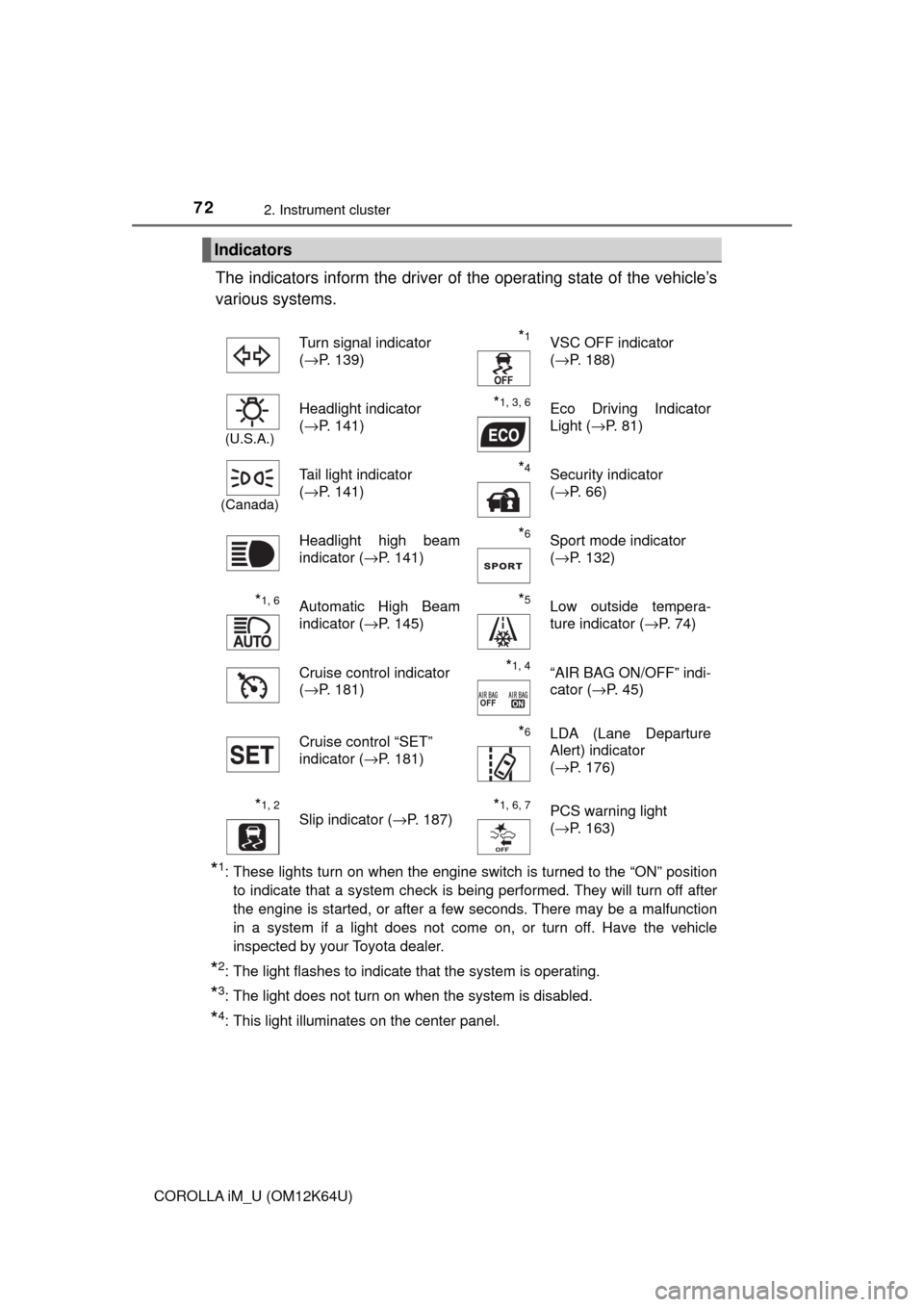
The indicators inform the driver of the operating state of the vehicle’s
various systems.
*1: These lights turn on when the engine switch is turned to the “ON” position
to indicate that a system check is being performed. They will turn off after
the engine is started, or after a few seconds. There may be a malfunction
in a system if a light does not come on, or turn off. Have the vehicle
inspected by your Toyota dealer.
*2: The light flashes to indicate that the system is operating.
*3: The light does not turn on when the system is disabled.
*4: This light illuminates on the center panel.
Indicators
Turn signal indicator
(→P. 139)*1VSC OFF indicator
(→P. 188)
(U.S.A.)
Headlight indicator
(→P. 141)*1, 3, 6Eco Driving Indicator
Light (→P. 81)
(Canada)
Tail light indicator
(→P. 141) *4Security indicator
(→P. 66)
Headlight high beam
indicator (→P. 141)
*6Sport mode indicator
(→P. 132)
*1, 6Automatic High Beam
indicator (→P. 145)*5Low outside tempera-
ture indicator (→P. 74)
Cruise control indicator
(→P. 181)
*1, 4“AIR BAG ON/OFF” indi-
cator (→P. 45)
Cruise control “SET”
indicator (→P. 181)
*6LDA (Lane Departure
Alert) indicator
(→P. 176)
*1, 2
Slip indicator (→P. 187)*1, 6, 7PCS warning light
(→P. 163)
Page 77 of 384
772. Instrument cluster
2
Instrument cluster
COROLLA iM_U (OM12K64U)
Settings display (→P. 80)
Select to change the meter display settings and other settings.
◆Changing the display
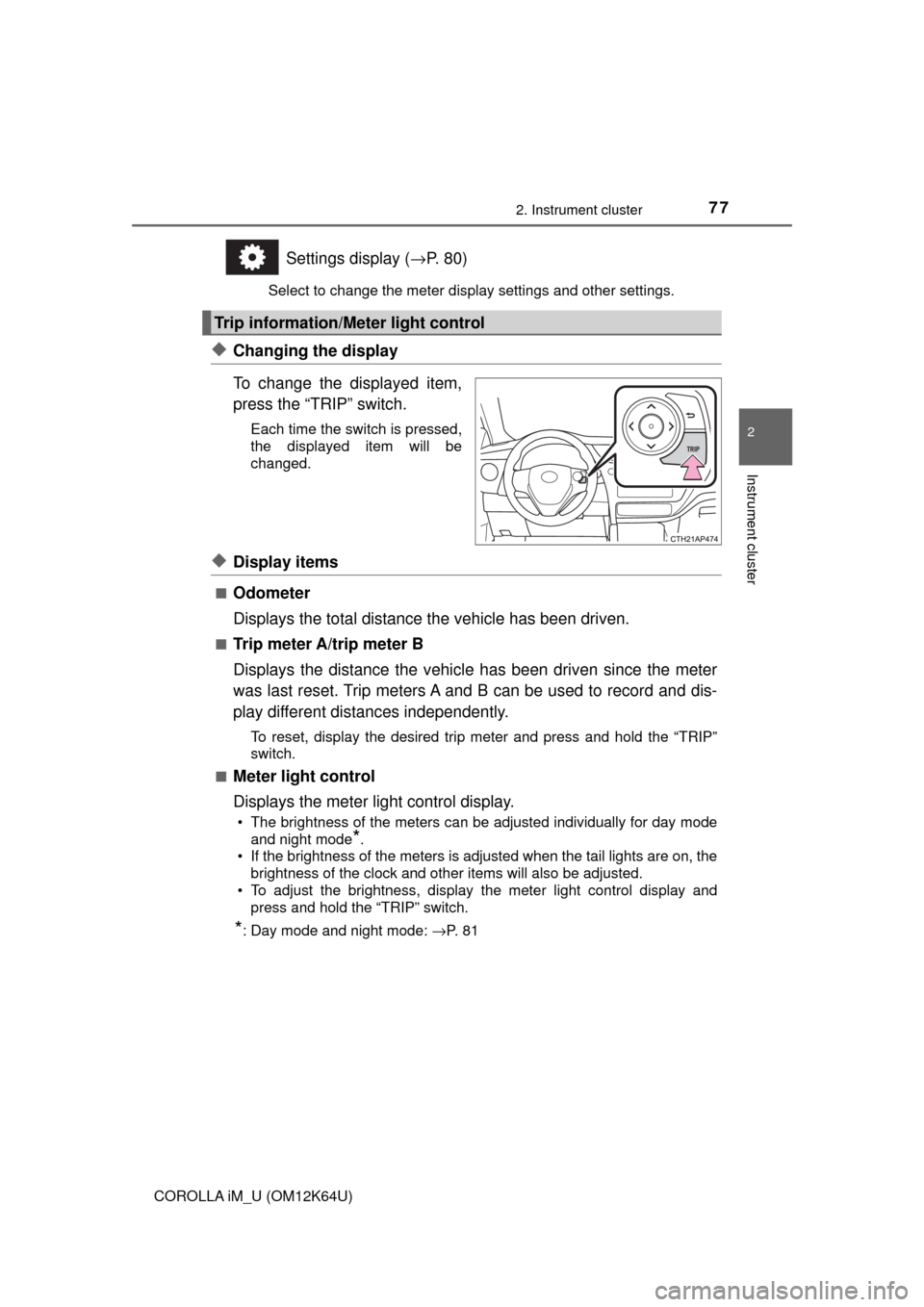
To change the displayed item,
press the “TRIP” switch.
Each time the switch is pressed,
the displayed item will be
changed.
◆Display items
■Odometer
Displays the total distance the vehicle has been driven.
■Trip meter A/trip meter B
Displays the distance the vehicle has been driven since the meter
was last reset. Trip meters A and B can be used to record and dis-
play different distances independently.
To reset, display the desired trip meter and press and hold the “TRIP”
switch.
■
Meter light control
Displays the meter light control display.
• The brightness of the meters can be adjusted individually for day mode
and night mode
*.
• If the brightness of the meters is adjusted when the tail lights are on, the
brightness of the clock and other items will also be adjusted.
• To adjust the brightness, display the meter light control display and
press and hold the “TRIP” switch.
*: Day mode and night mode: →P. 8 1
Trip information/Meter light control
Page 81 of 384
812. Instrument cluster
2
Instrument cluster
COROLLA iM_U (OM12K64U)
■Eco Driving Indicator (if equipped)
Eco Driving Indicator will not operate under the following conditions:
●The shift lever is in any position other than D.
●Sport mode is selected.
●The vehicle speed is approximately 80 mph (130 km/h) or higher.
■Brightness of the meters (day mode and night mode)
●The brightness of the meters are changed between day mode and night
mode.
• Day mode: When the tail lights are off or when the tail lights are on but
the surrounding area is bright
• Night mode: When the tail lights are on and the surrounding area is dark
●When in night mode, the brightness will be reduced slightly unless the
meters are set to the maximum brightness level.
■Suspension of the settings display
●While driving, the multi-information display cannot be changed to setting
mode. Before changing the settings, stop the vehicle in a safe place.
●In the following situations, operation of some of the settings display may be
temporarily suspended.
• When a warning message appears on the multi-information display
• When the vehicle begins to move
■When disconnecting and reconnecting battery terminals
The drive information data will be reset.
■Liquid crystal display
Small spots or light spots may appear on the display. This phenomenon is
characteristic of liquid crystal displays, and there is no problem continuing to
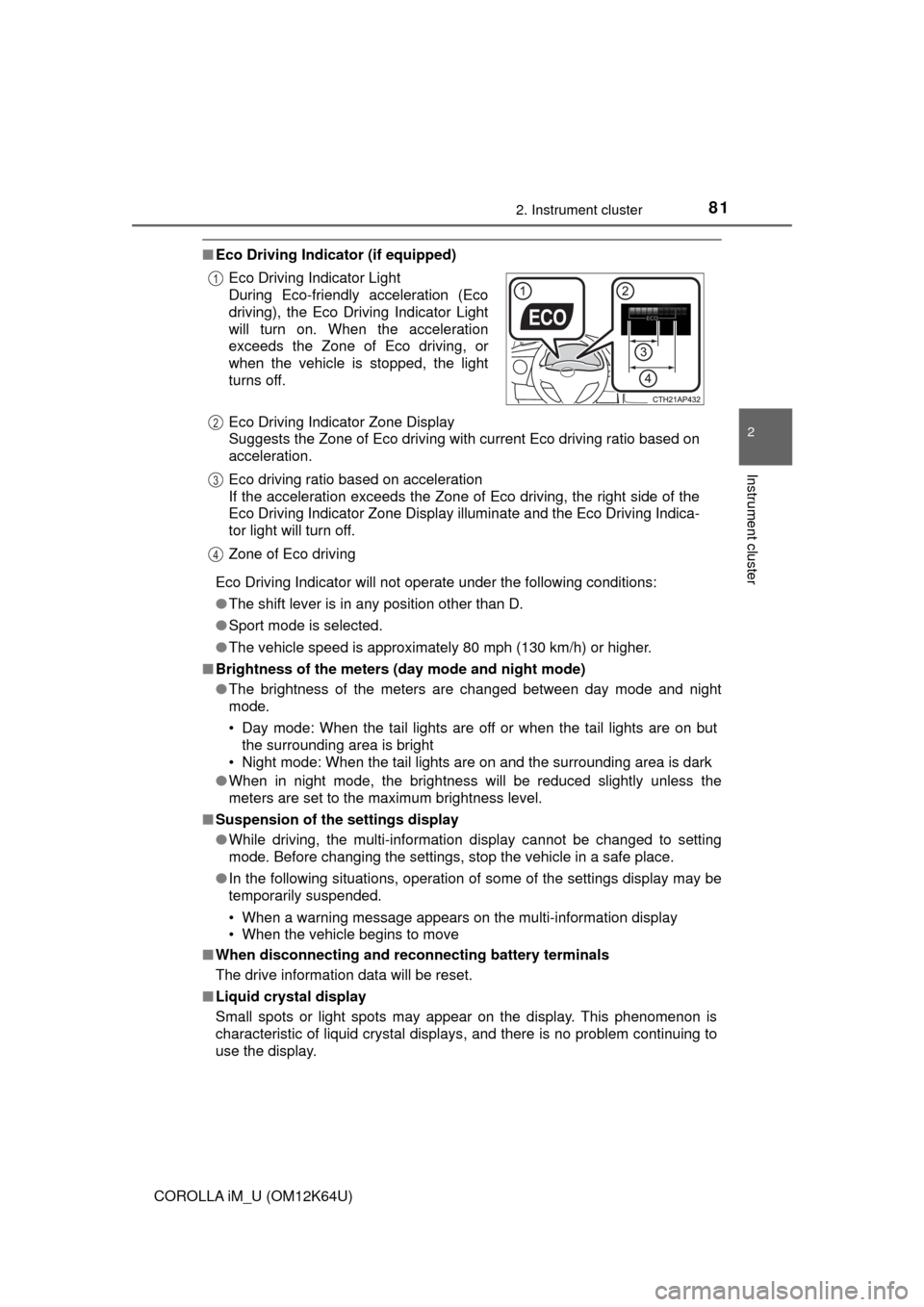
use the display. Eco Driving Indicator Light
During Eco-friendly acceleration (Eco
driving), the Eco Driving Indicator Light
will turn on. When the acceleration
exceeds the Zone of Eco driving, or
when the vehicle is stopped, the light
turns off.
Eco Driving Indicator Zone Display
Suggests the Zone of Eco driving with current Eco driving ratio based on
acceleration.
Eco driving ratio based on acceleration
If the acceleration exceeds the Zone of Eco driving, the right side of the
Eco Driving Indicator Zone Display illuminate and the Eco Driving Indica-
tor light will turn off.
Zone of Eco driving
1
2
3
4
Page 85 of 384
853-1. Key information
3
Operation of each component
COROLLA iM_U (OM12K64U)
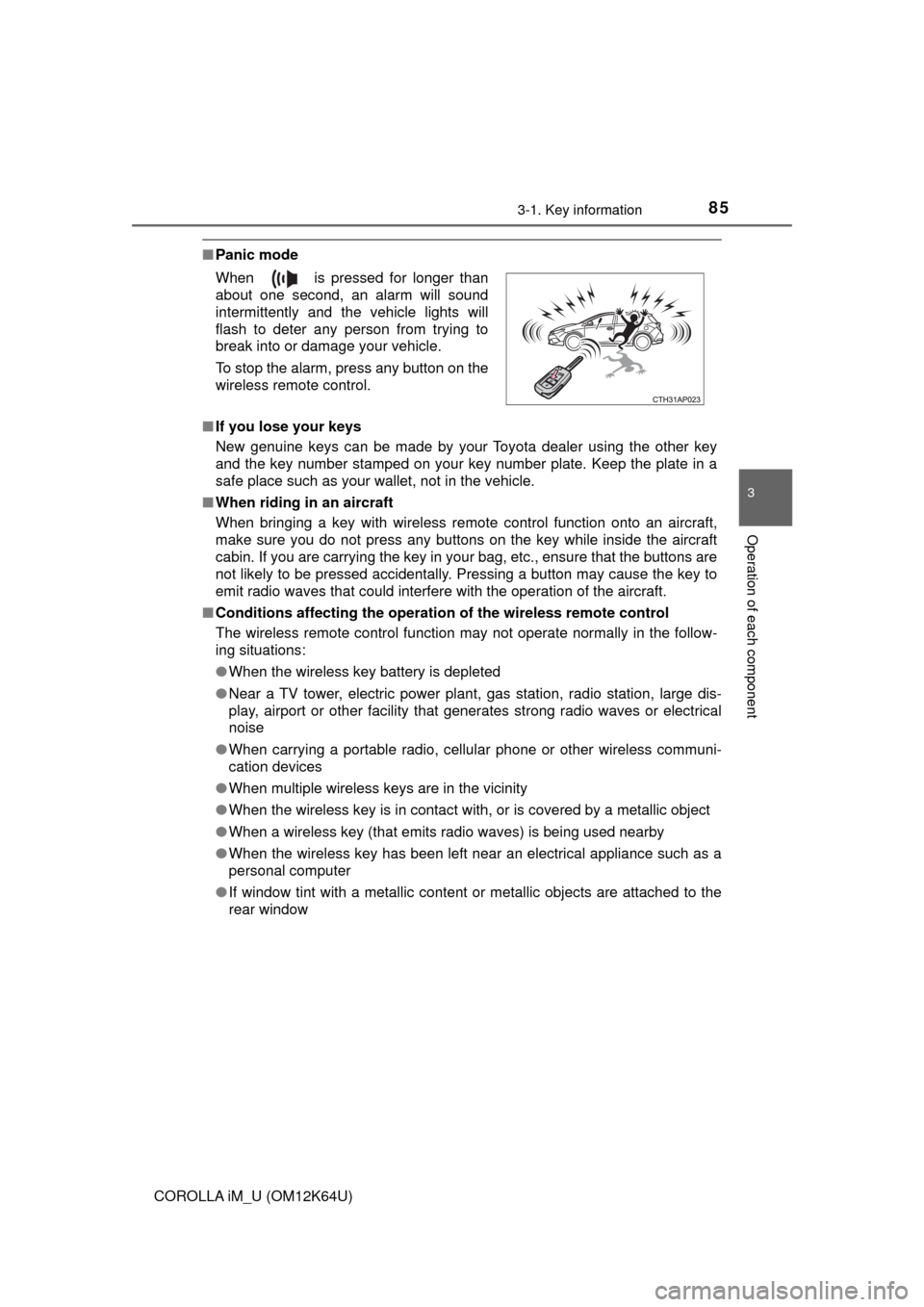
■Panic mode
■If you lose your keys
New genuine keys can be made by your Toyota dealer using the other key
and the key number stamped on your key number plate. Keep the plate in a
safe place such as your wallet, not in the vehicle.
■When riding in an aircraft
When bringing a key with wireless remote control function onto an aircraft,
make sure you do not press any buttons on the key while inside the aircraft
cabin. If you are carrying the key in your bag, etc., ensure that the buttons are
not likely to be pressed accidentally. Pressing a button may cause the key to
emit radio waves that could interfere with the operation of the aircraft.
■Conditions affecting the operation of the wireless remote control
The wireless remote control function may not operate normally in the follow-
ing situations:
●When the wireless key battery is depleted
●Near a TV tower, electric power plant, gas station, radio station, large dis-
play, airport or other facility that generates strong radio waves or electrical
noise
●When carrying a portable radio, cellular phone or other wireless communi-
cation devices
●When multiple wireless keys are in the vicinity
●When the wireless key is in contact with, or is covered by a metallic object
●When a wireless key (that emits radio waves) is being used nearby
●When the wireless key has been left near an electrical appliance such as a
personal computer
●If window tint with a metallic content or metallic objects are attached to the
rear window When is pressed for longer than
about one second, an alarm will sound
intermittently and the vehicle lights will
flash to deter any person from trying to
break into or damage your vehicle.
To stop the alarm, press any button on the
wireless remote control.
Page 112 of 384

1124-1. Before driving
COROLLA iM_U (OM12K64U)
■When starting off on an uphill
The hill-start assist control will activate. (→P. 186)
■Driving in the rain
●Drive carefully when it is raining, because visibility will be reduced, the win-
dows may become fogged-up, and the road will be slippery.
●Drive carefully when it starts to rain, because the road surface will be espe-
cially slippery.
●Refrain from high speeds when driving on an expressway in the rain,
because there may be a layer of water between the tires and the road sur-
face, preventing the steering and brakes from operating properly.
■Engine speed while driving (vehicles with a continuously variable trans-
mission)
In the following conditions, the engine speed may become high while driving.
This is due to automatic up-shifting control or down-shifting implementation to
meet driving conditions. It does not indicate sudden acceleration.
●The vehicle is judged to be driving uphill or downhill
●When the accelerator pedal is released
●When the brake pedal is depressed while sport mode is selected
●When the brake pedal is depressed suddenly and vehicle speed is reduced
sharply
■Breaking in your new Toyota
To extend the life of the vehicle, observing the following precautions is recom-
mended:
●For the first 186 miles (300 km):
Avoid sudden stops.
●For the first 621 miles (1000 km):
• Do not drive at extremely high speeds.
• Avoid sudden acceleration.
• Do not drive continuously in low gears.
• Do not drive at a constant speed for extended periods.
■Operating your vehicle in a foreign country
Comply with the relevant vehicle registration laws and confirm the availability
of the correct fuel. (→P. 326)
WARNING
Observe the following precautions.
Failure to do so may result in death or serious injury.
■When starting the vehicle (vehicles with a continuously variable trans-
mission)
Always keep your foot on the brake pedal while stopped with the engine
running. This prevents the vehicle from creeping.
Page 202 of 384
2025-1. Using the air conditioning system and defogger
COROLLA iM_U (OM12K64U)■Ventilation and air conditioning odors
●To let fresh air in, set the air conditioning system to the outside air mode.
●During use, various odors from inside and outside the vehicle may enter into
and accumulate in the air conditioning system. This may then cause odor to
be emitted from the vents.
●To reduce potential odors from occurring:
• It is recommended that the air conditioning system be set to outside air
mode prior to turning the vehicle off.
• The start timing of the blower may be delayed for a short period of time
immediately after the air conditioning system is started in automatic
mode.
■Air conditioning filter
→P. 265
■Customization
Settings (e.g. air conditioning setting) can be changed.
(Customizable features →P. 349)
WARNING
■To prevent the windshield from fogging up
●Do not use during cool air operation in extremely humid weather.
The difference between the temperature of the outside air and that of the
windshield can cause the outer surface of the windshield to fog up, block-
ing your vision.
■To prevent burns
Do not touch the rear view mirror surfaces when the outside rear view mirror
defoggers are on.
NOTICE
■To prevent battery discharge
Do not leave the air conditioning system on longer than necessary when the
engine is stopped.
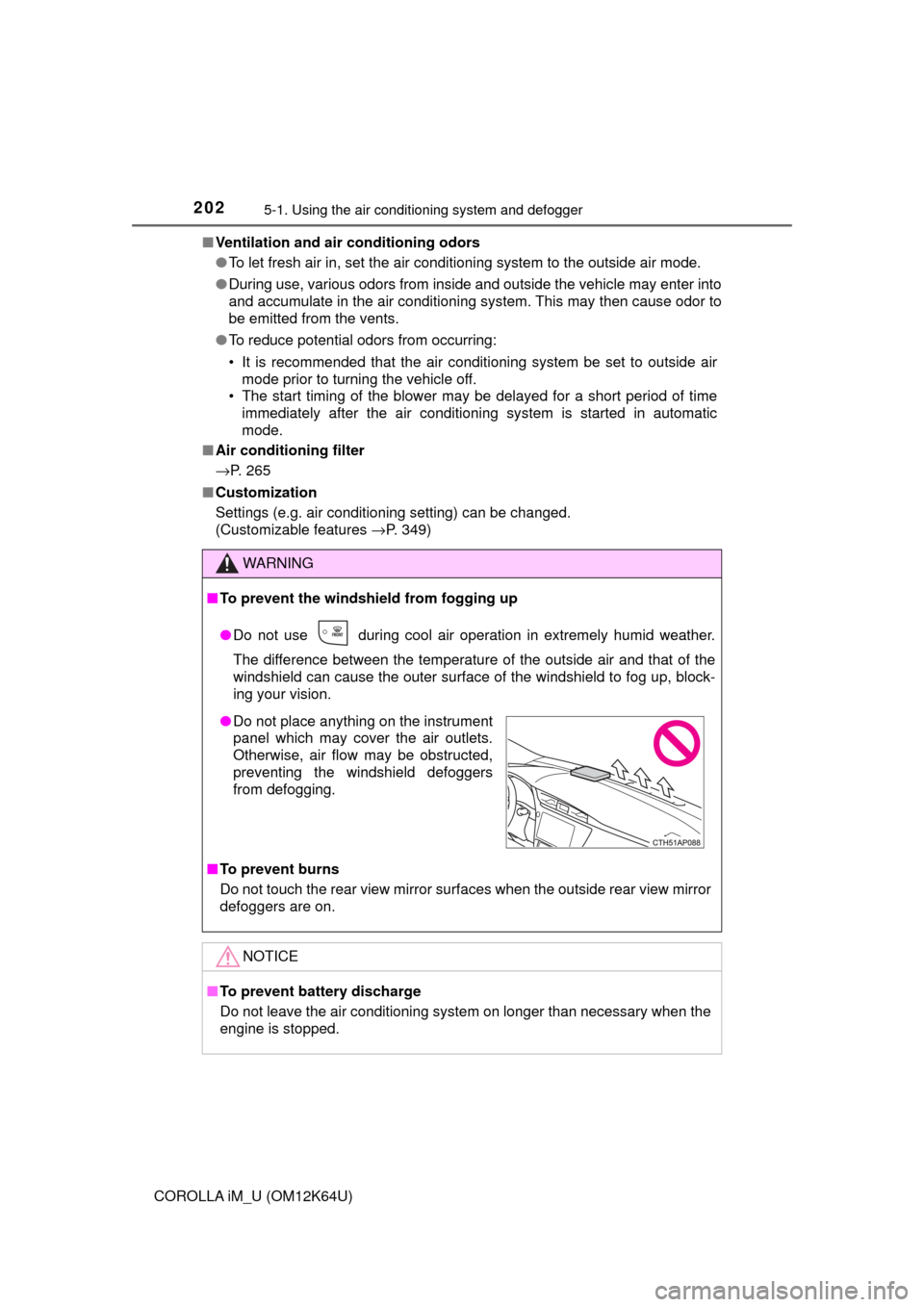
●Do not place anything on the instrument
panel which may cover the air outlets.
Otherwise, air flow may be obstructed,
preventing the windshield defoggers
from defogging.
Page 258 of 384

2586-3. Do-it-yourself maintenance
COROLLA iM_U (OM12K64U)
WARNING
■When inspecting or replacing tires
Observe the following precautions to prevent accidents.
Failure to do so may cause damage to parts of the drive train as well as
dangerous handling characteristics, which may lead to an accident
resulting in death or serious injury.
●Do not mix tires of different makes, models or tread patterns.
Also, do not mix tires of remarkably different treadwear.
●Do not use tire sizes other than those recommended by Toyota.
●Do not mix differently constructed tires (radial, bias-belted or bias-ply
tires).
●Do not mix summer, all season and snow tires.
●Do not use tires that have been used on another vehicle.
Do not use tires if you do not know how they were used previously.
●Do not tow if your vehicle has a compact spare tire installed.
■When initializing the tire pressure warning system
Do not operate the tire pressure warning reset switch without first
adjusting the tire inflation pressure to the specified level. Otherwise, the
tire pressure warning light may not come on even if the tire inflation
pressure is low, or it may come on when the tire inflation pressure is
actually normal.
Page 351 of 384
3518-2. Customization
8
Vehicle specifications
COROLLA iM_U (OM12K64U)■
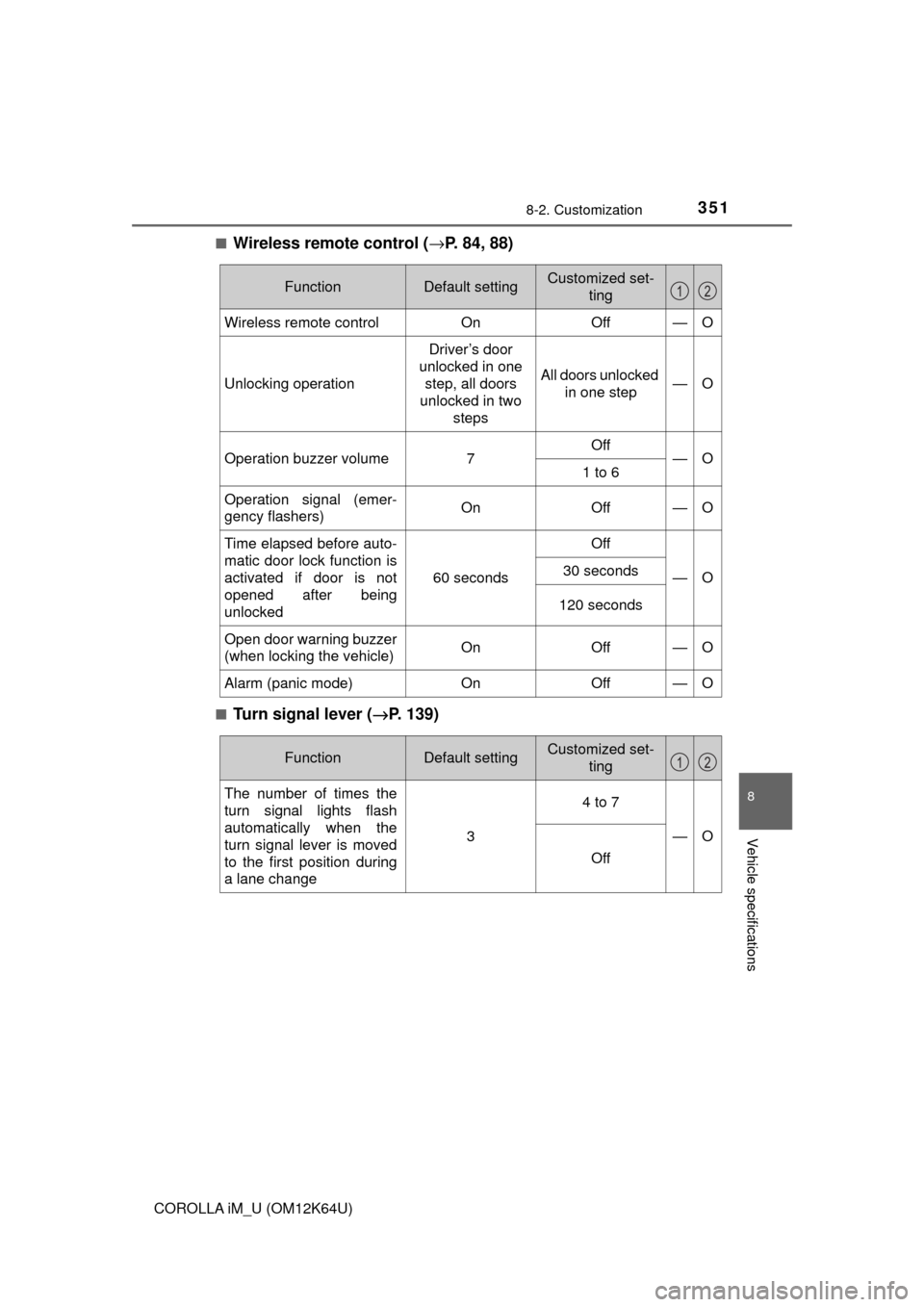
Wireless remote control (→P. 84, 88)
■Turn signal lever (→P. 139)
FunctionDefault settingCustomized set-
ting
Wireless remote controlOnOff—O
Unlocking operation
Driver’s door
unlocked in one
step, all doors
unlocked in two
steps
All doors unlocked
in one step—O
Operation buzzer volume7Off—O1 to 6
Operation signal (emer-
gency flashers)OnOff—O
Time elapsed before auto-
matic door lock function is
activated if door is not
opened after being
unlocked
60 seconds
Off
—O30 seconds
120 seconds
Open door warning buzzer
(when locking the vehicle)OnOff—O
Alarm (panic mode)OnOff—O
12
FunctionDefault settingCustomized set-
ting
The number of times the
turn signal lights flash
automatically when the
turn signal lever is moved
to the first position during
a lane change
3
4 to 7
—O
Off
12
Page 381 of 384

381Alphabetical index
COROLLA iM_U (OM12K64U)
Shift lever ......................... 131, 137
Continuously variable
transmission ....................... 131
If the shift lever cannot
be shifted from P ................ 135
Manual transmission ............. 137
Shift lock system ..................... 134
Side airbags ............................... 33
Side marker lights ................... 141
Light switch ........................... 141
Replacing light bulbs............. 275
Wattage ................................ 332
Side mirrors ............................. 104
Adjusting and folding ............ 104
Side turn signal lights ............. 139
Replacing light bulbs............. 280
Turn signal lever ................... 139
Wattage ................................ 332
Snow tires ................................ 193
Spare tire .................................. 303
Inflation pressure .................. 331
Storage location .................... 304
Spark plug ................................ 328
Specifications .......................... 324
Speedometer .............................. 74
Steering lock
Column lock release ............. 129
Steering wheel ......................... 101
Adjustment ............................ 101
Audio switches ...................... 218
Stop lights
Replacing light bulbs............. 277
Wattage ................................ 332
Storage feature ........................ 206
Stuck
If the vehicle becomes
stuck ................................... 321
Sun visors ................................ 215Switches
Audio remote control
switches ............................. 218
Cruise control switch ............ 181
Door lock switches.................. 89
Emergency flashers
switch ................................. 282
Engine switch ....................... 128
Ignition switch ....................... 128
LDA (Lane Departure Alert)
switch ................................. 178
Light switches ....................... 141
Meter control switches ............ 78
Outside rear view mirror
switches ............................. 104
PCS (Pre-Collision system)
switch ................................. 166
Power door lock switch ........... 89
Power window switches........ 106
Rear window and outside
rear view mirror
defoggers switch ................ 199
Sport mode switch ................ 132
Talk switch ............................ 218
Telephone
switches ............................. 218
Tire pressure warning reset
switch ................................. 252
“TRIP” switch .......................... 77
VSC OFF switch ................... 187
Window lock switch .............. 106
Windshield wiper and
washer switch..................... 149