audio TOYOTA COROLLA iM 2017 11.G Owners Manual
[x] Cancel search | Manufacturer: TOYOTA, Model Year: 2017, Model line: COROLLA iM, Model: TOYOTA COROLLA iM 2017 11.GPages: 384, PDF Size: 8.88 MB
Page 4 of 384

TABLE OF CONTENTS4
COROLLA iM_U (OM12K64U)5-1. Using the air conditioning
system and defogger
Automatic air
conditioning system ........ 196
5-2. Using the interior lights
Interior lights list ................ 203
• Front interior light/front
personal lights............... 204
• Rear interior light .......... 205
• Vanity lights .................. 205
5-3. Using the storage
features
List of storage features...... 206
• Glove box...................... 207
• Console box .................. 207
• Bottle holders ................ 208
• Cup holders .................. 209
• Auxiliary boxes .............. 210
Luggage compartment
features ........................... 211
5-4. Other interior features
Other interior features ....... 215
• Sun visors ..................... 215
• Vanity mirrors................ 215
• Clock ............................. 215
• Power outlet .................. 216
• Armrest ......................... 216
• Assist grips ................... 217
• Using the AUX port/
USB port ....................... 217
• Steering wheel audio
switches ........................ 218
• Using the microphone ... 2186-1. Maintenance and care
Cleaning and protecting
the vehicle exterior .......... 220
Cleaning and protecting
the vehicle interior ........... 223
6-2. Maintenance
Maintenance
requirements ................... 226
General maintenance ........ 228
Emission inspection and
maintenance (I/M)
programs ......................... 232
6-3. Do-it-yourself
maintenance
Do-it-yourself service
precautions ...................... 233
Hood .................................. 235
Positioning a floor jack....... 237
Engine compartment ......... 238
Tires................................... 250
Tire inflation pressure ........ 260
Wheels............................... 263
Air conditioning filter .......... 265
Wireless remote control
battery ............................. 267
Checking and replacing
fuses ................................ 269
Light bulbs ......................... 272
5Interior features6Maintenance and care
Page 17 of 384
17Pictorial index
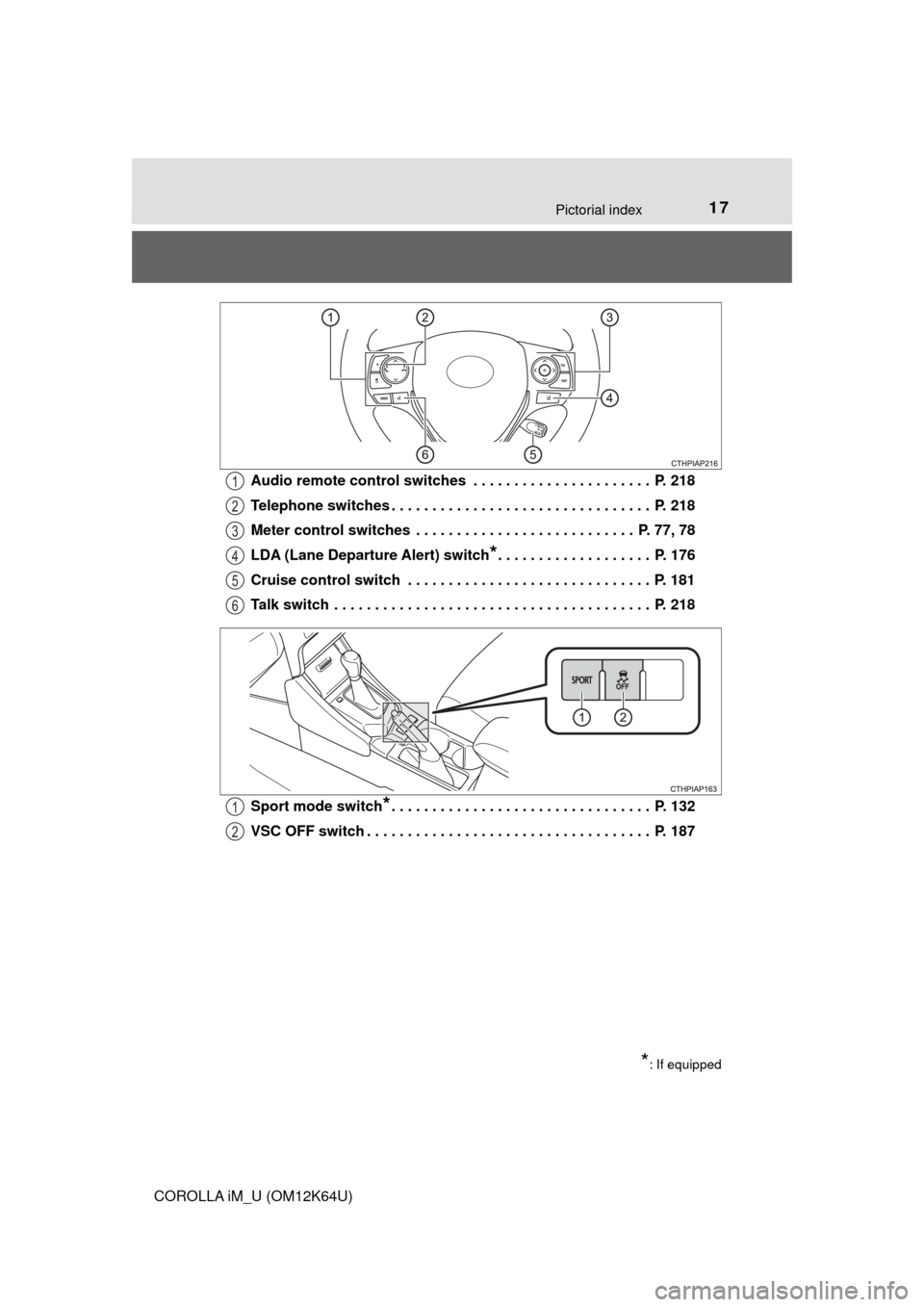
COROLLA iM_U (OM12K64U)Audio remote control switches . . . . . . . . . . . . . . . . . . . . . . P. 218
Telephone switches . . . . . . . . . . . . . . . . . . . . . . . . . . . . . . . . P. 218
Meter control switches . . . . . . . . . . . . . . . . . . . . . . . . . . . P. 77, 78
LDA (Lane Departure Alert) switch
*. . . . . . . . . . . . . . . . . . . P. 176
Cruise control switch . . . . . . . . . . . . . . . . . . . . . . . . . . . . . . P. 181
Talk switch . . . . . . . . . . . . . . . . . . . . . . . . . . . . . . . . . . . . . . . P. 218
Sport mode switch
*. . . . . . . . . . . . . . . . . . . . . . . . . . . . . . . . P. 132
VSC OFF switch . . . . . . . . . . . . . . . . . . . . . . . . . . . . . . . . . . . P. 187
1
2
3
4
5
6
*: If equipped
1
2
Page 126 of 384
1264-1. Before driving
COROLLA iM_U (OM12K64U)
To prevent damage to your vehicle, perform the following procedure
before towing.
Shift the shift lever to N.
Turn the engine switch to the “ACC” position. (→P. 128)
Ensure that the audio system and other powered devices are turned off.
Release the parking brake.
After towing, start the engine and let it idle for at least 3 minutes before
driving the vehicle.
■Necessary equipment and accessories
Specialized equipment and accessories are required for dinghy towing. Con-
tact the service branch of the motor home manufacturer regarding recom-
mended equipment.
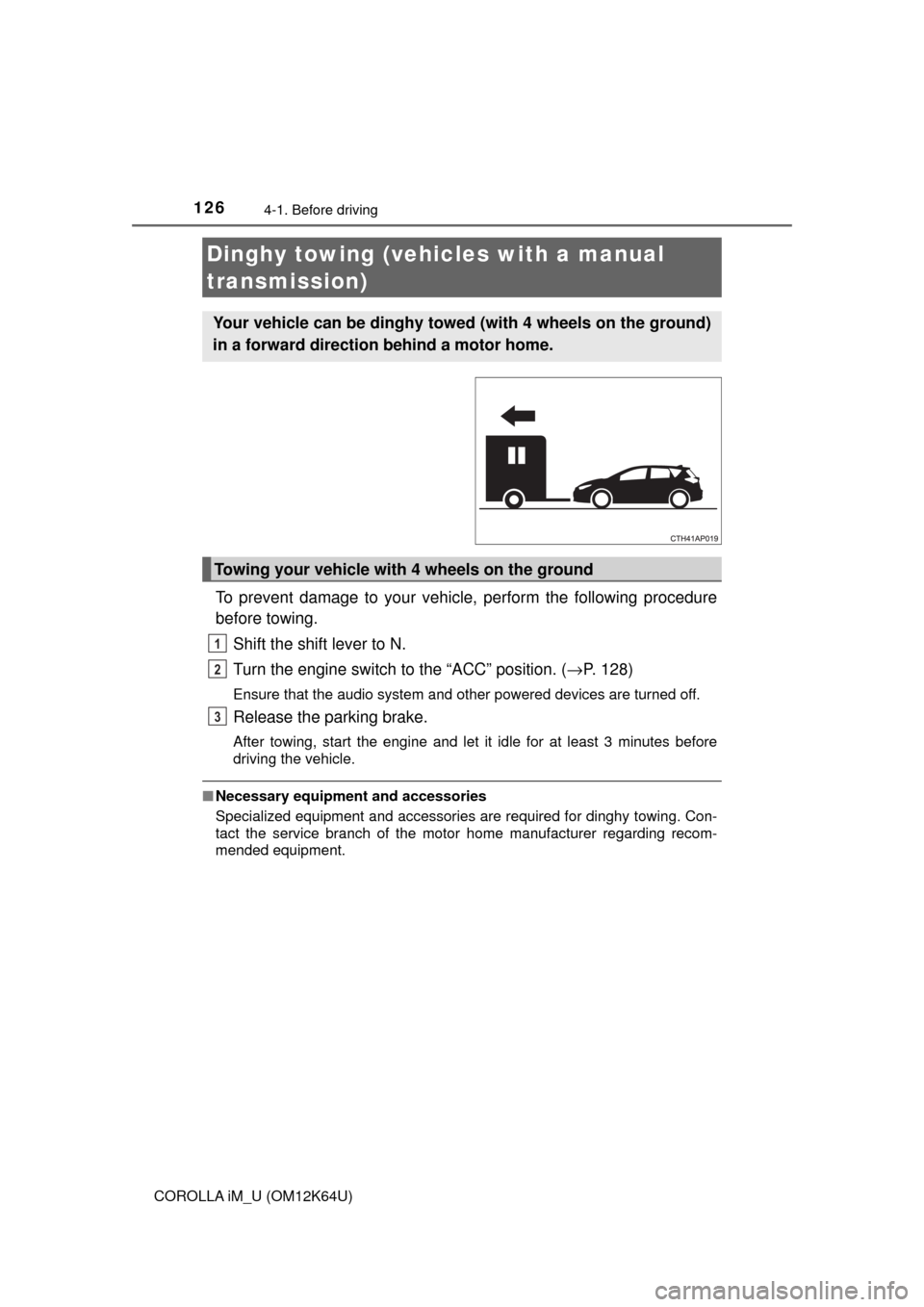
Dinghy towing (vehicles with a manual
transmission)
Your vehicle can be dinghy towed (with 4 wheels on the ground)
in a forward direction behind a motor home.
Towing your vehicle with 4 wheels on the ground
1
2
3
Page 179 of 384

1794-5. Using the driving support systems
4
Driving
COROLLA iM_U (OM12K64U)
■Operation conditions
This function operates when all of the following conditions are met.
●LDA is turned on.
●Vehicle speed is approximately 32 mph (50 km/h) or more.
●System recognizes white (yellow) lines.
●Width of traffic lane is approximately 9.8 ft. (3 m) or more.
●Turn signal lever is not operated.
●Vehicle is driven on a straight road or around a gentle curve with a radius of
more than approximately 492 ft. (150 m).
●No system malfunctions are detected. (→P. 292)
■Temporary cancellation of functions
When operation conditions are no longer met, a function may be temporarily
canceled. However, when the operation conditions are met again, operation
of the function is automatically restored.
■Lane departure alert function
The warning buzzer may be difficult to hear due to external noise, audio play-
back, etc.
■White (yellow) lines are only on one side of road
The LDA system will not operate for the side on which white (yellow) lines
could not be recognized.
■After the vehicle has been parked in the sun
The LDA system may not be available and a warning message may be dis-
played for a while after starting off. When the temperature in the cabin
decreases and the temperature around the front sensor (→P. 159) becomes
suitable for its operation, the system will begin to operate.
■If there are lane markers on only one side of the vehicle
The lane departure warning will not operate for the side on which lane mark-
ers could not be recognized.
Page 195 of 384
195
5Interior features
COROLLA iM_U (OM12K64U)5-1. Using the air conditioning
system and defogger
Automatic air conditioning
system............................. 196
5-2. Using the interior lights
Interior lights list ................ 203
• Front interior light/front
personal lights............... 204
• Rear interior light .......... 205
• Vanity lights .................. 205
5-3. Using the storage features
List of storage features ..... 206
• Glove box...................... 207
• Console box .................. 207
• Bottle holders ................ 208
• Cup holders .................. 209
• Auxiliary boxes.............. 210
Luggage compartment
features ........................... 2115-4. Other interior features
Other interior features ....... 215
• Sun visors ..................... 215
• Vanity mirrors................ 215
• Clock ............................. 215
• Power outlet .................. 216
• Armrest ......................... 216
• Assist grips ................... 217
• Using the AUX port/
USB port ....................... 217
• Steering wheel audio
switches ........................ 218
• Using the microphone ... 218
Page 217 of 384
2175-4. Other interior features
5
Interior features
COROLLA iM_U (OM12K64U)
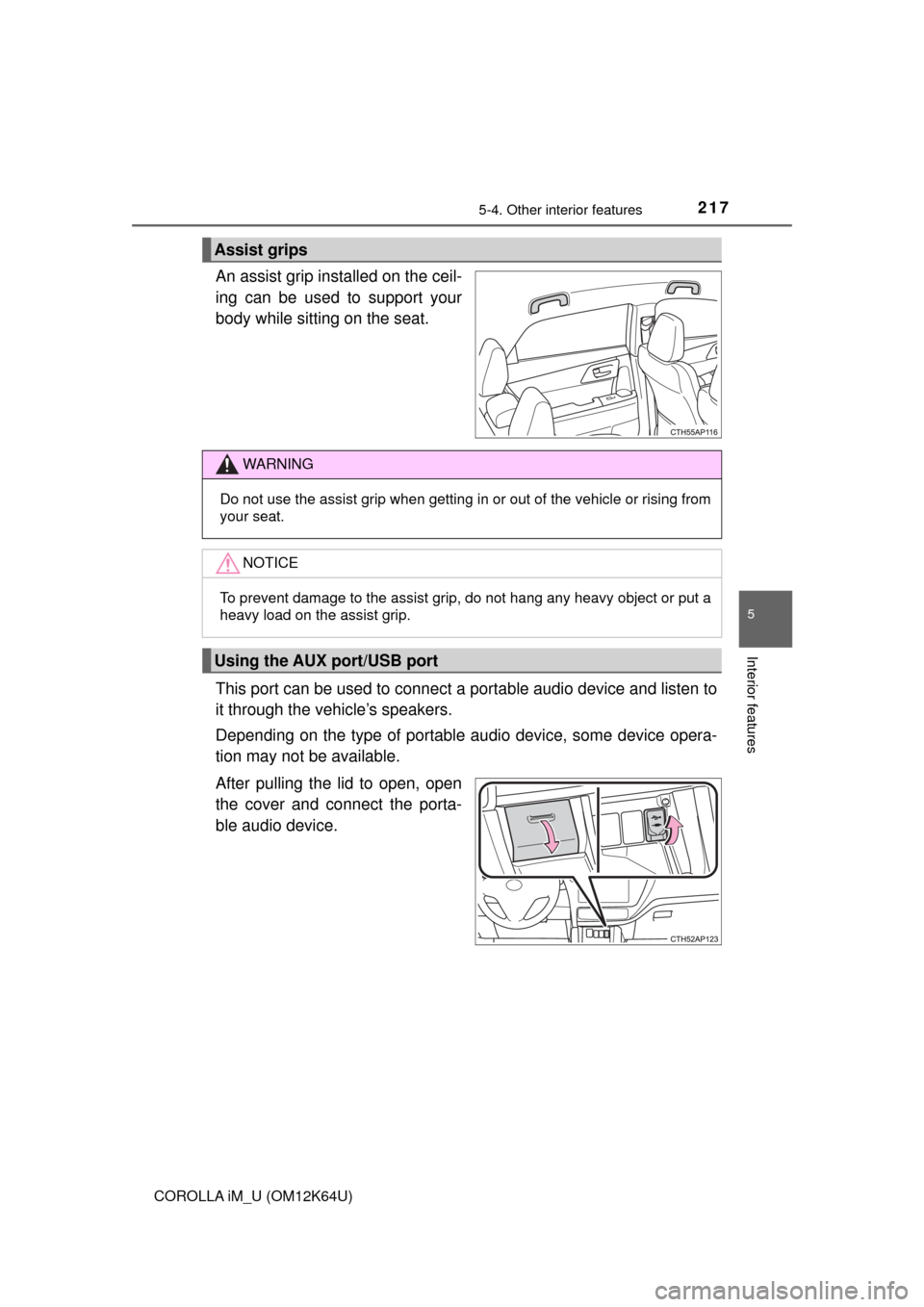
An assist grip installed on the ceil-
ing can be used to support your
body while sitting on the seat.
This port can be used to connect a portable audio device and listen to
it through the vehicle’s speakers.
Depending on the type of portable audio device, some device opera-
tion may not be available.
After pulling the lid to open, open
the cover and connect the porta-
ble audio device.
Assist grips
WARNING
Do not use the assist grip when getting in or out of the vehicle or rising from
your seat.
NOTICE
To prevent damage to the assist grip, do not hang any heavy object or put a
heavy load on the assist grip.
Using the AUX port/USB port
Page 218 of 384
2185-4. Other interior features
COROLLA iM_U (OM12K64U)
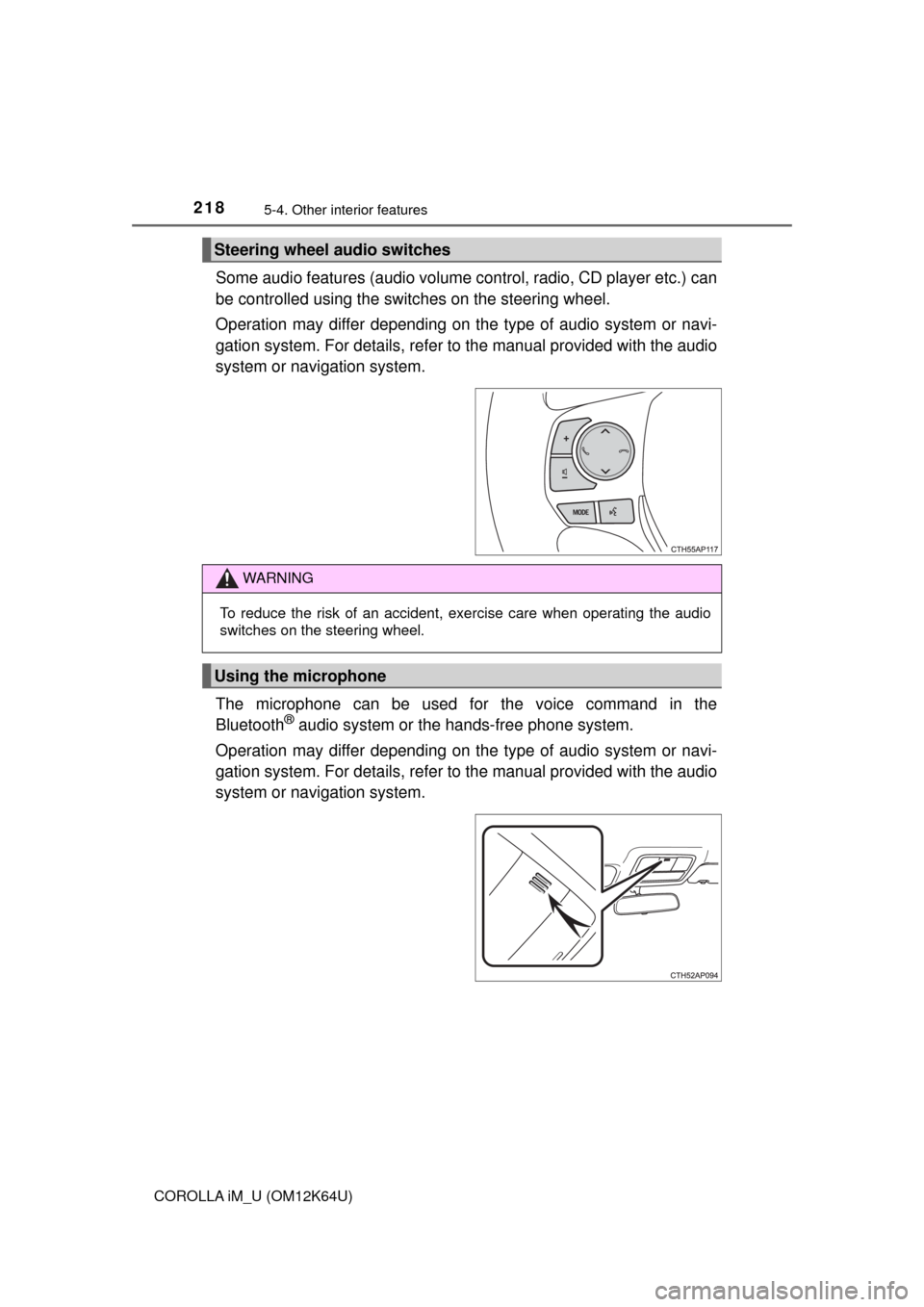
Some audio features (audio volume control, radio, CD player etc.) can
be controlled using the switches on the steering wheel.
Operation may differ depending on the type of audio system or navi-
gation system. For details, refer to the manual provided with the audio
system or navigation system.
The microphone can be used for the voice command in the
Bluetooth
® audio system or the hands-free phone system.
Operation may differ depending on the type of audio system or navi-
gation system. For details, refer to the manual provided with the audio
system or navigation system.
Steering wheel audio switches
WARNING
To reduce the risk of an accident, exercise care when operating the audio
switches on the steering wheel.
Using the microphone
Page 225 of 384
2256-1. Maintenance and care
6
Maintenance and care
COROLLA iM_U (OM12K64U)
NOTICE
■Cleaning detergents
●Do not use the following types of detergent, as they may discolor the vehi-
cle interior or cause streaks or damage to painted surfaces:
• Non-seat portions: Organic substances such as benzene or gasoline,
alkaline or acidic solutions, dye, and bleach
• Seats: Alkaline or acidic solutions, such as thinner, benzene, and alco-
hol
●Do not use polish wax or polish cleaner. The instrument panel’s or other
interior part’s painted surface may be damaged.
■Preventing damage to leather surfaces
Observe the following precautions to avoid damage to and deterioration of
leather surfaces:
●Remove any dust or dirt from leather surfaces immediately.
●Do not expose the vehicle to direct sunlight for extended periods of time.
Park the vehicle in the shade, especially during summer.
●Do not place items made of vinyl, plastic, or containing wax on the uphol-
stery, as they may stick to the leather surface if the vehicle interior heats
up significantly.
■Water on the floor
Do not wash the vehicle floor with water.
Vehicle systems such as the audio system may be damaged if water comes
into contact with electrical components such as the audio system above or
under the floor of the vehicle. Water may also cause the body to rust.
■Cleaning the inside of the rear window
●Do not use glass cleaner to clean the rear window, as this may cause
damage to the rear window defogger heater wires. Use a cloth dampened
with lukewarm water to gently wipe the window clean. Wipe the window in
strokes running parallel to the heater wires.
●Be careful not to scratch or damage the heater wires.
Page 297 of 384
2977-2. Steps to take in an emergency
7
When trouble arises
COROLLA iM_U (OM12K64U)■
When the tire pressure warning light comes on
Inspect the tires to check if a tire is punctured.
If a tire is punctured: →P. 303
If none of the tires are punctured:
Turn the engine switch off then turn it to the “ON” position. Check if the
tire pressure warning light comes on or flashes.
If the tire pressure warning light comes on
After the temperature of the tires has lowered sufficiently, check the
inflation pressure of each tire and adjust them to the specified level.
If the warning light does not turn off even after several minutes have
elapsed, check that the inflation pressure of each tire is at the specified
level and perform initialization. (→P. 252)
If the warning light does not turn off even after several minutes have
elapsed, have the vehicle inspected by your Toyota dealer immediately.
If the tire pressure warning light flashes for 1 minute then stays on
There may be a malfunction in the tire pressure warning system. Have
the vehicle inspected by your Toyota dealer immediately.
■The tire pressure warning light may come on due to natural causes
The tire pressure warning light may come on due to natural causes such
as natural air leaks and tire inflation pressure changes caused by tem-
perature. In this case, adjusting the tire inflation pressure will turn off the
warning light (after a few minutes).
■When a tire is replaced with a spare tire
The compact spare tire is not equipped with a tire pressure warning valve
and transmitter. If a tire goes flat, the tire pressure warning light will not
turn off even though the flat tire has been replaced with the spare tire.
Replace the spare tire with the repaired tire and adjust the tire inflation
pressure. The tire pressure warning light will go off after a few minutes.
■Conditions that the tire pressure warning system may not function
properly
→P. 2 5 5
■Warning buzzer
In some cases, the buzzer may not be heard because of noisy place or an
audio sound.
■Electric power steering system warning light (warning buzzer)
When the battery charge becomes insufficient or the voltage temporarily
drops, the electric power steering system warning light may come on and the
warning buzzer may sound.
1
2
Page 302 of 384
3027-2. Steps to take in an emergency
COROLLA iM_U (OM12K64U)
Take the appropriate actions as instructed in the message displayed.
If any of the following messages are displayed, also refer to this
Owner’s Manual.
■If “Front Camera Systems Unavailable Wait a Moment” or
“Front Camera Systems Unavailable Clean Windshield” is dis-
played (if equipped)
The following systems may be suspended until the problem shown
in the message is resolved.
●PCS (Pre-Collision system)
●LDA (Lane Departure Alert)
●Automatic High Beam
■If “Maintenance Required Soon” is displayed (U.S.A. only)
Indicates that all maintenance according to the driven distance on
the maintenance schedule
* should be performed soon.
Comes on approximately 4500 miles (7200 km) after the message
has been reset.
If necessary, perform maintenance.
*: Refer to the separate “Scheduled Maintenance Guide” or “Owner’s Manual
Supplement” for the maintenance interval applicable to your vehicle.
■
If “Maintenance Required Visit Your Dealer” is displayed
(U.S.A. only)
Indicates that all maintenance is required to correspond to the
driven distance on the maintenance schedule
*.
Comes on approximately 5000 miles (8000 km) after the message
has been reset.
(The indicator will not work properly unless the message has been
reset.)
Perform the necessary maintenance. Please reset the message
after the maintenance is performed. (→P. 227)
*: Refer to the separate “Scheduled Maintenance Guide” or “Owner’s Manual
Supplement” for the maintenance interval applicable to your vehicle.
■Warning buzzer
In some cases, the buzzer may not be heard because of noisy place or an
audio sound.
Other messages displayed on the multi-information display