reset TOYOTA COROLLA iM 2017 11.G Owners Manual
[x] Cancel search | Manufacturer: TOYOTA, Model Year: 2017, Model line: COROLLA iM, Model: TOYOTA COROLLA iM 2017 11.GPages: 384, PDF Size: 8.88 MB
Page 15 of 384
15Pictorial index
COROLLA iM_U (OM12K64U)Multi-information display . . . . . . . . . . . . . . . . . . . . . . . . . . . . P. 76
If a warning messages or indicator is displayed . . . . . . . . . . . P. 300
Parking brake . . . . . . . . . . . . . . . . . . . . . . . . . . . . . . . . . . . . . P. 140
Applying/releasing . . . . . . . . . . . . . . . . . . . . . . . . . . . . . . . . . . P. 140
Precautions for winter . . . . . . . . . . . . . . . . . . . . . . . . . . . . . . . P. 193
Warning buzzer/message . . . . . . . . . . . . . . . . . . . . . . . . . . . . P. 300
Turn signal lever . . . . . . . . . . . . . . . . . . . . . . . . . . . . . . . . . . P. 139
Headlight switch . . . . . . . . . . . . . . . . . . . . . . . . . . . . . . . . . . P. 141
Headlights/front parking lights/tail lights/
daytime running lights . . . . . . . . . . . . . . . . . . . . . . . . . . . . . . . P. 141
Windshield wiper and washer switch . . . . . . . . . . . . . . . . . P. 149
Usage . . . . . . . . . . . . . . . . . . . . . . . . . . . . . . . . . . . . . . . . . . . P. 149
Adding washer fluid . . . . . . . . . . . . . . . . . . . . . . . . . . . . . . . . . P. 249
Warning messages . . . . . . . . . . . . . . . . . . . . . . . . . . . . . . . . . P. 249
Emergency flasher switch . . . . . . . . . . . . . . . . . . . . . . . . . . P. 282
Hood lock release lever. . . . . . . . . . . . . . . . . . . . . . . . . . . . . P. 235
Tilt and telescopic steering lock release lever . . . . . . . . . . P. 101
Adjustment . . . . . . . . . . . . . . . . . . . . . . . . . . . . . . . . . . . . . . . . P. 101
Air conditioning system . . . . . . . . . . . . . . . . . . . . . . . . . . . . P. 196
Usage . . . . . . . . . . . . . . . . . . . . . . . . . . . . . . . . . . . . . . . . . . . P. 196
Rear window defogger . . . . . . . . . . . . . . . . . . . . . . . . . . . . . . . P. 199
Tire pressure warning reset switch . . . . . . . . . . . . . . . . . . . P. 252
*: Vehicles with a continuously variable transmission
4
5
6
7
8
9
10
11
12
Page 77 of 384
772. Instrument cluster
2
Instrument cluster
COROLLA iM_U (OM12K64U)
Settings display (→P. 80)
Select to change the meter display settings and other settings.
◆Changing the display
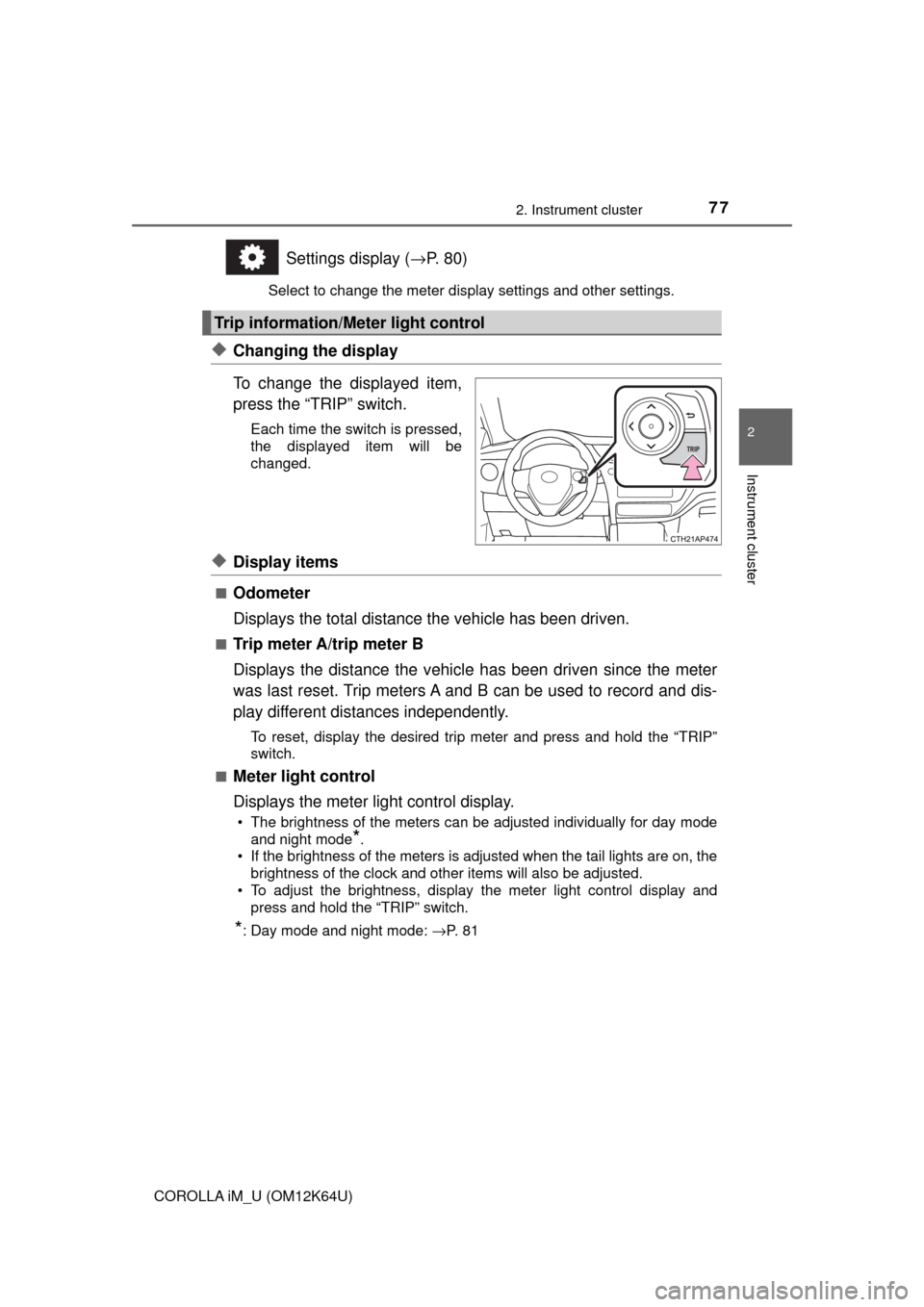
To change the displayed item,
press the “TRIP” switch.
Each time the switch is pressed,
the displayed item will be
changed.
◆Display items
■Odometer
Displays the total distance the vehicle has been driven.
■Trip meter A/trip meter B
Displays the distance the vehicle has been driven since the meter
was last reset. Trip meters A and B can be used to record and dis-
play different distances independently.
To reset, display the desired trip meter and press and hold the “TRIP”
switch.
■
Meter light control
Displays the meter light control display.
• The brightness of the meters can be adjusted individually for day mode
and night mode
*.
• If the brightness of the meters is adjusted when the tail lights are on, the
brightness of the clock and other items will also be adjusted.
• To adjust the brightness, display the meter light control display and
press and hold the “TRIP” switch.
*: Day mode and night mode: →P. 8 1
Trip information/Meter light control
Page 78 of 384
782. Instrument cluster
COROLLA iM_U (OM12K64U)
◆Operating the meter control switches
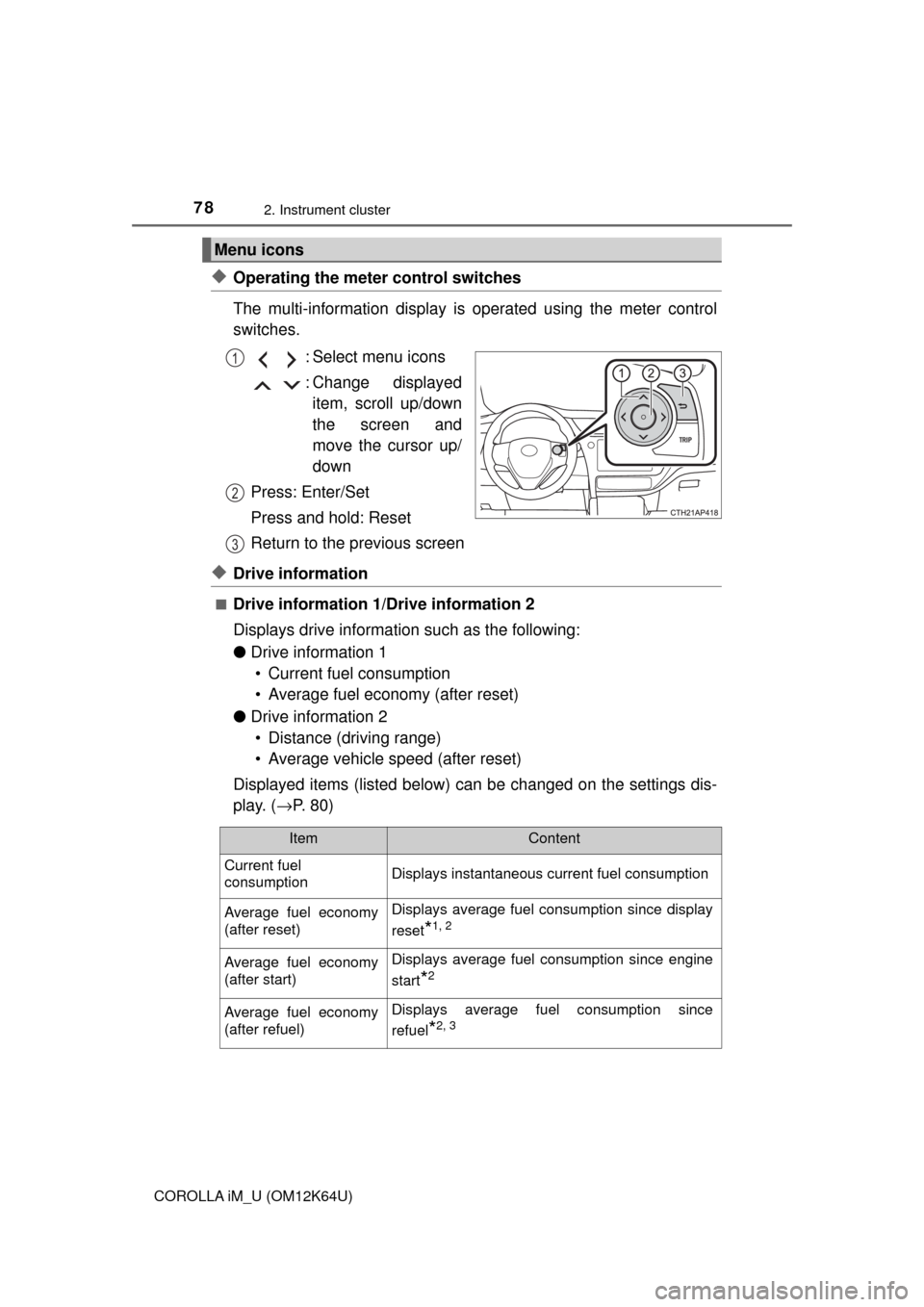
The multi-information display is operated using the meter control
switches.
: Select menu icons
: Change displayed
item, scroll up/down
the screen and
move the cursor up/
down
Press: Enter/Set
Press and hold: Reset
Return to the previous screen
◆Drive information
■Drive information 1/Drive information 2
Displays drive information such as the following:
●Drive information 1
• Current fuel consumption
• Average fuel economy (after reset)
●Drive information 2
• Distance (driving range)
• Average vehicle speed (after reset)
Displayed items (listed below) can be changed on the settings dis-
play. (→P. 80)
Menu icons
1
2
3
ItemContent
Current fuel
consumptionDisplays instantaneous current fuel consumption
Average fuel economy
(after reset)Displays average fuel consumption since display
reset
*1, 2
Average fuel economy
(after start)Displays average fuel consumption since engine
start
*2
Average fuel economy
(after refuel)Displays average fuel consumption since
refuel
*2, 3
Page 79 of 384
792. Instrument cluster
2
Instrument cluster
COROLLA iM_U (OM12K64U)
*1: To reset, display the desired item and press and hold switch. If both
displayed items are resettable, a reset selection screen will appear.
*2: Use the displayed fuel consumption as a reference.
*3: When only a small amount of fuel is added to the tank, the display may not
be updated.
When refueling, turn the engine switch off. If the vehicle is refueled without
turning the engine switch off, the display may not be updated.
*4: This distance is computed based on your average fuel consumption. As a
result, the actual distance that can be driven may differ from that dis-
played.
■
Eco Driving Indicator (if equipped)
→P. 8 1
■Blank (No items)
Displays no drive information items.
Average vehicle speed
(after reset)Displays average vehicle speed since display
reset
*1
Average vehicle speed
(after start)Displays average vehicle speed since engine
start
Elapsed time
(after reset)Displays elapsed time since display reset*1
Elapsed time
(after start)Displays elapsed time since engine start
Distance
(driving range)Displays driving range with remaining fuel*3, 4
Distance
(after start)Displays drive distance since vehicle start
BlankNo item
ItemContent
Page 80 of 384

802. Instrument cluster
COROLLA iM_U (OM12K64U)
◆Settings display
■LDA (Lane Departure Alert) warning sensitivity (if equipped)
LDA warning sensitivity can be set to 2 different levels.
■Eco Driving Indicator Light (if equipped)
Select to activate/deactivate the Eco Driving Indicator Light.
■Language
Select to change the language on the display.
■Units
Select to change the units of measure displayed on the multi-infor-
mation display.
■Drive information 1/Drive information 2
Select to select up to 2 items that will be displayed on the Drive
information 1 screen and Drive information 2 screen respectively.
(→P. 78)
■Scheduled Maintenance (U.S.A. only)
Select to reset the message indicating maintenance is required
after the required maintenance is performed. (→P. 227)
■Initialize Display
Select to reset the meter display settings. (→P. 350)
Page 81 of 384
812. Instrument cluster
2
Instrument cluster
COROLLA iM_U (OM12K64U)
■Eco Driving Indicator (if equipped)
Eco Driving Indicator will not operate under the following conditions:
●The shift lever is in any position other than D.
●Sport mode is selected.
●The vehicle speed is approximately 80 mph (130 km/h) or higher.
■Brightness of the meters (day mode and night mode)
●The brightness of the meters are changed between day mode and night
mode.
• Day mode: When the tail lights are off or when the tail lights are on but
the surrounding area is bright
• Night mode: When the tail lights are on and the surrounding area is dark
●When in night mode, the brightness will be reduced slightly unless the
meters are set to the maximum brightness level.
■Suspension of the settings display
●While driving, the multi-information display cannot be changed to setting
mode. Before changing the settings, stop the vehicle in a safe place.
●In the following situations, operation of some of the settings display may be
temporarily suspended.
• When a warning message appears on the multi-information display
• When the vehicle begins to move
■When disconnecting and reconnecting battery terminals
The drive information data will be reset.
■Liquid crystal display
Small spots or light spots may appear on the display. This phenomenon is
characteristic of liquid crystal displays, and there is no problem continuing to
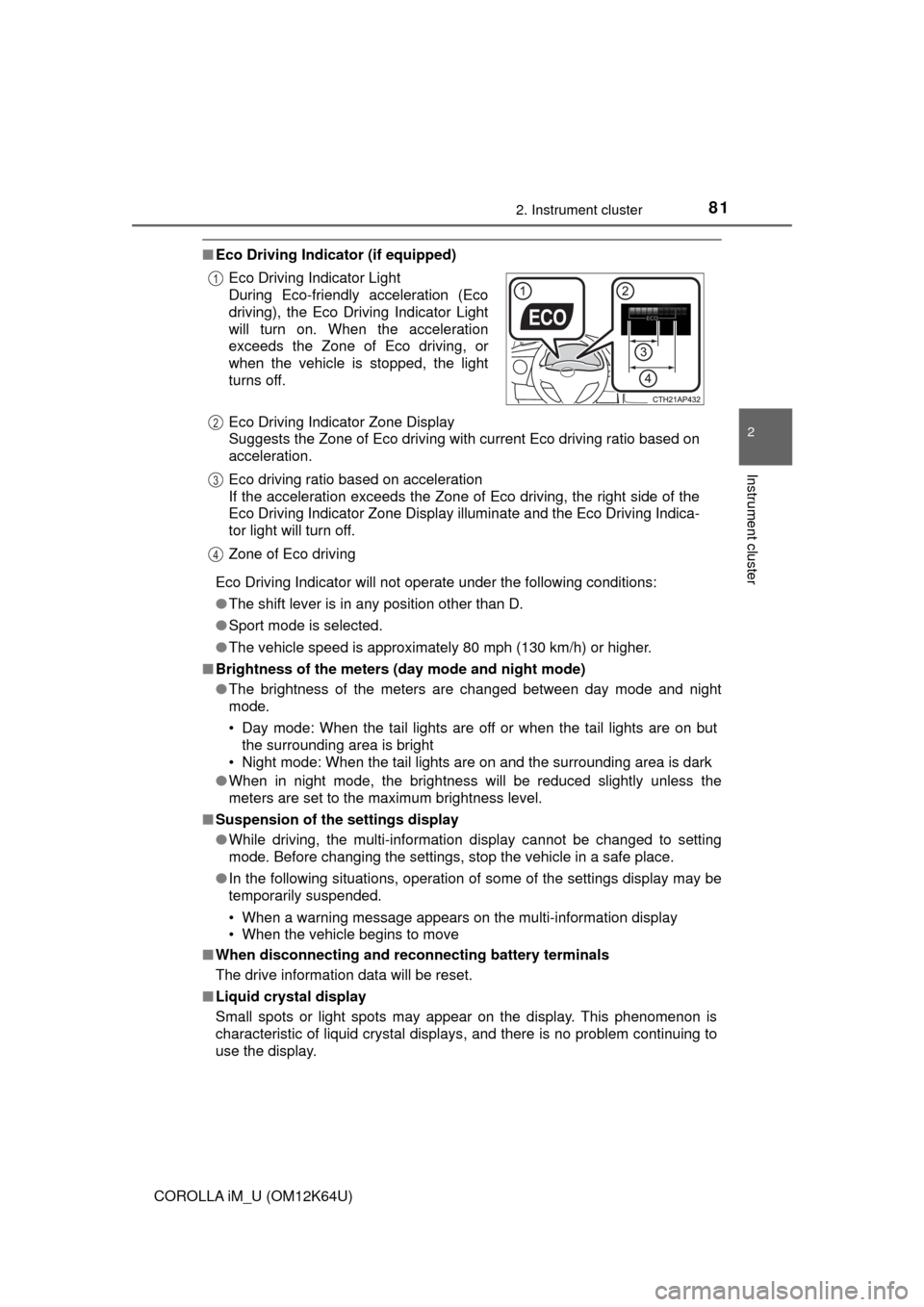
use the display. Eco Driving Indicator Light
During Eco-friendly acceleration (Eco
driving), the Eco Driving Indicator Light
will turn on. When the acceleration
exceeds the Zone of Eco driving, or
when the vehicle is stopped, the light
turns off.
Eco Driving Indicator Zone Display
Suggests the Zone of Eco driving with current Eco driving ratio based on
acceleration.
Eco driving ratio based on acceleration
If the acceleration exceeds the Zone of Eco driving, the right side of the
Eco Driving Indicator Zone Display illuminate and the Eco Driving Indica-
tor light will turn off.
Zone of Eco driving
1
2
3
4
Page 227 of 384
2276-2. Maintenance
6
Maintenance and care
COROLLA iM_U (OM12K64U)
■Repair and replacement
It is recommended that genuine Toyota parts be used for repairs to ensure
performance of each system. If non-Toyota parts are used in replacement or if
a repair shop other than a Toyota dealer performs repairs, confirm the war-
ranty coverage.
■Resetting the message indicating maintenance is required (U.S.A. only)
After the required maintenance is performed according to the maintenance
schedule, please reset the message.
To reset the message, follow the procedure described below:
While the engine is running, switch the multi-information display to the set-
tings display. (→P. 76)
Select “Scheduled Maintenance” on the settings display.
Select “Yes” on the “Scheduled Maintenance” screen.
“The Data Has Been Reset” will be displayed on the multi-information display
when the reset procedure has been completed.
■Allow inspection and repairs to be performed by a Toyota dealer
●Toyota technicians are well-trained specialists and are kept up to date with
the latest service information. They are well informed about the operations
of all systems on your vehicle.
●Keep a copy of the repair order. It proves that the maintenance that has
been performed is under warranty coverage. If any problem should arise
while your vehicle is under warranty, your Toyota dealer will promptly take
care of it.
WARNING
■If your vehicle is not properly maintained
Improper maintenance could result in serious damage to the vehicle and
possible death or serious injury.
■Handling of the battery
●Engine exhaust, some of its constituents, and a wide variety of automobile
components contain or emit chemicals known to the State of California to
cause cancer and birth defects and other reproductive harm. Work in a
well ventilated area.
●Oils, fuels and fluids contained in vehicles as well as waste produced by
component wear contain or emit chemicals known to the State of Califor-
nia to cause cancer and birth defects or other reproductive harm. Avoid
exposure and wash any affected area immediately.
●Battery posts, terminals and related accessories contain lead and lead
compounds which are known to cause brain damage. Wash your hands
after handling. (→P. 246)
1
2
3
Page 252 of 384
2526-3. Do-it-yourself maintenance
COROLLA iM_U (OM12K64U)■
How to initialize the tire pressure warning system
Park the vehicle in a safe place and turn the engine switch off.
Initialization cannot be performed while the vehicle is moving.
Adjust the tire inflation pressure to the specified cold tire inflation
pressure level. (→P. 331)
Make sure to adjust the tire pressure to the specified cold tire infla-
tion pressure level. The tire pressure warning system will operate
based on this pressure level.
Turn the engine switch to the “ON” position.
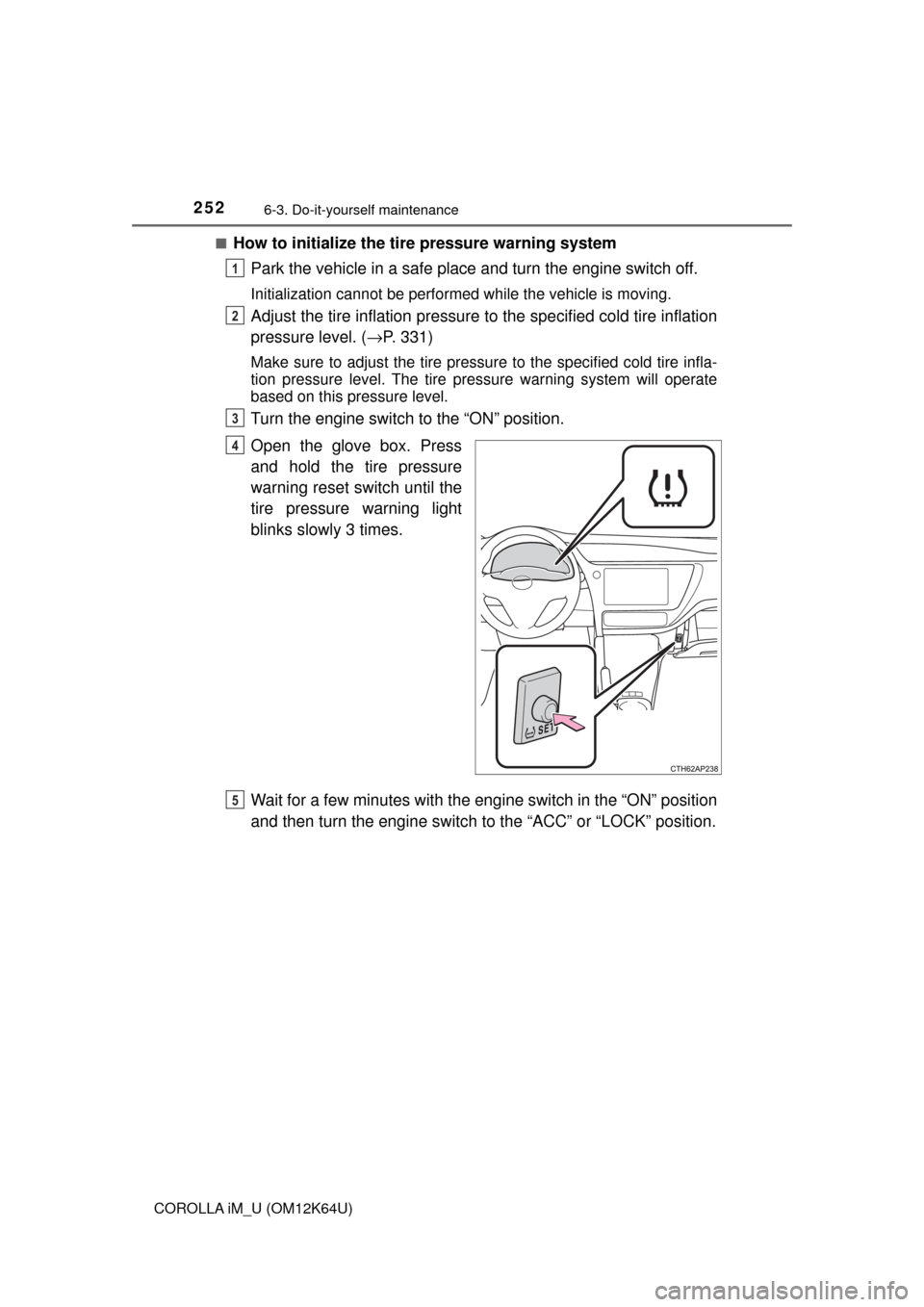
Open the glove box. Press
and hold the tire pressure
warning reset switch until the
tire pressure warning light
blinks slowly 3 times.
Wait for a few minutes with the engine switch in the “ON” position
and then turn the engine switch to the “ACC” or “LOCK” position.
1
2
3
4
5
Page 256 of 384

2566-3. Do-it-yourself maintenance
COROLLA iM_U (OM12K64U)■
The initialization operation
●Make sure to carry out initialization after adjusting the tire inflation pres-
sure.
Also, make sure the tires are cold before carrying out initialization or tire
inflation pressure adjustment.
●If you have accidentally turned the engine switch off during initialization,
it is not necessary to press the reset switch again as initialization will
restart automatically when the engine switch to the “ON” position for the
next time.
●If you accidentally press the reset switch when initialization is not neces-
sary, adjust the tire inflation pressure to the specified level when the
tires are cold, and conduct initialization again.
■Warning performance of the tire pressure warning system
The warning of the tire pressure warning system will change in accor-
dance with driving conditions. For this reason, the system may give a
warning even if the tire pressure does not reach a low enough level, or if
the pressure is higher than the pressure that was adjusted to when the
system was initialized.
■When initialization of the tire pressure warning system has failed
Initialization can be completed in a few minutes. However, in the following
cases, the settings have not been recorded and the system will not oper-
ate properly. If repeated attempts to record tire inflation pressure settings
are unsuccessful, have the vehicle inspected by your Toyota dealer.
●When operating the tire pressure warning reset switch, the tire pressure
warning light does not blink 3 times.
●After driving for a certain period of time since the initialization has been
completed, the warning light comes on after blinking for 1 minute.
Page 258 of 384

2586-3. Do-it-yourself maintenance
COROLLA iM_U (OM12K64U)
WARNING
■When inspecting or replacing tires
Observe the following precautions to prevent accidents.
Failure to do so may cause damage to parts of the drive train as well as
dangerous handling characteristics, which may lead to an accident
resulting in death or serious injury.
●Do not mix tires of different makes, models or tread patterns.
Also, do not mix tires of remarkably different treadwear.
●Do not use tire sizes other than those recommended by Toyota.
●Do not mix differently constructed tires (radial, bias-belted or bias-ply
tires).
●Do not mix summer, all season and snow tires.
●Do not use tires that have been used on another vehicle.
Do not use tires if you do not know how they were used previously.
●Do not tow if your vehicle has a compact spare tire installed.
■When initializing the tire pressure warning system
Do not operate the tire pressure warning reset switch without first
adjusting the tire inflation pressure to the specified level. Otherwise, the
tire pressure warning light may not come on even if the tire inflation
pressure is low, or it may come on when the tire inflation pressure is
actually normal.