window TOYOTA FJ CRUISER 2010 1.G Owner's Manual
[x] Cancel search | Manufacturer: TOYOTA, Model Year: 2010, Model line: FJ CRUISER, Model: TOYOTA FJ CRUISER 2010 1.GPages: 439, PDF Size: 11.02 MB
Page 210 of 439
210
3-1. Using the air conditioning system and defogger
Rear window defogger
■The rear window defogger can be operated when
The engine switch is in the ON position.
NOTICE
■To prevent battery discharge
Turn the rear window defogger off when the engine is off.
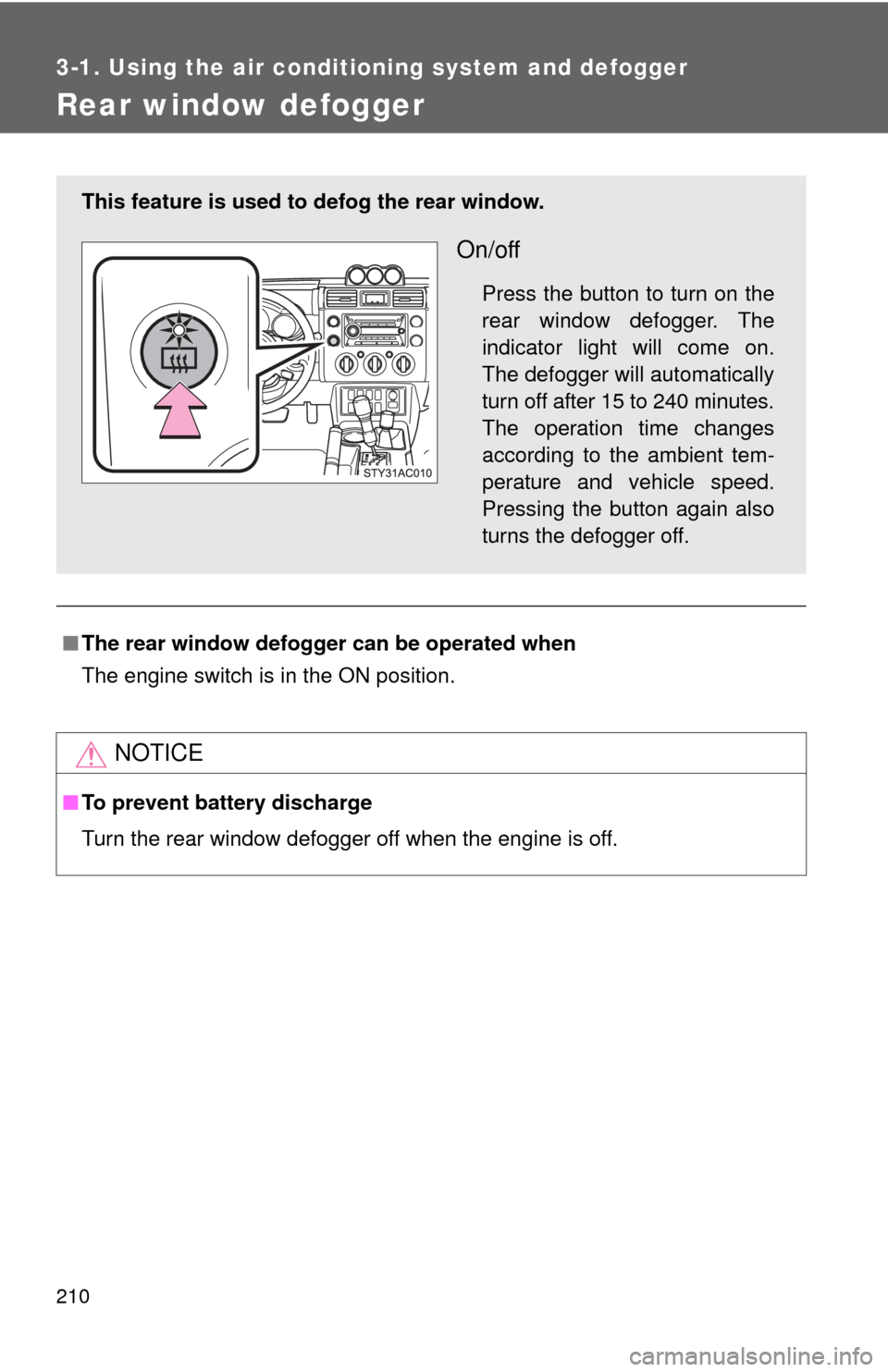
This feature is used to defog the rear window.
On/off
Press the button to turn on the
rear window defogger. The
indicator light will come on.
The defogger will automatically
turn off after 15 to 240 minutes.
The operation time changes
according to the ambient tem-
perature and vehicle speed.
Pressing the button again also
turns the defogger off.
Page 232 of 439

232 3-2. Using the audio system
■Lens cleaners
Do not use lens cleaners. Doing so may damage the MP3 and WMA player.
■MP3 and WMA files
MP3 (MPEG Audio LAYER3) is a standard audio compression format.
Files can be compressed to approximately 1/10 of their original size by using
MP3 compression.
WMA (Windows Media
® Audio) is a Microsoft® audio compression format.
This format compresses audio data to a size smaller than that of the MP3
format.
There is a limit to the MP3 and WMA file standards and to the media/formats
recorded by them that can be used.
●MP3 file compatibility
• Compatible standards
MP3 (MPEG1 LAYER3, MPEG2 LSF LAYER3)
• Compatible sampling frequencies
MPEG1 LAYER3: 32, 44.1, 48 (kHz)
MPEG2 LSF LAYER3: 16, 22.05, 24 (kHz)
• Compatible bit rates (compatible with VBR)
MPEG1 LAYER3: 64, 80, 96, 112, 128, 160, 192, 224, 256, 320 (kbps)
MPEG2 LSF LAYER3: 64, 80, 96, 112, 128, 144, 160 (kbps)
• Compatible channel modes: stereo, joint stereo, dual channel and
monaural
●WMA file compatibility
• Compatible standards
WMA Ver. 7, 8, 9
• Compatible sampling frequencies
32, 44.1, 48 (kHz)
• Compatible bit rates (only compatible with 2-channel playback)
Ver. 7, 8: CBR 48, 64, 80, 96, 128, 160, 192 (kbps)
Ver. 9: CBR 48, 64, 80, 96, 128, 160, 192, 256, 320 (kbps)
●Compatible media
Media that can be used for MP3 and WMA playback are CD-Rs and CD-
RWs.
Playback in some instances may not be possible, depending on the status
of the CD-R or CD-RW. Playback may not be possible or the audio may
jump if the disc is scratched or marked with fingerprints.
Page 234 of 439
234 3-2. Using the audio system
●Extensions
If the file extensions .mp3 and .wma are used for files other than MP3 and
WMA files, they will be mistakenly recognized and played as MP3 and
WMA files. This may result in large amounts of interference and damage
to the speakers.
●Playback
• To play MP3 file with steady sound quality, we recommend a fixed bit
rate of 128 kbps and a sampling frequency of 44.1 kHz.
• CD-R or CD-RW playback may not be possible in some instances,
depending on the characteristics of the disc.
• There is a wide variety of freeware and other encoding software for
MP3 and WMA files on the market, and depending on the status of the
encoding and the file format, poor sound quality or noise at the start of
playback may result. In some cases, playback may not be possible at
all.
• When files other than MP3 or WMA files are recorded on a disc, it may
take more time to recognize the disc and in some cases, playback may
not be possible at all.
•Microsoft
®, Windows®, and Windows Media® are the registered trade-
marks of Microsoft Corporation in the U.S. and other countries.
NOTICE
■CDs and adapters that cannot be used (P. 225)
■CD player precautions (P. 226)
Page 262 of 439
262 3-5. Other interior features
■If the protection circuit is activated and the power supply is cut, con-
duct the following procedure:
Park the vehicle in a safe place, and then securely apply the park-
ing brake.
Check and ensure the following conditions
• The shift lever is in P or N. (automatic transmission)
• The shift lever is in N and the clutch pedal is not depressed.
(manual transmission)
Make sure that the power consumption of the electric appliance is
within the maximum capacity of the power outlet and the appliance
is not broken.
Press the power outlet main switch again.
When the cabin temperature is high, open the windows to cool the tempera-
ture down. Once it reaches the normal temperature, turn the power outlet
main switch on again.
If the power supply is not resumed even after performing the above proce-
dure, have the vehicle inspected by a Toyota dealer.
CAUTION
■Using a power outlet
Observe the following precautions to reduce the risk of injury.
●Use of the power outlet when it is wet with drinking water or snow may
result in electrical shocks and is extremely dangerous. The power outlet
must be thoroughly dried before use.
●Do not allow children to use or play with the power outlet.
●Be careful not to get any part of your body caught in the power outlet lid.
●When using electrical appliances, strictly follow any cautions and notices
written on their labels and in the manufacturers’ instruction manuals.
●Do not modify, disassemble or repair the power outlet or its inverter, in any
way. Doing so may result in unexpected malfunctions or accidents, which
could cause serious damage or injuries. Contact a Toyota dealer for any
necessary repairs.
Page 263 of 439
263 3-5. Other interior features
3
Interior features
CAUTION
■To prevent injuries and accidents, securely fix all electric appliances
before use and do not use any appliances that may do any of the fol-
lowing:
●Distract the driver while driving, or hamper safe driving.
●Result in a fire or burn injuries due to the appliance rolling, falling or over-
heating while driving.
●Emit steam, while the windows of the cabin are closed.
■To prevent unexpected accidents, such as electric shocks, do not per-
form any of the following.
●Using the power outlet for electric heaters while sleeping.
●Contaminating the power outlet with liquid substances or mud.
●Handling electrical appliance plugs at the power outlet with wet hands or
feet.
●Inserting foreign objects into the power outlet.
●Using malfunctioning electric appliances.
●Inserting inappropriate or badly fitting plugs into the power outlet.
NOTICE
■To avoid damaging the power outlet and the plug
●Close the power outlet lid when not in use.
●Foreign objects or liquids that enter the power outlet may cause a short
circuit.
●Do not use plug adaptors to connect too many plugs to the power outlet.
●After inserting a plug, gently close the power outlet lid.
■To prevent the fuse from being blown
Do not use a 115V AC appliance that requires more than maximum capacity.
If a 115V AC appliance that consumes more than maximum capacity is
used, the protection circuit will cut the power supply.
Page 275 of 439

275 3-5. Other interior features
3
Interior features
NOTICE
■To avoid the compass malfunctions
Do not place magnets or any metal objects on or near the accessory meter.
Doing this may cause a malfunction of the compass sensor.
■To ensure normal operation of the compass
●Do not perform circling calibration of the compass in a place where the
earth’s magnetic field is subject to interference by artificial magnetic fields.
●During calibration, do not operate electric systems (power windows, etc.)
as they may interfere with the calibration.
Page 278 of 439
278
4-1. Maintenance and care
Cleaning and protecting the vehicle exterior
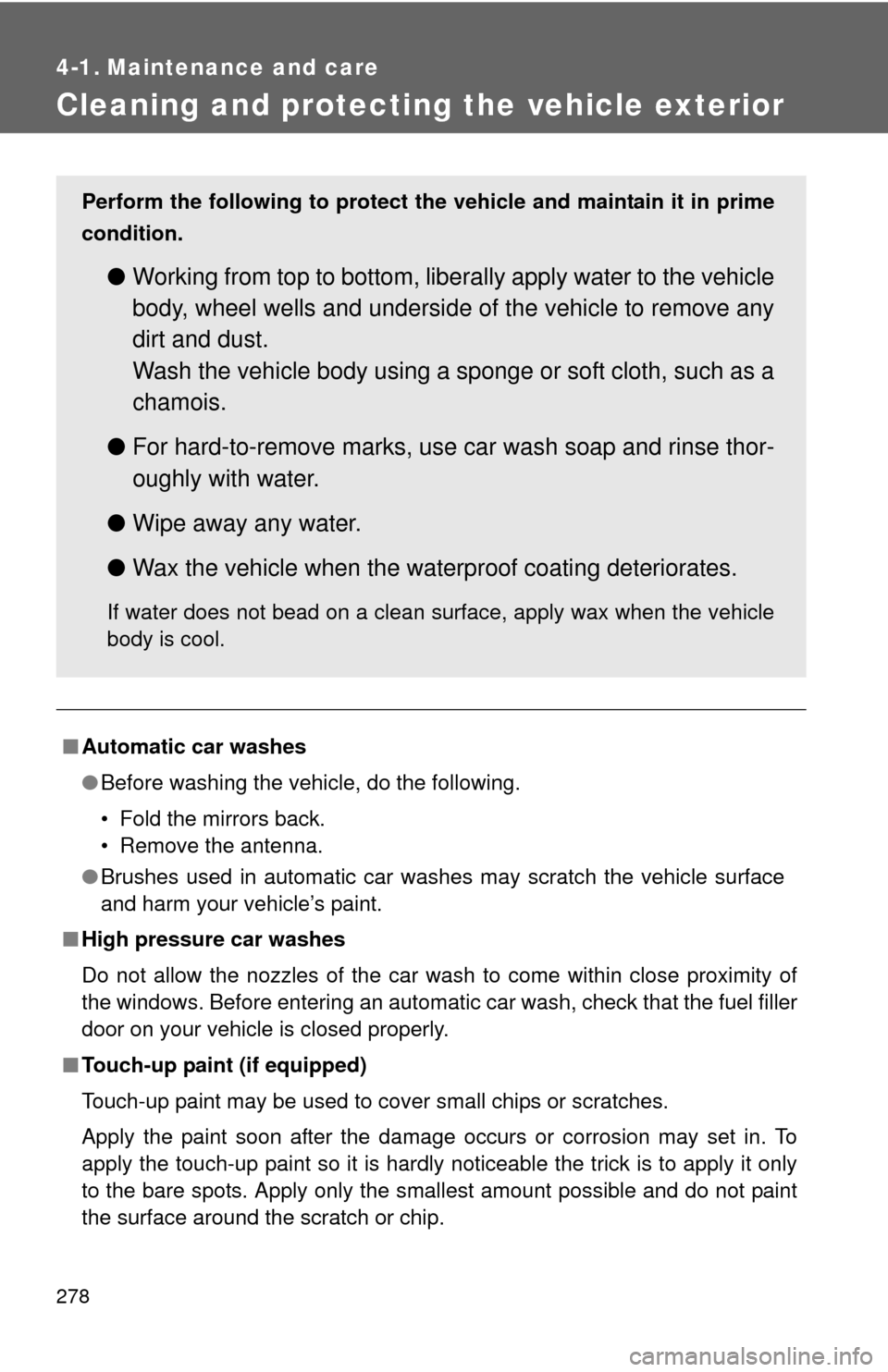
■Automatic car washes
●Before washing the vehicle, do the following.
• Fold the mirrors back.
• Remove the antenna.
●Brushes used in automatic car washes may scratch the vehicle surface
and harm your vehicle’s paint.
■High pressure car washes
Do not allow the nozzles of the car wash to come within close proximity of
the windows. Before entering an automatic car wash, check that the fuel filler
door on your vehicle is closed properly.
■Touch-up paint (if equipped)
Touch-up paint may be used to cover small chips or scratches.
Apply the paint soon after the damage occurs or corrosion may set in. To
apply the touch-up paint so it is hardly noticeable the trick is to apply it only
to the bare spots. Apply only the smallest amount possible and do not paint
the surface around the scratch or chip.
Perform the following to protect the vehicle and maintain it in prime
condition.
●Working from top to bottom, liberally apply water to the vehicle
body, wheel wells and underside of the vehicle to remove any
dirt and dust.
Wash the vehicle body using a sponge or soft cloth, such as a
chamois.
●For hard-to-remove marks, use car wash soap and rinse thor-
oughly with water.
●Wipe away any water.
●Wax the vehicle when the waterproof coating deteriorates.
If water does not bead on a clean surface, apply wax when the vehicle
body is cool.
Page 282 of 439

282 4-1. Maintenance and care
NOTICE
■Cleaning the inside of the rear window
●Do not use glass cleaner to clean the rear window, as this may cause
damage to the rear window defogger heater wires. Use a cloth dampened
with lukewarm water to gently wipe the window clean. Wipe the window in
strokes running parallel to the heater wires.
●Be careful not to scratch or damage the heater wires.
Page 330 of 439
329 4-3. Do-it-yourself maintenance
4
Maintenance and care
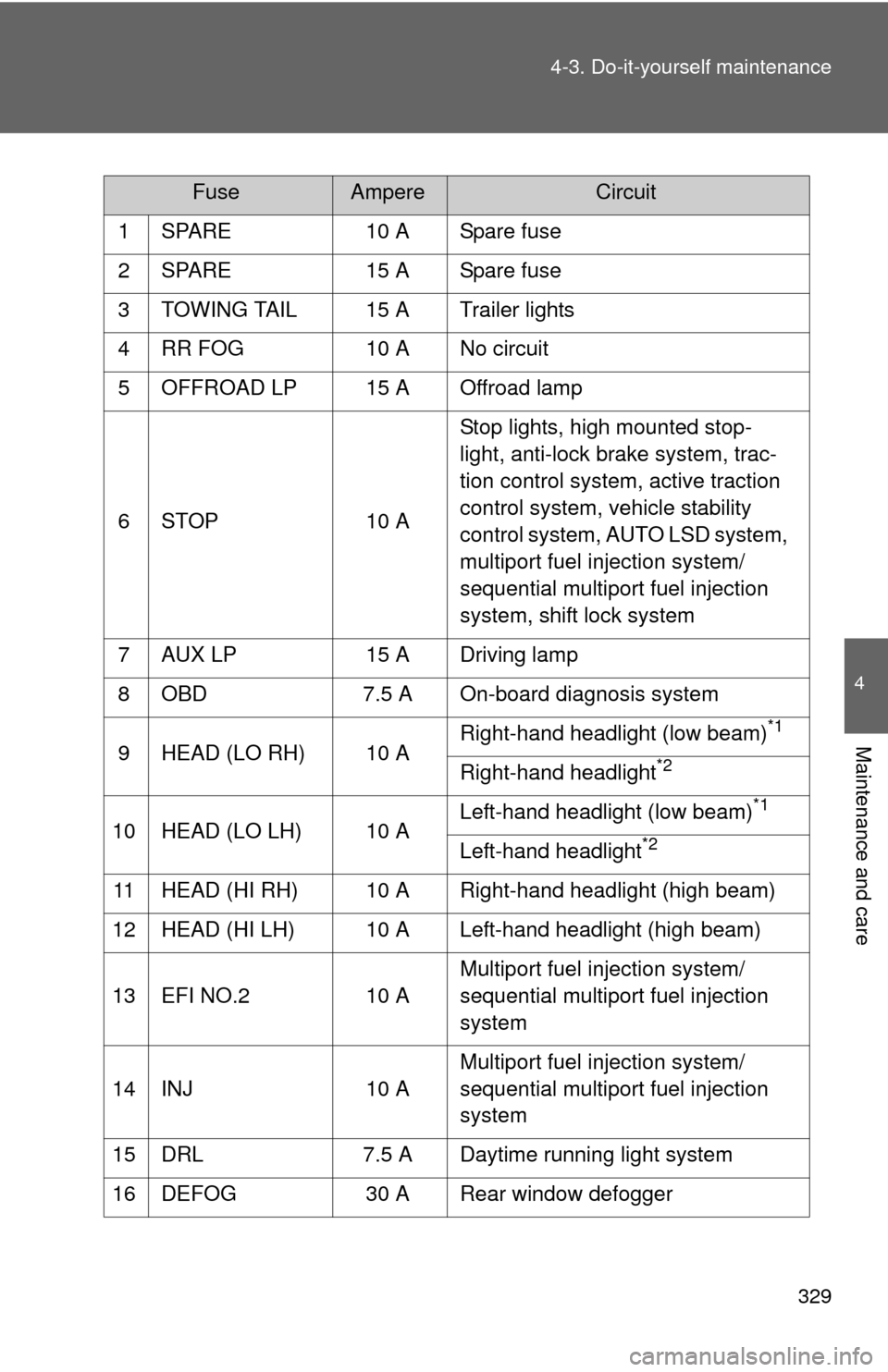
FuseAmpereCircuit
1 SPARE 10 A Spare fuse
2 SPARE 15 A Spare fuse
3 TOWING TAIL 15 A Trailer lights
4 RR FOG 10 A No circuit
5 OFFROAD LP 15 A Offroad lamp
6 STOP 10 AStop lights, high mounted stop-
light, anti-lock brake system, trac-
tion control system, active traction
control system, vehicle stability
control system, AUTO LSD system,
multiport fuel injection system/
sequential multiport fuel injection
system, shift lock system
7 AUX LP 15 A Driving lamp
8 OBD 7.5 A On-board diagnosis system
9 HEAD (LO RH) 10 ARight-hand headlight (low beam)
*1
Right-hand headlight*2
10 HEAD (LO LH) 10 ALeft-hand headlight (low beam)
*1
Left-hand headlight*2
11 HEAD (HI RH) 10 A Right-hand headlight (high beam)
12 HEAD (HI LH) 10 A Left-hand headlight (high beam)
13 EFI NO.2 10 AMultiport fuel injection system/
sequential multiport fuel injection
system
14 INJ 10 AMultiport fuel injection system/
sequential multiport fuel injection
system
15 DRL 7.5 A Daytime running light system
16 DEFOG 30 A Rear window defogger
Page 333 of 439
332 4-3. Do-it-yourself maintenance
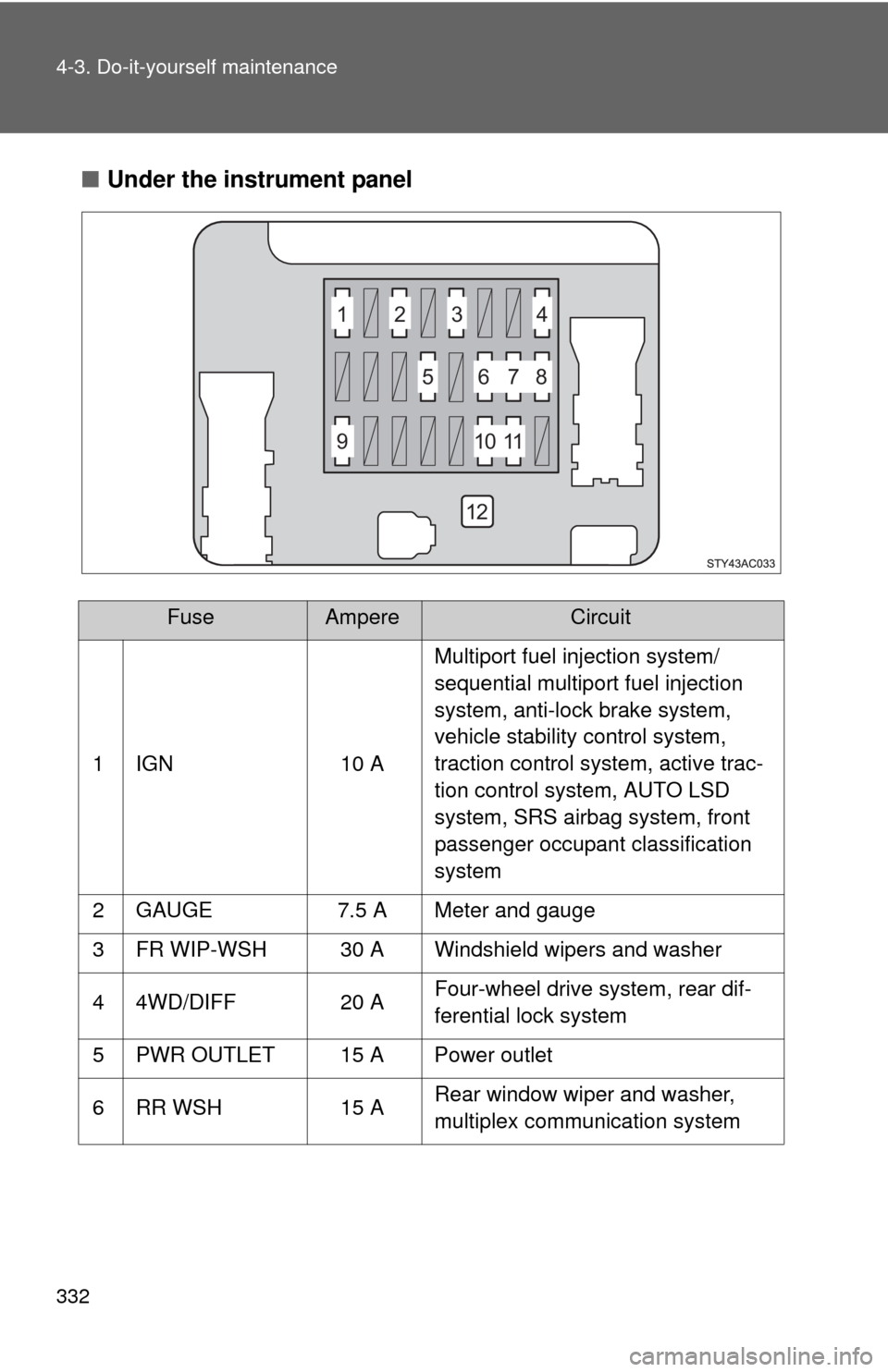
■Under the instrument panel
FuseAmpereCircuit
1 IGN 10 AMultiport fuel injection system/
sequential multiport fuel injection
system, anti-lock brake system,
vehicle stability control system,
traction control system, active trac-
tion control system, AUTO LSD
system, SRS airbag system, front
passenger occupant classification
system
2 GAUGE 7.5 A Meter and gauge
3 FR WIP-WSH 30 A Windshield wipers and washer
4 4WD/DIFF 20 AFour-wheel drive system, rear dif-
ferential lock system
5 PWR OUTLET 15 A Power outlet
6 RR WSH 15 ARear window wiper and washer,
multiplex communication system
1
5678
91011
12 23 4