light TOYOTA FJ CRUISER 2010 1.G Workshop Manual
[x] Cancel search | Manufacturer: TOYOTA, Model Year: 2010, Model line: FJ CRUISER, Model: TOYOTA FJ CRUISER 2010 1.GPages: 439, PDF Size: 11.02 MB
Page 146 of 439
146 2-3. Operating the lights and wipers
■Daytime running light system (if equipped)
To make your vehicle more visible to other drivers, the headlights turn on
automatically (at a reduced intensity) whenever the engine is started and the
parking brake is released. Daytime running lights are not designed for use at
night.
■Automatic light off system
●When the headlights come on: The headlights and tail lights turn off 30
seconds after all doors and glass hatch are closed with the engine switch
turned to the ACC or LOCK position. (The lights turn off immediately if
the LOCK button on the wireless remote control is pressed twice after all
doors are locked.)
●When only the tail lights come on: The tail lights turn off automatically
with the engine switch turned to the ACC or LOCK position and the
driver’s door is opened.
If the driver’s door is kept open, the lights automatically turn off after 30 min-
utes.
To turn the lights on again, turn the engine switch to the ON position, or turn
the headlight switch off once and then back to the or position.
■Customization that can be configured at Toyota dealer
Settings (automatic light off system) can be changed. (Customizable
features P. 412)
NOTICE
■To prevent battery discharge
Do not leave the lights on longer than necessary when the engine is not run-
ning.
Page 147 of 439
147
2-3. Operating the lights and wipers
2
When driving
Windshield wipers and washer
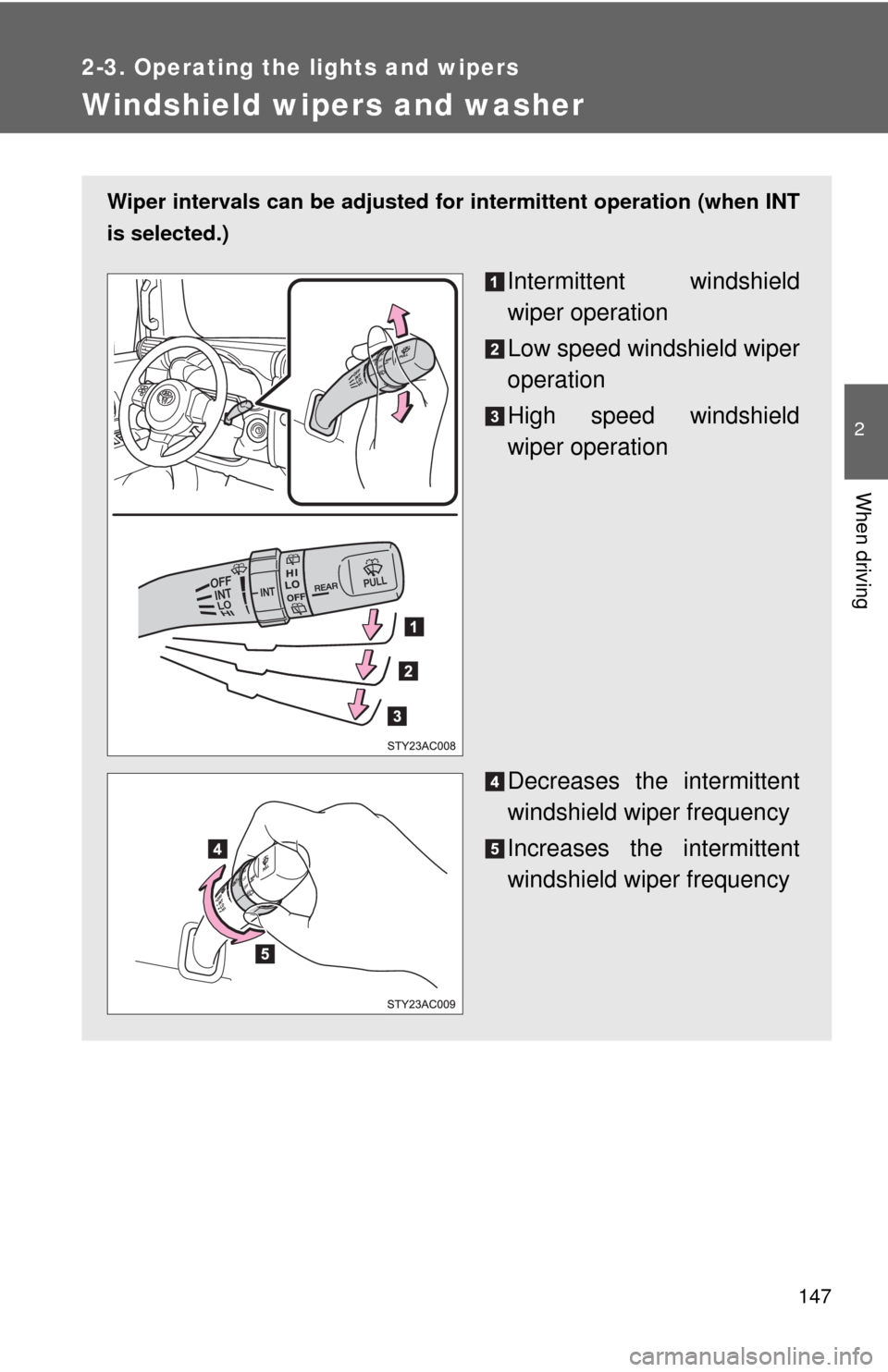
Wiper intervals can be adjusted for intermittent operation (when INT
is selected.)
Intermittent windshield
wiper operation
Low speed windshield wiper
operation
High speed windshield
wiper operation
Decreases the intermittent
windshield wiper frequency
Increases the intermittent
windshield wiper frequency
Page 148 of 439
148 2-3. Operating the lights and wipers
■The windshield wiper and washer can be operated when
The engine switch must be in the ON position.
■If no windshield washer fluid sprays
Check that the washer nozzles are not blocked and if there is washer fluid in
the windshield washer fluid reservoir.
NOTICE
■When the windshield is dry
Do not use the wipers, as they may damage the windshield.
■When there is no washer fluid spray from the nozzle
Damage to the washer fluid pump may be caused if the lever is pulled
toward you and held continually.
■When a nozzle becomes blocked
In this case, contact your Toyota dealer immediately.
Do not try to clear it with a pin or other object. The nozzle will be damaged.
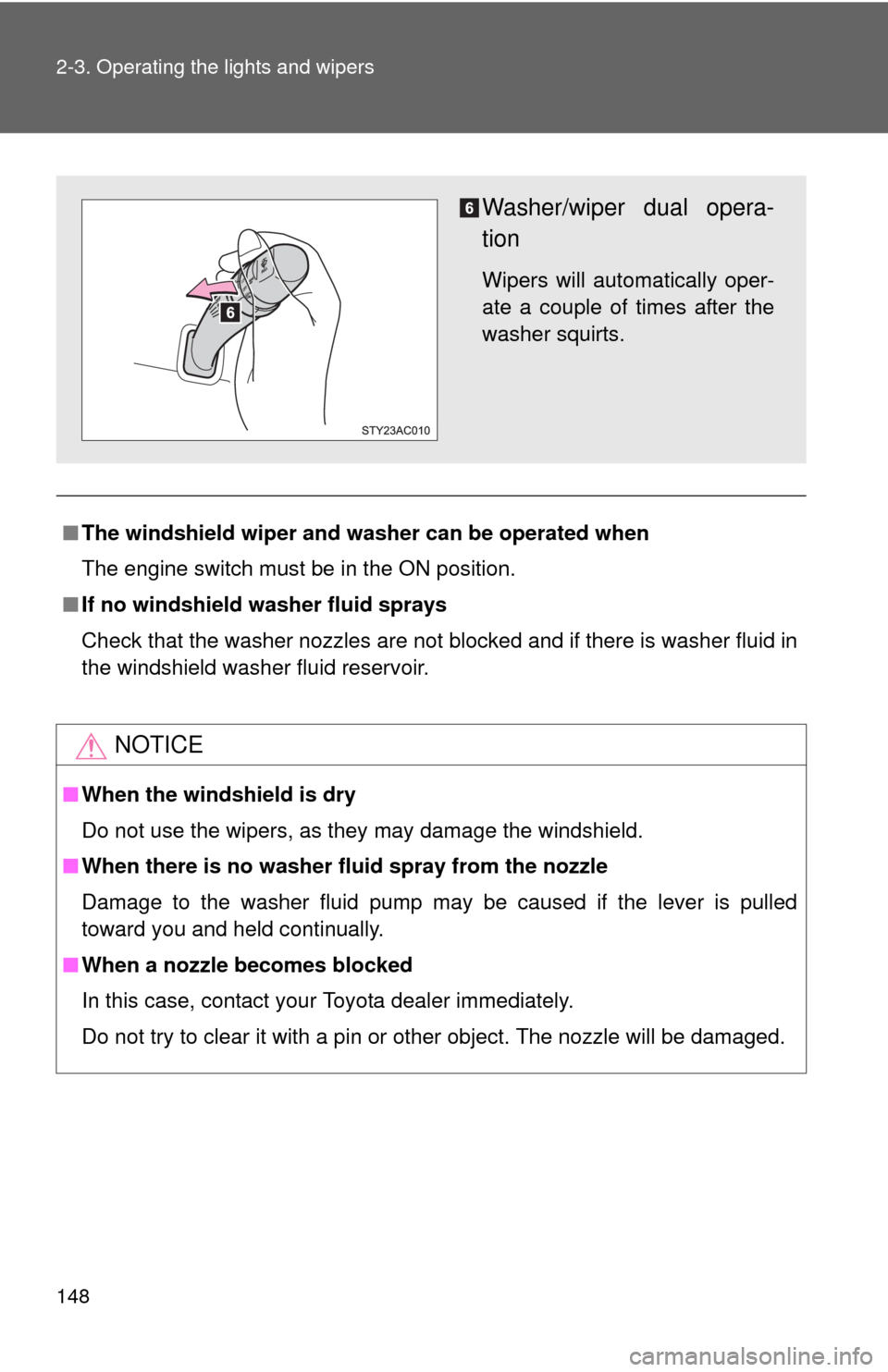
Washer/wiper dual opera-
tion
Wipers will automatically oper-
ate a couple of times after the
washer squirts.
Page 149 of 439
149
2-3. Operating the lights and wipers
2
When driving
Rear window wiper and washer
: If equipped
■The rear window wiper and washer can be operated when
●The engine switch must be in the ON position.
●The glass hatch is closed.
NOTICE
■When the rear window is dry
Do not use the wipers, as they may damage the rear window.
■When there is no washer fluid spray from the nozzle
Damage to the washer fluid pump may be caused if the knob is continuously
twisted upward or downward as far as it will go.
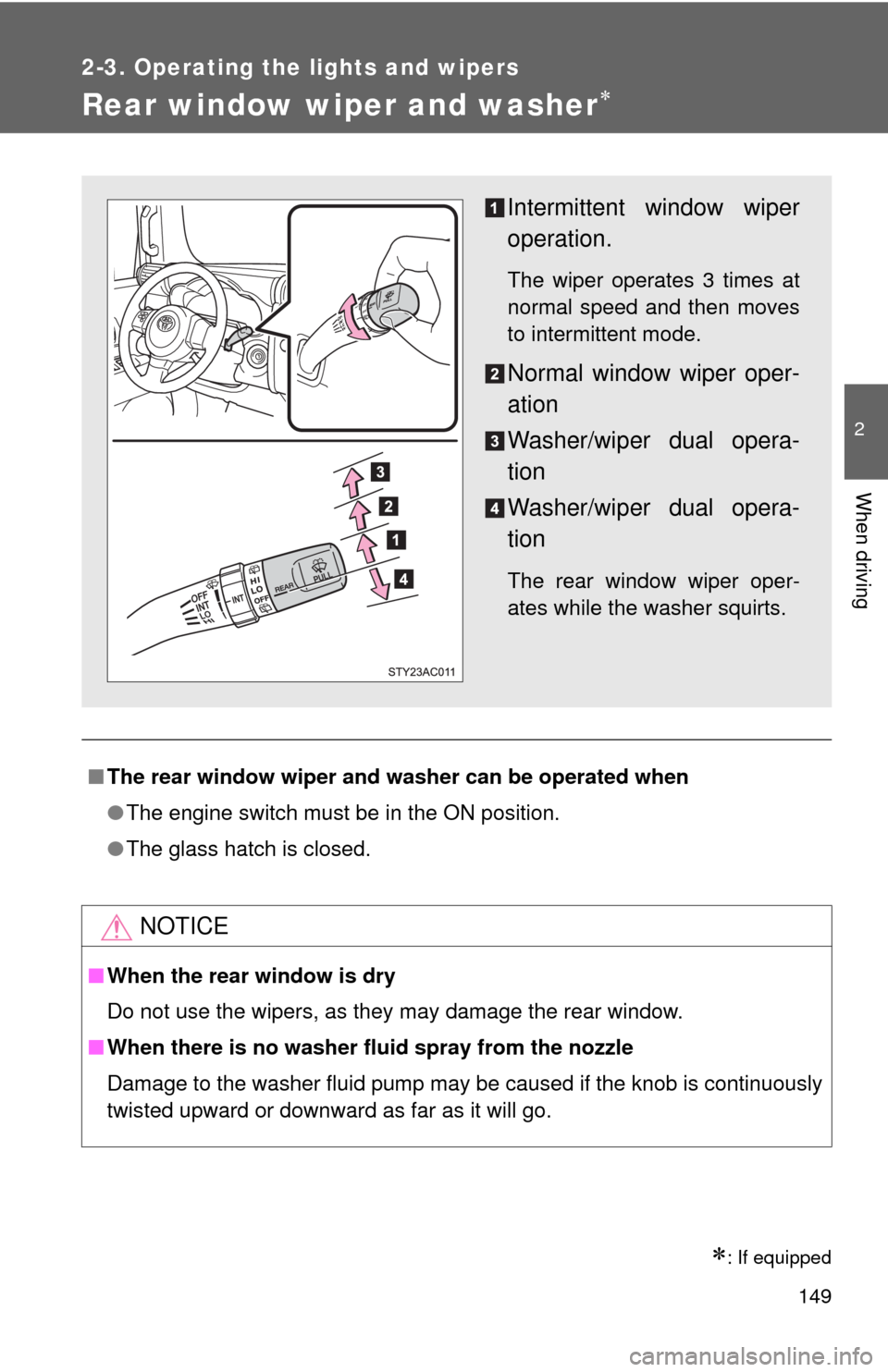
Intermittent window wiper
operation.
The wiper operates 3 times at
normal speed and then moves
to intermittent mode.
Normal window wiper oper-
ation
Washer/wiper dual opera-
tion
Washer/wiper dual opera-
tion
The rear window wiper oper-
ates while the washer squirts.
Page 151 of 439
151 2-4. Using other driving systems
2
When driving
■Cruise control can be set when
●The shift lever is in D or 4 (vehicles with an automatic transmission).
●Vehicle speed is more than approximately 25 mph (40 km/h).
■Accelerating
The vehicle can be accelerated normally. After acceleration, the set speed
resumes.
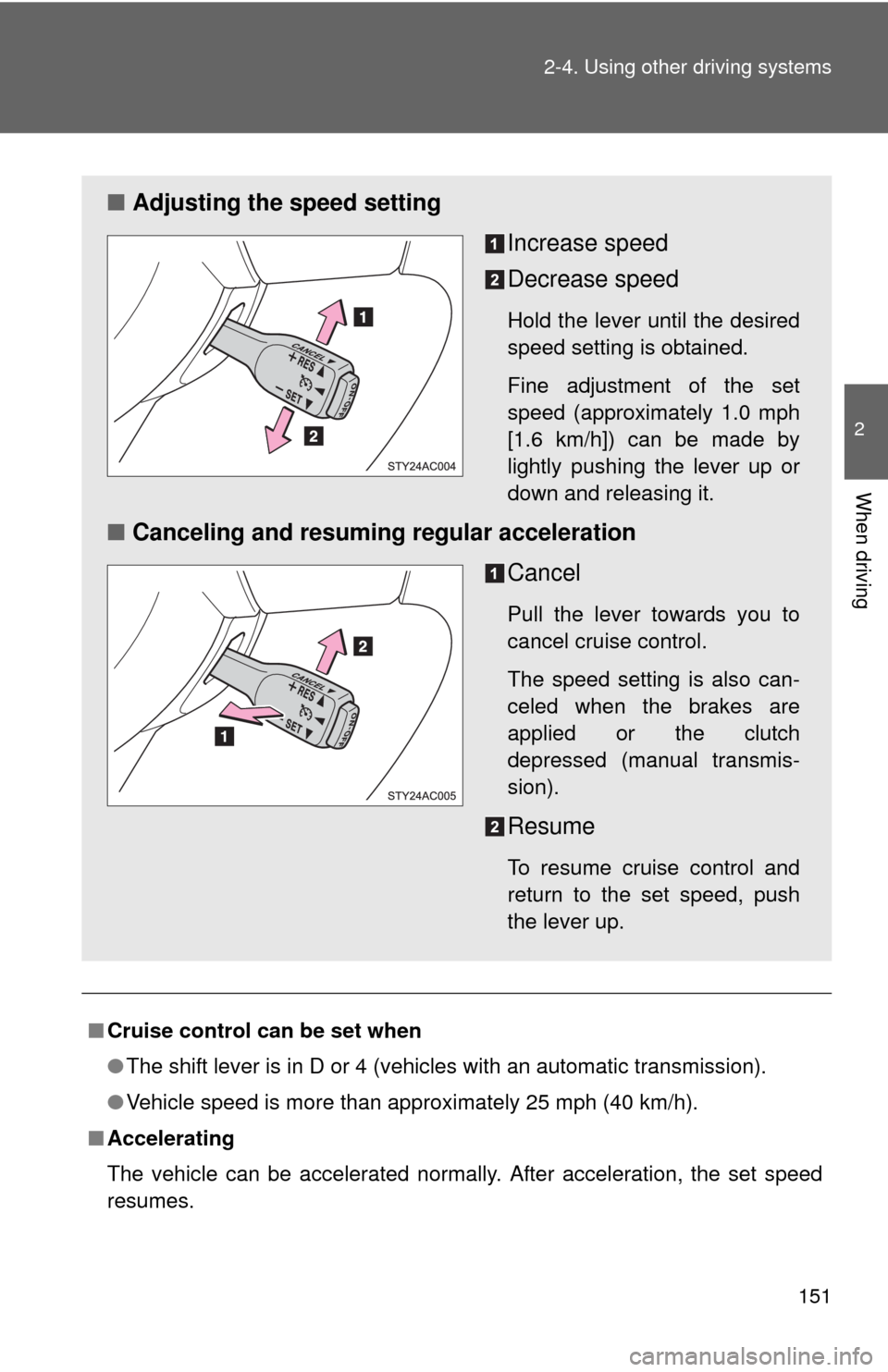
■Adjusting the speed setting
Increase speed
Decrease speed
Hold the lever until the desired
speed setting is obtained.
Fine adjustment of the set
speed (approximately 1.0 mph
[1.6 km/h]) can be made by
lightly pushing the lever up or
down and releasing it.
■Canceling and resuming regular acceleration
Cancel
Pull the lever towards you to
cancel cruise control.
The speed setting is also can-
celed when the brakes are
applied or the clutch
depressed (manual transmis-
sion).
Resume
To resume cruise control and
return to the set speed, push
the lever up.
Page 156 of 439

156 2-4. Using other driving systems
■The intuitive parking assist system can be operated when
●The engine switch is at the ON position.
●The shift lever is in R.
■Sensor detection information
●Certain vehicle conditions and the surrounding environment may affect
the ability of a sensor to correctly detect an obstacle. Particular instances
where this may occur are listed below.
• There is dirt, snow or ice on a sensor.
• A sensor is frozen.
• A sensor is covered in any way.
• The vehicle is leaning considerably to one side.
• On an extremely bumpy road, on an incline, on gravel, or on grass.
• The vicinity of the vehicle is noisy due to vehicle horns, motorcycle
engines, air brakes of large vehicles, or other loud noises producing
ultrasonic waves.
• There is another vehicle equipped with parking assist sensors in the
vicinity.
• A sensor is coated with a sheet of spray or heavy rain.
• The vehicle is equipped with a fender pole or radio antenna.
• A bumper or sensor receives a strong impact.
• The vehicle is approaching a tall or right-angled curb.
• In harsh sunlight or intense cold weather.
• The area directly under the bumpers is not detected.
Objects lower than the sensors or thin stakes etc. may be detected ini-
tially, but as they draw closer, they may cease to be detected.
• A towing hitch is mounted to the vehicle.
• A non-genuine Toyota suspension (lowered suspension etc.) is
installed.
• When attaching a two-way radio antenna.
• When a towing eyelet is mounted on your vehicle.
• When the bumper is damaged.
In addition to the examples above, there are instances in which, because of
their shapes, signs and other objects may be judged by a sensor to be closer
than they are.
Page 160 of 439
160 2-4. Using other driving systems
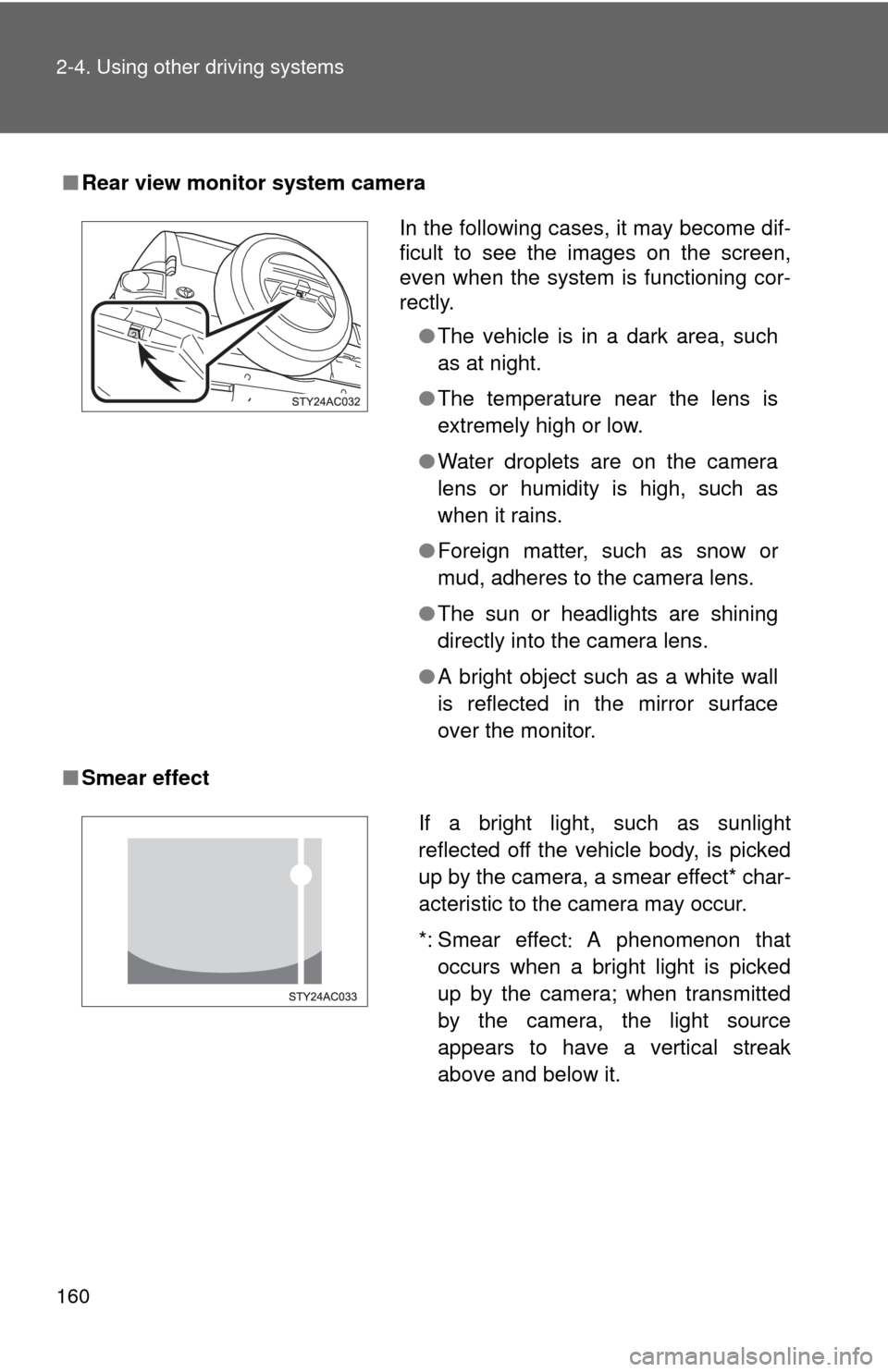
■Rear view monitor system camera
■Smear effect
In the following cases, it may become dif-
ficult to see the images on the screen,
even when the system is functioning cor-
rectly.
●The vehicle is in a dark area, such
as at night.
●The temperature near the lens is
extremely high or low.
●Water droplets are on the camera
lens or humidity is high, such as
when it rains.
●Foreign matter, such as snow or
mud, adheres to the camera lens.
●The sun or headlights are shining
directly into the camera lens.
●A bright object such as a white wall
is reflected in the mirror surface
over the monitor.
If a bright light, such as sunlight
reflected off the vehicle body, is picked
up by the camera, a smear effect* char-
acteristic to the camera may occur.
*: Smear effectA phenomenon that
occurs when a bright light is picked
up by the camera; when transmitted
by the camera, the light source
appears to have a vertical streak
above and below it.
Page 161 of 439
161 2-4. Using other driving systems
2
When driving
CAUTION
■When using the rear view monitor system, observe the following pre-
cautions to avoid an accident that could result in death or serious inju-
ries.
●Never depend solely on the monitor system when reversing.
●Always check visually and with the mirrors to confirm your intended path is
clear.
●Depicted distances between objects and flat surfaces differ from actual
distances.
■Conditions which may affect the rear view monitor system
●If the back of the vehicle has been hit, the camera’s position and mounting
angle may have changed. Have the vehicle inspected by your Toyota
dealer.
●Rapid temperature changes, such as when hot water is poured on the
vehicle in cold weather, may cause the system to function abnormally.
●If the camera lens is dirty, it cannot transmit a clear image. Rinse with
water and wipe with a soft cloth. If extremely dirty, wash with a mild
cleanser and rinse.
●The displayed image may be darker and moving images may be slightly
distorted when the system is cold.
NOTICE
●As the camera has a water proof construction, do not detach, disassemble
or modify it. This may cause incorrect operation.
●If the camera lens becomes dirty, it cannot transmit a clear image. If water
droplets, snow, or mud adhere to the lens, rinse with water and wipe with a
soft cloth. If the lens is extremely dirty, wash it with a mild cleanser and
rinse.
Page 171 of 439
171 2-4. Using other driving systems
2
When driving
Manual transmission
Before using the rear differential lock system.
Stop the vehicle or reduce your speed to less than 5 mph (8
km/h). Depress the clutch pedal and shift the four-wheel drive
control lever into LL to see if this is sufficient. If this has no
effect, additionally use the rear differential lock system.
Be sure to stop the wheels.
Depress the clutch pedal.
Press the RR DIFF LOCK switch.
Slowly release the clutch pedal.
After the rear differential is locked, the indicator will come on.
Unlock the rear differential as soon as the vehicle moves.
To unlock the rear differential, push the switch again.
■Locking the rear differential
●When the rear differential is locked, VSC is automatically turned off.
(The rear differential lock and VSC OFF indicators will come on.)
●The following systems do not operate when the rear differential is locked.
It is normal operation for the ABS warning light, VSC OFF indicator and
slip indicator to be on at this time.
•ABS
• Brake assist system
•VSC
•TRAC
■The rear differential lock is disengaged when
●Shift the four-wheel drive control lever to H or HL. (4WD models with a
manual transmission)
●Shift the front-wheel drive control lever to H2 or H4. (4WD models with
an automatic transmission)
Never forget to turn off the switch after using this feature.
■After unlocking the rear differential
Check that the indicator goes off.
Page 177 of 439
177 2-4. Using other driving systems
2
When driving
■Automatic TRAC and VSC reactivation
If the TRAC and VSC systems are turned off, the systems will not turn on,
even when vehicle speed increases.
■Sounds and vibrations caused by the ABS, TRAC, VSC and brake
assist system
●A sound may be heard from the engine compartment when the engine is
started or just after the vehicle begins to move. This sound does not indi-
cate that a malfunction has occurred in any of these systems.
●Any of the following conditions may occur when the above systems are
operating. None of these indicates that a malfunction has occurred.
• Vibrations may be felt through the vehicle body and steering.
• A motor sound may be heard after the vehicle comes to a stop.
• The brake pedal may pulsate slightly after the ABS is activated.
• The brake pedal may move down slightly after the ABS is activated.
■If the brake system overheats
TRAC will cease operation and a buzzer will sound to alert the driver. Stop
the vehicle in a safe place. (There is no problem with continuing normal driv-
ing.)
CAUTION
■The ABS does not operate effectively when
●The limits of the gripping performance have been exceeded.
●The vehicle hydroplanes while driving at high speed on the wet or slick
road.
■Stopping distance when the ABS is operating will exceed that of nor-
mal conditions
The ABS is not designed to shorten the vehicle's stopping distance. Always
maintain a safe distance from the vehicle in front of you in the following situ-
ations.
●When driving on dirt, gravel or snow-covered roads
●When driving with tire chains
●When driving over bumps in the road
●When driving over roads with potholes or roads with uneven roads