ECO mode TOYOTA FJ CRUISER 2011 1.G Owners Manual
[x] Cancel search | Manufacturer: TOYOTA, Model Year: 2011, Model line: FJ CRUISER, Model: TOYOTA FJ CRUISER 2011 1.GPages: 528, PDF Size: 10.93 MB
Page 28 of 528
28
1-2. Opening, closing and locking the doors
Wireless remote control
: If equipped
■Operation signals
A buzzer sounds and the emergency flashers flash to indicate that the doors
have been locked/unlocked. (Locked: Once; Unlocked: Twice)
■Panic mode
■Door lock buzzer
If a door or glass hatch is not fully closed, a buzzer sounds for 10 seconds if
an attempt to lock the door and glass hatch are made. Fully close the door
and glass hatch to stop the buzzer, and lock the vehicle once more.
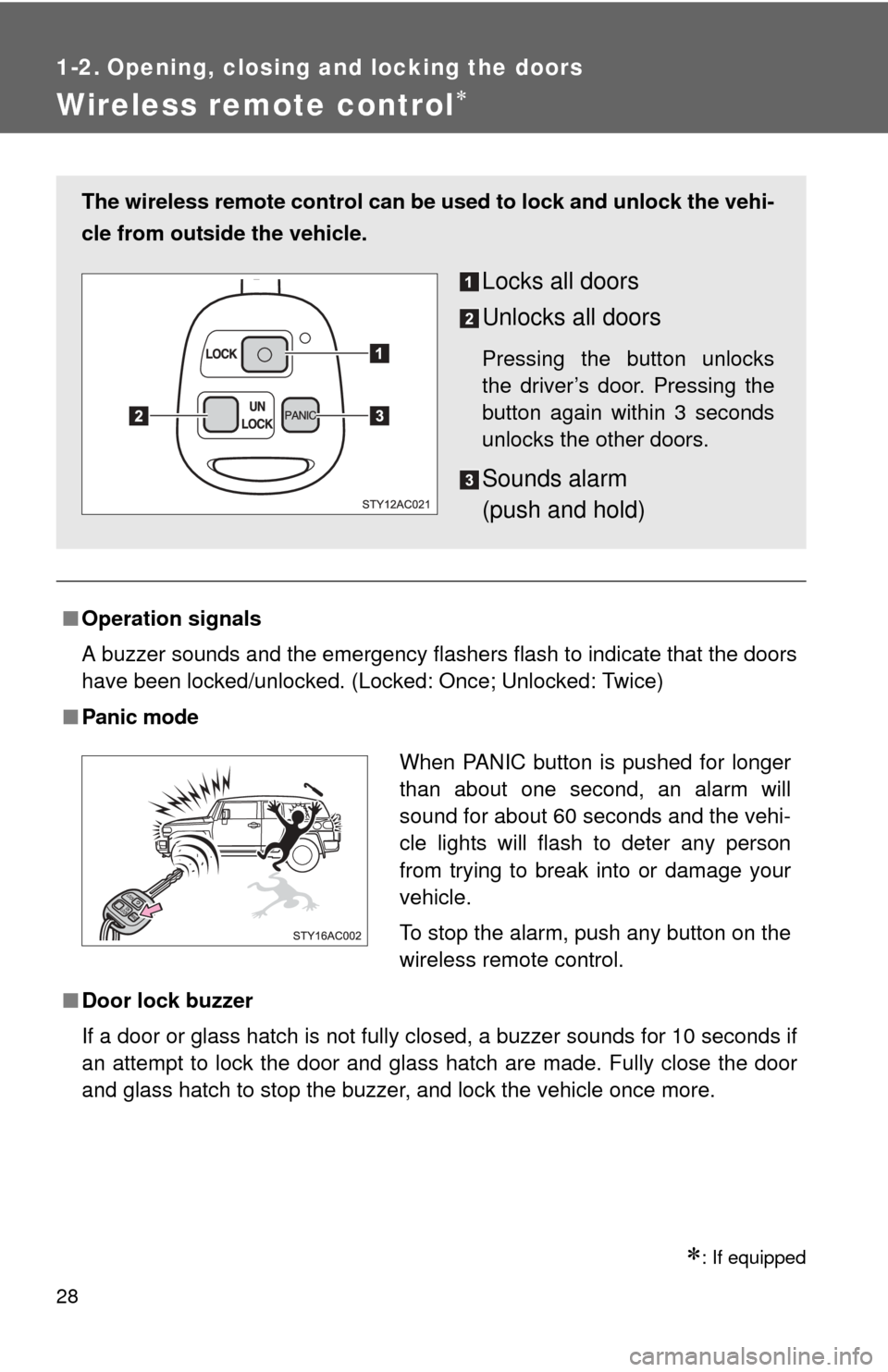
The wireless remote control can be used to lock and unlock the vehi-
cle from outside the vehicle.
Locks all doors
Unlocks all doors
Pressing the button unlocks
the driver’s door. Pressing the
button again within 3 seconds
unlocks the other doors.
Sounds alarm
(push and hold)
When PANIC button is pushed for longer
than about one second, an alarm will
sound for about 60 seconds and the vehi-
cle lights will flash to deter any person
from trying to break into or damage your
vehicle.
To stop the alarm, push any button on the
wireless remote control.
UN
LOCK
LOCKPA N I C
Page 161 of 528
161
2-4. Using other driving systems
2
When driving
Four-wheel drive system (4WD models with a manual transmission)
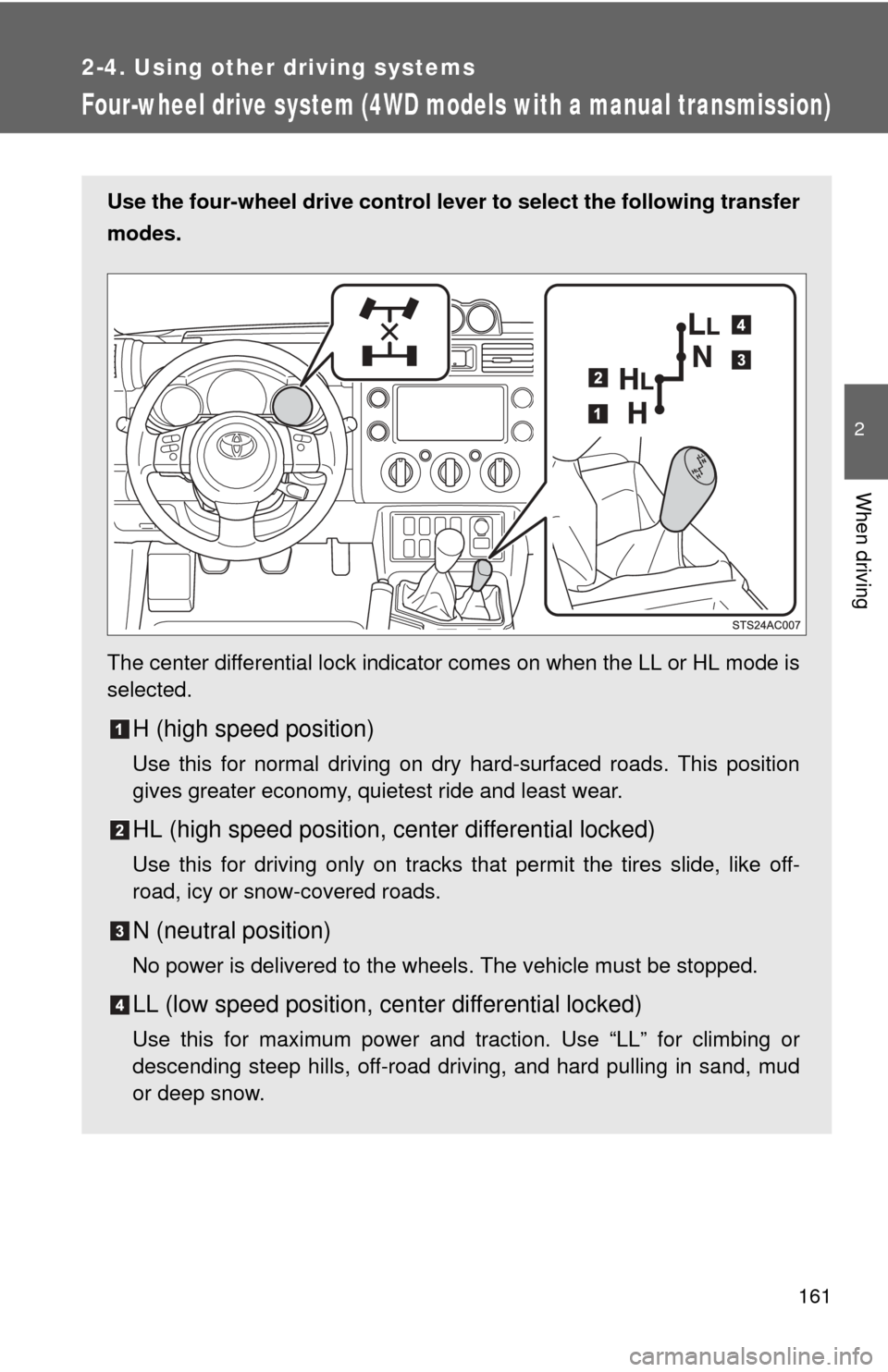
Use the four-wheel drive control lever to select the following transfer
modes.
The center differential lock indicator comes on when the LL or HL mode is
selected.
H (high speed position)
Use this for normal driving on dry hard-surfaced roads. This position
gives greater economy, quietest ride and least wear.
HL (high speed position, center differential locked)
Use this for driving only on tracks that permit the tires slide, like off-
road, icy or snow-covered roads.
N (neutral position)
No power is delivered to the wheels. The vehicle must be stopped.
LL (low speed position, ce nter differential locked)
Use this for maximum power and traction. Use “LL” for climbing or
descending steep hills, off-road driving, and hard pulling in sand, mud
or deep snow.
Page 164 of 528

164
2-4. Using other driving systems
Four-wheel drive system (4WD models with an automatic transmission)
Use the front-wheel drive control lever to select the following trans-
fer modes.
The four-wheel drive indicator comes on when the H4, N or L4 mode is
selected.
H2 (high speed position, two-wheel drive)
Use this for normal driving on dry hard-surfaced roads. This position
gives greater economy, quietest ride and least wear.
H4 (high speed position, four-wheel drive)
Use this for driving only on tracks that permit the tires slide, like off-
road, icy or snow-covered roads. This position provides greater traction
than two-wheel drive.
N (neutral position)
No power is delivered to the wheels. The vehicle must be stopped.
L4 (low speed position, four-wheel drive)
Use this for maximum power and traction. Use “L4” for climbing or
descending steep hills, off-road driving, and hard pulling in sand, mud
or deep snow.
Page 171 of 528
171
2-4. Using other driving systems
2
When driving
Rear differential lock system
Using the rear differential lock systemAutomatic transmission 4WD models: Before using the rear differential lock system.
Stop the vehicle, shift the shift lever to N and shift the front-
wheel drive control lever into L4 to see if this is sufficient. If
this has no effect, additionally use the rear differential lock
system.
Be sure to stop the wheels.
Press the RR DIFF LOCK switch.
Gently depress the accelerator pedal.
After the rear differential is locked, the indicator will come on.
Unlock the rear differential as soon as the vehicle moves.
To unlock the rear differential, push the switch again.
: If equipped
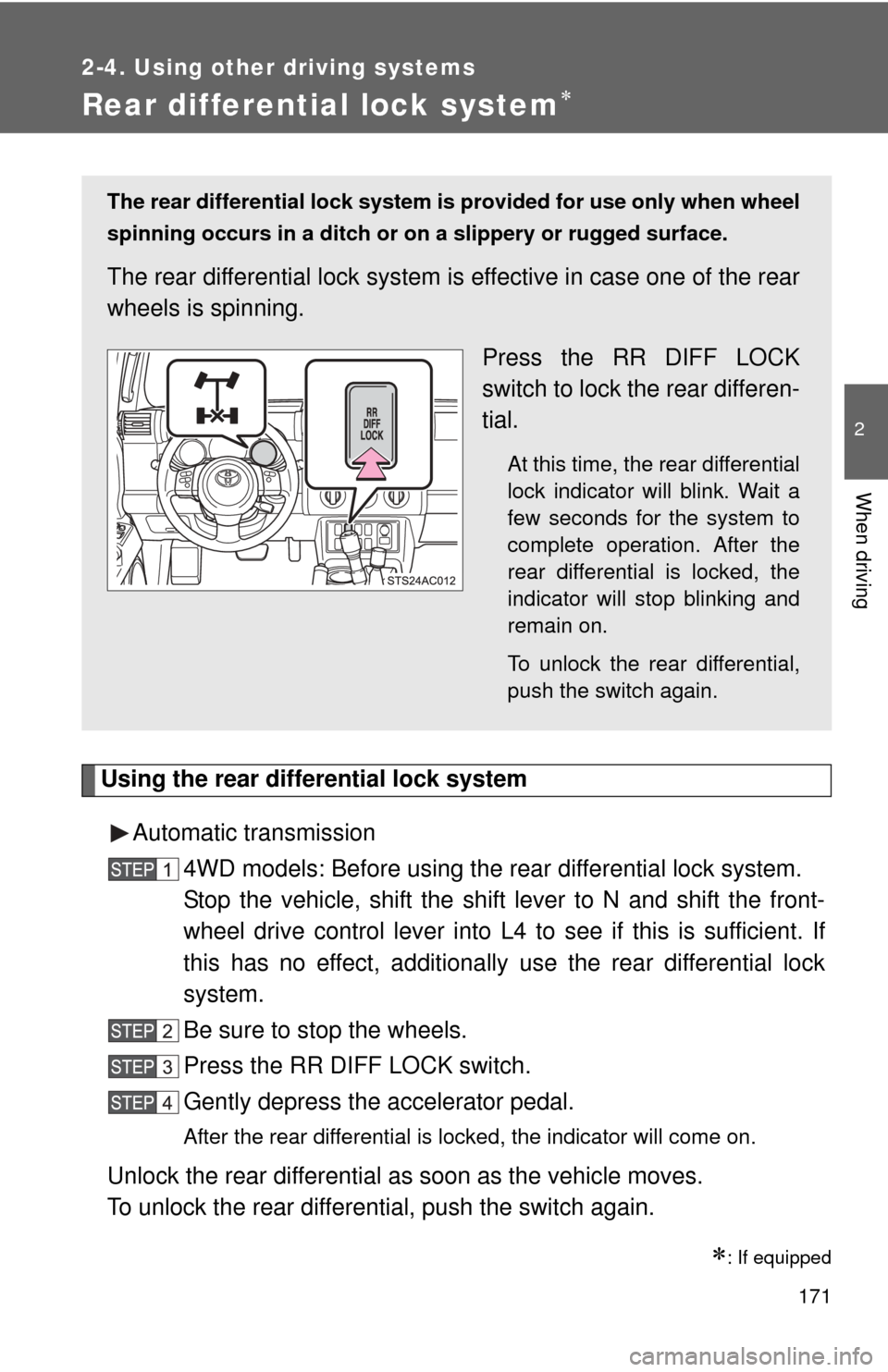
The rear differential lock system is provided for use only when wheel
spinning occurs in a ditch or on a slippery or rugged surface.
The rear differential lock system is effective in case one of the rear
wheels is spinning.
Press the RR DIFF LOCK
switch to lock the rear differen-
tial.
At this time, the rear differential
lock indicator will blink. Wait a
few seconds for the system to
complete operation. After the
rear differential is locked, the
indicator will stop blinking and
remain on.
To unlock the rear differential,
push the switch again.
Page 176 of 528
176 2-4. Using other driving systems
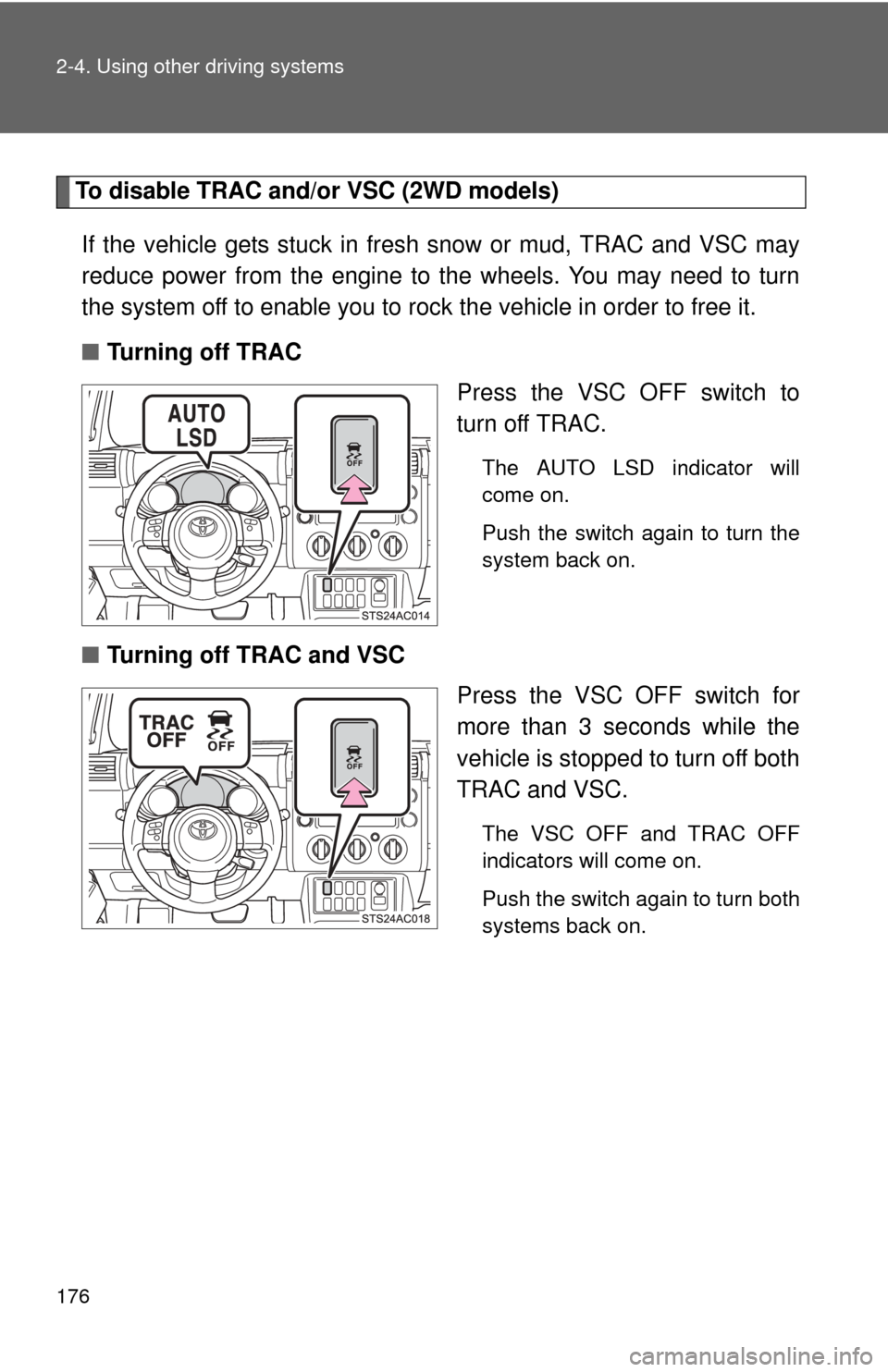
To disable TRAC and/or VSC (2WD models)If the vehicle gets stuck in fres h snow or mud, TRAC and VSC may
reduce power from the engine to the wheels. You may need to turn
the system off to enable you to rock the vehicle in order to free it.
■ Turning off TRAC
Press the VSC OFF switch to
turn off TRAC.
The AUTO LSD indicator will
come on.
Push the switch again to turn the
system back on.
■Turning off TRAC and VSC
Press the VSC OFF switch for
more than 3 seconds while the
vehicle is stopped to turn off both
TRAC and VSC.
The VSC OFF and TRAC OFF
indicators will come on.
Push the switch again to turn both
systems back on.
Page 177 of 528
![TOYOTA FJ CRUISER 2011 1.G Owners Manual 177
2-4. Using other
driving systems
2
When driving
To disable TRAC (TRC) and/or VSC (H2 and H4 mode [automatic
transmission] or H and HL mode [m anual transmission] on 4WD models)
If the vehicle get](/img/14/6370/w960_6370-176.png "TOYOTA FJ CRUISER 2011 1.G Owners Manual 177
2-4. Using other
driving systems
2
When driving
To disable TRAC (TRC) and/or VSC (H2 and H4 mode [automatic
transmission] or H and HL mode [m anual transmission] on 4WD models)
If the vehicle get")
177
2-4. Using other
driving systems
2
When driving
To disable TRAC (TRC) and/or VSC (H2 and H4 mode [automatic
transmission] or H and HL mode [m anual transmission] on 4WD models)
If the vehicle gets stuck in fresh snow or mud, TRAC (TRC) and VSC
may reduce power from the engine to the wheels. You may need to
turn the system off to enable you to rock the vehicle in order to free it.
■Turning off TRAC (TRC)
Press the VSC OFF switch to
turn off TRAC (TRC).
The TRAC OFF (TRC OFF) indi-
cator will come on.
Push the switch again to turn the
system back on.
■Turning off TRAC (TRC) and VSC
Press and hold the VSC OFF
switch for more than 3 seconds
while the vehicle is stopped to
turn off both TRAC (TRC) and
VSC.
The VSC OFF and TRAC OFF
(TRC OFF) indicators will come
on.
Push the switch again to turn both
systems back on.
U.S.A. Canada
U.S.A. Canada
Page 192 of 528
192 2-5. Driving information
CAUTION
■Driving with snow tires
Observe the following precautions to reduce the risk of accidents.
Failing to do so may result in a loss of vehicle control and cause death or
serious injury.
●Use tires of the size specified for your vehicle.
● Maintain the recommended level of air pressure.
● Do not drive in excess of 75 mph (120 km/h) regardless of the type of
snow tires being used.
● Snow tires should be installed on all wheels.
● 4WD models:
Do not mix tires of different makes, models, tread patterns or treadwear.
■ Driving with snow chains
Observe the following precautions to reduce the risk of accidents.
Failing to do so may result in the vehicle being unable to be driven safely,
and may cause death or serious injury.
●Do not drive in excess of the speed limit specified for the tire chains being
used or 30 mph (50 km/h), whichever is lower.
● Avoid driving on bumpy road surfaces or over potholes.
● Avoid sudden turns and braking.
● Slow down sufficiently before entering a curve to ensure that vehicle con-
trol is maintained.
NOTICE
■Repairing or replacing snow tires
Request repairs of and obtain replacement snow tires from Toyota dealers or
legitimate tire retailers.
This is because the removal and attachment of snow tires affects the opera-
tion of the tire pressure warning valves and transmitters.
■ Fitting tire chains
The tire pressure warning valves and transmitters may not function correctly\
when tire chains are fitted.
Page 209 of 528
209
3-1. Using the air conditioning system
and defogger
3
Interior features
■If the ambient temperature drops while using the recirculated
air mode
The air intake mode automatically changes from recirculated air
mode to outside air mode after a few minutes.
To cancel this function:
Press and hold for longer than 2 seconds.
To reactivate this function:
Turn the engine switch to the LOCK or ACC position.
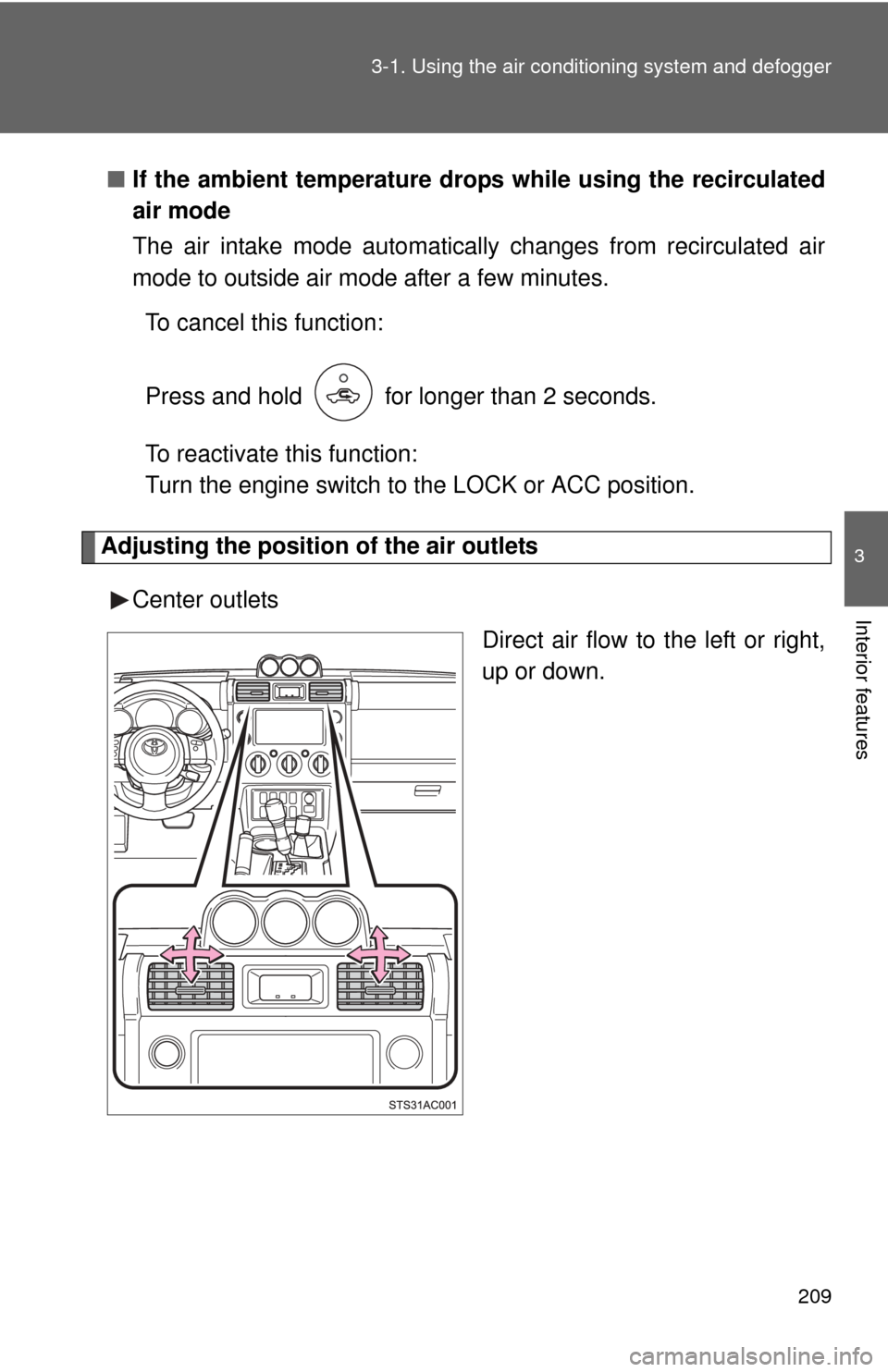
Adjusting the position of the air outlets
Center outlets Direct air flow to the left or right,
up or down.
Page 211 of 528
211
3-1. Using the air conditioning system
and defogger
3
Interior features
■Using the system in recirculated air mode
The windows will fog up more easily if the recirculated air mode is used for
an extended period.
■ When outside air temperature approaches 32°F (0°C)
The air conditioning system may not operate even when
is pressed.
■ When
is selected for the air outlets used
For your driving comfort, air flowing to the feet may be warmer than air flow-
ing to the upper body depending on the position of the temperature adjust-
ment dial.
■ When the indicator on flashes
Press and turn off the air conditioning system before turning it on
once more. There may be a problem in the air conditioning system if the indi-
cator continues to flash. Turn the air conditioning system off and have it
inspected by your Toyota dealer.
■ Air conditioning odors
●During use, various odors from inside and outside the vehicle may enter
into and accumulate in the air conditioning system. This may then cause
odor to be emitted from the vents.
● To reduce potential odors from occurring:
It is recommended that the air conditioning system be set to outside air
mode prior to turning the vehicle off.
CAUTION
■To prevent the windshield from fogging up
Do not set the air outlet selection dial to during cool air operation in
extremely humid weather. The difference between the temperature of the
outside air and that of the windshield can cause the outer surface of the
windshield to fog up, blocking your vision.
A/C
A/C
A/C
Page 219 of 528
219
3-2. Using the audio system
3
Interior features
Scanning radio stations (excluding XM® Satellite Radio)
■ Scanning the preset radio stations
Press and hold until you hear a beep.
Preset stations will be played for 5 seconds each.
When the desired station is reached, press again.
■ Scanning all radio stations within range
Press
.
All the stations with reception will be played for 5 seconds each.
When the desired station is reached, press again.
■ Displaying radio text me ssages (FM mode only)
When a new radio text message is received, “MSG” is shown on
the display. To display the message, press .
If the text continues past the end of the display, “ ” is displayed. Press
and hold until you hear a beep.
Text messages are not displayed while driving.