four wheel drive TOYOTA FJ CRUISER 2011 1.G Owners Manual
[x] Cancel search | Manufacturer: TOYOTA, Model Year: 2011, Model line: FJ CRUISER, Model: TOYOTA FJ CRUISER 2011 1.GPages: 528, PDF Size: 10.93 MB
Page 3 of 528

1
2
3
4
5
6
7
3
2-3. Operating the lights and wipers
Headlight switch .................. 143
Windshield wipers and washer .............................. 145
Rear window wiper and washer .............................. 147
2-4. Using other driving systems Cruise control ...................... 148
Intuitive parking assist......... 152
Rear view monitor system .............................. 157
Four-wheel drive system (4WD models with a
manual transmission)........ 161
Four-wheel drive system (4WD models with
an automatic
transmission) .................... 164
Active traction control system .............................. 167
AUTO LSD system (2WD models) ................... 169
Rear differential lock system .............................. 171
Clutch start cancel switch (vehicles with a manual
transmission) .................... 174
Driving assist systems ........ 175
2-5. Driving information Off-road precautions ........... 180
Cargo and luggage ............. 185
Vehicle load limits ............... 189
Winter driving tips ............... 190
Trailer towing ...................... 193
Dinghy towing ..................... 203 3-1. Using the air conditioning
system and defogger
Air conditioning system ...... 206
Rear window defogger ....... 213
3-2. Using the audio system Audio system ...................... 214
Using the radio ................... 218
Using the CD player ........... 225
Playing MP3 and WMA discs ................................. 233
Operating an iPod .............. 240
Operating a USB memory ............................ 247
Optimal use of the audio system .............................. 255
Using the AUX port............. 258
Using the steering wheel audio switches.................. 259
3-3. Using the Bluetooth
® audio
system
Bluetooth
® audio system .... 262
Using the Bluetooth®
audio system .................... 265
Operating a Bluetooth
®
enabled portable player.... 270
Setting up a Bluetooth
®
enabled portable player.... 272
Bluetooth
® audio system
setup ................................ 277
3Interior features
Page 12 of 528
12
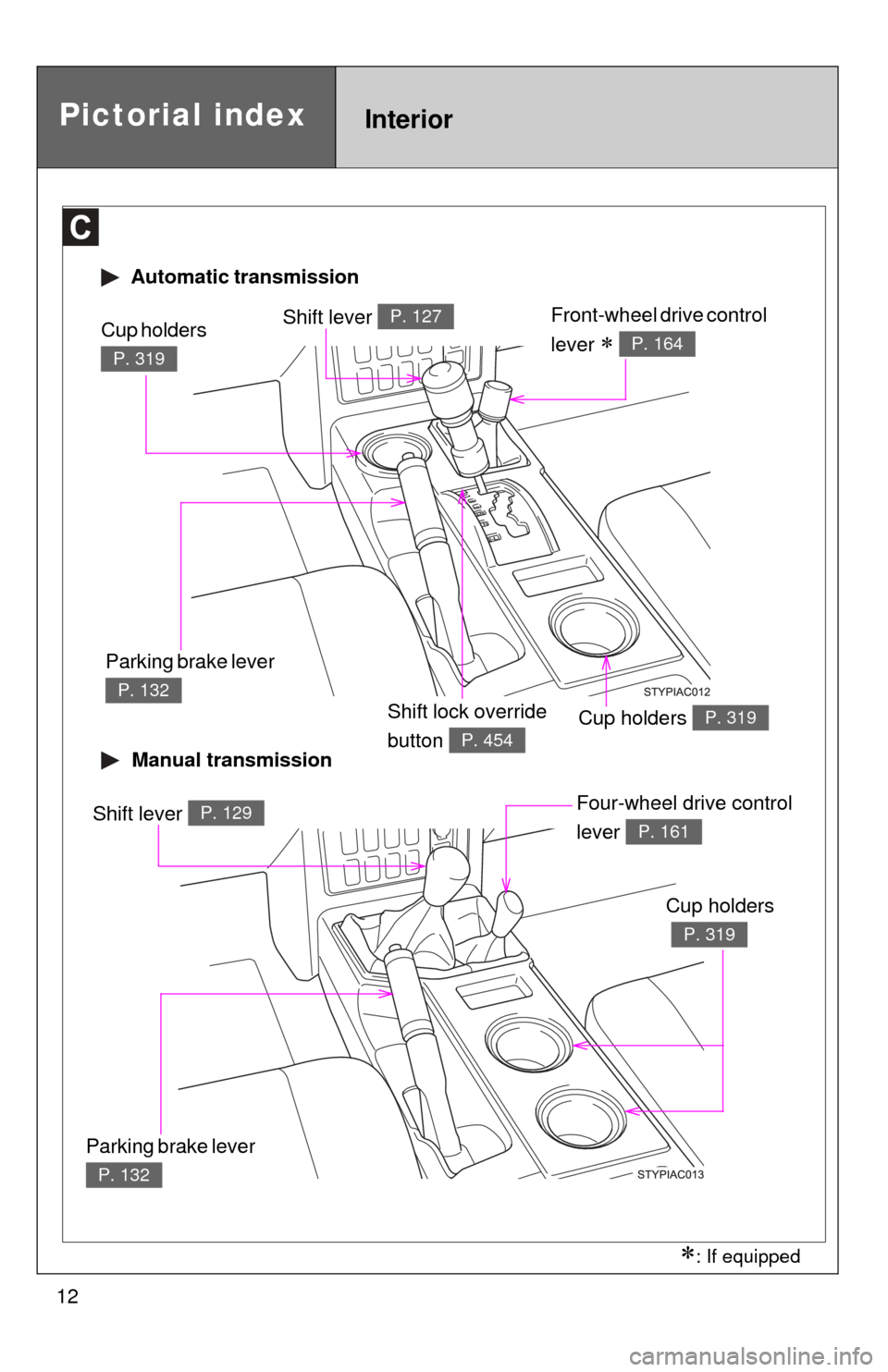
Automatic transmission
Manual transmission
Shift lever P. 127Front-wheel drive control
lever
P. 164
Cup holders P. 319
Cup holders
P. 319
Parking brake lever
P. 132
Shift lever P. 129Four-wheel drive control
lever
P. 161
Cup holders
P. 319
Parking brake lever
P. 132
Shift lock override
button
P. 454
Pictorial indexInterior
: If equipped
Page 113 of 528
When driving2
113
2-1. Driving proceduresDriving the vehicle............ 114
Engine (ignition) switch .... 124
Automatic Transmission... 127
Manual Transmission ....... 129
Turn signal lever .............. 131
Parking brake ................... 132
Horn ................................. 134
2-2. Instrument cluster Gauges and meters ......... 135
Indicators and warning lights .............................. 138
Accessory meter .............. 141
2-3. Operating the lights and wipers
Headlight switch ............... 143
Windshield wipers and washer ........................... 145
Rear window wiper and washer ........................... 147
2-4. Using other driving systems Cruise control ................... 148
Intuitive parking assist...... 152
Rear view monitor system ........................... 157 Four-wheel drive system
(4WD models with a
manual transmission) ..... 161
Four-wheel drive system (4WD models with
an automatic
transmission) ................. 164
Active traction control system ........................... 167
AUTO LSD system (2WD models) ................ 169
Rear differential lock system ........................... 171
Clutch start cancel switch (vehicles with a manual
transmission) ................. 174
Driving assist systems ..... 175
2-5. Driving information Off-road precautions ........ 180
Cargo and luggage .......... 185
Vehicle load limits ............ 189
Winter driving tips ............ 190
Trailer towing ................... 193
Dinghy towing .................. 203
Page 139 of 528
139
2-2. Instrument cluster
2
When driving
■
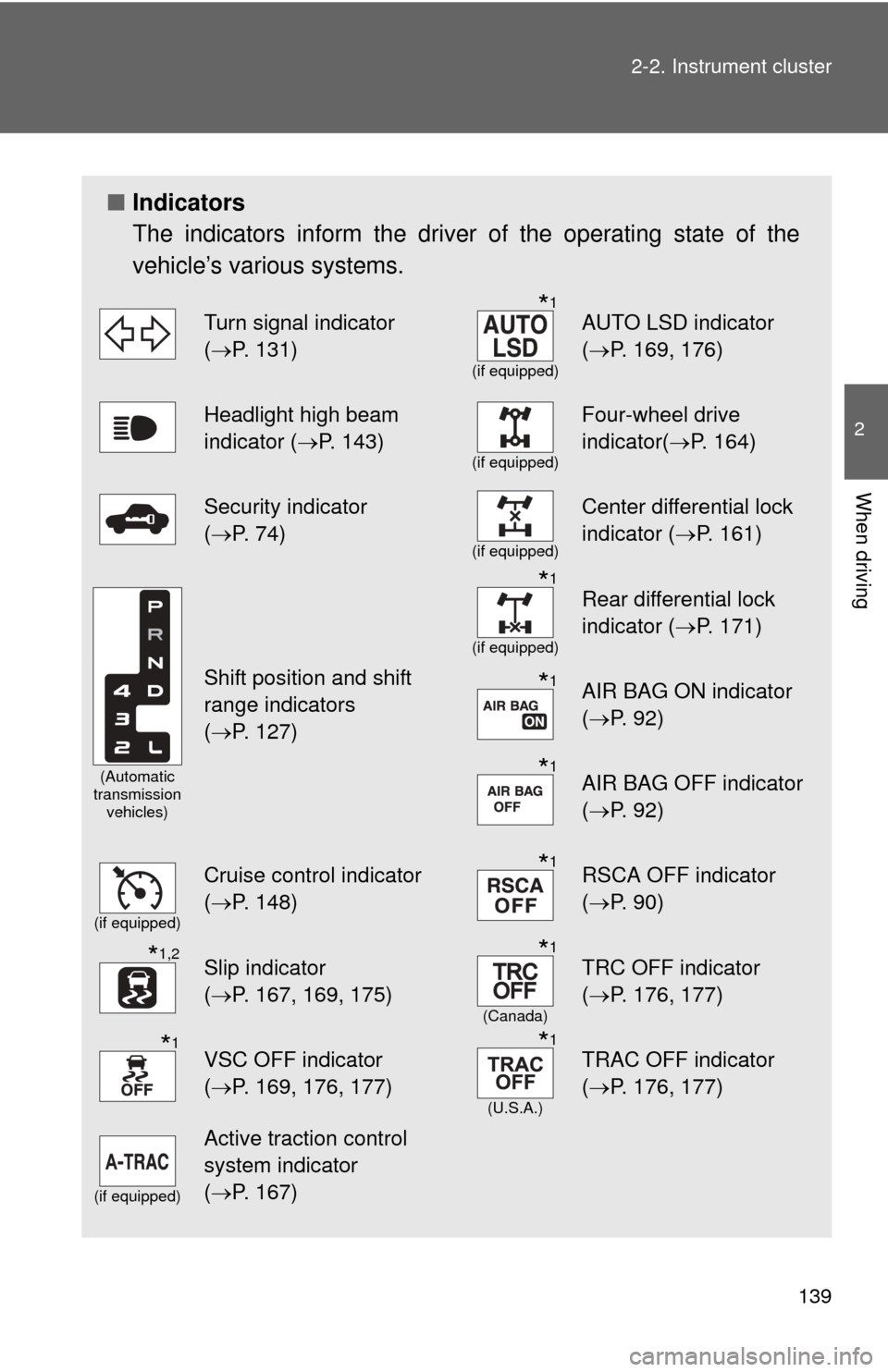
Indicators
The indicators inform the driver of the operating state of the
vehicle’s various systems.
Turn signal indicator
(P. 131)*1
(if equipped)
AUTO LSD indicator
( P. 169, 176)
Headlight high beam
indicator ( P. 143)
(if equipped)
Four-wheel drive
indicator(P. 164)
Security indicator
(P. 74)
(if equipped)
Center differential lock
indicator ( P. 161)
(Automatic
transmission vehicles)
Shift position and shift
range indicators
(P. 127)
*1
(if equipped)
Rear differential lock
indicator ( P. 171)
*1AIR BAG ON indicator
(P. 92)
*1AIR BAG OFF indicator
(P. 92)
(if equipped)
Cruise control indicator
(P. 148)*1RSCA OFF indicator
( P. 90)
*1,2Slip indicator
(P. 167, 169, 175)*1
(Canada)
TRC OFF indicator
( P. 176, 177)
*1VSC OFF indicator
(P. 169, 176, 177)*1
(U.S.A.)
TRAC OFF indicator
( P. 176, 177)
(if equipped)
Active traction control
system indicator
(P. 167)
Page 161 of 528
161
2-4. Using other driving systems
2
When driving
Four-wheel drive system (4WD models with a manual transmission)
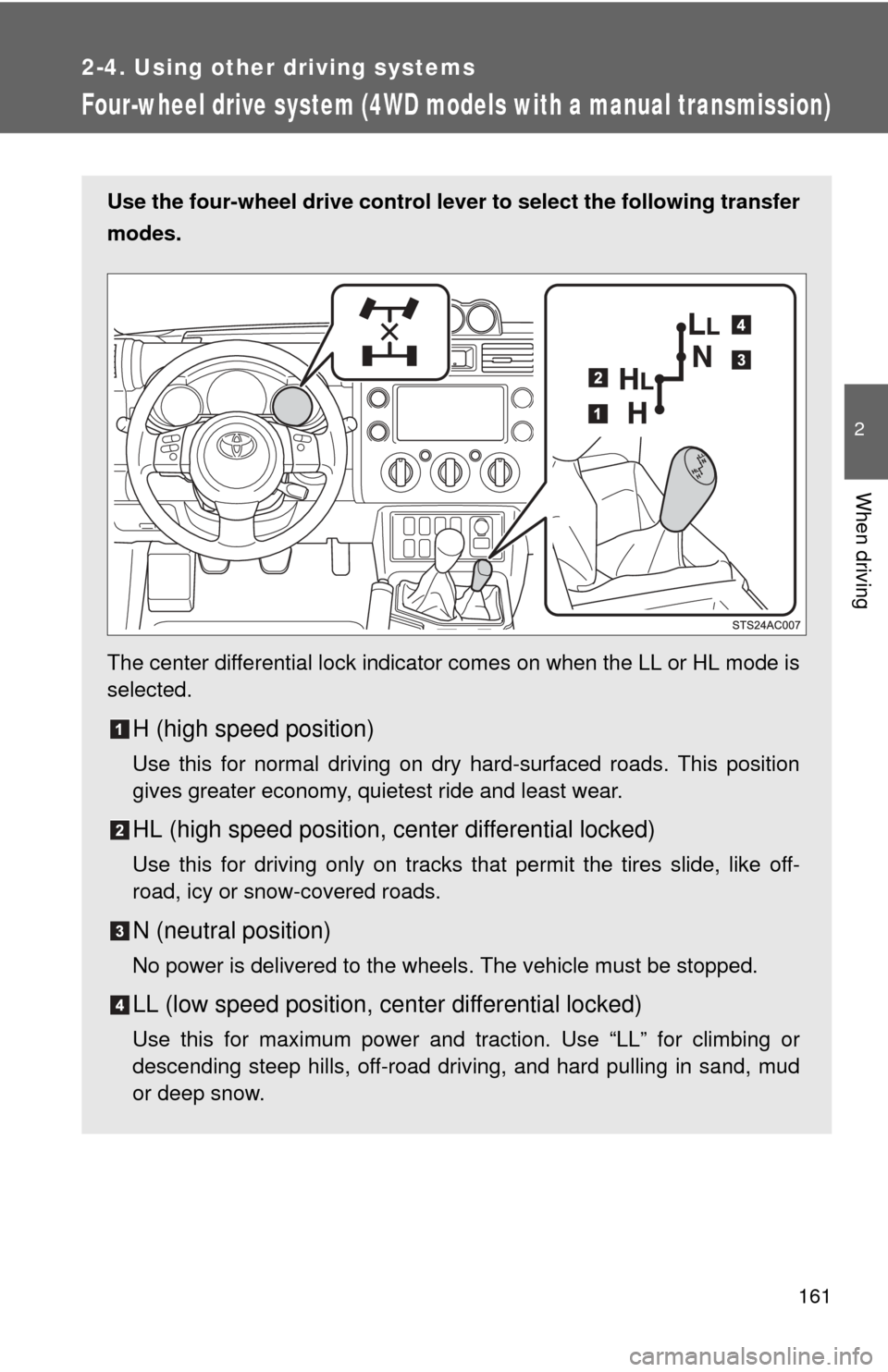
Use the four-wheel drive control lever to select the following transfer
modes.
The center differential lock indicator comes on when the LL or HL mode is
selected.
H (high speed position)
Use this for normal driving on dry hard-surfaced roads. This position
gives greater economy, quietest ride and least wear.
HL (high speed position, center differential locked)
Use this for driving only on tracks that permit the tires slide, like off-
road, icy or snow-covered roads.
N (neutral position)
No power is delivered to the wheels. The vehicle must be stopped.
LL (low speed position, ce nter differential locked)
Use this for maximum power and traction. Use “LL” for climbing or
descending steep hills, off-road driving, and hard pulling in sand, mud
or deep snow.
Page 162 of 528
162 2-4. Using other driving systems
■Shifting between H and HL
●You need not to depress the clutch pedal.
● If the center differential lock indicator does not come on when you shift
from H to HL, drive straight ahead while accelerating or decelerating.
● If the center differential lock indicator does not go off when you shift from
HL to H, drive straight ahead while accelerating or decelerating, or drive
in reverse.
■ Shifting from HL to LL
Stop the vehicle or reduce your speed to less than 5 mph (8 km/h).
Depress the clutch pedal and move the four-wheel drive control lever.
■ Shifting from LL to HL
Depress the clutch pedal and move the four-wheel drive control lever.
■ Shifting to LL
VSC is automatically turned off.
CAUTION
■Caution while driving
Avoid turning suddenly while the center differential is locked. If you do turn
suddenly, the difference in turning speeds between the front and rear wheels
may have a similar effect to braking, thus making driving difficult.
Page 163 of 528

163
2-4. Using other
driving systems
2
When driving
NOTICE
■To prevent damage to the center differential
●For normal driving on dry and hard surface roads, unlock the center differ-
ential.
● Shift to H after the wheels are out of the ditch or off the slippery or bumpy
surface.
● Do not shift to any position when the vehicle is cornering or when its
wheels spinning freely off the ground.
■ Shifting from H to HL while driving
Never operate the four-wheel drive control lever if the wheels are slipping.
Stop the slipping or spinning before shifting.
Page 164 of 528

164
2-4. Using other driving systems
Four-wheel drive system (4WD models with an automatic transmission)
Use the front-wheel drive control lever to select the following trans-
fer modes.
The four-wheel drive indicator comes on when the H4, N or L4 mode is
selected.
H2 (high speed position, two-wheel drive)
Use this for normal driving on dry hard-surfaced roads. This position
gives greater economy, quietest ride and least wear.
H4 (high speed position, four-wheel drive)
Use this for driving only on tracks that permit the tires slide, like off-
road, icy or snow-covered roads. This position provides greater traction
than two-wheel drive.
N (neutral position)
No power is delivered to the wheels. The vehicle must be stopped.
L4 (low speed position, four-wheel drive)
Use this for maximum power and traction. Use “L4” for climbing or
descending steep hills, off-road driving, and hard pulling in sand, mud
or deep snow.
Page 165 of 528

165
2-4. Using other
driving systems
2
When driving
■Shifting between H2 and H4
●Reduce your speed to less than 50 mph (80 km/h) and shift the front-
wheel drive control lever from H2 to H4.
If you have trouble shifting in cold weather, reduce your speed or stop the
vehicle.
● If the four-wheel drive indicator does not go off when you shift from H4 to
H2, drive straight ahead while accelerating or decelerating, or drive in\
reverse.
■ Shifting between H4 and L4
Stop the vehicle, shift the shift lever to N and shift the front-wheel drive con-
trol lever.
■ Shifting to L4
VSC is automatically turned off.
■ Four-wheel drive usage frequency
You should drive in four-wheel drive for at least 10 miles (16 km) each
month.
This will assure that the front drive components are lubricated.
Page 167 of 528
167
2-4. Using other driving systems
2
When driving
Active traction control system
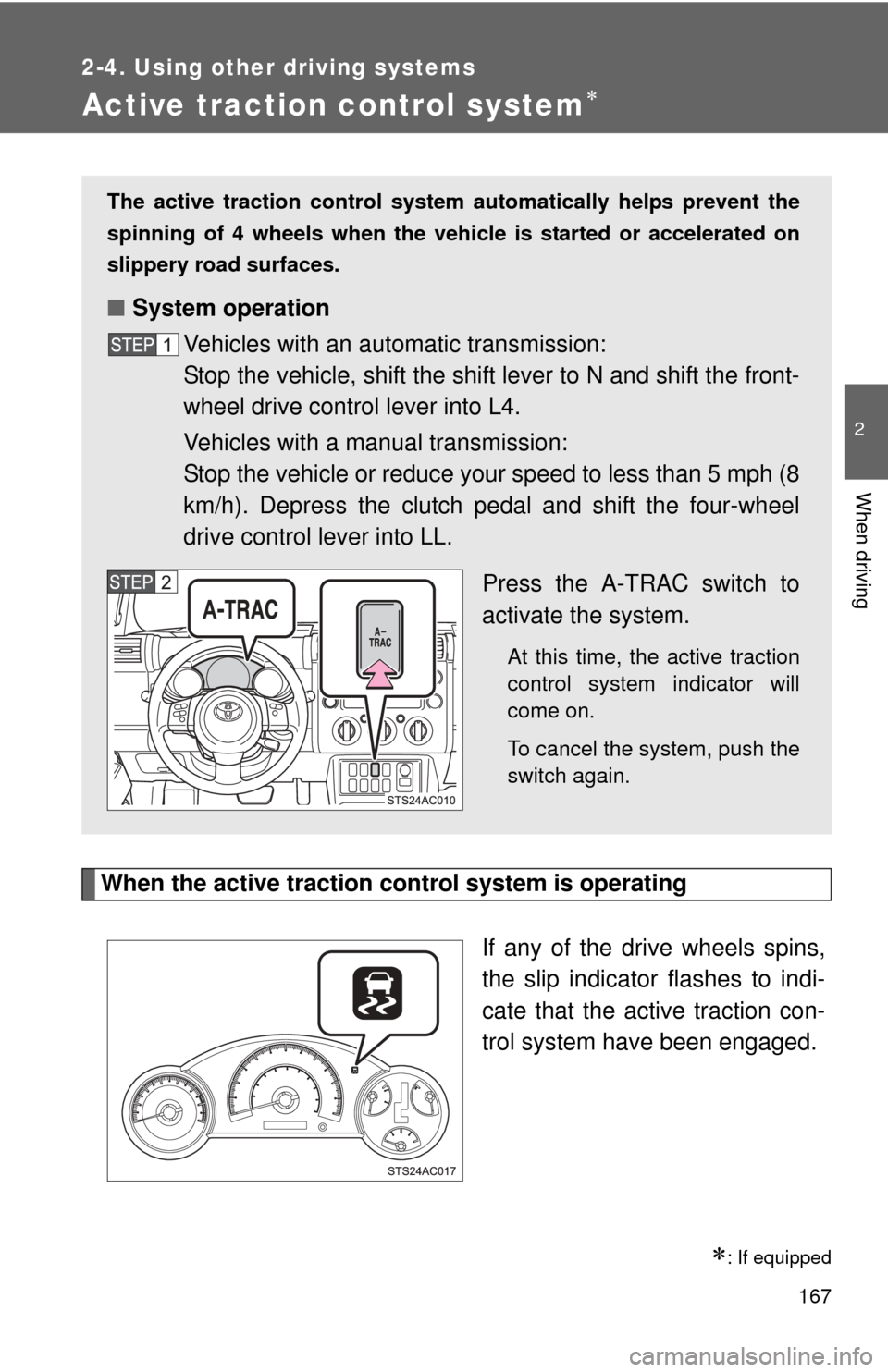
When the active traction control system is operatingIf any of the drive wheels spins,
the slip indicator flashes to indi-
cate that the active traction con-
trol system have been engaged.
: If equipped
The active traction control system automatically helps prevent the
spinning of 4 wheels when the vehicle is started or accelerated on
slippery road surfaces.
■ System operation
Vehicles with an automatic transmission:
Stop the vehicle, shift the shift lever to N and shift the front-
wheel drive control lever into L4.
Vehicles with a manual transmission:
Stop the vehicle or reduce your speed to less than 5 mph (8
km/h). Depress the clutch pedal and shift the four-wheel
drive control lever into LL.
Press the A-TRAC switch to
activate the system.
At this time, the active traction
control system indicator will
come on.
To cancel the system, push the
switch again.