interior lights TOYOTA FJ CRUISER 2011 1.G Owners Manual
[x] Cancel search | Manufacturer: TOYOTA, Model Year: 2011, Model line: FJ CRUISER, Model: TOYOTA FJ CRUISER 2011 1.GPages: 528, PDF Size: 10.93 MB
Page 3 of 528

1
2
3
4
5
6
7
3
2-3. Operating the lights and wipers
Headlight switch .................. 143
Windshield wipers and washer .............................. 145
Rear window wiper and washer .............................. 147
2-4. Using other driving systems Cruise control ...................... 148
Intuitive parking assist......... 152
Rear view monitor system .............................. 157
Four-wheel drive system (4WD models with a
manual transmission)........ 161
Four-wheel drive system (4WD models with
an automatic
transmission) .................... 164
Active traction control system .............................. 167
AUTO LSD system (2WD models) ................... 169
Rear differential lock system .............................. 171
Clutch start cancel switch (vehicles with a manual
transmission) .................... 174
Driving assist systems ........ 175
2-5. Driving information Off-road precautions ........... 180
Cargo and luggage ............. 185
Vehicle load limits ............... 189
Winter driving tips ............... 190
Trailer towing ...................... 193
Dinghy towing ..................... 203 3-1. Using the air conditioning
system and defogger
Air conditioning system ...... 206
Rear window defogger ....... 213
3-2. Using the audio system Audio system ...................... 214
Using the radio ................... 218
Using the CD player ........... 225
Playing MP3 and WMA discs ................................. 233
Operating an iPod .............. 240
Operating a USB memory ............................ 247
Optimal use of the audio system .............................. 255
Using the AUX port............. 258
Using the steering wheel audio switches.................. 259
3-3. Using the Bluetooth
® audio
system
Bluetooth
® audio system .... 262
Using the Bluetooth®
audio system .................... 265
Operating a Bluetooth
®
enabled portable player.... 270
Setting up a Bluetooth
®
enabled portable player.... 272
Bluetooth
® audio system
setup ................................ 277
3Interior features
Page 4 of 528

TABLE OF CONTENTSIndex
4
3-4. Using the hands-free phone system (for cellular phone)
Hands-free phone system features ............................ 278
Using the hands-free phone system ................... 282
Making a phone call ........... 291
Setting a cellular phone...... 296
Security and system setup ................................ 302
Using the phone book ........ 307
3-5. Using the interior lights Interior lights list ................. 315
• Interior lights .................... 316
• Personal lights ................. 317
3-6. Using the storage features List of storage features....... 318
• Glove box ......................... 319
• Cup holders (front) ........... 319
• Cup holders (rear) ............ 322
• Bottle holders ................... 323
• Auxiliary box ..................... 324
3-7. Other interior features Sun visors .......................... 325
Vanity mirrors ..................... 326
Clock .................................. 327
Outside temperature display .............................. 328
Power outlet (12V DC) ....... 329
Power outlet (115V AC) ..... 330
Armrest............................... 336
Floor mat ............................ 337
Luggage storage box (vehicles without sub
woofer) ............................. 339 Luggage compartment
features ............................ 340
Compass ............................ 343
4-1. Maintenance and care Cleaning and protecting the vehicle exterior ........... 350
Cleaning and protecting the vehicle interior ............ 353
4-2. Maintenance Maintenance requirements .................... 356
General maintenance ......... 358
Emission inspection and maintenance (I/M)
programs .......................... 361
4-3. Do-it-yourself maintenance Do-it-yourself service precautions ....................... 362
Hood ................................... 366
Engine compartment .......... 367
Tires.................................... 381
Tire inflation pressure ......... 387
Wheels................................ 391
Air conditioning filter ........... 394
Key battery ......................... 397
Checking and replacing fuses ................................. 399
Light bulbs .......................... 410
4Maintenance and care
Page 10 of 528
10
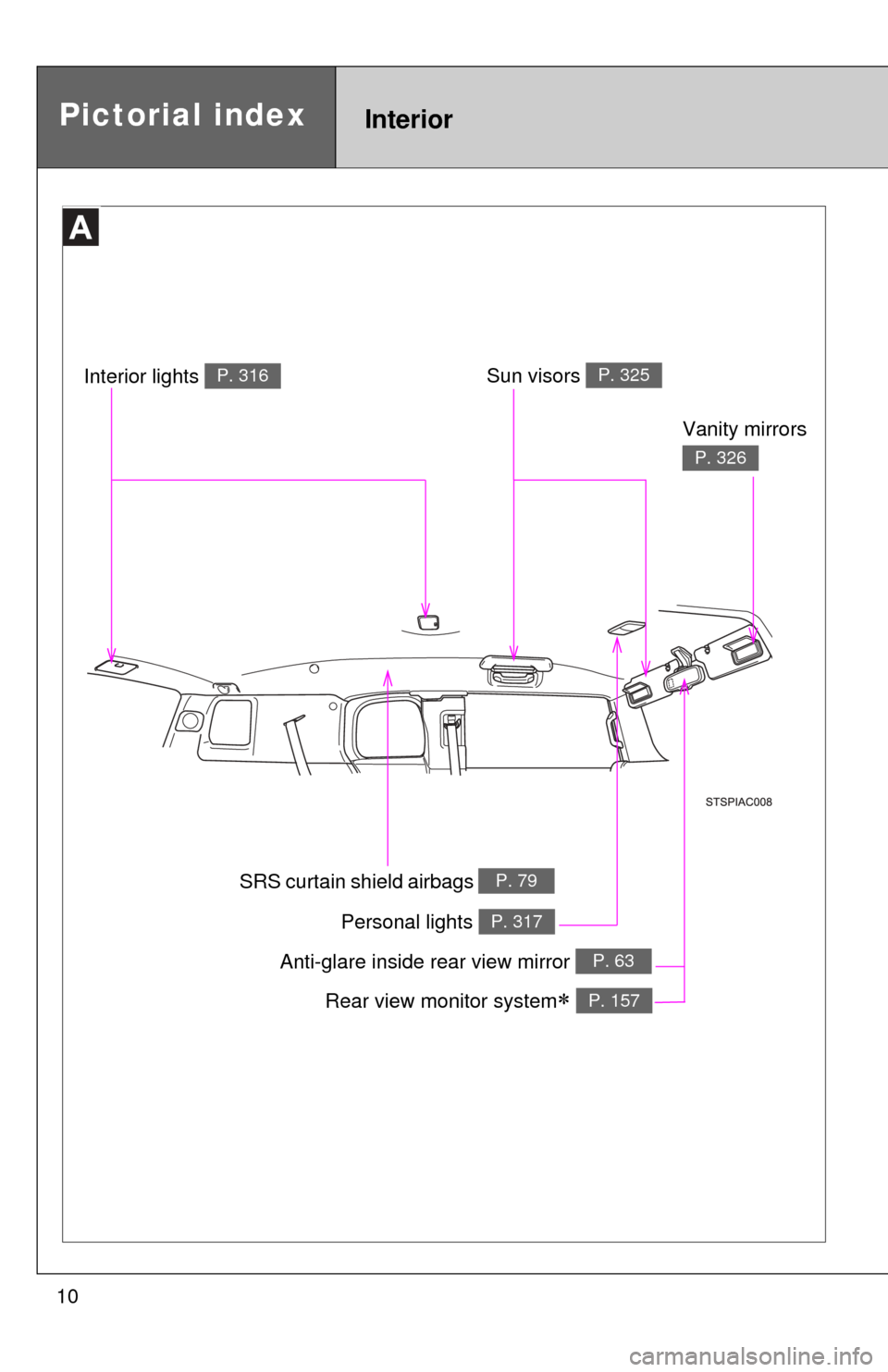
Anti-glare inside rear view mirror P. 63
Sun visors P. 325
SRS curtain shield airbags P. 79
Vanity mirrors
P. 326
Interior lights P. 316
Personal lights P. 317
Rear view monitor system P. 157
Pictorial indexInterior
Page 205 of 528
Interior features3
205
3-3. Using the Bluetooth® audio
system
Bluetooth
® audio
system ........................... 262
Using the Bluetooth
®
audio system.................. 265
Operating a Bluetooth
®
enabled portable
player ............................. 270
Setting up a Bluetooth
®
enabled portable
player ............................. 272
Bluetooth
® audio system
setup .............................. 277
3-4. Using the hands-free phone system (for cellular phone)
Hands-free phone system features .......................... 278
Using the hands-free phone system ................ 282
Making a phone call ......... 291
Setting a cellular phone ... 296
Security and system setup .............................. 302
Using the phone book ...... 307 3-5. Using the interior lights
Interior lights list ............... 315
• Interior lights .................. 316
• Personal lights ............... 317
3-6. Using the storage features List of storage features .... 318
• Glove box....................... 319
• Cup holders (front) ......... 319
• Cup holders (rear) .......... 322
• Bottle holders ................. 323
• Auxiliary box .................. 324
3-7. Other interior features Sun visors ........................ 325
Vanity mirrors ................... 326
Clock ................................ 327
Outside temperature display............................ 328
Power outlet (12V DC) ..... 329
Power outlet (115V AC) ... 330
Armrest ............................ 336
Floor mat .......................... 337
Luggage storage box (vehicles without sub
woofer) ........................... 339
Luggage compartment features .......................... 340
Compass .......................... 343
Page 315 of 528
315
3
Interior features
3-5. Using the interior lights
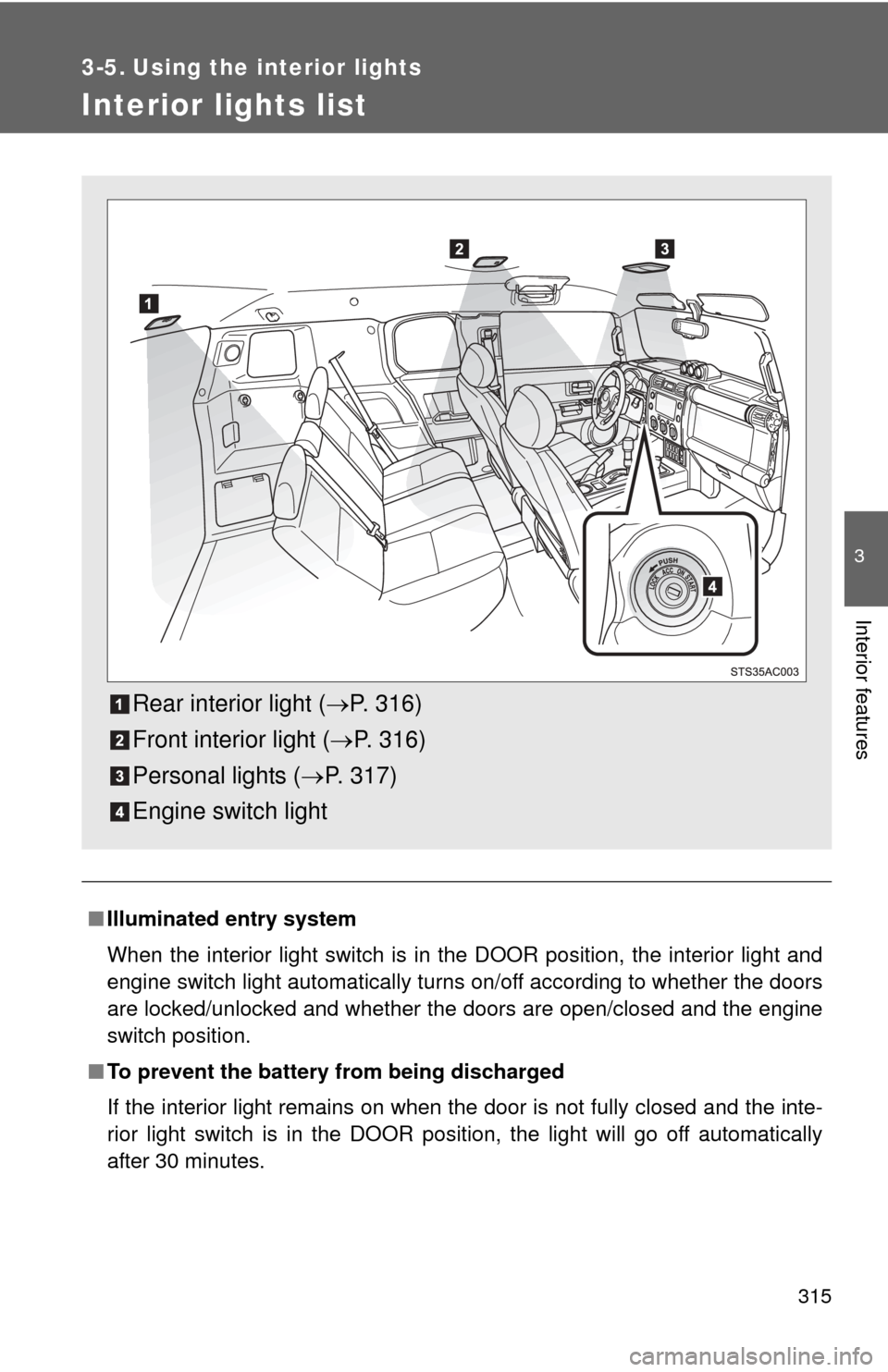
Interior lights list
■Illuminated entry system
When the interior light switch is in the DOOR position, the interior light and
engine switch light automatically turns on/off according to whether the doors
are locked/unlocked and whether the doors are open/closed and the engine
switch position.
■ To prevent the battery from being discharged
If the interior light remains on when the door is not fully closed and the inte-
rior light switch is in the DOOR position, the light will go off automatically
after 30 minutes.
Rear interior light ( P. 316)
Front interior light ( P. 316)
Personal lights ( P. 317)
Engine switch light
Page 316 of 528
316 3-5. Using the interior lights
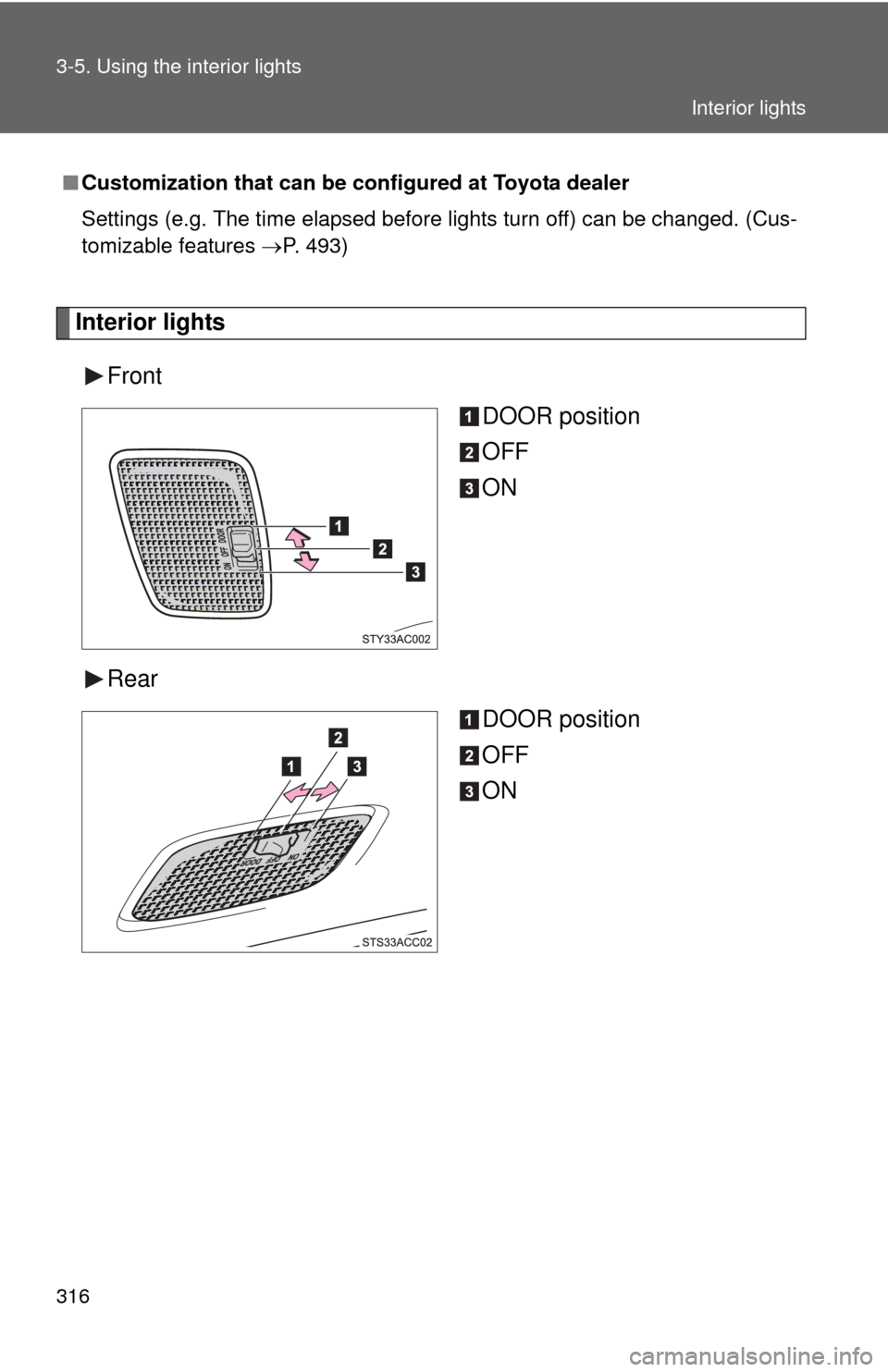
Interior lightsFront DOOR position
OFF
ON
Rear DOOR position
OFF
ON
■Customization that can be co nfigured at Toyota dealer
Settings (e.g. The time elapsed before lights turn off) can be changed. (Cus-
tomizable features P. 493)
Interior lights
Page 317 of 528
317
3-5. Using the interior lights
3
Interior features
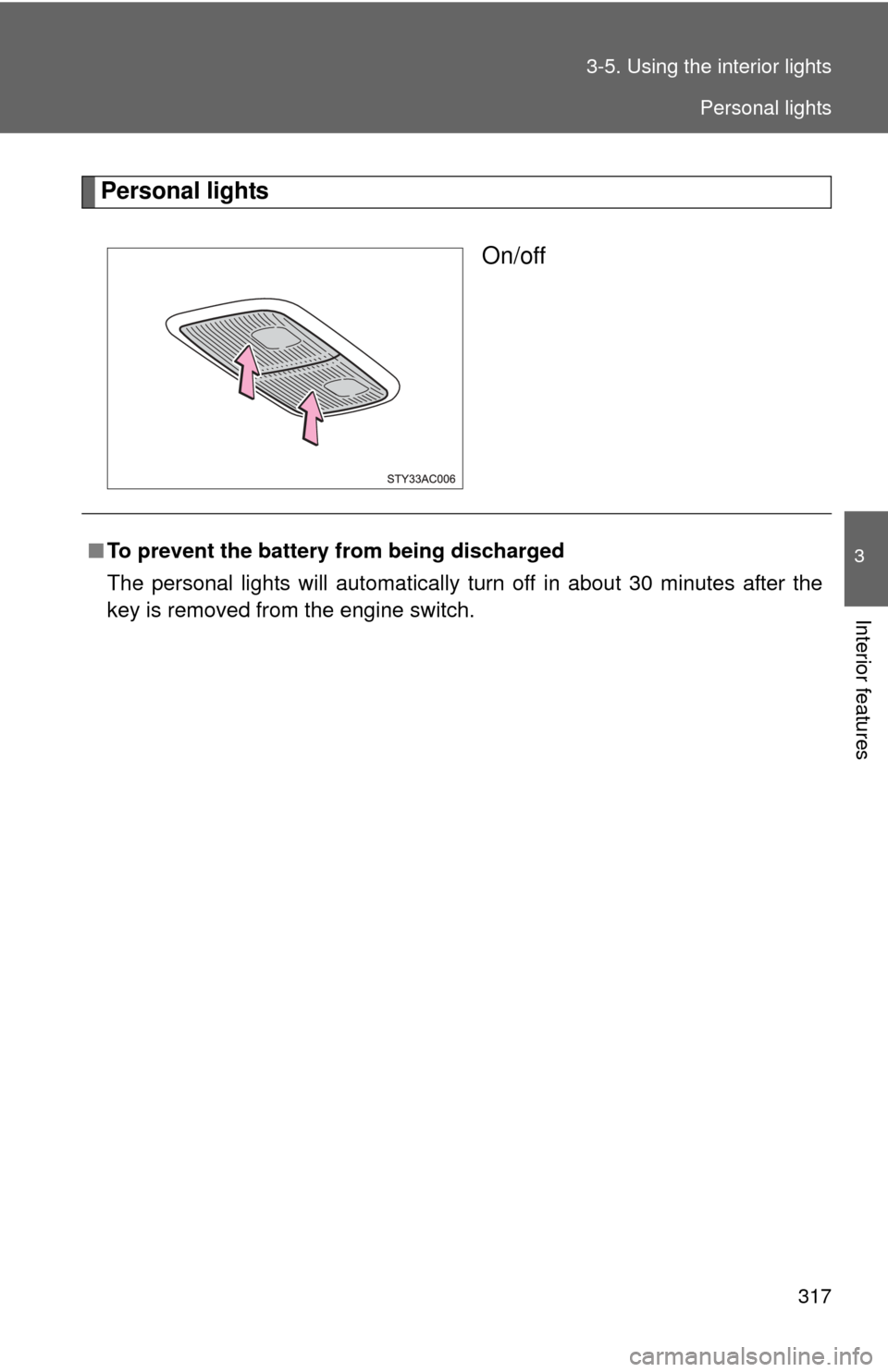
Personal lights
On/off
■To prevent the battery from being discharged
The personal lights will automatically turn off in about 30 minutes after the
key is removed from the engine switch.
Personal lights
Page 332 of 528
332 3-7. Other interior features
■The power outlet can be used when
The engine is started.
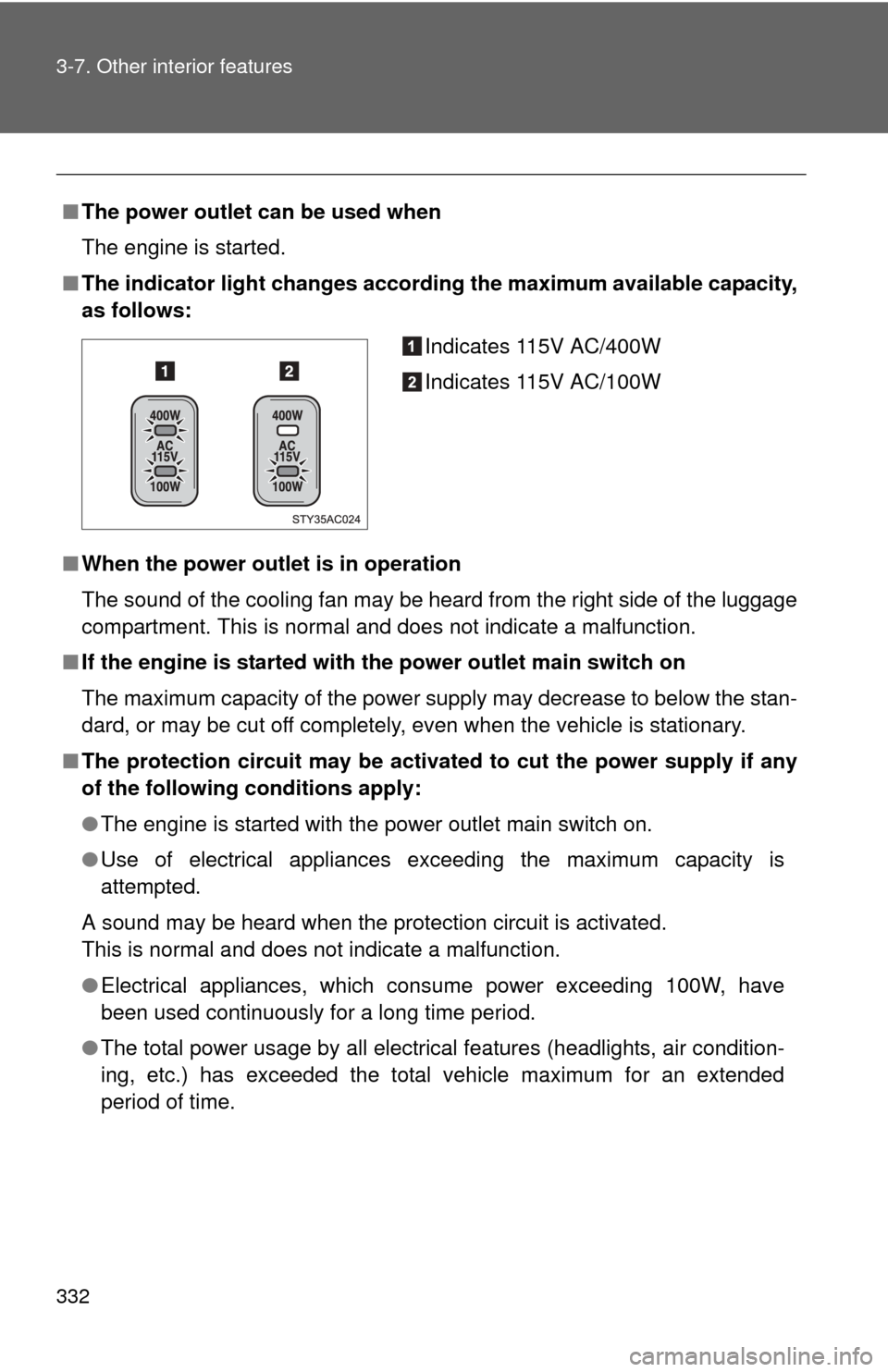
■ The indicator light changes accord ing the maximum available capacity,
as follows:
■ When the power outlet is in operation
The sound of the cooling fan may be heard from the right side of the luggage
compartment. This is normal and does not indicate a malfunction.
■ If the engine is started with th e power outlet main switch on
The maximum capacity of the power supply may decrease to below the stan-
dard, or may be cut off completely, even when the vehicle is stationary.
■ The protection circuit may be activated to cut the power supply if any
of the following conditions apply:
●The engine is started with the power outlet main switch on.
● Use of electrical appliances exceeding the maximum capacity is
attempted.
A sound may be heard when the protection circuit is activated.
This is normal and does not indicate a malfunction.
● Electrical appliances, which consume power exceeding 100W, have
been used continuously for a long time period.
● The total power usage by all electrical features (headlights, air condition-
ing, etc.) has exceeded the total vehicle maximum for an extended
period of time.
Indicates 115V AC/400W
Indicates 115V AC/100W
Page 335 of 528

335
3-7. Other interior features
3
Interior features
NOTICE
■
Appliances that may not ope rate properly (115V AC)
The following 115V AC appliances may not operate even if their power con-
sumption is under maximum capacity.
● Appliances with high initial peak wattage
● Measuring devices that process precise data
● Other appliances that require an extremely stable power supply
■ To prevent the battery from being discharged
Turn off all the vehicle’s electronic equipment and accessories, such as the
headlights and air conditioning, when electrical appliances that consume in
excess of 100W are used continuously for long periods of time.
■ To prevent any damage caused by heat
Do not use any electrical appliances that give off intense heat such as toast-
ers, in any locations including the internal or external trim, seats and deck.
●Do not use any electrical appliances, which are easily affected by vibration
or heat, inside the vehicle.
Vibration while driving, or the heat of the sun while parking, may result in
damage to those electrical appliances.
■ If any electrical appliances ar e to be used while driving
Securely fasten both the appliances and their cables to prevent them from
falling or getting caught any of the power train components.
■ If the power outlet is loose when an electrical appliance plug is con-
nected
Replace the outlet.
Contact a Toyota dealer for any necessary replacements.
■ If the power outlet gets dirty
Turn the main switch off and use a soft, clean cloth to wipe it gently.
Do not use any cleansing materials, such as organic solvents, wax, or com-
pound cleaners, as these may damage the power outlet or cause it to mal-
function.
Page 359 of 528
359
4-2. Maintenance
4
Maintenance and care
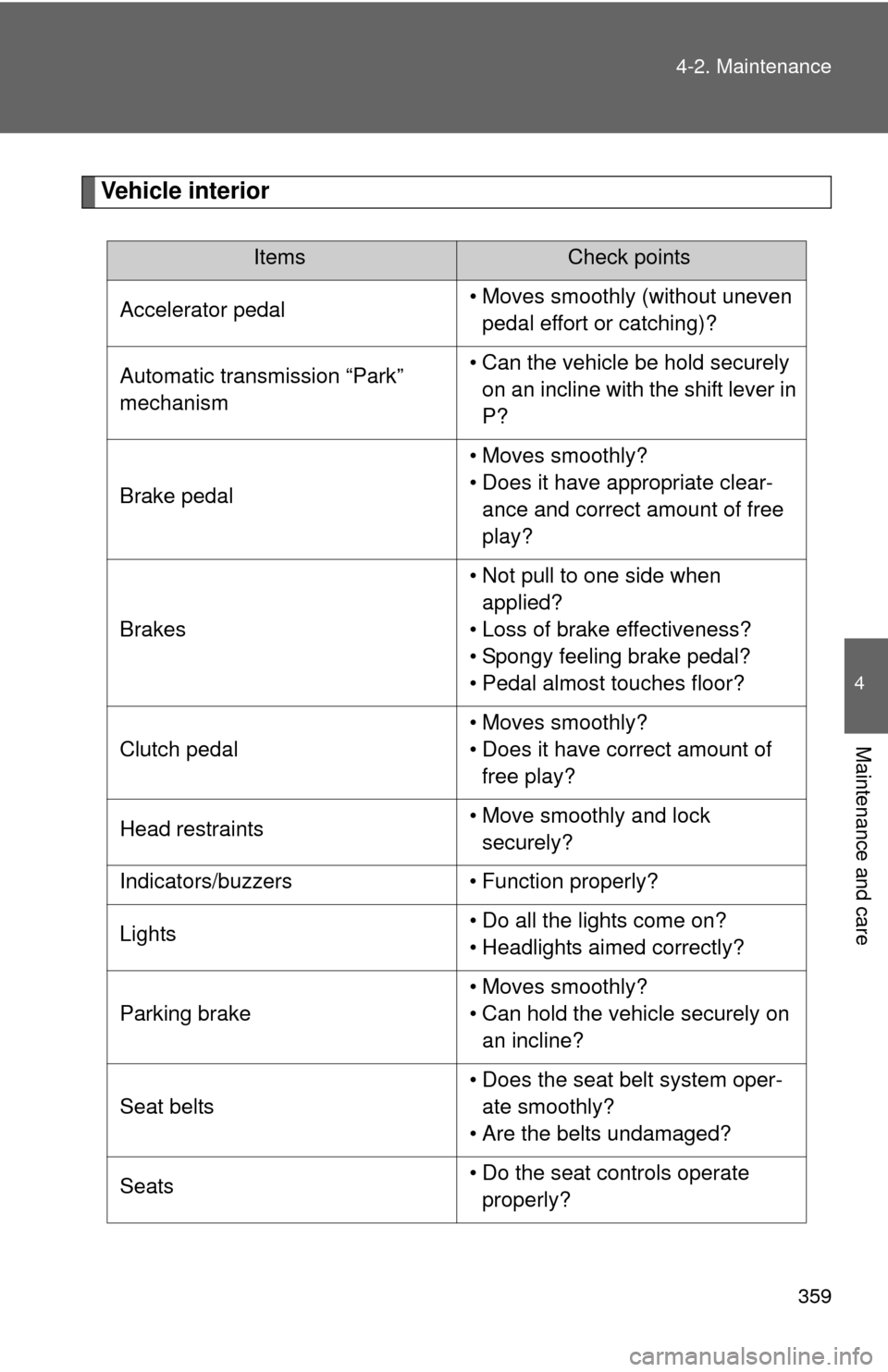
Vehicle interior
ItemsCheck points
Accelerator pedal • Moves smoothly (without uneven
pedal effort or catching)?
Automatic transmission “Park”
mechanism • Can the vehicle be hold securely
on an incline with the shift lever in
P?
Brake pedal • Moves smoothly?
• Does it have appropriate clear-
ance and correct amount of free
play?
Brakes • Not pull to one side when
applied?
• Loss of brake effectiveness?
• Spongy feeling brake pedal?
• Pedal almost touches floor?
Clutch pedal • Moves smoothly?
• Does it have correct amount of
free play?
Head restraints • Move smoothly and lock
securely?
Indicators/buzzers • Function properly?
Lights • Do all the lights come on?
• Headlights aimed correctly?
Parking brake • Moves smoothly?
• Can hold the vehicle securely on
an incline?
Seat belts • Does the seat belt system oper-
ate smoothly?
• Are the belts undamaged?
Seats • Do the seat controls operate
properly?