turn signal TOYOTA FJ CRUISER 2011 1.G Owners Manual
[x] Cancel search | Manufacturer: TOYOTA, Model Year: 2011, Model line: FJ CRUISER, Model: TOYOTA FJ CRUISER 2011 1.GPages: 528, PDF Size: 10.93 MB
Page 2 of 528
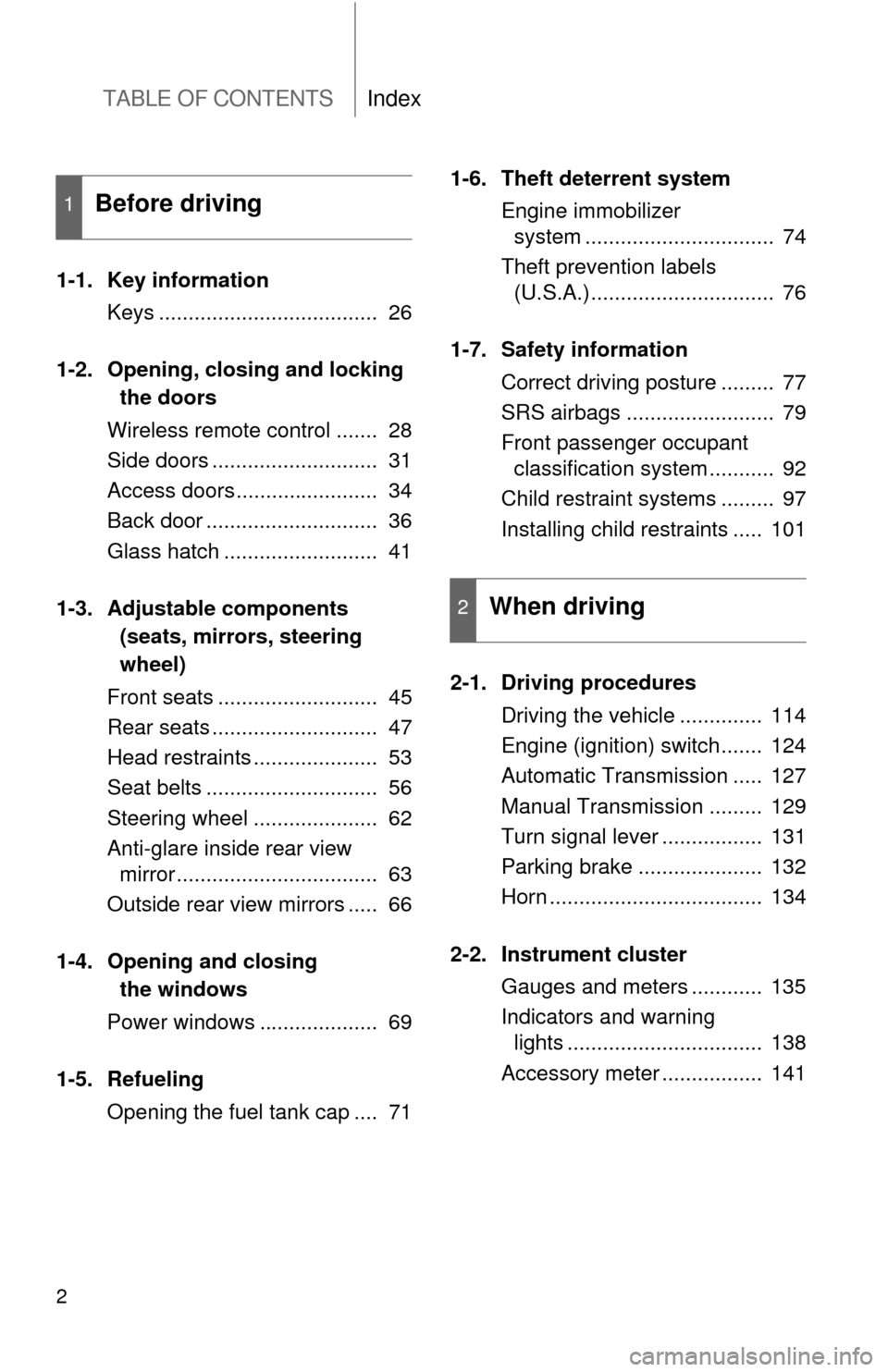
TABLE OF CONTENTSIndex
2
1-1. Key informationKeys ..................................... 26
1-2. Opening, closing and locking
the doors
Wireless remote control ....... 28
Side doors ............................ 31
Access doors........................ 34
Back door ............................. 36
Glass hatch .......................... 41
1-3. Adjustable components
(seats, mirrors, steering
wheel)
Front seats ........................... 45
Rear seats ............................ 47
Head restraints ..................... 53
Seat belts ............................. 56
Steering wheel ..................... 62
Anti-glare inside rear view mirror .................................. 63
Outside rear view mirrors ..... 66
1-4. Opening and clos ing
the windows
Pow er windows .................... 69
1-5. Refueling Opening the fuel tank cap .... 71 1-6. Theft deterrent system
Engine immobilizer system ................................ 74
Theft prevention labels (U.S.A.)............................... 76
1-7. Safety information Correct driving posture ......... 77
SRS airbags ......................... 79
Front passenger occupant classification system ........... 92
Child restraint systems ......... 97
Installing child restraints ..... 101
2-1. Driving procedures Driving the vehicle .............. 114
Engine (ignition) switch....... 124
Automatic Transmission ..... 127
Manual Transmission ......... 129
Turn signal lever ................. 131
Parking brake ..................... 132
Horn .................................... 134
2-2. Instrument cluster Gauges and meters ............ 135
Indicators and warning lights ................................. 138
Accessory meter ................. 141
1Before driving
2When driving
Page 6 of 528
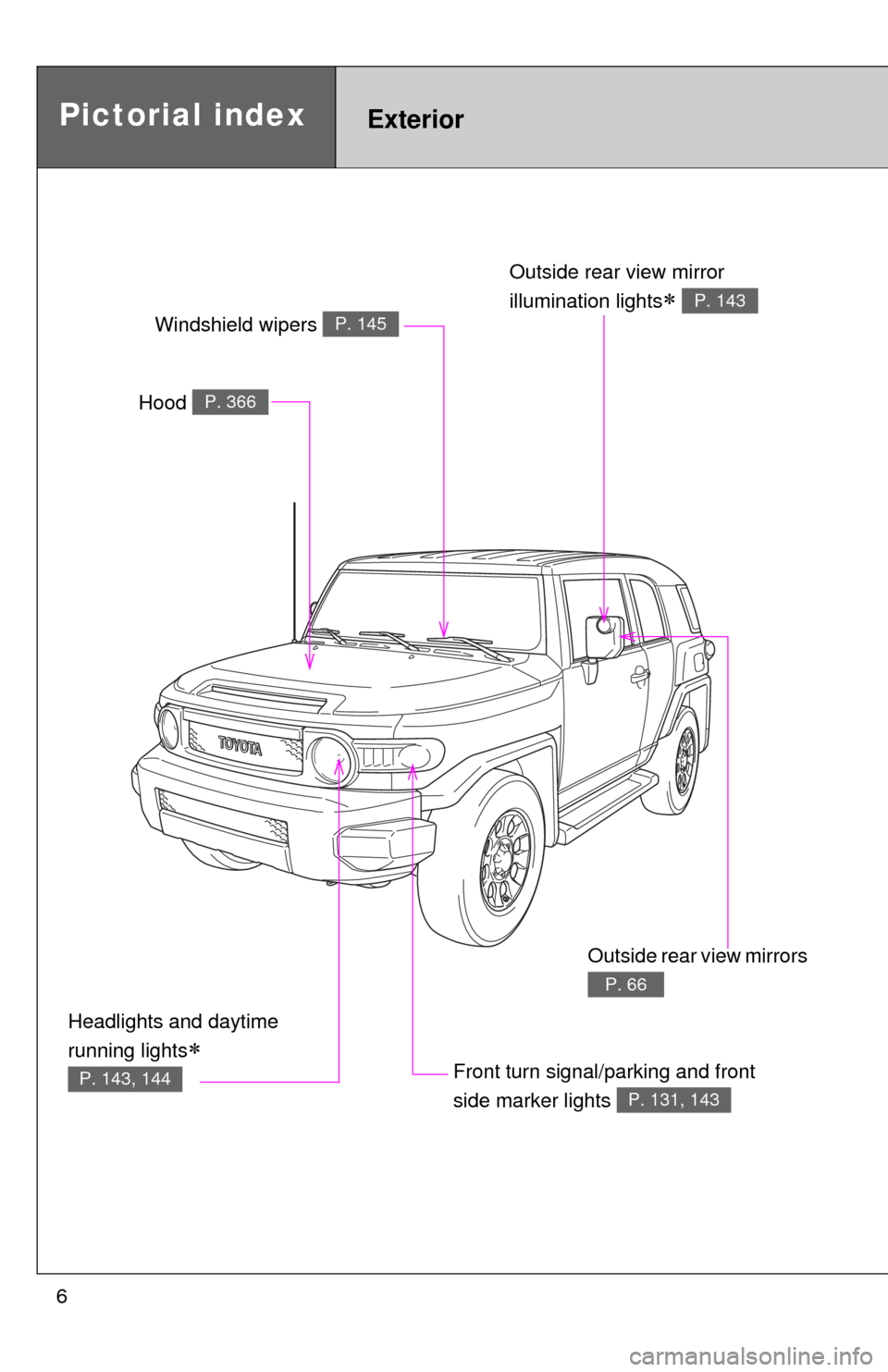
6
Headlights and daytime
running lights
P. 143, 144
Pictorial indexExterior
Hood P. 366
Windshield wipers P. 145
Outside rear view mirror
illumination lights
P. 143
Front turn signal/parking and front
side marker lights
P. 131, 143
Outside rear view mirrors
P. 66
Page 7 of 528
7
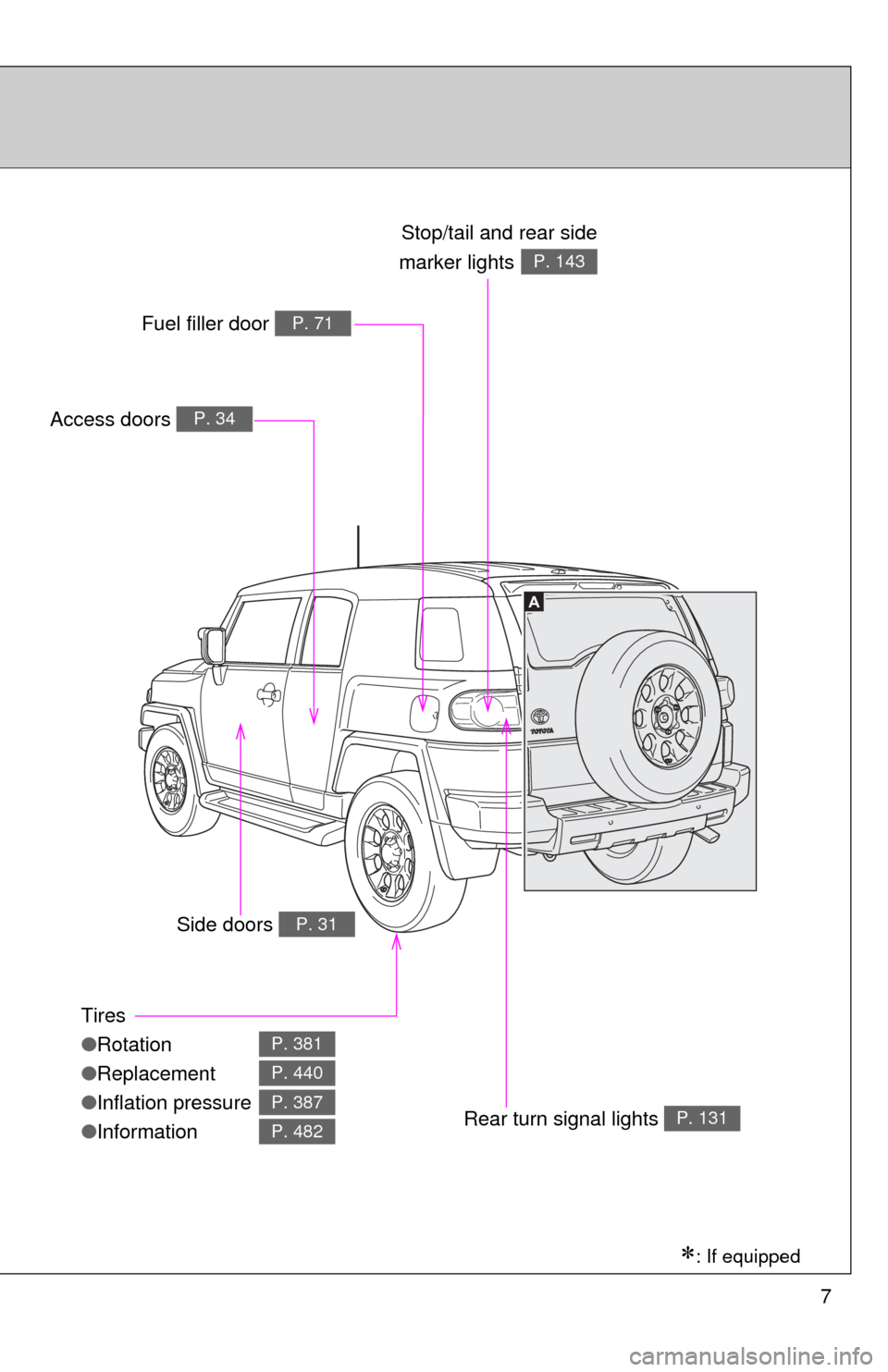
A
Tires
●Rotation
● Replacement
● Inflation pressure
● Information
P. 381
P. 440
P. 387
P. 482
Access doors P. 34
Fuel filler door P. 71
Rear turn signal lights P. 131
Stop/tail and rear side
marker lights
P. 143
Side doors P. 31
: If equipped
Page 13 of 528
13
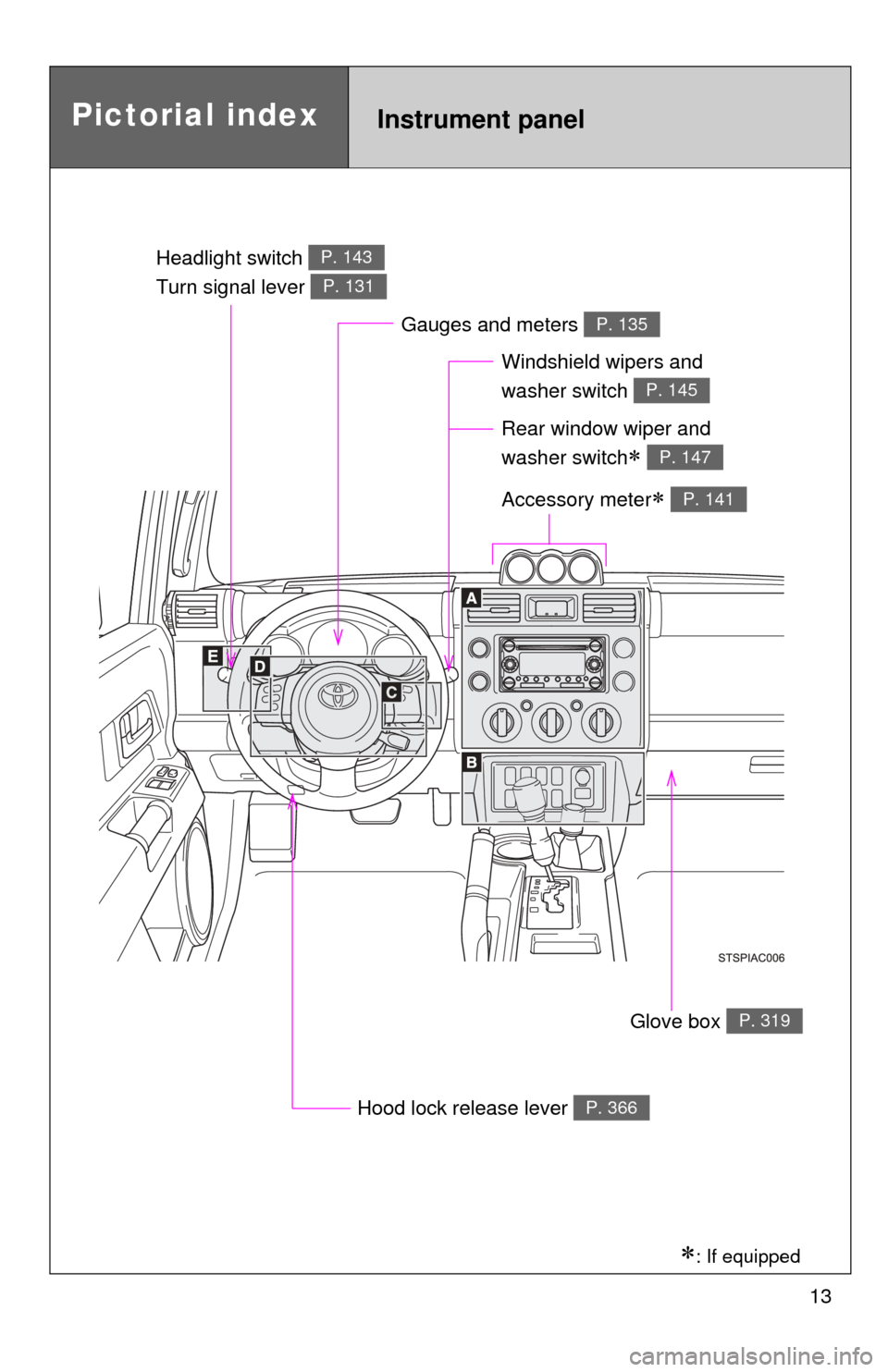
Pictorial indexInstrument panel
Headlight switch
Turn signal lever P. 143
P. 131
Windshield wipers and
washer switch
P. 145
Gauges and meters P. 135
Hood lock release lever P. 366
Glove box P. 319
Accessory meter P. 141
Rear window wiper and
washer switch
P. 147
: If equipped
Page 113 of 528
When driving2
113
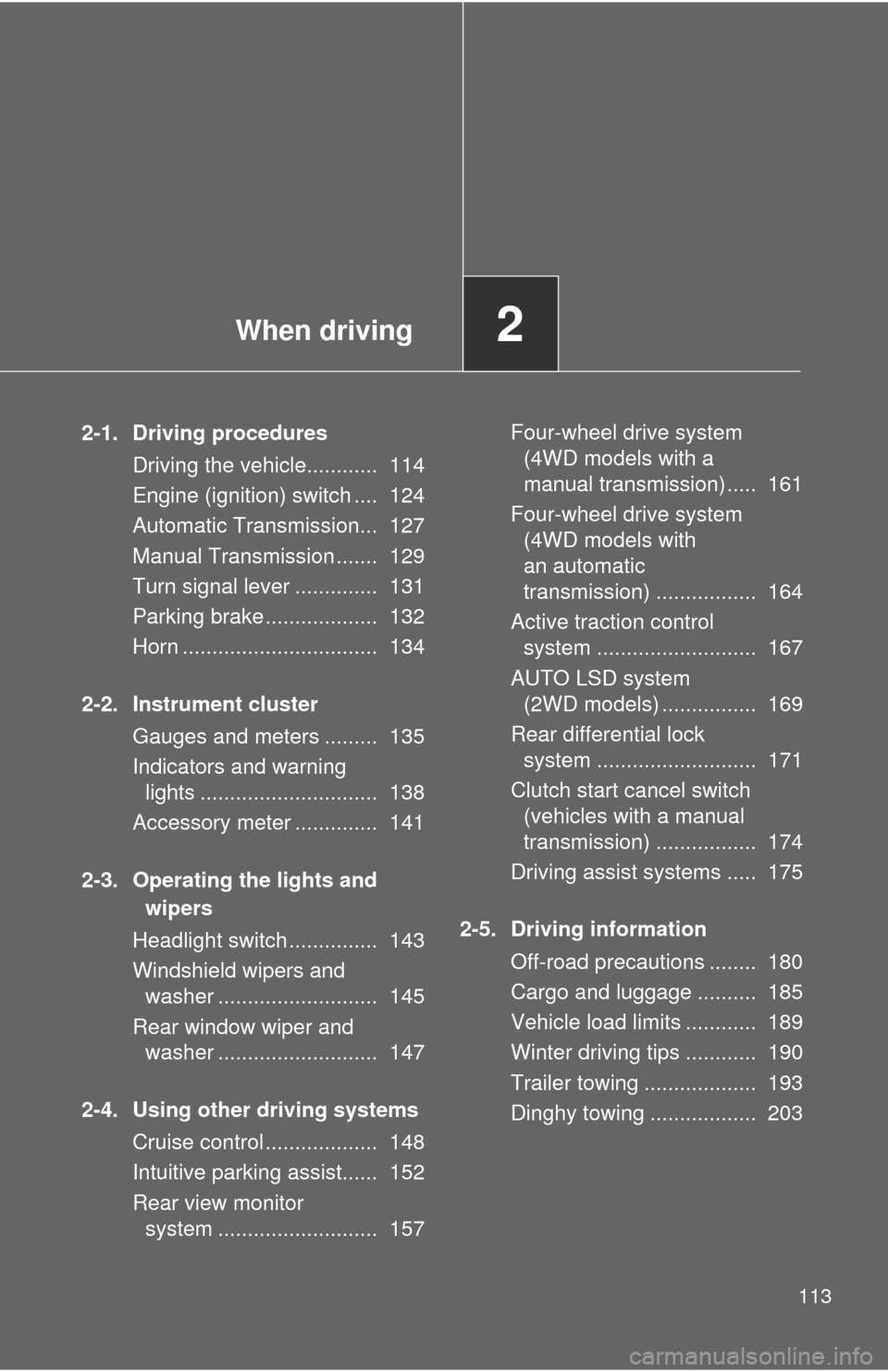
2-1. Driving proceduresDriving the vehicle............ 114
Engine (ignition) switch .... 124
Automatic Transmission... 127
Manual Transmission ....... 129
Turn signal lever .............. 131
Parking brake ................... 132
Horn ................................. 134
2-2. Instrument cluster Gauges and meters ......... 135
Indicators and warning lights .............................. 138
Accessory meter .............. 141
2-3. Operating the lights and wipers
Headlight switch ............... 143
Windshield wipers and washer ........................... 145
Rear window wiper and washer ........................... 147
2-4. Using other driving systems Cruise control ................... 148
Intuitive parking assist...... 152
Rear view monitor system ........................... 157 Four-wheel drive system
(4WD models with a
manual transmission) ..... 161
Four-wheel drive system (4WD models with
an automatic
transmission) ................. 164
Active traction control system ........................... 167
AUTO LSD system (2WD models) ................ 169
Rear differential lock system ........................... 171
Clutch start cancel switch (vehicles with a manual
transmission) ................. 174
Driving assist systems ..... 175
2-5. Driving information Off-road precautions ........ 180
Cargo and luggage .......... 185
Vehicle load limits ............ 189
Winter driving tips ............ 190
Trailer towing ................... 193
Dinghy towing .................. 203
Page 131 of 528
131
2-1. Driving procedures
2
When driving
Tur n signal lever
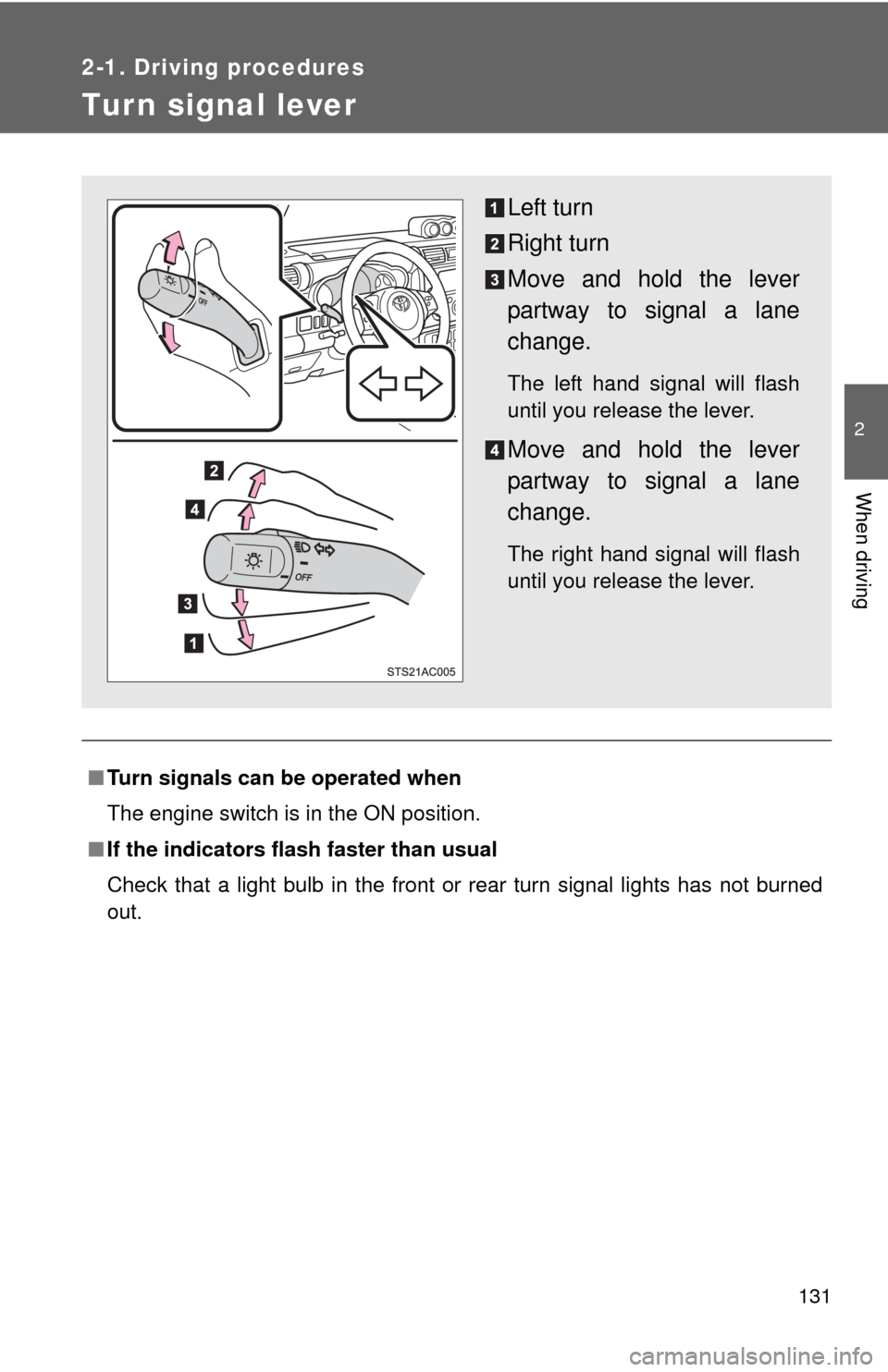
■Turn signals can be operated when
The engine switch is in the ON position.
■ If the indicators flash faster than usual
Check that a light bulb in the front or rear turn signal lights has not burned
out.
Left turn
Right turn
Move and hold the lever
partway to signal a lane
change.
The left hand signal will flash
until you release the lever.
Move and hold the lever
partway to signal a lane
change.
The right hand signal will flash
until you release the lever.
Page 139 of 528
139
2-2. Instrument cluster
2
When driving
■
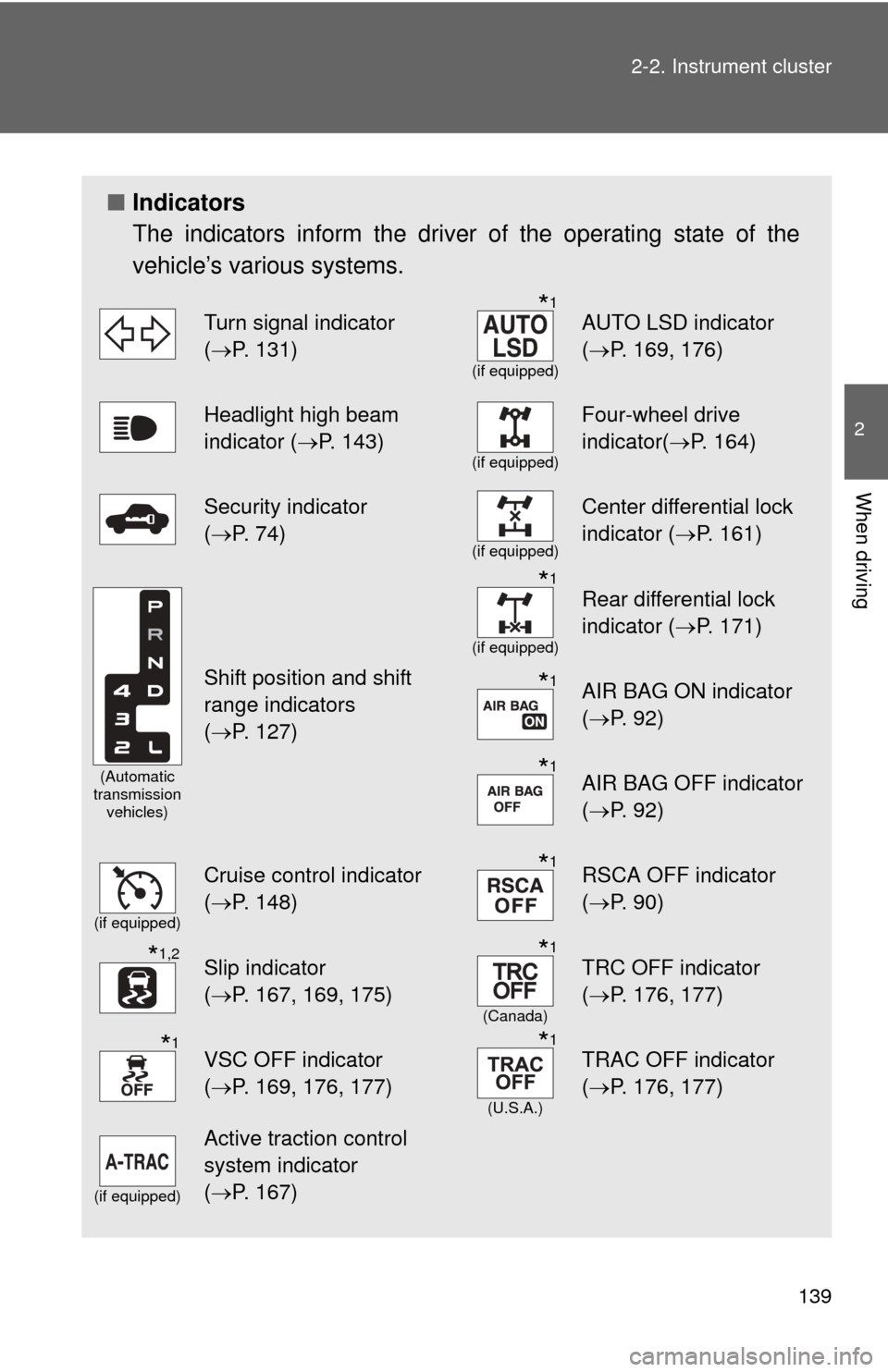
Indicators
The indicators inform the driver of the operating state of the
vehicle’s various systems.
Turn signal indicator
(P. 131)*1
(if equipped)
AUTO LSD indicator
( P. 169, 176)
Headlight high beam
indicator ( P. 143)
(if equipped)
Four-wheel drive
indicator(P. 164)
Security indicator
(P. 74)
(if equipped)
Center differential lock
indicator ( P. 161)
(Automatic
transmission vehicles)
Shift position and shift
range indicators
(P. 127)
*1
(if equipped)
Rear differential lock
indicator ( P. 171)
*1AIR BAG ON indicator
(P. 92)
*1AIR BAG OFF indicator
(P. 92)
(if equipped)
Cruise control indicator
(P. 148)*1RSCA OFF indicator
( P. 90)
*1,2Slip indicator
(P. 167, 169, 175)*1
(Canada)
TRC OFF indicator
( P. 176, 177)
*1VSC OFF indicator
(P. 169, 176, 177)*1
(U.S.A.)
TRAC OFF indicator
( P. 176, 177)
(if equipped)
Active traction control
system indicator
(P. 167)
Page 222 of 528
222 3-2. Using the audio system
■Reception sensitivity
●Cargo loaded on the roof luggage carrier, especially metal objects, may
adversely affect the reception of XM
® Satellite Radio.
● Maintaining perfect radio reception at all times is difficult due to the con-
tinually changing position of the antenna, differences in signal strength
and surrounding objects, such as trains, transmitters, etc.
● The radio antenna is mounted on the right-side front fender. The antenna
can be removed from the base by turning it.
■ XM
® Satellite Radio
An XM
® Satellite Radio is a tuner designed exclusively to receive broadcasts
provided under a separate subscription. Availability is limited to the 48 con-
tiguous states and 10 Canadian provinces.
● XM
® subscriptions
For detailed information about XM® Satellite Radio or to subscribe:
U.S.A.
Visit on the web at www.xmradio.com
or call 1-800-967-2346.
Canada
Visit on the web at www.xmradio.ca
or call 1-877-438-9677.
● Radio ID
You will need the radio ID when activating XM
® service or reporting a
problem. Select “CH000” using , and the receiver’s 8-character
ID number will appear.
● Satellite tuner
The tuner supports only Audio Services (Music and Talk) and the accom-
panying Text Information of XM
® Satellite Radio.
Page 223 of 528
223
3-2. Using the audio system
3
Interior features
■
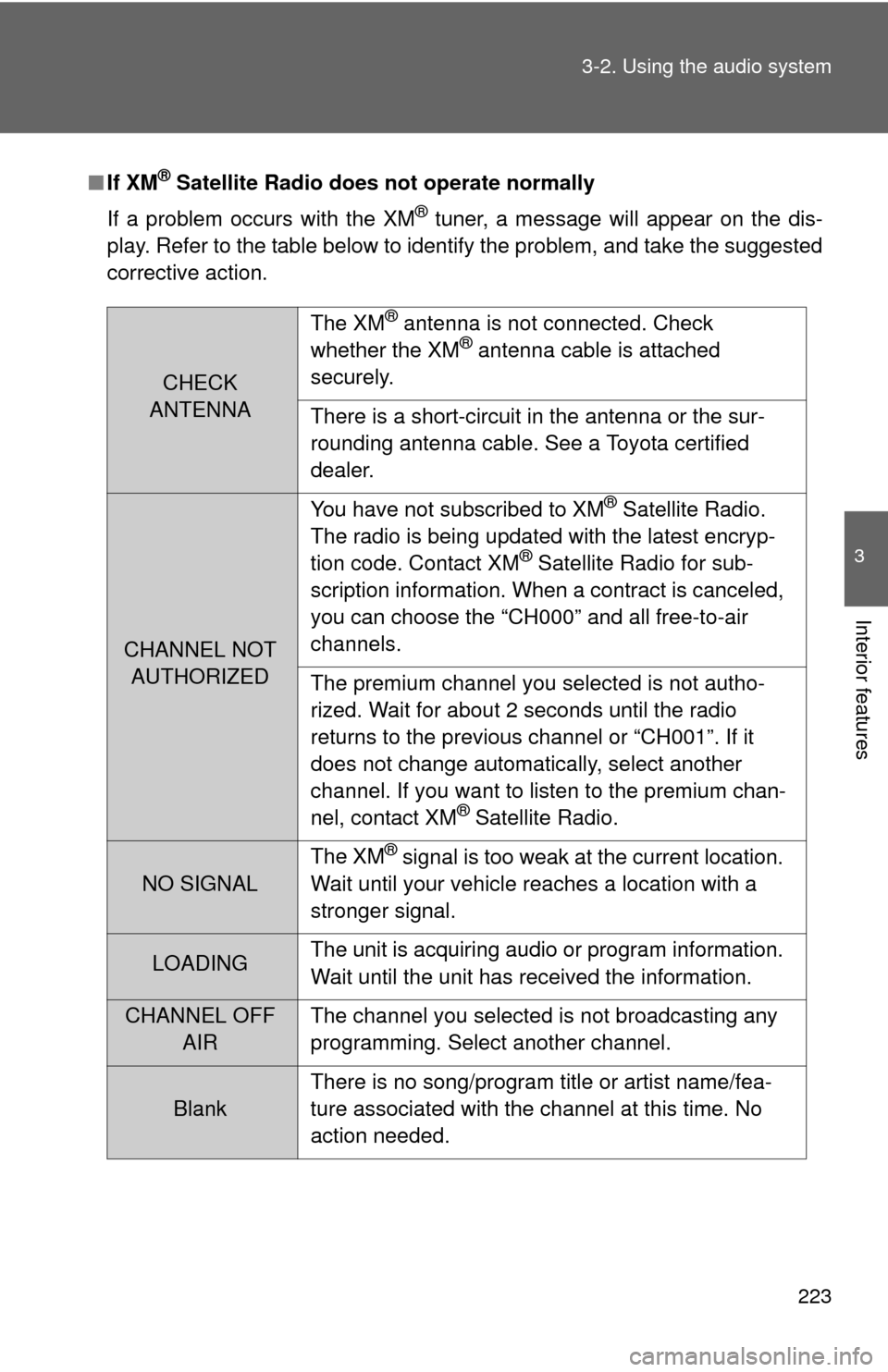
If XM® Satellite Radio does not operate normally
If a problem occurs with the XM
® tuner, a message will appear on the dis-
play. Refer to the table below to identify the problem, and take the suggested
corrective action.
CHECK
ANTENNA The XM
® antenna is not connected. Check
whether the XM® antenna cable is attached
securely.
There is a short-circuit in the antenna or the sur-
rounding antenna cable. See a Toyota certified
dealer.
CHANNEL NOT AUTHORIZED You have not subscribed to XM
® Satellite Radio.
The radio is being updated with the latest encryp-
tion code. Contact XM
® Satellite Radio for sub-
scription information. When a contract is canceled,
you can choose the “CH000” and all free-to-air
channels.
The premium channel you selected is not autho-
rized. Wait for about 2 seconds until the radio
returns to the previous channel or “CH001”. If it
does not change automatically, select another
channel. If you want to listen to the premium chan-
nel, contact XM
® Satellite Radio.
NO SIGNAL The XM
® signal is too weak at the current location.
Wait until your vehicle reaches a location with a
stronger signal.
LOADING The unit is acquiring audio or program information.
Wait until the unit has received the information.
CHANNEL OFF
AIR The channel you selected is not broadcasting any
programming. Select another channel.
Blank There is no song/program title or artist name/fea-
ture associated with the channel at this time. No
action needed.
Page 405 of 528
405
4-3. Do-it-yourself maintenance
4
Maintenance and care
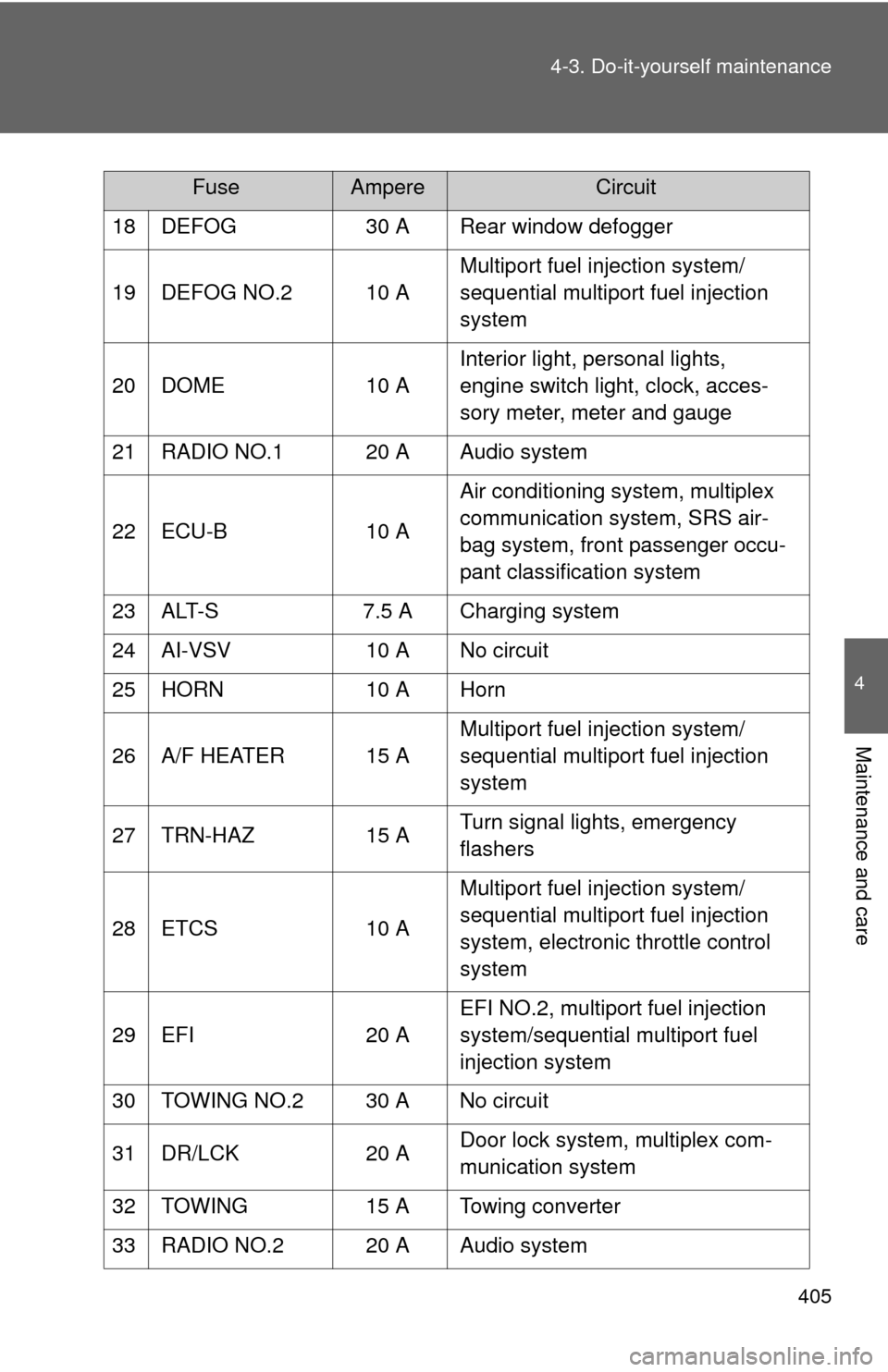
18 DEFOG
30 A Rear window defogger
19 DEFOG NO.2 10 A Multiport fuel injection system/
sequential multiport fuel injection
system
20 DOME 10 AInterior light, personal lights,
engine switch light, clock, acces-
sory meter, meter and gauge
21 RADIO NO.1 20 A Audio system
22 ECU-B 10 AAir conditioning system, multiplex
communication system, SRS air-
bag system, front passenger occu-
pant classification system
23 ALT-S 7.5 A Charging system
24 AI-VSV 10 A No circuit
25 HORN 10 A Horn
26 A/F HEATER 15 A Multiport fuel injection system/
sequential multiport fuel injection
system
27 TRN-HAZ 15 ATurn signal lights, emergency
flashers
28 ETCS 10 AMultiport fuel injection system/
sequential multiport fuel injection
system, electronic throttle control
system
29 EFI 20 AEFI NO.2, multiport fuel injection
system/sequential multiport fuel
injection system
30 TOWING NO.2 30 A No circuit
31 DR/LCK 20 ADoor lock system, multiplex com-
munication system
32 TOWING 15 A Towing converter
33 RADIO NO.2 20 A Audio system
FuseAmpereCircuit