traction control TOYOTA FJ CRUISER 2012 1.G Owners Manual
[x] Cancel search | Manufacturer: TOYOTA, Model Year: 2012, Model line: FJ CRUISER, Model: TOYOTA FJ CRUISER 2012 1.GPages: 540, PDF Size: 10.32 MB
Page 3 of 540

1
2
3
4
5
6
7
3
2-3. Operating the lights andwipers
Headlight swi tch .................. 146
Windshield wipers and washer .............................. 148
Rear window wiper and washer .............................. 150
2-4. Using other driving systems Cruise control ...................... 151
Intuitive parking assist......... 155
Rear view monitor system... 160
Four-wheel drive system (4WD models with
a manual transmission)..... 164
Four-wheel drive system (4WD models with
an automatic
transmission) .................... 167
Active traction control system .............................. 170
AUTO LSD system (2WD models) ................... 172
Rear differential lock system .............................. 174
Clutch start cancel switch (vehicles with a manual
transmission) .................... 177
Driving assist systems ........ 178
2-5. Driving information Off-road precautions ........... 183
Cargo and luggage ............. 188
Vehicle load limits ............... 192
Winter driving tips ............... 193
Trailer towing ...................... 196
Dinghy towing ..................... 214 3-1. Using the air conditioning
system and defogger
Air conditioning system ...... 218
Rear window defogger ....... 225
3-2. Using the audio system Audio system ...................... 226
Using the radio ................... 230
Using the CD player ........... 237
Playing MP3 and WMA discs ................................. 245
Operating an iPod .............. 252
Operating a USB memory ............................ 259
Optimal use of the audio system .............................. 267
Using the AUX port............. 270
Using the steering wheel audio switches.................. 271
Detachable pole antenna ... 274
3-3. Using the Bluetooth
® audio
system
Bluetooth
® audio system .... 277
Using the Bluetooth® audio
system .............................. 280
Operating a Bluetooth
®
enabled portable player.... 285
Setting up a Bluetooth
®
enabled portable player.... 287
Bluetooth
® audio system
setup ................................ 292
3Interior features
Page 25 of 540

25
CAUTION
■General precautions while driving
Driving under the influence: Never drive your vehicle when under the influ-
ence of alcohol or drugs that have impaired your ability to operate your vehi-
cle. Alcohol and certain drugs delay reaction time, impair judgment and
reduce coordination, which could lead to an accident that could result in
death or serious injury.
Defensive driving: Always drive defensively. Anticipate mistakes that other
drivers or pedestrians might make and be ready to avoid accidents.
Driver distraction: Always give your full attention to driving. Anything that dis-
tracts the driver, such as adjusting controls, talking on a cellular phone or
reading can result in a collision with resulting death or serious injury to you,
your occupants or others.
■ General precaution regarding children’s safety
Never leave children unattended in the vehicle, and never allow children to
have or use the key.
Children may be able to start the vehicle or shift the vehicle into neutral.
There is also a danger that children may injure themselves by playing with
the cigarette lighter, the windows, or other features of the vehicle. In addi-
tion, heat build-up or extremely cold temperatures inside the vehicle can be
fatal to children.
Page 115 of 540
When driving2
115
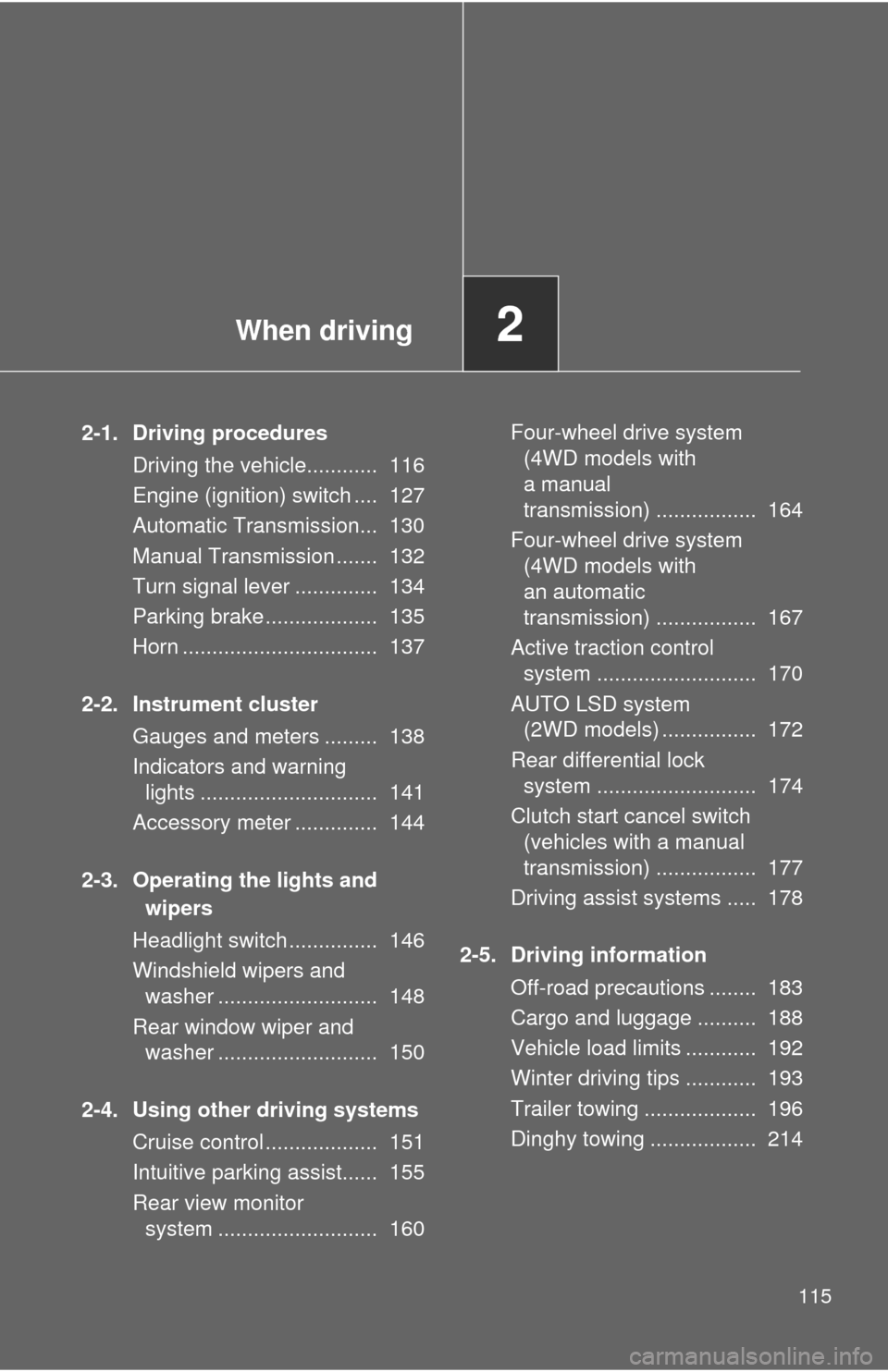
2-1. Driving proceduresDriving the vehicle............ 116
Engine (ignition) switch .... 127
Automatic Transmission... 130
Manual Transmission ....... 132
Turn signal lever .............. 134
Parking brake ................... 135
Horn ................................. 137
2-2. Instrument cluster Gauges and meters ......... 138
Indicators and warning lights .............................. 141
Accessory meter .............. 144
2-3. Operating the lights and wipers
Headlight switch ............... 146
Windshield wipers and washer ........................... 148
Rear window wiper and washer ........................... 150
2-4. Using other driving systems Cruise control ................... 151
Intuitive parking assist...... 155
Rear view monitor system ........................... 160 Four-wheel drive system
(4WD models with
a manual
transmission) ................. 164
Four-wheel drive system (4WD models with
an automatic
transmission) ................. 167
Active traction control system ........................... 170
AUTO LSD system (2WD models) ................ 172
Rear differential lock system ........................... 174
Clutch start cancel switch (vehicles with a manual
transmission) ................. 177
Driving assist systems ..... 178
2-5. Driving information Off-road precautions ........ 183
Cargo and luggage .......... 188
Vehicle load limits ............ 192
Winter driving tips ............ 193
Trailer towing ................... 196
Dinghy towing .................. 214
Page 142 of 540
142 2-2. Instrument cluster
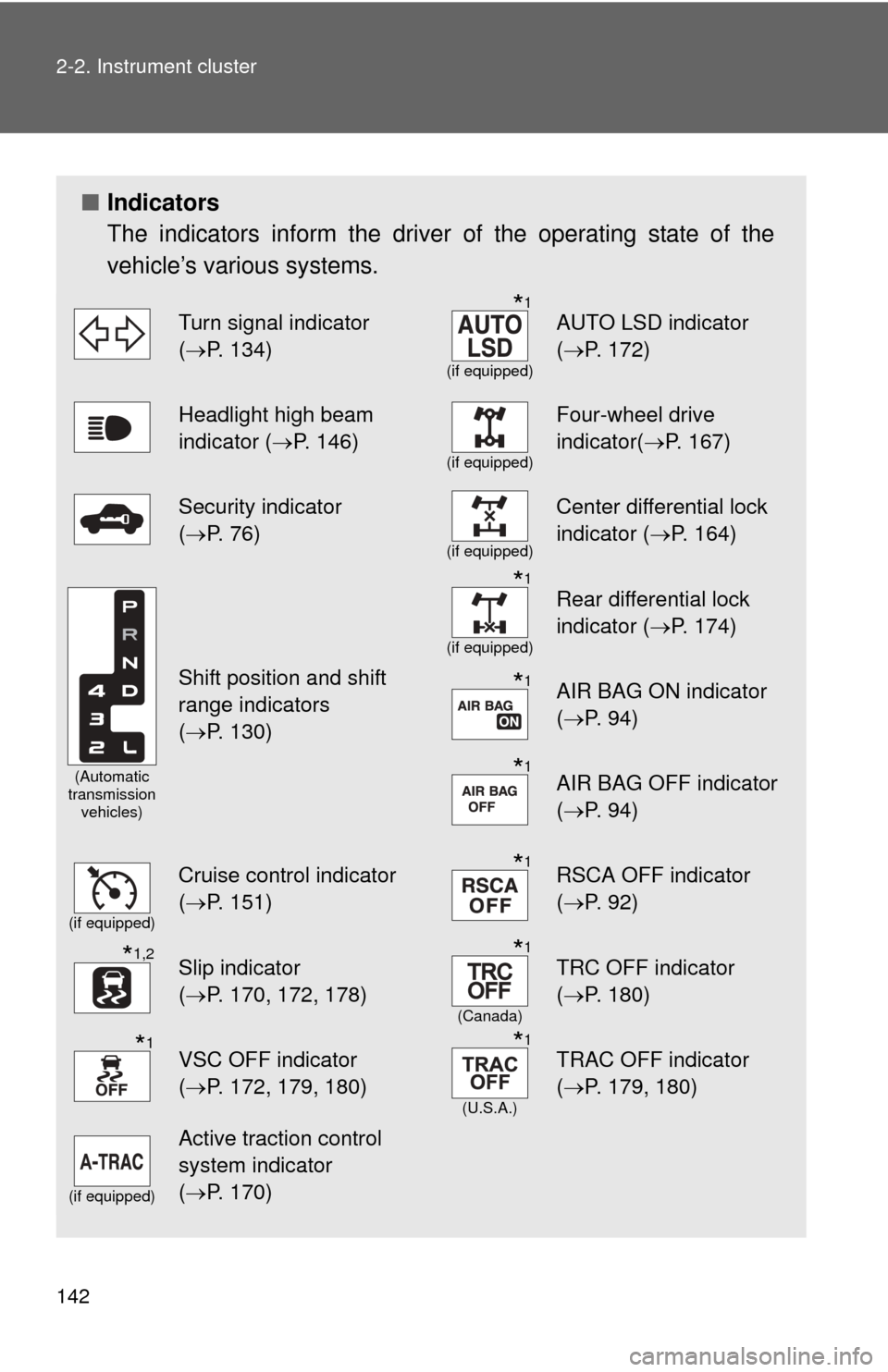
■Indicators
The indicators inform the driver of the operating state of the
vehicle’s various systems.
Turn signal indicator
(P. 134)*1
(if equipped)
AUTO LSD indicator
( P. 172)
Headlight high beam
indicator ( P. 146)
(if equipped)
Four-wheel drive
indicator(P. 167)
Security indicator
(P. 76)
(if equipped)
Center differential lock
indicator ( P. 164)
(Automatic
transmission vehicles)
Shift position and shift
range indicators
(P. 130)
*1
(if equipped)
Rear differential lock
indicator ( P. 174)
*1AIR BAG ON indicator
(P. 94)
*1AIR BAG OFF indicator
(P. 94)
(if equipped)
Cruise control indicator
(P. 151)*1RSCA OFF indicator
( P. 92)
*1,2Slip indicator
(P. 170, 172, 178)*1
(Canada)
TRC OFF indicator
( P. 180)
*1VSC OFF indicator
(P. 172, 179, 180)*1
(U.S.A.)
TRAC OFF indicator
( P. 179, 180)
(if equipped)
Active traction control
system indicator
(P. 170)
Page 164 of 540
164
2-4. Using other driving systems
Four-wheel drive system (4WD models with a manual transmission)
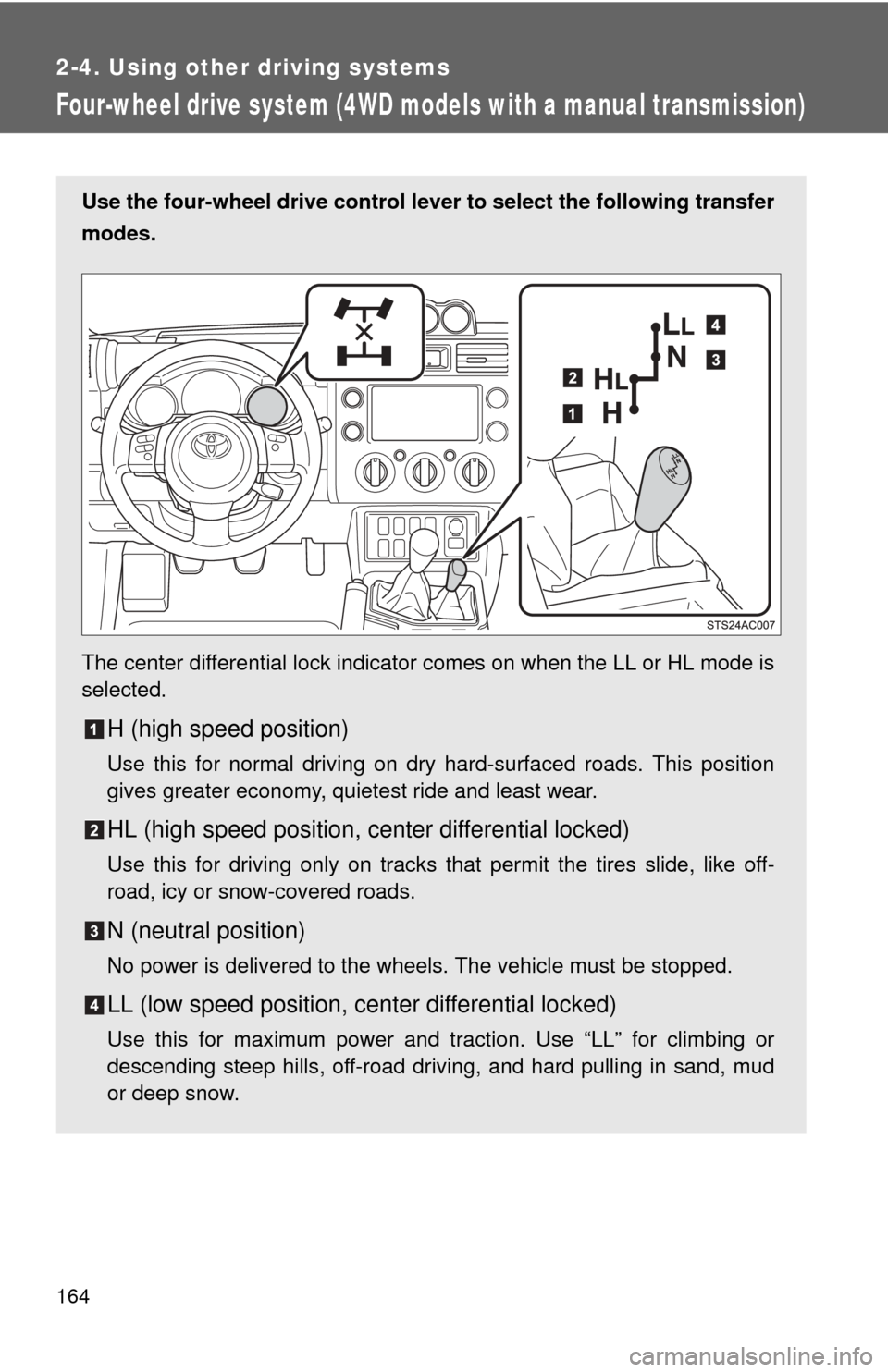
Use the four-wheel drive control lever to select the following transfer
modes.
The center differential lock indicator comes on when the LL or HL mode is
selected.
H (high speed position)
Use this for normal driving on dry hard-surfaced roads. This position
gives greater economy, quietest ride and least wear.
HL (high speed position, center differential locked)
Use this for driving only on tracks that permit the tires slide, like off-
road, icy or snow-covered roads.
N (neutral position)
No power is delivered to the wheels. The vehicle must be stopped.
LL (low speed position, ce nter differential locked)
Use this for maximum power and traction. Use “LL” for climbing or
descending steep hills, off-road driving, and hard pulling in sand, mud
or deep snow.
Page 167 of 540
167
2-4. Using other driving systems
2
When driving
Four-wheel drive system (4WD models with an automatic transmission)
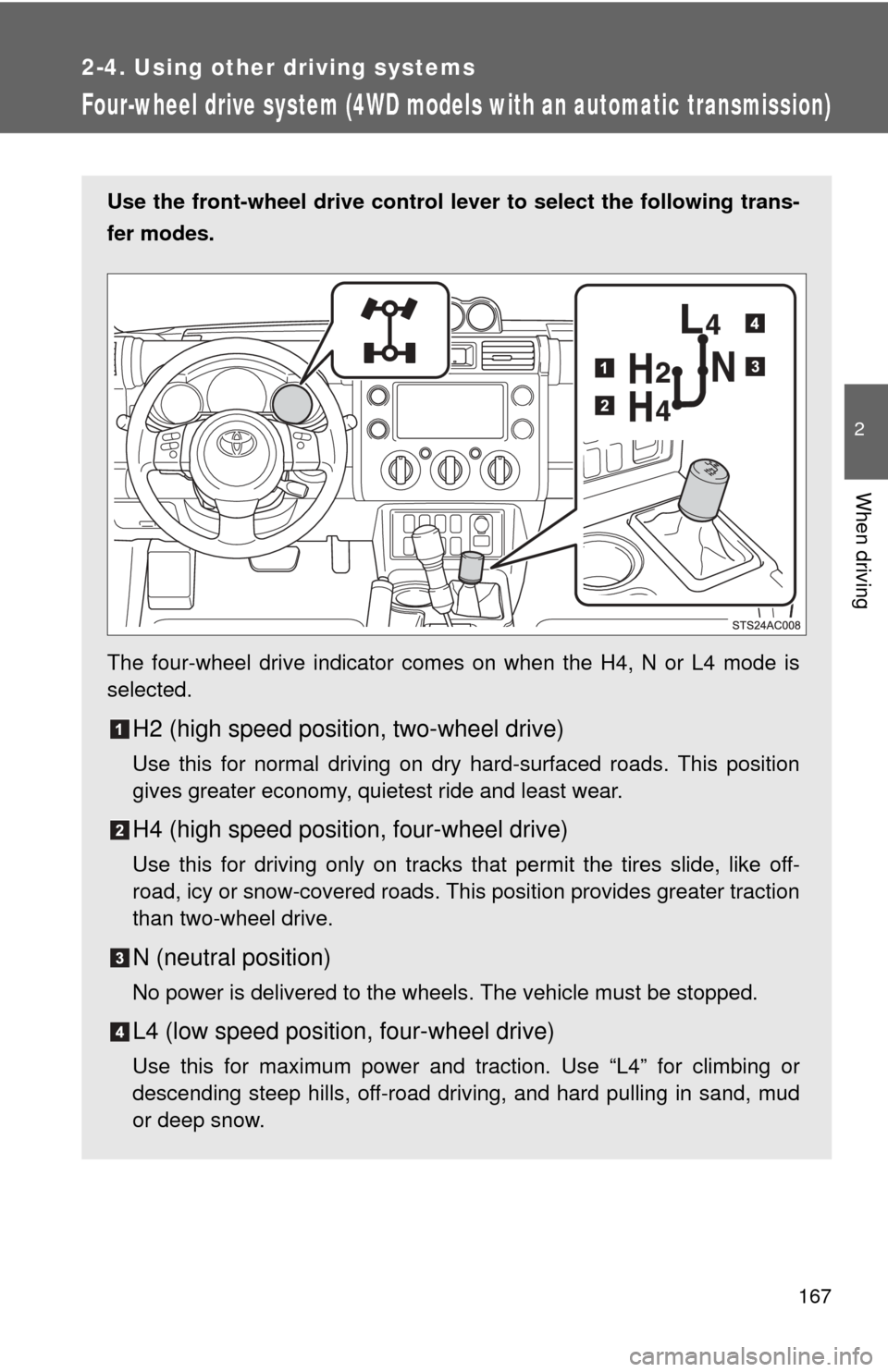
Use the front-wheel drive control lever to select the following trans-
fer modes.
The four-wheel drive indicator comes on when the H4, N or L4 mode is
selected.
H2 (high speed position, two-wheel drive)
Use this for normal driving on dry hard-surfaced roads. This position
gives greater economy, quietest ride and least wear.
H4 (high speed position, four-wheel drive)
Use this for driving only on tracks that permit the tires slide, like off-
road, icy or snow-covered roads. This position provides greater traction
than two-wheel drive.
N (neutral position)
No power is delivered to the wheels. The vehicle must be stopped.
L4 (low speed position, four-wheel drive)
Use this for maximum power and traction. Use “L4” for climbing or
descending steep hills, off-road driving, and hard pulling in sand, mud
or deep snow.
Page 170 of 540
170
2-4. Using other driving systems
Active traction control system
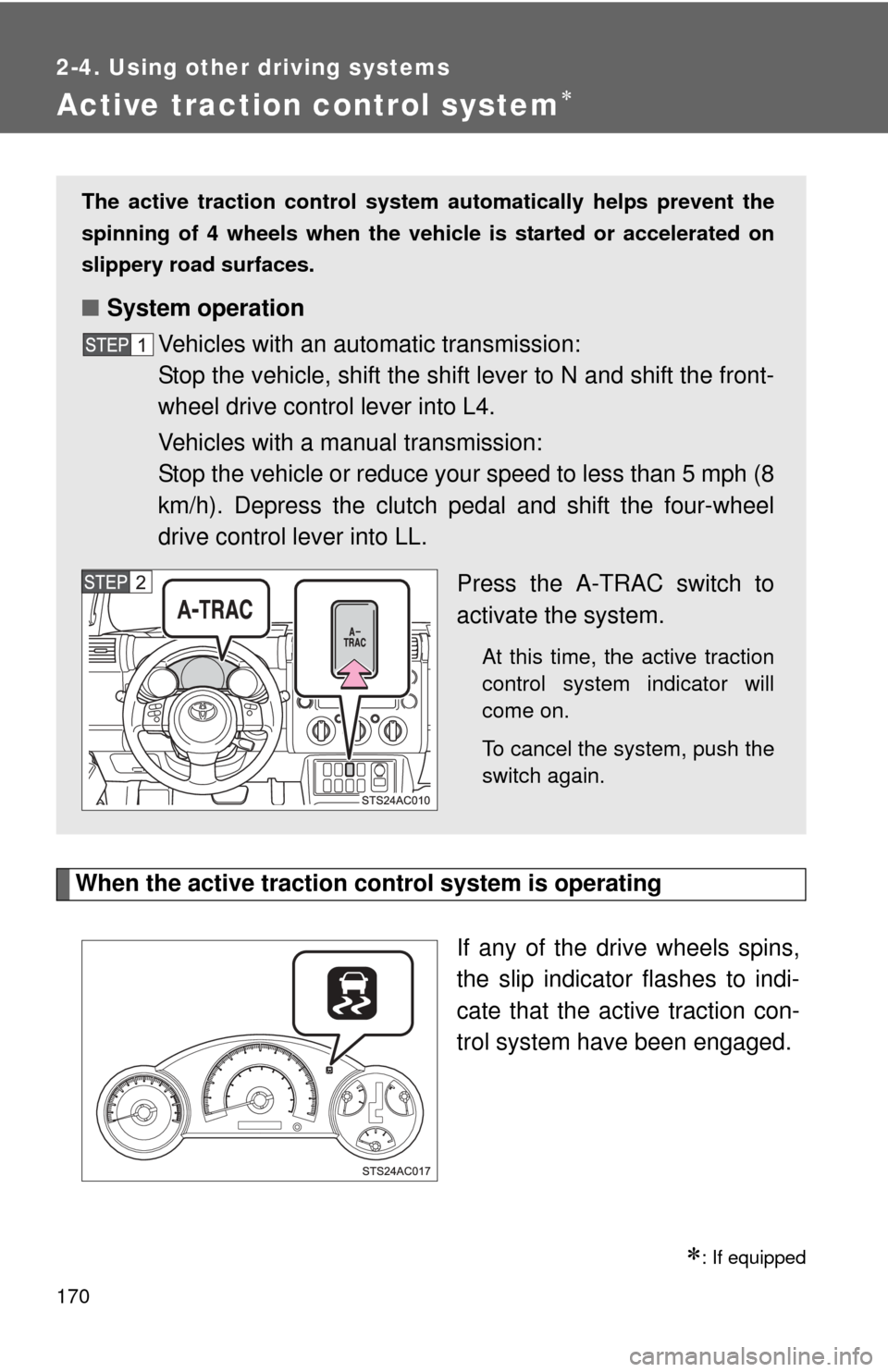
When the active traction control system is operatingIf any of the drive wheels spins,
the slip indicator flashes to indi-
cate that the active traction con-
trol system have been engaged.
: If equipped
The active traction control system automatically helps prevent the
spinning of 4 wheels when the vehicle is started or accelerated on
slippery road surfaces.
■ System operation
Vehicles with an automatic transmission:
Stop the vehicle, shift the shift lever to N and shift the front-
wheel drive control lever into L4.
Vehicles with a manual transmission:
Stop the vehicle or reduce your speed to less than 5 mph (8
km/h). Depress the clutch pedal and shift the four-wheel
drive control lever into LL.
Press the A-TRAC switch to
activate the system.
At this time, the active traction
control system indicator will
come on.
To cancel the system, push the
switch again.
Page 171 of 540
171
2-4. Using other
driving systems
2
When driving
■When the rear differential is locked (vehicles with the rear differential
lock system)
The active traction control system is activated only when the vehicle speed
is less than 4 mph (6 km/h).
■ Sounds and vibrations caused by the active traction control system
●A sound may be heard from the engine compartment when the engine is
started or just after the vehicle begins to move. This sound does not indi-
cate that a malfunction has occurred in the system.
● Vibrations may be felt through the vehicle body and steering. It may
occur when the system is operating.
■ If the brake system overheats
The system will cease operation and a buzzer will sound to alert the driver.
Stop the vehicle in a safe place. (Ther e is no problem with continuing normal
driving.)
CAUTION
■ The active traction control system m ay not operate effectively when
Directional control and power may not be achievable while driving on slip-
pery road surfaces, even if the active traction control system is operating.
Do not drive the vehicle in conditions where stability and power may be lost.
Page 172 of 540
172
2-4. Using other driving systems
AUTO LSD system (2WD models)
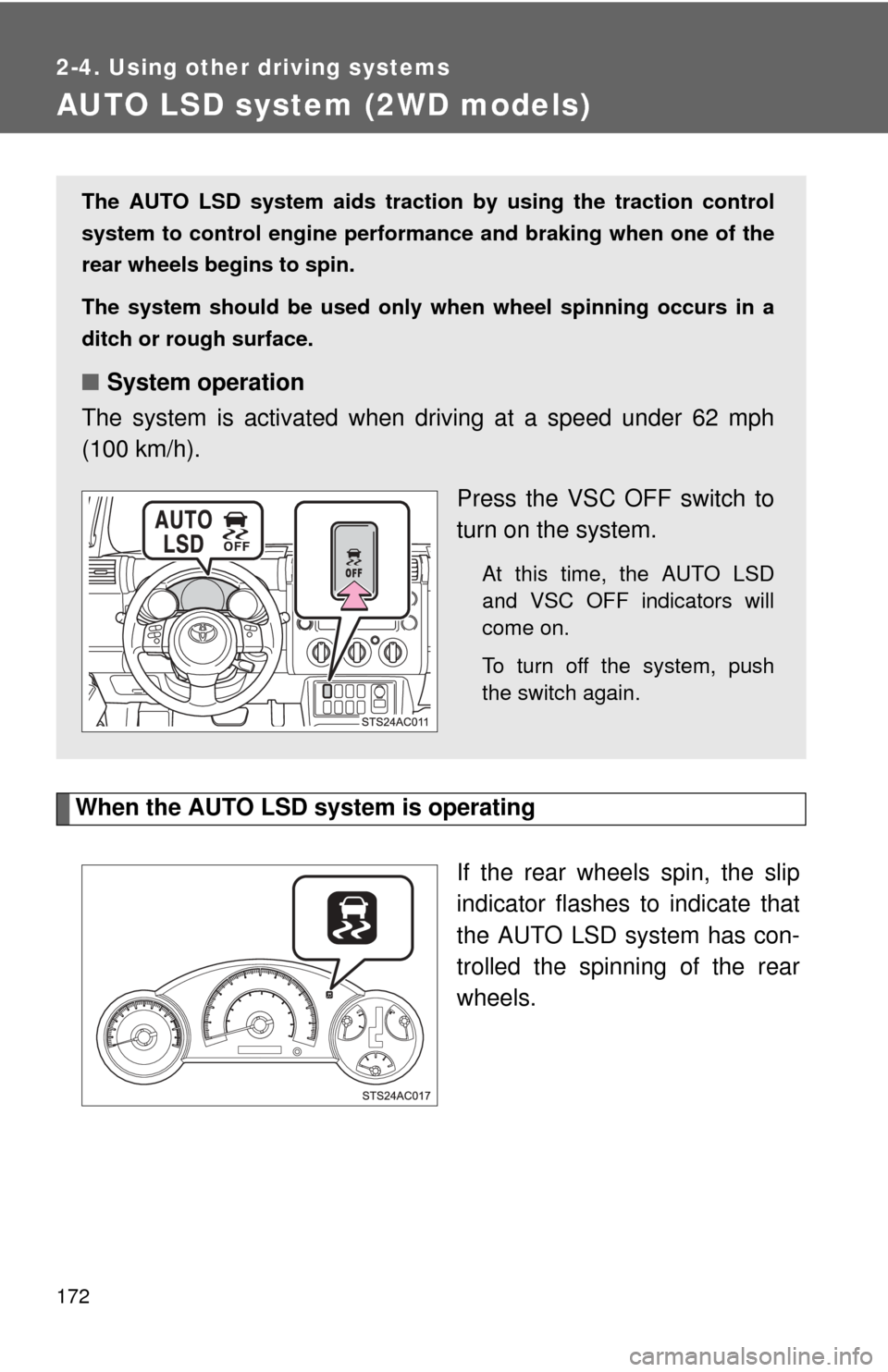
When the AUTO LSD system is operatingIf the rear wheels spin, the slip
indicator flashes to indicate that
the AUTO LSD system has con-
trolled the spinning of the rear
wheels.
The AUTO LSD system aids traction by using the traction control
system to control engine performance and braking when one of the
rear wheels begins to spin.
The system should be used only wh en wheel spinning occurs in a
ditch or rough surface.
■ System operation
The system is activated when driving at a speed under 62 mph
(100 km/h).
Press the VSC OFF switch to
turn on the system.
At this time, the AUTO LSD
and VSC OFF indicators will
come on.
To turn off the system, push
the switch again.
Page 178 of 540
178
2-4. Using other driving systems
Driving assist systems
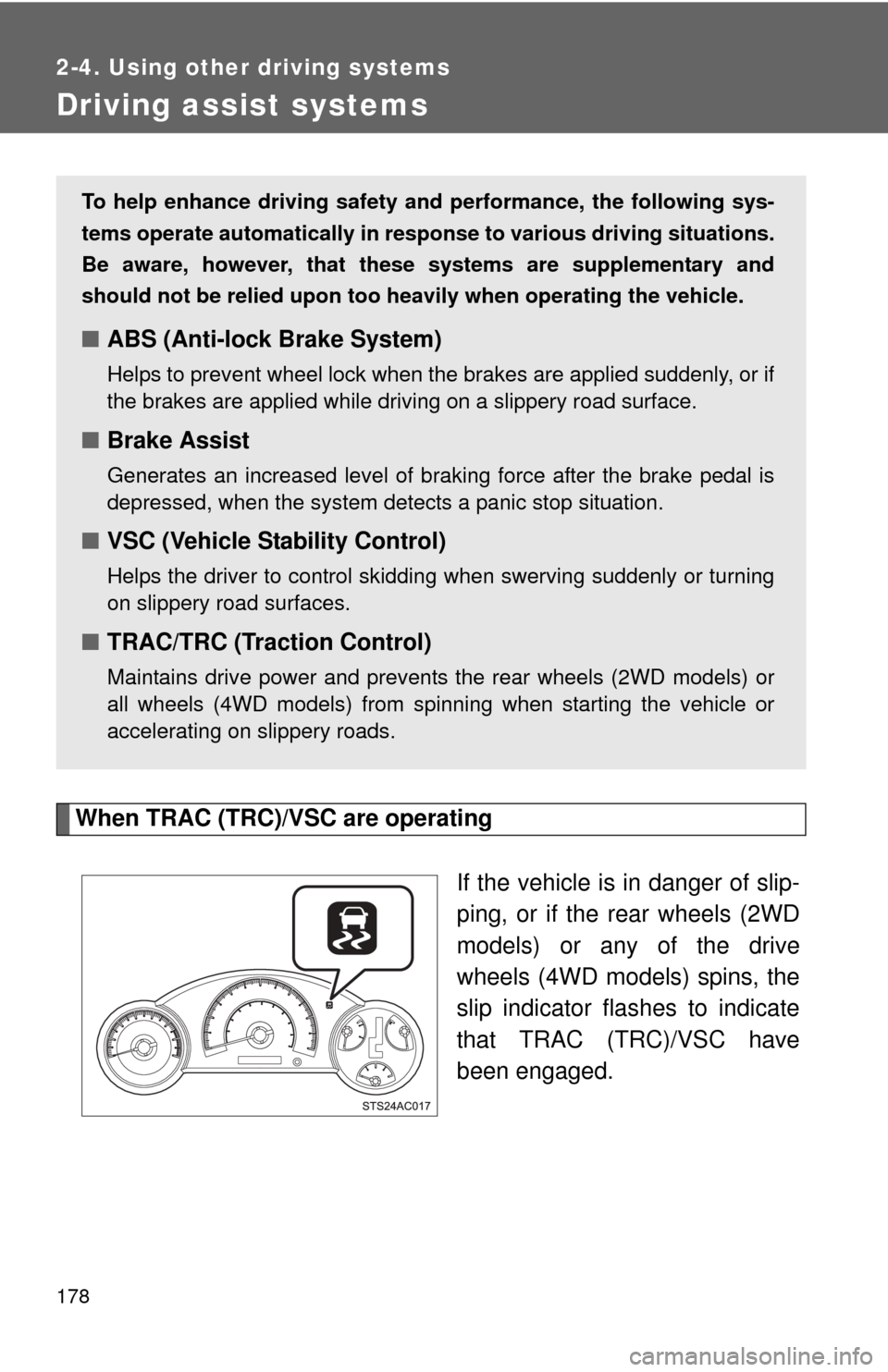
When TRAC (TRC)/VSC are operatingIf the vehicle is in danger of slip-
ping, or if the rear wheels (2WD
models) or any of the drive
wheels (4WD models) spins, the
slip indicator flashes to indicate
that TRAC (TRC)/VSC have
been engaged.
To help enhance driving safety and performance, the following sys-
tems operate automatically in res ponse to various driving situations.
Be aware, however, that these systems are supplementary and
should not be relied upon too h eavily when operating the vehicle.
■ABS (Anti-lock Brake System)
Helps to prevent wheel lock when the brakes are applied suddenly, or if
the brakes are applied while driving on a slippery road surface.
■Brake Assist
Generates an increased level of braking force after the brake pedal is
depressed, when the system detects a panic stop situation.
■VSC (Vehicle Stability Control)
Helps the driver to control skidding when swerving suddenly or turning
on slippery road surfaces.
■TRAC/TRC (Traction Control)
Maintains drive power and prevents the rear wheels (2WD models) or
all wheels (4WD models) from spinning when starting the vehicle or
accelerating on slippery roads.