automatic transmission TOYOTA FJ CRUISER 2014 1.G User Guide
[x] Cancel search | Manufacturer: TOYOTA, Model Year: 2014, Model line: FJ CRUISER, Model: TOYOTA FJ CRUISER 2014 1.GPages: 572, PDF Size: 9.45 MB
Page 124 of 572
124 2-1. Driving procedures
CAUTION
■When shifting the shift lever
Vehicles with an automatic transmission: Be careful not to shift the shift lever
with the accelerator pedal depressed.
This may lead to unexpected rapid acceleration of the vehicle that may
cause an accident and result in death or serious injury.
■ When the vehicle is stopped
●Do not race the engine.
If the vehicle is in any gear other than P (automatic transmission only) or
N, the vehicle may accelerate suddenly and unexpectedly, and may cause
an accident that could result in death or serious injury.
● Do not leave the vehicle with the engine running for a long time.
If such a situation cannot be avoided, park the vehicle in an open space
and check that exhaust fumes do not enter the vehicle interior.
● Vehicles with an automatic transmission: In order to prevent accidents due
to the vehicle rolling away, always keep depressing the brake pedal while
the engine is running, and apply the parking brake as necessary.
● If the vehicle is stopped on an incline, in order to prevent accidents caused
by the vehicle rolling forward or backward, always depress the brake pedal
and securely apply the parking brake as needed.
● Avoid revving or racing the engine. Running the engine at high speed
while the vehicle is stopped may cause the exhaust system to overheat,
which could result in a fire if combustible material is nearby.
■ When the vehicle is parked
●Do not leave glasses, cigarette lighters, spray cans, or soft drink cans in
the vehicle when it is in the sun.
Doing so may result in the following.
• Gas may leak from a cigarette lighter or spray can, and may lead to a
fire.
• The temperature inside the vehicle may cause the plastic lenses and plastic material of eye glasses to deform or crack.
• Soft drink cans may rupture, causing the contents to spray over the interior of the vehicle, and may also cause a short circuit in the vehi-
cle’s electrical components.
Page 127 of 572

127
2-1. Driving procedures
2
When driving
NOTICE
■
When driving the vehicle
Vehicles with an automatic transmission
● Do not depress the accelerator and brake pedals at the same time during
driving, as this may restrain driving torque.
● Do not use the accelerator pedal or depress the accelerator and brake
pedals at the same time to hold the vehicle on a hill.
Vehicles with a manual transmission
● Do not depress the accelerator and brake pedals at the same time during
driving, as this may restrain driving torque.
● Do not rest your foot on the clutch pedal while driving.
Doing so may cause clutch trouble.
● Do not use any gear other than the first gear when starting off and moving
forward.
Doing so may damage the clutch.
● Do not use the clutch to hold the vehicle when stopping on an uphill grade.
Doing so may damage the clutch.
■ When parking the vehicle
Vehicles with an automatic transmission: Always put the shift lever in P.
Failure to do so may cause the vehicle to move or the vehicle may acceler-
ate suddenly if the accelerator pedal is accidentally depressed.
■ To avoid damage to vehicle parts
●Do not turn the steering wheel fully in either direction and hold it there for a
long time.
Doing so may damage the power steering pump.
● When driving over bumps in the road, drive as slowly as possible to avoid
damaging the wheels, underside of the vehicle, etc.
Page 129 of 572
129
2-1. Driving procedures
2
When driving
Engine (ignition) switch
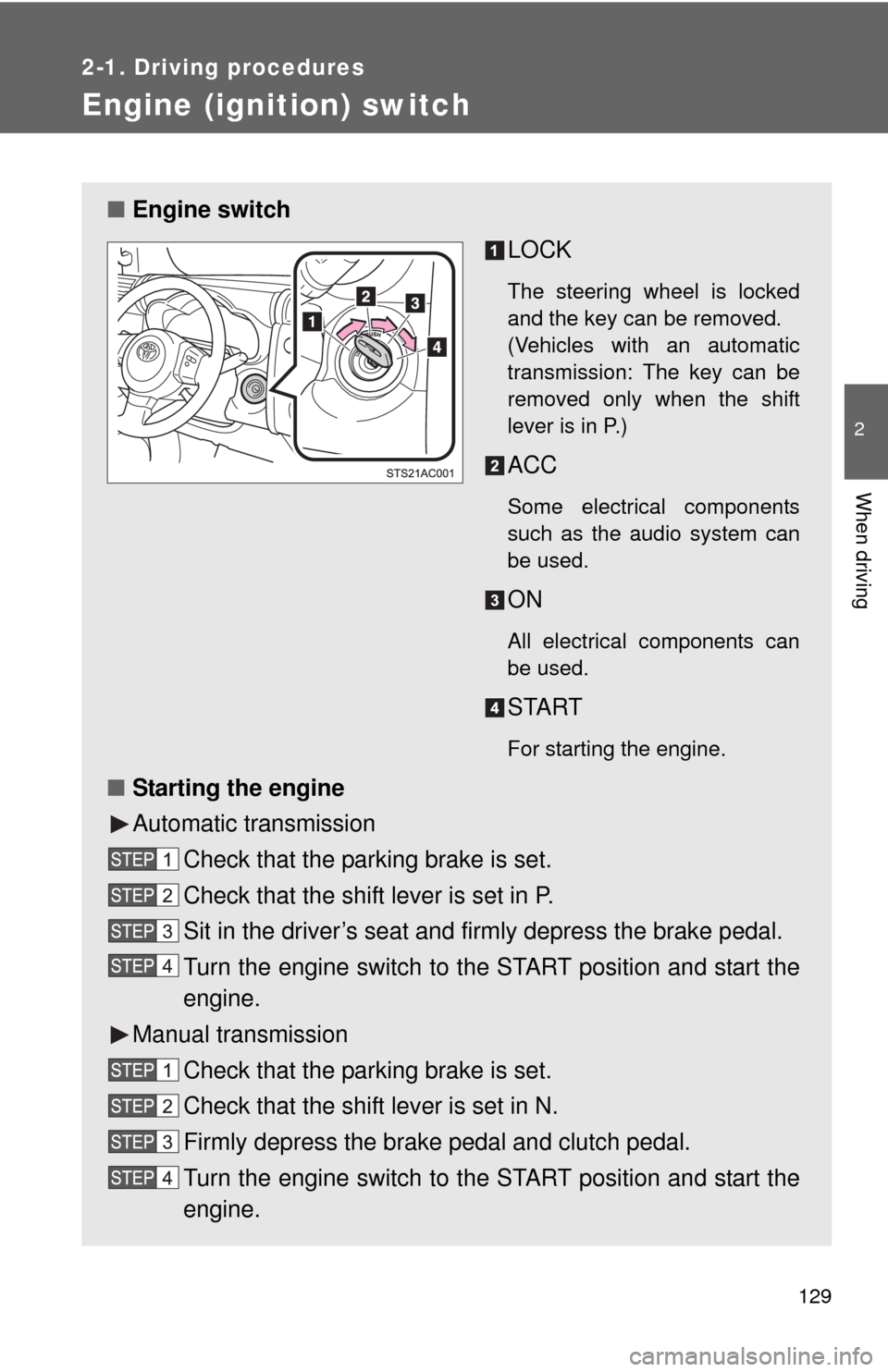
■Engine switch
LOCK
The steering wheel is locked
and the key can be removed.
(Vehicles with an automatic
transmission: The key can be
removed only when the shift
lever is in P.)
ACC
Some electrical components
such as the audio system can
be used.
ON
All electrical components can
be used.
START
For starting the engine.
■Starting the engine
Automatic transmission
Check that the parking brake is set.
Check that the shift lever is set in P.
Sit in the driver’s seat and firmly depress the brake pedal.
Turn the engine switch to the START position and start the
engine.
Manual transmission Check that the parking brake is set.
Check that the shift lever is set in N.
Firmly depress the brake pedal and clutch pedal.
Turn the engine switch to the START position and start the
engine.
Page 132 of 572
132
2-1. Driving procedures
Automatic Transmission
: If equipped
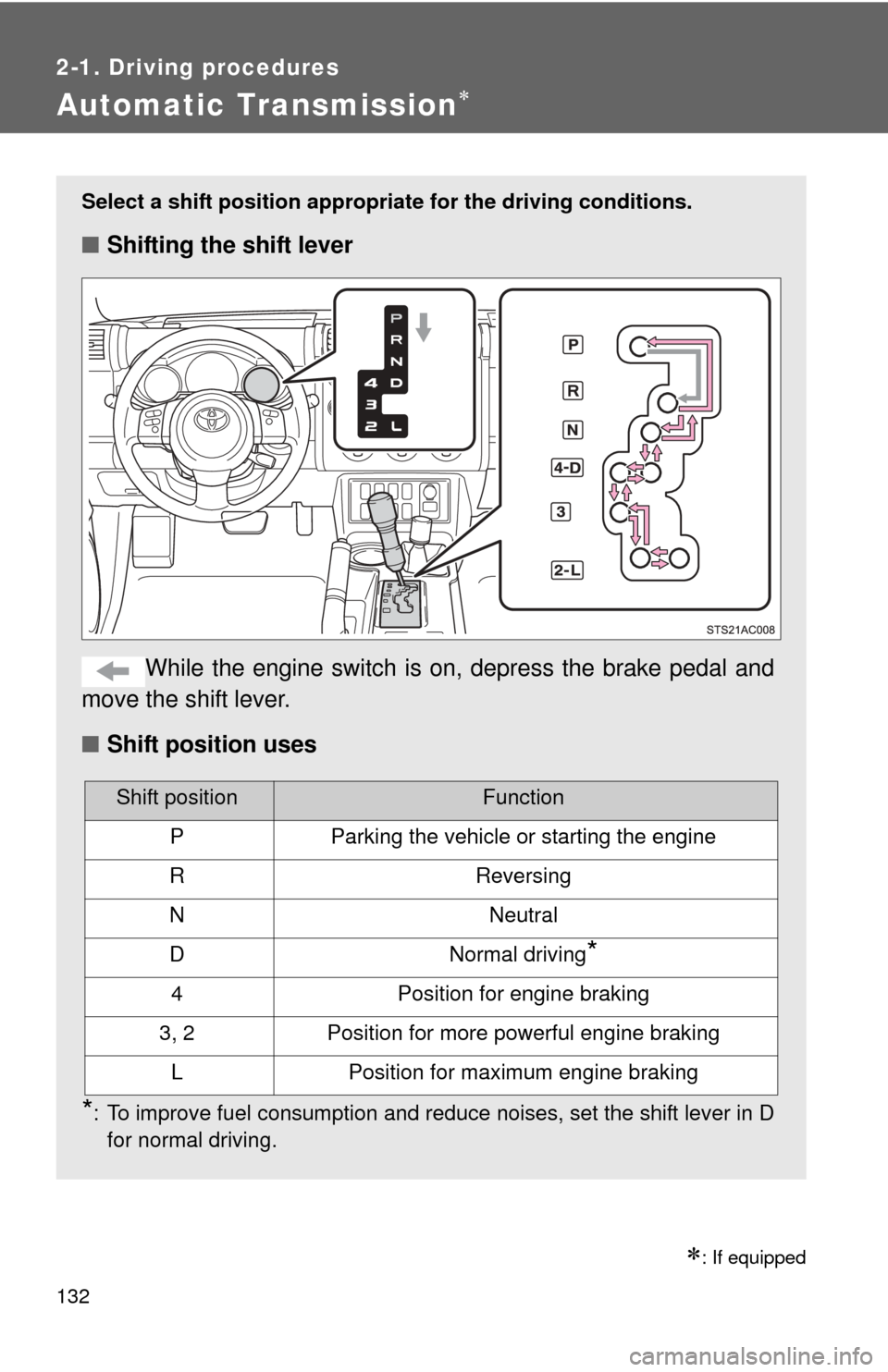
Select a shift position appropriate for the driving conditions.
■Shifting the shift lever
While the engine switch is on, depress the brake pedal and
move the shift lever.
■ Shift position uses
*: To improve fuel consumption and reduce noises, set the shift lever in D
for normal driving.
Shift positionFunction
PParking the vehicle or starting the engine
RReversing
NNeutral
DNormal driving*
4Position for engine braking
3, 2Position for more powerful engine braking
LPosition for maximum engine braking
Page 144 of 572
144 2-2. Instrument cluster
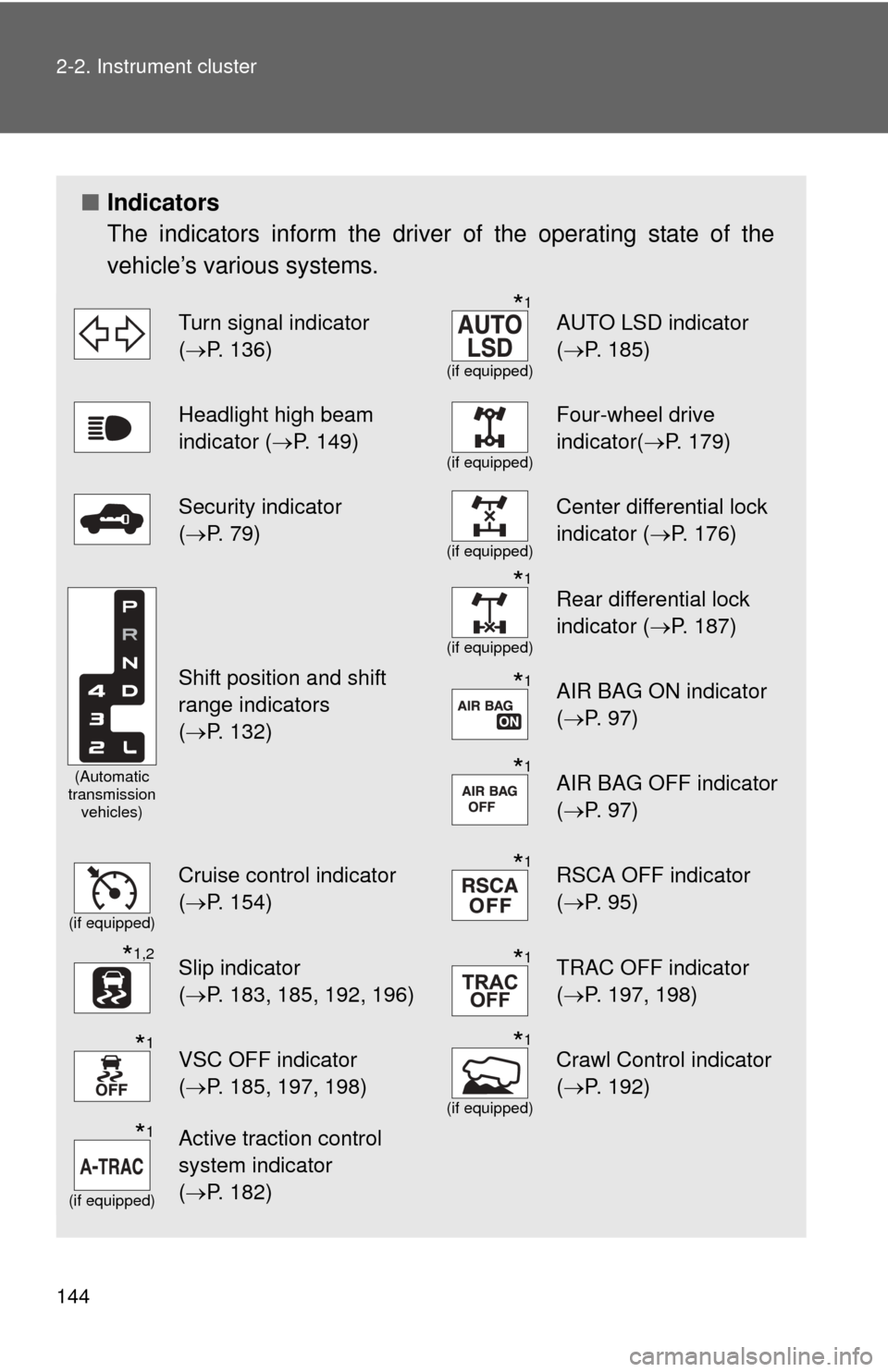
■Indicators
The indicators inform the driver of the operating state of the
vehicle’s various systems.
Turn signal indicator
(P. 136)*1
(if equipped)
AUTO LSD indicator
( P. 185)
Headlight high beam
indicator ( P. 149)
(if equipped)
Four-wheel drive
indicator(P. 179)
Security indicator
(P. 79)
(if equipped)
Center differential lock
indicator ( P. 176)
(Automatic
transmission vehicles)
Shift position and shift
range indicators
(P. 132)
*1
(if equipped)
Rear differential lock
indicator ( P. 187)
*1AIR BAG ON indicator
(P. 97)
*1AIR BAG OFF indicator
(P. 97)
(if equipped)
Cruise control indicator
(P. 154)*1RSCA OFF indicator
( P. 95)
*1,2Slip indicator
(P. 183, 185, 192, 196)*1TRAC OFF indicator
( P. 197, 198)
*1VSC OFF indicator
(P. 185, 197, 198)*1
(if equipped)
Crawl Control indicator
( P. 192)
*1
(if equipped)
Active traction control
system indicator
(P. 182)
Page 145 of 572
145
2-2. Instrument cluster
2
When driving
CAUTION
■
If a safety system warning light does not come on
Should a safety system light such as ABS and the SRS airbag warning light
not come on when you start the engine, this could mean that these systems
are not available to help protect you in an accident, which could result in
death or serious injury. Have the vehicle inspected by your Toyota dealer
immediately if this occurs.
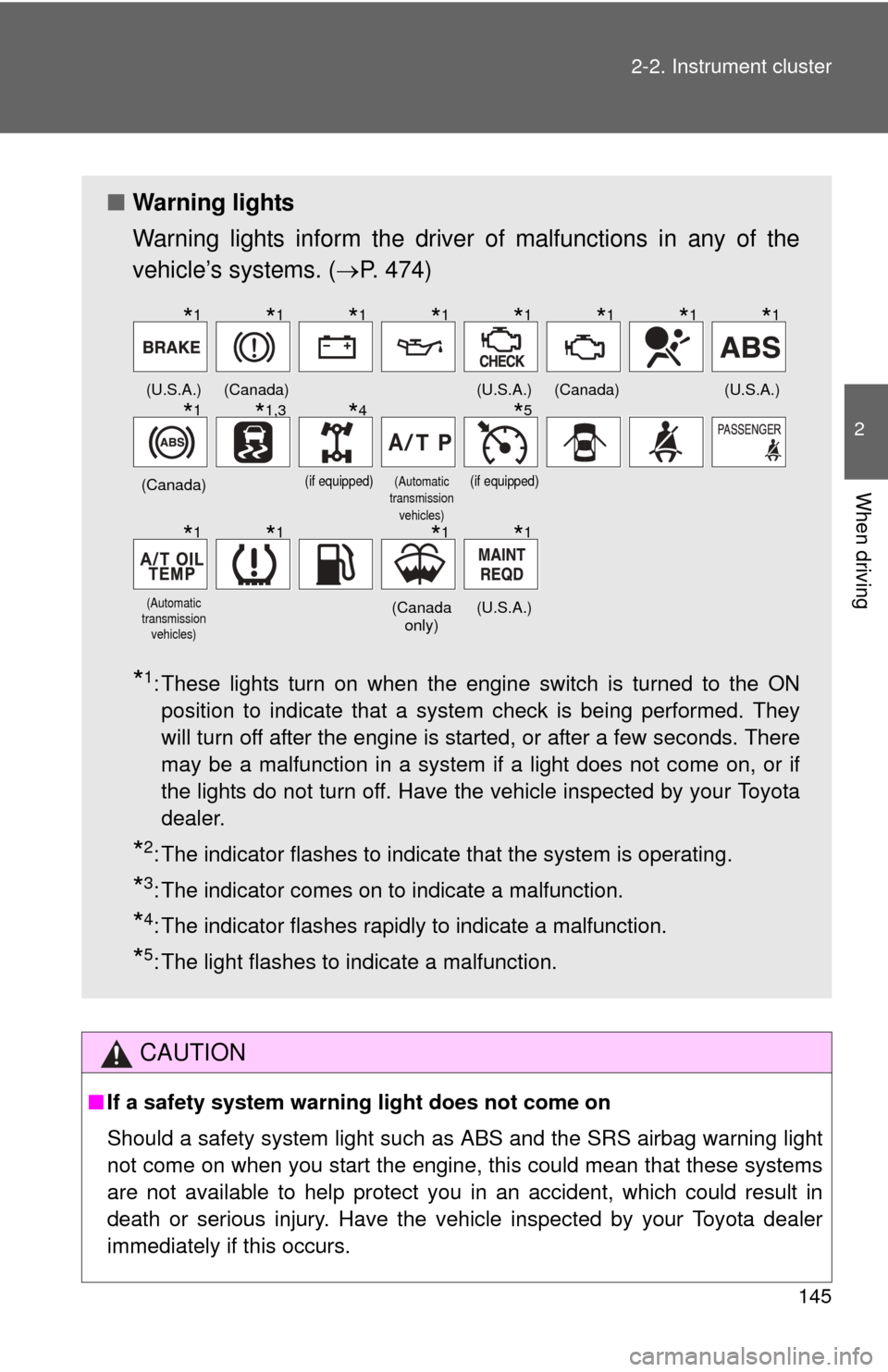
■ Warning lights
Warning lights inform the driver of malfunctions in any of the
vehicle’s systems. ( P. 474)
*1: These lights turn on when the engine switch is turned to the ON
position to indicate that a system check is being performed. They
will turn off after the engine is started, or after a few seconds. There
may be a malfunction in a system if a light does not come on, or if
the lights do not turn off. Have the vehicle inspected by your Toyota
dealer.
*2: The indicator flashes to indicate that the system is operating.
*3: The indicator comes on to indicate a malfunction.
*4: The indicator flashes rapidly to indicate a malfunction.
*5: The light flashes to indicate a malfunction.
(U.S.A.)(Canada)(U.S.A.)(Canada)(U.S.A.)
(Canada)(if equipped)(Automatic
transmission vehicles)(if equipped)
(Automatic
transmission vehicles)(Canada only)(U.S.A.)
*1*1*1*1*1*1*1*1
*1*1,3*4*5
*1*1*1*1
Page 156 of 572
156 2-4. Using other driving systems
■Cruise control can be set when
●Vehicles with an automatic transmission: The shift lever is in the D or
range 4.
● Vehicle speed is above approximately 25 mph (40 km/h).
■ Accelerating after setting the vehicle speed
●The vehicle can be accelerated normally. After acceleration, the set
speed resumes.
● Even without canceling the cruise control, the set speed can be
increased by first accelerating the vehicle to the desired speed and then
pushing the lever down to set the new speed.
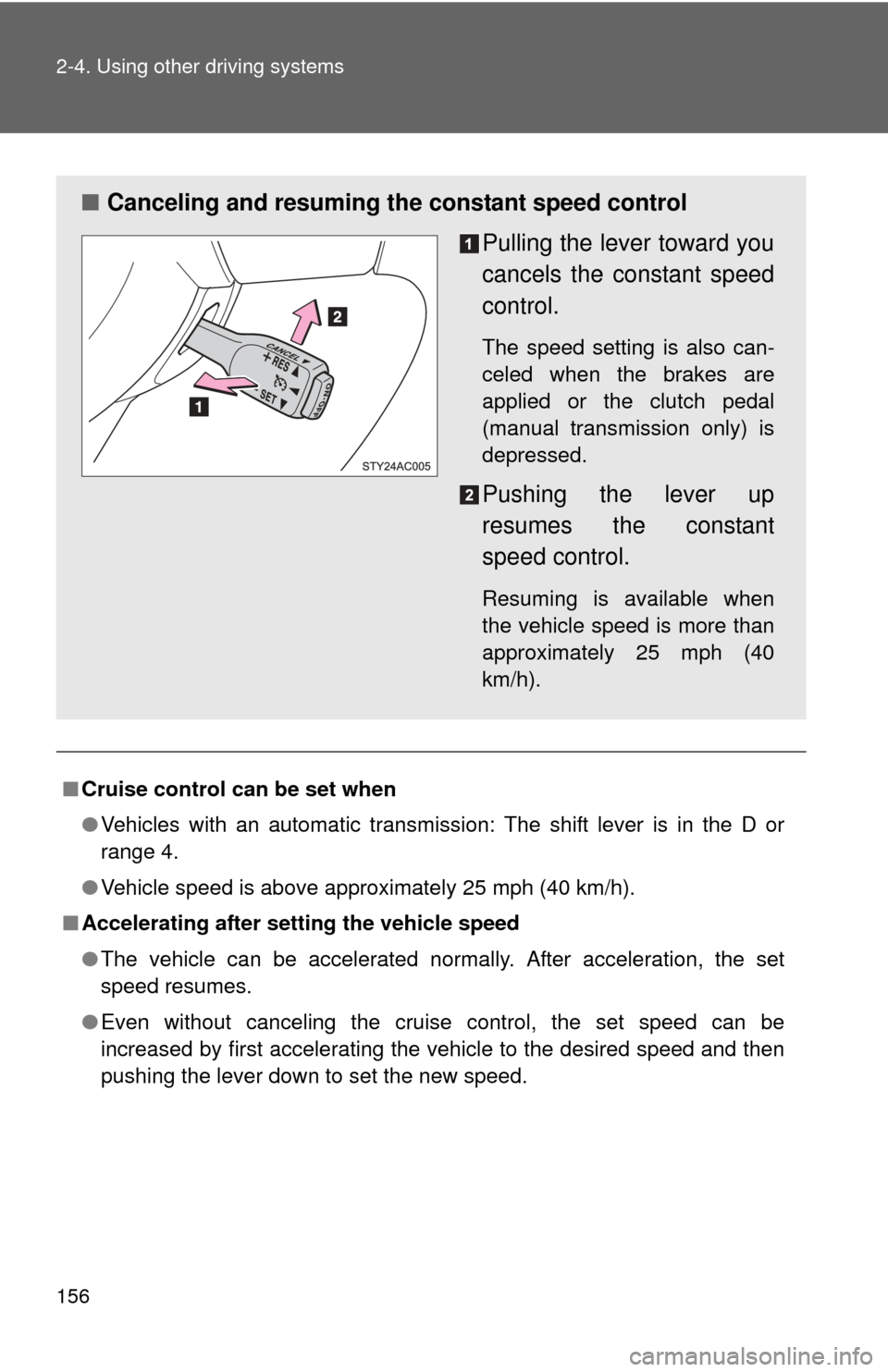
■ Canceling and resuming the constant speed control
Pulling the lever toward you
cancels the constant speed
control.
The speed setting is also can-
celed when the brakes are
applied or the clutch pedal
(manual transmission only) is
depressed.
Pushing the lever up
resumes the constant
speed control.
Resuming is available when
the vehicle speed is more than
approximately 25 mph (40
km/h).
Page 163 of 572
163
2-4. Using other driving systems
2
When driving
Rear view monitor system
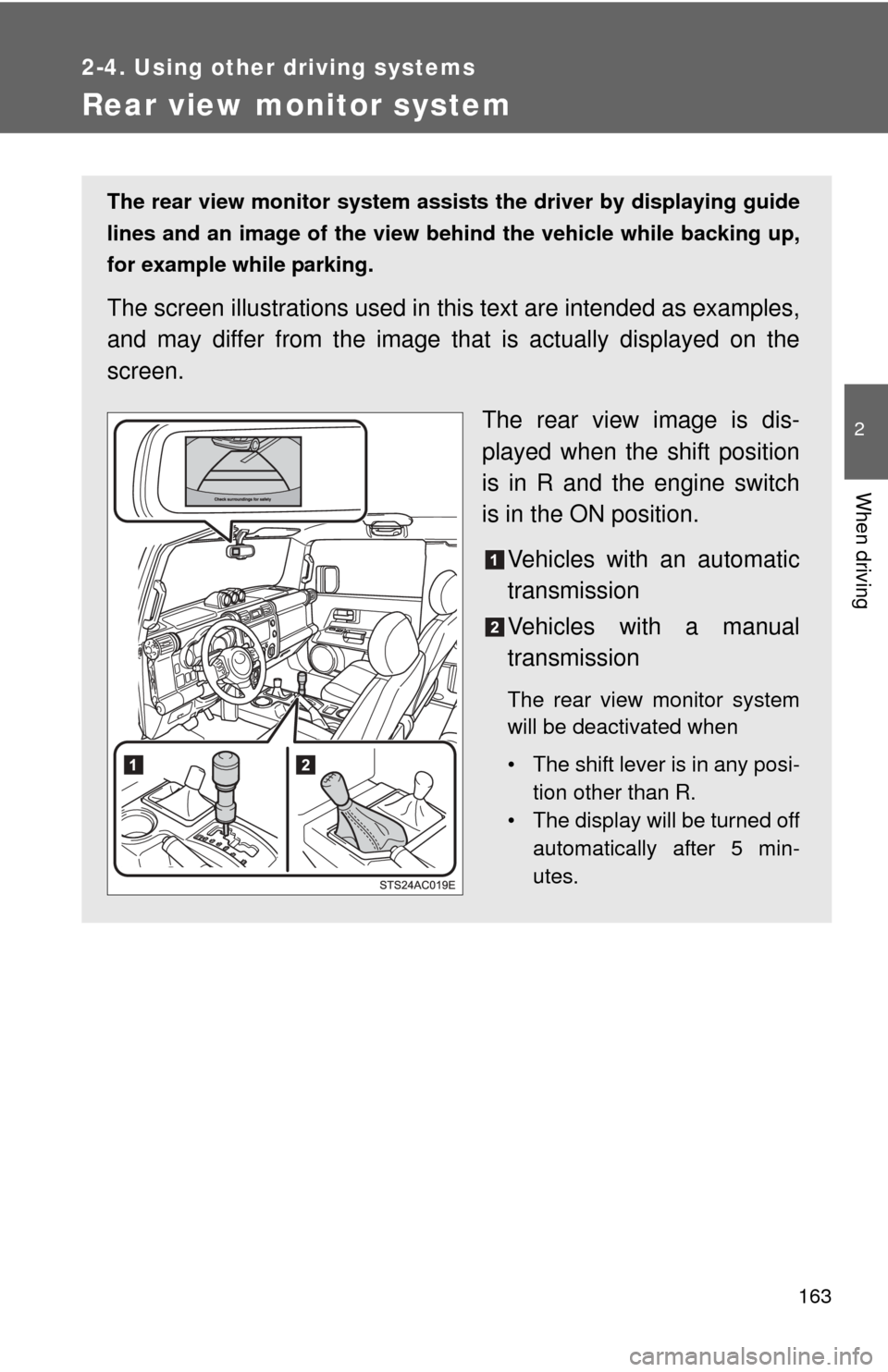
The rear view monitor system assists the driver by displaying guide
lines and an image of the view behind the vehicle while backing up,
for example while parking.
The screen illustrations used in th is text are intended as examples,
and may differ from the image that is actually displayed on the
screen.
The rear view image is dis-
played when the shift position
is in R and the engine switch
is in the ON position.Vehicles with an automatic
transmission
Vehicles with a manual
transmission
The rear view monitor system
will be deactivated when
• The shift lever is in any posi- tion other than R.
• The display will be turned off automatically after 5 min-
utes.
Page 179 of 572
179
2-4. Using other driving systems
2
When driving
Four-wheel drive system (4WD models with an automatic transmission)
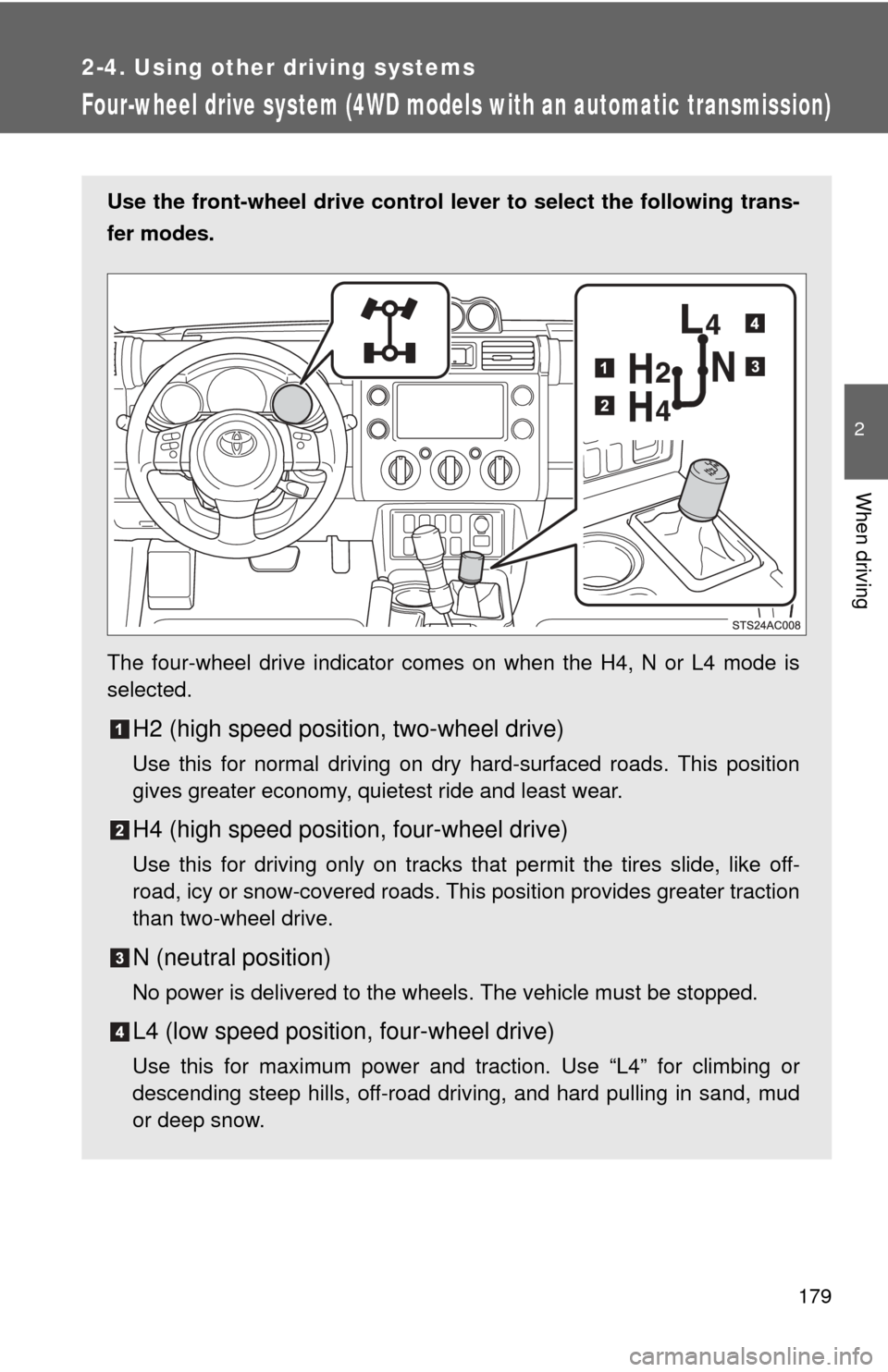
Use the front-wheel drive control lever to select the following trans-
fer modes.
The four-wheel drive indicator comes on when the H4, N or L4 mode is
selected.
H2 (high speed position, two-wheel drive)
Use this for normal driving on dry hard-surfaced roads. This position
gives greater economy, quietest ride and least wear.
H4 (high speed position, four-wheel drive)
Use this for driving only on tracks that permit the tires slide, like off-
road, icy or snow-covered roads. This position provides greater traction
than two-wheel drive.
N (neutral position)
No power is delivered to the wheels. The vehicle must be stopped.
L4 (low speed position, four-wheel drive)
Use this for maximum power and traction. Use “L4” for climbing or
descending steep hills, off-road driving, and hard pulling in sand, mud
or deep snow.
Page 182 of 572
182
2-4. Using other driving systems
Active traction control system
: If equipped
The active traction control system automatically helps prevent the
spinning of 4 wheels when the vehicle is started or accelerated on
slippery road surfaces.
■ System operation
Vehicles with an automatic transmission:
Stop the vehicle, shift the shift lever to N and shift the front-
wheel drive control lever into L4.
Vehicles with a manual transmission:
Stop the vehicle or reduce your speed to less than 5 mph (8
km/h). Depress the clutch pedal and shift the four-wheel
drive control lever into LL.
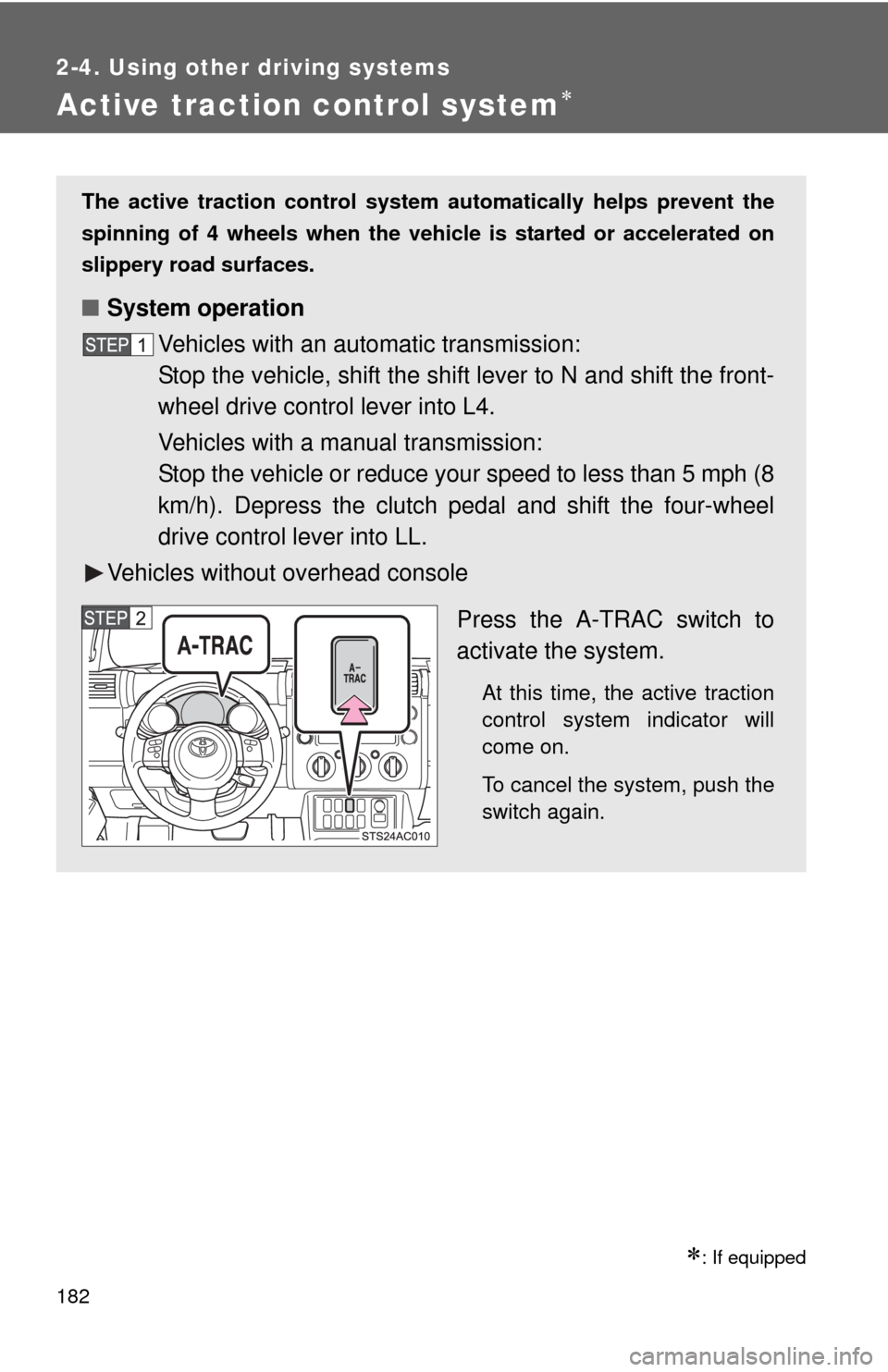
Vehicles without overhead console
Press the A-TRAC switch to
activate the system.
At this time, the active traction
control system indicator will
come on.
To cancel the system, push the
switch again.