esp TOYOTA FJ CRUISER 2014 1.G Owner's Manual
[x] Cancel search | Manufacturer: TOYOTA, Model Year: 2014, Model line: FJ CRUISER, Model: TOYOTA FJ CRUISER 2014 1.GPages: 572, PDF Size: 9.45 MB
Page 252 of 572
252 3-2. Using the audio system
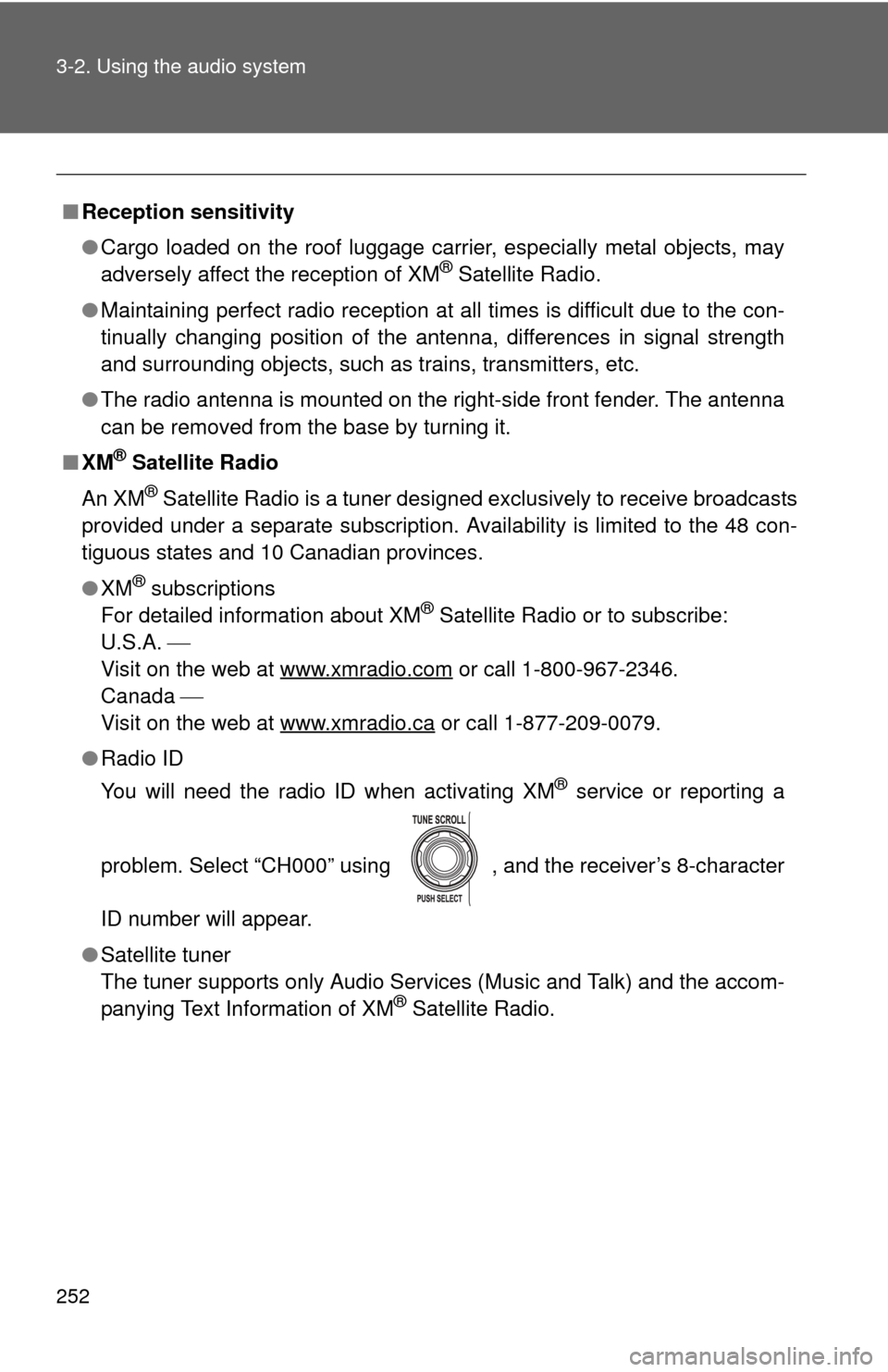
■Reception sensitivity
●Cargo loaded on the roof luggage carrier, especially metal objects, may
adversely affect the reception of XM
® Satellite Radio.
● Maintaining perfect radio reception at all times is difficult due to the con-
tinually changing position of the antenna, differences in signal strength
and surrounding objects, such as trains, transmitters, etc.
● The radio antenna is mounted on the right-side front fender. The antenna
can be removed from the base by turning it.
■ XM
® Satellite Radio
An XM
® Satellite Radio is a tuner designed exclusively to receive broadcasts
provided under a separate subscription. Availability is limited to the 48 con-
tiguous states and 10 Canadian provinces.
● XM
® subscriptions
For detailed information about XM® Satellite Radio or to subscribe:
U.S.A.
Visit on the web at www.xmradio.com
or call 1-800-967-2346.
Canada
Visit on the web at www.xmradio.ca
or call 1-877-209-0079.
● Radio ID
You will need the radio ID when activating XM
® service or reporting a
problem. Select “CH000” using , and the receiver’s 8-character
ID number will appear.
● Satellite tuner
The tuner supports only Audio Services (Music and Talk) and the accom-
panying Text Information of XM
® Satellite Radio.
Page 272 of 572
272 3-2. Using the audio system
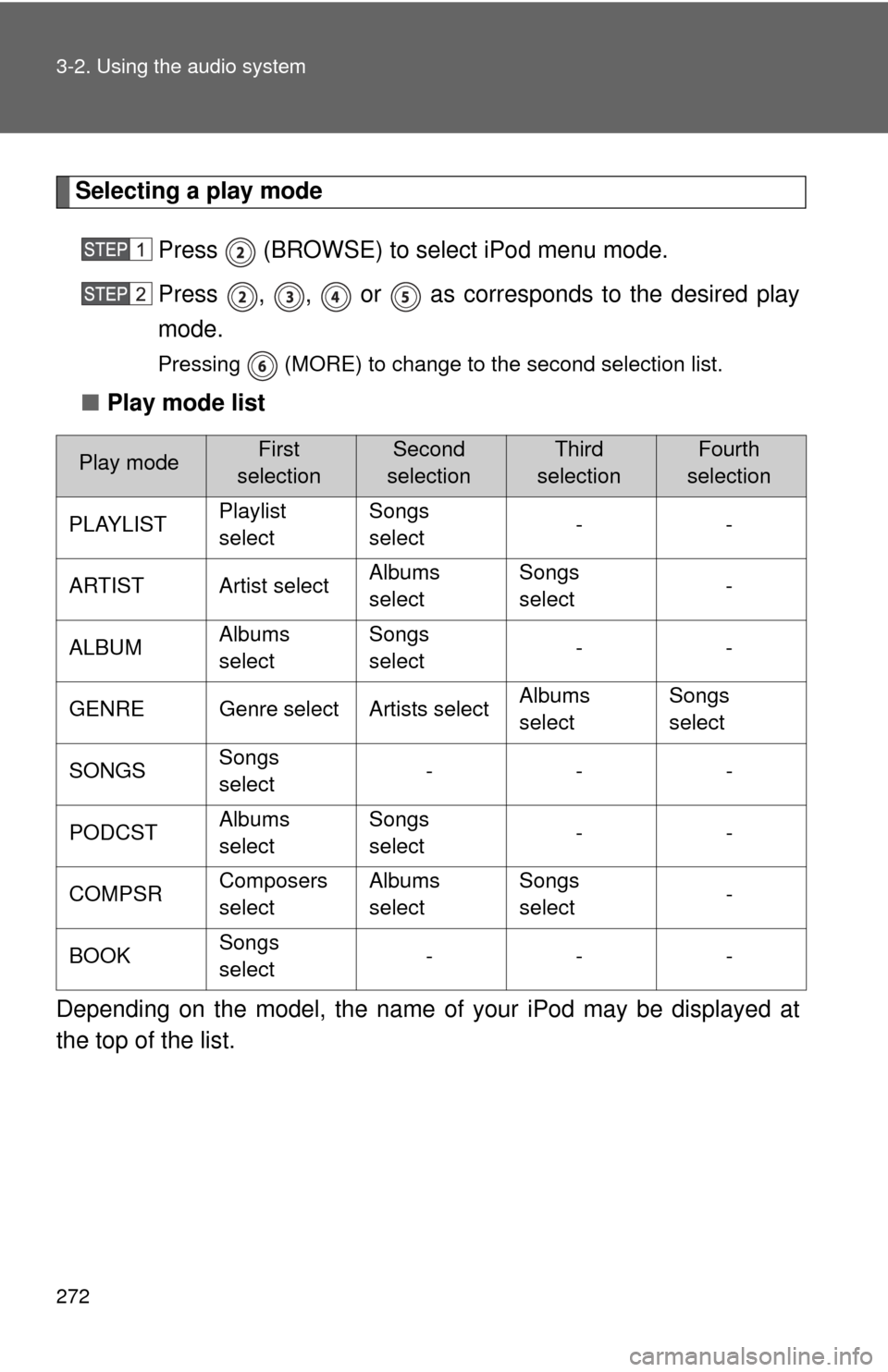
Selecting a play modePress (BROWSE) to select iPod menu mode.
Press , , or as corresponds to the desired play
mode.
Pressing (MORE) to change to the second selection list.
■Play mode list
Depending on the model, the name of your iPod may be displayed at
the top of the list.
Play modeFirst
selectionSecond
selectionThird
selectionFourth
selection
PLAYLIST Playlist
selectSongs
select
--
ARTIST Artist select Albums
selectSongs
select
-
ALBUM Albums
selectSongs
select
--
GENRE Genre select Artists select Albums
selectSongs
select
SONGS Songs
select ---
PODCST Albums
selectSongs
select
--
COMPSR Composers
selectAlbums
select Songs
select
-
BOOK Songs
select ---
Page 275 of 572
275
3-2. Using the audio system
3
Interior features
■
About iPod
●Apple is not responsible for the operation of this device or its compliance
with safety and regulatory standards.
● iPod is a trademark of Apple Inc., registered in the U.S. and other coun-
tries.
■ iPod functions
●When an iPod is connected and the audio source is changed to iPod
mode, the iPod will resume play from the same point at which it was last
used.
● Depending on the iPod that is connected to the system, certain functions
may not be available. Disconnecting the device and reconnecting it once
again may resolve some malfunctions.
■ iPod problems
To resolve most problems encountered when using your iPod, disconnect
your iPod from the vehicle iPod connection and reset it.
For instructions on how to reset your iPod, refer to your iPod Owner’s Man-
ual.
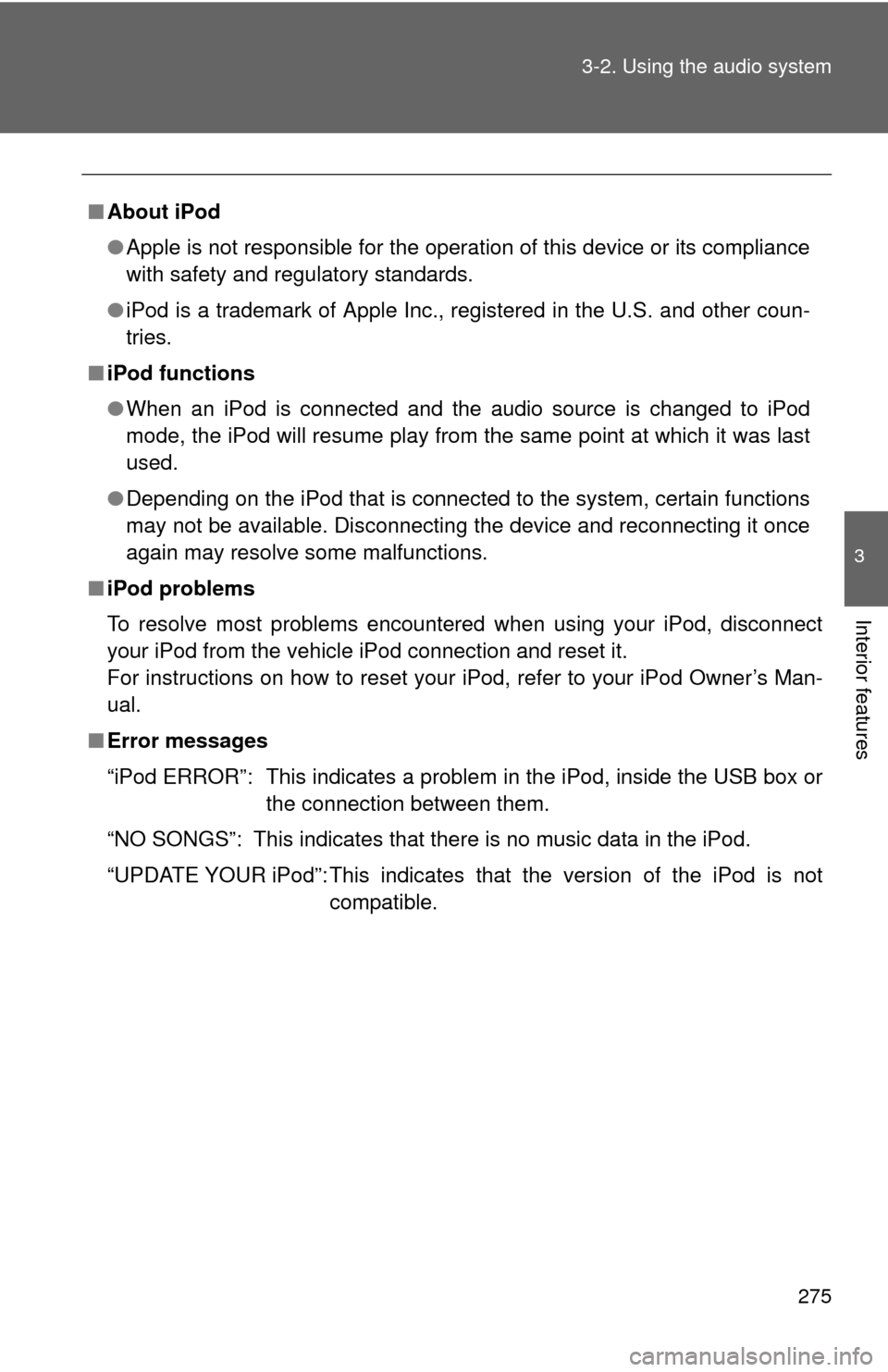
■ Error messages
“iPod ERROR”: This indicates a problem in the iPod, inside the USB box or
the connection between them.
“NO SONGS”: This indicates that there is no music data in the iPod.
“UPDATE YOUR iPod”: This indicates that the version of the iPod is not compatible.
Page 280 of 572
280 3-2. Using the audio system
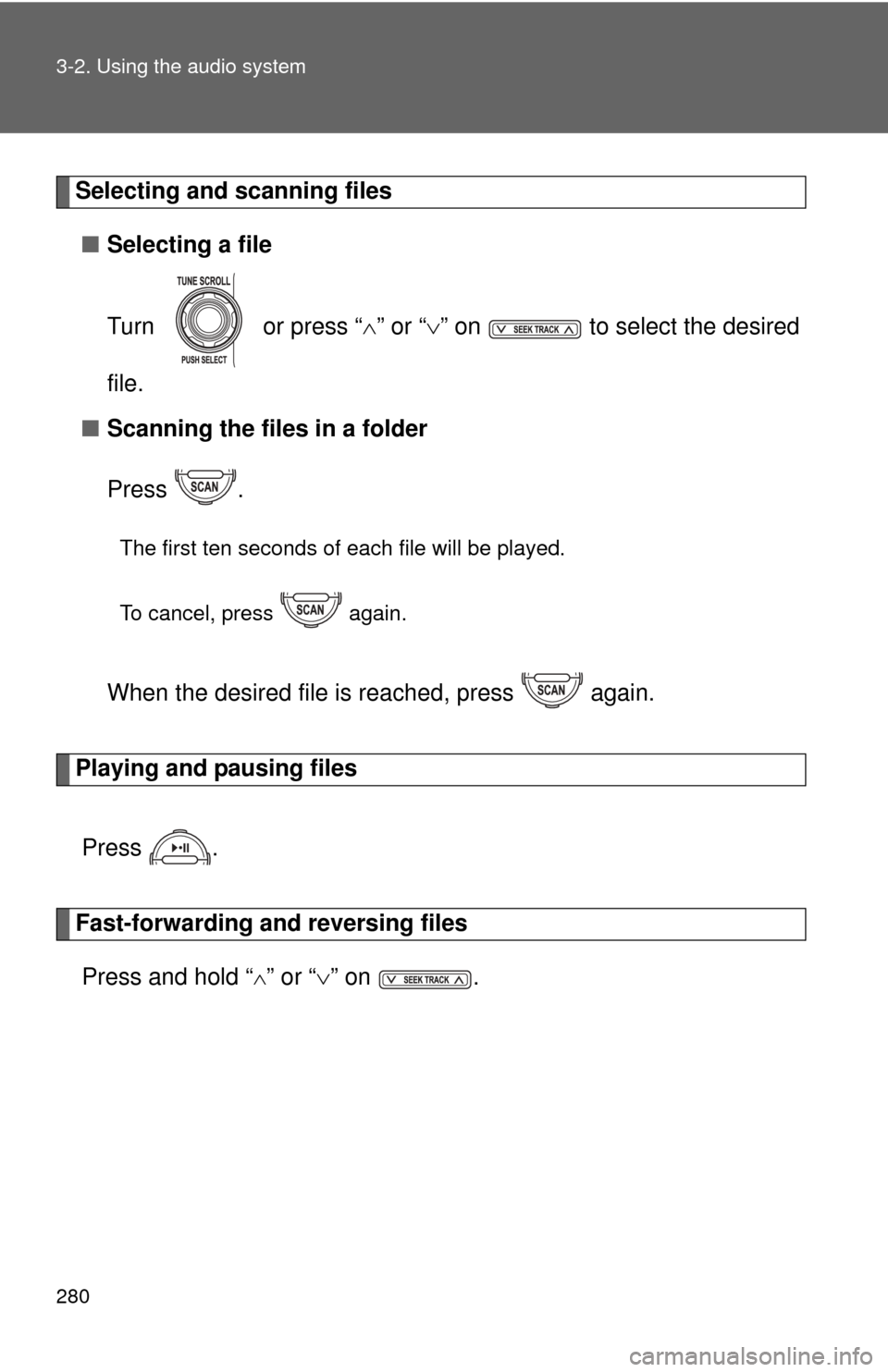
Selecting and scanning files■ Selecting a file
Turn or press “ ” or “ ” on to select the desired
file.
■ Scanning the files in a folder
Press .
The first ten seconds of each file will be played.
To cancel, press again.
When the desired file is reached, press again.
Playing and pausing files
Press .
Fast-forwarding and reversing filesPress and hold “
” or “ ” on .
Page 282 of 572

282 3-2. Using the audio system
■USB memory functions
Depending on the USB memory that is connected to the system, certain
functions may not be available. Disconnecting the device and reconnecting it
once again may resolve some malfunctions.
■ Error messages
“USB ERROR”:This indicates a problem in the USB memory, in the USB box
or connection between them.
“NO SUPPORT”:This indicates that no MP3/WMA files are included in the USB memory.
■ USB memory
●Compatible device
USB memory that can be used for MP3 and WMA playback.
Depending on the type of USB device, playback may not be possible.
● Compatible device formats
The following device formats can be used:
• USB communication formats: USB2.0 FS (12 mbps)
• File formats: FAT16/32 (Windows)
• Correspondence class: Mass storage class
MP3 and WMA files written in any format other than those listed above
may not play correctly, and their file names and folder names may not
be displayed correctly.
Items related to standards and limitations are as follows:
• Maximum directory hierarchy: 8 levels
• Maximum number of folder in device: 999 (including the root)
• Maximum number of files in device: 65025
• Maximum number of files per folder: 255
Page 286 of 572
286
3-2. Using the audio system
Optimal use of the audio system
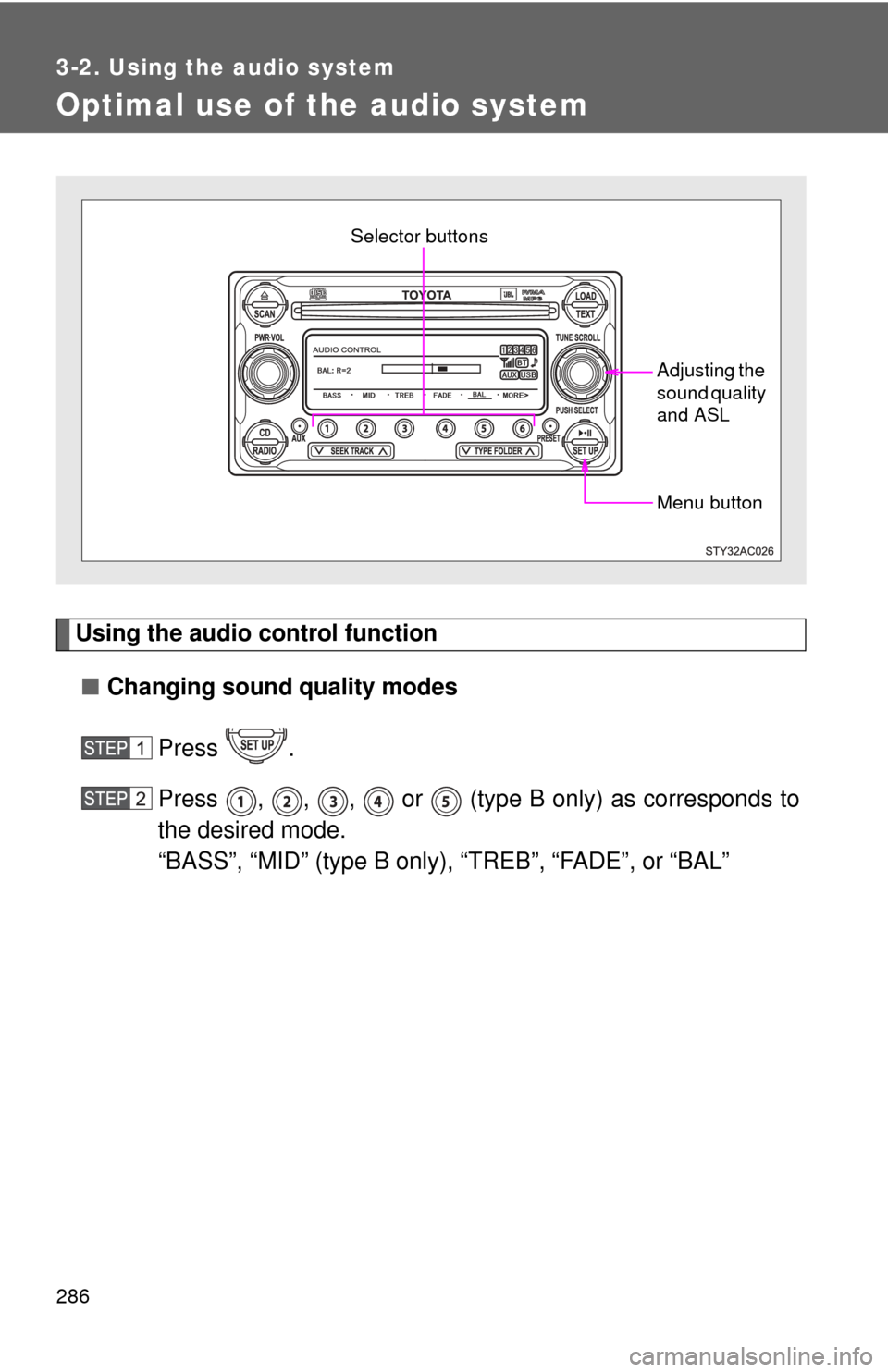
Using the audio control function■ Changing sound quality modes
Press .
Press , , , or (type B only) as corresponds to
the desired mode.
“BASS”, “MID” (type B only), “TREB”, “FADE”, or “BAL”
Menu button
Selector buttons
Adjusting the
sound quality
and ASL
Page 288 of 572
288 3-2. Using the audio system
■Setting the number of preset pages
The number of preset pages desired c an be set from 1 to 6. The initial
setting is 6 pages.
Press .
Press (MORE).
Press (PRESET).
Press , , , , or as corresponds to the
desired number of preset pages.
■ Language settings
P. 2 4 5
■Trademark owned by SRS Labs, Inc. (type A only)
The audio systems utilize SRS FOCUS
TM and SRS TruBass audio
enhancement technologies, under license from SRS Labs, Inc., in all modes
except AM radio mode.
FOCUS, TruBass, SRS and
symbols are trademarks of SRS Labs,
Inc.
FOCUS and TruBass technologies are incorporated under license from
SRS Labs, Inc.
■ Trademark owned by New Transducers Limited (type A only)
This vehicle incorporates NXT flat panel speaker technology by New
Transducers Limited, UK. is a registered trademarks of New
Transducers Limited.
Page 297 of 572
297
3-3. Using the Bluetooth
® audio system
3
Interior features
■
About Bluetooth®
■Compatible models
●Bluetooth
® specifications:
Ve r. 1 . 2
● Following Profiles:
• A2DP (Advanced Audio Distribution Profile) Ver. 1.0
• AVRCP (Audio/Video Remote Control Profile) Ver. 1.0 or higher (Ver.
1.3 or higher recommended)
Portable players must correspond to the above specifications in order to be
connected to the Bluetooth
® audio system. However, please note that some
functions may be limited depending on the type of portable player.
■ Certification for the Bluetooth
® audio system
For vehicles sold in the U.S.A.
• Vehicles with CD changer FCC ID: BABFT0001A
MADE IN JAPAN
• Vehicles without CD changer FCC ID: AJDK025
MADE IN JAPAN
This device complies with part 15 of the FCC Rules. Operation is subject to
the following two conditions: (1) This device may not cause harmful interfer-
ence, and (2) this device must accept any interference received, including
interference that may cause undesired operation.
Bluetooth is a registered trademark of
Bluetooth SIG. Inc.
Page 298 of 572
298 3-3. Using the Bluetooth
® audio system
For vehicles sold in Canada
• Vehicles with CD changer IC ID: 2024B-FT0001A
MADE IN JAPAN
• Vehicles without CD changer IC ID: 775E-K025
MADE IN JAPAN
Operation is subject to the following two conditions: (1) this device may not
cause interference, and (2) this device must accept any interference, includ-
ing interference that may cause undesired operation of the device.
CAUTION
■ FCC WARNING
Changes or modifications not expressly approved by the party responsible
for compliance could void the user’s authority to operate the equipment.
Radio Frequency Radiation Exposure. This equipment complies with FCC/
IC radiation exposure limits set forth for uncontrolled equipment and meets
the FCC radio frequency (RF) Exposure Guidelines in Supplement C to
OET65 and RSS-102 of the IC radio frequency (RF) Exposure rules. This
equipment has very low levels of RF energy that it deemed to comply with-
out maximum permissive exposure evaluation (MPE). But it is desirable that
it should be installed and operated with at least 7.9 in. (20 cm) and more
between the radiator and person’s body (excluding extremities: hands,
wrists, feet and ankles).
This transmitter must not be co-located or operated in conjunction with any
other antenna or transmitter.
■ Caution while driving
Do not connect portable players or operate the controls.
Page 316 of 572
316 3-4. Using the hands-free phone system (for cellular phone)
CAUTION
■FCC WARNING
Changes or modifications not expressly approved by the party responsible
for compliance could void the user’s authority to operate the equipment.
Radio Frequency Radiation Exposure. This equipment complies with FCC/
IC radiation exposure limits set forth for uncontrolled equipment and meets
the FCC radio frequency (RF) Exposure Guidelines in Supplement C to
OET65 and RSS-102 of the IC radio frequency (RF) Exposure rules. This
equipment has very low levels of RF energy that it deemed to comply with-
out maximum permissive exposure evaluation (MPE). But it is desirable that
it should be installed and operated with at least 7.9 in. (20 cm) and more
between the radiator and person’s body (excluding extremities: hands,
wrists, feet and ankles).
This transmitter must not be co-located or operated in conjunction with any
other antenna or transmitter.
■ Caution while driving
Do not use a cellular phone, or connect the Bluetooth
® phone.
■ Caution regarding interfer ence with electronic devices
● Your audio unit is fitted with Bluetooth
® antennas. People with implanted
pacemakers or cardiac defibrillators should maintain a reasonable dis-
tance between themselves and the Bluetooth
® antennas. The radio waves
may affect the operation of such devices.
● Before using Bluetooth
® devices, users of any electrical medical device
other than implanted pacemakers and implanted cardiac defibrillators
should consult the manufacturer of the device for information about its
operation under the influence of radio waves. Radio waves could have
unexpected effects on the operation of such medical devices.
NOTICE
■ To prevent damage to a cellular phone
Do not leave a cellular phone in the vehicle. The temperature inside may
become high resulting in damage to the phone.