change time TOYOTA GR SUPRA 2022 Owners Manual
[x] Cancel search | Manufacturer: TOYOTA, Model Year: 2022, Model line: GR SUPRA, Model: TOYOTA GR SUPRA 2022Pages: 356, PDF Size: 39.14 MB
Page 10 of 356
101-1. NOTES
cle, it can be deleted at any
time.
This data is only transmitted to
third parties upon personal
request as part of the use of
online services. The transmis-
sion depends on the selected
settings for the use of the ser-
vices.
Depending on the vehicle equip-
ment, mobile devices connected
to the vehicle, for instance
smartphones, can be controlled
via the vehicle control elements.
The sound and picture from the
mobile device can be played
back and displayed through the
multimedia system. Certain
information is transferred to the
mobile device at the same time.
Depending on the type of incor-
poration, this includes, for
instance position data and other
general vehicle information. This
optimizes the way in which
selected apps, for instance navi-
gation or music playback, work.
There is no further interaction
between the mobile device and
the vehicle, such as active
access to vehicle data.
How the data will be processed
further is determined by the pro-
vider of the particular app being
used. The extent of the possible settings depends on the respec-
tive app and the operating sys-
tem of the mobile device.
If the vehicle has a wireless net-
work connection, this enables
data to be exchanged between
the vehicle and other systems.
The wireless network connec-
tion is realized via an in-vehicle
transmitter and receiver unit or
via personal mobile devices
brought into the vehicle, for
instance smartphones. This
wireless network connection
enables 'online functions' to be
used. These include online ser-
vices and apps supplied by the
vehicle manufacturer or by other
providers.
Where online services from the
vehicle manufacturer are con-
cerned, the corresponding func-
tions are described in the
appropriate place, for instance
the Owner's Manual or manu-
facturer's website. The relevant
legal information pertaining to
data protection is provided there
too. Personal data may be used
to perform online services. Data
is exchanged over a secure con-
Incorporation of mobile
devices
Services
General information
Services from the vehicle
manufacturer
Page 11 of 356
111-1. NOTES
1
NOTES
nection, for instance with the IT
systems of the vehicle manufac-
turer intended for this purpose.
Any collection, processing, and
use of personal data above and
beyond that needed to provide
the services must always be
based on a legal permission,
contractual arrangement or con-
sent. It is also possible to acti-
vate or deactivate the data
connection as a whole. That is,
with the exception of functions
and services required by law
such as Assist systems.
When using online services
from other providers, these ser-
vices are the responsibility of
the relevant provider and sub-
ject to their data privacy condi-
tions and terms of use. The
vehicle manufacturer has no
influence on the content
exchanged during this process.
Information on the way in which
personal data is collected and
used in relation to services from
third parties, the scope of such
data, and its purpose, can be
obtained from the relevant ser-
vice provider.
This vehicle is equipped with an
event data recorder EDR. The main purpose of an EDR is to
record, in certain crash or near
crash-like situations, such as an
air bag deployment or hitting a
road obstacle, data that will
assist in understanding how a
vehicle’s systems performed.
The EDR is designed to record
data related to vehicle dynamics
and safety systems for a short
period of time, typically 30 sec-
onds or less.
The EDR in this vehicle is
designed to record such data
as:
• How various systems in your
vehicle were operating.
• Whether or not the driver and passenger safety belts were
fastened.
• How far, if at all, the driver was depressing the accelera-
tor and/or brake pedal.
• How fast the vehicle was trav- eling.
This data can help provide a
better understanding of the cir-
cumstances in which crashes
and injuries occur.
EDR data is recorded by your
vehicle only if a nontrivial crash
situation occurs; no data is
recorded by the EDR under nor-
mal driving conditions and no
personal data, for instance
name, gender, age, and crash
location, are recorded.
However, other parties, such as
law enforcement, could combine
Services from other provid-
ers
Event Data Recorder EDR
Page 27 of 356
272-1. QUICK REFERENCE
2
QUICK REFERENCE
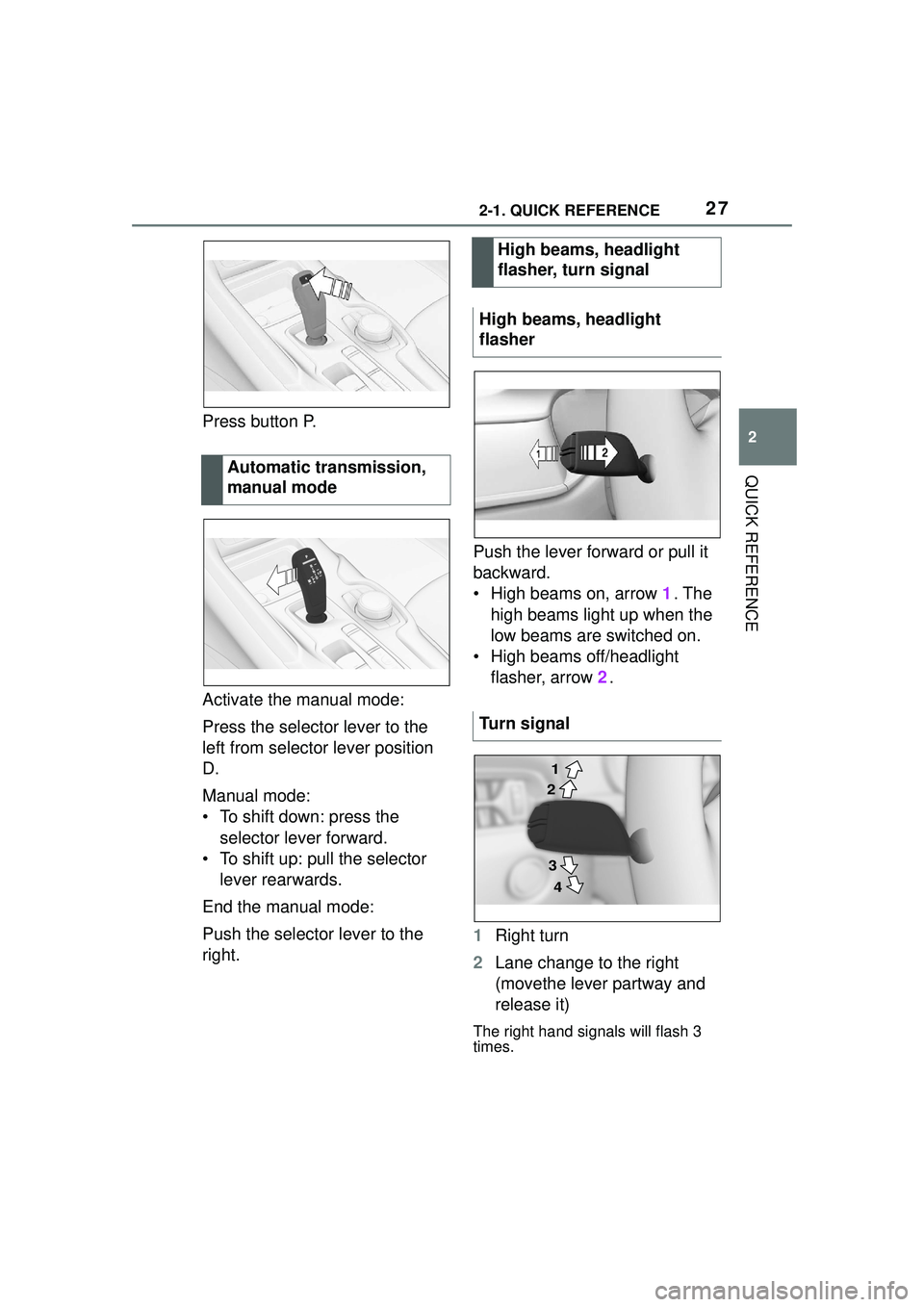
Press button P.
Activate the manual mode:
Press the selector lever to the
left from selector lever position
D.
Manual mode:
• To shift down: press the selector lever forward.
• To shift up: pull the selector lever rearwards.
End the manual mode:
Push the selector lever to the
right. Push the lever forward or pull it
backward.
• High beams on, arrow 1. The
high beams light up when the
low beams are switched on.
• High beams off/headlight flasher, arrow 2.
1 Right turn
2 Lane change to the right
(movethe lever partway and
release it)
The right hand signals will flash 3
times.
Automatic transmission,
manual mode
High beams, headlight
flasher, turn signal
High beams, headlight
flasher
Turn signal
2 1
3 4
Page 28 of 356
282-1. QUICK REFERENCE
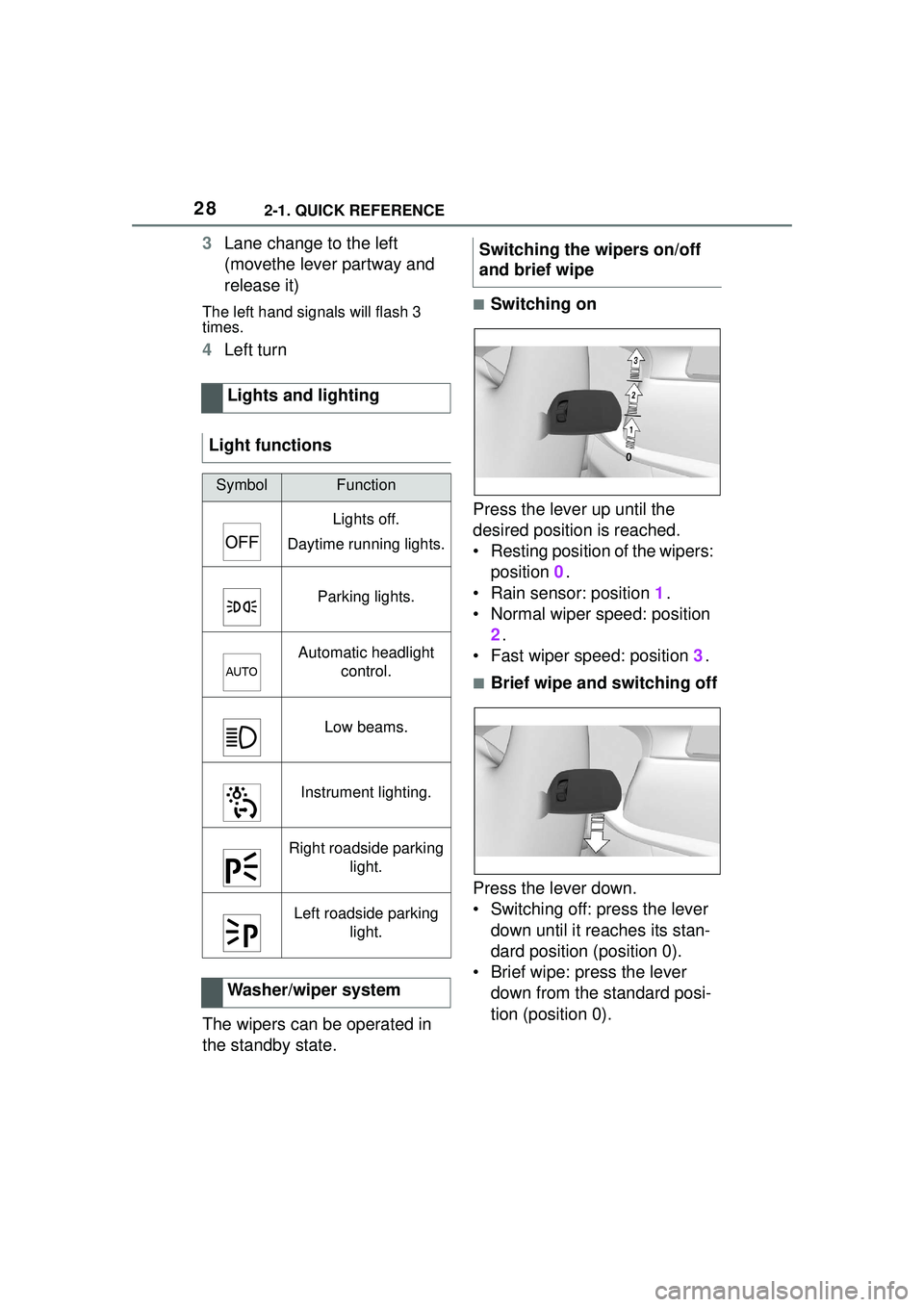
3Lane change to the left
(movethe lever partway and
release it)
The left hand signals will flash 3
times.
4Left turn
The wipers can be operated in
the standby state.
■Switching on
Press the lever up until the
desired position is reached.
• Resting position of the wipers: position 0.
• Rain sensor: position 1.
• Normal wiper speed: position 2.
• Fast wiper speed: position 3.
■Brief wipe and switching off
Press the lever down.
• Switching off: press the lever down until it reaches its stan-
dard position (position 0).
• Brief wipe: press the lever down from the standard posi-
tion (position 0).
Lights and lighting
Light functions
SymbolFunction
Lights off.
Daytime running lights.
Parking lights.
Automatic headlight control.
Low beams.
Instrument lighting.
Right roadside parking light.
Left roadside parking light.
Washer/wiper system
Switching the wipers on/off
and brief wipe
Page 65 of 356
653-1. CONTROLS
3
CONTROLS
In the driver profiles, individual
settings for several drivers can
be stored and called up again
when required.
There are three driver profiles
with which personal vehicle set-
tings can be stored. Every
remote control has one of these
driver profiles assigned.
If the vehicle is unlocked using a
remote control, the assigned
personal driver profile will be
activated. All settings stored in
the driver profile are automati-
cally applied.
If several drivers use their own
remote control, the vehicle will
adjust the personal settings
during unlocking. These settings
are also restored, if the vehicle
has been used in the meantime
by a person with a different
remote control.
Changes to the settings are
automatically stored in the driver
profile currently activated.
If another driver profile is
selected via Toyota Supra Com-
mand, the settings stored in it
will be applied automatically.
The new driver profile is
assigned to the vehicle key that is currently in use.
There is an additional guest pro-
file available that is not assigned
to any vehicle key. It can be
used to apply settings in the
vehicle without changing the
personal driver profiles.
For the system to be able to
identify the driver profile associ-
ated to a particular driver, the
detected remote control must be
clearly allocated to the driver.
This is the case when:
• The driver is only carrying his
or her own remote control.
• The driver unlocks the vehi- cle.
• The driver gets into the vehi- cle through the driver's door.
After switching on the Control
Display, the name of the active
driver profile is displayed.
Select driver profile, refer to
page 66.
As soon as the engine is started
or any key is pressed, the last
selected display is shown on the
Control Display.
To exit the welcome screen via
Toyota Supra Command: "OK"
Driver profile
Concept
General information
Functional requirements
Active driver profile
Page 83 of 356
833-1. CONTROLS
3
CONTROLSIt is not possible to switch on the
drive-ready state if the remote
control has not been detected.
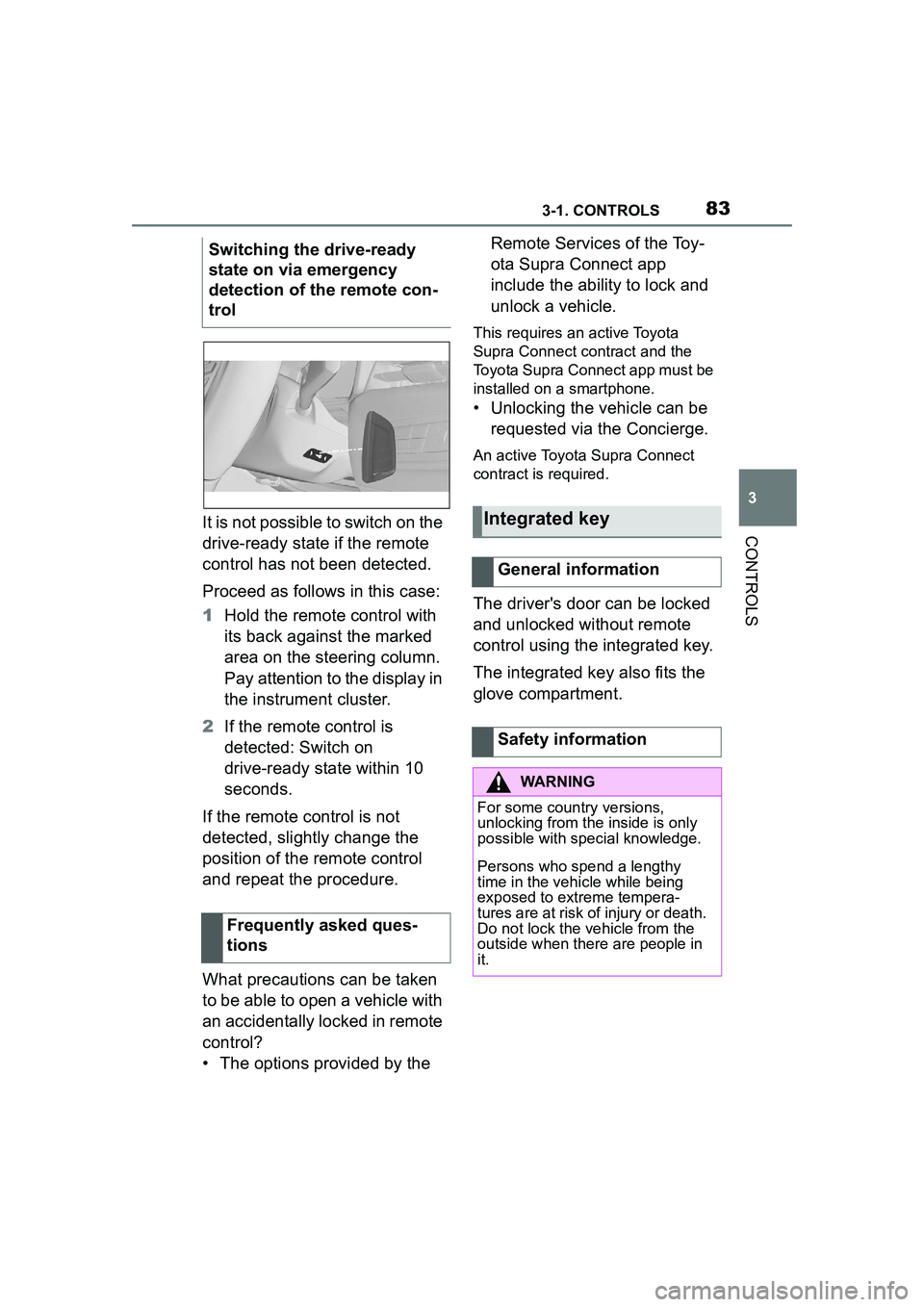
Proceed as follows in this case:
1Hold the remote control with
its back against the marked
area on the steering column.
Pay attention to the display in
the instrument cluster.
2 If the remote control is
detected: Switch on
drive-ready state within 10
seconds.
If the remote control is not
detected, slightly change the
position of the remote control
and repeat the procedure.
What precautions can be taken
to be able to open a vehicle with
an accidentally locked in remote
control?
• The options provided by the Remote Services of the Toy-
ota Supra Connect app
include the ability to lock and
unlock a vehicle.
This requires an active Toyota
Supra Connect contract and the
Toyota Supra Connect app must be
installed on a smartphone.
• Unlocking the vehicle can be
requested via the Concierge.
An active Toyota Supra Connect
contract is required.
The driver's door can be locked
and unlocked without remote
control using the integrated key.
The integrated key also fits the
glove compartment.
Switching the drive-ready
state on via emergency
detection of the remote con-
trol
Frequently asked ques-
tions
Integrated key
General information
Safety information
WARNING
For some country versions,
unlocking from the inside is only
possible with special knowledge.
Persons who spend a lengthy
time in the vehicle while being
exposed to extreme tempera-
tures are at risk of injury or death.
Do not lock the vehicle from the
outside when there are people in
it.
Page 92 of 356
923-1. CONTROLS
3"Doors/Key"
4 "Turn off after door opening"
Opening the front doors establishes
the idle state, refer to page 43.
When the vehicle is locked, the
vehicle alarm system reacts to
the following changes:
• Opening a door, the hood or
the trunk lid.
• Movements in the car's inte- rior.
• Changes in the vehicle tilt, e. g., during attempts at stealing
a wheel or when towing the
vehicle.
• Disconnected battery voltage.
• Improper use of the socket for OBD Onboard Diagnosis.
• Locking the vehicle while a device is connected to the
socket for the OBD Onboard-
Diagnosis. For socket for the
OBD Onboard Diagnosis,
refer to page 302.
The alarm system signals the
following changes visually and
acoustically:
• Acoustic alarm: Depending on local regulations, the acoustic
alarm may be suppressed.
• Visual alarm: By flashing of the hazard warning system
and headlights, where
required. Do not modify the system to
ensure function of the alarm
system.
When you unlock and lock the
vehicle, either with the remote
control or with Comfort entry, the
alarm system is switched off and
on at the same time.
The alarm system is triggered
when a door is opened if the
door was unlocked using the
integrated key in the door lock.
Switching off the alarm, refer to
page 94.
The trunk lid can be opened
even when the alarm system is
switched on.
After the trunk lid is closed, it is
locked and monitored again pro-
vided the doors are locked. The
hazard warning system flashes
once.
You can trigger the alarm sys-
tem if you find yourself in a dan-
Alarm system
General information
Switching on/off
Opening the doors with
the alarm system switched
on
Opening the trunk lid with
the alarm system switched
on
Panic mode
Page 118 of 356
1183-1. CONTROLS
door is open.
The hood was unlocked.
Some indicator lights light up for
a varied length of time.
The engine can only be started
via the Start/Stop button.
Even if driving off was not
intended, the deactivated
engine starts up automatically in
the following situations:
Excessive warming of the
car's interior when the air con-
ditioning is switched on.
Excessive cooling of the car's
interior when the heating is
switched on.
Where there is a risk of win-
dow condensation when the
automatic air conditioning is
switched on.
The steering wheel is turned.
Change from selector lever
position D to N or R.
Change from selector lever
position P to N, D, or R.
Vehicle battery is heavily dis-
charged.
Start of an oil level measure-
ment.
Depending on the vehicle equip- ment and country-specific ver-
sion, the vehicle features a
variety of sensors for assessing
the traffic situation. The Auto
Start/Stop function uses this
information to adapt to various
traffic situations in a proactive
manner.
For instance, this applies to the
following situations:
If a situation is detected in
which the stopping time is
expected to be very short, the
engine is not switched off
automatically. A message
appears on the Control Dis-
play, depending on the situa-
tion.
If a situation is detected in
which the vehicle needs to
drive off immediately, the
engine is started automati-
cally.
The function may be restricted if
the navigation data is invalid,
outdated or not available, for
example.
The engine is not automatically
switched off.
The engine is started during an
automatic engine stop.
System limits
Additional functions Auto
Start/Stop
Activating/deactivating the
system manually
Concept
Page 133 of 356

1333-1. CONTROLS
3
CONTROLS
This chapter describes all stan-
dard, country-specific and
optional features offered with
the series. It also describes fea-
tures and functions that are not
necessarily available in your
vehicle, e.g., due to the selected
options or country versions. This
also applies to safety-related
functions and systems. When
using these functions and sys-
tems, the applicable laws and
regulations must be observed.
The instrument cluster is a vari-
able display. When the sport
mode switch is used to change
the driving mode, the instrument
cluster displays change to
match the driving mode.
The display change in the instru-
ment cluster can be deactivated
via Toyota Supra Command.
Some of the displays in the
instrument cluster may differ
from the illustrations in this
Owner's Manual.1
Fuel gauge P.139
2 Speedometer
3 Tachometer P.139
Status, Sport mode switch
P. 1 3 1
4 Time P.60
5 Variable displays P.133
6 External temperature P.141
7 Engine coolant temperature
P. 1 4 0
8 Vehicle messages P.134
Range P.141
9 Transmission display P.126
10Variable displays P.133 Speed Limit Info P.143
In some areas of the instrument
cluster, various assistance sys-
tems, for example the cruise
control, can be displayed. The
displays may vary depending on
the equipment version and
country variant.
Displays
Vehicle features and
options
Instrument cluster
Concept
General information
Overview
Variable displays
Page 134 of 356
1343-1. CONTROLS
The display can be changed for
sport mode.
The driving mode will change to
sport mode.
The vehicle messages system
monitors functions in the vehicle
and notifies you of malfunctions
in the monitored systems.
A vehicle messages message is
displayed as a combination of
indicator or warning lights and
SMS text messages in the
instrument cluster and, if appli-
cable, in the Head-up Display.
In addition, an acoustic signal
may sound and an SMS text
message may appear on the
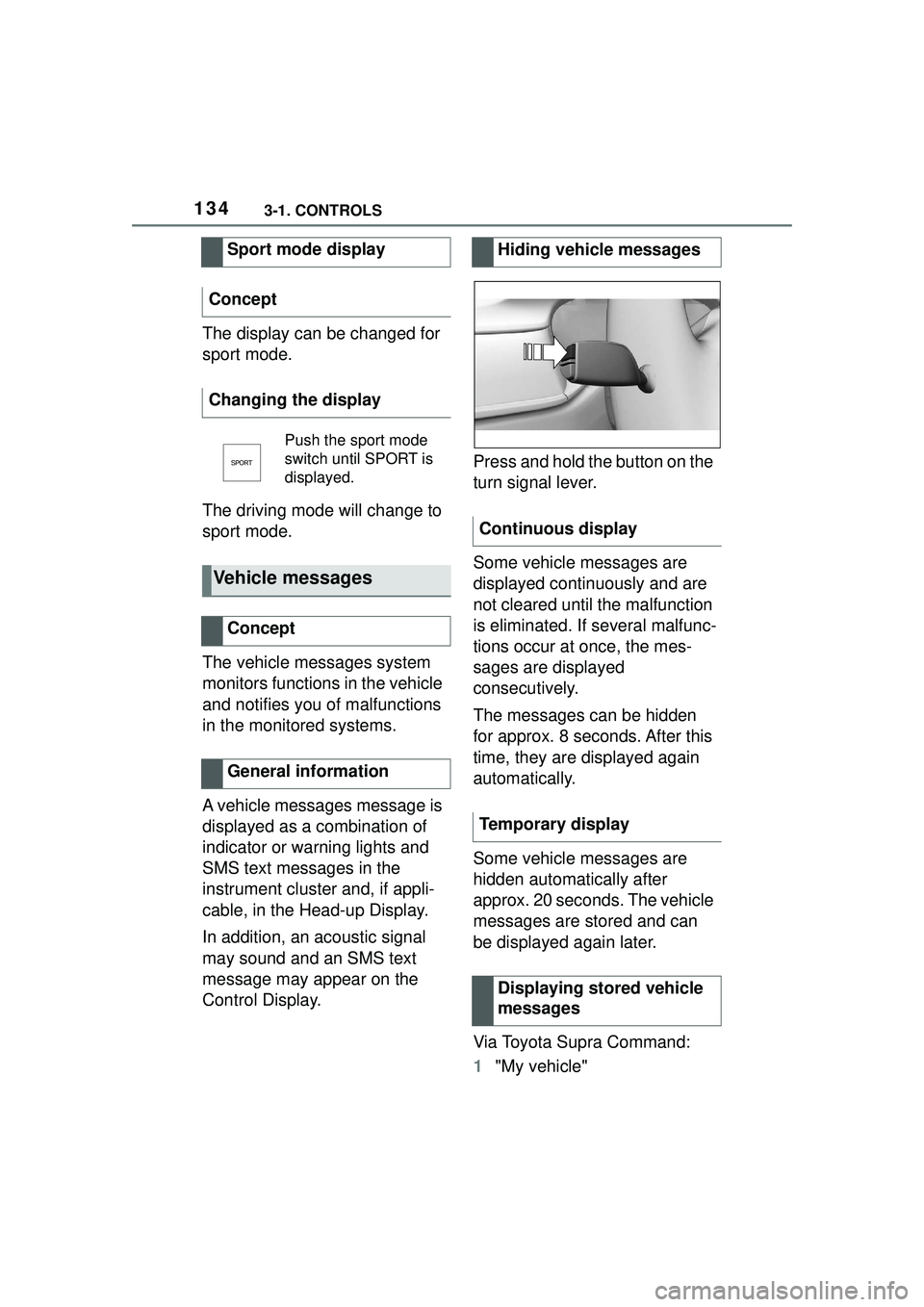
Control Display.Press and hold the button on the
turn signal lever.
Some vehicle messages are
displayed continuously and are
not cleared until the malfunction
is eliminated. If several malfunc-
tions occur at once, the mes-
sages are displayed
consecutively.
The messages can be hidden
for approx. 8 seconds. After this
time, they are displayed again
automatically.
Some vehicle messages are
hidden automatically after
approx. 20 seconds. The vehicle
messages are stored and can
be displayed again later.
Via Toyota Supra Command:
1
"My vehicle"
Sport mode display
Concept
Changing the display
Push the sport mode
switch until SPORT is
displayed.
Vehicle messages
Concept
General information
Hiding vehicle messages
Continuous display
Temporary display Displaying stored vehicle
messages