light TOYOTA GR YARIS 2021 Repair Manual
[x] Cancel search | Manufacturer: TOYOTA, Model Year: 2021, Model line: GR YARIS, Model: TOYOTA GR YARIS 2021Pages: 458, PDF Size: 105.69 MB
Page 159 of 458
157
4
YARIS(GR) Owner's Manual_Europe_M52L09_en
4-5. Using the driving support systems
Driving
WARNING
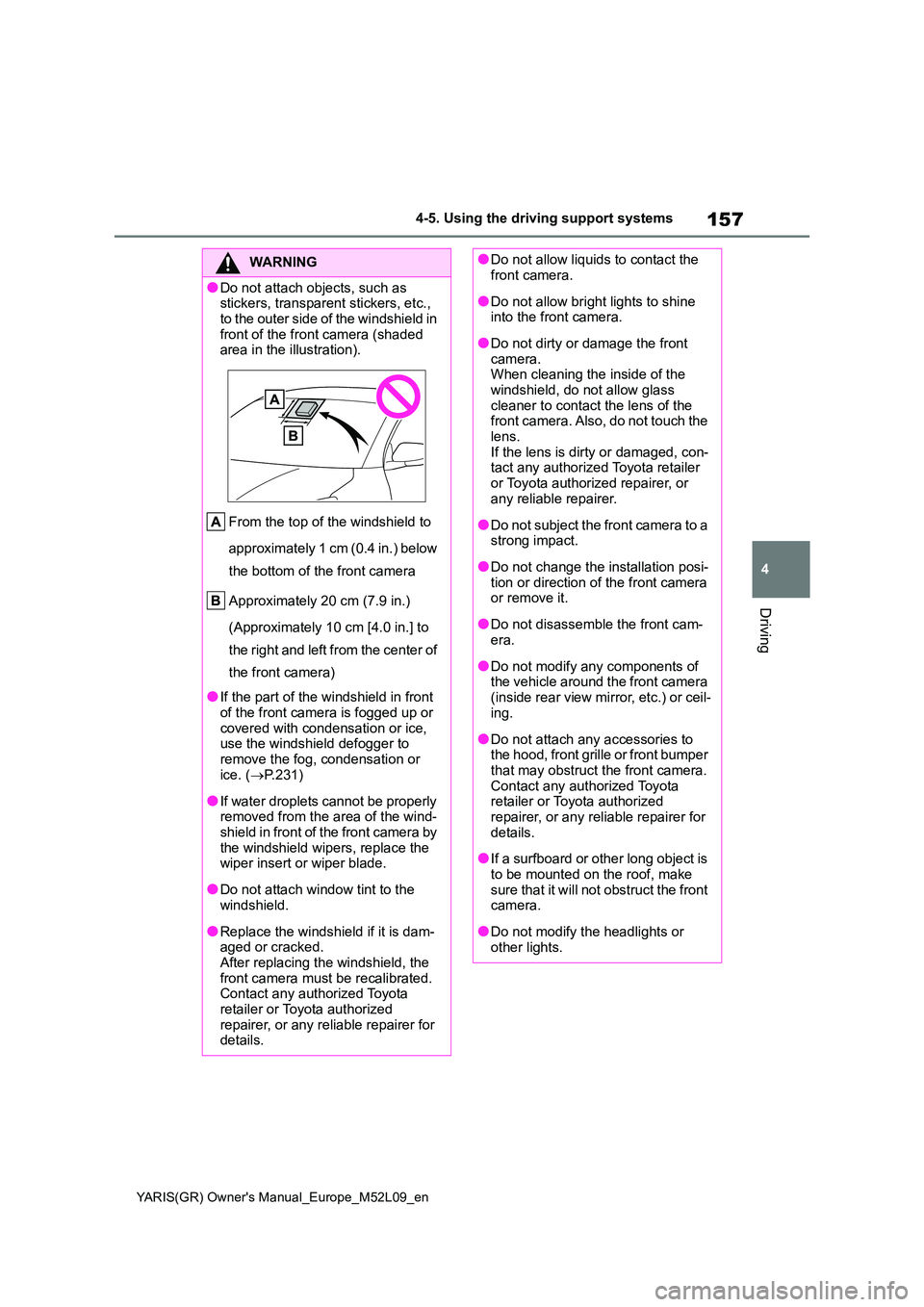
●Do not attach objects, such as stickers, transparent stickers, etc.,
to the outer side of the windshield in front of the front camera (shaded area in the illustration).
From the top of the windshield to
approximately 1 cm (0.4 in.) below
the bottom of the front camera
Approximately 20 cm (7.9 in.)
(Approximately 10 cm [4.0 in.] to
the right and left from the center of
the front camera)
●If the part of the windshield in front
of the front camera is fogged up or covered with condensation or ice, use the windshield defogger to
remove the fog, condensation or ice. ( →P.231)
●If water droplets cannot be properly removed from the area of the wind-shield in front of the front camera by
the windshield wipers, replace the wiper insert or wiper blade.
●Do not attach window tint to the windshield.
●Replace the windshield if it is dam-aged or cracked.After replacing the windshield, the
front camera must be recalibrated. Contact any authorized Toyota retailer or Toyota authorized
repairer, or any reliable repairer for details.
●Do not allow liquids to contact the front camera.
●Do not allow bright lights to shine into the front camera.
●Do not dirty or damage the front camera.When cleaning the inside of the
windshield, do not allow glass cleaner to contact the lens of the front camera. Also, do not touch the
lens. If the lens is dirty or damaged, con-tact any authorized Toyota retailer
or Toyota authorized repairer, or any reliable repairer.
●Do not subject the front camera to a strong impact.
●Do not change the installation posi-tion or direction of the front camera or remove it.
●Do not disassemble the front cam-era.
●Do not modify any components of the vehicle around the front camera
(inside rear view mirror, etc.) or ceil- ing.
●Do not attach any accessories to the hood, front grille or front bumper that may obstruct the front camera.
Contact any authorized Toyota retailer or Toyota authorized repairer, or any reliable repairer for
details.
●If a surfboard or other long object is
to be mounted on the roof, make sure that it will not obstruct the front camera.
●Do not modify the headlights or other lights.
Page 160 of 458
158
YARIS(GR) Owner's Manual_Europe_M52L09_en
4-5. Using the driving support systems
■Certifications for the Toyota Safety Sense
→P. 4 1 1
■If a warning message is displayed on the multi-information display
A system may be temporarily unavailable or there may be a malfunction in the sys-
tem.
●In the following situations, perform the actions specified in the table. When the nor-
mal operating conditions are detected, the message will disappear and the system
will become operational.
If the message does not disappear, contact any authorized Toyota retailer or Toyota
authorized repairer, or any reliable repairer.
●In the following situations, if the situation has changed (or the vehicle has been
SituationActions
When the area around a camera is cov-
ered with dirt, moisture (fogged up, cov-
ered with condensation, ice, etc.), or
other foreign matterUsing the wiper and A/C function,
remove the dirt and other attached mat-
ter. (→P.231).
When the temperature around the front
camera is outside of the operational
range, such as when the vehicle is in the
sun or in an extremely cold environment
If the front camera is hot, such as after
the vehicle had been parked in the sun,
use the air conditioning system to
decrease the temperature around the
front camera.
If a sunshade was used when the vehicle
was parked, depending on its type, the
sunlight reflected from the surface of the
sunshade may cause the temperature of
the front camera to become excessively
high.
If the front camera is cold, such after the
vehicle is parked in an extremely cold
environment, use the air conditioning
system to increase the temperature
around the front camera.
The area in front of the front camera is
obstructed, such as when the hood is
open or a sticker is attached to the part of
the windshield in front of the front cam-
era.
Close the hood, remove the sticker, etc.,
to clear the obstruction.
When “Pre-Collision System Radar In
Self Calibration Unavailable See
Owner’s Manual” is displayed.Check whether there is attached materi-
als on the radar sensor and radar sensor
cover, and if there is, remove it.
Page 161 of 458
159
4
YARIS(GR) Owner's Manual_Europe_M52L09_en
4-5. Using the driving support systems
Driving
driven for some time) and the normal operating conditions are detected, the mes-
sage will disappear and the system will become operational.
If the message does not disappear, contact any authorized Toyota retailer or Toyota
authorized repairer, or any reliable repairer.
• When the temperature around the radar sensor is outside of the operational range,
such as when the vehicle is in the sun or in an extremely cold environment
• When the front camera cannot detect objects in front of the vehicle, such as when
driving in the dark, snow, or fog, or when bright lights are shining into the front
camera
• Depending on the conditions in the vicinity of the vehicle, the radar may judge the
surrounding environment can not be properly recognized. In that case, “Pre-Colli-
sion System Unavailable See Owner’s Manual” is displayed.
Page 166 of 458
164
YARIS(GR) Owner's Manual_Europe_M52L09_en
4-5. Using the driving support systems
■Enabling/disabling the pre-col-
lision system
The pre-collision system can be
enabled/disabled on ( →P.361)
of the multi-information display.
The system is automatically enabled
each time the engine switch is turned to
ON.
If the system is disabled, the PCS
warning light will turn on and a
message will be displayed on the
multi-information display.
WARNING
• In some situations, while the emer- gency steering assist is operating,
operation of the function may be canceled if the accelerator pedal is depressed strongly, the steering
wheel is operated sharply or the brake pedal is being depressed and the system determines that the
driver is taking evasive action.
• When the emergency steering
assist is operating, if the steering wheel is held firmly or is operated in the opposite direction to that which
the system is generating torque, the function may be canceled.
■When to disable the pre-colli-sion system
In the following situations, disable the
system, as it may not operate prop- erly, possibly leading to an accident resulting in death or serious injury:
●When the vehicle is being towed
●When your vehicle is towing another vehicle
●When transporting the vehicle via truck, boat, train or similar means of transportation
●When the vehicle is raised on a lift with the engine running and the
tires are allowed to rotate freely
●When inspecting the vehicle using
a drum tester such as a chassis dynamometer or speedometer tes-ter, or when using an on vehicle
wheel balancer
●When a strong impact is applied to
the front bumper or front grille, due to an accident or other reasons
●If the vehicle cannot be driven in a stable manner, such as when the vehicle has been in an accident or
is malfunctioning
●When the vehicle is driven in a sporty manner or off-road
●When the tires are not properly inflated
●When the tires are very worn
●When tires of a size other than
specified are installed
●When tire chains are installed
●When a compact spare tire or an emergency tire puncture repair kit is
used
●If equipment (snow plow, etc.) that
may obstruct the radar sensor or front camera is temporarily installed to the vehicle
Changing settings of the
pre-collision system
Page 168 of 458
166
YARIS(GR) Owner's Manual_Europe_M52L09_en
4-5. Using the driving support systems
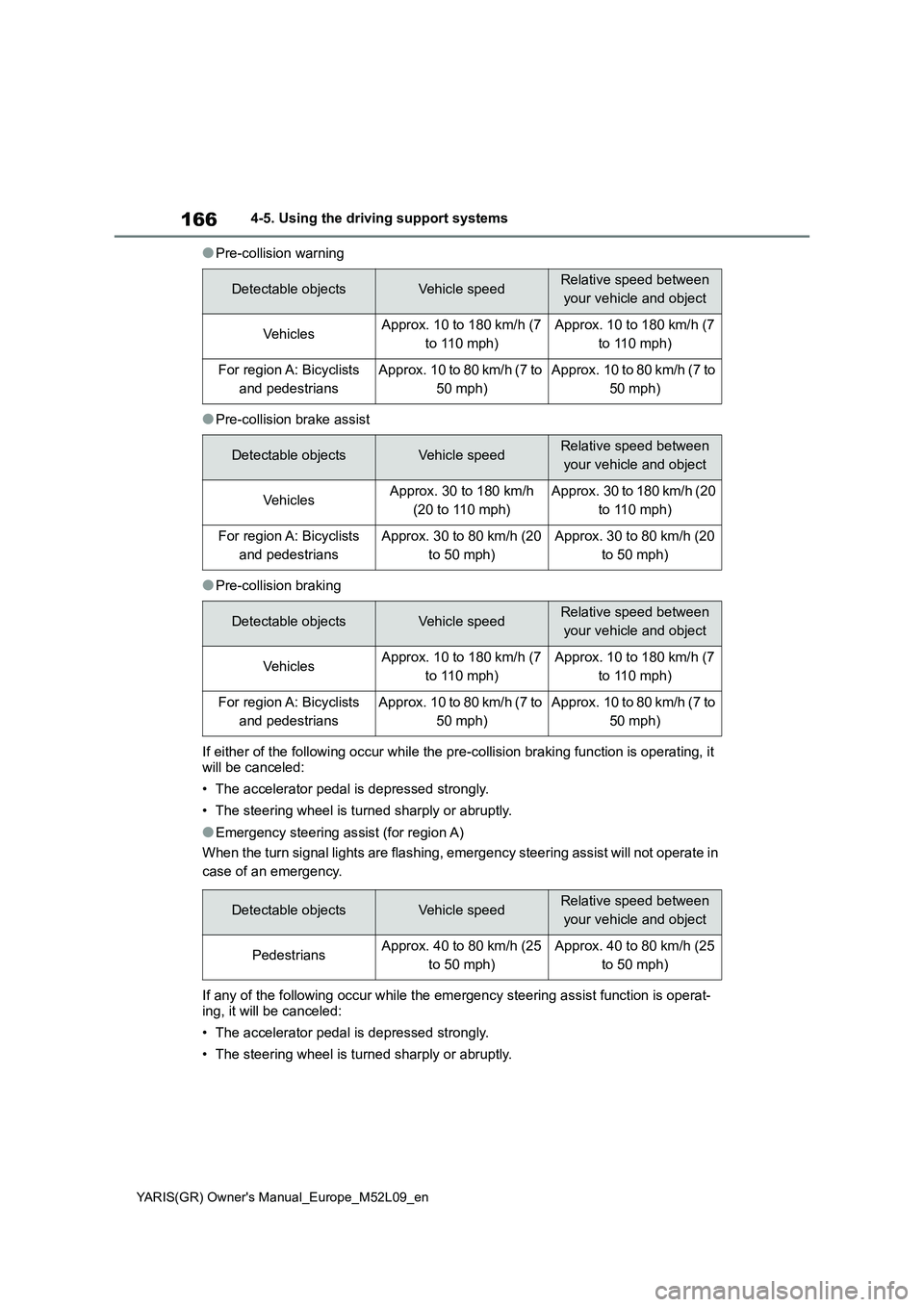
●Pre-collision warning
●Pre-collision brake assist
●Pre-collision braking
If either of the following occur while the pre-collision braking function is operating, it
will be canceled:
• The accelerator pedal is depressed strongly.
• The steering wheel is turned sharply or abruptly.
●Emergency steering assist (for region A)
When the turn signal lights are flashing, emergency steering assist will not operate in
case of an emergency.
If any of the following occur while the emergency steering assist function is operat-
ing, it will be canceled:
• The accelerator pedal is depressed strongly.
• The steering wheel is turned sharply or abruptly.
Detectable objectsVehicle speedRelative speed between
your vehicle and object
Ve hi cl e sApprox. 10 to 180 km/h (7
to 110 mph)Approx. 10 to 180 km/h (7
to 110 mph)
For region A: Bicyclists
and pedestriansApprox. 10 to 80 km/h (7 to
50 mph)Approx. 10 to 80 km/h (7 to
50 mph)
Detectable objectsVehicle speedRelative speed between
your vehicle and object
Ve hi cl e sApprox. 30 to 180 km/h
(20 to 110 mph)Approx. 30 to 180 km/h (20
to 110 mph)
For region A: Bicyclists
and pedestriansApprox. 30 to 80 km/h (20
to 50 mph)Approx. 30 to 80 km/h (20
to 50 mph)
Detectable objectsVehicle speedRelative speed between
your vehicle and object
Ve hi cl e sApprox. 10 to 180 km/h (7
to 110 mph)Approx. 10 to 180 km/h (7
to 110 mph)
For region A: Bicyclists
and pedestriansApprox. 10 to 80 km/h (7 to
50 mph)Approx. 10 to 80 km/h (7 to
50 mph)
Detectable objectsVehicle speedRelative speed between
your vehicle and object
PedestriansApprox. 40 to 80 km/h (25
to 50 mph)Approx. 40 to 80 km/h (25
to 50 mph)
Page 169 of 458
167
4
YARIS(GR) Owner's Manual_Europe_M52L09_en
4-5. Using the driving support systems
Driving
• The brake pedal is depressed.
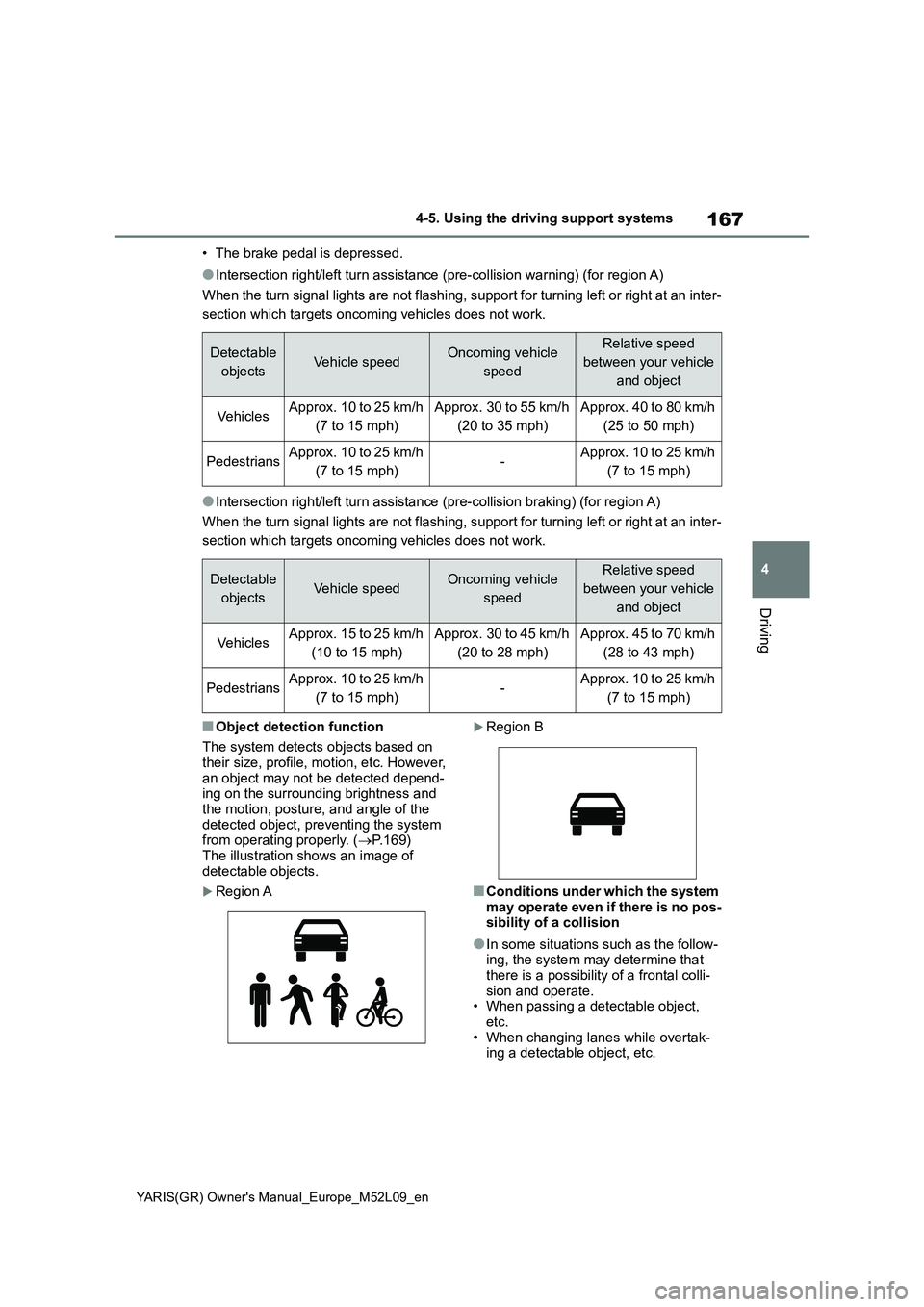
●Intersection right/left turn assistance (pre-collision warning) (for region A)
When the turn signal lights are not flashing, support for turning left or right at an inter-
section which targets oncoming vehicles does not work.
●Intersection right/left turn assistance (pre-collision braking) (for region A)
When the turn signal lights are not flashing, support for turning left or right at an inter-
section which targets oncoming vehicles does not work.
■Object detection function
The system detects objects based on
their size, profile, motion, etc. However,
an object may not be detected depend-
ing on the surrounding brightness and
the motion, posture, and angle of the
detected object, preventing the system
from operating properly. (→P.169)
The illustration shows an image of
detectable objects.
Region A
Region B
■Conditions under which the system
may operate even if there is no pos-
sibility of a collision
●In some situations such as the follow-
ing, the system may determine that
there is a possibility of a frontal colli-
sion and operate.
• When passing a detectable object,
etc.
• When changing lanes while overtak-
ing a detectable object, etc.
Detectable
objectsVehicle speedOncoming vehicle
speedRelative speed
between your vehicle
and object
Ve hi cl e sApprox. 10 to 25 km/h
(7 to 15 mph)Approx. 30 to 55 km/h
(20 to 35 mph)Approx. 40 to 80 km/h
(25 to 50 mph)
PedestriansApprox. 10 to 25 km/h
(7 to 15 mph)-Approx. 10 to 25 km/h
(7 to 15 mph)
Detectable
objectsVehicle speedOncoming vehicle
speedRelative speed
between your vehicle
and object
Ve hi cl e sApprox. 15 to 25 km/h
(10 to 15 mph)Approx. 30 to 45 km/h
(20 to 28 mph)Approx. 45 to 70 km/h
(28 to 43 mph)
PedestriansApprox. 10 to 25 km/h
(7 to 15 mph)-Approx. 10 to 25 km/h
(7 to 15 mph)
Page 171 of 458
169
4
YARIS(GR) Owner's Manual_Europe_M52L09_en
4-5. Using the driving support systems
Driving
reflects radio waves, such as a large
truck or guardrail
• When driving near a TV tower, broad-
casting station, electric power plant,
radar equipped vehicles, etc., or other
location where strong radio waves or
electrical noise may be present
• When there are many things which
can reflect the radio waves of the
radar in the vicinity (tunnels, truss
bridges, gravel roads, snow covered
road that have tracks, etc.)
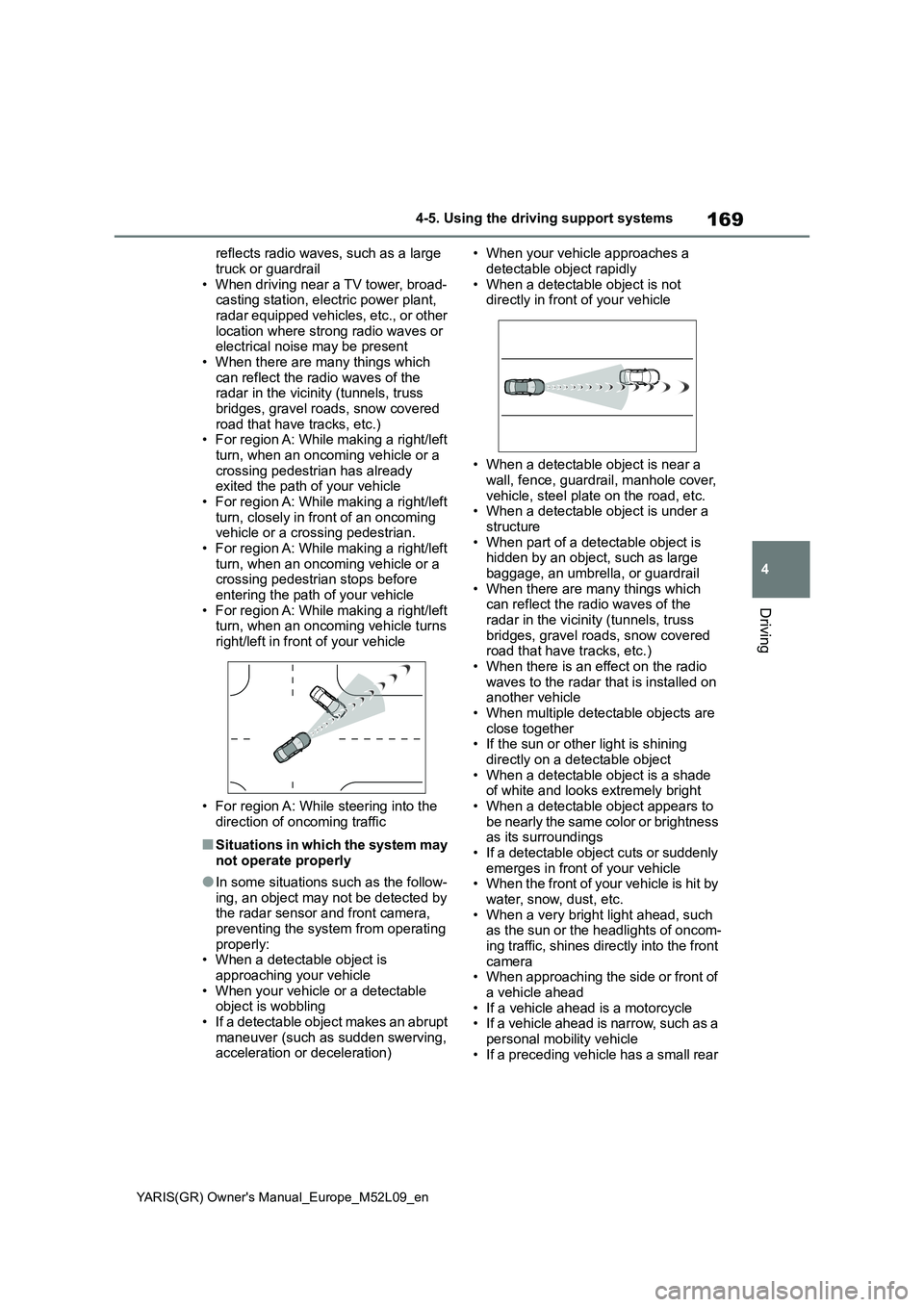
• For region A: While making a right/left
turn, when an oncoming vehicle or a
crossing pedestrian has already
exited the path of your vehicle
• For region A: While making a right/left
turn, closely in front of an oncoming
vehicle or a crossing pedestrian.
• For region A: While making a right/left
turn, when an oncoming vehicle or a
crossing pedestrian stops before
entering the path of your vehicle
• For region A: While making a right/left
turn, when an oncoming vehicle turns
right/left in front of your vehicle
• For region A: While steering into the
direction of oncoming traffic
■Situations in which the system may
not operate properly
●In some situations such as the follow-
ing, an object may not be detected by
the radar sensor and front camera,
preventing the system from operating
properly:
• When a detectable object is
approaching your vehicle
• When your vehicle or a detectable
object is wobbling
• If a detectable object makes an abrupt
maneuver (such as sudden swerving,
acceleration or deceleration)• When your vehicle approaches a
detectable object rapidly
• When a detectable object is not
directly in front of your vehicle
• When a detectable object is near a
wall, fence, guardrail, manhole cover,
vehicle, steel plate on the road, etc.
• When a detectable object is under a
structure
• When part of a detectable object is
hidden by an object, such as large
baggage, an umbrella, or guardrail
• When there are many things which
can reflect the radio waves of the
radar in the vicinity (tunnels, truss
bridges, gravel roads, snow covered
road that have tracks, etc.)
• When there is an effect on the radio
waves to the radar that is installed on
another vehicle
• When multiple detectable objects are
close together
• If the sun or other light is shining
directly on a detectable object
• When a detectable object is a shade
of white and looks extremely bright
• When a detectable object appears to
be nearly the same color or brightness
as its surroundings
• If a detectable object cuts or suddenly
emerges in front of your vehicle
• When the front of your vehicle is hit by
water, snow, dust, etc.
• When a very bright light ahead, such
as the sun or the headlights of oncom-
ing traffic, shines directly into the front
camera
• When approaching the side or front of
a vehicle ahead
• If a vehicle ahead is a motorcycle
• If a vehicle ahead is narrow, such as a
personal mobility vehicle
• If a preceding vehicle has a small rear
Page 173 of 458
171
4
YARIS(GR) Owner's Manual_Europe_M52L09_en
4-5. Using the driving support systems
Driving
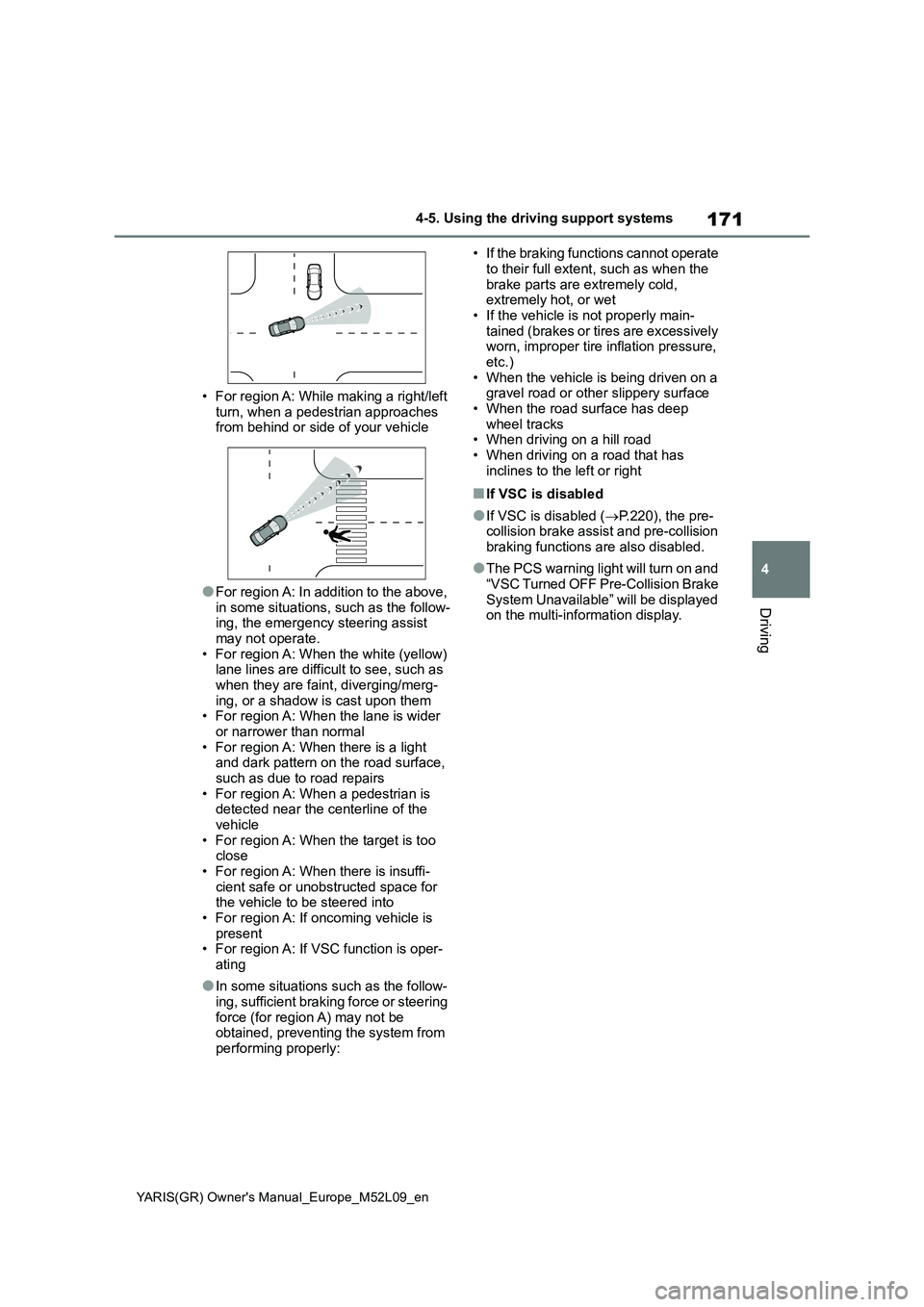
• For region A: While making a right/left
turn, when a pedestrian approaches
from behind or side of your vehicle
●For region A: In addition to the above,
in some situations, such as the follow-
ing, the emergency steering assist
may not operate.
• For region A: When the white (yellow)
lane lines are difficult to see, such as
when they are faint, diverging/merg-
ing, or a shadow is cast upon them
• For region A: When the lane is wider
or narrower than normal
• For region A: When there is a light
and dark pattern on the road surface,
such as due to road repairs
• For region A: When a pedestrian is
detected near the centerline of the
vehicle
• For region A: When the target is too
close
• For region A: When there is insuffi-
cient safe or unobstructed space for
the vehicle to be steered into
• For region A: If oncoming vehicle is
present
• For region A: If VSC function is oper-
ating
●In some situations such as the follow-
ing, sufficient braking force or steering
force (for region A) may not be
obtained, preventing the system from
performing properly:• If the braking functions cannot operate
to their full extent, such as when the
brake parts are extremely cold,
extremely hot, or wet
• If the vehicle is not properly main-
tained (brakes or tires are excessively
worn, improper tire inflation pressure,
etc.)
• When the vehicle is being driven on a
gravel road or other slippery surface
• When the road surface has deep
wheel tracks
• When driving on a hill road
• When driving on a road that has
inclines to the left or right
■If VSC is disabled
●If VSC is disabled (→P.220), the pre-
collision brake assist and pre-collision
braking functions are also disabled.
●The PCS warning light will turn on and
“VSC Turned OFF Pre-Collision Brake
System Unavailable” will be displayed
on the multi-information display.
Page 174 of 458
172
YARIS(GR) Owner's Manual_Europe_M52L09_en
4-5. Using the driving support systems
*: If equipped
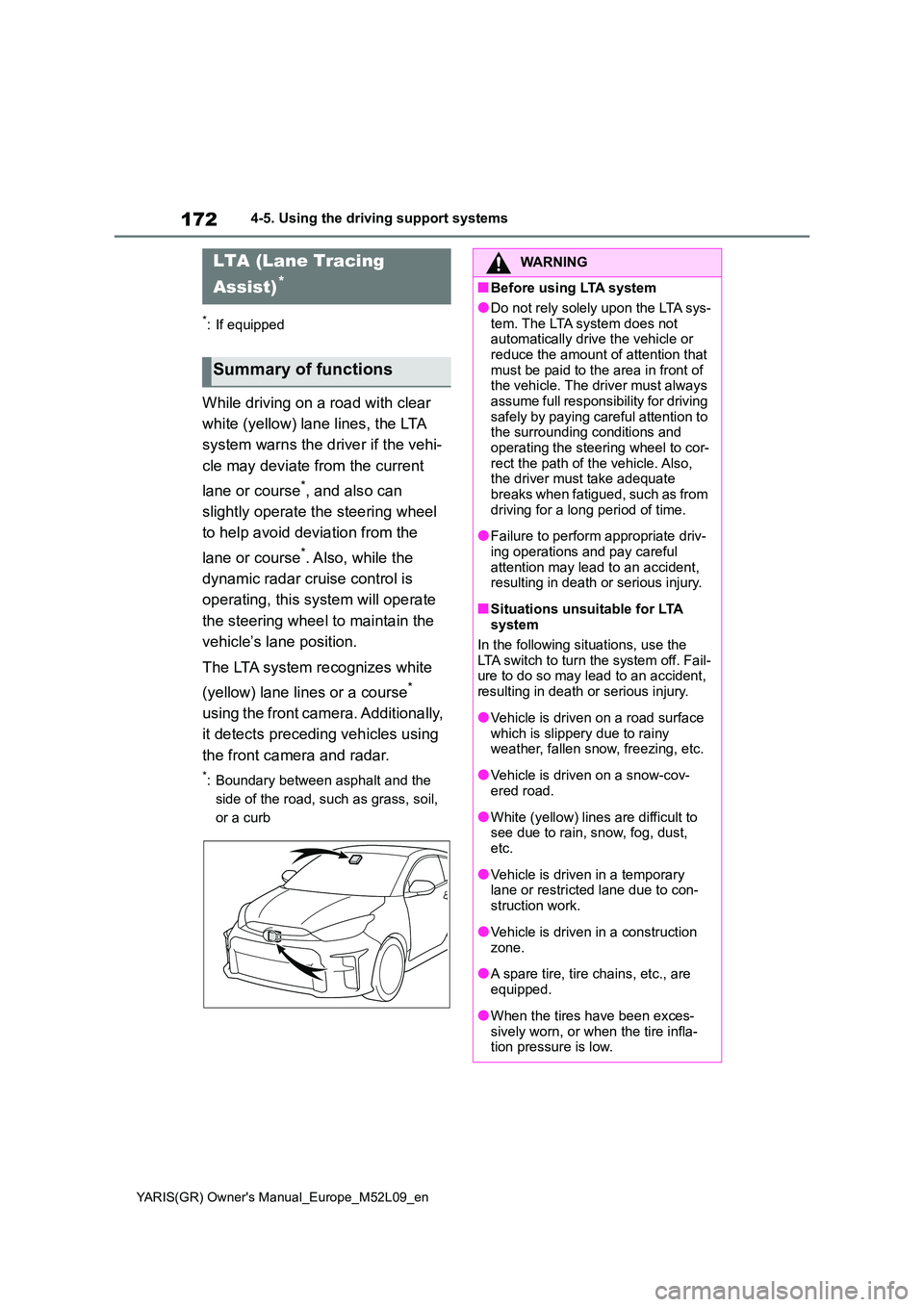
While driving on a road with clear
white (yellow) lane lines, the LTA
system warns the driver if the vehi-
cle may deviate from the current
lane or course*, and also can
slightly operate the steering wheel
to help avoid deviation from the
lane or course*. Also, while the
dynamic radar cruise control is
operating, this system will operate
the steering wheel to maintain the
vehicle’s lane position.
The LTA system recognizes white
(yellow) lane lines or a course*
using the front camera. Additionally,
it detects preceding vehicles using
the front camera and radar.
*: Boundary between asphalt and the
side of the road, such as grass, soil,
or a curb
LTA (Lane Tracing
Assist)*
Summary of functions
WARNING
■Before using LTA system
●Do not rely solely upon the LTA sys-
tem. The LTA system does not automatically drive the vehicle or reduce the amount of attention that
must be paid to the area in front of the vehicle. The driver must always assume full responsibility for driving
safely by paying careful attention to the surrounding conditions and operating the steering wheel to cor-
rect the path of the vehicle. Also, the driver must take adequate breaks when fatigued, such as from
driving for a long period of time.
●Failure to perform appropriate driv-
ing operations and pay careful attention may lead to an accident, resulting in death or serious injury.
■Situations unsuitable for LTA system
In the following situations, use the LTA switch to turn the system off. Fail-ure to do so may lead to an accident,
resulting in death or serious injury.
●Vehicle is driven on a road surface
which is slippery due to rainy weather, fallen snow, freezing, etc.
●Vehicle is driven on a snow-cov-ered road.
●White (yellow) lines are difficult to see due to rain, snow, fog, dust, etc.
●Vehicle is driven in a temporary lane or restricted lane due to con-
struction work.
●Vehicle is driven in a construction
zone.
●A spare tire, tire chains, etc., are
equipped.
●When the tires have been exces-
sively worn, or when the tire infla- tion pressure is low.
Page 175 of 458
173
4
YARIS(GR) Owner's Manual_Europe_M52L09_en
4-5. Using the driving support systems
Driving
WARNING
●When your vehicle is towing a trailer or during emergency towing
■Preventing LTA system malfunc-tions and operations performed
by mistake
●Do not modify the headlights or place stickers, etc., on the surface
of the lights.
●Do not modify the suspension, etc.
If the suspension, etc., needs to be replaced, contact any authorized Toyota retailer or Toyota authorized
repairer, or any reliable repairer.
●Do not install or place anything on
the hood or grille. Also, do not install a grille guard (bull bars, kan-garoo bar, etc.).
●If your windshield needs repairs, contact any authorized Toyota
retailer or Toyota authorized repairer, or any reliable repairer.
■Conditions in which functions may not operate properly
In the following situations, the func-
tions may not operate properly and the vehicle may depart from its lane. Drive safely by always paying careful
attention to your surroundings and operate the steering wheel to correct the path of the vehicle without relying
solely on the functions.
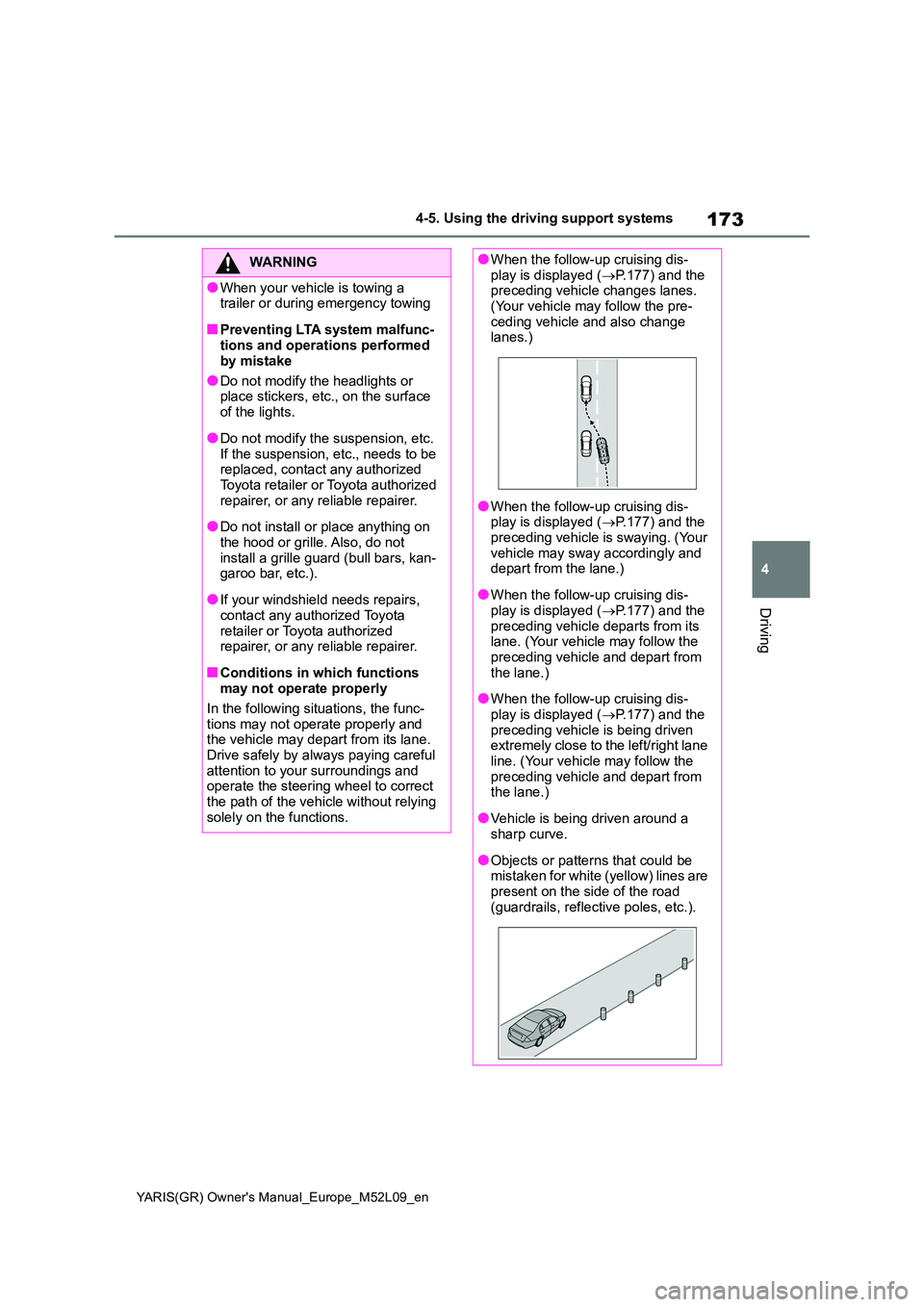
●When the follow-up cruising dis- play is displayed ( →P.177) and the preceding vehicle changes lanes.
(Your vehicle may follow the pre- ceding vehicle and also change lanes.)
●When the follow-up cruising dis-play is displayed ( →P.177) and the
preceding vehicle is swaying. (Your vehicle may sway accordingly and depart from the lane.)
●When the follow-up cruising dis-play is displayed ( →P.177) and the
preceding vehicle departs from its lane. (Your vehicle may follow the preceding vehicle and depart from
the lane.)
●When the follow-up cruising dis-
play is displayed ( →P.177) and the preceding vehicle is being driven extremely close to the left/right lane
line. (Your vehicle may follow the preceding vehicle and depart from the lane.)
●Vehicle is being driven around a sharp curve.
●Objects or patterns that could be mistaken for white (yellow) lines are
present on the side of the road (guardrails, reflective poles, etc.).