alarm TOYOTA GR86 2022 Owners Manual (in English)
[x] Cancel search | Manufacturer: TOYOTA, Model Year: 2022, Model line: GR86, Model: TOYOTA GR86 2022Pages: 582, PDF Size: 86.38 MB
Page 4 of 582
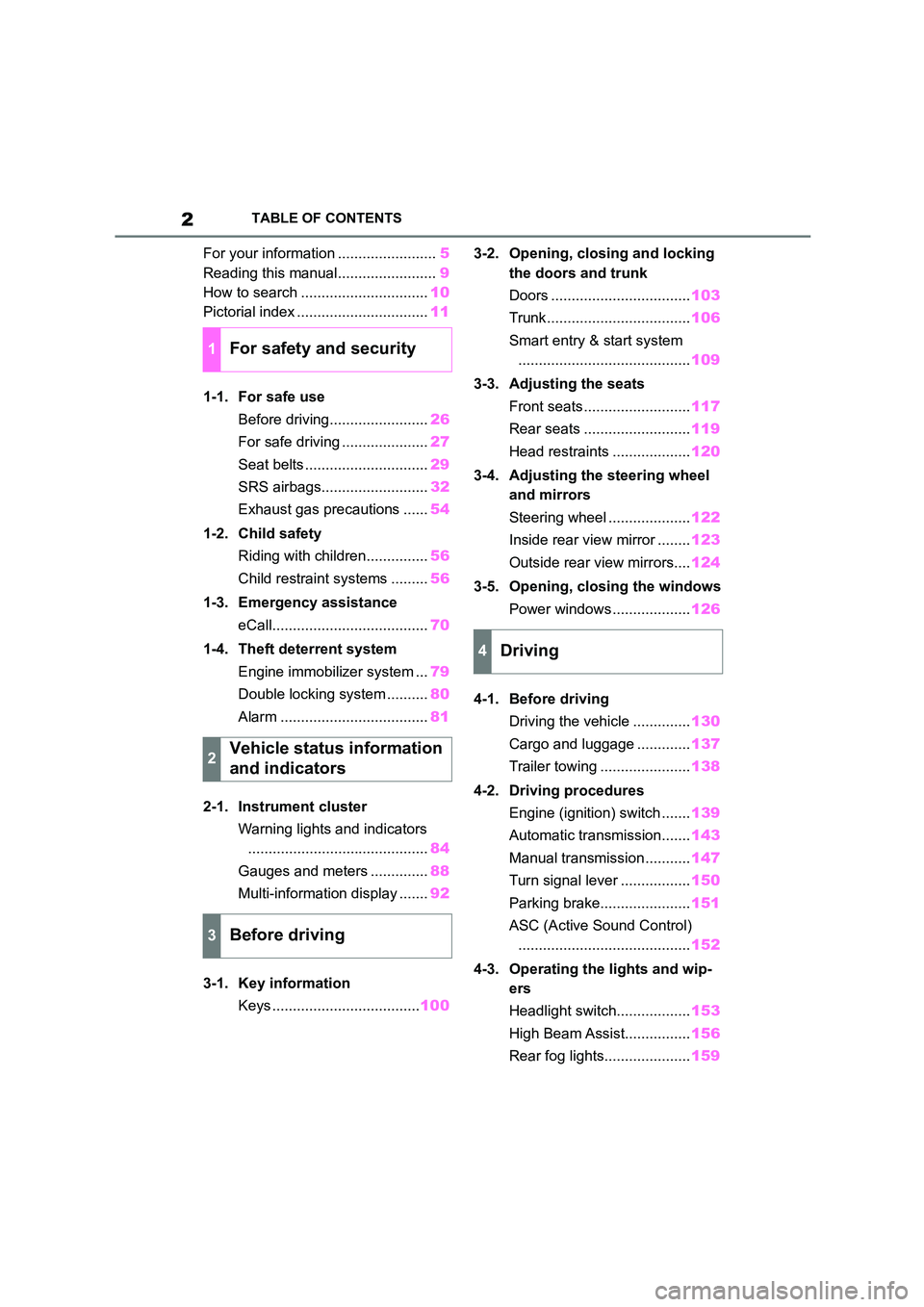
2TABLE OF CONTENTS
For your information ........................5
Reading this manual........................ 9
How to search ............................... 10
Pictorial index ................................ 11
1-1. For safe use
Before driving........................ 26
For safe driving ..................... 27
Seat belts .............................. 29
SRS airbags.......................... 32
Exhaust gas precautions ...... 54
1-2. Child safety
Riding with children............... 56
Child restraint systems ......... 56
1-3. Emergency assistance
eCall...................................... 70
1-4. Theft deterrent system
Engine immobilizer system ... 79
Double locking system .......... 80
Alarm .................................... 81
2-1. Instrument cluster
Warning lights and indicators
............................................ 84
Gauges and meters .............. 88
Multi-information display ....... 92
3-1. Key information
Keys .................................... 100
3-2. Opening, closing and locking
the doors and trunk
Doors .................................. 103
Trunk................................... 106
Smart entry & start system
.......................................... 109
3-3. Adjusting the seats
Front seats .......................... 117
Rear seats .......................... 119
Head restraints ................... 120
3-4. Adjusting the steering wheel
and mirrors
Steering wheel .................... 122
Inside rear view mirror ........ 123
Outside rear view mirrors.... 124
3-5. Opening, closing the windows
Power windows ................... 126
4-1. Before driving
Driving the vehicle .............. 130
Cargo and luggage ............. 137
Trailer towing ...................... 138
4-2. Driving procedures
Engine (ignition) switch ....... 139
Automatic transmission....... 143
Manual transmission ........... 147
Turn signal lever ................. 150
Parking brake...................... 151
ASC (Active Sound Control)
.......................................... 152
4-3. Operating the lights and wip-
ers
Headlight switch.................. 153
High Beam Assist................ 156
Rear fog lights..................... 159
1For safety and security
2Vehicle status information
and indicators
3Before driving
4Driving
Page 27 of 582
1
25
For safety and security
1
For safety and security
.1-1. For safe use
Before driving ..................... 26
For safe driving ................... 27
Seat belts............................ 29
SRS airbags ....................... 32
Exhaust gas precautions .... 54
1-2. Child safety
Riding with children ............ 56
Child restraint systems ....... 56
1-3. Emergency assistance
eCall ................................... 70
1-4. Theft deterrent system
Engine immobilizer system
......................................... 79
Double locking system ........ 80
Alarm .................................. 81
Page 83 of 582
81
1
1-4. Theft deterrent system
For safety and security
*: If equipped
■Items to check before locking
the vehicle
To prevent unexpected triggering of
the alarm and vehicle theft, make
sure of the following:
Nobody is in the vehicle.
The windows are closed before
the alarm is set.
No valuables or other personal
items are left in the vehicle.
■Setting
Close the doors and trunk, and lock
both side doors using the entry
function or wireless remote control.
The system will se t automatically
after 30 seconds.
The indicator light changes from being
on to flashing when the system is set.
■Canceling or stopping
Do one of the following to deacti-
vate or stop the alarms:
Unlock the doors or open the
trunk using the entry function or
wireless remote control.
Turn the engine switch to ACC or
ON, or start the engine.
1 Check that both side doors and
the trunk are closed.
2 Turn the engine switch to ON.
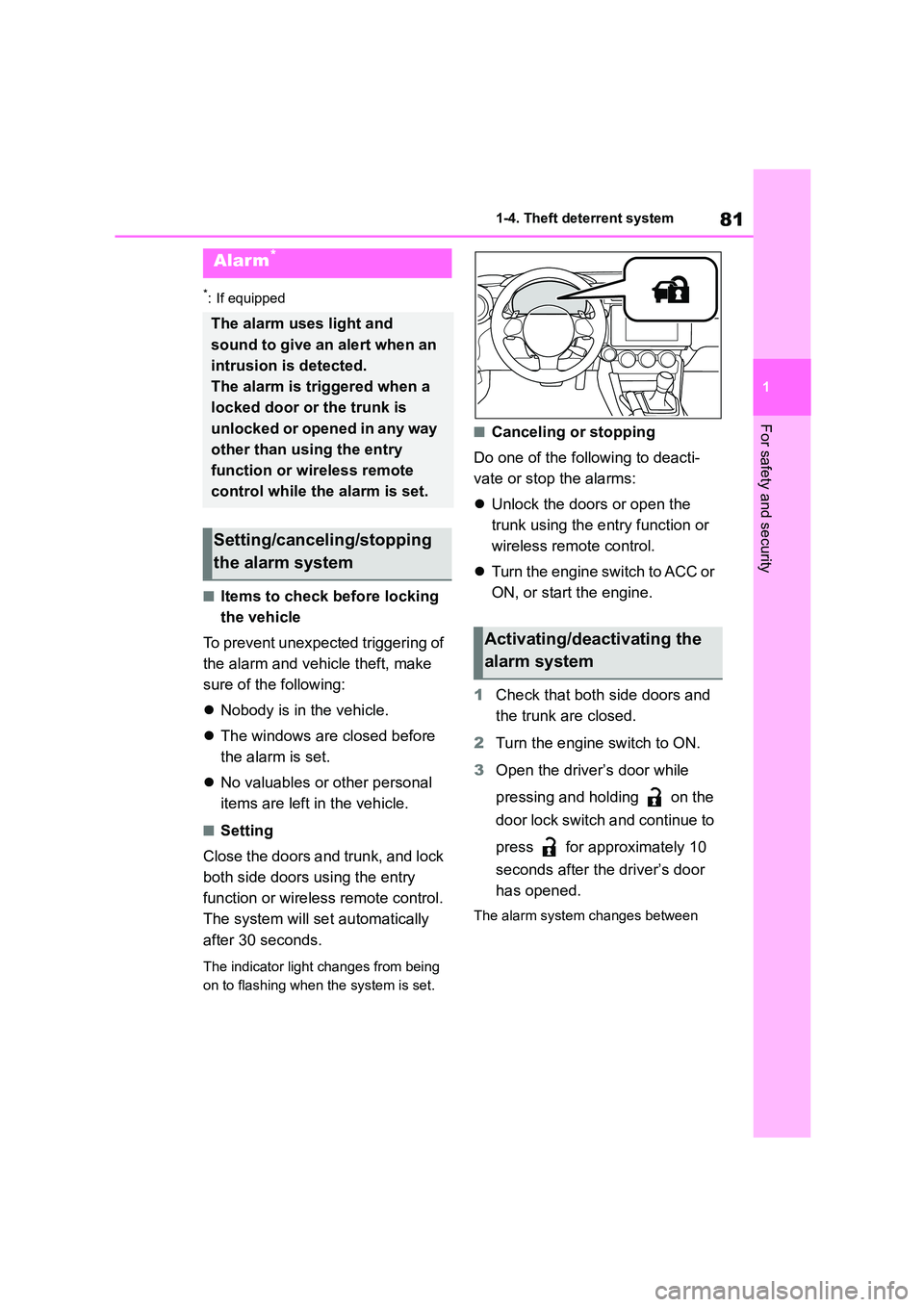
3 Open the driver’s door while
pressing and holding on the
door lock switch and continue to
press for approximately 10
seconds after the driver’s door
has opened.
The alarm system changes between
Alarm*
The alarm uses light and
sound to give an alert when an
intrusion is detected.
The alarm is triggered when a
locked door or the trunk is
unlocked or opened in any way
other than using the entry
function or wireless remote
control while the alarm is set.
Setting/canceling/stopping
the alarm system
Activating/deactivating the
alarm system
Page 84 of 582
821-4. Theft deterrent system
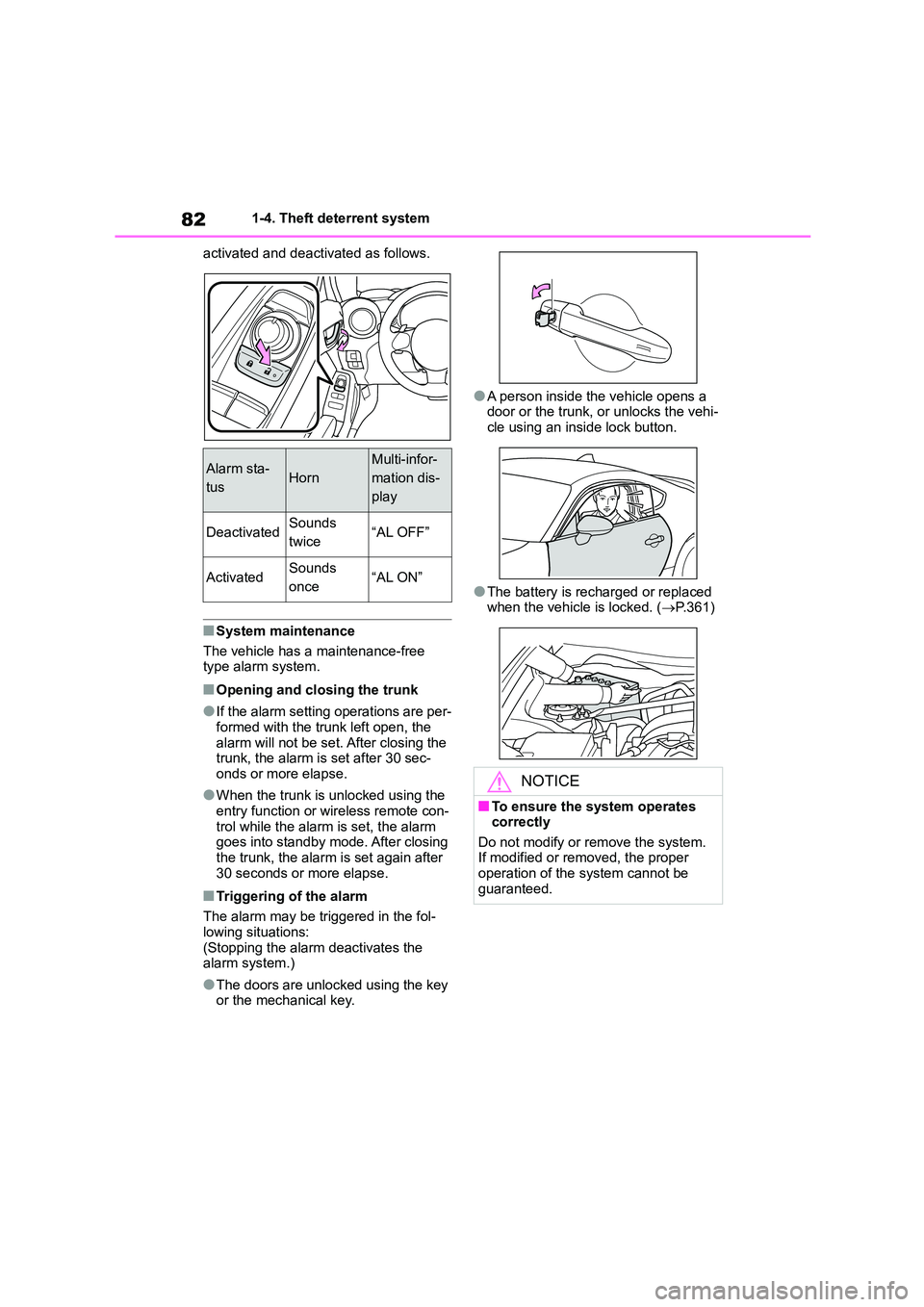
activated and deactivated as follows.
■System maintenance
The vehicle has a maintenance-free
type alarm system.
■Opening and closing the trunk
●If the alarm setting operations are per-
formed with the trunk left open, the
alarm will not be set. After closing the trunk, the alarm is set after 30 sec-
onds or more elapse.
●When the trunk is unlocked using the
entry function or wireless remote con-
trol while the alarm is set, the alarm goes into standby mode. After closing
the trunk, the alarm is set again after
30 seconds or more elapse.
■Triggering of the alarm
The alarm may be triggered in the fol- lowing situations:
(Stopping the alarm deactivates the
alarm system.)
●The doors are unlocked using the key
or the mechanical key.
●A person inside the vehicle opens a
door or the trunk, or unlocks the vehi- cle using an inside lock button.
●The battery is recharged or replaced when the vehicle is locked. ( P.361)
Alarm sta-
tusHorn
Multi-infor-
mation dis-
play
DeactivatedSounds
twice“AL OFF”
ActivatedSounds
once“AL ON”
NOTICE
■To ensure the system operates
correctly
Do not modify or remove the system. If modified or removed, the proper
operation of the system cannot be
guaranteed.
Page 100 of 582
982-1. Instrument cluster
Select to display the operational
status of the Adaptive Cruise Con-
trol system ( P.185, 201)
The settings of the following sys-
tems can be changed.
LDW (Lane Departure Warning)
(if equipped)
PCB (Pre-Collision Braking) (if
equipped)
BSD/RCTA (if equipped)
RAB (Reverse Automatic Brak-
ing system) (if equipped)
(Sonar Audible Alarm) (if
equipped)
SRH (Steering Responsive
Headlight) (if quipped)
■Meter display settings that can
be changed
Units (if equipped)
Select to change the units of measure
displayed.
Startup Scrn
Select to enable/disable the startup
screen when the engine switch is
turned to ON.
GSI (if equipped)
Select to enable/disable the shift posi-
tion indicator and shift-up indicator.
REV. (REV indicator)
• Select to enable/disable the rev indi-
cator.
• Select to enable/disable the sounding
of a buzzer when the REV indicator is
illuminated.
• Select to set the engine speed at
which the rev indicator (orange) will
begin to be displayed.
■Vehicle functions and settings
that can be changed
P.377
■Suspension of the settings display
●Some settings cannot be changed while driving. When changing set-
tings, park the vehicle in a safe place.
●If a warning message is displayed,
operation of the settings display will
be suspended.
Driving support system
information display (if
equipped)
Driving support system set-
ting display
Settings display
WA R N I N G
■Cautions during setting up the display
As the engine needs to be running
during setting up the display, ensure that the vehicle is parked in a place
with adequate ventilation. In a closed
area such as a garage, exhaust gases including harmful carbon mon-
oxide (CO) may colle ct and enter the
vehicle. This may lead to death or a serious health hazard.
NOTICE
■While setting up the display
To prevent battery discharge, ensure that the engine is running while set-
ting up the display features.
Page 102 of 582
1003-1. Key information
3-1.Key information
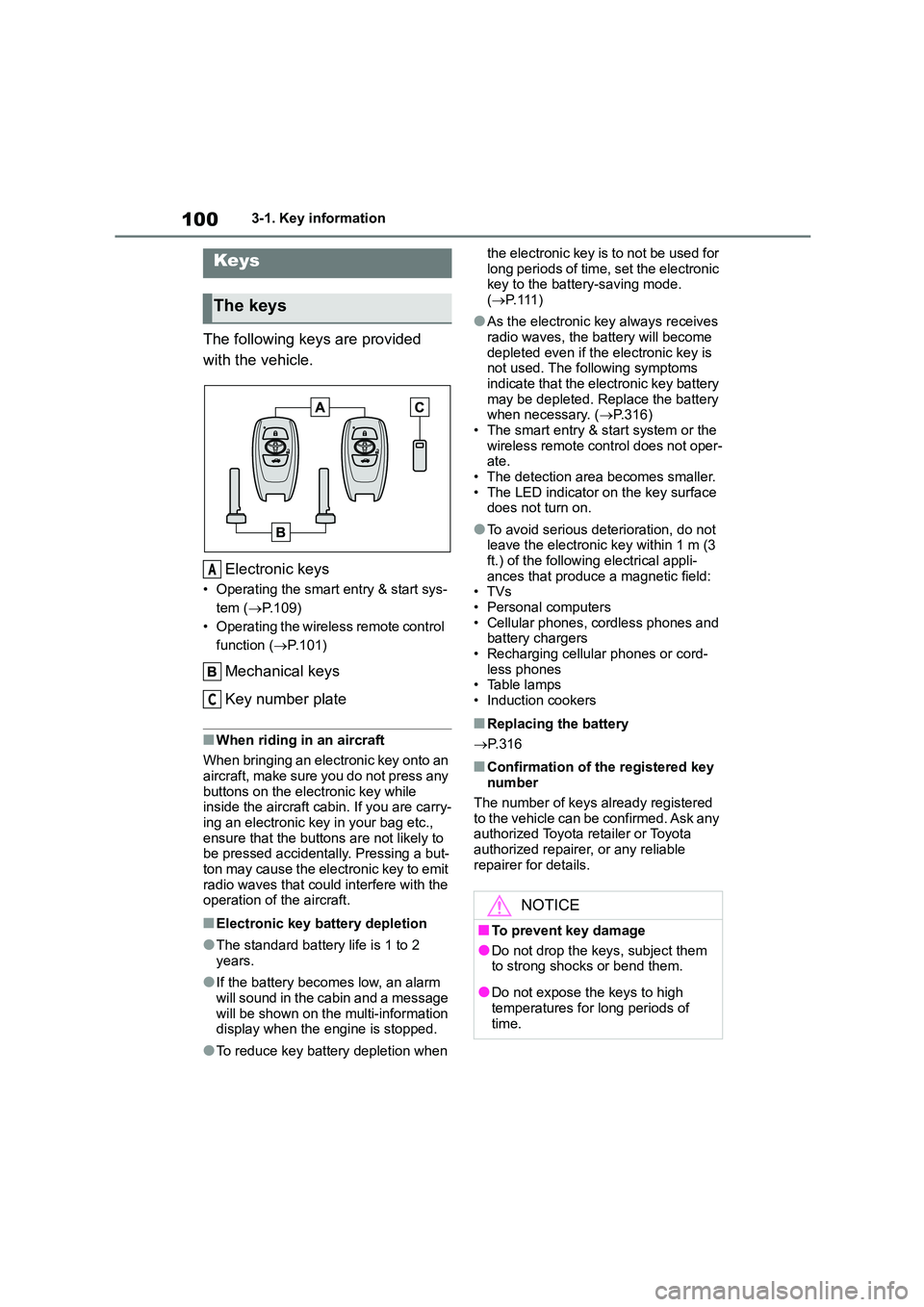
The following keys are provided
with the vehicle.
Electronic keys
• Operating the smart entry & start sys-
tem ( P.109)
• Operating the wireless remote control
function ( P.101)
Mechanical keys
Key number plate
■When riding in an aircraft
When bringing an electronic key onto an
aircraft, make sure you do not press any
buttons on the electronic key while inside the aircraft cabin. If you are carry-
ing an electronic key in your bag etc.,
ensure that the buttons are not likely to be pressed accidentally. Pressing a but-
ton may cause the electronic key to emit
radio waves that could interfere with the operation of the aircraft.
■Electronic key battery depletion
●The standard battery life is 1 to 2 years.
●If the battery becomes low, an alarm
will sound in the cabin and a message will be shown on the multi-information
display when the engine is stopped.
●To reduce key battery depletion when
the electronic key is to not be used for
long periods of time, set the electronic key to the battery-saving mode.
( P. 111 )
●As the electronic key always receives
radio waves, the battery will become
depleted even if the electronic key is not used. The following symptoms
indicate that the electronic key battery
may be depleted. Replace the battery when necessary. ( P.316)
• The smart entry & start system or the
wireless remote control does not oper- ate.
• The detection area becomes smaller.
• The LED indicator on the key surface does not turn on.
●To avoid serious deterioration, do not leave the electronic key within 1 m (3
ft.) of the following electrical appli-
ances that produce a magnetic field: •TVs
• Personal computers
• Cellular phones, cordless phones and battery chargers
• Recharging cellular phones or cord-
less phones • Table lamps
• Induction cookers
■Replacing the battery
P. 3 1 6
■Confirmation of the registered key number
The number of keys already registered
to the vehicle can be confirmed. Ask any authorized Toyota retailer or Toyota
authorized repairer, or any reliable
repairer for details.
Keys
The keys
A
C
NOTICE
■To prevent key damage
●Do not drop the keys, subject them
to strong shocks or bend them.
●Do not expose the keys to high
temperatures for long periods of
time.
Page 106 of 582
1043-2. Opening, closing and locking the doors and trunk
■Operation signals
The emergency flashers flash to indicate that the doors have been
locked/unlocked. (Locked: once;
Unlocked: twice)
■Security feature ( vehicles without a double locking system)
If a door is not opened within approxi-
mately 30 seconds after the vehicle is unlocked using the entry function or
wireless remote contro l, the security fea-
ture automatically locks the vehicle again.
■When the door cannot be locked by
the lock sensor on the surface of
the door handle
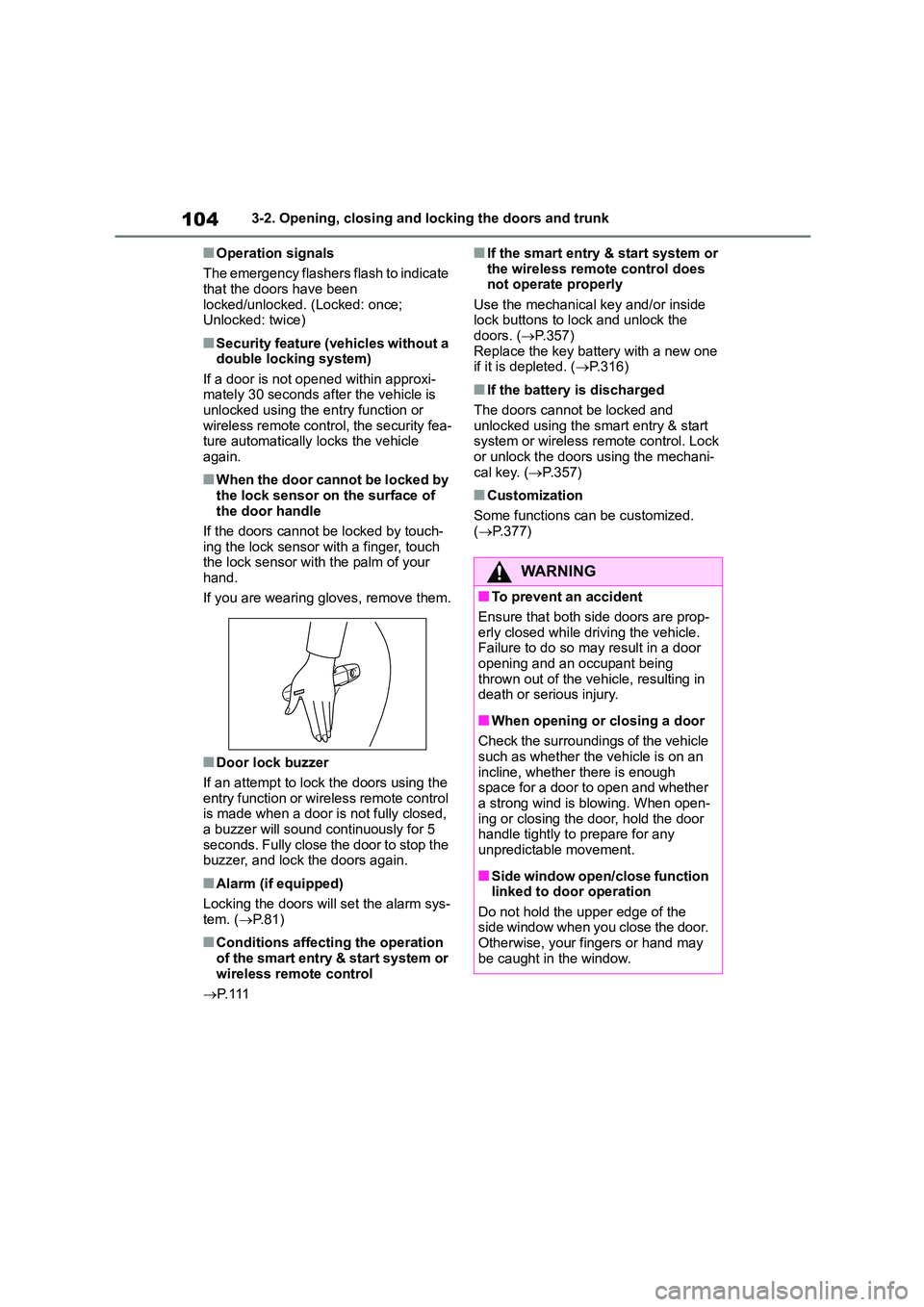
If the doors cannot be locked by touch-
ing the lock sensor with a finger, touch
the lock sensor with the palm of your hand.
If you are wearing gloves, remove them.
■Door lock buzzer
If an attempt to lock the doors using the
entry function or wireless remote control is made when a door is not fully closed,
a buzzer will sound continuously for 5
seconds. Fully close the door to stop the buzzer, and lock the doors again.
■Alarm (if equipped)
Locking the doors will set the alarm sys-
tem. ( P. 8 1 )
■Conditions affecting the operation
of the smart entry & start system or wireless remote control
P. 111
■If the smart entry & start system or
the wireless remote control does not operate properly
Use the mechanical key and/or inside
lock buttons to lock and unlock the doors. ( P.357)
Replace the key battery with a new one
if it is depleted. ( P.316)
■If the battery is discharged
The doors cannot be locked and
unlocked using the smart entry & start
system or wireless remote control. Lock or unlock the doors using the mechani-
cal key. ( P.357)
■Customization
Some functions can be customized. ( P.377)
WA R N I N G
■To prevent an accident
Ensure that both side doors are prop-
erly closed while driving the vehicle. Failure to do so may result in a door
opening and an occupant being
thrown out of the vehicle, resulting in death or serious injury.
■When opening or closing a door
Check the surroundings of the vehicle
such as whether the vehicle is on an
incline, whether there is enough space for a door to open and whether
a strong wind is blowing. When open-
ing or closing the door, hold the door handle tightly to prepare for any
unpredictable movement.
■Side window open/close function
linked to door operation
Do not hold the upper edge of the side window when you close the door.
Otherwise, your fingers or hand may
be caught in the window.
Page 110 of 582
1083-2. Opening, closing and locking the doors and trunk
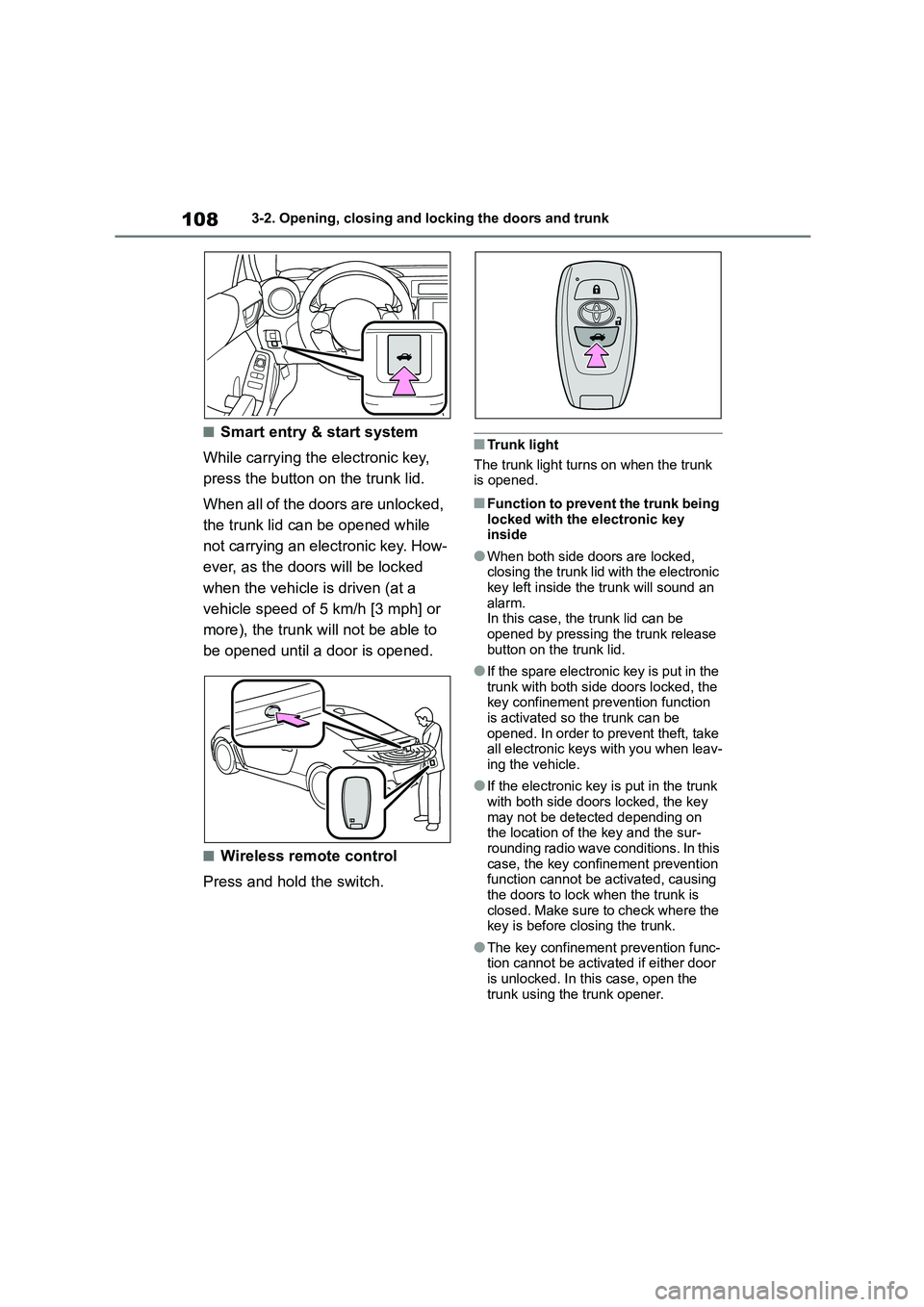
■Smart entry & start system
While carrying the electronic key,
press the button on the trunk lid.
When all of the doors are unlocked,
the trunk lid can be opened while
not carrying an electronic key. How-
ever, as the doors will be locked
when the vehicle is driven (at a
vehicle speed of 5 km/h [3 mph] or
more), the trunk will not be able to
be opened until a door is opened.
■Wireless remote control
Press and hold the switch.
■Trunk light
The trunk light turns on when the trunk
is opened.
■Function to prevent the trunk being
locked with the electronic key inside
●When both side doors are locked, closing the trunk lid with the electronic
key left inside the trunk will sound an
alarm. In this case, the trunk lid can be
opened by pressing the trunk release
button on the trunk lid.
●If the spare electronic key is put in the
trunk with both side doors locked, the key confinement prevention function
is activated so the trunk can be
opened. In order to prevent theft, take all electronic keys with you when leav-
ing the vehicle.
●If the electronic key is put in the trunk
with both side doors locked, the key
may not be detected depending on the location of the key and the sur-
rounding radio wave conditions. In this
case, the key confinement prevention function cannot be activated, causing
the doors to lock when the trunk is
closed. Make sure to check where the
key is before closing the trunk.
●The key confinement prevention func-
tion cannot be activated if either door is unlocked. In this case, open the
trunk using the trunk opener.
Page 112 of 582
1103-2. Opening, closing and locking the doors and trunk
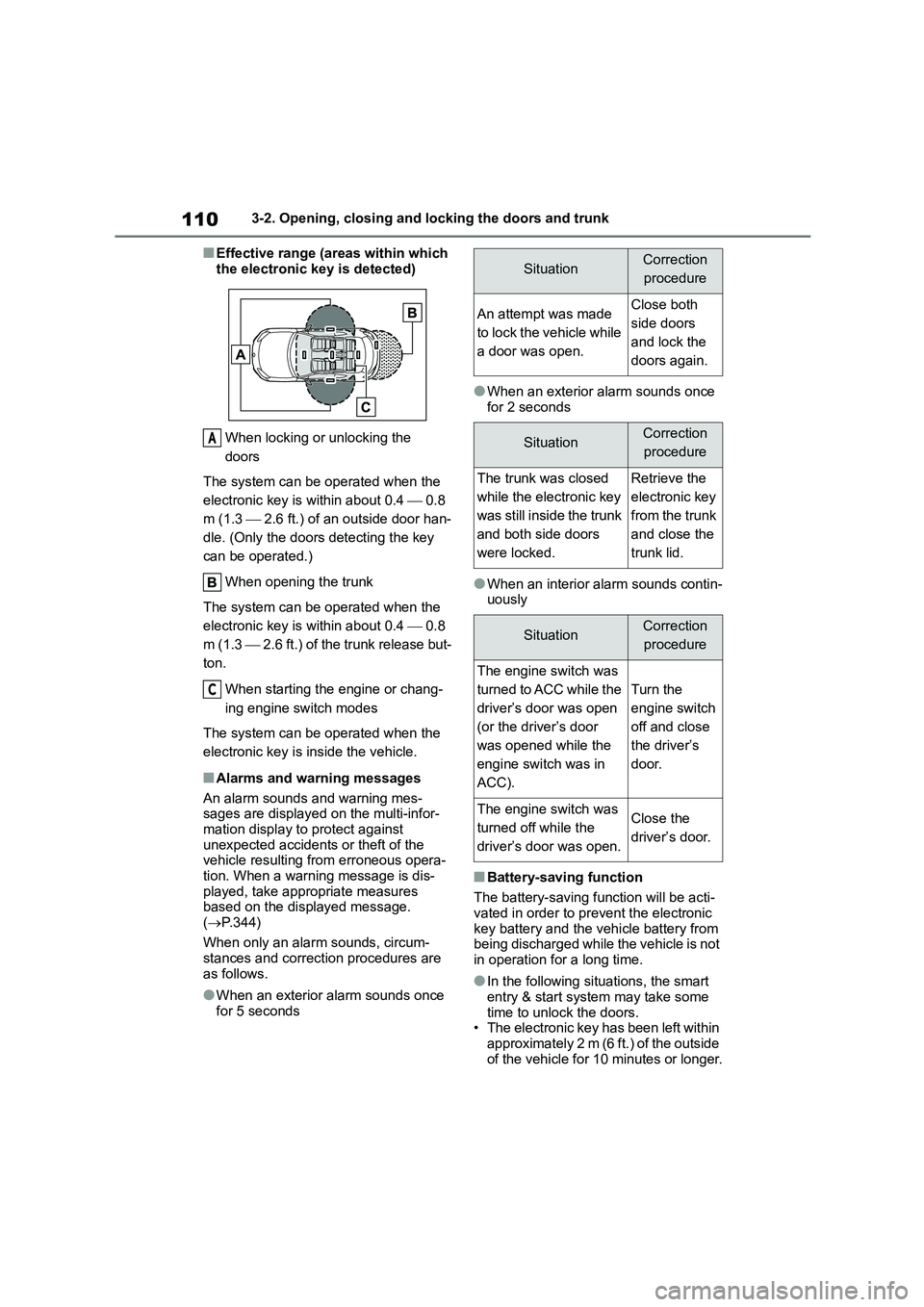
■Effective range (areas within which
the electronic key is detected)
When locking or unlocking the
doors
The system can be operated when the
electronic key is within about 0.4 0.8
m (1.3 2.6 ft.) of an outside door han-
dle. (Only the doors detecting the key
can be operated.)
When opening the trunk
The system can be operated when the
electronic key is within about 0.4 0.8
m (1.3 2.6 ft.) of the trunk release but-
ton.
When starting the engine or chang-
ing engine switch modes
The system can be operated when the
electronic key is inside the vehicle.
■Alarms and warning messages
An alarm sounds and warning mes- sages are displayed on the multi-infor-
mation display to protect against
unexpected accidents or theft of the vehicle resulting from erroneous opera-
tion. When a warning message is dis-
played, take appropriate measures based on the displayed message.
( P.344)
When only an alarm sounds, circum- stances and correction procedures are
as follows.
●When an exterior alarm sounds once
for 5 seconds
●When an exterior alarm sounds once
for 2 seconds
●When an interior alarm sounds contin-
uously
■Battery-saving function
The battery-saving function will be acti- vated in order to prevent the electronic
key battery and the vehicle battery from
being discharged while the vehicle is not
in operation for a long time.
●In the following situations, the smart
entry & start system may take some time to unlock the doors.
• The electronic key has been left within
approximately 2 m (6 ft.) of the outside of the vehicle for 10 minutes or longer.
A
C
SituationCorrection
procedure
An attempt was made
to lock the vehicle while
a door was open.
Close both
side doors
and lock the
doors again.
SituationCorrection
procedure
The trunk was closed
while the electronic key
was still inside the trunk
and both side doors
were locked.
Retrieve the
electronic key
from the trunk
and close the
trunk lid.
SituationCorrection
procedure
The engine switch was
turned to ACC while the
driver’s door was open
(or the driver’s door
was opened while the
engine switch was in
ACC).
Turn the
engine switch
off and close
the driver’s
door.
The engine switch was
turned off while the
driver’s door was open.
Close the
driver’s door.
Page 114 of 582
1123-2. Opening, closing and locking the doors and trunk
switch modes are changed.
●Do not leave the electronic key on top
of the instrument panel or near the
door pockets when exiting the vehicle. Depending on the radio wave recep-
tion conditions, it may be detected by
the antenna outside the cabin and the doors will become lockable from the
outside, possibly trapping the elec-
tronic key inside the vehicle.
●As long as the electronic key is within
the effective range, the doors may be locked or unlocked by anyone. How-
ever, only the doors detecting the
electronic key can be used to unlock the vehicle.
●Even if the electronic key is not inside the vehicle, it may be possible to start
the engine if the electronic key is near
the window.
●The doors may unlock or lock if a
large amount of water splashes on the door handle, such as in the rain or in a
car wash, when the electronic key is
within the effective range. (The doors will automatically be locked after
approximately 30 seconds if the doors
are not opened and closed.)
●If the wireless remote control is used
to lock the doors when the electronic key is near the vehicle, there is a pos-
sibility that the door may not be
unlocked by the entry function. (Use the wireless remote control to unlock
the doors.)
●Touching the door lock or unlock sen-
sor while wearing gloves may prevent
lock or unlock operation.
●Vehicles without a double locking sys-
tem: When the lock operation is per-
formed using the lock sensor, recognition signals will be shown up to
three consecutive times. After this, no
recognition signals will be given.
●If the door handle becomes wet while
the electronic key is within the effec- tive range, the door may lock and
unlock repeatedly. In this case, follow
the following correction procedures to
wash the vehicle:
• Place the electronic key in a location 2 m (6 ft.) or more away from the vehi-
cle. (Take care to ensure that the key
is not stolen.) • Set the electronic key to battery-sav-
ing mode to disable the smart entry &
start system. ( P. 1 1 1 )
●If the electronic key is inside the vehi-
cle and a door handle becomes wet during a car wash, a message may be
shown on the multi-information dis-
play and a buzzer will sound outside the vehicle. To turn off the alarm, lock
both side doors.
●The lock sensor may not work prop-
erly if it comes into contact with ice,
snow, mud, etc. Clean the lock sensor and attempt to operate it again.
●A sudden handle operation or a han-dle operation immediately after enter-
ing the effective range may prevent
the doors from being unlocked. Touch the door unlock sensor and check that
the doors are unlocked before pulling
the door handle again.
●Unlocking the vehicle may take more
time if another electronic key is within the effective range.
■When the vehicle is not driven for
extended periods
●To prevent theft of the vehicle, do not
leave the electronic key within 2 m (6
ft.) of the vehicle.
●The smart entry & start system can be
deactivated in advance. ( P. 1 1 3 )
●Setting the electronic key to bat-
tery-saving mode helps to reduce key battery depletion. ( P. 1 1 1 )
■To operate the system properly
●Make sure to carry the electronic key
when operating th e system. Do not get the electronic key too close to the
vehicle when operating the system
from the outside of the vehicle.
Depending on the position and holding
condition of the electronic key, the key may not be detected correctly and the