radio TOYOTA GR86 2022 Owners Manual (in English)
[x] Cancel search | Manufacturer: TOYOTA, Model Year: 2022, Model line: GR86, Model: TOYOTA GR86 2022Pages: 582, PDF Size: 86.38 MB
Page 8 of 582
6
provisions for the installation of
RF-transmitters, is available on
request at any authorized Toyota
retailer or Toyota authorized
repairer, or any reliable repairer.
High voltage parts and cables on
the hybrid vehicles emit approxi-
mately the same amount of electro-
magnetic waves as the
conventional gasoline powered
vehicles or home electronic appli-
ances despite of their electromag-
netic shielding.
Unwanted noise may occur in the
reception of the radio frequency
transmitter (RF-transmitter).
The vehicle is equipped with
sophisticated comp uters that will
record certain data, such as:
• Engine speed / Electric motor
speed (traction motor speed)
• Accelerator status
• Brake status
• Vehicle speed
• Operation status of the driving
assist systems
• Images from the cameras
Your vehicle is equipped with cameras.
Contact any authorized Toyota retailer
or Toyota authorized repairer, or any
reliable repairer for the location of
recording cameras.
The recorded data varies according
to the vehicle grade level, options
and destinations with which it is
equipped.
These computers do not record
conversations or sounds, and only
record images outside of the vehi-
cle in certain situations.
Data usage
Toyota and third parties contracted by
Toyota may use the data recorded in
this computer to diagnose malfunc-
tions, conduct research and develop-
ment, and improve quality.
Toyota and third parties contracted by
Toyota will not disclose the recorded
data to a third party except:
• With the consent of the vehicle owner
or with the consent of the lessee if
the vehicle is leased
• In response to an official request by
the police, a court of law or a govern-
ment agency
• For use by Toyota in a lawsuit
• For research purposes where the
data is not tied to a specific vehicle or
vehicle owner
This vehicle is equipped with an
event data recorder (EDR). The
main purpose of an EDR is to
record, in certain crash or near
crash-like situations, such as an
airbag deployment or hitting a road
obstacle, data that will assist in
understanding how a vehicle’s sys-
tems performed. The EDR is
designed to record data related to
vehicle dynamics and safety sys-
tems for a short period of time, typi-
cally 30 seconds or less. However,
data may not be recorded depend-
Vehicle data recording
Event data recorder
Page 42 of 582
401-1. For safe use
WA R N I N G
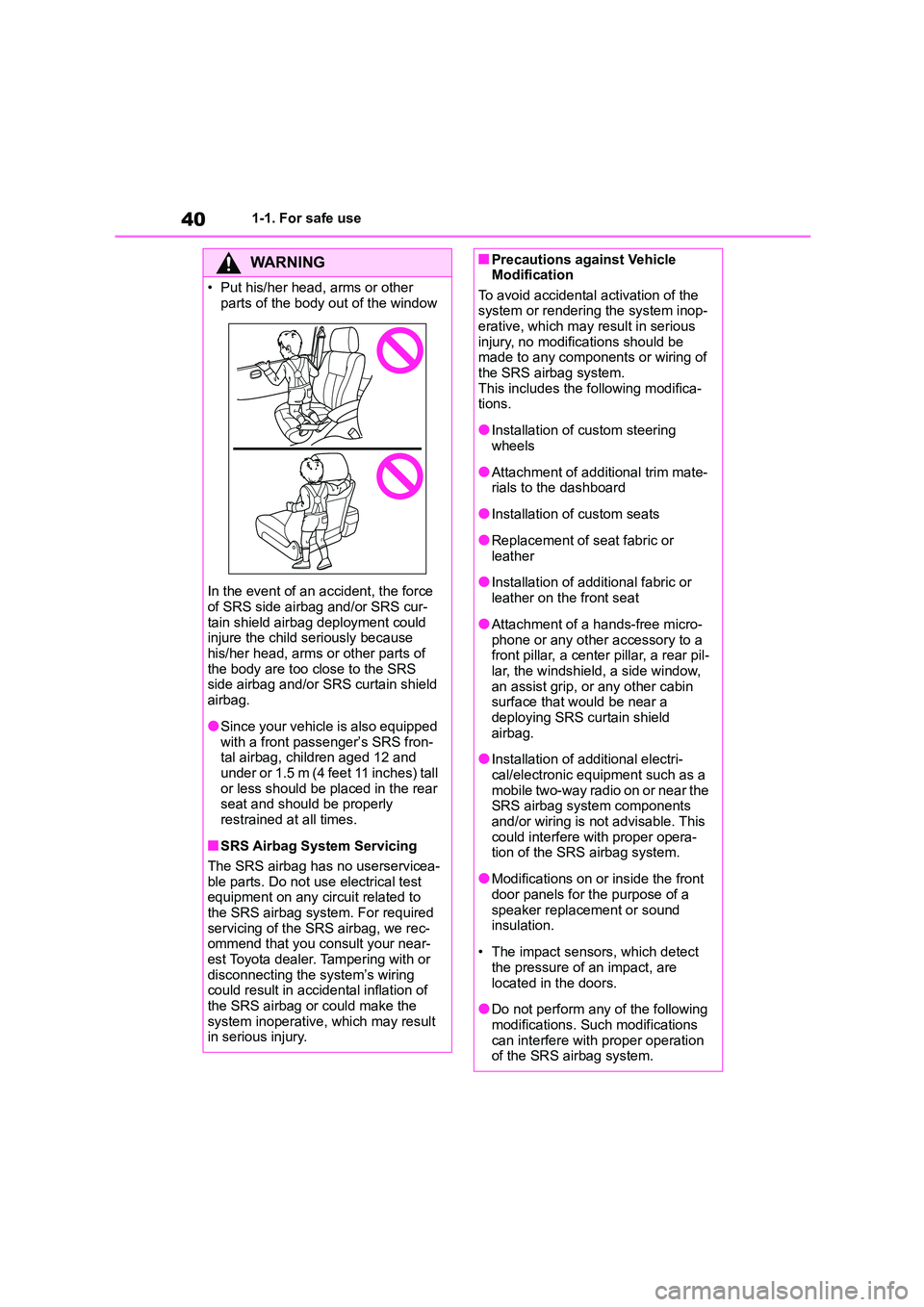
• Put his/her head, arms or other
parts of the body out of the window
In the event of an accident, the force
of SRS side airbag and/or SRS cur-
tain shield airbag deployment could injure the child seriously because
his/her head, arms or other parts of
the body are too close to the SRS side airbag and/or SRS curtain shield
airbag.
●Since your vehicle is also equipped
with a front passenger’s SRS fron-
tal airbag, children aged 12 and under or 1.5 m (4 feet 11 inches) tall
or less should be placed in the rear
seat and should be properly restrained at all times.
■SRS Airbag System Servicing
The SRS airbag has no userservicea-
ble parts. Do not use electrical test
equipment on any circuit related to the SRS airbag system. For required
servicing of the SRS airbag, we rec-
ommend that you consult your near- est Toyota dealer. Tampering with or
disconnecting the system’s wiring
could result in accidental inflation of the SRS airbag or could make the
system inoperative, which may result
in serious injury.
■Precautions against Vehicle Modification
To avoid accidental activation of the
system or rendering the system inop- erative, which may result in serious
injury, no modifications should be
made to any components or wiring of the SRS airbag system.
This includes the following modifica-
tions.
●Installation of custom steering
wheels
●Attachment of additional trim mate-
rials to the dashboard
●Installation of custom seats
●Replacement of seat fabric or
leather
●Installation of additional fabric or
leather on the front seat
●Attachment of a hands-free micro-
phone or any other accessory to a
front pillar, a center pillar, a rear pil- lar, the windshield, a side window,
an assist grip, or any other cabin
surface that would be near a deploying SRS curtain shield
airbag.
●Installation of additional electri-
cal/electronic equipment such as a
mobile two-way radio on or near the SRS airbag system components
and/or wiring is not advisable. This
could interfere with proper opera- tion of the SRS airbag system.
●Modifications on or inside the front door panels for the purpose of a
speaker replacement or sound
insulation.
• The impact sensors, which detect
the pressure of an impact, are
located in the doors.
●Do not perform any of the following
modifications. Such modifications can interfere with proper operation
of the SRS airbag system.
Page 74 of 582
721-3. Emergency assistance
WA R N I N G
• During an Emergency Call, the sys-
tem makes repeated attempts to
connect to the PSAP. However, if it cannot connect to the PSAP due to
poor radio wave reception, the sys-
tem may not be able to connect to the cellular network and the call
may finish without connecting. The
red indicator light will blink for
approximately 5 seconds to indicate this disconnection.
●If the battery’s voltage decreases or there is a disconnection, the system
may not be able to connect to the
PSAP.
■When the Emergency Call sys-
tem is replaced with a new one
The Emergency Call system should
be registered. Contact any authorized
Toyota retailer or Toyota authorized repairer, or any reliable repairer.
■For your safety
●Please drive safely.
The function of this system is to
assist you in making the Emer- gency Call in case of accidents
such as traffic accidents or sudden
medical emergencies, and it does not protect the driver or passengers
in any way. Please drive safely and
fasten your seatbelts at all times for your safety.
●In case of an emergency, make lives the top priority.
●If you smell anything burning or other unusual smells, leave the
vehicle and evacuate to a safe area
immediately.
●If the airbag deploys when the sys-
tem is operating normally, the sys- tem makes an emergency call.
Even if the airbag has not deployed,
the system may also make an emergency call when the vehicle is
hit from behind.
●For safety, do not make the Emer- gency Call while driving.
Making calls during driving may
cause mishandling of the steering wheel, which may lead to unex-
pected accidents.
Stop the vehicle and confirm the safety of your surroundings before
making the Emergency Call.
●When changing fuses, please use
the specified fuses. Using other
fuses may cause ignition or smoke in the circuit and lead to a fire.
●Using the system while there is smoke or an unusual smell may
cause a fire. Stop using the system
immediately and consult any authorized Toyota retailer or Toyota
authorized repairer, or any reliable
repairer.
NOTICE
■To prevent damage
Do not pour any liquids onto the
“SOS” button panel, etc. and do not
impact it.
■If the “SOS” button panel,
speaker or microphone malfunc- tions during an Emergency Call
or manual maintenance check
It may not be possible to make Emer- gency Calls, confirm the system sta-
tus, or communicate with the
emergency operator. If any of the above equipment is damaged, please
consult any authorized Toyota retailer
or Toyota authorized repairer, or any reliable repairer.
Page 102 of 582
1003-1. Key information
3-1.Key information
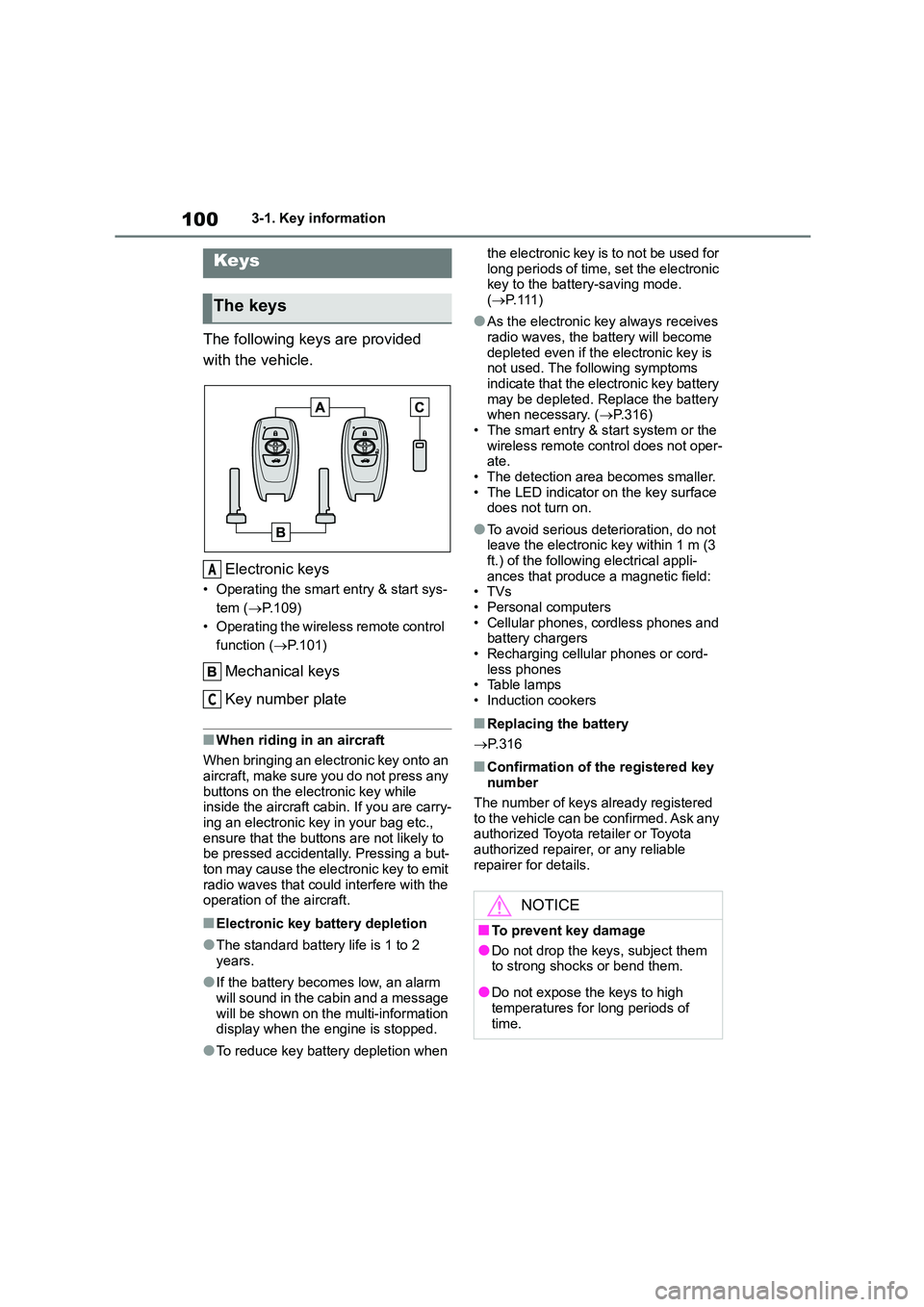
The following keys are provided
with the vehicle.
Electronic keys
• Operating the smart entry & start sys-
tem ( P.109)
• Operating the wireless remote control
function ( P.101)
Mechanical keys
Key number plate
■When riding in an aircraft
When bringing an electronic key onto an
aircraft, make sure you do not press any
buttons on the electronic key while inside the aircraft cabin. If you are carry-
ing an electronic key in your bag etc.,
ensure that the buttons are not likely to be pressed accidentally. Pressing a but-
ton may cause the electronic key to emit
radio waves that could interfere with the operation of the aircraft.
■Electronic key battery depletion
●The standard battery life is 1 to 2 years.
●If the battery becomes low, an alarm
will sound in the cabin and a message will be shown on the multi-information
display when the engine is stopped.
●To reduce key battery depletion when
the electronic key is to not be used for
long periods of time, set the electronic key to the battery-saving mode.
( P. 111 )
●As the electronic key always receives
radio waves, the battery will become
depleted even if the electronic key is not used. The following symptoms
indicate that the electronic key battery
may be depleted. Replace the battery when necessary. ( P.316)
• The smart entry & start system or the
wireless remote control does not oper- ate.
• The detection area becomes smaller.
• The LED indicator on the key surface does not turn on.
●To avoid serious deterioration, do not leave the electronic key within 1 m (3
ft.) of the following electrical appli-
ances that produce a magnetic field: •TVs
• Personal computers
• Cellular phones, cordless phones and battery chargers
• Recharging cellular phones or cord-
less phones • Table lamps
• Induction cookers
■Replacing the battery
P. 3 1 6
■Confirmation of the registered key number
The number of keys already registered
to the vehicle can be confirmed. Ask any authorized Toyota retailer or Toyota
authorized repairer, or any reliable
repairer for details.
Keys
The keys
A
C
NOTICE
■To prevent key damage
●Do not drop the keys, subject them
to strong shocks or bend them.
●Do not expose the keys to high
temperatures for long periods of
time.
Page 103 of 582

101
3
3-1. Key information
Before driving
The electronic keys are equipped
with the following wireless remote
control:
Locks the doors ( P.103)
Closes the windows* ( P.103)
Unlocks the doors ( P.103)
Opens the windows* ( P.103)
Opens the trunk ( P.108)
*: These settings must be customized
at any authorized Toyota retailer or
Toyota authorized repairer, or any
reliable repairer.
To take out the mechanical key,
push the release button and take
the key out.
The mechanical key can only be
inserted in one direction, as the key
only has grooves on one side. If the key
cannot be inserted in a lock cylinder,
turn it over and re-attempt to insert it.
After using the mechanical key, store it
in the electronic key. Carry the mechan-
ical key together with the electronic key.
If the electronic key battery is depleted
or the entry function does not operate
properly, you will need the mechanical
key. ( P.357)
NOTICE
●Do not get the keys wet or wash
them in an ultrasonic washer etc.
●Do not attach metallic or magnetic
materials to the keys or place the
keys close to such materials.
●Do not disassemble the keys.
●Do not attach a sticker or anything else to the surface of the electronic
key.
●Do not place the keys near objects
that produce magnetic fields, such
as TVs, audio systems and induc- tion cookers.
■Carrying the electronic key on your person
Carry the electronic key 10 cm (3.9
in.) or more away from electric appli- ances that are turned on. Radio
waves emitted from electric appli-
ances within 10 cm (3.9 in.) of the electronic key may interfere with the
key, causing the key to not function
properly.
■In case of a smart entry & start
system malfunction or other key-related problems
P. 3 5 7
■When an electronic key is lost
P. 3 5 6
Wireless remote control
Using the mechanical key
A
C
D
Page 110 of 582
1083-2. Opening, closing and locking the doors and trunk
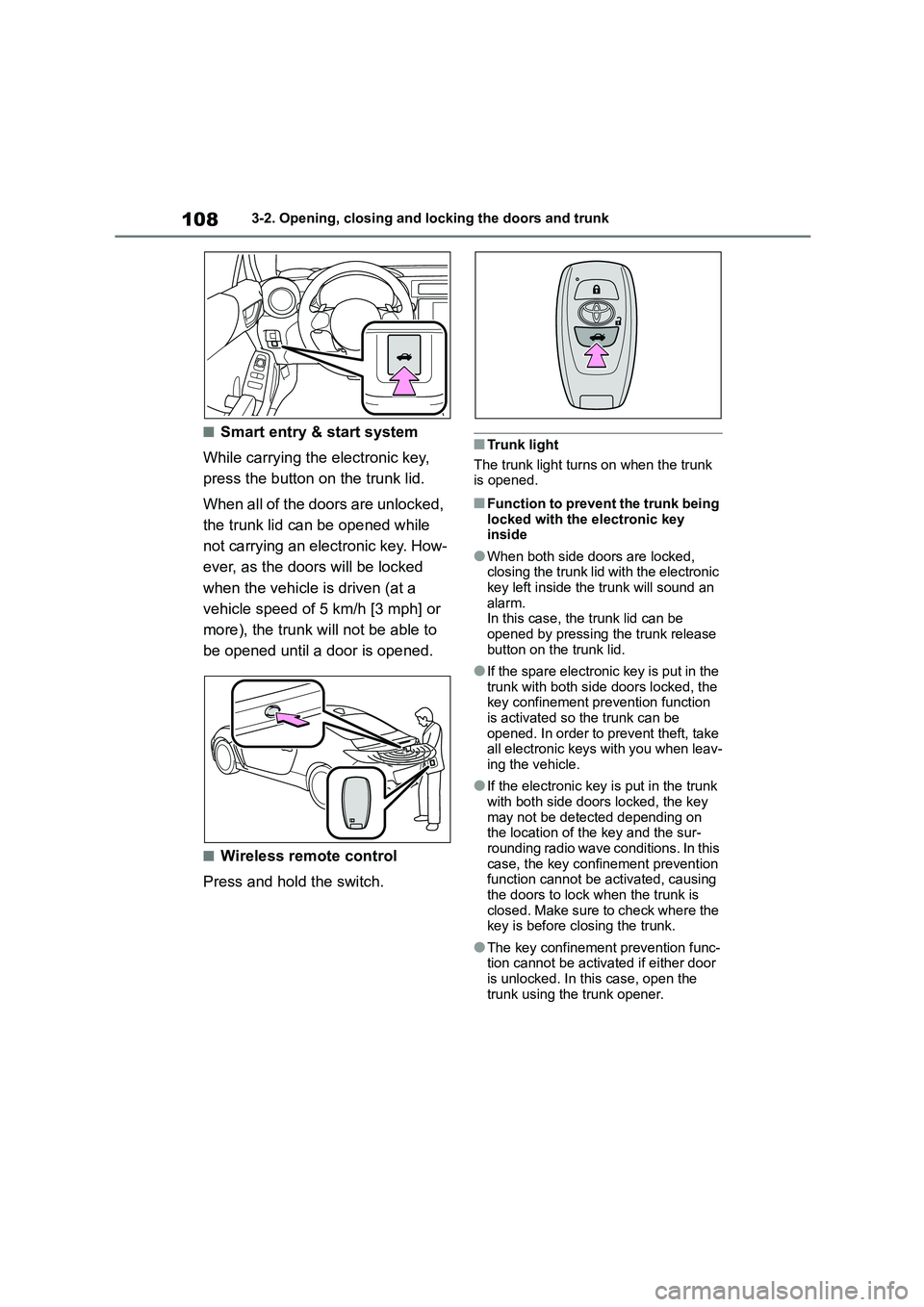
■Smart entry & start system
While carrying the electronic key,
press the button on the trunk lid.
When all of the doors are unlocked,
the trunk lid can be opened while
not carrying an electronic key. How-
ever, as the doors will be locked
when the vehicle is driven (at a
vehicle speed of 5 km/h [3 mph] or
more), the trunk will not be able to
be opened until a door is opened.
■Wireless remote control
Press and hold the switch.
■Trunk light
The trunk light turns on when the trunk
is opened.
■Function to prevent the trunk being
locked with the electronic key inside
●When both side doors are locked, closing the trunk lid with the electronic
key left inside the trunk will sound an
alarm. In this case, the trunk lid can be
opened by pressing the trunk release
button on the trunk lid.
●If the spare electronic key is put in the
trunk with both side doors locked, the key confinement prevention function
is activated so the trunk can be
opened. In order to prevent theft, take all electronic keys with you when leav-
ing the vehicle.
●If the electronic key is put in the trunk
with both side doors locked, the key
may not be detected depending on the location of the key and the sur-
rounding radio wave conditions. In this
case, the key confinement prevention function cannot be activated, causing
the doors to lock when the trunk is
closed. Make sure to check where the
key is before closing the trunk.
●The key confinement prevention func-
tion cannot be activated if either door is unlocked. In this case, open the
trunk using the trunk opener.
Page 113 of 582
111
3
3-2. Opening, closing and locking the doors and trunk
Before driving
• The smart entry & start system has
not been used for 5 days or longer.
●If the smart entry & start system has
not been used for 14 days or longer, the doors cannot be unlocked at the
passenger door. In this case, take
hold of the driver’s door handle, or use the wireless remote control or
mechanical key, to unlock the doors.
■Electronic Key Battery-Saving
Function
When battery-saving mode is set, bat-
tery depletion is minimized by stopping
the electronic key from receiving radio waves.
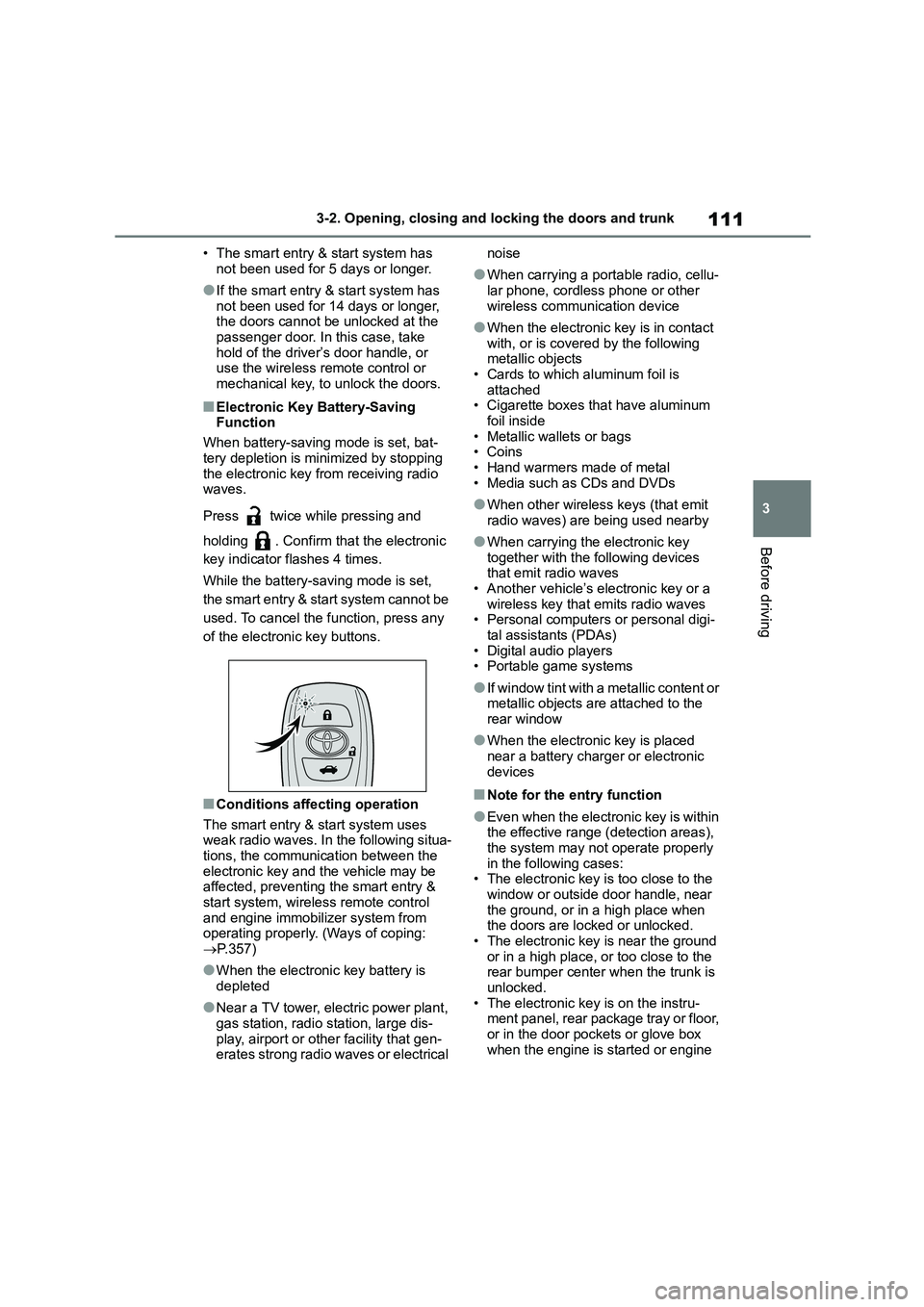
Press twice while pressing and
holding . Confirm that the electronic
key indicator flashes 4 times.
While the battery-saving mode is set,
the smart entry & start system cannot be
used. To cancel the function, press any
of the electronic key buttons.
■Conditions affecting operation
The smart entry & start system uses
weak radio waves. In the following situa- tions, the communication between the
electronic key and the vehicle may be
affected, preventing the smart entry &
start system, wireless remote control and engine immobilizer system from
operating properly. (Ways of coping:
P.357)
●When the electronic key battery is
depleted
●Near a TV tower, electric power plant,
gas station, radio station, large dis- play, airport or other facility that gen-
erates strong radio waves or electrical
noise
●When carrying a portable radio, cellu-
lar phone, cordless phone or other
wireless communication device
●When the electronic key is in contact
with, or is covered by the following metallic objects
• Cards to which aluminum foil is
attached • Cigarette boxes that have aluminum
foil inside
• Metallic wallets or bags •Coins
• Hand warmers made of metal
• Media such as CDs and DVDs
●When other wirele ss keys (that emit
radio waves) are being used nearby
●When carrying the electronic key
together with the following devices that emit radio waves
• Another vehicle’s electronic key or a
wireless key that emits radio waves • Personal computers or personal digi-
tal assistants (PDAs)
• Digital audio players • Portable game systems
●If window tint with a metallic content or metallic objects are attached to the
rear window
●When the electronic key is placed
near a battery charger or electronic
devices
■Note for the entry function
●Even when the electronic key is within
the effective range (detection areas), the system may not operate properly
in the following cases:
• The electronic key is too close to the window or outside door handle, near
the ground, or in a high place when
the doors are locked or unlocked.
• The electronic key is near the ground or in a high place, or too close to the
rear bumper center when the trunk is
unlocked. • The electronic key is on the instru-
ment panel, rear package tray or floor,
or in the door pockets or glove box when the engine is started or engine
Page 114 of 582
1123-2. Opening, closing and locking the doors and trunk
switch modes are changed.
●Do not leave the electronic key on top
of the instrument panel or near the
door pockets when exiting the vehicle. Depending on the radio wave recep-
tion conditions, it may be detected by
the antenna outside the cabin and the doors will become lockable from the
outside, possibly trapping the elec-
tronic key inside the vehicle.
●As long as the electronic key is within
the effective range, the doors may be locked or unlocked by anyone. How-
ever, only the doors detecting the
electronic key can be used to unlock the vehicle.
●Even if the electronic key is not inside the vehicle, it may be possible to start
the engine if the electronic key is near
the window.
●The doors may unlock or lock if a
large amount of water splashes on the door handle, such as in the rain or in a
car wash, when the electronic key is
within the effective range. (The doors will automatically be locked after
approximately 30 seconds if the doors
are not opened and closed.)
●If the wireless remote control is used
to lock the doors when the electronic key is near the vehicle, there is a pos-
sibility that the door may not be
unlocked by the entry function. (Use the wireless remote control to unlock
the doors.)
●Touching the door lock or unlock sen-
sor while wearing gloves may prevent
lock or unlock operation.
●Vehicles without a double locking sys-
tem: When the lock operation is per-
formed using the lock sensor, recognition signals will be shown up to
three consecutive times. After this, no
recognition signals will be given.
●If the door handle becomes wet while
the electronic key is within the effec- tive range, the door may lock and
unlock repeatedly. In this case, follow
the following correction procedures to
wash the vehicle:
• Place the electronic key in a location 2 m (6 ft.) or more away from the vehi-
cle. (Take care to ensure that the key
is not stolen.) • Set the electronic key to battery-sav-
ing mode to disable the smart entry &
start system. ( P. 1 1 1 )
●If the electronic key is inside the vehi-
cle and a door handle becomes wet during a car wash, a message may be
shown on the multi-information dis-
play and a buzzer will sound outside the vehicle. To turn off the alarm, lock
both side doors.
●The lock sensor may not work prop-
erly if it comes into contact with ice,
snow, mud, etc. Clean the lock sensor and attempt to operate it again.
●A sudden handle operation or a han-dle operation immediately after enter-
ing the effective range may prevent
the doors from being unlocked. Touch the door unlock sensor and check that
the doors are unlocked before pulling
the door handle again.
●Unlocking the vehicle may take more
time if another electronic key is within the effective range.
■When the vehicle is not driven for
extended periods
●To prevent theft of the vehicle, do not
leave the electronic key within 2 m (6
ft.) of the vehicle.
●The smart entry & start system can be
deactivated in advance. ( P. 1 1 3 )
●Setting the electronic key to bat-
tery-saving mode helps to reduce key battery depletion. ( P. 1 1 1 )
■To operate the system properly
●Make sure to carry the electronic key
when operating th e system. Do not get the electronic key too close to the
vehicle when operating the system
from the outside of the vehicle.
Depending on the position and holding
condition of the electronic key, the key may not be detected correctly and the
Page 115 of 582
113
3
3-2. Opening, closing and locking the doors and trunk
Before driving
system may not operat e properly. (The
alarm may go off accidentally, or the door lock prevention function may not
operate.)
●Do not leave the electronic key inside
the trunk.
The key confinement prevention func- tion may not operate, depending on
the location of the key (the inside
edge of the Trunk), conditions (inside a metal bag, close to metallic objects)
and the radio waves in the surround-
ing area. ( P.109)
■If the smart entry & start system does not operate properly
●Locking and unlocking the doors: P. 3 5 7
●Starting the engine: P. 3 5 8
■Customization
Some functions can be customized.
( P.377)
■If the smart entry & start system
has been disabled
●Locking and unlocking the doors:
Use the wireless remote control or mechanical key. ( P.103, 357)
●Starting the engine and changing engine switch modes: P. 3 5 8
●Stopping the engine: P. 1 4 1
In the following situations, the
smart entry & start system should
be disabled.
When people with implantable
cardiac pacemakers, cardiac
resynchronization therapy pace-
WA R N I N G
■Caution regarding interference
with electronic devices
●People with implantable cardiac pacemakers, cardiac
resynchronization therapy-pace-
makers or implantable cardioverter defibrillators should maintain a rea-
sonable distance between them-
selves and the smart entry & start
system antennas. ( P.110) The radio waves may affect the
operation of such devices. If neces-
sary, the entry function can be disa- bled. Ask any authorized Toyota
retailer or Toyota authorized
repairer, or any reliable repairer for details, such as the frequency of
radio waves and timing of the emit-
ted radio waves. Then, consult your doctor to see if you should disable
the entry function.
●Users of any electrical medical
device other than implantable car-
diac pacemakers, cardiac resynchronization therapy-pace-
makers or implantable cardioverter
defibrillators should consult the manufacturer of the device for infor-
mation about its operation under
the influence of radio waves. Radio waves could have unex-
pected effects on the operation of
such medical devices.
The smart entry & start system can be
disabled. ( P.113)
When to disable the smart
entry & start system
Page 228 of 582
2264-6. Using other driving systems
4-6.Using other driving systems
*: If equipped
BSD/RCTA consists of the following
functions.
To detect a vehicle in a blind spot
on an adjacent lane or a vehicle
approaching at high speed while
driving the vehicle (Blind Spot
Detection)
To detect a vehicle approaching
from the right or left while revers-
ing the vehicle (Rear Cross Traf-
fic Alert)
The system uses radar sensors for
the following features.
The BSD/RCTA radar sensor is approved under the radio wave related
laws of each country. For details, refer to
P.398.
■Blind Spot Detection (BSD)
The system notifies the driver of the
presence of vehicles in its blind
spot.
If the system detects a vehicle in
its blind spot, it warns the driver
by illuminating the BSD/RCTA
approach indicator(s) on the out-
side mirror(s).
If the driver operates the turn sig-
nal lever in the direction where
the BSD/RCTA approach indica-
tor is illuminating, the system
warns the driver of dangers by
flashing the BSD/RCTA
approach indicator.
BSD/RCTA*
The BSD/RCTA consists of rear
corner radars with Blind Spot
Detection, Lane Change Assist
and Rear Cross Traffic Alert.
These functions of BSD/RCTA
are the systems that detect
objects and vehicles to the rear
and draw attention to the
driver when changing a lane or
when driving in reverse.
WA R N I N G
The driver is responsible for driving
safely. Always be sure to check the
surroundings with your eyes when changing lanes or reversing the vehi-
cle.
The system is designed to assist the
driver in changing lanes or reversing
safely by monitoring the rear and side areas of the vehicle. However, you
cannot rely on this system alone in
assuring the safety during a lane change or reversing. Overconfidence
in this system could result in an acci-
dent and lead to serious injury or death. Since the system operation
has various limitations, the flashing or
illumination of the BSD/RCTA approach indicator may be delayed or
it may not operate at all even when a
vehicle is present in a neighboring lane or approaching from either side.
The driver is responsible for paying attention to the rear and side areas of
the vehicle.
System features