reset TOYOTA GR86 2022 Owners Manual (in English)
[x] Cancel search | Manufacturer: TOYOTA, Model Year: 2022, Model line: GR86, Model: TOYOTA GR86 2022Pages: 582, PDF Size: 86.38 MB
Page 93 of 582
91
2
2-1. Instrument cluster
Vehicle status information and indicators
■Display items
Odometer
Displays the total distance the vehicle
has been driven.
Trip meter A/Trip meter B
Displays the distance the vehicle has
been driven since the meter was last
reset. Trip meters A and B can be used
to record and display different distances
independently.
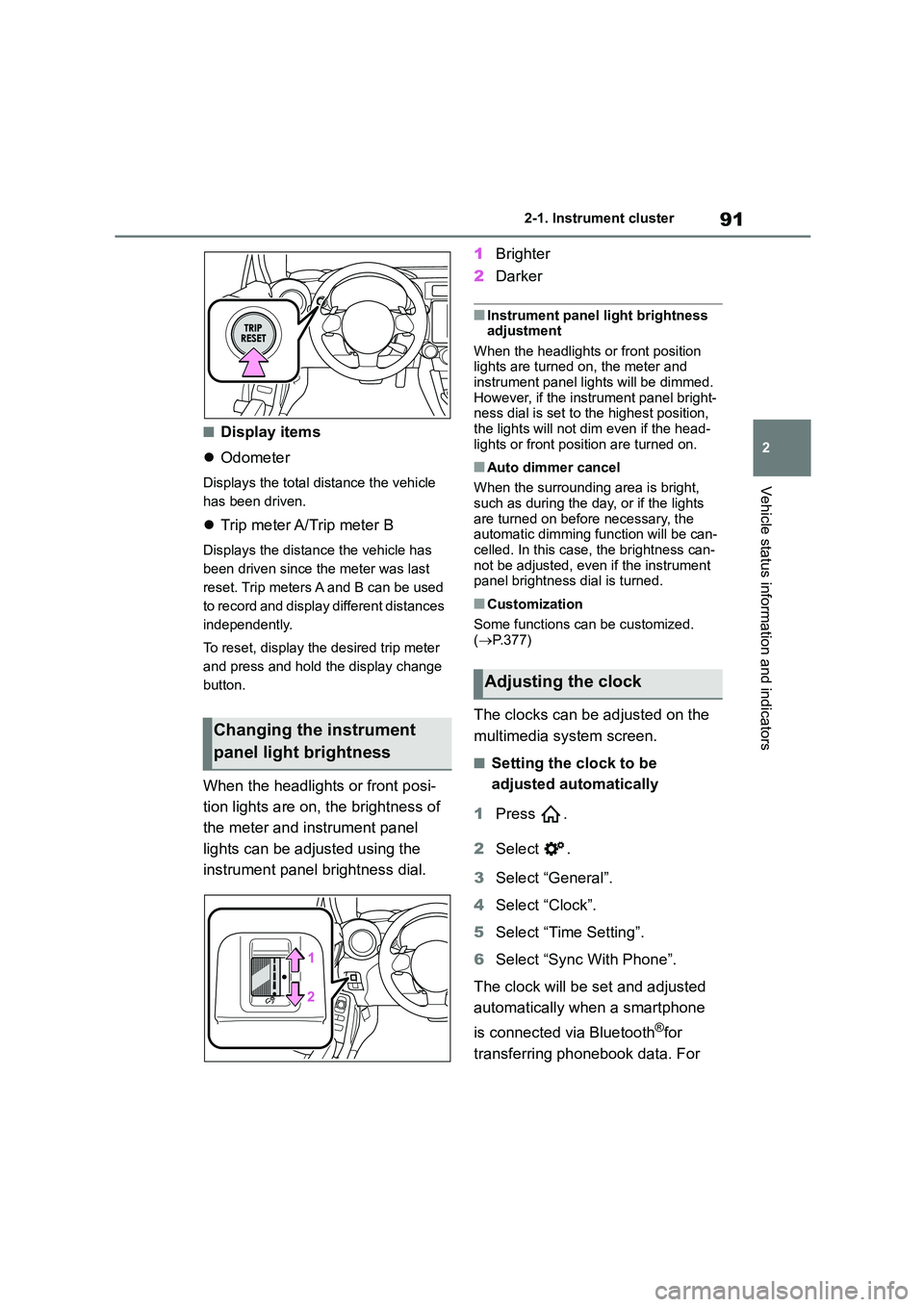
To reset, display th e desired trip meter
and press and hold the display change
button.
When the headlights or front posi-
tion lights are on, the brightness of
the meter and instrument panel
lights can be adjusted using the
instrument panel brightness dial.
1 Brighter
2 Darker
■Instrument panel light brightness adjustment
When the headlights or front position
lights are turned on, the meter and instrument panel lights will be dimmed.
However, if the instrument panel bright-
ness dial is set to the highest position, the lights will not dim even if the head-
lights or front position are turned on.
■Auto dimmer cancel
When the surrounding area is bright, such as during the day, or if the lights
are turned on before necessary, the
automatic dimming function will be can- celled. In this case, the brightness can-
not be adjusted, even if the instrument
panel brightness dial is turned.
■Customization
Some functions can be customized.
( P.377)
The clocks can be adjusted on the
multimedia system screen.
■Setting the clock to be
adjusted automatically
1 Press .
2 Select .
3 Select “General”.
4 Select “Clock”.
5 Select “Time Setting”.
6 Select “Sync With Phone”.
The clock will be set and adjusted
automatically when a smartphone
is connected via Bluetooth®for
transferring phonebook data. For
Changing the instrument
panel light brightness
Adjusting the clock
Page 96 of 582
942-1. Instrument cluster
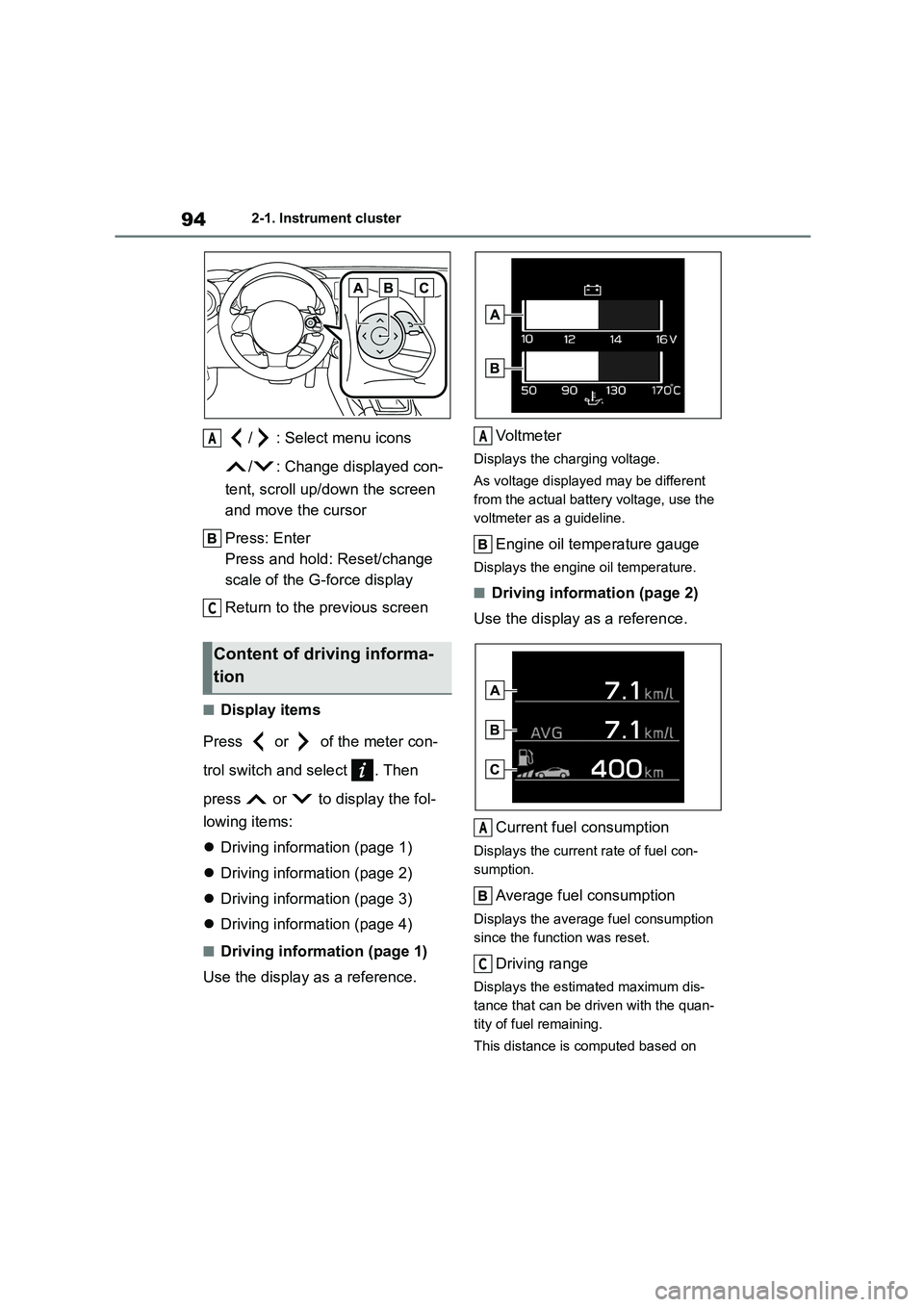
/ : Select menu icons
/ : Change displayed con-
tent, scroll up/down the screen
and move the cursor
Press: Enter
Press and hold: Reset/change
scale of the G-force display
Return to the previous screen
■Display items
Press or of the meter con-
trol switch and select . Then
press or to display the fol-
lowing items:
Driving information (page 1)
Driving information (page 2)
Driving information (page 3)
Driving information (page 4)
■Driving information (page 1)
Use the display as a reference.
Voltmeter
Displays the char ging voltage.
As voltage displayed may be different
from the actual battery voltage, use the
voltmeter as a guideline.
Engine oil temperature gauge
Displays the engine oil temperature.
■Driving information (page 2)
Use the display as a reference.
Current fuel consumption
Displays the current rate of fuel con-
sumption.
Average fuel consumption
Displays the average fuel consumption
since the function was reset.
Driving range
Displays the estimated maximum dis-
tance that can be driven with the quan-
tity of fuel remaining.
This distance is computed based on
Content of driving informa-
tion
A
C
A
A
C
Page 97 of 582
95
2
2-1. Instrument cluster
Vehicle status information and indicators
your average fuel consumption. As a
result, the actual distance that can be
driven may differ from that displayed.
When only a small amount of fuel is
added to the tank, the display may not
be updated. When refueling, turn the
engine switch off. If the vehicle is
refueled without turning the engine
switch off, the display may not be
updated.
■Driving information (page 3)
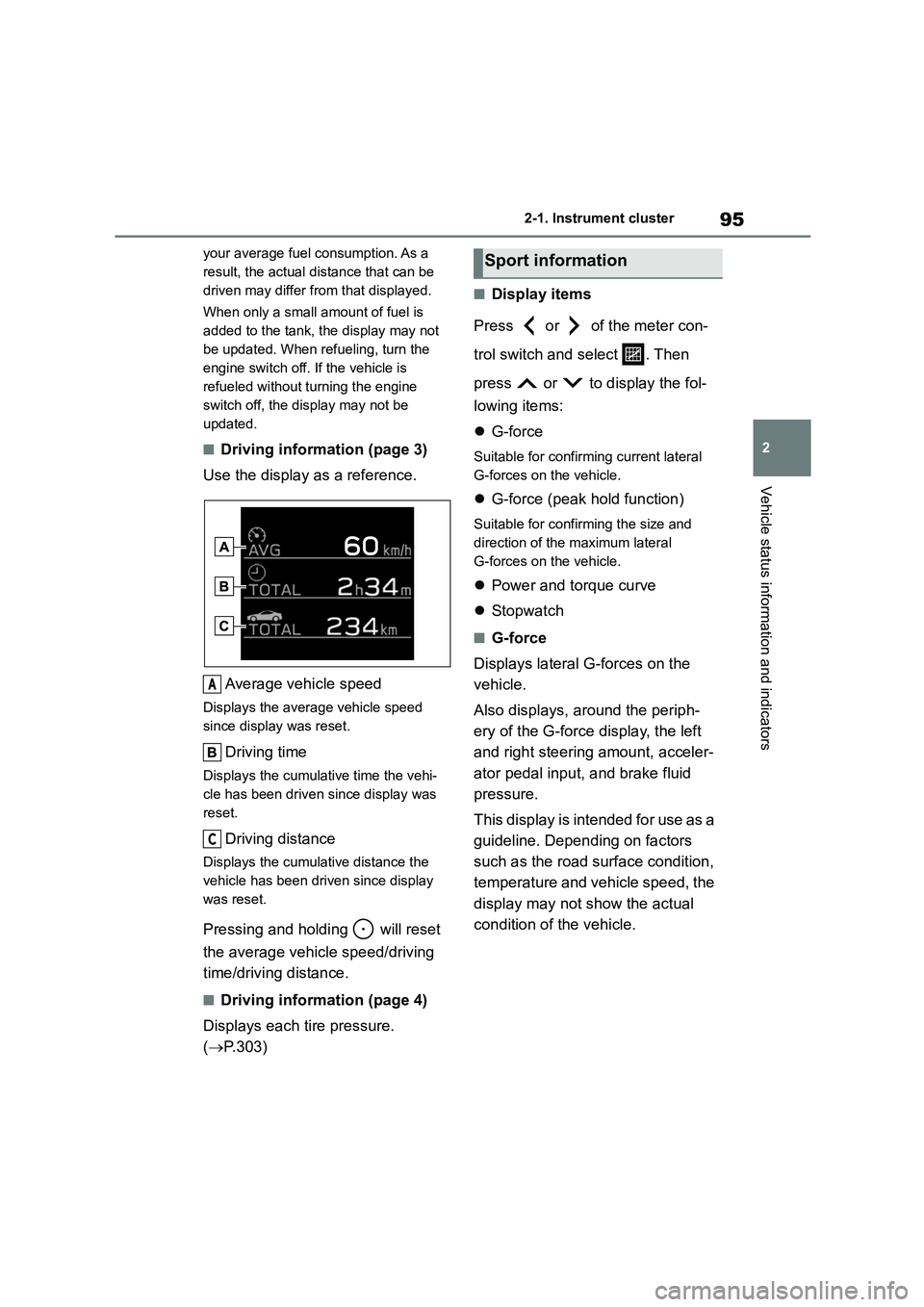
Use the display as a reference.
Average vehicle speed
Displays the average vehicle speed
since display was reset.
Driving time
Displays the cumulative time the vehi-
cle has been driven since display was
reset.
Driving distance
Displays the cumulative distance the
vehicle has been driven since display
was reset.
Pressing and hold ing will reset
the average vehicle speed/driving
time/driving distance.
■Driving information (page 4)
Displays each tire pressure.
( P.303)
■Display items
Press or of the meter con-
trol switch and select . Then
press or to display the fol-
lowing items:
G-force
Suitable for confirming current lateral
G-forces on the vehicle.
G-force (peak hold function)
Suitable for confirming the size and
direction of the maximum lateral
G-forces on the vehicle.
Power and torque curve
Stopwatch
■G-force
Displays lateral G-forces on the
vehicle.
Also displays, around the periph-
ery of the G-force display, the left
and right steering amount, acceler-
ator pedal input, and brake fluid
pressure.
This display is intended for use as a
guideline. Depending on factors
such as the road surface condition,
temperature and vehicle speed, the
display may not show the actual
condition of the vehicle.
A
C
Sport information
Page 98 of 582
962-1. Instrument cluster
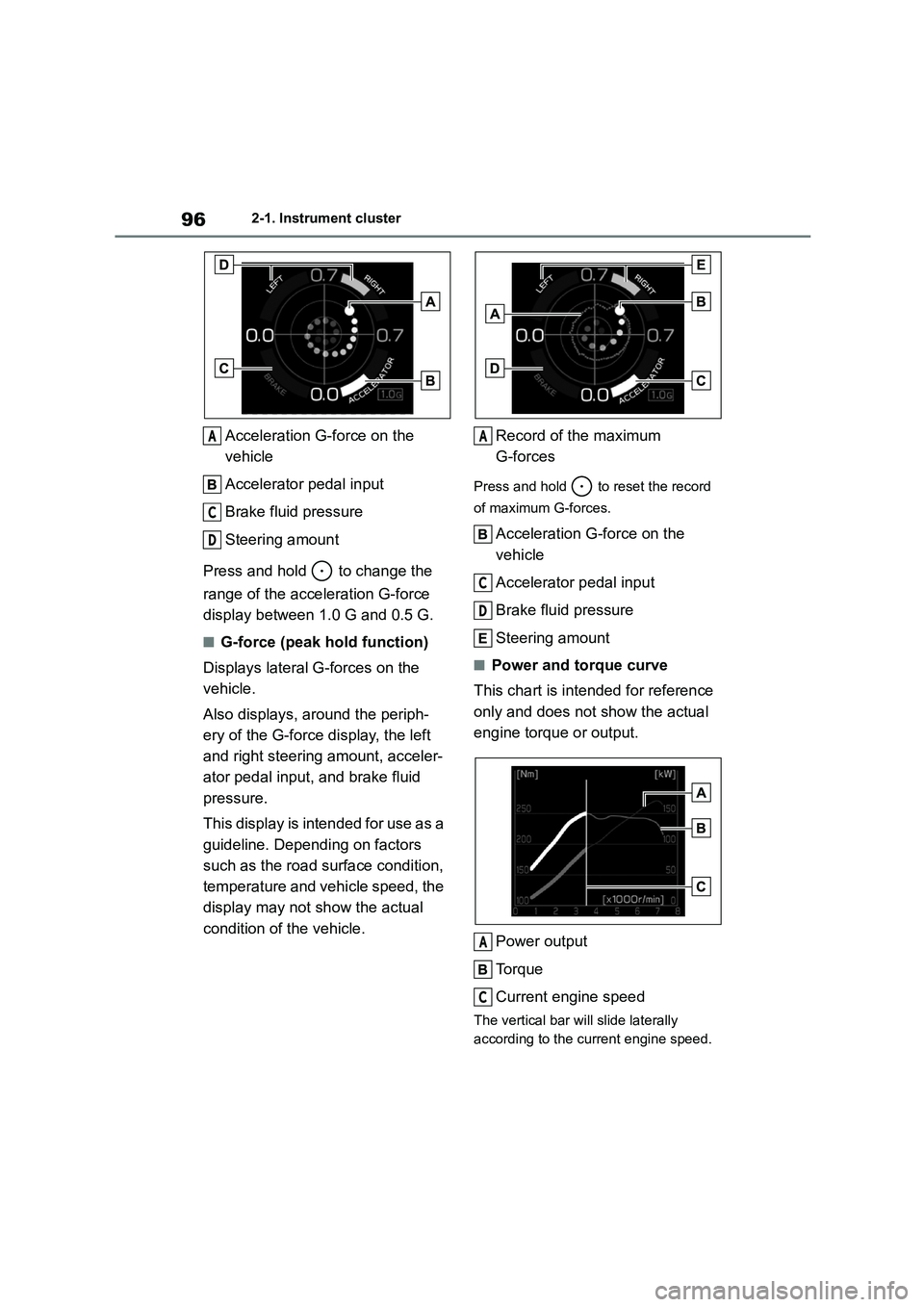
Acceleration G-force on the
vehicle
Accelerator pedal input
Brake fluid pressure
Steering amount
Press and hold to change the
range of the acceleration G-force
display between 1.0 G and 0.5 G.
■G-force (peak hold function)
Displays lateral G-forces on the
vehicle.
Also displays, around the periph-
ery of the G-force display, the left
and right steering amount, acceler-
ator pedal input, and brake fluid
pressure.
This display is intended for use as a
guideline. Depending on factors
such as the road surface condition,
temperature and vehicle speed, the
display may not show the actual
condition of the vehicle.
Record of the maximum
G-forces
Press and hold to reset the record
of maximum G-forces.
Acceleration G-force on the
vehicle
Accelerator pedal input
Brake fluid pressure
Steering amount
■Power and torque curve
This chart is intended for reference
only and does not show the actual
engine torque or output.
Power output
To r q u e
Current engine speed
The vertical bar will slide laterally
according to the current engine speed.
A
C
D
A
C
D
A
C
Page 99 of 582
97
2
2-1. Instrument cluster
Vehicle status information and indicators
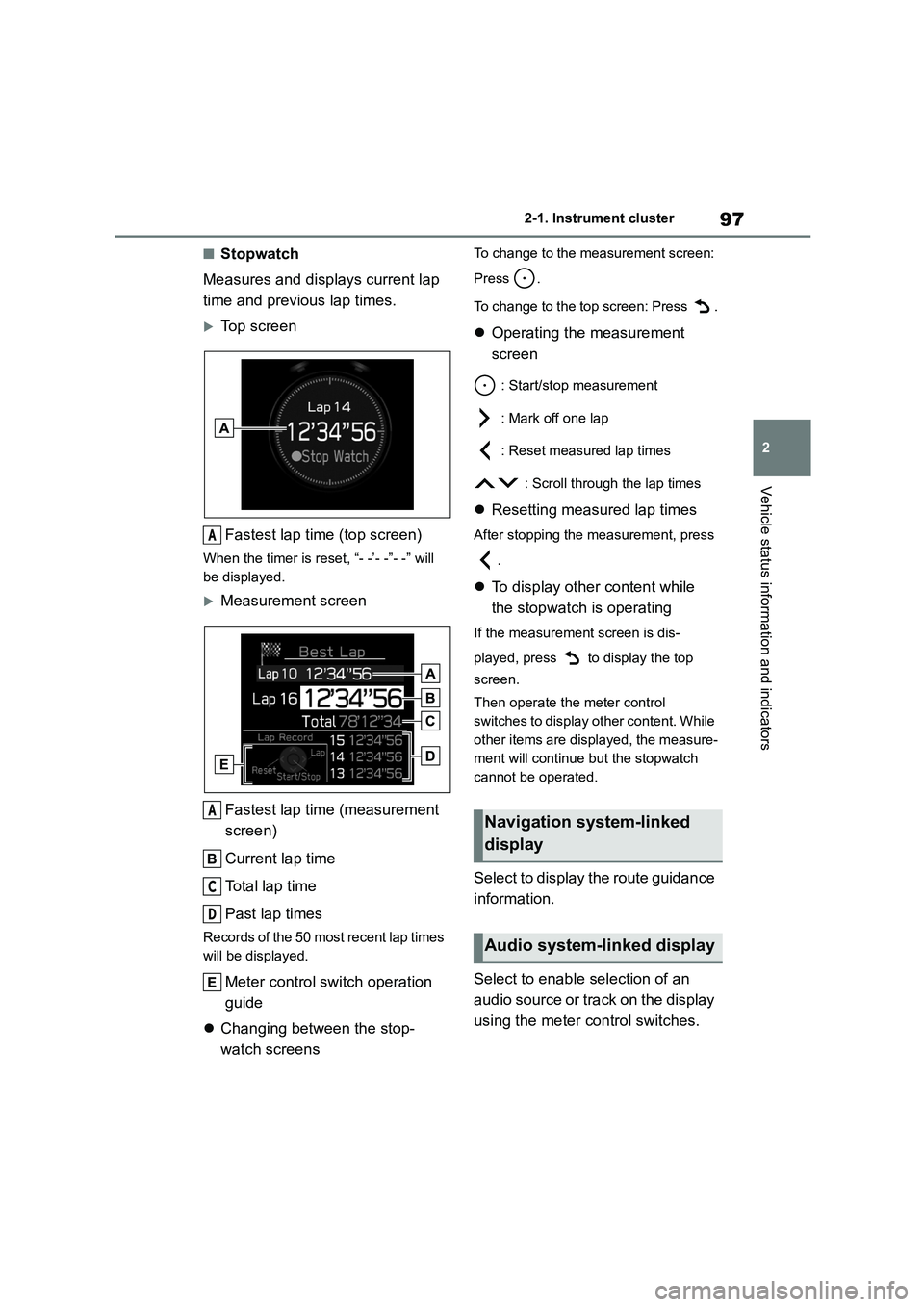
■Stopwatch
Measures and displays current lap
time and previous lap times.
Top screen
Fastest lap time (top screen)
When the timer is reset, “- -’- -”- -” will
be displayed.
Measurement screen
Fastest lap time (measurement
screen)
Current lap time
To t a l l a p t i m e
Past lap times
Records of the 50 most recent lap times
will be displayed.
Meter control switch operation
guide
Changing between the stop-
watch screens
To change to the measurement screen:
Press .
To change to the top screen: Press .
Operating the measurement
screen
: Start/stop measurement
: Mark off one lap
: Reset measured lap times
: Scroll through the lap times
Resetting measured lap times
After stopping the measurement, press
.
To display other content while
the stopwatch is operating
If the measurement screen is dis-
played, press to display the top
screen.
Then operate the meter control
switches to display other content. While
other items are displayed, the measure-
ment will continue but the stopwatch
cannot be operated.
Select to display the route guidance
information.
Select to enable selection of an
audio source or track on the display
using the meter control switches.
A
A
C
D
Navigation system-linked
display
Audio system-linked display
Page 198 of 582
1964-5. EyeSight
When operating the switch, the set
vehicle speed changes on the
meter display.
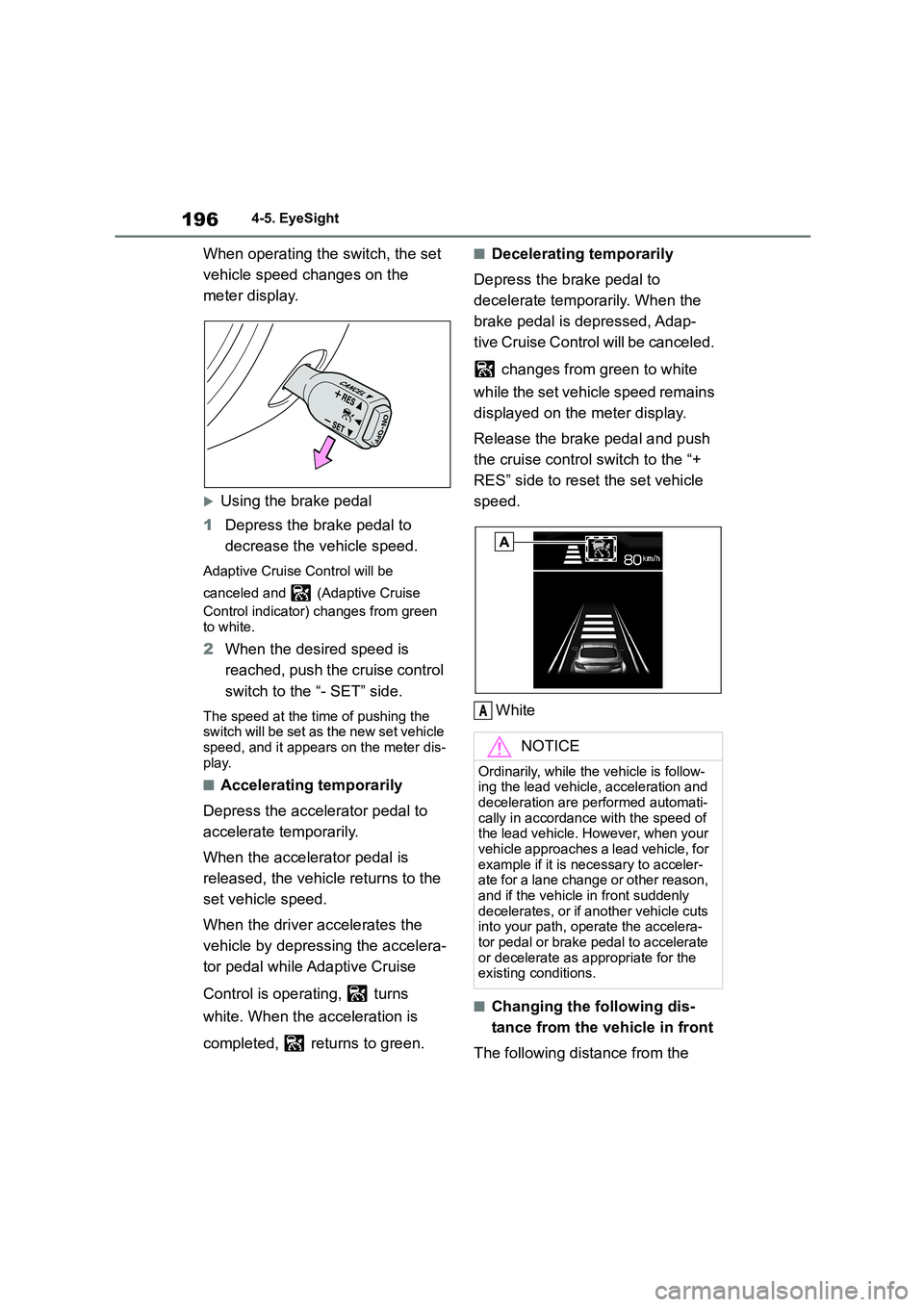
Using the brake pedal
1 Depress the brake pedal to
decrease the vehicle speed.
Adaptive Cruise Control will be
canceled and (Adaptive Cruise
Control indicator) changes from green
to white.
2 When the desired speed is
reached, push the cruise control
switch to the “- SET” side.
The speed at the time of pushing the
switch will be set as the new set vehicle
speed, and it appears on the meter dis- play.
■Accelerating temporarily
Depress the accelerator pedal to
accelerate temporarily.
When the accelerator pedal is
released, the vehicle returns to the
set vehicle speed.
When the driver accelerates the
vehicle by depressing the accelera-
tor pedal while Adaptive Cruise
Control is operating, turns
white. When the acceleration is
completed, returns to green.
■Decelerating temporarily
Depress the brake pedal to
decelerate temporarily. When the
brake pedal is depressed, Adap-
tive Cruise Contro l will be canceled.
changes from green to white
while the set vehicle speed remains
displayed on the meter display.
Release the brake pedal and push
the cruise control switch to the “+
RES” side to reset the set vehicle
speed.
White
■Changing the following dis-
tance from the vehicle in front
The following distance from the
NOTICE
Ordinarily, while the vehicle is follow-
ing the lead vehicle, acceleration and
deceleration are performed automati- cally in accordance with the speed of
the lead vehicle. However, when your
vehicle approaches a lead vehicle, for example if it is necessary to acceler-
ate for a lane change or other reason,
and if the vehicle in front suddenly decelerates, or if another vehicle cuts
into your path, operate the accelera-
tor pedal or brake pedal to accelerate or decelerate as appropriate for the
existing conditions.
A
Page 208 of 582
2064-5. EyeSight
When operating the switch, the set
vehicle speed changes on the
meter display.
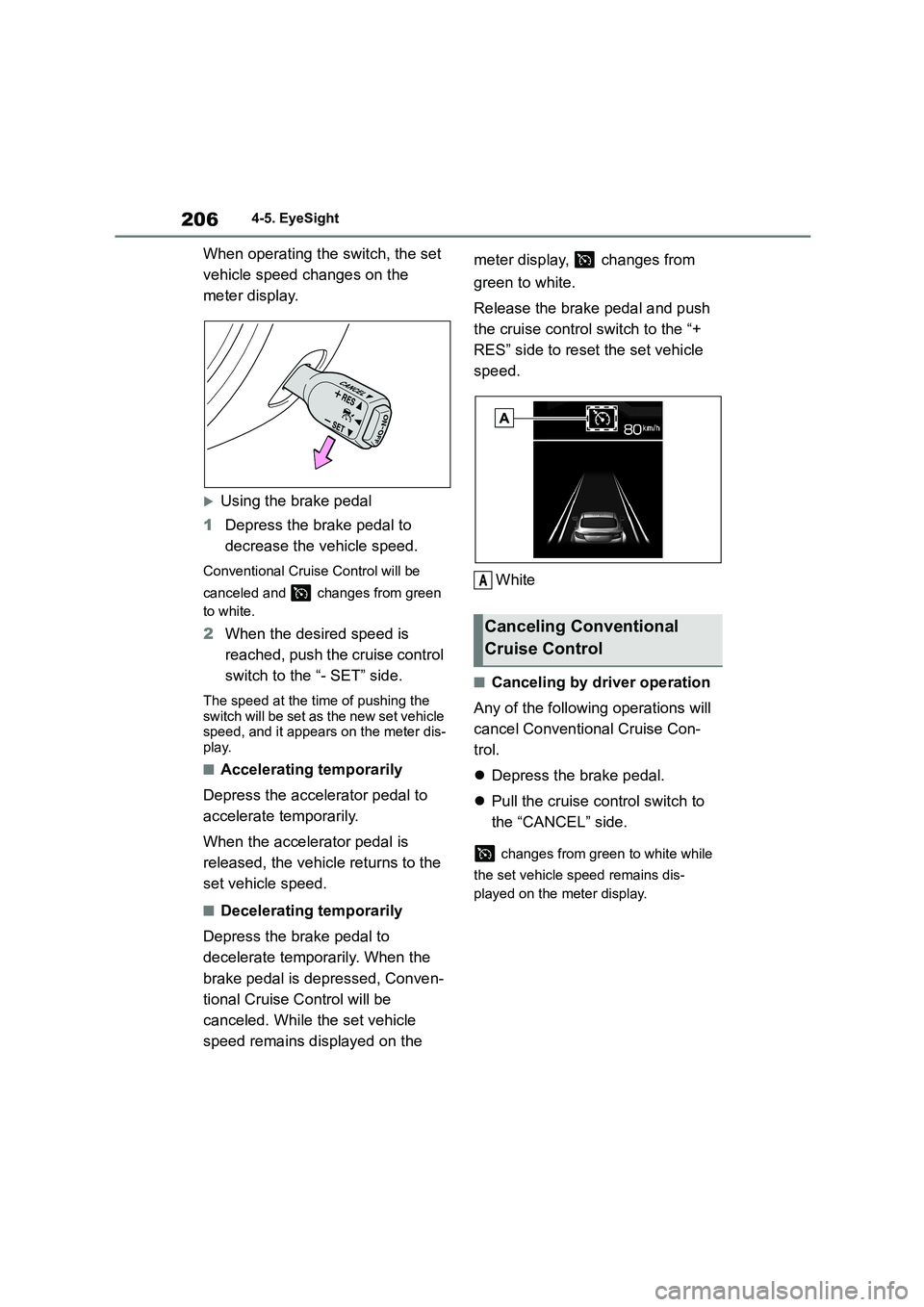
Using the brake pedal
1 Depress the brake pedal to
decrease the vehicle speed.
Conventional Cruise Control will be
canceled and changes from green
to white.
2 When the desired speed is
reached, push the cruise control
switch to the “- SET” side.
The speed at the time of pushing the switch will be set as the new set vehicle
speed, and it appears on the meter dis-
play.
■Accelerating temporarily
Depress the accelerator pedal to
accelerate temporarily.
When the accelerator pedal is
released, the vehicle returns to the
set vehicle speed.
■Decelerating temporarily
Depress the brake pedal to
decelerate temporarily. When the
brake pedal is depressed, Conven-
tional Cruise Control will be
canceled. While the set vehicle
speed remains displayed on the
meter display, changes from
green to white.
Release the brake pedal and push
the cruise control switch to the “+
RES” side to reset the set vehicle
speed.
White
■Canceling by driver operation
Any of the following operations will
cancel Conventional Cruise Con-
trol.
Depress the brake pedal.
Pull the cruise control switch to
the “CANCEL” side.
changes from green to white while
the set vehicle speed remains dis-
played on the meter display.
Canceling Conventional
Cruise Control
A
Page 307 of 582
305
6
6-3. Do-it-yourself maintenance
Maintenance and care
stays on to indicate a system malfunc-
tion.
■The tire pressure warning sys-
tem must be initialized in the
following circumstances:
When rotating the tires.
When the tire inflation pressure
is changed such as when chang-
ing traveling speed.
When changing the tire size.
When the tire pressure warning
system is initialized, the current tire
inflation pressure is set as the
benchmark pressure.
■How to initialize the tire pres-
sure warning system
1 Park the vehicle in a safe place
and turn the engine switch off.
Initialization cannot be performed while
the vehicle is moving.
2 Adjust the tire inflation pressure
to the specified co ld tire inflation
pressure level.
Make sure to adjust the tire pressure to
the specified cold tire inflation pressure level. The tire pressure warning system
will operate based on this pressure
level.
3 Turn the engine switch to ON.
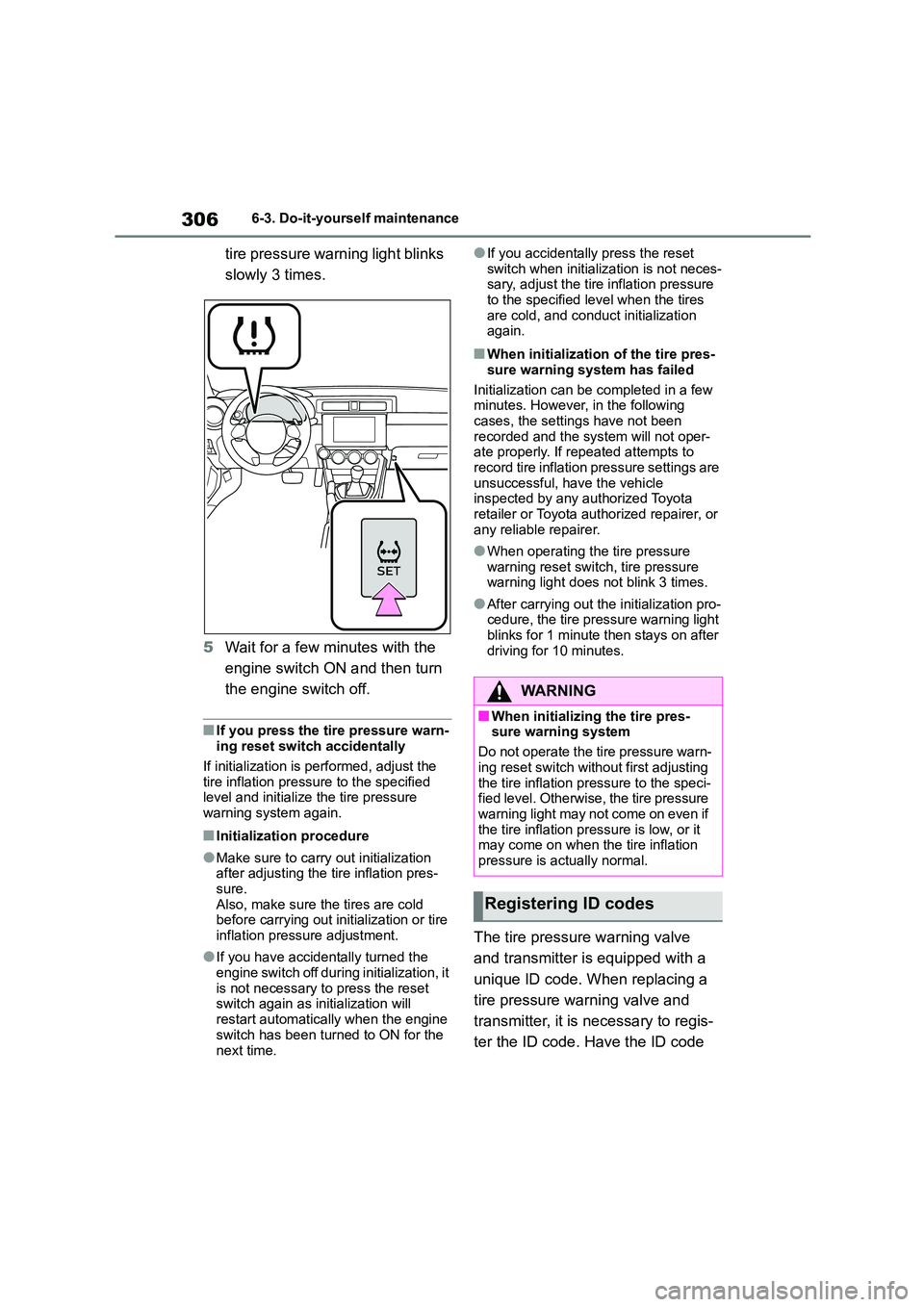
4 Press and hold the tire pressure
warning reset switch until the
NOTICE
■Repairing or replacing tires,
wheels, tire pressure warning
valves, transmitters and tire valve caps
●When removing or fitting the
wheels, tires or the tire pressure
warning valves and transmitters, contact any authorized Toyota
retailer or Toyota authorized
repairer, or any reliable repairer as the tire pressure warning valves
and transmitters may be damaged
if not handled correctly.
●Make sure to install the tire valve
caps. If the tire valve caps are not installed, water could enter the tire
pressure warning valves and the
tire pressure warning valves could be bound.
●When replacing tire valve caps, do not use tire valve caps other than
those specified. The cap may
become stuck.
■To avoid damage to the tire pres-
sure warning valves and trans- mitters
When a tire is repaired with liquid
sealants, the tire pressure warning valve and transmitter may not operate
properly. If a liquid sealant is used,
contact any authorized Toyota retailer or Toyota authorized repairer, or any
reliable repairer or other qualified ser-
vice shop as soon as possible. After use of liquid sealant, make sure to
replace the tire pressure warning
valve and transmitter when repairing or replacing the tire. ( P.304)
Initializing the tire pressure
warning system
Page 308 of 582
3066-3. Do-it-yourself maintenance
tire pressure warning light blinks
slowly 3 times.
5 Wait for a few minutes with the
engine switch ON and then turn
the engine switch off.
■If you press the tire pressure warn-
ing reset switch accidentally
If initialization is performed, adjust the
tire inflation pressure to the specified
level and initialize the tire pressure warning system again.
■Initialization procedure
●Make sure to carry out initialization after adjusting the tire inflation pres-
sure.
Also, make sure the tires are cold before carrying out initialization or tire
inflation pressure adjustment.
●If you have accidentally turned the
engine switch off during initialization, it
is not necessary to press the reset switch again as initialization will
restart automatically when the engine
switch has been turned to ON for the
next time.
●If you accidentally press the reset
switch when initialization is not neces- sary, adjust the tire inflation pressure
to the specified level when the tires
are cold, and conduct initialization again.
■When initialization of the tire pres-
sure warning system has failed
Initialization can be completed in a few minutes. However, in the following
cases, the settings have not been
recorded and the syst em will not oper- ate properly. If repeated attempts to
record tire inflation pressure settings are
unsuccessful, have the vehicle inspected by any authorized Toyota
retailer or Toyota authorized repairer, or
any reliable repairer.
●When operating the tire pressure
warning reset switch, tire pressure warning light does not blink 3 times.
●After carrying out the initialization pro-cedure, the tire pressure warning light
blinks for 1 minute then stays on after
driving for 10 minutes.
The tire pressure warning valve
and transmitter is equipped with a
unique ID code. When replacing a
tire pressure warning valve and
transmitter, it is necessary to regis-
ter the ID code. Have the ID code
WA R N I N G
■When initializing the tire pres- sure warning system
Do not operate the tire pressure warn-
ing reset switch without first adjusting the tire inflation pressure to the speci-
fied level. Otherwise, the tire pressure
warning light may not come on even if the tire inflation pressure is low, or it
may come on when the tire inflation
pressure is actually normal.
Registering ID codes
Page 309 of 582
307
6
6-3. Do-it-yourself maintenance
Maintenance and care
registered by any authorized Toyota
retailer or Toyota authorized
repairer, or any reliable repairer.
■Registering ID codes
The ID codes of the tire pressure warn- ing valve and transmitters for two sets of
wheels can be registered.
It is not necessary to register the ID codes when replacing normal tires with
snow tires, if the ID codes for the wheels
of both normal tires and snow tires are registered beforehand.
In addition to the set of tire pressure
warning system sensor ID codes initially registered to the vehicle, a second set of
ID codes can be registered.
A second set of tire pressure warning system sensor ID codes can be regis-
tered at your Toyota dealer or repairer,
or another duly qualified and equipped professional. When 2 sets of ID codes
have been registered, either ID code set
can be selected.
1 Park the vehicle in a safe place
and turn the engine switch to
ON.
2 Press the tire pressure warning
reset switch 3 times within 3
seconds.
3 The tire pressure warning light
will illuminate for 3 seconds and
then blink 3 times.
4 The tire pressure warning light
will blink for 1 minute and then
illuminate.
5 When the ID code change has
completed, the tire pressure
warning light will turn off.
Check that tire pressures are displayed
on the multi-information display.
Changing the ID code set