manual transmission TOYOTA GT86 2012 User Guide
[x] Cancel search | Manufacturer: TOYOTA, Model Year: 2012, Model line: GT86, Model: TOYOTA GT86 2012Pages: 448, PDF Size: 13.47 MB
Page 168 of 448
168 2-1. Driving procedures
FT86_EE
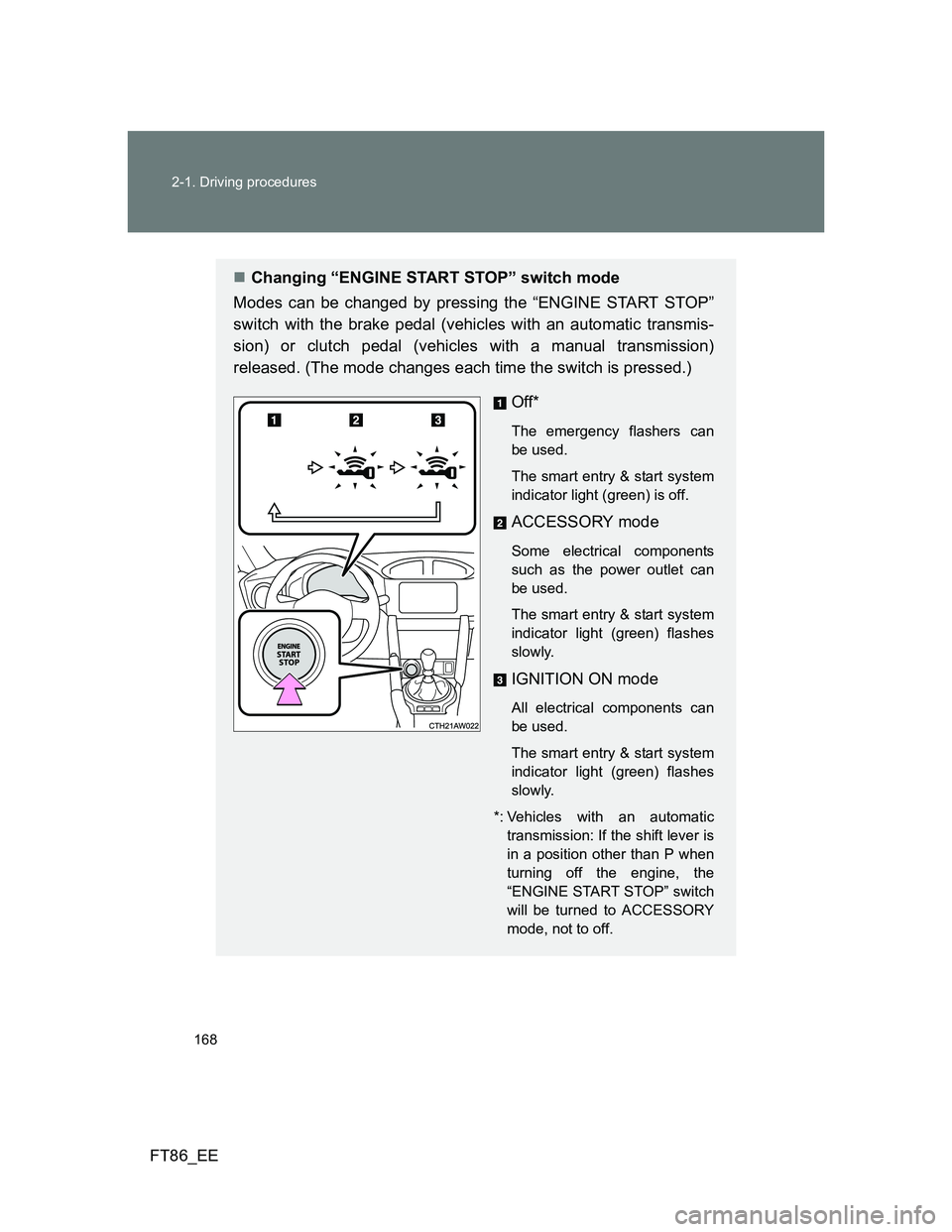
Changing “ENGINE START STOP” switch mode
Modes can be changed by pressing the “ENGINE START STOP”
switch with the brake pedal (vehicles with an automatic transmis-
sion) or clutch pedal (vehicles with a manual transmission)
released. (The mode changes each time the switch is pressed.)
Off*
The emergency flashers can
be used.
The smart entry & start system
indicator light (green) is off.
ACCESSORY mode
Some electrical components
such as the power outlet can
be used.
The smart entry & start system
indicator light (green) flashes
slowly.
IGNITION ON mode
All electrical components can
be used.
The smart entry & start system
indicator light (green) flashes
slowly.
*: Vehicles with an automatic
transmission: If the shift lever is
in a position other than P when
turning off the engine, the
“ENGINE START STOP” switch
will be turned to ACCESSORY
mode, not to off.
Page 169 of 448
169 2-1. Driving procedures
2
When driving
FT86_EE
When stopping the engine with the shift lever in a position other
than P (vehicles with an automatic transmission)
If the engine is stopped with the shift lever in a position other than P,
the “ENGINE START STOP” switch will not be turned off but instead
be turned to ACCESSORY mode. Perform the following procedure to
turn the switch off:
Check that the parking brake is set.
Shift the shift lever to P.
Check that the smart entry & start system indicator light
(green) flashes slowly and then press the “ENGINE START
STOP” switch once.
Check that the smart entry & start system indicator light
(green) is off.
Auto power off function
Vehicles with an automatic transmission
If the vehicle is left in ACCESSORY or IGNITION ON mode (the engine is
not running) for more than an hour with the shift lever in P, the “ENGINE
START STOP” switch will automatically turn off. However, this function can-
not entirely prevent battery discharge. Do not leave the vehicle with the
“ENGINE START STOP” switch in ACCESSORY or IGNITION ON mode for
long periods of time when the engine is not running.
Vehicles with a manual transmission
If the vehicle is left in ACCESSORY or IGNITION ON mode (the engine is
not running) for more than an hour, the “ENGINE START STOP” switch will
automatically turn off. However, this function cannot entirely prevent battery
discharge. Do not leave the vehicle with the “ENGINE START STOP” switch
in ACCESSORY or IGNITION ON mode for long periods of time when the
engine is not running.
STEP 1
STEP 2
STEP 3
STEP 4
Page 171 of 448
171 2-1. Driving procedures
2
When driving
FT86_EE
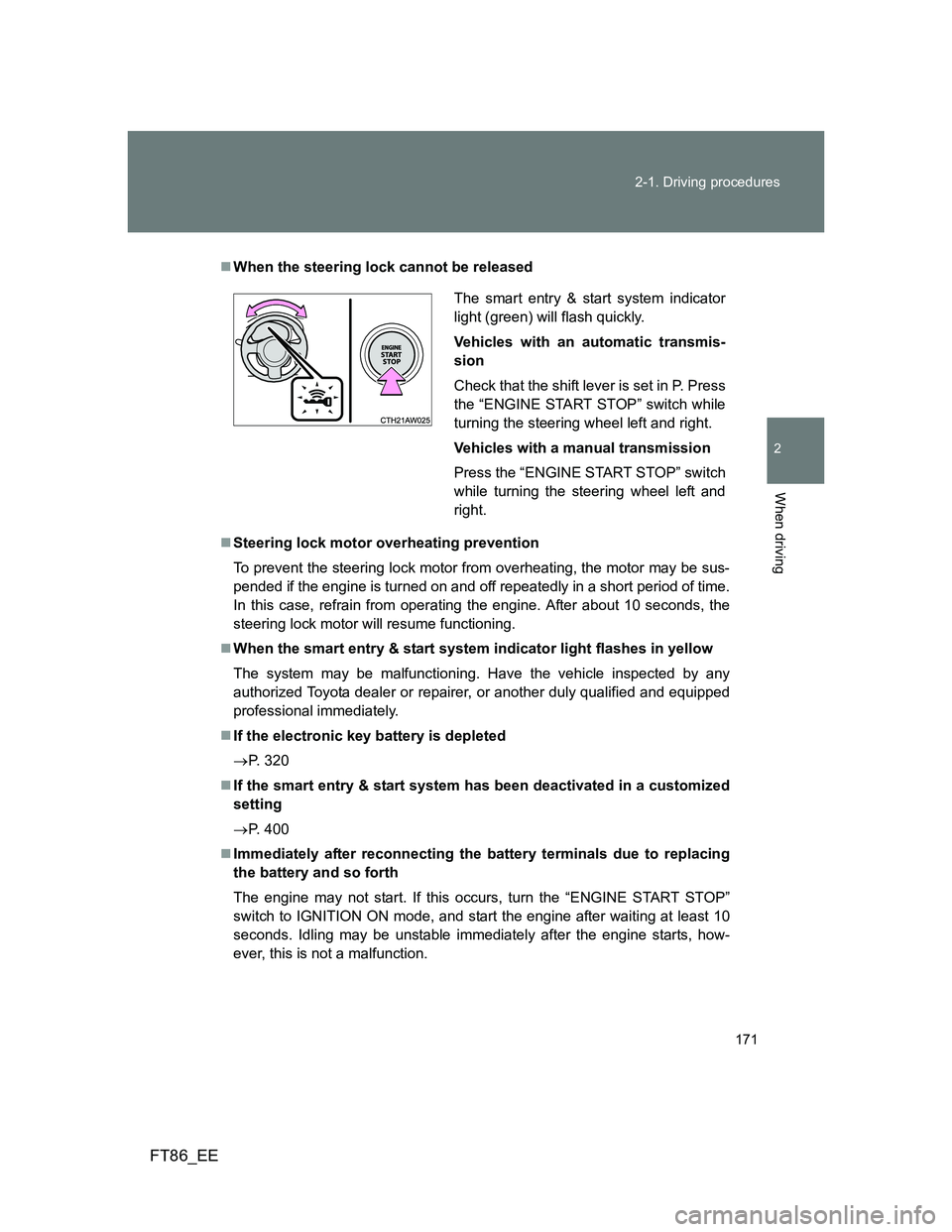
When the steering lock cannot be released
Steering lock motor overheating prevention
To prevent the steering lock motor from overheating, the motor may be sus-
pended if the engine is turned on and off repeatedly in a short period of time.
In this case, refrain from operating the engine. After about 10 seconds, the
steering lock motor will resume functioning.
When the smart entry & start system indicator light flashes in yellow
The system may be malfunctioning. Have the vehicle inspected by any
authorized Toyota dealer or repairer, or another duly qualified and equipped
professional immediately.
If the electronic key battery is depleted
P. 320
If the smart entry & start system has been deactivated in a customized
setting
P. 400
Immediately after reconnecting the battery terminals due to replacing
the battery and so forth
The engine may not start. If this occurs, turn the “ENGINE START STOP”
switch to IGNITION ON mode, and start the engine after waiting at least 10
seconds. Idling may be unstable immediately after the engine starts, how-
ever, this is not a malfunction.
The smart entry & start system indicator
light (green) will flash quickly.
Vehicles with an automatic transmis-
sion
Check that the shift lever is set in P. Press
the “ENGINE START STOP” switch while
turning the steering wheel left and right.
Vehicles with a manual transmission
Press the “ENGINE START STOP” switch
while turning the steering wheel left and
right.
Page 174 of 448
174
2-1. Driving procedures
FT86_EE
Engine (ignition) switch (vehicles without a smar t entr y & star t system)
Starting the engine
Vehicles with an automatic transmission
Check that the parking brake is set.
Check that the shift lever is set in P.
Firmly depress the brake pedal.
Turn the engine switch to the “START” position to start the
engine.
Vehicles with a manual transmission
Check that the parking brake is set.
Check that the shift lever is set in N.
Firmly depress the clutch pedal.
Turn the engine switch to the “START” position to start the
engine.
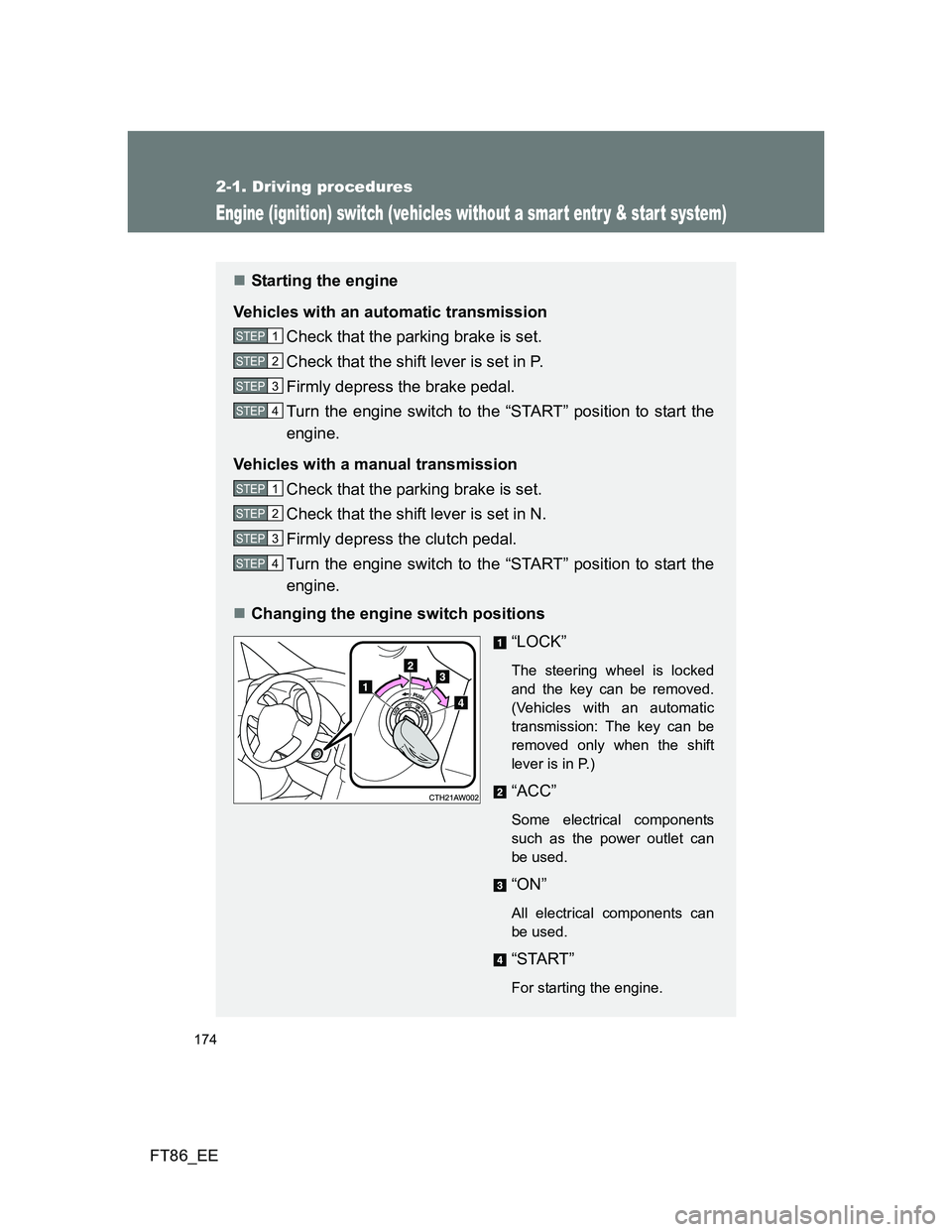
Changing the engine switch positions
“LOCK”
The steering wheel is locked
and the key can be removed.
(Vehicles with an automatic
transmission: The key can be
removed only when the shift
lever is in P.)
“ACC”
Some electrical components
such as the power outlet can
be used.
“ON”
All electrical components can
be used.
“START”
For starting the engine.
STEP 1
STEP 2
STEP 3
STEP 4
STEP 1
STEP 2
STEP 3
STEP 4
Page 175 of 448
175 2-1. Driving procedures
2
When driving
FT86_EE
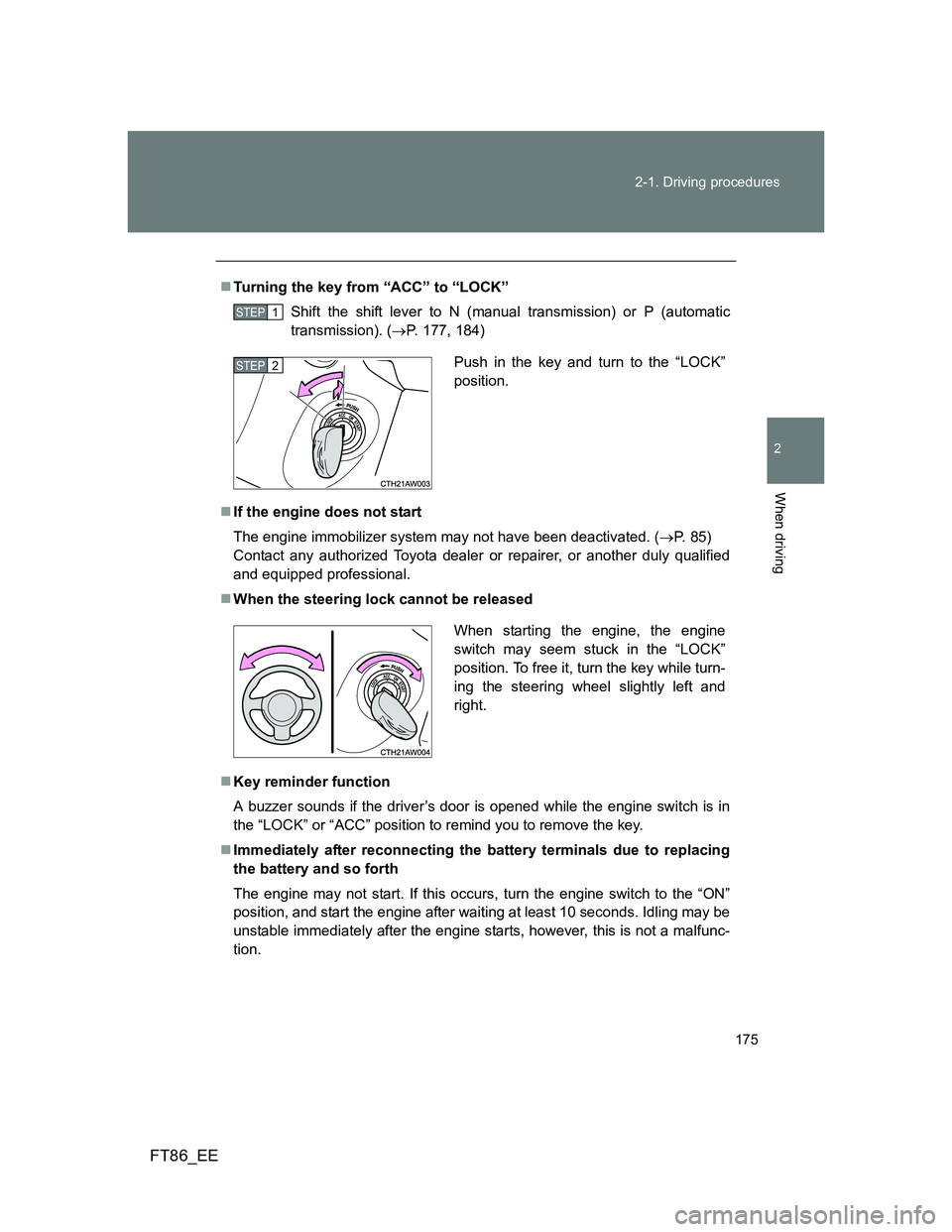
Turning the key from “ACC” to “LOCK”
Shift the shift lever to N (manual transmission) or P (automatic
transmission). (P. 177, 184)
If the engine does not start
The engine immobilizer system may not have been deactivated. (P. 85)
Contact any authorized Toyota dealer or repairer, or another duly qualified
and equipped professional.
When the steering lock cannot be released
Key reminder function
A buzzer sounds if the driver’s door is opened while the engine switch is in
the “LOCK” or “ACC” position to remind you to remove the key.
Immediately after reconnecting the battery terminals due to replacing
the battery and so forth
The engine may not start. If this occurs, turn the engine switch to the “ON”
position, and start the engine after waiting at least 10 seconds. Idling may be
unstable immediately after the engine starts, however, this is not a malfunc-
tion.
STEP 1
Push in the key and turn to the “LOCK”
position.STEP 2
When starting the engine, the engine
switch may seem stuck in the “LOCK”
position. To free it, turn the key while turn-
ing the steering wheel slightly left and
right.
Page 182 of 448
182 2-1. Driving procedures
FT86_EE
Automatic gear selection when the vehicle is stopped
When the vehicle is idling at high rpm in order to warm up, and the vehicle is
on a slippery road, the transmission may automatically shift to 2
nd gear for
stopping and starting off.
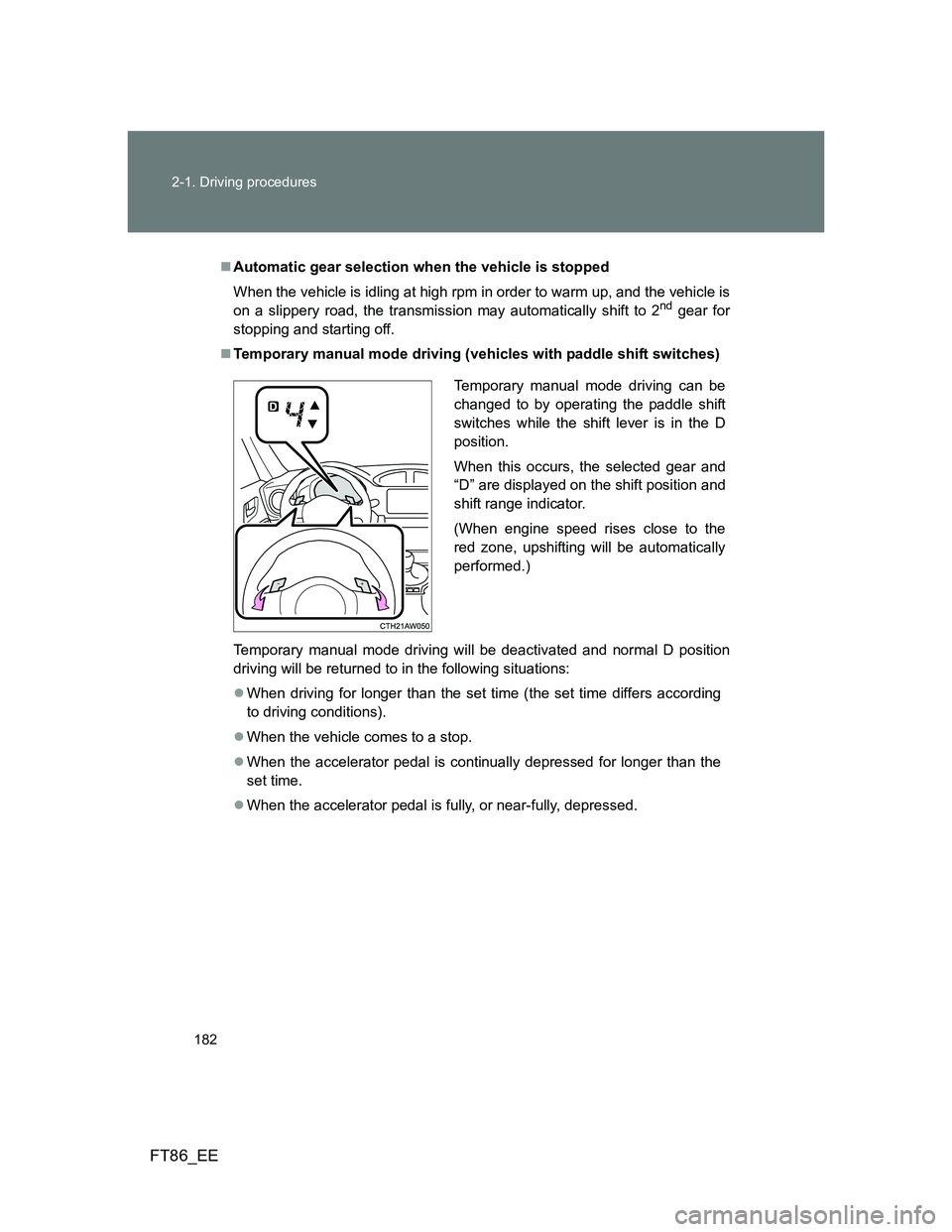
Temporary manual mode driving (vehicles with paddle shift switches)
Temporary manual mode driving will be deactivated and normal D position
driving will be returned to in the following situations:
When driving for longer than the set time (the set time differs according
to driving conditions).
When the vehicle comes to a stop.
When the accelerator pedal is continually depressed for longer than the
set time.
When the accelerator pedal is fully, or near-fully, depressed.
Temporary manual mode driving can be
changed to by operating the paddle shift
switches while the shift lever is in the D
position.
When this occurs, the selected gear and
“D” are displayed on the shift position and
shift range indicator.
(When engine speed rises close to the
red zone, upshifting will be automatically
performed.)
Page 184 of 448
184
2-1. Driving procedures
FT86_EE
Manual Transmission
: If equipped
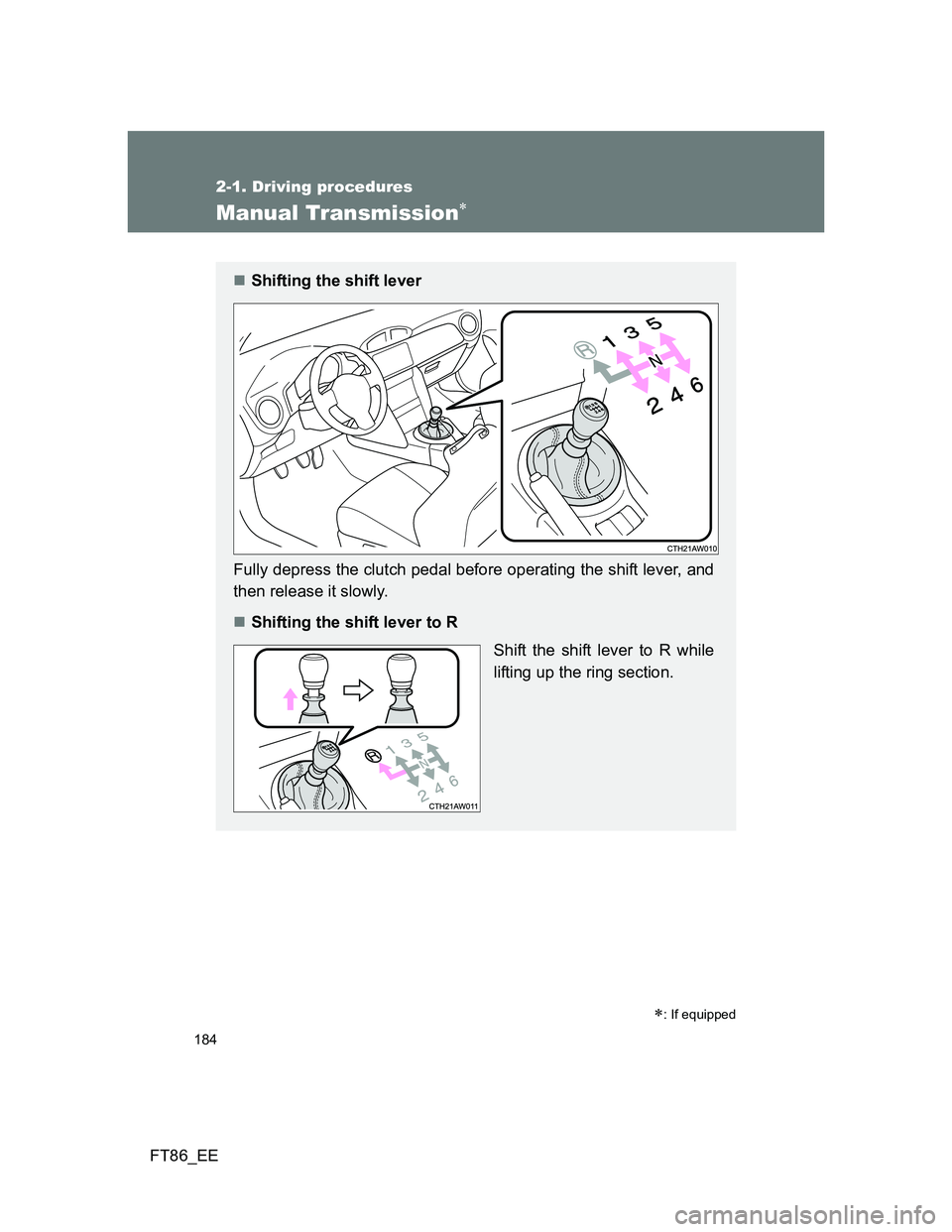
Shifting the shift lever
Fully depress the clutch pedal before operating the shift lever, and
then release it slowly.
Shifting the shift lever to R
Shift the shift lever to R while
lifting up the ring section.
Page 192 of 448
192 2-2. Instrument cluster
FT86_EE
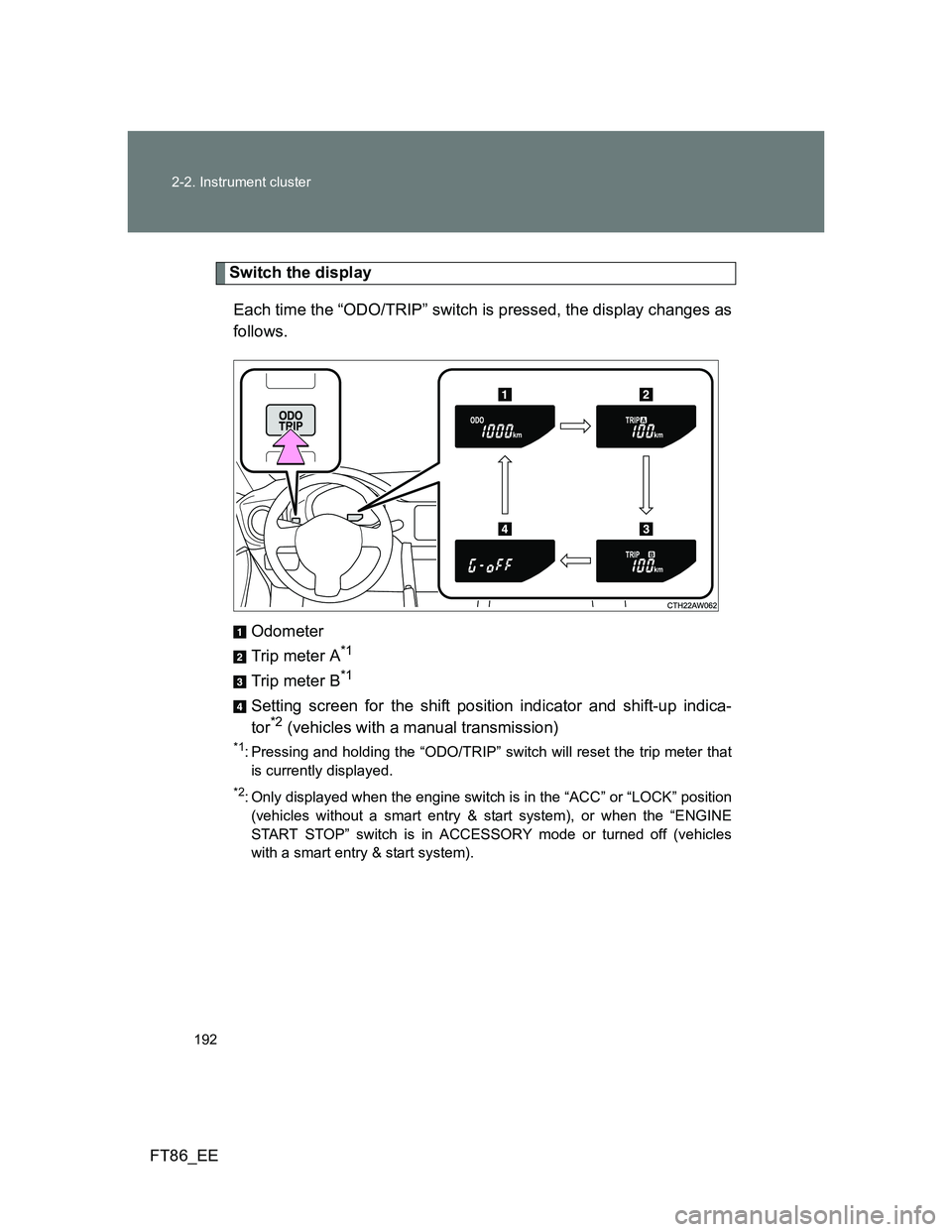
Switch the display
Each time the “ODO/TRIP” switch is pressed, the display changes as
follows.
Odometer
Trip meter A
*1
Trip meter B*1
Setting screen for the shift position indicator and shift-up indica-
tor*2 (vehicles with a manual transmission)
*1: Pressing and holding the “ODO/TRIP” switch will reset the trip meter that
is currently displayed.
*2: Only displayed when the engine switch is in the “ACC” or “LOCK” position
(vehicles without a smart entry & start system), or when the “ENGINE
START STOP” switch is in ACCESSORY mode or turned off (vehicles
with a smart entry & start system).
Page 193 of 448
193 2-2. Instrument cluster
2
When driving
FT86_EE
Setting the shift position indicator and shift-up indicator
(vehicles with a manual transmission)
Displaying of the shift position indicator and shift-up indicator can be
turned on/off.
Press the “ODO/TRIP” switch repeatedly until the setting
screen is displayed. (P. 192)
Each time the switch is pressed and held, the display changes
between on/off.
“G-on”: Display on
“G-oFF”: Display off
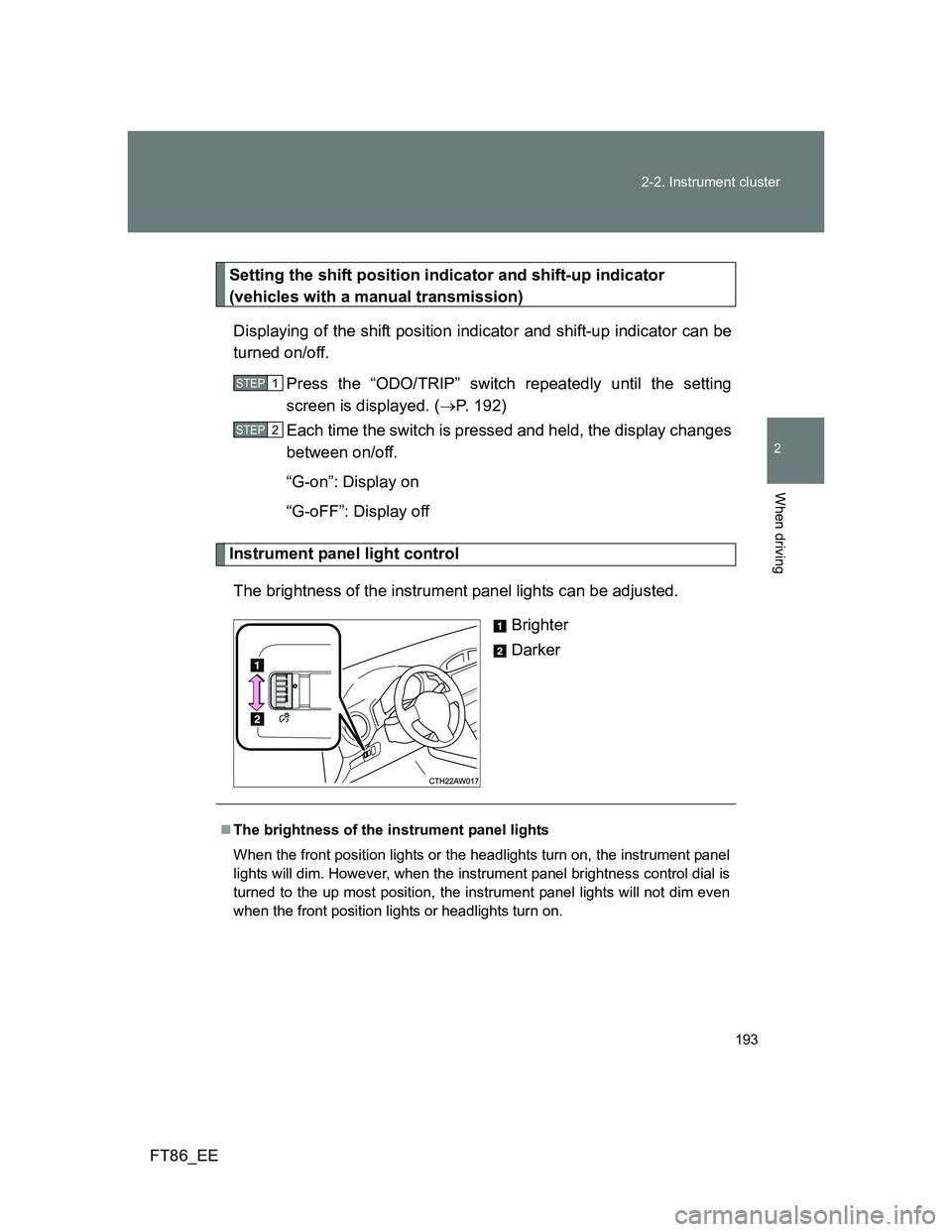
Instrument panel light control
The brightness of the instrument panel lights can be adjusted.
Brighter
Darker
STEP 1
STEP 2
The brightness of the instrument panel lights
When the front position lights or the headlights turn on, the instrument panel
lights will dim. However, when the instrument panel brightness control dial is
turned to the up most position, the instrument panel lights will not dim even
when the front position lights or headlights turn on.
Page 196 of 448
196 2-2. Instrument cluster
FT86_EE
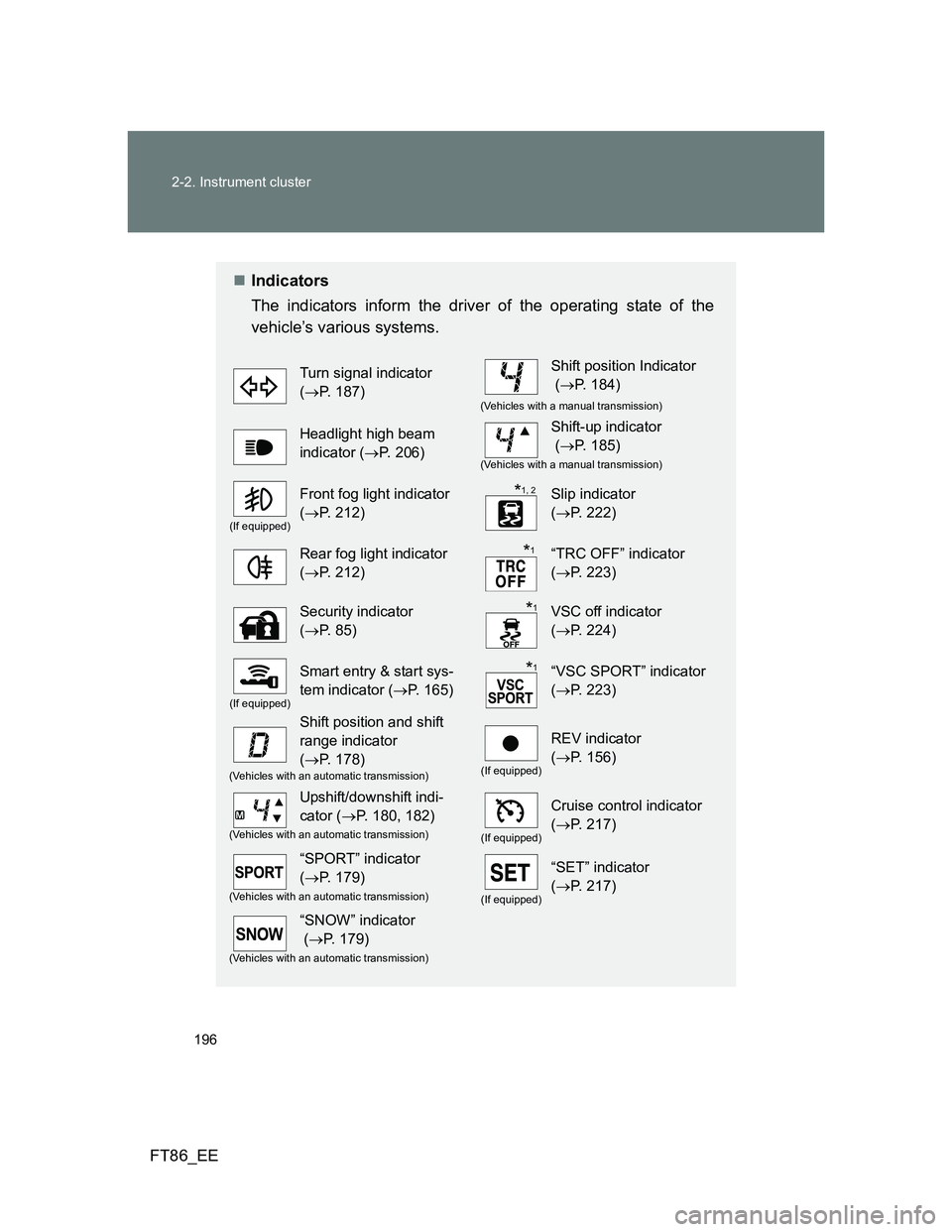
Indicators
The indicators inform the driver of the operating state of the
vehicle’s various systems.
Turn signal indicator
(P. 187)Shift position Indicator
(P. 184)
(Vehicles with a manual transmission)
Headlight high beam
indicator (P. 206)Shift-up indicator
(P. 185)
(Vehicles with a manual transmission)
(If equipped)
Front fog light indicator
(P. 212)Slip indicator
(P. 222)
Rear fog light indicator
(P. 212)“TRC OFF” indicator
(P. 223)
Security indicator
(P. 85)VSC off indicator
(P. 224)
(If equipped)
Smart entry & start sys-
tem indicator (P. 165)“VSC SPORT” indicator
(P. 223)
Shift position and shift
range indicator
(P. 178)
(If equipped)
REV indicator
(P. 156)
(Vehicles with an automatic transmission)
Upshift/downshift indi-
cator (P. 180, 182)
(If equipped)
Cruise control indicator
(P. 217)
(Vehicles with an automatic transmission)
“SPORT” indicator
(P. 179)
(If equipped)
“SET” indicator
(P. 217)
(Vehicles with an automatic transmission)
“SNOW” indicator
(P. 179)
(Vehicles with an automatic transmission)
*1, 2
*1
*1
*1